Pillars of Eternity to receive surprise turn-based mode in new update

Obsidian Entertainment, the studio behind Fallout: New Vegas and the recently released The Outer Worlds 2, has announced that it's revisiting an RPG it released over a decade ago for a new update. Pillars of Eternity, a throwback isometric RPG, is receiving a turn-based mode as part of a new public beta on PC.

The new mode slows the game's "real-time with pause" combat down, building on the optional turn-based mode the developer included with Pillars of Eternity: Deadfire, a sequel from 2018. The game's director Josh Sawyer digs into the thinking behind the update in a trailer Obsidian released alongside the update announcement, but in brief, the mode attempts to faithfully adapt characters' stats for turn-based combat, while making it easy to switch from real-time to turn-based modes on the fly.

Obsidian last returned to Eora, the setting of Pillars of Eternity, in the excellent Avowed from earlier this year. That game translated the series' world and combat systems into a first-person RPG in the style of The Elder Scrolls V: Skyrim. Besides releasing The Outer Worlds 2, Obsidian is also actively developing Grounded 2 in early access.

Pillars of Eternity's turn-based mode will be available in a public beta for PC starting on November 5. Obsidian is looking for feedback on the new mode ahead of a planned update to the game at some point in the future.

This article originally appeared on Engadget at https://www.engadget.com/gaming/pillars-of-eternity-to-receive-surprise-turn-based-mode-in-new-update-191221448.html?src=rss

Amazon Echo Dot Max review: Disappointing sound, but Alexa+ is a star

There’s a lot more riding on Amazon’s latest batch of Echo hardware than usual. After all, these are the first devices arriving alongside Alexa+, the AI-powered revamp of the company’s signature voice assistant. And unlike the $220 Echo Studio, the new Echo Dot Max is a more affordable ($100) and compact entry point into using Alexa+. It’s also another example of how confusing Amazon’s hardware lineup can get: the older Echo Pop ($40) and Echo Dot ($50) are also getting Alexa+. The Echo Dot Max isn’t the cheapest Echo, nor is it the best-sounding speaker Amazon sells. So, where does it fit?

The best way to think about this new speaker is that it occupies the same spot in Amazon’s lineup as the venerable and discontinued device simply named “Echo.” For years, the Amazon Echo was the company’s main speaker, but it no longer sells one with that pleasantly concise name. The Echo Dot Max steps in at the same price point, though. And while my testing has shown that Alexa+ is a solid step forward, the Dot Max hardware itself isn’t as good as what it replaces.

Design

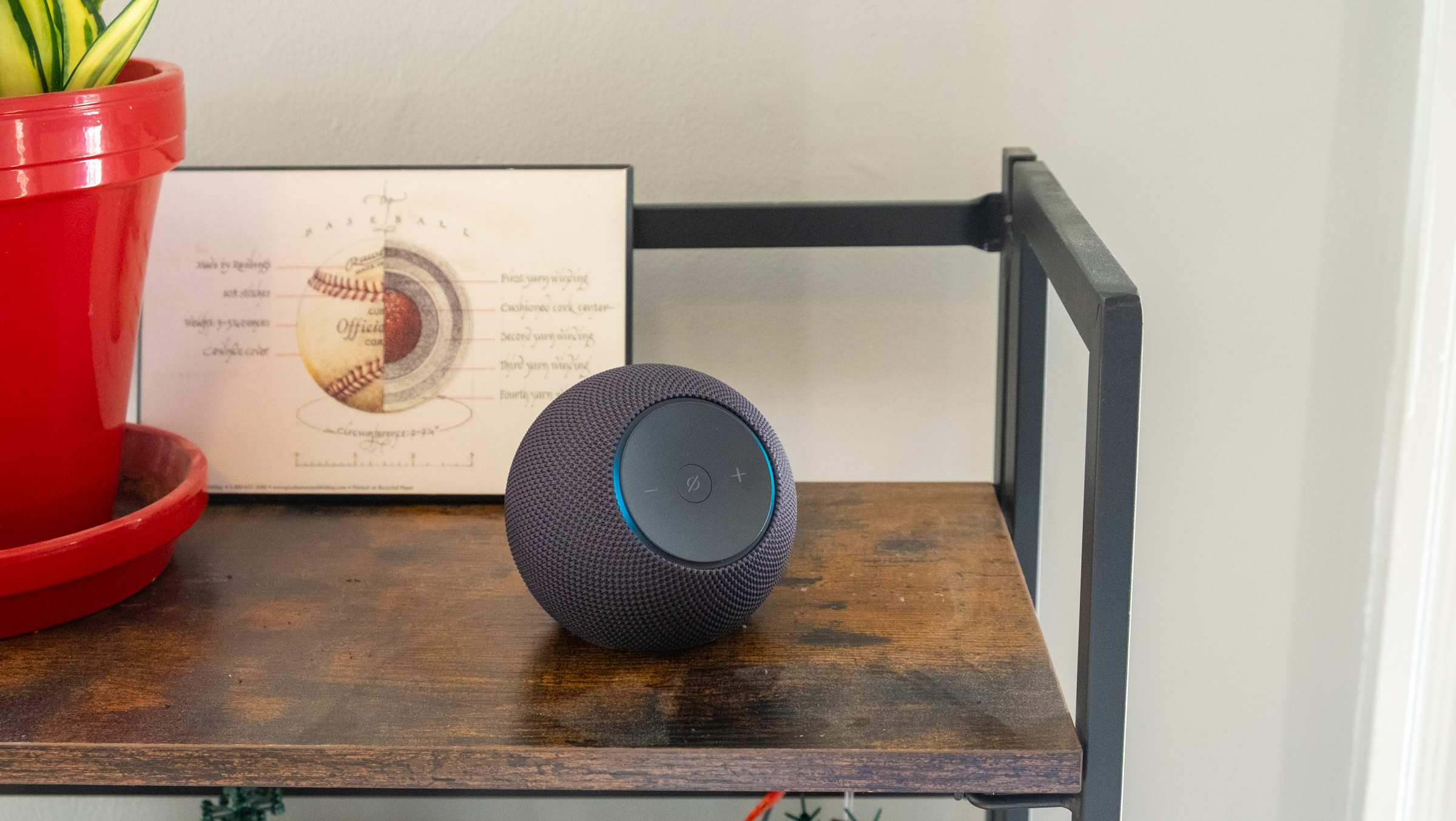
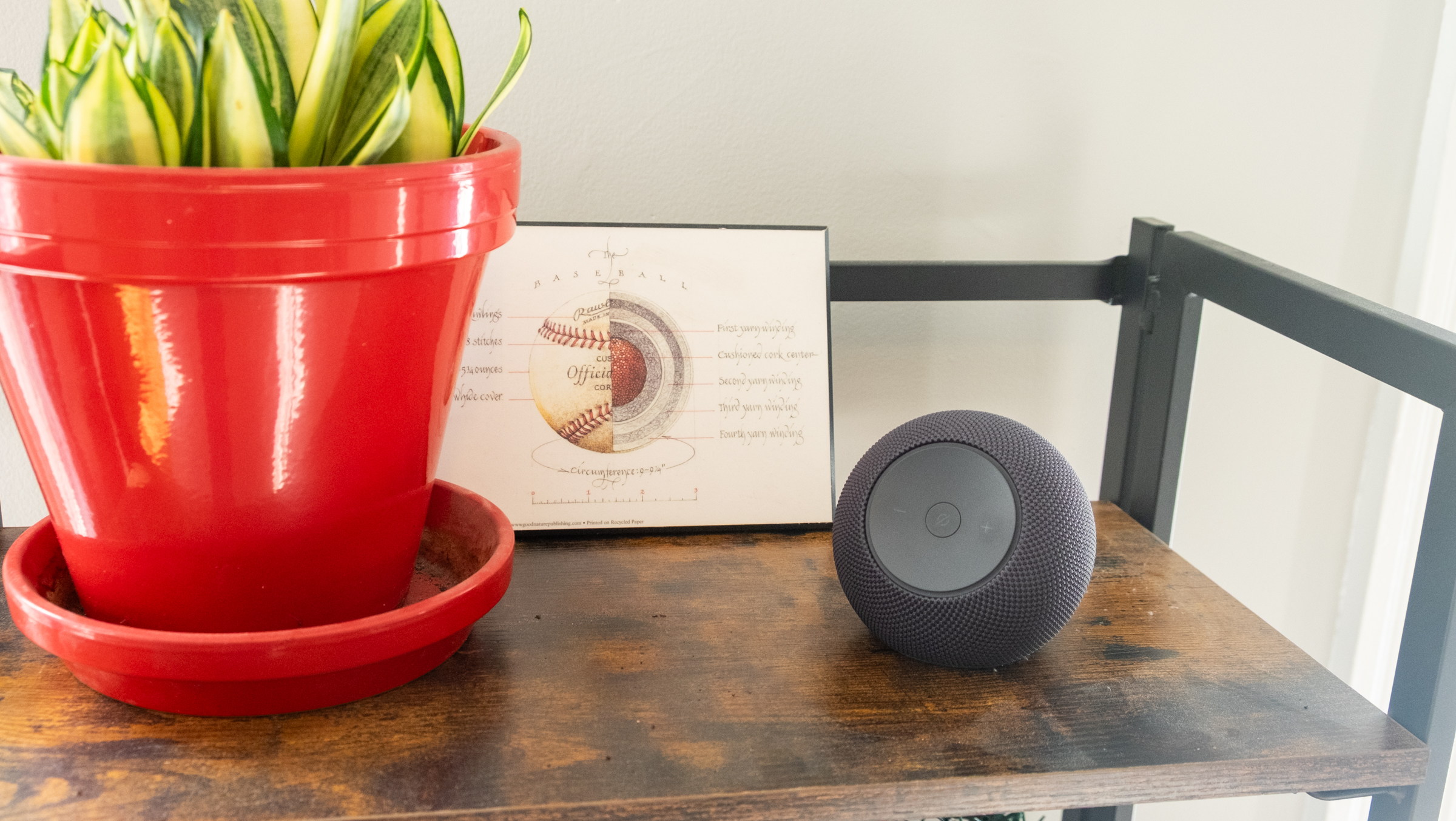
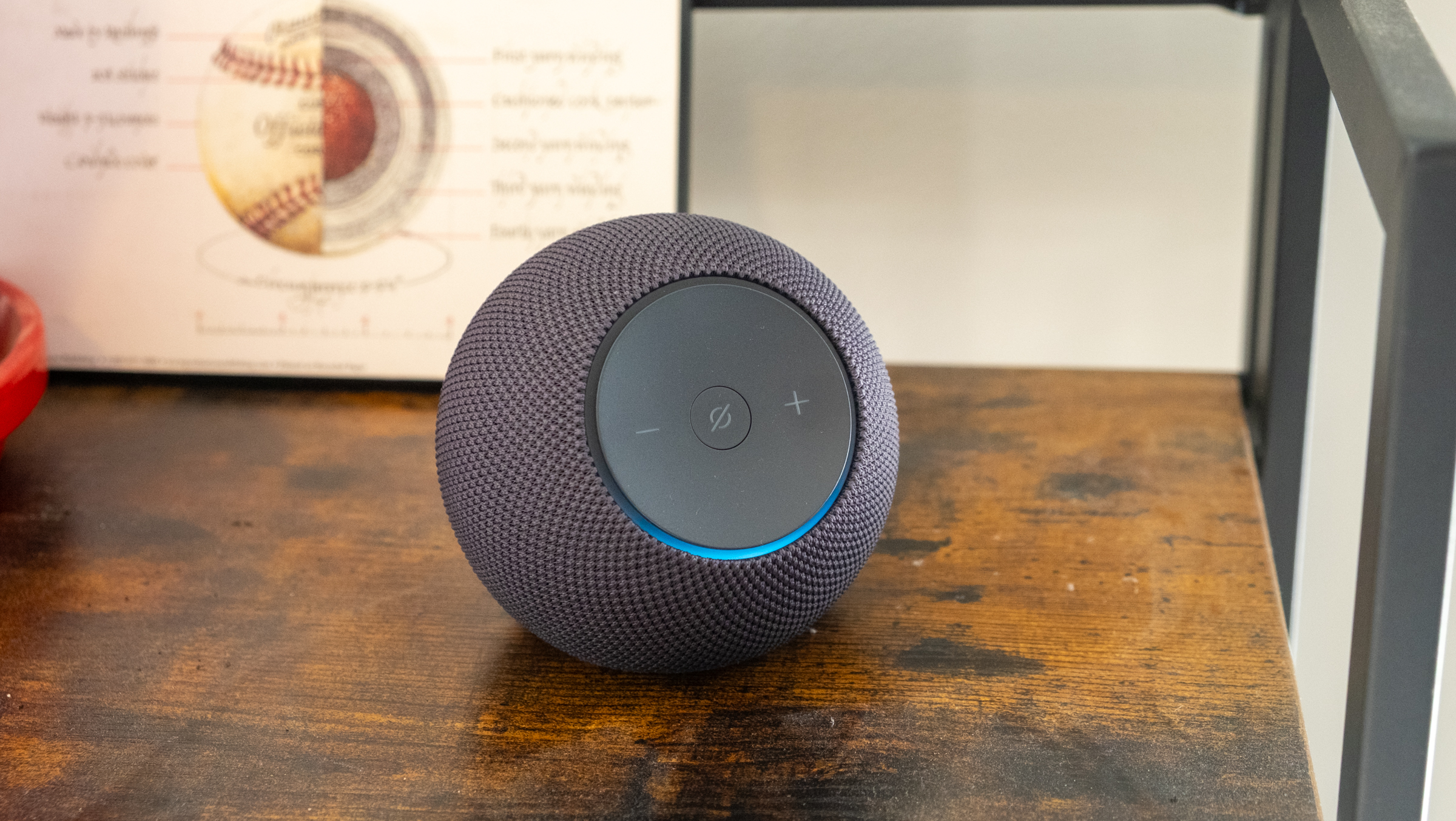
The Echo Dot Max feels immediately familiar if you’ve seen any of Amazon’s spherical smart speakers from the last five years or so, but there are numerous design changes here. The 2020 Echo and current Echo Dot have buttons on top for adjusting volume and muting the speaker’s microphone. Those buttons are now on a front-facing panel that is surrounded by the Echo’s signature light ring. While I liked how the light ring encircled the bottom of the Echo, it’s definitely easier to see in this new front-facing position and it’s particularly better at displaying the volume now. Overall, it’s a fairly refined and subtle device, which is exactly what you want from a smart speaker. I tested the graphite model, but you can also get it in white or a much bolder purple. I prefer the fully spherical, globe-like appearance of the Echo Dot, but there’s little to complain about here visually. 

Amazon's Echo Dot Max speaker.
Nathan Ingraham for Engadget

I do have some quibbles about the front-facing volume and mute buttons, though. The Echo Dot Max is simply so light that if I press the controls I’ll push the speaker around the shelf it’s on. This is easily solved by putting your hand around it and pressing the buttons with your thumb, but if you reach out to it with your index finger it probably won’t stay in place. I guess you’re supposed to primarily interact with the Echo Dot Max with your voice, but top-mounted buttons would’ve avoided this problem. I imagine this isn’t as much of a problem with the similarly-designed Echo Studio, simply because it’s much larger and three times heavier. 

Audio quality

I’m a pretty big music nerd and I’ve listened to many smart speakers over the years. I’ve come away impressed with the Echo devices I tested in 2018 as well as the 2020 Echo I spoke about earlier. At $100, that Echo punched well above its weight and sounded notably better than the identically-priced HomePod Mini and Nest Audio. 

Unfortunately, the Echo Dot Max does not match that older speaker’s bonafides. Don’t get me wrong, it sounds just fine — better than a standard Echo Dot and in line with what I’d expect from a $100 speaker. It’s a good bit louder than my HomePod Mini, with plenty of volume to fill a medium-sized room on its own. If you’re looking to really pump music through a bigger room, though, you’re better off looking at the Echo Studio or something like the Sonos Era 100. You can also pair two Echo Dot Max speakers together for stereo playback and increased volume, but I didn’t get to test this so can’t say how it’ll perform in a larger space.

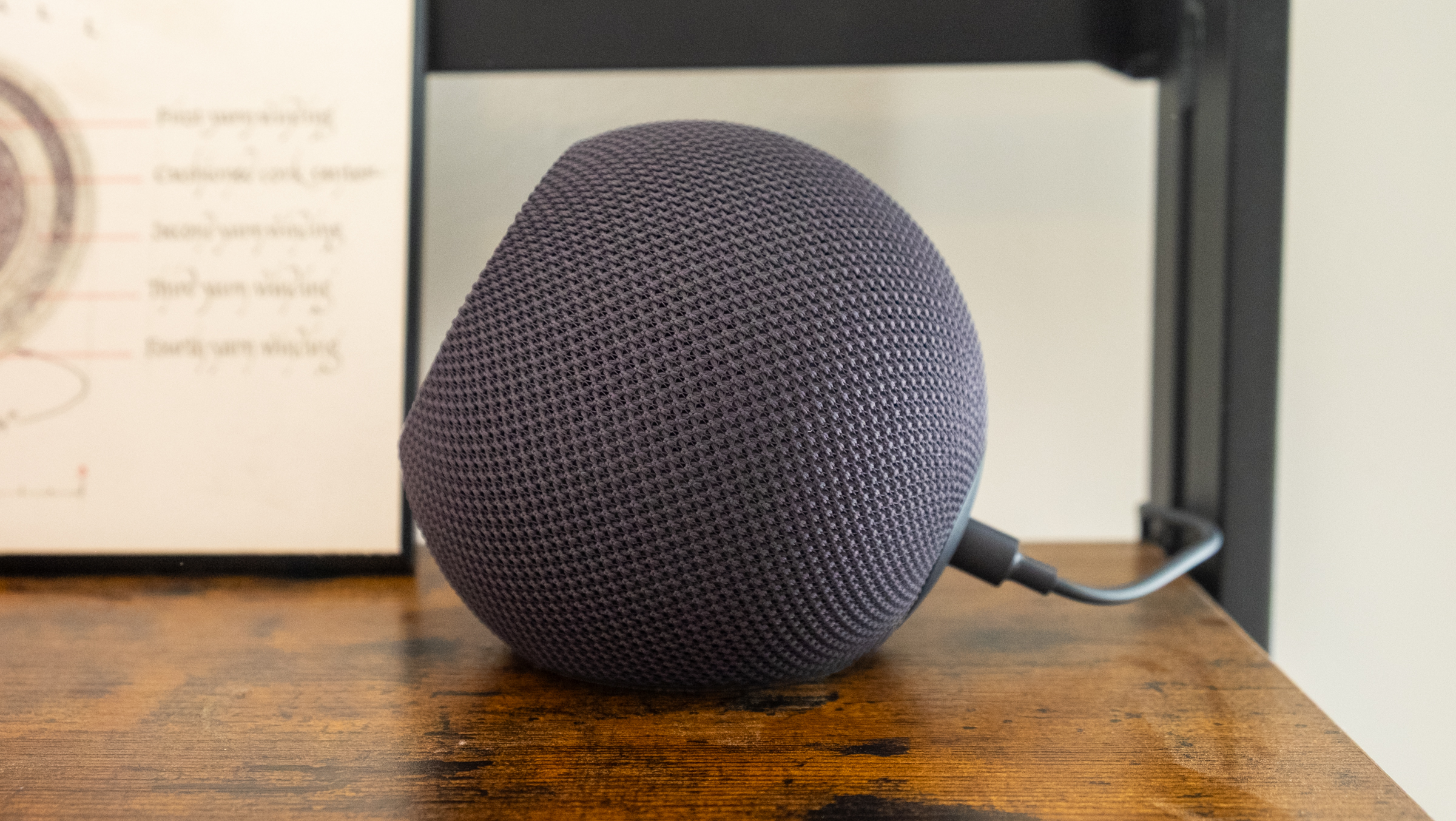
Side view of Amazon's Echo Dot Max speaker
Nathan Ingraham for Engadget

My biggest complaint with the Echo Dot Max is that frequencies often felt a bit smushed together, without a solid bass thump separating itself from the clarity in the mid- and high-range frequencies. It doesn’t provide the most dynamic listening experience. When you look at the difference in the Echo Dot Max’s speaker components compared to the fourth-generation Echo, that’s not a surprise. That older speaker paired a 3-inch woofer with dual 0.8-inch tweeters, while the Dot Max makes do with just one tweeter and a smaller 2.5-inch woofer. 

I want to reiterate that the Echo Dot Max still sounds good! The various beats, electronic glitches and vocals of Lorde’s “What Was That” came through clearly for the most part, and the modern disco vibes of “Jealous” by The Aces had a nice thump and the instruments were plenty punchy. The heavier, guitar-driven fury of albums like the new Deftones release Private Music and the 33-year-old Dirt by Alice In Chains came through loud and clear, while turning up the volume on the rave-esque vibes of “As Alive As You Need Me To Be” by Nine Inch Nails had plenty of life. But while the overall sound was pleasant enough, further listening made me realize that details like a good snap of a snare could get lost amidst a storm of guitars.

It’s a disappointment that Amazon took an undeniable step backwards here. Much like the Echo Studio that we just reviewed, the Echo Dot Max isn’t bad — it’s just underwhelming. It’s a little easier to forgive here, since the Dot Max is more of an all-purpose speaker rather than something designed to provide an exceptional listening experience. Again, it sounds totally fine for a $100 smart speaker, but given Amazon’s past success in providing surprisingly excellent audio, I was hoping for a lot more here. 

Amazon's Echo Dot Max smart speaker.
Nathan Ingraham for Engadget

Alexa+

The other piece of the puzzle is, of course, Alexa+, Amazon’s long-awaited update to its digital assistant. Somehow, it’s already been two years since Amazon first showed off the improvements it was working on delivering with Alexa+. But with these new devices, “early access” to the service is pretty easy to come by now. 

I’ll admit that I’m not much of a voice assistant guy. I think a lot of that comes from not having a very smart home. I’ve been renting for the last eight months after owning a home for almost a decade, and there just hasn’t been much to do with Alexa (or any voice assistant) at the moment.

But even without home-based routines to run, lights to control or a smart thermostat to adjust, it was evident how much more conversational and context-aware Alexa+ is now. I did a lot of testing during the World Series and I made it a habit to ask Alexa what was going on in the series. We had several “conversations” about what happened in the previous night’s game, when the next game was happening, who the starting pitchers were and so forth. It was probably the most natural experience I’ve ever had using a voice assistant, even though using my natural language with a speaker still feels awkward. (I definitely said please to Alexa more than once.)

Once you’re set up with Alexa+ Early Access, you can use the same updated assistant in the Alexa app on your smartphone, either with your voice or in a chat interface. The chatbot-style Alexa experience is fine, but I actually prefer using my voice, because I felt like it was easier to have a conversation with it and just ask things as they popped into my head. 

Another good thing about Alexa+ is that it felt fast and responsive. There are short pauses while it thinks about a response, but it usually got back to me quickly enough that continuing that natural language conversation didn’t feel stilted or awkward. Speed is a crucial factor towards making a voice assistant feel responsive, and Alexa+ on the Echo Dot Max hits on that point. Some combo of Amazon’s AZ3 chip and whatever is happening up in its cloud is getting the job done here. 

As with any voice assistant, Alexa+ is, of course, not perfect. Most basic tasks like setting reminders, checking the weather and playing music all work reliably. But asking for specific songs or albums can sometimes go badly. Occasionally, Alexa wouldn’t be able to find a specific album I was looking for but it would play other songs by the artist; other times it would come up with completely unrelated music. This is an issue I’ve had with all assistants, but I was hoping Alexa+ might be smart enough to avoid getting too far off base.

I asked it to “play the latest release by the band Now, Now.” It’s an EP entitled 01 so I had a feeling Alexa might struggle with that. Sure enough, it said “sure, here’s new music from Now, Now” and played one of the songs from that release. Not bad, but not quite right. I then followed up and said “can you play this entire album?” That did not work. Instead, I ended up with the song “Ain’t it Funky Now” performed by legendary jazz guitarist and composer Grant Green. An outstanding recording, sure, but not remotely close to what I was looking for. Even asking “play the album ‘01 EP’ by the band Now, Now” got me Drake’s “Laugh Now Cry Later.” Sigh. 

Worse than that were the times when Alexa+ just made things up. The Alexa app provides you with little suggestions for things to ask about, like “iconic music duets.” I tapped it, curious to see what it provided, and it pulled up a list of “iconic music duets that have left an indelible mark on the music industry.” 

Among those was “Smells Like Teen Spirit” performed by the late Kurt Cobain and his wife Courtney Love. This happened? News to me! I followed up and asked for more details and got a response noting that “there isn’t a formal duet of ‘Smells Like Teen Spirit.’” Best I can tell, it popped up because Love sang some unused lyrics from the legendary song on an episode of the 60 Songs That Explain the ‘90s podcast, back in 2023. This is a perfect example of the random inferences AI often draws, and it’s a good reminder that Alexa+, like all AI assistants, can make things up sometimes. This didn’t happen often, but it’s still something you’ll need to look out for. 

Amazon's Echo Dot Max smart speaker.
Nathan Ingraham for Engadget

Wrap-up

The Echo Dot Max more or less delivers on Amazon’s promises. It sounds better than smaller speakers like the Echo Dot or Pop, and it’s significantly cheaper than the Echo Studio. If you’re at all interested in music, it’s worth stepping up to the Dot Max over the standard Dot. Beyond just better audio, it’s also significantly newer (the Dot was last updated in 2022). Its more modern processor means it should have a longer lifespan than the standard Dot, making it a better option for people who are eager to try out Alexa+. 

That freshly updated hardware is a reason to consider the Echo Dot Max over similarly priced speakers like the Nest Audio and HomePod Mini, both of which are five years old. And despite Alexa+ dealing with some growing pains, it’s a better option at this moment than the unproven Gemini for Home Google that is rolling out or the old, limited Siri that the HomePod Mini is still stuck with.

But the Echo Dot Max still feels like a bit of a missed opportunity to me. The old Echo sounded so good, and this speaker is just not as exciting in comparison. It’s a fine way to interact with Alexa+ and enjoy some tunes, I just wish it sounded a little bit better.


This article originally appeared on Engadget at https://www.engadget.com/audio/speakers/amazon-echo-dot-max-review-disappointing-sound-but-alexa-is-a-star-190000721.html?src=rss

Vampire Survivors and Warhammer join forces in a new roguelite game

We've seen a whole bunch of Vampire Survivors clones arrive over the last few years in the wake of the roguelite's success. Poncle has released crossover DLC based on the likes of Castlevania and Balatro for its game as well. Now, the studio behind Vampire Survivors and Warhammer parent Games Workshop have given the green light for an officially licensed game that smushes the two together.

Warhammer Survivors has a formula that is very similar to Vampire Survivors. Developer Auroch Digital even used Poncle's engine to make it. Warhammer Survivors is a run-based game in which the aim is to take down hordes of enemies using an array of weapons and powerups that you can combine and evolve into more powerful tools. You'll unlock more characters and items as you play and there are lots of secrets to discover.

The characters, weapons, powerups, bad guys and level settings are all derived from Warhammer. You'll be able to play as characters from both the 40K and Age of Sigmar universes, such as Malum Caedo, who appeared in Auroch's first-person shooter Warhammer 40,000: Boltgun. Weapons and items such as the Boltgun, Astartes Chainsword, Whirlwind Axes and Citadel Nuln Oil paint will be at your disposal too.

There are some neat little touches in the trailer. The gems that you collect to gain experience and level up are pill-shaped in Vampire Survivors. But here, they’re shaped like skulls.

Auroch has worked on Warhammer projects (including typing game Boltgun — Words of Vengeance) for over a decade. It plans to reveal a whole lot more about its latest endeavor in the coming months. Warhammer Survivors is set to land on Steam sometime in 2026.

This article originally appeared on Engadget at https://www.engadget.com/gaming/vampire-survivors-and-warhammer-join-forces-in-a-new-roguelite-game-161352281.html?src=rss

Alexa+ comes to the Amazon Music app

Amazon has launched its new and improved AI assistant in the Amazon Music app. From today, anyone signed up to Alexa+ Early Access with the latest version of the app downloaded to their iOS or Android device can start using Amazon’s reimagined virtual assistant for music discovery and organizing their libraries.

To access the chatbot, you tap the “A” button in the lower right corner of the screen when Amazon Music is open. You can then test its knowledge by asking it a range of questions, from something as basic as finding a recently released song by a particular artist, to more complex searches based on a single lyric or the name of the TV show the song you’re trying to find is featured in.

Alexa+ is designed for more conversational interactions, so you can use natural language prompts and then ask follow-up questions as you would if you were talking to a friend, to narrow down its search results. Amazon says you can search for specific eras, moods and instruments, as well as telling Alexa what you don’t want it to serve up.

Alexa+ can also be used for playlist creation, allowing you to request something as specific as a high-energy running playlist with songs from a particular decade that starts with a song from a certain artist. You can also be more vague, asking for something that fits your current mood or the time of day.

Alexa+ in Amazon Music is being marketed not only as an AI tastemaker and personal DJ, but also a music expert, so you can ask it things like the inspiration for a song’s lyrics, where an album charted and questions about upcoming live performances.

Alexa+ has been gradually rolling out in Amazon’s various smart devices since the beginning of the year, with mixed results. You’ll be using it in everything from new Ring devices, to the latest Kindles and Vega, Amazon’s new smart TV operating system. It’s also built into the new Echo Studio speaker, and Engadget’s Billy Steele was impressed by the AI assistant’s more human-like conversation skills, even if it’s still prone to basic errors right now, such as getting the day of the week wrong in a response.

Alexa+ is currently available in Early Access for all tiers of Amazon Music. Eventually it’ll be free to all Prime members, and available to non-Prime members for $20 per month (more than an Amazon Prime subscription on its own).

This article originally appeared on Engadget at https://www.engadget.com/entertainment/music/alexa-comes-to-the-amazon-music-app-143234227.html?src=rss

Apple TV has a new intro bumper and soundmark

Apple dropped the "plus" from its streaming service's name in October, because the company typically uses the plus sign for free services with paid versions, such as iCloud+. Now, the company has released a new intro bumper and soundmark for its TV service. Apple has uploaded a five-second video showing its streaming service's new logo appearing in a hazy multi-colored animation before it shifts into focus at the center of the screen. Playing in the background is a soundmark, or as its composer calls it, a "mnemonic." 

The soundmark will appear before every show and every episode in a series, according its composer Finneas, whom you may know as Billie Eilish's brother and frequent collaborator. "The things that I think of as real classic mnemonics are NBC — you can hear that in your head — or HBO has its static," he told Variety. Netflix's "tudum" sound is pretty iconic, as well. Only time can tell if Apple's will have the same impact. He explained that the five-second version Apple released as a video will be played before every movie and in between the episodes of a show, so you're bound to hear it multiple times if you're bingeing a series. Apple also made a one-second version of the intro for trailers and a 12-second one for anything released in theaters, such as Killers of the Flower Moon

Finneas said that he was approached by Apple's Head of Music, David Taylor, who apparently told him that the company was "simplifying" the service. Removing the "plus" from its name was just the beginning. In addition, Apple has also debuted a new logo for Apple One, a subscription option that bundles multiple Apple services, including Apple Music, TV and iCloud+, into a lower-priced monthly plan. The new logo uses a textured multi-colored Apple illustration. 

This article originally appeared on Engadget at https://www.engadget.com/entertainment/streaming/apple-tv-has-a-new-intro-bumper-and-soundmark-140016449.html?src=rss

A supernatural detective mystery, FMV terror and other new indie games worth checking out

Welcome to our latest roundup of what's going on in the indie game space. As always, we have a bunch of new games for you to check out this weekend, along with fresh looks at some upcoming projects and a release date or two.

But first, I really enjoyed this week's edition of The Guardian's Pushing Buttons newsletter. The publication's video games editor, Keza MacDonald, wrote about spending a day in a theater playing what sounds like the ultimate pass-the-controller game with dozens of other people. 

The attendees were there to experience Asses.Masses, which is designed to be played collaboratively. The aim is to help a herd of unemployed donkeys get their jobs back. Audience members take turns to pick up the controller, and everyone else in the room can offer advice. It sounds like a fascinating social experiment.

New releases

'Tis the season for scares, so of course we have to include some creepy games in this week's roundup. There was some buzz this week around The Séance of Blake Manor from Spooky Doorway and publisher Raw Fury. This is a supernatural detective mystery game in which you investigate a woman's disappearance in 19th century Ireland.

To solve the case, you'll have to interrogate suspects and keep track of environmental clues and other evidence. You’ll encounter strange goings-on as you conduct the investigation amid a gathering of mystics who are looking to speak to the dead on All Hallow's Eve. The art style is quite fetching, and the vibes remind me of Lorelei and the Laser Eyes and Blue Prince.

The Séance of Blake Manor is out now on Steam. The regular price is $20, but there's a 10 percent discount until November 10.

The Run is a choose-your-own-adventure-style interactive film from PRM Games, Benacus Entertainment and RNF Productions. It's an FMV experience in which you help a fitness influencer (played by Roxanne McKee, who appeared in Game of Thrones) make decisions and try to survive the masked figures who are hunting her in northern Italy. There are 20 possible deaths and around five endings. Legendary giallo filmmaker Dario Argento makes a cameo appearance too.

It's neat to see more FMV games popping up (and we’ve got another one to highlight momentarily). The Run is out now on iOS for $10. It's coming to Android and Steam soon. You'll also be able to check it out at the Genesis Cinema in London. A two-month residency of The Run just started there. The audience votes on choices using glowsticks.

Solo developer Yannick Audéoud (aka Misty Whale) spent a decade making his debut game, Orbyss, and now it's out in the wild. This is a puzzle game that sees you switching between orbs to solve puzzles — bit like in Cocoon. Instead of a beetle that carries such spheres, you technically play as "a firefly of energy" that can bounce between the objects.

Orbyss has time-manipulation puzzles and ones that involve drones. Audéoud has included accessibility features as well, such as visual cues to represent sound-based mechanics on screen. This self-published game is on Steam. The regular price is $15 and there's a 15 percent discount until November 12.

Death by Scrolling is the latest game from Ron Gilbert's Terrible Toybox and publisher MicroProse Software. The famed director of the first two Monkey Island games (who has had a hand in so many other great games over the years) has now created a vertically scrolling roguelite.

The idea here is to stay alive long enough and earn enough gold to pay a ferryman and escape purgatory. I'm probably not going to jump into another roguelite for a minute since I'm still recovering from my time with CloverPit and Ball x Pit, but I definitely want to try out Death by Scrolling at some point. It'll typically run you $8 on Steam, but there's a 10 percent discount until November 11.

Upcoming 

Here's another FMV game for you. This one is all about taking care of a very, very good dog. 

Golden Retriever Simple Life features Pichu, the pet pooch of developer Pablo Coma (Rablo Games). You'll feed, train and play with the doggo. Going on walks and learning tricks is part of the fun too.

There's no release window as yet for Golden Retriever Simple Life, which is coming to Steam. In the meantime, you can stay up to date on the game's progress with developer updates Good Boy Diaries from Pichu.

I've seen Egging On pop up from time to time and I've been looking forward to checking it out. I won't have to wait much longer to do that as it's coming to Xbox Series X/S, PS5 and PC (Xbox app and Steam) on November 6. It'll hit Game Pass on day one.

In this precision platformer, you play as an egg (yes, a hen's egg) that tries to escape a farm. Fall too far and... well, you can probably guess what happens. Egobounds developed Egging On, and Alibi Games and IndieArk are the game's publishers. 

Anchor takes the format of games like Rust and Valheim and plunges you into the depths of the sea in the wake of a nuclear holocaust. The multiplayer survival game is slated to support more than 150 players per server and there are plans to expand that. 

You and your friends will take charge of genetically engineered beings and build a base that you have to defend from threats such as "failed clone experiments" and raids from other players. Things will change in this world even when you're not playing the game, so you'd better make sure your base is secure.

Sharks are a major factor in Anchor as well. They aren't always necessarily hostile. But, as in real life, they're attracted to blood, so any damage you sustain could spell doom.

Fearem is the developer of Anchor, which doesn't yet have a release window. It has set course for Steam.

There's a lot going on in this trailer for Agni: Village of Calamity, which premiered during the ID@Xbox indie showcase this week. In this debut title from Separuh Interactive, you play as Agni, an investigator who undertakes an unauthorized investigation in a remote village. You'll need to solve puzzles and fend off monsters as you try to uncover the village's secrets and find your missing partner.

Agni: Village of Calamity is steeped in Indonesian folklore. The one large monster that speaks in a childlike voice is quite unsettling. I'm intrigued to learn more about this survival horror game. It's coming to Xbox Series X/S, Xbox PC and Steam in 2026.

Let's wrap things up for this week with one more survival horror tale. There's often horror in beauty and vice versa (take a look at Silent Hill f, for instance). The Florist leans into both as well. 

As Jessica Park, you deliver a flower arrangement to a lakeside town. But an affliction takes over the area, causing the spread of flora that snares victims and turns them into monsters. For what it's worth, the teaser in that final shot of the trailer reminds me of a certain sequence from The Last of Us Part II

Unclear Games is taking an old-school approach here as it's using a fixed-camera design. You likely know the drill here: solving puzzles and defeating foes is your only way to stay alive. Finding out information about floral specimens will be helpful too. The Florist is coming to Steam in 2026.

This article originally appeared on Engadget at https://www.engadget.com/gaming/a-supernatural-detective-mystery-fmv-terror-and-other-new-indie-games-worth-checking-out-110000853.html?src=rss

The best live TV streaming services to cut cable in 2026

People who are interested in a live TV streaming service are probably looking for one (or all three) of the following: current sports matchups, breaking news and cable-like channels. We tried all the major providers to see what you get for your monthly bill — particularly in light of the fact that every live TV streamer has raised prices over the past year or two. That said, in most markets, a live TV streaming service is still more cost-effective than cable. And you still don’t have to sign a contract. Right now, we think YouTube TV is the most well-rounded option — but the others might have more of what you’re looking for. Here are the best live TV streaming services based on our testing.

Editor’s note: The blackout of NBC channels on Fubo’s service continues, with no end in sight. That means fans hoping to catch the Super Bowl will need to look elsewhere. We’ve detailed your options below

This year, the Super Bowl will take place on Sunday, February 8, 2026 at Levi's Stadium in Santa Clara, California. NBC has the rights to air the broadcast, which means you can watch it with a live TV streaming subscription to YouTube TV, Hulu + Live TV or DirecTV. Sling Blue plans include NBC in certain markets only. NBC channels are dark on Fubo as the company and NBC are still in negotiations. The traditional streaming service Peacock, which is owned by NBC, will also air the game. Those plans start at just $8 per month, which is nearly the cheapest way to watch. However, if you have a digital antenna, you can pick up the game’s broadcast signal from your local NBC affiliate for free.

If you have a digital antenna hooked up to your TV, you can grab games that are broadcast over the airways for your region by tuning into your local CBS, Fox, NBC and ABC stations. You can buy a digital antenna for between $20 and $60. 

Alternatively, you can check out your local sports bar and watch the game for the price of a soda and maybe some nachos. As it turns out, bars and restaurants that provide those games to customers have to pay a ton of cash to do so, so you may as well take advantage of the opportunity.

Yes. Peacock is owned by NBC Universal, which holds the rights to stream the big game this year. The Super Bowl will stream on both Peacock (all tiers) and local NBC stations (Premium Plus tier). The cheapest tier of Peacock's service starts at $8 per month. 

September 5, 2025 marked the first time YouTube was an official live NFL broadcaster when it aired the Friday night, week-one game of the 2025 NFL season from São Paulo, Brazil. It pit the Los Angeles Chargers against the Kansas City Chiefs (LA won 21-27) and aired worldwide on YouTube for free as well as for subscribers to YouTube TV.

There are no other plans for YouTube to air live NFL games for the 2025-6 season for free.

There are loads of ways to get free TV these days. To start, many standard streaming apps have added live components to their lineups — even Netflix. Peacock Premium Plus subscriptions include regional NBC stations. Paramount+ Premium subscribers can watch on-air CBS programming. The new Fox One service includes multiple live Fox stations. True, if you’re already paying for a service it’s not technically “free” but at least the live content isn’t extra.

The smart TV operating system (OS) you use likely provides free live content too: Amazon’s Fire TV, Google/Android TV, Roku’s built-in Roku Channel and Samsung’s TV Plus all have hundreds of live channels and original programming. Some of the paid services we recommend above have a free version — namely Sling Freestream, Fubo Free (available after you cancel) and DirecTV’s MyFree. But if you’re looking for more, here are the best free ad-supported TV (FAST) apps with live TV that we tried:

Streaming live TV is a lot like using Netflix. You get access through apps on your phone, tablet, smart TV or streaming device and the signal arrives over the internet. A faster and more stable connection tends to give you a better experience. Most live TV apps require you to sign up and pay via a web browser. After that, you can activate the app on all of your devices.

When I started testing these cord-cutting alternatives, I was struck by the price difference between live TV and a standard video streaming app. Where the latter cost between $5 and $20 per month, most live TV services hit the $80 mark and can go higher than $200 with additional perks, channel packages and premium extras. The higher starting price is mostly due to the cost of providing multiple networks — particularly sports and local stations. And, in the past year or so, every service has raised base plan prices.

Only two of the services I tried don’t include full local channel coverage for subscribers and one of those makes no effort to carry sports at all. That would be Philo and, as you might guess, it’s the cheapest. The next most affordable option, Sling, only carries three local stations — and only in larger markets — but it still manages to include some of the top sports channels.

When you sign up with any provider that handles local TV, you’ll enter your zip code, ensuring you get your area’s broadcast affiliates for ABC, CBS, FOX and NBC. Of course, you can also get those stations for free. Nearly all modern television sets support a radio frequency (RF) connection, also known as the coaxial port, which means if you buy an HD antenna, you’ll receive locally broadcast stations like ABC, CBS, PBS, FOX and NBC. And since the signal is digital, reception is much improved over the staticky rabbit-ears era.

But local channel access is another area where traditional streaming services, like Netflix, are bleeding into broadcast territory. For example, you can watch your local NBC station with a Peacock subscription and you can tune into your area’s CBS station through your Paramount+ subscription. Netflix is even getting into the mix with a recently announced deal with one of France’s broadcast companies, TF1. The streaming service will now air TF1's live TV channels and on-demand content inside the Netflix app. No word if the concept will expand to other regions, but it’s an interesting move to anyone interested in the future of streaming.

One reality that spun my head was the sheer number and iterations of sports networks in existence. Trying to figure out which network will carry the match-up you want to see can be tricky. I found that Google makes it a little easier for sports fans by listing out upcoming games (just swap in NBA, NFL, MLB, NHL and so on in the search bar). When you click an event, the “TV & streaming” button will tell you which network is covering it.

That just leaves figuring out if your chosen service carries the RSNs (regional sports networks) you want. Unfortunately, even with add-ons and extra packages, some providers simply don’t have certain channels in their lineups. It would take a lawyer to understand the ins and outs of streaming rights negotiations, and networks leave and return to live TV carriers all the time. That said, most major sporting events in the US are covered by ESPN, Fox Sports, TNT, USA and local affiliates.

I should also point out that traditional streaming services have started adding live sports to their lineups. Peacock carries live Premier League matches, Sunday Night Football games and aired the 2024 Olympic Games from Paris. Thursday Night Football as well as NBA and WNBA games are on Amazon Prime and Christmas Day Football airs on Netflix. HBO Max (formerly, er, HBO Max) now airs select, regular season games from the NHL, MLB, NCAA and NBA with a $10-per-month add-on

You can watch MLS games with an add-on through the Apple TV app, and Apple TV+ (now just called Apple TV) includes some MLB games. Roku users can watch the just-added free sports channel and those who subscribe to Paramount Plus can see many of the matches aired on CBS Sports, including live NFL games. In 2025, January's Super Bowl was live-streamed for free on Tubi. While all of these alternatives may not cover as much ground as live TV streamers, they could end up being cheaper avenues to the sports you want.

And if sports is all you’re after, there are sports-only plans that are a touch cheaper, too. The promised sports streaming service from ESPN, Fox and Warner Bros. called Venu was cancelled early this year. But on August 21, ESPN launched its own streaming service that includes all ESPN channels and costs $30 per month. Fubo Sports is $56 monthly and includes local broadcast stations from ABC, CBS and FOX plus a slew of sports networks (CBS Sport and FS1 among them) as well as all networks included with ESPN Unlimited.  

Fox launched its own standalone service in August as well and it includes Fox Sports and all other Fox properties (News, Business, Weather) for $20 monthly. DirecTV also has a $70-per-month, sports-only streaming package called MySports and Comcast has a sports and news bundle for that same price (as long as you're an Xfinity customer with auto-pay, otherwise it's more expensive).

Traditional cable networks

Dozens of linear programming networks were once only available with cable TV, like Bravo, BET, Food Network, HGTV, CNN, Lifetime, SYFY and MTV. If you only subscribe to, say, Netflix or Apple TV+, you won’t have access to those. But as with sports, standard streamers are starting to incorporate this content into their offerings. After the Warner Bros. merger, Max incorporated some content from HGTV, Discovery and TLC. Peacock has Bravo and Hallmark shows, and Paramount+ has material from Nickelodeon, MTV and Comedy Central.

Other entertainment channels like AMC+ have stand-alone apps. The Discovery+ app gives you 15 channels ad-free for $10 per month (or with ads for $6 monthly). And a service called Frndly TV starts at a mere $7 per month and streams A&E, Lifetime, Game Show Network, Outdoor Channel and about 35 others. Of course, most live TV streaming options will deliver more sizable lists of cable networks, but just note that you may already be paying for some of them — and if all you need is a certain channel, you could get it cheaper by subscribing directly.

Most live TV subscriptions include access to a selection of video-on-demand (VOD) content, like you would get with a traditional streaming service. Much of this content is made up of the movies and TV series that have recently aired on your subscribed networks. This typically doesn’t cover live events and news programming, but I was able to watch specific episodes of ongoing shows like Top Chef or BET’s Diarra from Detroit. Just search the on-demand library for the program, pick an episode and hit play.

Partnerships, like Hulu’s relationship with Disney, and add-ons, such as bundling Max with your YouTube TV subscription or Starz with your Sling plan, will let you watch even larger libraries of on-demand content. But again, if VOD is all you’re after, paying for those networks directly instead of through a live TV plan will be far cheaper.

Every option I tried offers some cloud DVR storage without needing a separate physical device. You’ll either get unlimited storage for recordings that expires after nine months or a year, or you’ll get a set number of hours (between 50 and 1,000) that you can keep indefinitely. Typically, all you need to do is designate what ongoing TV series you want to record and the DVR component will do all the hard work of saving subsequent episodes for you to watch later. You can do the same thing with sports events.

Aside from being able to watch whenever it’s most convenient, you can also fast-forward through commercials in recorded content. In contrast, you can’t skip them on live TV or VOD.

Each plan gives you a certain number of simultaneous streams, aka how many screens can play content at the same time. And while most providers will let you travel with your subscription, there are usually location restrictions that require you to sign in from your home IP address periodically. Stream allowances range from one at a time to unlimited screens (or as many as your ISP’s bandwidth can handle). Some plans require add-ons to get more screens.

Most services also let you set up a few profiles so I was able to give different people in my family the ability to build their own watch histories and libraries, set their favorite channels and get individual recommendations.

Picture-in-picture (PiP) usually refers to shrinking a video window on a mobile device or computer browser so you can watch it while using other apps. Sling, YouTube TV, FuboTV, Philo, DirecTV Stream and Hulu + Live TV all have PiP modes on computers and mobile devices. 

Another feature, multiview, lets you view multiple (usually four) sports matches or other live content at once on your TV screen. YouTube TV, FuboTV and now DirecTV all let you do this. With YouTube TV, you can select up to four views from a few preset selection of streams. FuboTV offers the same feature, but only if you're using an Apple TV or Roku streaming device. DirecTV lets you do so through “mixes” which include sports, news, business and kids variants with a set four channels in each mix.

Right now, just FuboTV, YouTube TV and DirecTV Stream offer 4K live streams — but with caveats. YouTube TV requires a $20-per-month add-on, after which you’ll only be able to watch certain live content in 4K. DirecTV Stream has three channels that show live 4K content — one with shows and original series, and two with occasional sporting events. You don’t have to pay extra for these but you do need to have either DirecTV’s Gemini receiver, or a device from Fire TV, Apple TV or Roku. You’ll need those same streaming devices to watch the select 4K programming on Sling as well. FuboTV shows certain live events in 4K but access is limited to the Elite and Premier packages, not the base-level Pro plan.

Of course, watching any 4K content also requires equipment that can handle it: a 4K smart TV or 4K streaming device paired with a cord and screen that can handle 4K resolution.

Comparing price-to-offering ratios is a task for a spreadsheet. I… made three. The base plans range from $28 to $85 per month. From there, you can add packages, which are usually groups of live TV channels bundled by themes like news, sports, entertainment or international content. Premium VOD extras like Max, AMC+ and Starz are also available. Add-ons cost an extra $5 to $20 each per month and simply show up in the guide where you find the rest of your live TV. This is where streaming can quickly get expensive, pushing an $80 subscription to $200 monthly, depending on what you choose.

I also downloaded and tried out a few apps that offer free ad-supported TV (FAST) including Freevee, Tubi, PlutoTV and Sling Freestream. These let you drop in and watch a more limited selection of live networks at zero cost. Most don’t even require an email address, let alone a credit card. And if you have a Roku device, an Amazon Fire TV or Stick, a Samsung TV, a Chromecast device or a Google TV, you already have access to hundreds of live channels via the Roku Channel, the live tab in Fire TV, through the Samsung TV Plus app or through Google TV.

When I begin testing for a guide, I research the most popular and well-reviewed players in the category and narrow down which are worth trying. For the paid plans, just six services dominate so I tried them all. There are considerably more free live TV contenders so I tested the four most popular. After getting accounts set up using my laptop, I downloaded the apps on a Samsung smart TV running the latest version of Tizen OS. I counted the local stations and regional sports coverage, and noted how many of the top cable networks were available. I then weighed the prices, base packages and available add-ons.

I then looked at how the programming was organized in each app’s UI and judged how easy everything was to navigate, from the top navigation to the settings. To test the search function, I searched for the same few TV shows on BET, Food Network, HGTV and Comedy Central, since all six providers carry those channels. I noted how helpful the searches were and how quickly they got me to season 6, episode 13 of Home Town.

I used DVR to record entire series and single movies and watched VOD shows, making sure to test the pause and scan functions. On each service with sports, I searched for the same four upcoming NHL, NBA, MLS and NCAA basketball matches and used the record option to save the games and play them back a day or two later. Finally, I noted any extra perks or irritating quirks.

All live TV streaming services we’ve tested:

Streaming simply refers to video content that is delivered to your screen over the internet. Live streaming can be split into two categories: linear programming and simultaneous transmission. That first one is similar to what you get with cable or broadcast TV, with channels that play a constant flow of movies and shows (sort of what TV looked like before Netflix). Simultaneous streaming lets you watch live events (like a basketball game) or a program (like the evening news) as they happen.

Standard streaming, the most popular example being Netflix, lets you pick what you want to watch from a menu of choices. It’s also referred to as “video on demand.” Live streaming refers to sports and news events that you can stream as they happen in real time. It also refers to channels that show a continuous, linear flow of programming.

FuboTV does the best job of letting you organize live channels to help you find just what you want to watch. The interface is uncluttered and when you search for something, the UI clearly tells you whether something is live now or on-demand. YouTube TV also does a good job making that info clear. Both have just over 100 live channels on offer.

Free TV streaming services like PlutoTV, Plex, Tubi and FreeVee show plenty of ad-supported TV shows and movies without charging you anything. Of course, they won’t have the same channels or content that more premium subscriptions have. Ultimately it depends on what you want to watch and finding the service that can supply that to you in the most streamlined form so you’re not paying for stuff you don’t need.

A basic cable package used to be more expensive than the base-level live TV streaming service. But now that nearly all major providers have raised their prices to over $75 per month, that’s no longer the case. And with add-ons and other premiums, you can easily pay over $200 a month for either cable or a live TV streaming service. But those who want to cut the cord will appreciate that streaming services don't have contracts. 

No service that we tested had every available channel. Hulu + Live TV and DirecTV Stream carry the the highest number of the top rated channels, according to Neilsen. Hulu’s service also gets you Disney+ fare, which you can’t get elsewhere. FuboTV has the most sports channels and YouTube TV gives you the widest selection of add-ons.

YouTube TV has the most paying customers. According to 2024's letter from the CEO, the service has over eight million subscribers. Disney’s 2024 third quarter earnings put the Hulu + Live TV viewer count at 4.6 million. Sling’s customer count dipped from two million to about 1.9 million in 2024 and FuboTV grew its subscriber list to 1.6 million.

You may have heard certain sites that provide free content can be dangerous, leading to stolen info and/or exposing you to malware. That’s likely in reference to certain peer-to-peer (P2P) networks and file-sharing sites that let people download free movies and series — which can come bundled with malicious code.

But if you’re talking about the free ad-supported streaming television (FAST) services listed here, from providers like PlutoTV, Tubi and Plex, they are just as safe as any other streaming service. Since you sometimes don’t even have to provide your email address or credit card info, they can even be more anonymous for cord cutters than apps that require login credentials.

December 2025: Included Fubo's channel and price adjustments. Confirmed pricing for all services

This article originally appeared on Engadget at https://www.engadget.com/entertainment/streaming/best-live-tv-streaming-service-133000410.html?src=rss
YouTube TV loses ESPN, ABC and other Disney channels

Disney's channels have gone dark on YouTube TV after the companies failed to reach an agreement by their October 30 deadline. The affected channels include ESPN, local ABC stations, ABC News, FX, NatGeo, Disney Channel and Freeform. "Last week Disney used the threat of a blackout on YouTube TV as a negotiating tactic to force deal terms that would raise prices on our customers," YouTube said in an announcement on its blog. "They’re now following through on that threat, suspending their content on YouTube TV." YouTube added that Disney's decision harms its subscribers while benefiting its own live TV products, such as Hulu+Live TV and Fubo.

In a statement sent to the Los Angeles Times, however, Disney accused Google's YouTube TV of choosing to deny "subscribers the content they value most by refusing to pay fair rates for [its] channels, including ESPN and ABC." Disney also accused Google of using its market dominance to "eliminate competition and undercut the industry-standard terms" that other pay-TV distributors have agreed to pay for its content. YouTube TV lost access to Disney channels back in 2021, but they were immediately able to strike a deal that restored the channels the very next day. The companies are most likely still trying to negotiate at the moment, but Google says it will offer subscribers a $20 credit if Disney channels remain offline for an extended period of time. 

Google has had to make several similar announcements over the past year. In February, YouTube TV almost lost Paramount content, including CBS, CBS Sports and Nickelodeon, before reaching a last-minute deal. The same thing happened in August with Fox. More recently, Google and NBCUniversal also came to an agreement at the eleventh hour, though YouTube TV lost access to Univision, the largest Spanish-language broadcaster in the US.

This article originally appeared on Engadget at https://www.engadget.com/entertainment/youtube/youtube-tv-loses-espn-abc-and-other-disney-channels-113026329.html?src=rss

Thief’s VR revival arrives in December

Much like Half-Life: Alyx, Thief's long-awaited return is a VR exclusive. The game was announced in June, but now we know when it will arrive. You can play the pioneering stealth franchise's new chapter, Thief VR: Legacy of Shadow, on December 4.

Thief VR takes place about halfway between the events of the original trilogy and Thief (2014). You play as Magpie, a cunning thief (duh), who discovers a legendary eye artifact with a mysterious connection to the past. You're operating in a city that's under the grip of Baron Ulysses Northcrest, "a tyrant who crushes rebellion before it can take root." That all sounds like an ideal backdrop for sneaking around and stealing shit.

Publisher Vertigo Games offered a glimpse at Meta Quest gameplay, which you can watch below. Thief VR will also be available on PS VR and SteamVR when it arrives on December 4. The title has a $30 list price on Steam and Meta, but can be pre-ordered now for $27. The PlayStation Store version doesn't yet have pricing or reservation info.

This article originally appeared on Engadget at https://www.engadget.com/gaming/thiefs-vr-revival-arrives-in-december-181506849.html?src=rss

We finally have a real-deal trailer for Stranger Things season five

It's been around three and a half years since season four of Stranger Things premiered. We finally have an actual trailer for the fifth and final season of Netflix's retro-soaked adventure series. It's a good thing, as the first batch of episodes drop on November 26.

As previously mentioned, this is a real trailer with tons of footage and not a teaser. It's over two minutes of Hawkins-based goodness. This is an action-packed affair that's heavy on emotion and light on the type of 1980s-style humor the show has become known for. That seems right, given the stakes are higher than ever.

If you just clicked on this and don't plan on actually watching the trailer, this is when I go into some light spoilers. It looks like the gang is trapped in Hawkins following the events of season four. There's a military enclosure around the city and, surprise, Vecna is back and looking for vengeance.

There's a very scary scene in which the entity looks to be controlling or torturing poor Will and we don't even know if he has a cassette player loaded with Kate Bush just out of frame. It's all very tense.

While the show premieres on November 26, this isn't a one-and-done season drop like many Netflix shows. It's being split into three installments. The first batch of episodes are set for November 26, with another batch dropping on December 25. The final episode will air on December 31 and is even coming to some movie theaters. It's a holiday miracle.

The showrunners do promise that this season will finally tell us exactly what the upside down is, which is something to look forward to. While Stranger Things is ending, the franchise will continue on. Netflix has some spinoffs planned for the future, but they won't have series creators the Duffer Brothers on board as showrunners. The pair recently signed a deal with Paramount.

This article originally appeared on Engadget at https://www.engadget.com/entertainment/tv-movies/we-finally-have-a-real-deal-trailer-for-stranger-things-season-five-160222670.html?src=rss