Sony’s investigating a possible ransomware attack at PlayStation subsidiary Insomniac Games, the makers of the beloved Spider-Man series. A hacking group called Rhysida has claimed credit for the alleged incident and announced that it’ll be selling any acquired data for $2 million within seven days if Insomniac and Sony don’t pay up, according to Cyber Daily.
This data potentially includes the usual stuff, like internal emails, confidential documents and personal information, but Rhysida says it goes even further. The organization claims it not only stole personal documents related to Spider-Man voice actor Yuri Lowenthal, but images and details regarding that forthcoming Wolverine game.
To that end, the group released proof-of-hack documents that suggest it grabbed screenshots from the game, in addition to character art relating to other superheroes that may be featured in the title. Rhysida put up a temporary website to advertise the sale of the documents, urging purchasers to “seize the opportunity to bid on exclusive, unique and impressive data.” It also promises that it only “sells to one hand, no reselling.” Honor among thieves, I guess.
Sony has issued a statement on the matter to Video Games Chronicle, writing “we are aware of reports that Insomniac Games has been the victim of a cyber security attack.” The company says it’s “currently investigating this situation” but notes that the alleged attack didn’t spread beyond Insomniac, so other Sony divisions remain unscathed.
Insomniac is recently known for Spider-Man, Spider-Man 2 and Spider-Man: Miles Morales, but the company cut its teeth in the 1990s making well-regarded PlayStation platformers like Spyro the Dragon and Ratchet & Clank. The developer’s Wolverine game was revealed back in 2021 and there’s no announced release date.
As for Sony, it's one of the largest companies in the world, so it tends to attract this kind of thing. The company fell victim to a similar ransomware attack back in October, which exposed the personal information of more than 7,000 employees. In September, a hacking group called Ransomed.vc alleged that it compromised “all” of Sony’s connected systems, but other hackers claimed this was a scam. Sony investigated the alleged attack but hasn’t released any findings.
This article originally appeared on Engadget at https://www.engadget.com/sony-is-investigating-possible-ransomware-attack-at-insomniac-games-173435808.html?src=rss
In today's day and age, it can feel almost impossible to keep anything private, such as your whereabouts, and we're often at the mercy of companies to take actionable steps to do so. To that end, Google has announced new location controls for Maps designed to give you more well, control, over what and where data is recorded.
One of the most notable changes rolling out is the option to save your Timeline right to your device instead of the cloud. If you're unfamiliar, the Timeline is an encrypted record of all the areas and attractions you've visited. You need to turn on your Location History — it's off by default — in order to activate Timeline. As part of Google Maps' updates, Location History will automatically delete your data after three months versus the previous 18 months. However, you can delete any information as soon as you want or turn off auto-delete. Plus, you can turn Location History back off at any point.
Speaking of Location History, Google Maps will also allow you to click on your blue dot on the map and see settings such as Location History and Timeline. The shortcut lets you edit how much of your information is shared with and stored on Google Maps without having to dive into your settings.
Similarly, Google Maps is adding the option to delete location-specific data. Say you were looking up a restaurant to take your partner for their birthday and want to keep it secret, you can delete directions, searches, shares and more. This feature and the blue dot shortcut will roll out in the coming weeks on Android and iOS, but the ability to save your Timeline straight to your device will become available sometime over the next year.
This article originally appeared on Engadget at https://www.engadget.com/google-maps-will-let-you-store-your-location-on-your-phone-instead-the-cloud-170041432.html?src=rss
Apple’s AI-powered Journal app is finally here. The new diary entry writing tool was first teased for iOS 17 back in June, but it only became available on Monday with the new iPhone update — nearly three months after iOS 17 itself came out. After Apple released iOS 17.2, iPhone users can now access to the Journal app, which allows users to jot down their thoughts in a digital diary. Journaling is a practice that can improve mental wellbeing and it can also be used to fuel creative projects.
You can create traditional text entries, add voice recordings to your notes, or include recent videos or pictures. If you need inspiration, AI-derived text prompts can offer suggestions for what to write or create an entry for next. The app also predicts and proposes times for you to create a new entry based on your recent iPhone activity, which can include newer photos and videos, location history, recently listened-to playlists, and workout habits. This guide will walk you through how to get started with the Journal app and personalize your experience.
How to create a new entry in the Journal app on iPhone
Malak Saleh
When you open the Journal app, tap the + button at the bottom of the page to create a new entry. If you want to start with a blank slate, when you tap ‘New Entry’ an empty page will appear and from there you can start typing text. You can add in recent photos from your library when you tap the photos icon below the text space, take a photo in the moment and add it to your entry or include a recorded voice memo when you tap the voice icon. You can also add locations to your entry when you tap the arrow icon at the bottom right of an entry page. This feature might be helpful for travel bloggers looking back at their trips abroad. You can edit the date of an entry at the top of the page.
Alternatively, you can create a post based on recent or recommended activities that your phone compiled — say, pictures, locations from events you attended, or contacts you recently interacted with. The recent tab will show you, in chronological order, people, photos and addresses that can inspire entries based on recent activities. The recommended tab pulls from highlighted images automatically selected from your photo memories. For example, a selection of portraits from 2022 can appear as a recommendation to inspire your next written entry. Some suggestions underneath the recommendation tab may appear within the app with ‘Writing prompts.’ For example, a block of text may appear with a question like, “What was the highlight of your trip?”
Malak Saleh
Scheduling, bookmarking and filtering
If you're not free to write when a suggestion is made, you can also save specific moments you want to journal about and write at a later time. Using the journaling schedule feature, you can set a specific time to be notified to create an entry, which will help a user make journaling a consistent practice. Go to the Settings app on your iPhone and search for the Journal app. Turn on the ‘Journaling schedule’ feature and personalize the days and times you would like to be reminded to write entries. As a side note, in Settings, you can also opt to lock your journal using your device passcode or Face ID.
Malak Saleh
You can also organize your entries within the app using the bookmarking feature, so you can filter and find them at your own convenience. After creating an entry, tap the three dots at the bottom of your page and scroll down to tap the bookmark tab. This is the same place where you can delete or edit a journal entry.
Later on, if you want to revisit a bookmarked entry, tap the three-lineicon at the corner of the main journal page to select the filter you would like applied to your entries. You can select to only view bookmarked entries, entries with photos, entries with recorded audio and see entries with places or locations. This might be helpful when your journal starts to fill up with recordings.
Adding music, workouts and other off-platform entries into your journal app
Using your streaming app of choice, (Apple Music, Spotify or Amazon Music), you can integrate specific tracks or podcast episodes into your entries by tapping three buttons at the bottom of your screen that opens up the option to ‘share your music.’ The option to share a track to the Journal app should appear and it will sit at the top of a blank entry when you open the app.
You can use the same method with other applications, like Apple’s Fitness app. You can share and export a logged workout into your journal and start writing about that experience.
Malak Saleh
This article originally appeared on Engadget at https://www.engadget.com/how-to-use-apples-new-journal-app-with-the-ios-172-update-164518403.html?src=rss
When you’re visiting car exhibit shows, you expect to see nothing but cars on display. The brands have to figure out how to make it a bit more exciting and innovative since looking at cars can become repetitive and if you’re not really a car enthusiast, it can get boring. But when you’re displaying a car at an art and design exhibition, then you can expect a more non-traditional way to look at the vehicle.
Designer: Marjan van Aubel
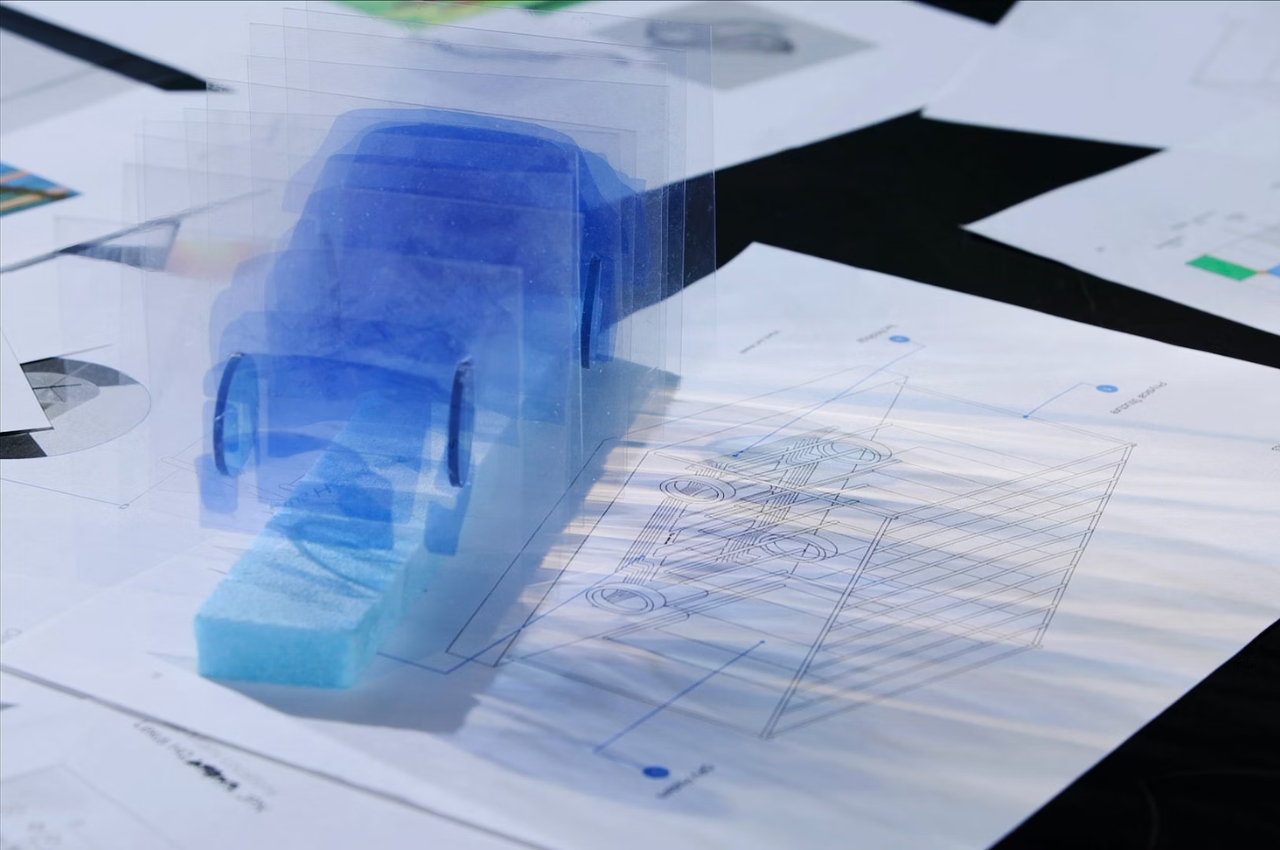
An installation to celebrate the Lexus LF-ZC Battery Electric Vehicle Concept Car is now on display at the Miami Art & Design Week. The “sculpture” is called “8 Minutes and 20 Seconds” which is the time it takes for light to reach earth. So instead of the usual car display, what you get is a self-illuminating 3D skeleton of the concept car itself. It’s made from organic transparent photovoltaic (POV) sheets and is powered by solar energy. Each cell gives off a spectrum of color and movement and they are transparent to give off the maximum effect of light and patterns.
The EV Skateboard, which is where the engine will be located, is highlighted with an LED panel. It is the main feature of the car so this is where eyes will be drawn. Depending on where you’re standing, you’ll get a different perspective of the sculpture. There are also motion sensors which will let the car respond to those walking around, triggering a ripple through the LED light panels. You will also hear bamboo chimes since the concept car uses bamboo materials as well.
Every 10 minutes, you’ll get a crescendo of sound and light patterns. Since the sculpture is located in a garden setting, the color temperature also shifts along with the natural circadian rhythms of its surroundings. It’s a pretty interesting thing to see this in person and to experience a different kind of display for cars, even if it’s still just a concept car.
Capture One’s eponymous photo-editing software suite is ending the free Express tier, effective on January 30. The popular Adobe Lightroom alternative will be fully pay-to-play, with a number of Pro tiers to choose from. The company says ending the free tier was necessary to “focus on our main products.”
Once January 30 hits, you won’t be able to download or use Express from the website and license keys will expire. Additionally, any saved images and edits will go the way of the dodo, so get in there and finish up before next month. You can, however, quickly transfer images and edits from Express to Pro, which is something Capture One would very much like you to do.
To that end, Pro subscriptions range from $24 to $34 each month, depending on if you choose a desktop client or a combo pack that adds a smartphone app. You can also buy the desktop client outright for $300, but you won’t get any updates or access to the smartphone app. There’s a 30-day free trial for those on the fence.
Capture One has become a crucial tool for digital photographers, as it allows you to connect an external camera and shoot images directly to the desktop software or app. The algorithm automatically applies edits as the photos come in. Capture One works with more than 500 cameras, including models by Canon, Sony, Nikon, Fujifilm, Leicia and Sigma, among others.
The software also handles RAW conversion, color processing and general editing tasks, just like Lightroom. You can even share a live link of a shoot with colleagues, to allow for speedy and efficient collaborations. This is serious photo-editing software made primarily for professionals or those serious about the craft. Still, it’s sad to see the free version sail away into that color-corrected sunset. If the Pro version’s cost has you wavering, the iPhone app by itself costs $5 each month.
This article originally appeared on Engadget at https://www.engadget.com/capture-one-is-axing-the-free-tier-of-its-photo-editing-software-on-january-30-162035781.html?src=rss
Arturia V Collection X is one of the biggest updates to the virtual synth library in quite some time. Six new instruments have been added (though, most have been available separately before) and two have been rebuilt from the ground up. That brings the grand total number of instruments in V Collection to 38, and over the last few years at least six of those have been completely revamped with dramatic improvements.
MiniFreak V, Acid V, Augmented Brass and Augmented Grand Piano were all available previously as standalone instruments, but now they are joining the V Collection proper. Two completely new instruments are also entering the fold. Augmented Woodwinds and CP-70 V. Augmented Woodwinds is, as you might have guessed, a take on Arturia’s Augmented series, except here the synths are paired with woodwind samples. CP-70 V is an emulation of Yamaha’s electric piano from the late ‘70s and early ‘80s used most notably by The Grateful Dead and Genesis.
Augmented Woodwinds, Brass and Grand Piano
Terrence O'Brien / Engadget
I’ll admit to being somewhat skeptical of Augmented Woodwinds at first. I think Augmented Strings and Grand Piano are excellent, but have found little use for Brass and Voices so far, and woodwinds often feel like some of the most difficult acoustic instruments to get right in a sample library. Yet, Arturia pulls it off, largely by leaning into the synth side of things pretty strongly. You’re never going to convince anyone that the sounds coming out of it are from a flesh-and-blood woodwind ensemble, but the soft cinematic pads and leads you can coax out of it are compelling, especially when paired with an MPE controller like the Push or Seaboard Rise 2. (With the exception of a few presets that seem to come undone when faced with MPE input, at least.)
Like the rest of the Augmented series, Woodwinds, Brass and Grand Piano feel built especially with scoring in mind. That’s not to say you can’t find a use for them in a pop song or jazz arrangement, but these are all about atmosphere and texture, and there’s a healthy dose of sounds that would only be appropriate in the tensest moments of a cosmic horror film.
They all have a suite of advanced controls where you can build almost any sound you want from its four layer engine (two samples and two synths). You can even completely disable the sample layers and go woodwind-less, though, you might as well use one of the other plugins at that point.
CP-70 V
Terrence O'Brien / Engadget
The other completely new instrument, CP-70 V, is a lot more straightforward. It’s an electric piano. A very specific one that hasn’t enjoyed the same level of reverence as the Rhodes or Wurlitzer, but isn’t without its merits. The CP-70 used strings like a real piano, instead of the metal reeds and tines found in Rhodes in Wurlitzers. It also used piezo pickups instead of magnetic ones, resulting in a sound that is significantly closer to an actual acoustic piano. That was definitely a huge selling point for touring acts in the ‘70s and ‘80s that wanted the sound of a grand piano, but didn’t want to lug one on the road.
The result though, is less characterful than those other electric pianos. It’s brighter and there’s less room for shaping the sound without adding effects. Arturia seems to do an admirable job of capturing the spirit of the CP-70, but it comes close enough to sounding like a real piano, I’d be far more likely to reach for the regular ol' Piano V plugin in most cases.
MiniFreak V
Terrence O'Brien / Engadget
Acid V and MiniFreak V both launched earlier this year. And frankly, nothing has changed with Acid V in the roughly four months since I wrote about it, so I won’t say much beyond, it’s an excellent TB-303 emulator. It does what you expect it to and not much else, but with about one-tenth of the headaches of the real thing.
MiniFreak V, on the other hand, got a major update yesterday with a new wavetable engine, new super unison effect and some improvements to the LFO. The 32 wavetables are pretty solid and modern sounding. And perhaps, best of all, they seem to be able to handle bass better than some of the other oscillators — an area the Freak line has always felt a little weak in. There are 64 new presets designed to show off the strength of the wavetable engine and there’s some real winners in there. Yes, there are plenty of weirdo sound effects and dubstep bass wubs, but there are also some lovely chilly pads and delicate keys.
Additionally, Arturia is finally adding preset packs for the MiniFreak and MiniFreak V to its store. There are two paid soundpacks, but also three free ones and, well, I can’t recommend that you download Deserted Lands from Oscillator Sink enough. It’s basically just one gorgeous broken patch after another. This was sort of a running theme, though. With MiniFreak 2.0, Augmented Woodwinds and the rebuilt Mini V4, Arturia really improved the quality of its presets. Whether they were designed in house or by an artist they worked with, most felt designed to show off what the plugins were capable of musically, as opposed to technically. That wasn’t necessarily the case with the MiniFreak, the MicroFreak or even Pigments.
Mini V4
Terrence O'Brien / Engadget
This was the single biggest shock of the lot, honestly. Mini V was also a decent enough Minimoog Model D emulation, but the world is filled with those. It was never the reason to seek out V Collection specifically, but it was good enough that you didn’t need to go find an alternative. Mini V4, however, is incredible. The difference is subtle, but definitely noticeable if you load up the default template in both Mini V3 and V4 and play them side by side. For one, the V4 is a touch louder, but it’s also fuller. Part of that, I think, is there’s more inherent instability in the new oscillator model. As you start playing at the lower reaches of the keyboard you can hear it more clearly.
You can also play lower notes. Where V3 simply doesn’t work below A-1, V4 will let you get all the way down to C-2, though, there’s very little musical reason for you to go down that far.
The differences become more apparent when you start messing with the filter. More bass is retained as you start turning up the resonance in the new version, and it remains usable even with it pinned. The frequency cutoff is also smoother with a bit more of a guttural growl as you start isolating those lower frequencies.
While the Minimoog obviously excels at bass, and Arturia makes sure to showcase that, there are also a lot of presets that push the sound in different directions. The benefit of a plugin over the actual vintage synth is that you can have eight notes of polyphony here. That gives this virtual Model D the freedom to play unstable pads and electric-piano style keys.
The addition of a “vintage” knob is also quite welcome here. While I love things being ever-so-slightly out of tune and for there to be a gentle whisper of white noise in the background, others might want a more buttoned up sound.
It’s also worth pointing out that Arturia didn’t go too overboard with the features here. There’s no modulation matrix or sequencer or motion recording. There’s a handful of useful effects, an arpeggiator and MPE controls, and not much else beyond what you’d find on the original.
Wurli V3
Terrence O'Brien / Engadget
Similar to the Mini V, Arturia took its Wurlitzer plugin and decided to start over agin. The results are excellent, if a touch less dramatic than with the Moog emulation. The general tone is brighter and it sings a bit more in the lower registers. There also seems to be a wider stereo field than before as well. The cumulative effect is something a bit more inviting.
The new mic and amp simulations help it feel more alive and like you're actually in a room with a Wurli instead of just playing one through your computer. And the age parameter adds instability to the sound, allowing you to get that "just found this keyboard in my uncle's basement where it's been sitting untouched for 30 years" sound. Not to mention it absolutely nails the sound of Supertramp's "The Logical Song."
The Wurli isn’t a plugin I reach for terribly often, but I appreciated the improved tone that should help it cut through a mix a bit better. It’s also far more versatile than the CP-70 V, though even with the improvements I’m far more likely to reach for a Rhodes.
Arturia V Collection X is available now and existing Arturia customers will get a discount, depending on what software they already own. If you're new, the full price of $599 might be a bit tough to swallow, but it still represents one of the better deals in soft syths.
This article originally appeared on Engadget at https://www.engadget.com/arturia-v-collection-x-is-its-biggest-upgrade-in-years-160015345.html?src=rss
Apple recently released their new Journal App on the iPhone and iPad, in this guide we will show you how you can easily protect the app with Face ID, Touch ID or by using a passcode. Are you seeking an effective way to safeguard your personal reflections and memories in the Journal App on your […]
The Electronic Entertainment Expo, better known as E3, is officially dead. "After more than two decades of E3, each one bigger than the last, the time has come to say goodbye. Thanks for the memories," the Entertainment Software Association, E3's organizer, wrote on X. The industry trade group wrote closed out the statement with "GGWP" or "good game, well played."
E3's troubles have been well documented in recent years, with the pandemic arguably exacerbating the video game expo's demise. There hadn't been an in-person E3 since 2019. The 2021 edition took place virtually, but the ESA canned the 2020, 2022 and 2023 events entirely.
The ESA told its members this spring that after major namespulled out of this year's planned E3, the event "simply did not garner the sustained interest necessary to execute it in a way that would showcase the size, strength and impact our industry." ReedPop, the organizer of PAX and New York Comic Con, was set to run E3 2023 before the event was canned.
“We know the entire industry, players and creators alike have a lot of passion for E3. We share that passion,” ESA president and CEO Stanley Pierre-Louis told The Washington Post. “We know it’s difficult to say goodbye to such a beloved event, but it’s the right thing to do given the new opportunities our industry has to reach fans and partners.”
In truth, the writing was on the wall before any of us had heard of COVID-19. Sony, the biggest publisher in the industry, opted not to take part in the 2019 edition. EA declined to hold an E3 press conference that year too, instead choosing to run its own EA Play showcase a few days before the industry event.
Many publishers no longer need an E3 to show off their upcoming slate of games. It used to be the case that they needed to strike deals with retailers to secure shelf space for their games and hardware ahead of the holiday season, and those agreements were often struck at E3. But the industry has changed significantly in recent years. While a ton of big games arrived this past October, publishers now release major titles throughout the year (in large part to help them meet quarterly revenue targets). Others focus on supporting long-term live-service games that aren't beholden to any release calendar. Digital game sales also mean that publishers and platform holders don't have to worry as much about partnerships with retailers.
Another key reason for E3's demise is that publishers can now show off their games to fans directly at any time and without having to struggle for attention against competitors at a trade show. The likes of Nintendo and Sony command the attention of hundreds of thousands of fans whenever they hold a Nintendo Direct or State of Play. There are so many ways for major publishers to get out the word about their games that E3 is no longer necessary in that regard. Skipping E3 also meant that publishers don't have to deal with the costs of attending a trade show or meeting another entity's deadlines for having demos or trailers ready.
On the other hand, the death of E3 could hurt independent studios that rely on trade shows to show off their games to publishers in the hopes of securing distribution and/or funding deals. It may also harm smaller publishers that have to compete with the giants for attention.
While E3 may be gone, gaming events aren't going away. Gamescom, for instance, is far larger than E3 in terms of attendance and other factors.
Summer Game Fest, a sort-of E3 replacement that The Game Awards producer and host Geoff Keighley started in 2020, expanded last year to include a physical event for the first time. Some major publishers — such as Capcom,Ubisoft and Xbox — held games showcases in association with Summer Game Fest this year. The event will return for its fifth edition in 2024. You can probably still expect many publishers to still be holding showcases in May and June, despite the death of E3.
After more than two decades of serving as a central showcase for the video game industry, ESA has decided to end E3. ESA remains focused on advocating for ESA member companies and the industry workforce who fuel positive cultural and economic impact every day.…
Audi has revealed a special edition version of its Audi e-tron GT, the Audi RS e-tron GT Ice Race Edition and just four right-hand drive versions of the car will be made, a total of 99 cars worldwide, each one with cost £150,630 on the road. Its starting point is a fully electric RS […]
QNAP network-attached storage (NAS) manufacturer, has recently launched its Thunderbolt 4 all-flash NASbook TBS-h574TX.Offering a multitude of features aimed at optimizing the experience for Mac and Windows PC creators engaged in online video editing, large file transfer, video transcoding, and backup. The TBS-h574TX is a compact device that provides low-latency storage, a feature that is […]