Microsoft Surface Laptop 7 review: Success at last

Ever since Apple’s MacBooks switched to the company’s homegrown M-series chips, Windows users have wondered when a similar revolution would happen to their machines. To Microsoft’s credit, it hasn’t been for a lack of trying. Way back in 2012, the company released the Surface RT with an Arm-based processor, which is the same architecture used in Apple’s silicon. Unfortunately, a tiny app library, sluggish performance and limited software compatibility made using one full-time kind of frustrating. Then in 2017, Microsoft renewed its efforts with Windows on Snapdragon. This led to systems like the Surface Pro X, which sported gorgeous hardware that was once again marred by lackluster processing power and spotty software support.

But as the old adage goes: If at first you don’t succeed, try, try again. And after more than a decade of starts and stumbles, Microsoft has done it. By combining the powerful Oryon cores in Qualcomm’s Snapdragon X Elite and X Plus chips with its new Prism emulator, Microsoft has turned the Surface Laptop 7 (and its sibling, the Surface Pro 11) into a nearly ideal productivity machine.

While the Surface Laptop 7 (or 7th Edition as Microsoft likes to call it) features fancy new silicon inside, not much has changed on the outside. But I’m not complaining. It has a sleek all-aluminum chassis with clean, minimalist lines, but doesn’t look like a MacBook. Microsoft has also made a few small tweaks like the addition of rounded corners on its display, a new haptic touchpad (similar to what’s on the Surface Laptop Studio 2) and a dedicated key for Copilot (more on that later).

Like before, the Surface Laptop 7 is available in two sizes. The smaller one features a slightly larger 13.8-inch display than before (up from 13.5) while the bigger model has stayed pat at 15 inches. There are also two USB 4 Type-C slots, one USB-A 3.1 jack, a microSD card reader and Microsoft’s magnetic Surface Connect port. So nothing unusual, but more than enough connectivity to handle most situations. And with the 13-inch model weighing just under three pounds (2.96 lb) and the 15-inch option coming in at 3.6 pounds, both versions won’t add much extra heft to your bag.

Between Qualcomm's Snapdragon X Elite chip and Microsoft's Prism emulator, the Surface Laptop 7 represents a major breakthrough for Arm-based Windows laptops.
Photo by Sam Rutherford/Engadget

As for the display itself, the 15-inch PixelSense LCD display on our Surface Laptop 7 review unit is top-notch. On top of its 120Hz refresh rate, it’s been color-calibrated to deliver accurate hues while also offering great brightness (over 600 nits on a full white screen) and 10-point touch support. It’s even covered by Gorilla Glass 5 to prevent scratches and abrasion. I just wish there was the option to upgrade to an OLED panel like you can on the Surface Pro 11.

The most impressive thing about the Surface Laptop 7 is just how normal it feels. It’s super responsive, has instant wake times and just generally feels extremely speedy. But the best part is that you often can’t even tell the difference between running native Arm software or when the laptop is using Microsoft’s Prism emulator in the background to seamlessly translate apps originally designed for x86 chips. It’s really that smooth.

In benchmarks, the Snapdragon X Elite chip delivers on Qualcomm’s lofty performance claims. For example, in Geekbench 6, the Surface Laptop 7 posted multicore scores of 14,400, which is higher than a similarly equipped Dell XPS 14 with an Intel Core Ultra 7 155H chip (11,920). In fact, the X Elite in the Surface even managed to top the Core Ultra 9 CPU inside an ASUS ROG Zephyrus G16, which maxed out at 12,798.

The right side of the Surface Laptop 7 features Microsoft's magnetic Surface Connect port and a microSD card reader.
Photo by Sam Rutherford/Engadget

However, it's important to note that the performance of the X Elite chip is based on how much juice it gets. On the 15-inch Surface Laptop 7, Microsoft allocates up to 30 watts to the processor. But on the smaller 13-inch model, it caps out at 20 watts, so while it should still be pretty fast, you will get better performance on the larger option. And though the Surface Laptop 7 isn’t fanless like a MacBook Air, even under load the notebook rarely got above a whisper quiet.

Finally, while most tools and apps just kind of work regardless of what architecture they were designed for, with Windows PCs still relatively early in the transition (at least this go around) to Arm-based systems, there are a handful of major apps that need a bit more time. Some of the big ones are Adobe products like Illustrator and InDesign, which won’t be available on Copilot+ PCs until sometime in July, while updated versions of After Effects and Premier Pro might not arrive until closer to the end of 2024.

The Surface Laptop 7 features a new haptic touchpad that's very accurate and responsive.
Photo by Sam Rutherford/Engadget

Microsoft has never said that the Surface Laptop 7 is a gaming machine. But given numbers from the ESA (Electronics Software Association) showing that 65 percent of Americans play some form of video game on a weekly basis, the laptop’s fragging abilities are probably worth a mention. Unfortunately, while the Snapdragon X Elite chip boasts decent benchmarks, a lot of titles that might otherwise be good fits for the Laptop 7 simply don’t run. A number of these are competitive games like Fortnite and League of Legends, which feature anti-cheat protocols that haven’t been updated to work on Arm-based chips. It’s doubly frustrating because in the case of LoL, the game installs normally and doesn’t display any warnings aside from Riot’s Vanguard system asking you to reboot your system before launching the game. But no matter how many times you do, the game never boots up.

That said, it’s not a completely lost cause. I’ve found that casual 2D titles like Into the Breach and Vampire Survivor run smoothly, so you still have some options. And if you want to play more demanding titles, there’s always streaming services like Xbox Cloud Gaming and NVIDIA GeForce Now, which by nature aren’t affected by architecture or OS limitations.

One of the big selling points for this new breed of Copilot+ PCs was supposed to be Microsoft’s built-in AI features. But in reality, they're more like occasionally useful bonuses. The tool with the most potential is Recall, which takes screenshots of your desktop so that AI can help you find things later. Unfortunately, due to concerns about its security, the feature will initially only be available to Windows Insiders before it’s officially released sometime in the future.

The Image Creator tool in the Photos app is one of Microsoft's new AI-powered Copilot+ features.
Photo by Sam Rutherford/Engadget

Meanwhile, other Copilot+ AI tools feel rather limited in scope. The Image Creator button in the Photos app lets you generate pictures based on word prompts and it largely delivers. But results still aren’t as detailed or realistic as what you get from more powerful cloud-based services like Midjourney. But hey, it’s free. To make things more confusing, in Paint, there’s another button also labeled Image Creator, but it’s actually an entirely different feature with a limited number of uses and results that aren’t quite as good as the similarly named option in Photos.

Ultimately, the most useful AI features are Live Captions and the Restyle Image tool in Photos. The former uses AI to creatively edit or transform existing shots, allowing you to change the style of a picture into something that looks like anime or an impressionistic painting, while the letter provides real-time translation for videos, podcasts and more. And even though Microsoft’s captions could be a touch more accurate, it’s generally good enough for you to get the gist of whatever you’re watching or listening to.

The left side of the Surface Laptop 7 features two USB4 ports (which also support charging) and a single USB-A 3.1 slot and a 3.5mm audio jack.
In case you don't feel like using's Microsoft's included power adapter, the Surface Laptop 7's USB4 ports also support charging. 
Photo by Sam Rutherford/Engadget

Even though emulating apps meant for x86 processors might use a little more juice, the Surface Laptop 7 has more than enough battery life to go around. Though our usual rundown test hasn’t been updated for Arm-based chips yet, when I streamed a 1080p video over Wi-Fi, the device lasted 17 hours and 38 minutes, which is several hours more than I typically get from some similarly equipped Intel and AMD-powered rivals. And in general use, it often felt like the Laptop 7 fared even better, frequently finishing a day with around 50 percent charge.

Another advantage of the Snapdragon X chips is that there’s almost zero battery drain when the system is asleep, which I attribute to Qualcomm’s experience in making efficient smartphone processors. I noticed that the Surface Laptop 7 would lose just one or two percent of battery overnight, which gives you the confidence to leave it unplugged for days at a time.

For charging, you can either use the magnetic Surface Connect port with the included power brick. But another bonus is that the Surface Laptop 7 also supports charging via USB-C, so if you want to travel light and use a universal adapter to keep this and a bunch of other gadgets topped up, you totally can.

The Surface Laptop 7 features a sleek chassis made from recycled aluminum.
Photo by Sam Rutherford/Engadget

While the road here was beset with bumps and potholes, the Surface Laptop 7 has arrived ready to compete. And it isn’t just a great rival to the MacBook Air, it’s paving a new road ahead for Windows PCs. It’s fast, quiet, has excellent battery life and plays nicely with most of your apps. Sure, a few major programs still need additional support and you may run into issues when trying to play games or installing niche software. And when you spec it up, it can get a bit pricey too. The 15-inch model starts at $1,300, but our review unit with a Snapdragon X Elite chip, 32GB of RAM and a 1TB SSD goes for $2,100. Still, for general productivity, the Surface Laptop 7 and its Snapdragon X Elite chip are a revelation and a revolutionary step forward for Windows as we know it.

This article originally appeared on Engadget at https://www.engadget.com/microsoft-surface-laptop-7-review-success-at-last-120056125.html?src=rss
How Apple redesigned its Photos app around customization

My relationship with my iPhone’s Photos app is complicated. It’s both my trove of memories and my secret pile of shame. I have thousands of pictures from trips, outings and gatherings with loved ones, but thousands more of myself, food and random internet stuff (tweets, Reddit posts and crossword puzzle hints). Throw in private pictures of things like my tax documents or IDs and the Photos app probably holds all the most important and sensitive things in my life. I spend hours on it each day. I’d be lost without the 73,600 photos and 2,607 videos I’ve stored in it (and the 600GB in my Google Photos of course, I only switched to iOS two years ago).

So when Apple announced a redesign was coming in iOS 18 (and iPadOS 18), I was skeptical and worried. Change? I hate it. My fingers already know exactly where the buttons are; having to relearn everything would suck. How else would I quickly find the screenshots I need?

The good news is, the iOS 18 redesign for the Photos app might make things easier to pull up. Better yet, it could allow people to use their albums in ways that best meet their needs — perhaps those of you who are more utilitarian and less vain about it could benefit too. 

I got a closer look at the upcoming changes at WWDC last month. But last week I got a deeper dive when I spoke with Della Huff, Billy Sorrentino and Jon McCormack from Apple’s Photos, design and software teams to learn more about why and how the app was redesigned.

At first glance, your Photos might not look too different. As shown off at WWDC 2024, all your pictures will still be the first thing you see. Peer just slightly beyond the surface, though, and the changes are obvious. Gone are the tabs below your images that say “Library,” “For You,” “Albums” and “Search.” And instead of your grid taking up basically the entire page, it now ends about two thirds of the way, with rows of albums showing up below.

I have to say that I was initially annoyed with this change, but once I heard my entire library is just a swipe down away, I was massively relieved. Well, mostly, anyway. The bar at the bottom that lets you jump between annual, monthly, daily and all views will now show years, months and all. That’s fine by me, since I rarely use the daily option.

A new filter button at the bottom left lets you choose what to focus on or cut out of the grid, like screenshots, favorites, portraits, videos and edited images. Swiping sideways will show various collections, either generated by your phone or created by yourself.

A composite graphic showing two screenshots of the redesigned Photos app for iOS 18. On the left are three rows of collections below the library grid, saying
Apple

The idea is to reduce “doomscrolling through the grid,” Huff said, referencing an idea McCormack had mentioned before. With over three trillion photos and videos taken each year, Apple users probably don’t want to sit around weeding through blurry shots or screenshots. Helping them get to what they want more quickly is one of the main focuses of the redesign.

But like I said, too much change sucks. Sorrentino said, “It was critical from the very beginning of this design process that we didn't lose any key features that people love today.” So far, it does look like the stuff I use most frequently is either still there or even easier to reach. And though I find it unnecessary that each collection will autoplay as a memory in the redesign, at least it will look nice and won’t take up extra space.

When you swipe to the right of the grid, you’ll see the new Photos Carousel, highlighting what Apple thinks is your best content. This uses “on-device intelligence” that has been in the app and evolving for 15 years and considers data like the people in the shots and the location they were taken in to create mini movies of your outings and activities.

Don’t confuse this with Apple Intelligence, though. This is simply algorithms. In fact, McCormack called it an “intuition.” For example, he said “iPhone knew who my partner was long before I told iPhone who my partner was.” The team is building on the same system that’s been identifying faces and generating Memories here, and in iOS 18 it will start surfacing photo sets featuring groups of people and pets like you and your parents, your partner and your pet or you and your partner. There will also be new collections like "recently edited" and "a smart receipts album that you can put right at the top with pinned collections," Huff said. 

She pointed out that in the redesigned Photos app "there's a number of new dimensions and types of content that we're surfacing, like receipts and documents, handwriting, QR codes and more." These can lead to more efficient and relevant search results to help drill down into your library.

Apple Intelligence will bring a few new tools to the Photos app, like Cleanup to erase distractions in the background and text prompts to create narrative Memories with storylines. It’ll also enable a “natural language search” that’ll let you find a picture by describing what’s in them so you won’t have to try to remember where or when the event happened, or worse, doomscroll. It should be as easy as typing “flaming praying mantis with a group of people in shock” instead of searching through the hundreds of pictures you took in Las Vegas. These will require you to have at least an iPhone 15 Pro, though.

During my time with Huff, Sorrentino and McCormack, I learned that Cleanup works on all images in your Photos app, so you could use it in screenshots or downloaded pictures, too. McCormack explained that when you use Cleanup on an image taken in Portrait mode, "we will clean up the original image and then reapply the depth of field effect."

Apple uses "three different AI models" to remove background distractions, McCormack said. The first will "understand the clutter so that when you click on something, we know what to make go away." The other two are an "in-filling model" to replace the hole, as well as one that will understand "the segmentation boundaries of the subject." The latter will prevent Cleanup from leaving divots in your subject's head or accidentally giving them an unflattering haircut. 

Because the new Photos app features collections so heavily, the fact that you can create and pin them where you want makes your favorite images easy to get to. Basically, the entire area below the grid is your playground. “You can organize the structure of the app itself,” Sorrentino said. You can “turn on or off any section of the app,” or reorganize it.

My favorite person is myself, so I’m probably going to put my best selfies in a collection and have it be the one I see first after swiping on the grid. But as part of the collections below the grid, I’m going to have the crochet patterns I’ve taken screenshots of as one I pin high up, as well as important information i frequently refer to like my airline loyalty account numbers.

The beauty of customization in general is how each person can tailor an interface to their individual needs. Maybe you prefer to use Photos a bit more like Pinterest, where you screenshot the car models you're considering buying and put them in an album. Or perhaps you're tracking your meals by taking pictures of your food daily to help plan a menu. Or you're cataloging your outfit, your garden, your stamp collection, or your growing child. You'll be able to create a collection of the photos you want and pin them.

I haven't spent time with the new Photos app yet, so though I'm excited at the promise of what customizability can bring, I'm also reserving judgment. I also enjoy doomscrolling my gallery while I look back at my weekend, since it visually represents my train of thought through the days. Sometimes, I use screenshots to remind myself to do something later in the evening when I'm inevitably staring at pictures of my friend's cute baby again. So the idea of letting Apple filter out what it thinks might be insignificant isn't something that appeals to my control-freak self. Luckily, it seems I can still view all images in my library.

I'd also like to see how the Cleanup tool performs, as well as whether the "natural language search" will perform well compared to Google's recently announced Ask Photos tool. And though I don't create or watch many Memories, I'd be curious about what a video derived from a prompt like "all my outfits from athleisure to formal" would look like. 

iOS 18 and iPadOS 18 are currently available to developers as a closed beta, and a public beta is expected later this summer. The full release of the new software is likely to drop in the fall, which is when most people will probably receive the redesigned Photos app when they update their iPhones. Still a few months to go before your fingers have to relearn where everything is, then.

This article originally appeared on Engadget at https://www.engadget.com/how-apple-redesigned-its-photos-app-around-customization-120038901.html?src=rss

Skullcandy expands its earbud lineup with three sport models all under $100

Skullcandy has revealed a trio of earbud models it says were designed with the "most active and adventurous consumers" in mind. The Active Collection lineup ranges from $60 to $100 and were engineered to deliver reliable performance in any conditions, according to Skullcandy.

The Push Play Active, Push ANC Active and Sesh ANC Active all have a few common features. They all support multipoint pairing and rapid charging — a 10-minute charge will allow two hours of playback time. A Sidetone feature is said to counteract occlusion and make it easier to hear our own voice. Meanwhile, the adjustable stay-aware mode lets you tweak things so that it's easier for you to remain alert and hear what's going on around you.

Push Play Active earbuds and charging case
Skullcandy

The $60 Push Play Active buds have over-the-ear hooks and an IP55 rating for sweat and water resistance. Skullcandy claims that a smart mic will reduce background noise for "crystal clear" calls. The Push Play Active earbuds have several equalizer presets and you'll be able to set up your own custom five-band EQ as well. They offer up to 34 hours of battery life, according to Skullcandy, with the earbuds running for up to 10 hours on a single charge and the charging case adding an extra 24 hours of use.

The other two models have some shared features as well. Push ANC Active and Sesh ANC Active are IP67 rated, meaning they're sweatproof and waterproof. Both models use a four-mic array for adjustable active noise cancellation (ANC). The earbuds are compatible with the Skullcandy app, which will allow you to customize the onboard controls and equalizer levels. There's a personal sound feature too — you'll be able to take a real-time audio test to create a profile for optimized sound levels.

Push ANC Active earbuds and charging case
Skullcandy

The Push ANC Active earbuds are the most expensive option of the three at $100. Skullcandy claims you'll get up to 37 hours of use with ANC on (seven hours from the earbuds and 30 extra from the charging case) and as much as 58 hours of use with ANC off. The brand says you'll be able to use the earbuds for up to 12 hours before having to return them to the charging case. In addition, the case supports wireless charging.

It's worth noting that while the Push ANC Active option has an over-the-ear hook, there's a more traditional true wireless design for the Sesh ANC Active. Skullcandy says these earbuds have a "fit grip" to keep them in your ears. They have a promised battery life of up to 28 hours with ANC on (seven hours in the earbuds, 21 in the charging case) and up to 48 hours with ANC off (12 hours and 36 hours, respectively). The Sech ANC Active earbuds will run you $90.

Sesh ANC Active earbuds and charging case
Skullcandy

Skullcandy has earned a reputation for offering solid products at relatively budget-friendly prices, so these are options worth considering if you're on the lookout for a set of earbuds to use while you're working out. All three models will be available on Skullcandy's website starting on June 25.

This article originally appeared on Engadget at https://www.engadget.com/skullcandy-expands-its-earbud-lineup-with-three-sport-models-all-under-100-120021846.html?src=rss

How is Artificial Intelligence (AI) is going to effect the World Economy

AI and the World Economy

Have you ever wondered how the rise of artificial intelligence might reshape our economy and society? According to a recent study by the International Monetary Fund (IMF), the economic implications of generative AI could be profound, potentially increasing wealth inequality and displacing a significant number of jobs. The report suggests that without agile government policies, […]

The post How is Artificial Intelligence (AI) is going to effect the World Economy appeared first on Geeky Gadgets.

10 Best Self-Gifts You’ll Love: From Tech to Wellness

We’re quite used to buying gifts for our loved ones – from our romantic partners to family members and our beloved friends. We spend precious time picking out the perfect present for them, ensuring they don’t get disappointed, and truly like what we select for them. But how often do we actually spend time and money picking thoughtful little presents for ourselves? Not a lot of time, right? Well, it is time you pamper yourself, and if you don’t have plenty of free time on your hands, worry not, we’ve curated a collection of functional and fulfilling products for you! These well-designed and clever products will make for wonderful self-gifts. Not only are they high-value, but they’re also well-priced, and visually appealing.

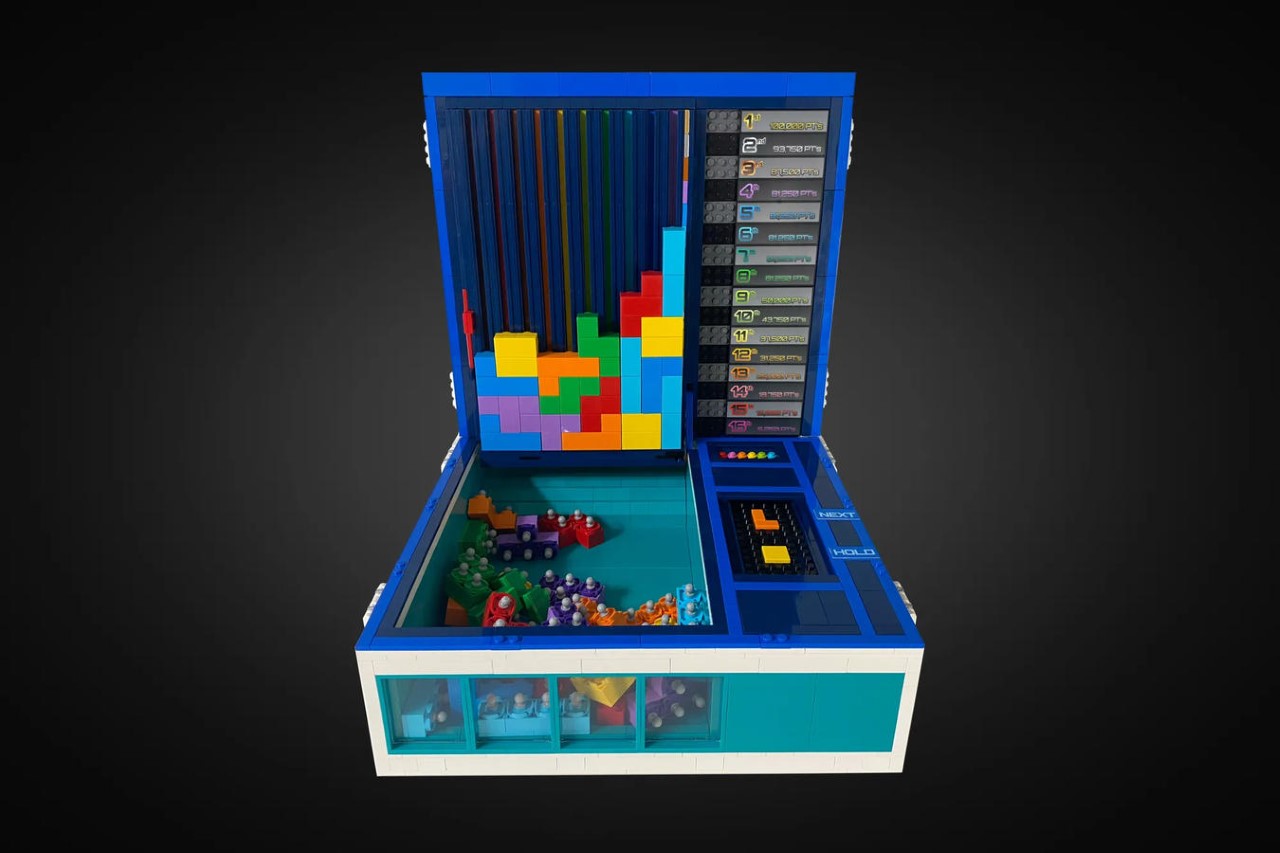
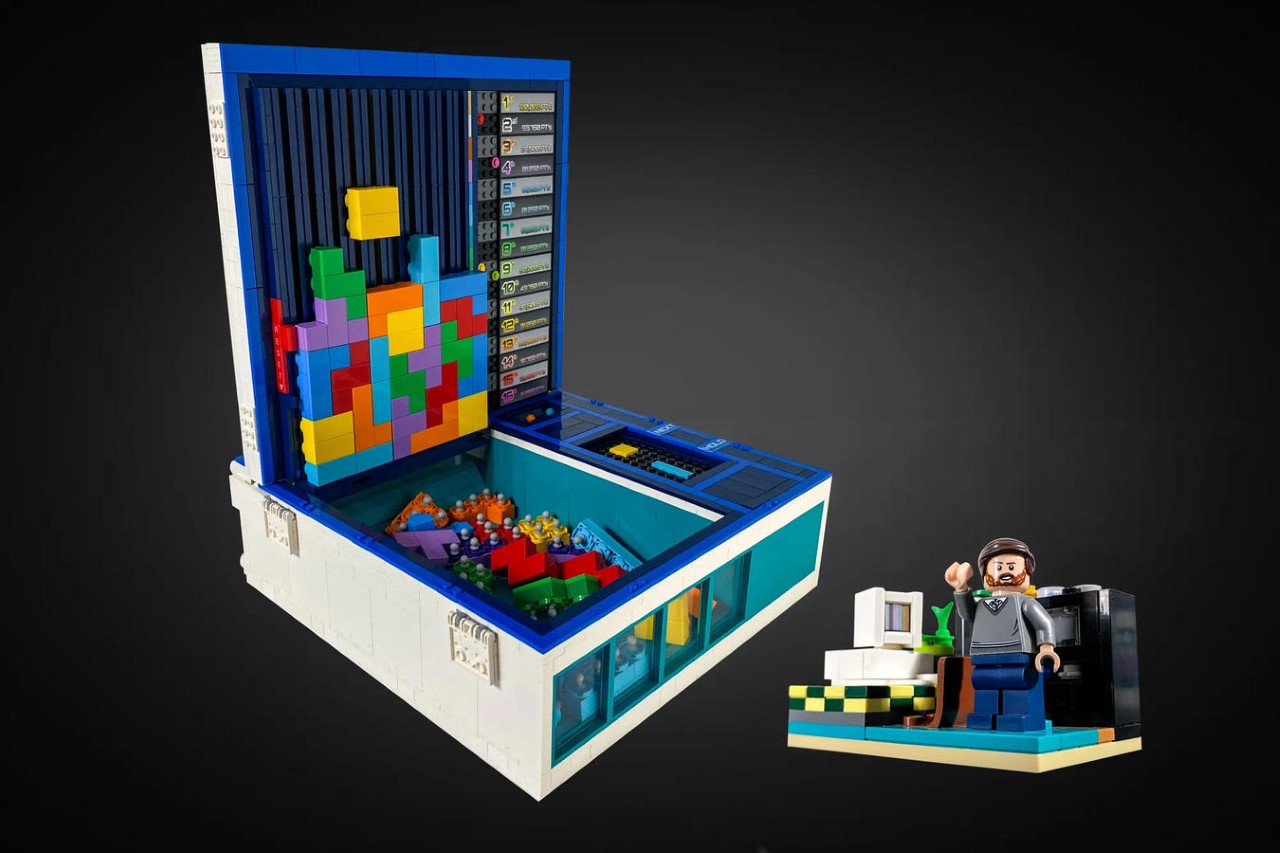
1. LEGO Tetris

Sometimes the best form of self-care is taking some time off from your hectic day, and indulging in a whimsical game or two. This LEGO Ideas set is a tribute to the world’s most influential digital game – the Tetris. Designed by LEGO builder ‘victorvey300′, the LEGO set celebrates Tetris’ 40th anniversary and features a box with a lid that serves as the game’s screen. It takes you back down memory lane, with a container filled with bricks, controls on the bottom right, and a leaderboard on the top right.

Why is it noteworthy?

This unique LEGO build has a lot of attention to detail on it. It is a vault-shaped kit with cool Tetris graphics and branding on the outside, while the inside is filled to the brim with features and various details which allow 6 players to game a whole game of Tetris. The box also features brick generators which tell you what the next brick should be.

What we like

  • Lets you play a refreshing version of the iconic game

What we dislike

  • You need to select each brick’s orientation and position yourself before you drop it into the channel

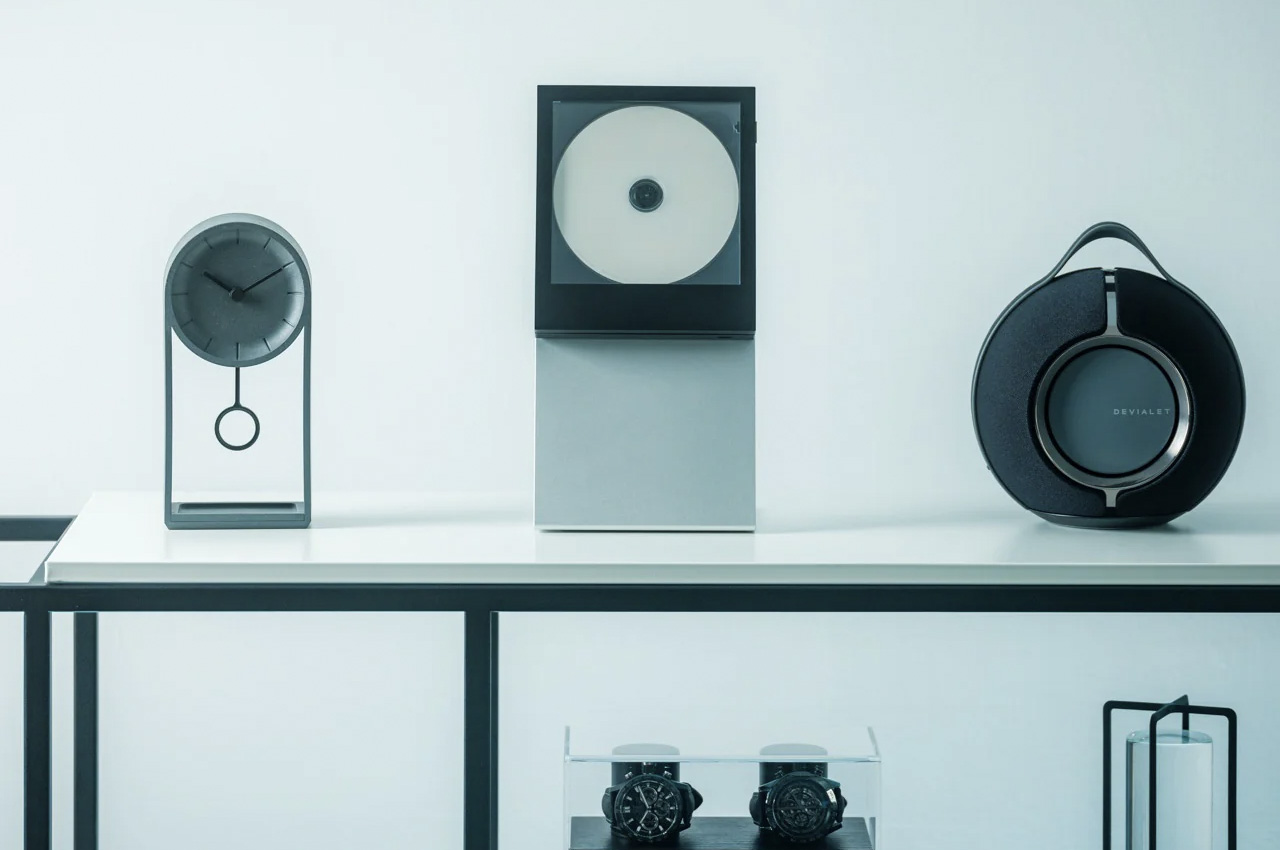
2. Elevate Stand (For CD Cover/Jacket Player)

If you own the Portable CD Cover Player or CD Jacket Player, then you may want to get your hands on the Elevate Stand as well. The minimal and compact stand is designed to hold your Portable CD Cover Player or CD Jacket Player. You can use the stand to display these products in an effortless and timeless fashion. It is essentially a sleek L-shaped aluminum stand with an elegant silver finish.

Click Here to Buy Now: $45.00

Why is it noteworthy?

The classy-looking stand will add an element of contemporary elegance to your home. It is ideal for windowsills, shelves, or any spot where you can’t wall-mount the players. It serves as a clever product that adds flexibility and style to how you choose to enjoy your music.

What we like

  • Has a chic and contemporary look that suits modern homes

What we dislike

  • It is only available in one finish option, and there is no scope for personalization

3. Japanese Lantern Candle

After a long day at work, sometimes I just love to sink into a warm bath, with a lovely little candle giving me company, and offering illumination. If this sounds like the perfect experience for you, then you may want to add the Japanese Lantern Candle to your self-care session. This pretty little lantern is inspired by the traditional Japanese ‘chouchin’ lantern, and has a lovely pillar form.

Click Here to Buy Now: $69

Why is it noteworthy?

The candle is designed to be a modern and elegant version of an age-old iconic Japanese lantern design. It radiates a surreal and calming glow while showcasing a minimal and compact design language that will complement different interior styles. The Japanese Candle Lantern is handcrafted by artisans in Kurashiki, Japan.

What we like

  • The outer wax is quite a handle and doesn’t melt easily, forming a clear body on the candle

What we dislike

  • Since it has an open flame, it is a fire hazard and must be used around kids and pets with care and caution

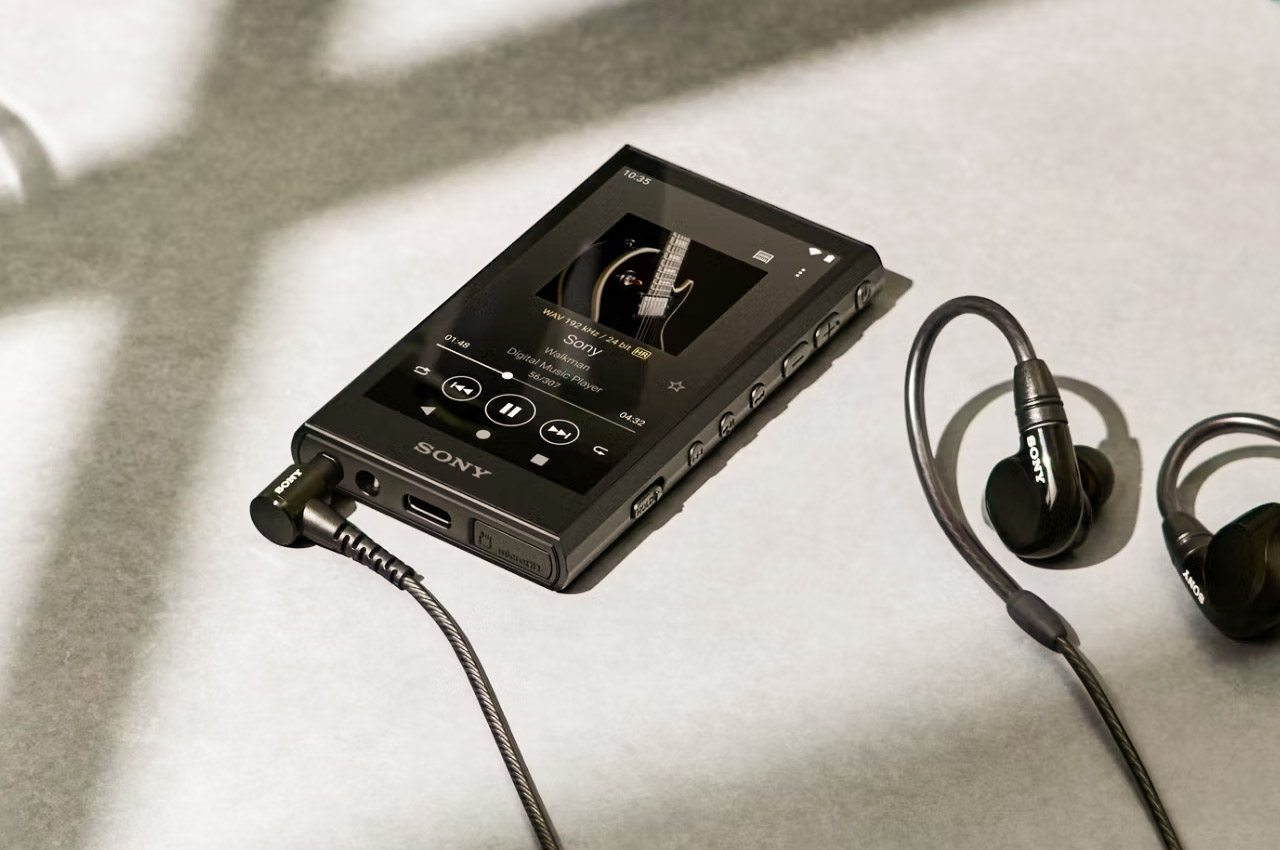
4. Sony Walkman MW-A306

Meet the Sony Walkman MW-A306, a neat Walkman device that delivers high-quality digital music in dynamic range, with original records guaranteed. It is designed to upscale compressed music files from streaming services in real time to provide CD-like audio playback that you can enjoy in your leisure time.

Why is it noteworthy?

You can enjoy CD-like music through headphones or wireless earbuds, creating a music-listening experience that feels authentic and seamless. It features Edge-AI and DSEE Ultimate technology, which allows the Walkman to compress files with complete accuracy and in real-time.

What we like

  • Has a richer and more dynamic music playback
  • Elevates the user experience on any streaming service of your choice

What we dislike

  • Equipped with only 18GB available space to store your favorite tracks

5. Unfiltered Titanium Whisky Glass

This beautiful glass is called the Unfiltered Titanium Whisky Glass, and it is inspired by metallic hues, creating a rather mesmerizing light and color interplay. The glass offers a lovely visual experience since it has a 1/f fluctuating pattern that resembles a murmuring stream. It is built from pure titanium, enhancing your drinking experience, and making for the perfect self-gift.

Click Here to Buy Now: $65.00

Why is it noteworthy?

It is made using cutting-edge technology which builds an interesting color play. The glass is biocompatible and safe, in fact, even more than platinum or glass. It is resistant to odors and stains and maintains long-term hygiene.

What we like

  • Utilizes advanced space development technology

What we dislike

  • You cannot see how much you’re pouring, or how much liquid is in the glass from far, as it is a solid glass

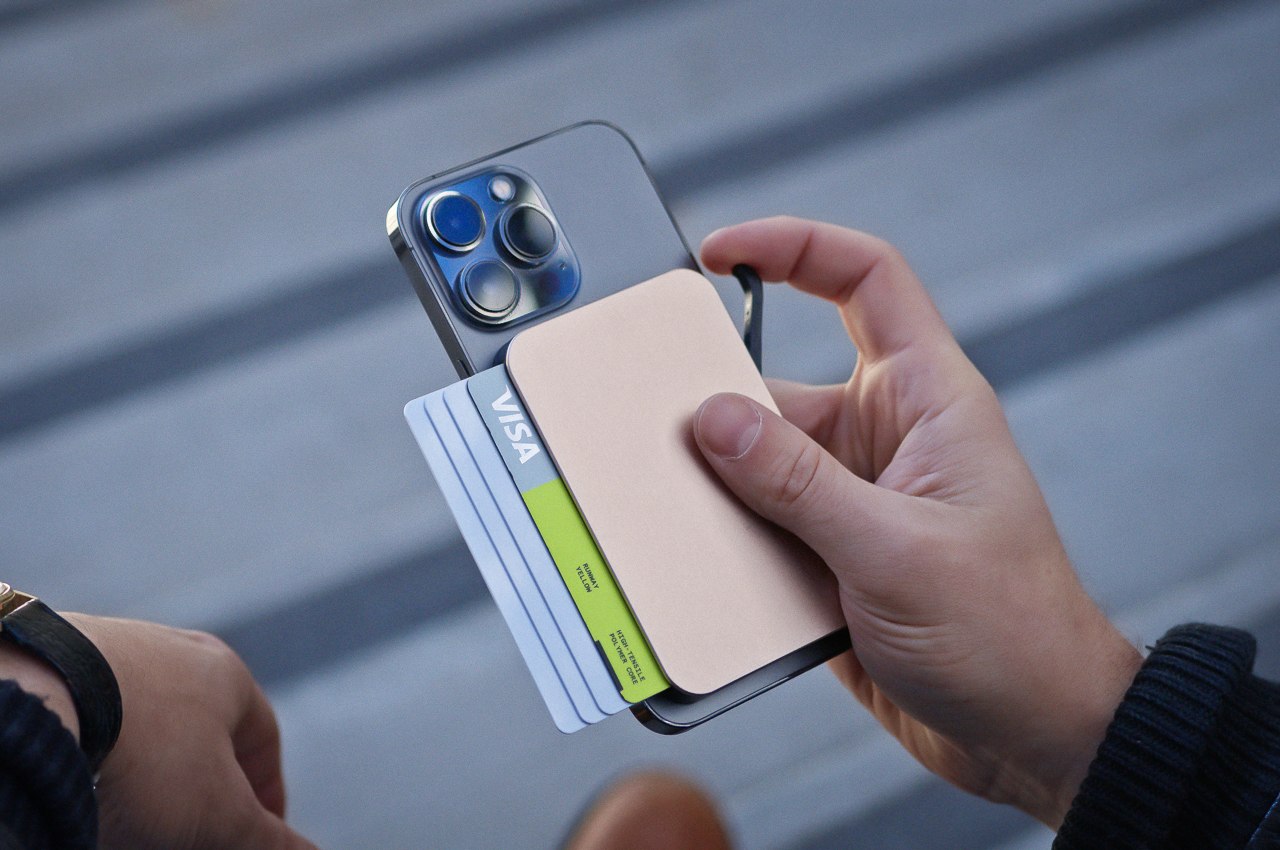
6. MagSnap Wallet

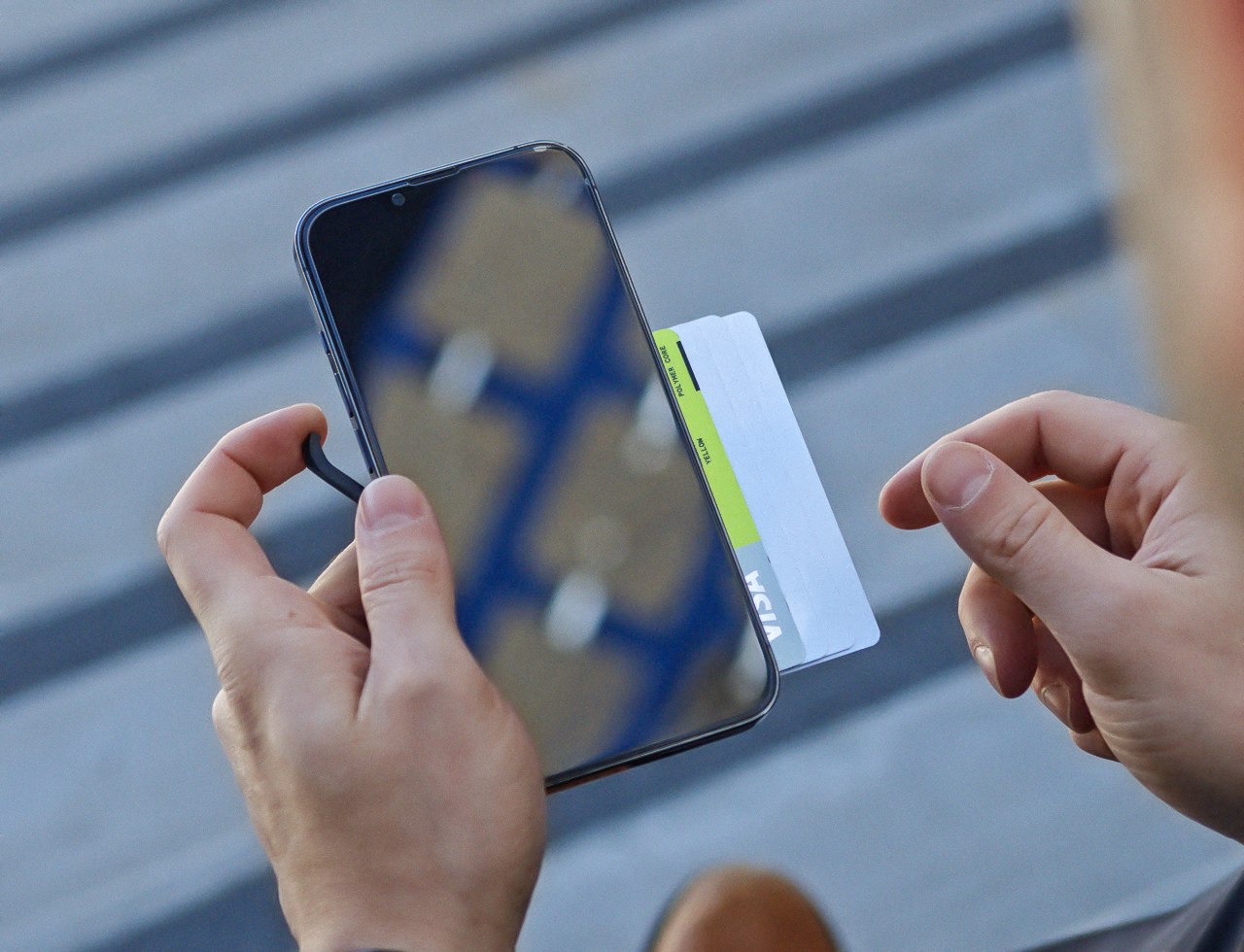
Called the MagSnap Wallet, this wallet has a magnetic and modular design, that lets you attach extra modules, allowing your wallet to hold more cards, cash, or even EDC tools. It is sleek and can be docked on the back of your iPhone, to enable easy carrying. It features an all-metal design and is RFID-blocking as well, something that Apple’s MagSafe wallet doesn’t have either.

Why is it noteworthy?

However, the MagSnap Wallet isn’t MagSafe compatible, it comes along with a magnet-enabled iPhone case or an adhesive MagSnap plate which you can attach to your phone. “Our magnet array and locking pin are much stronger than MagSafe”, say the designers at OhSnap.

What we like

  • You can attach extra modules giving your wallet a cool storage upgrade
  • A digitally secure product, owing to its RFID-blocking abilities

What we dislike

  • Has a slightly less streamlined approach than Apple, which may not be preferred by some users

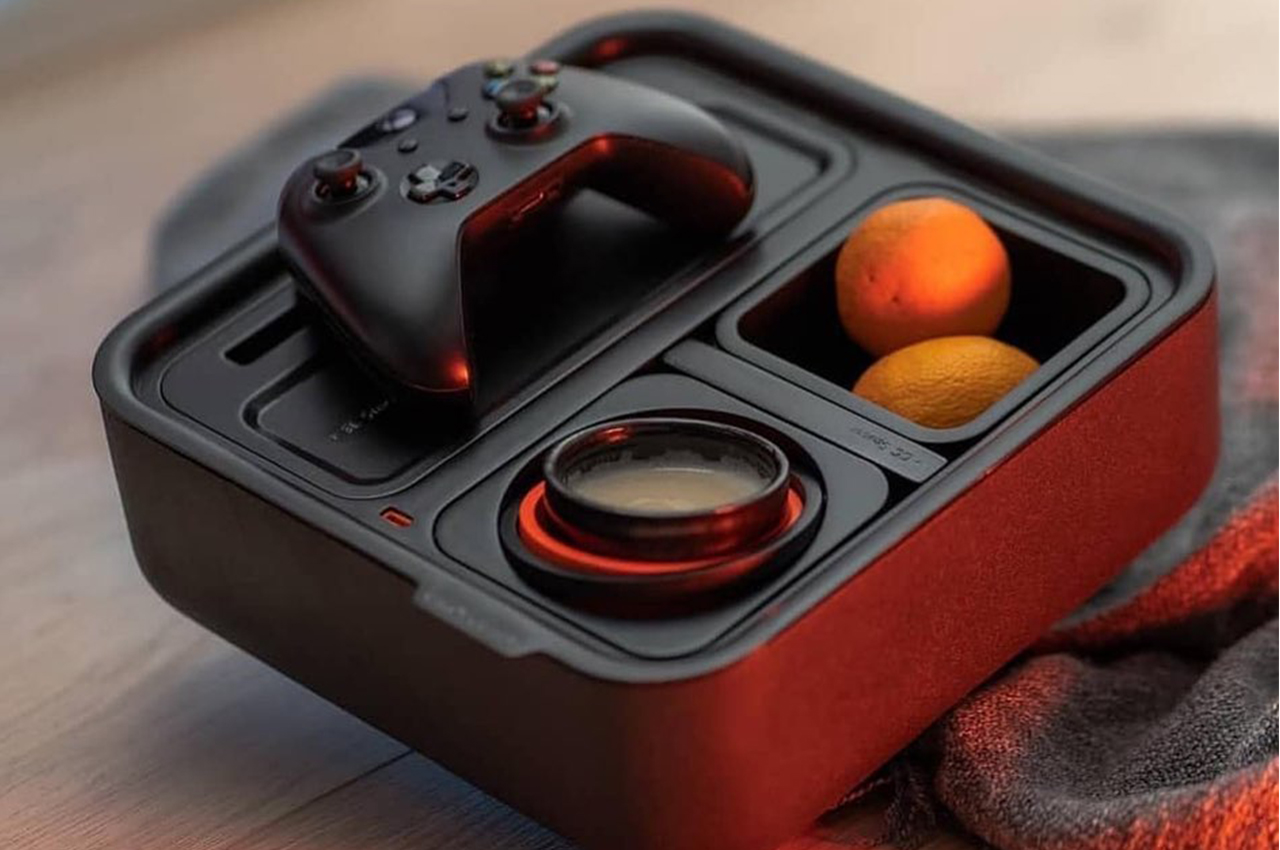
7. Couch Console

We’ve found the perfect gift for you – to gift yourself! This is the Couch Console the perfect product to hold your snacks and drinks and ensure they remain intact, as you sit and binge-watch your favorite show. There is something so comforting, wholesome, and yet extremely functional about this clever design. You need it in your living room!

Why is it noteworthy?

The Couch Console includes a cupholder that contains a mechanical gyroscope with a counterweight to keep your drinks safe and secure on different surfaces. It also features a clever little compartment to store knick-knacks, as well as a phone stand, snack holder, charging dock, and a dedicated remote tray.

What we like

  • Features a modular design, letting you customize the layout according to your needs
  • Features a USB C hub to hold the battery and juice up your phone

What we dislike

  • The design is quite bulky and space-consuming, we would have preferred smaller and more compact configurations as well

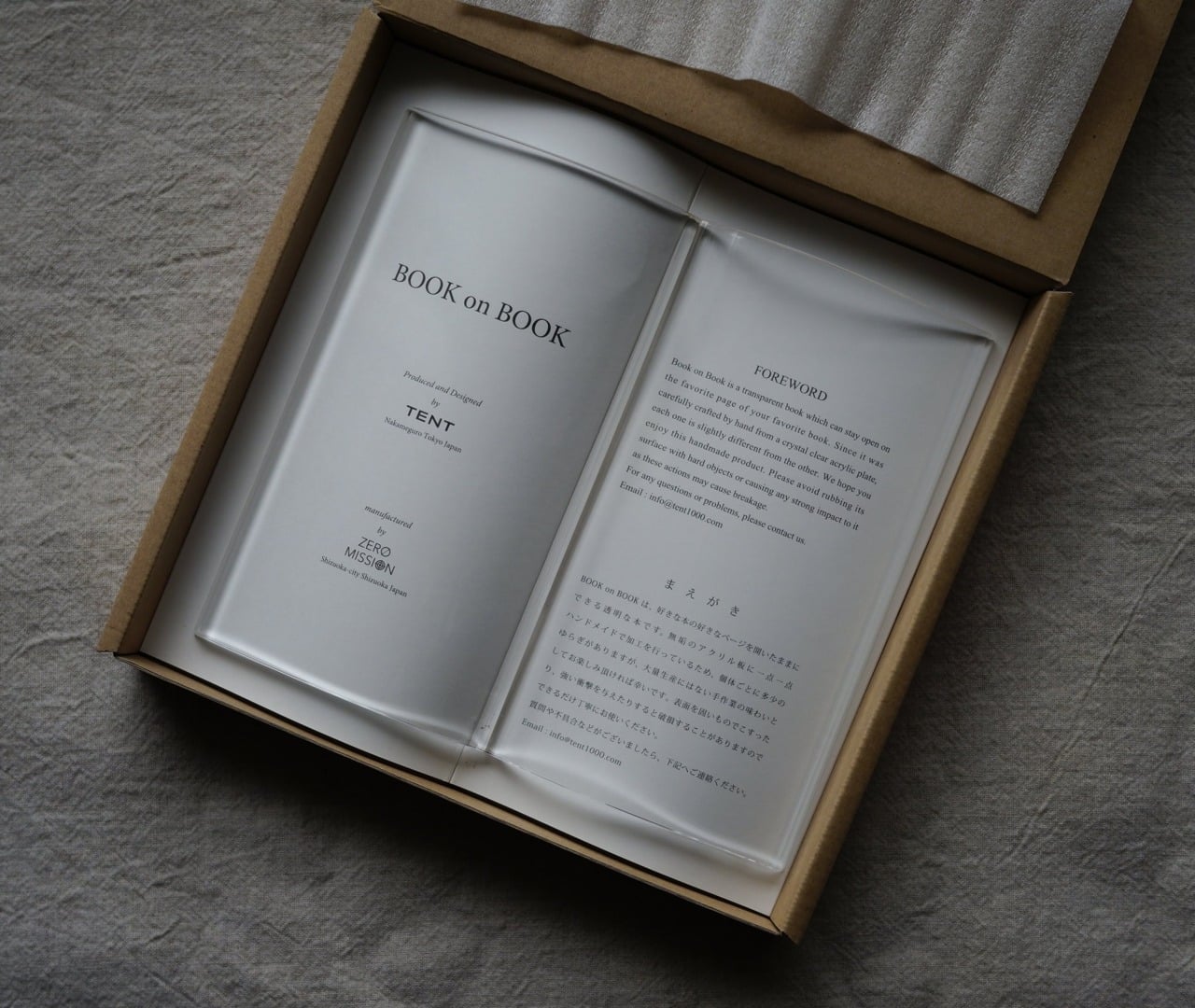
8. Bookish Bookmark

Named the Bookish Bookmark, this clever little product lets you enjoy a hands-free reading session, keeping your book open, without you resorting to any uncomfortable workarounds. Since it keeps your book open and accessible for you, you don’t need to hold your place using something heavy and bulky. It features a transparent design for anyone who likes to follow cookbooks or has a constant vision of their favorite books.

Click Here to Buy Now: $65

Why is it noteworthy?

The Bookish Bookmark is ideal for you if you also like to showcase your prized books in your home. Since it has a transparent form, you can keep your book wide open, and let it serve as a visually appealing component to your desk, bookshelf, or coffee table.

What we like

  • You can display your favorite books in a visually appealing and tidy manner

What we dislike

  • The bookmark may be too big for small books, and not preferred by people who like discreet and subtle bookmarks

9. OutIn Nano

Dubbed the OutIn Nano, this little flask-shaped product helps you prepare a hot cup of coffee anywhere, and anytime. The espresso maker can be used indoors, outdoors, or even up in the sky! You simply need to pull out a shot of espresso, prepare a cuppa, and enjoy a steaming cup of coffee without any worries.

Why is it noteworthy?

The OutIn Nano also includes its own water heater, so it warms up the water while brewing your coffee. This simplifies the process for you, and you don’t need to prepare anything except an empty cup, and your wish to make some freshly brewed coffee!

What we like

  • It is a portable espresso maker, so you can carry it wherever you like
  • Equipped with an easy-to-use single-button interface to prepare your coffee

What we dislike

  • The product takes a while to heat up between shots

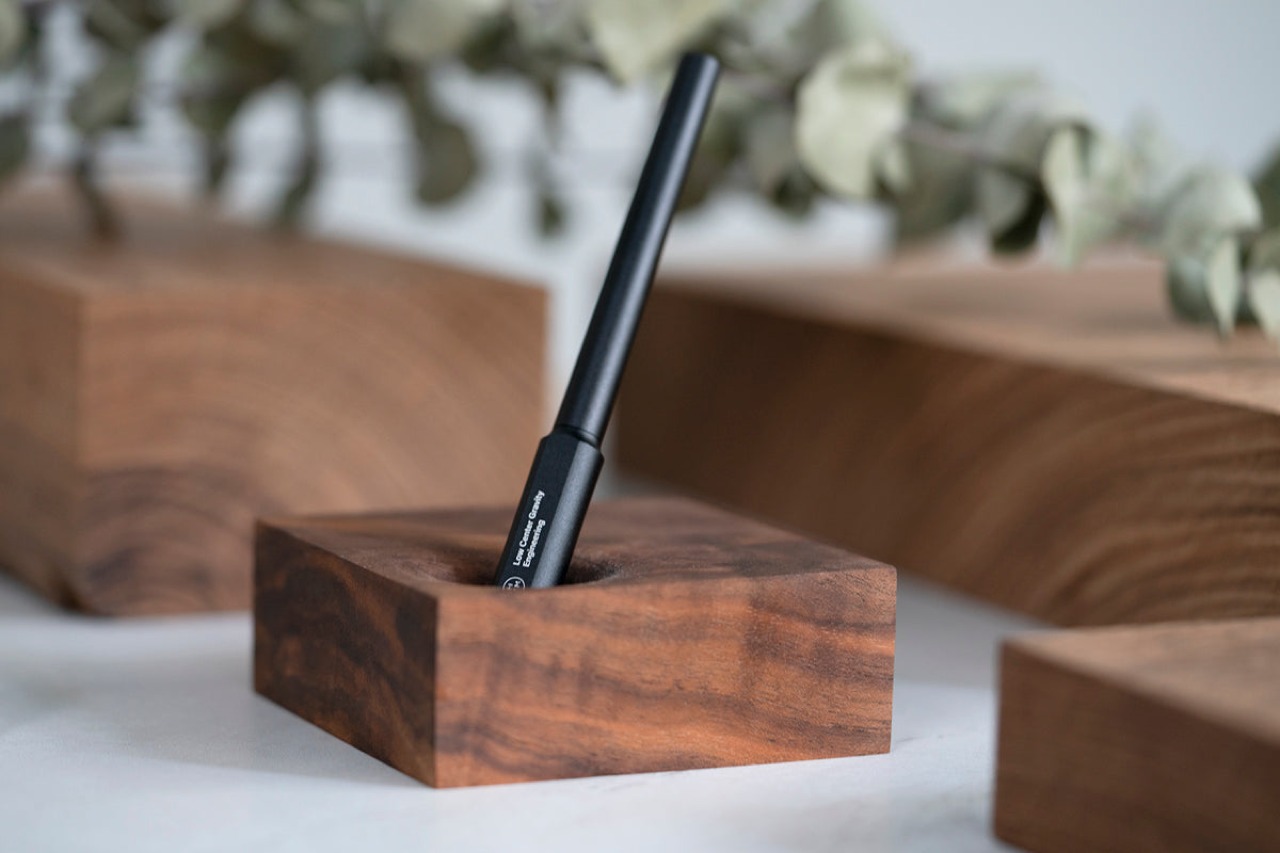
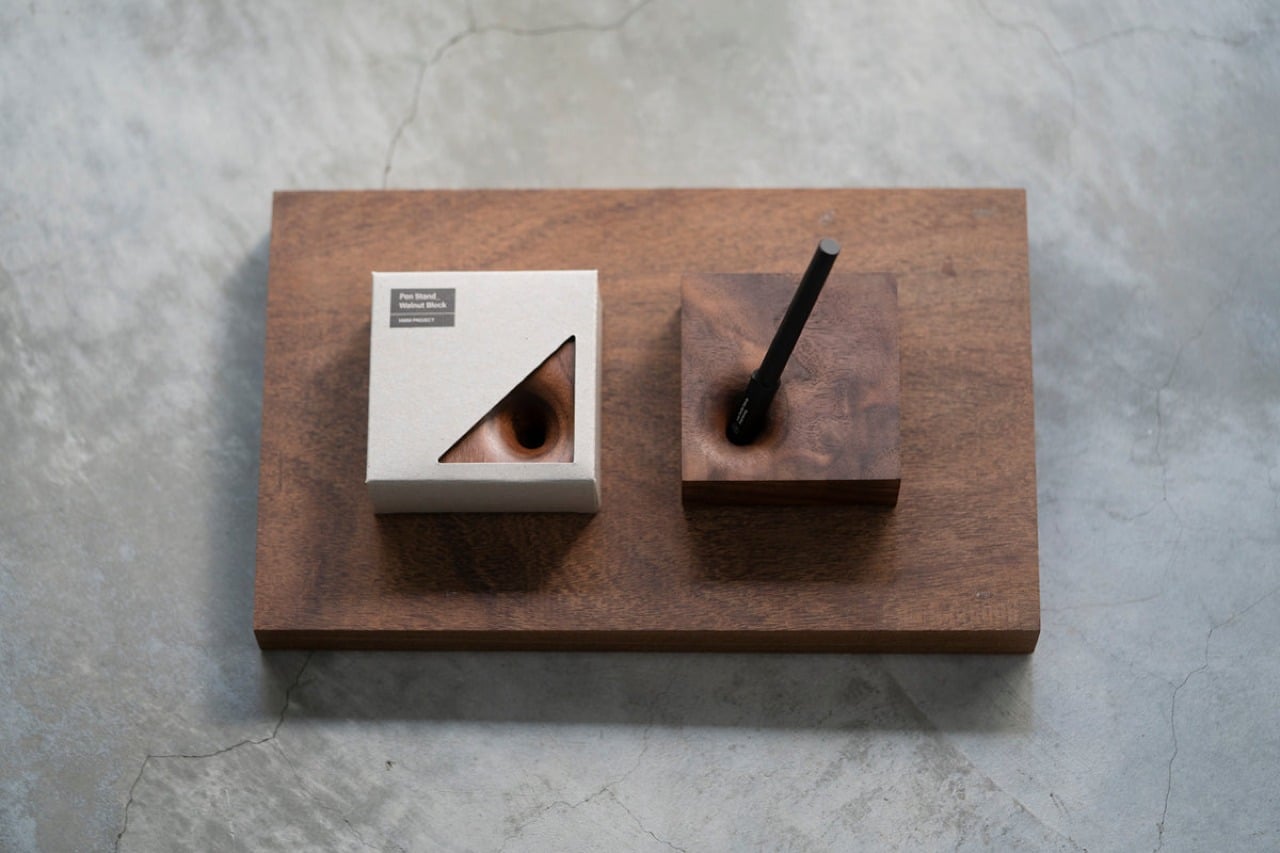
10. Wooden Pen Holder

Called the Wooden Pen Holder, this block of wood is the perfect little holder to store your powerful pen. There is something truly fascinating and satisfying about picking up a pen and putting your thoughts and ideas on paper. This pen holder adorns your desk, adding an element of tasteful elegance to it while storing your pen.

Click Here to Buy Now: $45.00

Why is it noteworthy?

The pen holder is essentially a wooden block, and it is quite simple and unassuming, yet quite beautiful, as minimal designs tend to be. It is built from genuine maple wood, and each piece is marked with unique grains and patterns, making them all special, and of course one-of-a-kind.

What we like

  • Features a gently curving depression that can hold any pen with a standard-size
  • Minimalist and compact design ethos

What we dislike

  • It occupies precious real estate on a bench that cannot be adjusted/reduced

The post 10 Best Self-Gifts You’ll Love: From Tech to Wellness first appeared on Yanko Design.

Keep up-to-date on chat threads in Microsoft Teams using Copilot AI

Keep up-to-date on chat threads in Microsoft Teams

Ever returned from a vacation or a long weekend only to be greeted by an overwhelming number of unread chat messages in Microsoft Teams? It’s a common scenario that can leave anyone feeling stressed and behind. But what if there was a way to catch up quickly and efficiently? In this article, we’ll explore how […]

The post Keep up-to-date on chat threads in Microsoft Teams using Copilot AI appeared first on Geeky Gadgets.

Posted in Uncategorized | Tagged

The Morning After: Supreme Court rejects rulings on social media moderation

Two state laws from Texas and Florida, that could upend the way social media companies handle content moderation are still up in the air. The Supreme Court sent the challenges back to lower courts, which vacates previous rulings. In a 9 - 0 decision in Moody v. NetChoice and NetChoice v. Paxton, the Supreme Court said that earlier rulings in lower courts had not properly evaluated the laws’ impact on the First Amendment. Never heard of NetChoice? It’s an industry group representing Meta, Google, X and other large tech companies. So it’s incredibly well-funded. NetChoice argued that the laws were unconstitutional.

The Texas law, passed in 2021, allows users to sue large social media companies over alleged “censorship” of their political views. The Supreme Court suspended the law in 2022 following a legal challenge. The Florida measure, also passed in 2021, attempted to impose fines on social media companies for banning politicians – that’s also on hold.

Justice Elena Kagan said that lower court rulings in both cases “concentrated” on the issue of “whether a state law can regulate the content-moderation practices used in Facebook’s News Feed (or near equivalents).” However, she writes, “they did not address the full range of activities the laws cover, and measure the constitutional against the unconstitutional applications.” It seems the lower courts need to do their homework.

— Mat Smith

The Kindle Scribe Essentials bundle is nearly $200 off at Amazon

Sega’s new Crazy Taxi reboot will be an open-world MMO

The best gaming handhelds

The Sims 4’s Lovestruck expansion lets you dive into a steamy polyamory sandbox

​​You can get these reports delivered daily direct to your inbox. Subscribe right here!

TMA
Midjourney

Midjourney, a popular AI-powered image generator, is creating images of Donald Trump and Joe Biden despite saying that it would block users from doing so ahead of the upcoming US presidential election. Engadget managed to get the tool to create images of Trump multiple times. The only time Midjourney refused to create an image of Trump or Biden was when it was asked to do so explicitly. “The Midjourney community voted to prevent using ‘Donald Trump’ and ‘Joe Biden’ during election season,” the service said in that instance. Midjourney did not respond to a request for comment from Engadget.

Continue reading.

Talking of AI-generated fakes, YouTube quietly added a new policy last month that lets you request the removal of AI-generated content that features your likeness. YouTube says several factors will determine whether it considers a removal, including whether the content is altered or synthetic (and whether it’s disclosed as such), easily identifiable as the person in question or realistic.

Continue reading.

This article originally appeared on Engadget at https://www.engadget.com/the-morning-after-supreme-court-rejects-rulings-on-social-media-moderation-111527524.html?src=rss

New Lotus Emeya EV Hyper-GT Lands in Europe This Month

Lotus Emeya

The Lotus Emeya is transforming the world of electric hyper-GTs, setting a new standard for performance, luxury, and sustainability. As the first electric grand tourer from Lotus, the Emeya seamlessly blends the brand’s iconic sports car heritage with state-of-the-art technology. This groundbreaking vehicle features a powerful all-electric powertrain, advanced aerodynamics, and a host of luxurious […]

The post New Lotus Emeya EV Hyper-GT Lands in Europe This Month appeared first on Geeky Gadgets.

How to use Mesop Google’s new AI user interface (UI) Builder

Google Mesop UI builder 2024

Google has open-sourced a new Python-based UI framework called Mesop, designed to rapidly build web applications with the help of AI. This framework allows users to create various UI components and front-ends efficiently using minimal code. Mesop supports hot reloading, enabling automatic browser updates and state preservation. It also integrates with Gemini’s API for enhanced […]

The post How to use Mesop Google’s new AI user interface (UI) Builder appeared first on Geeky Gadgets.

SK Hynix PCB01 NVMe SSD storage designed for AI workstations

SK Hynix PCB01 NVMe SSD storage

Have you ever wondered what it would take to make your AI PC run faster and more efficiently? If you’re tired of sluggish performance and long wait times, you’re not alone. The good news is that SK Hynix has just announced the PCB01 NVMe SSD, a innovative solution designed to meet the high demands of […]

The post SK Hynix PCB01 NVMe SSD storage designed for AI workstations appeared first on Geeky Gadgets.