What if the United States’ dominance in artificial intelligence isn’t as unshakable as we’ve been led to believe? For years, America has been the undisputed leader in AI innovation, fueled by Silicon Valley giants and innovative chip manufacturing. But now, China’s meteoric rise in AI development is forcing a global recalibration. With its centralized approach, […]
The M4 iPad Air is emerging as a compelling mid-range tablet for 2026. It is expected to offer a blend of performance enhancements and connectivity upgrades while retaining its familiar design. With a focus on incremental improvements, it appeals to users seeking a dependable and efficient device for everyday use. However, the absence of OLED […]
What if you could explore the cutting edge of computing without breaking the bank? The VisionFive 2 Lite, a low-cost single-board computer (SBC), offers just that, a chance to dive into the burgeoning world of RISC-V architecture. Unlike the ubiquitous ARM-based boards, this device opens the door to a rapidly growing ecosystem that’s reshaping the […]
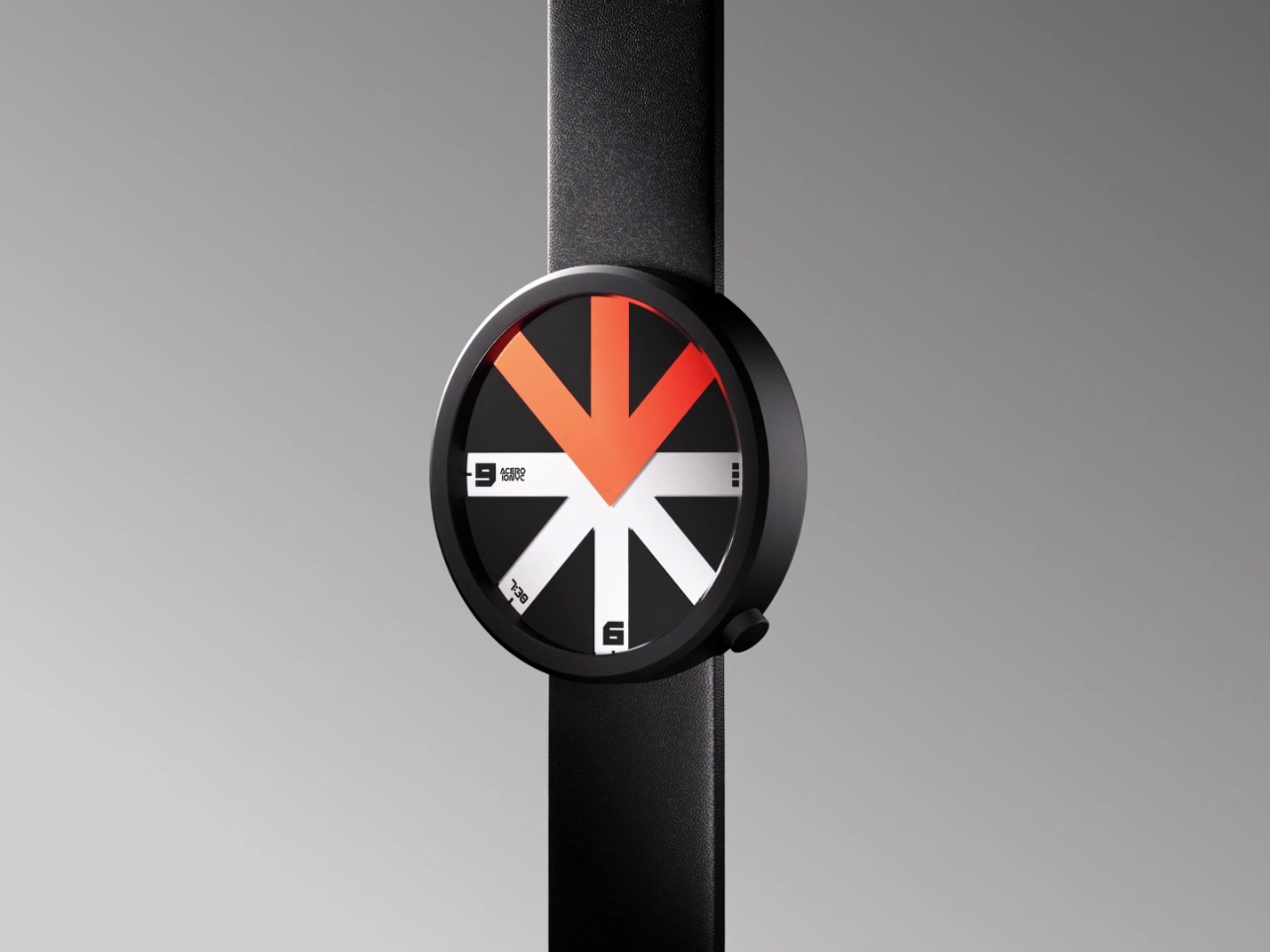
When was the last time a watch made you do a double-take? If you’re like most of us, probably never. We’ve seen countless variations of circles with numbers, hands pointing at things, and digital displays that all basically do the same job. But Ion Lucin’s ARROWatch isn’t just another pretty timepiece. It’s a design that fundamentally rethinks what a watch actually does.
Here’s the thing: we’ve been telling time for centuries, and watches have evolved from ornate pocket pieces to sleek smartwatches. So when a designer sits down to create something genuinely new, they’re facing a pretty daunting challenge. How do you innovate on an object that’s been perfected over hundreds of years?
Designer: Ion Lucin
Lucin, tackling his first watch design, didn’t try to reinvent the wheel (or the circle, as it were). Instead, he went back to basics and asked a deceptively simple question: what does a watch actually do? Strip away all the aesthetics, the luxury materials, the complications, and what you’re left with is this: a watch tells us where to look at a specific moment in time. That insight is brilliant in its simplicity. Sure, we can dress up that information with different colors, shapes, and forms. We can make it digital or analog, minimalist or maximalist. But what if, instead of just changing how the information looks, you changed how people interact with it? What if you could create an unexpected way of directing someone’s gaze?
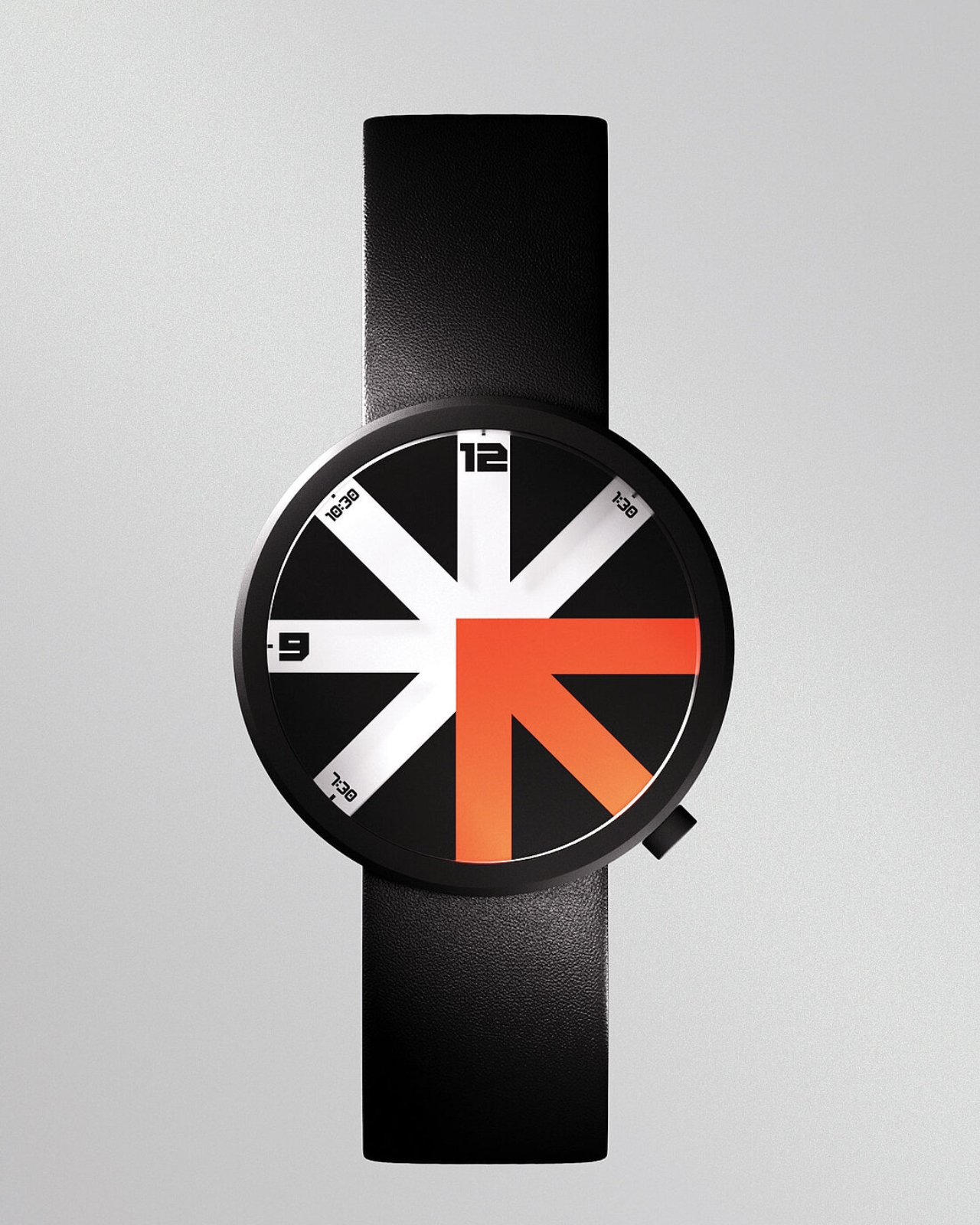
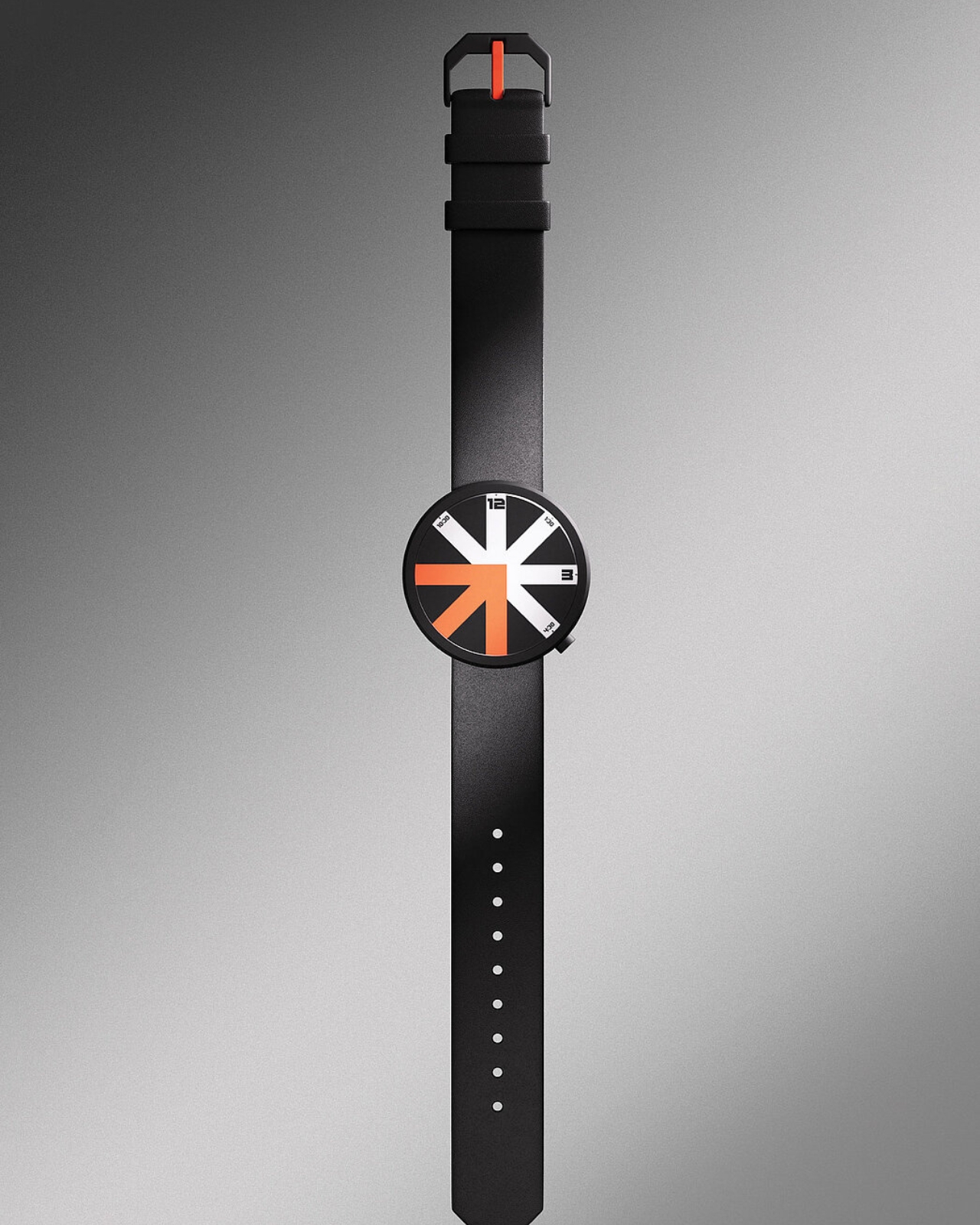
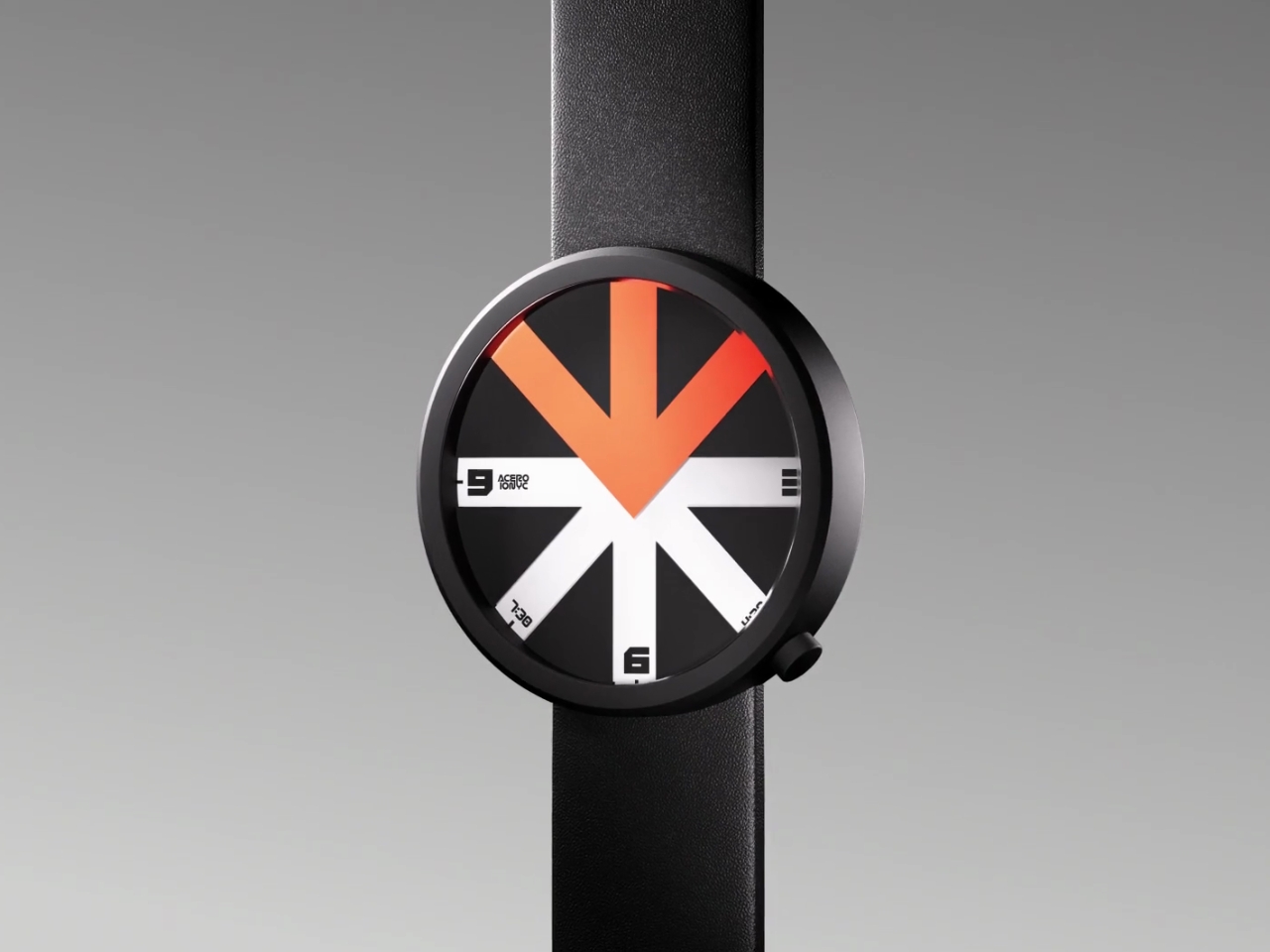
Enter the arrow. It’s possibly the most universal symbol we have for directing attention. You see arrows everywhere, from road signs to user interfaces, all doing the same basic job: pointing you somewhere. Lucin took this ubiquitous symbol and made it the entire concept of his watch. The ARROWatch face is divided into eight segments. Three of those segments are colored in a striking orange-red, forming an arrow shape. Five segments are left transparent. The rest of the watch face is black. This creates a kind of window effect where only certain portions of the time dial are visible at any given moment. The colored arrow literally guides your eye to the information you need.
What makes this particularly bold is what Lucin left out. The ARROWatch only displays hours and half-hours. No minute hand, no second hand, no fussy complications. We’re living in a time where we’re obsessed with precision (down to the millisecond on our smartphones) but this watch is telling you to chill out a bit. Do you really need to know it’s 3:47 and 32 seconds? Or is “about 3:30” good enough? This minimalist approach feels almost rebellious. We’re so accustomed to information overload that a watch that gives you less feels like a statement. It’s pushing back against the idea that more data equals better design. Sometimes, clarity comes from subtraction, not addition.
The aesthetic is unapologetically graphic. The black circle with its bold arrow in white and orange looks more like a wayfinding sign or a piece of modern art than a traditional timepiece. Paired with a sleek black leather strap, it’s the kind of thing that works equally well in a gallery, a coffee shop, or a design studio. It’s a conversation starter, which is exactly what good design should be. What’s particularly impressive is that this is Lucin’s debut watch design. There’s a fearlessness here that you don’t always see from first-time designers. He could have played it safe, creating something conventionally beautiful that would appeal to traditional watch collectors. Instead, he took a risk and created something that challenges our expectations.
Will everyone want to wear a watch that only tells time in half-hour increments? Probably not. But that’s not really the point. The ARROWatch exists to make us question our assumptions about everyday objects. It reminds us that innovation doesn’t always mean adding more features or making things more complex. Sometimes, the most radical thing you can do is simplify, focus, and ask people to look at something familiar in an entirely new way. And honestly? That’s exactly what good design is supposed to do.
Apple’s highly anticipated 2026 MacBook lineup introduces three distinct models, each tailored to meet the needs of a diverse user base. The lineup includes the budget-friendly MacBook, the performance-driven M5 MacBook Air, and the innovative OLED MacBook Pro. With advancements in chip technology, display innovation, and connectivity, these devices represent a significant evolution in Apple’s […]
For such a tiny piece of tech, a good wireless microphone can have an outsize impact on the quality of your videos. If you've been waiting for a serious sale to pick up a mic of your own, Cyber Monday may be your chance. The DJI Mic Mini kit is on sale for more than half off: you can snag it for a mere $80. That's an all-time low price compared to the set's usual $170 price tag. The full package includes two mics, a receiver and a charging case, as well as two windscreens and other accessories.
Depending on what peripherals you need along with your wireless microphone, DJI has several other promising Cyber Monday deals. If you don't want the charging case, you can get the Mic Mini without for just $66, which is a of 45 percent discount. Another option is a bundle featuring a single mic, receiver, charging dock and accessories for $45, or 49 percent off the regular price.
DJI's Mic Mini microphones (transmitters) weigh just a third of an ounce and attach easily to subjects via magnets or clips. Everything pairs automatically and they offer high quality 24-bit, 20Hz to 20K Hz recording. They also connect easily to smartphones over Bluetooth and other DJI devices like the Action 5 Pro and Osmo Pocket 3 cams using DJI's OsmoAudio direct connection. With a range of 1300 feet and 48 hours of battery life with the charger case, they're an excellent addition to a creator's bag of tricks. Again, note that you can grab one a big cheaper without the charging case.
DJI's Mic Mini deal includes two mic transmitters and a receiver that can be connected to a camera or phone, along with the charging case, two windscreens, a splitter USB-C cable for charging, a 3.5mm camera audio cable, two magnetic clips, a smartphone adapter, a charging cable and a compact carrying case. At this price the deal may not last the week, so if you've been eyeing one, act quickly.
This article originally appeared on Engadget at https://www.engadget.com/deals/dji-cyber-monday-deals-include-the-mic-mini-kit-with-a-charging-case-on-sale-for-just-80-110007210.html?src=rss
Have you ever felt overwhelmed by the sheer volume of information you need to process, whether for work, study, or personal projects? It’s a common struggle in today’s fast-paced world, but what if the solution was hiding in plain sight? Enter NotebookLM, Google’s AI-powered tool that’s quietly redefining how we approach research, planning, and learning. […]
The smartphone camera industry is witnessing a significant evolution, with Samsung and Sony at the forefront of innovation. The Samsung Galaxy S26 Ultra introduces a wider f/1.4 aperture, designed to improve low-light photography and enhance background blur for more professional-looking portraits. On the other hand, Sony’s LYT901 sensor, set to debut in flagship devices from […]
What if you could access a innovative AI tool that rivals the best proprietary systems, without spending a dime? Enter Flux 2.0, the innovative open source alternative to Nano Banana Pro. Developed by Black Forest Labs, this powerful image generation and editing model is shaking up the industry by offering advanced features like lifelike realism, […]
We spend a lot of time staring at our screens, so it’s worth finding one that actually feels good to use. The right monitor can make your desk setup feel faster, brighter and easier on the eyes, whether you’re deep into spreadsheets, watching a show or chasing higher frame rates in your favorite game.
What the best monitor means, though, depends on what you do. Gamers might want smooth, fast refresh rates. Creators usually prioritize color accuracy. Office workers and students just need something clear, comfortable and reliable. Thankfully, monitors in 2025 cover all of those needs, with options that range from compact 24-inch displays to massive ultrawides built for serious multitasking.
We’ve tested a variety of monitors across price ranges and use cases to find the ones that stand out for everyday use. No matter your budget, setup or screen-size preference, these are the monitors that make your PC, and your time in front of it, a little better.
The cheapest monitors are still TN (twisted nematic), which are strictly for gamers or office use. VA (vertical alignment) monitors are also relatively cheap, while offering good brightness and a high contrast ratio. However, content creators will find that LCD, IPS displays (in-plane switching) deliver better color accuracy, pixel density, picture quality and wide viewing angles — making them a strong option for general computer monitor use.
If maximum brightness is important, a quantum dot LCD display is the way to go — those are typically found in larger displays. OLED panels are now available and offer the best blacks and color reproduction, but they lack the brightness of LED or quantum dot displays. Plus, they’re expensive. The latest type of OLED monitor, called QD-OLED from Samsung, is now common among gaming monitors. The most notable advantage is that it can get a lot brighter, with recent models hitting up to 1,000 nits+ of peak brightness.
MiniLEDs are now widely used in high-end displays. They’re similar to quantum dot tech, but as the name suggests, it uses smaller LED diodes that are just 0.2mm in diameter. As such, manufacturers can pack in up to three times more LEDs with more local dimming zones, delivering deeper blacks and better contrast. MiniLED displays also tend to offer excellent backlight control, making them a great choice for HDR content and video editing.
Screen size, resolution and display format
Where 24-inch displays used to be more or less standard (and can still be useful for basic computing), 27-, 32-, 34- and even 42-inch displays have become popular for entertainment, content creation and even gaming these days.
Nearly every monitor used to be 16:9, but it’s now possible to find 16:10 and other more exotic display shapes. On the gaming and entertainment side, we’re also seeing curved monitors and widescreen ultrawide monitors with aspect ratios like 21:9. If you do decide to buy an ultrawide display, however, keep in mind that a 30-inch 21:9 model is the same height as a 24-inch monitor, so you might end up with a smaller display than you expected.
A 4K monitor is nearly a must for content creators, and some folks are even going for 5K or all the way up to 8K. Keep in mind, though, that you’ll need a pretty powerful computer with a decent graphics card to drive all those sharp pixels. And 4K higher resolution should be paired with a screen size of 27 inches and up, or you won’t notice much difference between 1440p. At the same time, I wouldn’t get a model larger than 27 inches unless it’s 4K, as you’ll start to see pixelation if you’re working up close to the display. That’s when a lower resolution monitor shows its limits.
One new monitor category to consider is portable monitors designed to be carried and used with laptops. Those typically come in 1080p resolutions and sizes from 13-15 inches. They usually have a lightweight kickstand-type support that folds up to keep things compact and maximize portability and functionality.
HDR
HDR adds vibrancy to entertainment and gaming – but be careful before jumping in. Some monitors that claim HDR on their marketing materials don’t even conform to a base standard. To be sure that a display at least meets minimum HDR specs, you’ll want to choose one with a DisplayHDR rating with each tier representing maximum brightness in nits.
However, the lowest DisplayHDR 400 and 500 tiers may disappoint you with a lack of brightness, washed out blacks and mediocre color reproduction. If you can afford it, the best monitor to choose is a model with DisplayHDR 600, 1000 or True Black 400, True Black 500 and True Black 600.
Where televisions typically offer HDR10 and Dolby Vision or HDR10+, most PC monitors only support the HDR10 standard, other than a few (very expensive) models. That doesn’t matter much for content creation or gaming, but HDR streaming on Netflix, Amazon Prime Video and other services won’t look quite as punchy. In addition, the best gaming monitors are usually the ones supporting HDR600 (and up), rather than content creation monitors – with a few exceptions.
Refresh rate
High refresh rate is a key feature, particularly on gaming monitors. A bare minimum nowadays is 60Hz, and 80Hz and higher refresh rates are much easier on the eyes. However, most 4K displays top out at 60Hz with some rare exceptions and the HDMI 2.0 spec only supports 4K at 60Hz, so you’d need at least DisplayPort 1.4 (4K at 120Hz) or HDMI 2.1. The latter is now available on a number of monitors, particularly gaming displays. However, it’s only supported by the latest NVIDIA RTX 3000- and 4000-series, AMD RX 6000-series GPUs. Support for G-Sync and AMD FreeSync is also something to look for if you want to eliminate screen tearing and stuttering during fast-paced gameplay — especially when paired with a high refresh rate.
Inputs
There are essentially three types of modern display inputs: Thunderbolt, DisplayPort and HDMI. Most monitors built for PCs come with the latter two, while a select few (typically built for Macs) will use Thunderbolt. To add to the confusion, USB-C ports may be Thunderbolt 3, and by extension, DisplayPort compatible, so you may need a USB-C to Thunderbolt or DisplayPort cable adapter depending on your display.
Color bit depth
Serious content creators should consider a more costly 10-bit monitor that can display billions of colors. If budget is an issue, you can go for an 8-bit panel that can fake billions of colors via dithering (often spec’d as “8-bit + FRC”). For entertainment or business purposes, a regular 8-bit monitor that can display millions of colors will be fine.
Color gamut
The other aspect of color is the gamut. That expresses the range of colors that can be reproduced and not just the number of colors. Most good monitors these days can cover the sRGB and Rec.709 gamuts (designed for photos and video respectively). For more demanding work, though, you’ll want one that can reproduce more demanding modern gamuts like AdobeRGB, DCI-P3 and Rec.2020 gamuts, which encompass a wider range of colors. The latter two are often used for film projection and HDR, respectively.
Monitor FAQs
Is OLED better than mini-LED for monitors?
OLED is better than mini-LED in many areas but not all. Here are the advantages of OLED panels:
OLED monitors don't have any "blooming" or halos around bright parts of the image.
OLEDs have blacks with zero brightness, which is not achievable on mini-LED. That means they also have higher contrast ratios.
OLEDs consume less energy.
OLEDs have faster response times for gaming.
And here are the advantages of mini-LED monitors:
They are brighter (often much brighter), so it can be better for HDR content.
They don't suffer from burn-in like OLED can.
What size monitor is best for a home office?
This depends on the individual. For normal use, 27-32 inches is the sweet spot. If you're one who likes many windows open at a time (like a stock broker), then you might want to go up to 37 or even 42 inches.
Are curved monitors worth it for gaming?
If you need as much speed as possible, a curved monitor lets you rapidly look around the screen without changing focus or moving your head as much compared to a flat screen. It also provides more immersion. The drawback is that curved displays tend to be wider so they take up more desk space. They're also generally more expensive.
This article originally appeared on Engadget at https://www.engadget.com/computing/accessories/best-monitor-130006843.html?src=rss