Futurewave Just Built a Smartwatch That Works Off the Grid

Most smartwatches are sold on the premise of convenience. They track your steps, ping you when you get a text, tell you to breathe, and remind you to stand up every hour like a politely nagging coworker strapped to your wrist. I don’t say that as a knock on the category. Convenience is genuinely valuable. But somewhere along the way, the smartwatch conversation became entirely about optimization and lifestyle metrics, and we kind of forgot that the wrist is also a really good place to put something that could keep you alive.

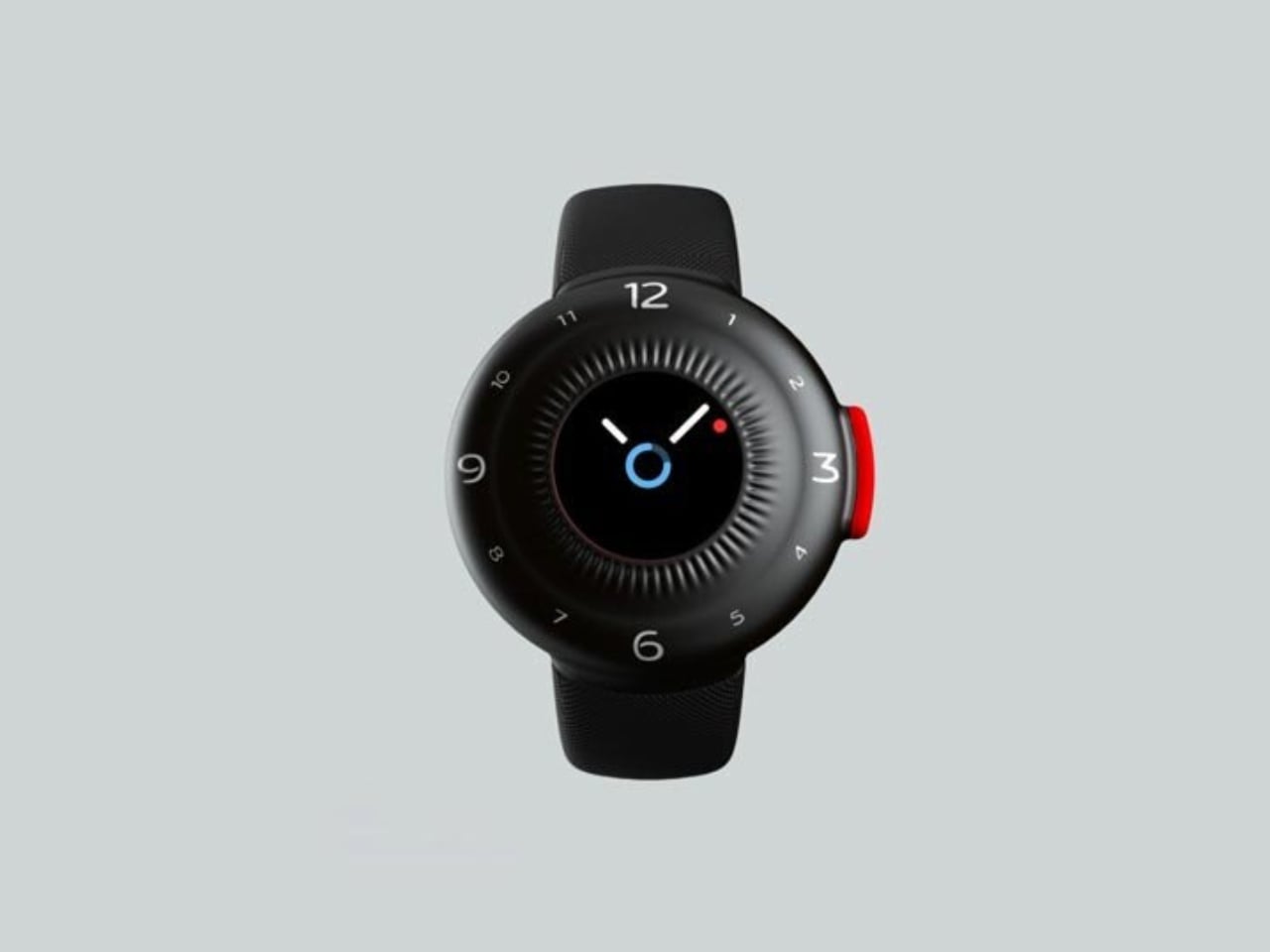
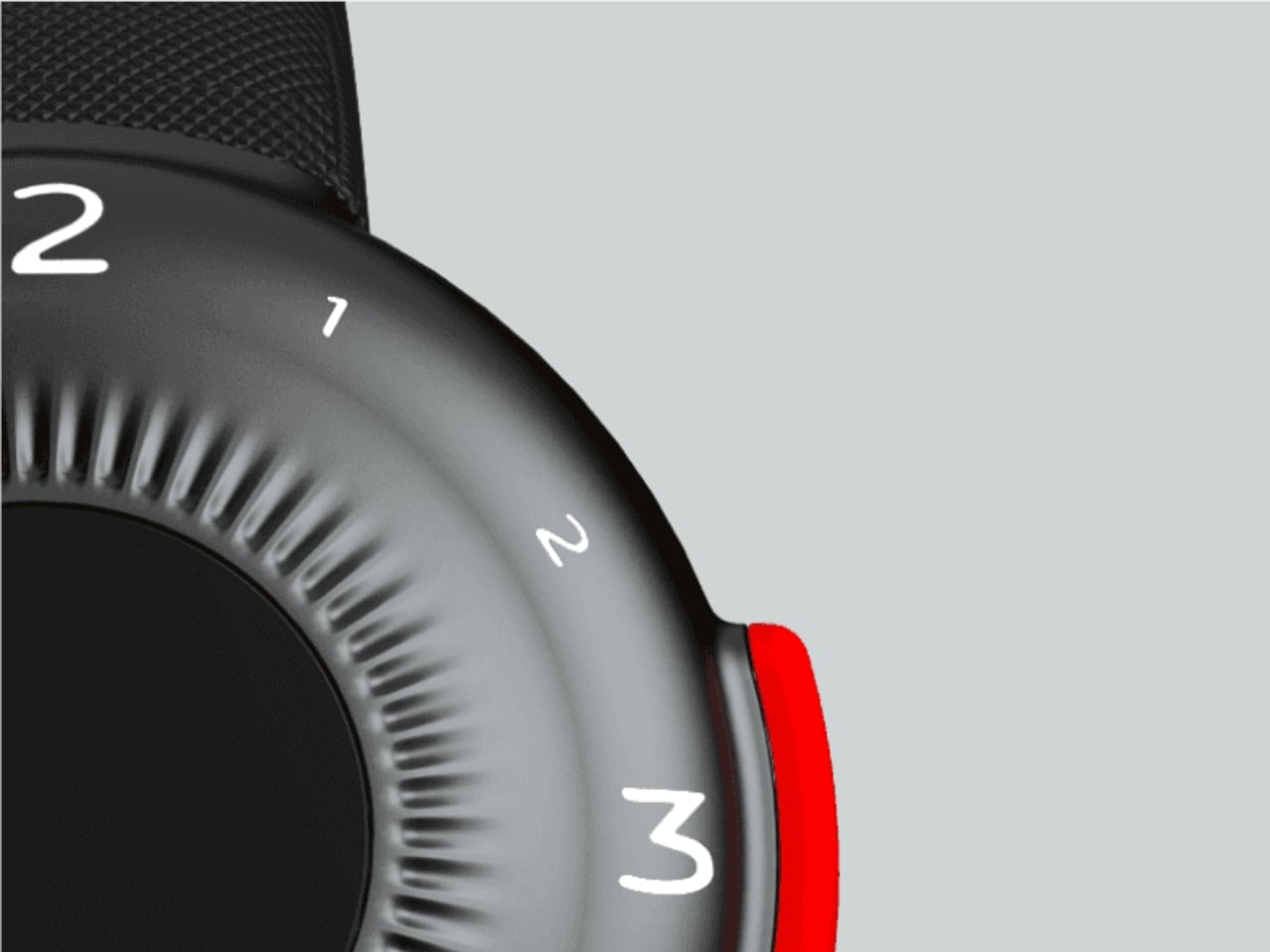
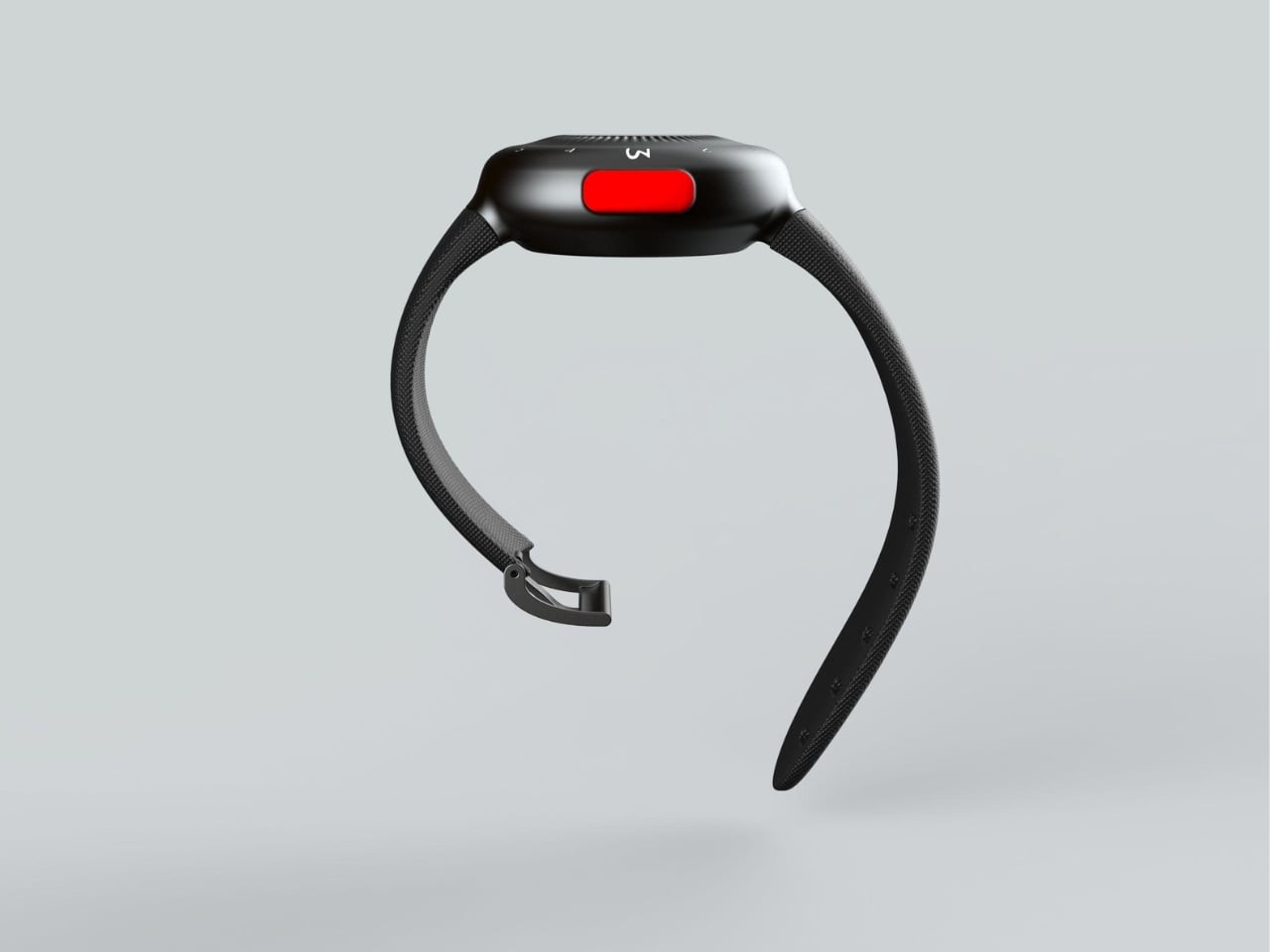
That’s where O-Boy comes in. Developed by Brussels-based design studio Futurewave, O-Boy is a satellite-connected smartwatch built specifically for emergencies in places where mobile networks simply don’t exist. No bars. No Wi-Fi. No backup signal. We’re talking mountains, open ocean, remote job sites, the kind of geography that doesn’t care about your carrier plan. In those environments, O-Boy functions as a direct link to satellite communication, allowing the wearer to transmit an emergency alert regardless of terrestrial infrastructure.

Designer: Futurewave
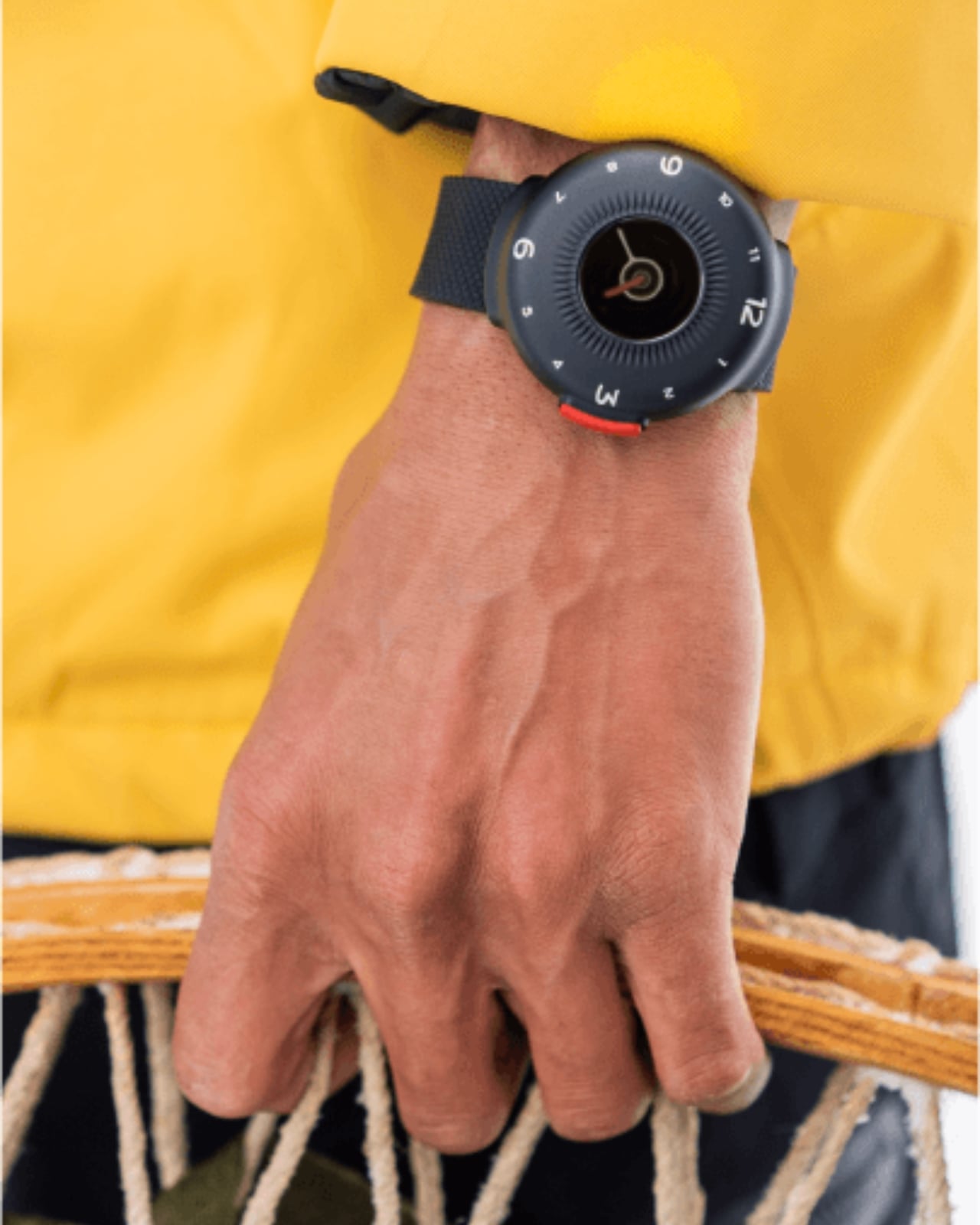
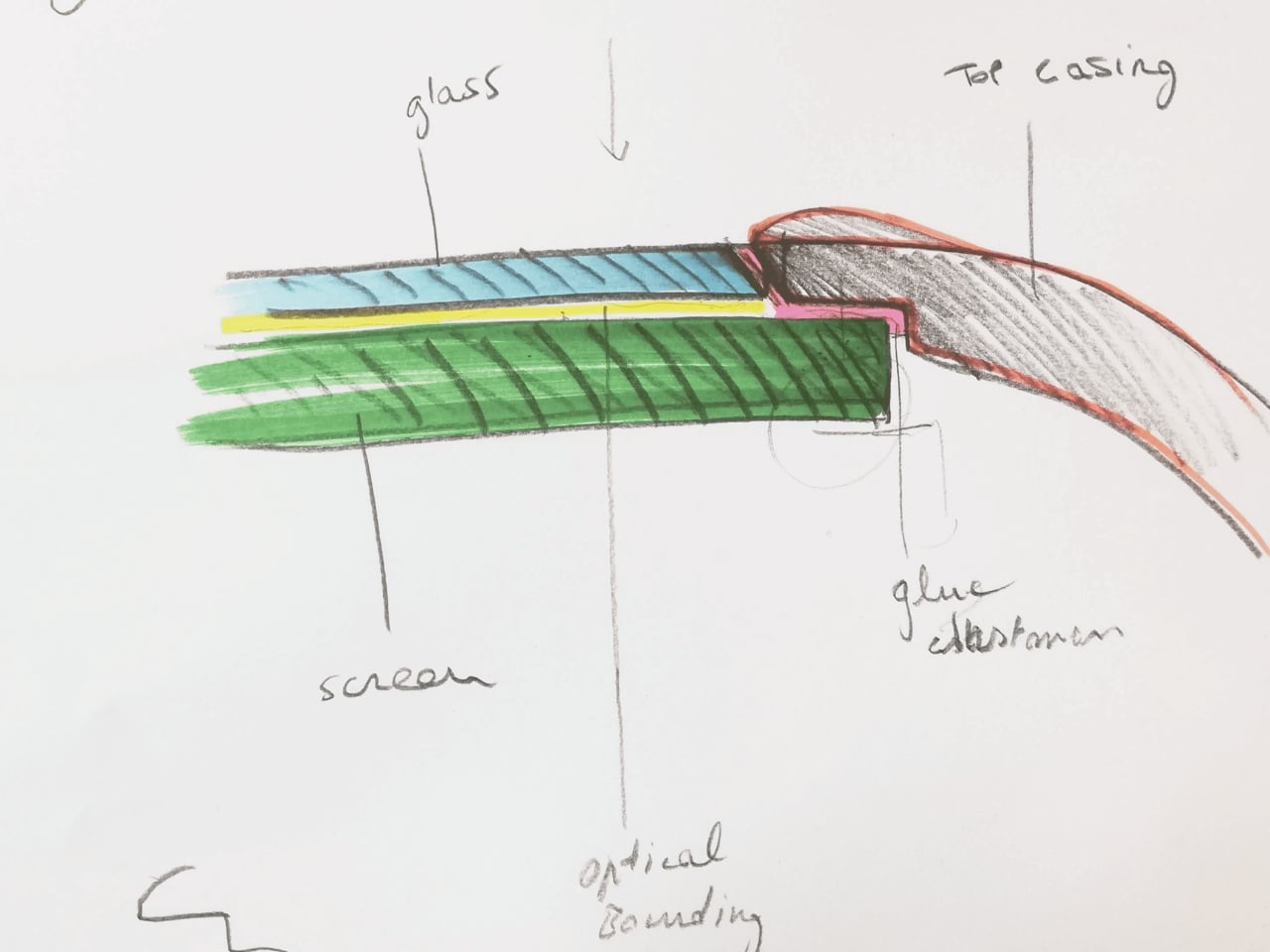
The premise sounds straightforward enough, but the execution is what makes this project interesting. Getting satellite communication hardware into a compact, wearable form factor is not a small feat. Futurewave brought together product designers, electronics engineers, and antenna specialists to make it work, and rethought the assembly system entirely from how conventional wearables are manufactured. That kind of cross-disciplinary collaboration tends to produce things that actually push the category forward rather than just iterating on what’s already there.
Visually, O-Boy reads as deliberate and utilitarian without being overtly tactical or rugged-for-rugged’s-sake. It doesn’t look like a watch that belongs exclusively to climbers or military personnel, which I think is actually the right call. The moment you design something to look extreme, you narrow your audience to people who already identify with that world. O-Boy appears to be reaching for a broader user: anyone who spends time in remote environments, whether for work or adventure, and wants a layer of safety that their phone simply cannot provide.
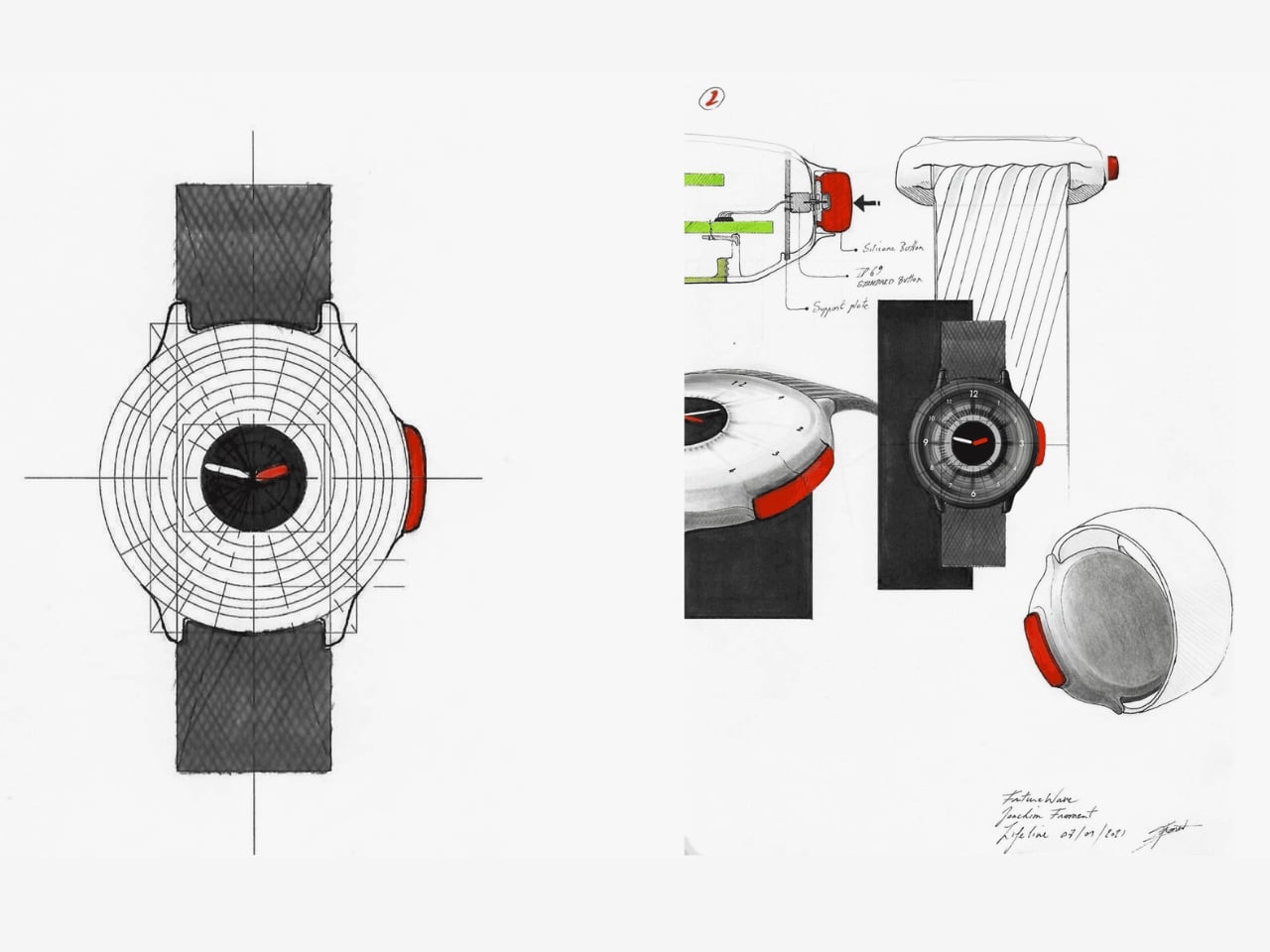
I’ll be honest about something. I’ve never been fully convinced that the average smartwatch user needs another notification device. The market is crowded, the differentiation is thin, and most new entries end up competing on specs that only matter to enthusiasts. O-Boy sidesteps that conversation almost entirely. It’s not trying to be the smartest watch. It’s trying to be the one you’d actually want on your wrist when a situation becomes life-or-death. That’s a completely different design brief, and it produces a completely different kind of product.
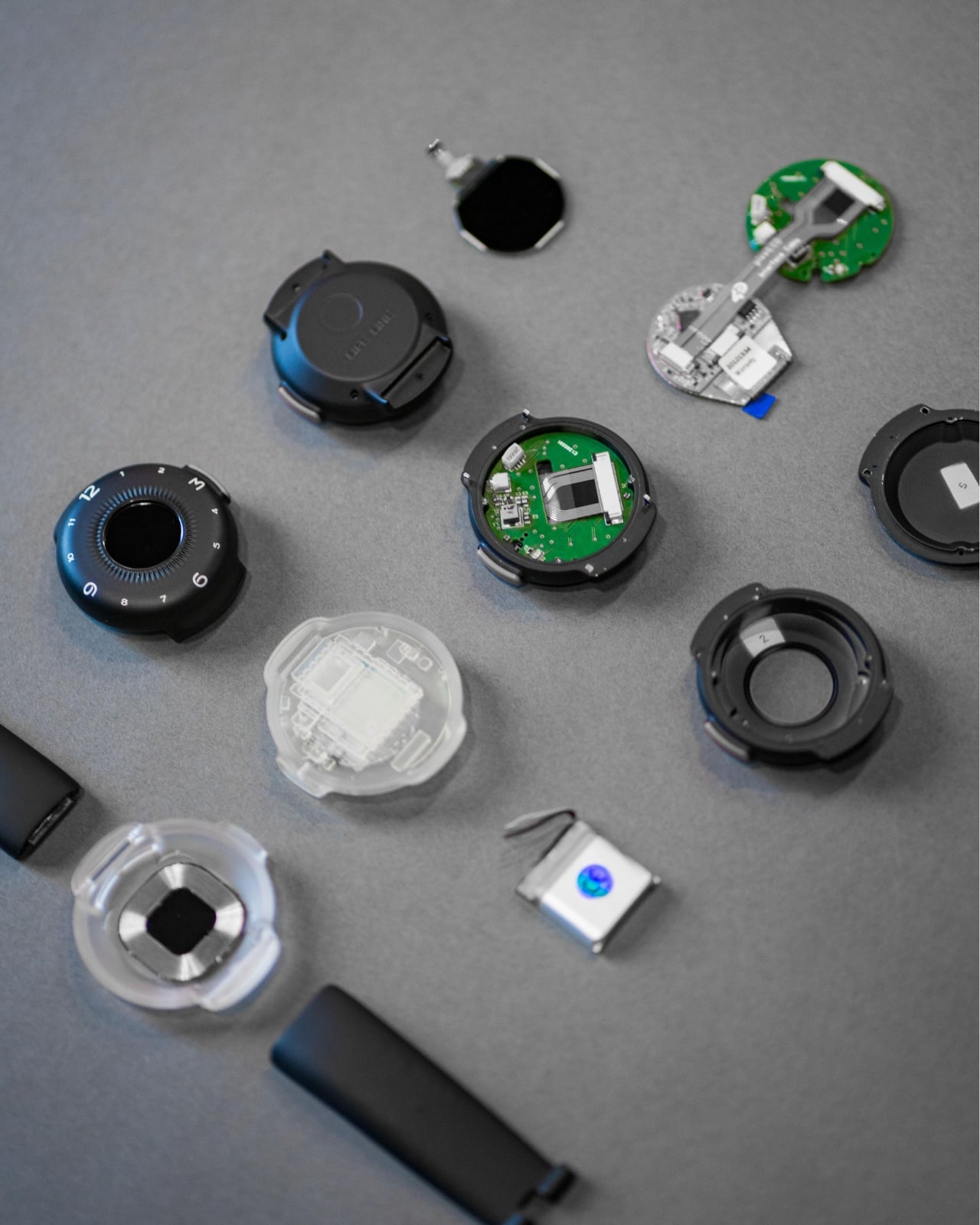
What I appreciate most is that the project seems to understand its context. Conventional mobile networks cover only a fraction of the Earth’s surface. Vast swaths of ocean, mountain ranges, deserts, and rural work sites exist in a communication dead zone that we collectively don’t think about until something goes wrong. The Apple Watch’s satellite SOS feature hinted at this need, but that capability is baked into a device designed primarily for a very different kind of user, sold at a premium price point and wrapped in a broader ecosystem. O-Boy is positioning itself as something more focused, more purpose-built, and arguably more honest about what it’s actually for.
Does it solve every problem in the wearable safety space? Almost certainly not. Satellite communication latency, subscription models for satellite access, and battery constraints are all real questions that any device in this category has to reckon with. Futurewave hasn’t published exhaustive technical specs publicly, so some of those answers remain open. But as a design concept and a signal of where wearables could be heading, it’s genuinely compelling.
The best design doesn’t ask you to change your habits. It meets you exactly where you are, anticipates the moment things go wrong, and gives you a way through. O-Boy feels like it was built with that thinking at its core. Whether it reaches mass production or stays within niche markets, the conversation it’s starting is one worth having.

The post Futurewave Just Built a Smartwatch That Works Off the Grid first appeared on Yanko Design.


Combining Claude Code & Obsidian Vaults for Persistent Project Memory

Combining Claude Code & Obsidian Vaults for Persistent Project Memory Screenshot-style view of an Obsidian markdown vault with architecture notes, tasks, and bug lists for a project.

Artificial intelligence has long struggled with memory retention, particularly in extended workflows or complex projects. This limitation often forces users to reintroduce context repeatedly, disrupting productivity and increasing the risk of errors. In a recent breakdown by World of AI, the integration of Claude Code with Obsidian is presented as a solution to this challenge. […]

The post Combining Claude Code & Obsidian Vaults for Persistent Project Memory appeared first on Geeky Gadgets.

Posted in Uncategorized

Tired of Missing Turns? Google Maps New 3D View is a Game Changer

Tired of Missing Turns? Google Maps New 3D View is a Game Changer Google Maps

Google Maps has introduced a significant update designed to transform the way you navigate and explore your surroundings. With a focus on a redesigned interface, advanced AI-powered features, and innovative 3D technology, this update aims to provide a more seamless, personalized, and visually engaging experience. Initially launched in the United States and India, the update […]

The post Tired of Missing Turns? Google Maps New 3D View is a Game Changer appeared first on Geeky Gadgets.

Posted in Uncategorized

Discord Alternatives Compared 2026 : Zulip, TeamSpeak, Matrix, Stoat, Fluxer & More

Discord Alternatives Compared 2026 : Zulip, TeamSpeak, Matrix, Stoat, Fluxer & More Discord Alternatives

Discord’s growing reliance on government ID verification and its alleged ties to surveillance entities have sparked widespread privacy concerns among users. Gamers Nexus explores whether self-hosted alternatives can address these issues, testing platforms like Matrix, TeamSpeak and Fluxer to evaluate their privacy features, usability and overall functionality. For instance, Matrix offers end-to-end encryption and a […]

The post Discord Alternatives Compared 2026 : Zulip, TeamSpeak, Matrix, Stoat, Fluxer & More appeared first on Geeky Gadgets.

Posted in Uncategorized

Forget the Pro Max: Apple’s New ‘Ultra’ Lineup is Coming for Your Wallet

Forget the Pro Max: Apple’s New ‘Ultra’ Lineup is Coming for Your Wallet AirPods Ultra concept showing tiny camera sensors and notes about an H3 chip and stronger noise cancellation.

Apple is reportedly preparing to expand its premium product lineup with a series of “Ultra” devices, signaling a bold step forward in technology and design. These rumored products include a foldable iPhone, advanced AirPods, a larger iPad, a high-performance MacBook, and a powerful iMac. Each device is expected to incorporate new technologies and innovative designs, […]

The post Forget the Pro Max: Apple’s New ‘Ultra’ Lineup is Coming for Your Wallet appeared first on Geeky Gadgets.

Posted in Uncategorized

Perplexity Computer AI Agent Guide : Browsing, Files & Over 400 Integrations

Perplexity Computer AI Agent Guide : Browsing, Files & Over 400 Integrations Pricing visual showing Perplexity Computer at $200 per month with credits that can run out for heavy users.

Perplexity Computer, as explained by David Ondrej, is a cloud-hosted AI system designed to handle complex tasks such as web automation, file generation and software integration. Its architecture includes features like dual virtual machines for enhanced security and dynamic task routing via the Opus 4.6 orchestrator, which assigns tasks to the most suitable AI models. […]

The post Perplexity Computer AI Agent Guide : Browsing, Files & Over 400 Integrations appeared first on Geeky Gadgets.

Posted in Uncategorized

Firefly is getting rebooted as an animated series

Firefly aired for just one season in 2002 before Fox canceled it. In the 24 years since, the sci-fi show has skyrocketed in popularity and now fans are finally getting more. Nathan Fillion has announced that an animated Firefly series is currently in advanced development, Deadline first reported. 

Fillion shared the news at AwesomeCon during a live taping of his podcast Once We Were Spacemen with his Firefly co-stars Gina Torres, Morena Baccarin, Summer Glau, Sean Maher, Jewel Staite and Alan Tudyk. Tudyk co-hosts the podcast, in which the duo look back at their careers and interview past coworkers. Each of the actors present at AwesomeCon are expected to voice the animated versions of their characters.

This isn't one of those maybe one day it will happen announcements, with many steps already being taken. The animated reboot is under the direction of showrunners Tara Butters (Agent Carter, Reaper) and Marc Guggenheim (DC's Legends of Tomorrow, Arrow) — original creator Joss Whedon is not involved, but has given his blessing. It has early concept art from ShadowMachine, an Oscar- and Emmy-winning animation studio. Fillion is producing the show through Collision33, his production company, and with 20th Television Animation. There's even already a script in place. 

According to Fillion, the one thing left is a home for the series. He and his co-stars took to Once We Were Spacemen's Instagram to provide more details and implore FireFly fans to show demand for the reboot.

Firefly took place in 2517, centuries after a universal civil war. It followed a group of people living aboard a transport ship, Serenity, flying through the galaxy. In 2005, the show got a sequel in the form of a movie, Serenity. 

This article originally appeared on Engadget at https://www.engadget.com/entertainment/tv-movies/firefly-is-getting-rebooted-as-an-animated-series-120604649.html?src=rss

How and where to buy refurbished tech online

In good news for our wallets and the environment at large, many electronic devices like phones and tablets last longer now than they once did. That means refurbished gadgets can have more life than ever before. There are no laws governing the terms, but refurbished or renewed devices tend to be a level above just plain “used.” At minimum, refurbished tech should have undergone cleaning and diagnostic testing. Some sellers also replace components like batteries and screens. Once ready for sale, these devices should operate as if they were new, with only minor scuffs indicating their history.

Refurbished devices not only save you a bit of cash, they have a drastically lower carbon footprint since most environmental impact comes from manufacturing. It’s more efficient than recycling and helps keep e-waste out of landfills. But there are better places to shop refurbished tech than others. We’ve gathered /a few recommendations, along with our advice on what to look for when you start shopping for refurbished gear.

Refurbished is not the same as used. Used items tend to be sold “as-is,'' which means you’re simply inheriting whatever mileage and quirks a device had when the previous owner said goodbye to it. It’s true that most refurbished items were previously owned, and many are a result of the growing trend of trading in your old device when you upgrade. But others were hardly used at all and are one of the millions of returns generated each year. Either way, a properly refurbished item has undergone testing to verify that it works, along with cleaning, repairs and parts replacement as needed.

Since there are no government regulations for renewed items, it’s up to the sellers to define what steps they take to ready a device for sale. And it’s up to the buyer to find out what those steps are before taking the plunge. The processes for refurbishing devices from Apple, Bose, Microsoft, Google Pixels and Samsung, for example, include cleaning, inspection, parts replacement as needed and shipment in a new box with the originally supplied accessories. They also all provide a one-year warranty.

A refurbished device should perform as well as its new counterpart, but the only way to guarantee that’s the case is to make sure it comes with a warranty. All of the sites we recommend below include a warranty with the products they sell. If you see something labeled as refurbished, but doesn’t include some sort of guarantee as to its reliability – shop elsewhere.

Also, a good return policy will let you send the item back (preferably with the same free shipping a new item gets) for any reason — including that you just changed your mind. That way if a refurbished product doesn’t look as good as you thought it would, you can send it back without having to prove there’s something wrong with it.

Most refurbished tech was used before it made its way back on the market. And while renewed items are cleaned, you’ll still need to consider your comfort with sanitation issues when buying things like headphones and earbuds.

Laptop and smartphone on round wooden table in cozy interior.
Polina Lebed via Getty Images

We recommend going directly to the manufacturer whenever possible, especially for more technical items like smartphones and laptops. If you need a new MacBook, check out Apple’s refurbished stock first; if you want a new Galaxy phone, hit up Samsung before anyone else. Repairs will be handled using genuine parts and you’re far more likely to get items that were properly unpaired from the original owner and all data wiped.

Retailers like Amazon, Walmart, and Best Buy are decent options if you’re on a tighter budget or if you’re looking for gadgets from a manufacturer that may not have its own refurbished outlet. Refurbished marketplaces like BackMarket can be useful if you’re looking for older, more specific items, or if price is the number one factor for your purchase.

Some smaller manufacturers like Dyson, Vitamix, Nintendo and JBL offer their own refurbished products, but for many other brands, you may need to head to a retailer.

Check out more from our spring cleaning guide.

This article originally appeared on Engadget at https://www.engadget.com/mobile/where-to-buy-refurbished-tech-140028700.html?src=rss

The $500 Question: Is MacBook Neo Enough or is the M5 Air Worth the Jump?

The $500 Question: Is MacBook Neo Enough or is the M5 Air Worth the Jump? MacBook Neo and M5 MacBook Air shown together, highlighting size differences, bezels, and the missing notch on Neo.

Choosing between the MacBook Neo and the M5 MacBook Air can be a complex decision, especially when factors such as performance, design, battery life, and overall value come into play. While the Neo provides a budget-friendly entry point, the M5 Air offers advanced features and superior performance, making it the better option for most users. […]

The post The $500 Question: Is MacBook Neo Enough or is the M5 Air Worth the Jump? appeared first on Geeky Gadgets.

Posted in Uncategorized

MacBook Pro M5 Max 16-inch review: Still the pinnacle

We've loved Apple's 2021-era MacBook Pro design from the start, and the M5 Max edition is once again the professional notebook to beat. But it's hard to deny that the star of Apple's recent laptop rollout wasn't its most powerful Pro systems — all eyes were on the $599 MacBook Neo. The MacBook Pro's next time to shine is likely this fall, when Apple is expected to finally deliver OLED models and a dynamic touchscreen interface.  (I’ve argued before that, at this point, Apple has no excuse not to give us touchscreen Macs.)

This generation of MacBook Pro might just be the last gasp of the 2021 remodel. It's still an incredibly powerful machine that's been honed to near-perfection, but if you're looking for something that feels truly new, it may be worth waiting several months. 

It's not too surprising to see the M5 Pro and Max MacBook Pros be relatively low-key efforts. Apple launched the M5 14-inch MacBook last fall with a mere press release. But at least that model delivered a noticeable leap in graphics performance. The new M5 Pro and Max chips are a bit faster than before, but they don't really have any major features to call out. (Unless you're super excited about Neural Accelerators for AI work.)

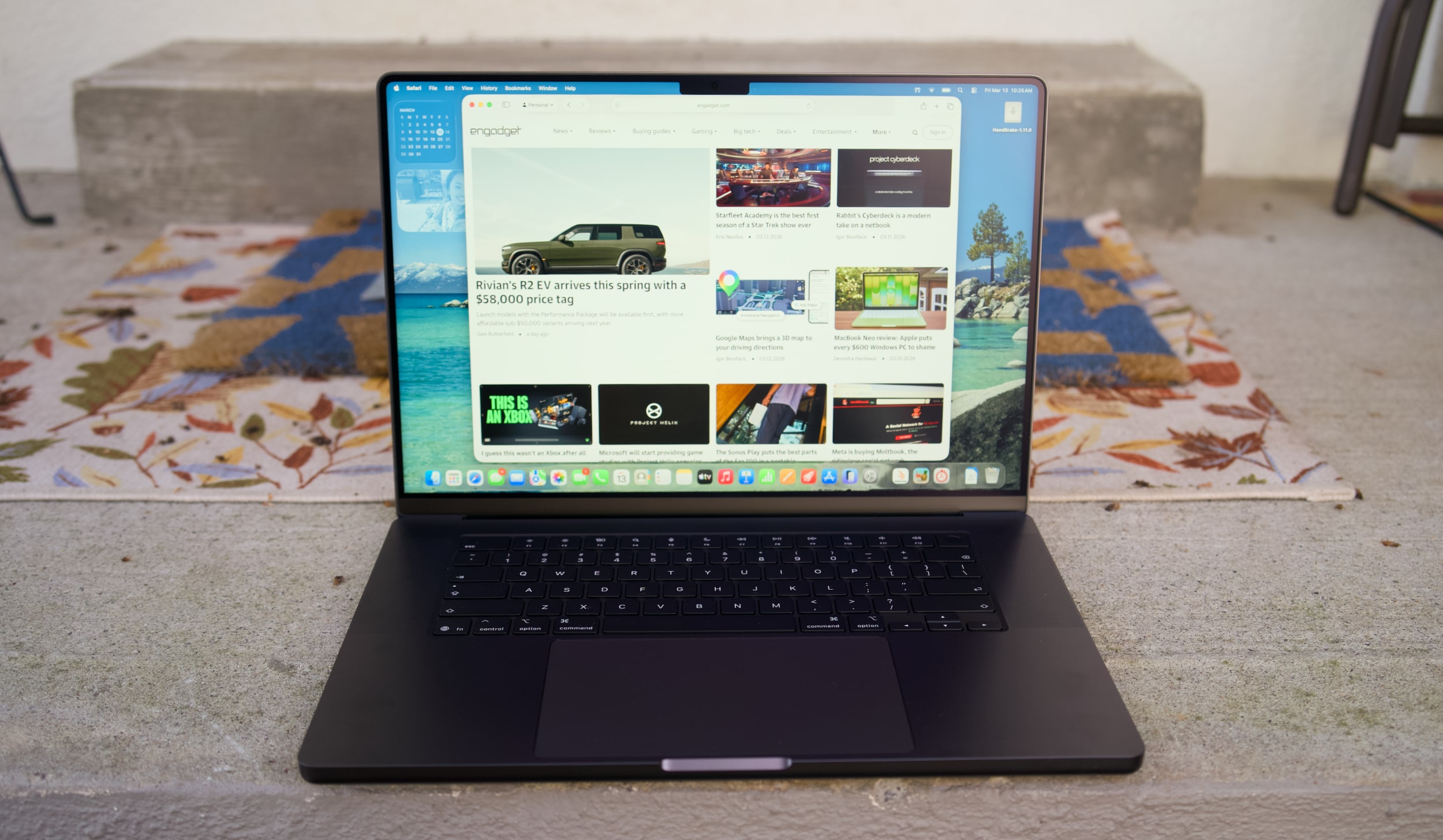
I don't want to sound like I'm complaining too much, though. The 16-inch M5 Max MacBook Pro I'm reviewing is still a gorgeous laptop, with an overall design that most premium Windows PC makers are still trying to copy. Apple's unibody metal frame design still feels rock solid. There's a generous amount of ports, including three Thunderbolt 5 USB-C connections, HDMI, a headphone jack and a SD card reader. Its 16-inch Liquid RetinaXDR screen also looks incredible, thanks to its bright Mini LED backlighting, and there's once again a nano-texture option to reduce glare. 

What else could you want in a laptop? I suppose there's the lingering feeling that an OLED screen would look better, with sharper contrast and pure black levels. But you'd be hard pressed to find much else to complain about with the MacBook Pro's screen. I'm also intrigued to see how Apple implements a touchscreen interface alongside macOS in upcoming MacBook Pros, but I'll admit, I haven't really been compelled to touch this laptop's display much. 

Touchscreens always seemed like a quixotic effort for laptops — they're nice to have, but Microsoft has been trying to shove them into PCs for 15 years now. The addition of touchscreens really didn't improve the overall Windows experience much. So I wasn't surprised to see Apple take its time bringing the technology to macOS — if you really want to swipe around screens, just get an iPad.

MacBook Pro 16-inch (2026, M5 Max) keyboard and trackpad
Devindra Hardawar for Engadget

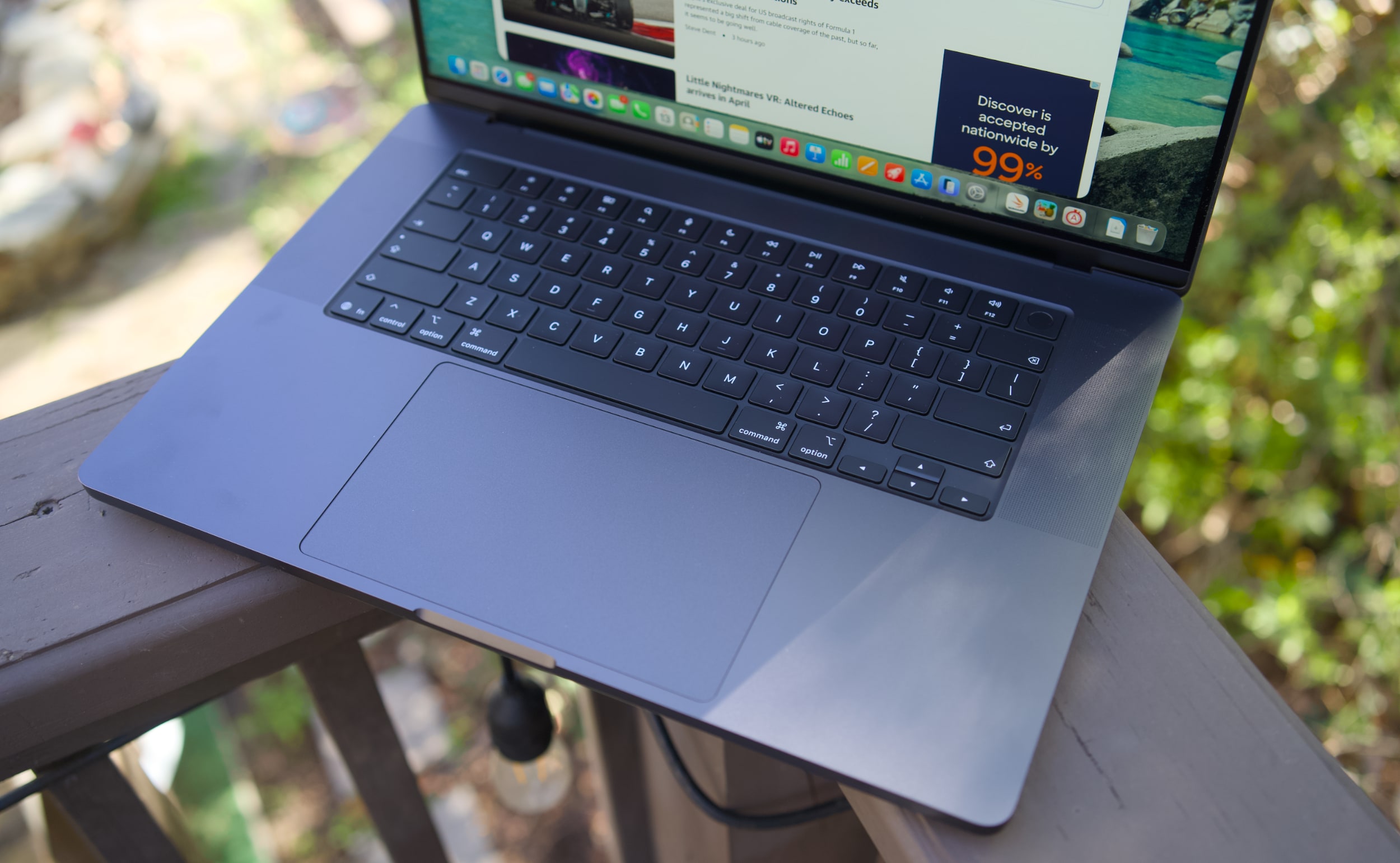
But back to this MacBook Pro: I still love everything about Apple's current design. Sure, the keyboard could have a bit more depth, but it withstood my furious typing like a champ. (Unlike Dell's XPS 14, which tried so hard to be a MacBook Pro-killer.) And the MacBook Pro's glass touchpad is still one of the best I've ever seen in a laptop.

Our review unit was also equipped with 32GB of RAM, a 4TB SSD, a 40-core GPU and Apple’s $150 nano-texture display upgrade, bringing the total for this M5 Max system to a whopping $6,149. That may seem excessive to most consumers, but for creative professionals who actually need the power of the M5 Max chip, it’s not that unusual. You can also save over $1,000 by opting for the M5 Pro chip instead. 

So what does the M5 Max bring to the party? Obviously, it's speedier than the M4 Max. Our review unit was 30 percent faster than the M4 Max-equipped MacBook Studio in the Geekbench 6 multi-threaded CPU benchmark. It's only 10 percent faster in Geekbench's single-threaded test, but that still gives Apple room to claim that it has the fastest chip core around. If you've got an M4 Max machine, you certainly don't need to dump it for this lineup. But if you've been hammering on an M1 Max or M2 Max system for years, you'll see some meaningful benefits from upgrading now.

Computer

Geekbench 6

Geekbench 6 GPU

Cinebench 2024

Apple MacBook Pro 16-inch (M5 Max, 2026)

4,338/ 29,261

145,309

192/2,150 | GPU: 22,374

Apple MacBook Pro 14-inch (M5, 2025)

4,310/18,003

48,840

197/1,034 | GPU: 6,143

Apple MacBook Pro 16-inch (M4 Pro, 2026)

3,925/22,456

70,197

178/1,689 GPU 9,295

Apple MacBook Pro 16-inch (M3 Max, 2024)

3,202/21,312

92,344

143/1,686 GPU 13,182

Apple says this new line of MacBook Pros also feature its latest SSD technology, which is up to twice as fast as before. Our review unit reached 13.8 GB/s write speeds and 13 GB/s read speeds in the ATTO disk speed test, whereas previous MacBook Pros hovered around 6 GB/s for read/write speeds. If you're working with huge data files every day, you'll likely notice the difference. Another benefit to the new hardware? Apple is now equipping every MacBook Pro with 1TB of storage by default. 

All of the M5 chips feature faster GPUs than before, but that's less noticeable on the M5 Max. I've never had trouble running a high-end game like Lies of P on the M2, M3 or M4 Max hardware, and once again it still runs incredibly well with the M5 Max in its native resolution, and with all of the graphics settings cranked up. All I'm looking for is a smooth 60 fps frame rate, and the MacBook Pros have delivered on that for years. macOS isn't the sort of platform where you'll be playing many high fps games, but the MacBook Pro's 120Hz refresh rate is equipped to handle them.

MacBook Pro 16-inch (2026, M5 Max) on a doorstep.
Devindra Hardawar for Engadget

Beyond raw performance, the MacBook Pro continues to be a joy to use. Its screen is gloriously bright, and its smooth refresh rate makes scrolling through documents and websites easy on the eyes. Its six-speaker setup remains the best audio experience I've ever heard on a laptop, allowing for crisp, detailed and surprisingly dynamic bass. When I'm too lazy to cast music to my Sonos speakers, I can still have a decent jam session on the MacBook Pro's built-in setup.

It's hard to improve much on the 30 hours and 16 minutes of battery life we saw on last year's 16-inch MacBook Pro, but the M5 Max model managed to beat that by 30 minutes. Realistically, it means you can likely use the MacBook Pro for a few days without needing to recharge, assuming you're not doing heavy-duty work the entire time.

MacBook Pro 16-inch (2026, M5 Max)
Devindra Hardawar for Engadget

You don't need me to sell you on the MacBook Pro; all you need to know is that the M5 Max actually delivers. Given how well the standard M5 14-inch MacBook Pro performed, I'd also expect a decent speed bump from the M5 Pro model. The only downside to the M5 systems is that they'll feel out of date quickly if the rumored OLED and touchscreen models arrive later this year. But if you need the best performance now, it's hard to go wrong with any MacBook Pro.


This article originally appeared on Engadget at https://www.engadget.com/computing/laptops/macbook-pro-m5-max-16-inch-review-still-the-pinnacle-120000325.html?src=rss