After one too many of you threatened to switch to Linux, Microsoft has published a long list of changes it plans to make to Windows 11. In a lengthy blog titled "Our commitment to Windows quality," Pavan Davuluri, the executive vice president of Windows and Devices, said the company has spent a "great deal" of time in recent months reading feedback from users. "What came through was the voice of people who care deeply about Windows and want it to be better," he said. To that end, Windows Insiders can expect to see some of the changes Microsoft plans in response to all criticism begin rolling out starting this month.
Most notably, Microsoft ease up on the AI pedal. "You will see us be more intentional about how and where Copilot integrates across Windows, focusing on experiences that are genuinely useful and well-crafted," writes Davuluri. As a first step, Microsoft says it will remove "unnecessary Copilot entry points," starting with apps like the Snipping Tool, Photos, Widgets and Notepad.
Elsewhere, users can look forward to additional taskbar customization, allowing them to position the interface element at the top or sides of the screen; less disruptive updates, with the option to shut down or restart your device without being forced to install a new patch; and a faster, less janky File Explorer. "Our first round of improvements will focus on a quicker launch experience, reduced flicker, smoother navigation and more reliable performance for everyday file tasks," said Davuluri.
Looking beyond the next two months, Microsoft notes it will work to improve performance across Windows, with “lowering the baseline memory footprint” of the operating system a key area of focus. Presumably, this plan of action is as much a response to the global memory shortage as it is user feedback. PC manufacturers are struggling right now, with a recent estimate warning the market could shrink as much as 8.9 percent year-over-year in 2026 due to the high cost of RAM and SSDs. On the subject of reliability, the company says reducing OS-level crashes and releasing higher quality drivers is a priority, as is making Bluetooth and USB connections less prone to errors and disconnects.
Microsoft's promise to fix Windows 11 is long overdue. In January, the company released a couple of emergencyupdates after what should have been a routine security patch caused bugs that left some PCs unable to shut down and broke Outlook. The general state of the operating system has led many to explore Linux alternatives like Bazzite. With Apple also recently releasing the $600 MacBook Neo, a laptop that few Windows manufacturers can match right now, Microsoft’s dominance in the PC market is looking vulnerable for the first time in more than a decade.
This article originally appeared on Engadget at https://www.engadget.com/computing/microsoft-will-yank-copilot-from-some-windows-apps-and-let-you-move-the-taskbar-again-202857203.html?src=rss
Nintendo is reportedly preparing a new version of the Switch 2 with a user-replaceable battery, according to Nikkei. This is to comply with a 2023 EU "right-to-repair" policy on portable electronics that mandates easy battery replacement.
The regulation also covers the Joy-Con 2 controllers, so they are reportedly being redesigned to allow users to replace each lithium-ion battery. We don't know when this new Switch 2 will hit store shelves, but the policy gives companies until 2027 to make the required changes.
This is great news for Europe, but the rest of the world isn't quite so lucky. There are no reported plans by Nintendo to bring this console refresh to other regions, but IGN notes that this could change if countries adopt similar policies to the EU. Tossing a perfectly good handheld console in the trash because the battery craps out isn't exactly fun, so here's hoping they do.
This EU legislation has forced other companies to make changes to their products. Apple has modified the design of newer iPhones to make it easier for consumers to swap out the battery. It's long been rumored that Sony will update its DualSense PS5 controllers for the same reason.
The EU regulates that by 2027, all smartphones must be equipped with replaceable batteries. The new iPhone’s adoption of a stainless steel battery case not only reduces the difficulty of removing the battery to meet EU regulations but also allows Apple to increase the battery… https://t.co/jLhEbw04po
It has also been suggested that the original Switch may stop being sold in the EU by the end of 2027. It's either that or redesign the now-ancient device. Nintendo hasn't issued an official response to any of this just yet. Engadget has reached out to the company and will update this post when we hear back.
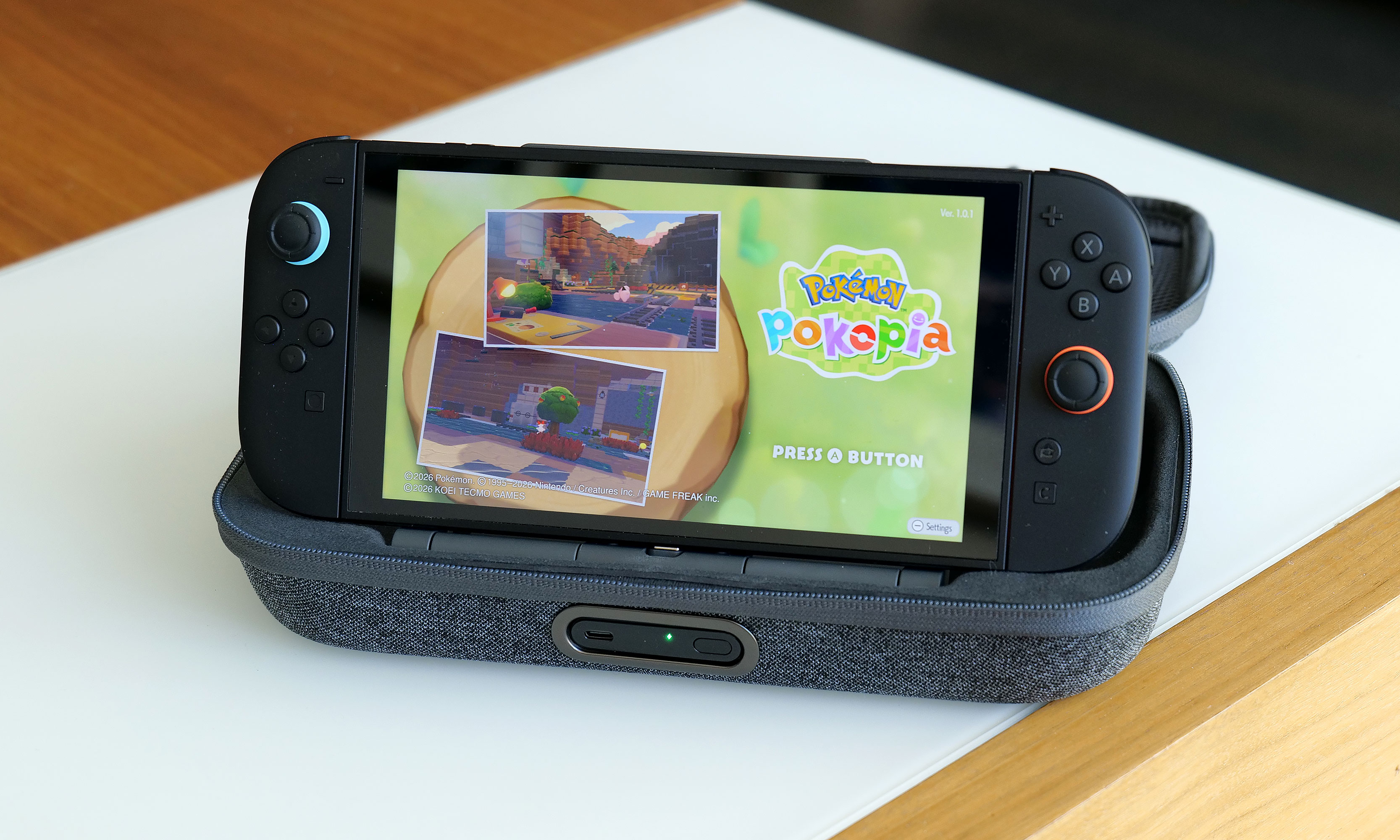
This has been a big week for the company's flagship console. It just received a software update that lets many older games run in 1080p while in handheld mode. There's also a little game called Pokémon Pokopiacurrently taking over the world.
This article originally appeared on Engadget at https://www.engadget.com/gaming/nintendo/nintendo-is-reportedly-making-a-switch-2-with-a-user-replaceable-battery-for-the-eu-172318540.html?src=rss
Last year, Belkin released a couple of cases for the Nintendo Switch 2 just in time for launch, including one that came with a handy battery pack. That one was simple and effective, but it felt a bit crude because it wasn't much more than a basic travel pouch with a generic power cell tossed inside. Now, Belkin is back with a Pro version of its Charging Case for the Nintendo Switch 2, featuring a more sophisticated battery pack along with a higher price tag ($100 vs. $70). So here’s the question for any Switch 2 owners still looking for a way to protect their console while keeping it topped off: Is a more elegant charging solution really worth the extra money?
Case design
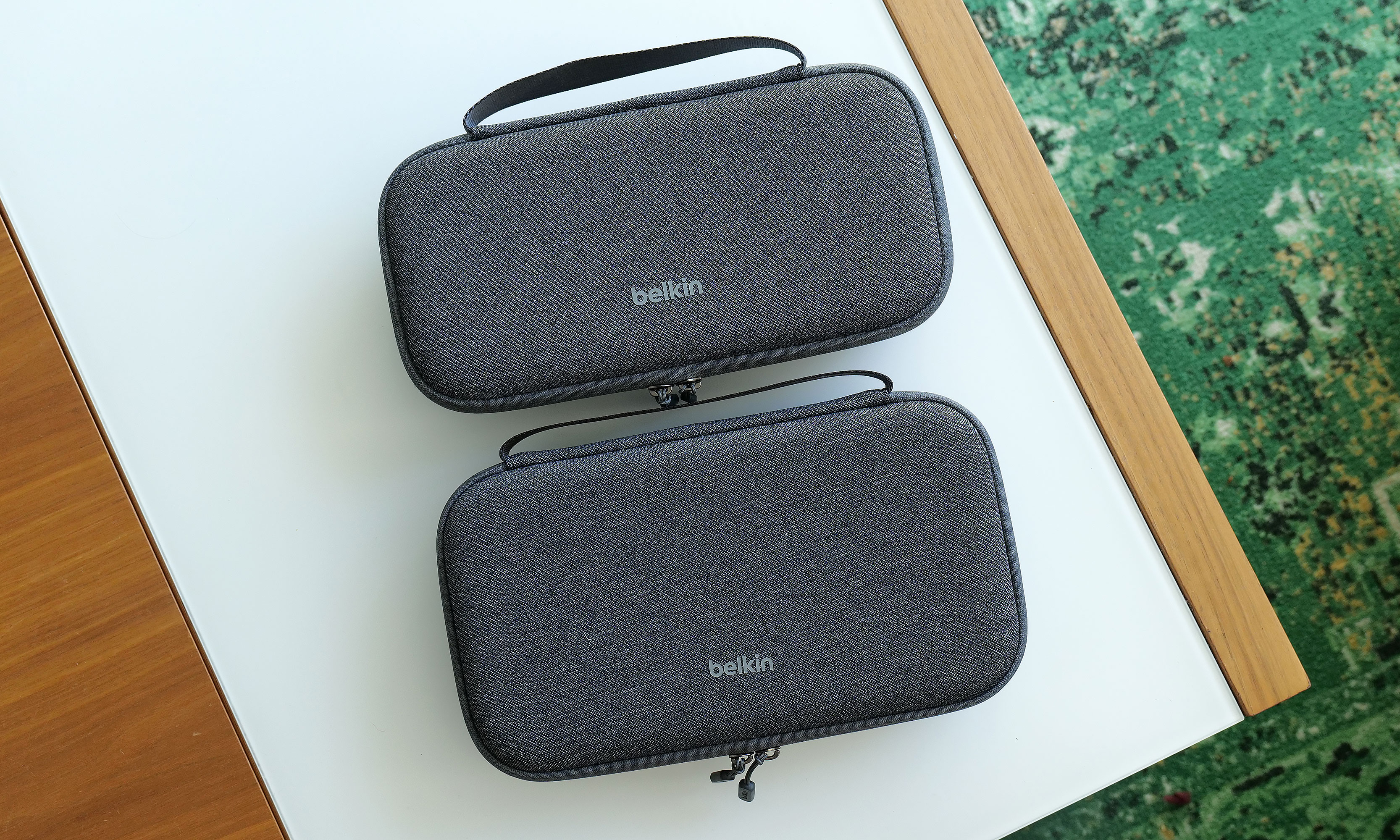
At 11.7 x 6.1 x 2.5 inches and weighing 1 pound 12 ounces, the Pro Charging Case is a touch larger and heavier than its non-pro sibling. It also features a very similar design with the same color options and materials, including a tough polyester outer shell that’s balanced by a softer, velvet-like material and cutouts for your Switch 2 on the inside.
The Pro Charging Case (bottom) is a touch bigger and heavier than the previous model, but aside from that its sports a nearly identical design.
Sam Rutherford for Engadget
Once again, Belkin has done a good job of providing a snug cabin to store your console while still making it easy to take it in and out. That said, if your system also has an extra-thick protector or hardshell case like the Killswitch from Dbrand, it may not fit. There's also a padded flap that swings down to protect your Switch 2's screen that also pulls double duty as a place to stash up to 12 game cartridges, which is a very thoughtful touch.
However, the biggest change to the Pro Charging Case's exterior design is a new cutout on the front edge, which allows you to top off other gadgets (or a Switch) by plugging a USB-C cable into Belkin's included battery pack. Unfortunately, the case doesn't come with a cord, which seems a bit odd until you take a closer look at the power pack's layout. That’s because once you open up the case, you’ll see a second port designed to fit right into the bottom power jack on the Switch 2 without the need for a cable.
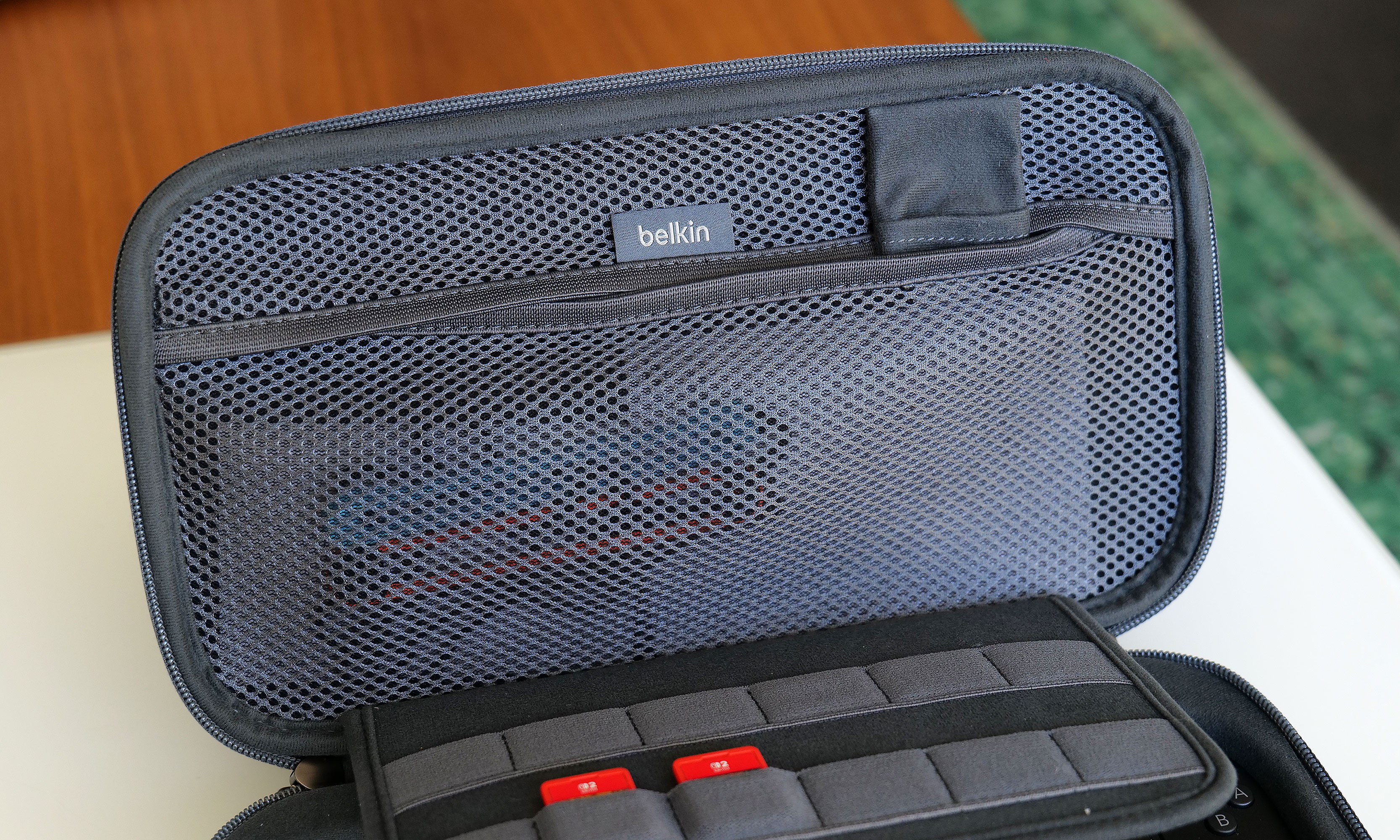
The inside of the Pro Charging Case features a handy mesh pocket, 12 slots for game carts and a hidden AirTag pouch.
Sam Rutherford for Engadget
Other small touches on Belkin's Pro Charging Case include a mesh pocket for storing things like cables, Joy-Con straps or cleaning cloths, which is very handy. However, my favorite thing might be the AirTag pouch that's also hidden inside that pocket, which could give you a fighting chance of recovering your system if it's ever lost or stolen (though I wouldn't count on it).
Battery pack
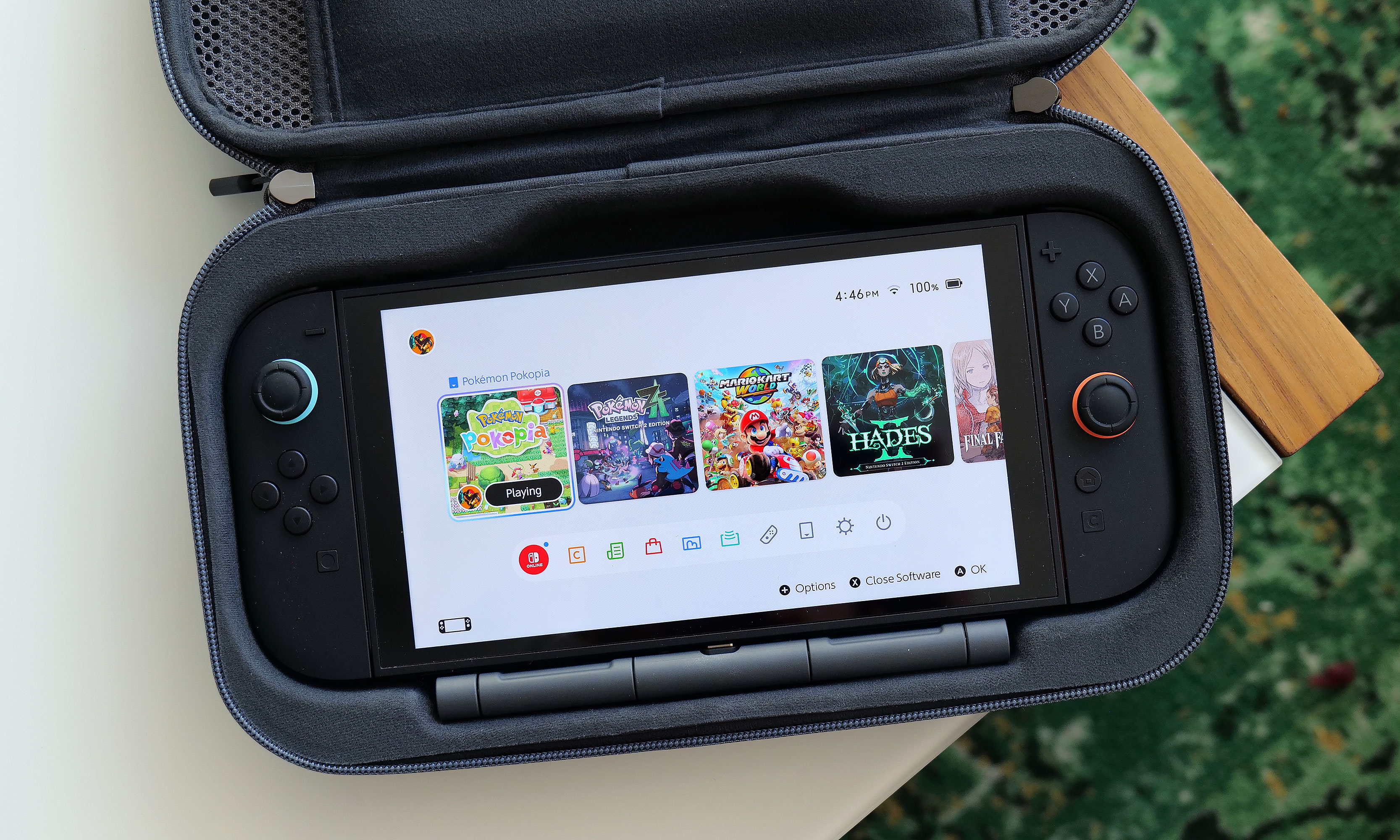
The arrangement of the included 10,000mAh battery pack and the placement of its internal USB-C port makes it a cinch to recharge your Switch 2 every time you put it in the case.
Sam Rutherford for Engadget
Despite the increased size of the Pro Charging Case's included battery, it has the same 10,000mAh capacity as what you get from its less expensive sibling. That means you'll typically have enough juice for a little more than 1.5 recharges for your Switch 2 and its onboard 5,220mAh cell. Instead of relying on a simple external power pack like before, Belkin's bundled battery comes with a second USB-C port and a kickstand. This makes it super easy to plug in your Switch 2 every time you put it in the case. This way, you know the next time you turn it on, it'll be at 100 percent.
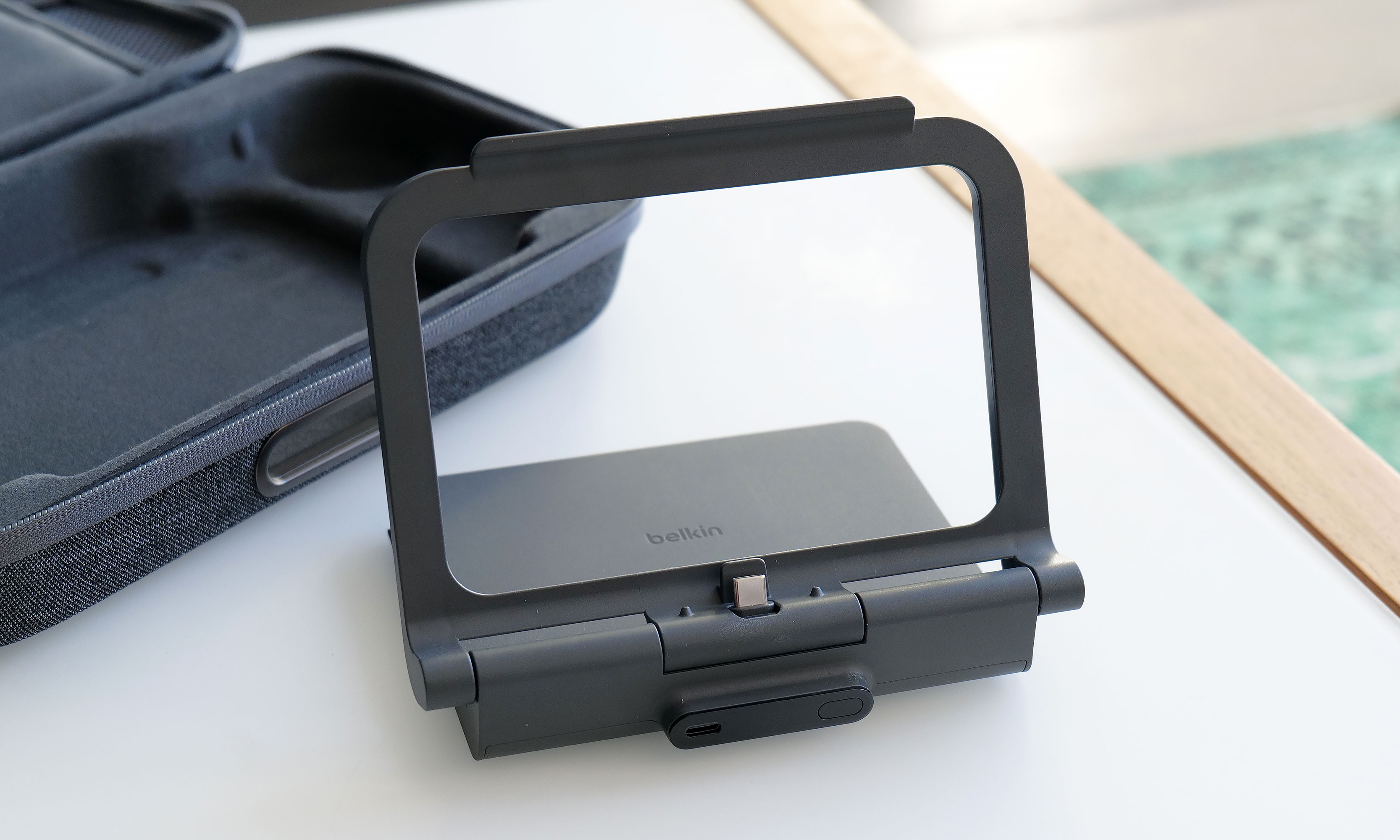
Here's what the battery pack looks like when you take it out of the case. As you can see, its size and shape means it's not a great standalone external power pack any more.
Sam Rutherford for Engadget
Alternatively, you can raise the kickstand to prop up the Switch 2 and game on it while it stays nestled inside the case. This might seem a bit redundant as Nintendo's console already has its own kickstand, but Belkin’s allows you to continue charging the system while you're playing without needing a cord. There's even a handy display on the side of the battery, so it's super easy to see how much juice is left, even when the case is closed. Furthermore, when you need to recharge the power pack, you can do so without removing it from the case or disconnecting your Switch thanks to that bonus USB-C port on the outside. Compared to the previous model, this is certainly a more elegant solution that provides some subtle quality of life improvements. The one downside is that the battery pack is somewhat awkwardly shaped, so you won't really want to use it on its own.
Wrap-up
There's no doubt the Pro Charging Case's new battery pack is a more premium solution that's easier to use and manage. When you need to recharge it, you can do so from the outside without opening the pouch. It also lets you charge a Switch 2 without ever needing a cable. The built-in kickstand is another bonus that helps elevate the whole kit from a simple case to something closer to a tiny all-in-one gaming booth.
One of the neat things about giving the battery a kickstand is that it turns the case into a mini all-in-one. This makes me wish Belkin gave the included power pack some sort of docking functionality for connecting the Switch 2 to an external display.
Sam Rutherford for Engadget
That said, after using it for a couple of weeks, I'm still not sure the added convenience is worth an extra $30 over the original. Due to the battery packs' new shape, it's less useful as a standalone power cell, and the rest of the case's design is largely unchanged. Of course, it's always nice to have options, and if you're the kind of person who doesn't mind spending a little extra for a more streamlined and convenient kit, Belkin's Pro Charging Case for the Switch 2 is still very much worth consideration.
This article originally appeared on Engadget at https://www.engadget.com/gaming/nintendo/belkin-charging-case-pro-for-switch-2-review-a-more-elegant-solution-144820809.html?src=rss
Amazon is reportedly planning to re-enter the smartphone market more than 10 years after its last attempt. According to a Reutersreport, the mysterious phone is internally codenamed "Transformer" and is being developed by the company’s devices and services unit.
There isn’t a whole lot to go on right now, but it probably won’t surprise many to learn that the phone will likely lean heavily on AI. According to Reuters’ sources, Alexa functionality would be a core part of the experience, but Amazon wouldn’t necessarily build a custom OS around its voice assistant. The phone would make buying products on Amazon and using services like Prime Music and Prime Video "easier than ever," and may bypass traditional app stores.
Reuters reports that the Transformer project is being led by the recently established ZeroOne, an Amazon devices unit headed up by ex-Microsoft executive and Xbox co-founder J Allard, who was also one of the creators of Zune. Allard joined Amazon last year to lead a "a special projects team dedicated to inventing breakthrough consumer product categories."
The development team has reportedly considered launching both a traditional smartphone and a so-called "dumbphone," which would presumably strip away anything that needlessly distracted you from the Amazon empire. Reuters’ anonymous sources suggest the latter could help combat screen addiction by offering fewer features.
ZeroOne is apparently inspired by the ultra-minimalist Light Phone, suggesting that Amazon might be reluctant to take on the flagship devices of Apple and Samsung. The report adds that the Transformer phone could even be positioned as a secondary handset.
This, of course, would not be Amazon’s first crack at the smartphone business. The company launched the Fire Phone in 2014, an ambitious and interesting device that ultimately failed to tempt people away from the more established smartphone ecosystems. It’s widely remembered as perhaps the company’s biggest hardware misstep.
With analysts forecasting an unprecedented decline in the smartphone market in 2026, now seems like a risky time for Amazon to try again, and Reuters was unable to determine exactly how much the company has committed to the Transformer project. Sources also wouldn’t rule out it being scrapped altogether if the company’s priorities suddenly shifted.
This article originally appeared on Engadget at https://www.engadget.com/mobile/amazon-is-reportedly-working-on-a-new-phone-built-around-alexa-142244500.html?src=rss
NVIDIA started an online firestorm this week when it announced DLSS 5 at its GTC conference. The company claims it's meant to deliver "photorealistic" lighting and materials in games by using neural processing. But it differs considerably from previous versions of DLSS, which were focused on using machine learning to upscale lower resolutions and generate additional frames, and gamers online aren’t too happy. To help us break this down, Anshel Sag, VP and principal analyst at Moor Insights and Strategy joins us to discuss his experience with NVIDIA's DLSS 5 demos. Also, we dive into what's next for Xbox with Project Helix.
NVIDIA announced DLSS 5, the disgust was immediate (with Anshel Sag from Moor Insights & Strategy) – 0:51
Arizona attorney general sues Kalshi for operating an illegal gambling business – 36:22
Polymarket users threaten the life of a reporter at The Times of Israel over accurate reporting – 36:59
Apple announces AirPods Max 2 with improved noise cancellation – 44:33
Elon Musk’s xAI faces class action suit over facilitating CSAM dsitribution – 47:38
Samsung stops selling Galaxy Z TriFold after 3 months because components got too expensive – 51:22
Around Engadget: Apple Studio XDR review, Dell XPS 16 review – 53:49.346
Listener Mail: Stick with iPhone on Linux? And are there any good Android tablets? – 55:41
Pop culture picks – 58:46
Credits
Hosts: Devindra Hardawar Guest: Anshel Sag Producer: Ben Ellman Music: Dale North and Terrence O’Brien
This article originally appeared on Engadget at https://www.engadget.com/gaming/pc/engadget-podcast-why-does-everyone-hate-nvidias-dlss-5-ai-upscaling-121335918.html?src=rss
OpenAI is developing a “super app” for desktop that unifies ChatGPT, its browser and its Codex app, according to the Wall Street Journaland CNBC. A company spokesperson told the publications that OpenAI Chief of Applications Fidji Simo will lead the application revamp with assistance from OpenAI President Greg Brockman. Simo will also help the marketing team advertise the app when it comes out. OpenAI’s leadership is apparently hoping that combining several products can help it streamline user experience and dedicate its resources to one project.
The company has yet to make an official announcement about the new app, but Simo replied to the Journal piece’s author on X. “Companies go through phases of exploration and phases of refocus; both are critical,” Simo said. “But when new bets start to work, like we're seeing now with Codex, it's very important to double down on them and avoid distractions. Really glad we're seizing this moment.”
The Journal saw the internal note Simo sent to employees, wherein she said that the company realized it was spreading its efforts across too many apps and that it needed to simplify its efforts. “That fragmentation has been slowing us down and making it harder to hit the quality bar we want,” she reportedly wrote. In an all-hands meeting, CNBC said she also told employees that the company was “orienting aggressively” towards high-productivity use cases.
It’s not clear yet when the unified app will be available, but OpenAI is reportedly focusing on developing agentic AI capabilities for it. The agents will be able to make decisions and use tools to do tasks on computers, such as writing software or analyzing data, with little human oversight.
This article originally appeared on Engadget at https://www.engadget.com/ai/openai-is-putting-chatgpt-its-browser-and-code-generator-into-one-desktop-app-025709839.html?src=rss
Amazon has acquired Rivr, a startup focused on autonomous robotics. Rivr is based in Zurich and was valued at $110 million in a funding round from August 2024, which both Amazon and its CEO's Bezos Expeditions participated in. Financial details of the acquisition were not disclosed.
Rivr's robots have four legs and wheels that allow it to maneuver on stairs and other potentially uneven surfaces. The company just released its second generation of the robot. The purchase will likely further Amazon's capabilities for ever-faster and more efficient package deliveries.
"This acquisition reflects our commitment to a continued investment in research, which we believe has the potential to further improve safety outcomes and the overall delivery experience for delivery service partners and their delivery associates," a representative from Amazon told The Information.
Amazon has been working toward introducing automations and robotics at various stages of its shopping business. It deployed its 1 millionth robot last summer and has future goals for automating 75 percent of all its operations.
This article originally appeared on Engadget at https://www.engadget.com/big-tech/amazon-acquires-autonomous-robotics-startup-rivr-212839750.html?src=rss
DoorDash has launched a new option for its gig economy workers to earn some extra cash. The delivery service introduced Tasks, which it describes as "short activities Dashers can complete between deliveries or in their own time." It gives taking pictures of restaurant dishes or recording video of unscripted conversations in languages other than English as examples. These materials will be used to train artificial intelligence and robotics models.
A representative from DoorDash told Bloomberg News that it will use Tasks content for evaluating its in-house AI models as well as those made by its partner companies in retail, insurance, hospitality and tech. DoorDash is piloting a standalone app for Tasks where Dashers will submit their content. The blog post notes that pay will be displayed upfront, and compensation will vary based on the complexity of the activity.
This idea isn't new. We've seen otherstartups in AI and robotics offering payment for content filmed by regular people. Considering how many lawsuits are underway against AI companies that have already benefited from unauthorized use of copyrightedmaterials, at least this approach lets people be directly compensated for training content.
This article originally appeared on Engadget at https://www.engadget.com/ai/doordash-will-start-paying-gig-workers-for-creating-content-to-train-ai-models-204048743.html?src=rss
Google is testing a version of its Gemini app for macOS, Bloomberg reports. The app would bring the AI assistant to uncharted territory, and in more direct competition with OpenAI's ChatGPT and Anthropic's Claude, both of which offer standalone Mac apps.
Gemini remains accessible through the web, and it sounds like the macOS app offers the same set of features, with the ability to respond to prompts, search the web and generate text, images and code. The major differentiator of the Mac app could be a feature called "Desktop Intelligence," which gives Gemini a new source of information and context for its responses. According to a message in the app's code viewed by Bloomberg, "when you enable apps for Desktop Intelligence you are enabling Gemini to see what you see (such as screen context) and pull content directly from these apps to improve and personalize your experience only when Gemini is in use."
The ability to refer to information in apps and what's currently on your screen is offered by both the Claude and ChatGPT macOS apps, and something Gemini is capable of on mobile devices. It's not clear if Gemini for macOS will be able to actually take action in the apps it can view — like, for example, Anthropic's popular Claude Cowork feature — but Google has already started offering that experience in a limited form on smartphones, so who's to say that couldn't come to desktop operating systems, too.
Bloomberg reports that the Gemini app is being tested with non-Google employees, which could be a sign it's making its way to a public release. Thanks to Apple and Google's AI partnership, whether the app sees the light of day or not, some of the technology that makes Gemini possible will run on macOS in the future. Google and Apple announced in January that Google's Gemini models would power future versions of Apple Intelligence. Apple is also reportedly overhauling Siri into more of a chatbot, an experience likely made possible by Gemini.
This article originally appeared on Engadget at https://www.engadget.com/ai/google-is-reportedly-testing-a-gemini-app-for-mac-203703372.html?src=rss
Google has detailed how users will be able to sideload apps from unverified developers once it implements its more restrictive policy towards downloading software on Android. The company originally planned to require all developers to be "verified" to distribute on Android, but softened its stance in November 2025 to allow carveouts for Android power-users and hobbyist developers.
For the average Android users, the ability to sideload apps will now be locked behind a multi-step one-time process. Users will first have to enable developer mode in settings, confirm they're not being coached into disabling security, restart their phone (to cut off any phone calls), then wait a day and confirm their identity with biometric authentication or a pin before installing any apps. Google says you can enable the ability to install apps from unverified developers for seven days or indefinitely, but regardless of what you'll choose, you'll still have to dismiss a warning telling you the app you're installing is from an unverified developer.
For hobbyist developers or students who want people to try their app but don't want to create a verified developer account, Google also plans to offer free "limited distributions accounts" that let you share apps without being verified. These accounts will let you share apps with up to 20 devices without having "to provide a government-issued ID or pay a registration fee."
Google is implementing its new verification process in the name of security, and has likened the requirements being asked of developers to "an ID check at the airport, which confirms a traveler's identity but is separate from the security screening of their bags." Neither the verification nor this new approach to sideloading entirely closes off getting apps from unverified developers onto your Android device, they just make it harder to download something dangerous directly from the internet onto your phone.
Google appears to be trying to split the difference on Android, tightening up what apps can be distributed via verification, while cutting its own Play Store fees and changing its stance towards third-party app stores. Requiring verification to distribute software extends Google's influence outside of its own apps and app store, which is why some developers and digital rights organizations have publicly pushed back on the company's plan.
Developers can sign-up for early access to the developer verification process now. Google says its new workflow for enabling sideloading and small distributions of apps will go live in August.
Correction, March 19, 2026, 3:44PM ET: The headline has been change to clarify that the new procedure does not apply to all app sideloading.
This article originally appeared on Engadget at https://www.engadget.com/apps/android-will-hide-app-sideloading-behind-a-new-one-time-security-process-184651171.html?src=rss