Meta has acquired Limitless, the maker of an AI-powered "Pendant," to work on building consumer hardware for the company, the startup announced via a YouTube video and blog post. So far, Meta has focused on selling VR headsets and AI smart glasses. Now the company seems interested in branching out.
"Meta recently announced a new vision to bring personal superintelligence to everyone and a key part of that vision is building incredible AI-enabled wearables. We share this vision and we'll be joining Meta to help bring our shared vision to life," Limitless CEO Dan Siroker said in the post announcing the acquisition.
Limitless' first product was Rewind, desktop productivity software that recorded everything you did on your computer and turned it into a searchable database you interacted with via a chatbot. The company later expanded into hardware with Pendant, essentially a clip-on Bluetooth microphone that applies the same concept (privacy concerns be damned) to the things you say or hear throughout the day.
The company plans to support its existing Pendant customers "for at least another year," but will no longer sell the wearable going forward. Current customers will be able to access all the features of Pendant without having to pay for a subscription, though Limitless says availability will vary per region. If you have data stored with Limitless and don’t want to hold onto your Pendant, you're now also able to export or delete your data if you choose.
AI wearables focused on recording audio have emerged as a common form factor primarily because they lean on two things AI models do moderately well: transcribing audio into text and summarizing it. Meta dipping its toes into the space makes sense, if only because not everyone will want to wear glasses to receive the benefits of an AI assistant. Amazon acquired an AI wearable company called Bee in July 2025, presumably with similar intentions.
Add in Meta's recent hiring of former Apple design lead Alan Dye, and you can start to imagine where things might be headed. In the future, the Ray-Ban Meta Smart Glasses and Meta Ray-Ban Display could be two entries in a larger lineup of AI-powered wearables.
This article originally appeared on Engadget at https://www.engadget.com/ai/metas-latest-acquisition-suggests-hardware-plans-beyond-glasses-and-headsets-212930339.html?src=rss
The Switch 2's lack of a built-in camera means you need an external one for GameChat video calls. But now, if your phone is a Google Pixel, you don't even need one of those. Android Authorityreported on Friday that the two now work nicely together (without needing third-party apps), and our tests confirm that.
Google has technically supported the use of Android devices as external webcams for two years: The company added it in a quarterly update for Android 14. (Specifically, it added the ability for devices to use USB Video Class mode, or UVC.) But that functionality didn't work with the Switch 2 before the November Pixel Drop.
How do we know it was that version? Well, before our Editor-in-Chief, Aaron Souppouris, installed November’s update on a Pixel, the Switch 2 webcam feature didn't work. After updating to that one today (but before installing the December update), it worked.
If that wasn't enough, the November firmware's release notes listed a "fix for an issue where webcam mode does not work properly with connected devices under certain conditions." That pretty much cinches it. Regardless, we reached out to Google for official confirmation, and we'll update this story if we hear back.
This article originally appeared on Engadget at https://www.engadget.com/gaming/nintendo/pixel-owners-you-can-now-use-your-phone-as-a-switch-2-webcam-203407555.html?src=rss
How can a troubled media company survive today? The answer seems to be further consolidation. Amazon's $8.45 billion MGM takeover in 2022 heralded future deals, like Skydance's $8 billion acquisition of Paramount . But Netflix's WB deal goes even further: It could fundamentally reshape the media industry as we know it, from theatrical movie-going to the existence of physical media.
What will the Netflix and Warner Bros. deal include?
After next year's already-announced separation of Warner Bros. and Discovery, Netflix says it plans to acquire all of Warner Bros. remaining assets — including its film and TV studios, HBO Max and HBO — for $82.7 billion. According to Game Developer, representatives also say Warner Bros. Games, which includes Mortal Kombat developers NetherRealm, will also be part of the deal.
Will the Netflix and Warner Bros. deal be approved by regulators?
Even before the deal was formally announced, it was clear that whoever bought WB would be facing government opposition from every side. Yesterday, Paramount sent WB a letter questioning the "fairness and adequacy" of the acquisition bidding process (which also included Comcast as a potential buyer). Afterwards, the New York Post reported that Paramount CEO David Ellison, son of the Trump-boosting Oracle CEO Larry Ellison, met with administration officials to make his case for buying Netflix. As of this morning, the Trump administration views the Netflix/WB deal with "heavy skepticism," an official tells CNBC.
On the other side of the aisle, Senator Elizabeth Warren (D-MA) has called the Netflix/WB deal an "anti-monopoly nightmare." She added, "A Netflix-Warner Bros. would create one massive media giant with control of close to half of the streaming market. It could force you into higher prices, fewer choices over what and how you watch, and may put American workers at risk."
At this point, it's too early to tell if the Netflix/WB deal will make it past regulators, but it's clear that both companies should prepare for a rocky approval process.
What does the Netflix and Warner Bros. deal mean for streaming video?
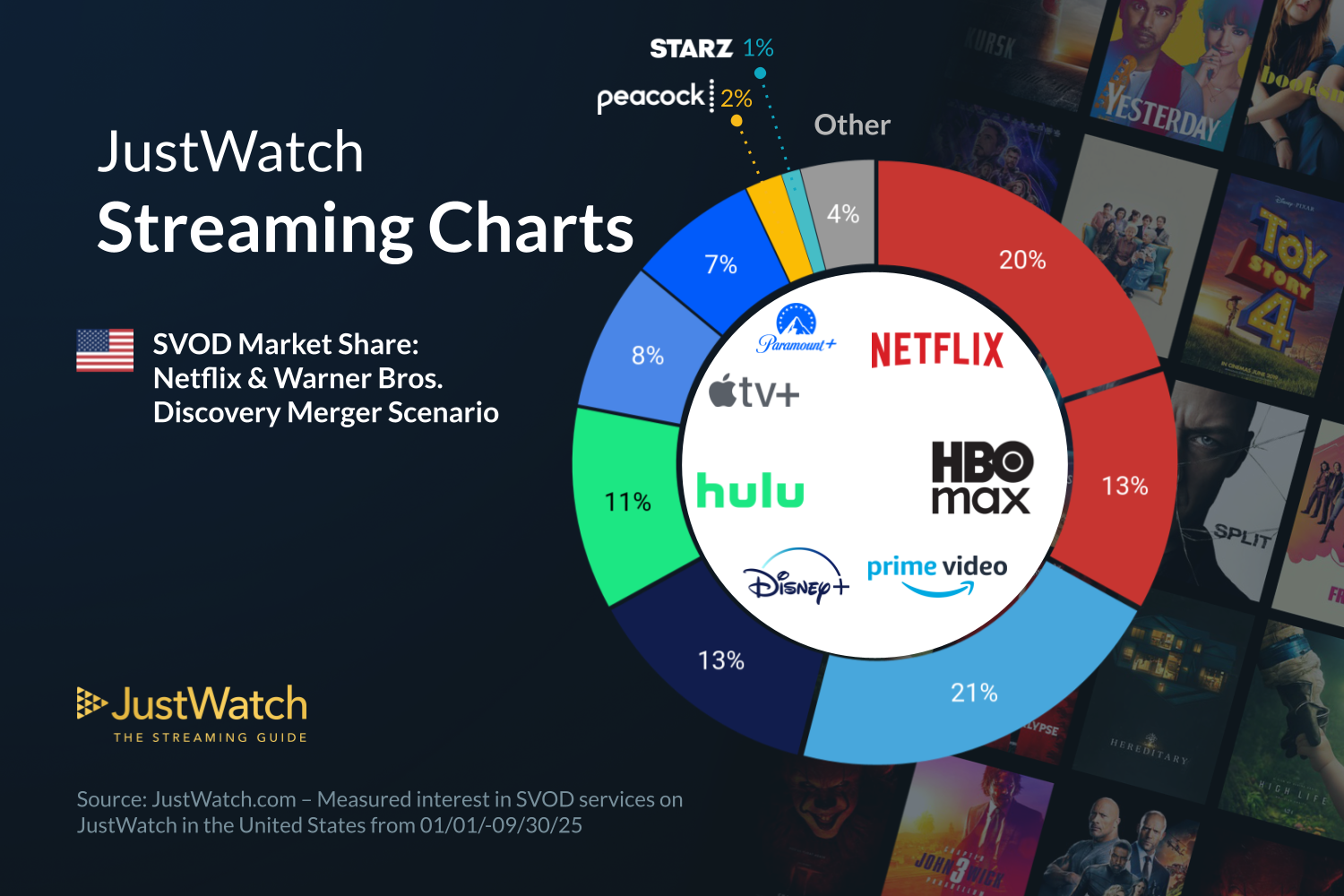
According to data from JustWatch, a combined Netflix and HBO would account for 33 percent of the US streaming video market, putting it ahead of Prime Video's 21 percent share. As for how the two media companies would co-exist, Netflix says it will "maintain Warner Bros. current businesses," which includes HBO Max and HBO, theatrical releases for films and well as movie and TV studio operations.
JustWatch streaming video market stats.
JustWatch
"We think it’s too early to talk specifics about how we’re going to tailor this offering for consumers," Netflix co-CEO Greg Peters said in an investor call this morning, when asked if HBO would remain a separate service. "Needless to say, we think the HBO brand is very powerful, and would constitute part of our plan for consumers. That then gives us a lot of options to figure out how to package things to offer the best options for consumers."
At the very least, we can expect increased prices across the board for HBO and Netflix. There's also potential for the company to offer combination subscriptions, similar to how Disney juggles Disney+, Hulu and ESPN.
What does the Netflix and Warner Bros. deal mean for theaters?
In short, a combined Netflix/WB wouldn't be great for theaters. Previous mergers, like Disney and Fox's union, led to fewer theatrical releases, not more. Since its transformation into a streaming-first company, Netflix has also been primarily focused on increasing subscriptions and engagement, with theatrical releases of its original content treated as an afterthought.
"We’ve released about 30 films into theaters this year, so it’s not like we have opposition to theatrical release," Netflix Co-CEO Ted Sarandos said in the investor call (without specifying how short some of those theatrical releases were). "It’s the longer windows that aren’t consumer friendly. Life cycle that starts in the movie theater, we’ll continue that. Over time, the windows will evolve to be much more consumer friendly, to meet the audience where we are."
He added: "All things that are going to theaters through WB will continue to do so. Our primary goal is to bring first-run movies to consumers, and we intend to continue with that." In an April interview at the Time100 Summit, Sarandos also famously called the theatrical model "outdated," since most people in the US can't easily walk to a multiplex.
Cinema United, a trade group representing over 30,000 movie theater screens in the US, is unsurprisingly against the entire deal. “The proposed acquisition of Warner Bros. by Netflix poses an unprecedented threat to the global exhibition business. The negative impact of this acquisition will impact theatres from the biggest circuits to one-screen independents in small towns in the United States and around the world,” Cinema United President and CEO Michael O’Leary said in a statement.
“Cinema United stands ready to support industry changes that lead to increased movie production and give consumers more opportunities to enjoy a day at the local theatre,” he added. “But Netflix’s stated business model does not support theatrical exhibition. In fact, it is the opposite. Regulators must look closely at the specifics of this proposed transaction and understand the negative impact it will have on consumers, exhibition and the entertainment industry.”
What do artists think of the Netflix and WB deal?
Writers, directors and producers are already having a tough time getting projects off the ground, so having one less place to pitch isn't going to help. There are also a handful of artists, including former WB darling Christopher Nolan, who have refused to work with Netflix entirely.
"The end goal of these consolidations is to limit choices in entertainment to a select handful of providers, so they can capture our whole attention, and thus our every available dollar," C. Robert Cargill, the screenwriter behind Doctor Strange and The Black Phone, said in a statement to Engadget. "The result will be a gutting of diversity and fresh voices in the industry, sending thousands, if not tens of thousands, of people back to their home towns to start their lives over, as there simply isn't a place for them in Hollywood any more, while homogenizing film and television into the "content" word we all grumble about hearing."
"WB has made so many daring choices this year, with executives taking big risks that made real cultural and financial impacts at the box office," he added. "And HBO, constant name changes be damned, is still making some of the best television there is, bar none. Will those creative environments survive the merger, or will many of those brilliant execs be sent packing along with the writers, directors, and crews?"
"In short, it's a very scary and heartbreaking time to be a filmmaker. No shade on Netflix and the people that work there; it's just that less choice in entertainment always makes for fewer winners and more people on the outside looking in."
What about physical media?
Other than noting that Netflix used to be a DVD-by-mail company, there was no mention of physical media on the acquisition's press release or investor call. That’s not too surprising, as physical releases have always been an afterthought for Netflix. A few of its films, like Roma and Frances Ha, are available as discs through the Criterion Collection, and some shows like Stranger Things are also on DVD and Blu-ray.
Netflix claims it'll continue to run WB's businesses as usual if the deal goes through, which should include physical media, but those sorts of pre-acquisition promises rarely last for long. WB's home video business isn't entirely its own, either: In 2020, it formed the joint venture Studio Distribution Services with Universal, which also handles physical media distribution for Sony Pictures, PBS and Neon.
Given the slowing demand for physical media, it’s likely one of the first things a combined Netflix/WB would eventually drop. But there’s also been a resurgence of premium physical releases from distributors like Arrow Video, so there’s a chance Netflix may want to keep it around for special releases.
Steve Dent contributed to this report.
This article originally appeared on Engadget at https://www.engadget.com/entertainment/streaming/the-netflix-and-warner-bros-deal-might-be-great-for-shareholders-but-not-for-anyone-else-183000247.html?src=rss
Looking to switch music streaming platforms for no real reason? Apple Music is holding one heck of a sale right now. You can get three months of use for just $1. There are some caveats, as this is only for new users on the individual plan. Students and family plans don't count for this.
Also, this has to be redeemed on iPhone, iPad or Mac. When you click the link it'll open up the Apple Music app, so click it from an Apple product to get the deal. Finally, it auto-renews after 90 days at $11 per month. Make sure to cancel ahead of time if you aren't enjoying the service.
As for Apple Music, it's one of the best music streaming platforms out there and certainly a perfect choice for those already tied to the Apple ecosystem. It lets you import your own files, which is great for anyone still hanging on to an iTunes library. Otherwise, it offers streaming access to millions upon millions songs like all the rest. It does, however, include some live radio stations staffed by actual people, which is cool.
The app works with Android devices, but it's really designed for Apple products. We also found the spatial audio to sound unnatural at times, but that's partly a limitation of the tech.
Check out our coverage of the best streaming deals for more discounts, and follow @EngadgetDeals on X for the latest tech deals and buying advice.
This article originally appeared on Engadget at https://www.engadget.com/deals/get-three-months-of-apple-music-for-only-1-right-now-180536582.html?src=rss
IMAX and animation distributor GKids are bringing more 4K Studio Ghibli restorations to the largest screens in 2026. The announcement follows the IMAX release of Princess Mononoke this year, with the ongoing restorations being directly supervised by Studio Ghibli’s Atsushi Okui, who’s been with the company since 1993.
Okui was the Director of Digital Imaging on 2023’s The Boy and the Heron, which was also the first Ghibli picture to get the IMAX treatment. The likes of My Neighbour Totoro and Spirited Away have also had theatrical re-releases in recent years. GKids heads up distribution in North America for the Japanese animation giant’s films across all platforms, and has been working with IMAX on various projects since 2021.
It sounds like the remaining Ghibli titles set for theatrical IMAX releases in the US will arrive one at a time, and GKids is not saying how many we can expect, or what it’s following Princess Mononoke with next year. I did a quick check for notable upcoming anniversaries, and 2026 does mark 40 years of Castle in the Sky, but one of the studio’s newer films might be a more obvious guess for a 4K refurb. Time will tell.
This article originally appeared on Engadget at https://www.engadget.com/entertainment/tv-movies/more-studio-ghibli-4k-restorations-are-coming-to-imax-in-2026-174508476.html?src=rss
You know what they say: If at first you don't succeed at mass government surveillance, try, try again. Only two days after India backpedaled on its plan to force smartphone makers to preinstall a state-run "cybersecurity" app, Reutersreports that the country is back at it. It’s said to be considering a telecom industry proposal with another draconian requirement. This one would require smartphone makers to enable always-on satellite-based location tracking (Assisted GPS).
The measure would require location services to remain on at all times, with no option to switch them off. The telecom industry also wants phone makers to disable notifications that alert users when their carriers have accessed their location. According to Reuters, India's home ministry was set to meet with smartphone industry executives on Friday, but the meeting was postponed.
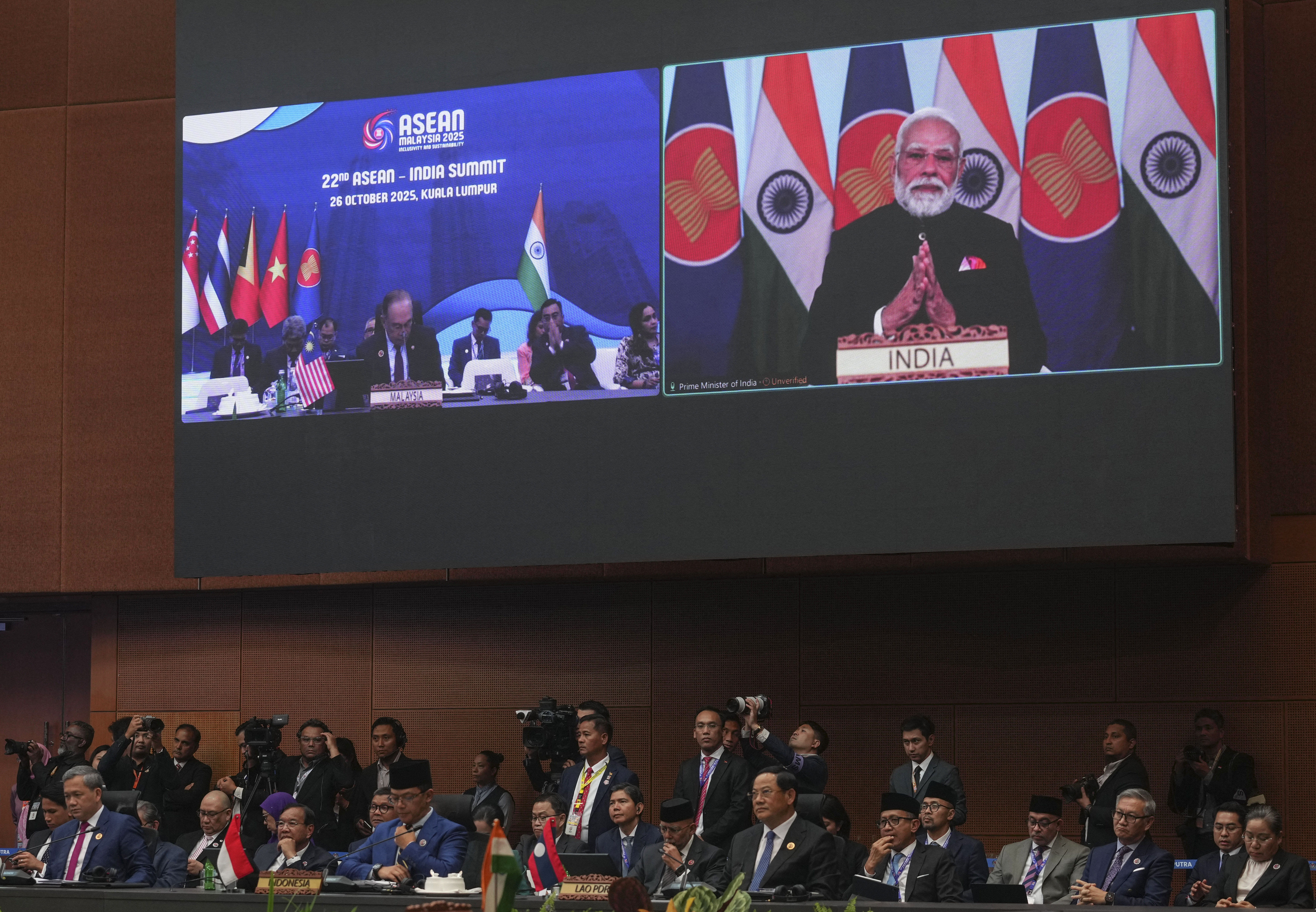
India's Prime Minister Narendra Modi appears on a screen to deliver a speech remotely as other leaders attend the 22nd ASEAN - India Summit during the 47th Association of Southeast Asian Nations (ASEAN) Summit in Kuala Lumpur on October 26, 2025. (Photo by Rafiq Maqbool / POOL / AFP) (Photo by RAFIQ MAQBOOL/POOL/AFP via Getty Images)
RAFIQ MAQBOOL via Getty Images
Predictably, proponents claim the plan is about helping law enforcement keep you safe from the bad guys. (See also: Orwell's Nineteen Eighty-Four.) The administration of Prime Minister Narendra Modi has long been concerned that law enforcement agencies can’t obtain precise enough locations during investigations. Cell tower data alone can be off by several meters. And hey, what's the privacy of 1.4 billion people next to tracking criminals with an extra 10 ft. or so of accuracy, right?
Apple, Google and Samsung are said to oppose the move and have urged the Modi government to reject it. The lobbying group India Cellular & Electronics Association (ICEA), which represents them, reportedly wrote in a confidential letter this summer that the proposal has no precedent anywhere in the world. The group's letter described the measure as a "regulatory overreach," which is probably putting it mildly. They warned that it could compromise military personnel, judges, corporate executives and journalists.
In a statement sent to Engadget, the Electronic Frontier Foundation (EFF) sounded the alarm on the proposal. "Requiring phones to have A-GPS enabled all the time would be a horrifying decision by the Indian government with significant impacts on the privacy of everyone in the country,” EFF Senior Staff Technologist Cooper Quintin said. “With this change, the phone company and law enforcement get your exact location at any time, potentially even without legal due process."
This article originally appeared on Engadget at https://www.engadget.com/cybersecurity/india-is-reportedly-considering-another-draconian-smartphone-surveillance-plan-173500327.html?src=rss
Philo has a decent discount for newcomers who are looking for a solid bundle of live TV channels and on-demand streaming services. New subscribers can get their first month of access to the Core plan for $25. That's a discount of $8.
For your 25 bucks, you'll gain access to more than 70 channels, including AMC, BBC America, Comedy Central, Food Network, Hallmark Channel, several MTV stations, Nickelodeon and TLC. AMC+, HBO Max basic with ads and Discovery+ are included at no extra cost.
Philo is our pick for the best cheap live TV streaming service. Having unlimited DVR is welcome and recordings expire after one year, which is three months longer than many competing platforms. There's no contract either, so you can cancel at any time.
The platform also offers more than 110 free channels, but unfortunately there are no local channels and there's not much in the way of sports programming. Other notable channels, such as Bravo and Freeform are missing too. However, if the lineup of channels and streaming services covers all your needs, Philo is a solid streaming option, especially with the discount.
This article originally appeared on Engadget at https://www.engadget.com/deals/new-philo-subscribers-can-get-their-first-month-of-access-for-25-171033925.html?src=rss
Meta has cut several deals with news publishers to help provide real-time data for its AI chatbot services, as reported by Axios. The commercial agreements will allow its Meta AI chatbots to better answer user queries about news and current events.
These are multiyear deals where publishers will be compensated for the use of their content, but we don't have any monetary specifics. The contracts do stipulate that Meta's chatbots will link out to articles when answering news queries, potentially offering a slight traffic boost to publishers.
The news partners include USA Today, People, Le Monde and CNN. However, there are also a whole lot of conservative outlets included in today's announcement, such as Fox News, The Daily Caller and Washington Examiner. It's a good thing Meta's AI will provide the aforementioned links, just in case a chatbot says something crazy about whatever nonsense culture war topic is going on that day.
This article originally appeared on Engadget at https://www.engadget.com/big-tech/meta-cuts-deals-with-several-news-publishers-for-ai-use-163404107.html?src=rss
The European Commission has fined Elon Musk’s X €120 million (around $140 million) for breaching its transparency rules under the Digital Services Act. The European Union’s executive arm announced that it was investigating the social media company’s blue checkmarking verification system — first introduced when it was still known as Twitter — last year, along with other alleged DSA violations. Today’s verdict concerns the "deceptive design" of the checkmark, as well as "the lack of transparency of [X's] advertising repository, and the failure to provide access to public data for researchers."
The Commission's issue with X’s verification system is that where blue checkmarks were once something that Twitter that Twitter vetted, they can now be bough by anyone. According to the EU, this puts users at risk of scams and impersonation fraud, as they can’t tell if the accounts they’re engaging with are authentic. "While the DSA does not mandate user verification, it clearly prohibits online platforms from falsely claiming that users have been verified, when no such verification took place," it wrote in a statement.
The EU has also ruled that X’s advertisement repository employs "design features and access barriers" that make it difficult for good faith actors and the general public to determine the source of online ads and spot scams or threat campaigns. It says that X fails to provide information pertaining to both the content of an ad and the entity paying for its placement.
The third alleged infringement concerns the public data that companies are required by the DSA to make available to qualifying researchers. The European Commission claims that X’s practices in this area are unnecessarily prohibitive, therefore "effectively undermining research into several systemic risks in the European Union."
X has 60 working days to respond to the EU’s non-compliance decision — the first of its nature — on blue checkmarks, and 90 days to submit an "action plan" of how it will address the alleged breaches relating to its advertising repository and access to public data. Failure to comply could result in financial penalties.
This article originally appeared on Engadget at https://www.engadget.com/big-tech/x-hit-with-140-million-fine-from-the-eu-161259324.html?src=rss
The New York Times and the Chicago Tribune have filed separate lawsuits against Perplexity over alleged copyright infringement. The Times said it had sent Perplexity several cease-and-desist demands to stop using its content until the two reached an agreement, but the AI company persisted in doing so.
In the lawsuit [PDF], the Times accused Perplexity of infringing on its copyrights at two main stages. First, by scraping its website (including in real time) to train AI models and feed content into the likes of the Claude chatbot and Comet browser. Second, in the output of Perplexity's products, with the Times accusing the company’s generative AI products of often reproducing its articles verbatim. The Times also says Perplexity damaged its brand by falsely attributing completely fabricated information (aka hallucinations) to the newspaper.
The Chicago Tribune also filed a lawsuit against Perplexity for similar reasons. "Perplexity’s genAI products generate outputs that are identical or substantially similar to the Chicago Tribune’s content,” the newspaper claimed in its suit. “Upon information and belief, Perplexity has unlawfully copied millions of copyrighted Chicago Tribune stories, videos, images and other works to power its products and tools."
These lawsuits are the latest in dozens of legal cases involving copyright holders and AI companies in the US. The Times, for instance, previously sued OpenAI and Microsoft. It accused the companies of training their large language models on millions of its articles without permission. That case is ongoing.
Copyright holders have licensed their content to AI companies in some cases, though. OpenAI has struck multiple deals with media companies. The Times and Amazon reached an agreement this year that's said to be worth as much as $25 million per year to the media company.
This article originally appeared on Engadget at https://www.engadget.com/ai/the-new-york-times-and-chicago-tribune-sue-perplexity-over-alleged-copyright-infringement-153656431.html?src=rss