Meta is testing out a premium version of its messaging app, called WhatsApp Plus, that will include several paywalled features. As first spotted by WABetaInfo, Meta is currently rolling out a paid version of WhatsApp, which features mostly cosmetic upgrades. According to the Help Center page, WhatsApp Plus subscribers will get access to premium stickers that can have special effects and the ability to personalize the app's themes and icons.
Beyond the decorative elements, WhatsApp Plus users can pin up to 20 chats, set a premium ringtone for certain contacts and further customize chat lists with alerts, ringtones and themes. According to WABetaInfo, WhatsApp is exploring more features for its premium plan, but there's no exact pricing announced yet. Subscription costs currently range from 229 Pakistani Rupees, or less than $1, to €2.49, or around $3, according to WABetaInfo.
Meta isn't paywalling any of WhatsApp's basic functions, so the ability to send messages, make voice calls and take advantage of end-to-end encryption remains free. However, the introduction of WhatsApp Plus follows Meta also trialing Instagram Plus, which previewed premium features like Stories that last longer than 24 hours and sending "super hearts." The prices haven't been announced for Instagram Plus either, but WABetaInfo reported that Meta may offer one-month trials for any interested users of WhatsApp Plus.
This article originally appeared on Engadget at https://www.engadget.com/apps/meta-is-testing-a-whatsapp-plus-subscription-that-mostly-focuses-on-cosmetic-upgrades-175452371.html?src=rss
Blackmagic Design’s DaVinci Resolve is a highly capable free color grading tool with a history dating way back to the ‘80s, but it has never been thought of as a rival to Adobe’s Lightroom due to its video origins. Now, Blackmagic Design has released a new version in beta that may change people’s minds about that. The new Photo page lets you import RAW images then adjust them using Resolve’s powerful color grading tools. You even get access to advanced VFX and AI features not found in Lightroom.
When I saw the new feature, I immediately wondered if I could cancel my $20 per month Adobe Photography subscription (with Lightroom CC and Photoshop CC). Apparently, I'm not alone. After trying it out, I believe that I could do so because photos are secondary to video for me. However, photographers who’ve used Lightroom for a long time would likely find it too painful to switch — at least, for now.
The Photo page and Albums
I tested the new Photo page functions and many of Resolve’s new filter effects, but beware that the first beta is still buggy. I used it inside the $295 DaVinci Resolve Studio app (which includes free updates for life), because it has a few extra features not found in the free version.
With that said, DaVinci Resolve 21 now supports RAW photos from Canon, Fujifilm, Nikon and Sony, with other brands to follow. Blackmagic has pledged to support RAW files for new cameras shortly after they’re released like Adobe does with Lightroom. It also supports TIFFs, JPEGs, HEIFs and other photo file formats.
Steve Dent for Engadget
To organize files, you can think of Resolve’s Projects as equivalent to Lightroom Catalogs. You import photos into a Project just as you do video, by dragging and dropping photos or folders into the media pool or using the “import” function. Resolve’s dedicated Media file management page also supports RAW photos. I find Resolve’s import system to be easier and more logical than Lightroom’s, with less steps required. You can import a full or partial Lightroom catalog into Resolve as well.
Once your photos are in the media pool, you can select and organize them by file name, rating, colors, favorites and other tags. DaVinci Resolve Studio also offers a new feature called AI IntelliSearch that lets you visually identify photos based on their content using terms like “cats” or “dancing.”
Photos can then be moved from the media pool into Albums, a new feature that’s similar to Lightroom’s Collections. Albums activate several photo-specific features in the Color and Edit pages. In Edit, Albums appear as simplified, single-track timelines, with each photo shown as a two second clip. That way, you can work with photos in the Color and Fusion pages just as you do with video.
You can reframe and crop images inside Photo (either by typing in the size or dragging) and make basic RAW-style adjustments for settings like exposure, highlights and shadows. For more advanced grading (like you may do in Lightroom’s Develop), you need to jump into the Color page.
Color and Fusion
On the Color page, you get the same functions for photos as video: primary and log color correction, curves, qualifiers, power windows, noise reduction and sharpening. You can also employ Resolve’s class-leading scopes, including parades, waveforms, vectorscopes and histograms.
Once you’ve created an Album, you can select it at the top of the Color page viewer, just as you would a video timeline. You can also label and sort photos as you do in the Photo page.
Steve Dent for Engadget
Resolve's node-based workflow really shines for photo editing. You can add nodes in series or parallel to build complex grades, then save and apply those grades to multiple images or an entire photo album. Resolve’s system for doing this via “stills” that show your grade is more visual and powerful than the one in Lightroom. You also get support for Resolve’s functions used for video like Look-Up Tables (LUTs) and the new Film Look Creator effect.
All of Resolve’s filter-style effects — like Vignette, Lens Blur and Film Damage — are available directly from the Photo page. Those include some of DaVinci Resolve Studio’s new AI effects (not available in the free version) like AI CineFocus, AI Face Age Transformer and AI Ultrafocus. This gives the app a leg up over Lightroom, which only offers comparable features via third-party plugins.
If you want even more advanced effects, the Fusion page is Resolve’s equivalent to After Effects. There, you’ll find tools like warping, lights and Paint, which lets you do Photoshop-like cloning. Resolve 21 now includes the Krokodove filters with features like warping and text animation.
This raises the question of whether you can do multi-image compositing in the Photo page like you can in Photoshop or After Effects. In short, it’s not possible as Photo only supports one image at a time. However, once you’ve adjusted a RAW image, you can drop it into a video timeline where your color adjustments and other tweaks will carry over. Then, you can stack multiple images and use any of Resolve’s compositing tools from the Edit or Fusion pages. This is pretty clunky compared to using Photoshop, but it’s the only way to combine multiple images for now.
DaVinci's Resolve 21's updated export page for photos
Steve Dent for Engadget
Once you’ve finished grading and adjusting images, there are two ways to export them. One is by the Quick Export function that provides minimal settings like file type, name and resolution. The better method is via Resolve’s Deliver page, which now has dedicated photo functions when you’re working with an Album. There, you can control size parameters like short and long side, width and height or percentage. You can also change the file type, resolution and quality. This function is severely lacking compared to Lightroom though, which offers advanced settings missing from Resolve, like content credentials, watermarking and post-processing.
Finally, another new dedicated feature within the Resolve Photo page is Capture Live View for camera tethering, which only supports Canon and Sony cameras for now. It allows you to connect a camera to your PC via USB-C and control aperture, shutter speed, ISO and exposure compensation directly from the app. You can also view your images using Resolve’s scopes and tweak RAW settings like white balance, temperature, shadows, highlights and more.
Wrap-up
DaVinci Resolve’s new Photo page can do most of what Lightroom does in terms of image adjustments, while adding powerful effects tools that its Adobe counterpart lacks. It’s not yet a substitute for Photoshop, though, as it lacks the organizing, exporting, compositing and pixel-level editing tools found in that app.
For now, the Photo page is ideal for filmmakers who dabble in photo editing, along with hobbyists and power users familiar with Resolve’s formidable grading tools. However, professional photographers may want to stick with Lightroom, because Resolve still lacks certain advanced features, particularly around organization and exporting.
The new DaVinci Resolve Photo page only just launched and is bound to improve greatly over time. If you’re on the fence, download the free version and see if it works for you. A lot of video editors made the same switch from Premiere and have never looked back. Given the current grumbling about Adobe’s subscriptions, I could see many people making the same move from Lightroom to Resolve.
This article originally appeared on Engadget at https://www.engadget.com/apps/davinci-resolve-21-hands-on-a-viable-lightroom-alternative-for-casual-users-160520123.html?src=rss
Apple's refusal to provide financial data to an Indian regulatory agency as part of an antitrust case will culminate in a final hearing on May 21, as first reported by Reuters. According to the Competition Commission of India (CCI), Apple still hasn't submitted information about its financials and its views on an antitrust investigation that started in October 2024.
The case revolves around the CCI accusing Apple of exploiting its dominant position with the App Store, arguing that developers are forced to use Apple's proprietary system for in-app purchases. Apple countered that Android was the more dominant smartphone operating system in India and that iPhones held a smaller market share in India. However, Apple has slowly been gaining momentum with its share of the Indian smartphone market, hitting nine percent in 2025, according to data from Counterpoint Research.
Reuters reported that the latest CCI order said that Apple had plenty of opportunities to file objections or suggestions, but added that the company still hadn't submitted the "requisite financial information," which is used to determine the amount of a potential penalty. Apple argued that the penalties could be up to $38 billion and responded to the order by citing a separate case where the tech giant challenged the country's antitrust penalty law.
It's not the first time Apple has butted heads with the Indian government, as it previously refused to pre-install a state-owned app called Sanchar Saathi onto its smartphones. The Indian government later decided to withdraw its mandate requiring smartphone makers to install the app, but it's much less willing to budge on this antitrust case. According to Reuters, the CCI offered Apple two more weeks to file any responses before the final hearing date next month.
This article originally appeared on Engadget at https://www.engadget.com/big-tech/apple-could-be-fined-up-to-38-billion-by-indian-antitrust-regulator-150821172.html?src=rss
Director Jon Favreau (Iron Man, The Jungle Book) hasn't been shy about embracing new technology for filmmaking. While producing The Mandalorian for Disney+, he was one of the first filmmakers to use ILM's massive LED screens, AKA "The Volume," to produce more realistic lighting and backgrounds on studio sets. For the feature film The Mandalorian and Grogu, which hits theaters May 22, Favreau recently revealed that he had Disney build an Apple Vision Pro app to preview its full IMAX scope during filming.
"So I'm making an IMAX movie, and I'm looking at a TV screen, and no matter how big your TV screen is it's not an IMAX screen," Favreau said in a recent episode of The Town podcast. "We built software so that I can pop on my Apple Vision Pro and be sitting in an IMAX movie theater and see the full aspect ratio when we're lining a shot up. And I can watch that take and see what people will see."
Favreau isn't the first director to use the Apple Vision Pro — Wicked filmmaker Jon Chu also used it to handle post-production work — but he's the first to specifically mention using the headset for IMAX production. That's still a relatively limited use case for the Apple Vision Pro, but it's one that could be useful to future filmmakers. With its large field of view and sharp micro-OLED screens, the Apple Vision Pro is one of the only ways to replicate the experience of watching a large IMAX screen at home. (The Meta Quest 3 comes in as a close second.)
In general, Favreau says he's more excited about using existing consumer technology in the filmmaking process than AI. He mentions using the Unreal Engine to previsualize special effects on The Mandalorian and his previous films, and he believes the quality from game engines could be good enough to make it into final productions down the line.
"This is what the animation industry has understood from the beginning," he said. "Get it right before you ever paint a cel."
This article originally appeared on Engadget at https://www.engadget.com/entertainment/tv-movies/the-mandalorian-and-grogu-director-used-apple-vision-pro-to-preview-the-film-in-imax-140331311.html?src=rss
We heard all about GoPro's new action camera series last week, but the company is now unveiling the pricing across its Mission 1, Mission 1 Pro and Mission 1 Pro ILS cameras. The entry-level Mission 1 ($600) features GoPro's new 50-megapixel 1-inch sensor, which the company says will offer a major leap in image quality and low-light performance over the Hero 13 line. While largely looking the same as the Hero series (and still waterproof), the Mission 1 can record 8K video at 30fps and 4K at 120fps. It lacks the higher frame rates of the other Mission 1 cameras, but supports 10-bit GP-Log2 color and 32-bit float audio.
The Mission 1 Pro ($700) is the flagship fixed-lens model this year, aimed at the professional (or semi-pro) videographer. It has upgraded frame-rate capture to 8K at 60 fps and 4K at 240 fps, along with an extreme "burst" slow-motion mode that hits 960 fps at 1080p. It also captures 4:3 "Open Gate" recordings at 8K/30fps and 4K/120fps, covering the entire sensor area, enabling more versatile editing and cropping across different screen sizes, including vertical video.
Steve Dent for Engadget
Then there's the beastly Mission 1 Pro ILS (Interchangeable Lens System). It swaps the standard GoPro lens for a Micro Four Thirds (MFT) mount lens. It otherwise shares the same 1-inch sensor and high-speed 8K/60fps video specs as the Pro model. It also matches the Pro model's $700 price, with an additional $100 discount for GoPro subscribers. However, it won't be launching until Q3 2026.
All of the Mission 1 Series accessories will be available on a rolling basis beginning May 28, with GoPro's own wireless mic system (take note, Rode and DJI) priced at $160. If you preorder a Mission 1 or Mission 1 Pro directly from GoPro now, you'll get the point-and-shoot grip bundled for free. The company still doesn't have an official release date for the cameras.
This article originally appeared on Engadget at https://www.engadget.com/cameras/gopros-mission-1-camera-series-will-start-at-600-130044898.html?src=rss
To make up for an incredibly laughable inaugural event, Beijing is running back its humanoid robot half-marathon. Fortunately, the event that pits humanoid robots made by Chinese companies against each other across 13 miles went a lot smoother this year.
This year's half-marathon hosted more than 100 competitors, with first place going to Honor, better known for its smartphones, and its red-clad robot named Lightning. Living up to the name, the gold medalist finished the race in 50 minutes and 26 seconds. That's several minutes faster than the human record that was recently set by Uganda's Jacob Kiplimo last month.
Honor swept the other podium spots, with the important caveat that they all navigated the course autonomously, according to the state-sponsored television news agency CCTV. That's a massive improvement over last year, where the fastest time among 21 robots was achieved by Tiangong Ultra with a record of two hours and 40 minutes. Last year's event saw many of the bipedal robots receiving assistance from human operators who ran alongside them, as well as some comical mishaps, like falling at the starting line.
However, the BBC reported that around 40 percent of the robots competed autonomously this year, while the rest were remote-controlled. Despite the rapid improvements, this year's event still had its fair share of crashes, even from Honor's robots.
This article originally appeared on Engadget at https://www.engadget.com/ai/beijings-robot-half-marathon-is-back-for-its-second-year-with-far-less-embarassing-results-191308396.html?src=rss
Anyone looking to upgrade to the next Mac Studio or MacBook Pro might have to wait a little longer, thanks to the ongoing global memory shortage. As reported by Bloomberg's Mark Gurman, "at least two of the company's upcoming machines ... could debut a little later than the company initially planned," referencing the refreshes to Apple's desktop and its laptop that's expected to get a touchscreen.
Bloomberg reported that the upcoming Mac Studio, which follows up the current lineup in the M4 Max and M3 Ultra configurations, was first expected to release in the middle of the year. However, Apple is already dealing with shortages of its existing Mac Studio stock, likely due to the device being a popular choice for anyone running local AI models. With no stop to the shortage in sight, Gurman predicted that the refreshed Mac Studio's release could be postponed to around October instead.
It's not just Apple's desktop offerings being affected. Gurman also reported that the release of the next MacBook Pro could be delayed. While Gurman said the release timeline of the touchscreen MacBook Pro could be between the end of 2026 to early 2027, he's now predicting that it would arrive toward the later end of that timeline. Of course, Apple isn't the only consumer tech company heavily affected by the RAM shortage. However, Apple can at least take advantage of its successful MacBook Neo release amidst the memory shortage crisis affecting all laptop makers.
This article originally appeared on Engadget at https://www.engadget.com/computing/the-next-mac-studio-and-macbook-pro-releases-could-be-postponed-by-several-months-173120187.html?src=rss
In hindsight, I suppose it was only a matter of time after Anthropic made Claude capable of generating charts and diagrams that the company would then begin offering a more robust image editor. Now, a little more than a month after that release, Anthropic has announced Claude Design, a new research preview that allows subscribers to use Claude to generate designs, prototypes, slides and more.
"Claude Design gives designers room to explore widely and everyone else a way to produce visual work," Anthropic says of its newest product. As with its previous forays into image generation, the company isn't calling this, well, an image generator. Instead, Anthropic describes Opus 4.7, the system powering the app, as its most capable vision model to date. In other words, you won't be using Claude Design to whip up a picture of a cat in space eating a lasagna.
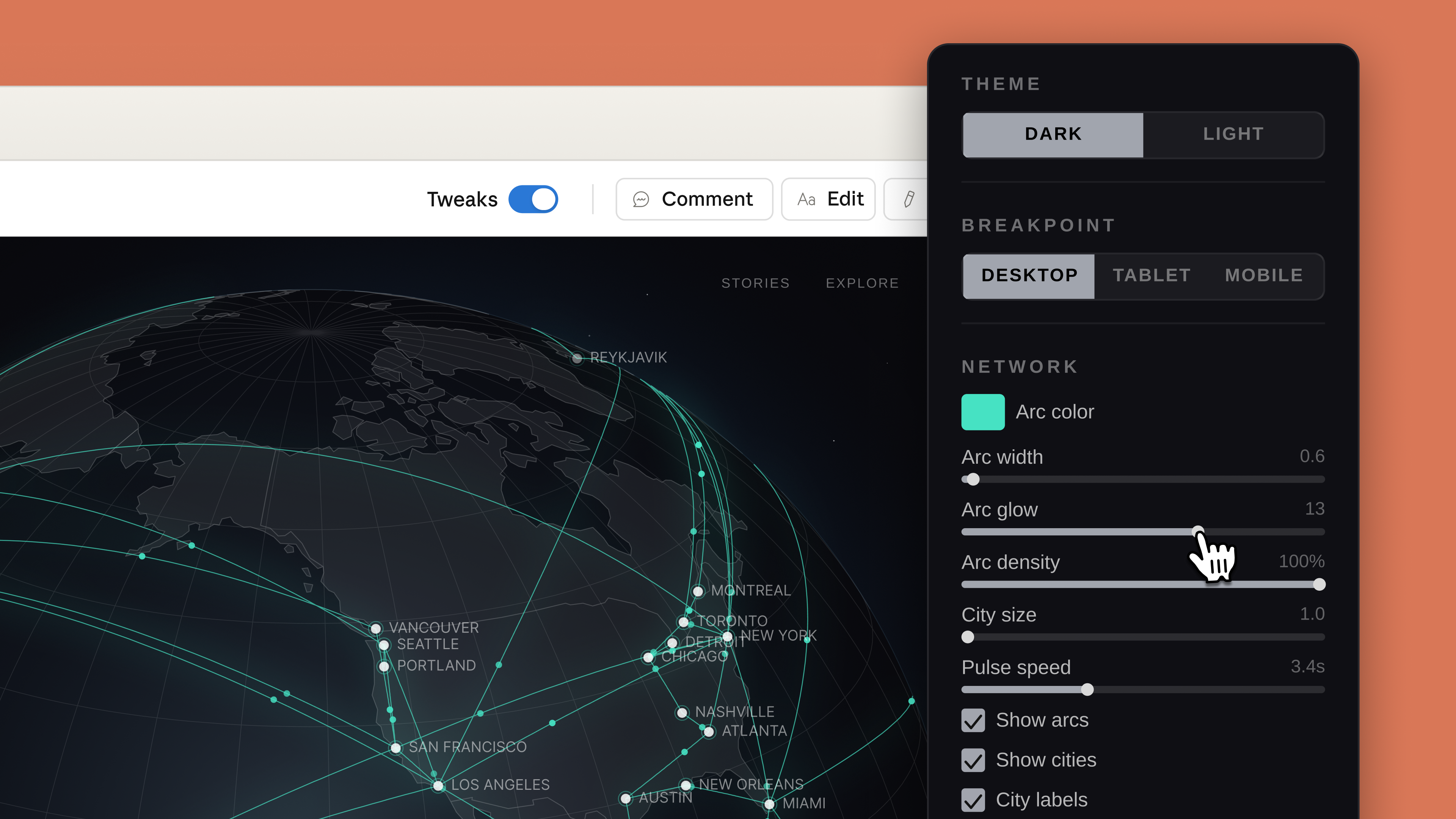
As you might expect, every project in Claude Design starts with a prompt. From there, Anthropic notes users can refine Claude's outputs through conversation, inline comments and direct edits. Like Adobe's recently announced AI assistant, Claude will also generate custom sliders that correspond to specific elements in a design, which the user can push and pull to modify those elements. For instance, in the screenshot below, you can see how Claude has tweaked the interface to allow the user to adjust the glow and density of arcs it used to illustrate a connected network.
Claude Design will generate custom sliders you can use to adjust specific visual elements.
Anthropic
Anthropic has also built an onboarding process that allows Claude to build an internal visual language after reading your organization's codebase and existing design documents. "Every project after that uses your colors, typography, and comments automatically," according to the company. Outside of text prompts, there's also support for image and document uploads, and Anthropic has even included a web capture tool so enterprise customers can snapshot elements from their company's website. There's also built-in sharing, and you can export a design directly to Claude Code. In the coming weeks, Anthropic has promised to make it easier to build integrations with its new app.
Claude Design arrives in the same week that both Adobe and Canva released their own visual AI assistants. If Anthropic is preparing to eat Canva’s lunch, it's doing so in a strange way given that you can export your Claude Design projects to Canva. If you want to try the new app for yourself, it's available as part of Anthropic's Pro, Max, Team and Enterprise subscriptions, with usage running up against your usage limits.
This article originally appeared on Engadget at https://www.engadget.com/ai/anthropic-now-has-a-design-assistant-too-150000903.html?src=rss
Startup Donut Lab made a splash at the start of the year with some astonishing — and suspicious — claims about its solid state batteries. Now Finnish newspaper Helsingin Sanomat reports an individual has filed a criminal whistleblower complaint against the company over those claims.
Until recently, Lauri Peltola was listed as the Chief Commercial Officer at Nordic Nano — the firm reportedly contracted to handle portions of the manufacturing on Donut's behalf, and which Donut Lab has invested in. He reportedly filed a criminal complaint that Donut Lab’s promises of energy density and longevity have been overstated and that the company lacks the production capacity previously claimed.
HS suggests it has seen copies of internal communications between Donut Lab and two partner companies, CT-Coating and Nordic Nano. The paper says that CT-Coating’s first-generation battery is the one that Donut Lab has been advertising, and is the model it handed to Finnish national lab VTT to test. But, according to the emails viewed by HS, CT-Coating had abandoned development on that cell in favor of a one still in early development, despite Donut Lab’s claim in January that it had a technology ready to enter mass production.
Donut Lab CEO Marko Lehtimäki reportedly told HS he had no knowledge of Peltola’s complaint. Nordic Nano CEO Esa Parjanen, meanwhile, denied Peltola’s accusations, saying that his views were not shared by the company and that Peltola had no involvement with Nordic’s battery project. In a joint public statement Donut Lab and Nordic Nano stated they "do not know the exact nature of the complaint" but denied "having committed any crime or misleading investors." They also describe the complainant (presumably Peltola, though the statement does not name him) as not having "the necessary knowledge of battery technology or the overall picture of the development work."
This article originally appeared on Engadget at https://www.engadget.com/transportation/donut-labs-battery-claims-reportedly-subject-of-whistleblower-complaint-142133269.html?src=rss
TCL introduced its new flagship X11L SQD-Mini LED TV at CES 2026, and now a few months later, the company is ready to expand its lineup with more SQD-Mini LED models and its first RGB-Mini LED TV. All sizes of the TCL QM8L SQD-Mini LED TV are available now. Meanwhile, both the TCL QM7L SQD-Mini LED TVs and the RM9L RGB-Mini LED TVs are available to pre-order.
SQD-Mini LED panels are TCL's latest iteration of its Mini LED display technology, where "SQD" stands for "Super Quantum Dot," a layer of tiny crystal dots that help filter the light from the LEDs in the company's panels. TCL claims its SQD-Mini LED screens are more color accurate than its previous models without losing out on HDR contrast. The TCL QM8L has an anti-reflective SQD-Mini LED panel, up to 4,000 discrete dimming zones, up to 6,000 nits of peak brightness and support for Dolby Vision 2 Max after a software update. The TCL QM7L also has an anti-reflective SQD-Mini LED panel, up to 2,100 discrete dimming zones, up to 3,000 nights of peak brightness and support for Dolby Vision IQ. Both TVs feature Audio by Bang & Olufsen and run the latest version of Google TV with support for Gemini.
TCL
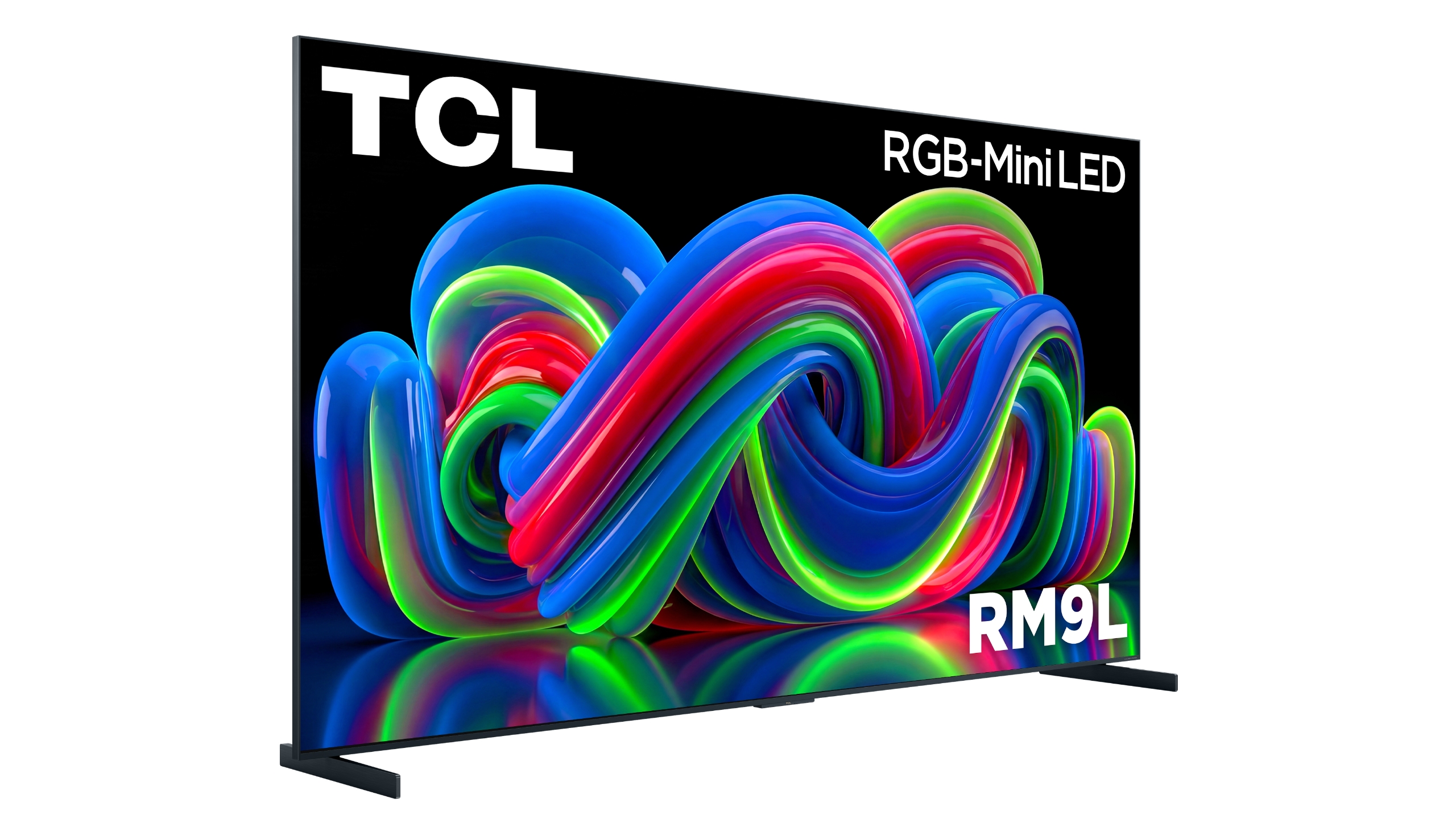
Like other TV makers at CES 2026, TCL also capitalized on the growing trend of Micro RGB or RGB Mini LED panels. Rather than use a layer of white or blue LEDs that are transformed with quantum dots and color filters, TCL's RGB-Mini LED starts with discrete red, green and blue LEDs to produce richer color. The TCL RM9L features the company's new RGB-Mini LED display with an anti-reflective layer, over 3,800 discrete local dimming zones, up to 6,000 nits of peak brightness and support for Dolby Vision 2 after a software update. The TV also features Bang & Olufsen audio and Google TV with Gemini support.
TCL says the QM8L is available to order now starting at $2,500 for the 65-inch model, $3,000 for the 75-inch model, $4,000 for the 85-inch model and $6,000 for the 98-inch model. The TCL QM7L, meanwhile, is available to pre-order starting at $1,200 for the 55-inch model and goes as high as $4,000 for the 98-inch model. If you're curious about TCL's new RGB-Mini LED displays, the TCL RM9L is available to pre-order starting at $8,000 for the 85-inch model and up to an eye-popping $30,000 for a 115-inch model.
This article originally appeared on Engadget at https://www.engadget.com/home/home-theater/tcls-rgb-mini-led-tvs-will-start-at-8000-130000543.html?src=rss