India is considering new smartphone security rules that would require device makers to allow government access to source code for “vulnerability analysis.” It would also require companies to notify the government of major software updates and security patches before rollout, according to Reuters.
This is the latest in a raft of unprecedented proposals by the Indian government under the guise of security, as it weighs making a package of 83 security standards drafted in 2023 legally binding in the world’s second-largest smartphone market with nearly 750 million smartphones.
Under the proposals, any source code review would be analyzed and potentially tested at designated labs in India. Major phone manufacturers have reportedly warned the Indian government that such a move risks revealing proprietary information.
The source code proposal comes alongside a series of additional recommendations such as restrictions on background permissions for apps and the option to remove all preinstalled apps. Reuters also reports the package would mandate periodic malware scanning and require phones to store system logs for at least 12 months, requirements that industry groups told the publication would drain battery life, run into storage limits and slow the rollout of necessary security updates.
The nation’s IT ministry told Reuters it "refutes the statement" that it is proposing manufacturers hand over their source code. This was despite a review of internal government and industry documents as part of the reporting. Government officials and industry executives are reportedly due to meet Tuesday for more discussions.
Last month, India was set to require a state-owned cybersecurity app be preinstalled on every smartphone in the nation before backpedaling after intense backlash. Just two days later, there was reportedly a proposal to require that smartphones keep location services on at all times with no way to turn them off.
This article originally appeared on Engadget at https://www.engadget.com/cybersecurity/india-is-proposing-another-far-reaching-security-rule-for-smartphones-155204829.html?src=rss
Apple and Google have confirmed reports that the former will use Google Gemini’s models to help power the new version of Siri and other generative AI features. CNBCfirst reported the news; Apple and Google subsequently released a joint statement which reads:
“Apple and Google have entered into a multi-year collaboration under which the next generation of Apple Foundation Models will be based on Google's Gemini models and cloud technology. These models will help power future Apple Intelligence features, including a more personalized Siri coming this year.
After careful evaluation, Apple determined that Google's Al technology provides the most capable foundation for Apple Foundation Models and is excited about the innovative new experiences it will unlock for Apple users. Apple Intelligence will continue to run on Apple devices and Private Cloud Compute, while maintaining Apple's industry-leading privacy standards.”
Apple first demoed a genAI version of Siri back at WWDC 2024. In March 2025, the company said it was delaying a major Siri update until this year, but it appears that Apple is not quite ready to publicly release a more capable version of the voice assistant.
In June, it was reported that Apple was considering partnerships with OpenAI and Anthropic for Siri (the voice assistant can currently tap ChatGPT for certain queries as part of Apple Intelligence). Two months later, Google emerged as a possible contender. Those rumors intensified in November, when it was reported that Apple might build the new Siri using a custom version of Gemini that runs on its Private Cloud Compute servers — and that it would pay Google around $1 billion a year for the privilege.
Update, January 12, 2026, 12:03PM ET: This story has been updated with a full joint statement from Apple and Google.
This article originally appeared on Engadget at https://www.engadget.com/ai/apples-siri-ai-will-be-powered-by-gemini-153636649.html?src=rss
The holiday season is fully in the rear view mirror and real life is here to stay. But that doesn't mean the time for gifts is over — especially ones for yourself. You can still take advantage of great January sales on some awesome tech products.
Take the Apple Mac mini M4, which is down to $500 from $599. The 17 percent discount gives you 16GB of RAM and 256GB of SSD for only about $20 more than the computer's Black Friday sale. Its beefier models are also on sale: opting for 512GB of SSD will cost you $690, down from $799, while also upping your RAM to 24GB is available for $890, dropping from $999.
We gave the Apple Mac mini M4 a 90 in our review thanks in large part to its powerful chip. The M4 works very fast despite being in such a small device. It also offers front-facing headphone and USB-C ports. You can further upgrade to the Apple M4 Pro chip for $1,270, down from $1,399 — a nine percent discount. The Pro model also has Thunderbolt 5 support.
Check out our coverage of the best Apple deals for more discounts, and follow @EngadgetDeals on X for the latest tech deals and buying advice.
This article originally appeared on Engadget at https://www.engadget.com/deals/get-100-off-apples-mac-mini-m4-desktop-141615926.html?src=rss
The Federal Communications Commission has approved SpaceX’s request to deploy an additional 7,500 Gen2 Starlink satellites, allowing the company to launch 15,000 in all. It has also allowed SpaceX to upgrade its Gen2 satellites with “advanced form factors and cutting-edge technology,” to operate across more frequencies and to add more orbital shells to optimize coverage and performance. This approval will give the company’s fleet a boost and will allow it to offer internet and mobile services to more parts of the globe. The satellites will also enable SpaceX to offer “direct-to-cell connectivity outside the United States and supplemental coverage” within the US.
In the United States, SpaceX has a partnership with T-Mobile, which gives its subscribers access to satellite-to-phone services. It enables subscribers to send texts and access compatible apps even in remote locations. The companies are also planning to roll out voice calls over satellite in the future.
As Ars Technicanotes, the FCC’s announcement comes after SpaceX revealed that it was moving 4,400 satellites from an altitude of 341 miles down to 298 miles to reduce the risk of collision. SpaceX originally asked for permission to deploy 29,988 second-generation Starlinks in 2020, but the FCC only granted it permission for 7,500 in 2022. Back then the commission said that it was giving SpaceX a limited approval to help maintain a safe space environment due to concerns about orbital debris.
This article originally appeared on Engadget at https://www.engadget.com/science/space/spacex-can-deploy-7500-more-starlink-gen2-satellites-with-fcc-approval-180000843.html?src=rss
That’s a wrap for CES 2026! In this episode, Devindra and Cherlynn chat about their favorite aspects of the show, as well as Engadget’s best of CES awards lineup. Also, Cherlynn chats with Pebble founder Eric Migicovsky about his Pebble smartwatch revival, as well as an intriguing new AI ring that’s built entirely around notetaking.
TVs at CES 2026: all eyes on Micro RGB and LG’s super thin OLED – 1:48
L'Oréal debuts LED/Infrared face masks seem cool but needs some development – 5:46
Engadget’s official Best of CES 2026: Lego’s Smart Brick, Lenovo’s rollable laptop screen, a super quiet leafblower and more – 9:55
Health Tech at CES 2026: Eyebot’s 30-second vision exam, Wheelmove makes manual wheelchairs motorized – 11:41
Interview with Pebble founder Eric Migicovsky – 20:43
Credits
Hosts: Devindra Hardawar and Cherlynn Low Producer: Ben Ellman Music: Dale North and Terrence O’Brien
This article originally appeared on Engadget at https://www.engadget.com/computing/engadget-podcast-best-of-ces-2026-and-a-chat-with-pebbles-founder-160000762.html?src=rss
CES always has its share of attention-grabbing robots. But this year in particular seemed to be a landmark year for robotics. The advancement in AI technology has not only given robots better “brains,” it’s enabled new levels of autonomy and given rise to an ambitious, if sometimes questionable, vision for our robot-filled future.
From sassy humanoids to AI-powered pets and chore-handling assistants, we sought out as many cute, strange and capable robots as we could find in Las Vegas. These are the ones that made the biggest impression.
Agibot Humanoids
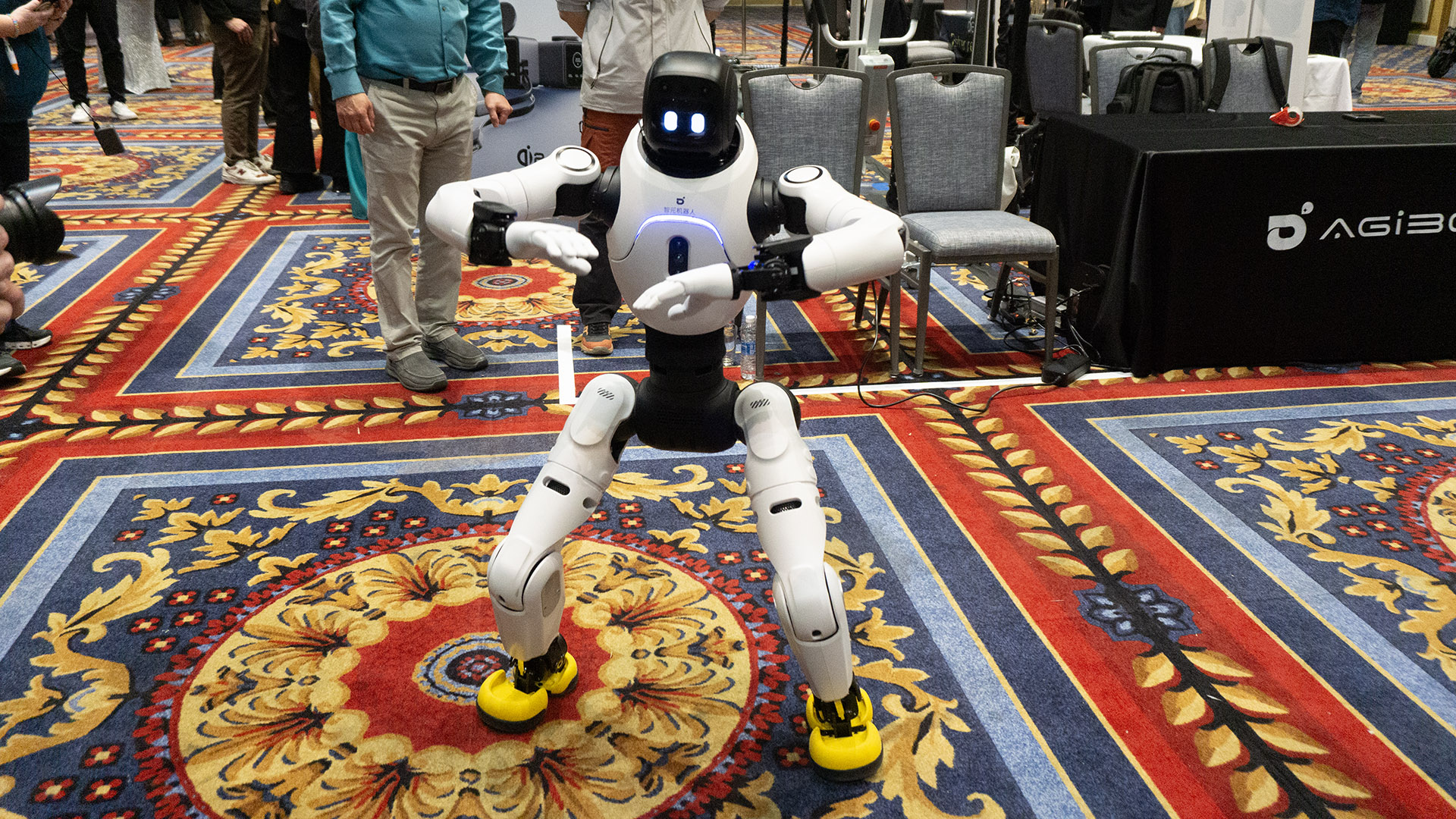
Agibot's X2 humanoid robot.
Karissa Bell for Engadget
Of all the humanoids we saw at CES, Agibot's made the biggest impression. The company was showing off two models: the larger A2 and the smaller X2 (pictured above). The latter impressed us with its dance moves — the company told us it can learn surprisingly complex choreography — but the A2 turned out to be surprisingly capable at chatting up CES goers.
Later in the show, we came across the A2 at IntBot's booth, where the company had custom versions of both Agibot humanoids "running" their booth. I spent several minutes talking with "Nylo" and was genuinely impressed by its conversational skills, even if its roasts could use a little work. — Karissa Bell, Senior Reporter
Dreame's robo vac arms and legs
Dreame was back this year with some wild robot vacuums. The company showed of the Cyber 10 Ultra, a robot vacuum with a multipurpose extendable arm. The arm, which we got a glimpse of at last year's show, can pick up stuff, but it also has its own cleaning attachments, allowing the robot to clean hard-to-reach corners and other spots that wouldn't otherwise be accessible.
Dreame also brought its latest wild concept, the Cyber X, which has legs that propel it up and down full-size staircases. The legs are somewhat unsettling — they look alarmingly similar to mini chainsaws — but watching it glide up and down stairs was impressive all the same. — KB
OlloBot
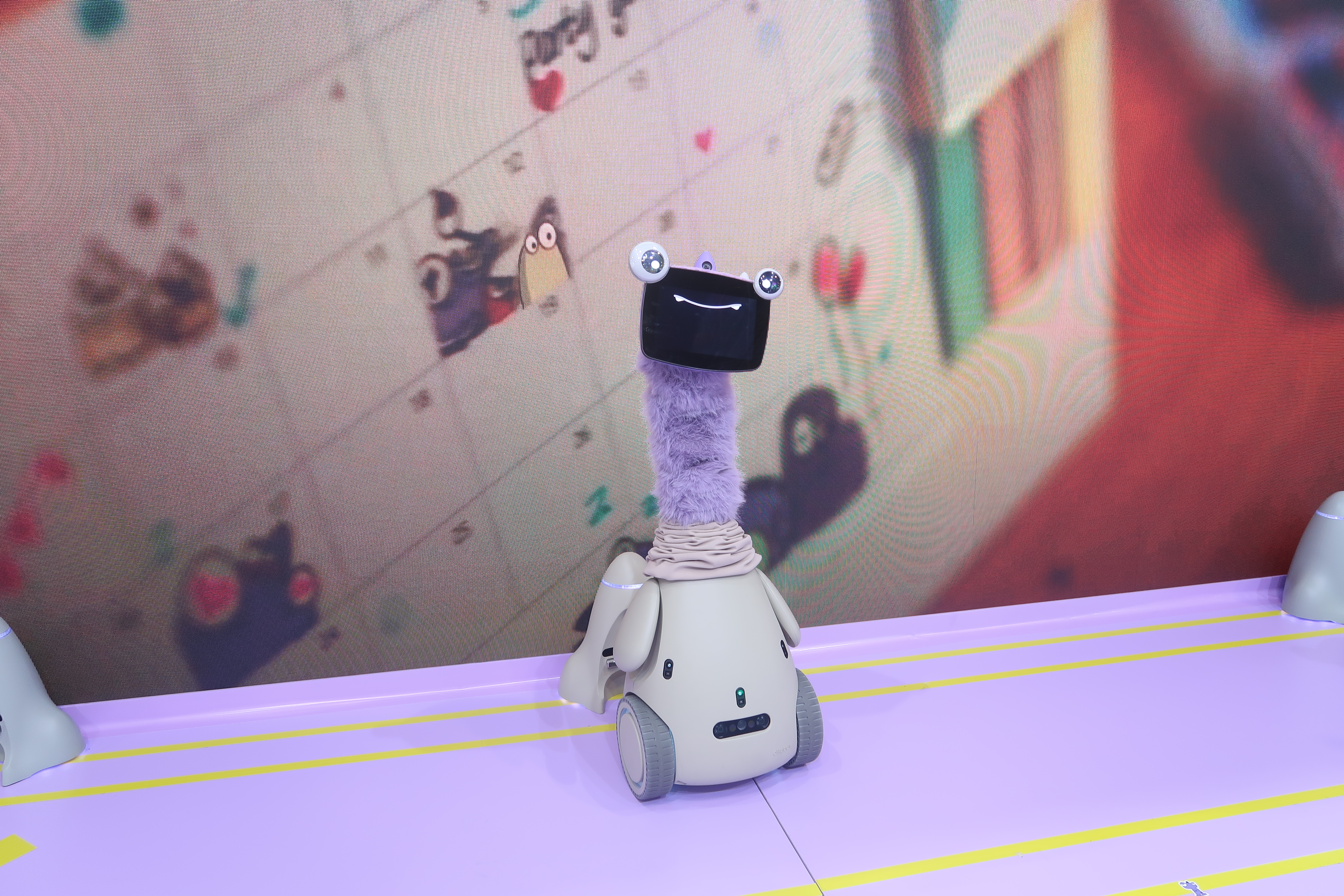
The long neck version of OlloBot.
Cheyenne MacDonald for Engadget
OlloBot is one of those semi-ridiculous CES robots that's just impossible not to smile at. It has the goofiest face, with top-sitting frog eyes slapped onto a tablet where its mouth is displayed. Then, on top of that, it has a patch of soft fur on its neck and nowhere else on its body, which is penguin shaped and complete with flappy little arms. There are two versions of OlloBot, one that's short with a fixed neck and another where the neck can stretch out to make it much taller. And of course, it can be dressed up in silly outfits.
It's a family-focused robot that responds to voice commands and touch, and is meant to capture memories as they happen, snapping pics and videos for its diary of notable moments. It can be used to make calls and control smart home devices. Everything is stored locally in its removable heart module, and there's a companion app for additional interactions. — Cheyenne MacDonald, Weekend Editor
Rovie
A robot with a dust pan like appendage dumps toys into a bin.
Cheyenne MacDonald for Engadget
Sure, we've seen multiple robots (particularly robovacuums) that can pick objects up off the floor and put them away to make homes tidier, but this one is cute and has a little face. Instead of using an arm to grab one thing at a time, Clutterbot's Rovie has a dustpan-style tray with two sweepers that fold out from its front. It drives around and, using computer vision, identifies toys that have been left on the floor and scoops them up. Then, it dumps them in a designated bin where they're consolidated and out of the way.
It's still in the R&D phase, a team member said when I visited the booth, but this is one I'm hoping to see become a real, purchasable product soon. For parents of small children who are constantly leaving their toys around, it would be pretty convenient to have a tiny robot picking up after them. Also for me, who doesn't have children but a very sweet and hardworking cat who loves to steal socks and then deliver them as if they're her kills, leaving socks scattered all over the house. Clutterbot team, if you're reading this, please add socks to the list of items Rovie can sweep up. — CM
Saros Rover
Not to be outdone, Roborock also brought a stairclimbing robot vacuum to CES, Saros Rover. And, unlike Dreame's prototype, the Roborock can also clean the stairs while it climbs. No word on when it will be available or how much it might cost (probably a lot!) but the company says it is "a real product in development." -KB
CLOiD
CLOiD folded laundry at LG's CES booth.
Karissa Bell for Engadget
LG's CLOiD was definitely the most ambitious robot we saw at CES 2026. The company showed its home helper concept (slowly) folding and sorting laundry, fetching drinks from the fridge, putting food in the oven and retrieving a set of lost keys. But while the 15-minute demo gave us a tantalizing look at the appliance maker's vision for a "zero labor home," it's unlikely to be anything more than a slick demo anytime soon. The company has made no commitment to actually make a version of CLOiD people can actually buy. — KB
Allex
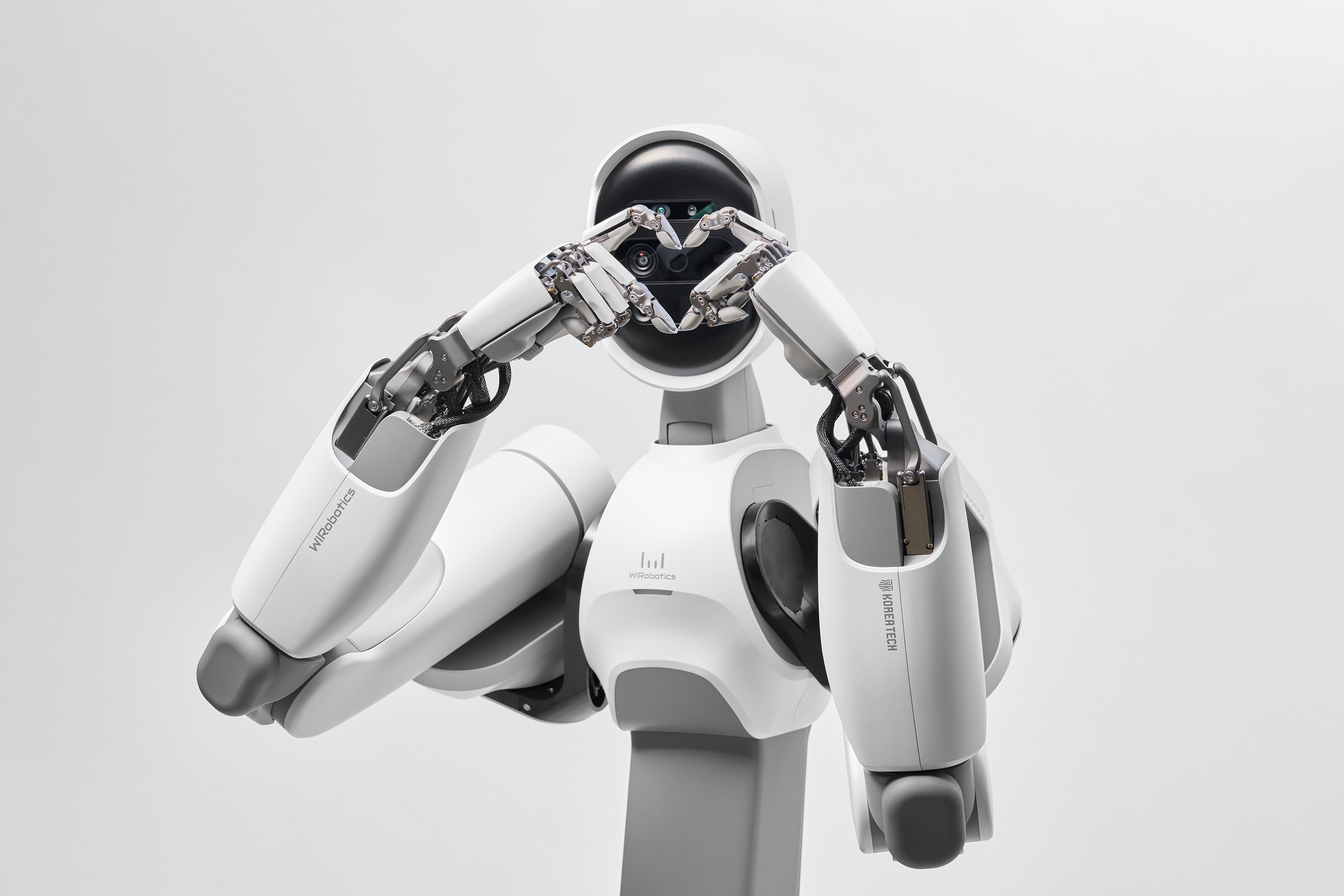
WIRobotics' Allex robot makes a heart sign with its hands.
Cheyenne MacDonald for Engadget
WIRobotics brought its new humanoid, Allex, to CES, and the robot was really hamming it up when we stopped by the booth, striking poses and engaging with visitors. It's a waist-up robot with articulated parts, from its arms to its fingers, and is meant to be a general purpose tool that could be used in manufacturing, the service industry or even households. Each hand can hold objects of up to about 6.6 lbs, and the robotic hand has 15 degrees of freedom. The company's website shows the robot's fingers are dexterous enough to do the Gen-Z heart sign, but when it looked at Karissa and me it threw a millennial heart up. Did Allex lowkey call us unc? — CM
Poketomo
Poketomo in one of the many outfits Sharp brought to CES.
Cheyenne MacDonald for Engadget
Sharp's Poketomo is an improbably adorable tiny meerkat. Well, technically it's an AI companion shaped like a fuzzy, portable meerkat. It might look like a toy, but the company says it's actually to be a companion for adults.
It’s small enough you can carry it around with you throughout the day (Sharp even makes a tiny Poketomo-sized clear backpack). Like a lot of AI companion devices we saw at CES, it’s equipped with a small camera and microphone that enables it to constantly interact with you. The camera also enables its “memory” so the pet can recognize and deliver personalized updates to its person. Poketomo launched recently in Japan, but sadly Sharp says it has no current plans to sell it in other markets. — KB
Bibo
Moony bibo (I-Type).
Cheyenne MacDonald for Engadget
It seemed like everyone was trying to cash in on Labubu hype at CES 2026. There were Pop Mart-style bag charms all over the place and countless products that looked suspiciously like the now ubiquitous toy monster. We even got one pitch for a "a labubu-like robot that talks to you" that, in fact, did not look like a Labubu in any way, shape or form. But there was one truly Labubu-like tiny robot that managed to stand out from the rest and kind of stole my heart, even though I'm not particularly into Labubus. (Please don't make me say Labubu ever again.)
Bibo is a cute-as-hell AI toy that's meant to be a companion you bring with you everywhere. It has a little camera on its head that it uses to see the world around it, and can recognize its owner's face and tone of voice, so it can respond to interactions in an emotionally appropriate way. It'll keep a daily diary of its activities, and while the toy comes in two starting personality "types" — Sunny bibo (E-Type), the bubbly extrovert, and Moony bibo (I-Type), the gentle, sensitive one — they'll develop more unique personalities over time. Their fur is soft and warm, so it feels like you're petting a kitten.
Why is it even cuter like this?
Cheyenne MacDonald
At the booth, the team had several of them on display wearing various outfits, in little dioramas showing them in classroom and camping scenes, and even deconstructed with the fur removed, which somehow made it look even cuter. Bibo isn't available to purchase yet, and when it is, it'll launch first in China before potentially expanding depending on its success at home. — CM
Sharpa
Sharpa's humanoid robot is seen playing ping-pong.
Cheyenne MacDonald for Engadget
Sharpa's booth had a lot going on and was definitely one of the bigger crowd-pullers. There was a humanoid robot playing ping-pong, another taking selfies with people and another dealing blackjack, along with a disembodied robotic hand that could mirror visitors' finger movements. The autonomous demos showed off what that highly dexterous hand can do, and it was pretty impressive — especially seeing it draw individual cards from the deck. — CM
Zeroth
Zeroth's W1 robot.
Cheyenne MacDonald for Engadget
Chinese robotics startup Zeroth brought two adorable home robots to CES: a pint-sized humanoid companion bot and a rolling robot that looks like Wall-E, with tank-style tracked treads so it can ride around outside. We didn't see these guys doing too much, but they sure were cute. The one that resembles Wall-E, called W1, kind of melted my heart just looking at it. (Don't get attached, you can't afford it.)
The tiny humanoid, M1, costs $2,400 while W1 costs $5,000. Both are expected to ship this spring, with a tentative date of April 15. — CM
Sweekar
Sweekars in their little outfits.
Karissa Bell for Engadget
Takway's Sweekar pocket pet was something I looked at and immediately thought, sigh, I'm going to buy that. It's a Tamagotchi-like virtual pet with AI smarts so it can form a personality based on your interactions with it and the activities you do together. The idea is that it "grows" with you. Like a Tamagotchi, it will require more frequent care in the younger stages of its life cycle. But after it reaches the adult level, it autonomously cares for itself, and it never dies. It can eventually keep itself entertained, and go off on its own virtual adventures and bring you back tales of its travels.
Sweekar is super cute as is, and it can be dressed up in little outfits for more personalization. The device comes in light yellow, pink, and blue, and we saw it sporting a snowboarder outfit and a full cowboy getup. — CM
Realbotix
One of Realbotix' robots.
Cheyenne MacDonald for Engadget
Realbotix is a company we've seen a lot at CES over the years, and it was at the show again for 2026 with several of its highly customizable, realistic humanoid robots. As always, it was among the most unnerving exhibits we saw. New for this year, Realbotix was demonstrating its Robotic Vision System, which allows its robots to see and react to their surroundings more naturally, tracking faces to look directly at whoever is talking and better reading emotion from facial expressions. Damn, it can sense my fear now… — CM
Onero H1
Onero H1 had an endearingly blank stare.
Karissa Bell for Engadget
Switchbot surprised us with its own chore-handling robot, Onero H1, which also won Engadget editors' pick for best robot of CES 2026. We were immediately taken by its weirdly long body and endearingly blank stare as it slowly wheeled around picking up laundry and depositing the items in a washing machine.
Like a lot of robot demos we saw at CES, we only saw Onero performing a small part of what Switchbot says it's actually capable of. But Onero also seemed much more realistic in terms of the type of robot helpers that people might actually see outside of CES, and the company told us it does plan to sell Onero (albeit in limited quantities) by the end of the year. — KB
Cocomo
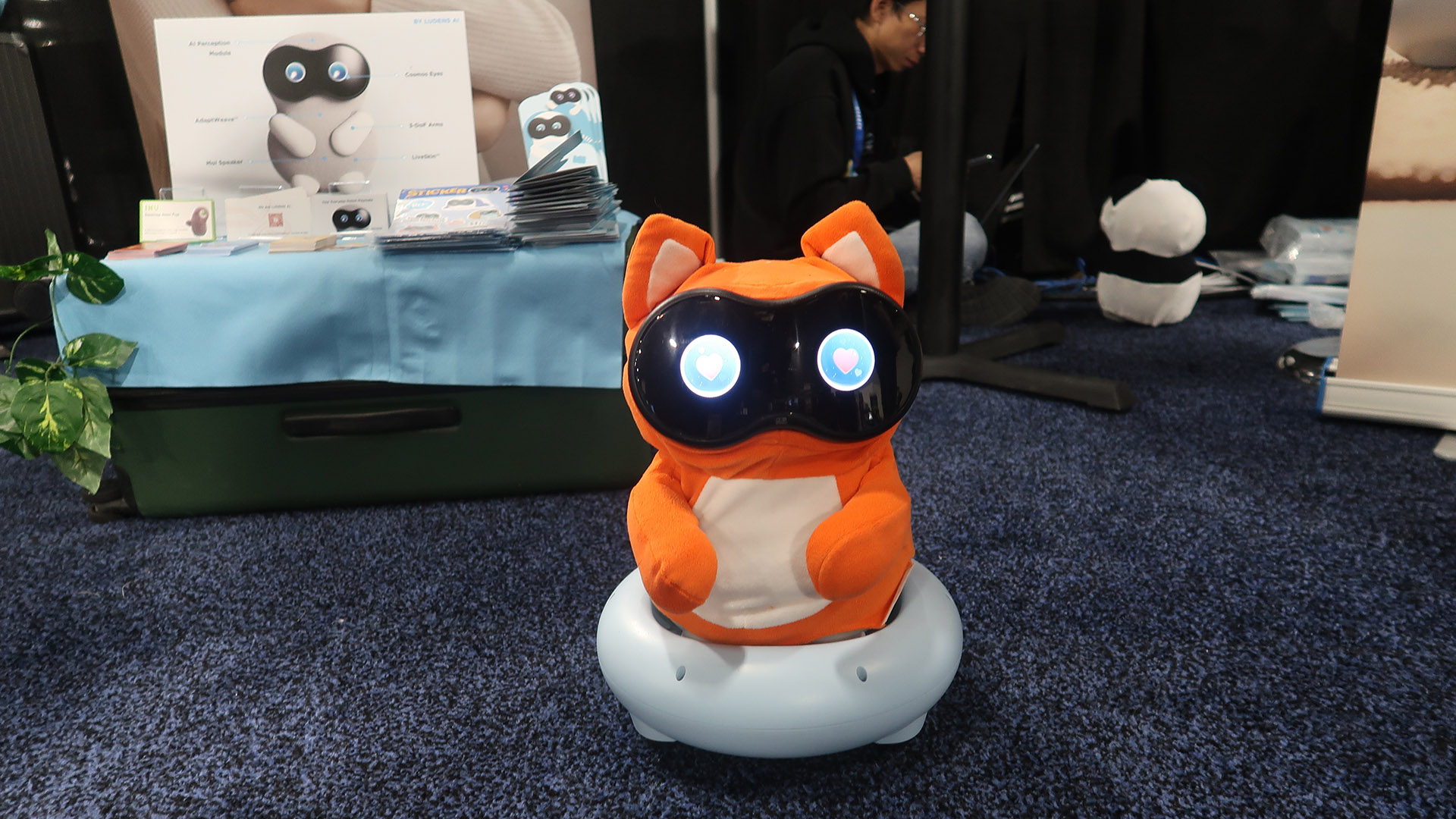
Ludens AI Cocomo robot.
Cheyenne MacDonald for Engadget
Another robot pet that won us over immediately was Cocomo. Created by Japanese startup Ludens AI, Cocomo is an autonomous robot friend that yes, uses AI to respond to voice and touch and is meant to bond with its owners over time. The egg-shaped creature can scoot around on a wheeled base, or you can carry it around with you.
But what we loved about Cocomo is that it's not trying to be yet another AI assistant, give out life advice or perform tasks. Its goal is to provide companionship and well, be your friend. And while it can respond to voice input it doesn't exactly have a voice of its own: it communicates via cute humming sounds, which is a lot less creepy than some of the talking robots we saw. — KB
Yonbo
Yonbo at CES.
Cheyenne MacDonald for Engadget
Yonbo is a kids' AI companion robot that totally charmed us. It kind of looks like a dog, and when we visited its booth at Unveiled, there were four of them playfully bopping their heads to a pop song and cycling through different cute facial expressions and emoji eyes (including bowls of ramen). It's designed to be an intelligent playmate that can tag along for activities, talk with a child and read them stories, and even help them work through emotions, like getting frustrated during a game.
Yonbo's movement is controlled by a wristband, so it doesn't require a phone to play with. It can also be used as an extra pair of eyes for parents around the house. In Parental Monitor mode, which the team says is the only time its camera will be able to stream and store video, parents are able to see what Yonbo sees. The robot costs $800 and is available now. — CM
MÖFO
MÖFO in a glass case at CES.
Cheyenne MacDonald for Engadget
If we're being completely honest, the pitch for will.i.am's MÖFO (yes, MOFO, like motherfucker) had us a bit, um, perplexed for a hot second. We read it and all the accompanying materials over and over trying to figure out what, exactly, this thing does. Some of the claims that added to this confusion: "the agent 'octopuses' across your digital ecosystem through its eight USB-C connections"; it "converts moments into objects"; it "turns life notes into a life operating system."
We get it now, (we think): It's agentic AI hardware, kind of like a Rabbit R1 or AI Pin but in the form of a teddy bear. Sadly, we didn't get to see MÖFO up close or watch it do anything, but we are nonetheless intrigued, if still a bit confused, by this strange teddy bear. — CM and KB
This article originally appeared on Engadget at https://www.engadget.com/ai/the-robots-we-saw-at-ces-2026-the-lovable-the-creepy-and-the-utterly-confusing-153537930.html?src=rss
Chances are that you're here because you've heard a virtual private network (VPN) can change your virtual location, and want to know what that means. If you know already, head over to my best VPN list to learn which services I recommend for changing your location. But if you're clueless, read on.
Whenever any device connects to the internet — whether it's a laptop, a phone or a smart Lego brick — it's assigned a unique IP address that other devices can use to identify it. Think of the name you give the barista at a coffee shop, except instead of a hot beverage, you’re being served websites and digital audio and video.
That's the upside. The downside is that a device's IP address can be used to find its location in the real world. That means service providers can show you local weather reports — as well as targeted local ads. More ominously, however, it means service providers can restrict what you see online based on where you are physically. That impacts everything from the fun (what Netflix has available to stream) to the serious (what information gets censored on the government's behalf).
A VPN gets around that downside by running all your online activity through a middleman server before sending it to its destination. Instead of your real IP address, everyone sees the address of the VPN server, along with its geolocation. That means you can subvert any local restrictions getting in your way: You’re actually in Houston, but so far as the website you’re viewing is concerned, you seem to be coming from Amsterdam. Here's how to do it.
How to change your virtual location with a VPN
With so many excellent commercial VPNs on the market, changing your virtual location is a lot easier than it sounds. You don't need to be a hacker — just find a good VPN app and connect to a server in your desired location. On almost any VPN, this is a simple matter of opening the app or desktop client and choosing the server location from a list.
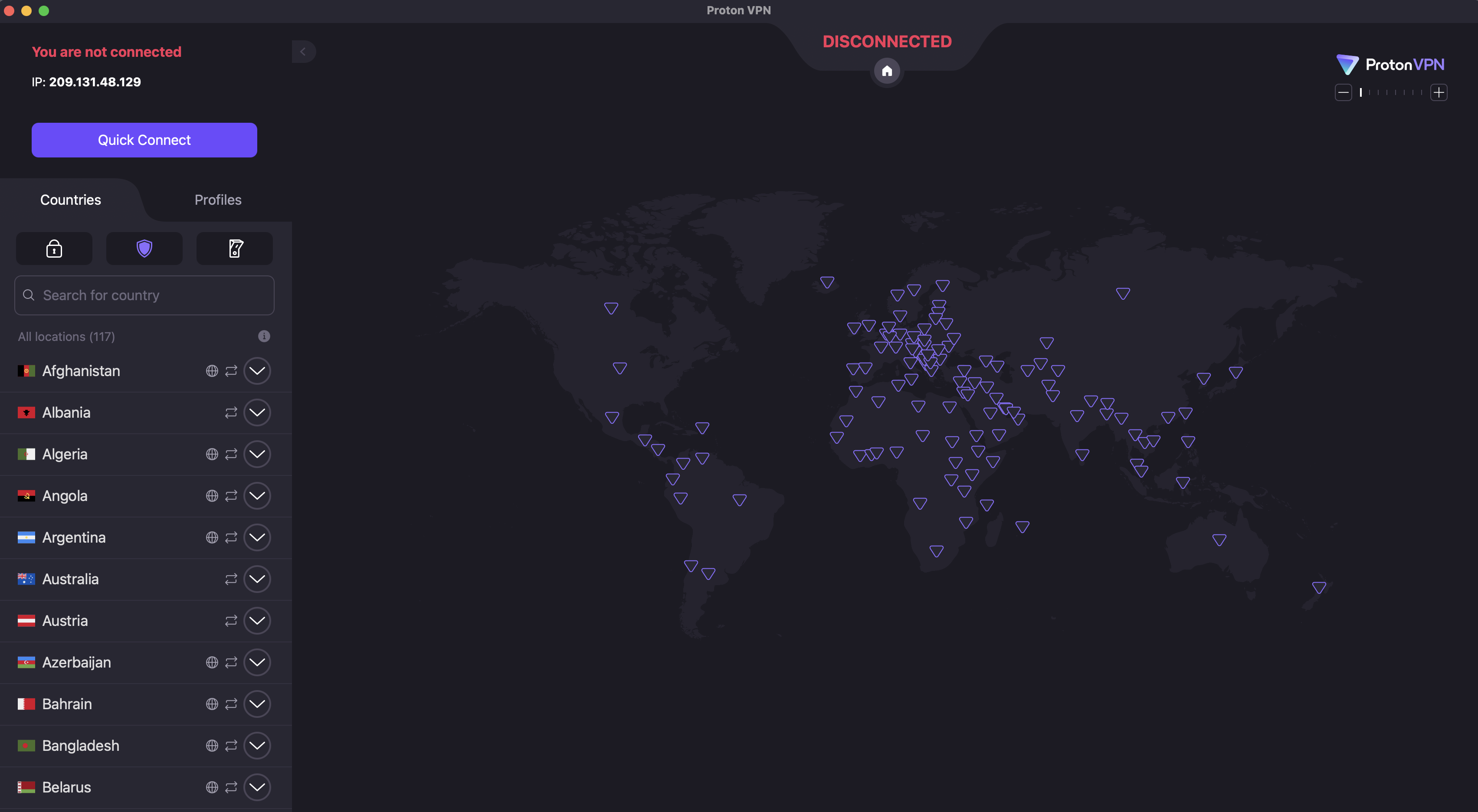
On Proton VPN, for example, you can switch locations by clicking the name of any country in the list on the left.
Sam Chapman for Engadget
However, as with any technology, there are some potential pitfalls. For reference, I've laid out the steps below for both desktop and mobile devices.
How to change location on Windows or Mac
Use these steps to change the virtual location of any desktop or laptop device running macOS or Windows. There may be slight variations, but in general, this process works for any top VPN.
Select a VPN provider. You can rely on Engadget's best VPN list or, if you're unable to pay for a new subscription right now, our list of the best free VPNs. My personal choice is Proton VPN, but there are other good options. Look for a service with fast speeds, modern encryption and a long, non-controversial record in the industry.
Create an account with the VPN and save your username and password. Unless it's a forever-free service, this is when you'll be asked to pay for a subscription. If you're sure about your provider, you can save a lot by going with a long-term deal. See our list of the best VPN deals for ideas.
Download the VPN app. It's best to go through the VPN's website, even if you're on Mac — in rare cases, the App Store versions can be outdated or short on features. Look for a download center on the site, and make sure you enter it while logged in.
Install the VPN app. Most VPNs have an installation flow built in, so all you have to do is follow the steps. If the VPN asks you to change your settings or grant it permissions, do it; this installs the tools it needs to do its job.
Open the VPN app and find your way around the user interface. At a minimum, make sure you know how to connect, disconnect and open the location selection menu.
Connect to a server in the location where you want your internet connection to appear to originate. If you're trying to get around local restrictions, you can just pick any nearby country without that censorship — for example, if you're in China, then Japan, South Korea or Singapore will work. If you're after content from a specific country, choose a server in that country.
Get online through a browser or connected app as you normally would. To make sure your location has actually changed, use a site like WhatIsMyIPAddress to check where you're coming from.
When you want to use your real location again, disconnect from the VPN or choose a server in the county you're in.
It's not necessary, but I also recommend activating your VPN's kill switch if there is one. VPN servers aren't perfect, and they do drop connections from time to time. If this happens, an active kill switch also cuts off your internet connection so your real location isn't visible for a millisecond.
How to change location on iPhone or Android
The process for using a VPN to change your virtual location on mobile is pretty similar to how it's done on desktop. Again, while individual installation flows have their own quirks, the following steps are broadly applicable to any iOS or Android VPN.
Pick a VPN provider you like. The best VPNs also tend to be the best for mobile, including Proton VPN, ExpressVPN and Surfshark. On mobile, you can use app store reviews and comments to research. Make sure you're getting the real version of your chosen VPN and not a similarly named one trying to piggyback.
Download the VPN from the Apple App Store or Google Play Store. At this point, if you haven't paid yet, you may be able to take advantage of a free trial by opening the app and proceeding through the setup flow. This is a good time to test if the VPN is changing your location in ways that can't be seen through.
Follow the VPN's instructions to create an account, including paying for a subscription if necessary.
Take some time to learn to use the VPN app. Mobile interfaces have to pack more features into a smaller space, usually relying on tabs. Try and find the tabs for picking server locations and toggling VPN settings.
Connect to a server in your desired location. Make sure the VPN is actually active before you proceed (most of them make it pretty clear, but it's still easy to forget).
Get online through a browser or another internet-capable app.
When you're finished, disconnect from the VPN to return to using your real location.
One more note: on both mobile and desktop, I recommend using either a paid VPN or a free VPN supported by a paid subscription. Entirely free VPNs come with risks, and some popular apps secretly share problematic connections.
Why change your virtual location?
Changing your virtual location isn't hard, but it's still an extra step between you and the internet. However, the benefits of location masking far outweigh the small amount of extra work. Hiding your IP address — and your location along with it — is one of the most impactful steps you can take to stay safe online.
Concealing your IP address has massive benefits on its own, even if you use one close to your real location (which gets you shorter loading times). Lots of web services track you without your consent, frequently for advertising purposes. Some of this is done through third-party cookies, but a lot of it starts with building profiles about your IP address.
Illicit actors can also take advantage of your IP address and its geolocation. A hacker can track you down to within your ZIP code — though an IP address can't pinpoint your location to the square foot, it makes it much easier to narrow down where you live. Even with just your IP address, hackers can launch DDoS attacks against you, use the IP to make fake social media accounts in your name or even call in SWAT teams to your location.
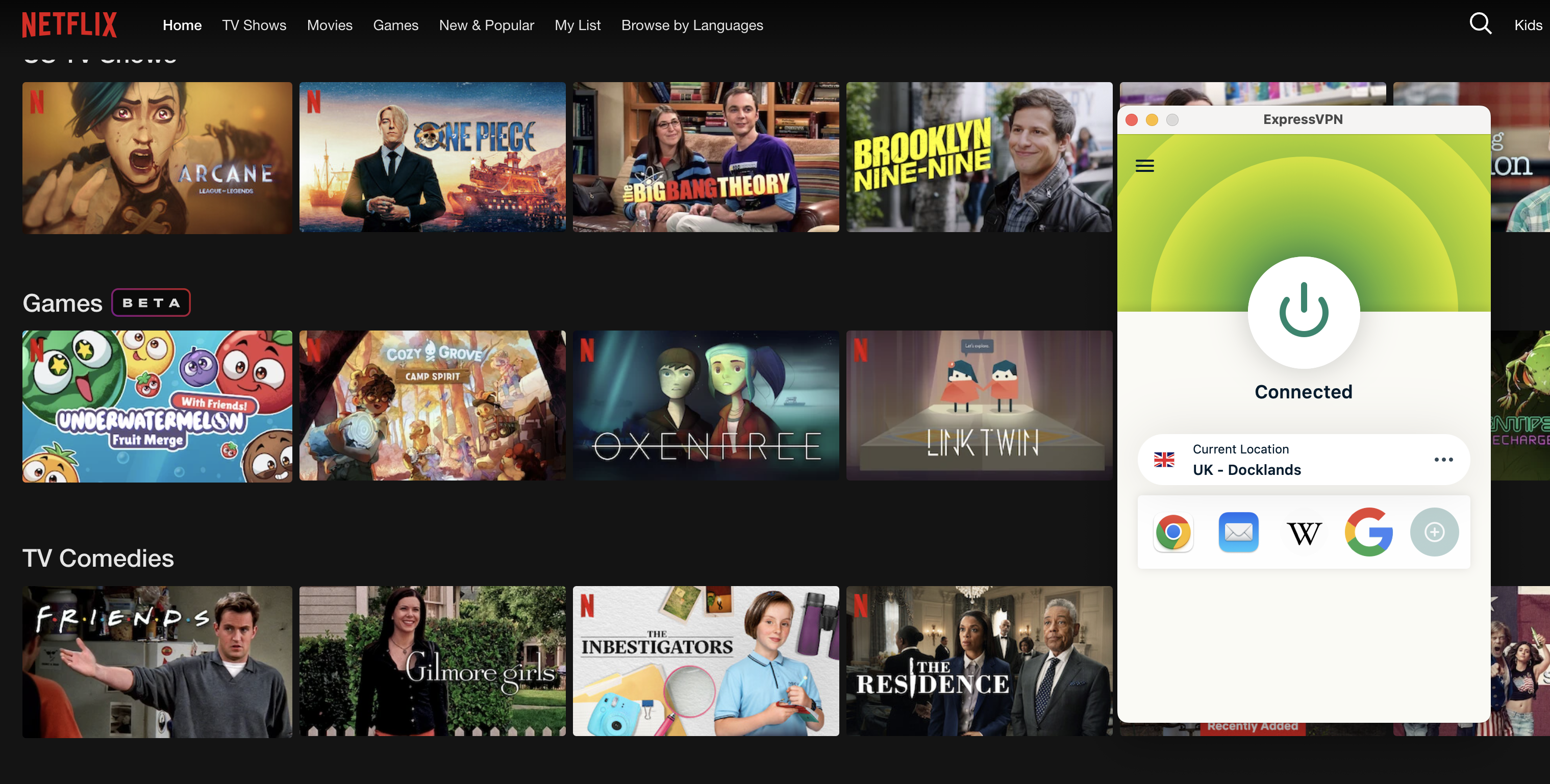
By changing my location to the UK using ExpressVPN, I can see shows on Netflix that aren't listed in the US.
Sam Chapman for Engadget
Although masking your virtual location can be vital to staying safe online, there are other practical and even fun reasons to do it. For one thing, when traveling abroad, you might want to use a site only available in your home country. Simply connect to a server located near home and you can use your bank account and local streaming libraries as normal.
If you're home, there are lots of benefits to being virtually in another region. You can see a foreign country's streaming libraries and shop for deals that may only be available in its currency. You can also get around any nationwide online censorship and potentially download banned apps. Just be sure to be aware of your local laws to know if doing so is merely frowned upon, or if it’s truly against the law.
Can a VPN change your GPS location?
There's one more critical point to remember when changing location with a VPN. The VPN server only changes your IP address and the physical location associated with it. It does not change the GPS location your device might be broadcasting.
GPS data can leak out in a few ways. Tablets and phones have location services turned on by default, and as anyone who's heard a true crime podcast knows, they can also give away your location by contacting cell towers. Web browsers often have similar features. Websites can also use HTML5 geolocation to access your GPS — provided you give permission, but that's easy to do without thinking.
Some VPNs, including Surfshark and Windscribe, do have features designed to fool GPS, but they're not standard. When you're changing your location with a VPN, make sure to turn off location services and avoid granting any permissions that might reveal where you really are. You can also run a separate GPS spoofing app alongside your VPN.
How to troubleshoot a VPN that's not changing your location
If you've found that browsers are still seeing your old IP address while you have a VPN active, or that websites show you the same content when you're supposed to be virtually abroad, there's a chance your VPN isn't actually changing your location. To test if your real position is leaking, start by checking your IP address (with a search engine or WhatIsMyIPAddress). If it matches your home location, something has gone wrong.
Note that it's not necessarily a problem if it doesn't match your home location or the stated location of your VPN server. VPNs use virtual server locations to reach a lot of locations where brick-and-mortar servers aren't practical — Windscribe, for example, does not have a physical data center in Antarctica.
If you find that your VPN is leaking your real IP address, try these troubleshooting steps in order. I've arranged them roughly from least to most time-intensive.
Disconnect from your VPN and reconnect to the same location. This should hook you up with a different server in that same place. Test your IP again — there's a good chance the problem was isolated to the first server you tried.
Try a new location (skip this step if you need a server in a particular country).
Try a different VPN protocol. If you're using WireGuard, switch to OpenVPN or IKEv2.
Make sure location services are turned off.
Clear your browser cache and cookies to get rid of any saved information.
Test for DNS leaks. Your VPN might accidentally be sending your IP address to a public server to resolve DNS requests. IPleak.org is a good tool for catching this.
Try a different VPN. Use a free service like Proton or Windscribe and test for leaks. If the problem reoccurs, it might be coming from inside your network.
Contact the helpdesk for your original VPN and inform them about the problem. Get screenshots of the VPN connected to the leaky location next to IP address data confirming the leak.
I've already mentioned several VPNs that do a good job of changing your location, but in case you're here for product advice, here are all my recommendations in one place. My favorite VPN is Proton VPN, which is so far the only service to receive full marks on my location-change test. I used 15 of its servers in five different countries to access Netflix. Each time, I saw the destination country's full content library like I was really there.
Surfshark is a close runner-up in this category. It passed 14 out of 15 tests, only slipping up once in Japan — and a quick disconnect and reconnect was enough to fix that. I got equally great results from ExpressVPN, only having to retry one server in the UK. NordVPN performed perfectly in every location except Nigeria, and that still didn't leak my real IP address. The problem only seemed to exist on Netflix.
This article originally appeared on Engadget at https://www.engadget.com/cybersecurity/vpn/how-to-change-location-with-a-vpn-140000339.html?src=rss
The start of the new year is a great time to get your finances in order, and a good budgeting app can help with that. Instead of laboring over a spreadsheet, you can try one of our favorite budgeting apps for less than usual. Monarch Money is running a sale that gives new users 50 percent off one year of the service, bringing the final cost down to just $50. Just use the code NEWYEAR2026 at checkout to get the discount.
Monarch Money makes for a capable and detailed budgeting companion. You can use the service via apps for iOS, Android, iPadOS or the web, and Monarch also offers a Chrome extension that can sync your Amazon and Target transactions and automatically categorize them. Like other budgeting apps, Monarch Money lets you connect multiple financial accounts and track your money based on where you spend it over time. Monarch offers two different approaches to tracking budgeting (flexible and category budgeting) depending on what fits your life best, and the ability to add a budget widget on your phone so you can know how you're tracking that month.
How budgeting apps turn your raw transactions into visuals you can understand at a glance is one of the big things that differentiates one app from another, and Monarch Money offers multiple graphs and charts to look at for things like spending, investments or categories of your choice based on how you've labelled your expenses. The app can also monitor the spending of you and your partner all in one place, to make it easier to plan together.
The main drawbacks Engadget found in testing Monarch Money were the app's learning curve, and the differences in features (and bugginess) between Monarch's web and mobile versions. Still, for 50 percent off, the Monarch Money is well worth experimenting with if you're trying to save money in 2026, especially if you want to do it collaboratively with a partner.
This article originally appeared on Engadget at https://www.engadget.com/deals/monarch-money-deal-new-users-get-one-year-of-access-for-only-50-204507285.html?src=rss
Meta's messaging app WhatsApp could soon be subject to deeper scrutiny (and punishment) under the European Commission's Digital Services Act, Reuters reports. Because the app's broadcasting feature WhatsApp Channels grew to around 51.7 million average monthly active users in the European Union in the first six months of 2025, the feature has crossed the 45-million-person barrier that lets DSA rules apply.
A platform is designated as a "very large online platform" or VLOP once it has 45 million monthly users or more, according to the European Commission. Once an app or service passes that amount, it's subject to the DSA and all its rules about how digital platforms should operate, particularly around removing illegal or harmful content. Companies can be fined up to six percent of their global annual revenue for not complying with the DSA.
WhatsApp traditionally functions as a private messaging app, but its Channels feature, which lets users make one-sided posts to anyone who follows their channel, does look a lot more like Meta's other social media platforms. "So here we would indeed designate potentially WhatsApp for WhatsApp Channels and I can confirm that the Commission is actively looking into it and I wouldn't exclude a future designation," a Commission spokesperson said in a daily news briefing Reuters viewed.
Engadget has asked Meta to comment on WhatsApp’s possible new designation. We’ll update this article if we hear back.
The possibility that WhatsApp could become a regulatory target in the EU was first reported in November 2025, but Meta has been dealing with DSA-related fines since well before then. Meta was charged with violating the EU law in October 2025 because of how it asks users to report illegal content on Facebook and Instagram. Earlier that month, a Dutch court also ordered the company to change how it presents the timelines on its platforms because people in the Netherlands were not "sufficiently able to make free and autonomous choices about the use of profiled recommendation systems" in the company's apps.
This article originally appeared on Engadget at https://www.engadget.com/social-media/whatsapp-might-soon-be-subject-to-stricter-scrutiny-under-the-eus-digital-services-act-191000354.html?src=rss
ExpressVPN is back on sale again, and its two-year plans are up to 81 percent off right now. You can get the Advanced tier for $88 for 28 months. This is marked down from the $392 that this time frame normally costs. On a per-month basis, it works out to roughly $3.14 for the promo period.
We’ve consistently liked ExpressVPN because it’s fast, easy to use and widely available across a large global server network. In fact, it's our current pick for best premium VPN. One of the biggest drawbacks has always been its high cost, and this deal temporarily solves that issue.
In our review we were able to get fast download and upload speeds, losing only 7 percent in the former and 2 percent in the latter worldwide. We found that it could unblock Netflix anywhere, and its mobile and desktop apps were simple to operate. We gave ExpressVPN an overall score of 85 out of 100.
The virtual private network service now has three tiers. Basic is cheaper with fewer features, while Pro costs more and adds extra perks like support for 14 simultaneous devices and a password manager. Advanced sits in the middle and includes the password manager but only supports 12 devices.
This article originally appeared on Engadget at https://www.engadget.com/deals/save-up-to-81-percent-on-expressvpn-two-year-plans-right-now-180602273.html?src=rss