Nintendo has filed a lawsuit against the creators of a popular Switch emulator called Yuzu, which gives users a way to play games developed for the platform on their PCs and Android devices. In the lawsuit shared by Game File's Stephen Totilo, the company argued that Yuzu violates the anti-circumvention and anti-trafficking provisions of the Digital Millennium Copyright Act (DMCA).
Nintendo explained that it protects its games with encryption and other security features meant to prevent people from playing pirated copies. Yuzu has the capability to defeat those security measures and to decrypt Nintendo games. "[W]ithout Yuzu's decryption of Nintendo's encryption, unauthorized copies of games could not be played on PCs or Android devices," the company wrote in its complaint.
It's illegal to "circumvent technological measures put into place by copyright owners to protect against unlawful access to and copying of copyrighted works" under the DMCA, Nintendo continued. And distributing "software primarily designed to circumvent technological measures" also constitutes unlawful trafficking. The defendants are, thus, "facilitating piracy at a colossal scale," the lawsuit argued. This case could set a precedent for future lawsuits against emulators, which aren't illegal in and of them themselves. As Ars Technica notes, Nintendo's arguments are calling their very nature unlawful.
To illustrate how much Yuzu has affected its business, Nintendo revealed in its complaint that The Legend of Zelda: Tears of the Kingdom was illegally distributed a week and a half before its official release. It was apparently downloaded over a million times from pirated websites, which specifically noted that people can play the game file through Yuzu. The company also mentioned that Yuzu's creators are making money from their emulator. They're getting around $30,000 a month from their Patreon supporters and have earned around $50,000 from the paid version of their software on Google Play, so far.
Nintendo is asking the court to stop Yuzu's creators from promoting and distributing the software. It's also asking for an unspecified amount in "equitable relief and damages."
This article originally appeared on Engadget at https://www.engadget.com/nintendo-lawsuit-accuses-switch-emulator-creators-of-piracy-at-a-colossal-scale-093157736.html?src=rss
Nintendo has filed a lawsuit against the creators of a popular Switch emulator called Yuzu, which gives users a way to play games developed for the platform on their PCs and Android devices. In the lawsuit shared by Game File's Stephen Totilo, the company argued that Yuzu violates the anti-circumvention and anti-trafficking provisions of the Digital Millennium Copyright Act (DMCA).
Nintendo explained that it protects its games with encryption and other security features meant to prevent people from playing pirated copies. Yuzu has the capability to defeat those security measures and to decrypt Nintendo games. "[W]ithout Yuzu's decryption of Nintendo's encryption, unauthorized copies of games could not be played on PCs or Android devices," the company wrote in its complaint.
It's illegal to "circumvent technological measures put into place by copyright owners to protect against unlawful access to and copying of copyrighted works" under the DMCA, Nintendo continued. And distributing "software primarily designed to circumvent technological measures" also constitutes unlawful trafficking. The defendants are, thus, "facilitating piracy at a colossal scale," the lawsuit argued. This case could set a precedent for future lawsuits against emulators, which aren't illegal in and of them themselves. As Ars Technica notes, Nintendo's arguments are calling their very nature unlawful.
To illustrate how much Yuzu has affected its business, Nintendo revealed in its complaint that The Legend of Zelda: Tears of the Kingdom was illegally distributed a week and a half before its official release. It was apparently downloaded over a million times from pirated websites, which specifically noted that people can play the game file through Yuzu. The company also mentioned that Yuzu's creators are making money from their emulator. They're getting around $30,000 a month from their Patreon supporters and have earned around $50,000 from the paid version of their software on Google Play, so far.
Nintendo is asking the court to stop Yuzu's creators from promoting and distributing the software. It's also asking for an unspecified amount in "equitable relief and damages."
This article originally appeared on Engadget at https://www.engadget.com/nintendo-lawsuit-accuses-switch-emulator-creators-of-piracy-at-a-colossal-scale-093157736.html?src=rss
In celebration of Pokémon Day (the first games launched on February 27, 1996), The Pokémon Company revealed the franchise’s latest “Legends” entry on Tuesday. Pokémon Legends: Z-A returns the series to Lumiose City, last seen as one of the regions in Pokémon X and Y on the Nintendo 3DS. The game arrives on Switch in 2025.
Developed by Game Freak, Pokémon Legends: Z-A’s trailer and press materials only provide a minimal glimpse at the upcoming title. The Pokémon Company describes it as “an exciting new adventure” and “an ambitious new entry” as the company tries to wrestle the narrative back from its guns-blazing off-brand counterpart Palworld. (That fast-growing title has already gotten the attention of The Pokémon Company’s legal team.)
A prancing Pikachu in wireframe minimalism.
The Pokémon Company
The trailer teases an urban redevelopment plan in a mysterious metro area, finally revealed as Lumiose City. Within the game world, a renovation project strives to help humans and Pokémon live together in the sprawling urban landscape. The trailer even teases Mega Evolutions, initially introduced in Pokémon X and Y.
The Pokémon Legends: Z-A trailer below — largely an extended teaser — doesn’t show any gameplay footage, and its shots of Lumiose City use wireframe models, suggesting an incomplete nature (or at least surprises reserved for another day). The game will have a simultaneous global launch when it arrives next year.
Pokémon Day also saw the announcement of a new digital trading card game. Pokémon Trading Card Game Pocket is a new mobile app (Android and iOS) set to arrive later this year. It will allow players to “enjoy the thrill of opening booster packs and collecting cards,” which will include “immersive cards” and visual effects unique to the app (in addition to classic artwork). The app’s trailer showcases a satisfying ripping animation when “opening” the digital packs (gotta get you hooked!).
Players using the app will receive two free booster packs daily. The company hasn’t officially announced the availability of additional packs through in-app purchases. However, the Pokémon Company’s language describing the app as “free-to-start” may provide a hint about its plans. The app will support trades and “quick battles,” using streamlined rules based on the card game’s battle system.
This article originally appeared on Engadget at https://www.engadget.com/pokemon-legends-z-a-for-switch-returns-the-series-to-lumiose-city-174208223.html?src=rss
In celebration of Pokémon Day (the first games launched on February 27, 1996), The Pokémon Company revealed the franchise’s latest “Legends” entry on Tuesday. Pokémon Legends: Z-A returns the series to Lumiose City, last seen as one of the regions in Pokémon X and Y on the Nintendo 3DS. The game arrives on Switch in 2025.
Developed by Game Freak, Pokémon Legends: Z-A’s trailer and press materials only provide a minimal glimpse at the upcoming title. The Pokémon Company describes it as “an exciting new adventure” and “an ambitious new entry” as the company tries to wrestle the narrative back from its guns-blazing off-brand counterpart Palworld. (That fast-growing title has already gotten the attention of The Pokémon Company’s legal team.)
A prancing Pikachu in wireframe minimalism.
The Pokémon Company
The trailer teases an urban redevelopment plan in a mysterious metro area, finally revealed as Lumiose City. Within the game world, a renovation project strives to help humans and Pokémon live together in the sprawling urban landscape. The trailer even teases Mega Evolutions, initially introduced in Pokémon X and Y.
The Pokémon Legends: Z-A trailer below — largely an extended teaser — doesn’t show any gameplay footage, and its shots of Lumiose City use wireframe models, suggesting an incomplete nature (or at least surprises reserved for another day). The game will have a simultaneous global launch when it arrives next year.
Pokémon Day also saw the announcement of a new digital trading card game. Pokémon Trading Card Game Pocket is a new mobile app (Android and iOS) set to arrive later this year. It will allow players to “enjoy the thrill of opening booster packs and collecting cards,” which will include “immersive cards” and visual effects unique to the app (in addition to classic artwork). The app’s trailer showcases a satisfying ripping animation when “opening” the digital packs (gotta get you hooked!).
Players using the app will receive two free booster packs daily. The company hasn’t officially announced the availability of additional packs through in-app purchases. However, the Pokémon Company’s language describing the app as “free-to-start” may provide a hint about its plans. The app will support trades and “quick battles,” using streamlined rules based on the card game’s battle system.
This article originally appeared on Engadget at https://www.engadget.com/pokemon-legends-z-a-for-switch-returns-the-series-to-lumiose-city-174208223.html?src=rss
Google has announced a slew of Android updates to kick off MWC this year, including Gemini integration with Messages and AI-powered text summaries for when you’re driving. As of this week, Messages users will be able to access Google’s chatbot without leaving the texting app. Gemini in Messages can handle basic tasks like drafting messages and helping to plan events, or you can just chat with it if you’re bored. The feature is still in beta, and it’s only available to English-language Messages users for now, Google says.
Android Auto is also getting a boost from AI that could help minimize distractions from people texting you while you’re on the road. If the group chat is blowing up your phone with nonstop messages or if someone is sending you novels of text, Android Auto will automatically summarize the messages and read you its more succinct version. It’ll also suggest replies and actions based on the messages, like sharing your ETA, so you can respond with a single tap and focus on driving.
Google
Google also announced some new accessibility features for Android at MWC, including AI-generated image captions in the Lookout app. It’ll be able to generate descriptions for images found online or received in messages and read them aloud to the user. The feature is only available in English to start, but is rolling out globally. Google’s Lens feature in Maps is getting an enhanced screen reader option as well, which will allow users to point their phone’s camera at something in front of them, like a restaurant or transit station, and hear information about it.
The Android updates also include new casting controls for Spotify called Spotify Connect so users can switch seamlessly between their devices, like from your headphones to a speaker. This feature was already available for YouTube Music.
Google
Catch up on all of the news from MWC 2024 right here!
This article originally appeared on Engadget at https://www.engadget.com/google-brings-gemini-to-messages-and-adds-ai-text-summaries-for-android-auto-080051647.html?src=rss
Google has announced a slew of Android updates to kick off MWC this year, including Gemini integration with Messages and AI-powered text summaries for when you’re driving. As of this week, Messages users will be able to access Google’s chatbot without leaving the texting app. Gemini in Messages can handle basic tasks like drafting messages and helping to plan events, or you can just chat with it if you’re bored. The feature is still in beta, and it’s only available to English-language Messages users for now, Google says.
Android Auto is also getting a boost from AI that could help minimize distractions from people texting you while you’re on the road. If the group chat is blowing up your phone with nonstop messages or if someone is sending you novels of text, Android Auto will automatically summarize the messages and read you its more succinct version. It’ll also suggest replies and actions based on the messages, like sharing your ETA, so you can respond with a single tap and focus on driving.
Google
Google also announced some new accessibility features for Android at MWC, including AI-generated image captions in the Lookout app. It’ll be able to generate descriptions for images found online or received in messages and read them aloud to the user. The feature is only available in English to start, but is rolling out globally. Google’s Lens feature in Maps is getting an enhanced screen reader option as well, which will allow users to point their phone’s camera at something in front of them, like a restaurant or transit station, and hear information about it.
The Android updates also include new casting controls for Spotify called Spotify Connect so users can switch seamlessly between their devices, like from your headphones to a speaker. This feature was already available for YouTube Music.
Google
Catch up on all of the news from MWC 2024 right here!
This article originally appeared on Engadget at https://www.engadget.com/google-brings-gemini-to-messages-and-adds-ai-text-summaries-for-android-auto-080051647.html?src=rss
Meta is currently testing a couple of capabilities for Threads, which Instagram head Adam Mosseri describes as some of the "most requested" features for the social network. One of these experimental features is the ability to save drafts. Users will be easily able to save a post they've typed as a draft that they can edit and publish later by swiping down on their mobile device's display. When there's a draft saved, the app's menu at the bottom of the screen highlights the post icon. At the moment, though, they can only save one draft, and it's unclear if Meta has plans to give users the ability to save more.
In addition to drafts, Meta is also testing an in-app camera. It opens the mobile phone's camera from within Threads itself, so that users can more easily share photos and videos from their phone. Meta chief Mark Zuckerberg made a post on the service with a photo he says was taken with the new in-app camera the company is testing.
Meta told us that these are initial tests for the experimental features, which means they could undergo a lot of changes before they get a wide release, and are only available for a small number of people. Over the past month, Meta also started testing a bookmarking feature for Threads that allows users to save posts they can refer to later. The company is experimenting with its version of trending topics on Threads, as well, along with the ability to make cross-posts between Threads and Facebook.
This article originally appeared on Engadget at https://www.engadget.com/the-latest-experimental-threads-features-let-you-save-drafts-and-take-photos-in-app-094535111.html?src=rss
Microsoft has announced a generative-AI powered eraser for pictures, which gives you an easy way of removing unwanted elements from your photos. Windows Photos has long had a Spot Fix tool that can remove parts of an image for you, but the company says Generative erase is an enhanced version of the feature. Apparently, this newer tool can create "more seamless and realistic" results even when large objects, such as bystanders or clutter in the background, are removed from an image.
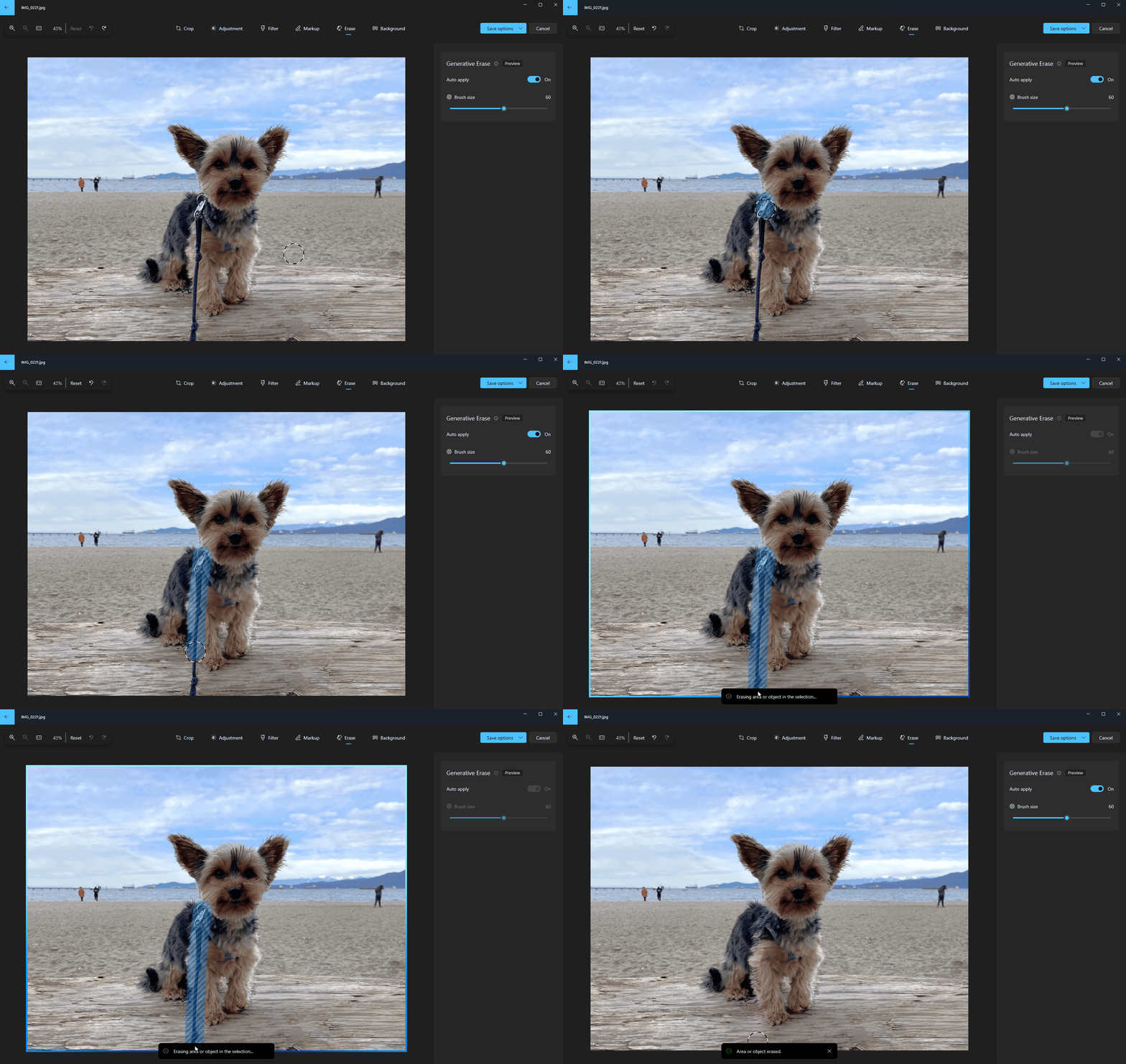
If you'll recall, both Google and Samsung have their own versions of AI eraser tools on their mobile devices. Google's used to be exclusively available on newer Pixel phones until it was rolled out to older models. Microsoft's version, however, gives you access to an AI-powered photo eraser on your desktop or laptop computer. You only need to fire up the image editor in Photos to start using the feature. Simply choose the Erase option and then use the brush to create a mask over the elements you want to remove. You can even adjust the brush size to make it easier to select thinner or thicker objects, and you can also choose to highlight more than one element before erasing them all.
At the moment, though, access to Generative erase is pretty limited. It hasn't been released widely yet, and you can only use it if you're a Windows Insider through the Photos app on Windows 10 and Windows 11 for Arm64 devices.
Microsoft
undefinedThis article originally appeared on Engadget at https://www.engadget.com/microsoft-is-giving-windows-photos-a-boost-with-a-generative-ai-powered-eraser-061851854.html?src=rss
NVIDIA is testing out a new unified app that lets users adjust GPU settings, install software and fine-tune gameplay, all from the same place. Currently, you have to access the dated Control Panel app and do some heavy menu diving to do stuff like configuring G-Sync. There’s also an entirely separate "user-friendly" app called GeForce Experience for basic GPU adjustments, driver updates and quick settings. So this collapses two different things into one.
The appropriately-named NVIDIA app is just a beta for now, but seems to do a whole lot. You can use it to update drivers, discover and install standalone applications like GeForce Now and make all kinds of GPU adjustments. To further simplify things for PC gamers, you can also use it to fine-tune both game settings and driver settings. It’s pretty much a one-stop shop.
There’s a redesigned in-game overlay for easier access to recording tools and performance monitoring. The overlay also lets you apply various gameplay filters, including AI-powered filters available to GeForce RTX users. The app looks to be squarely aimed at those who balk at the perceived complexity of PC gaming. You can even use it to redeem bundles and rewards and opt into experimental features and new RTX capabilities.
Speaking of new RTX capabilities, the app lets users easily experiment with that new remix tool that adds AI-optimized upscaled textures to older games. The celebrated Half Life 2 is getting an unofficial RTX remaster thanks to this technology. The app will also have access to a new feature called RTX Dynamic Vibrance that beefs up visual clarity and improves upon the current Digital Vibrance feature found in the current Control Panel app.
This article originally appeared on Engadget at https://www.engadget.com/nvidia-is-testing-an-app-that-unifies-geforce-experience-and-control-panel-140037038.html?src=rss
Last year, a global survey crowned KeyShot as the “Best Rendering Software,” with 88% of designers overwhelmingly picking it for its incredibly photorealistic rendering capabilities. Now, with KeyShot’s newly unveiled Physics Simulation and Camera Keyframe features, the software is growing even more powerful, bringing real-world physics and camera effects to make your renders pop even more.
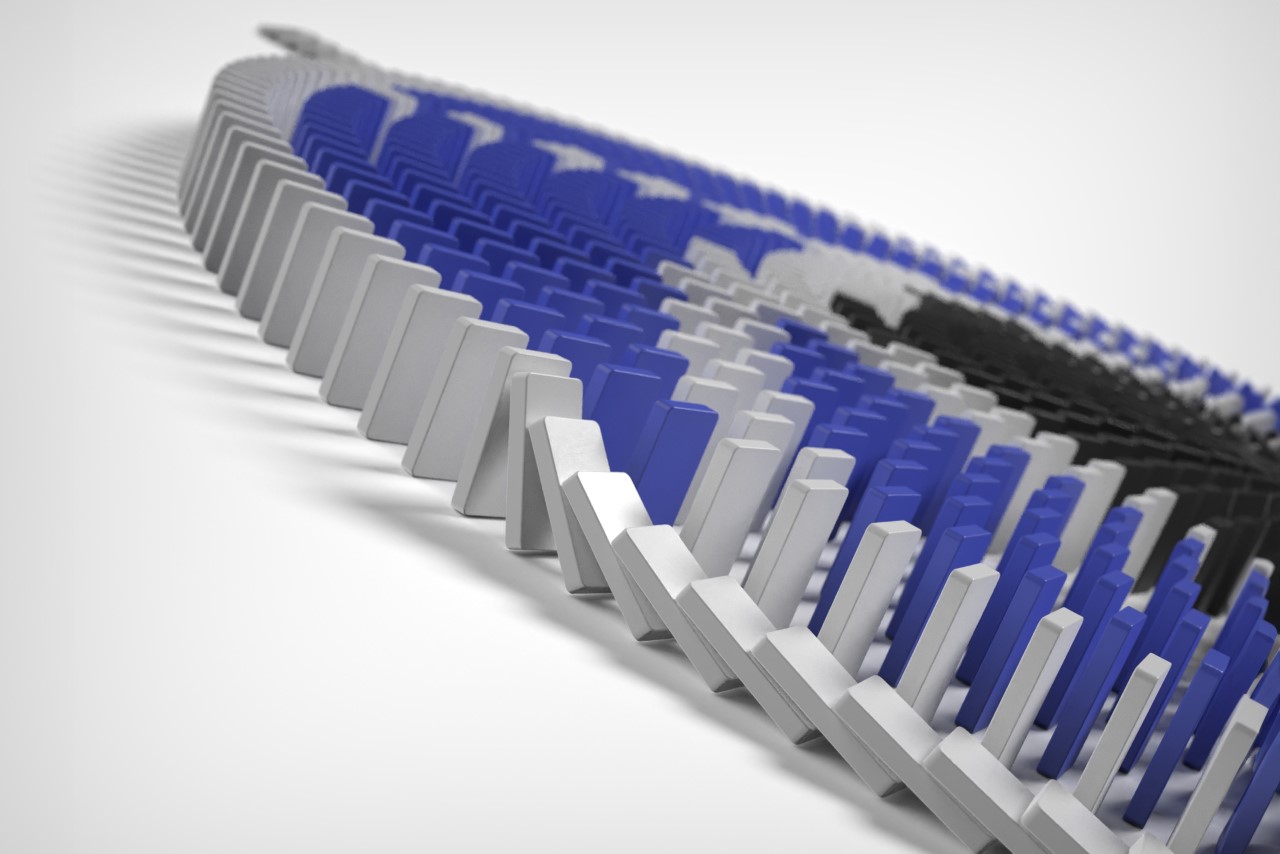
I put KeyShot’s Physics Simulation feature to the ultimate test by rendering a dramatic domino chain reaction scene. Setting up the simulation took hardly any time, with incredibly easy controls that took mere minutes to get the hang of. The results were jaw-dropping if I say so myself. In this article, I’ll show you how I managed to pull off one of my most exciting KeyShot rendering experiences ever. I’ll walk you through how I set the domino scene up, what parameters I input into the Physics Simulation window, and how you can recreate this scene, too. I’ll also share tips and tricks that can help you create some incredibly real simulations with objects falling, bouncing, and colliding with each other, absolutely enhancing your KeyShot rendering experience to a level like never before.
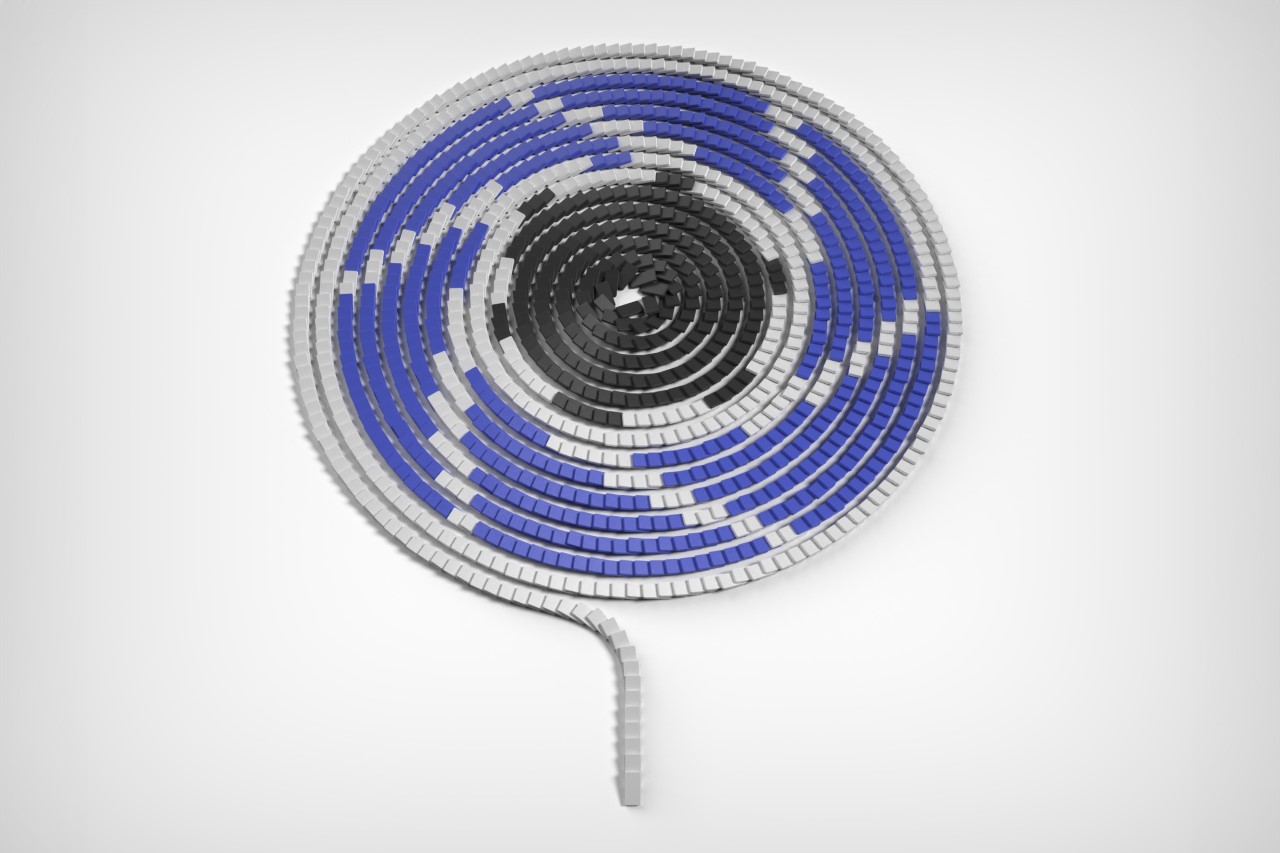
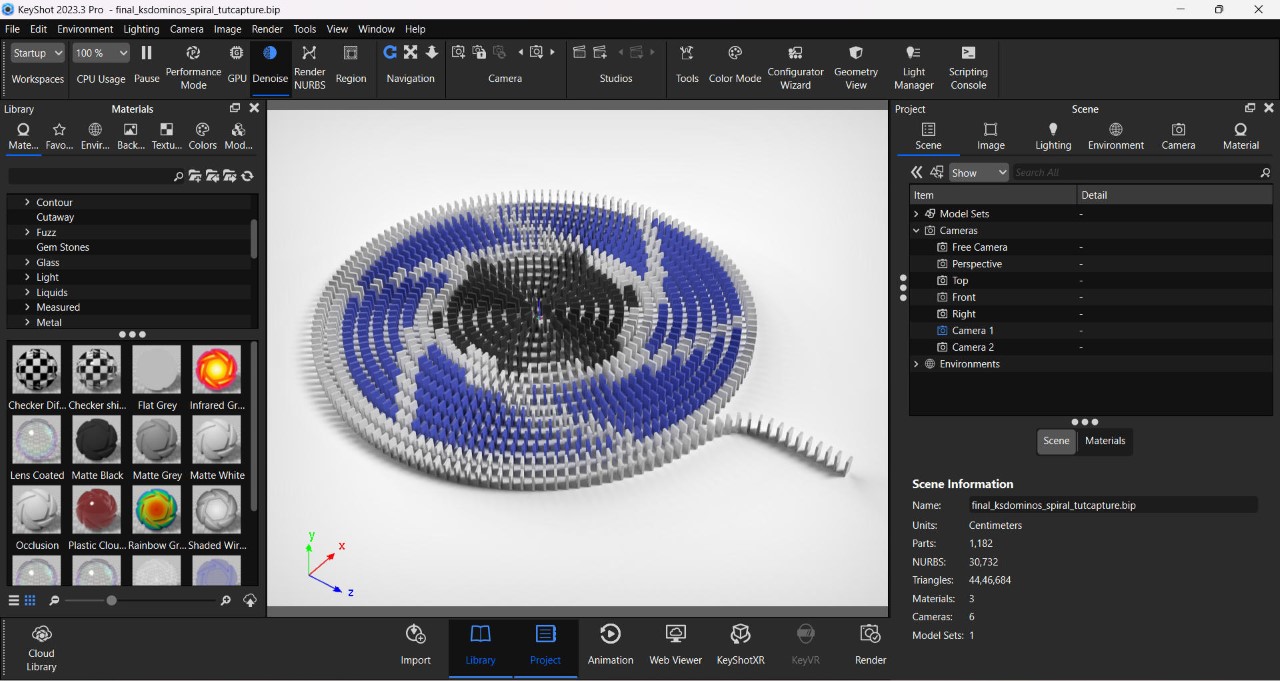
The entire scene was modeled in Rhino 7, starting by building one single domino, creating a spiral curve, and arraying multiple dominoes along the curve. The dominos were spaced at roughly 2 centimeters apart, ensuring the chain reaction would go smoothly from start to finish. The entire scene has a whopping 1182 dominoes in total; a little ambitious considering I was going to render the simulation on a 2022 gaming laptop.
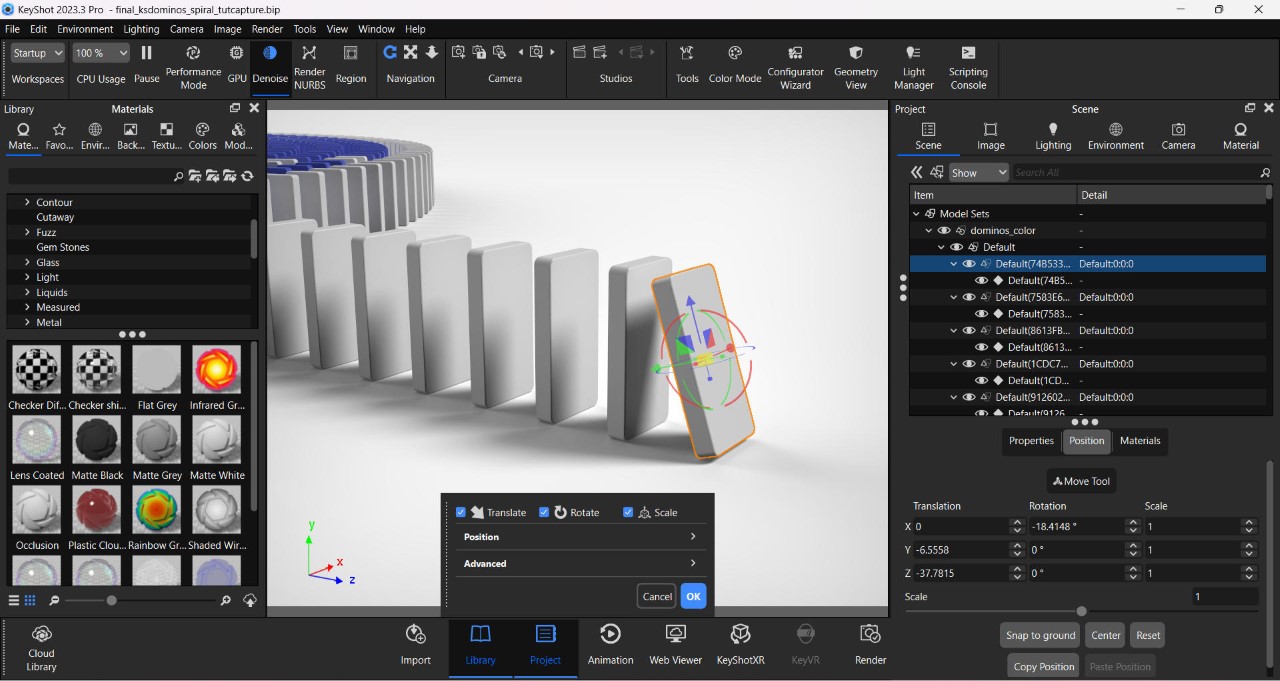
Tilt the first domino to help kickstart the physics cycle
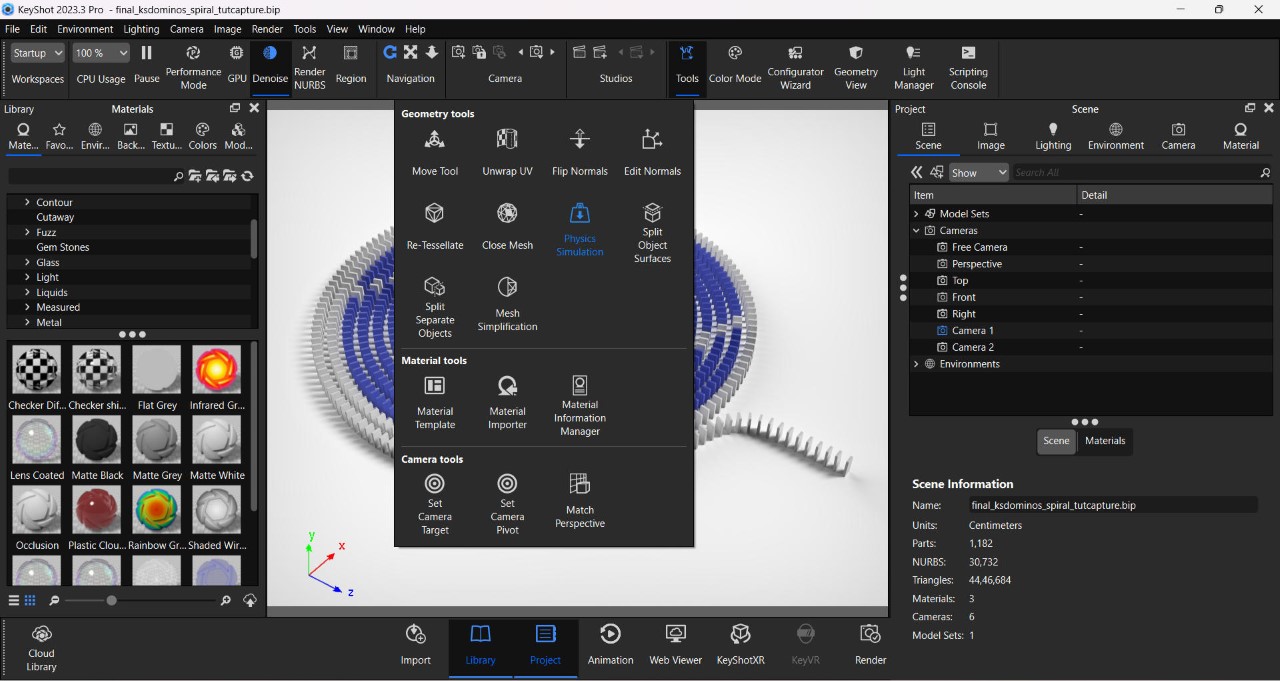
To use the simulation feature, import your scene into the latest version of KeyShot (2023-24) (get a free trial here), set the scale, add the materials, and pick the right environment. Before you use the physics feature, however, you need to prime your scene – in this case, it meant tilting the first domino forward so gravity would kick in during the simulation. The Physics Simulation feature can be found in the ‘Tools’ section on top. Clicking on it opens a separate window with a preview viewport, a bunch of settings, and an animation timeline on the bottom.
The Physics Simulation feature can be found in the Tools window
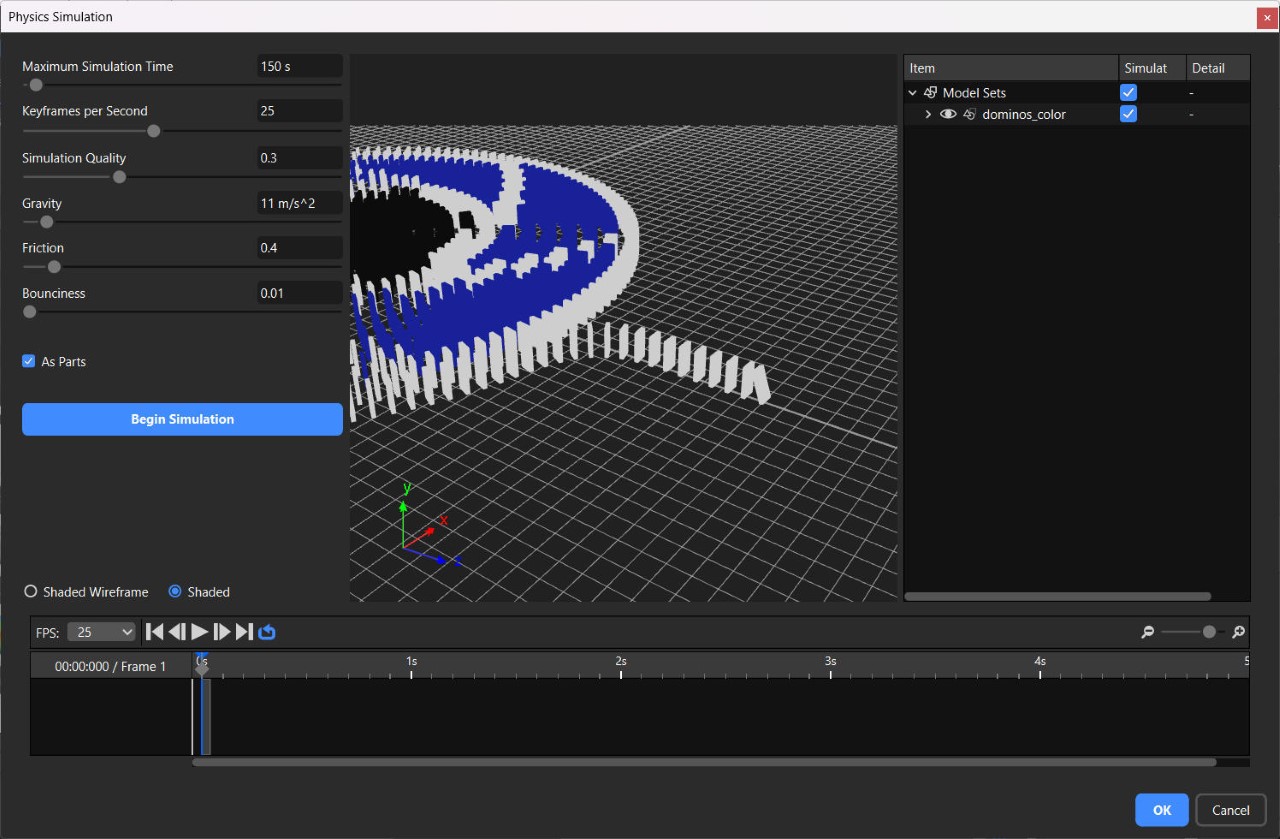
To begin with, pick the parts you want to apply physics to (these are the parts that will be influenced by gravity, so don’t pick stuff that remains stationary, like ground objects). The parts you don’t select will still influence your physics because moving objects will still collide with them. Once you’ve chosen what parts you want to move (aka the dominoes), select the ‘Shaded’ option so you can see them clearly in the viewport.
The settings on the left are rather basic but extremely powerful. You start by first setting the maximum simulation time (short animations require short simulations; considering mine was a long chain reaction, I chose 200 seconds), followed by Keyframes Per Second – This basically tells KeyShot to make your animation more detailed or choppy (think FPS, but for simulation). I prefer selecting 25 keyframes per second since I’m rendering my animation at 25fps (just to keep the simulation light), but you can bump things up to 60 keyframes per second, which gives your simulation smoother detail. You can then bump up your animation FPS to render high frame-rate videos that can then be slowed down for dramatic slow motion. Simulation quality dictates how well KeyShot factors the physics in – it’s at a default of 0.1, although if you feel like your simulation looks off, bump it up to a higher value.
The Physics Simulation Window
The remaining settings pertain to gravity and material properties. The gravity is set at Earth’s default of 9.81 m/s² – increasing it makes items heavier (and fall faster), and decreasing it makes objects float around for longer before descending. I set mine at 11 m/s² just to make sure the dominoes fall confidently. Friction determines the amount of drag caused by two colliding objects – setting a higher friction causes more surface interference, like dropping a cube on a ramp made of rubber, and reducing the friction enables smooth sliding, like the same cube on a polished metal ramp. To ensure that the dominos don’t stick to each other like they were made of rubber, I reduced my friction setting to 0.4. Finally, a Bounciness feature lets you determine how two objects collide – the lower this setting, the less bounce-back, the higher the setting, the more the rebound. Given that I didn’t want my dominos bouncing off each other, I set this at a low of 0.01. Once you’re done, hit the Begin Simulation button to watch the magic unfold.
If you aren’t happy with your simulation, you can stop it mid-way and troubleshoot. Usually, tinkering with the settings helps achieve the right simulation, but here’s something I learned, too – bigger objects fall slower than smaller objects, so playing around with the size and scale of your model can really affect the simulation. If, however, you’re happy with your simulation (you can run through it in the video timeline below), just hit the blue ‘OK’ button, and you’ve successfully rendered your first physics simulation!
The simulation then becomes a part of KeyShot’s Animation timeline, and you can then play around with camera angles and movements to capture your entire scene just the way you visualized it. I created multiple clips of my incredibly long domino chain reaction (in small manageable chunks because my laptop crashed at least 8 times during this) and stitched them together in a video editing app.
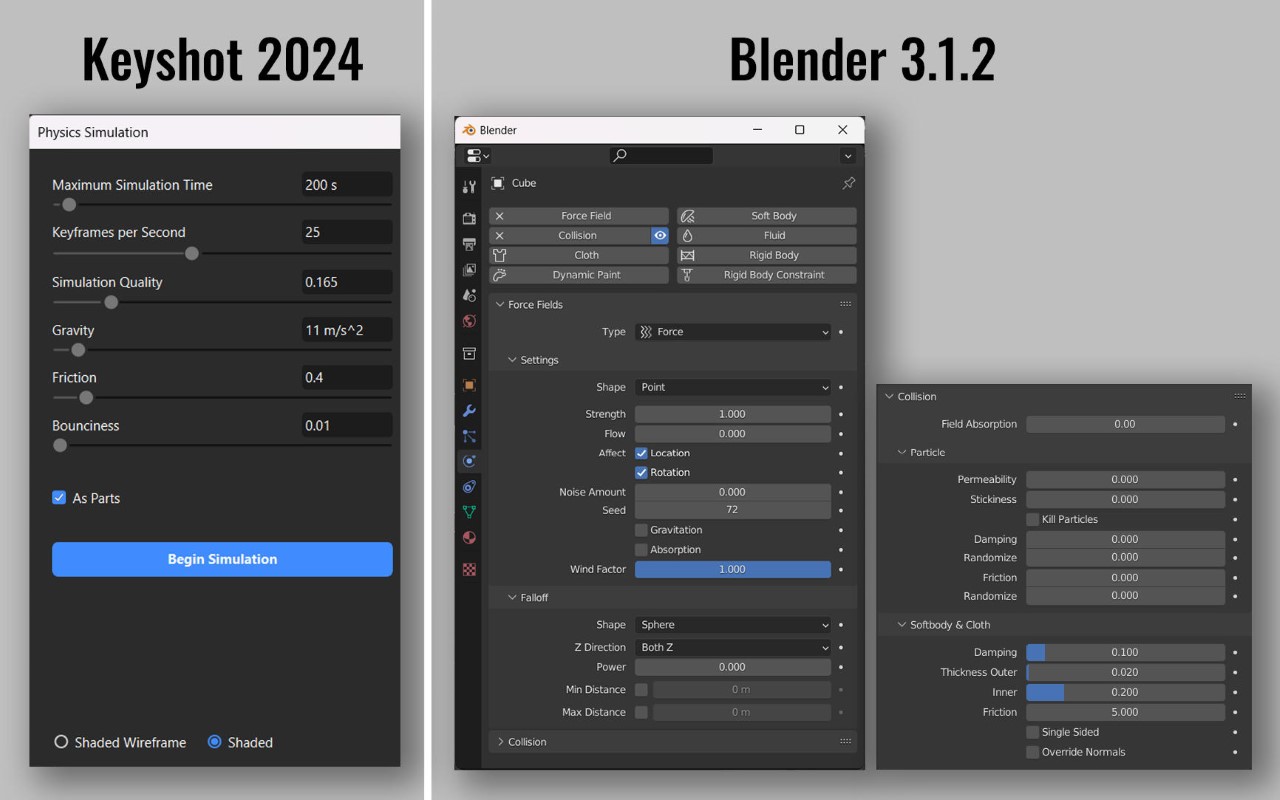
Comparing KeyShot and Blender’s Physics Control Panels
The Physics Simulation feature in KeyShot 2023-24 is incredibly impressive. For starters, it’s a LOT easier than other software like Blender, which can feel a little daunting with the hundreds of settings it has you choose from. Figuring out physics simulation in KeyShot takes just a few minutes (although the actual simulation can take a while if you’re running something complex), making an already powerful rendering software feel even more limitless!
That being said, there’s some room for growth. Previous experiments with the simulation tool saw some strange results – falling objects sometimes ended up choosing their own direction, making the simulation feel odd (I made a watch fall down and the entire thing disassembled and scattered in mid-air instead of falling together and breaking apart on impact). Secondly, sometimes objects can go through each other instead of colliding, so make sure you tinker with quality settings to get the perfect result. Thirdly, you can’t choose different bounciness values for different objects in the same simulation just yet, although I’m sure KeyShot is working on it. Finally, it would be absolutely amazing if there were a ‘slow-motion’ feature. The current way to do this is to bump up the keyframe rate and bring down the gravity, but that can sometimes cause objects to drift away after colliding instead of falling downwards in slow motion.
So there you have it! You can use this tutorial to animate your own domino sequence, too, or better still, create a new simulation based on your own ideas! If you do, make sure to participate in the 2024 KeyShot Animation Challenge to stand a chance to win some exciting prizes. Hurry! The competition ends on March 10th, 2024!