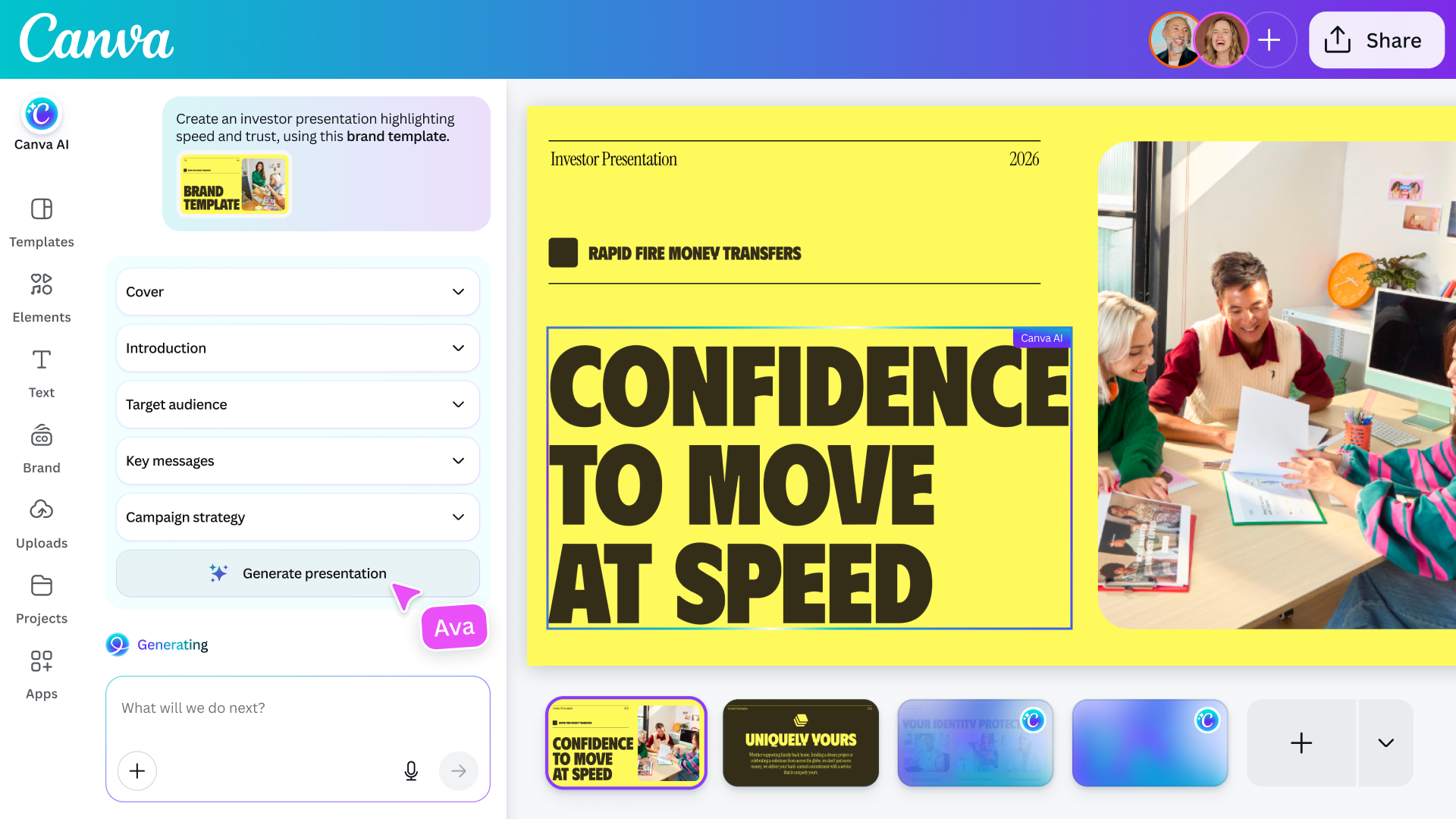
Adobe isn't the only company releasing a new AI assistant this week. Ahead of its Create event in Los Angeles today, Canva announced Canva AI 2.0. Building on its existing AI assistant, the company is billing the release as its most significant update since the platform first launched in 2013, and the culmination of years of investment to build its own foundational design models.
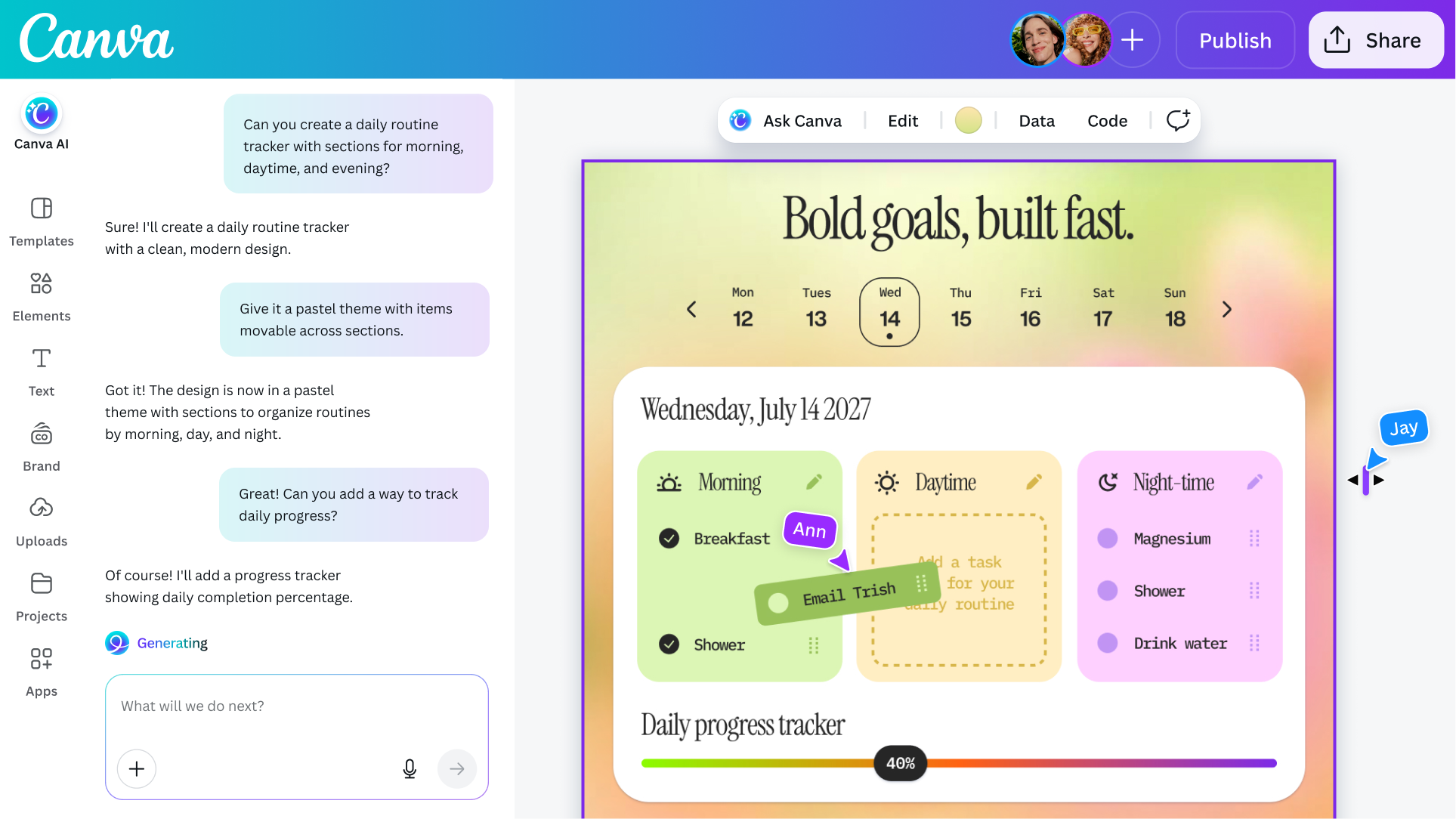
As you might imagine, it all starts with a conversational interface that allows you to describe an idea or goal and the system will start generating a design to match. Under the hood, there's a new orchestration layer that allows the model to use all of Canva's disparate tools to accomplish complex, multi-step tasks. For instance, the company suggests you could use Canva AI to create a multi-channel advertising campaign, and the software will generate everything you need to get that off the ground.
For brands, Canva AI 2.0 can adapt to their design needs.
Canva
If edits are required, the company says Canva AI avoids one of the pitfalls of many other image generation models. It's possible to edit every visual element the system generates, just like if they were created with a traditional image editor. As a result, you can do things like swap out images and tweak fonts without affecting any other part of a design. To bring everything together, Canva has built persistent memory into the tool. The more you use Canva AI, the better the system will get at applying your personal taste and style to future generations. According to the company, it also has a context window that is long enough to maintain coherence until you arrive at a final design.
Alongside those enhancements, Canva is adding support for new workflows that expand what you can do with its software, starting with connections that allow its models to pull data from other apps, including Notion, Slack, Zoom, Gmail, Google Calendar and more. Users can also schedule tasks for Canva AI to complete in the background, and the company has even baked in deep research capabilities into the tool.
The coding function Canva previously offered has been upgraded to include support for HTML imports, allowing users to bring any HTML file or AI-generated experience into Canva's visual editor to tweak the design of it without breaking things. For brands, the company is also offering a tool that can process their visual identity and apply it to new and existing designs.
Canva's updated coding agent now support HTML imports.
Canva
As a casual observer, it might seem like Canva is trend chasing, but Danny Wu, the company's head of AI, argues the new AI tools represent a natural evolution for Canva. "This is something we've been dreaming of and working towards for quite a while," he tells Engadget. "Even before ChatGPT was a thing, we were thinking, 'what if we don't have a template that matches your needs?' … So I wouldn't describe this as a pivot or shift, we've been wanting to offer these kinds of capabilities all along as part of our mission to make design simple."
If you want to give Canva's new tools a try for yourself, Canva AI 2.0 is available as a research preview starting today. The first 1 million people who visit the Canva website will get first access, with availability gradually expanding to more users over the coming weeks. As before, access to Canva’s AI features remains included in the company’s free offering, though it’s also introducing a new AI Pass add-on that significantly increases rate limits for users.
This article originally appeared on Engadget at https://www.engadget.com/ai/canva-starts-previewing-a-more-powerful-version-of-its-ai-assistant-130000966.html?src=rss
Spotify has a new look today for listeners on tablets. The streaming service’s updated tablet UI now provides adaptive orientation, switching between portrait and landscape layouts rather than simply resizing the interface when changing how the device is held.
Spotify's tablet app now sports a collapsible sidebar so listeners can take advantage of their larger screen space when watching a music video or podcast. Parallel browsing lets you continue to scroll through the app while a video or lyrics are in the sidebar, and the "switch to video" toggle has been made more prominent.
The new design had appeared for some users earlier this year during tests. The final version is rolling out today for both iPad and Android devices.
This article originally appeared on Engadget at https://www.engadget.com/entertainment/music/spotify-debuts-a-new-ui-just-for-tablets-130000533.html?src=rss
DJI’s Osmo Pocket 3 gimbal-camera was a category-defining camera. Two years since its launch, everyone from vloggers to pro film makers continue to upload how-to guides and gushing reviews to YouTube. When the Osmo Pocket 4 landed at the FCC at the end of 2025 (followed by a credible leak), creator forums and Reddit threads started to chatter with excitement. Over the following months the Pocket 4 leaked again and again, to the point where there’s very little that someone with a passing interest and an internet connection doesn’t already know about the camera. But DJI chose today to give us the official reveal, so we’re here with the full review which, remarkably, does contain some surprises.
What’s new
For those who were waiting for official, confirmed specs and information, here’s a rundown of the headline new features of the Osmo Pocket 4. The camera is still 4K, but comes with an updated 1-inch CMOS sensor that DJI says is good for another two stops of low light performance (for a total of 14). The camera retains the 20mm equivalent, f/2.0 lens but squeezes in an improved max framerate of 240 fps (up from 120 fps) for up to 10x slow-mo. The Pocket 4 can also shoot in full, high dynamic range 10-Bit D-Log, upgraded from the more lightweight D-Log-M available on the Pocket 3. Shutter speeds are now expanded and go right down to 1/4 for extreme light effects.
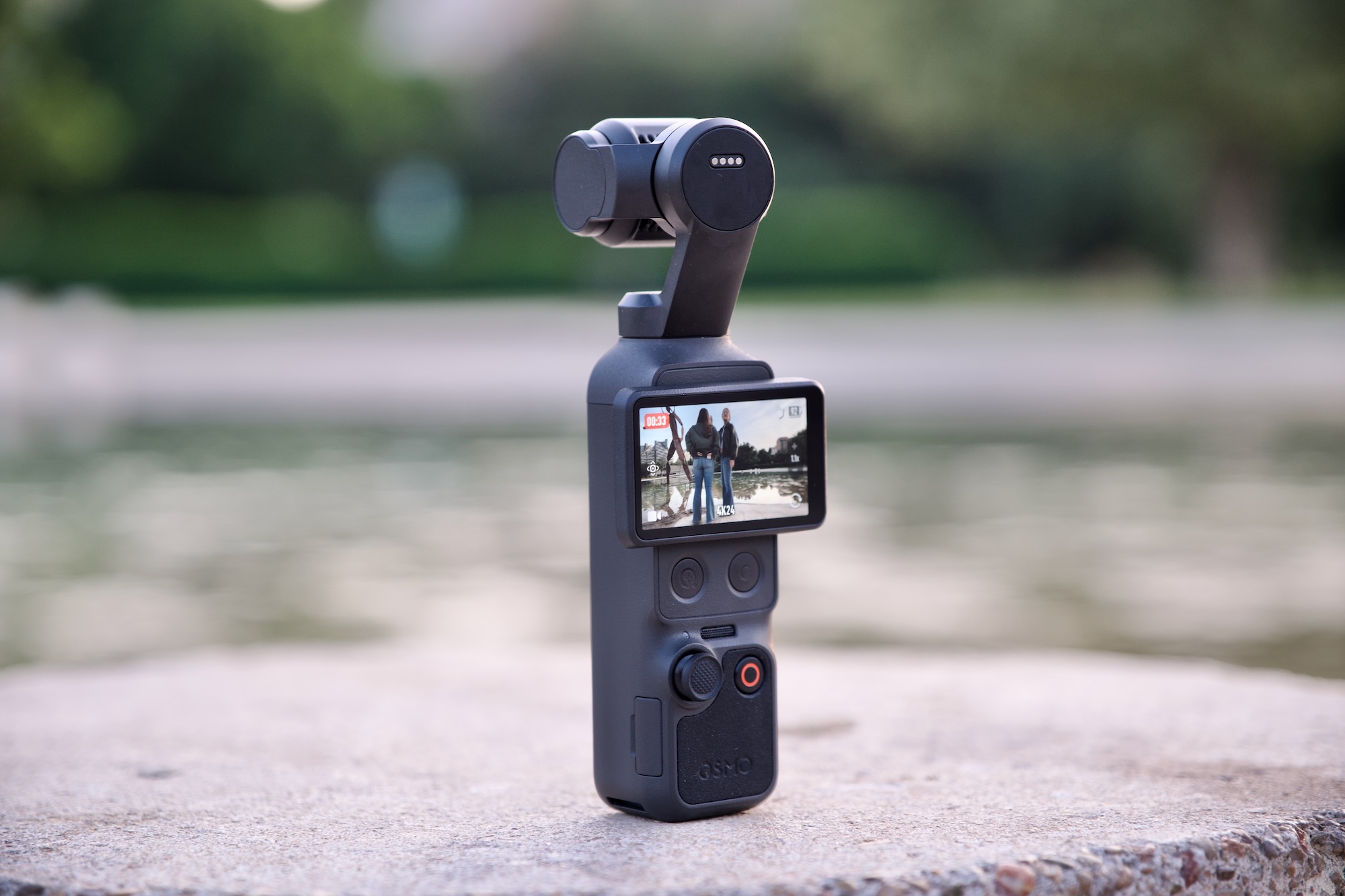
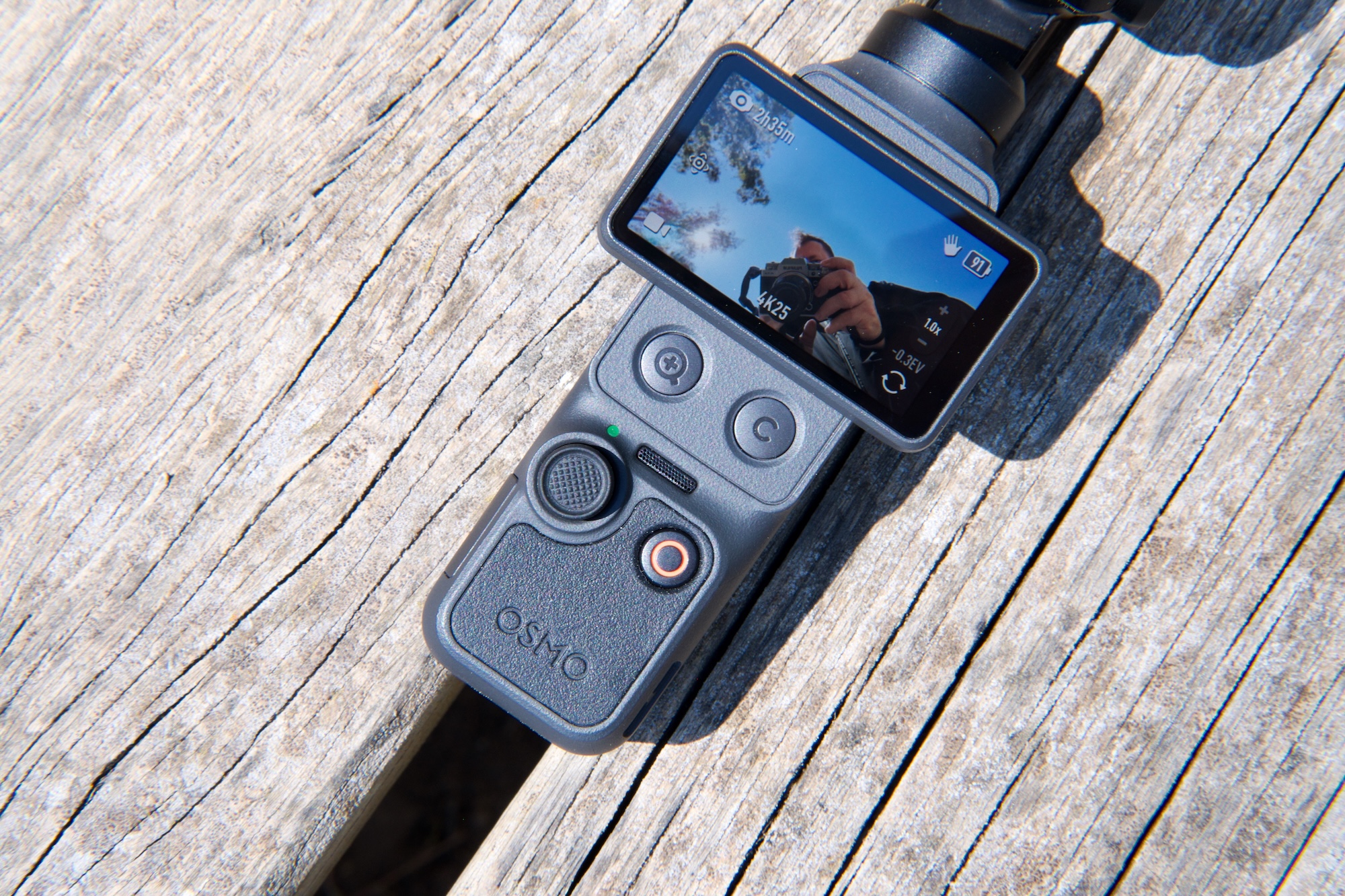
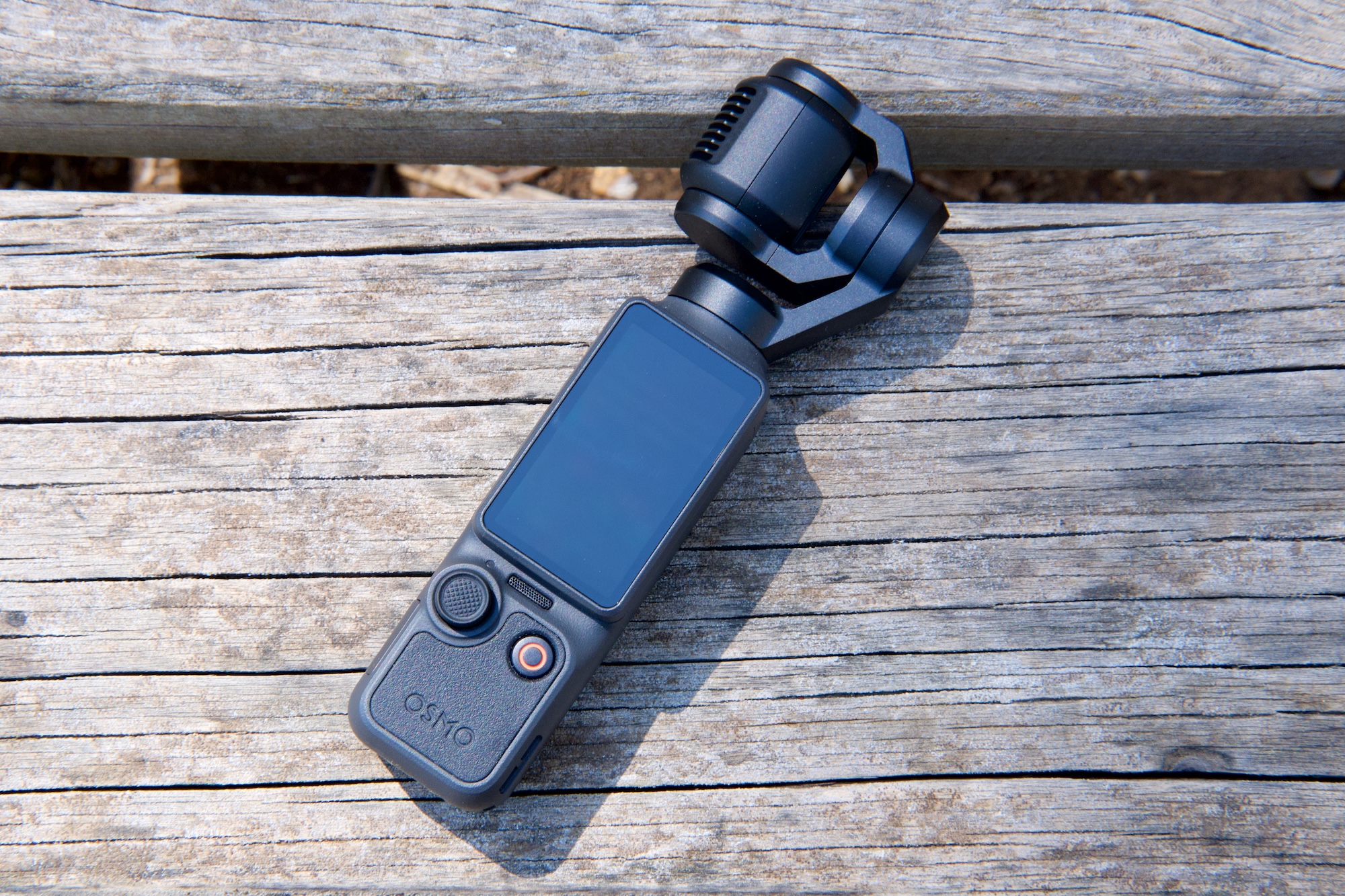
Hardware changes are few, but do include two new buttons below the 2-inch display. One is a dedicated zoom button and the other you can assign a function from a selection of common tasks — rotating the gimbal, toggling recording presets and so on. You can assign up to three different controls to this button via single, double and triple clicks. There’s also 107GB of internal storage. You can still use SD cards, but you don’t need to if you don’t want to.
That zoom, DJI states, is good for 2x “lossless” zoom while shooting in 4K and 4x in 1080p. The Pocket 3’s 2x Mid-Tele zoom had to be activated first, but now you can use lossless zoom any time and/or while using ActiveTrack face-tracking. It’s available in Portrait mode, too, but if you’ll need to have the screen in the horizontal position to access the buttons, which means your viewfinder/preview will be teeny-tiny as it’s rescaled for 16:9.
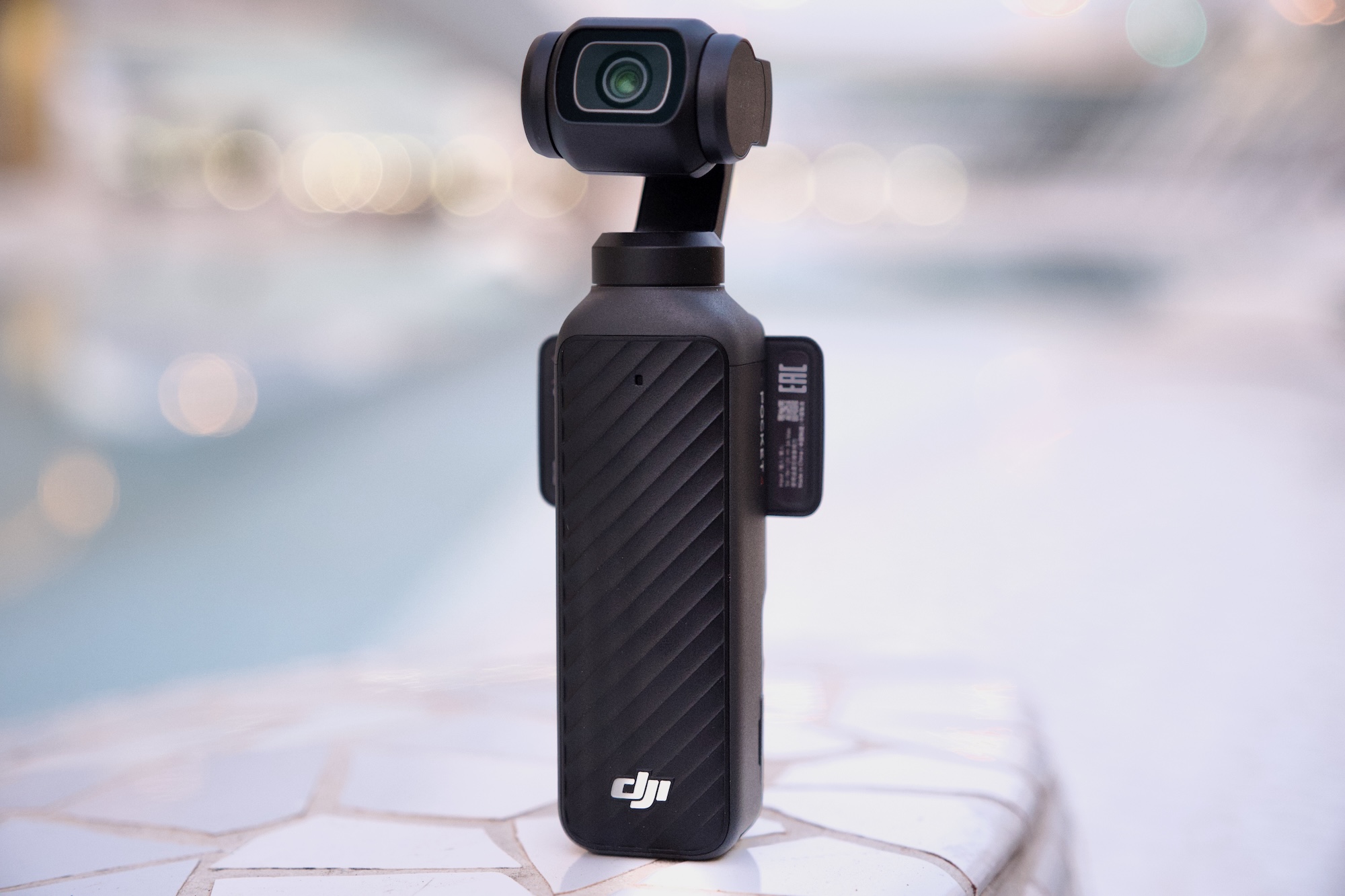
DJI Osmo Pocket 4
James Trew for Engadget
DJI has added on-camera “Film Tones” which are similar, functionally, to film simulations seen on Fujifilm cameras. There are six to choose from at launch and include subtle and not-so-subtle stylized color tones that apply different “moods” to your videos without having to manually color grade or use a LUT after the fact. As for still images, there’s an on-screen button for “Live” photos similar to what you might find on an iPhone. Live photos were sorta-kinda possible on the Pocket 3, but they are a little bit easier this time around.
A lot of DJI drones include Gesture Control, which lets you start/stop recording and engage ActiveTrack from a distance, and that’s new on the Pocket 4 too.
On the audio side of things, the Pocket 4 now has “audio zoom,” so if you have two people in a scene and do a close up on one of them, the volume of their voices will be boosted. It’s a little crude, but it could be handy in certain situations. The Pocket 4 can also record spatial audio via the three onboard microphones, good for live music and other situations where sound placement might matter.
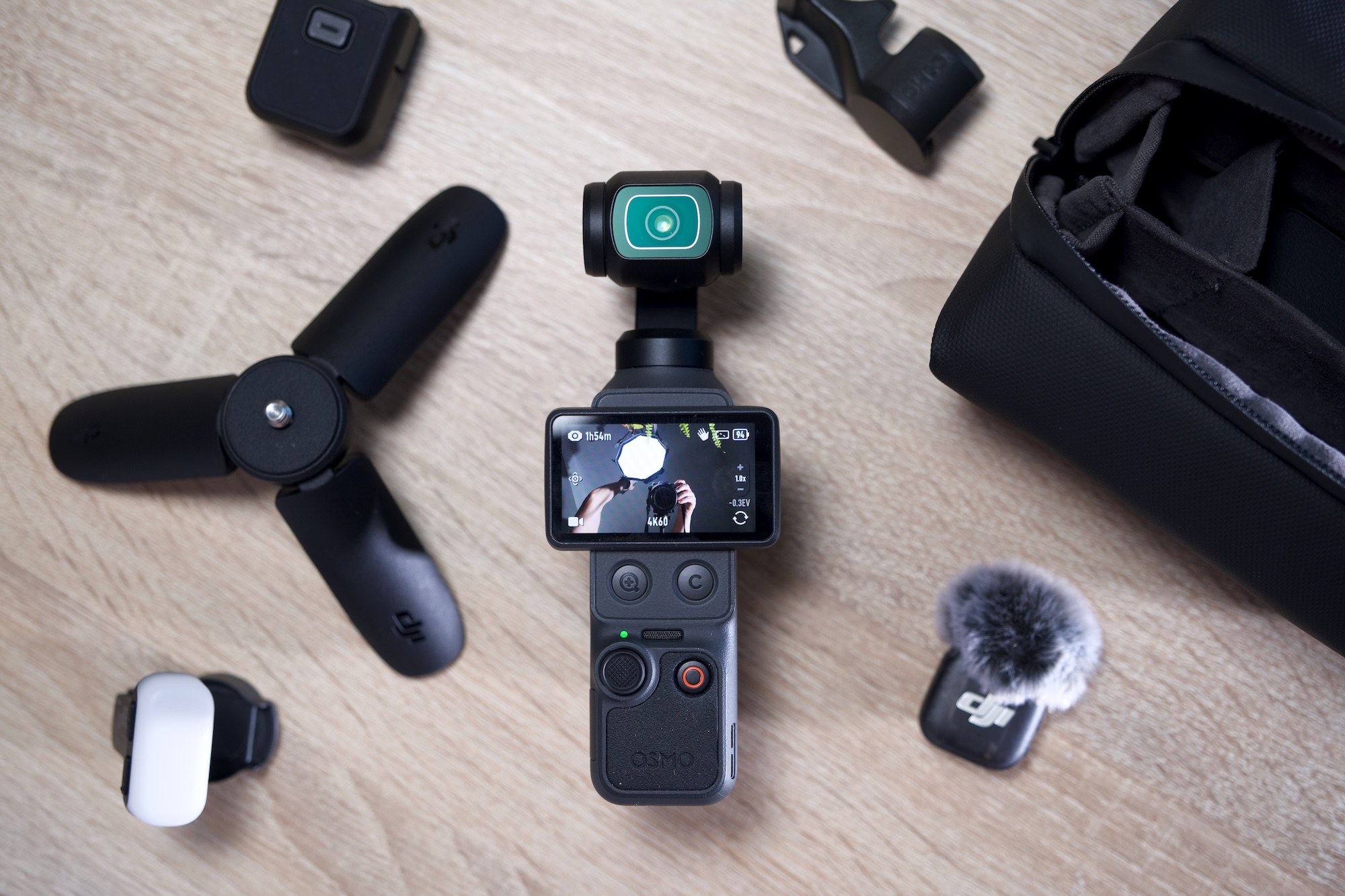
Lastly, the Pocket 4 has a modular component. At launch, there’s a magnetic fill light that clips onto the gimbal and can be configured via the camera menus. It’s included in the creator combo and opens the door for other modular accessories, though it’s limited to things that can sit on the gimbal without causing problems. A shotgun-style microphone, for example, could be possible.
The display and controls on the Osmo Pocket 4
James Trew for Engadget
Battery life also gets a slight boost over the Pocket 3 with a 1,545mAh cell — which is almost a 20 percent increase. That translates to an extra 30 minutes or so of recording time for an average of two and a half hours at 4K, more if you shoot in lower resolutions or are using the camera for photos.
What we don’t see here, an item that you might have been hoping for, is any type of optical zoom. What’s more, the max resolution in vertical mode remains capped at 3K. You still have to rotate the camera if you want full-sensor, 4K video in portrait.
Video quality
The popularity of the Pocket series is thanks to its combination of high-quality video and a portable form factor. The Pocket 4 builds on this winning formula with exceptional quality for the camera’s size. The new 1-inch sensor is noticeably more detailed than the Pocket 3 and DJI’s claim of improved low light performance is backed up by stellar results. I took the Pocket 4 out at night and it bested its predecessor with far more dynamic range and better exposure in shadowed areas that come out dark or fuzzy on the Pocket 3.
Image performance in general is impressive and a definite strong point for a camera of this size. Colors now look more natural than ever without looking over-saturated. Similar shots on the Pocket 3 look a little flatter when viewed side by side. I like that the f2.0 aperture still provides some light bokeh, and when combined with the new D-Log mode, there’s plenty of scope for cinematic shots. These would be harder to achieve with a phone and don’t require the setup and planning of a mirrorless camera.
With the extended shutter speeds you can get some interesting effects — dramatic light trails in traffic for example — but it’s going to over expose any other light source in your shot. So, proceed with caution. The Pocket 3 bottomed-out at 1/25, but the Pocket 4 goes right down to a dramatic 1/4.
The 2x lossless zoom surprised me. At first, I was sceptical about DJI’s claims of it being lossless, but it does seem to maintain visual quality without noticeable loss of detail. Though if you want to use that 4x zoom in 4K, expect to see some digital artifacts. The Pocket 4’s 20mm lens is particularly suited to wider, vlog-style shots, so a usable zoom is a welcome addition. It’s worth noting that it’s better used for static and tripod shots as any gimbal movements and keeping a subject in frame can feel like steering a ship.
Film tones
Until now, if you were aiming for a more cinematic style, you had to get comfortable shooting in D-Log-M and boning up on color-grading. DJI provided some filters in the Mimo app for a quick and dirty way to add a mood or vibe to your videos, but that still caused some friction in the workflow. The new film modes are on camera, so achieving something more stylized is now just a menu tap away. I’ll be honest, I’m not a huge fan of the selection available right now as they’re either too hot or too cold. Of the six, Warm and Movie seem the most usable for cozy-style landscapes or B-roll cityscapes.
DJI hasn’t shared much about whether these are just on-camera filters or true film simulations. Movie and Retro, at least, were already available as filters in the app. If the full effect is too strong, you can dial down the intensity, but that’s the extent of the control. Their addition here expands what you can get out of the camera without using the app or having to drag things over to your editing software. It’s unclear if we’ll see more options in the future, but they’re there if you need them.
New buttons
One of my main complaints with the Pocket cameras was the zoom. More specifically, controlling it with the joystick. It always looks slow, inconsistent and a bit amateur when zooming in manually. The new button provides an instant punch-in that can be used for an intentional, attention-drawing effect. I can’t count the number of times I’ve ruined a shot because I thought I had the joystick set to zoom, but it was still assigned to panning (you had to toggle its use via an on-screen button). With the physical button, I can close in on a target instantly and never worry about accidental pans.
The button layout on the Osmo Pocket 4
James Trew for Engadget
The second, customizable button is also a real usability upgrade. If, like me, you’re constantly recentering the gimbal, you’ll know that the usual double-click on the joystick is often unreliable. Now you can assign that action to the button plus two more controls from a selection of common actions. I have it set so double-click switches to one of my manual recording presets and triple-click locks the gimbal so I no longer have to jump into the main menu to switch gimbal modes. It even works while recording if I spontaneously decide I want to keep my horizon level.
Changing what this button does is simple: Long-press it and it’ll jump into the settings where you can choose its functionality. There’s still scope for some refinement, as although a double click can instantly start recording with my preferred settings, clicking again doesn’t stop it. You have to use the record button. This makes some sense, but I’m used to using the same button to stop/start recording, so intuitively I thought that might be the case here. Sadly not.
Audio upgrades
Something a little unexpected in the Pocket 4 is the addition of spatial audio. Using the three built-in microphones, the theory is you should be able to hear where sounds are coming from — though you’ll need headphones on for the effect to work. In practice, it does create a different audio ambience, one where sounds feel more relative to their location, but it comes at a price. If you speak to the camera, even if you’re nearby, your voice will sound distant and muddled so spatial audio is something you’ll want to use intentionally and certainly not as a default setting.
The same is true for that audio “zoom.” To be fair to DJI, I’ve never found an audio zoom I truly liked. You can’t capture better audio than what the microphone is receiving, so amplifying it in any way isn’t going to improve it beyond what you can do with editing software. In a pinch, this might help with interviews when you have multiple speakers, no external microphone and need to publish quickly, but I’m reluctant to recommend it for anything else.
You can get an Osmo Pocket 4 bundle with a DJI lapel mic
James Trew for Engadget
The new “Vocal Boost” is a more useful option under the Pro settings menu. When activated, it enhances voices by lowering background noise and other sounds. Again, it’s not a fix for getting good source audio, but in noisy run-and-gun vlogging environments, it can improve your chances of capturing something useful with just the internal microphones.
Fortunately, DJI has a much better solution that was already a feature of Pocket cameras — native connectivity with its wireless microphones. The Creator Combo now includes a single DJI Mic 3 transmitter and charging cable, and it’s the absolute best way to get YouTube-ready audio from the camera. One nice tweak with the Pocket 4 is that you can now export videos with both the built-in and external mic audio as one 4-channel file. Open this in your video editor and you can mix and cut between mic and ambient audio without having to deal with separate files as before.
The competition
The fact that there’s no real direct competition for the Pocket series is surprising. For true, like-for-like gimbal cameras, expect to find alternatives from brands you’re less familiar with — such as Agfaphoto or Feiyu. Most of the nearest competition will be action cameras like the GoPro Mission 1 or Insta360 Ace Pro 2. Both of these are great portable cameras with solid stabilisation, but they unsurprisingly favor that wide, bright and sharp action-style footage. The Pocket 4’s nearest rival for stabilized vlog-friendly filming is still the Pocket 3.
This raises the question of whether the Pocket 4 (£445) is worth it over the more affordable Pocket 3 (£389) at launch. (DJI can’t directly sell the Pocket 4 in the US, so official prices are in British Pounds or Euros.) Both are great, all-purpose, vlogging cameras versatile enough for recording in a variety of situations — though less suited to rugged/action filming thanks to the delicate mechanical gimbal. It’s likely that the price difference between the two will expand after the launch window.
The Osmo Pocket 4 flipped down and powered off
James Trew for Engadget
Wrap-up
The Pocket 4 might not bring defining new features like optical zoom or higher resolution, but it’s a better camera in every way that matters. There are also several quality of life improvements that make it incredibly compelling. For the extra money, you’re getting better image quality that will pay you back over time. The new buttons make the camera even more convenient and that onboard storage alone effectively closes the price gap — not to mention the huge convenience that feature alone brings with it.
Hardcore fans might have been hoping for more “dazzle” with the Pocket 4. In reality, DJI delivered a camera that builds on an already winning formula in ways that actually matter: higher quality video, improved usability, modular capabilities and longer battery life. It’s hard to argue with that.
This article originally appeared on Engadget at https://www.engadget.com/cameras/dji-osmo-pocket-4-review-the-only-vlogging-camera-youll-ever-need-120000374.html?src=rss
Opera is offering a new choice for looping in an AI assistant during browsing. Today, the company introduced Browser Connector, which allows Opera One and Opera GX users to integrate either ChatGPT or Claude into the platform. The chatbots will be able to access page content while a person is browsing and will draw context for queries from the information in your open tabs. The free new feature can be enabled through the AI Services section of the Settings menu.
Opera is one of the many browser companies that has been experimenting with an AI-focused service. It began rolling out the $20-a-month Opera Neon agentic AI browser last year. The benefit of something like Browser Connector means you aren't limited to a single brand's product offerings and can switch things up at will.
This article originally appeared on Engadget at https://www.engadget.com/ai/opera-adds-browser-connector-for-integrating-ai-chatbots-080000153.html?src=rss
Opera is offering a new choice for looping in an AI assistant during browsing. Today, the company introduced Browser Connector, which allows Opera One and Opera GX users to integrate either ChatGPT or Claude into the platform. The chatbots will be able to access page content while a person is browsing and will draw context for queries from the information in your open tabs. The free new feature can be enabled through the AI Services section of the Settings menu.
Opera is one of the many browser companies that has been experimenting with an AI-focused service. It began rolling out the $20-a-month Opera Neon agentic AI browser last year. The benefit of something like Browser Connector means you aren't limited to a single brand's product offerings and can switch things up at will.
This article originally appeared on Engadget at https://www.engadget.com/ai/opera-adds-browser-connector-for-integrating-ai-chatbots-080000153.html?src=rss
Earlier this year it was revealed that Apple and Google were offering "nudify" apps on their stores despite having clear policies barring such content. Nearly three months later, such apps are not only still available, but being actively promoted on the iOS App Store and Google Play, according to a new report from the Tech Transparency Project(TTP). Many of those were labeled "E" for Everyone, meaning they can be downloaded by children.
Searching for "nudify," "undress" and other terms in those stores gives users access to apps that can make real people nude or put them into pornographic videos. The new report alleges that "the platforms are key participants in the spread of AI tools that can turn real people into sexualized images," TTP wrote. The app stores even ran ads for similar nudifying apps in the search results. (Engadget has reached out to Apple and Google for comment.)
The group identified 18 nudify apps in Apple's App Store and 20 in Google Play. Some were marketed with sexual images, while others weren't advertised as such but could still be used for deepfakes. Those apps have collectively generated around $122 million in revenue and been downloaded 483 million times, according to the report.
"It’s not just that the companies are failing to actually appropriately review these apps and continue to approve them and profit from them," TTP director Katie Paul told Bloomberg. "They are actually directing users to the apps themselves."
Apple and Google both have policies banning sexual or pornographic material, and Google has a specific policy against nudifying apps. Apple told Bloomberg that it removed 15 apps identified by the group, while Google said that it suspended a number of them. One of the apps cited in the report called Video Face Swap AI: DeepFace, advertises itself by showing an actress's face swapped onto another actress's body and allows users to put a real person's face on the bodies of partially undressed women. The app was rated "E" for Everyone.
The proliferation of nudify and deepfake apps has pushed some governments to propose laws against them. The UK's Children's Commissioner recently called for a ban on AI deepfake apps that create nude or sexual images of children. The US and other countries have proposed or created laws banning explicit deepfakes, and the California Attorney General recently sent Elon Musk's X a cease and desist order over Grok's explicit deepfakes.
Update April 16 at 3:42 AM ET: Google gave Engadget the following comment:
"Google Play does not allow apps that contain sexual content.
When violations of our policies are reported to us, we investigate and take appropriate action.
Many of the apps referenced in this report have been suspended from Google Play for violations of our policies.
Our investigation and enforcement process is ongoing."
This article originally appeared on Engadget at https://www.engadget.com/apps/apple-and-google-are-reportedly-pointing-users-to-nudify-apps-065144277.html?src=rss
Apple's MacBook Neo is a $600 (or $500 for students) shot across the bow at affordable Windows laptops, and it seems like Microsoft has ready its first response. The newly announced "Microsoft College Offer" is a bundle of Microsoft 365 Premium, Xbox Game Pass Ultimate, custom Xbox controller and discounted laptop that the company thinks could woo students away from Apple's new deal.
With the purchase of a discounted machine directly from Microsoft, retailers like Amazon and Best Buy or PC makers like HP, ASUS and Acer, you can get what the company says is an extra $500 of value from its bundle. The laptop deals include a Lenovo IdeaPad Slim 3x with a Snapdragon X chip, 16GB of RAM and 256GB of storage for $500 from Best Buy, around $250 off the laptop's usual $750 price. Or if you wanted something even cheaper, Walmart is selling an HP Omnibook 3 for $429, a discount of $270 off its usual $699 price. Microsoft is less generous with the deals on its own laptops and tablets, but you can even get a discount on a Surface Laptop as part of the offer.
A discounted laptop is great, but where the value of the Microsoft College Offer gets harder to define is with the services the company is packing in. Getting what would normally be a $200 year-long subscription to Microsoft 365 Premium for free is a meaningful deal, but many colleges give their students access to Microsoft's apps (and other software) with the cost of their tuition. A year of Xbox Game Pass Ultimate, which costs $30 per month as of October 2025, sounds like significant savings, but the offer is only valid for new subscribers. That leaves the free custom Xbox controller as the simplest bonus of the bunch, a value of around $76.
Windows PC makers are expected to make more serious attempts to compete with the Neo over the next year. For now, though, the Microsoft College Offer isn't exactly a bad deal, but it's certainly not as straightforwardly appealing as an Apple-quality laptop for $500 with a college discount.
The Microsoft College Offer is available to students starting April 15 and runs through June 30, 2026. Microsoft says redemption of the full bundle of services and accessories it’s offering needs to happen by July 31, 2026.
This article originally appeared on Engadget at https://www.engadget.com/computing/laptops/microsofts-new-college-deal-is-a-half-hearted-answer-to-the-500-macbook-neo-215336362.html?src=rss
Not content with stuffing Gemini into all of its own apps and services, Google wants you to adopt its AI assistant on desktops and laptops too. The company released a Gemini Windows app on Tuesday and it's following that up a day later with one for Macs.
Google says the macOS Gemini app is a "native desktop experience" that you can access with a keyboard shortcut. By default, pressing option and space will open a mini chat, while a combo of option, shift and space will open the full Gemini chat experience. You'll be able to adjust these bindings in the app settings.
Users will be able to share anything that's on their screen, including files they have saved on your system, with the chatbot and ask it questions about whatever they’re seeing. This can include anything from images to documents, and data to code.
There's an option to share full web pages with Gemini, not just what's on your display. The Gemini app also supports image and video generation with Nano Banana and Veo, respectively. The app is available on Macs that are running macOS 15 (i.e. macOS Sequoia) or later in all countries and languages in which Gemini is supported.
"We're building the foundation for a truly personal, proactive and powerful desktop assistant, with more news to share in the coming months," Michael Friedman, group product manager for the Gemini app, wrote in a blog post. That's intriguing, given that Apple's long-delayed, generative AI revamp of Siri may finally debut at WWDC in June. Apple's retooled chatbot, which is slated to have deep integration with macOS apps, is powered by Gemini models.
This article originally appeared on Engadget at https://www.engadget.com/ai/google-unleashes-a-native-gemini-app-for-the-mac-170500185.html?src=rss
Snap is laying off around 1,000 staff, amounting to 16 percent of its workforce, which it will seemingly replace with AI. The cuts were announced in a company-wide memo from CEO Evan Spiegel, who added that more than 300 open roles are also being closed.
Spiegel said the "incredibly difficult" decision would likely save Snap more than $500 million by the second half of 2026, in turn helping it to "establish a clearer path to net-income profitability." Impacted staff were notified by email and the company’s North America-based team were instructed to work from home. Snap said it would provide four-month severance packages to those affected by the layoffs, as well as healthcare and other entitlements.
"While these changes are necessary to realize Snap’s long-term potential, we believe that rapid advancements in artificial intelligence enable our teams to reduce repetitive work, increase velocity, and better support our community, partners, and advertisers," Spiegel wrote. "We have already witnessed small squads leveraging AI tools to drive meaningful progress across several important initiatives, including Snapchat+, enhanced ad platform performance, and efficiency improvements in our Snap Lite infrastructure."
Snap laid off around 20 percent of its employees in 2022, with further cuts made in 2023 and 2024. It follows in the footsteps of a number of tech companies laying off employees in favor of AI in a move to boost efficiency, including Amazon, Fiverr, Microsoft and Pinterest in the last year. Snap is expected to launch the consumer version of its Specs AR glasses later this year, and recently span off the brand into its own business.
This article originally appeared on Engadget at https://www.engadget.com/big-tech/snap-is-laying-off-16-percent-of-its-workforce-blames-ai-162456069.html?src=rss
Traeger gave backyard pit masters something more affordable last year with the Woodridge, but now the company is back with an even more budget-friendly option. With the Westwood series, the company offers very basic pellet grill functionality with a simplified controller and a no-frills design. You’ll still get Wi-Fi connectivity that works with the company’s app, and the Westwood grills are compatible with Traeger’s rail-based accessories. As you might expect at the $700 and $800 prices, there are a number of caveats compared to the company’s more expensive options.
The new Westwood grills have an even more streamlined controller than the Woodridge models. A button-based interface replaces the knob, with buttons for increasing and decreasing temperatures, both wired and wireless food probes, Wi-Fi and ignition. The side-mounted hopper has an 18-pound pellet capacity and there are shelves on the left side and underneath the cooking chamber. Inside, a two-tier setup offers either 653 or 823 square inches of cooking space, depending on which Westwood model you opt for.
The Westwood remains a set-it-and-forget-it device. The Wi-Fi connectivity allows you to keep tabs on cooking sessions from anywhere with the Traeger app. You can do everything from low-and-slow smoking to roasting and grilling with the 180-450 degrees Fahrenheit temperature range. There’s also a front rail for the company’s Pop and Lock accessories, which include a folding front shelf.
The Westwood grills have a simplified design with two-tier grates inside
Traeger
Of course, with the lower price comes a number of sacrifices. There’s no mention of Super Smoke or Keep Warm modes that Traeger offers on some of its more expensive grills. The Westwood only supports one wired food probe, so you’ll have to plan accordingly there. If you’re willing to spend an extra $80, these new grills do connect with Traeger’s wireless meat probe, so you at least have an option for additional food monitoring. Lastly, there’s no mention of a pellet sensor inside the hopper, which is a handy component for keeping track of your fuel supply.
While Traeger has consistently focused on midrange and premium pellet grills in recent years, the Westwood and Westwood XL are now the company’s most affordable options. These new grills will replace the popular Pro series in Traeger’s lineup. What’s more, new affordable options come at time when the company faces financial troubles and is currently in the midst of an ongoing restructuring.
The Westwood and Westwood XL are now available from grill retailers including Ace Hardware.
This article originally appeared on Engadget at https://www.engadget.com/home/kitchen-tech/traeger-debuts-westwood-smart-pellet-grills-that-start-at-700-160448450.html?src=rss