Petco has accidentally exposed a whole lot of customer data and personal information, according to a report by TechCrunch. This is thanks to a security lapse involving its Vetco clinics website, forcing the company to take a portion of that site offline.
Petco has confirmed the leak and TechCrunch noted that the security lapse allowed anyone to download customer records without login information. The exposed data includes customer names, driver's license numbers, dates of birth, Social Security numbers and even financial information. It also includes customer records from visits to Vetco, like medical histories, pet names, vaccination records and other stuff like that.
This was due to an incorrect software setting that made a number of files accessible online, according to a notice filed by California’s attorney general and reported on by Mashable. The company has since corrected the setting, removed the exposed files and implemented security measures.
However, Petco hasn't said if any data was actually extracted during the security lapse or if it even has the means to suss out that kind of thing. Vetco customers should probably perform some due diligence to shore up personal security. The company is offering credit and identity monitoring services to impacted customers, but only in some states. We recommend giving Petco a call to discuss options.
This article originally appeared on Engadget at https://www.engadget.com/big-tech/petco-accidentally-exposed-heaps-of-customer-information-163825302.html?src=rss
Apple’s Studio Display hasn’t been updated since it launched in 2022, but it remains one of the best monitors for the Mac-oriented, and right now you can pick one up for $230 off. This deal applies specifically to the tilt-adjustable model, which means you can’t adjust the height of the built-in stand. That might be a deal-breaker for some users, but if not, $1,368 is a near-record low.
The Studio Display was a product that Apple devotees had been asking the company to make for years. As well as being a solid 27-inch 5K LED monitor, it also packs in a variety of ports and some surprisingly good speakers. In our 80-scoring review at the time, we praised its bright and color-accurate screen, while bemoaning the fact that it isn't as smooth as Apple’s many ProMotion-equipped devices.
If you’re content with what's already on offer, this is a good deal on what has always been a very expensive luxury device, but bear in mind that there are swirling rumors of a next generation Studio Display that could arrive in 2026. Mark Gurman of Bloomberg reported earlier this year that Apple might currently have two new models in the works, though it isn’t clear if both will end up making it to retail.
Check out our coverage of the best Apple deals for more discounts, and follow @EngadgetDeals on X for the latest tech deals and buying advice.
This article originally appeared on Engadget at https://www.engadget.com/deals/apples-studio-display-is-230-off-right-now-152328981.html?src=rss
Not long ago, you may have thought of projectors as complicated, unreliable or just too expensive. In 2025, though, consumer sentiment started to flip. Companies like Anker and Valerion made the projector experience more practical and immersive, helping drive consumer interest and, ultimately, sales.
This shift has been quite a few years in the making. LG helped kickstart the projector renaissance back at CES 2018 when it introduced its unusual-looking CineBeam HU80K projector that could provide a 150-inch image. The next year at CES saw the dawn of the ultra short-throw (UST) laser projector that could create a similarly large display while sitting just inches from your wall. Another big technological upgrade over the following years was the bright and long-lasting laser light engines that replaced weaker, more fragile bulbs.
The timing couldn’t have been better for projector manufacturers. When COVID shut down theaters in 2020, consumers were forced to get their entertainment at home. Many wanted something akin to a movie theater experience — both indoors and out — and thus interest in projectors started to take off.
In 2025, though, projectors really entered the zeitgeist thanks to two new products. The first was Anker’s SoundCore Nebula X1, the highest-rated home theater product Engadget reviewed this year. It comes with a triple-laser engine that allows for 3,500 lumens of brightness — enough that you can watch it during the day. It also uses liquid cooling to reduce annoying fan noise and offers color-accurate picture quality with support for Dolby Vision HDR.
Even better, it can be carried outside easily via the retractable handle and used for movie nights under the stars. If you splurge for the Soundcore Nebula X1 Pro version that comes with huge party speakers, you can even expect excellent sound quality. It also looks sleek and modern, unlike the plasticky models normally aimed at mid-range buyers.
However, the most interesting feature — which is new for a projector in this price range — is the motorized tilting lens that automatically fits the picture to your screen or surface. That allows buyers to set up the Nebula X1 themselves in just a few minutes, rather than hours. That also makes it easy to move the projector around and use in another location.
Valerion
The other model that captured our imagination was the Valerion VisionMaster Max. This projector shares many traits of the Nebula X1, like Dolby Vision, a triple laser system and automatic setup. It’s also a nice-looking, modern product.
However, it has two other innovations that made it extra interesting. The first is the dynamic iris and its Enhanced Black Level technology. That had reviewers raving about its deep black levels that were comparable to projectors like JVC’s NZ8 that cost twice as much. The other is the so-called anti-rainbow technology, which eliminates most of the rainbow-hued strobing that appears with models using Texas Instruments DLP chips. This resolves a common complaint with mid-range projectors.
For a similar price as a good quality TV ($1,500 - $3,000), these models can beam an image double the size. And to install one, you just need to position the projector in front of the screen, roughly center it and hit “calibrate” to get a perfect image.
Both the X1 and VisionMaster Max were first announced on Kickstarter and became the top two projectors ever sold on the site. Plus, several projector models, particularly from Anker/Soundcore, appeared on Google’s gadget search trends. All of that is helping the home projector market increase to the point that it’s, well, projected to nearly double by 2030.
As people researched these products, they may have noticed the other advantages. Along with movies, they’re also great for gaming and sports, particularly if you have a big group of people. In fact, they actually take up less room than a TV if both the projector and screen are ceiling mounted. And many models are portable, battery-powered and bright enough to use outside for parties and camping.
Steve Dent for Engadget
A prime example of a recent projector convert is Engadget editor and cinema podcaster Devindra Hardawar, who explained why he decided to make the leap. “I know big TVs have gotten cheaper, but they still can't reach the massive 120-inch screen size of my Formovie ultra-short throw projector,” he said. “It makes watching anything feel truly cinematic, and not like I'm just staring at another screen.”
Even though projectors are gaining some ground, they won’t replace TVs for most people. Mid-range televisions still cost less at around $1,000. TVs are obviously easier to install and more convenient to use, as all projectors need time to warm up. TVs are much brighter, too: even dim models put out at least 500 nits of brightness, compared to 200 to 300 nits max for very bright projectors. However, even though projector setups are less tricky than before, you still need to buy and install a screen for optimal performance, which adds cost and complexity.
How much more can projectors improve? I think they’ll continue to get brighter, more color accurate and even easier to install. Another piece of technology with potential to reduce complexity and improve image quality is the roll-up screen. If those come down in price enough, they may convince some buyers to replace their TVs with a projector. They’re still likely to remain a niche product, but for cinephiles who want a theater-like experience, projectors are now a more compelling option.
This article originally appeared on Engadget at https://www.engadget.com/home/home-theater/projectors-won-us-over-in-2025-143655492.html?src=rss
In a world where notifications persistently compete for our attention, distraction-free ereaders and writing tablets have found an audience. Putting your phone, laptop or iPad aside and curling up with a Kindle or a reMarkable tablet have become an almost ironic way for the tech-savvy to disconnect from online noise and focus on reading and writing. It’s debatable how broad the appeal of these devices is, but even in what appears to be a relatively small slice of the industry, the competition is fierce.
Amazon is arguably the biggest name in the space, with its Kindles dominating the ereader market for years. When it introduced the Kindle Scribe in 2022, the company made a play for the burgeoning E Ink writing tablet category, and just last year it launched its first color ereader with the Kindle Colorsoft. Put all those features — reading, writing and color — together, and you’ve got the ingredients for Amazon’s latest contender: the Kindle Scribe Colorsoft.
This time, Amazon expanded the Scribe line by releasing three new Scribes at once. The entry-level model is the black-and-white tablet without a front light, which costs $430. For $70 more, you’ll get the front light, and then the Colorsoft version goes for $630. There are upgrades from last year’s Scribe across the trio, and for this review we’ll be looking mostly at the Colorsoft, which has all of the new features.
Like with previous models of the Scribe, Amazon doesn’t indicate the generation number in the name, simply calling this lineup the “all-new Kindle Scribe,” attaching the word Colorsoft to the edition that renders colors. To avoid confusion, I’ll occasionally be referring to this generation of the device as the Scribe 3, and the version from last year as the Scribe 2.
Editor’s note: As I only received the Kindle Scribe Colorsoft on December 7 due to shipping delays, I won’t be assigning a score to this device until I have had more time to test it. My colleague Valentina Palladino received the new Kindle Scribe a few days before that, and has contributed testing and impressions to this review. It’s also worth noting that some new features, like “Send to Alexa+,” “Story so far” and “Ask this book” aren’t available to test yet. We will update this review with a score after spending more time with it so we can better gauge things like battery life and the usefulness of some software features.
What’s new with the Kindle Scribe Colorsoft
Aside from the obvious, which is that the Colorsoft can now render colors, the latest Kindle Scribes also feature a refined design, improved front light system, updated screen architecture, new quad-core chip, more memory and Oxide display technology. It has a larger 11-inch screen compared to the 10.2-inch display on its predecessor, and still manages to weigh 33 grams less at 400 grams (0.88 pounds). There’s also a revamped Home page that houses a Quick Note for easier access to the writing interface as well as some software and AI tools that aren’t available to test yet.
A lot of the hardware tweaks translated to a snappier, more responsive device overall. In my testing, the Scribe Colorsoft’s AI summarization and handwriting refinements took a bit less time than the Scribe 2, which I attribute most to the processor, but I also noticed improved fluidity in the writing experience.
Drawing on the Scribe Colorsoft brings me right back to my younger days testing out pens at bookstores. Amazon’s stylus feels like a pen with ink that flows more freely and consistently onto the page than others, and between the nib and the texture of the page there is a lack of resistance and overall smoothness that is very satisfying.
Cherlynn Low for Engadget
Amazon said that the Premium Pen that comes with the Scribes has been refined with a thicker and more rounded silhouette. With its latest Oxide display, the Scribe Colorsoft’s screen response rate of 14 milliseconds and the non-Colorsoft Scribe 3’s rates of 12ms are both much higher than the 20-21ms for the Scribe 2. Together, this probably is the main reason that the new Scribe feels more responsive in general, and why writing on it seems so smooth. Although, that new front light system might also be contributing to the overall feeling of freshness.
Speaking of, I put the Scribe 2 and Scribe Colorsoft side by side in my friend’s living room and the difference was stark. When I brought both devices next to the window, under direct sunlight, they both seemed similarly bright, with the typical glare-free finish you’d expect of ereaders. But when I took them into a darkened bedroom, the auto-adjusting panel on the Colorsoft lit up its screen and made it easier to read. Colors popped, and while I felt that there was a slight blue tinge to the light, it wasn’t something I would’ve noticed without a side-by-side comparison. It’s not an issue though because you can also adjust the warmth here like you can on other Kindles.
One of my complaints in my review of the Scribe 2 was the flimsy attachment method of magnets holding the pen to the tablet. While Amazon hasn’t built an onboard slot or holder for the stylus, it did increase the magnetic force on the Scribe 3. This was already noticeable during my hands-on with the device back in October, and in real-world use I appreciated this upgrade in keeping the Premium Pen tightly attached to the Scribe Colorsoft. I would still prefer a more secure approach, since I still do worry about the stylus getting lost in my purse and don’t want to have to buy a case just for this purpose. But it’s a small quibble and my concerns have largely been allayed with the increased magnetism.
Cherlynn Low for Engadget
I still need to test some software features like Send to Alexa+, Ask This Book and Story So Far, but they’re not available yet. I’ve been focusing my testing on the Notebook section and need to spend more time marking up and annotating books to better evaluate that use case. But not much has changed there since Amazon rolled out the collapsible margins in February, and you can read my review of the Scribe 2 for my impressions there.
The new home page and AI-powered Notebook search
At the moment, I can speak to one of the new features: AI-powered Notebook search. The Search bar at the top of the Scribe can now answer questions about the contents of all your Notebooks (and books). At the time of the Scribe’s announcement, I thought this would be helpful in pulling together all the tasks I’d assigned to specific team members across the to-do lists I drew up for various events.
When I asked the Scribe “what tasks have I assigned Sam,” its results page showed six categories, pulling information from my library, notebooks, the Kindle Store, the Audible Store, Goodreads and text within books. Only the second one had any findings. Under “Results in your notebooks,” there was a label “AI-powered insights” followed by a header “Sam’s Assigned Tasks.” Below that was a bulleted list, which I’ll transcribe and include an image of here:
Add content to CES sheet
Handle KPBP company set
Track Samsung mobile developments
Handle OnePlus 13
Review device during CES
Attend meetings with: - Dell & ASUS on Thursday, MSI, Razer, HP, Lenovo, Potentially Sony Ateela
Work on Sam Qi 2
Best-Sam host responsibilities
Cherlynn Low for Engadget
I quickly realized that I’d need to fine-tune my requests to get results that made more sense, since random tasks divorced from their parent documents made little sense without context. Thankfully, there was a button below the results that prompted me to “Ask Notebooks” about “these insights, or ask something else.” However, tapping that only brought me to a different page showing the same list but with a new section to see the notes they were sourced from.
I’ll also point out that this list of tasks for Sam was not the same result I got from a query about “where do I mention Sam?” In addition to the two to-do lists that I created in December 2023 and January of this year, the Scribe told me “Sam appears on a Christmas shopping list as one of the checked-off friends.”
That’s fairly impressive, since that list did have Sam under a handwritten header “Friends,” as opposed to other pages titled “Gym” or “Neighbors.” But it appeared to only be able to determine that Sam’s name was checked off thanks to the template I used for the notebook. Other check marks I made outside the predefined boxes in that background weren’t deemed as checks and instead misrecognized as dashes. So later when I asked where my friend Michelle appeared in all my notebooks, the Scribe noted an entry for “Michelle-scart” in a different holiday shopping page.
Retrying the same question did yield more accurate results, though, with a subsequent search correctly stating “Michelle appears in a list with ‘scarf’ noted next to her name.” And whether it’s my overly messy handwriting to blame or Amazon’s technological deficiencies, there were still some words or sentences that it misidentified, like “Michelle-callin” instead of “Michelle — Callie.”
So far, the AI-powered Search feels like a hit-or-miss update. Sometimes, like when I took the bait and asked the questions it suggested, I would get shockingly accurate answers. “Try asking ‘which Ariana song is mentioned in the list,’” the Scribe prompted. Or “When is the HOA meeting occurring?” For the former, it told me that the song “Bang Bang” was on a list of karaoke songs, while the latter simply told me the date and time it had found in a note titled “Appointments Dec 2022.” I’ll need more time to think of better ways to use this feature, but for now I can’t decide if it’s actually helpful without some extra work.
Cherlynn Low for Engadget
I already spent some time testing the Summarize and Refine tools introduced in the last Kindle Scribe, so I’ll just say that refining the handwriting of a to-do list on the Scribe Colorsoft was largely the same as before, just a tad faster. I didn’t really use either AI tool in the year since I reviewed the Scribe 2, so I was right last year in thinking I wouldn’t find much use for them in daily practice.
What I thought would be more practical is the redesigned Home screen and the Quick Note that takes up the top left corner of this page. Again, I’d need to spend much more time to understand how I’d navigate the device over weeks and months, but for the most part I find it easy to just hop in and out of notes I want without first going to the Home section. I’d prefer a hardware shortcut like Montblanc offers in its Digital Paper writing tablet. On that device, you can program the buttons on the pen so that a double click starts a new note, adds a blank page or brings you back home.
While you can customize the button on Amazon’s Premium Pen, your options are limited to switching between tools like the highlighter, pen, shader or eraser for use while you’re writing. (And yes, like before, you can still use the top of the Premium Pen to erase content — no need to push any button.)
One last thing to note about the home page (for now) is that seeing the rows of book covers in color is a delight, and though it’s not something that impacts the function of the device, it certainly adds a layer of visual pleasure.
How does the Kindle Scribe Colorsoft compare to the competition?
One of the Scribe Colorsoft’s main competitors is the reMarkable Paper Pro. The latter has a larger 11.8-inch screen and, correspondingly, weighs a lot more at 525 grams (1.16 pounds). Though I prefer the sharp lines of the reMarkable to the rounded edges and corners of the Scribe, I find the Kindle’s size much more manageable, especially when I’m writing for more than five minutes.
Importantly, the Kindle Scribe Colorsoft simply has a better screen than the reMarkable. It delivers brighter, more saturated colors, and supports more hues, too. Plus, when I placed them next to each other, the Paper Pro seemed to have a yellow cast and a dimmer screen overall (even at maximum brightness). And when I use the highlight function on each, the reMarkable device “flashes” — meaning you have to give it a second for the color to appear in its final form after you put the stylus to the screen. Meanwhile, the color that shows up on the Colorsoft’s panel as soon as you write on it doesn’t change — no flashing takes place.
Cherlynn Low for Engadget
The Scribe’s other strengths are its superior performance and Amazon’s ecosystem of books (for those like me who already have large Kindle libraries, anyway). Though it does offer AI features that reMarkable doesn’t, I’m generally leery of those tools, and, as already detailed in this review, they don’t usually help me.
However, the reMarkable remains the winner when it comes to writing software. It’s way more versatile than Amazon in this respect, especially with its ability to have handwritten and typed text coexist within the same document. You can also edit a note from reMarkable’s app on your phone, typing in any last-minute additions to your shopping list and bolding, italicizing or formatting them if you like. And if you’re a power user, getting your favorite ebooks onto the reMarkable tablet isn’t too difficult, provided you have the EPUB files. The main problem for me here is that you'll need to pay $3 a month for its Connect subscription to continue having access to a lot of these features.
I’ll also shout out companies like Kobo and Boox, who also make color-rendering ereaders that you can write on. Boox’s Note Air 5c starts at $530 and includes the stylus and a magnetic case for that price. It supports apps via the Google Play Store, but, as our deputy editor Valentina Palladino cautions, isn’t the most beginner-friendly product. Kobo, on the other hand, makes color ereaders like the Libra Color. Although it does support stylus input, it is much smaller with its 7-inch display.
And for those who aren’t too fussed about color, there are plenty of black-and-white E Ink writing tablets, including the $905 Montblanc Digital Paper, which I’ve been testing for a few weeks. I’m finishing up my review but that one is clearly a luxury product targeted at a much more niche audience than the already limited target market for this category of devices. If your budget is tight, I’d recommend skipping the Colorsoft model unless it’s crucial to your process. $500 is a much easier price to stomach.
Who should get the Kindle Scribe Colorsoft?
I hesitate to recommend anyone buy anything before I’ve had enough time to assign a score, since things like battery life take longer to evaluate. And while I continue to test the device to get a better sense for its battery life, I’ve already noticed that like the Scribes before it, this version doesn’t last as long as other Kindles. Amazon promises weeks of reading and writing per charge, which could be anything between two and ten (or more) weeks.
In my experience so far, the Kindle Scribe Colorsoft dropped about 20 percent in two days, which, mathematically, means it would struggle to even last a week, not to mention multiple weeks. But because the Scribe 2 showed similar battery drain during my review (with heavier use) and manages to stay charged for at least a month when I’m not testing it all day every day, I’m willing to believe Amazon’s promise of greater runtime.
Aside from my reservations about battery life, the Kindle Scribe Colorsoft is a competent device that delivers on most of its promises so far. The biggest knock against it is its price. At $500 for the monochrome model and $630 for color, this is one Amazon product that can be more expensive than the competition.
But it’s not without its strengths. I’d think of the Kindle Scribe 3 (and Colorsoft) as an E Ink tablet that is more of a notebook than a portal for textbooks you can mark up, with a robust library of Kindle titles to boot. The AI features are not crucial to the experience, but they also stay out of the way. For those looking for a more sophisticated and versatile writing tablet that is less of a book replacement, the reMarkable Paper Pro is the superior device. And for people who don’t mind the notifications, apps and alerts that these purpose-driven tablets keep from distracting you, there’s always the option of buying an iPad or an Android tablet with a stylus. Just install minimal apps or block all notifications, and you might even save hundreds of dollars in the process.
Cherlynn Low for Engadget
Wrap-up
I hate to admit it, but Amazon’s devices and services chief Panos Panay was right in calling the Kindle Scribe a 2-in-1. But the two functions it serves are very specific. I think of the Scribe devices as Kindles first and foremost. That means they’re ereaders, capable of substituting stacks of books thanks to their digital libraries and eye-friendly screens. The second role the Scribe plays well is that of a notebook substitute. It is a place to hold endless slips of digital paper, and its search function can competently help you find what you jotted down in a random note years ago.
But Amazon has not yet found a way to deliver on features like annotating and marking up ebooks that feels like pen-and-paper. Trying to mark up a digital textbook on the Scribe still feels unintuitive, involving virtual sticky notes, collapsible margins and inserting boxes within lines of text. And you won’t be able to easily edit your notes if you’re away from your Scribe, unlike how you can on a reMarkable product.
So the Kindle Scribe 3 is not a three- or four-in-one. I don’t have a problem with that, especially without the extra cost that comes with the color capabilities. While the Colorsoft model is superior to the competition at the moment, it also comes at a premium. If you’re looking for the best color E Ink writing tablet available and are willing to splurge, the Kindle Scribe Colorsoft is worth consideration.
This article originally appeared on Engadget at https://www.engadget.com/mobile/tablets/kindle-scribe-colorsoft-review-a-very-particular-set-of-skills-for-a-price-140014961.html?src=rss
Back in October, OpenAI announced apps like Spotify and Canva would be accessible in ChatGPT. At the time, the company said more software was on the way, and now one of the most popular professional applications is available through the chatbot.
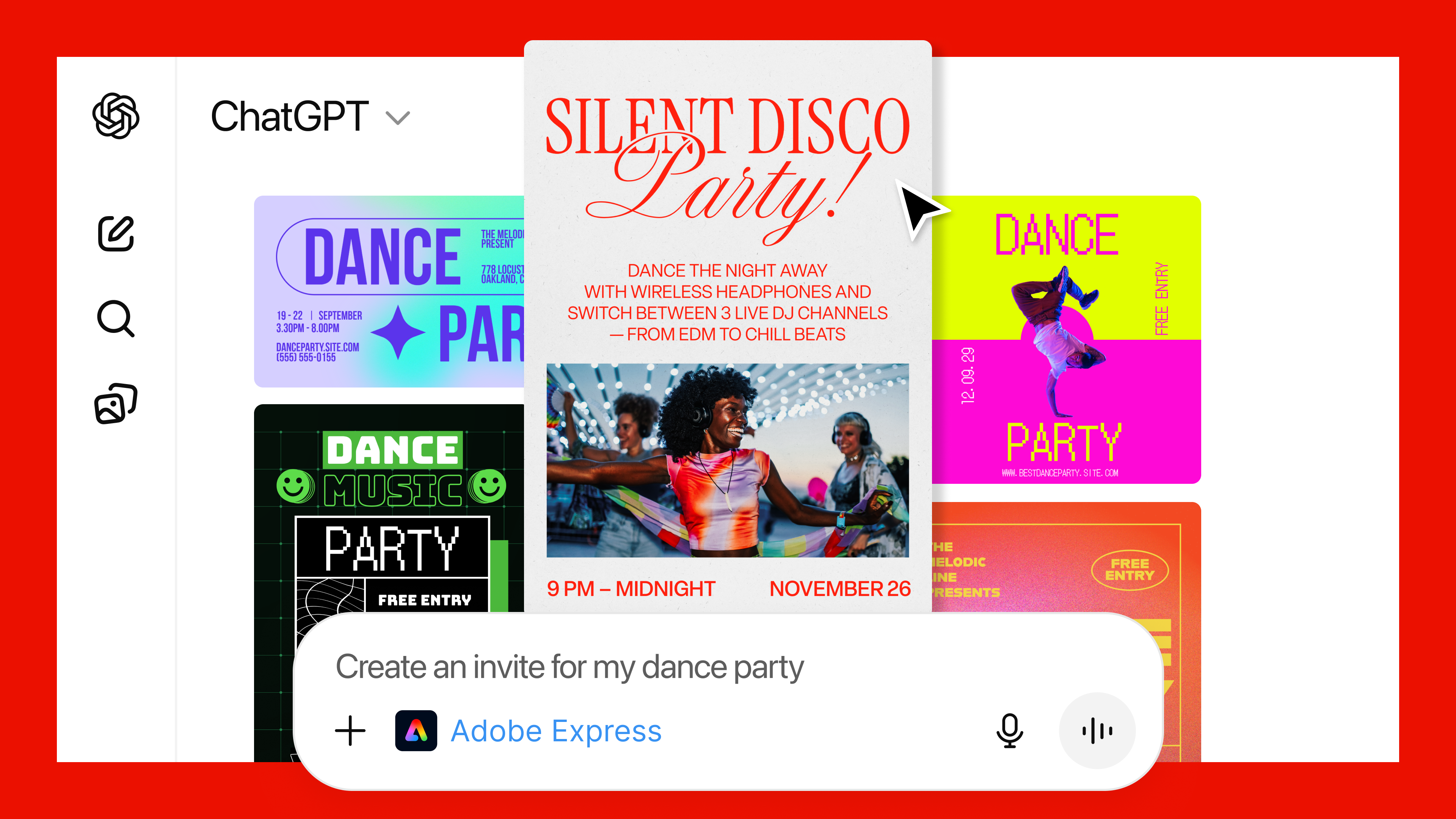
Starting today, you can access Photoshop, Acrobat and Adobe Express inside of ChatGPT. All the apps are free to use through OpenAI’s website, though before you can begin generating PDFs and illustrations using Acrobat and Adobe Express, you'll need to sign into your Adobe account. To use any of the apps in ChatGPT, either name them in your prompt or select them from the plus menu.
Of the three apps, the way OpenAI's chatbot connects to Photoshop is probably the most interesting. Depending on the prompt, the interface will change to display the sliders most relevant to your request. For example, if you want to brighten an image, you'll see one slider allowing you to adjust the exposure, alongside other ones for the shadows and highlights. By comparison, if you want to add an effect to an image, ChatGPT might display options related to dithering and tri-tone, among others.
What's interesting about all this is the way ChatGPT is interacting with Adobe's tools, through an MCP server, to offer a slice of the company's apps. I don't know about you, but I’ve always found Adobe software to be far too complicated, with often one too many ways to accomplish the same task. Granted, what I saw was a hands-off demo, but the routing Adobe created worked well.
A ChatGPT user asks the chatbot to create a dance party invitation.
Adobe
"We build the Lego blocks, which are the MCP tools, and we create detailed instructions, and then ChatGPT figures out what it wants to do," Aubrey Cattell, vice-president of developer platform and partner ecosystem at Adobe, explains. "Sometimes it does what we want it, and sometimes it doesn't. That's the nature of it being non-deterministic, and we're continuing to hone as much as we can from users' intent and natural language to give them the result that they're looking for."
Of course, if you ever want more control, the web versions of Photoshop, Acrobat and Adobe Express are a click away.
For OpenAI, this is easily the biggest coup to date of its push to reshape ChatGPT into an operating system for all the apps its more than 800 million users depend on daily. For Adobe, it feels like the company is partnering with an entity out to eat its lunch. After all, OpenAI offers its own image generation. However, Cattell said Adobe doesn't see it that way.
"A couple weeks back, OpenAI dropped Apps SDK as a new paradigm for accessing ChatGPT, we saw there was a natural fit in the work we were doing with our applications," he said. "Essentially, they gave us an operating system we were able to leverage to bring our applications to their surface. There's a lot of natural affinity there between the workflows OpenAI is trying to enable and Adobe's best in class capabilities."
Cattell promised Adobe would continue to explore what it could offer inside of ChatGPT, but added the company's apps will continue to be the place users can go if they want more power, precision and control.
This article originally appeared on Engadget at https://www.engadget.com/ai/adobe-brings-photoshop-acrobat-and-adobe-express-to-chatgpt-130000389.html?src=rss
For many of us at Engadget, a big part of our jobs is testing out new tech on a regular basis. Our desks are cluttered with new smartphones, power banks, gaming accessories and more pretty much all the time, and there are plenty of winners and losers amongst them. Similarly, there are winners and losers in the things we buy for ourselves throughout the year, and we like to sing their praises just as much as we do for the best new tech that (professionally) comes across our desks. These are the best things Engadget staffers purchased in 2025 that will continue to get lots of use in the new year.
This article originally appeared on Engadget at https://www.engadget.com/the-best-things-engadget-editors-bought-in-2025-130000576.html?src=rss
We love a little nostalgia mixed in with our cozy gaming, and ReStory looks like a perfect blend of those two. In this upcoming indie game, you play the owner of a Tokyo electronics repair shop in the mid 2000s. The trailer that dropped today shows you tinkering with some very familiar gadgets from the era, such as renamed riffs on a Tamagotchi, a Nokia brick phone, a PSP and a Walkman. You clean and repair these devices for customers, and it looks like your conversations with them might have as much impact on their lives as your official work does.
The whole thing looks exceedingly charming and chill. It's nice to see a game like ReStory as a counterpart to something with a similar premise but wildly different tone like Kaizen, which was a highlight during the Steam Automation Fest over the summer. ReStory is being developed by Mandragora, and it is currently playtesting ahead of a planned 2026 release.
This article originally appeared on Engadget at https://www.engadget.com/gaming/repair-iconic-2000s-era-gadgets-in-upcoming-indie-game-restory-233445848.html?src=rss
Uber is rolling out kiosks for travelers to book rideshares without using the mobile app. The company is pitching the service as a convenience for international travelers who may not have a data plan, but it could also be a lifesaver if your phone runs out of juice and you don't have a way to recharge it. A passenger can use the kiosk to enter their destination and desired ride type, then will receive a printed receipt with the details about their booked ride. The first kiosk will debut in Terminal C at LaGuardia Airport in New York City, but Uber said it would have additional locations in airports, hotels and ports over the coming months.
In airport situations, these kiosks make Uber even more of a direct competitor to traditional taxis. With the removal of the app, the kiosk can essentially stand in as the dispatcher and a passenger can decide how to travel based on their preferences (or on wait times) for a rideshare versus a yellow cab.
Uber also used LaGuardia as the starting point for its shuttle bus service in New York, with $18 rides between the airport and Manhattan transit hubs in October 2024; it later rolled out the shuttles to John F. Kennedy Airport in March 2025. Today, Uber said it is bringing the shuttle bus option to Newark Liberty International Airport, so all major NYC airports now have access to the service.
This article originally appeared on Engadget at https://www.engadget.com/transportation/uber-is-installing-kiosks-for-booking-rides-without-the-mobile-app-220904106.html?src=rss
Traeger debuted its Woodridge line of Wi-Fi-enabled pellet grills back in January. The overall theme across the Woodridge, Woodridge Pro and Woodridge Elite is the company’s reliable performance and features are available for less than the cost of its most premium models. Just before Christmas, the company is adding to the the Woodridge lineup with the Woodridge Pro Plus.
For $400 more than the Woodridge Pro, this Plus model adds the enclosed storage cabinet from the Woodridge Elite. Instead of an open shelf, the cabinet offers a better option for keep pellet bins and other accessories close to the grill. This Plus version also has four casters on the bottom of the cart, so it’s easier to maneuver on solid surfaces than the Woodridge Pro. The main difference between the Pro Plus and Elite models is that the latter includes an induction burner on the side shelf.
This new Woodridge Pro Plus still carries all of the handy features from the Woodridge Pro, including Wi-Fi-powered WiFIRE connectivity with the Traeger app, Super Smoke mode, 970 square inches of cooking space and an integrated pellet level sensor. You can also use wireless food probes from the Traeger-owned Meater lineup and the P.A.L. Rail system allows you to customize the grill to your needs with extra organization.
This article originally appeared on Engadget at https://www.engadget.com/home/kitchen-tech/traeger-debuts-woodridge-pro-plus-grill-with-wi-fi-features-and-built-in-storage-cabinet-205320548.html?src=rss
Owners of the Porsche Macan and upcoming Porsche Cayenne Electric will be able to unlock and start their cars with their Galaxy phones, Samsung has announced. The cars, alongside other Porsche models, are gaining support for Samsung Wallet's Digital Key feature, which lets users wirelessly control their car over a secure UWB or NFC connection.
Digital Key support will be available in Europe in December, before rolling out globally, "aligned with the launch timeline of Porsche vehicles," Samsung says. Samsung Wallet is available on Samsung devices as old as the Galaxy S20, Note 20, Galaxy Z Fold 2 and Galaxy Flip 5G, and is included on the majority of the company's new phones. Like similar features on Google's Pixels and Apple's iPhones, Digital Key allows Porsche owners with a supported Galaxy phone to unlock, lock and start their car directly from their phone. If your phone is ever taken, you can also remotely lock or delete a Digital Key to keep your car safe.
Samsung added Digital Key support to select Volvo and Polestar EVs in February 2025. The feature first became available in 2021, and is one of several ways the phone maker imagines people will use Samsung Wallet. Beyond digital car keys, the app can also store credit and debit cards and be used to transfer money with a tap.
This article originally appeared on Engadget at https://www.engadget.com/mobile/smartphones/samsung-wallet-to-gain-support-for-digital-porsche-keys-193000085.html?src=rss