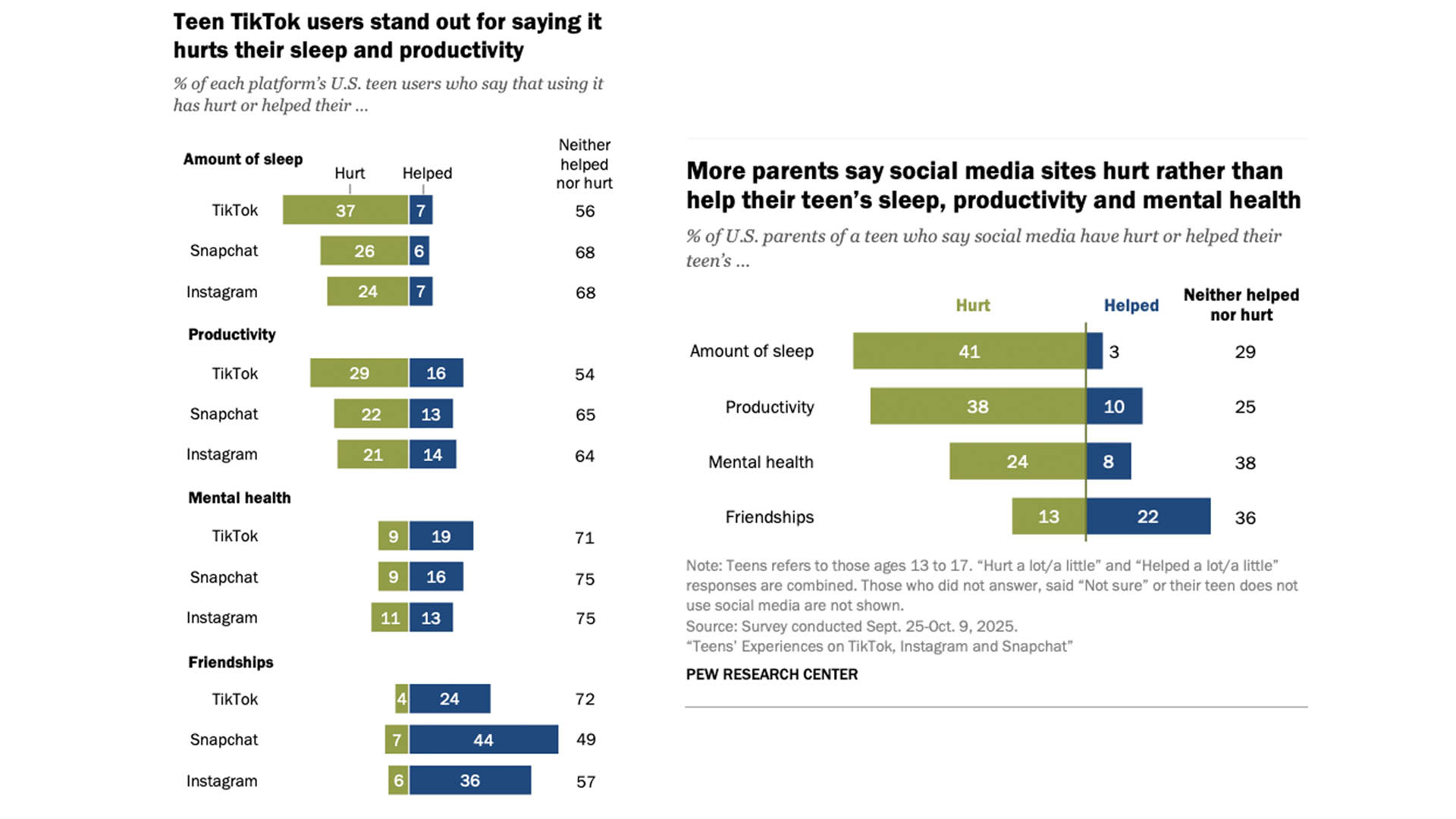
Most teens in the United States say that Instagram, TikTok and Snapchat aren't harming their mental health, though a slightly higher proportion report negative effects on their sleep and productivity, according to a new report from Pew Research. The report offers fresh insights into how teens perceive the effects of social media at a time when there are increasing calls to ban younger teens from social platforms altogether.
The report is based on a survey of 1,458 teens between the ages of 13 and 17. Teens were asked about their use of Instagram, Snapchat and TikTok and how those apps affect them. Pew also asked the teens' parents to weigh in.
Relatively few teens reported negative mental health effects, with 9 percent of Snapchat and TikTok users and 11 percent of Instagram users saying they thought the services had hurt their mental health. More teens reported negative effects on sleep and productivity, however, especially when it comes to use of TikTok. Thirty-seven percent of teens said their use of the app had hurt their sleep and 29 percent reported that it had affected their productivity. Even so, the majority of teens responded that the apps had "neither helped nor hurt" their mental health, sleep or productivity.
Teens and their parents differed on the effects of social media platforms.
Pew Research
A significant number of teens did say that social media apps had helped their friendships, particularly Snapchat. At the same time, the app had a "somewhat higher rate" of bullying and harassment compared with the other services.
While the self-reported data is hardly a definitive answer to whether social media is harming teens, the numbers do offer a somewhat different narrative than the one that lawmakers, regulators and other critics have used to pursue social media bans and civil litigation against major companies. Meta, Snap and TikTok are all facing lawsuits that claim the platforms have purposefully created addicting features and enabled other harms to teen users,
Perhaps unsurprisingly, when researchers surveyed those same teens' parents, they had a more negative view of the apps' impact on their children. About four in ten parents said that social media hurts their kids' sleep and productivity and about a quarter thought it hurt their mental health. Forty-four percent of parents whose teens use TikTok said they thought their child was spending "too much" time in the app.
"The share of parents who say the same of Snapchat and Instagram is lower," the researchers note. "But the same pattern continues for both, with parents being more likely than teens to describe their teens’ use of these sites as excessive."
The report isn't the first time Pew has polled teens on their relationship with social media. Last year, a separate report found that teens were becoming more worried about social media, though they were less likely to say they had been negatively impacted on a personal level.
This article originally appeared on Engadget at https://www.engadget.com/social-media/most-us-teens-say-tiktok-instagram-and-snapchat-arent-hurting-or-helping-their-mental-health-140000912.html?src=rss
Meta has announced that it’s introducing parent-managed accounts on WhatsApp. Designed to allow young people under the age of 13 to use the messaging platform more safely, these accounts feature new controls that enable a parent or guardian to restrict who can send them messages. Parent-managed accounts can also only be used for messaging and calling, so additional features like Channels, location sharing and Meta AI integration aren’t included.
To set up an account, you’ll need to put your phone next to the pre-teen’s device to link the two accounts. Once that’s done, the person managing the kids’ account can decide who’s able to contact them and which groups they’re able to join. Step-by-step instructions on how to activate the new accounts can be found here.
They’ll also see message requests from unknown contacts first and can adjust privacy settings from the managed device. Parent-managed accounts are PIN-protected and only the parent or guardian can make changes to privacy settings.
Like all WhatsApp conversations, end-to-end encryption means nobody else can see messages exchanged on parent-managed accounts. By default, only saved contacts can message a managed account, and a child won’t be able to join a group or view group invites from strangers before they’re separately approved by the owner of the parent account. These requests will appear as notifications to the parent.
WhatsApp doesn’t specify a minimum age suitable for a parent-messaged account, but says it’ll roll the new features out gradually in the coming months.
Meta has spent the last few years ramping up its parental controls features across its various platforms. In September it introduced teen accounts — aimed at teens between the age of 13 and 15 — for Facebook and Messenger. A year earlier, Under-16 teen accounts became a requirement on Instagram. Like the new parent-managed accounts on WhatsApp, these allow parents to vet requests and enable stricter privacy settings.
At the start of 2026, Meta put a temporary pause on allowing teens to interact with its AI chatbot characters, following reports that some of these bots had engaged in sexual conversations and other concerning interactions with minors.
This article originally appeared on Engadget at https://www.engadget.com/social-media/meta-will-let-kids-under-13-use-whatsapp-with-parent-managed-accounts-172023976.html?src=rss
Snapchat is updating its parental control features to give parents more detailed information about who their kids are connecting with in the app and which features they use the most. The app's Family Center already gives parents visibility into their child's friend list, but it will now surface contextual details when a new friend is added.
For example, the feature could highlight that the two share mutual friends or have each other's contact info saved in their phones. It could also indicate that they are classmates if both users have joined the same in-app “community.” If the two have no commonalities, then that could be a sign for a parent to "start a productive conversation," Snap says.
The company has long been criticized for making it too easy for teenagers to talk to strangers. The issue has come up in safety-related lawsuits, including an ongoing case brought by New Mexico's Attorney General. Snap says that adding additional "trust signals" to its parental control features "make it easier for parents to understand new connections and have greater confidence that their teen is chatting with someone they know in real life."
The update is also adding more granular stats about how exactly teens are spending their time in the app. Family Center's screen time dashboard now includes a breakdown of how much of their time spent in the app is in its messaging, camera, map or shortform video features. It will still be up to parents to decide what, if any, limits they want to put on their teens. But at a time when there's increasing conversation around banning teens from social media entirely, having access to more stats could better help parents understand their kids' relationship with Snapchat.
This article originally appeared on Engadget at https://www.engadget.com/social-media/snapchat-gives-parents-more-info-on-who-their-kids-are-talking-to-120000077.html?src=rss
Setting up a PS5 for a child means you can offer an age-appropriate and safe platform for them to play. Sony made its parental control tools more comprehensive in recent years and they allow families to manage screen time, block unsuitable content, guide online interactions and approve purchases. The process is straightforward once the right menus are in view, but it helps to understand how each feature works before handing over the controller.
The system uses individual accounts for each family member, and these accounts determine what a child can access. A parent or guardian assigns restrictions to the child’s profile and the console enforces them more consistently than earlier PlayStation systems. The process begins with creating a child account, then linking it to the Family Management section of the adult account, and finally adjusting controls on the console itself.
Create a child account through Family Management
A child account is required before you can use any parental controls. This account is linked to the family manager’s PlayStation account and cannot be converted into an adult account until the child reaches the appropriate age under local regulations.
From the PS5 Home screen, navigate to Settings, Family and Parental Controls then choose Family Management. The system will request the family manager’s password before any changes can be made. Select Add Family Member and choose Add a Child. The console generates a QR code that opens a secure PlayStation webpage on a phone or browser. This page guides the setup process and ties the new account to the family group.
The form asks for the child’s date of birth first. Sony uses this to assign default age restrictions and to determine which features are allowed. A small credit card charge may be requested to verify the adult’s identity. The next steps involve entering an email address for the child, creating a password and selecting basic settings for content access, communication and spending. The child account must then be verified through a link sent to the provided email address. This ensures the account can use PlayStation Network features including any future purchases through the PlayStation Store.
Once complete, the new profile appears in the Family Management list on the PS5. This profile is now ready for fine-tuning.
Manage parental controls on the console
The PS5 keeps all parental controls in Family and Parental Controls within the main Settings menu. This section is organized into Playtime Settings, Content Restrictions, Communication and User-Generated Content and Spending controls. Each area can be adjusted separately for every child account in the family group.
How to set limits on playtime
Playtime controls help set boundaries for gaming sessions. Select the child’s profile, then open Playtime Settings. Limits can be set by total daily hours or by specific time windows. The console can be configured to notify the child when time is nearly up, or to log them out automatically once the limit is reached. These settings apply across the child’s account, so they remain active even if the child switches between PS5 consoles in the same household.
Parents can choose how strictly the system enforces these rules. For example, the console can continue to display warnings without blocking gameplay or it can stop activity when the allotted time ends. Playtime reports can also be viewed through the family manager’s PlayStation account or the PS App.
How to restrict content based on age ratings
Sony’s content filters are based on age ratings from the ESRB in the United States and equivalent regional boards in other countries. In Family Management, select the child’s profile and then select Parental Controls. Here, parents can set an age level for games. Titles above this level will not launch without approval from the family manager.
Blu-ray and DVD content can also be restricted and the system browser can be disabled entirely. If the family uses services that stream movies or TV shows through the console, those apps often apply their own content filters, but the PS5 can serve as a first line of control.
Engadget
How to manage communication and online interactions
Online communication can be limited to prevent unwanted contact. In Parental Controls, select Communication and User-Generated Content. This area controls messaging, voice chat, profile sharing and the ability to see or share player-created media such as screenshots and video clips.
Online play can also be adjusted. For younger kids, it may be helpful to block online multiplayer entirely until they better understand online etiquette and safety. For older children, communication can be limited to friends only. The PS5 respects these limits across all supported games.
How to set spending limits for purchases
A child account cannot use payment cards directly, but it can spend funds from the family manager’s wallet. Spending limits can be set in the child’s profile under Family Management. Parents can choose a monthly spending cap or block purchases altogether. Any attempt to exceed the limit requires approval from the family manager.
This feature covers games, add-ons, subscriptions and in-game currency. It ensures surprises on the credit card are less likely, especially in titles that promote quick digital purchases.
How to sign your child into the PS5
Once controls are set, the child can be added as a user on the console. Return to the home screen and select the user icon to switch users. Choose Add User, then select Get Started. Sign in using the child account’s email address and password.
The console guides the profile setup process and prompts for an online ID, avatar and privacy preferences. These steps help personalise the child’s space on the PS5. The system may request a locally created passcode that prevents access to parental controls without the family manager’s approval. This passcode should be unique and not shared with the child.
After setup is complete, the child will see a version of the PS5 tailored to the restrictions applied. Games that exceed the assigned age rating will appear with a lock icon and the console will block any actions that the family manager has limited.
Use the PS App and PlayStation’s online tools for ongoing management
Playtime and permissions can be managed remotely through Sony’s PS App or the PlayStation website. This makes it easier to adjust rules without taking over the TV. The app also provides notifications when playtime is running low or when the child attempts to access restricted content.
Sony’s Family Management tools synchronise across devices. Changes made from a phone appear on the PS5 within seconds. This helps maintain consistent rules, especially in homes with more than one console.
A child-ready PS5 is more than a restriction tool. It creates a safer environment for learning how to navigate digital spaces, interact with friends and handle screen time. Sony’s updated controls take much of the pressure off parents by enforcing rules in predictable ways that are difficult to bypass. Once everything is configured, the child can enjoy the console’s library while staying within the boundaries that support healthy gaming habits.
This article originally appeared on Engadget at https://www.engadget.com/gaming/playstation/how-to-set-up-a-ps5-for-a-child-160039866.html?src=rss
Game developer Vince Zampella, known for his work on many popular first-person shooter franchises, has died. According to Los Angeles news channel NBC4, Zampella was killed in a single-vehicle car crash on Sunday along with one other unnamed person. He was 55.
Zampella has helmed several well-known first-person shooter titles. He was a founder of Infinity Ward, where he was a creator of the Call of Duty series. Zampella remained at the company for the launch of the hugely popular franchise's first few installments. In 2010, he co-founded Respawn Entertainment, the studio behind Titanfall, Titanfall 2 and Apex Legends. Respawn was acquired by EA, and most recently, Zampella was leading DICE's studio in Los Angeles and headed up the Battlefield franchise, another FPS series that just saw the launch of Battlefield 6 earlier this year.
EA shared the following statement about Zampella's death: “This is an unimaginable loss, and our hearts are with Vince’s family, his loved ones and all those touched by his work. Vince’s influence on the video game industry was profound and far-reaching. A friend, colleague, leader and visionary creator, his work helped shape modern interactive entertainment and inspired millions of players and developers around the world. His legacy will continue to shape how games are made and how players connect for generations to come.”
Update, December 22, 2025, 3:53PM ET: Added statement from EA.
This article originally appeared on Engadget at https://www.engadget.com/gaming/call-of-duty-co-creator-vince-zampella-killed-in-a-car-crash-204046354.html?src=rss
Rebecca Heineman, co-founder of video game company Interplay Entertainment, has died at 62. As Rock Paper Shotgun has reported, her friends and colleagues from the industry broke the news on their social media accounts. According to Heineman’s GoFundMe campaign, she was diagnosed with adenocarcinoma a few months ago. In her last update, she revealed that “all further treatments [were] pointless” and that all donations will go towards her funeral being arranged by her children. Heineman’s last post on Instagram was a tribute to her wife Jennell Jaquays who died in 2024 due complications brought by Guillain–Barré syndrome.
Heineman won the Atari 2600 Space Invaders championship in 1980 before she was offered a job as a programmer at 16 years old by Avalon Hill Games. She then co-founded Interplay as Interplay Productions back in 1983 with Brian Fargo, Jay Patel and Troy Worrell. Under Interplay, she designed The Bard's Tale III: Thief of Fate among other games. In 1999, she founded Contraband Entertainment, which worked on the Mac OS ports for Aliens vs. Predator and Baldur's Gate II. Heineman also worked as a senior software engineer at Electronic Arts, senior engine programmer at Ubisoft Toronto and senior software architect at Sony Computer Entertainment America.
This article originally appeared on Engadget at https://www.engadget.com/gaming/interplay-co-founder-rebecca-heineman-dies-133000414.html?src=rss
Shut-ins of the world, you’ll have to wait a bit longer for your ultimate wish-fulfillment video game. Date Everything!, the cheekily bizarre romantic sim from Team17 and Sassy Chap Games, is no longer arriving on October 24, as was initially announced. On Friday, the team pushed back the game’s release date to Valentine’s Day 2025.
On a game design level, Date Everything! appears to be a simple dating simulator with dialogue branches and voiced characters. What sets it apart is its delightfully absurd premise: You can date all your household objects, thanks to magical glasses known as the “Dateviator.”
Your dateable objects each have a distinct personality and branching storylines. Your romantic possibilities include a laundry hamper (the fiery “Harper”), a vacuum cleaner (the hunky “Hoove”) and your overwhelming (and shirtless) sense of existential dread who would prefer just to be called “Doug.” As unappealing as that bunch sounds for a romantic fling, it may still beat today’s microtransaction-riddled dating apps.
Team17 / Sassy Chap Games
Depending on your dialog branch choices, each humanized object can become a Love, Friend or Hate. The game’s press release promised that each outcome influences a “critical path tying it all together,” so choose wisely between the lamp and the towel who dresses like Liberace.
Date Everything! arrives on February 14, 2025, on Switch, PS5, Xbox Series X/S and PC.
This article originally appeared on Engadget at https://www.engadget.com/gaming/absurdist-romance-sim-date-everything-has-been-delayed-to-valentines-day-2025-163412249.html?src=rss
Texas Attorney General Ken Paxton has filed a lawsuit against TikTok claiming the company violated a new child privacy law in the state. It's set to be the first test of Texas’ Securing Children Online Through Parental Empowerment (SCOPE) Act since it went into effect just over a month ago.
Under the law, parts of which were struck down by a federal judge, social media platforms are required to verify the ages of younger users and offer parental control features, including the ability for parents to opt their children out of data collection.
Paxton alleges that TikTok’s existing parental control features are insufficient. "However, Defendants do not provide the parents or guardians of users known to be 13 to 17 years old with parental tools that allow them to control or limit most of a known minor’s privacy and account settings,” the lawsuit states. “For example, parents or guardians do not have the ability to control Defendants’ sharing, disclosing, and selling of a known minor’s personal identifying information, nor control Defendants’ ability to display targeted advertising to a known minor."
The lawsuit also argues that the app’s “Family Pairing” tool isn’t “commercially reasonable” because it requires parents to make their own TikTok account and because teens are free to deny their parents’ requests to set up the monitoring tool. TikTok didn’t immediately respond to a request for comment. The app already prohibits most targeted advertising to anyone younger than 18.
"We strongly disagree with these allegations and, in fact, we offer robust safeguards for teens and parents, including family pairing, all of which are publicly available," the company said in a statement shared on X. "We stand by the protections we provide families."
The lawsuit adds to TikTok’s growing legal challenges in the United States. The company is currently fighting a law that could result in a total ban of the app in the United States. It’s also facing a separate Justice Department lawsuit related to child privacy.
Update, October 3, 2024, 8:05 PM ET: This story has been updated to add a statement from TikTok.
This article originally appeared on Engadget at https://www.engadget.com/big-tech/texas-is-suing-tiktok-for-allegedly-violating-its-new-child-privacy-law-235432146.html?src=rss
Following a beta test earlier this year, Steam Families is now live with a new way for relatives to be connected on the gaming portal. Up to five family members can be invited into a group, which will grant access to a shared family library. Each person can create their own save files and collect their own achievements for games in the family library.
The marquee development with the new family feature is that multiple people within the group will be able to play games from the shared library at the same time. And if you own multiple copies of a game, then multiple people can be playing that title at once. The caveat with family sharing is that a game developer may opt not to support the feature. Steam maintains a list of the titles that currently have family sharing enabled.
Steam Families also folds in the features of the old Steam Family View, where the adults can monitor and limit what the children in the group can do on the platform. Any adult in the family will be able to restrict kids' access to Steam's store, communities or chat. They can also set playtime limits, approve extensions to the limits and recover a child's account if the password is lost.
This type of family sharing plan doesn't always reflect a person's home environment, and Steam does have some restrictions on Steam Families' use. Adults can leave a family group at any time, but have to wait a year before they can join or create another family. Also, the Steam accounts need to be in the same country to join a family group.
Valve has a full FAQ on its Steam support page detailing the limitations of Steam Families and how to restrict the games kids in your family have access to.
Update, September 12, 1:40PM: This story was updated after publish with additional information on Steam's FAQ for its families feature.
This article originally appeared on Engadget at https://www.engadget.com/gaming/pc/steam-families-library-sharing-is-live-and-you-can-all-play-at-the-same-time-231044311.html?src=rss
When I was a preteen, social media was just getting going, so there weren't many restrictions in place regarding access. Now, regulations — and the consequences of not having them — are everywhere, with the latest example coming courtesy of Meta (a case study for all the good and bad social media has to offer). Meta has announced it's opening up Horizon Worlds to preteens with parent-approved access to a Meta account.
Anyone aged 10 to 12 can soon request entry to the VR game and explore different worlds like The Space Station or Citadel. Each world is also getting a rating of ages 10+, 13+ or 18+, with ones in the last category not shown as an option to anyone 17 or younger. Parents can either approve all worlds in a specific age bracket, go through and pick specific ones or wait for their kid to send a request.
Further safety features in Horizon Worlds for preteens include the fact that voice chat is disabled for everyone except parent-approved contacts, there are no follow suggestions and there are automatic offline status and visibility settings — something only a parent can change. All parent-managed accounts will also permanently have the personal boundary feature turned on, stopping other avatars from getting too close. Plus, anyone using a Meta Quest 2 or 3 headset will have to re-enter their birthday before playing.
As thought out as these measures seem, parents and guardians might not want to trust that Meta will take care of everything without question. The company has hardly kept young people's well-being at the forefront of their decisions, with lawmakers slamming (and suing) Meta for its disregard. Nearly every state across the US has taken part in lawsuits alleging Meta hooks teenagers onto its platforms and repeatedly promotes safety features while ignoring staff pleas to devote more time and resources to protecting children. Our deep dive into all of Meta CEO Mark Zuckerberg's dangerous decisions (including the company taking minimal action to stop adults from sexually harassing children on Facebook and Instagram) is available here.
This article originally appeared on Engadget at https://www.engadget.com/social-media/meta-will-open-up-horizon-worlds-access-to-preteens-130059930.html?src=rss