The Wireless Display Kit That Needs No App, No Network, No Pairing

There’s no shortage of ways to get your screen onto a larger display these days, but the experience rarely matches the simplicity it should have. Adapters pile up in bags, cables stretch across desks, and software-based casting tools have a talent for dropping at the worst possible moment. For a market that’s moved so decisively toward wireless, display connectivity has been surprisingly slow to catch up.

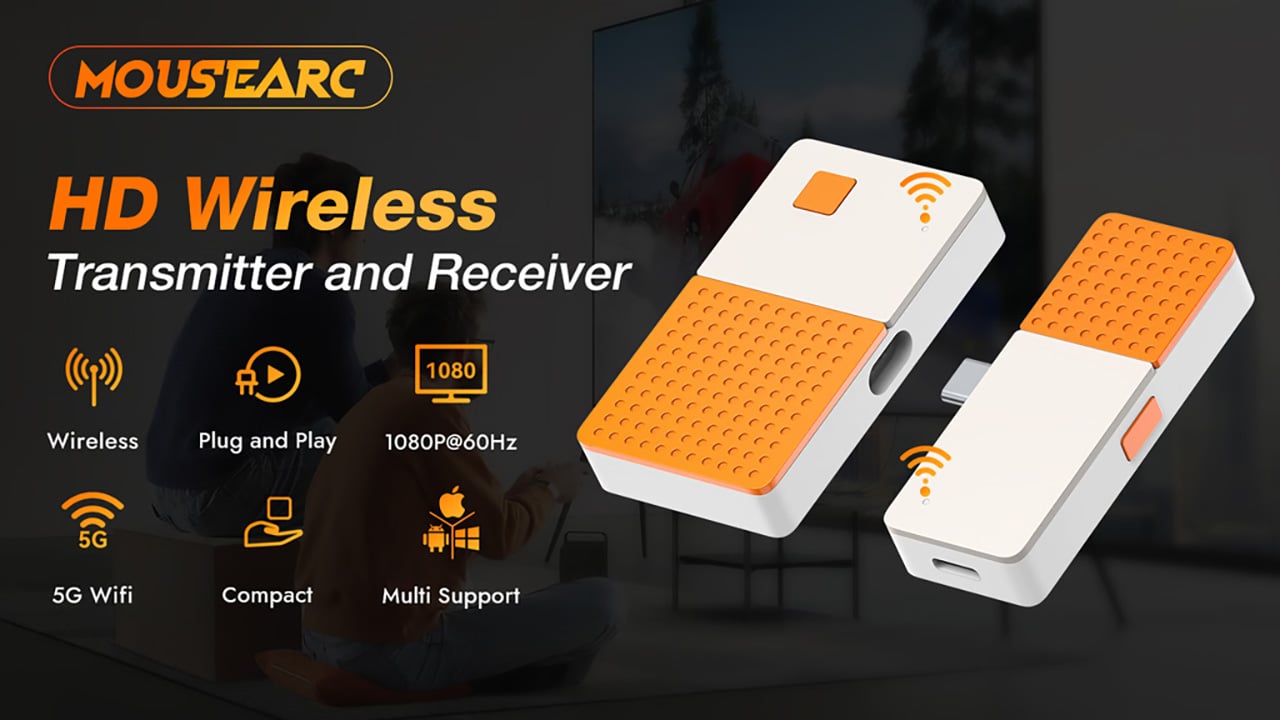
The MouseArc G1 is a wireless HD transmitter and receiver set that takes that problem head-on, without leaning on apps, network menus, or the complicated routines that have made similar devices tedious. It also doesn’t look the part of a utilitarian tool. The G1 sports a puzzle-tile design in white and orange that gives it a visual identity far removed from a typical AV dongle.

Designer: MouseArc

Click Here to Buy Bow: $69 $120 (43% off). Hurry, only 89/400 left! Raised over $49,000.

The kit includes a USB-C transmitter for source devices and an HDMI receiver for the display. Both come factory pre-paired, so there’s nothing to configure right out of the box. No app installs, no Bluetooth pairing, no hopping onto a Wi-Fi network. You plug the transmitter into your laptop or phone, connect the receiver to a TV or projector, and you’re ready almost immediately.

The G1 runs on 802.11ac 5G peer-to-peer Wi-Fi, operating on a dedicated channel rather than borrowing bandwidth from your home network. That separation keeps the signal clean and resistant to interference, which pays off noticeably during longer sessions. It’s also rated for up to 50m in open areas, making it a practical option for conference rooms, lecture halls, and larger commercial spaces.

Think about walking into a conference room with your laptop, needing to get a presentation up before the meeting starts. With the G1 already connected to the room’s display, the only step is plugging in the transmitter. There’s no wrestling with the AV system, no scrambling for a compatible cable, and no awkward silence while everyone politely watches you troubleshoot.

That same ease carries into more personal moments. Connecting a phone or tablet to a TV for a movie night is about as involved as plugging in a USB drive. The G1 works with a wide range of USB-C devices that support DisplayPort Alt Mode, from iPhones and iPads to MacBooks and Samsung Galaxy phones, so there’s a good chance what you already own qualifies.

For anything where motion matters, the G1 supports 1080p at 120Hz, with a dedicated processing unit keeping visuals sharp and movement fluid. Fast-moving scenes stay clear without the blur or judder that can make wireless display setups feel like a step backward. Audio stays synced throughout as well, which rounds out an experience that holds up well for gaming, sports, and high-motion content.

Something that often goes unaddressed with wireless display kits is what happens to your device’s power while you’re casting. The G1 includes a 100W PD 3.0 pass-through charging port, so your laptop or phone stays charged while the transmitter is in use. For anything running longer than a quick demo, that detail makes a real difference to how the session actually plays out.

Then there’s the form factor. At 6.5cm x 6cm x 1.3cm and around 32g, the G1 is compact enough to pocket or slip into a bag without thought. The puzzle-tile silhouette and white and orange finish give it a visual personality that stands apart from the usual AV dongle, which feels like a deliberate design choice for something meant to travel daily.

What the G1 delivers is a cleaner way to use the displays you already own. Whether it’s a presentation, a movie, a classroom session, or a gaming moment on a bigger screen, it handles the connection without demanding anything back. That quiet, friction-free reliability is genuinely hard to find in a category that tends to make everything feel more complicated than it needs to be.

Click Here to Buy Bow: $69 $120 (43% off). Hurry, only 89/400 left! Raised over $49,000.

The post The Wireless Display Kit That Needs No App, No Network, No Pairing first appeared on Yanko Design.

The Wireless Display Kit That Needs No App, No Network, No Pairing

There’s no shortage of ways to get your screen onto a larger display these days, but the experience rarely matches the simplicity it should have. Adapters pile up in bags, cables stretch across desks, and software-based casting tools have a talent for dropping at the worst possible moment. For a market that’s moved so decisively toward wireless, display connectivity has been surprisingly slow to catch up.

The MouseArc G1 is a wireless HD transmitter and receiver set that takes that problem head-on, without leaning on apps, network menus, or the complicated routines that have made similar devices tedious. It also doesn’t look the part of a utilitarian tool. The G1 sports a puzzle-tile design in white and orange that gives it a visual identity far removed from a typical AV dongle.

Designer: MouseArc

Click Here to Buy Bow: $69 $120 (43% off). Hurry, only 89/400 left! Raised over $49,000.

The kit includes a USB-C transmitter for source devices and an HDMI receiver for the display. Both come factory pre-paired, so there’s nothing to configure right out of the box. No app installs, no Bluetooth pairing, no hopping onto a Wi-Fi network. You plug the transmitter into your laptop or phone, connect the receiver to a TV or projector, and you’re ready almost immediately.

The G1 runs on 802.11ac 5G peer-to-peer Wi-Fi, operating on a dedicated channel rather than borrowing bandwidth from your home network. That separation keeps the signal clean and resistant to interference, which pays off noticeably during longer sessions. It’s also rated for up to 50m in open areas, making it a practical option for conference rooms, lecture halls, and larger commercial spaces.

Think about walking into a conference room with your laptop, needing to get a presentation up before the meeting starts. With the G1 already connected to the room’s display, the only step is plugging in the transmitter. There’s no wrestling with the AV system, no scrambling for a compatible cable, and no awkward silence while everyone politely watches you troubleshoot.

That same ease carries into more personal moments. Connecting a phone or tablet to a TV for a movie night is about as involved as plugging in a USB drive. The G1 works with a wide range of USB-C devices that support DisplayPort Alt Mode, from iPhones and iPads to MacBooks and Samsung Galaxy phones, so there’s a good chance what you already own qualifies.

For anything where motion matters, the G1 supports 1080p at 120Hz, with a dedicated processing unit keeping visuals sharp and movement fluid. Fast-moving scenes stay clear without the blur or judder that can make wireless display setups feel like a step backward. Audio stays synced throughout as well, which rounds out an experience that holds up well for gaming, sports, and high-motion content.

Something that often goes unaddressed with wireless display kits is what happens to your device’s power while you’re casting. The G1 includes a 100W PD 3.0 pass-through charging port, so your laptop or phone stays charged while the transmitter is in use. For anything running longer than a quick demo, that detail makes a real difference to how the session actually plays out.

Then there’s the form factor. At 6.5cm x 6cm x 1.3cm and around 32g, the G1 is compact enough to pocket or slip into a bag without thought. The puzzle-tile silhouette and white and orange finish give it a visual personality that stands apart from the usual AV dongle, which feels like a deliberate design choice for something meant to travel daily.

What the G1 delivers is a cleaner way to use the displays you already own. Whether it’s a presentation, a movie, a classroom session, or a gaming moment on a bigger screen, it handles the connection without demanding anything back. That quiet, friction-free reliability is genuinely hard to find in a category that tends to make everything feel more complicated than it needs to be.

Click Here to Buy Bow: $69 $120 (43% off). Hurry, only 89/400 left! Raised over $49,000.

The post The Wireless Display Kit That Needs No App, No Network, No Pairing first appeared on Yanko Design.

The Wireless Display Kit That Needs No App, No Network, No Pairing

There’s no shortage of ways to get your screen onto a larger display these days, but the experience rarely matches the simplicity it should have. Adapters pile up in bags, cables stretch across desks, and software-based casting tools have a talent for dropping at the worst possible moment. For a market that’s moved so decisively toward wireless, display connectivity has been surprisingly slow to catch up.

The MouseArc G1 is a wireless HD transmitter and receiver set that takes that problem head-on, without leaning on apps, network menus, or the complicated routines that have made similar devices tedious. It also doesn’t look the part of a utilitarian tool. The G1 sports a puzzle-tile design in white and orange that gives it a visual identity far removed from a typical AV dongle.

Designer: MouseArc

Click Here to Buy Bow: $69 $120 (43% off). Hurry, only 89/400 left! Raised over $49,000.

The kit includes a USB-C transmitter for source devices and an HDMI receiver for the display. Both come factory pre-paired, so there’s nothing to configure right out of the box. No app installs, no Bluetooth pairing, no hopping onto a Wi-Fi network. You plug the transmitter into your laptop or phone, connect the receiver to a TV or projector, and you’re ready almost immediately.

The G1 runs on 802.11ac 5G peer-to-peer Wi-Fi, operating on a dedicated channel rather than borrowing bandwidth from your home network. That separation keeps the signal clean and resistant to interference, which pays off noticeably during longer sessions. It’s also rated for up to 50m in open areas, making it a practical option for conference rooms, lecture halls, and larger commercial spaces.

Think about walking into a conference room with your laptop, needing to get a presentation up before the meeting starts. With the G1 already connected to the room’s display, the only step is plugging in the transmitter. There’s no wrestling with the AV system, no scrambling for a compatible cable, and no awkward silence while everyone politely watches you troubleshoot.

That same ease carries into more personal moments. Connecting a phone or tablet to a TV for a movie night is about as involved as plugging in a USB drive. The G1 works with a wide range of USB-C devices that support DisplayPort Alt Mode, from iPhones and iPads to MacBooks and Samsung Galaxy phones, so there’s a good chance what you already own qualifies.

For anything where motion matters, the G1 supports 1080p at 120Hz, with a dedicated processing unit keeping visuals sharp and movement fluid. Fast-moving scenes stay clear without the blur or judder that can make wireless display setups feel like a step backward. Audio stays synced throughout as well, which rounds out an experience that holds up well for gaming, sports, and high-motion content.

Something that often goes unaddressed with wireless display kits is what happens to your device’s power while you’re casting. The G1 includes a 100W PD 3.0 pass-through charging port, so your laptop or phone stays charged while the transmitter is in use. For anything running longer than a quick demo, that detail makes a real difference to how the session actually plays out.

Then there’s the form factor. At 6.5cm x 6cm x 1.3cm and around 32g, the G1 is compact enough to pocket or slip into a bag without thought. The puzzle-tile silhouette and white and orange finish give it a visual personality that stands apart from the usual AV dongle, which feels like a deliberate design choice for something meant to travel daily.

What the G1 delivers is a cleaner way to use the displays you already own. Whether it’s a presentation, a movie, a classroom session, or a gaming moment on a bigger screen, it handles the connection without demanding anything back. That quiet, friction-free reliability is genuinely hard to find in a category that tends to make everything feel more complicated than it needs to be.

Click Here to Buy Bow: $69 $120 (43% off). Hurry, only 89/400 left! Raised over $49,000.

The post The Wireless Display Kit That Needs No App, No Network, No Pairing first appeared on Yanko Design.
The Wireless Display Kit That Needs No App, No Network, No Pairing

There’s no shortage of ways to get your screen onto a larger display these days, but the experience rarely matches the simplicity it should have. Adapters pile up in bags, cables stretch across desks, and software-based casting tools have a talent for dropping at the worst possible moment. For a market that’s moved so decisively toward wireless, display connectivity has been surprisingly slow to catch up.

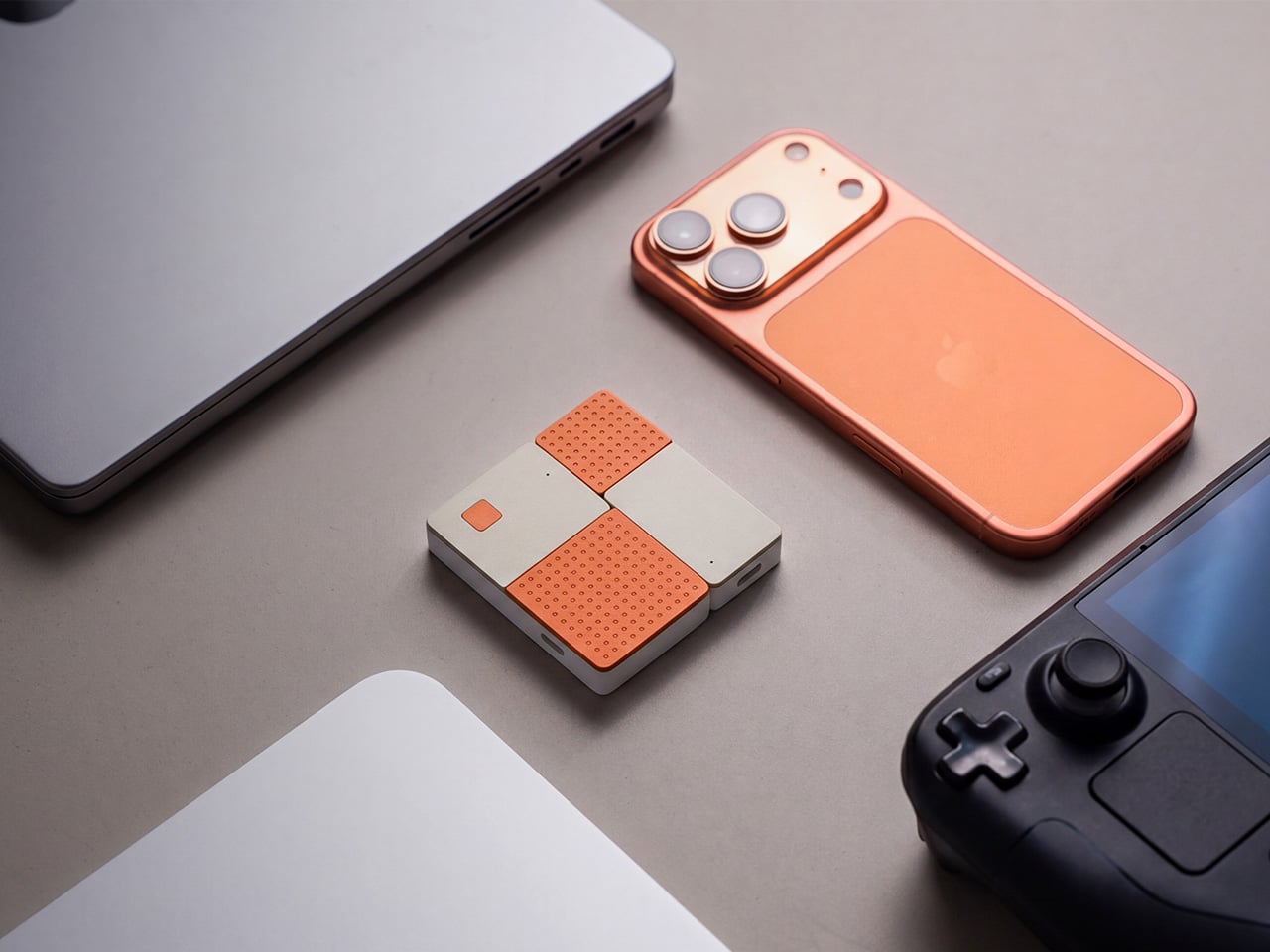
The MouseArc G1 is a wireless HD transmitter and receiver set that takes that problem head-on, without leaning on apps, network menus, or the complicated routines that have made similar devices tedious. It also doesn’t look the part of a utilitarian tool. The G1 sports a puzzle-tile design in white and orange that gives it a visual identity far removed from a typical AV dongle.

Designer: MouseArc

Click Here to Buy Bow: $69 $120 (43% off). Hurry, only 89/400 left! Raised over $49,000.

The kit includes a USB-C transmitter for source devices and an HDMI receiver for the display. Both come factory pre-paired, so there’s nothing to configure right out of the box. No app installs, no Bluetooth pairing, no hopping onto a Wi-Fi network. You plug the transmitter into your laptop or phone, connect the receiver to a TV or projector, and you’re ready almost immediately.

The G1 runs on 802.11ac 5G peer-to-peer Wi-Fi, operating on a dedicated channel rather than borrowing bandwidth from your home network. That separation keeps the signal clean and resistant to interference, which pays off noticeably during longer sessions. It’s also rated for up to 50m in open areas, making it a practical option for conference rooms, lecture halls, and larger commercial spaces.

Think about walking into a conference room with your laptop, needing to get a presentation up before the meeting starts. With the G1 already connected to the room’s display, the only step is plugging in the transmitter. There’s no wrestling with the AV system, no scrambling for a compatible cable, and no awkward silence while everyone politely watches you troubleshoot.

That same ease carries into more personal moments. Connecting a phone or tablet to a TV for a movie night is about as involved as plugging in a USB drive. The G1 works with a wide range of USB-C devices that support DisplayPort Alt Mode, from iPhones and iPads to MacBooks and Samsung Galaxy phones, so there’s a good chance what you already own qualifies.

For anything where motion matters, the G1 supports 1080p at 120Hz, with a dedicated processing unit keeping visuals sharp and movement fluid. Fast-moving scenes stay clear without the blur or judder that can make wireless display setups feel like a step backward. Audio stays synced throughout as well, which rounds out an experience that holds up well for gaming, sports, and high-motion content.

Something that often goes unaddressed with wireless display kits is what happens to your device’s power while you’re casting. The G1 includes a 100W PD 3.0 pass-through charging port, so your laptop or phone stays charged while the transmitter is in use. For anything running longer than a quick demo, that detail makes a real difference to how the session actually plays out.

Then there’s the form factor. At 6.5cm x 6cm x 1.3cm and around 32g, the G1 is compact enough to pocket or slip into a bag without thought. The puzzle-tile silhouette and white and orange finish give it a visual personality that stands apart from the usual AV dongle, which feels like a deliberate design choice for something meant to travel daily.

What the G1 delivers is a cleaner way to use the displays you already own. Whether it’s a presentation, a movie, a classroom session, or a gaming moment on a bigger screen, it handles the connection without demanding anything back. That quiet, friction-free reliability is genuinely hard to find in a category that tends to make everything feel more complicated than it needs to be.

Click Here to Buy Bow: $69 $120 (43% off). Hurry, only 89/400 left! Raised over $49,000.

The post The Wireless Display Kit That Needs No App, No Network, No Pairing first appeared on Yanko Design.

The Wireless Display Kit That Needs No App, No Network, No Pairing

There’s no shortage of ways to get your screen onto a larger display these days, but the experience rarely matches the simplicity it should have. Adapters pile up in bags, cables stretch across desks, and software-based casting tools have a talent for dropping at the worst possible moment. For a market that’s moved so decisively toward wireless, display connectivity has been surprisingly slow to catch up.

The MouseArc G1 is a wireless HD transmitter and receiver set that takes that problem head-on, without leaning on apps, network menus, or the complicated routines that have made similar devices tedious. It also doesn’t look the part of a utilitarian tool. The G1 sports a puzzle-tile design in white and orange that gives it a visual identity far removed from a typical AV dongle.

Designer: MouseArc

Click Here to Buy Bow: $69 $120 (43% off). Hurry, only 89/400 left! Raised over $49,000.

The kit includes a USB-C transmitter for source devices and an HDMI receiver for the display. Both come factory pre-paired, so there’s nothing to configure right out of the box. No app installs, no Bluetooth pairing, no hopping onto a Wi-Fi network. You plug the transmitter into your laptop or phone, connect the receiver to a TV or projector, and you’re ready almost immediately.

The G1 runs on 802.11ac 5G peer-to-peer Wi-Fi, operating on a dedicated channel rather than borrowing bandwidth from your home network. That separation keeps the signal clean and resistant to interference, which pays off noticeably during longer sessions. It’s also rated for up to 50m in open areas, making it a practical option for conference rooms, lecture halls, and larger commercial spaces.

Think about walking into a conference room with your laptop, needing to get a presentation up before the meeting starts. With the G1 already connected to the room’s display, the only step is plugging in the transmitter. There’s no wrestling with the AV system, no scrambling for a compatible cable, and no awkward silence while everyone politely watches you troubleshoot.

That same ease carries into more personal moments. Connecting a phone or tablet to a TV for a movie night is about as involved as plugging in a USB drive. The G1 works with a wide range of USB-C devices that support DisplayPort Alt Mode, from iPhones and iPads to MacBooks and Samsung Galaxy phones, so there’s a good chance what you already own qualifies.

For anything where motion matters, the G1 supports 1080p at 120Hz, with a dedicated processing unit keeping visuals sharp and movement fluid. Fast-moving scenes stay clear without the blur or judder that can make wireless display setups feel like a step backward. Audio stays synced throughout as well, which rounds out an experience that holds up well for gaming, sports, and high-motion content.

Something that often goes unaddressed with wireless display kits is what happens to your device’s power while you’re casting. The G1 includes a 100W PD 3.0 pass-through charging port, so your laptop or phone stays charged while the transmitter is in use. For anything running longer than a quick demo, that detail makes a real difference to how the session actually plays out.

Then there’s the form factor. At 6.5cm x 6cm x 1.3cm and around 32g, the G1 is compact enough to pocket or slip into a bag without thought. The puzzle-tile silhouette and white and orange finish give it a visual personality that stands apart from the usual AV dongle, which feels like a deliberate design choice for something meant to travel daily.

What the G1 delivers is a cleaner way to use the displays you already own. Whether it’s a presentation, a movie, a classroom session, or a gaming moment on a bigger screen, it handles the connection without demanding anything back. That quiet, friction-free reliability is genuinely hard to find in a category that tends to make everything feel more complicated than it needs to be.

Click Here to Buy Bow: $69 $120 (43% off). Hurry, only 89/400 left! Raised over $49,000.

The post The Wireless Display Kit That Needs No App, No Network, No Pairing first appeared on Yanko Design.

The Wireless Display Kit That Needs No App, No Network, No Pairing

There’s no shortage of ways to get your screen onto a larger display these days, but the experience rarely matches the simplicity it should have. Adapters pile up in bags, cables stretch across desks, and software-based casting tools have a talent for dropping at the worst possible moment. For a market that’s moved so decisively toward wireless, display connectivity has been surprisingly slow to catch up.

The MouseArc G1 is a wireless HD transmitter and receiver set that takes that problem head-on, without leaning on apps, network menus, or the complicated routines that have made similar devices tedious. It also doesn’t look the part of a utilitarian tool. The G1 sports a puzzle-tile design in white and orange that gives it a visual identity far removed from a typical AV dongle.

Designer: MouseArc

Click Here to Buy Bow: $69 $120 (43% off). Hurry, only 89/400 left! Raised over $49,000.

The kit includes a USB-C transmitter for source devices and an HDMI receiver for the display. Both come factory pre-paired, so there’s nothing to configure right out of the box. No app installs, no Bluetooth pairing, no hopping onto a Wi-Fi network. You plug the transmitter into your laptop or phone, connect the receiver to a TV or projector, and you’re ready almost immediately.

The G1 runs on 802.11ac 5G peer-to-peer Wi-Fi, operating on a dedicated channel rather than borrowing bandwidth from your home network. That separation keeps the signal clean and resistant to interference, which pays off noticeably during longer sessions. It’s also rated for up to 50m in open areas, making it a practical option for conference rooms, lecture halls, and larger commercial spaces.

Think about walking into a conference room with your laptop, needing to get a presentation up before the meeting starts. With the G1 already connected to the room’s display, the only step is plugging in the transmitter. There’s no wrestling with the AV system, no scrambling for a compatible cable, and no awkward silence while everyone politely watches you troubleshoot.

That same ease carries into more personal moments. Connecting a phone or tablet to a TV for a movie night is about as involved as plugging in a USB drive. The G1 works with a wide range of USB-C devices that support DisplayPort Alt Mode, from iPhones and iPads to MacBooks and Samsung Galaxy phones, so there’s a good chance what you already own qualifies.

For anything where motion matters, the G1 supports 1080p at 120Hz, with a dedicated processing unit keeping visuals sharp and movement fluid. Fast-moving scenes stay clear without the blur or judder that can make wireless display setups feel like a step backward. Audio stays synced throughout as well, which rounds out an experience that holds up well for gaming, sports, and high-motion content.

Something that often goes unaddressed with wireless display kits is what happens to your device’s power while you’re casting. The G1 includes a 100W PD 3.0 pass-through charging port, so your laptop or phone stays charged while the transmitter is in use. For anything running longer than a quick demo, that detail makes a real difference to how the session actually plays out.

Then there’s the form factor. At 6.5cm x 6cm x 1.3cm and around 32g, the G1 is compact enough to pocket or slip into a bag without thought. The puzzle-tile silhouette and white and orange finish give it a visual personality that stands apart from the usual AV dongle, which feels like a deliberate design choice for something meant to travel daily.

What the G1 delivers is a cleaner way to use the displays you already own. Whether it’s a presentation, a movie, a classroom session, or a gaming moment on a bigger screen, it handles the connection without demanding anything back. That quiet, friction-free reliability is genuinely hard to find in a category that tends to make everything feel more complicated than it needs to be.

Click Here to Buy Bow: $69 $120 (43% off). Hurry, only 89/400 left! Raised over $49,000.

The post The Wireless Display Kit That Needs No App, No Network, No Pairing first appeared on Yanko Design.

Raspberry Pi Finally Has the 10-Inch Screen Its Projects Always Needed

The Raspberry Pi has spent over a decade proving that small, affordable computers can do serious things. What has sometimes held those builds back isn’t the processor or the memory; it’s the display. The original 7-inch touch screen, launched alongside the Pi back in 2015, became a reliable staple of maker projects everywhere, but its modest resolution and size kept more ambitious builds looking a little rough around the edges. That gap just got a lot smaller.

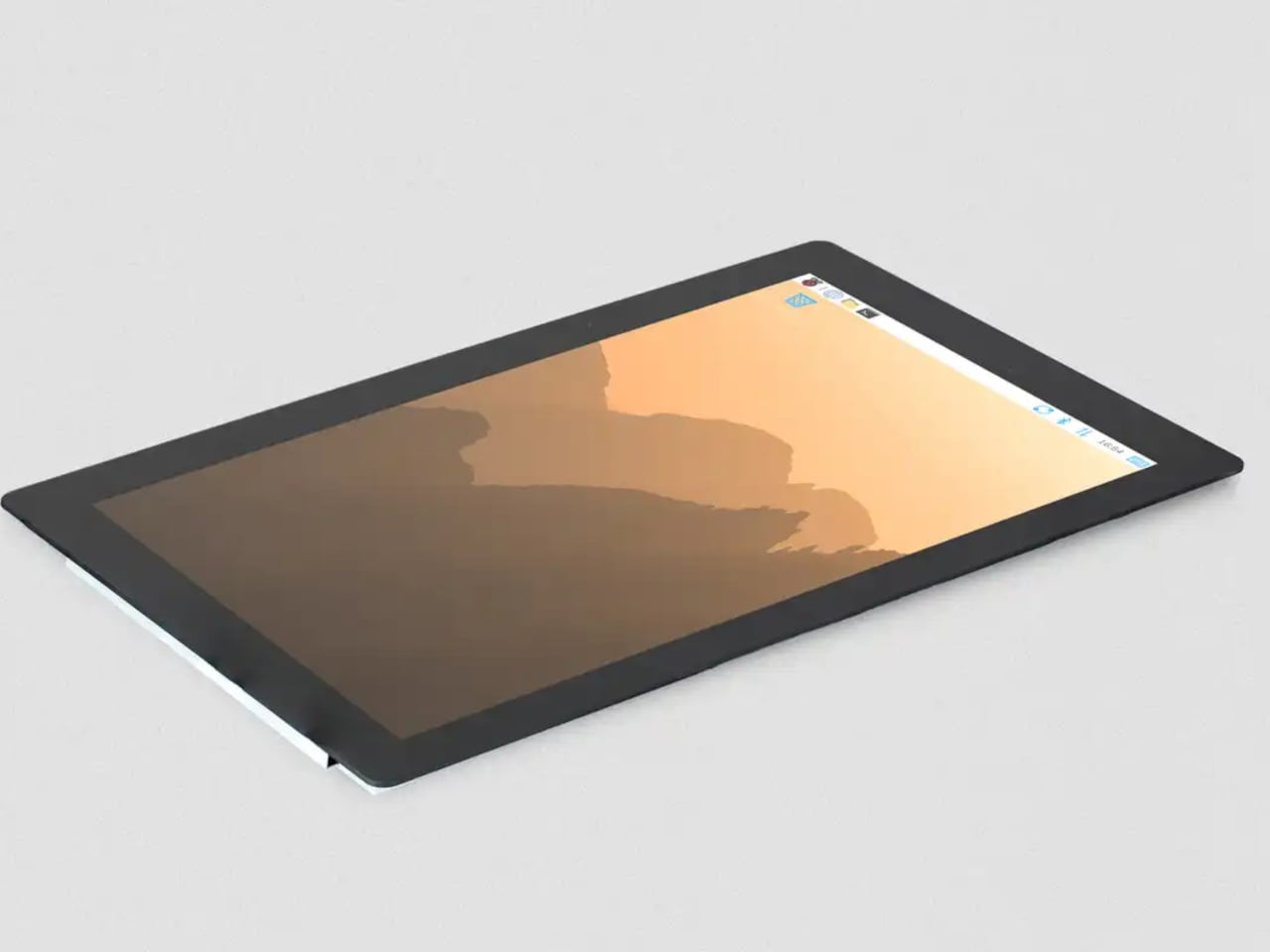
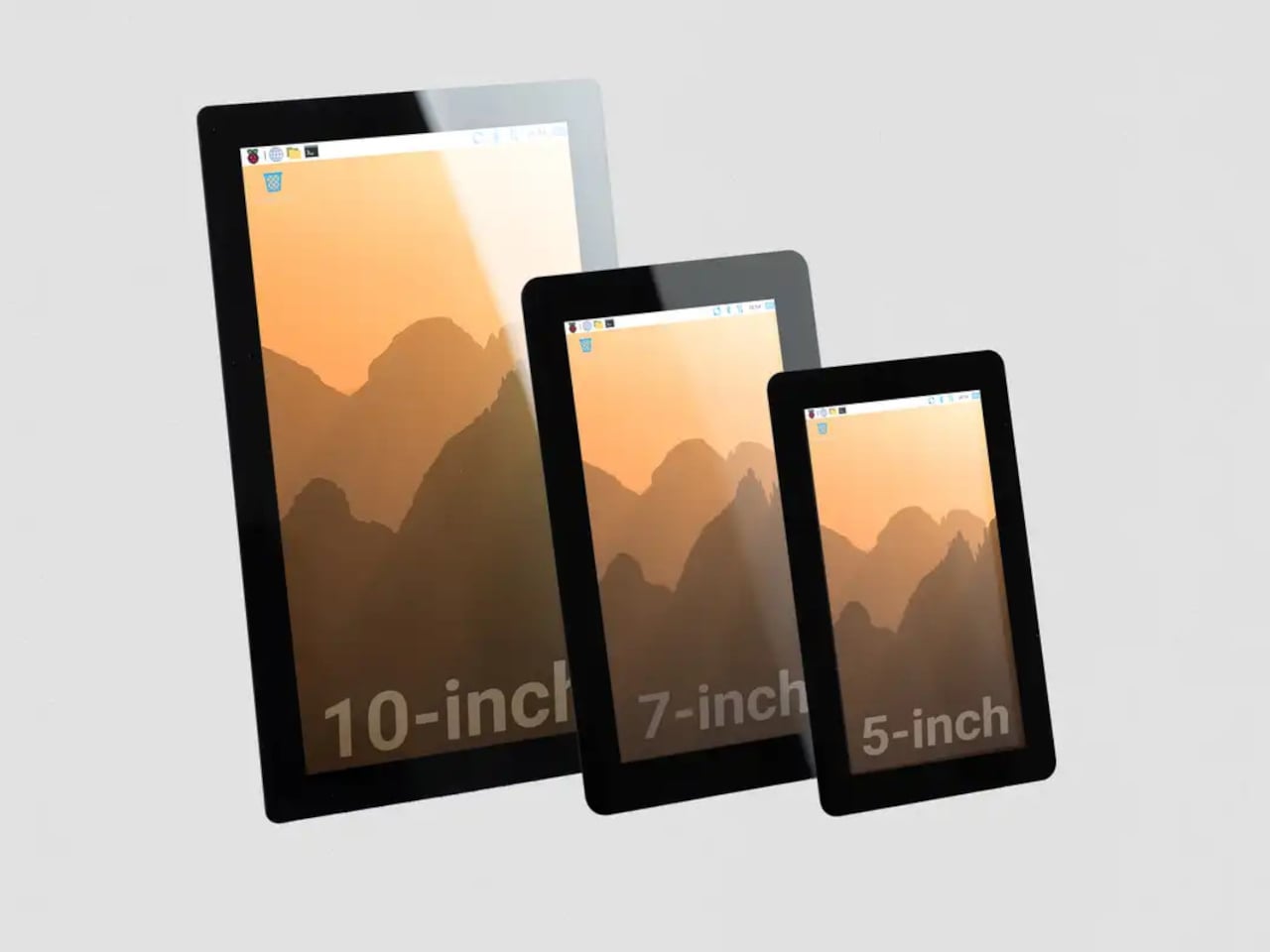
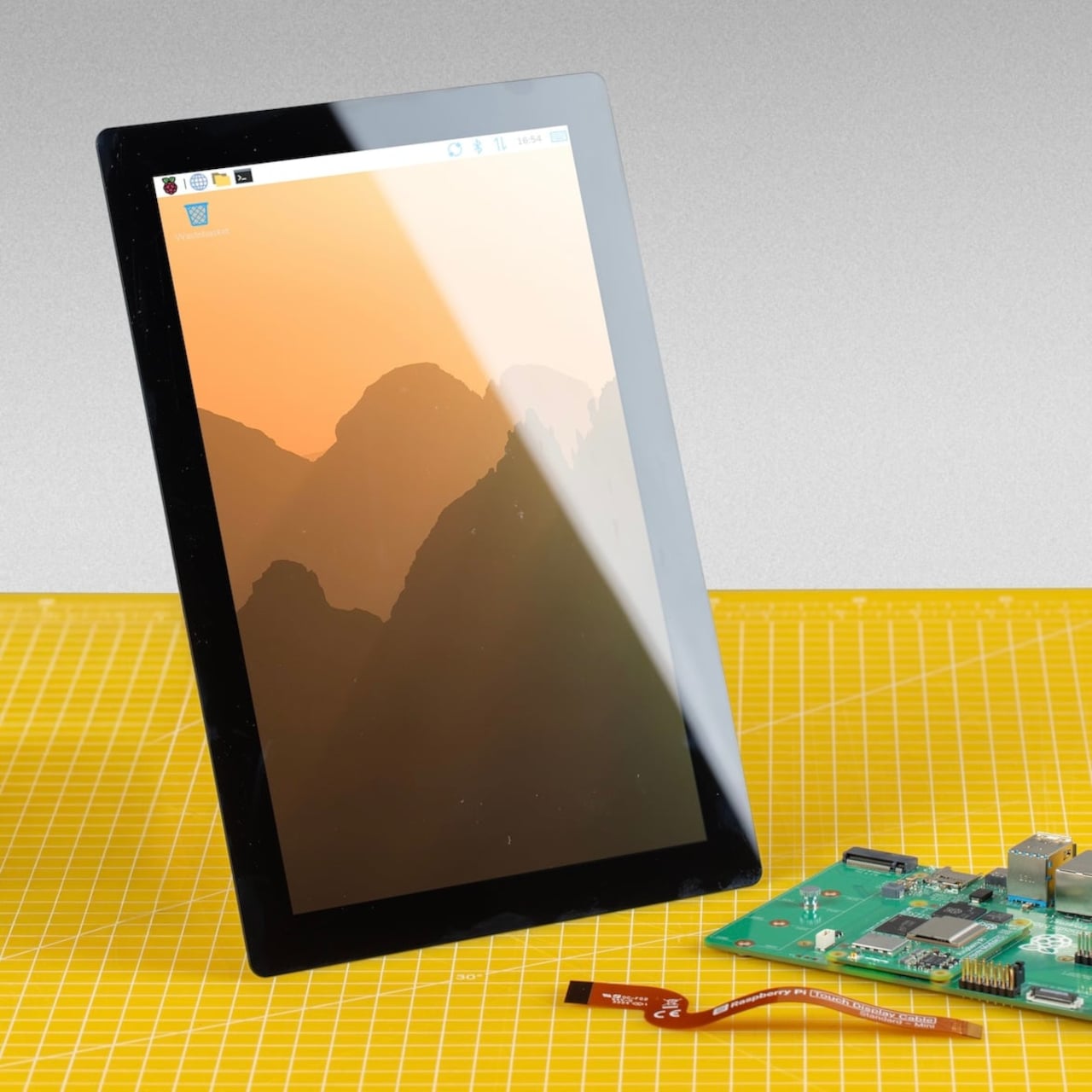
Raspberry Pi has released a 10-inch variant of its Touch Display 2, completing a family that now spans 5-inch, 7-inch, and 10-inch options. At $80, it’s the largest and most capable screen the company has offered as an official first-party accessory, and it arrives with a meaningful set of upgrades beyond simply being bigger. The resolution jumps to 1200×1920 pixels from the 720×1280 available on the smaller models, and touch support doubles to ten-point capacitive from the five-point that the 5-inch and 7-inch variants offer.

Designer: Raspberry Pi

That resolution increase matters more than the raw numbers suggest. On a 10-inch IPS panel with an anti-glare surface and 400 cd/m² brightness, the extra pixel density makes text and UI elements genuinely crisp rather than just adequate. Anyone who’s tried building a home automation dashboard or a workshop control panel with a 7-inch screen knows how quickly the interface can feel cramped. Ten inches gives those layouts room to breathe.

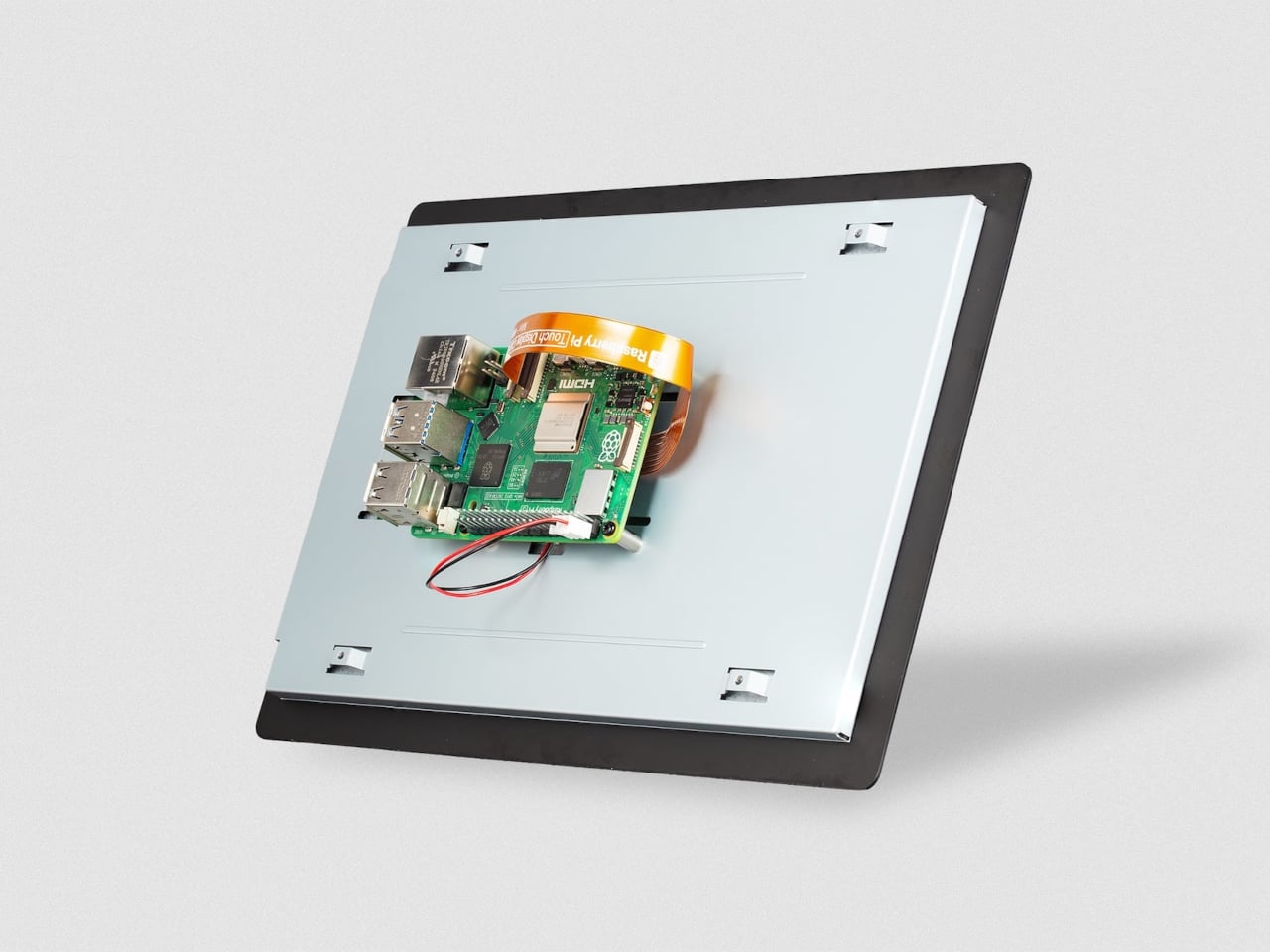
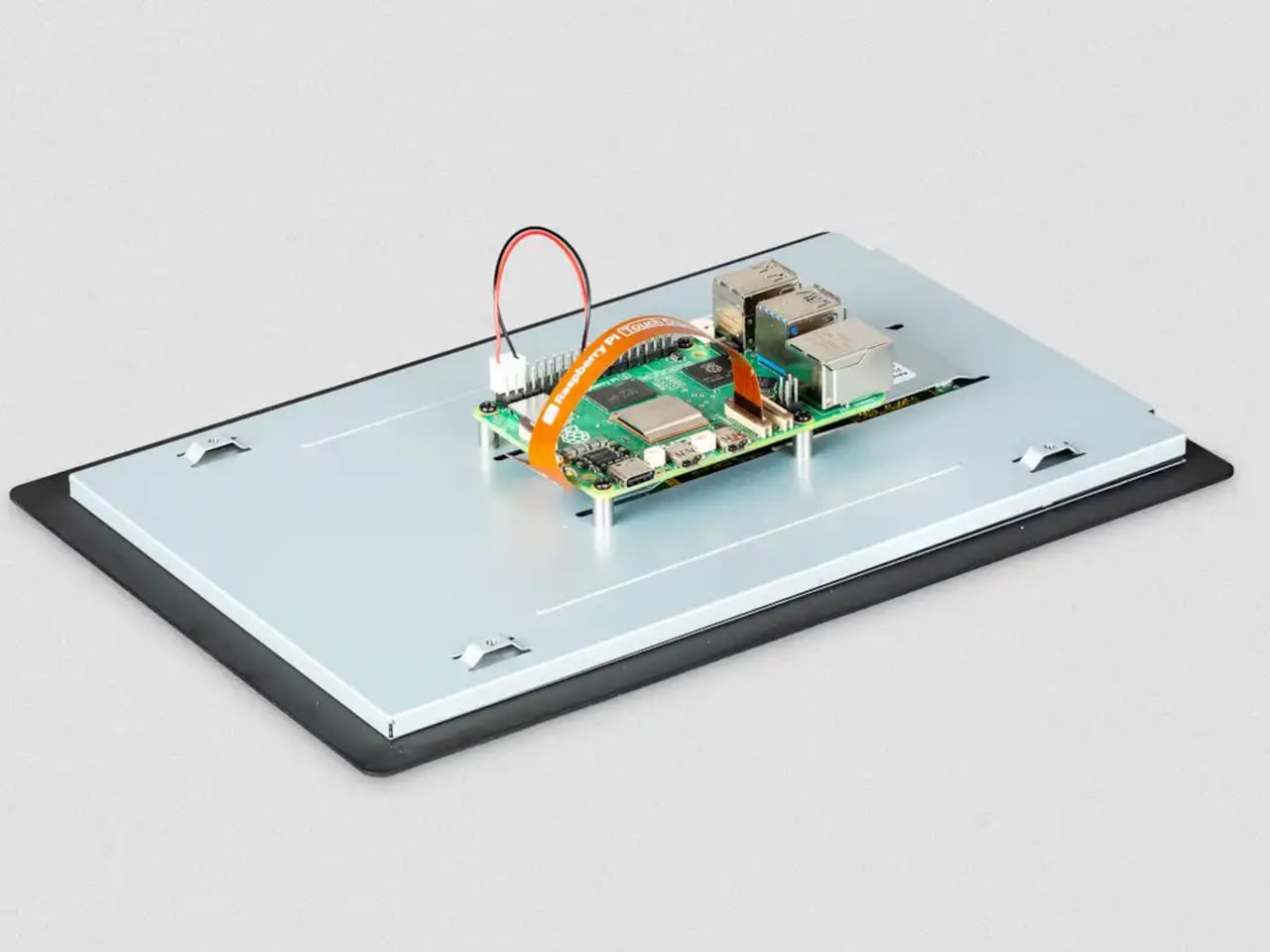
The physical setup follows the same principle the Touch Display 2 family has always used. The display mounts to the rear of a Raspberry Pi 5 using four M2.5 screws, and it draws power directly from the board’s GPIO, so there’s no need for a separate power supply. Raspberry Pi OS detects the screen automatically with full driver support, including the on-screen keyboard. No manual configuration, no hunting for drivers.

The 10-inch model does require a Raspberry Pi 5 or a Compute Module paired with a compatible carrier board. The panel uses four DSI lanes to maintain a stable 60Hz refresh rate, and earlier standard Pi models only support two, so they can’t run this display. For the builders already working with a Pi 5, that’s a natural fit. For those still on older hardware, the 7-inch and 5-inch options remain in production.

A display this size changes what a Pi-based project can realistically look like in a finished state. A kiosk that actually feels like a kiosk. A digital signage panel that doesn’t look like a proof-of-concept. A robotics control interface with enough screen real estate to show sensor data without squinting. Even a portable gaming system that approaches the comfort of a commercial handheld.

The IPS panel supports an 85-degree viewing angle and operates across a temperature range of −20°C to +70°C, which makes it a reasonable fit for environments that aren’t strictly climate-controlled. Both portrait and landscape orientations are supported in software, giving builders flexibility in how they mount the display relative to the rest of the build.

The post Raspberry Pi Finally Has the 10-Inch Screen Its Projects Always Needed first appeared on Yanko Design.