Throne has rocked up to CES 2026 to show off its forthcoming toilet computer which uses computer vision to study your poop. It hangs from the side of the bowl and has a camera and microphone to track bowel motions and urination and offer feedback. It was co-founded by (activity tracker) Whoop co-founder John Capodilupo, who explained the hardware is designed to understand what your base state is to be able to identify when you fall out of that pattern.
Capodilupo explained the hardware will look at how often you go, the texture and size of your motions, as well as the volume. The eventual aim is to be able to analyze your gut health, adding that as a GLP-1 user, that sort of data is vital to manage the symptoms of those drugs. The battery lasts for a month on a single charge but you won’t be forced to drag it out of the bathroom to re-juice it. The device ships with a 13 foot long USB-C power cable which should stretch long enough from your nearest outlet to the toilet.
At this point, we can’t talk to its efficacy but will certainly be looking to test this thing when it arrives at some point in February. Pre-orders are open, and it can currently be picked up for $340, plus a $6 per month membership.
This article originally appeared on Engadget at https://www.engadget.com/home/smart-home/throne-from-the-co-founder-of-whoop-uses-computer-vision-to-study-your-poop-150000606.html?src=rss
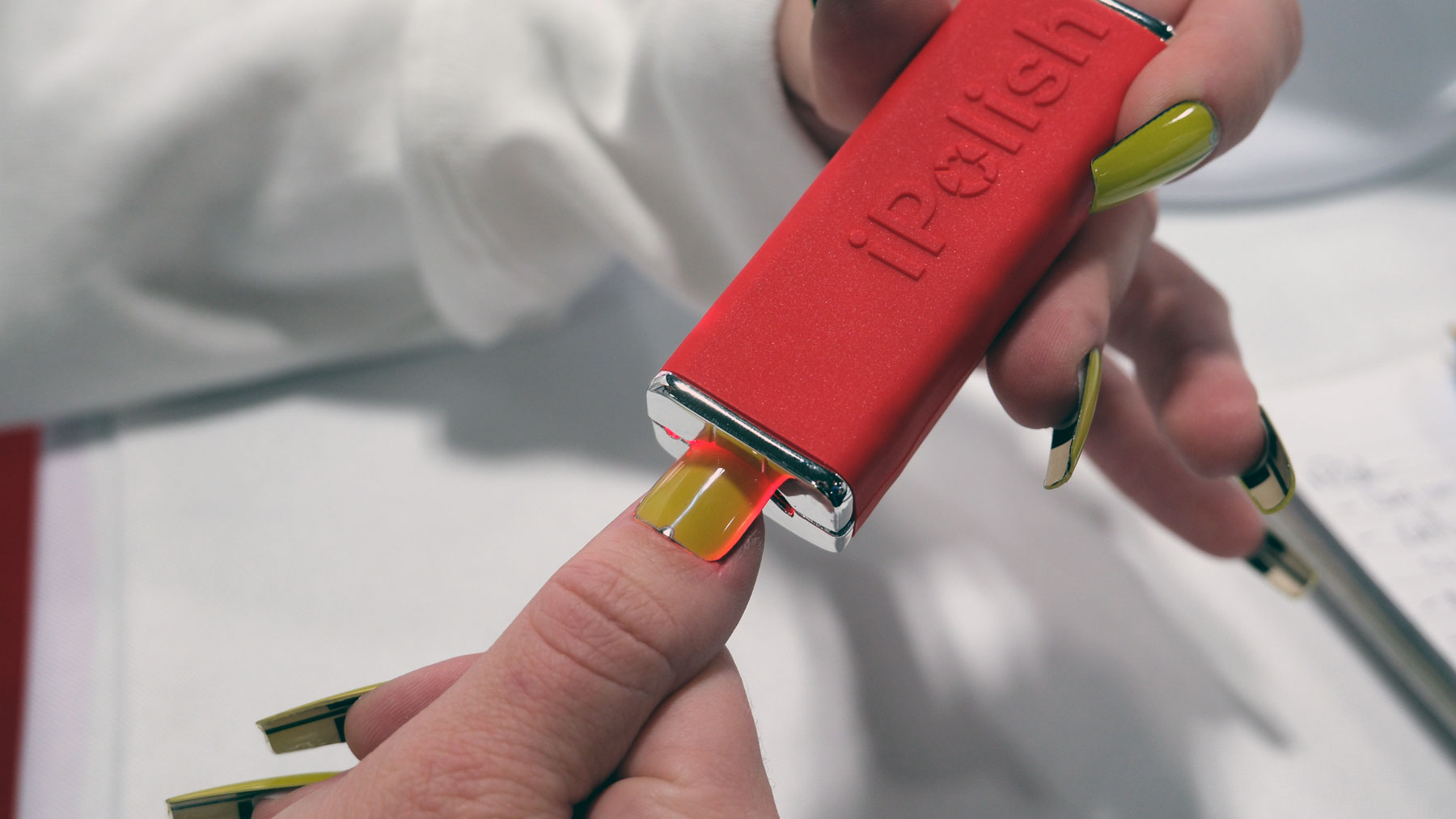
In the original, andbest Total Recall,you may remember a scene in which Rekall’s receptionist changes her nail polish by using a digital pen. Now, after only 35 years, a company came to CES 2026 with a vision for such a gadget that actually works outside of that pricey sci-fi movie. The company is iPolish, and it makes press-on acrylic nails that, when you apply an electric charge, change color almost like magic.
In order to enjoy kaleidoscopic nails, you’ll need to charge the wand, which then connects to your phone. Once you’ve selected your color of choice, you just put the tip of the nail into the wand, and it’ll pass a short charge into the nail to change it. Sadly, the company wouldn’t shed too much light on the process it uses to run the nails but, from my guess, it’s some sort of electrochemical shenanigans going on behind the scenes. All in all, it took around five seconds to change the color of a single nail, so it’s not a big deal in the grand scheme of things.
iPolish
Daniel Cooper for Engadget
iPolish says that each nail can display 400 colors, and can be changed as many times as the user would like. So, if you’re coordinating your nails with your outfits, you’re not bound to a single color palette in the weeks between salon visits. They’re also surprisingly affordable, with the starter set costing $95 which contains two sets of nails, one in Ballerina cut, one in Squoval. The Ballerinas are relatively short, while the Sqovals are longer. It’s worth noting that you can’t shape the nails as you’ll break the hardware, so if you don’t like those shapes, you can’t use ‘em.
When it comes time to replace your nails when one breaks or you lose it in some nailbed mishap, you’ll be able to pick up spares for $6.50. Given the theoretical cost of getting your nails re-done on a weekly basis, being able to change color on a whim seems like a bargain. Of course, we won’t be able to speak to iPolish’s quality and reliability until they start shipping, which is presently expected to begin in June 2026.
This article originally appeared on Engadget at https://www.engadget.com/wearables/ipolish-brings-color-changing-press-on-smart-nails-to-ces-001345407.html?src=rss
The following article discusses themes of an adult nature.
Lovense has turned up to CES with a “companion doll,” a life-size sex doll that’s designed to be more than just a life size sex doll. The company has equipped it with its proprietary AI engine and promises “human-like cognition, emotional awareness and expressive behavior.” The doll, which in the marketing video is called Emily, is Lovense’s answer to the global loneliness crisis. It says, over time, a user’s relationship with the system will grow deeper as it learns to adapt to their needs. And that the doll is the natural evolution of the virtual companions that have, until now, “existed only on phones and screens.”
From a hardware standpoint, the doll uses a standard user posable skeleton for everywhere but inside the skull. Up top, there are various servos and mechanisms to give the doll the ability to slightly move their mouth while speaking, as well as some basic facial expressions. (You haven’t lived until you’ve seen Emily attempt a smize or a wink in a matter few would describe as flirtatious.) The company hasn’t spoken about the less delicate parts of her anatomy, but did say her built in Bluetooth can “integrate effortlessly with the full Lovense ecosystem” and can run for eight hours on a single charge.
The major focus, however, is on the AI part of the equation, explaining it will remember details of previous conversations to enable users to build a deeper bond with its user. In addition, you can even engage with the AI when you’re out and about, messaging it via the Lovense app. Oh, and you can even get “AI-generated selfies that mirror her real-world appearance” should you want. The company, in its materials, say that the doll will hopefully lead people out of their comfort zone and better equip them to engage with real people.
Of course, it’s worth noting that Lovense’s track record with people’s most intimate data isn’t the best. In 2017, a Reddit user discovered the Lovense app was recording a private moment between them and their partner. In July 2025, another security flaw enabled hackers to hijack accounts without a password. The company addressed both issues at the time, but it’s one to consider if you’re thinking about forming a long-term relationship with one of its bots.
There’s no word on pricing or availability just yet —the company will be launching a pre-sale in the near future — but you can probably expect it to be fairly expensive.
This article originally appeared on Engadget at https://www.engadget.com/lovense-launches-an-ai-companion-doll-at-ces-170000490.html?src=rss
As soon as I held the Pebble Round 2 in my hand, I suddenly realized what I’d been missing for the better part of a decade. I’ve always felt smartwatches should supplement, rather than supplant, your phone, but that’s an attitude that feels almost quaint these days. After all, Apple and Samsung believe everyone wants a watch that can do almost everything your phone can do. But that wasn’t the prevailing opinion at the dawn of the smartwatch era, either philosophically or from limitations in the technology. Back then, companies like Pebble, Vector, Basis and others all built devices that added a second screen to the device in your pocket, and were all the better for it. Thankfully, Pebble founder Eric Migicovsky agrees, and if his project to revive the company is successful, perhaps we’ll once again see these alternative approaches flourish. The first step on this very long road is the Pebble Round 2, which aims to be the standard bearer for a new generation of comparatively less smart, but fundamentally more useful, smartwatches.
Round 2 was announced on January 2, and is the second product in Core Devices’ (Migicovsky’s new company) lineup of revived Pebbles. The first was the revamped Time 2, aping the form of its more successful predecessor, while the Round 2 is an attempt to correct the mistakes of 2015’s Pebble Time Round. That watch, when it debuted, was met with disappointment from critics who loved its aesthetics but little else. Back then, building a Pebble with a round face required plenty of compromise, including a higher price, shorter battery life, fewer features and a massive bezel. A decade on, and the technology has come along sufficiently to render such compromises moot, making for a much better device overall.
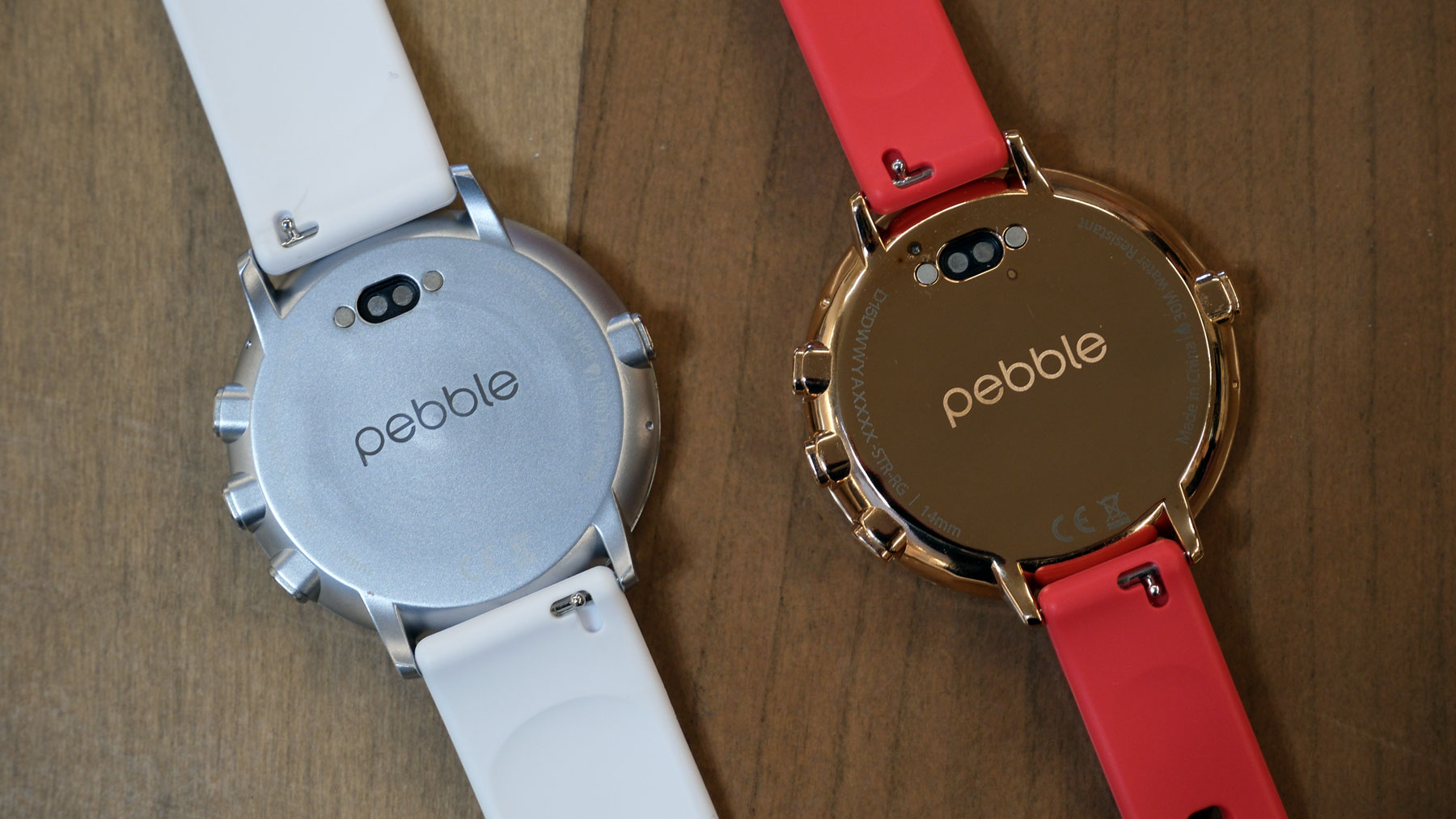
The new watch has a 1.3-inch color e-paper touchscreen which stretches to the end of the case. Its display has been bonded to the glass crystal, dramatically improving the viewing angles and reducing glare. You should expect to get two weeks of life on a single charge, but it remains just 8.1mm thick, and you can really feel that lack of heft when it’s in your hand. In fact, compared to so many of its smartwatch peers, you could almost unironically describe it as dainty, making its case size feel almost comically large. On the materials side, the case feels strong enough that I think it would withstand the rigors of daily life, and I’m quite smitten with both the polished rose gold and brushed silver finishes.
On one hand, it’s hardly the major reason to buy a watch, but I’m deeply smitten by how much text the Round 2’s display can render. Even the fanciest of smartwatches aren’t that willing to display big reams of text for your ease of reading. I was tickled to read a lengthy Slack message which reminded me, again, of what I’ve been missing for all of these years. Perhaps that’s a sign of the broader benefits a device like this offers, which is the ability to tweak its UI to what you need, rather than being tied by the UI designers in Cupertino and Mountain View.
There are plenty of omissions in the spec list, including no optical heart rate sensor, no GPS and no speaker. I’m not weeping over any of them: I’ve not used my smartwatch’s GPS in years and yes, and Pebble is swerving away from the health and fitness market. I don’t want to take calls from my wrist, either, and while the omitted heart rate sensor is harder to take given their ubiquity, it’s been done to ensure the watch is thinner than many of its competitors.
Migicovsky is candid about Pebble’s failure, saying the company spent too much to become a global hardware brand. He invested heavily in inventory in anticipation of blockbuster sales that never came, similar to Peloton’s post-COVID slump. This time around, the focus is on ensuring the company remains sustainable over the long term and, hopefully, building a succession of products. Rather than big investments, he’ll make small batches of devices to cater to pre-orders and won’t water down his philosophy in the hope of attracting a broad user base. He even said the Pebble website may include recommendations for alternative smartwatches from other companies to ensure he’s only catering to the faithful.
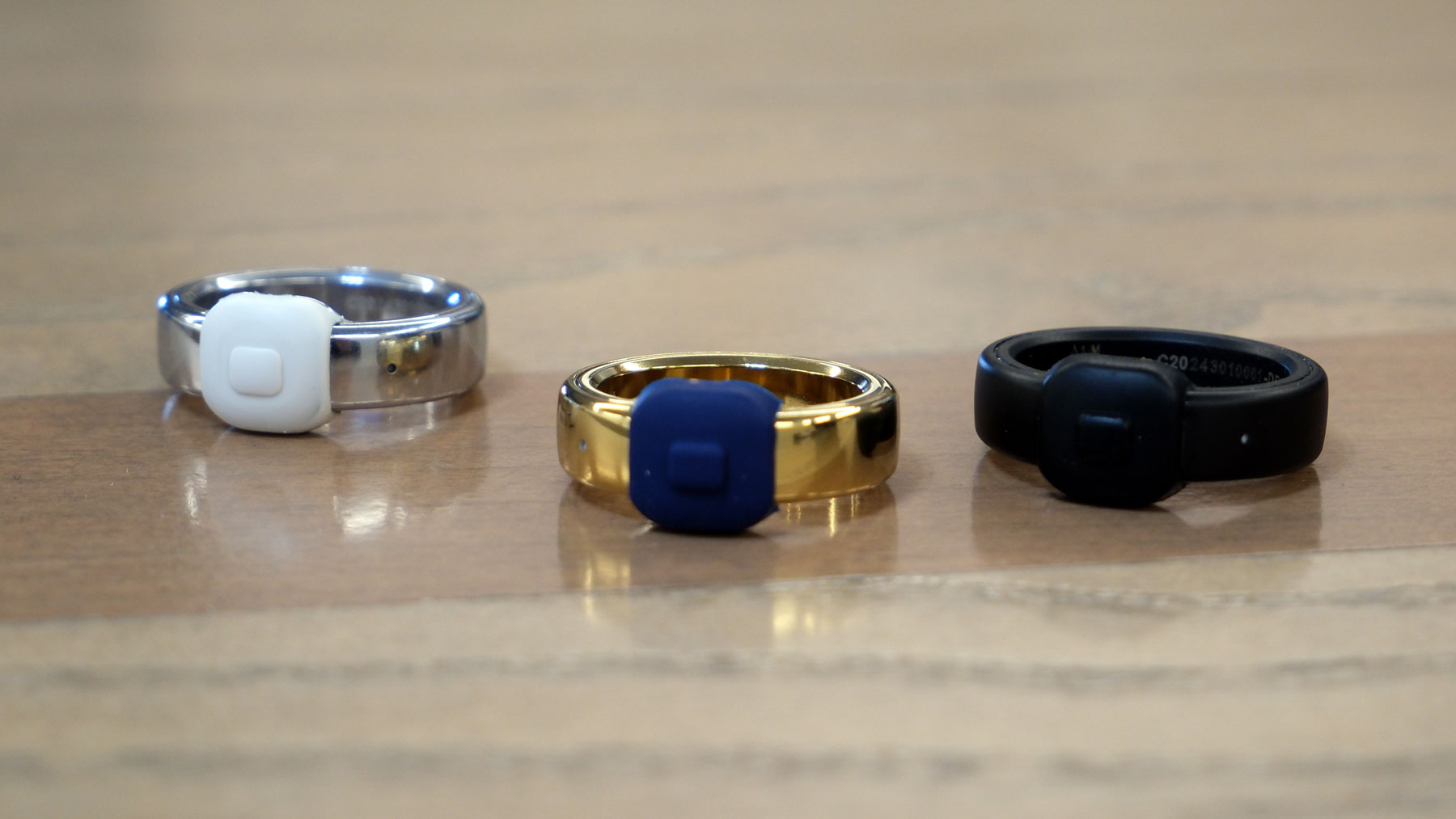
Three Pebble Indexes side by side on a table.
Daniel Cooper for Engadget
It’s his hope that this approach will give him the time and space to make more products, such as the already-announced Pebble Index 01. It’s a $75 ring equipped with a microphone, Bluetooth and a single push button, where users can record brief reminders to themselves. Rather than add weight and complexity with a rechargeable battery, each Index has a sealed-in cell that the company promises will last for up to two years. A month before the battery is due to expire, you’ll be asked if you want to buy a replacement, sending in the original for recycling. It’s an unusual arrangement but one that Migicovsky believes is more compelling than some others. After all, users aren’t saddled with any monthly subscription fees, and they only need to buy a new one if they’ve actually gotten the benefit out of their existing model. As with the revived Pebbles, the prevailing attitude is that nobody’s twisting your arm here.
Image of the rear sides of the Pebble Round 2
Daniel Cooper for Engadget
More broadly, Migicovsky has the time and money now to explore these product ideas free from the usual pressures. He has no investors or backers demanding instant returns and fast growth, giving him license to pursue his ideas as far as he wants to take them. And he is determined to return a small degree of whimsy to consumer electronics, building gadgets that are in some way fun. Let’s hope he succeeds, because the industry can’t survive another decade of homogeneity.
This article originally appeared on Engadget at https://www.engadget.com/wearables/pebble-seeks-to-remedy-the-wearable-industrys-original-sin-170000834.html?src=rss
Last year, PocketBook rocked up at CES with a series of large e-paper displays to display art on the walls of your home. This year, the company has turned up with a far larger, A1-sized model called the Duna, which it says mimics the “texture, depth and tonal richness of printed paper.” It’s intended to act as an upmarket alternative to those big screen TVs which display art when they’re not being used for their intended purpose.
Unsurprisingly, such a fancy product also needs some fancy accessories, so it’s recruited Italian design house Pininfarina to help. It claims the credit for the Duna’s “precision-engineered aluminum frame” and its “elegantly stitched Alcantara.” To celebrate the pairing, the InkPoster App will enable you to view original design sketches from the Pininfarina archives on your screens.
At last year’s CES, I saw the three smaller models in person and found them to be very promising. The colors are vibrant in a way you don’t expect from an e-paper display, and at a distance you could easily mistake these for a real canvas. Just don’t get too close to the screen itself, since you’ll still be able to see the pixels rather than brush strokes. I’m no expert, but I suspect the technology suits bold, blocky art styles — think modern artists like Modigliani — better than delicate, more antiquated forms.
As before, each InkPoster can be hung for up to a year on a single charge, refreshing from its library of licensed artwork according to your whims. Plus, you can use it as a digital photo frame, if you want to display your selfies at art gallery or movie poster sizes.
If you’re interested in buying one of the new models, you’ll have to wait until April, after the frames are exhibited at Milan Design Week in April. While we don’t have full pricing details right now, you can expect to pay something in the region of $6,000 for one.
This article originally appeared on Engadget at https://www.engadget.com/home/inkposter-launches-a-premium-41-inch-e-paper-display-for-your-home-170000292.html?src=rss
Ring turned up to CES with a whole host of announcements, including a revamped range of home sensors. Ring Sensors (for that is their name) is a new lineup of tools, built on Amazon’s Sidewalk low-power networking protocol. That includes updated versions of its door, window and break glass sensors, as well as a new OBD-II car alarm, motion detectors and panic buttons. You’ll be able to pre-order the new car alarm today, while the rest of the new sensors will be available at some point in March. And, in tandem with that news, Amazon is announcing that Sidewalk is expanding outside of the US, starting in Canada and Mexico.
At the same time, the company is launching a number of enhancements to its app platform, including the Ring Appstore. This will let users purchase and integrate with third-party apps which have been built to cater to “specific use cases, from small business operations to everyday needs around the home.” The company added that, in the coming weeks, users will be able to browse a growing number of apps designed to help “you get more value from your Ring cameras.”
The company is also throwing more AI into its system to better coordinate its alerts, including Unusual Event Alerts. These will learn from the patterns around your home and, when it spots something out of the ordinary, send you a ping. Active Warnings, meanwhile, will use computer vision to identify potential threats and offer “specific warnings based on details like location and actions.”
Finally, Ring has teamed up with Watch Duty, a non-profit alert platform designed to share useful information about local wildfires. The pair have added a Fire Watch feature to the Neighbors app to enable communities keep each other in the loop about local fire and smoke events. Ring users are encouraged to share details from their own Ring cameras to “support first responders on the ground.”
This article originally appeared on Engadget at https://www.engadget.com/home/smart-home/ring-relaunches-its-suite-of-smart-home-sensors-140000667.html?src=rss
Ugreen makes plenty of things, but you’re probably familiar with the name in the context of its NAS systems (should that be NASes? Who knows). Naturally, the company has turned up to CES 2026 with the former, but it’s also branching out into home security. It’s announcing SynCare, an AI infused all-in-one surveillance platform which, it rather boldly claims, will become an “attentive, integrated guardian” of your home.
Leading the pack is the SynCare Video Doorbell with head-to-toe 4K video, intelligent detection and 24/7 recording — especially if you’ve got it hooked up to your Ugreen NAS. That works in tandem with SynCare cameras offering 4K video on a pan-tilt base and, of course, AI to recognise “people, pets and key events.” Ugreen is also offering a tablet, the SynCare Smart Display, a “home hub” to let you manage your cameras from a single place in your home.
The company is quick to highlight the major benefit of an at-home system like this, which is no need to pay for a monthly subscription. And, of course, that the footage from your home stays inside your home at all times, making it a better option for those folks who value their privacy. Sadly, Ugreen isn’t ready to share pricing or availability information for the series, saying it’ll be available in the back end of 2026.
This article originally appeared on Engadget at https://www.engadget.com/wearables/ugreen-launches-a-smart-home-security-platform-at-ces-130000389.html?src=rss
I’m no psychologist, but I get a sense Segway turned up to CES 2026 with something to prove after last year. Certainly, it’s gone out of its way to prove its micromobility bona fides with the press, who perhaps were a bit too sniffy that scooter people were launching an e-bike. This year, Segway’s not just launching two more mainstream e-bikes, but an electric dirt bike, all of which are crammed with the sort of tech that might just make everyone halt their sniffiness.
First up, there’s the Myon, a chunky step-through with a decent-sized pannier rack for folks who want to go far and carry a bit of luggage as they go. That’s hardly an eye-catching proposition given so many e-bikes fit within the same template, but Segway is hoping its tech will make a difference here. Myon is equipped with electronic gear shifting (tied to a Shimano CUES chain drivetrain), electronic motor optimization and the company’s proprietary Intelligent Ride System.
The latter, along with Segway(TM) TurboTuned(TM) will automatically optimize motor and battery performance while under way. The company adds that the bike’s built-in gyros, cadence and torque sensors will meter out performance according to road conditions. So if you’re going up hill, the power will gently increase before you have to think about it. Additionally, if you stop at the lights, the system won’t just turn on the power to whatever you’ve set it at as soon as it senses the tiniest ounce of pressure on the pedal, removing the jerky start action you see in other bikes.
Segway’s broader pitch is that its bikes will also feature a whole host of smart features, including integration with Apple’s Find My network, GPS tracking, remote locking, integration with your health and fitness app of choice, and smartphone pairing.
Muxi
Segway
Muxi (pronounced moo-shee) is a more interesting piece of hardware, since it’s been built like a longtail cargo bike, but with the long tail chopped off. Even so, the focus is on cargo, with the bike getting an optional passenger seat with foot pegs, and an optional middle basket. Plus, the bike comes with a beverage cup holder (although given it has a direct drive motor, I’m not sure I’d want to cruise around at low speed while trying to sip my morning latte). To ensure you don’t struggle with your load, the bike comes with Hill Start Assist, Hill Descent Control, regenerative braking and traction control. Plus the aforementioned suite of added value features, like Find My integration, remote locking, GPS and the app integrations.
Rounding out the announcements is the Xaber (say-br) 300, an electric dirt bike geared toward off-roading. It has three power modes, letting you learn on the equivalent of a 150cc engine, then dialing that up to 200cc, before topping out at 300cc. If you still want a greater sense of control, you can activate an electronic clutch, and if you want to cede more of it to the bike, you can set the maximum wheelie angle. If you want to enjoy all of that dirt bikin’ action, it’ll set you back $5,300 when it arrives.
As for Myon, it’s available to buy today from Segway’s official site and via its dealer network, priced at $2,000. Muxi will be available through those same channels in March, setting you back $1,700.
This article originally appeared on Engadget at https://www.engadget.com/transportation/segway-launches-two-more-e-bikes-at-ces-130000152.html?src=rss
One surprising find at CES 2026 comes from OhDoki, the Norwegian makers of The Handy, a smart stroking device. It turned up to the desert with two new products, the Handy 2 and the Handy 2 Pro. Fundamentally, they’re the same device, but the Handy 2 Pro comes with a far bigger battery, taking the usable life from one hour on the standard model all the way to five. That extra power enables you to run the 2 Pro far faster and harder than the original once you set it into Turbo mode. In fact, I was told the hardware can essentially be “overclocked,” although I wouldn’t recommend it. Because the motor action was so aggressive that even just holding it in the hand, I’d be worried about breaking bones.
There are plenty of useful new features, including using the Handy’s beefy battery to charge your other USB-C devices. In addition, the sleeves are now be mounted to the motor arm with a click on motion, so you don’t have to wrestle with the (very) weighty hardware when you don’t have to. There are even tripod screws on both the side and bottom of the unit, enabling you to mount the Handy 2 to any compatible equipment. And, if you don’t want to use your phone to control the action, there’s a dot matrix display on the side which will show you both speed and stroke length.
Naturally, the company’s representatives were keen to highlight the connectivity features beyond just connecting to your own phone. As well as allowing other people to control the device, it’ll sync with various VR and video content platforms as well as tube sites like Xhamster. And the company has recently teamed up with a cam platform for more remote opportunities for intimacy.
The Handy 2 and Handy 2 Pro launch January 6, with the regular model priced at $299 and the Pro going for $499.
This article originally appeared on Engadget at https://www.engadget.com/general/the-handy-2-pro-is-an-overclockable-sex-toy-044456140.html?src=rss
Urinalysis company Vivoo has rocked up at CES 2026 with two new products designed to keep an eye on your health. The first is the Smart Toilet, which clips onto your bowl and uses optical sensors to monitor your hydration levels.
It’s an evolution of the smart toilet product it originally announced back in 2023, which used a reactive testing strip as part of its process. Here, that feature has been ditched in favor of just collecting a small sample in its pocket-shaped cup for non-contact testing before being released.
The optical sensors in question are designed to track your urine’s specific gravity to monitor how hydrated you are. (If urine is too dense, it’s a sign of dehydration, while if it’s too thin, it’s a sign of over-hydration or something more serious, like diabetes or renal failure.)
mage of the Vivoo Smart Toilet being splashed with water
Vivoo
You trigger a reading via the smartphone app, and when the test is complete the data will be pushed back to your device. The company says its battery will last for more than 1,000 measurements before you need to recharge it, too.
Vivoo doesn’t (Withings) name (Withings) names (Withings) but throws a sharp elbow toward its competitor. It boasts that its product will last for 1,000 tests on a single charge, “vastly exceeding the handful of monthly readings offered by chemical cartridge-based tests.” And that its battery pack, which sits on the outside of the toilet bowl, means you won’t need to uninstall the sensor to recharge and clean it on a regular basis.
Image of Vivoo's FlowPad
Vivoo
At the same time, the company is announcing Hygenic FlowPad, a menstrual pad infused with microfluidics. These are capable of monitoring factors such as Follicle-Stimulating Hormone (FSI), a marker for fertiity, ovarian health and perimenopause. Once the wearer removes the pad, they are tasked with scanning it with their phone camera to Vivoo’s app, much like many of its other at-home tests. At present, there’s no word on when FlowPad will be available to buy, but the company hopes to charge $4-5 per pad.
Vivoo’s Smart Toilet can be ordered today, with early birds getting the gear for $99 with no need for an additional subscription, due to ship March. A second batch on the same deal arrives in June, but latecomers will have to wait until September 2026 when it goes on general sale. At that point, the price will climb to $129, plus an additional $6 a month for the subscription.
This article originally appeared on Engadget at https://www.engadget.com/home/vivoos-toilet-computer-keeps-an-eye-on-your-hydration-030000209.html?src=rss