We still can’t stop thinking about the Apple Vision Pro. This week, Cherlynn and Devindra chat with CNET’s Scott Stein about our post-review impressions of Apple’s headset. We’ve got further thoughts about using it in public (maybe don’t), the isolation of being sealed off from the world, and the way falling asleep with the Vision Pro on can make you lose your sense of reality. We also discuss Mark Zuckerberg’s impression of the headset, and why he thinks the Quest 3 is ultimately a better product. (We agree, with caveats.) In other news, we explore how Arc’s ad-stripped AI mobile search app may be good for its users, but ultimately bad for web creators.
Listen below or subscribe on your podcast app of choice. If you've got suggestions or topics you'd like covered on the show, be sure to email us or drop a note in the comments! And be sure to check out our other podcast, Engadget News!
Topics
Last thoughts on Apple’s Vision Pro with CNet’s Scott Stein – 1:11
Arc Browser AI summaries prompts the question “Who makes money when AI reads the internet for us?” – 38:06
Waymo self-driving car attacked and set on fire during Lunar New Year celebration – 49:22
Stealth piracy app Kimi briefly passed Netflix on Apple’s App Store charts – 52:48
Lyft stock spikes after typo in earnings report – 55:12
We still can’t stop thinking about the Apple Vision Pro. This week, Cherlynn and Devindra chat with CNET’s Scott Stein about our post-review impressions of Apple’s headset. We’ve got further thoughts about using it in public (maybe don’t), the isolation of being sealed off from the world, and the way falling asleep with the Vision Pro on can make you lose your sense of reality. We also discuss Mark Zuckerberg’s impression of the headset, and why he thinks the Quest 3 is ultimately a better product. (We agree, with caveats.) In other news, we explore how Arc’s ad-stripped AI mobile search app may be good for its users, but ultimately bad for web creators.
Listen below or subscribe on your podcast app of choice. If you've got suggestions or topics you'd like covered on the show, be sure to email us or drop a note in the comments! And be sure to check out our other podcast, Engadget News!
Topics
Last thoughts on Apple’s Vision Pro with CNet’s Scott Stein – 1:11
Arc Browser AI summaries prompts the question “Who makes money when AI reads the internet for us?” – 38:06
Waymo self-driving car attacked and set on fire during Lunar New Year celebration – 49:22
Stealth piracy app Kimi briefly passed Netflix on Apple’s App Store charts – 52:48
Lyft stock spikes after typo in earnings report – 55:12
I’ve been using the AIAIAI Unit-4 Wireless+ studio monitors for a couple of months now. And initially, I wasn’t sure what to make of them. They’re solid studio monitors with 4-inch woofers and 1-inch silk tweeters. They sound good and look good. But the pitch — the reason these things cost $800 for a pair — is that they’re wireless. And not, “they’re studio monitors that also happen to have Bluetooth” wireless, though they have that as well. They include AIAIAI’s low-latency 2.4Ghz wireless tech that made its debut on the Studio Wireless+ a couple of years back. Plus they have sizable batteries, allowing them to run for up to 20 hours without any cables at all.
I was skeptical of the Studio Wireless+, but was eventually won over by the surprising convenience of not being tethered to my audio interface by a 3-meter long coiled cable. The Unit-4 have a somewhat tougher case to make, though. The cables that keep my current PreSonus monitors tethered to my desk don’t get in the way. I don’t have to unplug them to put on my guitar and I don’t trip over them while grabbing a synth from the shelf. Instead, the Unit-4 are meant to solve a very specific problem: needing studio quality monitors when you’re not in your studio.
As you might imagine, this is not a thing I find myself needing terribly often. I’m sure that someone out there, likely professional musicians who spend significant time on the road, would immediately see the appeal. But for a hobbyist like me, finding a use case is harder.
Before we get too deep into the “why,” let’s talk a little bit about the “what.” Until now AIAIAI has focused exclusively on headphones. A more conservative company might have simply made some bog-standard studio monitors and called it a day. But today you can get bog-standard studio monitors, and pretty decent ones at that, for not much money. So rather than just add more noise to an already saturated market, AIAIAI looked to see what it could do that would be unique.
Terrence O'Brien / Engadget
The somewhat surprising answer it got from some artists was wireless, battery-powered monitors. So it took the low-latency W+ Link technology it had developed for Studio Wireless+ and adapted it for use in a pair of 4-inch studio monitors. Where Bluetooth latency can be all over the map, ranging from around 40ms under ideal conditions with the latest hardware, to well over 100ms, W+ Link is a consistent 16ms. It’s not zero latency, but it’s close enough for a quick recording session or a casual jam.
Because of their size you’re not gonna get a ton of bass out of them. You get a surprising amount more low end just by jumping up to 5-inch woofers. But, it’s not like the Unit-4 lack oomph. They’ve got a decent amount of punch and a reasonably flat frequency response. That said, as with the Studio Wireless+, I find their tone a touch on the dark side.
There is an app for iOS and Android, though, where you can tune the EQ to your liking. I personally scooped the mids and cut the sub bass just a smidge to help brighten up the sound ever so slightly and keep things from getting muddy in my small attic studio. But there are also useful presets in there depending on where you are and what orientation the speakers are in, whether that’s horizontal on your desktop or on a picnic blanket in a park.
Terrence O'Brien / Engadget
While it’s purely subjective and of little practical value, the Unit-4 look great in any orientation or setting. They’re much better looking than most studio monitors. They’re sleek, black and have a stylish metal speaker grill that attaches firmly with the help of a few magnets. A ring of white light glows around the woofer when they’re powered on too. Like I said, it makes no functional difference, but they’re certainly a visual upgrade from my PreSonus Eris E5s.
There are a few design choices that I can quibble with, however, even if I understand the reasoning (usually to shave size and weight). First off, the Unit-4 lack XLR hookups. This isn’t unheard of on portable studio monitors, and they do have balanced TRS connections, but combo XLR / TRS jacks are pretty ubiquitous at this point and wouldn’t have required much more room.
The power bricks for each speaker are also enormous.Obviously, putting those components inside the speaker, along with their sizable 77Wh batteries, would have dramatically increased their size and weight. But it seems odd that, what I believe are, the largest power bricks in my home currently belong to the Unit-4, while none of the other studio monitors or speakers I own have external power supplies at all, just standard AC cables. They weigh more than a pound each, which means that, despite AIAIAI bragging that the Unit-4 only tip the scales at 2.5kg (or about 5.5 pounds), if you were to hit the road with two monitors and the chargers for each you’d be looking at a total weight of close to 14 pounds.
Terrence O'Brien / Engadget
That’s hardly unreasonable if your definition of portable is simply that you can move them from place to place — nobody is taking the Unit-4 with them on a whim on the off chance that they might need a studio monitor. Still, I will say that I think AIAIAI should include the carrying case if they’re pitching the portability factor, rather than it being a $70 add-on.
My biggest issue, though, was the decision to remove the battery from the transmitter. The X01 Transmitter that comes with the Studio Wireless+ has a built-in battery. The X02 Transmitter that is packaged with the Unit-4 does not. The perk of this is that, when used as a USB-C audio dongle with a laptop, it’s nice and discrete. The downside is that if you use the minijack output you need to provide your own power, preferably via a powerbank, rather than an AC adapter to minimize opportunity for interference or ground loops.
Part of AIAIAI’s rationale for ditching the battery was that, well, batteries have a tendency to wear out. And this way, you don’t have to chuck the whole transmitter just because it won’t hold a charge anymore. But, the company has figured out how to make practically every part of the studio monitors removable and replaceable (including the battery), so it seems like doing that for the transmitter shouldn’t have been too tough.
Terrence O'Brien / Engadget
The lack of a battery is a non-issue if you’re primarily using the Unit-4 connected to a computer. But if you’re using a standalone piece of gear like an SP-404, connecting to a mixer for a jam session or out busking it in a park, the extra cable and external power bank become something else to forget at home and kind of undermine the whole “wireless” thing.
I know that seems like a lot of negatives all in a row, but these are honestly pretty minor complaints. And I think that, if you are one of the people who will get a lot of use out of the Unit-4, they probably won’t deter you. The audience here is undoubtedly smaller than with the Studio Wireless+, though. Where almost any bedroom producer could use a solid set of headphones that can be wired or wireless at a moment’s notice, bouncing from low-latency studio mode to Bluetooth at the flip of a switch. The list of musicians that need the same from their desktop studio monitors is probably pretty short.
I can imagine these being super handy on a tour bus but, I am not a touring musician. Instead where I found the wireless feature most useful was for dabbling with new musical toys from anywhere in my house. Rather than hide in my attic, I could bring one of the Unit-4s down into the living room (but not both), connect the transmitter and a powerbank to say, the Gaia 2 and get some work done while also hanging out with my kids.
Terrence O'Brien / Engadget
Just for the hell of it, I took the Unit-4 to a park to shoot some review photos. I can’t say that’s something I’d want to do terribly often. Lugging them through the park as I looked for a decent enough place to stage my shoot got tiresome pretty quickly. But, I did put their loudness to the test by cranking the speakers all the way with my SP-404 MKII set to top volume. Quite a lot of people stopped and stared at me with open hostility. They still sounded great, with no distortion and the audio remained clear and punchy even from a few dozen feet away. But, like with the Wireless Studio+, the W+ Link does introduce some noise that becomes noticeable as you approach the 75-percent mark on the volume.
They were handy as just regular ol’ Bluetooth speakers. While it’s been a touch too cold to throw parties in my backyard, I’ve set one of the Unit-4s up outside while I’ve raked the leaves. If I really wanted to make my neighbors hate me, I could turn the speakers all the way up and they’d even be audible over my trimmer and leaf blower.
And thanks to their giant batteries they’d easily be able to last through a few hours of yard work, a raucous BBQ, some late night cleanup and then some. AIAIAI claims over 20 hours of battery life, but doesn’t specify if that’s over Bluetooth or W+ Link. I did a battery rundown test where I left the Unit-4 connected over W+, occasionally playing music through them from Ableton Live and djay Pro with the volume set at 75 percent. The first speaker gave up the ghost after 17 hours and 46 minutes, and the second followed 11 minutes later. Considering the Studio Wireless+ last more than four times as long when on Bluetooth versus W+ Link, it’s safe to assume you’d be able to eke quite a bit more playtime out of the Unit-4 if you were using them strictly as Bluetooth speakers. Of course, if you did that you’d be missing out on the whole point of the Unit-4.
Terrence O'Brien / Engadget
Even though they’re pricey, perhaps the ideal customer would be a busker. The Unit-4 can cover live performances with low enough latency to not be distracting, are reliable monitors for mixing in a studio, and also loud enough fill up an apartment or yard with tunes for a party. The only thing I wouldn’t want to rely on them for is DJing. While you could work around the latency by feeding both the cue and the live mix to a pair of headphones, it’s just a smidge too much if you really want to make sure your transitions are 100-percent on point.
One other thing worth noting is that the amount of latency you experience with the Unit-4 will vary depending on your source (USB-C vs ⅛” TRS) and even whether you’re on Windows or macOS. If you intend to use the Unit-4 with a Windows PC over USB-C you absolutely need to install the ASIO4ALL driver. Built-in Windows audio drivers have improved over the years, but they still can’t hold a candle to Apple’s Core Audio or Steinberg’s ASIO. To be clear, this isn’t an issue with the Unit-4, but with Windows. For the best results and the lowest latency, your best bet is still to use a dedicated Audio interface and to connect the X02 Transmitter to that using a TRS cable. Of course, that also means you’ll have to bring some way to power the transmitter, whether that’s a power bank or a USB-C power adapter.
Terrence O'Brien / Engadget
If you are someone looking for a pair of portable studio monitors that let you (more or less) ditch the cables entirely, the Unit-4 are basically the only game in town. They’re stylish, natural sounding and have a completely unique set of features. But they’re definitely more of a niche product than the Studio Wireless+. While their $350 price tag isn’t cheap, the flexibility and broader appeal make them an easier sell. The Unit-4 on the other hand are both quite expensive at $800, and trying to solve a very specific problem. At least I can say unequivocally, they solve that problem quite well.
This article originally appeared on Engadget at https://www.engadget.com/aiaiai-unit-4-review-unique-wireless-portable-studio-monitors-130048854.html?src=rss
I’ve been using the AIAIAI Unit-4 Wireless+ studio monitors for a couple of months now. And initially, I wasn’t sure what to make of them. They’re solid studio monitors with 4-inch woofers and 1-inch silk tweeters. They sound good and look good. But the pitch — the reason these things cost $800 for a pair — is that they’re wireless. And not, “they’re studio monitors that also happen to have Bluetooth” wireless, though they have that as well. They include AIAIAI’s low-latency 2.4Ghz wireless tech that made its debut on the Studio Wireless+ a couple of years back. Plus they have sizable batteries, allowing them to run for up to 20 hours without any cables at all.
I was skeptical of the Studio Wireless+, but was eventually won over by the surprising convenience of not being tethered to my audio interface by a 3-meter long coiled cable. The Unit-4 have a somewhat tougher case to make, though. The cables that keep my current PreSonus monitors tethered to my desk don’t get in the way. I don’t have to unplug them to put on my guitar and I don’t trip over them while grabbing a synth from the shelf. Instead, the Unit-4 are meant to solve a very specific problem: needing studio quality monitors when you’re not in your studio.
As you might imagine, this is not a thing I find myself needing terribly often. I’m sure that someone out there, likely professional musicians who spend significant time on the road, would immediately see the appeal. But for a hobbyist like me, finding a use case is harder.
Before we get too deep into the “why,” let’s talk a little bit about the “what.” Until now AIAIAI has focused exclusively on headphones. A more conservative company might have simply made some bog-standard studio monitors and called it a day. But today you can get bog-standard studio monitors, and pretty decent ones at that, for not much money. So rather than just add more noise to an already saturated market, AIAIAI looked to see what it could do that would be unique.
Terrence O'Brien / Engadget
The somewhat surprising answer it got from some artists was wireless, battery-powered monitors. So it took the low-latency W+ Link technology it had developed for Studio Wireless+ and adapted it for use in a pair of 4-inch studio monitors. Where Bluetooth latency can be all over the map, ranging from around 40ms under ideal conditions with the latest hardware, to well over 100ms, W+ Link is a consistent 16ms. It’s not zero latency, but it’s close enough for a quick recording session or a casual jam.
Because of their size you’re not gonna get a ton of bass out of them. You get a surprising amount more low end just by jumping up to 5-inch woofers. But, it’s not like the Unit-4 lack oomph. They’ve got a decent amount of punch and a reasonably flat frequency response. That said, as with the Studio Wireless+, I find their tone a touch on the dark side.
There is an app for iOS and Android, though, where you can tune the EQ to your liking. I personally scooped the mids and cut the sub bass just a smidge to help brighten up the sound ever so slightly and keep things from getting muddy in my small attic studio. But there are also useful presets in there depending on where you are and what orientation the speakers are in, whether that’s horizontal on your desktop or on a picnic blanket in a park.
Terrence O'Brien / Engadget
While it’s purely subjective and of little practical value, the Unit-4 look great in any orientation or setting. They’re much better looking than most studio monitors. They’re sleek, black and have a stylish metal speaker grill that attaches firmly with the help of a few magnets. A ring of white light glows around the woofer when they’re powered on too. Like I said, it makes no functional difference, but they’re certainly a visual upgrade from my PreSonus Eris E5s.
There are a few design choices that I can quibble with, however, even if I understand the reasoning (usually to shave size and weight). First off, the Unit-4 lack XLR hookups. This isn’t unheard of on portable studio monitors, and they do have balanced TRS connections, but combo XLR / TRS jacks are pretty ubiquitous at this point and wouldn’t have required much more room.
The power bricks for each speaker are also enormous.Obviously, putting those components inside the speaker, along with their sizable 77Wh batteries, would have dramatically increased their size and weight. But it seems odd that, what I believe are, the largest power bricks in my home currently belong to the Unit-4, while none of the other studio monitors or speakers I own have external power supplies at all, just standard AC cables. They weigh more than a pound each, which means that, despite AIAIAI bragging that the Unit-4 only tip the scales at 2.5kg (or about 5.5 pounds), if you were to hit the road with two monitors and the chargers for each you’d be looking at a total weight of close to 14 pounds.
Terrence O'Brien / Engadget
That’s hardly unreasonable if your definition of portable is simply that you can move them from place to place — nobody is taking the Unit-4 with them on a whim on the off chance that they might need a studio monitor. Still, I will say that I think AIAIAI should include the carrying case if they’re pitching the portability factor, rather than it being a $70 add-on.
My biggest issue, though, was the decision to remove the battery from the transmitter. The X01 Transmitter that comes with the Studio Wireless+ has a built-in battery. The X02 Transmitter that is packaged with the Unit-4 does not. The perk of this is that, when used as a USB-C audio dongle with a laptop, it’s nice and discrete. The downside is that if you use the minijack output you need to provide your own power, preferably via a powerbank, rather than an AC adapter to minimize opportunity for interference or ground loops.
Part of AIAIAI’s rationale for ditching the battery was that, well, batteries have a tendency to wear out. And this way, you don’t have to chuck the whole transmitter just because it won’t hold a charge anymore. But, the company has figured out how to make practically every part of the studio monitors removable and replaceable (including the battery), so it seems like doing that for the transmitter shouldn’t have been too tough.
Terrence O'Brien / Engadget
The lack of a battery is a non-issue if you’re primarily using the Unit-4 connected to a computer. But if you’re using a standalone piece of gear like an SP-404, connecting to a mixer for a jam session or out busking it in a park, the extra cable and external power bank become something else to forget at home and kind of undermine the whole “wireless” thing.
I know that seems like a lot of negatives all in a row, but these are honestly pretty minor complaints. And I think that, if you are one of the people who will get a lot of use out of the Unit-4, they probably won’t deter you. The audience here is undoubtedly smaller than with the Studio Wireless+, though. Where almost any bedroom producer could use a solid set of headphones that can be wired or wireless at a moment’s notice, bouncing from low-latency studio mode to Bluetooth at the flip of a switch. The list of musicians that need the same from their desktop studio monitors is probably pretty short.
I can imagine these being super handy on a tour bus but, I am not a touring musician. Instead where I found the wireless feature most useful was for dabbling with new musical toys from anywhere in my house. Rather than hide in my attic, I could bring one of the Unit-4s down into the living room (but not both), connect the transmitter and a powerbank to say, the Gaia 2 and get some work done while also hanging out with my kids.
Terrence O'Brien / Engadget
Just for the hell of it, I took the Unit-4 to a park to shoot some review photos. I can’t say that’s something I’d want to do terribly often. Lugging them through the park as I looked for a decent enough place to stage my shoot got tiresome pretty quickly. But, I did put their loudness to the test by cranking the speakers all the way with my SP-404 MKII set to top volume. Quite a lot of people stopped and stared at me with open hostility. They still sounded great, with no distortion and the audio remained clear and punchy even from a few dozen feet away. But, like with the Wireless Studio+, the W+ Link does introduce some noise that becomes noticeable as you approach the 75-percent mark on the volume.
They were handy as just regular ol’ Bluetooth speakers. While it’s been a touch too cold to throw parties in my backyard, I’ve set one of the Unit-4s up outside while I’ve raked the leaves. If I really wanted to make my neighbors hate me, I could turn the speakers all the way up and they’d even be audible over my trimmer and leaf blower.
And thanks to their giant batteries they’d easily be able to last through a few hours of yard work, a raucous BBQ, some late night cleanup and then some. AIAIAI claims over 20 hours of battery life, but doesn’t specify if that’s over Bluetooth or W+ Link. I did a battery rundown test where I left the Unit-4 connected over W+, occasionally playing music through them from Ableton Live and djay Pro with the volume set at 75 percent. The first speaker gave up the ghost after 17 hours and 46 minutes, and the second followed 11 minutes later. Considering the Studio Wireless+ last more than four times as long when on Bluetooth versus W+ Link, it’s safe to assume you’d be able to eke quite a bit more playtime out of the Unit-4 if you were using them strictly as Bluetooth speakers. Of course, if you did that you’d be missing out on the whole point of the Unit-4.
Terrence O'Brien / Engadget
Even though they’re pricey, perhaps the ideal customer would be a busker. The Unit-4 can cover live performances with low enough latency to not be distracting, are reliable monitors for mixing in a studio, and also loud enough fill up an apartment or yard with tunes for a party. The only thing I wouldn’t want to rely on them for is DJing. While you could work around the latency by feeding both the cue and the live mix to a pair of headphones, it’s just a smidge too much if you really want to make sure your transitions are 100-percent on point.
One other thing worth noting is that the amount of latency you experience with the Unit-4 will vary depending on your source (USB-C vs ⅛” TRS) and even whether you’re on Windows or macOS. If you intend to use the Unit-4 with a Windows PC over USB-C you absolutely need to install the ASIO4ALL driver. Built-in Windows audio drivers have improved over the years, but they still can’t hold a candle to Apple’s Core Audio or Steinberg’s ASIO. To be clear, this isn’t an issue with the Unit-4, but with Windows. For the best results and the lowest latency, your best bet is still to use a dedicated Audio interface and to connect the X02 Transmitter to that using a TRS cable. Of course, that also means you’ll have to bring some way to power the transmitter, whether that’s a power bank or a USB-C power adapter.
Terrence O'Brien / Engadget
If you are someone looking for a pair of portable studio monitors that let you (more or less) ditch the cables entirely, the Unit-4 are basically the only game in town. They’re stylish, natural sounding and have a completely unique set of features. But they’re definitely more of a niche product than the Studio Wireless+. While their $350 price tag isn’t cheap, the flexibility and broader appeal make them an easier sell. The Unit-4 on the other hand are both quite expensive at $800, and trying to solve a very specific problem. At least I can say unequivocally, they solve that problem quite well.
This article originally appeared on Engadget at https://www.engadget.com/aiaiai-unit-4-review-unique-wireless-portable-studio-monitors-130048854.html?src=rss
Apple’s iOS 17.4 is currently in beta, Apple recently released the third beta of the software and this update is bringing some major changes to the iPhone in Europe to comply with the new Digital markets App. The update will introduce alternative app stores in Europe and alternative payment methods in apps and more, and […]
E-scooters are like the e-bike’s friendly little brother! They are easier to ride, sleek, and also seem more approachable. Weaving through traffic is super easy with them, letting you finally bid adieu to traffic jams. And if you choose an electric scooter as your preferred means of transportation, then you’re also cutting down on fossil-fuel consumption, and being a major support to planet Earth. In an ode to scooters and their immense functionality, we’ve curated a collection of innovative and nifty scooter designs that seem to be slowly taking over the automotive industry. Ride on!
1. S32 EV
Say hello to the S32 EV, an electric scooter that transforms into an e-rikshaw and vice versa! This innovative automotive is designed for the Indian subcontinent, and it has an interchangeable body frame which is truly a first for the industry. The transition takes less than three minutes, owing to the specially engineered spring-loaded mechanism, which transforms the three-wheeled e-rickshaw into an electric scooter.
2. The Infinite Machine P1 Electric Scooter
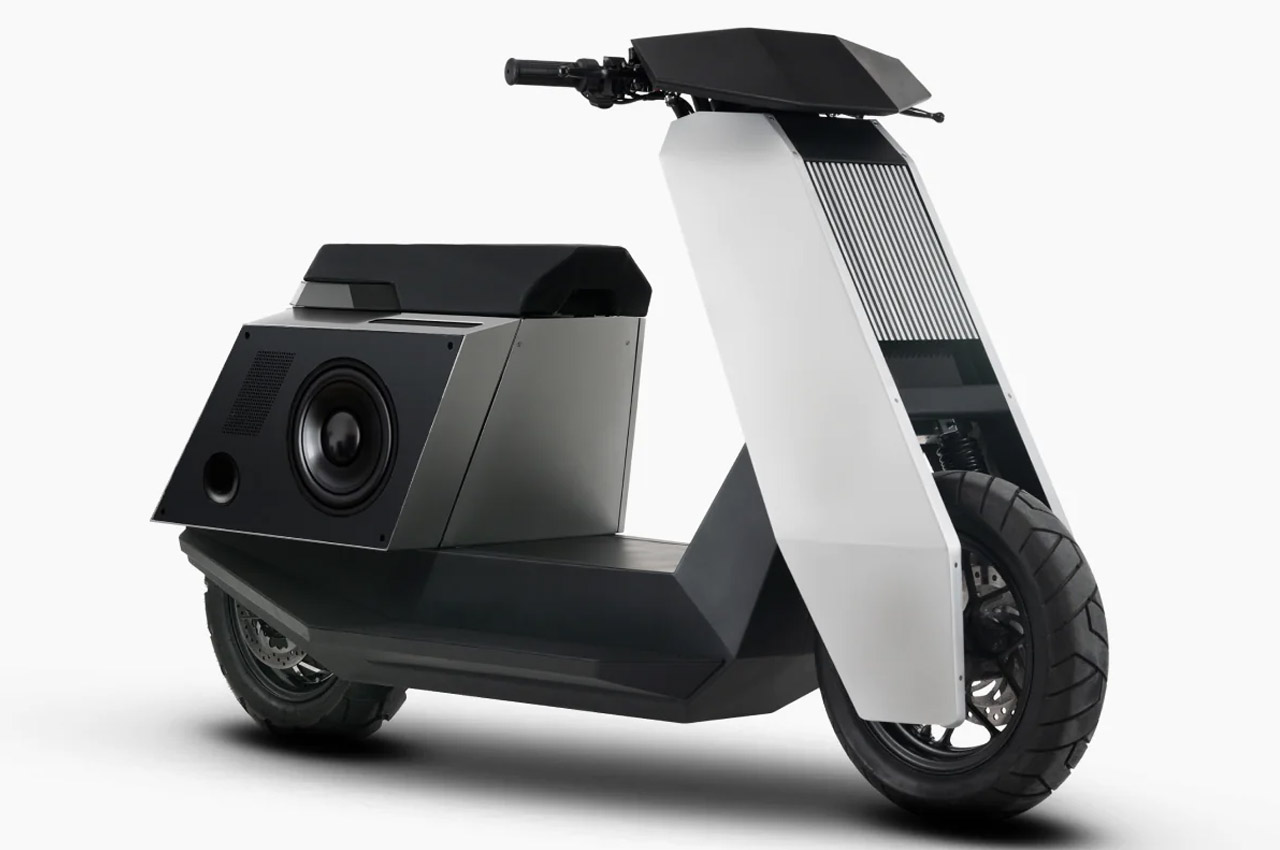
Dubbed the Infinite Machine P1 Electric Scooter, this Cybertruck-inspired E-scooter by techie brothers Eddie and Joseph Cohen is made out of anodized aluminum and steel composition. It has integrated Apple CarPlay which allows turn-by-turn navigation alerts or lets you play your favorite tunes on the go. The scooter’s GPS and remote locking capability eliminate all chances of theft, as the culprit can be quickly tracked down. It is a future-proof automotive, that resonates with the emotions and likings of Gen-Z.
3. Omni Scooter
Called the Omni Scooter, this electric scooter is centered around the likes, preferences, and aspirations of Generation Z. It was designed in close collaboration with BMW Designworks Munich, Germany. The commuter was constructed with a bottom-up approach, and it caters to the communication element with this scooter, offering the tools to shape their own unique culture. What makes this scooter even more interesting and unique, is that it changes colors and graphics in real-time.
4. The Stilride 1 Electric Scooter
The Stilride 1 electric scooter is created by folding a single piece of stainless steel. It is a unique two-wheeler that looks like a piece of art, while also being environmentally conscious owing to its sustainable construction process. No pieces have been welded together to create the final shape, which makes the scooter ultra-lightweight, ensuring it only weighs 286 pounds including the battery. Since there are fewer parts, the Stilride 1 electric scooter is easily recyclable.
5. Yamaev’s Scooter Concept
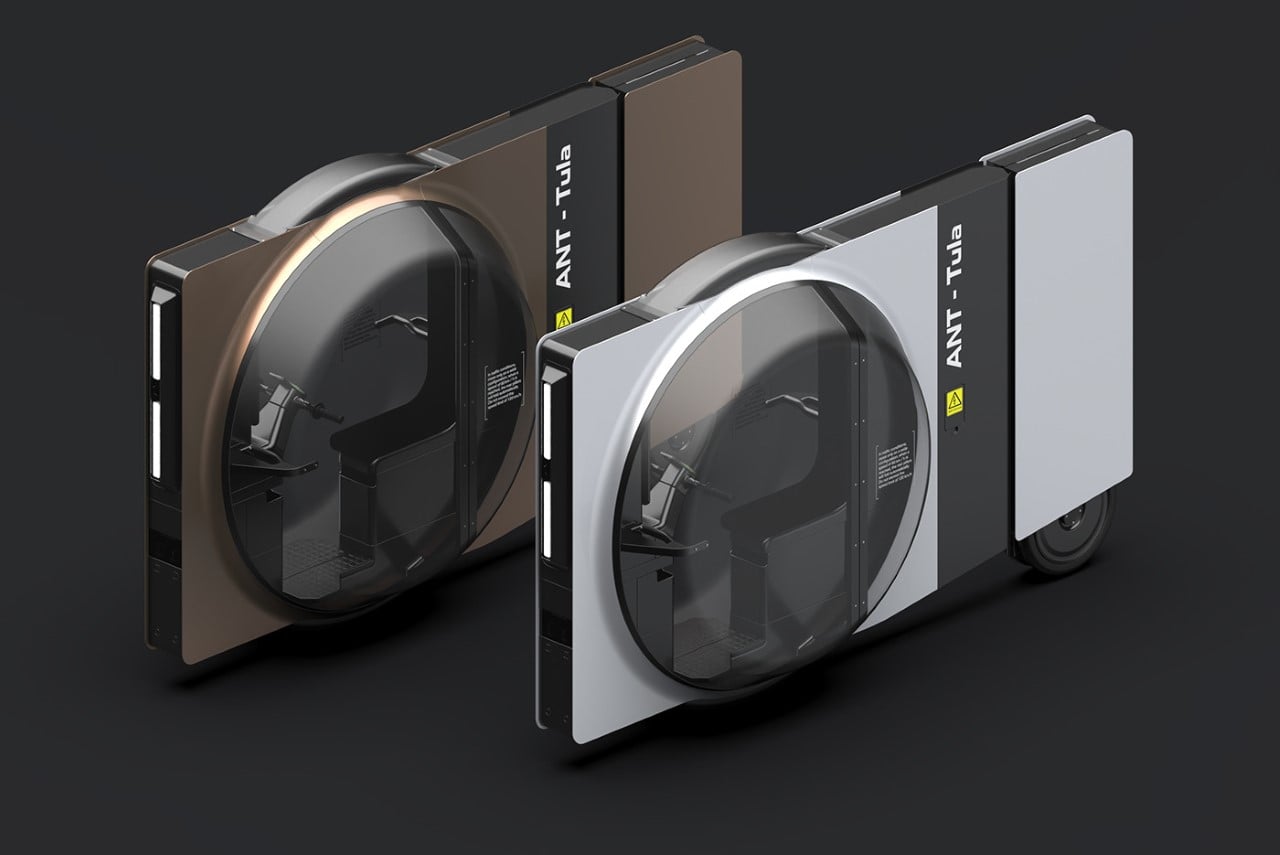
This innovative eye-catching tricycle scooter concept features a unique rectangular side profile that slices through the air the same way a credit card would swipe through a payment machine. It also has a different wheel setup feature with a massive front wheel that surrounds the scooter’s transparent bubble-shaped cockpit and two rear wheels that separate for stability at lower speeds, and connect at higher speeds for maneuverability.
6. Nano & Nano+ Model
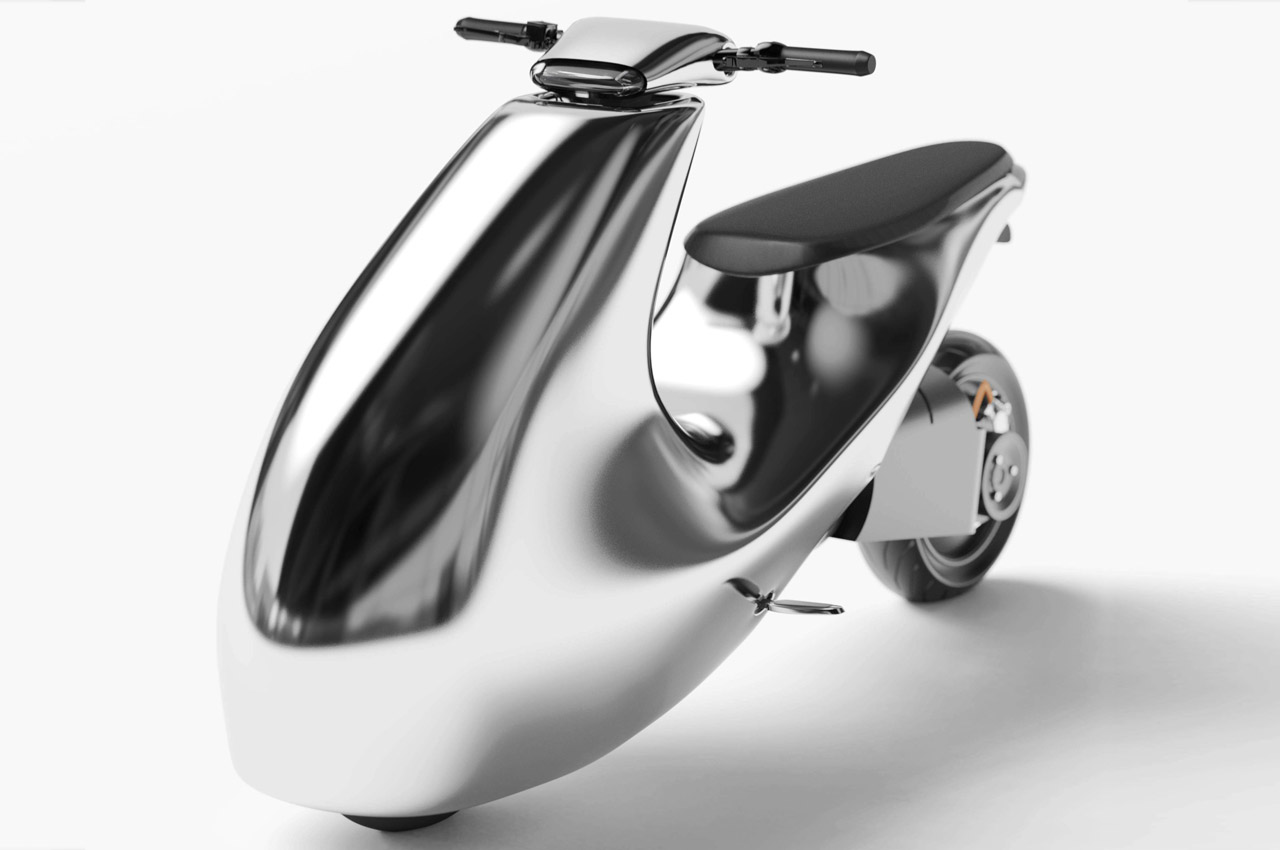
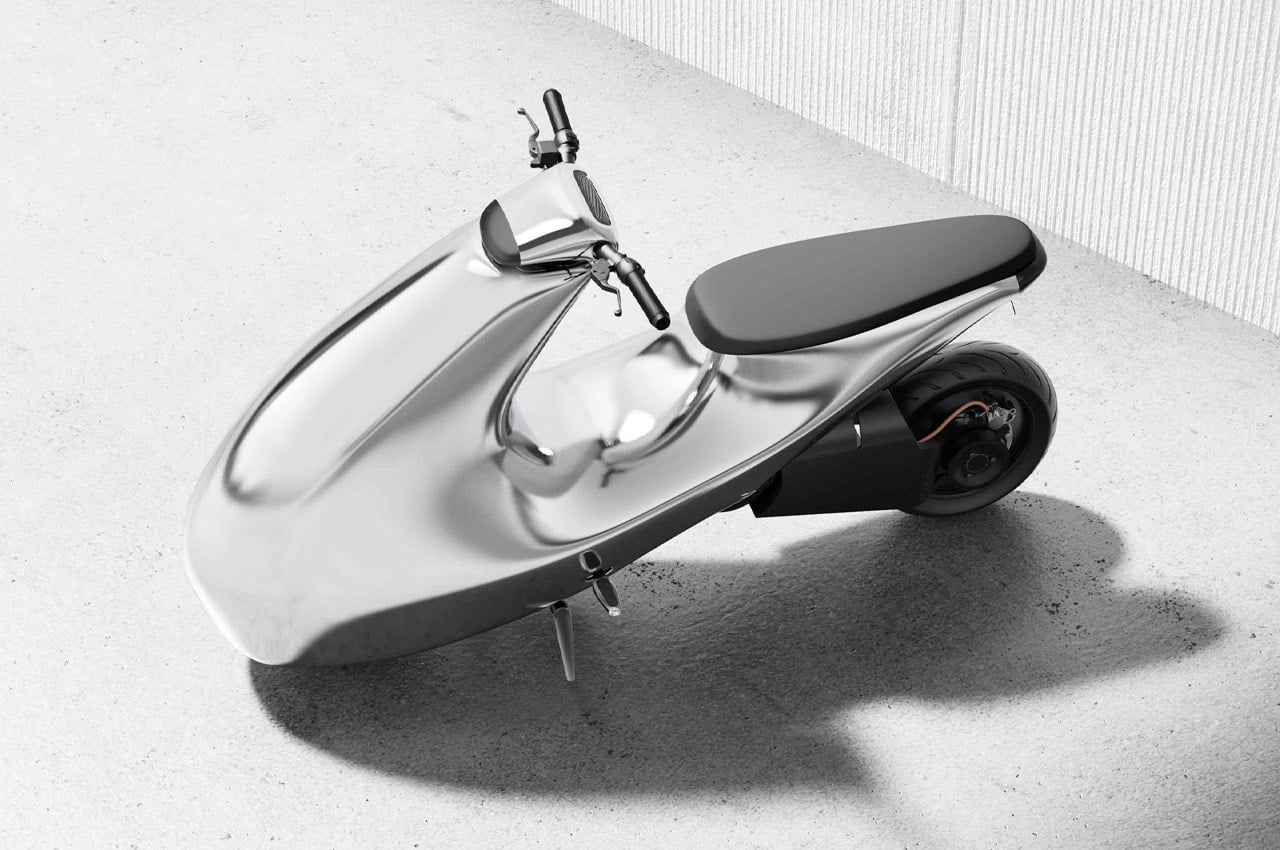
This electric scooter is made from Rolex Steel, and it is polished in an attractive silver finish, giving the scooter an appealing and lasting impression. The designers created two variants of the electric scooter – the Nano variant which has a max speed of 45 km/h, and the Nano+ model which can go at a speed of 75 km/h. The range on both the variants is the same as they both can clock 60 miles on a full charge of 4.2 kWh battery, which can be charged in four hours.
7. Rena Max E-scooter
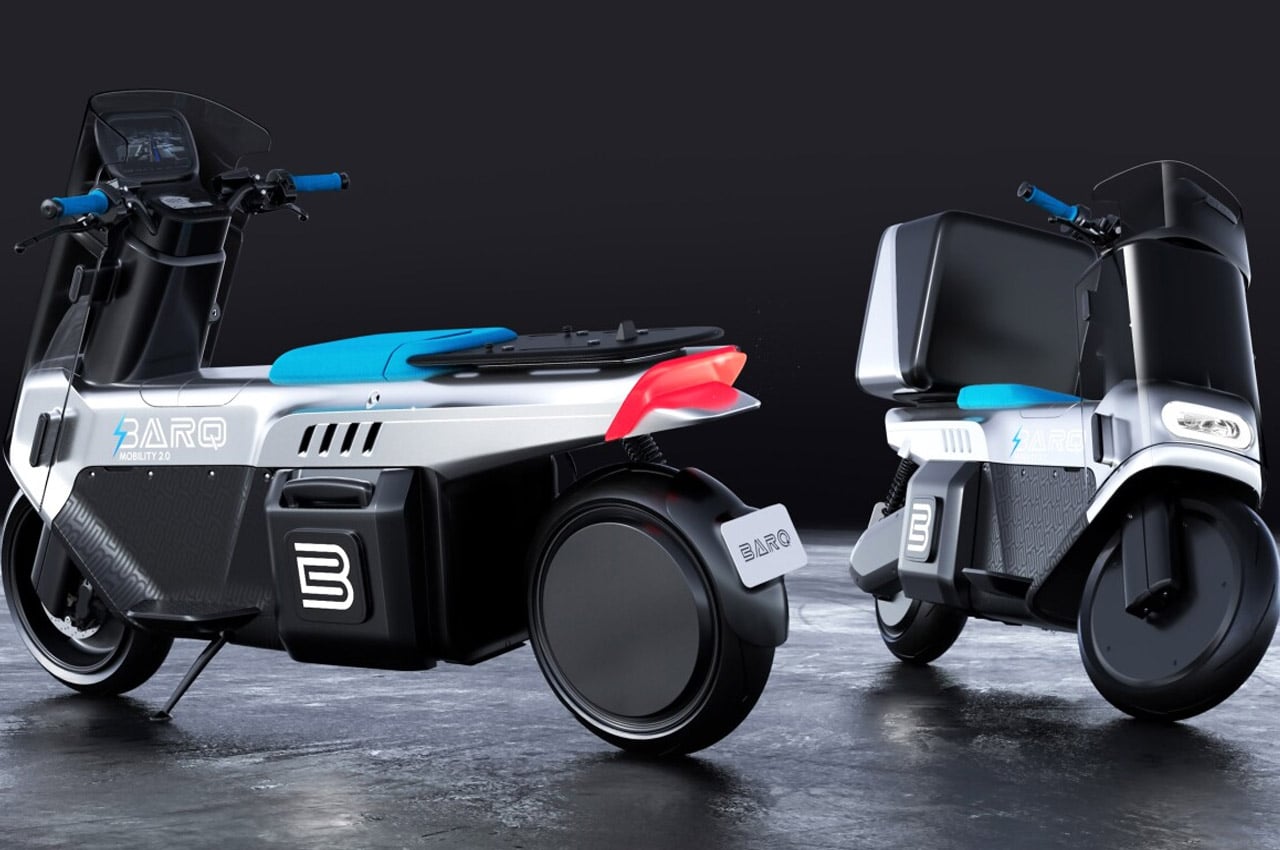
Called the Rena Max e-scooter, this fully electric scooter is designed for Middle-Eastern and North African delivery personnel. Since the scooter is designed for delivery services, it features a digitally lockable carry box that has temperature control, modular shelving, and insulation. It has a climate-controlled environment which ensures that the food or beverage being delivered is fresh and in good condition.
8. Gyro Canopy e
Honda’s Gyro Canopy e is a revamp of its popular Gyro three-wheeled business scooter line. The scooter looks quite similar to a concept Honda introduced back at the 2011 Motor Show. The Canopy e features an electric powertrain, as well as swappable batteries that enable the delivery personnel using them (targetted for delivery systems), to easily and efficiently swap them out, instead of waiting for them to recharge.
9. Scootility
Called the Scootility, this e-scooter with its compact size and narrow footprint in traffic is designed to deliver medication or supplies in affected areas where other forms of transport cannot find access. The Scootility has full suspension and wheels that measure 16 inches on the front and 13 inches on the back. It has a smaller wheel size which creates more space for a cargo box on this scooter with utility as its priority.
10. BeoSpeed
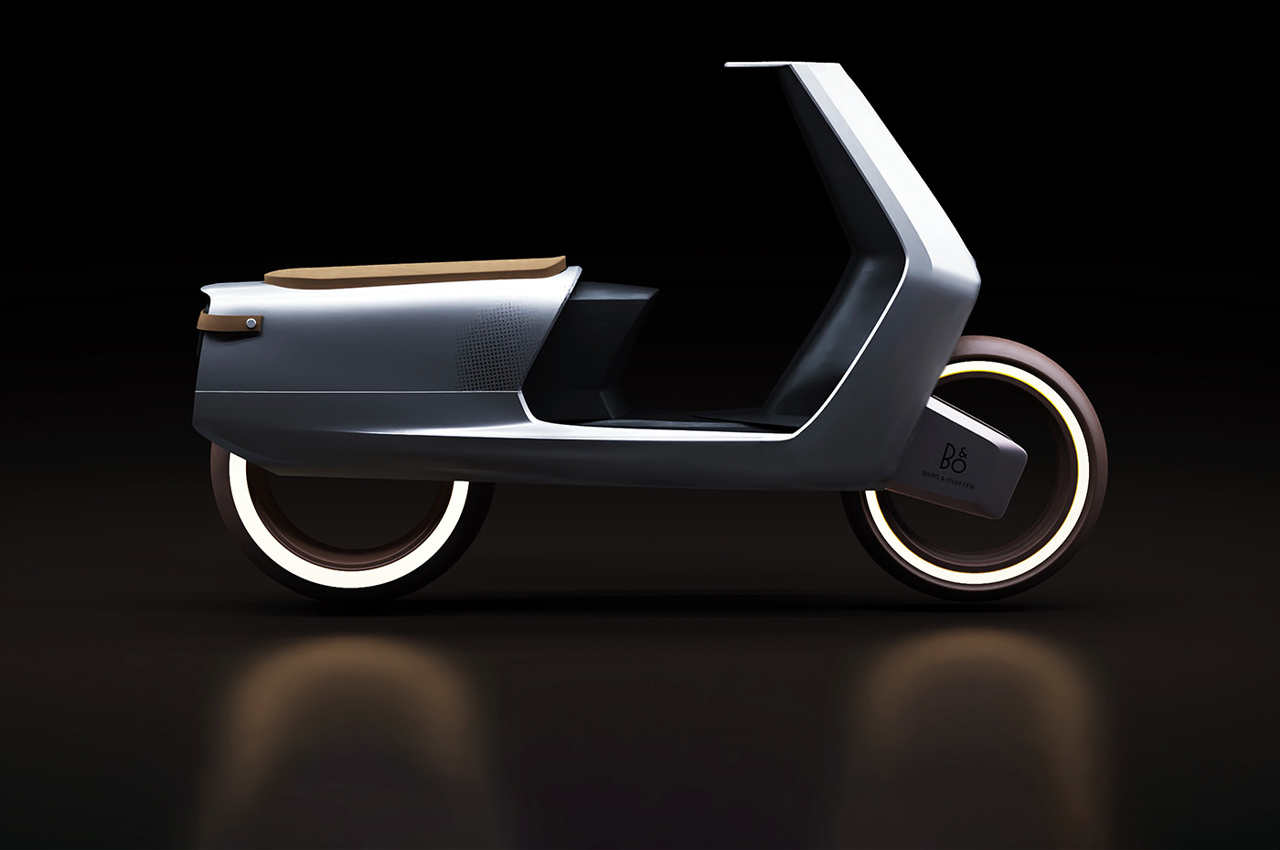
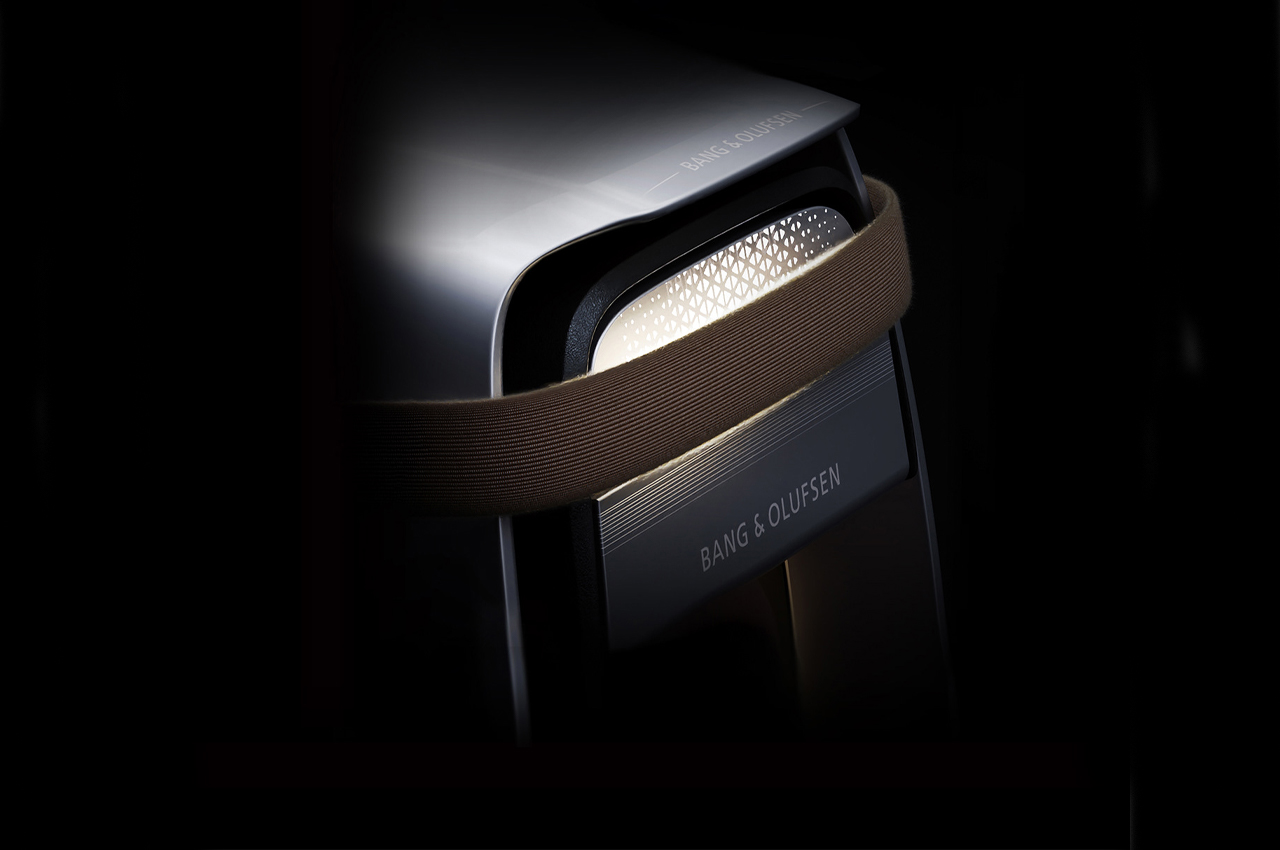
The BeoSpeed has a polished, clean exterior that has a durable hefty weight with a stainless steel coat. The BeoSpeed mixes the modern and classic and has natural leather seating and handlebars that are inspired by Bang & Olufsen’s headphone cushions. The electric scooter is equipped with smooth edges, minimal wheels, and stripped-back leather accents that give it a retro personality.
If the image itself isn’t unappetizing enough, the description might put you off. South Korean researchers have made a hybrid rice variant, infused with cow muscle and fat cells, creating a bright pink grain that is one part plant and one part meat. The team hopes to eventually create a cheaper and more sustainable source of protein, with a much lower carbon footprint than actual beef. But please: change the color.
The meat cells grow both on the surface of the rice grain and inside of the grain itself. After around ten days, you get the finished product. The study, published in Matter, suggests the rice grains taste like beef sushi, which is made of cow and rice. So yes, that tracks.
Bose’s $299 Ultra Open Earbuds sit outside of your ear canal and clip onto the ridge of your ear to stay in place. Due to the open nature of the design, active noise cancellation (ANC) is moot. Open-type earbuds have become increasingly popular, mostly for the allure of “all day” wear by allowing you to stay in tune with your surroundings, so Bose developed this model that fixes all the issues of its previous design. They seem more of a fashion accessory than a wearable, however.
On the latest episode of the Official Xbox Podcast, Microsoft Gaming CEO Phil Spencer said the company is bringing four of its games to "the other consoles." Contrary to previous rumors, Starfield and Indiana Jones and the Great Circle are not coming to PS5 or Switch for now. Reports have suggested that Hi-Fi Rush, Sea of Thieves, Halo and Gears of War may appear on Nintendo and Sony hardware. Both of those consoles have a far larger install base than Xbox Series X/S, which are estimated to have shipped a combined 27 million units, compared with 54.8 million PS5s and nearly 140 million Switches.
It’s still in testing before being offered to the public.
OpenAI on Thursday announced Sora, a brand new model that generates high-definition videos up to one minute in length from text prompts. Sora, which means “sky” in Japanese, won’t be available to the general public any time soon. Instead, OpenAI is first offering it to a small group of academics and researchers who will assess harm and its potential for misuse. The company said on its website: “The model understands not only what the user has asked for in the prompt, but also how those things exist in the physical world.” Other companies including Meta, Google and Runway, have either teased text-to-video tools or made them available to the public. Still, no other tool can generate videos as long as 60 seconds.
If the image itself isn’t unappetizing enough, the description might put you off. South Korean researchers have made a hybrid rice variant, infused with cow muscle and fat cells, creating a bright pink grain that is one part plant and one part meat. The team hopes to eventually create a cheaper and more sustainable source of protein, with a much lower carbon footprint than actual beef. But please: change the color.
The meat cells grow both on the surface of the rice grain and inside of the grain itself. After around ten days, you get the finished product. The study, published in Matter, suggests the rice grains taste like beef sushi, which is made of cow and rice. So yes, that tracks.
Bose’s $299 Ultra Open Earbuds sit outside of your ear canal and clip onto the ridge of your ear to stay in place. Due to the open nature of the design, active noise cancellation (ANC) is moot. Open-type earbuds have become increasingly popular, mostly for the allure of “all day” wear by allowing you to stay in tune with your surroundings, so Bose developed this model that fixes all the issues of its previous design. They seem more of a fashion accessory than a wearable, however.
On the latest episode of the Official Xbox Podcast, Microsoft Gaming CEO Phil Spencer said the company is bringing four of its games to "the other consoles." Contrary to previous rumors, Starfield and Indiana Jones and the Great Circle are not coming to PS5 or Switch for now. Reports have suggested that Hi-Fi Rush, Sea of Thieves, Halo and Gears of War may appear on Nintendo and Sony hardware. Both of those consoles have a far larger install base than Xbox Series X/S, which are estimated to have shipped a combined 27 million units, compared with 54.8 million PS5s and nearly 140 million Switches.
It’s still in testing before being offered to the public.
OpenAI on Thursday announced Sora, a brand new model that generates high-definition videos up to one minute in length from text prompts. Sora, which means “sky” in Japanese, won’t be available to the general public any time soon. Instead, OpenAI is first offering it to a small group of academics and researchers who will assess harm and its potential for misuse. The company said on its website: “The model understands not only what the user has asked for in the prompt, but also how those things exist in the physical world.” Other companies including Meta, Google and Runway, have either teased text-to-video tools or made them available to the public. Still, no other tool can generate videos as long as 60 seconds.
Skoda has unveiled the 2024 Skoda Octavia and Octavia vRS and the cars come with a range of upgrades over the previous models. There is a choice of four petrol engines and two diesel engines with up to 265 PS, there are also some mild hybrid options as well. The exterior of the vehicle has […]
Apple has explained why it's disabling progressive web apps (PWAs) in the EU, it wrote in updated developer notes seen by TechCrunch. The news follows users noticing that web apps were no longer functional in Europe with recent iOS 17.4 beta releases. Apple said it's blocking the feature in the region due to new rules around browsers in Europe's Digital Markets Act (DMA).
Web apps behave much like native apps, allowing dedicated windowing, notifications, long-term local storage and more. European users tapping web app icons will see a message asking if they wish to open them in Safari instead or cancel. That means they act more like web shortcuts, creating issues like data loss and broken notifications, according to comments from users seen by MacRumors.
The problem, according to Apple, is a new DMA requirement that it allow browsers that don't use its WebKit architecture. "Addressing the complex security and privacy concerns associated with web apps using alternative browser engines would require building an entirely new integration architecture that does not currently exist in iOS and was not practical to undertake given the other demands of the DMA and the very low user adoption of Home Screen web apps," the company wrote.
However, the Open Web Advocacy organization disagrees, as it writes in its latest blog:
Some defend Apple's decision to remove Web Apps as a necessary response to the DMA, but this is misguided.
Apple has had 15 years to facilitate true browser competition worldwide, and nearly two years since the DMA’s final text. It could have used that time to share functionality it historically self-preferenced to Safari with other browsers. Inaction and silence speaks volumes.
The complete absence of Web Apps in Apple's DMA compliance proposal, combined with the omission of this major change from Safari beta release notes, indicates to us a strategy of deliberate obfuscation. Even if Apple were just starting to internalize its responsibilities under the DMA, this behaviour is unacceptable. A concrete proposal with clear timelines, outlining how third party browsers could install and power Web Apps using their own engines, could prevent formal proceedings, but this looks increasingly unlikely. Nothing in the DMA compels Apple to break developers' Web Apps, and doing so through ineptitude is no excuse.
The change, spotted earlier by researcher Tommy Mysk, arrived with the second iOS 17.4 beta, but many observers first thought it was a bug. "The EU asked for alternative app stores and Apple took down web apps. Looks like the EU is going to rue the day they have asked Apple to comply with the #DMA rules," he posted on X.
According to Apple's App Store Guidelines, web apps are supposed to be an alternative to the App Store model. Considering that that the EU's DMA is designed to break the App Store monopoly, the move to disable them altogether is bound to cause friction. The EU, Japan, Australia and the UK have previously criticized the requirement for WebKit to run PWAs, according to the Open Web Advocacy (OWA).
Apple said it regrets any impact to the change, but said it was required "as part of the work to comply with the DMA." The company has already been accused by developers of malicious compliance with the DMA over fees for developers to bypass the App Store, with Spotify CEO Daniel Ek describing it as "extortion.".
This article originally appeared on Engadget at https://www.engadget.com/apple-confirms-home-screen-web-apps-will-no-longer-work-on-european-ios-devices-112527560.html?src=rss