This Case Fixes iPhone’s Weak Selfie Camera with a Second Screen

The iPhone’s rear cameras keep getting better, but selfies still rely on a smaller, lower-resolution front sensor, and storage upgrades cost considerably more than a microSD card. People who shoot a lot of photos and video feel squeezed on both fronts, choosing between spending hundreds on internal storage or dealing with blurry front-camera selfies. Selfix is a case for the iPhone 17 Pro that tackles both problems at once.

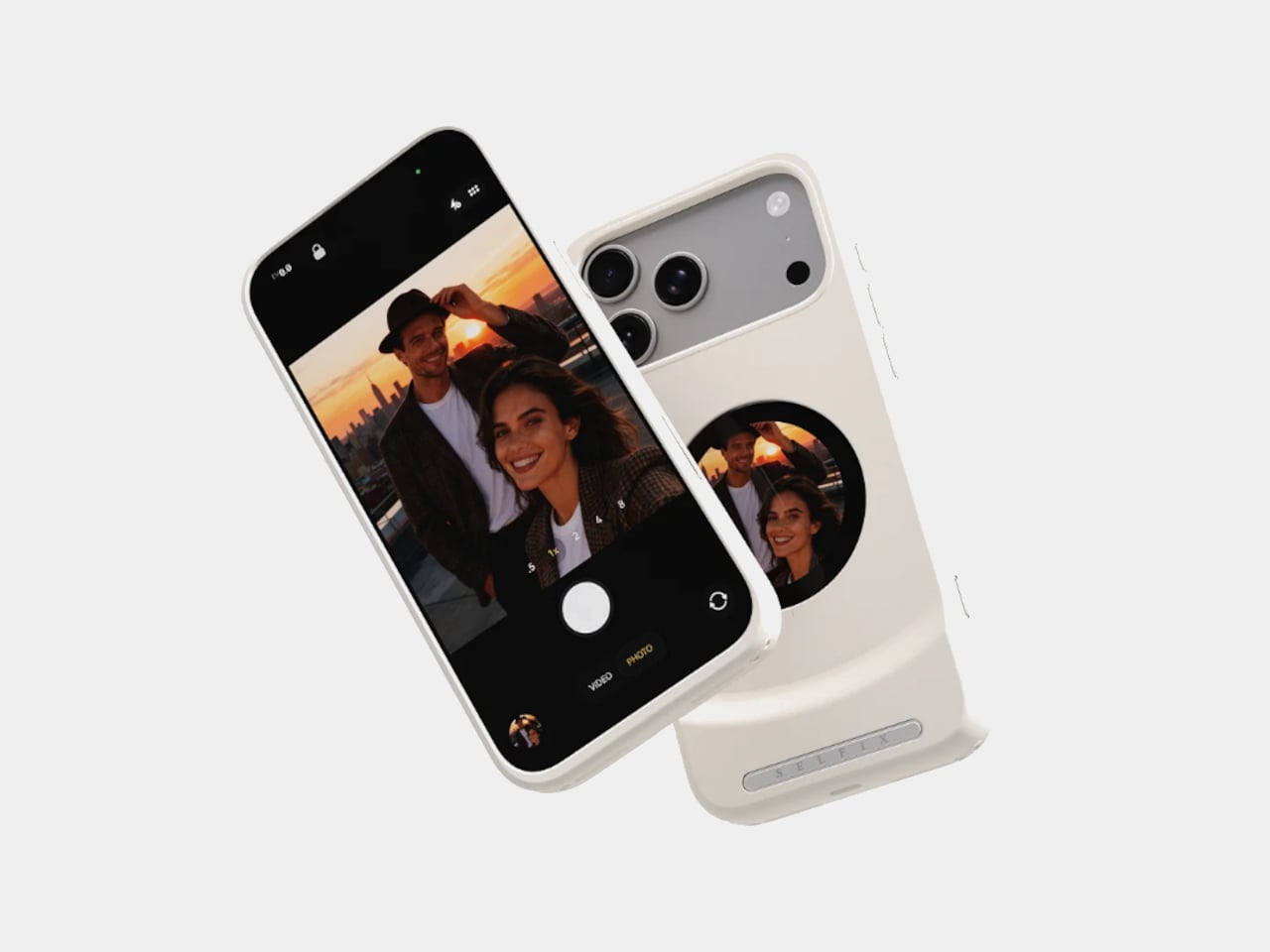
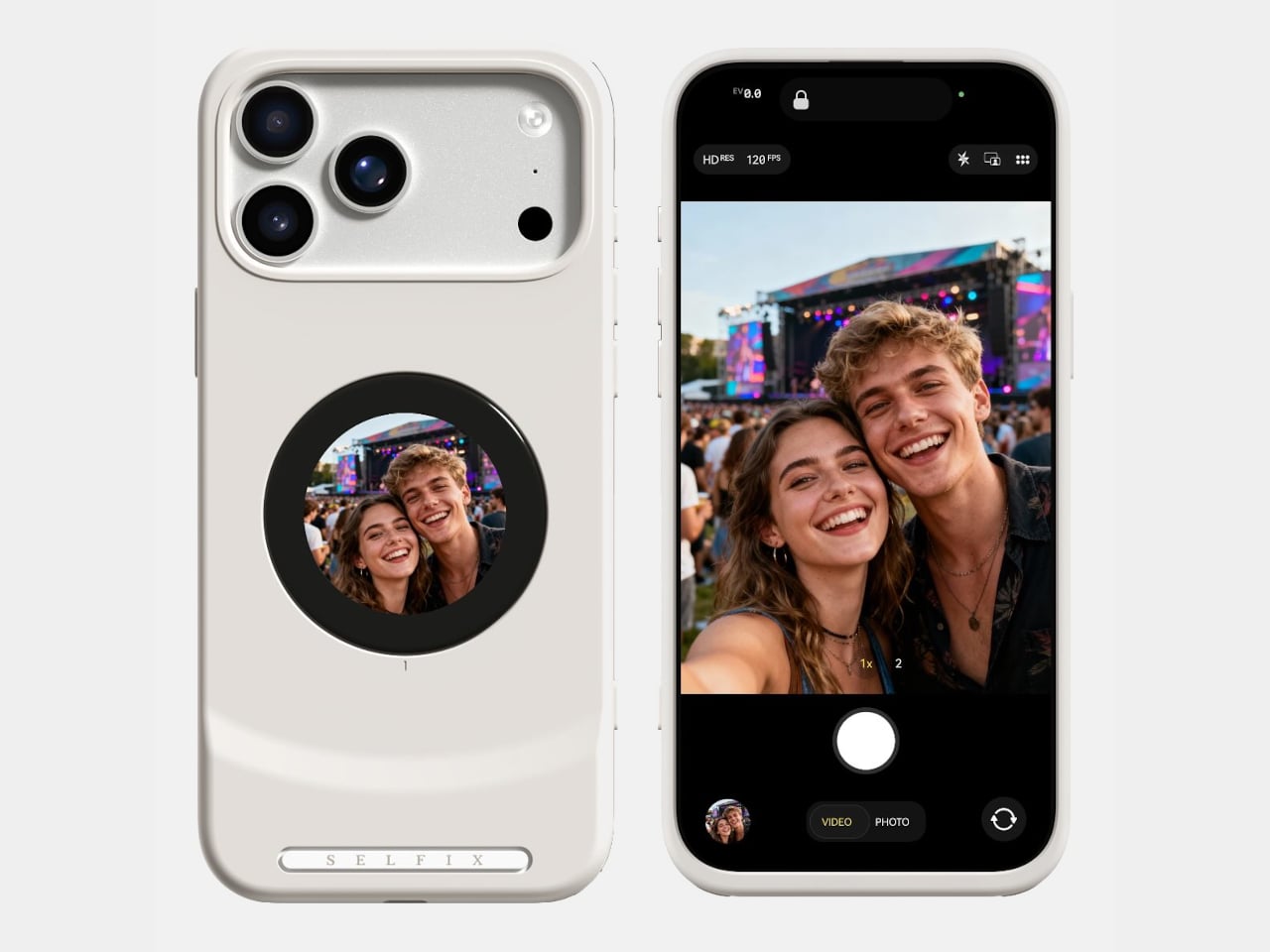
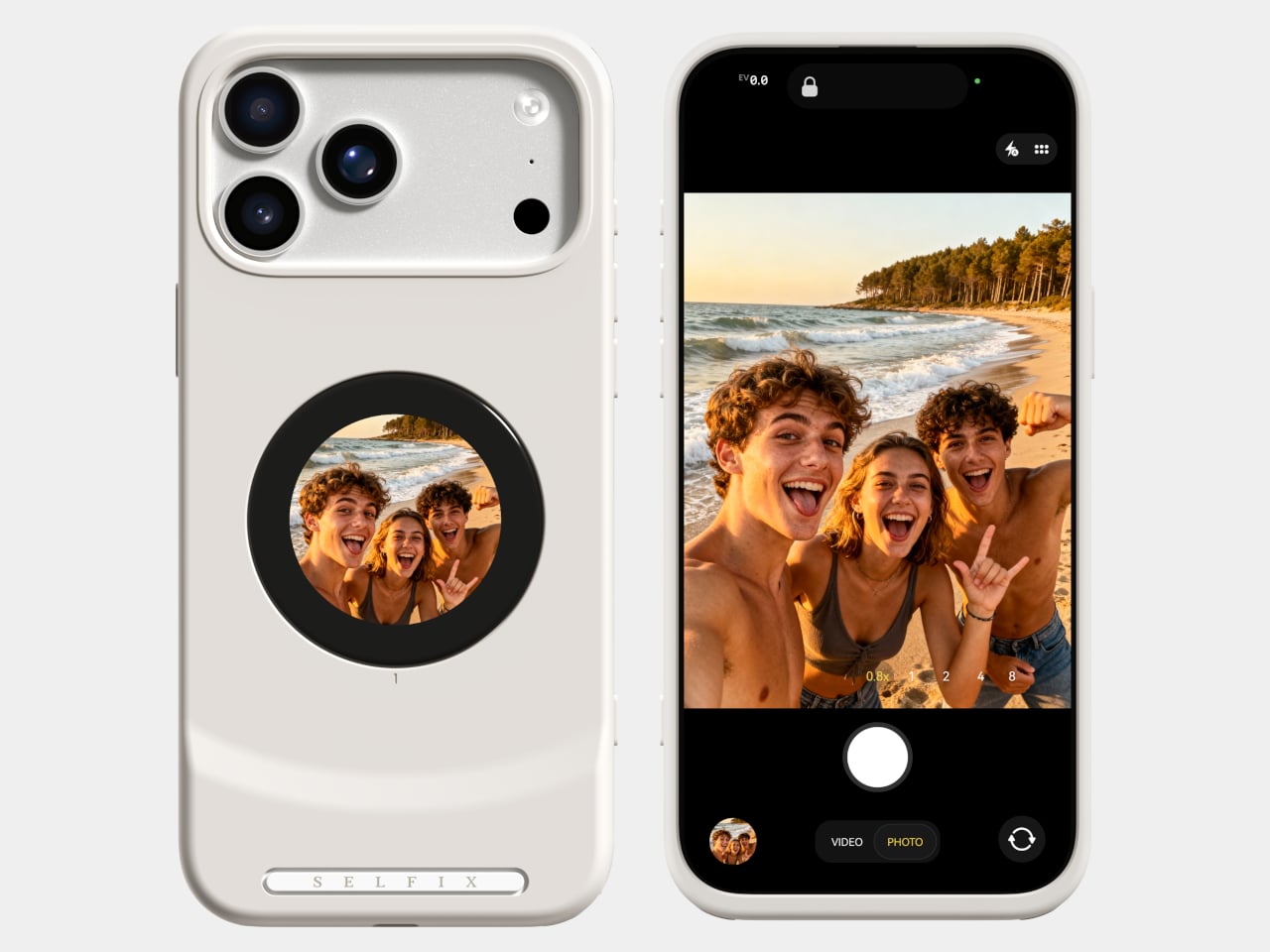
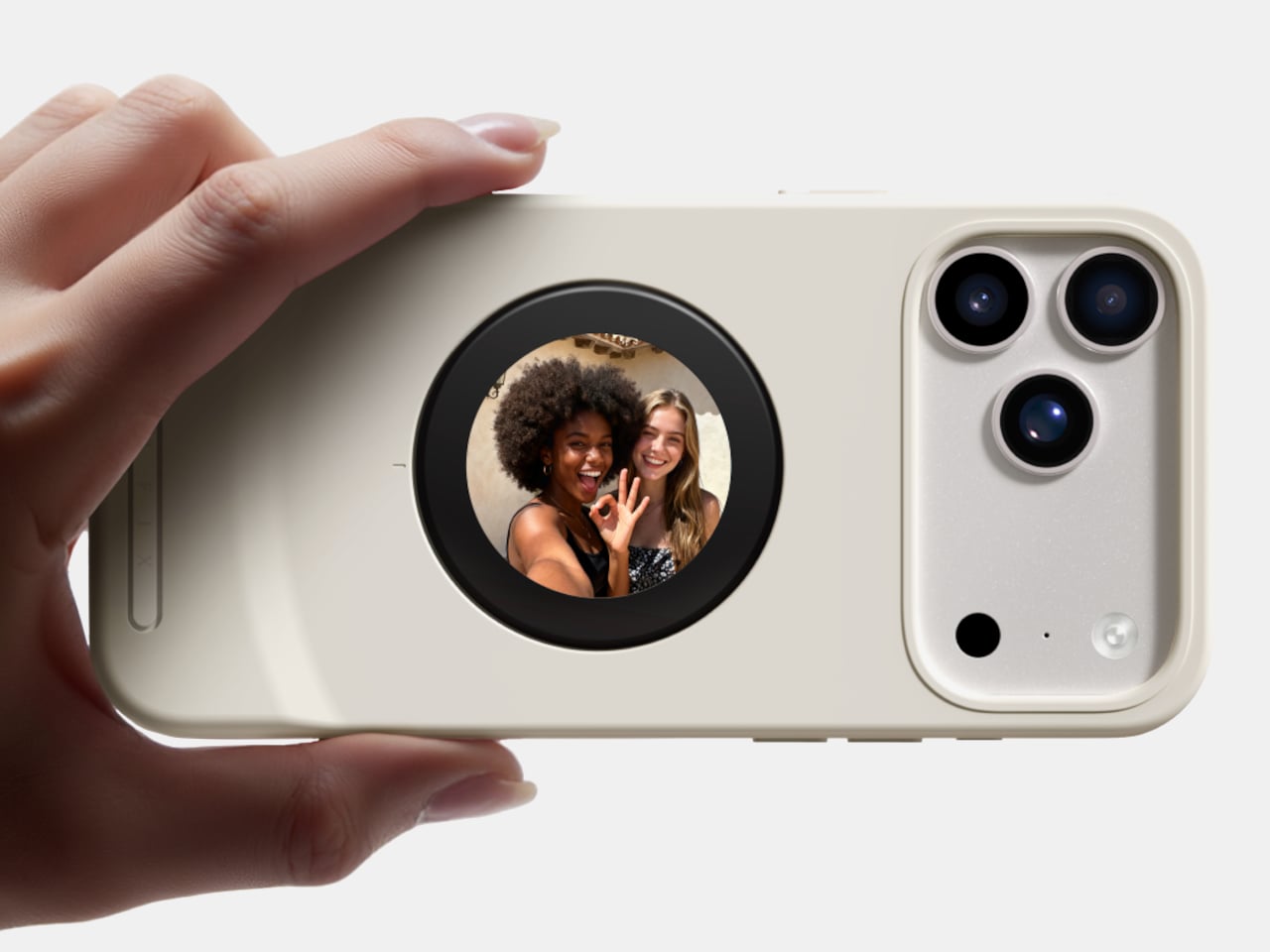
Selfix is a case for the iPhone 17 Pro and Pro Max that adds a circular 1.6-inch AMOLED screen to the back and hides a microSD slot inside. The rear screen acts as a tiny viewfinder so you can use the 48 MP rear cameras for selfies, while the card slot lets you add up to 2 TB of storage without touching Apple’s upgrade menu or monthly cloud fees.

Designer: Selfix

The rear display mirrors the camera view so you can frame yourself, adjust in real time, and pick any of the rear lenses, from ultra-wide group shots to telephoto portraits. You get the main sensor’s larger 1/1.28-inch glass, Night Mode, and up to 8× optical zoom for selfies, instead of guessing with a cropped front camera and hoping everyone fits into the narrower field of view.

Selfix connects through the phone’s USB-C port and does not need a separate app. You snap the case on, open the camera, and the rear screen wakes up. A dedicated button on the case lets you turn the display off when you are not using it to save battery. The idea is to feel like a built-in second screen, not another gadget that needs pairing, permissions, and a drawer full of instructions.

The case includes a microSD slot that supports cards up to 2 TB, using the same USB-C connection to integrate with the phone. A 512 GB card costs around $50, while Apple’s $200 jump for the same capacity makes swappable storage a compelling alternative. Heavy shooters can archive trips or projects without paying monthly cloud fees or deleting older work to make room for new sessions.

Selfix is made from high-quality TPU and comes in Oat White, Blush Pink, and Midnight Black, sized to match the 17 Pro and Pro Max. It adds some thickness, bringing the total to 17mm, but in return, you get a grippy shell, a second screen, and a hidden storage bay. The design aims to look like a natural extension of the phone rather than a bolt-on camera rig or accessory that screams afterthought.

Selfix is aimed at people who care enough about image quality to use the rear cameras for everything, and who are tired of juggling storage or paying the upgrade tax. A case that quietly turns the iPhone into a dual-screen shooter with expandable memory makes you wonder why the phone did not ship this way, especially when the rear cameras already outclass the front by a significant margin, and storage remains artificially expensive.

The post This Case Fixes iPhone’s Weak Selfie Camera with a Second Screen first appeared on Yanko Design.

Why Amazon Replaced Its AI Lead, China’s EUV Push & 3 More AI Trends This Week

Why Amazon Replaced Its AI Lead, China’s EUV Push & 3 More AI Trends This Week

What happens when one of the world’s most influential companies makes a bold leadership change in its AI division? Below Nate B Jones breaks down Amazon’s decision to part ways with its AI chief, a move that has sparked conversations across the tech industry. This isn’t just about one executive; it’s a revealing moment in […]

The post Why Amazon Replaced Its AI Lead, China’s EUV Push & 3 More AI Trends This Week appeared first on Geeky Gadgets.

Posted in Uncategorized

The best budget laptops for 2026

A tight budget does not mean you have to settle for a slow or outdated laptop. Many affordable models today offer solid performance for work, classes and everyday browsing, and some even pack in extras like bright displays or long battery life. Whether you need something for school, travel or streaming, there are plenty of budget laptops that deliver more value than you might expect.

Since the options can be overwhelming, we tested a wide range of devices to find the best budget laptops that offer dependable performance without stretching your wallet.

First, we at Engadget consider anything under $1,000 to be “budget” in the laptop space. The reason for this is twofold: even the most affordable flagship laptops typically start at $1,000 or more, and if you go dramatically lower than that (say, $500 or less), that’s where you’ll really start to see compromises in performance. You’ll typically find the best cheap laptops striking a good balance between power and price in the $500 to $1,000 range. But in this guide, we’ll cover top picks at a wide range of prices — there are a number of excellent options on the low and high end of the budget spectrum.

Arguably the biggest thing to look for in a cheap laptop is build quality and a decent spec sheet. You might be able to find configuration options with the latest generation CPU chipsets, or you may have to go for one that has a slightly older processor. We recommend looking for models with solid state drive (SSD) storage instead of a traditional hard drive, as SSDs provide faster performance. And if you can find a PC with the latest internals, it’s worth the investment. However, going with a CPU that’s just one generation behind likely won’t make a noticeable difference in performance.

Along with processors, you should also consider the amount of memory and storage you need in a daily driver. For the former, we recommend laptops with at least 8GB of RAM; anything with less than that will have a hard time multitasking and managing all those web browsing tabs. The latter is a bit more personal: how much onboard storage you need really depends on how many apps, files, photos, documents and more you will save locally. As a general rule of thumb, try to go for a laptop that has at least a 256GB SSD (this only goes for macOS and Windows machines, as Chromebooks are a bit different). That should give you enough space for programs and files, plus room for future operating system updates. And if you need a machine for light productivity or Android emulation, some laptops even support Android apps natively, which can add extra versatility.

After determining the best performance you can get while sticking to your budget, it’s also worth examining a few different design aspects. We recommend a laptop with an IPS display for better viewing angles and color accuracy, though premium models with OLED displays are becoming more common and can offer deeper blacks and vibrant colors. Pay attention to port selection, too — many budget models offer plenty of ports, while higher-end ones tend to prioritize minimalism with fewer connections. If connectivity matters to you, look for options with USB-C, USB-A, HDMI and an audio jack.

And speaking of practical features, keep an eye on GPU performance if you're shopping for a budget-friendly gaming laptop. While integrated graphics are fine for casual users, a dedicated GPU will improve gaming and creative workloads. We also recommend checking the refresh rate of the screen, as a higher rate will make a noticeable difference in both games and scrolling-heavy apps.

Refurbished laptops are another option to consider if you need a new machine and don’t want to spend a ton of money. Buying refurbished tech can be tricky if you’re unfamiliar with a brand’s or merchant’s policies surrounding what they classify as “refurbished.” But it’s not impossible — for laptops, we recommend going directly to the manufacturer for refurbished devices. Apple, Dell and Microsoft all have official refurbishment processes that their devices go through before they’re put back on the market that verifies the machines work properly and are in good condition. Third-party retailers like Amazon and Walmart also have their own refurbishment programs for laptops and other gadgets as well.

This article originally appeared on Engadget at https://www.engadget.com/computing/laptops/best-budget-laptop-150038435.html?src=rss

Finally! iOS 26.2 Gives Us Full Control Over Liquid Glass

Finally! iOS 26.2 Gives Us Full Control Over Liquid Glass

Apple’s iOS 26.2 introduces the ultra liquid glass aesthetic, a visually captivating design that enhances your iPhone’s interface with sleek transparency and modern elegance. This feature allows users to customize their device with a refined, minimalist appearance while maintaining functionality and clarity. By following the video below from iDeviceHelp, you can transform your iPhone into […]

The post Finally! iOS 26.2 Gives Us Full Control Over Liquid Glass appeared first on Geeky Gadgets.

Posted in Uncategorized

Easily Ship Google AI Studio Apps on Cloud Run on Your Own Domain

Easily Ship Google AI Studio Apps on Cloud Run on Your Own Domain

What if you could take your project from a simple prototype in Google AI Studio to a fully deployed application on your own custom domain, all without breaking a sweat? In the guide below, Your AI Workflow breaks down the process of using Google Cloud Run to make this transformation not only possible but surprisingly […]

The post Easily Ship Google AI Studio Apps on Cloud Run on Your Own Domain appeared first on Geeky Gadgets.

Posted in Uncategorized

Samsung Finally Listened: The Galaxy Z Fold 8 Fixes Everything

Samsung Finally Listened: The Galaxy Z Fold 8 Fixes Everything

The Samsung Galaxy Z Fold 8 represents a pivotal advancement in the foldable smartphone market. By addressing persistent challenges and introducing thoughtful upgrades, Samsung has elevated its foldable lineup to new heights. With significant improvements in camera technology, a refined design, and a focus on user-centric features, the Z Fold 8 positions itself as a […]

The post Samsung Finally Listened: The Galaxy Z Fold 8 Fixes Everything appeared first on Geeky Gadgets.

Posted in Uncategorized

NotebookLM & Gemini 3 Combine to Turn Research into Decks, Visuals & Clean Data

NotebookLM & Gemini 3 Combine to Turn Research into Decks, Visuals & Clean Data

What if your research process could think as dynamically as you do, seamlessly integrating text, images, and data into a single, cohesive workflow? In the guide below, Universe of AI breaks down the innovative integration of Gemini 3 into NotebookLM, a move that redefines how we approach everything from academic research to creative projects. This […]

The post NotebookLM & Gemini 3 Combine to Turn Research into Decks, Visuals & Clean Data appeared first on Geeky Gadgets.

Posted in Uncategorized

This $2,899 Desktop AI Computer With RTX 5090M Lets You Cancel Every AI Subscription Forever

Look across the history of consumer tech and a pattern appears. Ownership gives way to services, and services become subscriptions. We went from stacks of DVDs to streaming movies online, from external drives for storing data and backups to cloud drives, from MP3s on a player to Spotify subscriptions, from one time software licenses to recurring plans. But when AI arrived, it skipped the ownership phase entirely. Intelligence came as a service, priced per month or per million tokens. No ownership, no privacy. Just a $20 a month fee.

A device like Olares One rearranges that relationship. It compresses a full AI stack into a desktop sized box that behaves less like a website and more like a personal studio. You install models the way you once installed apps. You shape its behavior over time, training it on your documents, your archives, your creative habits. The result is an assistant that feels less rented and more grown, with privacy, latency, and long term cost all tilting back toward the owner.

Designer: Olares

Click Here to Buy Now: $2,899 $3,999 (28% off) Hurry! Only 15/320 units left!
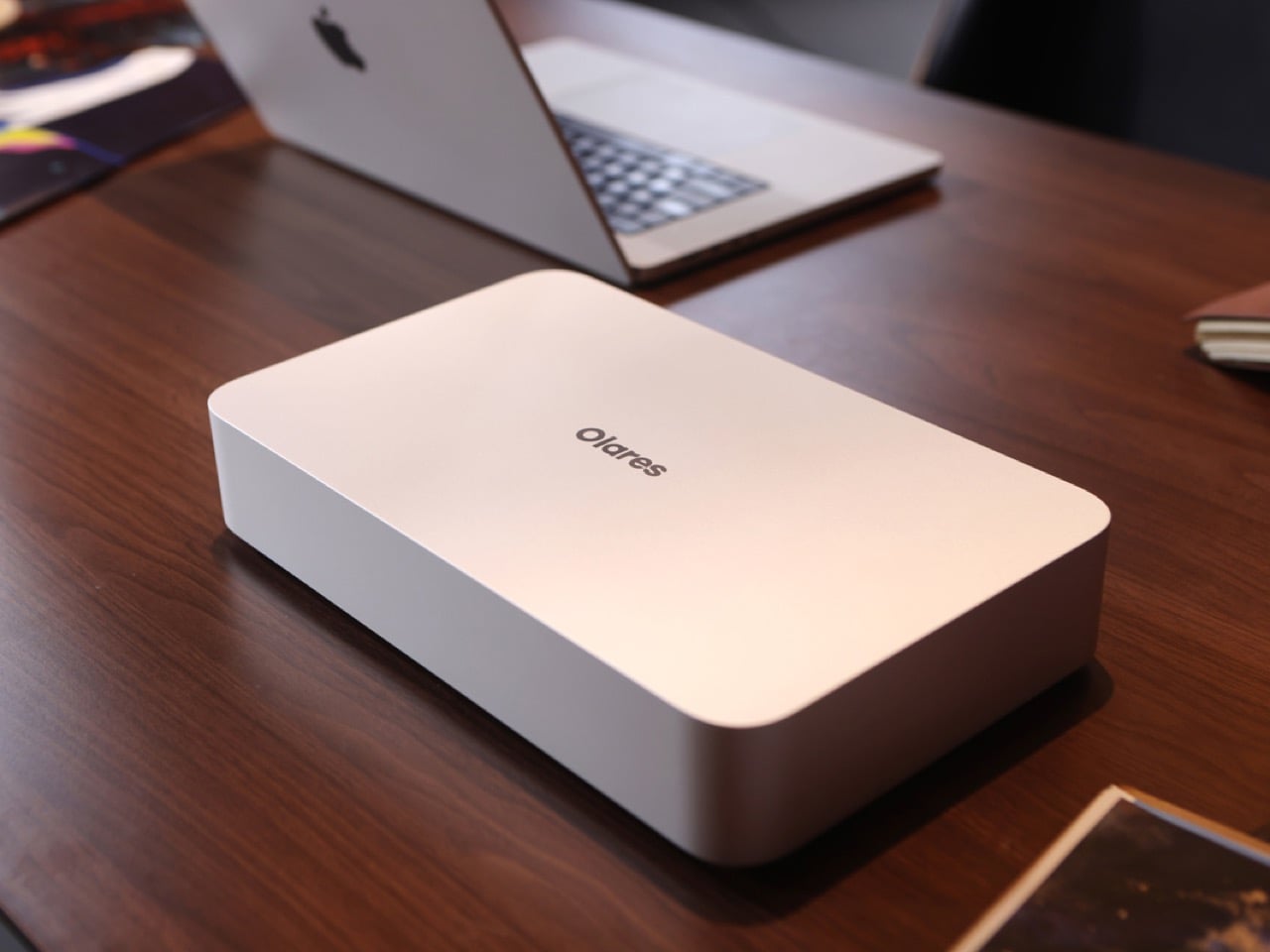
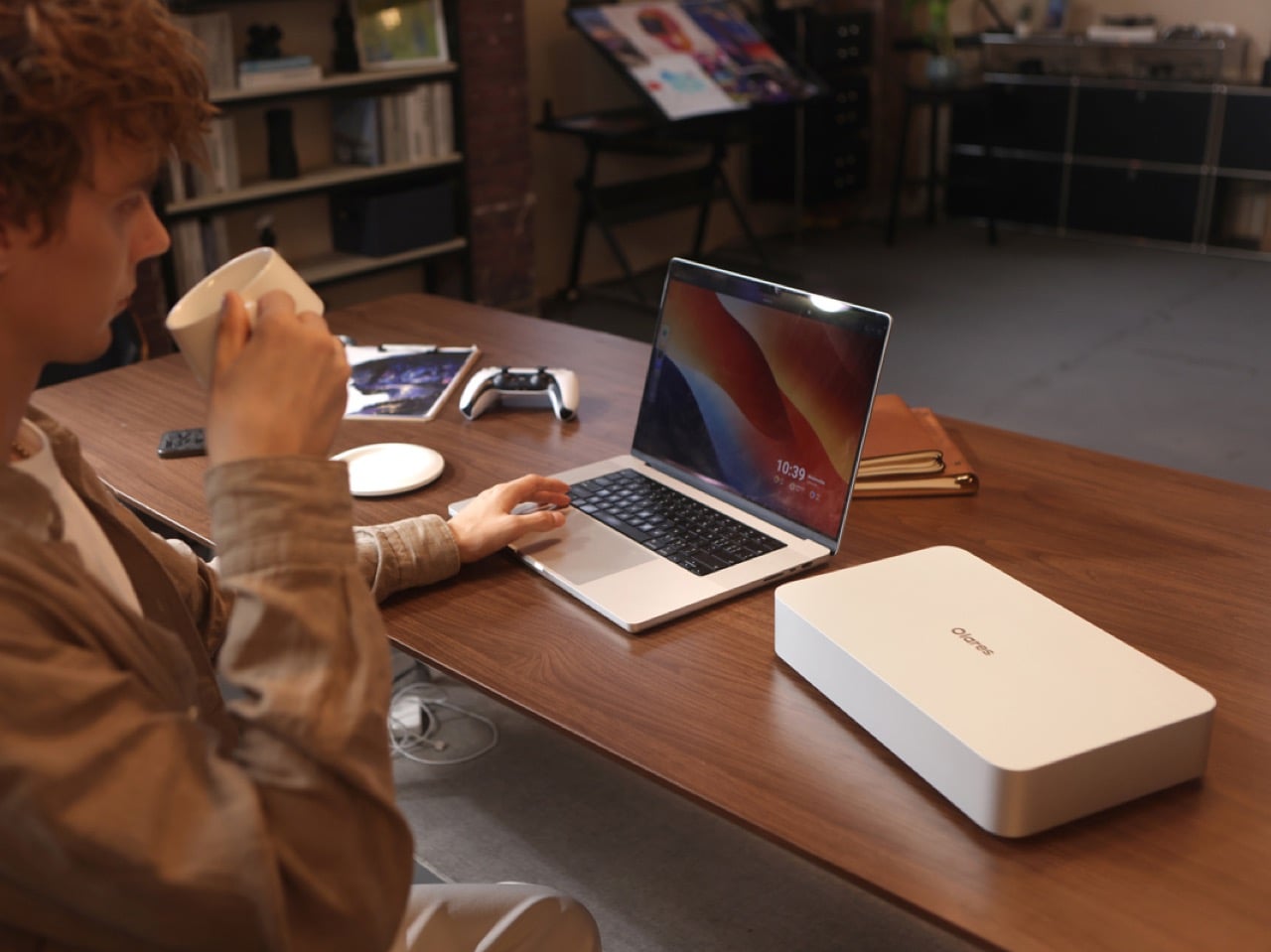
The pitch is straightforward. Take the guts of a $4,000 gaming laptop, strip out the screen and keyboard, put everything in a minimalist chassis that looks like Apple designed a chonky Mac mini, and tune it for sustained performance instead of portability. Dimensions are 320 x 197 x 55mm, weighs 2.15 kg without the PSU, and the whole package pulls 330 watts under full load. Inside sits an Intel Core Ultra 9 275HX with 24 cores running up to 5.4 GHz and 36 MB of cache, the same chip you would find in flagship creator laptops this year. The GPU is an NVIDIA GeForce RTX 5090 Mobile with 24 GB of GDDR7 VRAM, 1824 AI TOPS of tensor performance, and a 175W max TGP. Pair that with 96 GB of DDR5 RAM at 5600 MHz and a PCIe 4.0 NVMe SSD, and you have workstation level compute in a box smaller than most soundbars.

Olares OS runs on top of all that hardware, and it is open source, which means you can audit the code, fork it, or wipe it entirely if you want. Out of the box it behaves like a personal cloud with an app store containing over 200 applications ready to deploy with one click. Think Docker and Kubernetes, but without needing to touch a terminal unless you want to. The interface looks clean, almost suspiciously clean, like someone finally asked what would happen if you gave a NAS the polish of an iPhone. You get a unified account system so all your apps share a single login, configurable multi factor authentication, enterprise grade sandboxing for third party apps, and Tailscale integration that lets you access your Olares box securely from anywhere in the world. Your data stays on your hardware, full stop.

I have been tinkering with local LLMs for the past year, and the setup has always been the worst part. You spend hours wrestling with CUDA drivers, Python environments, and obscure GitHub repos just to get a model running, and then you realize you need a different frontend for image generation and another tool for managing multiple models and suddenly you have seven terminal windows open and nothing talks to each other. Olares solves that friction by bundling everything into a coherent ecosystem. Chat agents like Open WebUI and Lobe Chat, general agents like Suna and OWL, AI search with Perplexica and SearXNG, coding assistants like Void, design agents like Denpot, deep research tools like DeerFlow, task automation with n8n and Dify. Local LLMs include Ollama, vLLM, and SGIL. You also get observability tools like Grafana, Prometheus, and Langfuse so you can actually monitor what your models are doing. The philosophy is simple. String together workflows that feel as fluid as using a cloud service, except everything runs on metal you control.

Gaming on this thing is a legitimate use case, which feels almost incidental given the AI focus but makes total sense once you look at the hardware. That RTX 5090 Mobile with 24 GB of VRAM and 175 watts of power can handle AAA titles at high settings, and because the machine is designed as a desktop box, you can hook it up to any monitor or TV you want. Olares positions this as a way to turn your Steam library into a personal cloud gaming service. You install your games on the Olares One, then stream them to your phone, tablet, or laptop from anywhere. It is like running your own GeForce Now or Xbox Cloud Gaming, except you own the server and there are no monthly fees eating into your budget. The 2 TB of NVMe storage gives you room for a decent library, and if you need more, the system uses standard M.2 drives, so upgrades are straightforward.
Cooling is borrowed from high end laptops, with a 2.8mm vapor chamber and a 176 layer copper fin array handling heat dissipation across a massive 310,000 square millimeter surface. Two custom 54 blade fans keep everything moving, and the acoustic tuning is genuinely impressive. At idle, the system sits at 19 dB, which is whisper quiet. Under full GPU and CPU load, it climbs to 38.8 dB, quieter than most gaming desktops and even some laptops. Thermal control keeps things stable at 43.8 degrees Celsius under sustained loads, which means you can run inference on a 70B model or render a Blender scene without the fans turning into jet engines. I have used plenty of small form factor PCs that sound like they are preparing for liftoff the moment you ask them to do anything demanding, so this is a welcome change.
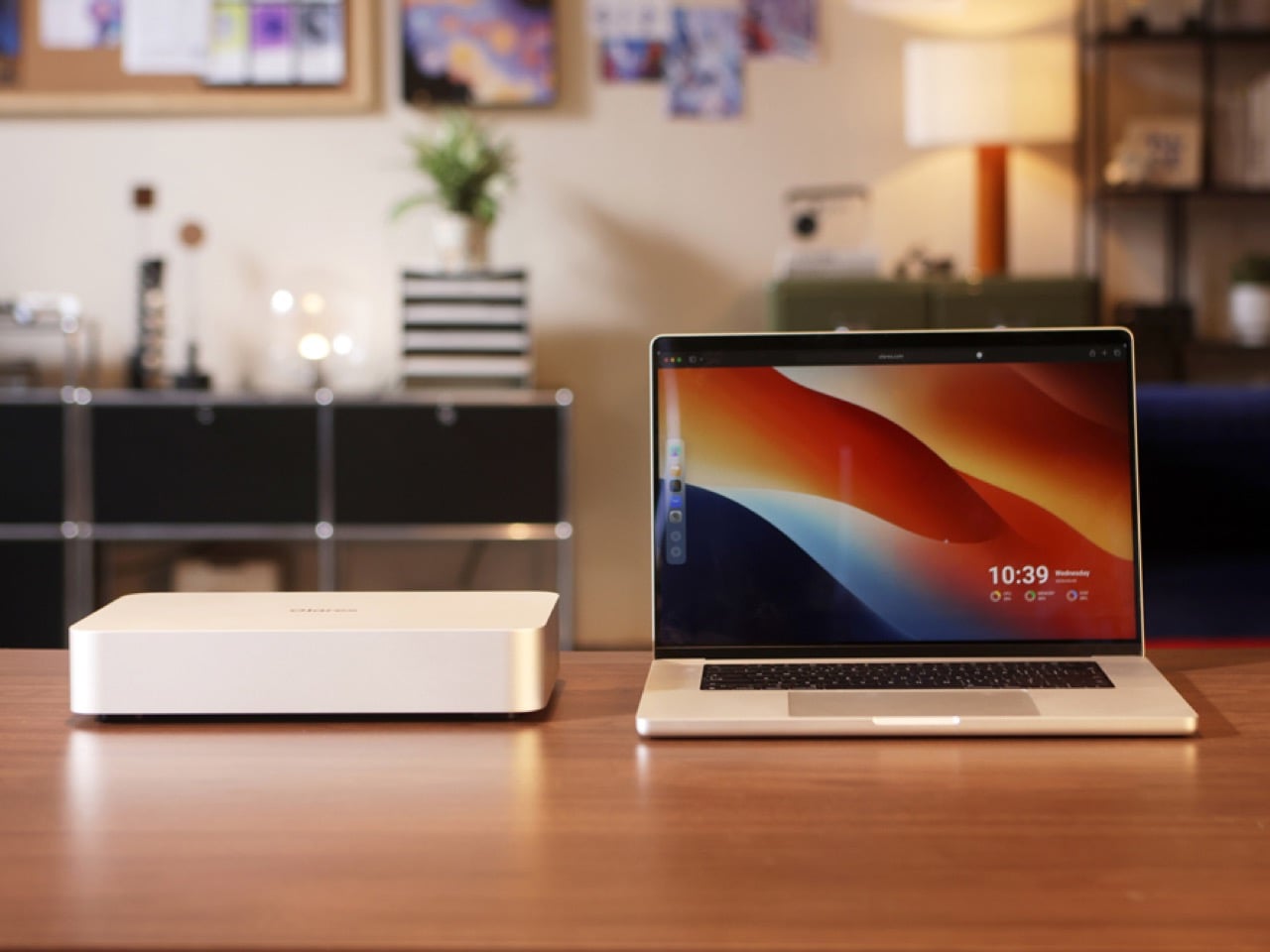
RAGFlow and AnythingLLM handle retrieval augmented generation, which lets you feed your own documents, notes, and files into your AI models so they can answer questions about your specific data. Wise and Files manage your media and documents, all searchable and indexed locally. There is a digital secret garden feature that keeps an AI powered local first reader for articles and research, with third party integration so you can pull in content from RSS feeds or save articles for later. The configuration hub lets you manage storage, backups, network settings, and app deployments without touching config files, and there is a full Kubernetes console if you want to go deep. The no CLI Kubernetes interface is a big deal for people who want the power of container orchestration but do not want to memorize kubectl commands. You get centralized control, performance monitoring at a glance, and the ability to spin up or tear down services in seconds.
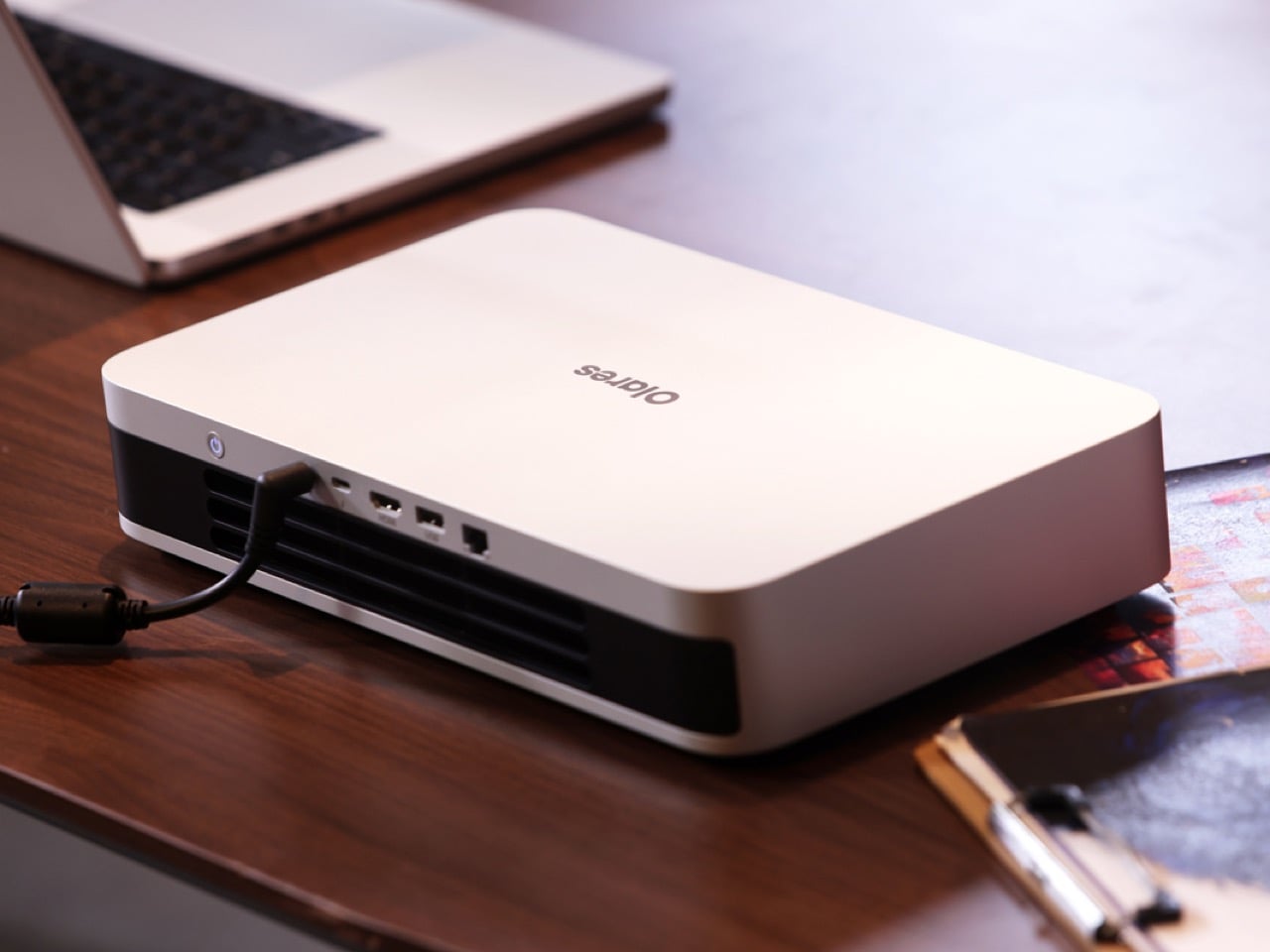
Olares makes a blunt economic argument. If you are using Midjourney, Runway, ChatGPT Pro, and Manus for creative work, you are probably spending around $6,456 per year per user. For a five person team, that balloons to $32,280 annually. Olares One costs $2,899 for the hardware (early-bird pricing), which breaks down to about $22.20 per month per user over three years if you split it across a five person team. Your data stays private, stored locally on your own hardware instead of floating through someone else’s data center. You get a unified hub of over 200 apps with one click installs, so there are no fragmented tools or inconsistent experiences. Performance is fast and reliable, even when you are offline, because everything runs on device. You own the infrastructure, which means unconditional and sovereign control over your tools and data. The rented AI stack leaves you as a tenant with conditional and revocable access.
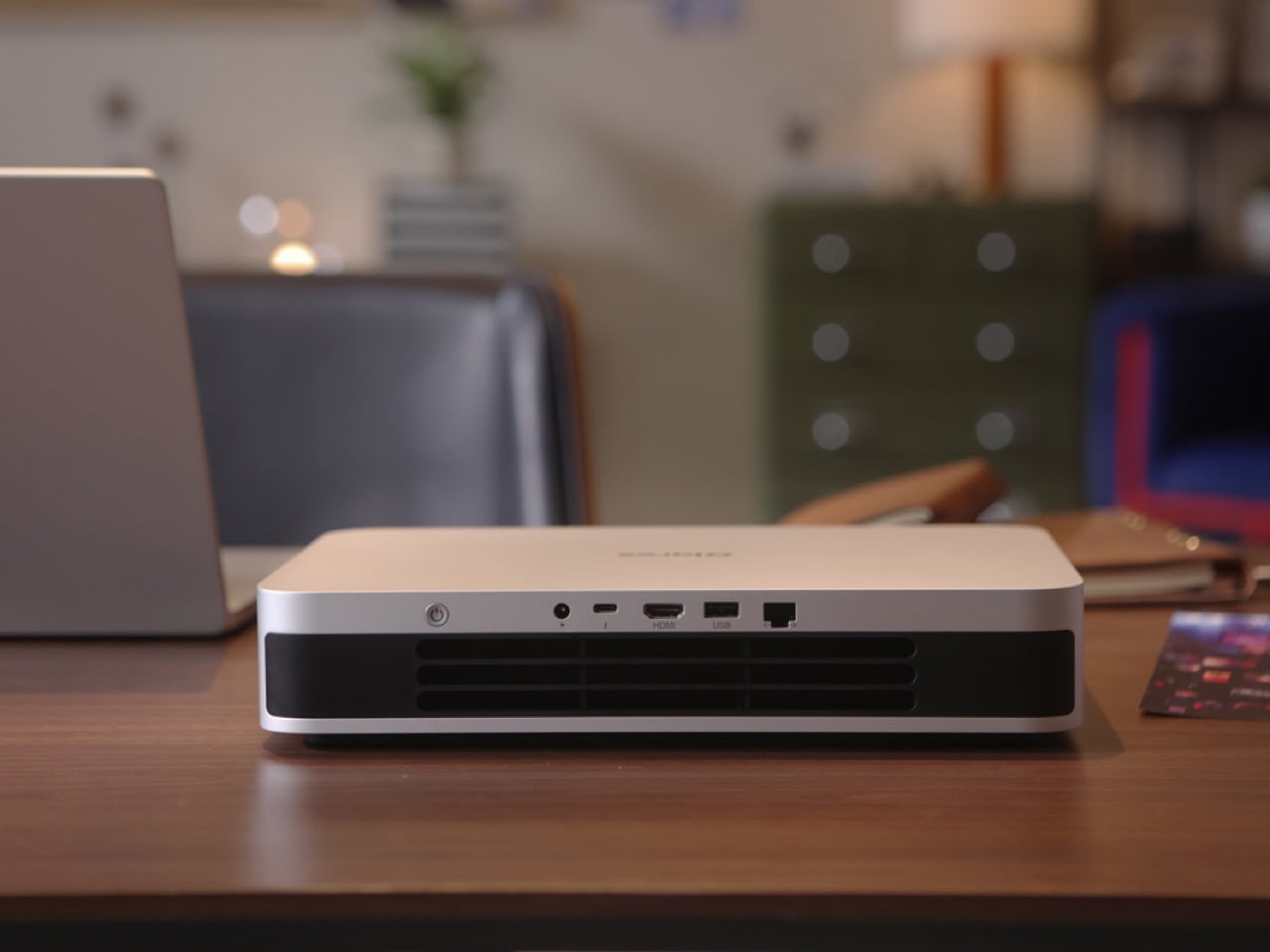
Ports include Thunderbolt 5, RJ45 Ethernet at 2.5 Gbps, USB A, and HDMI 2.1, plus Wi-Fi 7 and Bluetooth 5.4 for wireless connectivity. The industrial design leans heavily into the golden ratio aesthetic, with smooth curves and a matte aluminum finish that would not look out of place next to a high end monitor or a piece of studio equipment. It feels like someone took the guts of a $4,000 gaming laptop, stripped out the compromises of portability, and optimized everything for sustained performance and quietness. The result is a machine that can handle creative work, AI experimentation, gaming, and personal cloud duties without breaking a sweat or your eardrums.
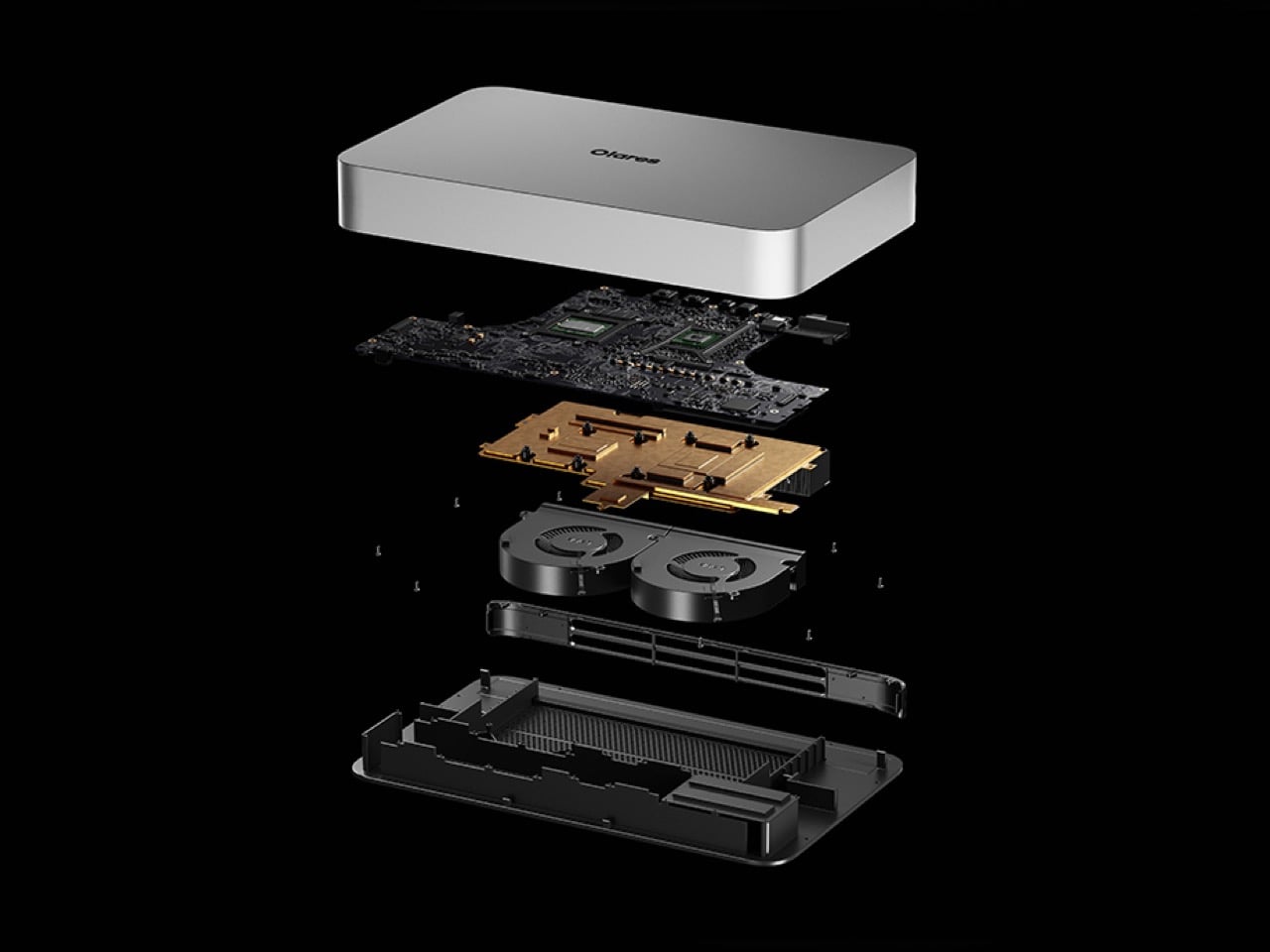
Olares One is available now on Kickstarter, with units expected to ship early next year. The base configuration with the RTX 5090 Mobile, Intel Core Ultra 9 275HX, 96 GB RAM, and 2 TB SSD is priced at a discounted $2,899 for early-bird backers (MSRP $3,999). That still is a substantial upfront cost, but when you compare it to the ongoing expense of cloud AI subscriptions and the privacy compromises that come with them, the math starts to make sense. You pay once, and the machine is yours. No throttling, no price hikes, no terms of service updates that quietly change what the company can do with your data. If you have been looking for a way to bring AI home without sacrificing capability or convenience, this is probably the most polished attempt at that idea so far.

Click Here to Buy Now: $2,899 $3,999 (28% off) Hurry! Only 15/320 units left!

The post This $2,899 Desktop AI Computer With RTX 5090M Lets You Cancel Every AI Subscription Forever first appeared on Yanko Design.

How Coca Cola’s Benny Lee Is Redefining Industrial Design as Storytelling, Not Just “Making Products”

Design Mindset steps into episode 16 with a clear purpose: to understand how industrial designers are navigating a world where tools, platforms, and expectations keep shifting under their feet. Yanko Design’s weekly podcast, Design Mindset, powered by KeyShot, is less about design celebrity and more about design thinking, unpacking how decisions get made, how stories are built around products, and how technology is reshaping the craft from the inside out. Each week, a new episode premieres with designers who are actively pushing workflows, visuals, and experiences into new territory.

This episode features Benny Lee, Senior Design Manager of Technology and Strategic Partnerships at The Coca-Cola Company, and a practitioner who moves comfortably between mass production, digital ecosystems, and even film props. Trained as an industrial designer, Benny started at Coke in a traditional ID role while also leading visualization, bringing advanced 3D rendering into a company that was still heavily reliant on Photoshop and 2D assets. He now sits at the intersection of heritage and innovation, helping a 140 year old brand adopt real time visualization, AI, and new storytelling platforms without losing what makes Coca-Cola recognizable everywhere.

Download your Free Trial of KeyShot Here

Storytelling as the real job of industrial design

Benny treats industrial design as a storytelling discipline first and a styling discipline second. His training spans sketching, 3D modeling, rendering, and prototyping, but he frames each of these as a narrative tool rather than a technical checkpoint. Sketches, CAD, and renders exist to show what a product does, how it behaves, and how it should feel to use, not just how it looks on a white background.

Inside a large organization, that narrative focus becomes practical very quickly. He puts it plainly in the conversation: “Storytelling as an ID, you know, is important because it’s all about bringing this visual alignment of the actual product when you’re trying to get a buy in to sell in.” The job is to reach a point where the design communicates its intent on its own, without the designer in the room. Call to action areas, material breaks, and even lighting choices in a render become part of that silent story, aligning stakeholders around what the product is supposed to be.

When rendering becomes a thinking tool, not just a final output

When Benny joined Coca-Cola, much of the visualization work sat in a 2D world. Concepts were often built through Photoshop and static compositions, heavily intertwined with graphic design. He talks about the shift he helped drive quite directly: “I find it really quite an honor and a pleasure that I was able to bring 3D renderings into the practice here.” That move to 3D was not just about realism, it was about adding depth to how ideas are explored and communicated.

The key change is that rendering is no longer treated as the last step before a presentation. Tools like KeyShot become part of the exploration loop. Benny uses quick CAD setups and fast render passes to test light, material, and even simple motion, and to storyboard how a product opens, glows, or reacts in context. He describes this as a way to “fail fast, iterate faster,” and he underlines that “we don’t always just use renderings to create pretty visuals and a lot of times we’re using it to build new experience.” Visualization turns into a thinking environment, especially valuable when physical labs and prototypes are slow or limited.

Respecting a 140 year old brand while pushing it into new arenas

Designing at Coca-Cola means working around a product that barely changes. The formula in the bottle remains constant, so innovation happens in the ecosystem that surrounds it. Packaging systems, retail touchpoints, digital layers, and immersive experiences become the canvas where design can move, while the core product stays familiar.

Benny describes his role with a custodian mindset. He imagines the brand as a skyscraper built over generations, and his work as adding “layers of bricks” rather than ripping out foundations. That perspective shows up in how Coca-Cola experiments with new platforms. The company explores metaverse activations, NFTs, experiential installations, and AI driven storytelling, not as disconnected stunts but as new ways to retell the same product story for new audiences. The strategy, as he frames it, is to adapt the ecosystem and technology “to retell the product’s story” while staying true to the brand’s core character.

Mass production versus one off film props

Benny’s portfolio stretches across lifestyle accessories, consumer electronics, and concept work for films like the Avengers. On the surface, the process for these domains begins similarly, with sketching, modeling, and rendering. The divergence appears when the work hits reality. In consumer products, industrial design is tied to mass production, with all the constraints of tooling, factory collaboration, golden samples, logistics, and long term durability.

Film work operates under a different set of pressures. Concept art might start in tools like ZBrush with exaggerated, dramatic forms that look incredible on screen but are not remotely manufacturable in a traditional sense. Benny’s responsibility in those situations is to respect the creative vision while making it buildable. Props do not have to scale to millions of units. They have to survive a shoot and read correctly on camera. If one breaks, it can be rebuilt. That freedom shifts what is possible in form and material, but the throughline is still storytelling, captured in a few seconds of screen time instead of years of daily use.

Adapting to an ever expanding toolset without losing your core

Throughout the episode, Benny returns to the pace of change in design tools. Skills that were once specialized are now table stakes. Students are graduating with exposure to UI and UX, electronics integration, and AI enhanced workflows. He notes that “you have to wear so many hats,” and points out that traditional industrial design is becoming a “rare breed” precisely because the field has branched into web, mobile, service, and emerging tech work.

His response is not to chase mastery of every new tool, but to understand what each category can do and to build teams around that understanding. He emphasizes hiring people who are better than you at specific domains and managing the mix of skills rather than guarding personal expertise. In parallel, he argues that adaptation is now the most important traditional trait. The designers who thrive will be the ones who stay resilient, keep a story first mindset, and move fluidly between CAD, KeyShot, AI, and whatever comes next, while still grounding their decisions in how things work in the real world.


Design Mindset, powered by KeyShot, returns every week with conversations like this, tracing the connection between how designers think, the tools they use, and the work they put into the world. Episode 6 with Reid Schlegel leaves you with a simple, practical challenge: see your ideas sooner, in more ways, and with less fear of being imperfect.

Download your Free Trial of KeyShot Here

The post How Coca Cola’s Benny Lee Is Redefining Industrial Design as Storytelling, Not Just “Making Products” first appeared on Yanko Design.