How to buy a GPU in 2026

One of the toughest parts of any new computer build or upgrade is finding the right video card. In a gaming PC, the GPU is easily the most important part, and you can limit your experience by going with the wrong model. The buying process can be frustrating, especially right now with memory shortages leading to higher prices. In this guide, we'll help you navigate the market and find the right GPU for your needs.

The first question to ask yourself is what kind of games do you want to play. Competitive shooters like Valorant, Overwatch and Marvel Rivals were designed to run on older hardware. As such, even entry-level GPUs like the GeForce RTX 5060 can push those games at 120 frames per second and above at 1080p (more on why that's important in a moment).

By contrast, if you want to play modern, single-player games with ray tracing and other graphical extras, you'll need a more powerful GPU. Just how much more powerful will depend on the resolution of your monitor.

A 1440p or QHD monitor has 78 percent more pixels than a 1080p screen, and a 4K display has more than twice as many pixels as a QHD panel. In short, running a game at 4K, especially at anything above 60 frames per second, is demanding, and most GPUs will need to use upscaling techniques like NVIDIA's Deep Learning Super Sampling (DLSS) and AMD's FidelityFX Super Resolution (FSR) to push new games at high refresh rates.

On the subject of resolution, it doesn't make sense to spend a lot of money on a 4K monitor only to pair it with an inexpensive GPU. That's a recipe for a bad experience. As you're shopping for a new video card, you should think about the resolution and frame rate you want to play your games. If you're in the market for both a GPU and display, be sure to check out our guide to the best gaming monitors.

If your budget allows, a good bet is to buy a midrange card that can comfortably render all but the most demanding games at 1440p and at least 144 frames per second. Put another way, you want a GPU that can saturate a monitor at its native resolution and refresh rate in as many games as possible. That will give you the smoothest possible experience in terms of motion clarity, and allow you to dabble in both competitive shooters and the latest single-player games as the mood strikes you.
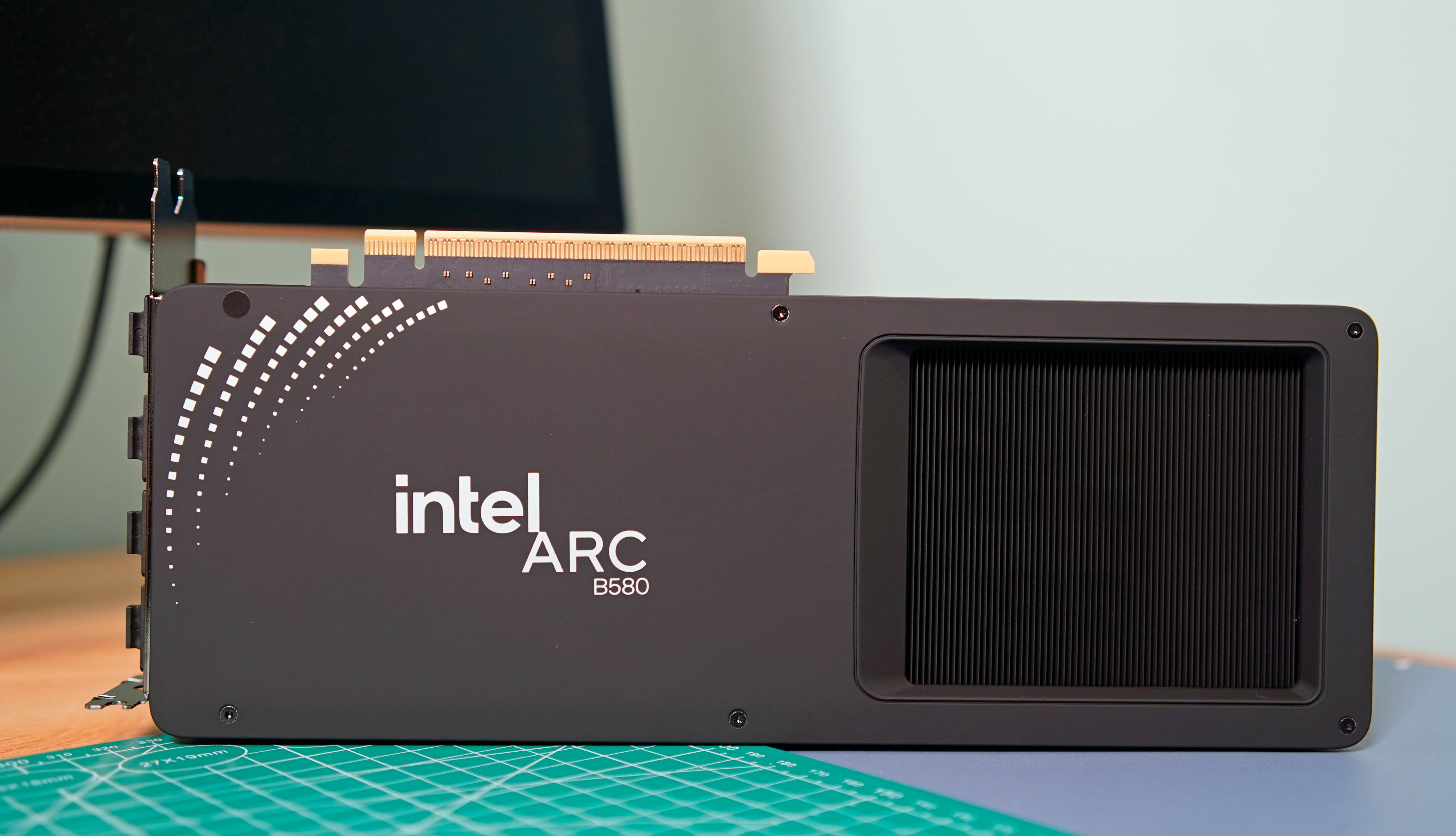
Intel Arc B580 label view
Photo by Devindra Hardawar/Engadget

One of the confusing aspects of the GPU industry are all the players involved. What you need to know is that there are three main players: AMD, Intel and NVIDIA. They design the cards you can buy, but delegate the manufacturing of them to so-called add-in board (AIB) partners like ASUS, XFX, Gigabyte and others.

As you can imagine, this creates some headaches. The most annoying of which is that AMD, Intel and NVIDIA will often set recommended prices for their graphic cards, only for their partners to sell their versions of those GPUs for more than the manufacturer's suggested retail price (MSRP). For example, NVIDIA's website lists the RTX 5070 with a starting price of $549. On Newegg, there are no new 5070s listed at that price. The only models anywhere close to $549 are refurbished and open box specials. If you want one that comes sealed, that will cost you at least $630.

As for what company you should buy your new GPU from, before 2025, NVIDIA was the undisputed king of the market. Specific GeForce cards may have not offered the best rasterization performance in their price range, but between their performance in games with ray tracing and the fact NVIDIA was ahead on features like DLSS, an RTX GPU was a safe bet.

However, with this year's RTX 50 series release (and excluding models like the RTX 5080 and 5090 where there's no competition), it's safe to say NVIDIA missed the mark this generation. If you're in the market for an entry- or mid-level GPU, AMD and Intel offer better value, with cards that come with enough VRAM for now and into the future. That said, there are still a few reasons you might consider an NVIDIA GPU, starting with ray tracing.

For decades, developers have used rasterization techniques to approximate how light behaves in the real world, and the results have been commendable. But if you know what to look for, it's easy to see where the illusion falls apart. For that reason, real-time ray tracing has been a goal of industry for years, and in 2018 it became a reality with NVIDIA's first RTX cards.

In some games, effects like ray-traced reflections and global illumination are transformational. Unfortunately, those features are expensive to run, often coming at a significant frame rate drop without upscaling. Since ray tracing was optional in many games before 2025, you could save money by buying an AMD GPU. For example, even if the RX 7800 XT was worse at ray tracing than the RTX 4070, the former was often cheaper to buy, had more onboard VRAM and offered as good or better rasterization performance in many games.

However, you can't ignore ray tracing performance anymore. We're starting to see releases like Doom: The Dark Ages where the tech is an integral part of a game's rendering pipeline, and more are likely to follow in the future. Thankfully, AMD's newest cards are much better in that regard, though you'll still get an edge running an NVIDIA model. For that reason, if ray tracing is important to you, NVIDIA cards are still the way to go.

If you're new to the world of PC gaming, it can be tricky to wrap your head around refresh rates. In short, the higher the refresh rate of a monitor, the more times it can update the image it displays on screen every second, thereby producing a smoother moving picture.

For example, moving elements on a monitor with a 240Hz refresh rate will look better than on one with a 120Hz refresh rate. However, that's dependent on your GPU being able to consistently render a game at the appropriate frame rates. In the case of a 120Hz monitor, you want a GPU with enough headroom to drive most games at 120 fps. Realistically, most video cards won't be able to achieve that in every game, but it's a good baseline to aim for when shopping for a new GPU.

Since the release of NVIDIA's RTX 40-series GPU, the company has offered a feature called frame generation. As the name suggests, it allows NVIDIA's latest video cards to generate an additional frame for every frame they render normally. With the 50-series, NVIDIA has since begun offering multi-frame generation, which gives those GPUs the ability to generate up to three additional frames for every rendered frame. AMD has its own take on the tech, as does Intel, though NVIDIA's offering is considered superior to both due to how it handles frame pacing.

Frame generation is nice to have, but it's not the silver bullet it might seem. Enabling it will increase system latency, reducing how responsive your games feel. Somewhat unintuitively, high-end GPUs also benefit more from the tech than their entry-level counterparts since they can naturally render more frames. For that reason, it's best to think of frame generation as a way to get the most out of a high refresh rate display.

I've mentioned DLSS a few times already. Alongside FSR and Intel XeSS, DLSS is an example of what's known as an image reconstruction technology. More and more, native rendering is going out of fashion in game design. With ray tracing and other modern effects enabled, even the most powerful GPUs can struggle to render a game at 1440p or 4K and a playable framerate. That’s why many developers will turn to DLSS, FSR or XeSS to eke out additional performance by upscaling a lower resolution image to QHD or UHD.

Upscaling in games is nothing new. For example, the PS4 Pro used a checkerboard technique to output games in 4K. What’s different now is how modern GPUs go about it. With DLSS, NVIDIA pioneered an approach that uses machine learning to recreate an image at a higher resolution, and in the process, addressed some of the pitfalls of past upscaling methods. If you're sensitive to these sorts of things, there's still blur and shimmer with DLSS, FSR and XeSS, but it's much less pronounced and can lead to significant performance gains.

To DLSS, NVIDIA later added single and multi-frame generation. DLSS is only available on NVIDIA cards, and following the recent release of DLSS 4.5, widely considered to offer the best image quality. That's another reason why you might choose an NVIDIA card over one of its competitors.

However, if you decide to go with an AMD GPU, don't feel like you're missing out. The company recently released FSR 4. While it's not quite on par with DLSS 4 and 4.5 in terms of support and image quality, it's a major leap over FSR 3 and FSR 2.

While on the subject of DLSS, I'll also mention NVIDIA Reflex. It's a latency-reducing technology NVIDIA introduced in 2020. AMD has its own version called Radeon Anti-Lag, but here again Team Green has a slight edge. If you're serious about competitive games, Reflex can significantly reduce input lag, which will make it easier to nail your shots in Counter-Strike 2, Valorant and other shooters.

Previously, one of the reasons to pick an NVIDIA GPU over the competition was the company's solid track record of driver support. With one of the company's video cards, you were less likely to run into stability issues and games failing to launch. At the start of 2025, NVIDIA's drivers were abysmal, but the company has since corrected course.

As you're comparing different GPUs, especially those in the same tier, pay close attention to the amount of VRAM they offer. Many modern games will eat up as much VRAM as a GPU can offer, and if your card has a low amount, such as 8GB, you're likely to run into a performance bottleneck.

If your budget allows for it, always go for the model with more VRAM. Consider, for instance, the difference between the $379 RTX 5060 Ti 8GB and $429 RTX 5060 Ti 16GB. Spending an extra $50 is going to be a lot for some people, but it's the difference between a card that is only adequate for many recent releases and one that will last you for a few years. In many cases, more VRAM is better.

A slight caveat to this is when comparing models that have different memory bandwidths. A GPU that can access more of its memory faster can outperform one with more memory, even if it has less of it outright. Here, you'll want to read reviews of the models you're comparing to see how they perform in different games.

Modern GPUs are big. Most new cards will take up at least two PCI slots on the back of your motherboard. They can also vary dramatically in length, depending on the number of fans the AIB has added to cool the PCB. To be safe, be sure to check the length of the card you want to buy against the maximum clearance listed by your case manufacturer. If you have a radiator at the front of your case, you will also need to factor the size of that in your measurements. The last thing you want is to buy a card that doesn't fit in your case.

Lastly, be sure to check the recommended power supply for the card you want. As a rule of thumb, unless you know what you're doing, it's best to just stick with the manufacturer's recommendation. For instance, NVIDIA suggests pairing the RTX 5070 Ti with a 750 watt PSU. So if you're currently running a 650 watt unit, you'll need to factor in the price of a PSU upgrade with your new GPU.
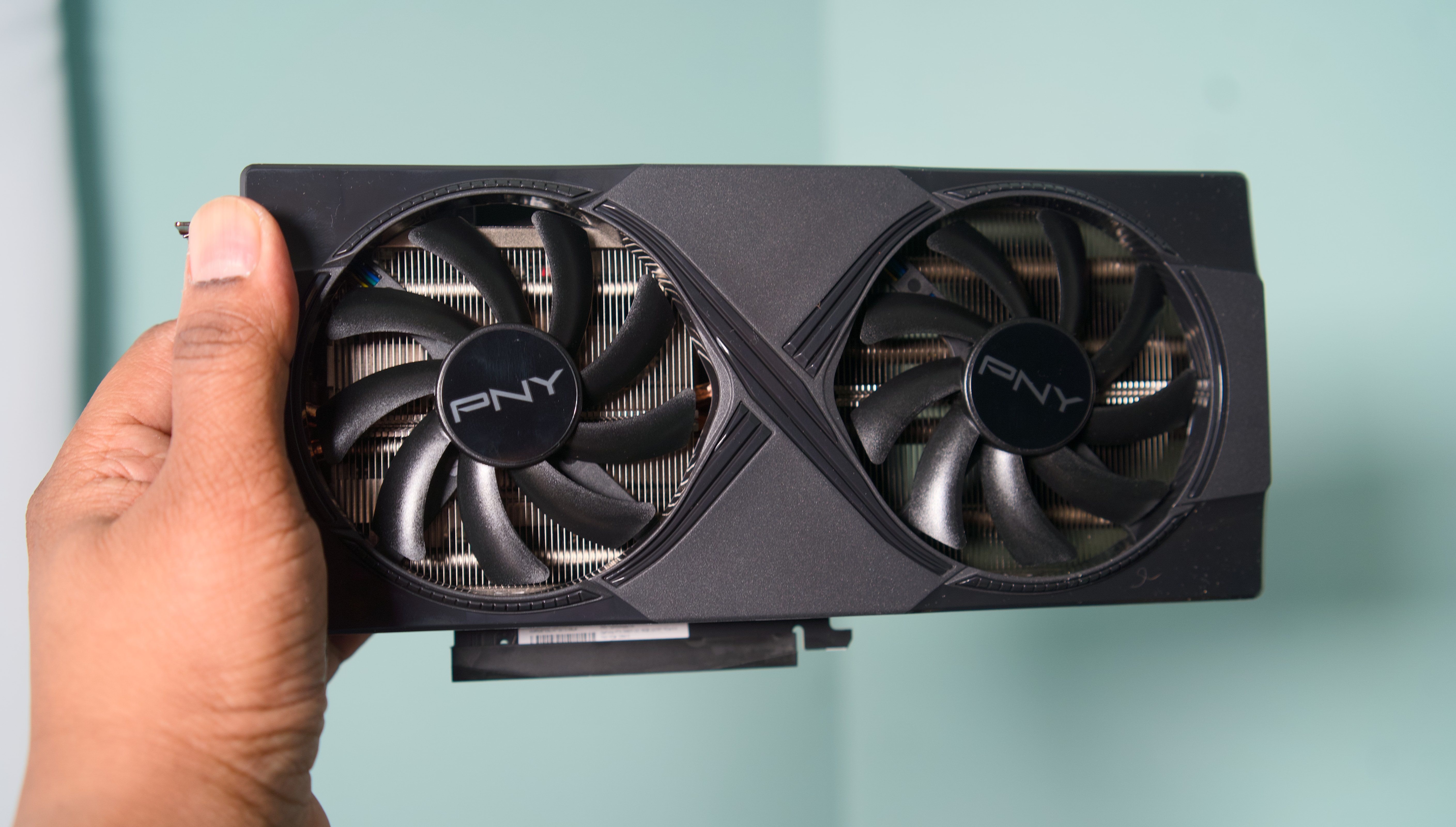
NVIDIA RTX 5060 Ti
NVIDIA RTX 5060 Ti
Devindra Hardawar for Engadget

It depends. If you can find a deal on an old RTX 40 series GPU, then yes. NVIDIA's RTX 50 series don't offer greatly improved performance over their predecessors, and with most models selling for more than their suggested retail price, it's not the best time to buy a new NVIDIA card.

That said, I suspect finding a good deal on a used GPU will be difficult. Most people will know the value of what they have, and considering the current market, will probably try to get as much as they can for their old card.

You may find better deals on older AMD and Intel GPUs, but I think you're better off spending more now on a new model from one of those companies since the generational gains offered by their latest cards are much more impressive. Simply put, the 9070 XT and B580 are two of the best cards you can buy right now.

Anything older than a card from NVIDIA's 40 series or AMD's RX 6000 family is not worth considering. Unless your budget is extremely tight or you mostly play older games, you're much better off spending more to buy a new card that will last you longer.

If you've read up to this point, you're probably wondering if it's even worth buying a GPU right now. The answer is (unsurprisingly) complicated. There are a handful of great cards like the Radeon RX 9060 XT and 9070 that are absolutely worth it. The problem is finding any GPU at a price approaching those set by AMD, Intel or NVIDIA.

The AI boom, and in particular actions by OpenAI, have led to memory shortages. In turn, those shortages have caused the price of consumer GPUs, SSDs and RAM kits to skyrocket in recent months. As of our latest update to this guide, some models like the GeForce RTX 5070 Ti are selling for hundreds of dollars above MSPR.

As such, if you own a relatively recent GPU, you're probably best off trying to hold onto your current card until things settle down. But if your GPU isn't cutting it anymore, you face a difficult decision: overpay now, or wait and potentially pay even more later.

To make that decision easier, I've been maintaining a separate guide that lists a selection of GPU models you can buy close to MSPR. My goal is to update that article at least once per month, so be sure to check often.

Entry-level (1080p)

As we mentioned above, if you're only aiming to play basic competitive shooters like Valorant and Overwatch 2 in 1080p, an entry-level GPU may be all you need. While 1080p isn't an ideal resolution when it comes to sharpness, many gamers prefer it since it's easier to reach higher framerates. And it also helps that 1080p gaming monitors, like the AOC 24G15N 24-inch we recommend, tend to offer speedy refresh rates for between $100 and $200. When you're zipping through matches, you likely won't have time to take a breath and appreciate the detail from higher resolutions.

Here are our recommendations for entry-level video cards:

  • AMD Radeon RX 9060 XT 8GB: Surprisingly enough, you can actually find this AMD GPU for $300. While you'll have to live with 8GB of RAM, that's more than enough for 1080p gaming, and it also has the benefit of DLSS 4 upscaling.

  • AMD Radeon RX 7600: While it's a last-gen card, the RX 7600 is still powerful enough to handle basic shooters.

While entry-level cards can dabble with 1440p gaming, it's worth stepping up to something a bit more powerful if you actually want to achieve higher refresh rates. For most gamers, 1440p is the best balance between sharpness and high frame rates. It looks noticeably better than 1080p, and doesn't require the horsepower overhead of 4K. (And there's a good chance you won't really see a visual difference with the jump to 4K.)

Here are our recommendations for midrange GPUs:

  • NVIDIA RTX 5060 Ti: Forget the disappointing RTX 5070, the 5060 Ti delivers excellent 1080p and 1440p performance. And best of all, you can still find it under $500. (Read our NVIDIA RTX 5060 Ti review.)

  • AMD Radeon RX 9060 XT 16GB: A step up from the 8GB model we recommend above. The 16GB 9060 XT offers excellent performance across many of the latest games, and is less expensive than the 5060 Ti.

  • AMD Radeon RX 9070: AMD surprised us all with the Radeon RX 9070 and 9070 XT, two midrange cards that offered similar power to and more VRAM than NVIDIA's more expensive cards. While you won't see the RX 9070 for its $550 launch price today, you can still snag one for a slight premium at $650. (Check out our AMD Radeon RX 9070 and 9070 XT review.)

If you want the most of what modern PC games have to offer, including 4K and all of the benefits of ray tracing, then be ready to spend big bucks on a high-end GPU. If you're going this route, though, be sure you're also gaming on a high-end monitor that befits these powerful GPUs.

Here are our recommendations for premium GPUs:

  • NVIDIA RTX 5070 Ti: The RTX 5070 Ti surprised me with excellent 4K gaming performance for a launch price that was well below the RTX 5080. It's the best overall NVIDIA card if you want to play in 4K at 120Hz or beyond, but it's also the hardest to find at MSRP. (Check out our NVIDIA RTX 5070 Ti review.)

  • AMD Radeon RX 9070 XT: I already mentioned the RX 9070 XT. With shortages of the 5070 Ti, it's the best GPU you can buy now without paying a ridiculous premium. (Check out our AMD Radeon RX 9070 and 9070 XT review.)

  • NVIDIA RTX 5080: If the RTX 5070 Ti isn't enough for you, the RTX 5080's additional power and 16GB of VRAM should suit your fancy. Just be prepared to pay around $1,500 for it, a 50 percent jump from its $999 launch price.

This article originally appeared on Engadget at https://www.engadget.com/gaming/pc/how-to-buy-a-gpu-160100017.html?src=rss

Create Seamless Short Films with Consistent Characters & Scenes from One AI Prompt

Create Seamless Short Films with Consistent Characters & Scenes from One AI Prompt

What if you could craft a fully realized film, complete with consistent characters, immersive scenes, and a compelling narrative, all from a single prompt? It might sound like science fiction, but CyberJungle takes a closer look at how advancements in AI are transforming this bold idea into a practical reality. Imagine creating a cinematic experience […]

The post Create Seamless Short Films with Consistent Characters & Scenes from One AI Prompt appeared first on Geeky Gadgets.

Posted in Uncategorized

Google Workspace 2026 Productivity Tips, AI Tools & Improved Planning Workflows

Google Workspace 2026 Productivity Tips, AI Tools & Improved Planning Workflows

Have you ever felt like your productivity hits a wall, even with all the features Google Workspace offers? You’re not alone. Below Tom from ICOR walks through how the platform, while powerful, still leaves users struggling to manage complex workflows effectively. Despite its seamless integration of apps like Gmail, Google Docs, and Calendar, there’s a […]

The post Google Workspace 2026 Productivity Tips, AI Tools & Improved Planning Workflows appeared first on Geeky Gadgets.

Posted in Uncategorized

Apple Watch Updates: New Features and AirTag 2

Apple Watch Updates: New Features and AirTag 2

Apple has rolled out a series of updates and features for the Apple Watch, emphasizing enhanced functionality, improved tracking capabilities, and the introduction of new accessories. These updates, including better AirTag integration, watchOS refinements, and second-generation AirTag advancements, aim to elevate your experience while preserving the device’s hallmark reliability and performance. Whether you’re a long-time […]

The post Apple Watch Updates: New Features and AirTag 2 appeared first on Geeky Gadgets.

Posted in Uncategorized

Revolutionize Your Daily Routine with These 15 iPhone Shortcuts

Revolutionize Your Daily Routine with These 15 iPhone Shortcuts

Are you searching for effective ways to save time and streamline your daily routines? These 15 shortcuts from Stephen Robles for Apple devices are designed to enhance productivity and simplify tasks. By using APIs, Apple Intelligence, and user customization, these tools provide practical solutions for a variety of needs, including stock alerts, article summarization, concert […]

The post Revolutionize Your Daily Routine with These 15 iPhone Shortcuts appeared first on Geeky Gadgets.

Posted in Uncategorized

Samsung Galaxy Watch Ultra 2: Tips & Tricks to Master Your Watch

Samsung Galaxy Watch Ultra 2: Tips & Tricks to Master Your Watch

The Galaxy Watch Ultra 2 represents a significant step forward in the smartwatch market, combining personalization, practicality, and advanced technology to cater to a wide range of users. Designed with versatility in mind, this wearable device offers tools that enhance convenience, improve safety, and support fitness goals. Whether you’re a tech enthusiast, a fitness devotee, […]

The post Samsung Galaxy Watch Ultra 2: Tips & Tricks to Master Your Watch appeared first on Geeky Gadgets.

Posted in Uncategorized

AMD suggests the next-gen Xbox will arrive in 2027

Microsoft could launch the next-generation Xbox console sometime in 2027, AMD CEO Lisa Su has revealed during the semiconductor company’s latest earnings call. Valve is on track to start shipping its AMD-powered Steam Machine early this year, she said, while Microsoft’s development of an Xbox with a semi-custom SOC from AMD is “progressing well to support a launch in 2027.” While it doesn’t necessarily mean Microsoft is releasing a new Xbox console next year, that seems to be the company’s current goal.

Xbox president Sarah Bond announced Microsoft’s multi-year partnership with AMD for its consoles in mid-2025. Based on Bond’s statement back then, Microsoft is embracing the use of artificial intelligence and machine learning in future Xbox games. She also said that the companies are going to “co-engineer silicon” across devices, “in your living room and in your hands,” implying the development of future handheld consoles.

Leaked documents from the FTC vs. Microsoft court battle revealed in the past that Microsoft was planning to make the next Xbox a “hybrid game platform,” which combines local hardware and cloud computing. The documents also said that Microsoft was planning to release the next Xbox in 2028. Whether the company has chosen to launch the new Xbox early remains to be seen, but it is possible when the Xbox X and S were released in 2020, and they haven’t sold as well as the Xbox One.

This article originally appeared on Engadget at https://www.engadget.com/gaming/xbox/amd-suggests-the-next-gen-xbox-will-arrive-in-2027-052707822.html?src=rss

Forget bulky Leathermans, this minimalist Pockitrod multitool pen is built for modern EDC

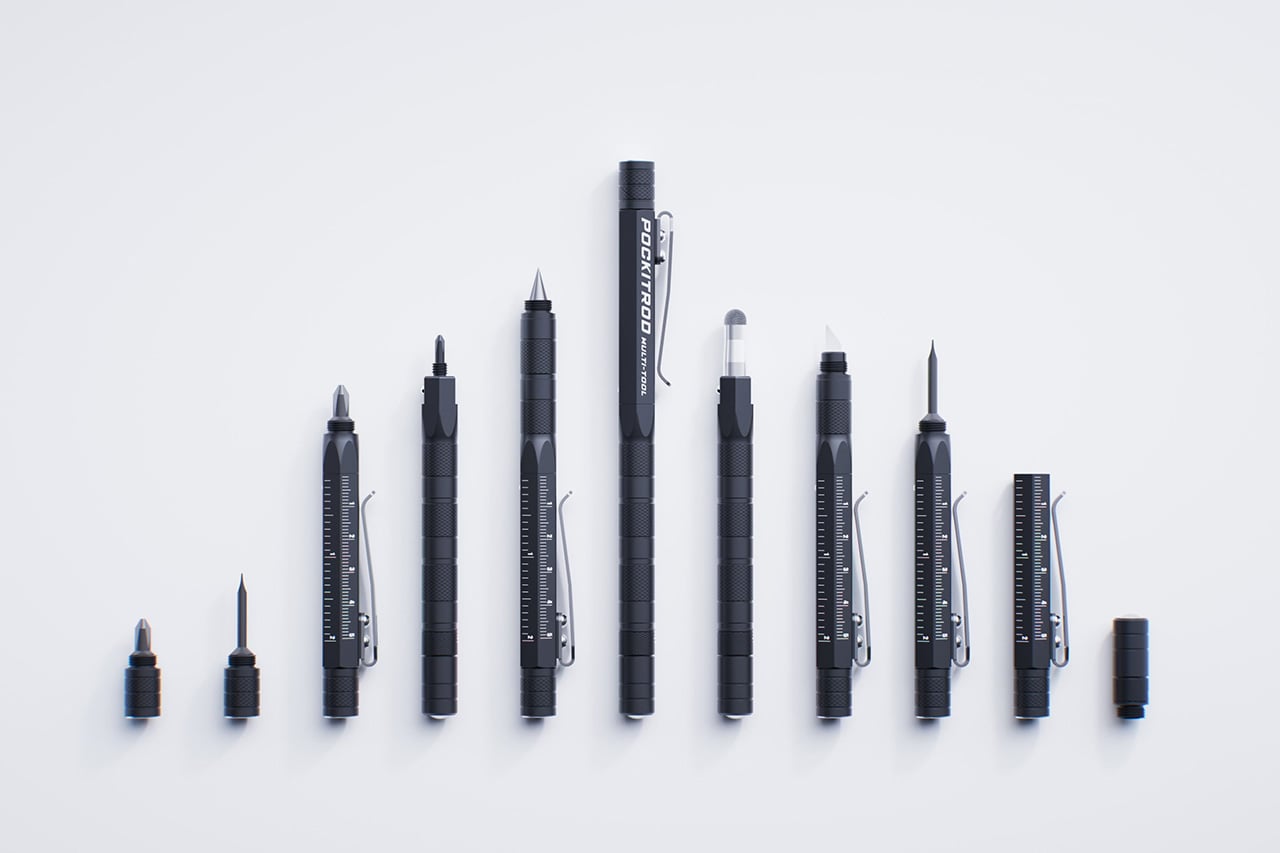
The Pockitrod multitool is a compelling take on this idea, using its pen-like form as the foundation for a deeply modular system. Its main body, machined from 6061-T4 aluminum, has a hex shape for better grip when used as a driver, a subtle but practical detail. The tool is organized around a central driver assembly housed within the handle, while additional modules such as , a box opener with interchangeable 20CV steel tips, an inkless writing implement and a magnetic-base LED flashlight can be threaded on as extensions. In doing so, it respects the classic pen form factor while fundamentally expanding its purpose. Subtle etched measurement markings along the body function as a built-in ruler, with a zero-reference aligned to the edge for more practical, real-world measuring.

What really makes this system work is the execution of the modular connections. Each component threads together, secured by precision-fitted O-rings that provide a smooth, friction-based fit. This is a critical detail because it prevents the tool from feeling like a wobbly collection of parts in use, maintaining a cohesive and solid feel in hand.. The anodized finish on the aluminum body adds wear and corrosion resistance, so it should hold up to being tossed in a pocket with keys. At 170mm long and weighing just 50 grams, it maintains that pen-like portability while feeling substantial enough for actual work.

Designer: Clinton Brassington (Converge Multi-Tools)

Click Here to Buy Now: $99 $133 (26% off). Hurry, only 107/120 left!

What really makes this system work is the execution of the modular connections. Each component threads together, secured by precision-fitted O-rings that provide a smooth, friction-based fit. This is a critical detail because it prevents the tool from feeling like a wobbly collection of parts in use, maintaining a cohesive and solid feel in hand.. The anodized finish on the aluminum body adds wear and corrosion resistance, so it should hold up to being tossed in a pocket with keys. At 170mm long and weighing just 50 grams, it maintains that pen-like portability while feeling substantial enough for actual work.

At its core, the Pockitrod is built around a solid driver system, with an integrated stylus and a concealed precision screwdriver tip for working with small fasteners. The main 1/4″ hex driver features a spring-loaded locking mechanism to keep the bit holder firmly engaged with the handle, eliminating the play that plagues many compact multitools, and comes fitted with a 6150 CRV PH2 bit. The Pockitrod also includes a mini 1/4″ driver for reaching into tight spaces. Both drivers accept standard ¼” bits, with the mini driver housing an internal spare, a long-shank SL3 bit for accessing deep recessed or hard-to-reach fasteners. It’s a thoughtful detail for anyone who frequently switches between tasks without wanting to carry extra loose bits.

Beyond the drivers, the tool selection is pure EDC perfection. The inkless writing tip, made from a graphite compound, is a practical choice that will never dry out or leak, and it’s paired with a conductive fiber stylus tip for touchscreen use. For cutting tasks, the box opener module uses replaceable tips made from 20CV steel, a high-end choice known for excellent edge retention. Converge offers several tip styles, including a bladeless version for safety, a standard utility tip, and a scraper, which adds a layer of compliance for different workplace regulations.

The utility is further expanded by a detachable LED flashlight module. It’s a compact LED light intended for close-range task lighting, ideal for quick inspections or low-light work. The clever part is its magnetic base, which allows it to be used independently as a small work light. It can also be mounted to the main tool’s pocket clip for a 90-degree beam or attached to the magnetic tip and clipped to a hat brim for a makeshift headlamp. This kind of multi-use design shows a deep understanding of how people actually use their tools in the field.

Speaking of magnetism, the N52 grade magnetic tip is surprisingly strong, with a lift capacity of up to 1kg under ideal conditions. That’s more than enough to retrieve a dropped set of keys or hold a handful of screws at the ready while you work. The whole system is designed to be reconfigured on the fly. Modules can be rearranged, swapped, or left behind depending on the task or environment, with shared compatibility across the main tool and the included Keychain Companion. This companion is a compact, threaded extension of the system, featuring a quick-disconnect loop and allowing select components to be carried, combined, or repurposed independently for more minimalist setups.

This entire package comes from Converge Multi-Tools, an outfit based in Australia.Launch pricing is expected to start around $99 USD for a complete system, which includes the main tool, the keychain companion, and a set of alternative tips. Worldwide shipping is included, starting around June 2026.

Click Here to Buy Now: $99 $133 (26% off). Hurry, only a few left!

The post Forget bulky Leathermans, this minimalist Pockitrod multitool pen is built for modern EDC first appeared on Yanko Design.

Bring The Touch Bar Back… And Maybe Put An Intelligent Siri Or Gemini On It

Sounds radical, doesn’t it? The Touch Bar was such a waste of space on the MacBook Pro when it was first introduced exactly a decade ago in 2016. It shipped with a lot of potential but barely any real-world use, and Apple even considered swapping it out for a slot that housed the Apple Pencil back in 2021. While that feature never really came to pass, something else happened in 2021 that blew everyone’s minds – OpenAI’s Dall-E. For a lot of people, this was the first time you could just ‘tell’ an AI to make an image for you and it would. It was the birth of generative AI, and only a year later, OpenAI would break the internet with ChatGPT.

This is also around the time that Apple quietly killed the Touch Bar, but here’s my opinion… bring it back. Maybe not on the MacBook, but the Touch Bar definitely deserves a place on any independent wireless keyboard. With AI LLMs, progressive web apps, widgets, and vibe-coding going mainstream, a Touch Bar on a keyboard finally makes sense. It’s a place for your AI agent to live, alongside tasks, shortcuts, toolbars, and widgets. Apple pioneered the Touch Bar, but one could argue they were way too early to realize its potential. Now, a concept keyboard by Eslam Mohammed and Ahmed Yassen shows how the Touch Bar should be resurrected.

Designers: Eslam Mohammed & Ahmed Yassen

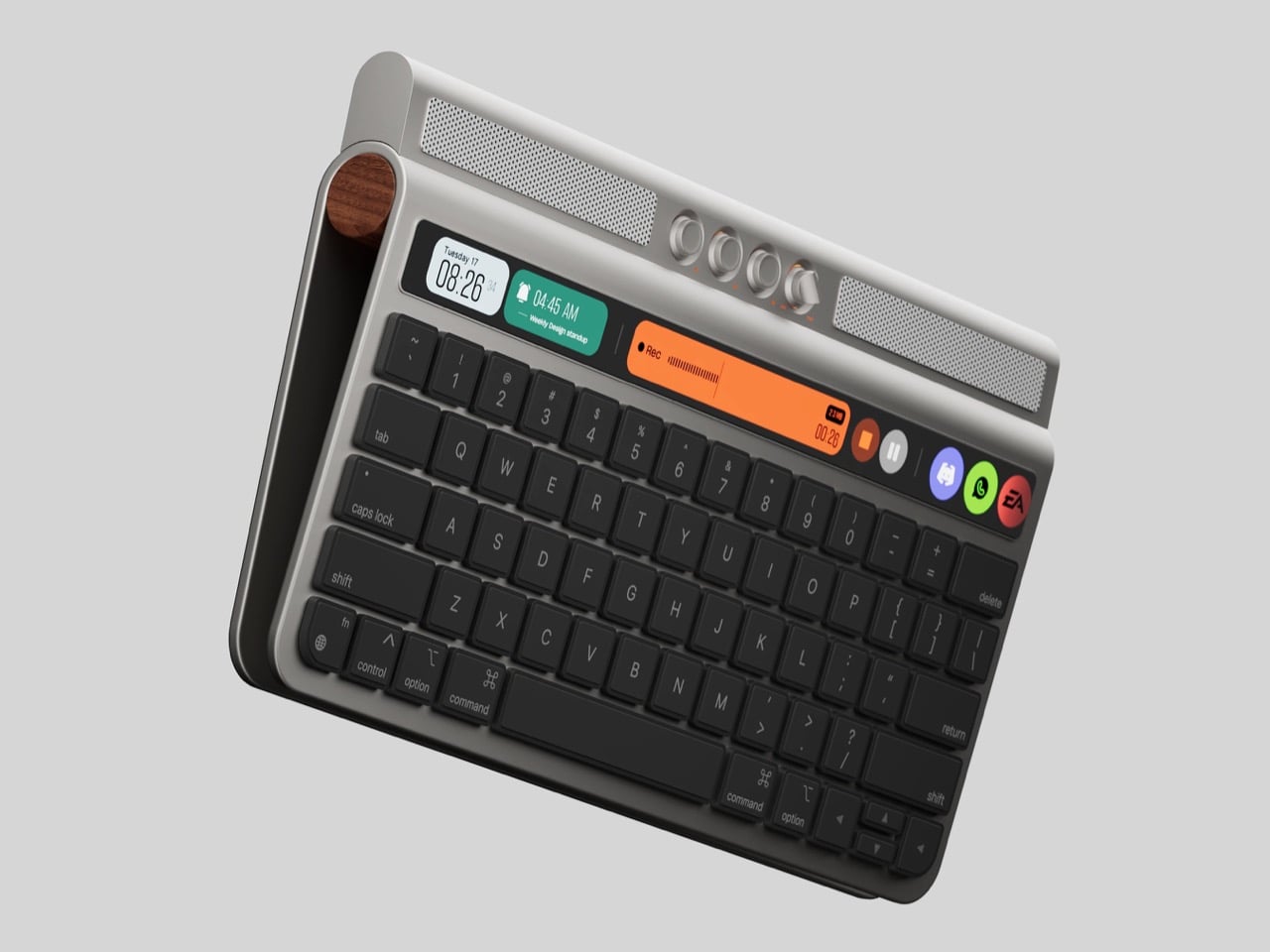
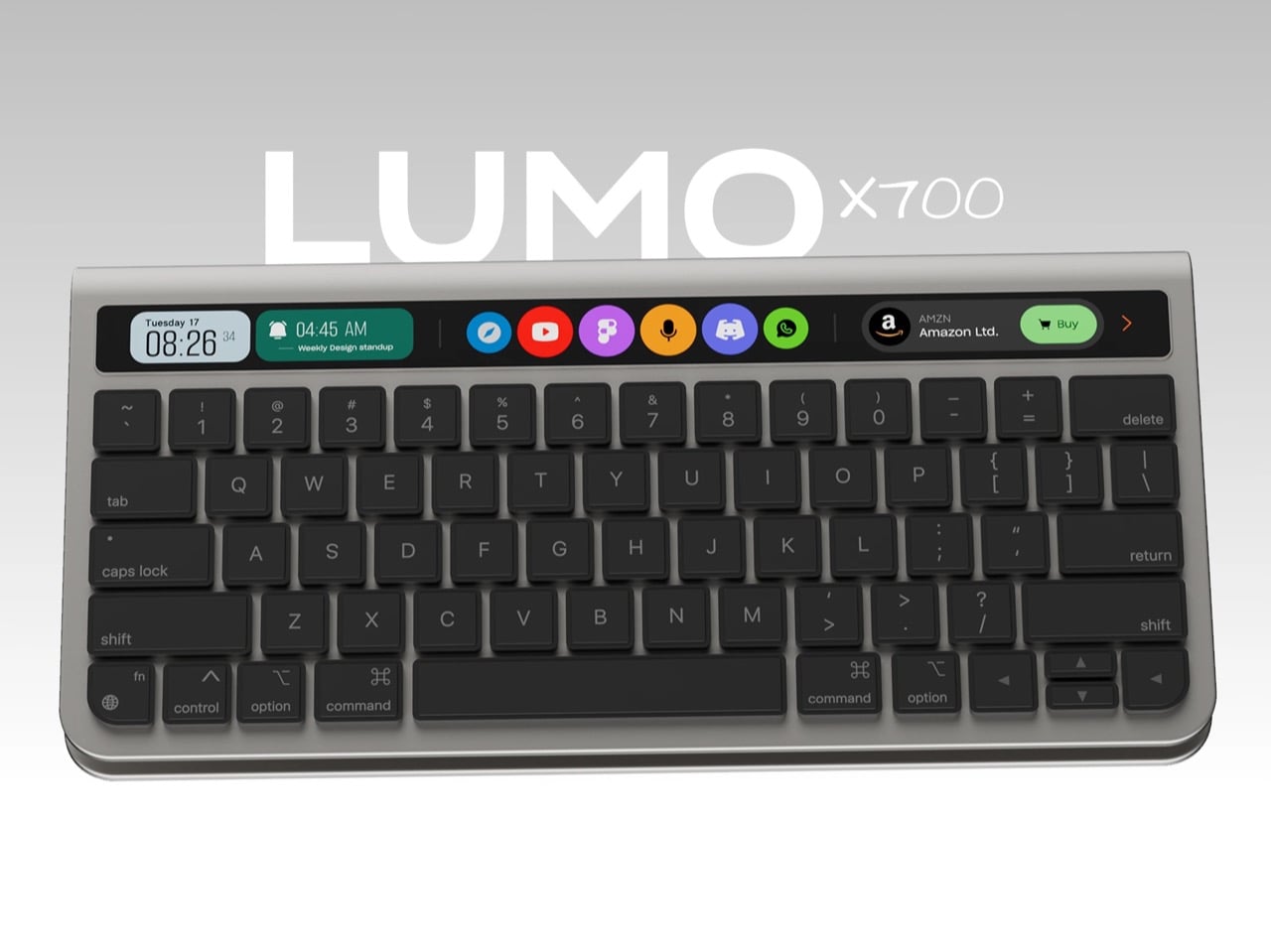
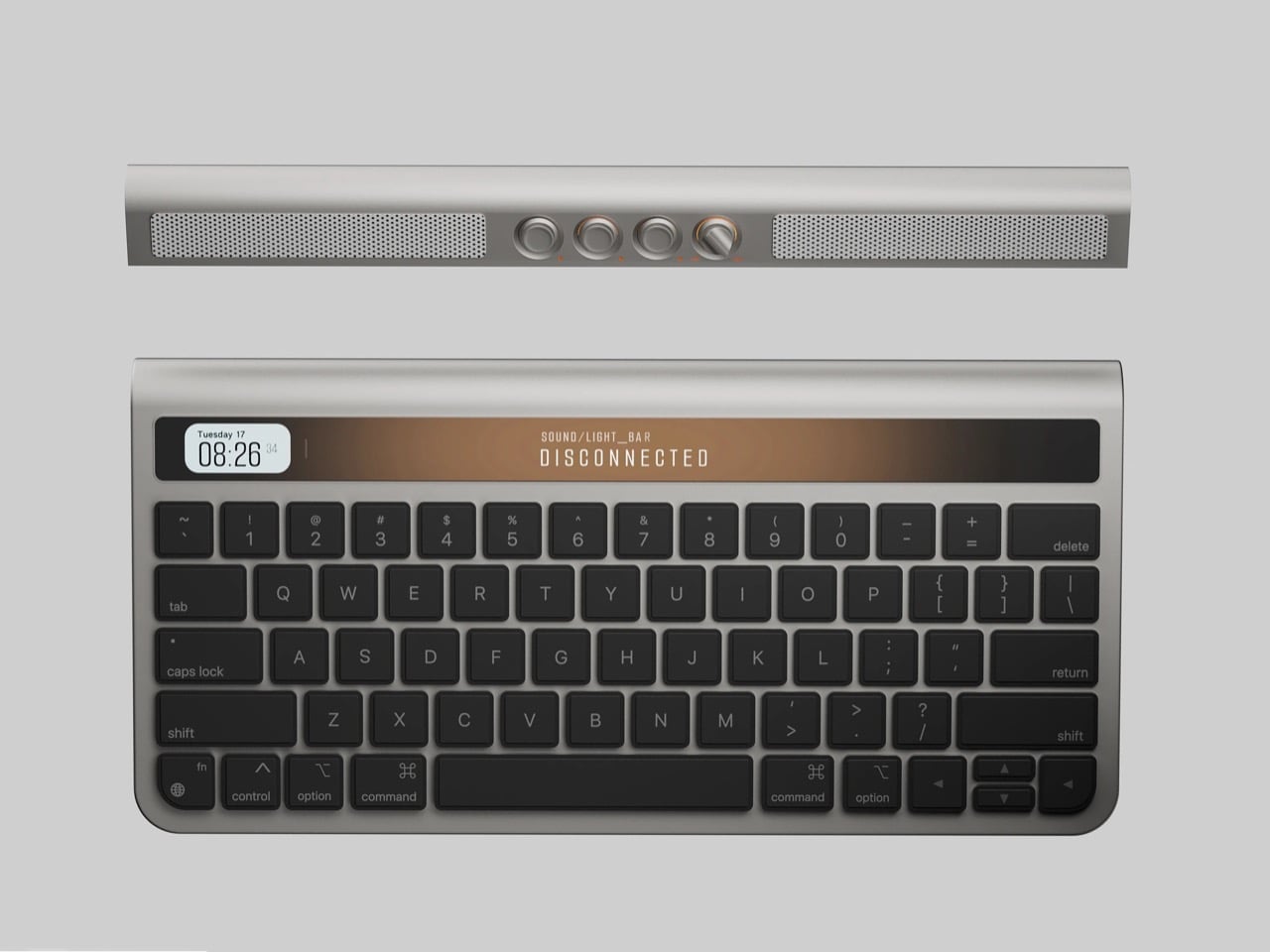
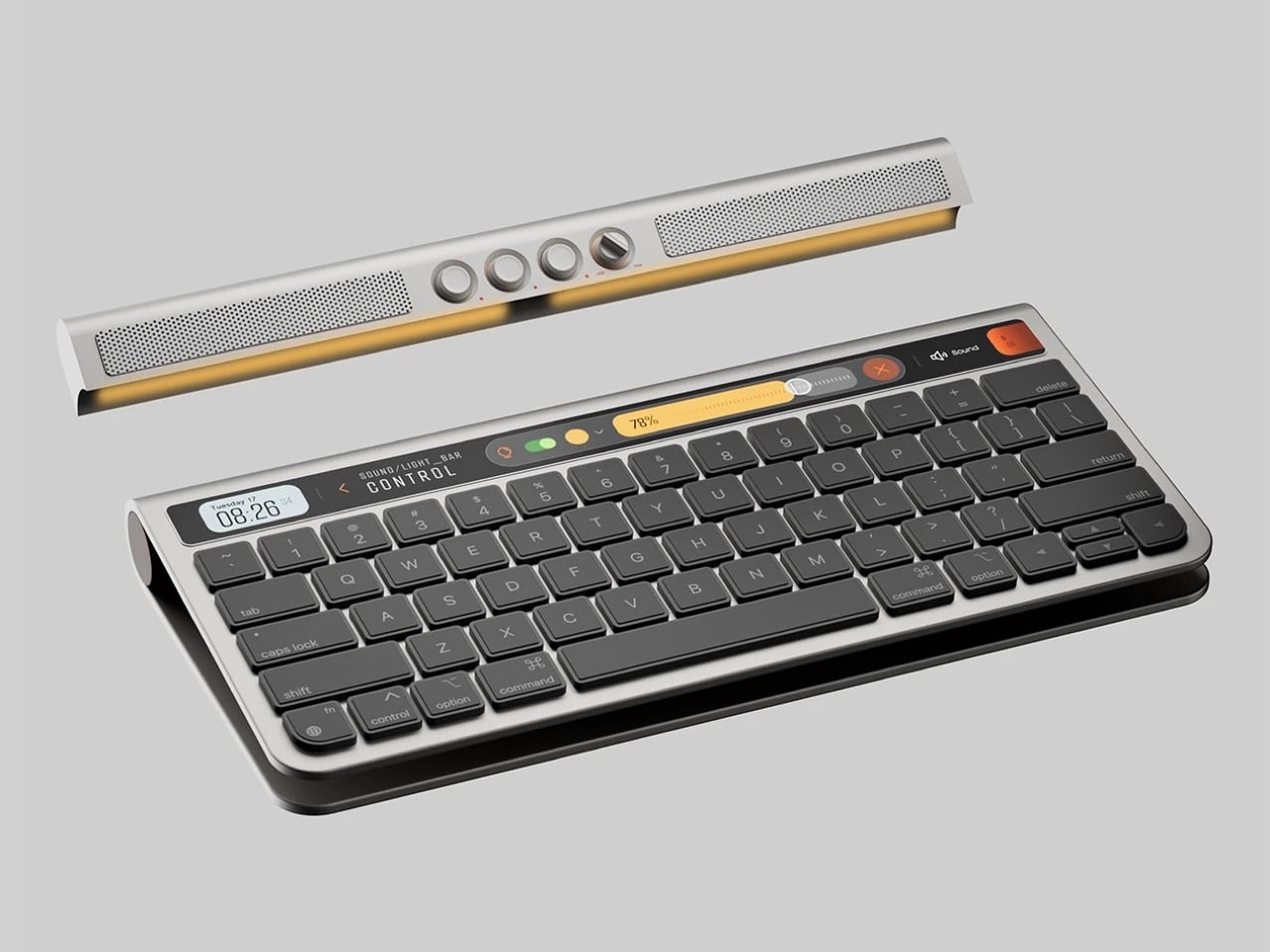
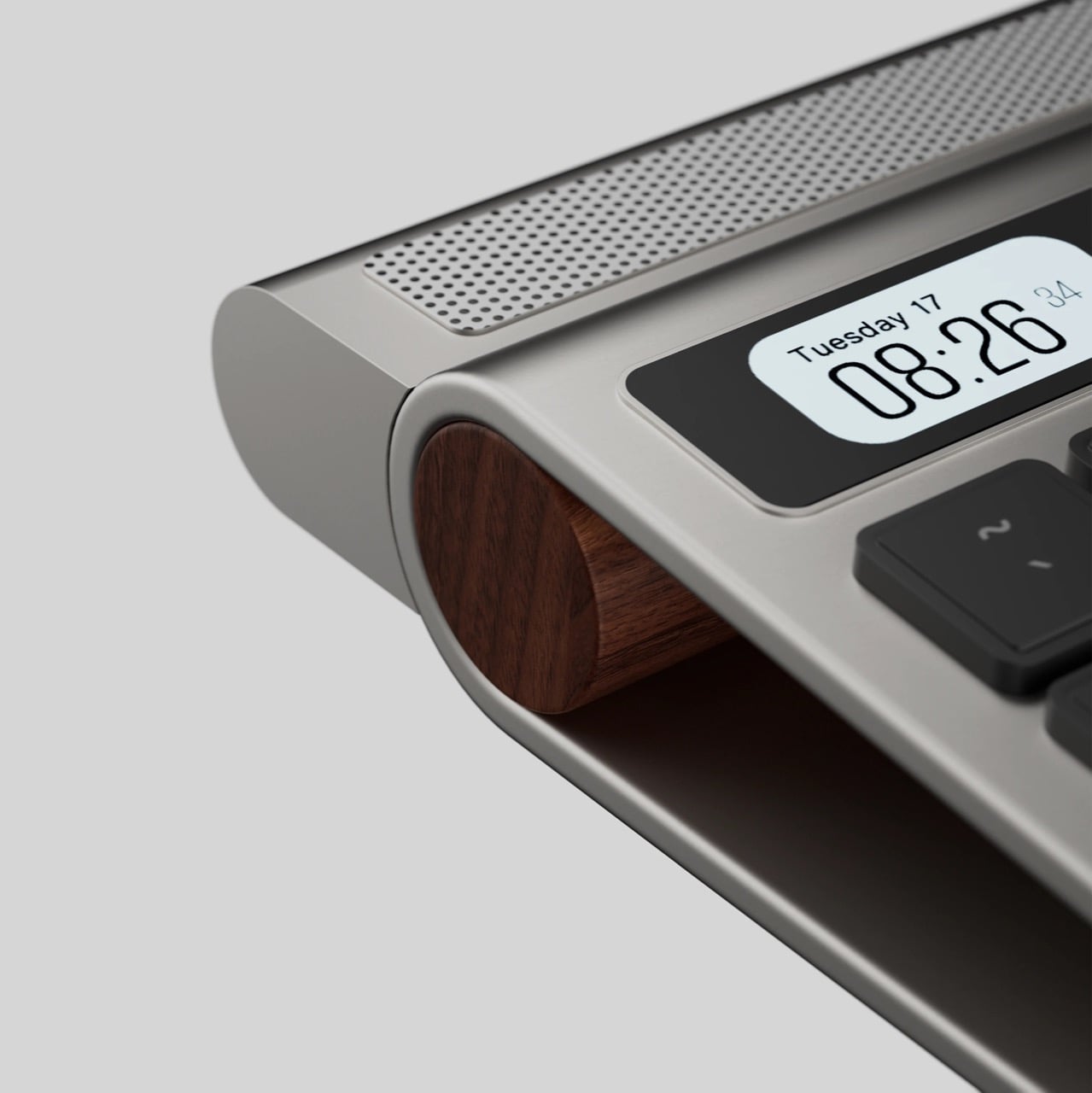
Mohammed and Yassen’s LUMO x700 keyboard comes with a few tricks up its sleeve. Sure, it sports a sleek, metal-forward Magic Keyboard-inspired design, but the thing also packs an end-to-end Touch Bar that’s about as tall as your standard key, making it a lot more usable than the actual Touch Bar, which was just as slim as the function key row. However, that isn’t all there is to this. A snap-on module turns the keyboard into a music player so you aren’t listening to tunes on your iMac or laptop’s fairly tinny speakers. All in all, this turns your keyboard into something a little more versatile than just ‘something you type on’. It now has an identity of its own, and can channel a level of productivity you’d only get with an Elgato-style accessory.

But wait! That modular soundbar isn’t just keyboard-dependent! It works independently too, allowing you to place it underneath the monitor or anywhere else on your desk for a wireless sound experience. The dual speakers fire stereo audio, buttons and a knob help tweak volume and playback, and the part that attaches to the LUMO x700 keyboard, well, there’s a hidden light-bar there to give your desk some ambient lighting. It’s all cleverly designed to ensure the module isn’t useless on its own. However, that Touch Bar is my predominant focus.

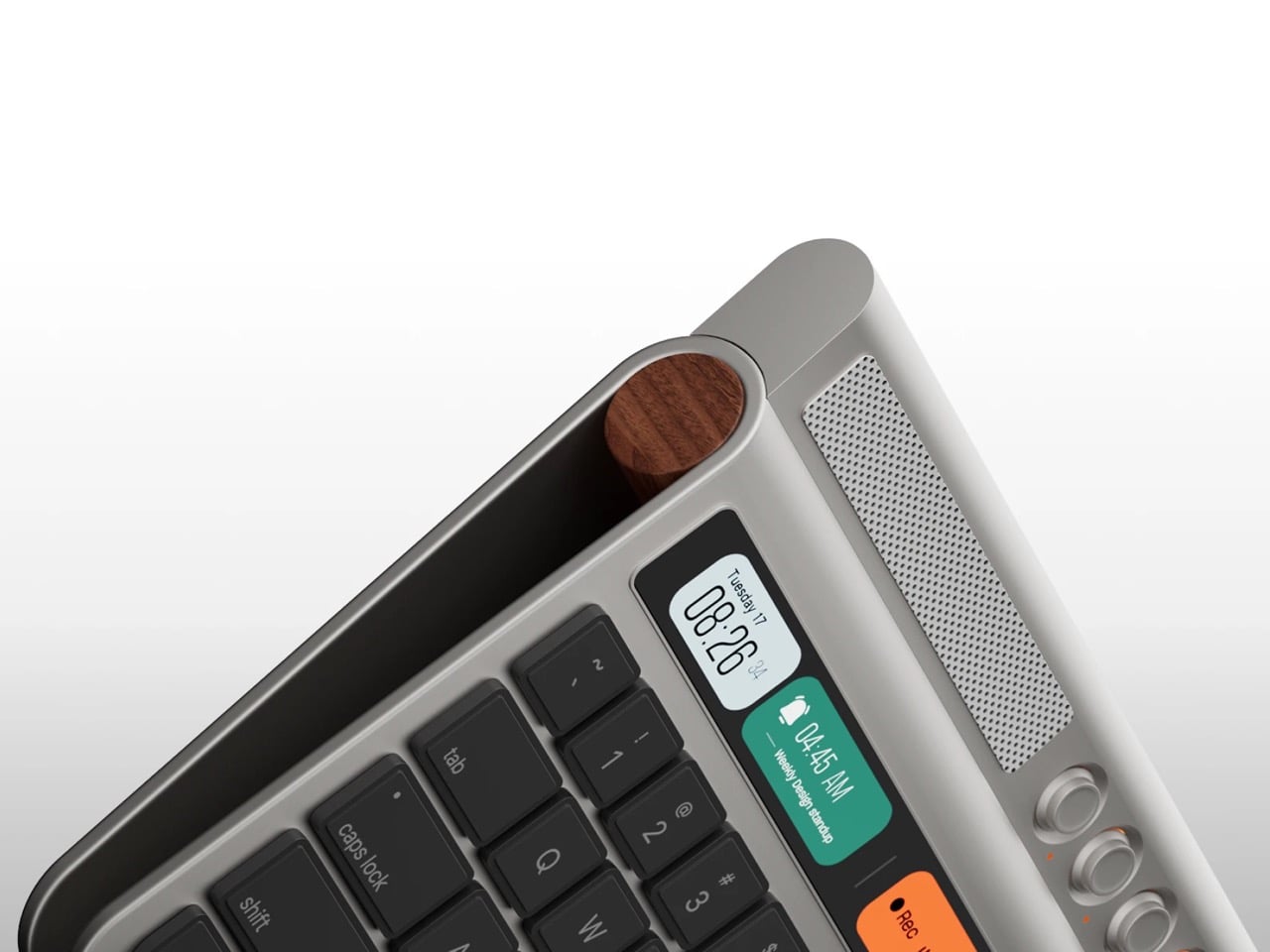
Why does a Touch Bar matter now more than ever? Well, we’re all multitasking, we’re all looking for extra real estate for displays, and almost all of us are running agents of some kind to automate tasks. That’s what this Touch Bar is for. Shortcuts to apps live in the center, widgets on the left, and maybe an AI chatbot on the right that you can deploy to talk to, ask questions to, or delegate tasks to. Claude just debuted a desktop-controlling agent called Claude Cowork that can run tasks and perform duties on your desktop on your command, and the infamous OpenClaw’s been taking the internet by storm for doing pretty much the same thing too. Obviously, such an AI will need to be vetted, and probably contained by a set of restrictions so it doesn’t go around leaking your data on a ‘Reddit for AI Agents’ or spending your cash (as OpenClaw has done in a few instances).

The rest of the Touch Bar experience goes on as originally intended. Active programs can reside within the bar, like a recorder interface, the player for music or video apps, allowing you to seek to different parts of a song/video, or even the emoji keyboard that lets you easily cycle through emojis before pasting them. The potential is endless, and while independent Touch Bars like this one exist, we need to design one for an era of AI agents, applets, shortcuts, and widgets. It really is about time.

The post Bring The Touch Bar Back… And Maybe Put An Intelligent Siri Or Gemini On It first appeared on Yanko Design.

This $61K Tiny Home Finally Gives Remote Workers Room to Breathe

Dragon Tiny Homes has unveiled the Sora 20′, an expanded version of their popular compact dwelling that responds directly to customer feedback. This spacious tiny home marks a significant evolution from the original 16-foot Sora model, offering more room while maintaining the bright, practical design philosophy that made its predecessor a success. The Sora 20′ represents a thoughtful approach to full-time tiny living, balancing increased square footage with the efficiency that defines the tiny house movement.

The design prioritizes natural light and openness, featuring large windows that flood the interior with brightness throughout the day. The layout flows seamlessly from one area to the next, creating a sense of spaciousness that belies the home’s compact footprint. Dragon Tiny Homes has crafted a well-balanced interior where every element serves a purpose, from the strategically placed windows to the carefully considered traffic patterns that make daily routines feel effortless and intuitive.

Designer: Dragon Tiny Homes

At 20 feet in length, the Sora 20′ offers significantly more living space than the original 16-foot model. This extra footage translates into practical improvements throughout the home, allowing for more comfortable accommodations without sacrificing the cozy feel that draws people to tiny living. The additional space has been thoughtfully distributed to enhance functionality in key areas, making the home suitable for extended stays or permanent residence rather than just weekend getaways.

The Sora 20′ includes purpose-built features that acknowledge modern living realities. A built-in floating desk provides a dedicated workspace for remote workers, reflecting the growing need for home offices in compact spaces. The design incorporates a sleeping loft that maximizes vertical space while keeping the main floor open for living and working. Each feature demonstrates a function-forward approach, where comfort meets practicality in ways that support contemporary lifestyles.

The base price for the Sora 20′ is typically set at $61,030, positioning it as an accessible entry point into quality tiny home living. Dragon Tiny Homes occasionally offers inventory homes at discounted rates, with some units available for $52,950, representing savings of $8,070. These move-in-ready options provide an opportunity for buyers to skip the wait time associated with custom builds and transition into tiny living more quickly.

The Sora 20′ suits solo dwellers seeking a minimalist lifestyle or couples ready to embrace downsizing without compromising on comfort. Its design accommodates full-time living with amenities that support daily routines, from cooking to working to relaxing. Dragon Tiny Homes has created a model that proves tiny living can be spacious, practical, and genuinely livable for the long term, making it a compelling option for anyone reconsidering traditional housing.

The post This $61K Tiny Home Finally Gives Remote Workers Room to Breathe first appeared on Yanko Design.