GoPro has seen its action camera market share diminish due to strong competition from rivals like Insta360 and DJI of late. Now, the company is fighting back with a new line of flagship cameras called Mission 1, designed to greatly improve the video quality offered by its current Hero 13 camera. The company also introduced a new Wireless Mic system similar to DJI's Mic Mini, along with a point-and-shoot grip and other accessories.
"The combination of our new 50 megapixel one-inch sensor and ultra-efficient GP3 processor sets a new performance bar for compact cinema cameras, enabling resolutions, frame rates, low-light performance, runtimes and thermal capabilities never seen before in cameras this small," GoPro's senior VP Pablo Lema said in a statement.
Sample Photo from GoPro Mission 1 Pro action camera
GoPro
The new line includes three models: the Mission 1, Mission 1 Pro and Mission 1 Pro ILS. All have a one-inch 50-megapixel sensor, new GP3 processor and up to 8K video, but the Mission 1 Pro supports higher frame rates. The Mission 1 Pro ILS (interchangeable lens system) comes with a lens mount so you can use high-quality Micro Four Thirds lenses from the likes of Panasonic and OM System.
The Mission 1 has an updated lens design with a 159 degree native field of view, the widest in its category. It also features a new OLED rear display that's 14 percent larger than previous flagship GoPro cameras, along with bigger raised buttons for easier use with gloves and a removable lens hood to reduce glare and lens flare.
GoPro
The 50MP 1-inch sensor has large 1.6μm pixels at full resolution or 3.2μm fused pixels when it's in operating at 4K in quad-bayer mode. That allows for higher dynamic range up to 14 stops and improved low-light performance with "exceptional detail in the darkest of shadows while protecting highlight details," GoPro claims. That low-light performance is likely to be better in quad-bayer 4K mode than full resolution 8K, however.
Meanwhile, the new GP3 Processor offers a power-efficient 5nm design that allows "best-in-class resolutions, frame rates and image quality," the company says. Those resolutions include 8K at up to 60 fps for the Mission 1 Pro/Pro ILS models, 4K at up to 240 fps and 1080p at up to 960(!) fps. GoPro also offers 10-bit HLG/HDR and a 10-bit GP-Log2 mode to maximize dynamic range.
The Pro models support 4:3 open gate capture so you can easily reframe shots or export video for different platforms. The Mission 1, meanwhile, captures up to 8K 30 fps, 4K 120 fps and 1080p 480 fps video, along with 4K 120 fps open gate video. You can capture 50MP RAW stills at up to 60 fps burst speeds on all Mission 1 models.
GoPro
The lineup promises excellent battery life thanks to the new Enduro 2 battery, with three-plus hours of 4K 30p recording on a charge. You can use the Hero 13 batteries as well albeit with shorter recording times. The company is also promising faster charging speeds. Thermal performance is solid despite the small size, with 8K 60p capture possible for 37 minutes straight with no airflow, or 74 minutes with airflow (when riding a bike for instance). However, unlike recent rivals, the Mission 1 supports microSD storage but has no internal memory.
Like its DJI and Insta360 rivals, the Mission 1 cameras offer multiple intelligent capture modes, including subject tracking, Dive (underwater stabilization) and Low-Light, along with Slow-Mo, Lapse, Sport POV, Vlog and Open Gate. GoPro action cams generally have excellent stabilization, so it'll be interesting to see if the Mission 1 series continues that trend, especially in low-light conditions.
GoPro isn't skimping on audio either, as the Mission 1 models offer a four-mic system with 32-bit float along with stereo recording and wind noise reduction. You can connect wirelessly to compatible devices via Bluetooth 5.3 or wired mics over USB-C audio.
GoPro
The Mission 1 Pro ILS appears to be the first action camera with an interchangeable lens mount that's compatible with any Micro Four Thirds lenses and adapters. GoPro's HyperSmooth electronic video stabilization will work with any prime (non-fisheye) lens. It's "the world’s smallest, most rugged and versatile high-speed cinema camera at a fraction of the cost and size of comparable cameras," GoPro said. Most lenses will likely make the camera too heavy and awkward to attach to a helmet or body, but you could certainly mount it to a motorbike, car or other vehicle.
Along with the Mission 1 cameras, GoPro is introducing some new accessories. Key among those is the new Wireless Mic System designed for easy pairing with the Mission 1 cameras, along with DSLRs and smartphones. With a charging case and magnetic clips, it looks a lot like DJI's Mic Mini system and offers 24-bit/48kHz audio with Dynamic Noise Reduction, 150 meters of wireless range, 6.5 hours of run time, adjustable gain and a safety track mode.
GoPro
Other accessories include a Media Mod kit with a built-in multi-pattern mic and expanded I/O capability including 3.5mm mic and headphone ports, a micro HDMI port and a line-in port for timecode sync. GoPro is also offering a new Point-and-Shoot grip, M-Series ND Filters, a protective housing, a dual Enduro 2 battery charger, Volta battery grip and Light Mod 2 LED light. It's compatible with a GoPro subscription and Quick App, along with GoPro Labs that lets you unlock higher data rates (up to 300Mbps) and over 1,000 complex settings.
The new models will be available individually or in kits, including the Mission 1 Pro Creator Edition bundled with the Media Mod, Wireless Mic System and Volta battery grip. The Mission 1 Pro Ultimate Creator Edition includes those while adding GoPro's Fluid Pro AI gimbal and Light Mod 2. Pricing and availability will be announced at a later date.
This article originally appeared on Engadget at https://www.engadget.com/cameras/gopros-mission-1-offers-8k-60p-video-and-interchangeable-lenses-130018643.html?src=rss
The price of nearly every type of gaming gadget has skyrocketed recently. RAMageddon has caused the cost of memory to double or triple in the last six months, with companies like HP saying that RAM now accounts for more than a third of a new PC’s bill of materials. Meanwhile, the Xbox Series S/X and the PS5 have gotten price hikes, and a similar bump for the Switch 2 is starting to look “inevitable.” Even mobile devices are not immune, with Samsung jacking up the cost of the Galaxy Z Fold 7 nine months after release. But with the $350 27-inch QD-OLED (AW2726DM), Alienware hasn’t just created a gaming display that’s an excellent value, it’s made a beacon of hope for anyone looking to upgrade their setup without emptying their bank account.
Design
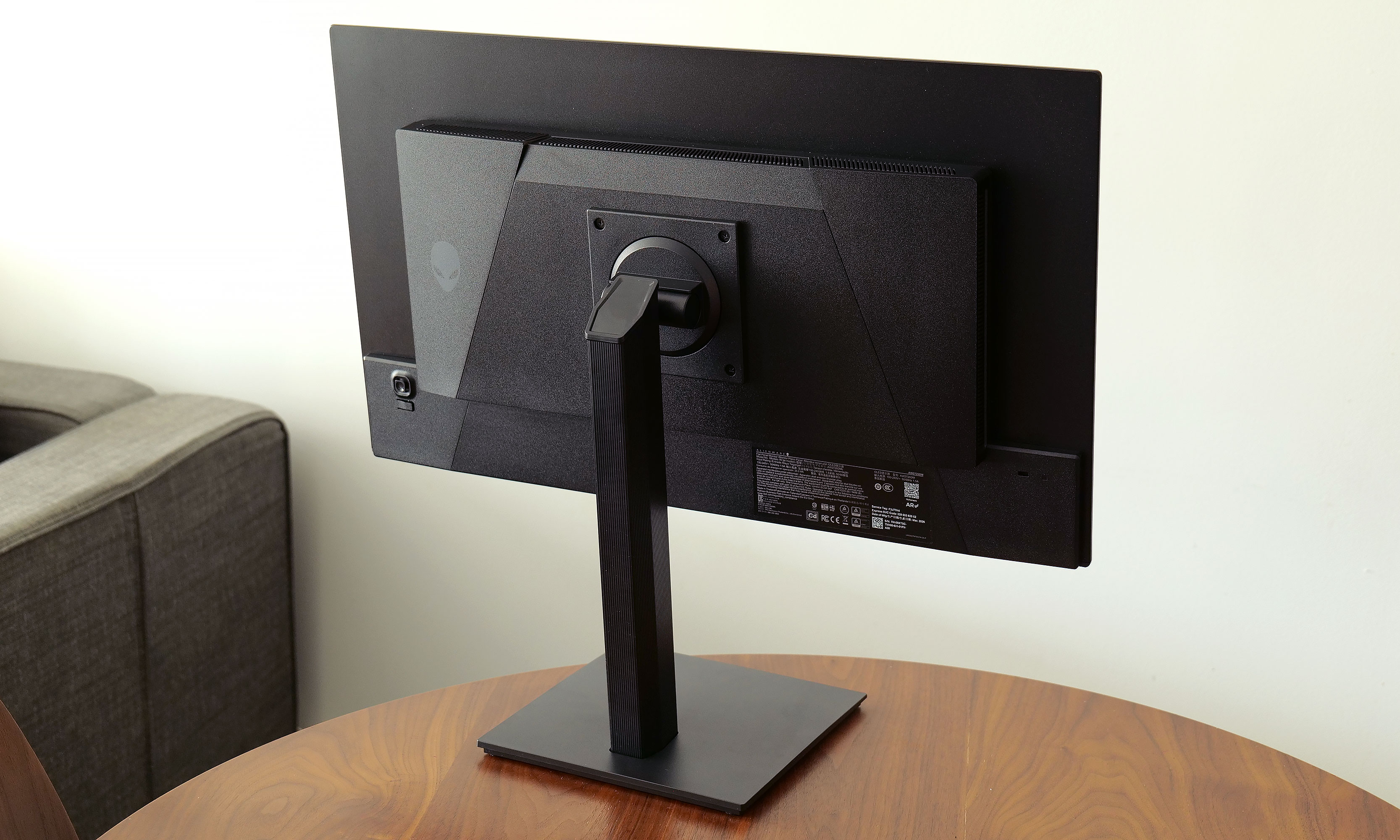
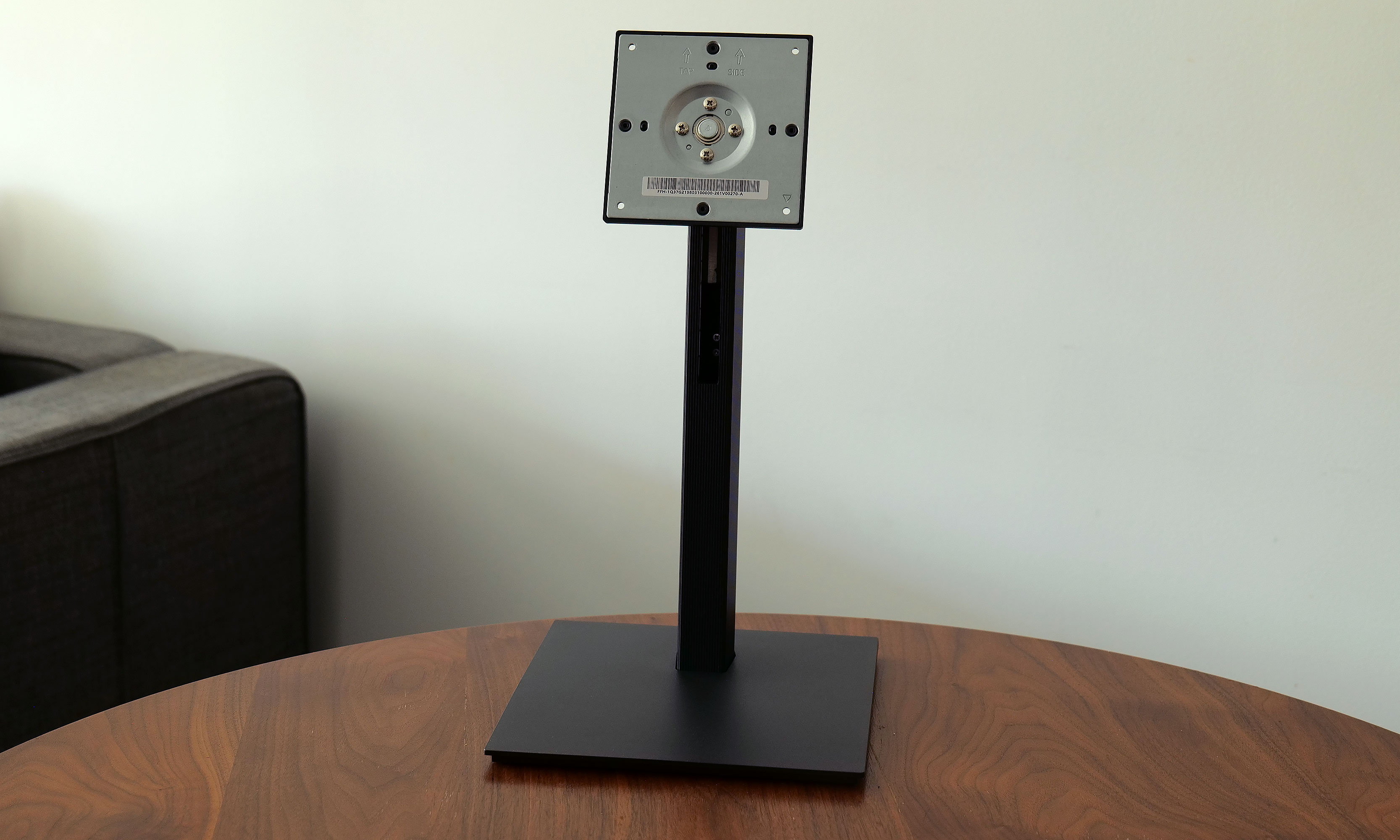
Unlike some of Alienware’s more expensive displays, the AW2726DM’s design couldn’t be simpler. It sits on a square 8.75-inch base that supports tilt, pivot and height adjustments. Though it does require a little assembly, everything you need comes in the box. Alienware’s monitor arm attaches via a captured thumb tab, while the monitor relies on four screws and a VESA mount that can be connected using the bundled Philips wrench. (Though if you have a proper screwdriver, that would be even better.) Setup only took me a few minutes and after arranging it properly on my desk, the monitor felt quite solid. The only potential drawback is that if you have limited desk space or you’re the kind of gamer that likes jamming your keyboard as close to your monitor as possible, Alienware’s stand might get in the way.
The back of the monitor has an easy-to-use joystick for controlling its on-screen settings menu.
Sam Rutherford
At around 4mm thick, the AW2726DM’s panel is exceedingly sleek, though naturally that expands a bit on the lower portion of the monitor where its ports are located. This brings us to one of the biggest differences between Alienware’s budget display and more premium options: limited connectivity. All you get here is two HDMI 2.1 jacks, one DisplayPort 1.4 slot and a 3.5mm plug for audio out. There’s no support for data transfer, power sharing or anything else. Heck, there isn’t even any RGB lighting, which feels weird on a product from Alienware. But given its price, I’m not upset. In fact, it’s actually kind of refreshing. Finally, there’s a handy control stick on the back of the display for navigating its on-screen menu.
Visuals
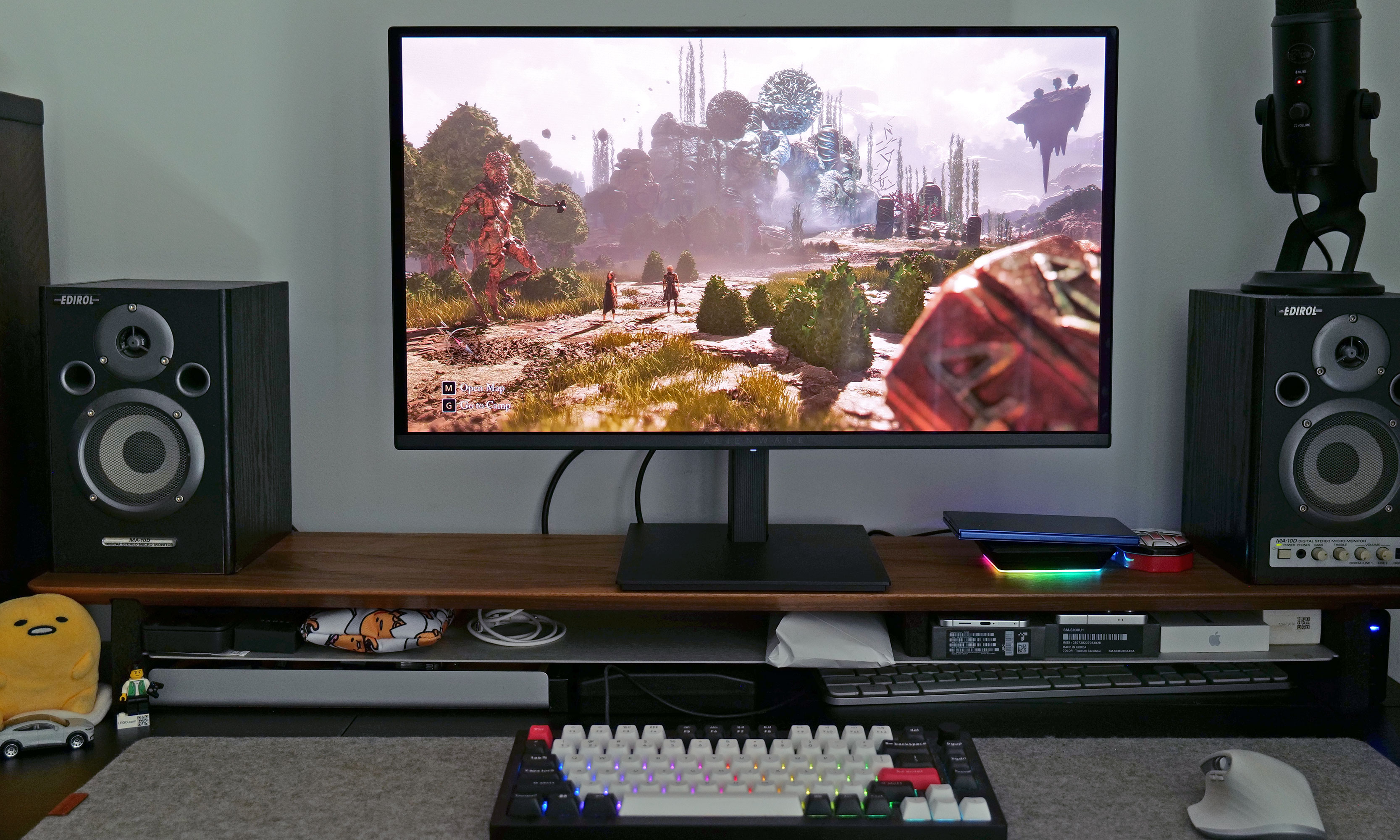
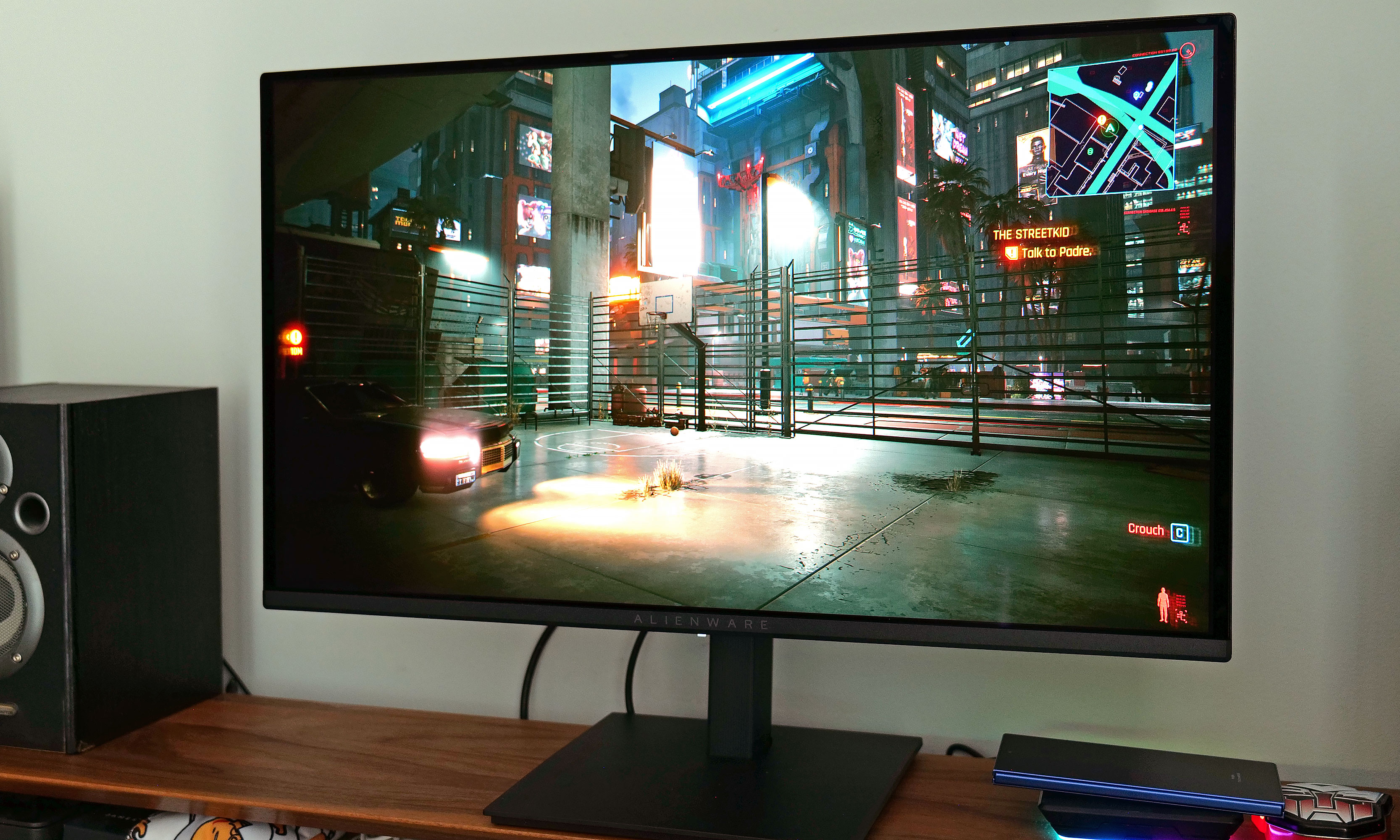
As long as it's not too sunny or bright, the AW2726DM delivers excellent visuals for the money.
Sam Rutherford for Engadget
The AW2726DM features a QD-OLED panel supplied by Samsung that comes with a QHD resolution (2,560 x 1,440) and up to a 240Hz refresh rate. Alienware supports VRR via AMD FreeSync Premium and VESA AdaptiveSync, though sadly there’s no native option for NVIDIA G-Sync. That means if you have a GPU from Team Green and want to take full advantage of the monitor’s potential, you’ll want to rely on that DisplayPort for optimal compatibility.
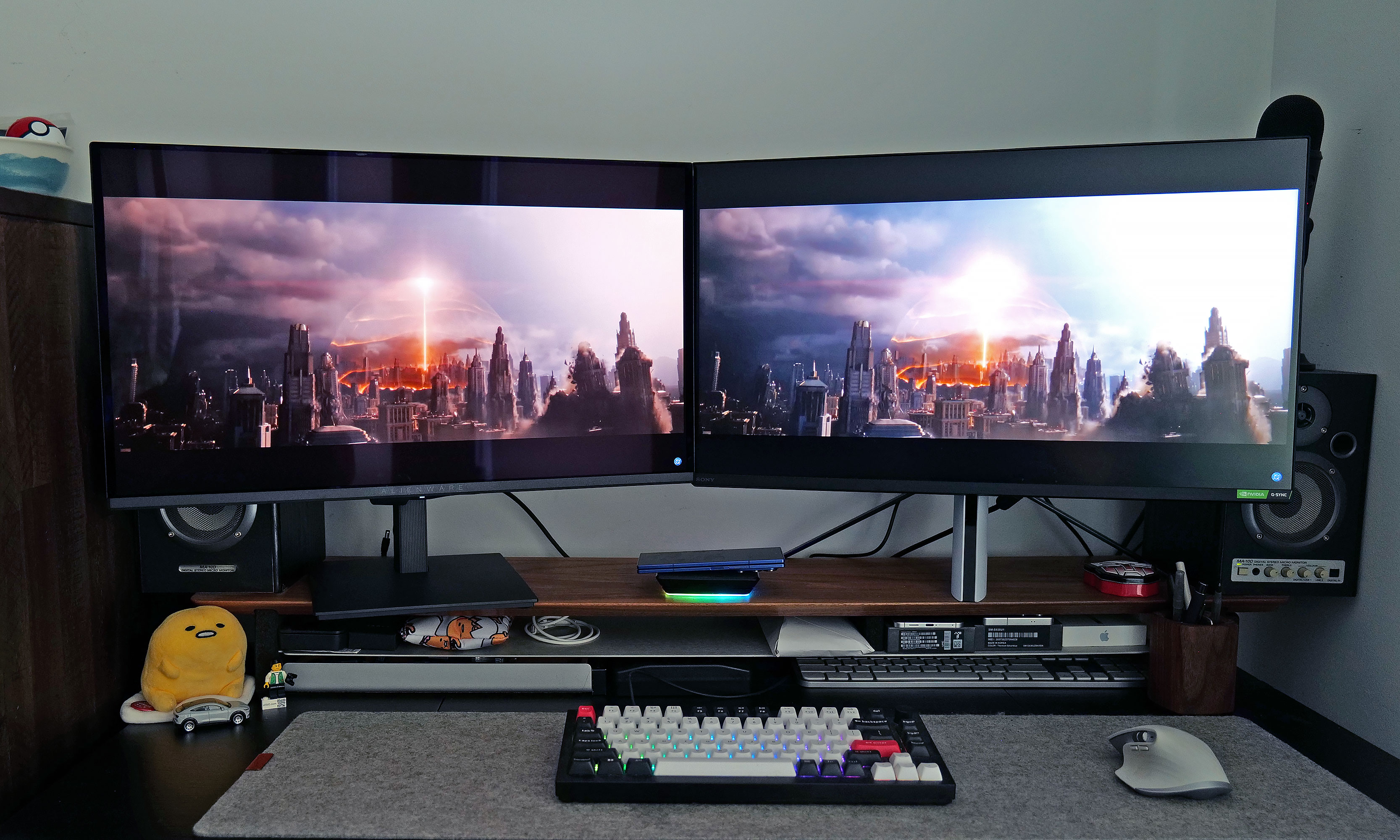
Regardless, for a $350 gaming display, the AW2726DM checks all the most important boxes and it looks fantastic. Alienware’s budget monitor showcases the strengths of OLED panels versus LCD, even when compared to Sony’s Inzone M9, which was a much more expensive monitor when it debuted back in 2022. Alienware offers richer colors (it covers 99 percent of DCI-P3), and thanks to its deep inky blacks, contrast is significantly better as well.
Here's a direct comparison between the AW2726DM and the Sony Inzone M9, the latter of which cost $900 when it came out in 2022.
Sam Rutherford for Engadget
The one big drawback is that, with a typical brightness of 200 nits, the AW2726DM is dimmer than more expensive rivals. That means the monitor doesn’t have fancy certifications for stuff like VESA True Black and instead relies heavily on general HDR10. Furthermore, Alienware chose a glossy (and quite reflective) finish that makes colors look even more saturated while improving perceived brightness. The one thing you need to watch out for is glare, especially if your PC or console lives in a room that gets a lot of sunlight. But if you’re like a lot of gamers that prefer to frag at night or in the dark, this may not be an issue.
Outside of gaming, there’s another shortcoming of the AW2726DM. Between its QHD resolution and the arrangement of Samsung’s QD-OLED subpixels, folks with good eyesight may notice a little fringing, especially when compared to higher-res 4K displays. This means some Word docs and web pages may not look quite as sharp as you’d like, but that’s a small price to pay for some of the best visuals you can get on a gaming monitor in this price range.
Warranty and care
The stand for the AW2726DM supports tilt, height adjustment and even pivoting all the way into portrait mode.
Sam Rutherford for Engadget
One of the major concerns about OLED displays when they first hit the market was the potential for burn-in, resulting in permanent damage to the panel from things like static UI elements staying on the screen too long. Thankfully, the AW2726DM comes with a three-year warranty that includes a clause covering burn-in, along with a free panel replacement in case there’s even a single bright pixel. Furthermore, Alienware uses a graphite film heatsink and an AI algorithm to prevent any sort of ghosting from appearing in the first place.
Wrap-up
Alienware also conveniently includes both HDMI and DisplayPort cables in the box, along with the required screws for mounting the panel to the stand.
Sam Rutherford for Engadget
The AW2726DM might not have all the fancy features you get on more expensive monitors, but it’s an excellent example of a no frills gadget done right. You get just enough ports, a straightforward design and a beautiful QD-OLED panel with a solid resolution and refresh rate — all for just $350. It would certainly be nice if it was a little brighter or if text looked a touch sharper, but those shortcomings are pretty easy to live with. For anyone looking to upgrade what might be arguably the second most important part of your gaming setup (your screen is your window into new worlds after all), this display is budget gold.
This article originally appeared on Engadget at https://www.engadget.com/gaming/pc/alienware-27-aw2726dm-qd-oled-monitor-review-a-budget-pc-gamers-new-best-friend-130000287.html?src=rss
Achieving standout results with Midjourney 8 often relies on crafting prompts that are both precise and visually descriptive. Thaeyne highlights the value of using specific details, such as lighting, texture and style, to guide the model effectively. For instance, a prompt like “sunlit forest with soft shadows” provides clear visual direction, resulting in more refined […]
Artificial intelligence has become the hottest topic in technology news today. It fuels headlines, investment stories, corporate strategy, and public debate in a way rarely seen with any other technology. Every week, it seems like there is a new model, a new partnership, or a new claim about how AI will change the way we […]
Apple’s long-anticipated foldable iPhone is steadily moving closer to becoming a reality. Recent leaks have shed light on its potential design, features, and production progress. Tentatively referred to as the “iPhone Ultra,” this device marks a significant departure from Apple’s traditional smartphone designs. While development is advancing, questions about its release date and final specifications […]
The “Superpowers” plugin, created by Jesse Vincent, introduces a structured workflow that significantly enhances cloud code development. Nate Herk explores how this open source solution automates key phases like brainstorming, planning and debugging to improve productivity and code quality. By incorporating features such as detailed implementation plans and systematic debugging, the plugin is particularly well-suited […]
If you love Pokémon and electronic dance music, the Pokémon Company made the perfect event for you. As part of Pokémon’s 30th anniversary festivities, the company is holding EDM concert experiences called “Pokémon Night Out” in Los Angeles and London. American DJ Marshmello, known for wearing a marshmallow-like mask on stage, will be headlining the events, with Australian DJ Alison Wonderland as a supporting act. The experiences will feature custom sets and Pokémon-inspired visual storytelling.
The events will be open to fans 16-years-old and up. It will be held at the Intuit Dome in Los Angeles on October 24, 2026, and at the O2 arena in London on November 10. You can get tickets for both concerts starting on April 18 at 10AM Pacific time for the Los Angeles concert and at 10AM British time for the London experience.
In addition to holding EDM concerts, Nintendo and the Pokémon Company re-released the Game Boy Advance remakes of Pokémon Red and Blue on Nintendo Switch Online for the franchise’s 30th anniversary. They also released a Game Boy-shaped portable Pokémon jukebox, little music players that can be loaded witha different melody or sound effect from the original games' soundtracks.
This article originally appeared on Engadget at https://www.engadget.com/gaming/nintendo/you-can-attend-pokemon-edm-shows-in-los-angeles-and-london-120405128.html?src=rss
Think you’ve mastered your iPhone? Think again. Apple’s iconic device is packed with hidden features that can enhance your experience, making it more efficient, personalized and enjoyable. Whether you’re a casual user or a tech enthusiast, these lesser-known tricks can help you unlock your iPhone’s full potential. Let’s dive into ten practical tips that can […]
Small Modular Reactors (SMRs) are often presented as a promising innovation in the quest for low-carbon energy, but their potential impact remains a subject of debate. These reactors, capable of generating up to 300 megawatts of electricity per unit, are designed for modular construction and factory production, which could reduce costs and streamline deployment compared […]
Renting comes with a particular kind of creative tension. You want the space to feel entirely like yours, but the lease says no holes, no permanent fixtures, no alterations at all. Earth Day lands on April 22nd, and that tension extends well beyond walls and landlords. It reaches into how we consume, what we buy, and whether the things we choose to bring into a space are genuinely worth keeping.
The smartest renter upgrades aren’t just about convenience — they’re about buying fewer, better things that genuinely work with the space you have, move when you leave, and don’t leave a mark on the wall or the planet. That requires a different kind of shopping: slower, more deliberate, more willing to invest in objects that earn their place and hold it well across multiple leases. These seven products do exactly that.
1. Couch Console
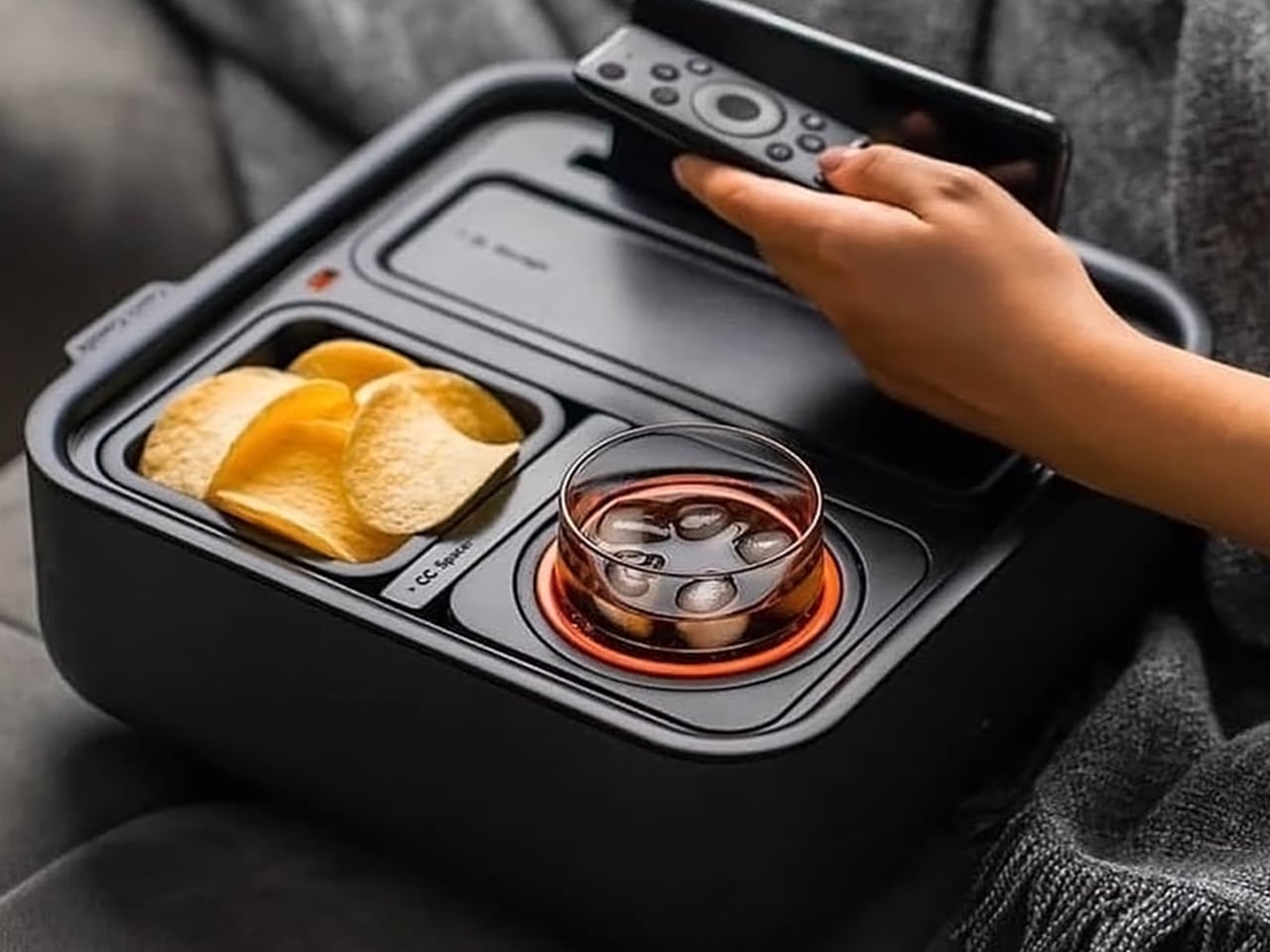
The Couch Console is one of those products that makes you wonder why it took this long. It slots right into your sofa and turns your couch into a proper command center — cupholder, snack tray, phone stand, charging dock, remote holder, and a small compartment for your glasses. The mechanical gyroscope in the cupholder keeps your drink level even when you’re sprawled sideways across three cushions, which is the kind of engineering that quietly deserves far more credit than it gets. No installation. No screws. No instructions. Just set it down and live better.
For renters, the appeal is obvious. There’s nothing to attach, nothing to mount, nothing to explain to a landlord at the end of a lease. You move it from the couch to the floor to a guest chair without a second thought, and it goes into a box when you move out. It’s also a genuinely useful object, not a gimmick. If you’ve ever knocked over a drink during a movie or spent ten minutes looking for the remote while your chips went cold, the Couch Console is quietly solving every problem you didn’t know needed solving.
What we like
Gyroscopic cupholder keeps drinks stable on uneven and tilted surfaces
Completely portable with zero installation or tools required
What we dislike
Design is specific to couch use and may not work well with all sofa styles
May feel bulky on smaller sectionals or narrow loveseats
2. Door Chime BO
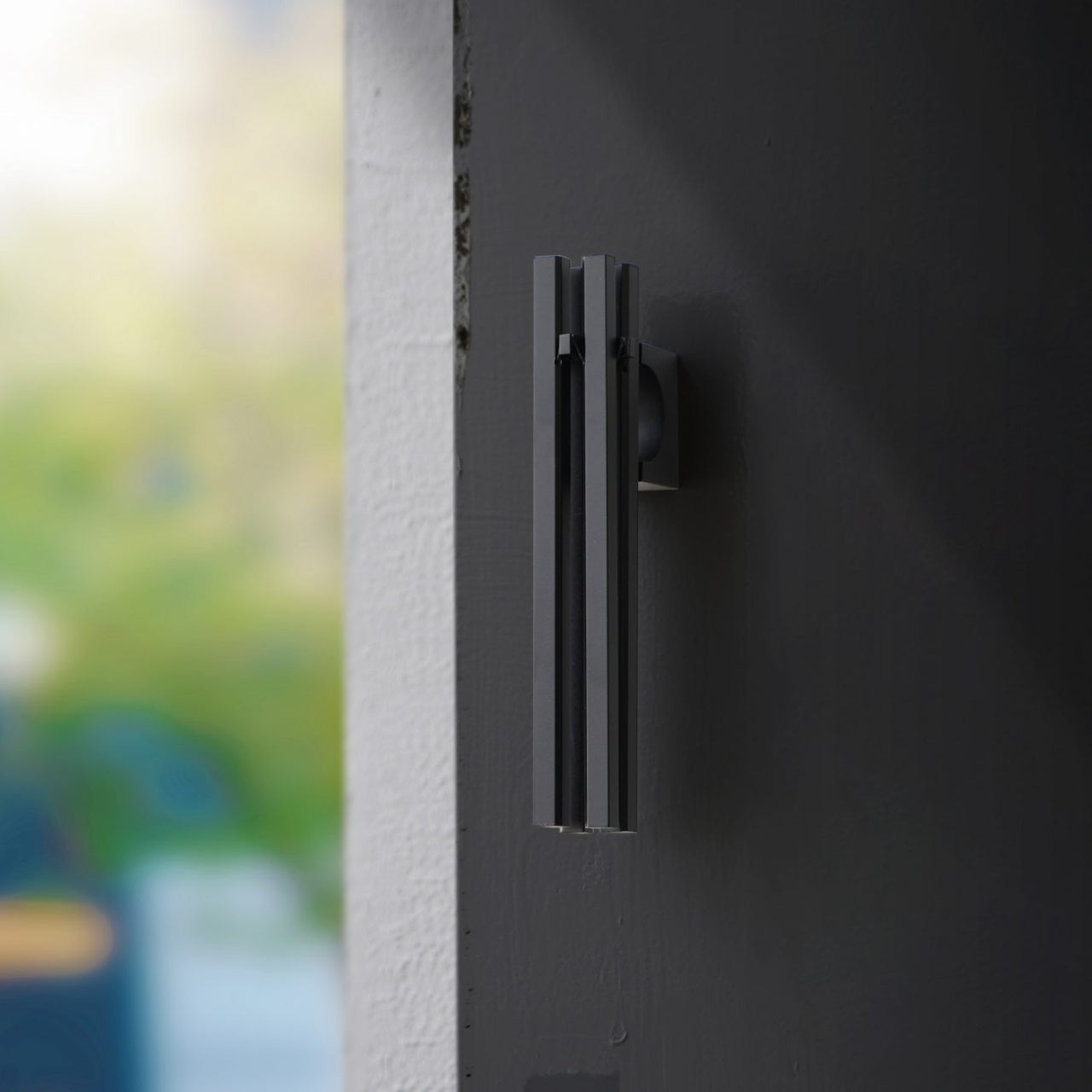
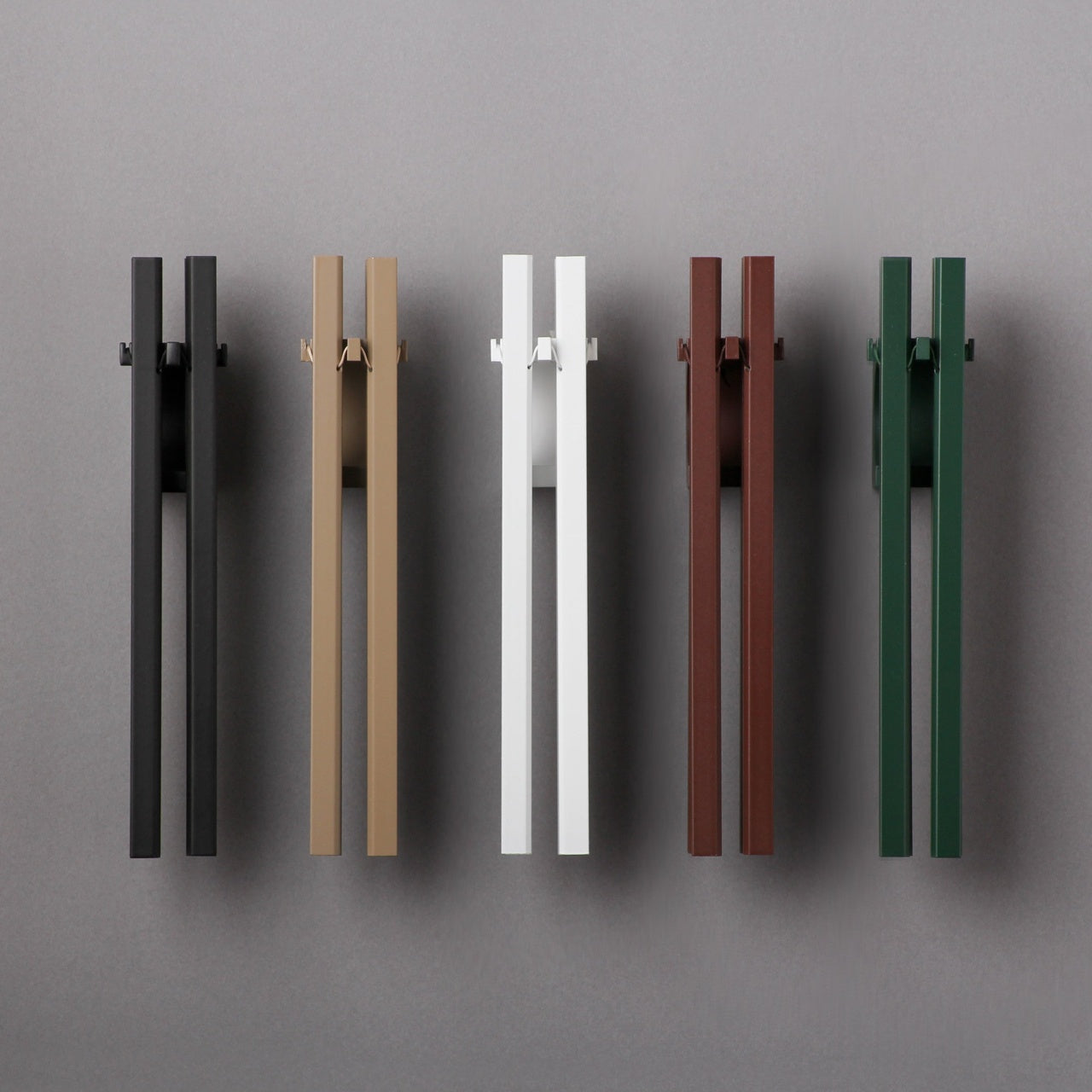
A sound can beautifully change how a space feels. The Door Chime BO is a modern interpretation of the Japanese wind chime — four equally-tuned aluminum rods that produce a crystalline ring whenever they move with wind or motion. The zinc die-cast base uses a neodymium magnet to mount directly onto any metal surface, no drilling needed. It comes in black, white, green, and light brown, which means it integrates into almost any interior without forcing a design conversation you didn’t want to have.
For renters, it’s the kind of detail that elevates a space without altering it. Hang it near the door, and suddenly every entry and exit carries a note. Guests hear it before they’ve even stepped inside. It works on two levels — aesthetically, it’s minimal and well-resolved, the kind of object that looks intentional on a doorframe or shelf. Acoustically, it’s warm and non-intrusive. It doesn’t demand attention. It just makes everything around it feel a little more considered, and that’s a quality worth paying for.
Magnetic mount attaches to metal surfaces instantly with no drilling required
Minimalist design available in four versatile colorways to suit any interior
What we dislike
Limited to metal surfaces only, which narrows placement options considerably
The chime sound, while pleasant, may not suit noise-sensitive or shared-wall living situations
3. Tilt Chair
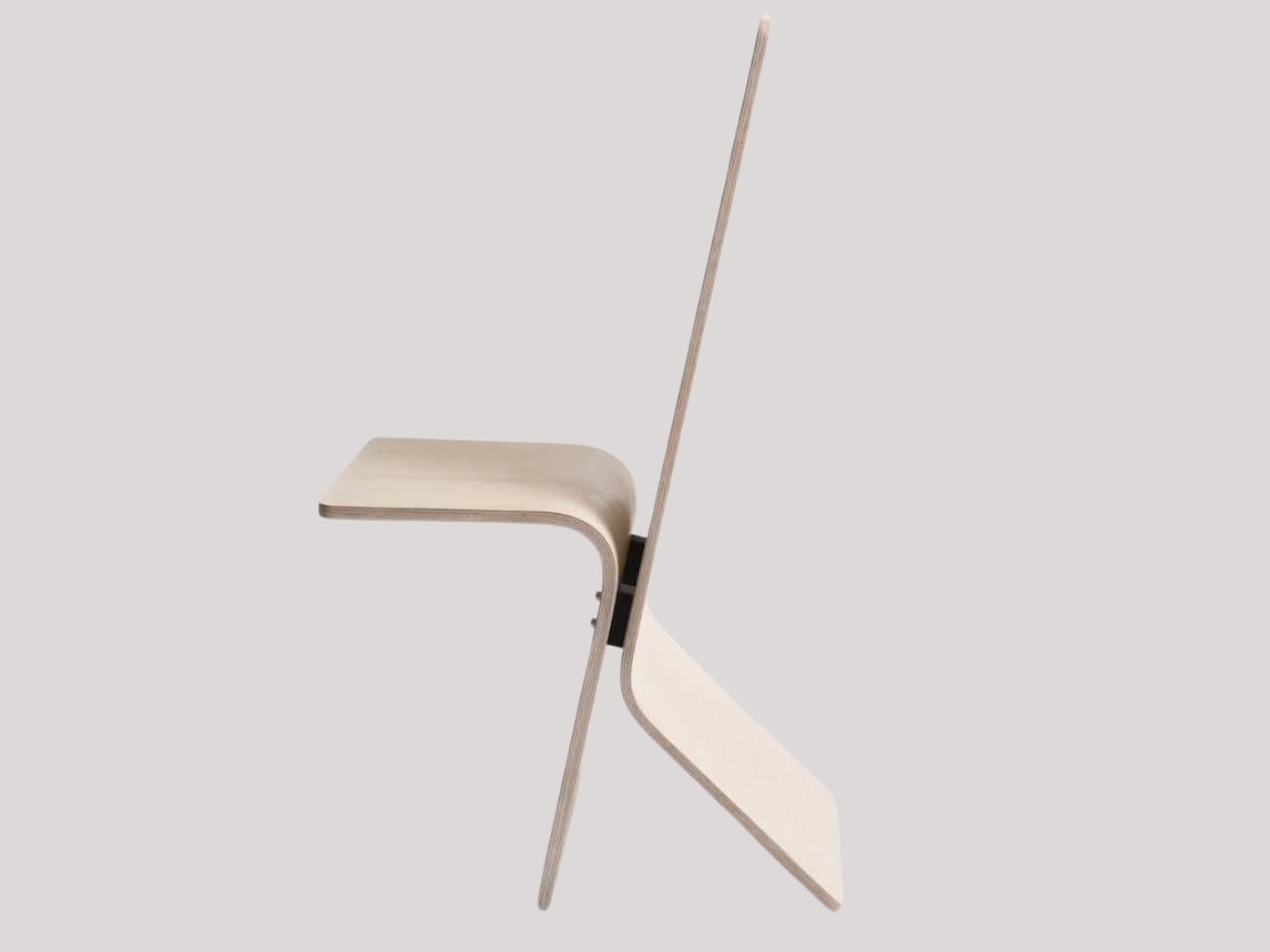
Student design rarely earns this kind of attention, but Tilt earns every bit of it. Designed by Hirschfeld, the chair transforms from an upright seat to a full lounger through a single forward tilt — no levers, no mechanisms, no instructions. The balance is engineered directly into the form itself, so the transition feels intuitive, like the chair already knows what you want before you do. One material, one gesture, two distinct functions. It’s one of the most honest and quietly impressive pieces of furniture design to emerge in 2026.
For renters, a chair like Tilt is a smart investment precisely because it isn’t tied to a room or a fixed interior. It works as a desk chair that doubles as a reading lounger, which means you’re buying one piece instead of two. It travels with you when you move, it doesn’t require any floor hardware or wall support to function, and it doesn’t demand a particular layout to make sense. Arriving upright or relaxing and letting go — that’s not just a product description. It’s a pretty solid philosophy for how to live in a space that isn’t entirely yours yet.
What we like
Transforms from chair to lounger in seconds through intuitive balance, no mechanisms needed
Single-material construction makes it lightweight and easy to move between rooms
What we dislike
The tilt position may not provide adequate lumbar support for users with back concerns
As a student concept, wider production availability has yet to be confirmed
4. Invisible Shoehorn
The Invisible Shoehorn is exactly what the name suggests — a long, stainless steel shoehorn that disappears into its transparent stand and reads more like a sculptural object than a functional tool. Its length means you never have to bend or hunch over to put on shoes, which is a genuine ergonomic benefit most people don’t realize they’re missing until they actually try it. The smooth, polished surface glides on without snagging socks or stockings, which sounds like a minor detail until you’ve torn a good pair at the door before work.
What makes this worth highlighting in a renter context isn’t just the zero-drilling stand — it’s the fact that it’s attractive enough to leave out in the open. Most shoe accessories are the kind of thing you shove in a closet and forget about. The Invisible Shoehorn sits in its stand near the front door and looks like it belongs there, like something you chose deliberately. It solved two problems at once: making a functional object and making it beautiful enough that you don’t feel the need to hide it. That combination is rarer than it sounds.
Transparent freestanding base requires no installation and suits any entryway aesthetic
Ergonomic length eliminates back strain when putting on shoes without needing to bend
What we dislike
The stainless steel finish requires regular wiping to stay free of fingerprints and water marks
The transparent stand may feel less stable than a wall-mounted alternative in high-traffic entryways
5. Tandem Shower
The Tandem Shower doesn’t require a plumber, a permit, or a landlord’s permission. It attaches directly to your existing showerhead and splits the water flow into two distinct streams, effectively doubling the shower experience without touching a single tile or pipe. The concept addresses something that sounds simple but plays out as a real logistical problem — two people, one showerhead, and the inevitable standoff over who stands in the warm water. It’s a clever, tool-free attachment that changes the entire experience without changing the infrastructure one bit.
For solo showers, the Tandem setup delivers something closer to a spa experience — a full, enveloping flow that feels significantly more immersive than a standard single stream. Renters living in older buildings with dated bathroom fixtures will particularly appreciate how much this attachment upgrades the experience without requiring any permanent modification. You install it yourself in minutes, take it with you when you move, and the bathroom looks exactly as you found it. That’s the gold standard for renter-friendly design — maximum impact, zero trace.
What we like
Attaches to existing showerheads with no plumbing work, tools, or professional help required
Works as both a couple’s shower upgrade and a solo luxury experience
What we dislike
Splitting the flow may noticeably reduce water pressure in buildings with weaker systems
May not be compatible with all showerhead fixture types and configurations
6. JewelVase Mirror Stand
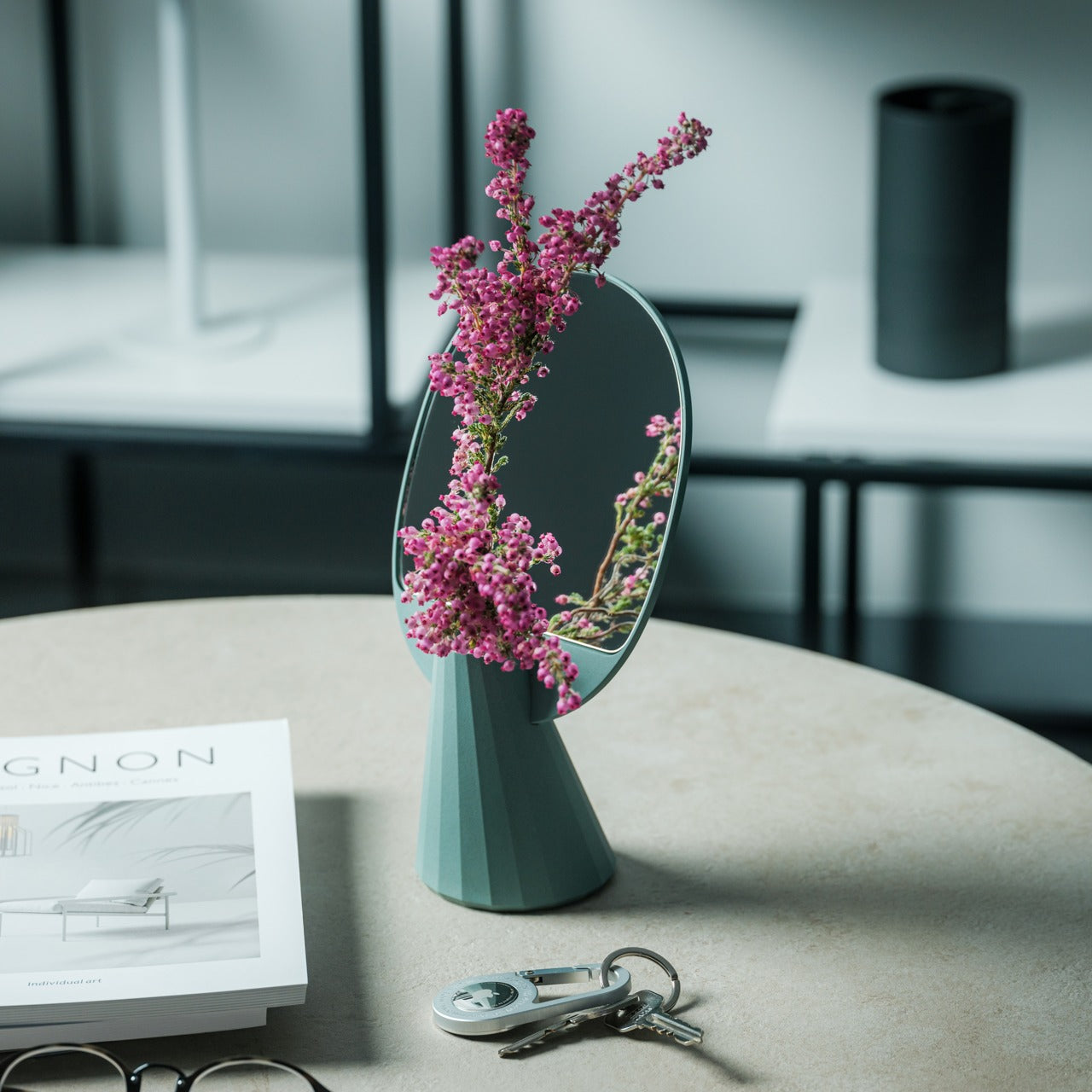
The JewelVase Mirror Stand earns its place simply by being beautiful and useful at the same time. The polyhedron-shaped mirror doubles as a vase and an accessory stand, made from bioplastic incorporating rice husks for added durability and a cleaner material story. Put a single flower in it, and the mirror doubles the bloom. Set your rings and earrings in front of it and the reflection turns a small, everyday gesture into something that looks curated and intentional. It sits on any surface without requiring a wall, a hook, or a single piece of hardware.
Renters tend to under-decorate because they’re afraid of commitment — afraid to put things on walls, afraid to invest in a space they might leave in a year. The JewelVase reframes that entirely. It’s a standalone object that adds life to a desk, shelf, or bedside table without needing any context to work. It brings greenery, reflection, and sculptural quality to whatever surface it lands on. For anyone living in a rental who wants their space to feel intentional without making anything permanent, this is a genuinely elegant place to start.
Fully freestanding design places beautifully on any flat surface with zero mounting required
Bioplastic construction with rice husks offers durability with a lower environmental footprint
What we dislike
The polyhedron form limits vase capacity largely to single stems or very small arrangements
The fixed mirror angle may not function well as a practical vanity or grooming mirror
7. Philips Screeneo UL5 Smart Projector
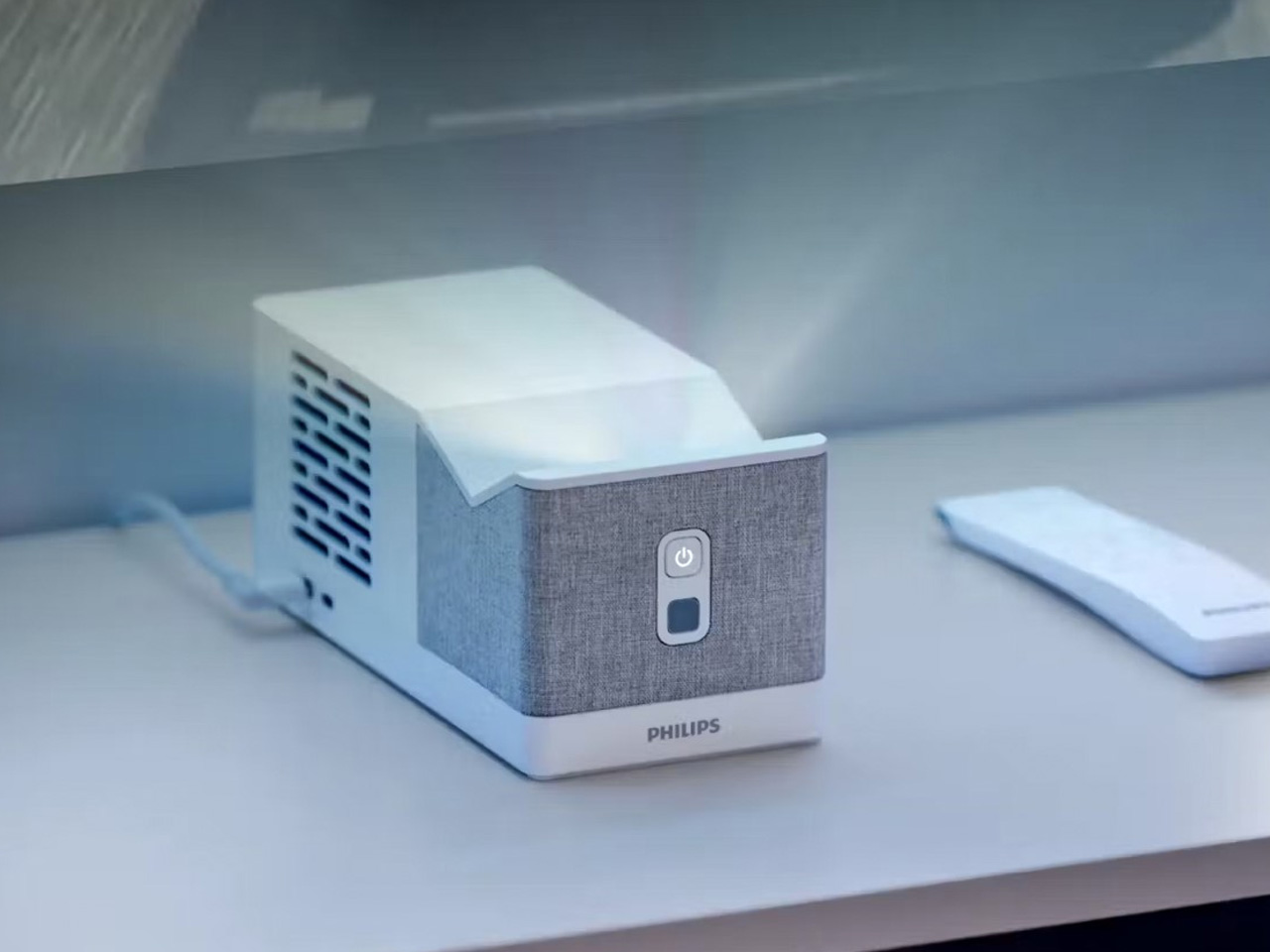
The Philips Screeneo UL5 Smart is the most compelling argument for ditching a television that currently exists under $800. Measuring just over eight inches long, it throws a 100-inch display from only 20 inches away from any wall — meaning you can set it on a shelf, a media unit, or a stack of books and get a full cinematic image without mounting a single thing. The 1080p Full HD resolution, 550 ANSI lumen brightness, and built-in streaming OS make it a complete home theater setup in a device the size of a thick hardcover.
For renters, this is the smarter long-term investment. A television either goes on a wall bracket — which means holes — or occupies a furniture footprint that may not exist in the next apartment. The Screeneo UL5 simply moves with you. Set it on any flat surface, point it at a light-colored wall, and you have a theater. The built-in OS means no extra streaming boxes or cables cluttering the space. It upgrades the living room experience completely and entirely without leaving a single mark behind — which is, after all, exactly the point.
What we like
Ultra-short throw produces a 100-inch image from just 20 inches away, no wall mount needed
Built-in streaming OS removes the need for external devices, dongles, or extra cables
What we dislike
550 ANSI lumens may struggle to produce a vivid image in brightly lit rooms
1080p resolution will disappoint users expecting the sharpness of a 4K display
The Best Thing You Can Buy Is Something Worth Keeping
The through line across every product here isn’t convenience, though convenience is part of it. It’s intention. Each of these objects was chosen because it works harder than it looks, moves with you without complaint, and doesn’t ask anything of the walls it lives near. That’s not a small design achievement. Making something genuinely useful without making it permanent requires a kind of restraint that most products never bother with. These seven do. And that restraint, compounded across a whole home, starts to mean something.
Earth Day is a reminder that the things we buy carry weight beyond their price tags. The most sustainable purchase is always the one you keep — the one that solves a real problem, holds up over time, and still makes sense in the next apartment, and the one after that. Renters have always known this instinctively. The lease ends, and everything comes with you, so it had better be worth carrying. Buy fewer things. Buy better ones. That’s not a trend. It’s just good sense.