Fortunately, we live in a time when most information can be recovered from another device or the cloud. Now, iPhone users can add another app to that list. Signal has announced that secure backups are now available for iOS devices. It follows a similar launch for Android devices in early September. The company shared the news on X and linked to the previous Android blog post for all additional information.
At the time, Signal noted that secure backups would be an opt-in feature and available in Android users' latest beta release. The company stated this was to test the feature on a smaller scale before it came to iOS and desktop — so clearly something worked.
The end-to-end encrypted backup offers no-cost storage of a user's text messages and up to 45 days of media. Keeping older media costs $2 per month — Signal's first paid offering. "The reason we’re doing this is simple: media requires a lot of storage, and storing and transferring large amounts of data is expensive," Signal said at the time. "As a nonprofit that refuses to collect or sell your data, Signal needs to cover those costs differently than other tech organizations that offer similar products but support themselves by selling ads and monetizing data."
Anyone who opts-in will have their messages backed up each day. The secure backups use a 64-character recovery key that is available exclusively on a user's device. It's required to access the backup and Signal is unable to recover it.
This article originally appeared on Engadget at https://www.engadget.com/apps/signal-extends-backup-feature-to-ios-users-133006884.html?src=rss
Streaming deals come and go throughout the year, but they are most abundant around Black Friday. It’s been a testy year for streaming services to say the least, and one big manifestation of that has been continuously rising prices. Disney+ and HBO Max were just a couple of the streaming services that bumped up prices, which means it’s more important than ever to subscribe if and when you can get a discount. These are the best Black Friday streaming deals you can get this year; just note, though, that most require you to be either a new subscriber to get the deal, or a returning subscriber who hasn’t been a paid customer in a hot minute.
Best Black Friday streaming deals
Apple TV+ — 6 months for $36: Apple TV+ is offering six months of access for only $36 for Black Friday, which comes out to a discounted price of $6 per month for the six-month period. The deal is live now for new and eligible returning subscribers and runs through December 1, giving you a chance to stream shows like Silo, The Morning Show and For All Mankind for less. The biggest caveat to the deal is that you must subscribe directly through Apple and not through a third-party service.
HBO Max — one year for $36: HBO Max's Black Friday deal gives subscribers one year streaming for $36 through December 1. This Black Friday streaming deal is on the ad-supported option, which normally goes for $11 per month. With this discount, you're getting it for $3 per month for one year. You can sign up via HBO Max's website or, if you're a Prime Video subscriber already, via that service as an add-on.
Sling TV Orange — day pass for only $1: Sling TV launched Day Passes earlier this year, giving users one-day access to a variety of its packages. This deal cuts $4 off the normal price of a day pass for Sling Orange. With that, you get unlimited access for 24 hours to Orange's more than 30 channels that includes ESPN, CNN, TBS and others.
Paramount+ — two months of Essential or Premium for $6: This Black Friday deal brings the monthly price of either Paramount+ tier down to just $6 for two months, or $3 per month. The obvious better deal is on the Premium plan, which typically costs $13 per month.
Audible — three months for $3 + $20 Audible credit: For literally $1 per month, you can get access to Audible's enormous library of published audiobooks, podcasts and Audible Originals (which can be anything from never-before-heard books to live performances). It's only three months, after which you'll have to cancel or renew at the regular price, but an audiobibliophile can cram a lot of listening into 90 days.
Starz — one year for $12: Pay upfront for one year and you can get more than $50 off a Stars annual subscription. There's a month-to-month option too, which costs $3 per month for the first three months if you don't want to commit to the full year. Either option gives you access to the entire Starz TV and movie library with offline viewing and no ads.
MasterClass — up to 50 percent off annual subscriptions: The MasterClass Black Friday deal discounts most subscription tiers by 50 percent when you pay for one year upfront. The Premium tier, the most expensive option, usually costs $20 per month but now only sets you back $10 per month for one year. That gives you access to the entire MasterClass content library, offline viewing and up to six simultaneous streams.
Plex — lifetime pass for $150: Plex offers personal media servers you can use to organize your digital collection — imagine your own curated Netflix homepage that nothing ever vanishes from. It's also a streaming platform in its own right, with movies and TV from all genres and eras. Plex did just raise its prices, so now's your chance to get a lifetime pass for close to what it used to cost.
Fubo TV — up to $30 off your first month: Fubo is arguably the best live TV streaming service for sports, and now new subscribers can save up to $30 on their first month. You'll get that discount if you subscribe to the Elite plan, which normally costs $95 per month and provides access to 325 channels including ABC, NBC, CBS and Fox, and it includes ESPN Unlimited as well. If you're looking for a more affordable plan, the News + Sports tier has a $10 discount for new subscribers.
DirecTV — starting at $50/month for one month: All of DirecTV's signature packages are up to $45 off right now for your first month when you sign up. If you opt for the base "Entertainment" package, you'll spend $50 for the first month and get access to over 90 channels, including many local stations as well as ESPN, ESPN 2 and Fox Sports 1. You'll also be able to watch on the go with the DirecTV mobile app.
This article originally appeared on Engadget at https://www.engadget.com/deals/best-black-friday-streaming-deals-for-2025-disney-hulu-bundle-is-only-60-for-one-year-plus-major-savings-on-apple-tv-hbo-max-and-others-094257749.html?src=rss
The Disney+ and Hulu (with ads) bundle is officially on sale for $5 per month for one year (for a total of $60) through December 1, giving new and returning subscribers a full year of both streaming platforms for less than the cost of a few movie tickets. The bundle includes Disney+ and Hulu’s basic plans with ads, so if you’ve been waiting for a sign to catch up on Only Murders in the Building or dive into the Star Wars universe, this is it.
Disney+ and Hulu make one of the most balanced streaming pairs available, blending family-friendly favorites with acclaimed originals and network TV staples. Disney+ brings a vast library of animated classics, blockbuster franchises and exclusive content from Marvel, Pixar, Star Wars and National Geographic. It’s the place to stream nearly every Star Wars film and series, plus the full Marvel Cinematic Universe lineup and Disney’s most recent theatrical releases.
For families, it doubles as a reliable destination for animated favorites, from Encanto to Inside Out 2, and its kid-friendly interface makes it simple to hand over the remote without worrying about what’s queued next.
Hulu balances things out with a more adult-oriented lineup of current TV shows, next-day network episodes and a growing roster of award-winning originals. The platform hosts series like The Bear,The Handmaid’s Tale and Only Murders in the Building, alongside comedies, thrillers and documentaries that regularly feature in awards conversations. It’s also the home for next-day streaming of ABC and FX shows, making it especially useful if you’ve already cut the cable cord but still want to keep up with primetime TV.
The Duo Basic bundle ties these two services together under a single subscription, offering a simple way to expand your library without juggling multiple accounts. This tier includes ads on both platforms, but the trade-off is significant savings compared with paying for each service separately. For many households, that’s an acceptable compromise when it means access to such a wide range of content.
Both platforms also integrate smoothly across devices. Disney+ is available on nearly every smart TV and streaming stick and Hulu’s interface is built around customizable profiles, so everyone in the household can keep separate watch lists. The bundle login works seamlessly between the two, and since they’re both owned by Disney, it’s easy to switch from a Marvel marathon to a new episode of The Great or Abbott Elementary without leaving the ecosystem.
If you prefer a more premium experience, you can upgrade to the Duo Premium bundle for ad-free viewing, but the Basic plan remains the best value for most users. It’s an especially practical pick if you’re looking to consolidate your streaming subscriptions without losing access to major franchises or hit series.
If you’re still comparing options or thinking about how to simplify your lineup, our guide to the best streaming services outlines how Disney+, Hulu and others stack up. But for those already invested in Disney’s worlds or Hulu’s critically acclaimed originals, this annual Duo Basic deal offers one of the easiest and most affordable ways to keep it all in one place.
Apple TV+ — 6 months for $36: Apple TV+ is offering six months of access for only $36 for Black Friday, which comes out to a discounted price of $6 per month for the six-month period. The deal is live now for new and eligible returning subscribers and runs through December 1, giving you a chance to stream shows like Silo, The Morning Show and For All Mankind for less. The biggest caveat to the deal is that you must subscribe directly through Apple and not through a third-party service.
HBO Max — one year for $36: HBO Max's Black Friday deal gives subscribers one year streaming for $36 through December 1. This Black Friday streaming deal is on the ad-supported option, which normally goes for $11 per month. With this discount, you're getting it for $3 per month for one year. You can sign up via HBO Max's website or, if you're a Prime Video subscriber already, via that service as an add-on.
Paramount+ — two months of Essential or Premium for $6: This Black Friday deal brings the monthly price of either Paramount+ tier down to just $6 for two months, or $3 per month. The obvious better deal is on the Premium plan, which typically costs $13 per month.
Sling TV Orange — day pass for only $1: Sling TV launched Day Passes earlier this year, giving users one-day access to a variety of its packages. This deal cuts $4 off the normal price of a day pass for Sling Orange. With that, you get unlimited access for 24 hours to Orange's more than 30 channels that includes ESPN, CNN, TBS and others.
This article originally appeared on Engadget at https://www.engadget.com/deals/the-disney-hulu-bundle-is-still-only-5-per-month-for-one-year-thanks-to-black-friday-deals-094131684.html?src=rss
The best soundbars can completely transform your TV setup, turning flat, lifeless audio into something that actually sounds cinematic. Whether you're watching blockbuster movies, listening to music or gaming, a good soundbar delivers clearer vocals, deep bass and better overall playback than most built-in TV speakers ever could.
In 2025, there’s a soundbar for every kind of home entertainment setup — from compact all-in-one units to full surround systems with subwoofers and rear speakers. Some prioritize simplicity and sleek design, while others are packed with immersive features like Dolby Atmos and smart voice controls. No matter your budget or your space, we’ve picked the best soundbars you can buy right now to help elevate your audio experience.
I typically come out of CES with a pretty clear understanding of the new soundbars that are coming for the year, but that wasn’t exactly the case in 2025. LG decided to carry over its most premium soundbars from 2024, but it will add the compact S20A this year. The company only previewed the model at CES, so full specs are still forthcoming.
Samsung will once again keep the same overall design and features for its top-end Q990 soundbar. However, the company is adding a few new tools and it drastically reduced the size of the wireless subwoofer that comes in the box. Samsung does have one new model for 2025, the QS700F, that’s designed to sit on a table or automatically adjust to being mounted flat on a wall. Details are scarce on that soundbar for now and I anticipate a full spec sheet when the company is really to sell it.
Of the big three TV companies, Sony is the only one that didn’t announce any home theater gear at CES. The company has decided to focus mainly on its automotive efforts at the show recently, leaving TV and audio announcements for later in the year. The company debuted multiple soundbar options in 2024 and a four-speaker setup for the living room in the Bravia Quad. That said, it wouldn’t surprise me if Sony released new soundbars later in the year since its most recent models were only announced last April.
One company I would keep an eye on is Sennheiser. The original Ambeo model is nearly six years old and could use a refresh. The company has added medium and mini options to the Ambeo lineup since then, but it would be nice to see a refined version of the largest model too. The original Ambeo soundbar is huge, so no matter how good it sounds, it will always be a tough sell for some people.
Although I think it’s less likely, it’s also possible that Sonos has new soundbars this year. While the company’s next device will likely be the rumored set-top streaming box, the Sound Motion tech inside the Arc Ultra would offer a big improvement to bass performance in compact models like the Beam and Ray. The company may bring Sound Motion to standalone speakers first, but it’s destined for those smaller soundbars eventually.
The best soundbars for 2025
What to look for in a soundbar
Features
When it comes to features, the more you pay the more you're going to get in your new audio system. Most affordable options ($150 or less) will improve your television's audio quality, but that's about it. Step into the $300 to $400 range and you'll find all-in-one soundbars with things like built-in voice control, wireless connectivity, Google Chromecast, AirPlay 2 and even Android TV. They're all helpful when you want to avoid looking for the remote control, but the best playback quality is usually only in the top tier and the formats those premium soundbar systems support. I’m talking about things like Dolby Atmos, DTS:X and other high-resolution audio standards — essentials if you’re building a truly cinematic home entertainment setup. And not all Atmos soundbars are equal, so you'll need to look at the finer details carefully before you break into the savings account. If you're looking for one of the best Dolby Atmos soundbars, size, channels and subwoofer options will be important factors to consider. Some models even include a dedicated subwoofer to enhance bass performance, bringing an extra punch to action scenes and soundtracks.
Ports
This is a big one. A lot of the more affordable soundbars are limited when it comes to connectivity options. They either offer an optical port or one HDMI jack and, if you're lucky, both. Things get slightly better in the mid-range section, but that's not always the case. The Sonos Beam, for example, is $449, but only has a single HDMI port. Even at the higher-end, the $899 Sonos Arc still only has one HDMI port. If you plan to connect multiple devices like a set-top box, gaming laptop or console directly to your soundbar for the best audio experience, you’ll want an option with at least two HDMI (eARC) inputs. HDMI connections are critical for supporting Dolby Atmos and Dolby Digital audio formats, as well as high-res passthrough for HDR and 8K/4K content.
Channels
Another big thing you’ll want to pay attention to when looking for the best soundbar is channels. That’s the 2.1, 7.1.2 or other decimal number that companies include in product descriptions. The first figure corresponds to the number of channels. A two would just be left and right while a more robust Atmos system, especially one with rear surround speakers, could be five or seven (left, right, center and upward). The second number refers to the dedicated subwoofer, so if your new soundbar comes with one or has them built in, you’ll see one here. The third numeral is up-firing speakers, important for the immersive effect of Dolby Atmos. Not all Atmos-enabled units have them, but if they do, the third number will tell you how many are in play and how they contribute to the overall soundstage.
Wireless
Most soundbars these days offer either Bluetooth, Wi-Fi or both. When it comes to Wi-Fi, that connectivity affords you luxuries like voice control (either built-in or with a separate device), Chromecast, Spotify Connect and AirPlay 2. Depending on your preferences, you might be able to live without some of these. For me, AirPlay 2 and Chromecast are essentials, but the rest I can live without. Those two give me the ability to beam music and podcasts from my go-to apps without having to settle for — or struggle with — a Bluetooth connection. For instance, Sonos speakers often offer seamless integration with iOS devices, making it easy to connect and stream music wirelessly. If you’re looking for a wireless speaker that can enhance your TV setup while also offering flexibility for audio throughout the house, it's worth considering a multi-room system.
Size
This one might seem obvious but humor me for a minute. Nothing is more soul-crushing than getting a pricey soundbar in your living room only to discover you have to rearrange everything to find a spot for it. This was my plight when the Sennheiser Ambeo Soundbar arrived at my door. Yes, that speaker is absurdly large (and heavy), and most soundbars aren't nearly as big. I learned a valuable lesson: Make sure the space where you want to put a soundbar will accommodate the thing you're about to spend hundreds (if not thousands) of dollars on.
Basically, it all comes down to the TV you have (or are planning to get) and what the primary goal is for your living-room audio. Is it ease of use? Do you want the best possible sound from a single speaker or speaker/sub combo? Do you just want to be able to actually hear your TV better? Or do you want a full home entertainment experience with crisp vocals, thunderous deep bass, and immersive surround system audio?
By paying attention to each of those areas, you should have a good idea of what to look for in a soundbar, soundbar/subwoofer combo, Dolby Digital system or a more robust setup. With that said, we've put numerous products through their paces at Engadget and have a few favorites for best soundbar at various price points to get you started.
Other soundbars we tested
Sony Bravia Theater Bar 6
There’s a lot to like about the Bravia Theater Bar 6, Sony’s new midrange option in its soundbar lineup. Sound quality is the speaker’s best attribute, even though it’s limited by its 3.1.2-channel configuration. The biggest two issues with this model are the lack of Wi-Fi connectivity — which means no AirPlay, Chromecast or Spotify Connect — and the need to use your computer and a thumb drive to install firmware updates. Neither of those should be things you have to consider on a $650 soundbar in 2025.
Sonos Arc
There’s no doubt that the Arc is Sonos’ best-sounding soundbar, but it’s also the company’s most expensive. With a new model based on the Arc rumored to be on the way, it’s difficult to recommend this product over the likes of Samsung and Sony. The Arc works well as both a soundbar and a speaker, and the device will fit in nicely with other Sonos gear you might already have for a multiroom setup. It only has one HDMI port though, where much of the competition allows you to connect streaming and gaming devices directly to their soundbars.
Sennheiser Ambeo Soundbar Plus
I don’t think Sennheiser’s medium-sized model offers enough to stand out from the more powerful Ambeo Soundbar Max or the Ambeo Soundbar Mini. The Mini is more affordable and does a solid job with immersive audio in its own right. Like the rest of the Ambeo lineup, there’s no option for satellite speakers as you can only add a subwoofer to the soundbars. However, the Ambeo Soundbar Plus does have RCA input, so you can use it with a turntable if you’re into vinyl.
Best soundbar FAQs
Is a soundbar better than speakers?
It really depends on what you’re after. A soundbar is definitely a simpler, more compact solution compared to a full speaker setup. If you want better sound than your TV’s built-in setup but don’t want to deal with multiple speakers and wires everywhere, a soundbar is probably the way to go. Some soundbars can even deliver impressive surround sound effects, thanks to features like Dolby Atmos and virtual audio technology.
However, if you’re an audiophile or want true surround sound for an at-home theater experience, a multi-speaker setup with a receiver, surround speakers and subwoofer will give you a richer soundstage and more control over your experience.
What connection do I need for a soundbar?
Most modern soundbars connect to your TV via HDMI ARC or eARC, which is the easiest and best option for achieving high-quality audio. If your TV supports this, all you need is an HDMI cable, and you’ll get not only great sound but also some extra features like controlling the soundbar with your TV remote.
If HDMI ARC isn’t an option on your TV, you can use an optical cable, which also delivers solid audio quality. Some soundbars even offer Bluetooth or Wi-Fi connections for streaming music, and a few still have a 3.5mm aux jack for connecting to older devices.
Do all soundbars come with subwoofers?
Not all soundbars come with subwoofers, but many do or at least offer one as an optional add-on that you can purchase separately. A subwoofer is what gives you that deep, booming bass, so if you like action movies or want a fuller sound for music, having one can make a big difference. Some soundbars have a built-in subwoofer, but these generally don’t provide the same punch as a separate one.
This article originally appeared on Engadget at https://www.engadget.com/audio/speakers/best-soundbars-143041791.html?src=rss
President Donald Trump has issued a new Executive Order that launches the “Genesis Mission,” an AI-focused initiative that will be led by the Department of Energy. It will “harness the current AI and advanced computing revolution to double the productivity and impact of American science and engineering within a decade,” the DOE explained. One of the mission’s main goals is to build a centralized platform that will house a huge collection of datasets collected “over decades of federal investments,” as well as datasets from academic institutions and partners from the private sector.
Those datasets will then be used to train scientific foundation models and to create AI agents, automate research workflows and accelerate scientific breakthroughs, the administration said in its announcement. “The platform will connect the world’s best supercomputers, AI systems, and next-generation quantum systems with the most advanced scientific instruments in the nation,” the Energy department said.
Based on that statement, the platform will be linked to the two sovereign AI supercomputers the agency is building at the Oak Ridge National Laboratory, its famous research and development center. The machines, to be built by Hewlett Packard Enterprises, are meant to be the Trump AI Action Plan’s flagship supercomputers. The DOE previously revealed that the machines will be powered by AMD chips and will help tackle the biggest challenges in energy, medicine, health and national security.
“The Genesis Mission marks a defining moment for the next era of American science. We are linking the nation’s most advanced facilities, data, and computing into one closed-loop system to create a scientific instrument for the ages, an engine for discovery that doubles R&D productivity and solves challenges once thought impossible,” said Dr. Darío Gil, the Under Secretary for Science and Genesis Mission Director.
In the next four months, the Energy department must identify its initial set of data and model assets for the Genesis platform. The department must be able to demonstrate “an initial operating capability of the platform for at least one of the national science and technology challenges” the government has identified within nine months. While the list of challenges is pretty long, the Genesis Mission will focus on addressing three key challenges overall. First, it aims to accelerate nuclear and fusion energy, as well as to modernize the energy grid using AI. It also aims to power scientific discoveries for decades to come. Finally, it aims to create advanced AI technologies for the purpose of national security, such as systems that can ensure the reliability of America’s nuclear weapons and can accelerate the development of materials for defense.
This article originally appeared on Engadget at https://www.engadget.com/ai/trumps-genesis-mission-aims-to-build-a-centralized-ai-platform-to-power-scientific-breakthroughs-043506089.html?src=rss
Cameo, the app that allows people to buy short videos from celebrities, has won an important victory in its legal battle against OpenAI. On Monday, a federal judge granted the company a temporary restraining order against OpenAI, CNBC reports. Until December 22, the startup is not allowed to use the word “cameo” in relation to any features inside of Sora, its TikTok-like app for creating AI-generated videos. The order covers similar words like “Kameo” and “CameoVideo.”
“We are gratified by the court’s decision, which recognizes the need to protect consumers from the confusion that OpenAI has created by using the Cameo trademark,” Cameo CEO Steven Galanis told CNBC. “While the court’s order is temporary, we hope that OpenAI will agree to stop using our mark permanently to avoid any further harm to the public or Cameo.”
An OpenAI spokesperson told Engadget: “We disagree with the complaint’s assertion that anyone can claim exclusive ownership over the word ‘cameo’, and we look forward to continuing to make our case to the court.”
Cameo sued OpenAI in October, claiming the company’s use of the term was likely to confuse consumers and dilute its brand. Before filing the suit, Galanis said Cameo tried to resolve the dispute “amicably,” but claims OpenAI refused to stop using the name. Sora’s cameo feature allows users to upload their likeness to the app, which other people can then use in their own videos. US District Judge Eumi K. Lee, who granted Cameo the temporary junction, has scheduled a hearing for December 19 to determine if the order should be made permanent.
Update, November 24, 7:25PM ET: This article was updated after publish to include comment from an OpenAI spokesperson.
This article originally appeared on Engadget at https://www.engadget.com/ai/openai-cant-use-the-term-cameo-in-sora-following-temporary-injunction-213431626.html?src=rss
One of the more intriguing prospects Amazon revealed at its devices and services event back in September was Alexa Home Theater, a surround sound mode for select Echo speakers. Amazon has now confirmed to Engadget that it's rolling out Alexa Home Theater "broadly" starting today.
This could make Echo speakers a more budget-friendly, entry-level alternative to a Sonos setup in some consumers' eyes — though a good soundbar may be actually a better bet for those just starting to put together a home theater system. You can connect up to five of the company's new Echo Studio or Echo Dot Max speakers plus a subwoofer to a Fire TV Stick 4K or 4K Max (the original Echo Studio isn't compatible).
Amazon said that, after you plug in several Echo devices in the same room as your TV and link them to the same Wi-Fi network, the Alexa app can walk you through the setup process. Alexa will automatically tune the speakers for your space.
This article originally appeared on Engadget at https://www.engadget.com/audio/speakers/alexa-home-theater-surround-sound-for-echo-speakers-is-rolling-out-now-204557932.html?src=rss
In the last few years, pizza ovens have become as much of a backyard staple as a grill. There are many options for making restaurant-quality pies at home in a range of styles. What’s more, many models allow you to change up the fuel type, and some even allow you to do more than simply fire off pizzas. I’ve compiled a list of the best pizza ovens that you can buy right now, with selections for multi-fuel ovens, compact designs and indoor pizza parties. I’ve also included some buying advice on what to consider before you commit and how to get the most out of your at-home pizza making experience.
Let me preface this section by saying you probably already have an indoor option that you can use to make some great pizza. Whether that’s the main oven in your kitchen or a multi-function countertop unit, with some affordable accessories, you can easily up your game without spending $1,000 on a dedicated appliance. For example, my Breville Smart Oven Air Fryer has a convection pizza setting that automatically adjusts cook time based on the size, oven temperature and whether the pie is fresh or frozen. A key consideration here is size. These things are massive, about the size of a large microwave, so you likely won’t want to keep them out all the time unless you have a huge kitchen.
What to look for in a pizza oven
When shopping for a home oven or dedicated pizza oven, you’ll first want to consider what types of pies you plan to make. Most portable pizza ovens from the likes of Ooni, Solo Stove and others use wood burning fuel and are primarily designed for the high-heat cooking required for light and airy Neapolitan-style pizzas. We’re talking high temperatures up to 900 degrees Fahrenheit. These units can certainly cook different styles of pizza at cooler temperatures, but the learning curve is easiest when you’re running them wide open with a full load of wood.
You'll also want to consider alternate fuel types. If you purchase a propane or natural gas burner, you can adjust temperatures easily by turning a knob. For this reason, I recommend you spend the extra $100 or so on that accessory. This dual-fuel option makes your pizza oven a lot more versatile and gives you the option to still have a freshly fired pie when you don’t feel like messing with wood or charcoal. If you only want to cook with gas, there are models available that only use propane or natural gas.
The other key consideration for aspiring pizza makers is size. Most companies make ovens that fit 12-inch pizzas, a perfect size for a personal pan pizza. They’re also great for pizza parties, since people can customize their own without having to pick off toppings they don’t like. If you want to make larger pizzas or plan to use your oven for other things (pans, etc), consider a larger version that can accommodate more than just small pies. The interior dimensions – or at the very least the pizza stone size – will be listed on most product pages.
How to prepare before outdoor cooking
Making good pizza at home requires a considerable amount of counter or table space. You’ll need room to stretch and prep your pizza dough, lay out your mozzarella, other cheeses and toppings and load pies onto a peel. Of course, some folks will be comfortable working in the tight confines of a small kitchen, but I’ve found it much easier to use extra space to make sure I’m not constantly moving things around during the various steps in the process.
It’s also less hassle to set up your pizza-making station in close proximity to your oven. As a pizza-baking beginner, I did the running back and forth from the kitchen to the back porch. It’s far from ideal. It’s difficult to maintain your fire (if using wood or charcoal) when you’re unable to watch it closely. The good news is a patio table can be easily converted into a pizza station with a large cutting board. This also gets your oven off the ground so it’s easier to access.
Ooni sells tables for its ovens that also offer shelving and storage for peels and other accessories. Solo Stove has a rolling stand for its Pi oven too, with small side shelves and a spot for your propane tank underneath. Of course, you can find other tables and stands to suit your needs, just make sure they can withstand any heat that may radiate from the bottom of the oven while cooking. Most ovens are either well insulated or don’t project too much excess heat toward the table, but you can never be too careful. For that reason, a stainless steel or metal surface is a good choice to set up an outdoor model.
Most of these ovens heat up quickly and cook at high temperatures, especially if you’re making Neapolitan pizza. Having everything you need nearby so you can keep tabs on the oven and quickly make the next pie — especially the first pizza — will ease a lot of unnecessary headaches. When your cook time is two minutes or less, you don’t want to venture too far.
The best pizza accessories for the oven you already have
If you want to make a good pizza that rivals that of your favorite pizzeria (and without spending hundreds of dollars on a dedicated oven), you can definitely do it with the home oven you already have in your kitchen. With a few gadgets, you can improve your game without splurging on a Breville, Ooni or Solo Stove. First, I’d recommend a high quality baking steel or stone.
Baking stones are great for getting better browning on the bottom of your pies than a pizza or sheet pan. You can also use them for bread, cookies and other items. The stone absorbs heat to cook pizza quickly, and you’ll get that charred crust like a brick oven provides. They’re also more affordable compared to baking steels. Those metal slabs do have one key advantage: higher heat conductivity. This means a steel will cook your pizzas faster since it can absorb more heat from your oven. While baking steels can be used as griddles on your stovetop and for other types of baking, they’re not ideal for some leavened breads.
The second item you’ll want is a pizza peel. These come in all shapes and sizes, made out of a variety of materials. I typically use a bamboo or wooden peel when topping and launching my pizzas and then a metal one for retrieving them. I’ve found that dough doesn’t stick as easily to bamboo during prep and the metal resists the high heat of the oven when turning or retrieving a finished pizza (bamboo will burn). There are also perforated peels which allow both steam and excess flour to escape. A peel is a great tool for loading and turning pizzas, getting them in the back of the oven, and since you’ll typically be cooking them with your oven at 500 degrees or hotter, using something like parchment paper to move them around won’t work.
And if you’re going for a New York style pizza, just make sure your dough recipe and ingredients are geared toward that thinner, crispy crust — the right accessories alone won’t be enough.
This article originally appeared on Engadget at https://www.engadget.com/home/kitchen-tech/best-pizza-oven-141550352.html?src=rss
For the uninitiated, Skate Story can only be described as a Lynchian take on skateboarding. Players control a glass avatar and they perform tricks to, well, swallow the moon and defeat the devil. It was announced all the way back in 2020. We got to play it last year and came away impressed. The game was made by Sam Eng, who was behind the indie shooter Zarvot.
It's also being published by Devolver Digital, a company that knows its way around unique gameplay concepts. It published the utterly sublimeCult of the Lamb and one of our recent favorites, Ball x Pit. The former lets you feed poop to cult followers, which makes performing kickflips as a glass-bodied demon seem downright normal.
Looking to see what all of the fuss is about? There's a demo right now on Steam. The game's also available for purchase on the PS5, for those who don't wanna pony up for a PS Plus subscription.
This article originally appeared on Engadget at https://www.engadget.com/gaming/playstation/skate-story-grinds-its-way-to-playstation-plus-on-december-8-193034939.html?src=rss
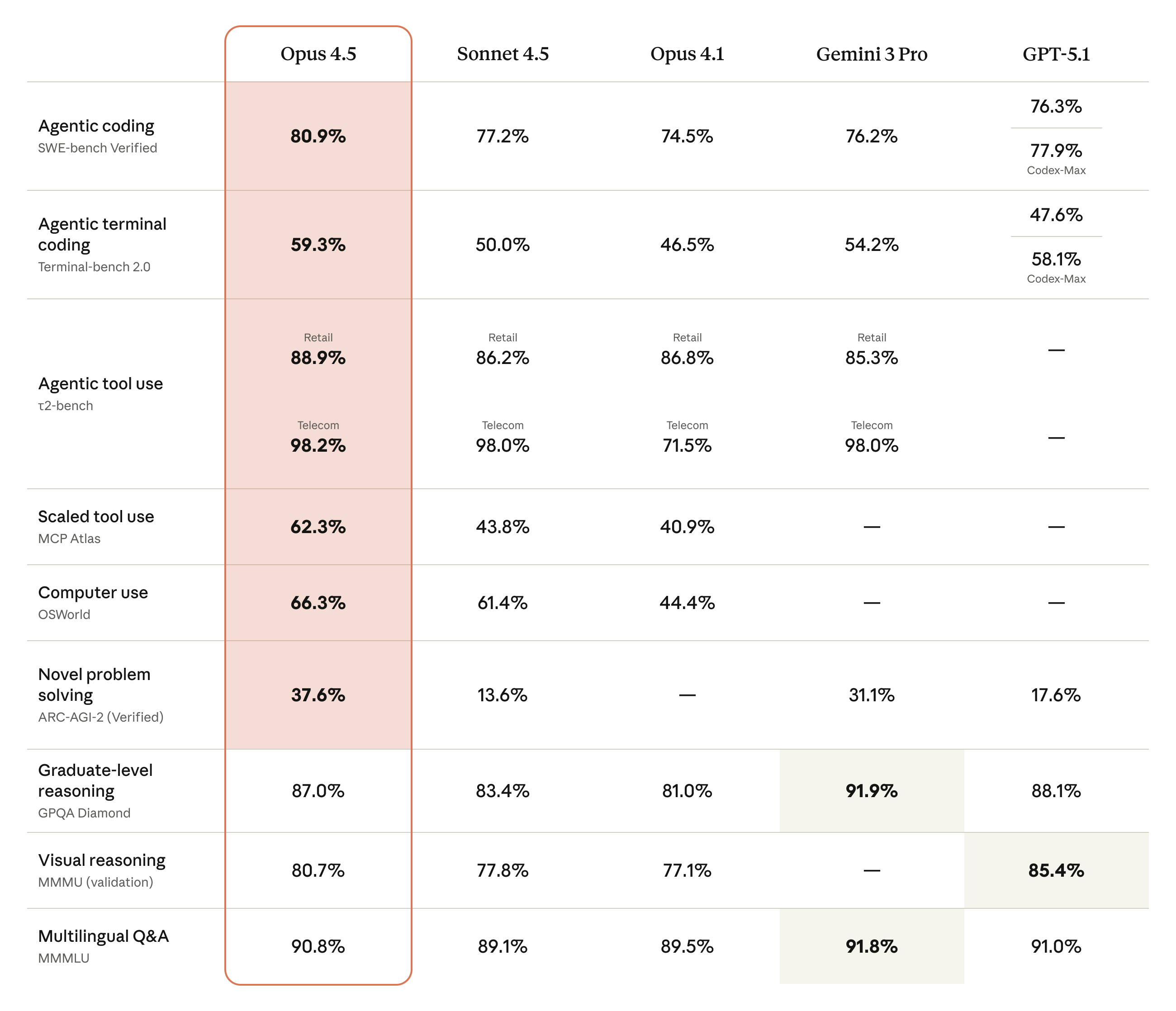
Hot on the heels of Google's Gemini 3 Pro release, Anthropic has announced an update for its flagship Opus model. Now at version 4.5, the new system offers state-of-the-art performance in coding, computer use and office tasks. No surprise there, those have been some of Claude's greatest strengths for a while. The good news is Anthropic is rolling out a handful of existing tools more broadly alongside Opus 4.5. It's also releasing one new feature.
To start, the company's Chrome extension, Claude for Chrome, is now available to all Max users. Anthropic is also introducing a feature called infinite chat. Provided you pay to use Claude, the chatbot won't fall to context window errors, allowing it to maintain consistency across files and chats. According to Anthropic, infinite chat was one of the most requested features from its users. Then there's Claude for Excel, which brings the chatbot to a sidebar inside of Microsoft's app. The tool is now broadly available to all Max, Team and Enterprise users, with support for pivot tables, charts and file uploads built-in.
A table comparing Opus 4.5's efforts in various benchmarks.
Anthropic
On the subject of Excel, Anthropic says early testers saw a 20 percent accuracy improvement on their internal evaluations and a 15 percent improvement in efficiency gains. As a complete Excel noob, I'm excited to for the company to trickle down that expertise to its more consumer-oriented models, Claude Sonnet and Haiku.
Elsewhere, Opus 4.5 also delivers improvements in agentic workflows, with the new model excelling at refining its own processes. More importantly, Anthropic is calling Opus 4.5 its safest model yet. It’s better at rejecting prompt injection style attacks, outpacing even Gemini 3 Pro, according to Anthropic’s own evaluations.
If you want to try Opus 4.5 for yourself, it’s available today through all of Anthropic’s apps and the company’s API. For developers, pricing for the new model starts at $5 per million tokens.
This article originally appeared on Engadget at https://www.engadget.com/ai/anthropics-opus-45-model-is-here-to-conquer-microsoft-excel-190000905.html?src=rss