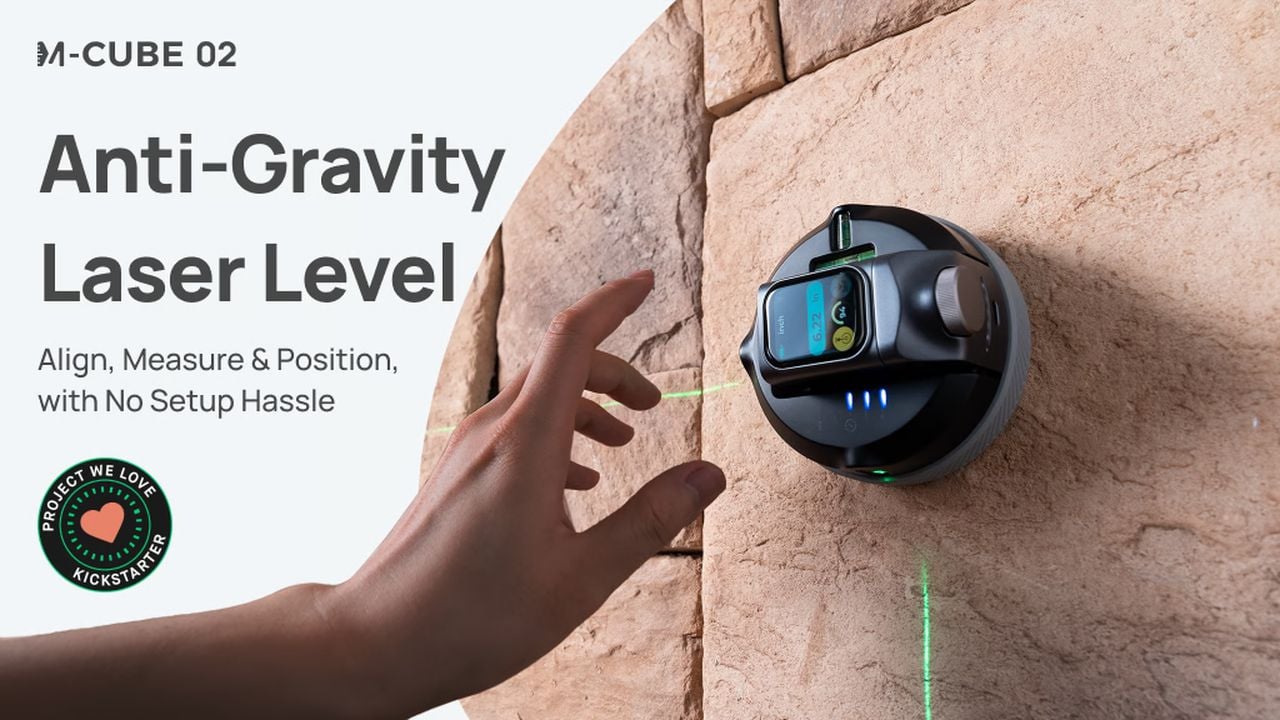
The M-Cube 02 Anti-Gravity Laser Level and the digital measure is your ultimate measurement companion, transforming the way you approach leveling, measuring, and positioning tasks. This remarkable tool is designed to defy gravity, offering a innovative experience that sets it apart from traditional devices. With its innovative features, the M-Cube 02 becomes an indispensable part […]
If you are interested in learning more about how you can use the new OpenAI ChatGPT 4o Canvas which is now currently available to in its beta release. Offering fantastic way to interact with the ChatGPT AI and work on code or writing projects where the text or code is updated in one window in […]
Gaming chairs have surged in popularity from 2008, appealing not only to enthusiastic gamers but also to remote workers and casual computer users. As ergonomic benefits become increasingly vital, many are questioning if investing in an ergonomic gaming chair is worthwhile and how to choose the best one. This blog will outline key factors that […]
The highly anticipated iOS 18.1 beta 6 is here, bringing a wealth of new features and improvements designed to elevate your iPhone experience to new heights. As one of the final betas before the public release, this update focuses on refining the way you interact with your device, making it more intuitive, efficient, and enjoyable. […]
Discover the all-new 2025 Nissan Armada, featuring bold design, advanced technology, powerful performance, and off-road capabilities with its first PRO-4X grade.
In an era where digital security is paramount, Apple’s iOS 18 introduces a revamped Passwords App that transforms password management. This app offers a comprehensive suite of features designed to strengthen password protection and provide users with a streamlined approach to safeguarding their online presence. The video below from Jacob’s Quick Tips shows us how […]
Apple has released watchOS 11.1 Beta 4, a significant update for the Apple Watch that brings a host of improvements and new features. This 432 MB update, specifically designed for the Apple Watch Ultra 1, addresses critical issues from the previous beta version, ensuring a more stable and reliable user experience. The watchOS 11.1 Beta 4 […]
The iPhone 16 Plus stands as a testament to Apple’s relentless pursuit of innovation and engineering excellence. This comprehensive teardown takes you on a journey through the device’s intricate internal landscape, shedding light on the innovative components that power its impressive performance. Whether you’re a curious tech-enthusiast eager to explore the inner workings of the […]
You fill a glass from the tap, the water looks clear enough, and you take a sip without thinking twice. But do you really know what’s in that water? Hidden beneath its transparency are impurities you can’t always see—chemicals, metals, microorganisms, etc. We assume the tap is fine because it’s what we’ve always done. But why settle for “good enough” when you could have water that’s visibly, undeniably clean? That’s the idea behind Waterdrop’s ED01 Electric Water Filter Pitcher. It’s not just about filtration; it’s about transparency—literally. The water-purifying pitcher itself is crystal clear, so you see exactly what you’re pouring into your glass. No more guessing, no more second thoughts. And the best part? Being able to carry your ED01 around from room to room instead of having to walk to the kitchen or your wall-mounted purifier every single time you need a glass of water. Whether you’re working at your desk, lounging on the couch, or prepping a meal, this sleek pitcher follows you, offering fresh, purified water wherever you need it. Clean water, on your terms.
Designer: Waterdrop
Click Here to Buy Now: $37.23$57.19 (31% off on Amazon). Get an extra 5% off with coupon code ‘YDreader’. Hurry, deal ends in 24 hours!
The Waterdrop ED01 is a remarkably portable water filter pitcher, designed to give you clear water wherever you go. The pitcher itself holds 3.5 liters (or 15 glasses worth) of water in it at any given point in time, with a one-touch dispenser that automatically filters and dispenses water directly into your bottle or glass. At 10.2 inches in height, it’s compact enough to even slide right into your fridge, giving you the added advantage of crisp, chilled drinking water at the push of a button.
Even though its transparent design is arguably its most eye-catching feature, the real beauty of the Waterdrop ED01 is what you don’t see—the advanced filtration happening behind the scenes. Sure, we all want clean water, but most of us don’t give a second thought to what’s actually in that water. With a single-button dispensing system, this pitcher does the heavy lifting of purifying for you on demand, removing bacteria, heavy metals, chemicals, and other contaminants you don’t want in your body. And it does so instantly, meaning you’re not just getting water that’s filtered—you’re getting water that’s as fresh as it can possibly be. Compare that to traditional gravity-fed systems, where the water can sit around for hours, potentially growing germs or losing its crisp taste.
Waterdrop’s electric filter pitchers provide instant filtration too, at a stunning 0.8 liters a minute compared to gravity water filters that take nearly 4x as long. All you do is hit the water drop icon on top and the ED01 gets to work. Water passes through a 5-micrometer filter that traps and removes over 30 harmful contaminants like chlorine, PFOA/PFOS, lead, benzene, mercury, while even trapping molecules that give some types of water a bad odor or taste. It doesn’t reduce the water’s TDS count, which you may want to take care of if you’ve got high-TDS tap water in your neighborhood – that’s where RO filtration systems are required, although RO systems are traditionally a lot bigger and bulkier than the ED01’s sleek water filter design.
The cartridge-based filters are easy to install and even swap out. Sort of like installing a big battery, the cylindrical filter cartridges slide in and slide out, making replacement a breeze. Each cartridge is good for up to 200 gallons of water or 1600 bottles, lasting anywhere between 4-6 months based on your water consumption. The ED01’s built-in battery has a 30-day life too, so you only ever need to recharge the thing once a month.
The ED01’s portable design and built-in handle mean you can carry your water purifier around with you – reducing your dependency on single-use water bottles. Whether you’re at home, at work, or out in nature, the ED01 has your drinking water needs sorted. Going on a camping trip? No need to haul around a bunch of bottled water when you can just bring the ED01 along and get fresh, filtered water from any available source. Living in a small apartment? The compact size won’t take up much counter space, and the clean, minimalist design ensures it won’t clash with your décor. The minimal, all-clear design adapts to your decor, and the compact form factor to your lifestyle, offering you the flexibility and freedom to get clean water wherever you are. You don’t realize how much you rely on something as simple as good, clean water until you have a product that makes it this easy to access.
Click Here to Buy Now: $37.23$57.19 (31% off on Amazon). Get an extra 5% off with coupon code ‘YDreader’. Hurry, deal ends in 24 hours!
When DJI revealed its tiny $200 Neo drone, I immediately saw how it could fit into my vlogger’s toolkit to supplement my Mini 4 Pro and Mavic 3 Pro. Flying those sophisticated drones is a whole thing that requires planning. But the Neo can be launched spontaneously to grab quick and fun shots, thanks to features like palm takeoff and voice control. That ease of use also makes it ideal for the social media influencers.
Though beginner-friendly, it’s quite powerful. You get features from DJI’s bigger drones like ActiveTrack, FPV capabilities and even support for DJI’s Mic 2. And forget about the fuzzy video you may have seen on other cheap drones. The Neo can record in sharp 4K, making it suitable for content creators who need affordable aerial video.
It’s not perfect though, as the Neo is noisy and lacks vertical video, something influencers will likely want. Still, it looked like the kind of product that could appeal to all types of people, even creators like myself who already have multiple drones. To see how it performed, we put it through a variety of scenarios from events to weddings — and even flying just for fun.
Design and features
With a softly sculpted design and protective propeller guards, the Neo gives off safe, friendly vibes. It’s DJI’s lightest drone by far at 135 grams, less than half the Mini 4’s heft, and is small enough to fit into a large jacket pocket. The device’s diminutive size also means it’s exempt from any drone license requirements.
The Neo has a rich feature set, but all you need to start flying is your hand. Simply place the Neo in your palm, press the new mode button at front and it’ll take off and perform one of six preprogrammed “smart shots.” Those are Follow (the drone tracks and follows you around), Dronie (it starts tight on your face then flies up and away from you), Circle (flies around you), Rocket (starts at face level and flies straight up), Spotlight (keeps you centered in the frame but doesn’t move) and Direction Track (for vlogging). After you complete the shot, stick out your hand under the Neo to land it.
Another great option for newbies is voice control, which lets you fly and record video by speaking into the Fly More app. I wasn’t able to try this feature in my initial hands-on tests, but it has now been enabled via a firmware update. You can either tap on the voice button to say a command or enable the wake word settings. Then, you can just say, “Hey Fly” to activate it.
Steve Dent for Engadget
For instance, saying the word “dronie” will activate the dronie flight pattern and start recording. You can then change parameters using commands like “closer,” “farther” and “higher.” It also includes the safety commands “land,” “stop” and “brake.”
The setting is a great way to give users some control over the social media-oriented quick shots without the need to touch a controller. It was straightforward to set up, and I found that it responded quickly and reliably to my commands. However, you’ll need to keep the phone’s mic close to your mouth when the Neo is nearby, or the propeller wailing will drown out your voice.
Steve Dent for Engadget
The Neo is also DJI’s first drone that can be piloted using a smartphone alone. Switching the app into manual mode brings up a touch screen with full maneuvering controls. It also offers a camera/video mode and return-to-home toggle. There’s a serious caveat to using it, though, as I’ll detail shortly. For more serious piloting, the Neo supports multiple DJI controllers (sold separately), including the RC N3 model that requires a smartphone. You can even use it as an FPV drone with DJI’s RC Motion 3 and DJI Goggles 3. Those controllers offer most of the features available on other DJI camera drones, like cinema, normal and sport modes, along with auto and manual video settings.
What you won’t see are any obstacle detection sensors, which is one reason the Neo is so cheap. The only crash protection measures are the camera’s subject detection AI, a downward facing IR landing sensor and a rugged design that resists minor accidents.
As for storage, there’s no microSD card slot, so the Neo relies on the 22GB of internal memory that holds 40 minutes of 4K footage or 55 minutes of 1080p video. You can transfer the files to a PC or other device via the rear USB-C charging port. Again, this is less than ideal, but it keeps the price down.
Performance
Steve Dent for Engadget
If you have low performance expectations for a 5-ounce, $200 drone, get ready to be pleasantly surprised — the Neo is maneuverable, fast and fun. It can hit speeds up to 18 mph in sport mode, which is half that of the Mini 4 Pro, but still at the upper end of this category. You can even fly it in fairly blustery winds up to 18 mph, though it could get blown into another county if you let it get too far away.
The Neo can also fly twice that speed in manual mode, another feature that arrived in a post-launch firmware update, but requires DJI’s FPV Controller 3. With that controller and the firmware update, I pushed it to its top speed. 36 mph is faster than any drone this size by far, but it never felt out of control. However, at that speed the noise level resembles a swarm of particularly irate hornets.
The FPV Controller 3 also opens up the possibility of acrobatic (acro) flying, letting you perform flips, spins and other maneuvers. That’s a lot of fun, especially knowing that the drone is not only crash resistant but costs just $200 — a pittance by drone standards. I'm not an acro pilot, but in the hands of an expert like quadmovr, the Neo can rip through some unbelievable moves.
Steve Dent for Engadget
For novices who want to try first-person video flying (FPV) but aren’t ready for the tricky-to-use Controller 3, DJI’s Goggles 3 and RC Motion 3 are better for FPV newbs. It’s certainly not as nimble and quick as the Avata 2, but it’s still a lot of fun. In fact, it’s a great learning tool for wannabe FPV pilots with either of those controllers, thanks to the durability and low price.
The Neo is ideal for event videography too, as you can maneuver it almost anywhere to get some cool or dramatic shots. At the same time, the propeller guards make it safe to use around people. Again, it’s very noisy, so it’s obviously not suitable to fly through something like a wedding or a best man’s speech.
The modes ActiveTrack, Spotlight and Point of Interest (POI) work just as they do on other DJI drones to track or follow you. A key mode for content creators is Direction Track, which lets you do walk-and-talk vlogging while keeping your face in view. With that setting, the Neo is usually flying backwards with no rear obstacle sensor, so you’ll need a clear path. When I tested this, the drone veered into some tree branches and was thrown off course, but it kept on flying.
I never try to crash drones on purpose, but did have a few mishaps. The Neo hit some trees before falling to the ground a couple of times, and bonked a hard interior floor on one occasion. It not only continued to function perfectly, but had nary a visible scratch, so DJI has done a good job with durability. That said, you can purchase a one-year insurance plan for the Neo at just $22, which covers accidents and loss of the drone.
Steve Dent for Engadget
With a controller and DJI’s O4 transmission, the Neo has a 6.2 mile line-of-sight range in the US, or 3.7 miles in Europe where transmission power is limited. That’s exactly half that of the Mini Pro 4, but pretty extraordinary given the size — though I’m not sure who’d ever want to fly such a lightweight drone that far away. I flew it about half a mile away with no loss of signal, and that was plenty far for my comfort level. Maximum altitude, meanwhile, is unlimited and set by the user.
When using smartphone Wi-Fi control, maximum range is just 165 feet, so it’s really just for indoor or nearby outdoor use. This is based on Wi-Fi limits, but it also effectively serves as a geofence for novices (the drone just stops and hovers if it gets out of Wi-Fi range). In addition, if you’re using the palm or voice control, altitude is limited to around 100 feet.
While small and light, the Neo’s 1,435mAh lithium-ion Intelligent Flight Batteries support up to 17 minutes of flying time, or around 13 to 14 minutes in the real world — not bad in this category. With the Neo alone, it takes an hour to charge a single battery directly within the drone. However, if you spring for the $289 combo kit (including the drone, two extra batteries and a three-battery charger), you can juice three batteries in that same 60 minutes.
Camera
Steve Dent for Engadget
The gimbal is tucked into a protective housing and can tilt up 60 degrees and down 90. The camera has a 1/2-inch 12-megapixel sensor with an ultra-wide 13mm equivalent focal length and f/2.8 aperture — about what you’d expect on a decent smartphone.
The Neo’s video specs are weaker than other DJI drones, but I was pretty happy with my footage considering the price of the Neo. It can shoot 4K 30p video and 1080p at up to 60fps, certainly good enough for most social media users. It also supports 4K in a 4:3 aspect ratio at 30fps, or 1080p in the same aspect ratio but up to 60fps.
The camera doesn’t tilt sideways like it does on the Mini 4 Pro, which means it can’t do vertical video. That’s unfortunate considering the target market, but adding that capability would also increase complexity and, no doubt, the price. The best bet for social media users is to shoot in 4K and then crop to a 1080x1920 9:16 resolution.
There’s also no D-LogM capability to boost dynamic range as seen on most other DJI drones, and with such a small sensor, low-light capability is poor. However, video is sharp and color accurate, which is well above what you’d expect in this price range. The 12-megapixel photos are also good enough for hobbyists and social media users. I expect the average buyer taking aerial shots of their home, family and vacations will be more than pleased.
Steve Dent for Engadget
The Neo also incorporates DJI’s software-based RockSteady stabilization along with gimbal tilt stabilization. That should provide smooth enough video for most users, or you can disable the stabilization altogether and use DJI’s GyroFlow app in post for better results. The Neo also supports HorizonBalancing, providing level video even if the drone banks up to 45 degrees. Note that for the 4:3 video modes, there’s no electronic image stabilization, so you need to stabilize the footage later using GyroFlow or another app.
The Neo can even capture audio with your phone just by tapping the Fly More app’s audio record button. You’ll get better quality by connecting an external microphone or using DJI’s Mic 2. Since the Neo is extremely noisy, the Mic 2 will cancel out much of that prop screeching, leaving your voice clear and legible, albeit with some distortion.
Wrap-up
Steve Dent for Engadget
DJI’s Neo might be small in stature, but it can shoot good quality video and photos safely around people, and does so at a very reasonable price. It has clearly captured the public’s imagination, as it’s already been sold out on DJI’s site despite only being on sale for a couple of weeks.
Potential buyers range from novices up to experienced hands who want a small, people-friendly drone for Instagram stories and more. It’s ideal for TikTok and other creators because it can act as a robot videographer, helping you record content by yourself. The main issues you’ll have to live with are the noise, lack of vertical video and limited battery life.
For $200, or $289 if you opt for the combo kit with three batteries and a charger, the Neo is a no-brainer for many creators. The only real competition is the $350 HoverAir X1, which costs more and offers lower-resolution video. But by providing higher quality video for less money, the Neo is a better value.
This article originally appeared on Engadget at https://www.engadget.com/cameras/dji-neo-review-the-best-200-drone-ever-made-010032884.html?src=rss