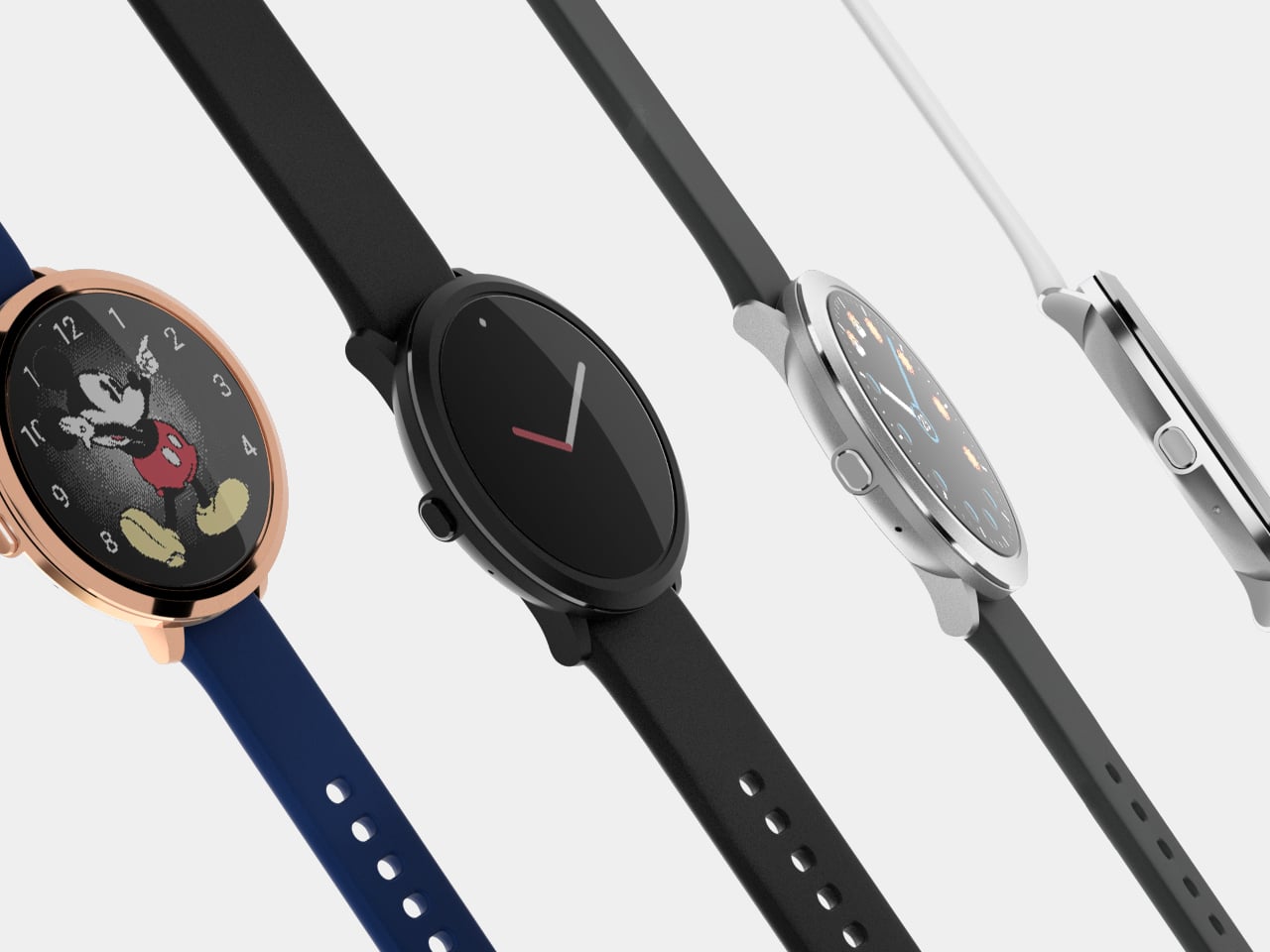
The 2015 Pebble Time Round stole a lot of hearts by looking like a real analog watch and still being a Pebble, but it shipped with a tiny screen, a huge bezel, and battery life that lagged behind its siblings. It remained the thinnest smartwatch ever made, yet always felt like a beautiful compromise waiting for a second chance, the kind of product people kept wearing despite its flaws because it looked better than anything else on their wrist.
Pebble Round 2 is that second chance, part of the broader Pebble relaunch. It keeps the same ultra-slim stainless-steel profile, just 8.1 mm thick, but fixes the two big complaints: the bezel is gone, and the battery now lasts around two weeks. It is framed as the most stylish Pebble ever, but this time without the asterisk or the mental math about whether style was worth the compromises.
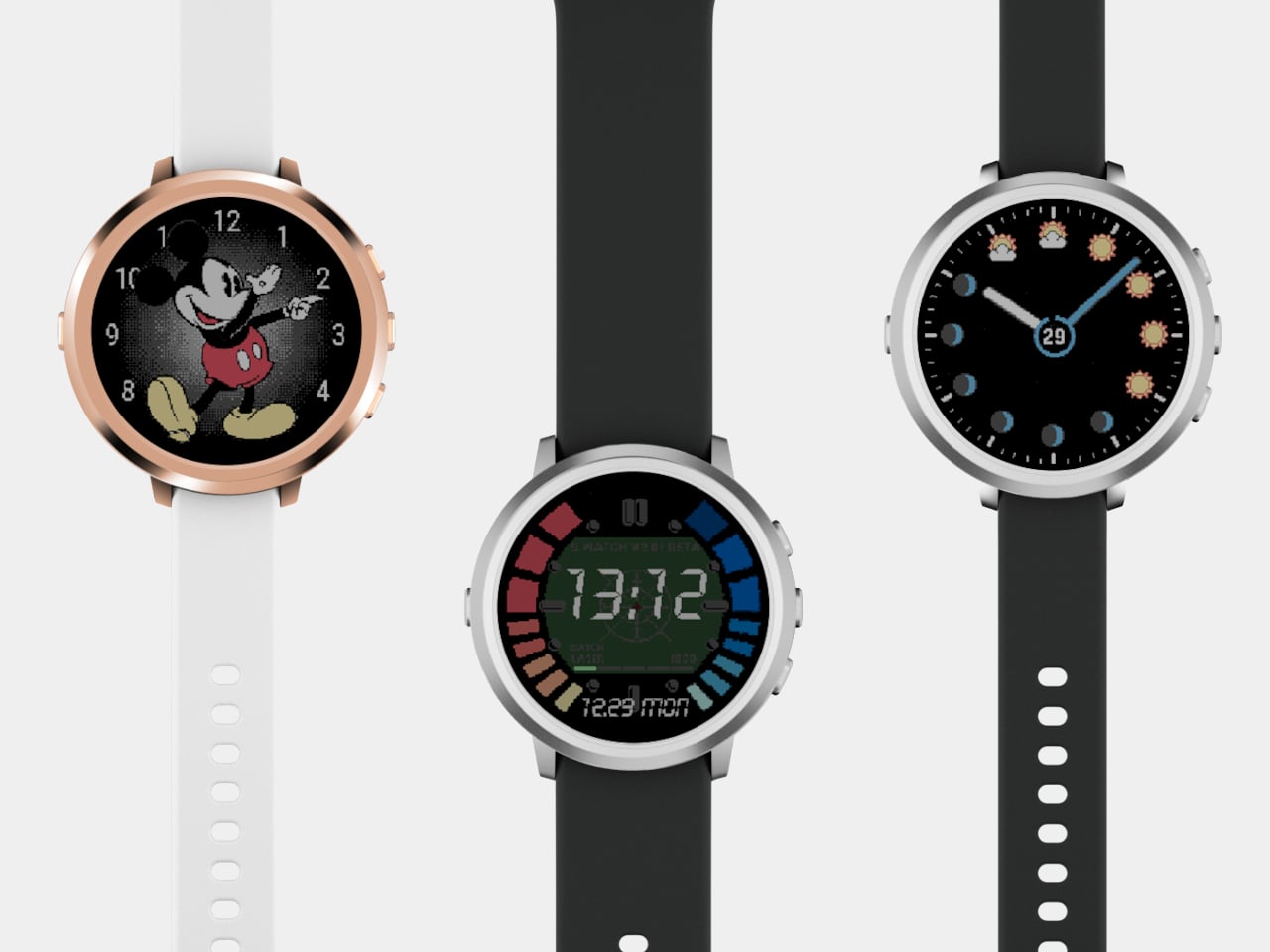
The new 1.3-inch color e-paper display covers the entire face, 260 × 260 pixels at 283 DPI, twice the resolution of the original. The always-on, reflective screen still behaves like a classic Pebble, readable in sunlight and gentle indoors, but finally looks proportionally right. Wrap that in a stainless-steel frame, and you get something that reads as a watch first, gadget second, which has always been the goal.
The two-week estimated battery life, made possible by newer Bluetooth chips and Pebble’s frugal OS, brings the Round in line with the rest of the lineup. Interaction stays very Pebble, four physical buttons you can use without looking, plus a touchscreen you do not have to rely on. There is a backlight for night glances, but the default state is that calm, always-on face that does not glow at you during meetings.
The software side stays fun, quirky, and open source. PebbleOS powers everything, with an open-source mobile app that works with iOS and Android. The Pebble app store has over 15,000 apps and watchfaces, and the SDK is there if you want to build your own. Health tracking covers steps and sleep, enough for everyday awareness without pretending to be a hardcore fitness or sports watch.
Dual microphones handle speech input, from interacting with AI agents to replying to messages on Android, with iOS support coming in some regions. Water resistance is targeted at 30 m, enough for daily life. Style-wise, you get matte black with a 20 mm band, brushed silver in 14 mm or 20 mm, and polished rose gold in 14 mm, all with quick-release bands and room for standard straps.
Pebble Round 2 speaks to people who miss glancing at a watch that is always on, who like the idea of weeks-long battery life and tactile buttons, and who want something that looks good with a shirt cuff as well as a hoodie. It is not chasing the latest sensor arms race; it is doubling down on the idea that a smartwatch can still feel like a watch, just one that happens to run PebbleOS in 2026, with a full-face display and enough battery to forget about charging for 14 days.
Kitchen design reached a turning point in 2025, moving beyond gadget proliferation toward thoughtful consolidation. The tools that stood out this year questioned whether we really need separate appliances cluttering our counters or if smarter design could deliver more capability in less space. From espresso machines that resemble modern sculpture to modular cooking systems that adapt to small kitchens, these innovations demonstrate that kitchen essentials can be both beautiful and highly efficient.
What makes these seven tools worth your attention is their refusal to compromise. They deliver professional capability without demanding professional-sized kitchens, embrace minimalist aesthetics without sacrificing functionality, and respect the reality that most of us cook in spaces far smaller than we’d prefer. Whether you’re drawn to all-in-one versatility or single-purpose perfection, these designs represent kitchen tools that have evolved beyond their utilitarian origins into objects worth keeping visible rather than hidden away in cabinets.
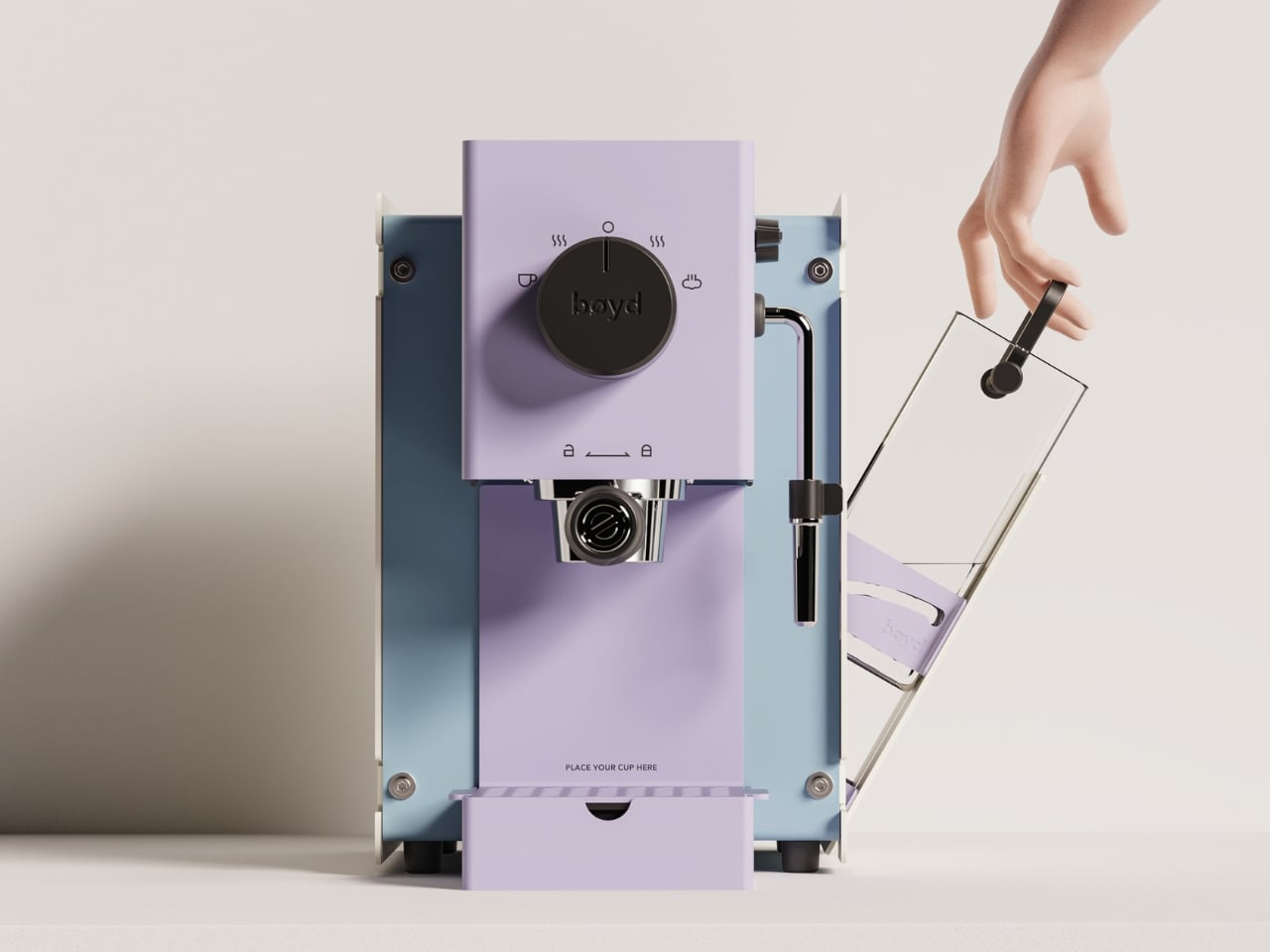
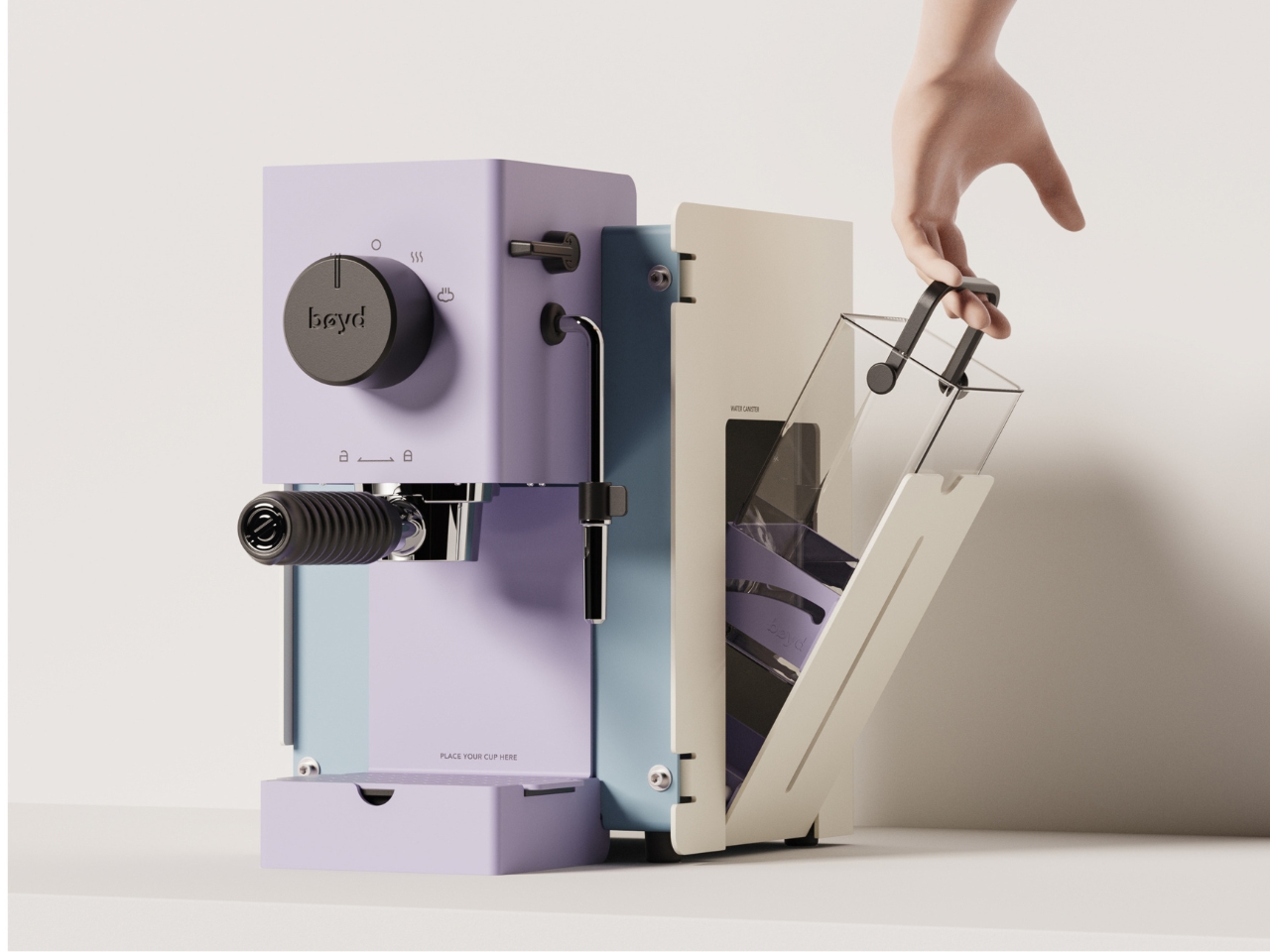
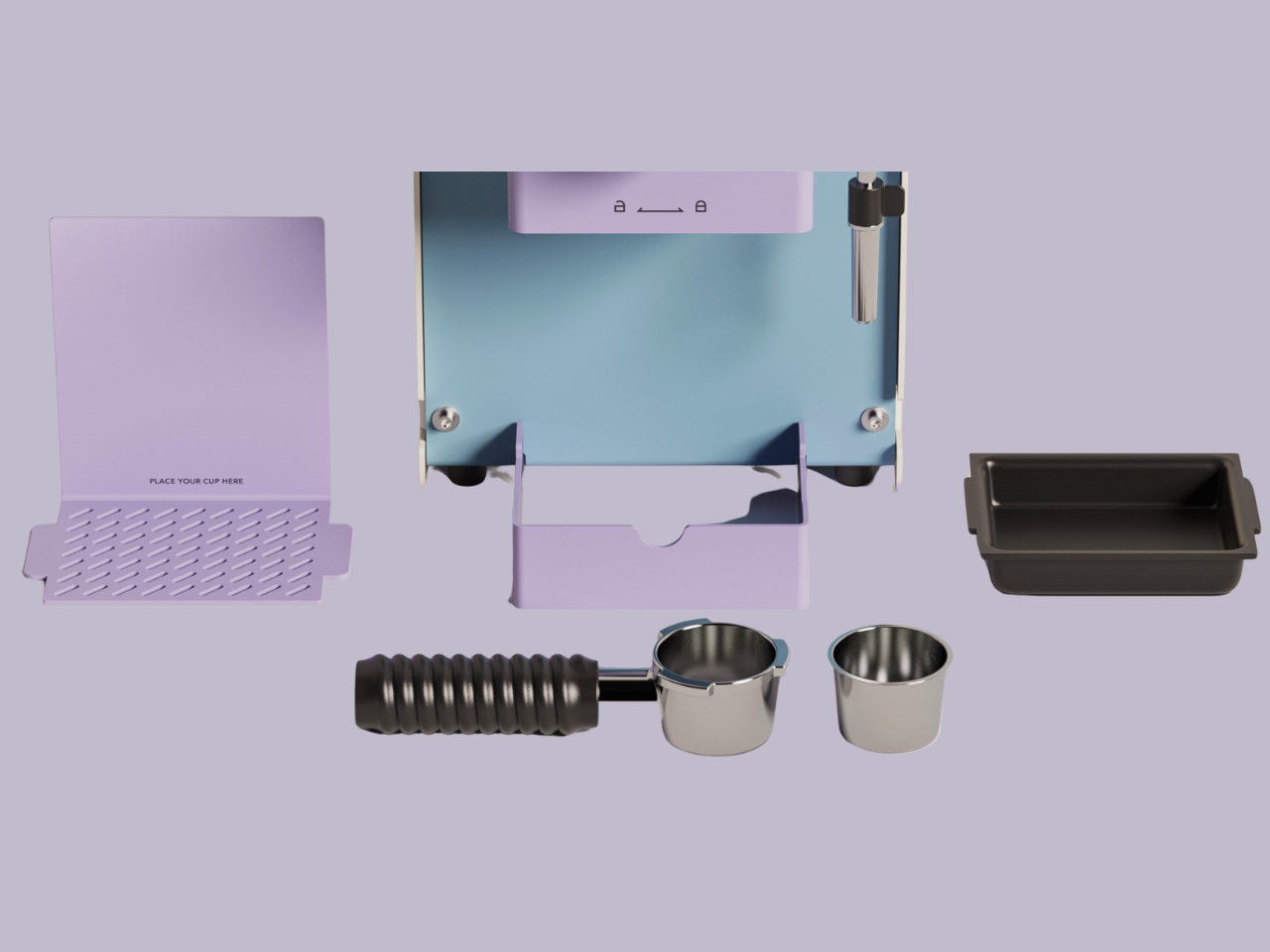
The BØYD espresso machine concept from NYZE Studio commands attention through bold geometric simplicity rather than technical intimidation. Smooth curves and pure lines create something resembling modern sculpture more than traditional coffee equipment, transforming countertop real estate into visual statement territory. The less-is-more philosophy strips away unnecessary details, leaving only what matters for making exceptional espresso. This machine invites display rather than storage.
Thoughtful ergonomics ground the aesthetic ambition in practical usability. The perfectly arched handle provides natural grip comfort, while the simplified interface eliminates button-fumbling before your first cup. Morning coffee preparation becomes intuitive rather than overwhelming, which matters when you’re operating pre-caffeine. The BØYD proves that espresso machines don’t need complexity to deliver quality, just clarity of purpose and execution that respects both the coffee and the person making it.
What we like
The bold minimalist form functions as a countertop sculpture while making espresso.
The arched handle and simple interface prioritize ergonomic comfort and intuitive operation.
What we dislike
The concept status means availability and pricing remain unknown.
The minimalist aesthetic may lack the visual warmth some prefer in kitchen appliances.
2. Concept Cooker: The All-in-One Kitchen Revolution
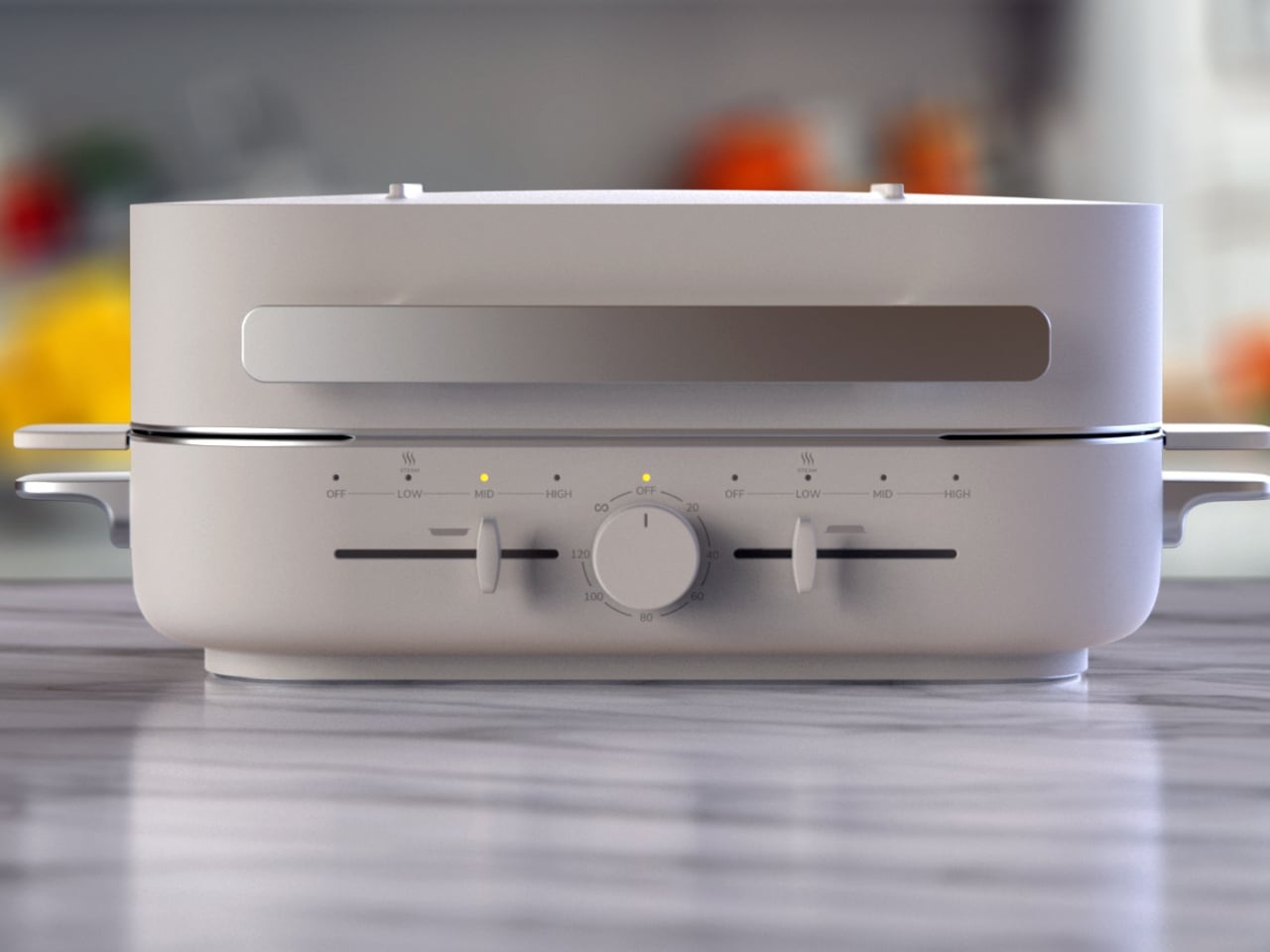
Vuk Dragović’s concept for Nanlong imagines replacing multiple appliances with one versatile countertop unit capable of grilling, steaming, baking, and hosting hot-pot dinners. Designed for China’s dynamic cooking culture, this all-in-one system simplifies both everyday meals and entertaining through intelligent consolidation. The clean control panel allows mode selection, temperature setting, and timer adjustment in a few taps, eliminating confusing menus and excessive knobs that plague traditional appliances.
Interchangeable accessories demonstrate the breadth of functionality. Snap-in grill racks deliver smoky finishes to meats and vegetables, steaming baskets preserve nutrients in seafood and dumplings, baking trays transform the unit into a miniature oven, and dedicated hot-pot inserts bring communal dining home. The compact footprint sits comfortably on most counters, freeing space otherwise occupied by separate grills, steamers, and ovens. Quick attachment and straightforward cleanup make the modular approach practical rather than theoretical, proving that versatility doesn’t require complexity.
What we like
The all-in-one design replaces multiple appliances with one compact countertop unit.
Interchangeable accessories enable grilling, steaming, baking, and hot-pot functionality.
What we dislike
The concept stage leaves questions about durability across multiple cooking methods.
The modular accessories require storage space when not actively in use.
3. Iron Frying Plate: Cook and Eat on the Same Surface
The Iron Frying Plate eliminates the transfer step between cooking and eating by making the frying pan your plate. This beautifully crafted cookware allows you to enjoy meals immediately after cooking them, served on the very surface that brought out their best flavors and textures. Made from 1.6mm-thick mill scale steel, the uncoated iron surface is rust-resistant, stick-resistant, and ready to use straight from the box without seasoning rituals that intimidate casual cooks.
The wooden handle attaches and detaches with one hand, transforming the pan from cooking tool to serving plate seamlessly. This design philosophy respects the reality that transferring hot food creates extra dishes and loses precious heat. Eating directly from the iron plate maintains optimal temperature while reducing cleanup to a single item. The handsome aesthetic makes tableside presentation feel intentional rather than lazy, proving that the shortest distance between stove and mouth deserves celebration rather than apology.
The cook-and-eat design eliminates food transfer and reduces dishes to one item.
The 1.6mm mill scale steel is rust-resistant and stick-resistant without coatings.
What we dislike
The iron construction retains heat intensely, requiring careful handling at the table.
The single-serve format doesn’t scale well for cooking family-sized meals.
4. Thanko Electric Bento Rice Cooker: Perfect Rice Anywhere
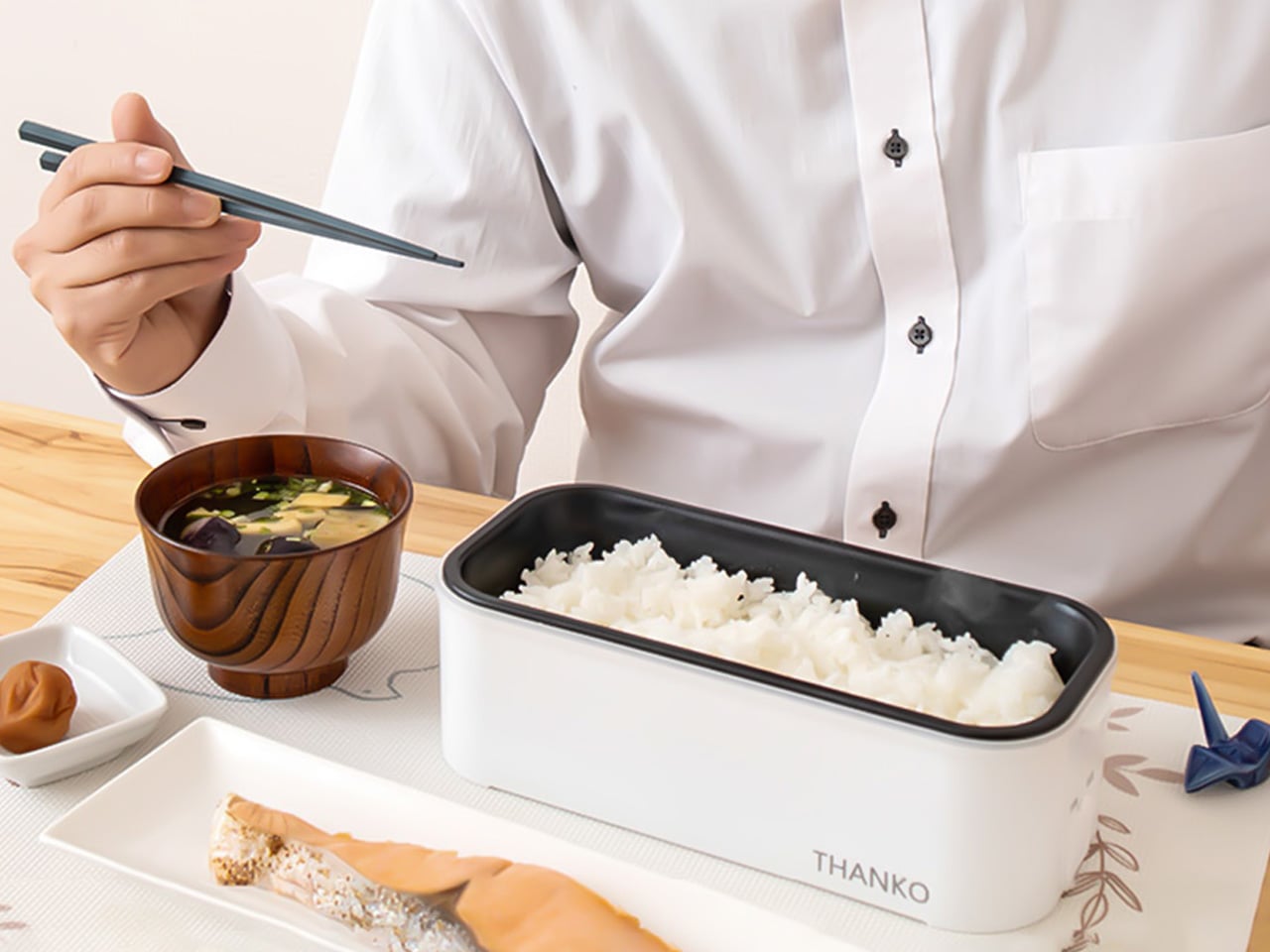
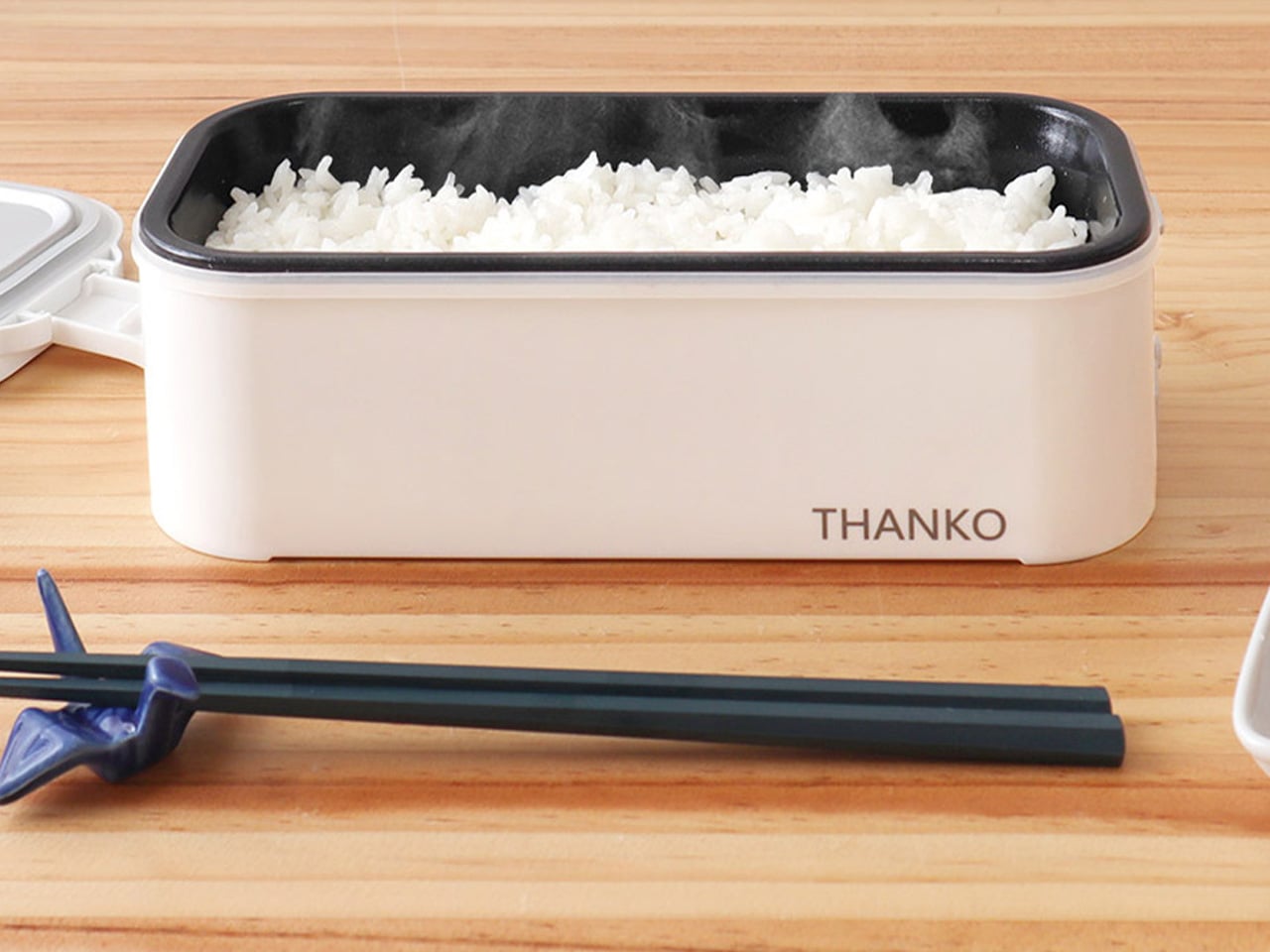
Rice deserves more appreciation as the global food icon that transcends cuisine boundaries and meal timing. The Thanko Electric Bento rice cooker makes this omnipresent grain literally portable, cooking single servings wherever you happen to be. The compact device cooks 6 ounces of rice in 14 to 20 minutes, with an LED indicator showing when it’s ready. Weighing just 2 pounds and fitting easily in bags, this cooker brings fresh food to offices and travel destinations without takeout compromises.
The device operates silently without releasing steam, making it discreet enough for practically anywhere. Add water, rice, and optional salt or broth for enhanced flavor, then wait while it works quietly. The best feature is eating rice directly from the cooking container, eliminating dish multiplication that usually accompanies meal preparation. This optimization suits solo diners, frequent travelers, and anyone wanting quick meals that go with everything. The included measuring cup adds convenience, proving that portable cooking doesn’t require guesswork or complicated processes.
What we like
The 2-pound weight and compact size make this genuinely portable for travel and office use.
Silent operation without steam release enables discreet cooking practically anywhere.
What we dislike
The 6-ounce capacity limits this to strict single-serving use.
The specialized function doesn’t justify the space for people with existing rice cookers at home.
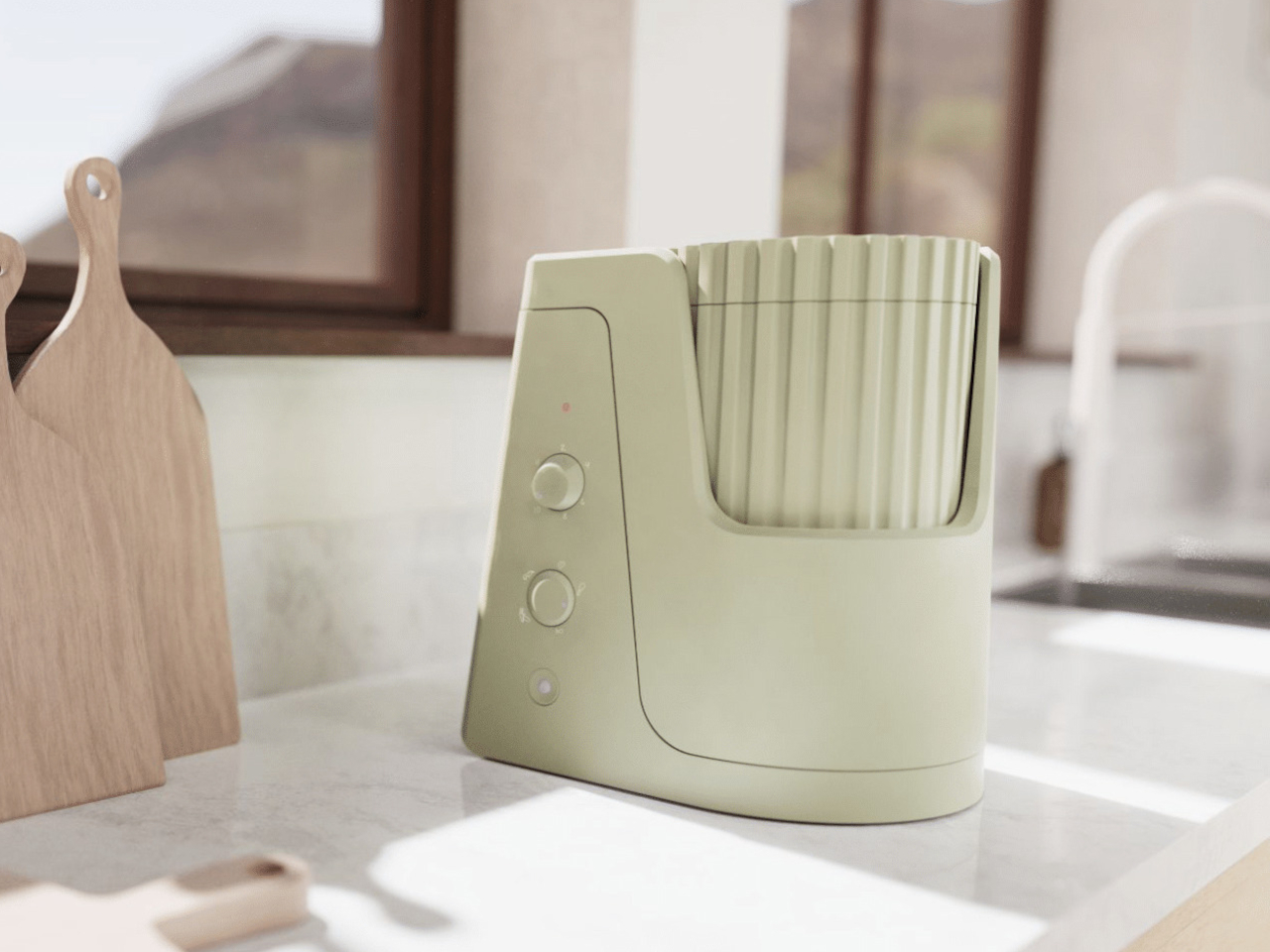
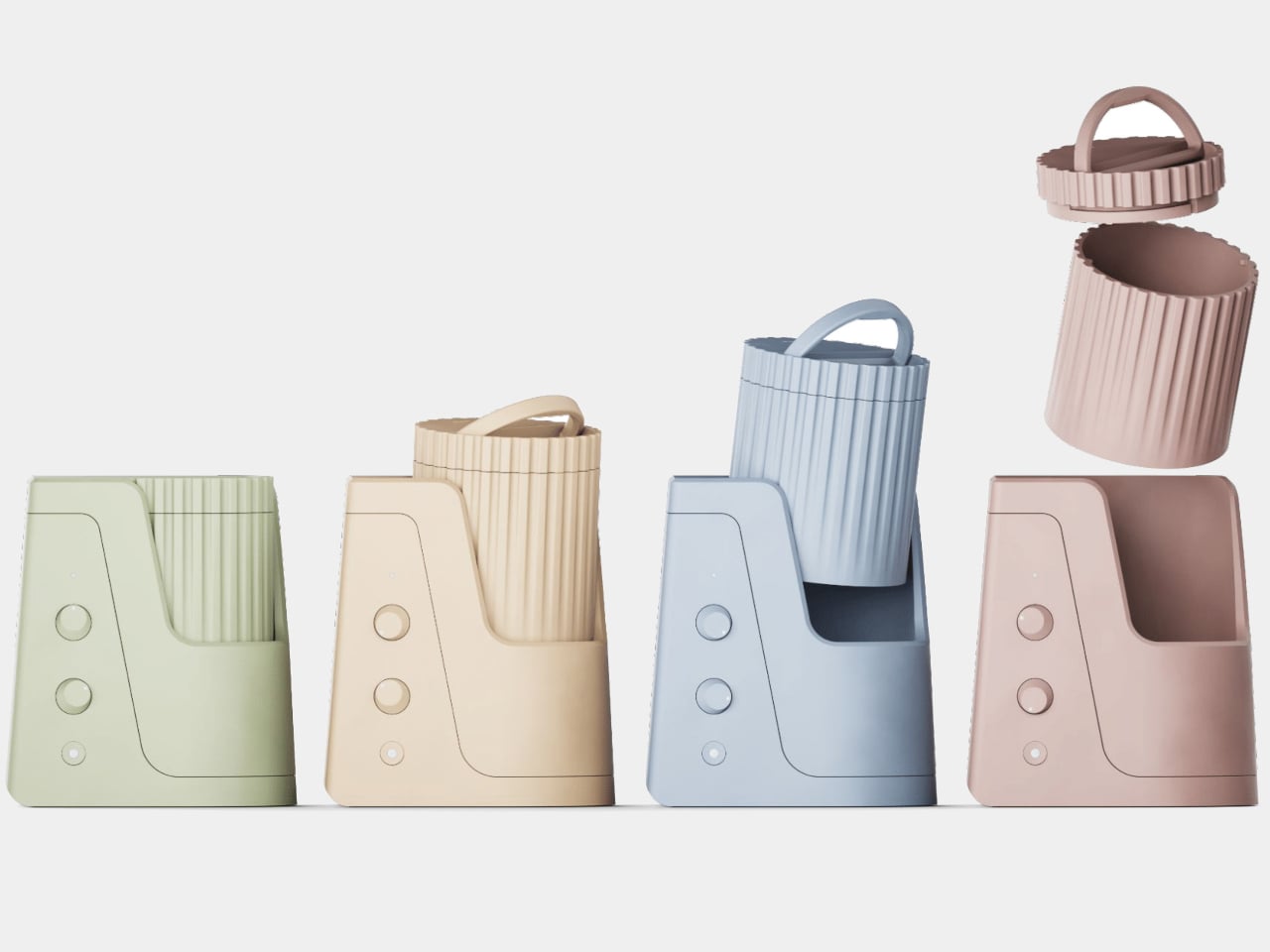
Slow cooking predates modern appliances by centuries. Hawaiian Imu underground pit cooking buried large quantities for communal feasting, creating a unique atmosphere while feeding many people. The Lehua slow cooker concept draws inspiration from this tradition, adapting lessons from pit cooking to modern lifestyles and small households. The design adds peculiar features, making the process more convenient and meaningful than standard slow cookers manage.
The actual pot separates from the cooker itself, allowing safe lifting of the hot vessel for food preparation away from the heating element. This seemingly simple feature addresses a common frustration with integrated slow cookers, where accessing food means awkward maneuvering around hot components. The Hawaiian inspiration isn’t just an aesthetic reference; it represents thoughtful consideration of how communal cooking traditions can inform contemporary appliance design. The Lehua proves that looking backward sometimes reveals better paths forward than pure technological advancement alone can offer.
What we like
The separate pot design allows safe lifting and food preparation away from the heating element.
Hawaiian Imu pit cooking inspiration brings cultural meaning to contemporary appliance design.
What we dislike
The concept stage leaves practical questions about capacity and cooking performance unanswered.
The separated pot design may reduce heat efficiency compared to integrated slow cookers.
6. Obsidian Black Precision Chopstick Tongs: Where Tradition Meets Practicality
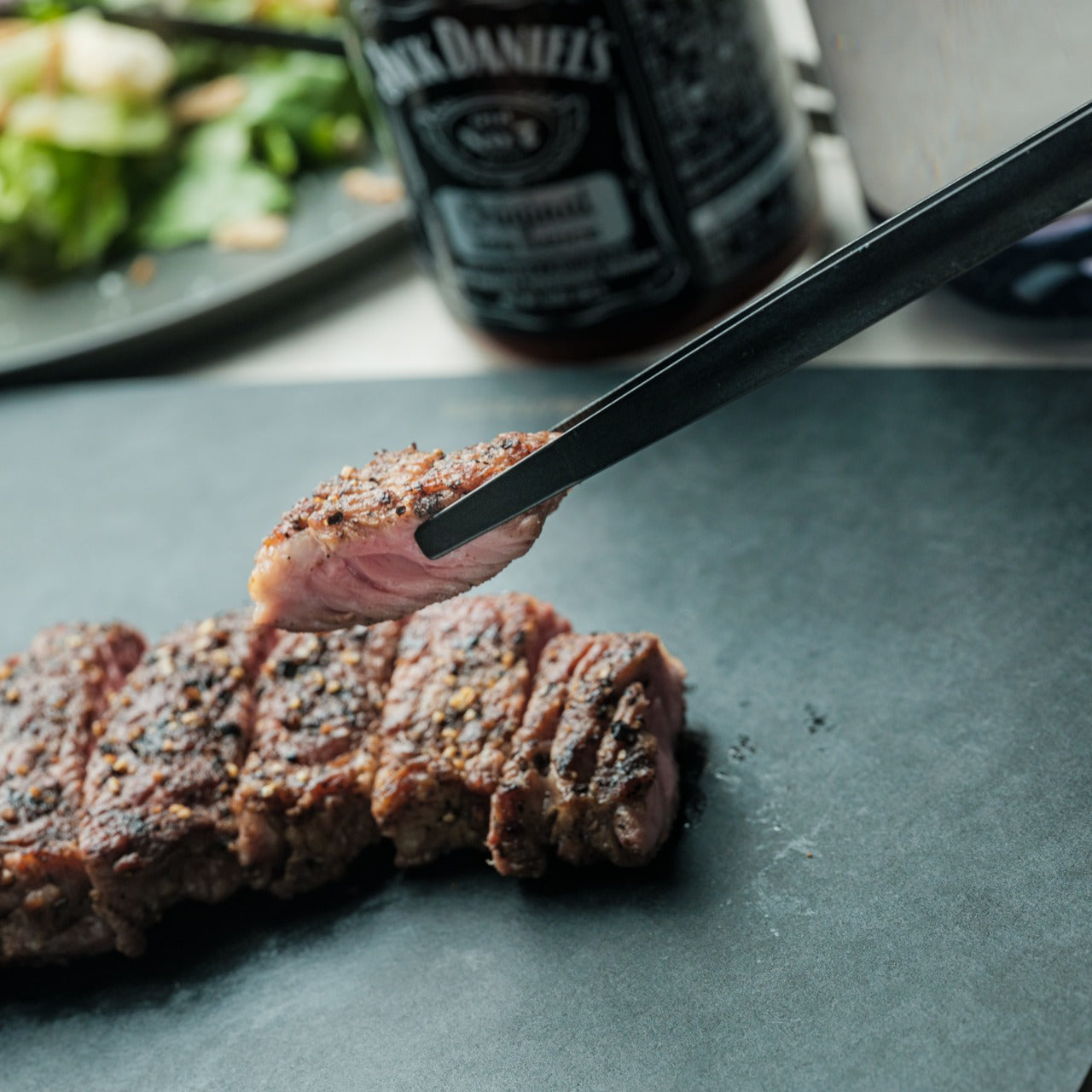
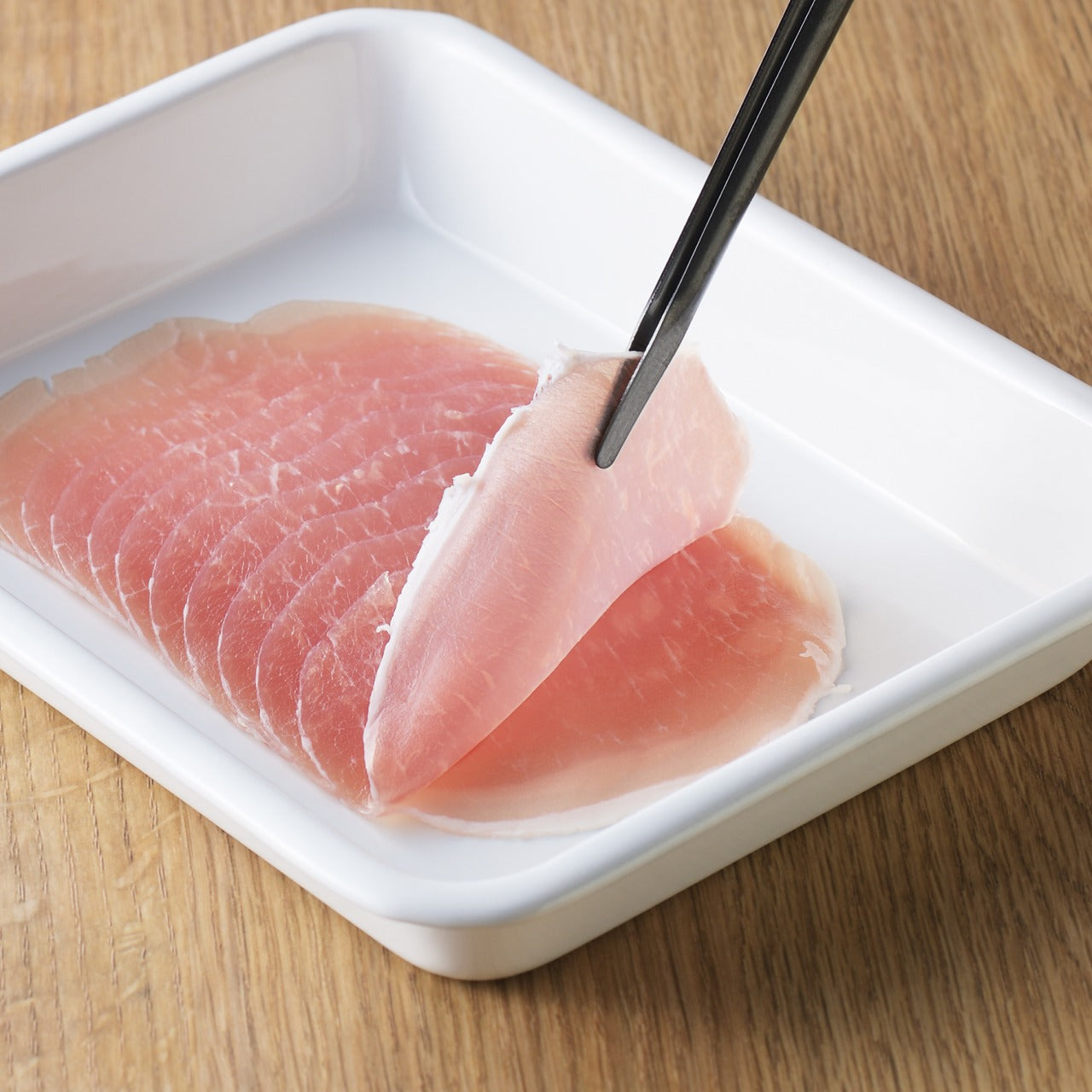
Traditional Japanese chopsticks meet modern tong functionality in this unique utensil that handles delicate food with expert precision. Made from SUS821L1 stainless steel, these chopstick-style tongs blend elegance with practicality, offering chopstick precision combined with tong versatility. The obsidian black finish comes from special metal processing, ensuring the color never scratches or peels, preserving handsome looks indefinitely through daily use. These aren’t just kitchen tools; they’re craftsmanship designed to last years.
The design excels at picking up and turning small or delicate pieces, whether flipping sushi or handling tiny ingredients on the stovetop. There’s no wrong way to hold them, making confident use accessible regardless of chopstick skill level. The lightweight yet durable construction balances control with ease, perfect for both cooking and dining applications. The exceptional strength and corrosion resistance of the stainless steel withstand daily demands without degradation. These tongs prove that inspiration from tradition, when perfected for modern use, creates tools superior to purely contemporary designs.
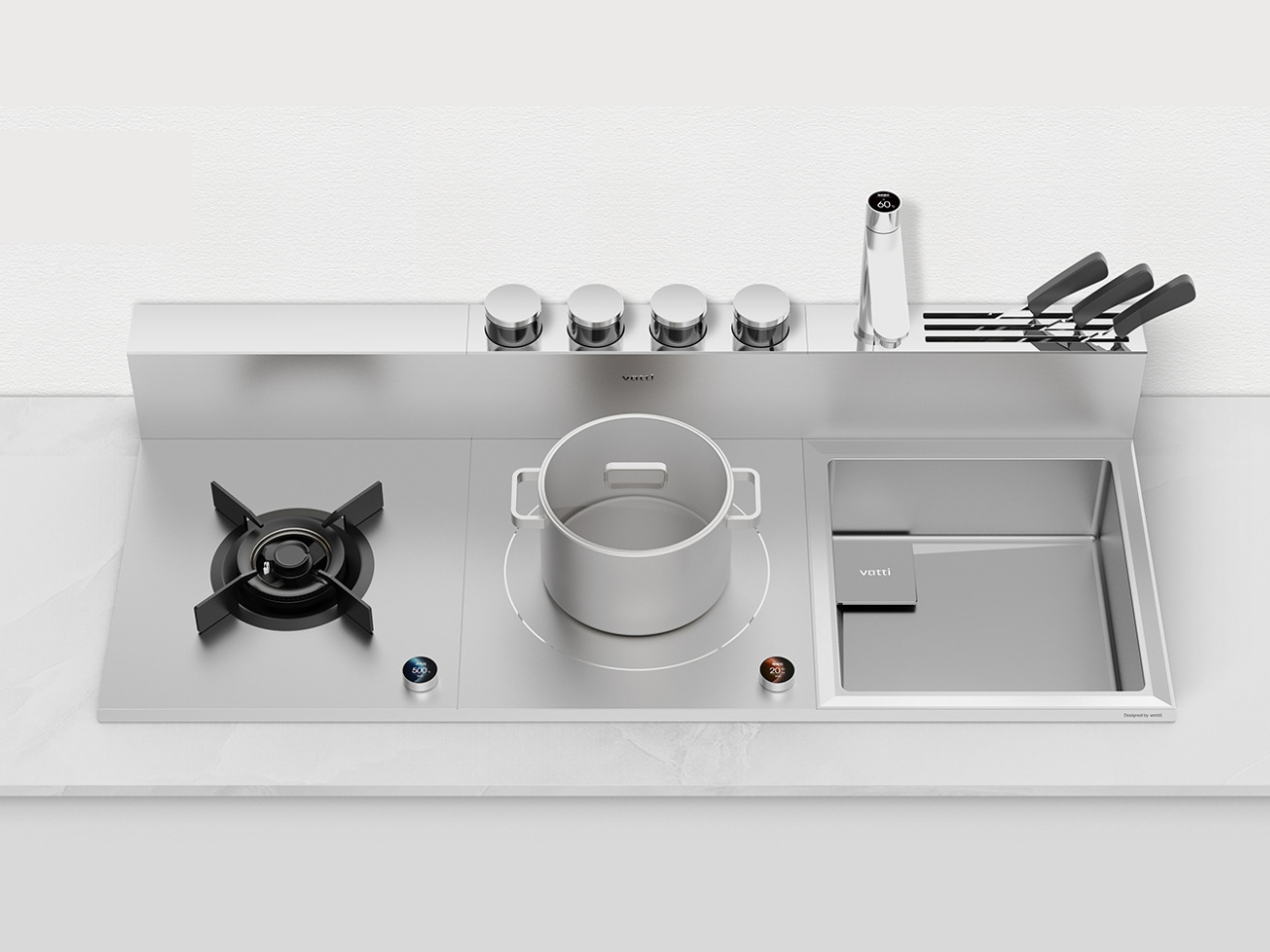
Tiny kitchens demand creative solutions beyond just buying smaller appliances. The Magic Cube Cooking System maximizes functionality and efficiency through a modular design that integrates essential cooking elements into a sleek, space-saving format. The customizable approach ensures you only get what you actually need by combining multiple crucial functions into interconnected modules. This system adapts to your specific cooking style rather than forcing you to adapt to predetermined configurations.
Available modules include open flame and induction cookers for easy fuel-type switching, integrated range hoods for clean, ventilated environments, built-in sinks for mid-cooking cleanup, and condiment storage with knife disinfection units for organization and hygiene. The modular nature allows seamless matching to maximize efficiency while enabling individual module replacement to extend overall system lifespan. Standardized dimensions mean integration into different kitchen layouts without custom fitting. This concept solves cooking-related space problems through intelligent consolidation that respects the reality of modern urban living, where kitchen square footage comes at a premium price.
What we like
The modular design allows customization to specific needs and cooking styles.
Standardized dimensions enable integration into various kitchen layouts without custom fitting.
What we dislike
The modular approach requires careful planning to avoid purchasing unnecessary components.
The interconnected system may create single points of failure affecting multiple functions.
Kitchen Tools Evolved
These seven innovations share a common philosophy that kitchen tools should adapt to our lives rather than demanding we adapt to them. They reject the assumption that capability requires counter sprawl, proving that thoughtful design can deliver professional results in compact formats. From espresso machines that double as sculpture to modular systems that transform with your needs, these tools represent evolution beyond pure functionality toward objects that enhance both cooking and the spaces where it happens.
What makes this collection particularly relevant is how each piece addresses different aspects of modern cooking life. Some prioritize portability for people who cook in multiple locations, others embrace all-in-one versatility for space-constrained kitchens, and a few perfect single functions to excellence. The common thread is respect for the people using them and the spaces they occupy. Kitchen essentials in 2025 finally acknowledged that most of us don’t have restaurant-sized kitchens, unlimited budgets, or patience for complicated equipment. These tools meet us where we actually are, and that feels worth celebrating.
Kitchen design reached a turning point in 2025, moving beyond gadget proliferation toward thoughtful consolidation. The tools that stood out this year questioned whether we really need separate appliances cluttering our counters or if smarter design could deliver more capability in less space. From espresso machines that resemble modern sculpture to modular cooking systems that adapt to small kitchens, these innovations demonstrate that kitchen essentials can be both beautiful and highly efficient.
What makes these seven tools worth your attention is their refusal to compromise. They deliver professional capability without demanding professional-sized kitchens, embrace minimalist aesthetics without sacrificing functionality, and respect the reality that most of us cook in spaces far smaller than we’d prefer. Whether you’re drawn to all-in-one versatility or single-purpose perfection, these designs represent kitchen tools that have evolved beyond their utilitarian origins into objects worth keeping visible rather than hidden away in cabinets.
The BØYD espresso machine concept from NYZE Studio commands attention through bold geometric simplicity rather than technical intimidation. Smooth curves and pure lines create something resembling modern sculpture more than traditional coffee equipment, transforming countertop real estate into visual statement territory. The less-is-more philosophy strips away unnecessary details, leaving only what matters for making exceptional espresso. This machine invites display rather than storage.
Thoughtful ergonomics ground the aesthetic ambition in practical usability. The perfectly arched handle provides natural grip comfort, while the simplified interface eliminates button-fumbling before your first cup. Morning coffee preparation becomes intuitive rather than overwhelming, which matters when you’re operating pre-caffeine. The BØYD proves that espresso machines don’t need complexity to deliver quality, just clarity of purpose and execution that respects both the coffee and the person making it.
What we like
The bold minimalist form functions as a countertop sculpture while making espresso.
The arched handle and simple interface prioritize ergonomic comfort and intuitive operation.
What we dislike
The concept status means availability and pricing remain unknown.
The minimalist aesthetic may lack the visual warmth some prefer in kitchen appliances.
2. Concept Cooker: The All-in-One Kitchen Revolution
Vuk Dragović’s concept for Nanlong imagines replacing multiple appliances with one versatile countertop unit capable of grilling, steaming, baking, and hosting hot-pot dinners. Designed for China’s dynamic cooking culture, this all-in-one system simplifies both everyday meals and entertaining through intelligent consolidation. The clean control panel allows mode selection, temperature setting, and timer adjustment in a few taps, eliminating confusing menus and excessive knobs that plague traditional appliances.
Interchangeable accessories demonstrate the breadth of functionality. Snap-in grill racks deliver smoky finishes to meats and vegetables, steaming baskets preserve nutrients in seafood and dumplings, baking trays transform the unit into a miniature oven, and dedicated hot-pot inserts bring communal dining home. The compact footprint sits comfortably on most counters, freeing space otherwise occupied by separate grills, steamers, and ovens. Quick attachment and straightforward cleanup make the modular approach practical rather than theoretical, proving that versatility doesn’t require complexity.
What we like
The all-in-one design replaces multiple appliances with one compact countertop unit.
Interchangeable accessories enable grilling, steaming, baking, and hot-pot functionality.
What we dislike
The concept stage leaves questions about durability across multiple cooking methods.
The modular accessories require storage space when not actively in use.
3. Iron Frying Plate: Cook and Eat on the Same Surface
The Iron Frying Plate eliminates the transfer step between cooking and eating by making the frying pan your plate. This beautifully crafted cookware allows you to enjoy meals immediately after cooking them, served on the very surface that brought out their best flavors and textures. Made from 1.6mm-thick mill scale steel, the uncoated iron surface is rust-resistant, stick-resistant, and ready to use straight from the box without seasoning rituals that intimidate casual cooks.
The wooden handle attaches and detaches with one hand, transforming the pan from cooking tool to serving plate seamlessly. This design philosophy respects the reality that transferring hot food creates extra dishes and loses precious heat. Eating directly from the iron plate maintains optimal temperature while reducing cleanup to a single item. The handsome aesthetic makes tableside presentation feel intentional rather than lazy, proving that the shortest distance between stove and mouth deserves celebration rather than apology.
The cook-and-eat design eliminates food transfer and reduces dishes to one item.
The 1.6mm mill scale steel is rust-resistant and stick-resistant without coatings.
What we dislike
The iron construction retains heat intensely, requiring careful handling at the table.
The single-serve format doesn’t scale well for cooking family-sized meals.
4. Thanko Electric Bento Rice Cooker: Perfect Rice Anywhere
Rice deserves more appreciation as the global food icon that transcends cuisine boundaries and meal timing. The Thanko Electric Bento rice cooker makes this omnipresent grain literally portable, cooking single servings wherever you happen to be. The compact device cooks 6 ounces of rice in 14 to 20 minutes, with an LED indicator showing when it’s ready. Weighing just 2 pounds and fitting easily in bags, this cooker brings fresh food to offices and travel destinations without takeout compromises.
The device operates silently without releasing steam, making it discreet enough for practically anywhere. Add water, rice, and optional salt or broth for enhanced flavor, then wait while it works quietly. The best feature is eating rice directly from the cooking container, eliminating dish multiplication that usually accompanies meal preparation. This optimization suits solo diners, frequent travelers, and anyone wanting quick meals that go with everything. The included measuring cup adds convenience, proving that portable cooking doesn’t require guesswork or complicated processes.
What we like
The 2-pound weight and compact size make this genuinely portable for travel and office use.
Silent operation without steam release enables discreet cooking practically anywhere.
What we dislike
The 6-ounce capacity limits this to strict single-serving use.
The specialized function doesn’t justify the space for people with existing rice cookers at home.
Slow cooking predates modern appliances by centuries. Hawaiian Imu underground pit cooking buried large quantities for communal feasting, creating a unique atmosphere while feeding many people. The Lehua slow cooker concept draws inspiration from this tradition, adapting lessons from pit cooking to modern lifestyles and small households. The design adds peculiar features, making the process more convenient and meaningful than standard slow cookers manage.
The actual pot separates from the cooker itself, allowing safe lifting of the hot vessel for food preparation away from the heating element. This seemingly simple feature addresses a common frustration with integrated slow cookers, where accessing food means awkward maneuvering around hot components. The Hawaiian inspiration isn’t just an aesthetic reference; it represents thoughtful consideration of how communal cooking traditions can inform contemporary appliance design. The Lehua proves that looking backward sometimes reveals better paths forward than pure technological advancement alone can offer.
What we like
The separate pot design allows safe lifting and food preparation away from the heating element.
Hawaiian Imu pit cooking inspiration brings cultural meaning to contemporary appliance design.
What we dislike
The concept stage leaves practical questions about capacity and cooking performance unanswered.
The separated pot design may reduce heat efficiency compared to integrated slow cookers.
6. Obsidian Black Precision Chopstick Tongs: Where Tradition Meets Practicality
Traditional Japanese chopsticks meet modern tong functionality in this unique utensil that handles delicate food with expert precision. Made from SUS821L1 stainless steel, these chopstick-style tongs blend elegance with practicality, offering chopstick precision combined with tong versatility. The obsidian black finish comes from special metal processing, ensuring the color never scratches or peels, preserving handsome looks indefinitely through daily use. These aren’t just kitchen tools; they’re craftsmanship designed to last years.
The design excels at picking up and turning small or delicate pieces, whether flipping sushi or handling tiny ingredients on the stovetop. There’s no wrong way to hold them, making confident use accessible regardless of chopstick skill level. The lightweight yet durable construction balances control with ease, perfect for both cooking and dining applications. The exceptional strength and corrosion resistance of the stainless steel withstand daily demands without degradation. These tongs prove that inspiration from tradition, when perfected for modern use, creates tools superior to purely contemporary designs.
Tiny kitchens demand creative solutions beyond just buying smaller appliances. The Magic Cube Cooking System maximizes functionality and efficiency through a modular design that integrates essential cooking elements into a sleek, space-saving format. The customizable approach ensures you only get what you actually need by combining multiple crucial functions into interconnected modules. This system adapts to your specific cooking style rather than forcing you to adapt to predetermined configurations.
Available modules include open flame and induction cookers for easy fuel-type switching, integrated range hoods for clean, ventilated environments, built-in sinks for mid-cooking cleanup, and condiment storage with knife disinfection units for organization and hygiene. The modular nature allows seamless matching to maximize efficiency while enabling individual module replacement to extend overall system lifespan. Standardized dimensions mean integration into different kitchen layouts without custom fitting. This concept solves cooking-related space problems through intelligent consolidation that respects the reality of modern urban living, where kitchen square footage comes at a premium price.
What we like
The modular design allows customization to specific needs and cooking styles.
Standardized dimensions enable integration into various kitchen layouts without custom fitting.
What we dislike
The modular approach requires careful planning to avoid purchasing unnecessary components.
The interconnected system may create single points of failure affecting multiple functions.
Kitchen Tools Evolved
These seven innovations share a common philosophy that kitchen tools should adapt to our lives rather than demanding we adapt to them. They reject the assumption that capability requires counter sprawl, proving that thoughtful design can deliver professional results in compact formats. From espresso machines that double as sculpture to modular systems that transform with your needs, these tools represent evolution beyond pure functionality toward objects that enhance both cooking and the spaces where it happens.
What makes this collection particularly relevant is how each piece addresses different aspects of modern cooking life. Some prioritize portability for people who cook in multiple locations, others embrace all-in-one versatility for space-constrained kitchens, and a few perfect single functions to excellence. The common thread is respect for the people using them and the spaces they occupy. Kitchen essentials in 2025 finally acknowledged that most of us don’t have restaurant-sized kitchens, unlimited budgets, or patience for complicated equipment. These tools meet us where we actually are, and that feels worth celebrating.
Kitchen design reached a turning point in 2025, moving beyond gadget proliferation toward thoughtful consolidation. The tools that stood out this year questioned whether we really need separate appliances cluttering our counters or if smarter design could deliver more capability in less space. From espresso machines that resemble modern sculpture to modular cooking systems that adapt to small kitchens, these innovations demonstrate that kitchen essentials can be both beautiful and highly efficient.
What makes these seven tools worth your attention is their refusal to compromise. They deliver professional capability without demanding professional-sized kitchens, embrace minimalist aesthetics without sacrificing functionality, and respect the reality that most of us cook in spaces far smaller than we’d prefer. Whether you’re drawn to all-in-one versatility or single-purpose perfection, these designs represent kitchen tools that have evolved beyond their utilitarian origins into objects worth keeping visible rather than hidden away in cabinets.
The BØYD espresso machine concept from NYZE Studio commands attention through bold geometric simplicity rather than technical intimidation. Smooth curves and pure lines create something resembling modern sculpture more than traditional coffee equipment, transforming countertop real estate into visual statement territory. The less-is-more philosophy strips away unnecessary details, leaving only what matters for making exceptional espresso. This machine invites display rather than storage.
Thoughtful ergonomics ground the aesthetic ambition in practical usability. The perfectly arched handle provides natural grip comfort, while the simplified interface eliminates button-fumbling before your first cup. Morning coffee preparation becomes intuitive rather than overwhelming, which matters when you’re operating pre-caffeine. The BØYD proves that espresso machines don’t need complexity to deliver quality, just clarity of purpose and execution that respects both the coffee and the person making it.
What we like
The bold minimalist form functions as a countertop sculpture while making espresso.
The arched handle and simple interface prioritize ergonomic comfort and intuitive operation.
What we dislike
The concept status means availability and pricing remain unknown.
The minimalist aesthetic may lack the visual warmth some prefer in kitchen appliances.
2. Concept Cooker: The All-in-One Kitchen Revolution
Vuk Dragović’s concept for Nanlong imagines replacing multiple appliances with one versatile countertop unit capable of grilling, steaming, baking, and hosting hot-pot dinners. Designed for China’s dynamic cooking culture, this all-in-one system simplifies both everyday meals and entertaining through intelligent consolidation. The clean control panel allows mode selection, temperature setting, and timer adjustment in a few taps, eliminating confusing menus and excessive knobs that plague traditional appliances.
Interchangeable accessories demonstrate the breadth of functionality. Snap-in grill racks deliver smoky finishes to meats and vegetables, steaming baskets preserve nutrients in seafood and dumplings, baking trays transform the unit into a miniature oven, and dedicated hot-pot inserts bring communal dining home. The compact footprint sits comfortably on most counters, freeing space otherwise occupied by separate grills, steamers, and ovens. Quick attachment and straightforward cleanup make the modular approach practical rather than theoretical, proving that versatility doesn’t require complexity.
What we like
The all-in-one design replaces multiple appliances with one compact countertop unit.
Interchangeable accessories enable grilling, steaming, baking, and hot-pot functionality.
What we dislike
The concept stage leaves questions about durability across multiple cooking methods.
The modular accessories require storage space when not actively in use.
3. Iron Frying Plate: Cook and Eat on the Same Surface
The Iron Frying Plate eliminates the transfer step between cooking and eating by making the frying pan your plate. This beautifully crafted cookware allows you to enjoy meals immediately after cooking them, served on the very surface that brought out their best flavors and textures. Made from 1.6mm-thick mill scale steel, the uncoated iron surface is rust-resistant, stick-resistant, and ready to use straight from the box without seasoning rituals that intimidate casual cooks.
The wooden handle attaches and detaches with one hand, transforming the pan from cooking tool to serving plate seamlessly. This design philosophy respects the reality that transferring hot food creates extra dishes and loses precious heat. Eating directly from the iron plate maintains optimal temperature while reducing cleanup to a single item. The handsome aesthetic makes tableside presentation feel intentional rather than lazy, proving that the shortest distance between stove and mouth deserves celebration rather than apology.
The cook-and-eat design eliminates food transfer and reduces dishes to one item.
The 1.6mm mill scale steel is rust-resistant and stick-resistant without coatings.
What we dislike
The iron construction retains heat intensely, requiring careful handling at the table.
The single-serve format doesn’t scale well for cooking family-sized meals.
4. Thanko Electric Bento Rice Cooker: Perfect Rice Anywhere
Rice deserves more appreciation as the global food icon that transcends cuisine boundaries and meal timing. The Thanko Electric Bento rice cooker makes this omnipresent grain literally portable, cooking single servings wherever you happen to be. The compact device cooks 6 ounces of rice in 14 to 20 minutes, with an LED indicator showing when it’s ready. Weighing just 2 pounds and fitting easily in bags, this cooker brings fresh food to offices and travel destinations without takeout compromises.
The device operates silently without releasing steam, making it discreet enough for practically anywhere. Add water, rice, and optional salt or broth for enhanced flavor, then wait while it works quietly. The best feature is eating rice directly from the cooking container, eliminating dish multiplication that usually accompanies meal preparation. This optimization suits solo diners, frequent travelers, and anyone wanting quick meals that go with everything. The included measuring cup adds convenience, proving that portable cooking doesn’t require guesswork or complicated processes.
What we like
The 2-pound weight and compact size make this genuinely portable for travel and office use.
Silent operation without steam release enables discreet cooking practically anywhere.
What we dislike
The 6-ounce capacity limits this to strict single-serving use.
The specialized function doesn’t justify the space for people with existing rice cookers at home.
Slow cooking predates modern appliances by centuries. Hawaiian Imu underground pit cooking buried large quantities for communal feasting, creating a unique atmosphere while feeding many people. The Lehua slow cooker concept draws inspiration from this tradition, adapting lessons from pit cooking to modern lifestyles and small households. The design adds peculiar features, making the process more convenient and meaningful than standard slow cookers manage.
The actual pot separates from the cooker itself, allowing safe lifting of the hot vessel for food preparation away from the heating element. This seemingly simple feature addresses a common frustration with integrated slow cookers, where accessing food means awkward maneuvering around hot components. The Hawaiian inspiration isn’t just an aesthetic reference; it represents thoughtful consideration of how communal cooking traditions can inform contemporary appliance design. The Lehua proves that looking backward sometimes reveals better paths forward than pure technological advancement alone can offer.
What we like
The separate pot design allows safe lifting and food preparation away from the heating element.
Hawaiian Imu pit cooking inspiration brings cultural meaning to contemporary appliance design.
What we dislike
The concept stage leaves practical questions about capacity and cooking performance unanswered.
The separated pot design may reduce heat efficiency compared to integrated slow cookers.
6. Obsidian Black Precision Chopstick Tongs: Where Tradition Meets Practicality
Traditional Japanese chopsticks meet modern tong functionality in this unique utensil that handles delicate food with expert precision. Made from SUS821L1 stainless steel, these chopstick-style tongs blend elegance with practicality, offering chopstick precision combined with tong versatility. The obsidian black finish comes from special metal processing, ensuring the color never scratches or peels, preserving handsome looks indefinitely through daily use. These aren’t just kitchen tools; they’re craftsmanship designed to last years.
The design excels at picking up and turning small or delicate pieces, whether flipping sushi or handling tiny ingredients on the stovetop. There’s no wrong way to hold them, making confident use accessible regardless of chopstick skill level. The lightweight yet durable construction balances control with ease, perfect for both cooking and dining applications. The exceptional strength and corrosion resistance of the stainless steel withstand daily demands without degradation. These tongs prove that inspiration from tradition, when perfected for modern use, creates tools superior to purely contemporary designs.
Tiny kitchens demand creative solutions beyond just buying smaller appliances. The Magic Cube Cooking System maximizes functionality and efficiency through a modular design that integrates essential cooking elements into a sleek, space-saving format. The customizable approach ensures you only get what you actually need by combining multiple crucial functions into interconnected modules. This system adapts to your specific cooking style rather than forcing you to adapt to predetermined configurations.
Available modules include open flame and induction cookers for easy fuel-type switching, integrated range hoods for clean, ventilated environments, built-in sinks for mid-cooking cleanup, and condiment storage with knife disinfection units for organization and hygiene. The modular nature allows seamless matching to maximize efficiency while enabling individual module replacement to extend overall system lifespan. Standardized dimensions mean integration into different kitchen layouts without custom fitting. This concept solves cooking-related space problems through intelligent consolidation that respects the reality of modern urban living, where kitchen square footage comes at a premium price.
What we like
The modular design allows customization to specific needs and cooking styles.
Standardized dimensions enable integration into various kitchen layouts without custom fitting.
What we dislike
The modular approach requires careful planning to avoid purchasing unnecessary components.
The interconnected system may create single points of failure affecting multiple functions.
Kitchen Tools Evolved
These seven innovations share a common philosophy that kitchen tools should adapt to our lives rather than demanding we adapt to them. They reject the assumption that capability requires counter sprawl, proving that thoughtful design can deliver professional results in compact formats. From espresso machines that double as sculpture to modular systems that transform with your needs, these tools represent evolution beyond pure functionality toward objects that enhance both cooking and the spaces where it happens.
What makes this collection particularly relevant is how each piece addresses different aspects of modern cooking life. Some prioritize portability for people who cook in multiple locations, others embrace all-in-one versatility for space-constrained kitchens, and a few perfect single functions to excellence. The common thread is respect for the people using them and the spaces they occupy. Kitchen essentials in 2025 finally acknowledged that most of us don’t have restaurant-sized kitchens, unlimited budgets, or patience for complicated equipment. These tools meet us where we actually are, and that feels worth celebrating.
Kitchen design reached a turning point in 2025, moving beyond gadget proliferation toward thoughtful consolidation. The tools that stood out this year questioned whether we really need separate appliances cluttering our counters or if smarter design could deliver more capability in less space. From espresso machines that resemble modern sculpture to modular cooking systems that adapt to small kitchens, these innovations demonstrate that kitchen essentials can be both beautiful and highly efficient.
What makes these seven tools worth your attention is their refusal to compromise. They deliver professional capability without demanding professional-sized kitchens, embrace minimalist aesthetics without sacrificing functionality, and respect the reality that most of us cook in spaces far smaller than we’d prefer. Whether you’re drawn to all-in-one versatility or single-purpose perfection, these designs represent kitchen tools that have evolved beyond their utilitarian origins into objects worth keeping visible rather than hidden away in cabinets.
The BØYD espresso machine concept from NYZE Studio commands attention through bold geometric simplicity rather than technical intimidation. Smooth curves and pure lines create something resembling modern sculpture more than traditional coffee equipment, transforming countertop real estate into visual statement territory. The less-is-more philosophy strips away unnecessary details, leaving only what matters for making exceptional espresso. This machine invites display rather than storage.
Thoughtful ergonomics ground the aesthetic ambition in practical usability. The perfectly arched handle provides natural grip comfort, while the simplified interface eliminates button-fumbling before your first cup. Morning coffee preparation becomes intuitive rather than overwhelming, which matters when you’re operating pre-caffeine. The BØYD proves that espresso machines don’t need complexity to deliver quality, just clarity of purpose and execution that respects both the coffee and the person making it.
What we like
The bold minimalist form functions as a countertop sculpture while making espresso.
The arched handle and simple interface prioritize ergonomic comfort and intuitive operation.
What we dislike
The concept status means availability and pricing remain unknown.
The minimalist aesthetic may lack the visual warmth some prefer in kitchen appliances.
2. Concept Cooker: The All-in-One Kitchen Revolution
Vuk Dragović’s concept for Nanlong imagines replacing multiple appliances with one versatile countertop unit capable of grilling, steaming, baking, and hosting hot-pot dinners. Designed for China’s dynamic cooking culture, this all-in-one system simplifies both everyday meals and entertaining through intelligent consolidation. The clean control panel allows mode selection, temperature setting, and timer adjustment in a few taps, eliminating confusing menus and excessive knobs that plague traditional appliances.
Interchangeable accessories demonstrate the breadth of functionality. Snap-in grill racks deliver smoky finishes to meats and vegetables, steaming baskets preserve nutrients in seafood and dumplings, baking trays transform the unit into a miniature oven, and dedicated hot-pot inserts bring communal dining home. The compact footprint sits comfortably on most counters, freeing space otherwise occupied by separate grills, steamers, and ovens. Quick attachment and straightforward cleanup make the modular approach practical rather than theoretical, proving that versatility doesn’t require complexity.
What we like
The all-in-one design replaces multiple appliances with one compact countertop unit.
Interchangeable accessories enable grilling, steaming, baking, and hot-pot functionality.
What we dislike
The concept stage leaves questions about durability across multiple cooking methods.
The modular accessories require storage space when not actively in use.
3. Iron Frying Plate: Cook and Eat on the Same Surface
The Iron Frying Plate eliminates the transfer step between cooking and eating by making the frying pan your plate. This beautifully crafted cookware allows you to enjoy meals immediately after cooking them, served on the very surface that brought out their best flavors and textures. Made from 1.6mm-thick mill scale steel, the uncoated iron surface is rust-resistant, stick-resistant, and ready to use straight from the box without seasoning rituals that intimidate casual cooks.
The wooden handle attaches and detaches with one hand, transforming the pan from cooking tool to serving plate seamlessly. This design philosophy respects the reality that transferring hot food creates extra dishes and loses precious heat. Eating directly from the iron plate maintains optimal temperature while reducing cleanup to a single item. The handsome aesthetic makes tableside presentation feel intentional rather than lazy, proving that the shortest distance between stove and mouth deserves celebration rather than apology.
The cook-and-eat design eliminates food transfer and reduces dishes to one item.
The 1.6mm mill scale steel is rust-resistant and stick-resistant without coatings.
What we dislike
The iron construction retains heat intensely, requiring careful handling at the table.
The single-serve format doesn’t scale well for cooking family-sized meals.
4. Thanko Electric Bento Rice Cooker: Perfect Rice Anywhere
Rice deserves more appreciation as the global food icon that transcends cuisine boundaries and meal timing. The Thanko Electric Bento rice cooker makes this omnipresent grain literally portable, cooking single servings wherever you happen to be. The compact device cooks 6 ounces of rice in 14 to 20 minutes, with an LED indicator showing when it’s ready. Weighing just 2 pounds and fitting easily in bags, this cooker brings fresh food to offices and travel destinations without takeout compromises.
The device operates silently without releasing steam, making it discreet enough for practically anywhere. Add water, rice, and optional salt or broth for enhanced flavor, then wait while it works quietly. The best feature is eating rice directly from the cooking container, eliminating dish multiplication that usually accompanies meal preparation. This optimization suits solo diners, frequent travelers, and anyone wanting quick meals that go with everything. The included measuring cup adds convenience, proving that portable cooking doesn’t require guesswork or complicated processes.
What we like
The 2-pound weight and compact size make this genuinely portable for travel and office use.
Silent operation without steam release enables discreet cooking practically anywhere.
What we dislike
The 6-ounce capacity limits this to strict single-serving use.
The specialized function doesn’t justify the space for people with existing rice cookers at home.
Slow cooking predates modern appliances by centuries. Hawaiian Imu underground pit cooking buried large quantities for communal feasting, creating a unique atmosphere while feeding many people. The Lehua slow cooker concept draws inspiration from this tradition, adapting lessons from pit cooking to modern lifestyles and small households. The design adds peculiar features, making the process more convenient and meaningful than standard slow cookers manage.
The actual pot separates from the cooker itself, allowing safe lifting of the hot vessel for food preparation away from the heating element. This seemingly simple feature addresses a common frustration with integrated slow cookers, where accessing food means awkward maneuvering around hot components. The Hawaiian inspiration isn’t just an aesthetic reference; it represents thoughtful consideration of how communal cooking traditions can inform contemporary appliance design. The Lehua proves that looking backward sometimes reveals better paths forward than pure technological advancement alone can offer.
What we like
The separate pot design allows safe lifting and food preparation away from the heating element.
Hawaiian Imu pit cooking inspiration brings cultural meaning to contemporary appliance design.
What we dislike
The concept stage leaves practical questions about capacity and cooking performance unanswered.
The separated pot design may reduce heat efficiency compared to integrated slow cookers.
6. Obsidian Black Precision Chopstick Tongs: Where Tradition Meets Practicality
Traditional Japanese chopsticks meet modern tong functionality in this unique utensil that handles delicate food with expert precision. Made from SUS821L1 stainless steel, these chopstick-style tongs blend elegance with practicality, offering chopstick precision combined with tong versatility. The obsidian black finish comes from special metal processing, ensuring the color never scratches or peels, preserving handsome looks indefinitely through daily use. These aren’t just kitchen tools; they’re craftsmanship designed to last years.
The design excels at picking up and turning small or delicate pieces, whether flipping sushi or handling tiny ingredients on the stovetop. There’s no wrong way to hold them, making confident use accessible regardless of chopstick skill level. The lightweight yet durable construction balances control with ease, perfect for both cooking and dining applications. The exceptional strength and corrosion resistance of the stainless steel withstand daily demands without degradation. These tongs prove that inspiration from tradition, when perfected for modern use, creates tools superior to purely contemporary designs.
Tiny kitchens demand creative solutions beyond just buying smaller appliances. The Magic Cube Cooking System maximizes functionality and efficiency through a modular design that integrates essential cooking elements into a sleek, space-saving format. The customizable approach ensures you only get what you actually need by combining multiple crucial functions into interconnected modules. This system adapts to your specific cooking style rather than forcing you to adapt to predetermined configurations.
Available modules include open flame and induction cookers for easy fuel-type switching, integrated range hoods for clean, ventilated environments, built-in sinks for mid-cooking cleanup, and condiment storage with knife disinfection units for organization and hygiene. The modular nature allows seamless matching to maximize efficiency while enabling individual module replacement to extend overall system lifespan. Standardized dimensions mean integration into different kitchen layouts without custom fitting. This concept solves cooking-related space problems through intelligent consolidation that respects the reality of modern urban living, where kitchen square footage comes at a premium price.
What we like
The modular design allows customization to specific needs and cooking styles.
Standardized dimensions enable integration into various kitchen layouts without custom fitting.
What we dislike
The modular approach requires careful planning to avoid purchasing unnecessary components.
The interconnected system may create single points of failure affecting multiple functions.
Kitchen Tools Evolved
These seven innovations share a common philosophy that kitchen tools should adapt to our lives rather than demanding we adapt to them. They reject the assumption that capability requires counter sprawl, proving that thoughtful design can deliver professional results in compact formats. From espresso machines that double as sculpture to modular systems that transform with your needs, these tools represent evolution beyond pure functionality toward objects that enhance both cooking and the spaces where it happens.
What makes this collection particularly relevant is how each piece addresses different aspects of modern cooking life. Some prioritize portability for people who cook in multiple locations, others embrace all-in-one versatility for space-constrained kitchens, and a few perfect single functions to excellence. The common thread is respect for the people using them and the spaces they occupy. Kitchen essentials in 2025 finally acknowledged that most of us don’t have restaurant-sized kitchens, unlimited budgets, or patience for complicated equipment. These tools meet us where we actually are, and that feels worth celebrating.
Kitchen design reached a turning point in 2025, moving beyond gadget proliferation toward thoughtful consolidation. The tools that stood out this year questioned whether we really need separate appliances cluttering our counters or if smarter design could deliver more capability in less space. From espresso machines that resemble modern sculpture to modular cooking systems that adapt to small kitchens, these innovations demonstrate that kitchen essentials can be both beautiful and highly efficient.
What makes these seven tools worth your attention is their refusal to compromise. They deliver professional capability without demanding professional-sized kitchens, embrace minimalist aesthetics without sacrificing functionality, and respect the reality that most of us cook in spaces far smaller than we’d prefer. Whether you’re drawn to all-in-one versatility or single-purpose perfection, these designs represent kitchen tools that have evolved beyond their utilitarian origins into objects worth keeping visible rather than hidden away in cabinets.
The BØYD espresso machine concept from NYZE Studio commands attention through bold geometric simplicity rather than technical intimidation. Smooth curves and pure lines create something resembling modern sculpture more than traditional coffee equipment, transforming countertop real estate into visual statement territory. The less-is-more philosophy strips away unnecessary details, leaving only what matters for making exceptional espresso. This machine invites display rather than storage.
Thoughtful ergonomics ground the aesthetic ambition in practical usability. The perfectly arched handle provides natural grip comfort, while the simplified interface eliminates button-fumbling before your first cup. Morning coffee preparation becomes intuitive rather than overwhelming, which matters when you’re operating pre-caffeine. The BØYD proves that espresso machines don’t need complexity to deliver quality, just clarity of purpose and execution that respects both the coffee and the person making it.
What we like
The bold minimalist form functions as a countertop sculpture while making espresso.
The arched handle and simple interface prioritize ergonomic comfort and intuitive operation.
What we dislike
The concept status means availability and pricing remain unknown.
The minimalist aesthetic may lack the visual warmth some prefer in kitchen appliances.
2. Concept Cooker: The All-in-One Kitchen Revolution
Vuk Dragović’s concept for Nanlong imagines replacing multiple appliances with one versatile countertop unit capable of grilling, steaming, baking, and hosting hot-pot dinners. Designed for China’s dynamic cooking culture, this all-in-one system simplifies both everyday meals and entertaining through intelligent consolidation. The clean control panel allows mode selection, temperature setting, and timer adjustment in a few taps, eliminating confusing menus and excessive knobs that plague traditional appliances.
Interchangeable accessories demonstrate the breadth of functionality. Snap-in grill racks deliver smoky finishes to meats and vegetables, steaming baskets preserve nutrients in seafood and dumplings, baking trays transform the unit into a miniature oven, and dedicated hot-pot inserts bring communal dining home. The compact footprint sits comfortably on most counters, freeing space otherwise occupied by separate grills, steamers, and ovens. Quick attachment and straightforward cleanup make the modular approach practical rather than theoretical, proving that versatility doesn’t require complexity.
What we like
The all-in-one design replaces multiple appliances with one compact countertop unit.
Interchangeable accessories enable grilling, steaming, baking, and hot-pot functionality.
What we dislike
The concept stage leaves questions about durability across multiple cooking methods.
The modular accessories require storage space when not actively in use.
3. Iron Frying Plate: Cook and Eat on the Same Surface
The Iron Frying Plate eliminates the transfer step between cooking and eating by making the frying pan your plate. This beautifully crafted cookware allows you to enjoy meals immediately after cooking them, served on the very surface that brought out their best flavors and textures. Made from 1.6mm-thick mill scale steel, the uncoated iron surface is rust-resistant, stick-resistant, and ready to use straight from the box without seasoning rituals that intimidate casual cooks.
The wooden handle attaches and detaches with one hand, transforming the pan from cooking tool to serving plate seamlessly. This design philosophy respects the reality that transferring hot food creates extra dishes and loses precious heat. Eating directly from the iron plate maintains optimal temperature while reducing cleanup to a single item. The handsome aesthetic makes tableside presentation feel intentional rather than lazy, proving that the shortest distance between stove and mouth deserves celebration rather than apology.
The cook-and-eat design eliminates food transfer and reduces dishes to one item.
The 1.6mm mill scale steel is rust-resistant and stick-resistant without coatings.
What we dislike
The iron construction retains heat intensely, requiring careful handling at the table.
The single-serve format doesn’t scale well for cooking family-sized meals.
4. Thanko Electric Bento Rice Cooker: Perfect Rice Anywhere
Rice deserves more appreciation as the global food icon that transcends cuisine boundaries and meal timing. The Thanko Electric Bento rice cooker makes this omnipresent grain literally portable, cooking single servings wherever you happen to be. The compact device cooks 6 ounces of rice in 14 to 20 minutes, with an LED indicator showing when it’s ready. Weighing just 2 pounds and fitting easily in bags, this cooker brings fresh food to offices and travel destinations without takeout compromises.
The device operates silently without releasing steam, making it discreet enough for practically anywhere. Add water, rice, and optional salt or broth for enhanced flavor, then wait while it works quietly. The best feature is eating rice directly from the cooking container, eliminating dish multiplication that usually accompanies meal preparation. This optimization suits solo diners, frequent travelers, and anyone wanting quick meals that go with everything. The included measuring cup adds convenience, proving that portable cooking doesn’t require guesswork or complicated processes.
What we like
The 2-pound weight and compact size make this genuinely portable for travel and office use.
Silent operation without steam release enables discreet cooking practically anywhere.
What we dislike
The 6-ounce capacity limits this to strict single-serving use.
The specialized function doesn’t justify the space for people with existing rice cookers at home.
Slow cooking predates modern appliances by centuries. Hawaiian Imu underground pit cooking buried large quantities for communal feasting, creating a unique atmosphere while feeding many people. The Lehua slow cooker concept draws inspiration from this tradition, adapting lessons from pit cooking to modern lifestyles and small households. The design adds peculiar features, making the process more convenient and meaningful than standard slow cookers manage.
The actual pot separates from the cooker itself, allowing safe lifting of the hot vessel for food preparation away from the heating element. This seemingly simple feature addresses a common frustration with integrated slow cookers, where accessing food means awkward maneuvering around hot components. The Hawaiian inspiration isn’t just an aesthetic reference; it represents thoughtful consideration of how communal cooking traditions can inform contemporary appliance design. The Lehua proves that looking backward sometimes reveals better paths forward than pure technological advancement alone can offer.
What we like
The separate pot design allows safe lifting and food preparation away from the heating element.
Hawaiian Imu pit cooking inspiration brings cultural meaning to contemporary appliance design.
What we dislike
The concept stage leaves practical questions about capacity and cooking performance unanswered.
The separated pot design may reduce heat efficiency compared to integrated slow cookers.
6. Obsidian Black Precision Chopstick Tongs: Where Tradition Meets Practicality
Traditional Japanese chopsticks meet modern tong functionality in this unique utensil that handles delicate food with expert precision. Made from SUS821L1 stainless steel, these chopstick-style tongs blend elegance with practicality, offering chopstick precision combined with tong versatility. The obsidian black finish comes from special metal processing, ensuring the color never scratches or peels, preserving handsome looks indefinitely through daily use. These aren’t just kitchen tools; they’re craftsmanship designed to last years.
The design excels at picking up and turning small or delicate pieces, whether flipping sushi or handling tiny ingredients on the stovetop. There’s no wrong way to hold them, making confident use accessible regardless of chopstick skill level. The lightweight yet durable construction balances control with ease, perfect for both cooking and dining applications. The exceptional strength and corrosion resistance of the stainless steel withstand daily demands without degradation. These tongs prove that inspiration from tradition, when perfected for modern use, creates tools superior to purely contemporary designs.
Tiny kitchens demand creative solutions beyond just buying smaller appliances. The Magic Cube Cooking System maximizes functionality and efficiency through a modular design that integrates essential cooking elements into a sleek, space-saving format. The customizable approach ensures you only get what you actually need by combining multiple crucial functions into interconnected modules. This system adapts to your specific cooking style rather than forcing you to adapt to predetermined configurations.
Available modules include open flame and induction cookers for easy fuel-type switching, integrated range hoods for clean, ventilated environments, built-in sinks for mid-cooking cleanup, and condiment storage with knife disinfection units for organization and hygiene. The modular nature allows seamless matching to maximize efficiency while enabling individual module replacement to extend overall system lifespan. Standardized dimensions mean integration into different kitchen layouts without custom fitting. This concept solves cooking-related space problems through intelligent consolidation that respects the reality of modern urban living, where kitchen square footage comes at a premium price.
What we like
The modular design allows customization to specific needs and cooking styles.
Standardized dimensions enable integration into various kitchen layouts without custom fitting.
What we dislike
The modular approach requires careful planning to avoid purchasing unnecessary components.
The interconnected system may create single points of failure affecting multiple functions.
Kitchen Tools Evolved
These seven innovations share a common philosophy that kitchen tools should adapt to our lives rather than demanding we adapt to them. They reject the assumption that capability requires counter sprawl, proving that thoughtful design can deliver professional results in compact formats. From espresso machines that double as sculpture to modular systems that transform with your needs, these tools represent evolution beyond pure functionality toward objects that enhance both cooking and the spaces where it happens.
What makes this collection particularly relevant is how each piece addresses different aspects of modern cooking life. Some prioritize portability for people who cook in multiple locations, others embrace all-in-one versatility for space-constrained kitchens, and a few perfect single functions to excellence. The common thread is respect for the people using them and the spaces they occupy. Kitchen essentials in 2025 finally acknowledged that most of us don’t have restaurant-sized kitchens, unlimited budgets, or patience for complicated equipment. These tools meet us where we actually are, and that feels worth celebrating.
Kitchen design reached a turning point in 2025, moving beyond gadget proliferation toward thoughtful consolidation. The tools that stood out this year questioned whether we really need separate appliances cluttering our counters or if smarter design could deliver more capability in less space. From espresso machines that resemble modern sculpture to modular cooking systems that adapt to small kitchens, these innovations demonstrate that kitchen essentials can be both beautiful and highly efficient.
What makes these seven tools worth your attention is their refusal to compromise. They deliver professional capability without demanding professional-sized kitchens, embrace minimalist aesthetics without sacrificing functionality, and respect the reality that most of us cook in spaces far smaller than we’d prefer. Whether you’re drawn to all-in-one versatility or single-purpose perfection, these designs represent kitchen tools that have evolved beyond their utilitarian origins into objects worth keeping visible rather than hidden away in cabinets.
The BØYD espresso machine concept from NYZE Studio commands attention through bold geometric simplicity rather than technical intimidation. Smooth curves and pure lines create something resembling modern sculpture more than traditional coffee equipment, transforming countertop real estate into visual statement territory. The less-is-more philosophy strips away unnecessary details, leaving only what matters for making exceptional espresso. This machine invites display rather than storage.
Thoughtful ergonomics ground the aesthetic ambition in practical usability. The perfectly arched handle provides natural grip comfort, while the simplified interface eliminates button-fumbling before your first cup. Morning coffee preparation becomes intuitive rather than overwhelming, which matters when you’re operating pre-caffeine. The BØYD proves that espresso machines don’t need complexity to deliver quality, just clarity of purpose and execution that respects both the coffee and the person making it.
What we like
The bold minimalist form functions as a countertop sculpture while making espresso.
The arched handle and simple interface prioritize ergonomic comfort and intuitive operation.
What we dislike
The concept status means availability and pricing remain unknown.
The minimalist aesthetic may lack the visual warmth some prefer in kitchen appliances.
2. Concept Cooker: The All-in-One Kitchen Revolution
Vuk Dragović’s concept for Nanlong imagines replacing multiple appliances with one versatile countertop unit capable of grilling, steaming, baking, and hosting hot-pot dinners. Designed for China’s dynamic cooking culture, this all-in-one system simplifies both everyday meals and entertaining through intelligent consolidation. The clean control panel allows mode selection, temperature setting, and timer adjustment in a few taps, eliminating confusing menus and excessive knobs that plague traditional appliances.
Interchangeable accessories demonstrate the breadth of functionality. Snap-in grill racks deliver smoky finishes to meats and vegetables, steaming baskets preserve nutrients in seafood and dumplings, baking trays transform the unit into a miniature oven, and dedicated hot-pot inserts bring communal dining home. The compact footprint sits comfortably on most counters, freeing space otherwise occupied by separate grills, steamers, and ovens. Quick attachment and straightforward cleanup make the modular approach practical rather than theoretical, proving that versatility doesn’t require complexity.
What we like
The all-in-one design replaces multiple appliances with one compact countertop unit.
Interchangeable accessories enable grilling, steaming, baking, and hot-pot functionality.
What we dislike
The concept stage leaves questions about durability across multiple cooking methods.
The modular accessories require storage space when not actively in use.
3. Iron Frying Plate: Cook and Eat on the Same Surface
The Iron Frying Plate eliminates the transfer step between cooking and eating by making the frying pan your plate. This beautifully crafted cookware allows you to enjoy meals immediately after cooking them, served on the very surface that brought out their best flavors and textures. Made from 1.6mm-thick mill scale steel, the uncoated iron surface is rust-resistant, stick-resistant, and ready to use straight from the box without seasoning rituals that intimidate casual cooks.
The wooden handle attaches and detaches with one hand, transforming the pan from cooking tool to serving plate seamlessly. This design philosophy respects the reality that transferring hot food creates extra dishes and loses precious heat. Eating directly from the iron plate maintains optimal temperature while reducing cleanup to a single item. The handsome aesthetic makes tableside presentation feel intentional rather than lazy, proving that the shortest distance between stove and mouth deserves celebration rather than apology.
The cook-and-eat design eliminates food transfer and reduces dishes to one item.
The 1.6mm mill scale steel is rust-resistant and stick-resistant without coatings.
What we dislike
The iron construction retains heat intensely, requiring careful handling at the table.
The single-serve format doesn’t scale well for cooking family-sized meals.
4. Thanko Electric Bento Rice Cooker: Perfect Rice Anywhere
Rice deserves more appreciation as the global food icon that transcends cuisine boundaries and meal timing. The Thanko Electric Bento rice cooker makes this omnipresent grain literally portable, cooking single servings wherever you happen to be. The compact device cooks 6 ounces of rice in 14 to 20 minutes, with an LED indicator showing when it’s ready. Weighing just 2 pounds and fitting easily in bags, this cooker brings fresh food to offices and travel destinations without takeout compromises.
The device operates silently without releasing steam, making it discreet enough for practically anywhere. Add water, rice, and optional salt or broth for enhanced flavor, then wait while it works quietly. The best feature is eating rice directly from the cooking container, eliminating dish multiplication that usually accompanies meal preparation. This optimization suits solo diners, frequent travelers, and anyone wanting quick meals that go with everything. The included measuring cup adds convenience, proving that portable cooking doesn’t require guesswork or complicated processes.
What we like
The 2-pound weight and compact size make this genuinely portable for travel and office use.
Silent operation without steam release enables discreet cooking practically anywhere.
What we dislike
The 6-ounce capacity limits this to strict single-serving use.
The specialized function doesn’t justify the space for people with existing rice cookers at home.
Slow cooking predates modern appliances by centuries. Hawaiian Imu underground pit cooking buried large quantities for communal feasting, creating a unique atmosphere while feeding many people. The Lehua slow cooker concept draws inspiration from this tradition, adapting lessons from pit cooking to modern lifestyles and small households. The design adds peculiar features, making the process more convenient and meaningful than standard slow cookers manage.
The actual pot separates from the cooker itself, allowing safe lifting of the hot vessel for food preparation away from the heating element. This seemingly simple feature addresses a common frustration with integrated slow cookers, where accessing food means awkward maneuvering around hot components. The Hawaiian inspiration isn’t just an aesthetic reference; it represents thoughtful consideration of how communal cooking traditions can inform contemporary appliance design. The Lehua proves that looking backward sometimes reveals better paths forward than pure technological advancement alone can offer.
What we like
The separate pot design allows safe lifting and food preparation away from the heating element.
Hawaiian Imu pit cooking inspiration brings cultural meaning to contemporary appliance design.
What we dislike
The concept stage leaves practical questions about capacity and cooking performance unanswered.
The separated pot design may reduce heat efficiency compared to integrated slow cookers.
6. Obsidian Black Precision Chopstick Tongs: Where Tradition Meets Practicality
Traditional Japanese chopsticks meet modern tong functionality in this unique utensil that handles delicate food with expert precision. Made from SUS821L1 stainless steel, these chopstick-style tongs blend elegance with practicality, offering chopstick precision combined with tong versatility. The obsidian black finish comes from special metal processing, ensuring the color never scratches or peels, preserving handsome looks indefinitely through daily use. These aren’t just kitchen tools; they’re craftsmanship designed to last years.
The design excels at picking up and turning small or delicate pieces, whether flipping sushi or handling tiny ingredients on the stovetop. There’s no wrong way to hold them, making confident use accessible regardless of chopstick skill level. The lightweight yet durable construction balances control with ease, perfect for both cooking and dining applications. The exceptional strength and corrosion resistance of the stainless steel withstand daily demands without degradation. These tongs prove that inspiration from tradition, when perfected for modern use, creates tools superior to purely contemporary designs.
Tiny kitchens demand creative solutions beyond just buying smaller appliances. The Magic Cube Cooking System maximizes functionality and efficiency through a modular design that integrates essential cooking elements into a sleek, space-saving format. The customizable approach ensures you only get what you actually need by combining multiple crucial functions into interconnected modules. This system adapts to your specific cooking style rather than forcing you to adapt to predetermined configurations.
Available modules include open flame and induction cookers for easy fuel-type switching, integrated range hoods for clean, ventilated environments, built-in sinks for mid-cooking cleanup, and condiment storage with knife disinfection units for organization and hygiene. The modular nature allows seamless matching to maximize efficiency while enabling individual module replacement to extend overall system lifespan. Standardized dimensions mean integration into different kitchen layouts without custom fitting. This concept solves cooking-related space problems through intelligent consolidation that respects the reality of modern urban living, where kitchen square footage comes at a premium price.
What we like
The modular design allows customization to specific needs and cooking styles.
Standardized dimensions enable integration into various kitchen layouts without custom fitting.
What we dislike
The modular approach requires careful planning to avoid purchasing unnecessary components.
The interconnected system may create single points of failure affecting multiple functions.
Kitchen Tools Evolved
These seven innovations share a common philosophy that kitchen tools should adapt to our lives rather than demanding we adapt to them. They reject the assumption that capability requires counter sprawl, proving that thoughtful design can deliver professional results in compact formats. From espresso machines that double as sculpture to modular systems that transform with your needs, these tools represent evolution beyond pure functionality toward objects that enhance both cooking and the spaces where it happens.
What makes this collection particularly relevant is how each piece addresses different aspects of modern cooking life. Some prioritize portability for people who cook in multiple locations, others embrace all-in-one versatility for space-constrained kitchens, and a few perfect single functions to excellence. The common thread is respect for the people using them and the spaces they occupy. Kitchen essentials in 2025 finally acknowledged that most of us don’t have restaurant-sized kitchens, unlimited budgets, or patience for complicated equipment. These tools meet us where we actually are, and that feels worth celebrating.
Kitchen design reached a turning point in 2025, moving beyond gadget proliferation toward thoughtful consolidation. The tools that stood out this year questioned whether we really need separate appliances cluttering our counters or if smarter design could deliver more capability in less space. From espresso machines that resemble modern sculpture to modular cooking systems that adapt to small kitchens, these innovations demonstrate that kitchen essentials can be both beautiful and highly efficient.
What makes these seven tools worth your attention is their refusal to compromise. They deliver professional capability without demanding professional-sized kitchens, embrace minimalist aesthetics without sacrificing functionality, and respect the reality that most of us cook in spaces far smaller than we’d prefer. Whether you’re drawn to all-in-one versatility or single-purpose perfection, these designs represent kitchen tools that have evolved beyond their utilitarian origins into objects worth keeping visible rather than hidden away in cabinets.
The BØYD espresso machine concept from NYZE Studio commands attention through bold geometric simplicity rather than technical intimidation. Smooth curves and pure lines create something resembling modern sculpture more than traditional coffee equipment, transforming countertop real estate into visual statement territory. The less-is-more philosophy strips away unnecessary details, leaving only what matters for making exceptional espresso. This machine invites display rather than storage.
Thoughtful ergonomics ground the aesthetic ambition in practical usability. The perfectly arched handle provides natural grip comfort, while the simplified interface eliminates button-fumbling before your first cup. Morning coffee preparation becomes intuitive rather than overwhelming, which matters when you’re operating pre-caffeine. The BØYD proves that espresso machines don’t need complexity to deliver quality, just clarity of purpose and execution that respects both the coffee and the person making it.
What we like
The bold minimalist form functions as a countertop sculpture while making espresso.
The arched handle and simple interface prioritize ergonomic comfort and intuitive operation.
What we dislike
The concept status means availability and pricing remain unknown.
The minimalist aesthetic may lack the visual warmth some prefer in kitchen appliances.
2. Concept Cooker: The All-in-One Kitchen Revolution
Vuk Dragović’s concept for Nanlong imagines replacing multiple appliances with one versatile countertop unit capable of grilling, steaming, baking, and hosting hot-pot dinners. Designed for China’s dynamic cooking culture, this all-in-one system simplifies both everyday meals and entertaining through intelligent consolidation. The clean control panel allows mode selection, temperature setting, and timer adjustment in a few taps, eliminating confusing menus and excessive knobs that plague traditional appliances.
Interchangeable accessories demonstrate the breadth of functionality. Snap-in grill racks deliver smoky finishes to meats and vegetables, steaming baskets preserve nutrients in seafood and dumplings, baking trays transform the unit into a miniature oven, and dedicated hot-pot inserts bring communal dining home. The compact footprint sits comfortably on most counters, freeing space otherwise occupied by separate grills, steamers, and ovens. Quick attachment and straightforward cleanup make the modular approach practical rather than theoretical, proving that versatility doesn’t require complexity.
What we like
The all-in-one design replaces multiple appliances with one compact countertop unit.
Interchangeable accessories enable grilling, steaming, baking, and hot-pot functionality.
What we dislike
The concept stage leaves questions about durability across multiple cooking methods.
The modular accessories require storage space when not actively in use.
3. Iron Frying Plate: Cook and Eat on the Same Surface
The Iron Frying Plate eliminates the transfer step between cooking and eating by making the frying pan your plate. This beautifully crafted cookware allows you to enjoy meals immediately after cooking them, served on the very surface that brought out their best flavors and textures. Made from 1.6mm-thick mill scale steel, the uncoated iron surface is rust-resistant, stick-resistant, and ready to use straight from the box without seasoning rituals that intimidate casual cooks.
The wooden handle attaches and detaches with one hand, transforming the pan from cooking tool to serving plate seamlessly. This design philosophy respects the reality that transferring hot food creates extra dishes and loses precious heat. Eating directly from the iron plate maintains optimal temperature while reducing cleanup to a single item. The handsome aesthetic makes tableside presentation feel intentional rather than lazy, proving that the shortest distance between stove and mouth deserves celebration rather than apology.
The cook-and-eat design eliminates food transfer and reduces dishes to one item.
The 1.6mm mill scale steel is rust-resistant and stick-resistant without coatings.
What we dislike
The iron construction retains heat intensely, requiring careful handling at the table.
The single-serve format doesn’t scale well for cooking family-sized meals.
4. Thanko Electric Bento Rice Cooker: Perfect Rice Anywhere
Rice deserves more appreciation as the global food icon that transcends cuisine boundaries and meal timing. The Thanko Electric Bento rice cooker makes this omnipresent grain literally portable, cooking single servings wherever you happen to be. The compact device cooks 6 ounces of rice in 14 to 20 minutes, with an LED indicator showing when it’s ready. Weighing just 2 pounds and fitting easily in bags, this cooker brings fresh food to offices and travel destinations without takeout compromises.
The device operates silently without releasing steam, making it discreet enough for practically anywhere. Add water, rice, and optional salt or broth for enhanced flavor, then wait while it works quietly. The best feature is eating rice directly from the cooking container, eliminating dish multiplication that usually accompanies meal preparation. This optimization suits solo diners, frequent travelers, and anyone wanting quick meals that go with everything. The included measuring cup adds convenience, proving that portable cooking doesn’t require guesswork or complicated processes.
What we like
The 2-pound weight and compact size make this genuinely portable for travel and office use.
Silent operation without steam release enables discreet cooking practically anywhere.
What we dislike
The 6-ounce capacity limits this to strict single-serving use.
The specialized function doesn’t justify the space for people with existing rice cookers at home.
Slow cooking predates modern appliances by centuries. Hawaiian Imu underground pit cooking buried large quantities for communal feasting, creating a unique atmosphere while feeding many people. The Lehua slow cooker concept draws inspiration from this tradition, adapting lessons from pit cooking to modern lifestyles and small households. The design adds peculiar features, making the process more convenient and meaningful than standard slow cookers manage.
The actual pot separates from the cooker itself, allowing safe lifting of the hot vessel for food preparation away from the heating element. This seemingly simple feature addresses a common frustration with integrated slow cookers, where accessing food means awkward maneuvering around hot components. The Hawaiian inspiration isn’t just an aesthetic reference; it represents thoughtful consideration of how communal cooking traditions can inform contemporary appliance design. The Lehua proves that looking backward sometimes reveals better paths forward than pure technological advancement alone can offer.
What we like
The separate pot design allows safe lifting and food preparation away from the heating element.
Hawaiian Imu pit cooking inspiration brings cultural meaning to contemporary appliance design.
What we dislike
The concept stage leaves practical questions about capacity and cooking performance unanswered.
The separated pot design may reduce heat efficiency compared to integrated slow cookers.
6. Obsidian Black Precision Chopstick Tongs: Where Tradition Meets Practicality
Traditional Japanese chopsticks meet modern tong functionality in this unique utensil that handles delicate food with expert precision. Made from SUS821L1 stainless steel, these chopstick-style tongs blend elegance with practicality, offering chopstick precision combined with tong versatility. The obsidian black finish comes from special metal processing, ensuring the color never scratches or peels, preserving handsome looks indefinitely through daily use. These aren’t just kitchen tools; they’re craftsmanship designed to last years.
The design excels at picking up and turning small or delicate pieces, whether flipping sushi or handling tiny ingredients on the stovetop. There’s no wrong way to hold them, making confident use accessible regardless of chopstick skill level. The lightweight yet durable construction balances control with ease, perfect for both cooking and dining applications. The exceptional strength and corrosion resistance of the stainless steel withstand daily demands without degradation. These tongs prove that inspiration from tradition, when perfected for modern use, creates tools superior to purely contemporary designs.
Tiny kitchens demand creative solutions beyond just buying smaller appliances. The Magic Cube Cooking System maximizes functionality and efficiency through a modular design that integrates essential cooking elements into a sleek, space-saving format. The customizable approach ensures you only get what you actually need by combining multiple crucial functions into interconnected modules. This system adapts to your specific cooking style rather than forcing you to adapt to predetermined configurations.
Available modules include open flame and induction cookers for easy fuel-type switching, integrated range hoods for clean, ventilated environments, built-in sinks for mid-cooking cleanup, and condiment storage with knife disinfection units for organization and hygiene. The modular nature allows seamless matching to maximize efficiency while enabling individual module replacement to extend overall system lifespan. Standardized dimensions mean integration into different kitchen layouts without custom fitting. This concept solves cooking-related space problems through intelligent consolidation that respects the reality of modern urban living, where kitchen square footage comes at a premium price.
What we like
The modular design allows customization to specific needs and cooking styles.
Standardized dimensions enable integration into various kitchen layouts without custom fitting.
What we dislike
The modular approach requires careful planning to avoid purchasing unnecessary components.
The interconnected system may create single points of failure affecting multiple functions.
Kitchen Tools Evolved
These seven innovations share a common philosophy that kitchen tools should adapt to our lives rather than demanding we adapt to them. They reject the assumption that capability requires counter sprawl, proving that thoughtful design can deliver professional results in compact formats. From espresso machines that double as sculpture to modular systems that transform with your needs, these tools represent evolution beyond pure functionality toward objects that enhance both cooking and the spaces where it happens.
What makes this collection particularly relevant is how each piece addresses different aspects of modern cooking life. Some prioritize portability for people who cook in multiple locations, others embrace all-in-one versatility for space-constrained kitchens, and a few perfect single functions to excellence. The common thread is respect for the people using them and the spaces they occupy. Kitchen essentials in 2025 finally acknowledged that most of us don’t have restaurant-sized kitchens, unlimited budgets, or patience for complicated equipment. These tools meet us where we actually are, and that feels worth celebrating.
Kitchen design reached a turning point in 2025, moving beyond gadget proliferation toward thoughtful consolidation. The tools that stood out this year questioned whether we really need separate appliances cluttering our counters or if smarter design could deliver more capability in less space. From espresso machines that resemble modern sculpture to modular cooking systems that adapt to small kitchens, these innovations demonstrate that kitchen essentials can be both beautiful and highly efficient.
What makes these seven tools worth your attention is their refusal to compromise. They deliver professional capability without demanding professional-sized kitchens, embrace minimalist aesthetics without sacrificing functionality, and respect the reality that most of us cook in spaces far smaller than we’d prefer. Whether you’re drawn to all-in-one versatility or single-purpose perfection, these designs represent kitchen tools that have evolved beyond their utilitarian origins into objects worth keeping visible rather than hidden away in cabinets.
The BØYD espresso machine concept from NYZE Studio commands attention through bold geometric simplicity rather than technical intimidation. Smooth curves and pure lines create something resembling modern sculpture more than traditional coffee equipment, transforming countertop real estate into visual statement territory. The less-is-more philosophy strips away unnecessary details, leaving only what matters for making exceptional espresso. This machine invites display rather than storage.
Thoughtful ergonomics ground the aesthetic ambition in practical usability. The perfectly arched handle provides natural grip comfort, while the simplified interface eliminates button-fumbling before your first cup. Morning coffee preparation becomes intuitive rather than overwhelming, which matters when you’re operating pre-caffeine. The BØYD proves that espresso machines don’t need complexity to deliver quality, just clarity of purpose and execution that respects both the coffee and the person making it.
What we like
The bold minimalist form functions as a countertop sculpture while making espresso.
The arched handle and simple interface prioritize ergonomic comfort and intuitive operation.
What we dislike
The concept status means availability and pricing remain unknown.
The minimalist aesthetic may lack the visual warmth some prefer in kitchen appliances.
2. Concept Cooker: The All-in-One Kitchen Revolution
Vuk Dragović’s concept for Nanlong imagines replacing multiple appliances with one versatile countertop unit capable of grilling, steaming, baking, and hosting hot-pot dinners. Designed for China’s dynamic cooking culture, this all-in-one system simplifies both everyday meals and entertaining through intelligent consolidation. The clean control panel allows mode selection, temperature setting, and timer adjustment in a few taps, eliminating confusing menus and excessive knobs that plague traditional appliances.
Interchangeable accessories demonstrate the breadth of functionality. Snap-in grill racks deliver smoky finishes to meats and vegetables, steaming baskets preserve nutrients in seafood and dumplings, baking trays transform the unit into a miniature oven, and dedicated hot-pot inserts bring communal dining home. The compact footprint sits comfortably on most counters, freeing space otherwise occupied by separate grills, steamers, and ovens. Quick attachment and straightforward cleanup make the modular approach practical rather than theoretical, proving that versatility doesn’t require complexity.
What we like
The all-in-one design replaces multiple appliances with one compact countertop unit.
Interchangeable accessories enable grilling, steaming, baking, and hot-pot functionality.
What we dislike
The concept stage leaves questions about durability across multiple cooking methods.
The modular accessories require storage space when not actively in use.
3. Iron Frying Plate: Cook and Eat on the Same Surface
The Iron Frying Plate eliminates the transfer step between cooking and eating by making the frying pan your plate. This beautifully crafted cookware allows you to enjoy meals immediately after cooking them, served on the very surface that brought out their best flavors and textures. Made from 1.6mm-thick mill scale steel, the uncoated iron surface is rust-resistant, stick-resistant, and ready to use straight from the box without seasoning rituals that intimidate casual cooks.
The wooden handle attaches and detaches with one hand, transforming the pan from cooking tool to serving plate seamlessly. This design philosophy respects the reality that transferring hot food creates extra dishes and loses precious heat. Eating directly from the iron plate maintains optimal temperature while reducing cleanup to a single item. The handsome aesthetic makes tableside presentation feel intentional rather than lazy, proving that the shortest distance between stove and mouth deserves celebration rather than apology.
The cook-and-eat design eliminates food transfer and reduces dishes to one item.
The 1.6mm mill scale steel is rust-resistant and stick-resistant without coatings.
What we dislike
The iron construction retains heat intensely, requiring careful handling at the table.
The single-serve format doesn’t scale well for cooking family-sized meals.
4. Thanko Electric Bento Rice Cooker: Perfect Rice Anywhere
Rice deserves more appreciation as the global food icon that transcends cuisine boundaries and meal timing. The Thanko Electric Bento rice cooker makes this omnipresent grain literally portable, cooking single servings wherever you happen to be. The compact device cooks 6 ounces of rice in 14 to 20 minutes, with an LED indicator showing when it’s ready. Weighing just 2 pounds and fitting easily in bags, this cooker brings fresh food to offices and travel destinations without takeout compromises.
The device operates silently without releasing steam, making it discreet enough for practically anywhere. Add water, rice, and optional salt or broth for enhanced flavor, then wait while it works quietly. The best feature is eating rice directly from the cooking container, eliminating dish multiplication that usually accompanies meal preparation. This optimization suits solo diners, frequent travelers, and anyone wanting quick meals that go with everything. The included measuring cup adds convenience, proving that portable cooking doesn’t require guesswork or complicated processes.
What we like
The 2-pound weight and compact size make this genuinely portable for travel and office use.
Silent operation without steam release enables discreet cooking practically anywhere.
What we dislike
The 6-ounce capacity limits this to strict single-serving use.
The specialized function doesn’t justify the space for people with existing rice cookers at home.
Slow cooking predates modern appliances by centuries. Hawaiian Imu underground pit cooking buried large quantities for communal feasting, creating a unique atmosphere while feeding many people. The Lehua slow cooker concept draws inspiration from this tradition, adapting lessons from pit cooking to modern lifestyles and small households. The design adds peculiar features, making the process more convenient and meaningful than standard slow cookers manage.
The actual pot separates from the cooker itself, allowing safe lifting of the hot vessel for food preparation away from the heating element. This seemingly simple feature addresses a common frustration with integrated slow cookers, where accessing food means awkward maneuvering around hot components. The Hawaiian inspiration isn’t just an aesthetic reference; it represents thoughtful consideration of how communal cooking traditions can inform contemporary appliance design. The Lehua proves that looking backward sometimes reveals better paths forward than pure technological advancement alone can offer.
What we like
The separate pot design allows safe lifting and food preparation away from the heating element.
Hawaiian Imu pit cooking inspiration brings cultural meaning to contemporary appliance design.
What we dislike
The concept stage leaves practical questions about capacity and cooking performance unanswered.
The separated pot design may reduce heat efficiency compared to integrated slow cookers.
6. Obsidian Black Precision Chopstick Tongs: Where Tradition Meets Practicality
Traditional Japanese chopsticks meet modern tong functionality in this unique utensil that handles delicate food with expert precision. Made from SUS821L1 stainless steel, these chopstick-style tongs blend elegance with practicality, offering chopstick precision combined with tong versatility. The obsidian black finish comes from special metal processing, ensuring the color never scratches or peels, preserving handsome looks indefinitely through daily use. These aren’t just kitchen tools; they’re craftsmanship designed to last years.
The design excels at picking up and turning small or delicate pieces, whether flipping sushi or handling tiny ingredients on the stovetop. There’s no wrong way to hold them, making confident use accessible regardless of chopstick skill level. The lightweight yet durable construction balances control with ease, perfect for both cooking and dining applications. The exceptional strength and corrosion resistance of the stainless steel withstand daily demands without degradation. These tongs prove that inspiration from tradition, when perfected for modern use, creates tools superior to purely contemporary designs.
Tiny kitchens demand creative solutions beyond just buying smaller appliances. The Magic Cube Cooking System maximizes functionality and efficiency through a modular design that integrates essential cooking elements into a sleek, space-saving format. The customizable approach ensures you only get what you actually need by combining multiple crucial functions into interconnected modules. This system adapts to your specific cooking style rather than forcing you to adapt to predetermined configurations.
Available modules include open flame and induction cookers for easy fuel-type switching, integrated range hoods for clean, ventilated environments, built-in sinks for mid-cooking cleanup, and condiment storage with knife disinfection units for organization and hygiene. The modular nature allows seamless matching to maximize efficiency while enabling individual module replacement to extend overall system lifespan. Standardized dimensions mean integration into different kitchen layouts without custom fitting. This concept solves cooking-related space problems through intelligent consolidation that respects the reality of modern urban living, where kitchen square footage comes at a premium price.
What we like
The modular design allows customization to specific needs and cooking styles.
Standardized dimensions enable integration into various kitchen layouts without custom fitting.
What we dislike
The modular approach requires careful planning to avoid purchasing unnecessary components.
The interconnected system may create single points of failure affecting multiple functions.
Kitchen Tools Evolved
These seven innovations share a common philosophy that kitchen tools should adapt to our lives rather than demanding we adapt to them. They reject the assumption that capability requires counter sprawl, proving that thoughtful design can deliver professional results in compact formats. From espresso machines that double as sculpture to modular systems that transform with your needs, these tools represent evolution beyond pure functionality toward objects that enhance both cooking and the spaces where it happens.
What makes this collection particularly relevant is how each piece addresses different aspects of modern cooking life. Some prioritize portability for people who cook in multiple locations, others embrace all-in-one versatility for space-constrained kitchens, and a few perfect single functions to excellence. The common thread is respect for the people using them and the spaces they occupy. Kitchen essentials in 2025 finally acknowledged that most of us don’t have restaurant-sized kitchens, unlimited budgets, or patience for complicated equipment. These tools meet us where we actually are, and that feels worth celebrating.
Kitchen design reached a turning point in 2025, moving beyond gadget proliferation toward thoughtful consolidation. The tools that stood out this year questioned whether we really need separate appliances cluttering our counters or if smarter design could deliver more capability in less space. From espresso machines that resemble modern sculpture to modular cooking systems that adapt to small kitchens, these innovations demonstrate that kitchen essentials can be both beautiful and highly efficient.
What makes these seven tools worth your attention is their refusal to compromise. They deliver professional capability without demanding professional-sized kitchens, embrace minimalist aesthetics without sacrificing functionality, and respect the reality that most of us cook in spaces far smaller than we’d prefer. Whether you’re drawn to all-in-one versatility or single-purpose perfection, these designs represent kitchen tools that have evolved beyond their utilitarian origins into objects worth keeping visible rather than hidden away in cabinets.
The BØYD espresso machine concept from NYZE Studio commands attention through bold geometric simplicity rather than technical intimidation. Smooth curves and pure lines create something resembling modern sculpture more than traditional coffee equipment, transforming countertop real estate into visual statement territory. The less-is-more philosophy strips away unnecessary details, leaving only what matters for making exceptional espresso. This machine invites display rather than storage.
Thoughtful ergonomics ground the aesthetic ambition in practical usability. The perfectly arched handle provides natural grip comfort, while the simplified interface eliminates button-fumbling before your first cup. Morning coffee preparation becomes intuitive rather than overwhelming, which matters when you’re operating pre-caffeine. The BØYD proves that espresso machines don’t need complexity to deliver quality, just clarity of purpose and execution that respects both the coffee and the person making it.
What we like
The bold minimalist form functions as a countertop sculpture while making espresso.
The arched handle and simple interface prioritize ergonomic comfort and intuitive operation.
What we dislike
The concept status means availability and pricing remain unknown.
The minimalist aesthetic may lack the visual warmth some prefer in kitchen appliances.
2. Concept Cooker: The All-in-One Kitchen Revolution
Vuk Dragović’s concept for Nanlong imagines replacing multiple appliances with one versatile countertop unit capable of grilling, steaming, baking, and hosting hot-pot dinners. Designed for China’s dynamic cooking culture, this all-in-one system simplifies both everyday meals and entertaining through intelligent consolidation. The clean control panel allows mode selection, temperature setting, and timer adjustment in a few taps, eliminating confusing menus and excessive knobs that plague traditional appliances.
Interchangeable accessories demonstrate the breadth of functionality. Snap-in grill racks deliver smoky finishes to meats and vegetables, steaming baskets preserve nutrients in seafood and dumplings, baking trays transform the unit into a miniature oven, and dedicated hot-pot inserts bring communal dining home. The compact footprint sits comfortably on most counters, freeing space otherwise occupied by separate grills, steamers, and ovens. Quick attachment and straightforward cleanup make the modular approach practical rather than theoretical, proving that versatility doesn’t require complexity.
What we like
The all-in-one design replaces multiple appliances with one compact countertop unit.
Interchangeable accessories enable grilling, steaming, baking, and hot-pot functionality.
What we dislike
The concept stage leaves questions about durability across multiple cooking methods.
The modular accessories require storage space when not actively in use.
3. Iron Frying Plate: Cook and Eat on the Same Surface
The Iron Frying Plate eliminates the transfer step between cooking and eating by making the frying pan your plate. This beautifully crafted cookware allows you to enjoy meals immediately after cooking them, served on the very surface that brought out their best flavors and textures. Made from 1.6mm-thick mill scale steel, the uncoated iron surface is rust-resistant, stick-resistant, and ready to use straight from the box without seasoning rituals that intimidate casual cooks.
The wooden handle attaches and detaches with one hand, transforming the pan from cooking tool to serving plate seamlessly. This design philosophy respects the reality that transferring hot food creates extra dishes and loses precious heat. Eating directly from the iron plate maintains optimal temperature while reducing cleanup to a single item. The handsome aesthetic makes tableside presentation feel intentional rather than lazy, proving that the shortest distance between stove and mouth deserves celebration rather than apology.
The cook-and-eat design eliminates food transfer and reduces dishes to one item.
The 1.6mm mill scale steel is rust-resistant and stick-resistant without coatings.
What we dislike
The iron construction retains heat intensely, requiring careful handling at the table.
The single-serve format doesn’t scale well for cooking family-sized meals.
4. Thanko Electric Bento Rice Cooker: Perfect Rice Anywhere
Rice deserves more appreciation as the global food icon that transcends cuisine boundaries and meal timing. The Thanko Electric Bento rice cooker makes this omnipresent grain literally portable, cooking single servings wherever you happen to be. The compact device cooks 6 ounces of rice in 14 to 20 minutes, with an LED indicator showing when it’s ready. Weighing just 2 pounds and fitting easily in bags, this cooker brings fresh food to offices and travel destinations without takeout compromises.
The device operates silently without releasing steam, making it discreet enough for practically anywhere. Add water, rice, and optional salt or broth for enhanced flavor, then wait while it works quietly. The best feature is eating rice directly from the cooking container, eliminating dish multiplication that usually accompanies meal preparation. This optimization suits solo diners, frequent travelers, and anyone wanting quick meals that go with everything. The included measuring cup adds convenience, proving that portable cooking doesn’t require guesswork or complicated processes.
What we like
The 2-pound weight and compact size make this genuinely portable for travel and office use.
Silent operation without steam release enables discreet cooking practically anywhere.
What we dislike
The 6-ounce capacity limits this to strict single-serving use.
The specialized function doesn’t justify the space for people with existing rice cookers at home.
Slow cooking predates modern appliances by centuries. Hawaiian Imu underground pit cooking buried large quantities for communal feasting, creating a unique atmosphere while feeding many people. The Lehua slow cooker concept draws inspiration from this tradition, adapting lessons from pit cooking to modern lifestyles and small households. The design adds peculiar features, making the process more convenient and meaningful than standard slow cookers manage.
The actual pot separates from the cooker itself, allowing safe lifting of the hot vessel for food preparation away from the heating element. This seemingly simple feature addresses a common frustration with integrated slow cookers, where accessing food means awkward maneuvering around hot components. The Hawaiian inspiration isn’t just an aesthetic reference; it represents thoughtful consideration of how communal cooking traditions can inform contemporary appliance design. The Lehua proves that looking backward sometimes reveals better paths forward than pure technological advancement alone can offer.
What we like
The separate pot design allows safe lifting and food preparation away from the heating element.
Hawaiian Imu pit cooking inspiration brings cultural meaning to contemporary appliance design.
What we dislike
The concept stage leaves practical questions about capacity and cooking performance unanswered.
The separated pot design may reduce heat efficiency compared to integrated slow cookers.
6. Obsidian Black Precision Chopstick Tongs: Where Tradition Meets Practicality
Traditional Japanese chopsticks meet modern tong functionality in this unique utensil that handles delicate food with expert precision. Made from SUS821L1 stainless steel, these chopstick-style tongs blend elegance with practicality, offering chopstick precision combined with tong versatility. The obsidian black finish comes from special metal processing, ensuring the color never scratches or peels, preserving handsome looks indefinitely through daily use. These aren’t just kitchen tools; they’re craftsmanship designed to last years.
The design excels at picking up and turning small or delicate pieces, whether flipping sushi or handling tiny ingredients on the stovetop. There’s no wrong way to hold them, making confident use accessible regardless of chopstick skill level. The lightweight yet durable construction balances control with ease, perfect for both cooking and dining applications. The exceptional strength and corrosion resistance of the stainless steel withstand daily demands without degradation. These tongs prove that inspiration from tradition, when perfected for modern use, creates tools superior to purely contemporary designs.
Tiny kitchens demand creative solutions beyond just buying smaller appliances. The Magic Cube Cooking System maximizes functionality and efficiency through a modular design that integrates essential cooking elements into a sleek, space-saving format. The customizable approach ensures you only get what you actually need by combining multiple crucial functions into interconnected modules. This system adapts to your specific cooking style rather than forcing you to adapt to predetermined configurations.
Available modules include open flame and induction cookers for easy fuel-type switching, integrated range hoods for clean, ventilated environments, built-in sinks for mid-cooking cleanup, and condiment storage with knife disinfection units for organization and hygiene. The modular nature allows seamless matching to maximize efficiency while enabling individual module replacement to extend overall system lifespan. Standardized dimensions mean integration into different kitchen layouts without custom fitting. This concept solves cooking-related space problems through intelligent consolidation that respects the reality of modern urban living, where kitchen square footage comes at a premium price.
What we like
The modular design allows customization to specific needs and cooking styles.
Standardized dimensions enable integration into various kitchen layouts without custom fitting.
What we dislike
The modular approach requires careful planning to avoid purchasing unnecessary components.
The interconnected system may create single points of failure affecting multiple functions.
Kitchen Tools Evolved
These seven innovations share a common philosophy that kitchen tools should adapt to our lives rather than demanding we adapt to them. They reject the assumption that capability requires counter sprawl, proving that thoughtful design can deliver professional results in compact formats. From espresso machines that double as sculpture to modular systems that transform with your needs, these tools represent evolution beyond pure functionality toward objects that enhance both cooking and the spaces where it happens.
What makes this collection particularly relevant is how each piece addresses different aspects of modern cooking life. Some prioritize portability for people who cook in multiple locations, others embrace all-in-one versatility for space-constrained kitchens, and a few perfect single functions to excellence. The common thread is respect for the people using them and the spaces they occupy. Kitchen essentials in 2025 finally acknowledged that most of us don’t have restaurant-sized kitchens, unlimited budgets, or patience for complicated equipment. These tools meet us where we actually are, and that feels worth celebrating.