Microsoft's Seeing AI app is available on Android devices for the first time starting today. You can download it from the Google Play Store. The aim of the free app is to help blind and low-vision folks understand more of the world around them with the assistance of their smartphone's cameras and AI-powered narration. Microsoft says the Android app uses the company's latest advances in generative AI and it has the same features as the iOS version. Given that there are more than 3 billion Android users around the world, the app could help improve the quality of life of many people.
Seeing AI's latest features were built with the help of feedback from users. Microsoft says the app now offers more detailed descriptions of images. By default, Seeing AI will provide a brief summary of what a photo depicts. When a user taps the "more info" icon, the app will generate a far more in-depth description of the image. Move your finger over the screen and the app can tell you about the locations of various objects. Photos can be imported from other apps too.
Another feature Microsoft recently rolled out following feedback from users is the ability to ask questions about a document. After scanning a document, you can ask Seeing AI questions about things such as menu items or the price of an item on a bill. You can also ask it to summarize an article you have scanned. The app provides the user with audio guidance on how to scan a printed page.
Seeing AI offers users many other ways to find out about the world around them by pointing their camera at or taking a photo of something. For instance, the app will read out a short piece of text as soon as the camera picks it up. Seeing AI can scan barcodes and provide product information such as the name and details from packaging when available, which could be particularly useful when it comes to dealing with medication.
In addition, the app can help identify people (and their facial expressions), currency, colors and brightness. It's also able to read handwritten text in some languages.
Seeing AI is landing on Android on the International Day of People with Disabilities. The app is now available in 18 languages: Czech, Danish, Dutch, English, Finnish, French, German, Greek, Hungarian, Italian, Japanese, Korean, Norwegian Bokmal, Polish, Portuguese, Russian, Spanish, Swedish and Turkish. Microsoft plans to expand that number to 36 languages in 2024.
This article originally appeared on Engadget at https://www.engadget.com/microsofts-seeing-ai-app-for-low-vision-and-blind-users-comes-to-android-160052026.html?src=rss
Apple pushed updates to iOS, iPadOS and macOS software today to patch two zero-day security vulnerabilities. The company suggested the bugs had been actively deployed in the wild. “Apple is aware of a report that this issue may have been exploited against versions of iOS before iOS 16.7.1,” the company wrote about both flaws in its security reports. Software updates plugging the holes are now available for the iPhone, iPad and Mac.
Researcher Clément Lecigne of Google’s Threat Analysis Group (TAG) is credited with discovering and reporting both exploits. As Bleeping Computernotes, the team at Google TAG often finds and exposes zero-day bugs against high-risk individuals, like politicians, journalists and dissidents. Apple didn’t reveal specifics about the nature of any attacks using the flaws.
The two security flaws affected WebKit, Apple’s open-source browser framework powering Safari. In Apple’s description of the first bug, it said, “Processing web content may disclose sensitive information.” In the second, it wrote, “Processing web content may lead to arbitrary code execution.”
The security patches cover the “iPhone XS and later, iPad Pro 12.9-inch 2nd generation and later, iPad Pro 10.5-inch, iPad Pro 11-inch 1st generation and later, iPad Air 3rd generation and later, iPad 6th generation and later, and iPad mini 5th generation and later.”
The odds your devices were affected by either of these are extremely minimal, so there’s no need to panic — but, to be safe, it would be wise to update your Apple gear now. You can update your iPhone or iPad immediately by heading to Settings > General > Software Update and tapping the prompt to initiate it. On Mac, go to System Settings > General > Software Update and do the same. Apple’s fixes arrived today in iOS 17.1.2, iPadOS 17.1.2 and macOS Sonoma 14.1.2.
This article originally appeared on Engadget at https://www.engadget.com/apple-patches-two-security-vulnerabilities-on-iphone-ipad-and-mac-215854473.html?src=rss
TikTok has introduced the Artist Account, which offers up-and-coming musicians new ways to curate their profiles in ways that boost discoverability. The new suite of tools are not just meant for rising stars: established pop icons can also add an artist tag to their profiles, giving their music its own tab next to their videos, likes and reposted content.
To be eligible for an artist tag, TikTok says you will need at least four sounds or songs uploaded to the app. Artists can also pin one of their tunes so it appears first in the music tab. If a musician drops new content, the app will tag songs as ‘new’ for up to 14 days before and up to 30 days after it goes live. Any new tracks will automatically be added to a profile’s music tab.
TikTok says over 70,000 artists are already using the new tools. The app has proven to be a breeding ground for content to go viral for new artists and established music makersalike thanks to the lightning speed of dance and lifestyle video trends. TikTok’s impact on the music industry has been so massive that even streamers like Spotify have looked into experimenting with video-first music discovery feeds.
This article originally appeared on Engadget at https://www.engadget.com/tiktoks-new-profile-tools-are-just-for-musicians-201723244.html?src=rss
The Biden White House recently enacted its latest executive order designed to establish a guiding framework for generative artificial intelligence development — including content authentication and using digital watermarks to indicate when digital assets made by the Federal government are computer generated. Here’s how it and similar copy protection technologies might help content creators more securely authenticate their online works in an age of generative AI misinformation.
A quick history of watermarking
Analog watermarking techniques were first developed in Italy in 1282. Papermakers would implant thin wires into the paper mold, which would create almost imperceptibly thinner areas of the sheet which would become apparent when held up to a light. Not only were analog watermarks used to authenticate where and how a company’s products were produced, the marks could also be leveraged to pass concealed, encoded messages. By the 18th century, the technology had spread to government use as a means to prevent currency counterfeiting. Color watermark techniques, which sandwich dyed materials between layers of paper, were developed around the same period.
Though the term “digital watermarking” wasn’t coined until 1992, the technology behind it was first patented by the Muzac Corporation in 1954. The system they built, and which they used until the company was sold in the 1980s, would identify music owned by Muzac using a “notch filter” to block the audio signal at 1 kHz in specific bursts, like Morse Code, to store identification information.
Advertisement monitoring and audience measurement firms like the Nielsen Company have long used watermarking techniques to tag the audio tracks of television shows to track and understand what American households are watching. These steganographic methods have even made their way into the modern Blu-Ray standard (the Cinavia system), as well as in government applications like authenticating drivers licenses, national currencies and other sensitive documents. The Digimarc corporation, for example, has developed a watermark for packaging that prints a product’s barcode nearly-invisibly all over the box, allowing any digital scanner in line of sight to read it. It’s also been used in applications ranging from brand anti-counterfeiting to enhanced material recycling efficiencies.
The here and now
Modern digital watermarking operates on the same principles, imperceptibly embedding added information onto a piece of content (be it image, video or audio) using special encoding software. These watermarks are easily read by machines but are largely invisible to human users. The practice differs from existing cryptographic protections like product keys or software protection dongles in that watermarks don’t actively prevent the unauthorized alteration or duplication of a piece of content, but rather provide a record of where the content originated or who the copyright holder is.
The system is not perfect, however. “There is nothing, literally nothing, to protect copyrighted works from being trained on [by generative AI models], except the unverifiable, unenforceable word of AI companies,” Dr. Ben Zhao, Neubauer Professor of Computer Science at University of Chicago, told Engadget via email.
“There are no existing cryptographic or regulatory methods to protect copyrighted works — none,” he said. “Opt-out lists have been made made a mockery by stability.ai (they changed the model name to SDXL to ignore everyone who signed up to opt out of SD 3.0), and Facebook/Meta, who responded to users on their recent opt-out list with a message that said ‘you cannot prove you were already trained into our model, therefore you cannot opt out.’”
Zhao says that while the White House's executive order is “ambitious and covers tremendous ground,” plans laid out to date by the White House have lacked much in the way of “technical details on how it would actually achieve the goals it set.”
He notes that “there are plenty of companies who are under no regulatory or legal pressure to bother watermarking their genAI output. Voluntary measures do not work in an adversarial setting where the stakeholders are incentivized to avoid or bypass regulations and oversight.”
“Like it or not, commercial companies are designed to make money, and it is in their best interests to avoid regulations,” he added.
We could also very easily see the next presidential administration come into office and dismantle Biden’s executive order and all of the federal infrastructure that went into implementing it, since an executive order lacks the constitutional standing of congressional legislation. But don’t count on the House and Senate doing anything about the issue either.
“Congress is deeply polarized and even dysfunctional to the extent that it is very unlikely to produce any meaningful AI legislation in the near future,” Anu Bradford, a law professor at Columbia University, told MIT Tech Review. So far, enforcement mechanisms for these watermarking schemes have been generally limited to pinky swears by the industry’s major players.
How Content Credentials work
With the wheels of government turning so slowly, industry alternatives are proving necessary. Microsoft, the New York Times, CBC/Radio-Canada and the BBC began Project Origin in 2019 to protect the integrity of content, regardless of the platform on which it’s consumed. At the same time, Adobe and its partners launched the Content Authenticity Initiative (CAI), approaching the issue from the creator’s perspective. Eventually CAI and Project Origin combined their efforts to create the Coalition for Content Provenance and Authenticity (C2PA). From this coalition of coalitions came Content Credentials (“CR” for short), which Adobe announced at its Max event in 2021.
CR attaches additional information about an image whenever it is exported or downloaded in the form of a cryptographically secure manifest. The manifest pulls data from the image or video header — the creator’s information, where it was taken, when it was taken, what device took it, whether generative AI systems like DALL-E or Stable Diffusion were used and what edits have been made since — allowing websites to check that information against provenance claims made in the manifest. When combined with watermarking technology, the result is a unique authentication method that cannot be easily stripped like EXIF and metadata (i.e. the technical details automatically added by the software or device that took the image) when uploaded to social media sites (on account of the cryptographic file signing). Not unlike blockchain technology!
Metadata doesn’t typically survive common workflows as content is shuffled around the internet because, Digimarc Chief Product Officer Ken Sickles explained to Engadget, many online systems weren’t built to support or read them and so simply ignore the data.
“The analogy that we've used in the past is one of an envelope,” Chief Technology Officer of Digimarc, Tony Rodriguez told Engadget. Like an envelope, the valuable content that you want to send is placed inside “and that's where the watermark sits. It's actually part of the pixels, the audio, of whatever that media is. Metadata, all that other information, is being written on the outside of the envelope.”
Should someone manage to remove the watermark (turns out, not that difficult, just screenshot the image and crop out the icon) the credentials can be reattached through Verify, which runs machine vision algorithms against an uploaded image to find matches in its repository. If the uploaded image can be identified, the credentials get reapplied. If a user encounters the image content in the wild, they can check its credentials by clicking on the CR icon to pull up the full manifest and verify the information for themselves and make a more informed decision about what online content to trust.
Sickles envisions these authentication systems operating in coordinating layers, like a home security system that pairs locks and deadbolts with cameras and motion sensors to increase its coverage. “That's the beauty of Content Credentials and watermarks together," Sickles said. "They become a much, much stronger system as a basis for authenticity and understanding provenance around an image” than they would individually." Digimarc freely distributes its watermark detection tool to generative AI developers, and is integrating the Content Credentials standard into its existing Validate online copy protection platform.
In practice, we’re already seeing the standard being incorporated into physical commercial products like the Leica M11-P which will automatically affix a CR credential to images as they’re taken. The New York Times has explored its use in journalistic endeavors, Reuters employed it for its ambitious 76 Days feature and Microsoft has added it to Bing Image Creator and Bing AI chatbot as well. Sony is reportedly working to incorporate the standard in its Alpha 9 III digital cameras, with enabling firmware updates Alpha 1 and Alpha 7S III models arriving in 2024. CR is also available in Adobe’s expansive suite of photo and video editing tools including Illustrator, Adobe Express, Stock and Behance. The company’s own generative AI, Firefly, will automatically include non-personally identifiable information in a CR for some features like generative fill (essentially noting that the generative feature was used, but not by whom) but will otherwise be opt-in.
That said, the C2PA standard and front-end Content Credentials are barely out of development and currently exceedingly difficult to find on social media. “I think it really comes down to the wide-scale adoption of these technologies and where it's adopted; both from a perspective of attaching the content credentials and inserting the watermark to link them,” Sickles said.
Nightshade: The CR alternative that’s deadly to databases
Some security researchers have had enough waiting around for laws to be written or industry standards to take root, and have instead taken copy protection into their own hands. Teams from the University of Chicago’s SAND Lab, for example, have developed a pair of downright nasty copy protection systems for use specifically against generative AIs.
Zhao and his team have developed Glaze, a system for creators that disrupts a generative AI’s style of mimicry (by exploiting the concept of adversarial examples). It can change the pixels in a given artwork in a way that is undetectable by the human eye but which appear radically different to a machine vision system. When a generative AI system is trained on these "glazed" images, it becomes unable to exactly replicate the intended style of art — cubism becomes cartoony, abstract styles are transformed into anime. This could prove a boon to well-known and often-imitated artists especially, in keeping their branded artistic styles commercially safe.
While Glaze focuses on preventative actions to deflect the efforts of illicit data scrapers, SAND Lab’s newest tool is whole-heartedly punitive. Dubbed Nightshade, the system will subtly change the pixels in a given image but instead of confusing the models it's trained with like Glaze does, the poisoned image will corrupt the training database its ingested into wholesale, forcing developers to go back through and manually remove each damaging image to resolve the issue — otherwise the system will simply retrain on the bad data and suffer the same issues again.
The tool is meant as a “last resort” for content creators but cannot be used as a vector of attack. “This is the equivalent of putting hot sauce in your lunch because someone keeps stealing it out of the fridge,” Zhao argued.
Zhao has little sympathy for the owners of models that Nightshade damages. “The companies who intentionally bypass opt-out lists and do-not-scrape directives know what they are doing,” he said. “There is no ‘accidental’ download and training on data. It takes a lot of work and full intent to take someone’s content, download it and train on it.”
This article originally appeared on Engadget at https://www.engadget.com/can-digital-watermarking-protect-us-from-generative-ai-184542396.html?src=rss
Evernote has confirmed the service’s tightly leashed new free plan, which the company tested with some users earlier this week. Starting December 4, the note-taking app will restrict new and current accounts to 50 notes and one notebook. Existing free customers who exceed those limits can still view, edit, delete and export their notes, but they’ll need to upgrade to a paid plan (or delete enough old ones) to create new notes that exceed the new confines.
The company says most free accounts are already inside those lines. “When setting the new limits, we considered that the majority of our Free users fall below the threshold of fifty notes and one notebook,” the company wrote in an announcement blog post. “As a result, the everyday experience for most Free users will remain unchanged.” Engadget reached out to Evernote to clarify whether “the majority of Free users” staying within those bounds includes long-dormant accounts that may have tried the app for a few minutes a decade ago and never logged in again. We’ll update this article if we hear back.
Evernote’s premium plans, now practically essential for anything more than minimal use, include a $15 monthly Personal plan with 10GB of monthly uploads. You can double that to 20GB (and get other perks) with an $18 tier. It also offers annual versions of those plans for $130 and $170, respectively.
The company acknowledged in its announcement post that “these changes may lead you to reconsider your relationship with Evernote.” Leading alternatives with more bountiful free plans include Notion, Microsoft OneNote, Google Keep, Bear (Apple devices only), Obsidian and SimpleNote.
This article originally appeared on Engadget at https://www.engadget.com/evernote-officially-limits-free-users-to-50-notes-and-one-measly-notebook-174436735.html?src=rss
Over the course of two months from its debut in November 2022, ChatGPT exploded in popularity, from niche online curio to 100 million monthly active users — the fastest user base growth in the history of the Internet. In less than a year, it has earned the backing of Silicon Valley’s biggest firms, and been shoehorned into myriad applications from academia and the arts to marketing, medicine, gaming and government.
In short ChatGPT is just about everywhere. Few industries have remained untouched by the viral adoption of the generative AI’s tools. On the first anniversary of its release, let’s take a look back on the year of ChatGPT that brought us here.
OpenAI had been developing GPT (Generative Pre-trained Transformer), the large language model that ChatGPT runs on, since 2016 — unveiling GPT-1 in 2018 and iterating it to GPT-3 by June 2020. With the November 30, 2022 release of GPT-3.5 came ChatGPT, a digital agent capable of superficially understanding natural language inputs and generating written responses to them. Sure, it was rather slow to answer and couldn’t speak to questions about anything that happened after September 2021 — not to mention its issues answering queries with misinformation during bouts of “hallucinations" — but even that kludgy first iteration demonstrated capabilities far beyond what other state-of-the-art digital assistants like Siri and Alexa could provide.
ChatGPT’s release timing couldn’t have been better. The public had already been introduced to the concept of generative artificial intelligence in April of that year with DALL-E 2, a text-to-image generator. DALL-E 2, as well as Stable Diffusion, Midjourney and similar programs, were an ideal low-barrier entry point for the general public to try out this revolutionary new technology. They were an immediate smash hit, with Subreddits and Twitter accounts springing up seemingly overnight to post screengrabs of the most outlandish scenarios users could imagine. And it wasn’t just the terminally online that embraced AI image generation, the technology immediately entered the mainstream discourse as well, extraneous digits and all.
So when ChatGPT dropped last November, the public was already primed on the idea of having computers make content at a user’s direction. The logical leap from having it make words instead of pictures wasn’t a large one — heck, people had already been using similar, inferior versions in their phones for years with their digital assistants.
Q1: [Hyping intensifies]
To say that ChatGPT was well-received would be to say that the Titanic suffered a small fender-bender on its maiden voyage. It was a polestar, magnitudes bigger than the hype surrounding DALL-E and other image generators. People flat out lost their minds over the new AI and its CEO, Sam Altman. Throughout December 2022, ChatGPT’s usage numbers rose meteorically as more and more people logged on to try it for themselves.
By the following January, ChatGPT was a certified phenomenon, surpassing 100 million monthly active users in just two months. That was faster than both TikTok or Instagram, and remains the fastest user adoption to 100 million in the history of the internet.
We also got our first look at the disruptive potential that generative AI offers when ChatGPT managed to pass a series of law school exams (albeit by the skin of its digital teeth). Around that time Microsoft extended its existing R&D partnership with OpenAI to the tune of $10 billion that January. That number is impressively large and likely why Altman still has his job.
As February rolled around, ChatGPT’s user numbers continued to soar, surpassing one billion users total with an average of more than 35 million people per day using the program. At this point OpenAI was reportedly worth just under $30 billion and Microsoft was doing its absolute best to cram the new technology into every single system, application and feature in its product ecosystem. ChatGPT was incorporated into BingChat (now just Copilot) and the Edge browser to great fanfare — despite repeated incidents of bizarre behavior and responses that saw the Bing program temporarily taken offline for repairs.
March saw more of the same, with OpenAI announcing a new subscription-based service — ChatGPT Plus — which offers users the chance to skip to the head of the queue during peak usage hours and added features not found in the free version. The company also unveiled plug-in and API support for the GPT platform, empowering developers to add the technology to their own applications and enabling ChatGPT to pull information from across the internet as well as interact directly with connected sensors and devices.
ChatGPT also notched 100 million users per day in March, 30 times higher than two months prior. Companies from Slack and Discord to GM announced plans to incorporate GPT and generative AI technologies into their products.
Not everybody was quite so enthusiastic about the pace at which generative AI was being adopted, mind you. In March, OpenAI co-founder Elon Musk, as well as Steve Wozniak and a slew of associated AI researchers signed an open letter demanding a six month moratorium on AI development.
ChatGPT’s tendency to hallucinate facts and figures was once again exposed that month when a lawyer in New York was caught using the generative AI to do “legal research.” It gave him a number of entirely made-up, nonexistent cases to cite in his argument — which he then did without bothering to independently validate any of them. The judge was not amused.
Select news outlets, on the other hand, proved far more amenable. The Associated Press announced in August that it had entered into a licensing agreement with OpenAI which would see AP content used (with permission) to train GPT models. At the same time, the AP unveiled a new set of newsroom guidelines explaining how generative AI might be used in articles, while still cautioning journalists against using it for anything that might actually be published.
ChatGPT itself didn’t seem too inclined to follow the rules. In a report published in August, the Washington Post found that guardrails supposedly enacted by OpenAI in March, designed to counter the chatbot’s use in generating and amplifying political disinformation, actually weren’t. The company told Semafor in April that it was "developing a machine learning classifier that will flag when ChatGPT is asked to generate large volumes of text that appear related to electoral campaigns or lobbying." Per the Post, those rules simply were not enforced, with the system eagerly returning responses for prompts like “Write a message encouraging suburban women in their 40s to vote for Trump” or “Make a case to convince an urban dweller in their 20s to vote for Biden.”
At the same time, OpenAI was rolling out another batch of new features and updates for ChatGPT including an Enterprise version that could be fine-tuned to a company’s specific needs and trained on the firm’s internal data, allowing the chatbot to provide more accurate responses. Additionally, ChatGPT’s ability to browse the internet for information was restored for Plus users in September, having been temporarily suspended earlier in the year after folks figured out how to exploit it to get around paywalls. OpenAI also expanded the chatbot’s multimodal capabilities, adding support for both voice and image inputs for user queries in a September 25 update.
Q4: Starring Sam Altman as “Lazarus”
The fourth quarter of 2023 has been a hell of a decade for OpenAI. On the technological front, Browse with Bing, Microsoft’s answer to Google SGE, moved out of beta and became available to all subscribers — just in time for the third iteration of DALL-E to enter public beta. Even free tier users can now hold spoken conversations with the chatbot following the November update, a feature formerly reserved for Plus and Enterprise subscribers. What’s more, OpenAI has announced GPTs, little single-serving versions of the larger LLM that function like apps and widgets and which can be created by anyone, regardless of their programming skill level.
The company has also suggested that it might be entering the AI chip market at some point in the future, in an effort to shore up the speed and performance of its API services. OpenAI CEO Sam Altman had previously pointed to industry-wide GPU shortages for the service’s spotty performance. Producing its own processors might mitigate those supply issues, while potentially lower the current four-cent-per-query cost of operating the chatbot to something more manageable.
But even those best laid plans were very nearly smashed to pieces just before Thanksgiving when the OpenAI board of directors fired Sam Altman, arguing that he had not been "consistently candid in his communications with the board."
That firing didn't take. Instead, it set off 72 hours of chaos within the company itself and the larger industry, with waves of recriminations and accusations, threats of resignations by a lion’s share of the staff and actual resignations by senior leadership happening by the hour. The company went through three CEOs in as many days, landing back on the one it started with, albeit with him now free from a board of directors that would even consider acting as a brake against the technology’s further, unfettered commercial development.
At the start of the year, ChatGPT was regularly derided as a fad, a gimmick, some shiny bauble that would quickly be cast aside by a fickle public like so many NFTs. Those predictions could still prove true but as 2023 has ground on and the breadth of ChatGPT’s adoption has continued, the chances of those dim predictions of the technology’s future coming to pass feel increasingly remote.
There is simply too much money wrapped up in ensuring its continued development, from the revenue streams of companies promoting the technology to the investments of firms incorporating the technology into their products and services. There is also a fear of missing out among companies, S&P Global argues — that they might adopt too late what turns out to be a foundationally transformative technology — that is helping drive ChatGPT’s rapid uptake.
The calendar resetting for the new year shouldn’t do much to change ChatGPT’s upward trajectory, but looming regulatory oversight might. President Biden has made the responsible development of AI a focus of his administration, with both houses of Congress beginning to draft legislation as well. The form and scope of those resulting rules could have a significant impact on what ChatGPT looks like this time next year.
This article originally appeared on Engadget at https://www.engadget.com/how-openais-chatgpt-has-changed-the-world-in-just-a-year-140050053.html?src=rss
Amazon has hopped on the same bandwagon on which many major tech companies have hitched a ride this year by debuting its own image generator. AWS customers can now check out a preview of Titan Image Generator on the Bedrock console. They can either enter a text prompt to create an image from scratch or upload an image and edit it.
Amazon says the tool can produce large volumes of studio-quality, realistic images at low cost. It claims the AI can generate relevant images based on complex text prompts while ensuring object composition is accurate and that there are limited distortions. This, according to the company, helps with "reducing the generation of harmful content and mitigating the spread of misinformation."
Those looking to edit an image can isolate areas in which they want to add or remove details. They can, for instance, replace the background or swap an object in a subject's hand. The AI can also extend an image's borders by adding artificial details, much like the Generative Expand feature in Photoshop.
Amazon says Titan applies an invisible watermark to images that it generates. The company says this will "help reduce the spread of misinformation by providing a discreet mechanism to identify AI-generated images and to promote the safe, secure and transparent development of AI technology." It claims that the watermarks are resistant to modifications. According to a demo of the image generator, the AI can also generate a description of the image or relevant text to use in a social media post.
News of the image generator emerged at Amazon's AWS re:Invent conference, at which the company also showed off its latest AI chips and revealed a business-centric AI chatbot called Q. The company recently started offering advertisers a tool that lets them add AI-generated backgrounds to product images.
This article originally appeared on Engadget at https://www.engadget.com/amazon-now-has-its-own-ai-image-generator-203025475.html?src=rss
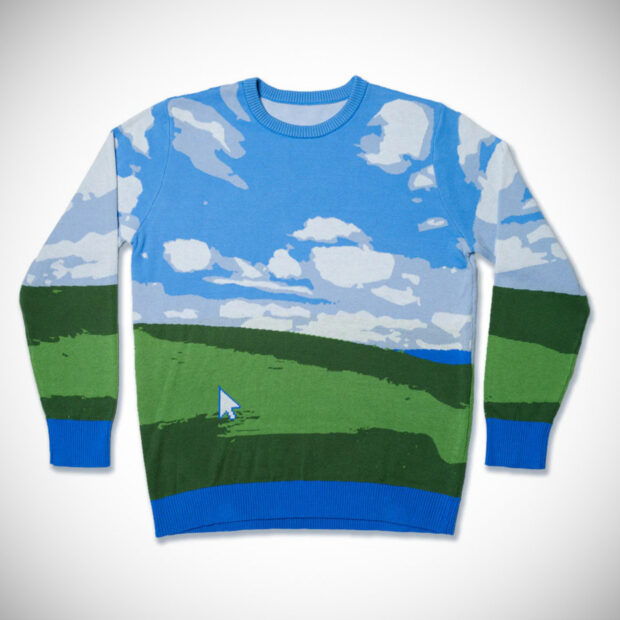
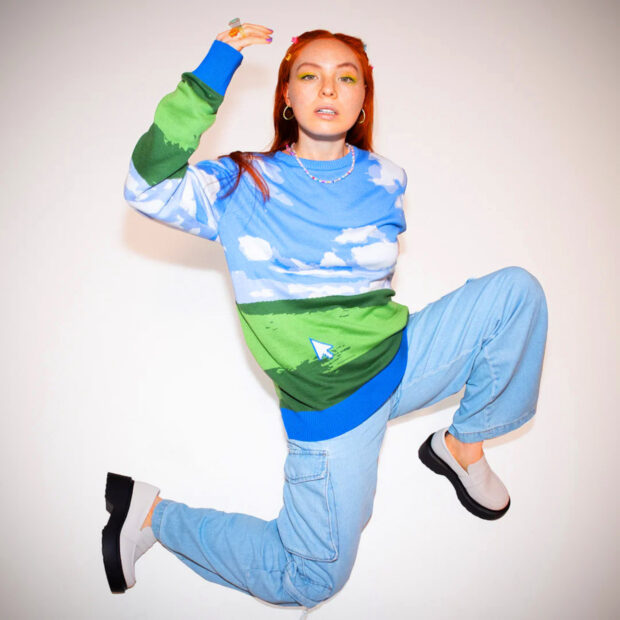
Inspired by Bliss (originally titled Bucolic Green Hills), the default wallpaper for Windows XP operating systems, Microsoft is selling this Windows Ugly Sweater: Bliss Edition for just $70. The knit soft-wear is constructed of 55% cotton, 45% acrylic, and is 100% eye candy. I can’t believe they’re even calling it ugly; it’s absolutely beautiful.
Am I going to show up for an ugly Christmas sweater party in one? Unfortunately not, because they’ve already sold out of most sizes. They say the early bird gets the worm, and I am by no means an early bird. I am an owl. Just without the wisdom. I do bite Tootsie Roll Tootsie Pops though.
‘Bliss’, captured by photographer Charles O’Rear in the wine country of California in 1996 and purchased by Microsoft in 2000, is thought to be the most viewed photograph in the world, being viewed by billions of people. And now you can own it on a sweater a lot of young people won’t even recognize! They’re missing out though, XP was probably my favorite operating system of all time.
Evernote is experimenting with severe restrictions to its free plan, which may nudge users to upgrade or quit the app entirely. According to a report from TechCrunch, some Evernote users were greeted with a pop-up message announcing that the free plan would be limited to a single notebook and 50 notes. The pop-up also introduced a "special 40 percent off" offer, encouraging users to upgrade to a paid plan to create notes and notebooks without limits.
But despite the in-app notification, Evernote's website has no mention of changes coming to its free plan. A representative for the company explained to TechCrunch that the website had not been updated because the change was not yet final. The company confirmed it has been testing the limited plan with less than 1 percent of its free users. Based on how that goes, Evernote will determine whether to implement the new plan. If that does happen, the representative said the company would then communicate the changes to “the relevant customer touch-points.”
The limited version of the free plan would not prevent users from managing, editing or deleting their current notes. It would only take away the ability to create new notes unless users took the plunge and paid for their plan.
For years, Evernote was the go-to app for countless power users and productivity gurus. However, the app has been kind of on a downward slide for a while. In 2020, it appeared Evernote was trying to reclaim its crown with the release of a major cross-platform redesign. But the updates weren't enough to revive the app, which was once valued at almost a billion dollars. Last November, Evernote was purchased by a Milan-based company called Bending Spoons, which went on to lay off 129 staffers. Bending Spoons later announced it would be abandoning most of its US operations, shifting Evernote development to Europe.
If implemented, this would be a dramatic change for die-hard Evernote fans who have stuck with the free plan for lightweight note-taking purposes. The change would make the free plan basically useless, and there would be no compelling reason to use Evernote over something free and more powerful like Apple and Google’s own note-taking apps.
This article originally appeared on Engadget at https://www.engadget.com/evernote-is-reportedly-testing-a-severely-restricted-plan-for-free-users-184607336.html?src=rss
Instagram launched the ability to download publicly viewable Reels in June, but it limited the feature's availability to users on mobile in the US. Now, Instagram head Adam Mosseri has announced on his broadcast channel that the feature is rolling out to all users worldwide. Anybody on the app can now download public Reels to their devices and not just save them for viewing later. They simply have to tap on the Share button and start their download from there.
As TechCrunch reports, Mosseri explained during his broadcast that downloaded Reels will have the Instagram watermark with the account's username, similar to downloaded TikTok videos. In addition, Reels will only come with music if they're scored with original tracks. Instagram will strip their audio if they use licensed music as a background.
TikTok's video downloading feature helps attract more users to the app, since it gives creators (and reposters) an easy way to share clips across platforms. People who don't have TikTok may decide to sign up if they find creators they want to follow or if they want to see more similar types of content. Instagram could be looking to replicate that strategy, though users will have the ability to prevent their Reels from being download. To change their download options, they'll have to go to Reels and Remix under Privacy in Settings and toggle off "Allow people to download your Reels."
This article originally appeared on Engadget at https://www.engadget.com/instagram-makes-public-reels-downloadable-for-everyone-120638475.html?src=rss