Meta is finally providing a bit of visibility into what kinds of conversations are happening on its Twitter competitor, Threads. The service is rolling out its “trending now” feature to all US users, Mark Zuckerberg said in a post.
The feature, which the company began testing in February, uses AI to surface a handful of topics “based on what people are engaging with right now.” Trends will appear in Threads’ search page and will also appear in between posts in users’ For You feeds.
For now, the feature is still fairly limited. Threads only shows five trending topics at any one time, which is likely an attempt to keep the list relatively curated and avoid some of the issues that have plagued the feature on Twitter and now X. Meta has said it employs human “content specialists” to review topics and ensure that trends comply with the company’s safety rules.
Still, the official arrival of trends brings a much-requested feature to the app. Up until now, users had very few ways to get insight into what others are talking about outside of what they can see in their own feeds. Trends also gives users a way to keep up with some news and current events on the platform, despite Meta’s reluctance to “encourage” news content on Threads.
This article originally appeared on Engadget at https://www.engadget.com/meta-is-finally-rolling-out-trending-topics-on-threads-184311138.html?src=rss
Meta is finally providing a bit of visibility into what kinds of conversations are happening on its Twitter competitor, Threads. The service is rolling out its “trending now” feature to all US users, Mark Zuckerberg said in a post.
The feature, which the company began testing in February, uses AI to surface a handful of topics “based on what people are engaging with right now.” Trends will appear in Threads’ search page and will also appear in between posts in users’ For You feeds.
For now, the feature is still fairly limited. Threads only shows five trending topics at any one time, which is likely an attempt to keep the list relatively curated and avoid some of the issues that have plagued the feature on Twitter and now X. Meta has said it employs human “content specialists” to review topics and ensure that trends comply with the company’s safety rules.
Still, the official arrival of trends brings a much-requested feature to the app. Up until now, users had very few ways to get insight into what others are talking about outside of what they can see in their own feeds. Trends also gives users a way to keep up with some news and current events on the platform, despite Meta’s reluctance to “encourage” news content on Threads.
This article originally appeared on Engadget at https://www.engadget.com/meta-is-finally-rolling-out-trending-topics-on-threads-184311138.html?src=rss
Blizzard is finally making it easier to unlock new heroes in Overwatch 2. This is big news, as players regularly complain about how difficult it is to obtain new characters in the live-service shooter. Currently, people get new heroes by paying for and grinding through a battle pass, buying them outright or waiting until they become available as a reward for winning a certain number of games. That changes with the forthcoming season 10, as the company will make new and old heroes available for free to all players.
This not only pertains to Venture, a new hero created for season 10, but all of the game’s previously released heroes, like Mauga, Illari, Sojourn and Lifeweaver, among many others. New players will still have to complete the intro, but “once the heroes from the original Overwatch roster have been unlocked, all Overwatch 2 heroes will also become available.”
This will even extend to future heroes. The entire roster of Overwatch 2 characters will be playable in all game modes when season 10 officially begins this April.
This is just one change coming to how the game handles its battle pass, as suggested by director Aaron Keller in a video. Blizzard is also going to start selling mythic skins that were previously available only through a paid battle pass, though pricing and availability is still up in the air.
In addition, Overwatch Coins, the game’s dominant currency, will soon be easier to earn. Right now, people accrue coins by accessing a premium battle pass, completing weekly challenges or buying them outright. In season 10, they’ll become available in the free tracks of the game’s battle pass system. Fans will be able to earn up to 600 coins per season for free, up from 540.
Finally, there’s a new in-game competition called Clash, which was first announced at last year’s Blizzcon. This team-based PvP mode features five points lined up in a row, and the first team that captures all five points or reaches a maximum score wins. It looks like the full Clash mode won’t launch alongside season 10, but will come later this year and will include two dedicated maps.
Blizzard also previewed season 11 today, which is due later this year and will include a new Push map set in Peru, as well as a reworked version of the Rome-based Colosseo map.
This article originally appeared on Engadget at https://www.engadget.com/overwatch-2-players-wont-have-to-pay-or-grind-through-a-battle-pass-to-unlock-new-heroes-183729811.html?src=rss
Blizzard is finally making it easier to unlock new heroes in Overwatch 2. This is big news, as players regularly complain about how difficult it is to obtain new characters in the live-service shooter. Currently, people get new heroes by paying for and grinding through a battle pass, buying them outright or waiting until they become available as a reward for winning a certain number of games. That changes with the forthcoming season 10, as the company will make new and old heroes available for free to all players.
This not only pertains to Venture, a new hero created for season 10, but all of the game’s previously released heroes, like Mauga, Illari, Sojourn and Lifeweaver, among many others. New players will still have to complete the intro, but “once the heroes from the original Overwatch roster have been unlocked, all Overwatch 2 heroes will also become available.”
This will even extend to future heroes. The entire roster of Overwatch 2 characters will be playable in all game modes when season 10 officially begins this April.
This is just one change coming to how the game handles its battle pass, as suggested by director Aaron Keller in a video. Blizzard is also going to start selling mythic skins that were previously available only through a paid battle pass, though pricing and availability is still up in the air.
In addition, Overwatch Coins, the game’s dominant currency, will soon be easier to earn. Right now, people accrue coins by accessing a premium battle pass, completing weekly challenges or buying them outright. In season 10, they’ll become available in the free tracks of the game’s battle pass system. Fans will be able to earn up to 600 coins per season for free, up from 540.
Finally, there’s a new in-game competition called Clash, which was first announced at last year’s Blizzcon. This team-based PvP mode features five points lined up in a row, and the first team that captures all five points or reaches a maximum score wins. It looks like the full Clash mode won’t launch alongside season 10, but will come later this year and will include two dedicated maps.
Blizzard also previewed season 11 today, which is due later this year and will include a new Push map set in Peru, as well as a reworked version of the Rome-based Colosseo map.
This article originally appeared on Engadget at https://www.engadget.com/overwatch-2-players-wont-have-to-pay-or-grind-through-a-battle-pass-to-unlock-new-heroes-183729811.html?src=rss
A man has been jailed for 66 weeks in England after pleading guilty to cyberflashing. Nicholas Hawkes is the first person to be convicted of the crime in the country under the Online Safety Act. Cyberflashing (sending unsolicited photos of genitalia) was outlawed in England and Wales under the law on January 31.
“Cyberflashing is a serious crime which leaves a lasting impact on victims, but all too often it can be dismissed as thoughtless ‘banter’ or a harmless joke," prosecutor Hannah von Dadelzsen said in a statement. “Just as those who commit indecent exposure in the physical world can expect to face the consequences, so too should offenders who commit their crimes online; hiding behind a screen does not hide you from the law."
Registered sex offender Hawkes, of Basildon, Essex, admitted to sending a photo of his genitals to a 15-year-old girl and a woman in early February. The woman took screenshots of the image and reported it to police. Cyberflashing victims receive lifelong anonymity under the Sexual Offences Act after reporting such crimes.
Hawkes pleaded guilty on February 12 to two counts of sending a photograph or film of genitals to cause alarm, distress or humiliation. He was held in custody until his sentencing on Tuesday. Hawkes was jailed for one year for the cyberflashing counts, and 14 weeks for breaching a previous order. He was convicted last year of exposure and sexual activity with a child under 16 and was sentenced to a community order.
Some other jurisdictions have similar laws against cyberflashing. Scotland banned it in 2010 and Northern Ireland followed suit last year. Singapore made it a crime in 2019, while the practice is illegal in some circumstancesin Australia. Some states have moved to tackle cyberflashing too, including California, Virginia and Texas.
This article originally appeared on Engadget at https://www.engadget.com/first-cyberflasher-convicted-in-england-is-sentenced-to-66-weeks-in-jail-182615668.html?src=rss
A man has been jailed for 66 weeks in England after pleading guilty to cyberflashing. Nicholas Hawkes is the first person to be convicted of the crime in the country under the Online Safety Act. Cyberflashing (sending unsolicited photos of genitalia) was outlawed in England and Wales under the law on January 31.
“Cyberflashing is a serious crime which leaves a lasting impact on victims, but all too often it can be dismissed as thoughtless ‘banter’ or a harmless joke," prosecutor Hannah von Dadelzsen said in a statement. “Just as those who commit indecent exposure in the physical world can expect to face the consequences, so too should offenders who commit their crimes online; hiding behind a screen does not hide you from the law."
Registered sex offender Hawkes, of Basildon, Essex, admitted to sending a photo of his genitals to a 15-year-old girl and a woman in early February. The woman took screenshots of the image and reported it to police. Cyberflashing victims receive lifelong anonymity under the Sexual Offences Act after reporting such crimes.
Hawkes pleaded guilty on February 12 to two counts of sending a photograph or film of genitals to cause alarm, distress or humiliation. He was held in custody until his sentencing on Tuesday. Hawkes was jailed for one year for the cyberflashing counts, and 14 weeks for breaching a previous order. He was convicted last year of exposure and sexual activity with a child under 16 and was sentenced to a community order.
Some other jurisdictions have similar laws against cyberflashing. Scotland banned it in 2010 and Northern Ireland followed suit last year. Singapore made it a crime in 2019, while the practice is illegal in some circumstancesin Australia. Some states have moved to tackle cyberflashing too, including California, Virginia and Texas.
This article originally appeared on Engadget at https://www.engadget.com/first-cyberflasher-convicted-in-england-is-sentenced-to-66-weeks-in-jail-182615668.html?src=rss
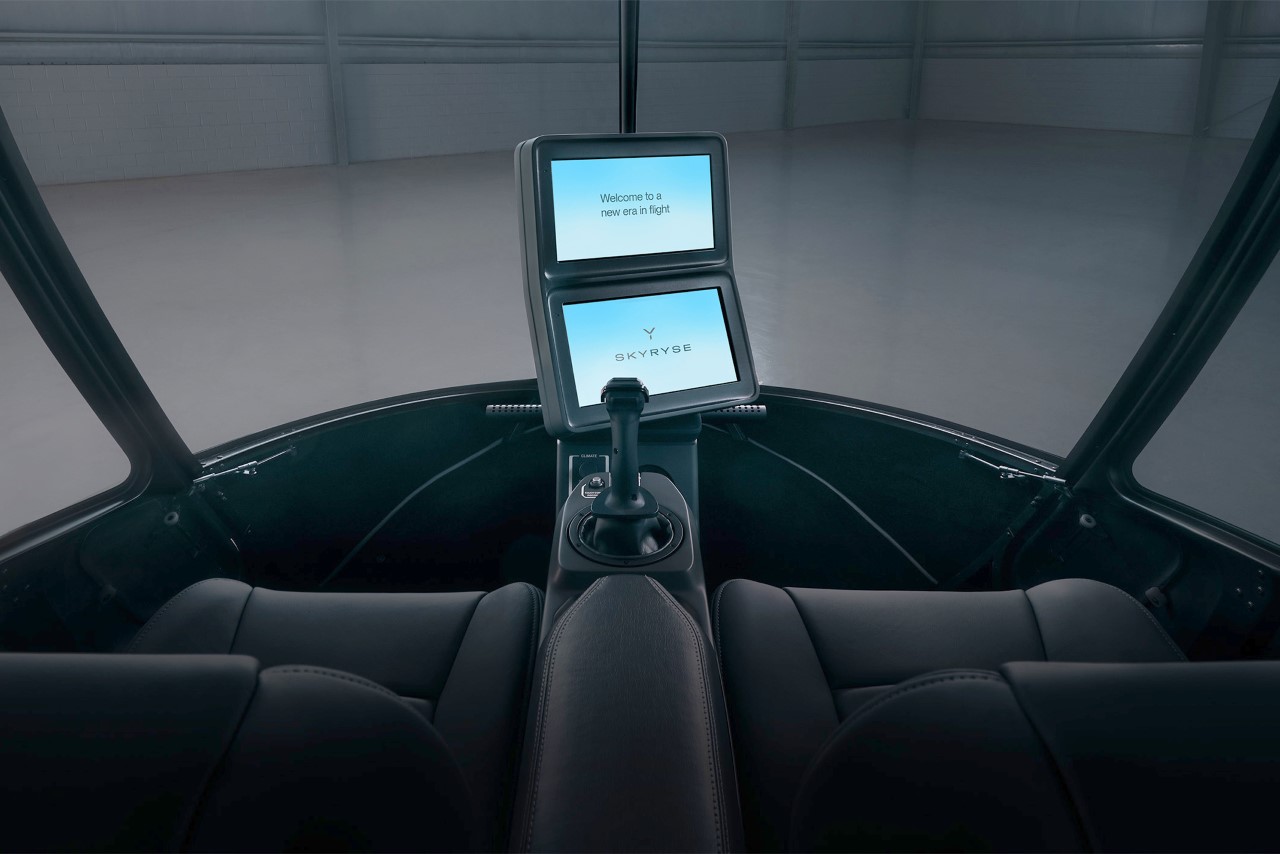
With just one joystick and two touchscreen panels, the Skyryse One is making helicopters more autonomous, intuitive, and safe.
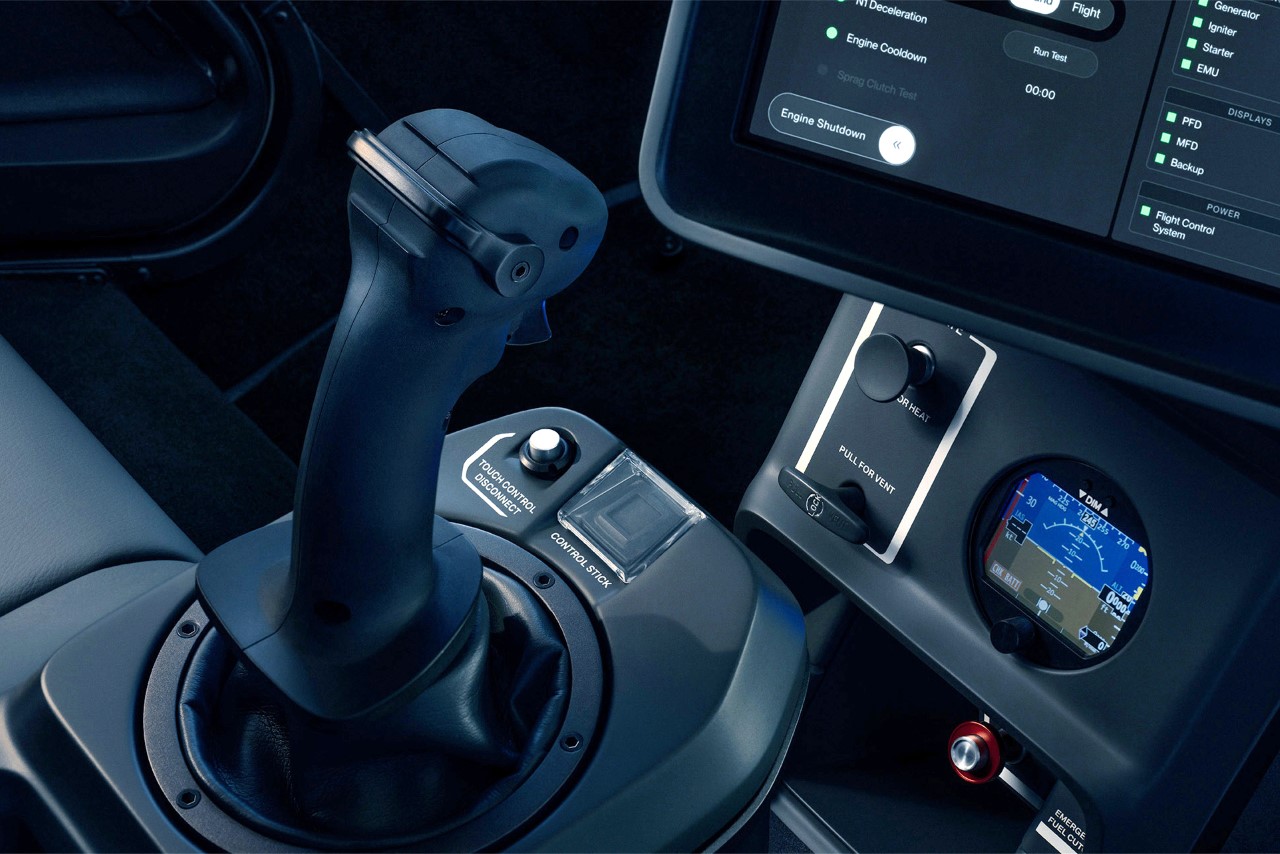
Helicopters, like pretty much any airborne vehicle, are notoriously difficult to operate. You’ve got controls in front of you, beside you, sometimes even above you – it’s no wonder you need a license with hundreds of hours of training to be able to professionally pilot one. While understandably, you’d expect helicopter pilots to go through rigorous training before being certified to operate a hunk of metal through the sky, there’s really no need for control panels and dashboards to be as complicated as they are. Founded in 2016, Skyryse has been working to simplify how helicopters are operated. Distinct from traditional helicopters, the Skyryse One eschews conventional controls like the cyclic stick, collective lever, throttle, and anti-torque pedals for a simplified control scheme centered around a single stick and a touchscreen interface. This design philosophy is built around Skyryse’s proprietary SkyOS system, which aims to enhance safety by streamlining operations and automating critical functions such as takeoff, hovering, and in the event of system failures, autorotation and landing. The company’s first-ever helicopter, the Skyryse One, puts this new control panel front and center. In fact the company claims it’s so easy to learn, you need just 20 hours of practice before taking to the skies.
Eschewing the traditional, mechanically complex controls found in helicopters, Skyryse introduces a fly-by-wire system controlled by a single four-axis control stick and two touch screens. This system, powered by Skyryse’s proprietary SkyOS, brings an unprecedented level of simplicity and safety to aviation. Fly-by-wire, a technology where electronic systems replace mechanical ones, is not new to aviation but applying it to helicopters in such a simplified manner certainly is. The SkyOS enhances this system by continuously analyzing pilot input, environmental conditions, aircraft status, and flight parameters, ensuring the aircraft remains within a safe flight envelope.
One of the most groundbreaking features of the Skyryse One is its fully automated autorotation capability. In traditional helicopters, autorotation is a complex emergency maneuver required when the engine fails, demanding immediate and precise actions from the pilot. The Skyryse One, through SkyOS, automates this process, significantly reducing the pilot’s workload and making emergency landings safer.
Moreover, features like auto-pickup and set-down, swipe-to-start, and hover assist simplify operations that previously required intricate control and coordination. The inherent stability feature of the Skyryse One means that at any point, the pilot can release the controls, with the aircraft immediately activating autonomous protocols to maintain safe flying parameters.
Skyryse is making the dream of piloting more accessible. Despite its advanced technology, flying the Skyryse One only requires a standard helicopter Private Pilot License. For those already licensed for airplanes, transitioning to the Skyryse One involves just an additional 20 hours of flight training. This approach could significantly expand the helicopter pilot community by lowering the entry barrier to flying.
As revolutionary as it is, the Skyryse One comes with a hefty price tag of $1.8 million. However, for aviation enthusiasts and professionals looking for the cutting edge of safety and simplicity, the investment might well be worth it. The company has started accepting a $2,500 deposit for reservations, with deliveries expected to begin following airworthiness certification.
It sounds too good to be true. The ability to smoke meats, seafood and more inside your kitchen without risking your security deposit doesn’t seem like something that should be possible. GE Appliances begs to differ. The company debuted the final version of its GE Profile Smart Indoor Smoker just before CES, quickly nabbing the attention of this wood-fired-grill reviewer. Thanks to a unique filtration system, the unit captures smoke while cooking and only expels warm air (out of the front). After getting a small taste (literally one bite) in Vegas of what the smoker could do, I’ve spent the last few weeks cooking a variety of proteins to see if the $999 device is as compelling as it seems.
Design
The GE Profile indoor smoker has the stature of a small mini fridge. It’s not far off from the quick-cooking ovens behind the counter at Starbucks either. Its glossy front is two-thirds door, complete with viewing window, while the remaining space is dedicated to the control panel and pellet waste bin. Up top is a small sliding door at the front left for adding food-grade wood pellets. The sides and back look plain and boring, like a countertop oven or microwave, but that’s just fine. The contraption is short enough to fit under cabinets, but you’ll want to leave space on the sides and back for radiant heat.
At the bottom of the front, there’s a vent where the GE Profile indoor smoker expels warm air while it’s cooking. The company also provides a small drip tray that slides under the front edge to help keep your counter clean. Over to the right, a display sits up top to show you status, probe temperature, smoker temperature, cook time and smoke level. You turn a knob to navigate settings and menus and then press to confirm your choices. Back and Start buttons flank that dial on the left and right sides respectively. There’s progress and status lights that encircle the knob too, adding a visual cue during preheating, cooking and more.
Under the knob is a smattering of buttons to get to certain functions quickly. These include settings, cancel, the interior light, activating the Clear Smoke feature and toggling between probe temperature and cooking time on the display. There’s also a power switch in this group and they’re all touch-based rather than clicky physical buttons.
Inside, supports snap onto the sides to hold the three moveable racks in place. A drip pan slides into the bottom to catch grease and other debris. To keep tabs on food temps, a probe snaps into a jack at the top right of the cooking chamber and can be stored on the outside of the smoker via a magnetic holder when not in use. Lastly, the GE Profile Smart Indoor Smoker’s prime piece of tech, the Active Smoke Filtration system, is on the back interior wall.
Setup and use
Photo by Billy Steele/Engadget
Another benefit of the GE Profile indoor smoker is that it’s ready to go out of the box. There’s no seasoning or burn-off required to get rid of oils or other manufacturing leftovers. Simply snap the rack supports in place, slide in the racks, put the drip pan in the bottom and that’s it for the cooking chamber. Once you add pellets in the slot up top and fill the water tank to the indicated level, the smoker is almost ready to start cooking.
One more step you’ll need to do the first time you cook, or anytime you empty the pellet chute, is to prime the auger. This ensures that the device will start producing smoke quickly and efficiently, giving your food as much time as possible to bathe in it. Afterwards, you can choose a preset or opt to go full manual mode (called Customize) and you’re off and running.
GE Profile has dialed-in selections for brisket, pork ribs, pork butt, wings, chicken and salmon. These offer the necessary time and temperature settings for proper cooking, including a recommended smoke level. Additionally, you can determine the duration of the cook based on time or internal food temperature. Once either of those are achieved, the GE Profile Smart Indoor Smoker can automatically go into Keep Warm mode until you’re ready to eat.
Photo by Billy Steele/Engadget
A word on larger cuts: you’ll need to portion them out in order to make them fit. For things like ribs and brisket, you can easily slice them in half and make use of the rack system. I did chuckle when reading the recipe book as GE Profile says you can fit a 18-pound brisket in this smoker. That single cut of beef would take up most of the cooking area on some pellet grills, so you definitely have to cut it to fit here. And even then, the pieces will be quite large.
Pork butts fit with ease, as do whole chickens. If you prefer to spatchcock your birds to cook them, that won’t work here. However, you could easily do two chicken halves. I was also able to accommodate nearly four pounds of wings (flats and drums) across the three racks. Basically, any meat you’d smoke on an outdoor grill can be done on this unit, but some of them will take a bit of extra planning, and maybe a few cuts, to get them to fit.
How does the GE Indoor Smoker work?
After you’ve selected your preset or manually entered your cooking parameters and pressed start, the GE Profile indoor smoker will ask you to confirm that you’ve added both pellets to the chute and water to the waste bin. From there, the device will preheat to the appropriate temperature before it begins producing any smoke. This will allow you to put your food inside without having to clear the smoke immediately. The last step is to push the start dial once more to begin the smoking process.
Before you open the door while things are cooking, you’ll need to activate the Clear Smoke function to avoid setting off any alarms in your kitchen. This takes 10 minutes, so you’ll have to plan ahead a bit – unless you don’t mind smoking up the room. I mention this because you will have to flip and rotate nearly everything you prepare in this thing to make sure it cooks evenly. I learned this lesson the hard way with a pork butt that burned on top but was undercooked near the bone. A simple flip and front-to-back rotation for everything about half-way through the process remedied the issue for everything I cooked after that, but it is an extra step that outdoor grills don’t require. You can leave a pork butt on a pellet grill unbothered until it’s done, but those have fans pushing heat around the cooking chamber. GE Profile says it didn’t opt for a convection fan in this unit because of how it would’ve affected the flow of smoke.
Can you taste the smoke?
One of the biggest questions I had about the GE Profile indoor smoker is if you’d actually be able to taste the smoke. The unit burns just enough wood pellets to fill the cooking chamber with smoke, which is enough to give proteins a kiss of flavor. It’s certainly not as intense as what you get on an outdoor grill, but it’s definitely there.
Since the GE Profile Smart Indoor Smoker does an excellent job of regulating temperature, the texture of all of those meats, and even seafood, is consistently moist and tender. Smoke flavor was most prominent in wings, chicken and salmon, but I could taste it in larger cuts of meat, too. GE Profile allows you to adjust the smoke level from 0 to 5, so you can crank it all the way up to maximize the flavor if that’s your culinary preference. I almost always set it to level 5.
Let’s talk about smoke rings
One thing you won’t see on meat cooked low-and-slow in the GE Profile Smart Indoor Smoker is a smoke ring. This is the pink area along the outside of sliced meats that most people think indicates how well smoke has penetrated the food. That’s actually a misconception. A smoke ring is caused by a chemical reaction with nitric oxide gas produced by burning wood or charcoal. It isn’t by any means an indication of the level of smoke flavor, or even good barbecue.
Outdoor pellet grills, offset smokers and even a Weber kettle with charcoal will create a noticeable smoke ring on things like ribs, pork butts and briskets. The GE Profile Smart Indoor Smoker will not. That’s because the appliance isn’t burning wood pellets as the heat source – it’s only using them to flavor the food. That takes very little fuel, and it also requires barely any heat to smolder them.
You can actually fake a smoke ring if you really want one for the ‘gram, but overdoing it can ruin your food, so tread carefully. For that, you’ll need a small amount of something that contains sodium nitrate and sodium nitrite, like Morton’s Tender Quick. It’s the stuff that’s used to cure pastrami, where the pink color is essential.
Cleanup and maintenance
Photo by Billy Steele/Engadget
Unlike most outdoor grills, all of the racks and rack supports inside the GE Profile Smart Indoor Smoker are dishwasher safe – simply by virtue of being small enough to fit. Since you’ll have to wipe down the interior of the cooking chamber with a solution of either mild soap and water or vinegar and water, not having to hand-wash what’s sure to be the dirtiest part of the machine is a plus. The drip pan is made out of a similar material to roasting pans you’d use in an oven, so you can probably stick it in the dishwasher too. I have been doing this with no issues so far, but you can always wrap it in foil before you start smoking for easy cleaning.
You’ll also need to empty the water tank that collects and extinguishes the spent pellets after each use, though the smoker may ask you to do so midway through longer sessions. You’ll need to strain out the remaining wood particles from the water before discarding the cooled solids in the trash. Since the water container doesn’t touch any food, a quick wipe and rinse is all that’s needed here.
GE Profile says you’ll occasionally need to clean the pellet ramp to ensure proper smoke production. The company includes a small brush that’s used to keep unwanted debris out of the cooking chamber. Simply lift the smoke inlet cover on the right side of the cooking area and use the brush to remove anything that’s accumulated there. The company also recommends that you wipe the interior light after each use. I assume that’s so you’ll be able to see well during the cooking process, but GE Profile doesn’t elaborate on why you need to do it.
GE Profile SmartHQ app
The Smart Indoor Smoker works with GE Profile’s SmartHQ app to allow you to monitor the small appliance over Wi-Fi. With this software, you can monitor smoker and food temperatures from anywhere, as well as activate the 10-minute Clear Smoke process from the sofa. The app also lets you turn the internal light on and off, but that’s really about it. You can’t actually adjust the smoker temperature without walking over to it.
The smoker comes with a recipe book, but it would’ve been great if those (and many more) were available inside the app. Those instructions, paired with the ability to send the appropriate cooking info to the device, would give new users a lot of ways to get started beyond the simple protein-specific presets. I would also love it if there was a way to trigger the Keep Warm function or shut down the smoker remotely. You know, for the times when I get too excited about putting pulled pork in my mouth and forget to turn the machine off before sitting down at the table.
Is it better than an outdoor grill?
Photo by Billy Steele/Engadget
While it’s tempting to compare the results from the GE Profile Smart Indoor Smoker to those of a pellet, charcoal or wood-burning grill, it would be like discussing apples and oranges. Since all of the other options have an open flame and use significantly more fuel as the primary heat source, the smoke flavor is much more intense. They also require a lot more planning. First, you’d need dedicated outdoor space where those grills and smokers will be safe to use. You’ll also need to consider the added cleaning and maintenance needed to keep them running well.
All of these outdoor grills have a wider temperature range, so they can be used for more than just smoking. You could use a pellet grill, for example, to do everything from brisket to searing steaks. Ditto for charcoal or wood-burning units. And if you factor in Wi-Fi-enabled features, outdoor grills typically allow you to adjust temperature in addition to just monitoring it. Some of them even offer advanced tools like the Super Smoke mode from Traeger or the ability to send recipes to the grill as part of step-by-step guidance.
All this considered, the GE Profile Smart Indoor Smoker is still a good option for people who can’t have an outdoor smoker due to rental agreements or a lack of space. You’ll certainly need to plan ahead on how to store the appliance when you’re not using it. But, the fact that you can put it in your kitchen opens up the ability to cook barbecue, smoked wings, tasty seafood and more that you otherwise wouldn’t be able to. It’s not entirely a “set it and forget it” type of device, and there are some hoops to jump through in terms of rotating things during the cook. However, you won't have to spend hours babying the meats the cooking starts.
Wrap-up
The GE Profile Smart Indoor Smoker works just like the company describes. The only real nuisance is having to flip and rotate foods to make sure they’re cooked properly. I really wish the company was more up-front about this somewhere other than the troubleshooting table and recipe book. It’s a key action that shouldn’t be left to trial and error. Even with that caveat, the device produces noticeably smoky flavor in a range of foods, albeit in a more-subdued way than what an outdoor grill.
Presets make it easy to get started and the manual mode will provide an open playground once you gain some experience. This won’t replace your pellet or charcoal grill, but that’s not really the point. It lets people who can’t own one of those make some tasty barbecue inside their kitchens. You just have to find a place to store it, or give up previously allocated countertop space, between smoke sessions.
This article originally appeared on Engadget at https://www.engadget.com/ge-profile-smart-indoor-smoker-review-turning-your-kitchen-into-a-bbq-joint-163057181.html?src=rss
It sounds too good to be true. The ability to smoke meats, seafood and more inside your kitchen without risking your security deposit doesn’t seem like something that should be possible. GE Appliances begs to differ. The company debuted the final version of its GE Profile Smart Indoor Smoker just before CES, quickly nabbing the attention of this wood-fired-grill reviewer. Thanks to a unique filtration system, the unit captures smoke while cooking and only expels warm air (out of the front). After getting a small taste (literally one bite) in Vegas of what the smoker could do, I’ve spent the last few weeks cooking a variety of proteins to see if the $999 device is as compelling as it seems.
Design
The GE Profile indoor smoker has the stature of a small mini fridge. It’s not far off from the quick-cooking ovens behind the counter at Starbucks either. Its glossy front is two-thirds door, complete with viewing window, while the remaining space is dedicated to the control panel and pellet waste bin. Up top is a small sliding door at the front left for adding food-grade wood pellets. The sides and back look plain and boring, like a countertop oven or microwave, but that’s just fine. The contraption is short enough to fit under cabinets, but you’ll want to leave space on the sides and back for radiant heat.
At the bottom of the front, there’s a vent where the GE Profile indoor smoker expels warm air while it’s cooking. The company also provides a small drip tray that slides under the front edge to help keep your counter clean. Over to the right, a display sits up top to show you status, probe temperature, smoker temperature, cook time and smoke level. You turn a knob to navigate settings and menus and then press to confirm your choices. Back and Start buttons flank that dial on the left and right sides respectively. There’s progress and status lights that encircle the knob too, adding a visual cue during preheating, cooking and more.
Under the knob is a smattering of buttons to get to certain functions quickly. These include settings, cancel, the interior light, activating the Clear Smoke feature and toggling between probe temperature and cooking time on the display. There’s also a power switch in this group and they’re all touch-based rather than clicky physical buttons.
Inside, supports snap onto the sides to hold the three moveable racks in place. A drip pan slides into the bottom to catch grease and other debris. To keep tabs on food temps, a probe snaps into a jack at the top right of the cooking chamber and can be stored on the outside of the smoker via a magnetic holder when not in use. Lastly, the GE Profile Smart Indoor Smoker’s prime piece of tech, the Active Smoke Filtration system, is on the back interior wall.
Setup and use
Photo by Billy Steele/Engadget
Another benefit of the GE Profile indoor smoker is that it’s ready to go out of the box. There’s no seasoning or burn-off required to get rid of oils or other manufacturing leftovers. Simply snap the rack supports in place, slide in the racks, put the drip pan in the bottom and that’s it for the cooking chamber. Once you add pellets in the slot up top and fill the water tank to the indicated level, the smoker is almost ready to start cooking.
One more step you’ll need to do the first time you cook, or anytime you empty the pellet chute, is to prime the auger. This ensures that the device will start producing smoke quickly and efficiently, giving your food as much time as possible to bathe in it. Afterwards, you can choose a preset or opt to go full manual mode (called Customize) and you’re off and running.
GE Profile has dialed-in selections for brisket, pork ribs, pork butt, wings, chicken and salmon. These offer the necessary time and temperature settings for proper cooking, including a recommended smoke level. Additionally, you can determine the duration of the cook based on time or internal food temperature. Once either of those are achieved, the GE Profile Smart Indoor Smoker can automatically go into Keep Warm mode until you’re ready to eat.
Photo by Billy Steele/Engadget
A word on larger cuts: you’ll need to portion them out in order to make them fit. For things like ribs and brisket, you can easily slice them in half and make use of the rack system. I did chuckle when reading the recipe book as GE Profile says you can fit a 18-pound brisket in this smoker. That single cut of beef would take up most of the cooking area on some pellet grills, so you definitely have to cut it to fit here. And even then, the pieces will be quite large.
Pork butts fit with ease, as do whole chickens. If you prefer to spatchcock your birds to cook them, that won’t work here. However, you could easily do two chicken halves. I was also able to accommodate nearly four pounds of wings (flats and drums) across the three racks. Basically, any meat you’d smoke on an outdoor grill can be done on this unit, but some of them will take a bit of extra planning, and maybe a few cuts, to get them to fit.
How does the GE Indoor Smoker work?
After you’ve selected your preset or manually entered your cooking parameters and pressed start, the GE Profile indoor smoker will ask you to confirm that you’ve added both pellets to the chute and water to the waste bin. From there, the device will preheat to the appropriate temperature before it begins producing any smoke. This will allow you to put your food inside without having to clear the smoke immediately. The last step is to push the start dial once more to begin the smoking process.
Before you open the door while things are cooking, you’ll need to activate the Clear Smoke function to avoid setting off any alarms in your kitchen. This takes 10 minutes, so you’ll have to plan ahead a bit – unless you don’t mind smoking up the room. I mention this because you will have to flip and rotate nearly everything you prepare in this thing to make sure it cooks evenly. I learned this lesson the hard way with a pork butt that burned on top but was undercooked near the bone. A simple flip and front-to-back rotation for everything about half-way through the process remedied the issue for everything I cooked after that, but it is an extra step that outdoor grills don’t require. You can leave a pork butt on a pellet grill unbothered until it’s done, but those have fans pushing heat around the cooking chamber. GE Profile says it didn’t opt for a convection fan in this unit because of how it would’ve affected the flow of smoke.
Can you taste the smoke?
One of the biggest questions I had about the GE Profile indoor smoker is if you’d actually be able to taste the smoke. The unit burns just enough wood pellets to fill the cooking chamber with smoke, which is enough to give proteins a kiss of flavor. It’s certainly not as intense as what you get on an outdoor grill, but it’s definitely there.
Since the GE Profile Smart Indoor Smoker does an excellent job of regulating temperature, the texture of all of those meats, and even seafood, is consistently moist and tender. Smoke flavor was most prominent in wings, chicken and salmon, but I could taste it in larger cuts of meat, too. GE Profile allows you to adjust the smoke level from 0 to 5, so you can crank it all the way up to maximize the flavor if that’s your culinary preference. I almost always set it to level 5.
Let’s talk about smoke rings
One thing you won’t see on meat cooked low-and-slow in the GE Profile Smart Indoor Smoker is a smoke ring. This is the pink area along the outside of sliced meats that most people think indicates how well smoke has penetrated the food. That’s actually a misconception. A smoke ring is caused by a chemical reaction with nitric oxide gas produced by burning wood or charcoal. It isn’t by any means an indication of the level of smoke flavor, or even good barbecue.
Outdoor pellet grills, offset smokers and even a Weber kettle with charcoal will create a noticeable smoke ring on things like ribs, pork butts and briskets. The GE Profile Smart Indoor Smoker will not. That’s because the appliance isn’t burning wood pellets as the heat source – it’s only using them to flavor the food. That takes very little fuel, and it also requires barely any heat to smolder them.
You can actually fake a smoke ring if you really want one for the ‘gram, but overdoing it can ruin your food, so tread carefully. For that, you’ll need a small amount of something that contains sodium nitrate and sodium nitrite, like Morton’s Tender Quick. It’s the stuff that’s used to cure pastrami, where the pink color is essential.
Cleanup and maintenance
Photo by Billy Steele/Engadget
Unlike most outdoor grills, all of the racks and rack supports inside the GE Profile Smart Indoor Smoker are dishwasher safe – simply by virtue of being small enough to fit. Since you’ll have to wipe down the interior of the cooking chamber with a solution of either mild soap and water or vinegar and water, not having to hand-wash what’s sure to be the dirtiest part of the machine is a plus. The drip pan is made out of a similar material to roasting pans you’d use in an oven, so you can probably stick it in the dishwasher too. I have been doing this with no issues so far, but you can always wrap it in foil before you start smoking for easy cleaning.
You’ll also need to empty the water tank that collects and extinguishes the spent pellets after each use, though the smoker may ask you to do so midway through longer sessions. You’ll need to strain out the remaining wood particles from the water before discarding the cooled solids in the trash. Since the water container doesn’t touch any food, a quick wipe and rinse is all that’s needed here.
GE Profile says you’ll occasionally need to clean the pellet ramp to ensure proper smoke production. The company includes a small brush that’s used to keep unwanted debris out of the cooking chamber. Simply lift the smoke inlet cover on the right side of the cooking area and use the brush to remove anything that’s accumulated there. The company also recommends that you wipe the interior light after each use. I assume that’s so you’ll be able to see well during the cooking process, but GE Profile doesn’t elaborate on why you need to do it.
GE Profile SmartHQ app
The Smart Indoor Smoker works with GE Profile’s SmartHQ app to allow you to monitor the small appliance over Wi-Fi. With this software, you can monitor smoker and food temperatures from anywhere, as well as activate the 10-minute Clear Smoke process from the sofa. The app also lets you turn the internal light on and off, but that’s really about it. You can’t actually adjust the smoker temperature without walking over to it.
The smoker comes with a recipe book, but it would’ve been great if those (and many more) were available inside the app. Those instructions, paired with the ability to send the appropriate cooking info to the device, would give new users a lot of ways to get started beyond the simple protein-specific presets. I would also love it if there was a way to trigger the Keep Warm function or shut down the smoker remotely. You know, for the times when I get too excited about putting pulled pork in my mouth and forget to turn the machine off before sitting down at the table.
Is it better than an outdoor grill?
Photo by Billy Steele/Engadget
While it’s tempting to compare the results from the GE Profile Smart Indoor Smoker to those of a pellet, charcoal or wood-burning grill, it would be like discussing apples and oranges. Since all of the other options have an open flame and use significantly more fuel as the primary heat source, the smoke flavor is much more intense. They also require a lot more planning. First, you’d need dedicated outdoor space where those grills and smokers will be safe to use. You’ll also need to consider the added cleaning and maintenance needed to keep them running well.
All of these outdoor grills have a wider temperature range, so they can be used for more than just smoking. You could use a pellet grill, for example, to do everything from brisket to searing steaks. Ditto for charcoal or wood-burning units. And if you factor in Wi-Fi-enabled features, outdoor grills typically allow you to adjust temperature in addition to just monitoring it. Some of them even offer advanced tools like the Super Smoke mode from Traeger or the ability to send recipes to the grill as part of step-by-step guidance.
All this considered, the GE Profile Smart Indoor Smoker is still a good option for people who can’t have an outdoor smoker due to rental agreements or a lack of space. You’ll certainly need to plan ahead on how to store the appliance when you’re not using it. But, the fact that you can put it in your kitchen opens up the ability to cook barbecue, smoked wings, tasty seafood and more that you otherwise wouldn’t be able to. It’s not entirely a “set it and forget it” type of device, and there are some hoops to jump through in terms of rotating things during the cook. However, you won't have to spend hours babying the meats the cooking starts.
Wrap-up
The GE Profile Smart Indoor Smoker works just like the company describes. The only real nuisance is having to flip and rotate foods to make sure they’re cooked properly. I really wish the company was more up-front about this somewhere other than the troubleshooting table and recipe book. It’s a key action that shouldn’t be left to trial and error. Even with that caveat, the device produces noticeably smoky flavor in a range of foods, albeit in a more-subdued way than what an outdoor grill.
Presets make it easy to get started and the manual mode will provide an open playground once you gain some experience. This won’t replace your pellet or charcoal grill, but that’s not really the point. It lets people who can’t own one of those make some tasty barbecue inside their kitchens. You just have to find a place to store it, or give up previously allocated countertop space, between smoke sessions.
This article originally appeared on Engadget at https://www.engadget.com/ge-profile-smart-indoor-smoker-review-turning-your-kitchen-into-a-bbq-joint-163057181.html?src=rss
Ubisoft helped build new "NEO NPCs" by using NVIDIA’s Avatar Cloud Engine (ACE) technology, with an assist from dynamic NPC experts Inworld AI. The end result? Characters that don’t repeat the same phrase over and over, while ignoring the surrounding violent mayhem.
These NEO NPCs are said to interact in real time with players, the environment and other in-game characters. NVIDIA says this opens up “new possibilities for emergent storytelling.” To that end, Ubisoft’s narrative team built complete backgrounds, knowledge bases and conversational styles for two NPCs as a proof of concept.
Ubisoft/NVIDIA
These are fully-fleshed out characters with “environmental and contextual awareness” along with conversational memory. NVIDIA says each character excels with “collaboration and strategic decision-making.” The company also incorporated its Audio2Face technology to allow for appropriate facial animations and lip syncing. NVIDIA suggests that these characters push “the boundaries of game design and immersion.”
The company didn’t explicitly announce that this technology would be coming to Ubisoft titles in the nearish future, but it’s a safe bet it's on the roadmap. Perhaps soon you’ll be able to see what the sweet old man outside of the inn thinks about you absolutely obliterating the whole town. Won’t that be fun?
This isn’t the only big AI-adjacent announcement from NVIDIA this week. The company just unveiled its next-generation of GPUs, an evolution of the chips that are used to train large language models. The company promises that its Blackwell chips are seven to 30 times faster than the H100 series and use 25 times less power.
This article originally appeared on Engadget at https://www.engadget.com/nvidia-partners-with-ubisoft-to-further-develop-its-ai-driven-npcs-160432137.html?src=rss