
Reviving Elegance in Design – The Porsche Pepita Edition by Vitra Blends Classic and Modern Mastery

The Porsche Pepita Edition by Vitra represents a masterful integration of automotive heritage and contemporary design, where each piece fulfills a functional role and also carries a legacy of innovation and timeless design as it finds a place in homes and offices. Vitra’s limited release of iconic chairs, such as the ‘Eames Plastic Side Chair,’ ‘ID Trim L,’ and ‘Petit Repos,’ show the synergy between traditional craftsmanship and modern aesthetics. This houndstooth pattern, a long-standing feature in Porsche interiors since 1965, symbolizes a tradition of exceptional craftsmanship and aesthetic finesse.

Designer: Porsche x Vitra Collab

First introduced in the interiors of Porsche vehicles in the 1960s, the Pepita fabric is a distinctive duotone checkered pattern that resembles abstract four-pointed shapes. It is often rendered in black and white, though it can be incorporated through a specific weaving process that interlaces two contrasting colors to create a visually striking and uniquely recognizable broken check pattern. Pepita fabric has become synonymous with high quality and sophisticated taste.
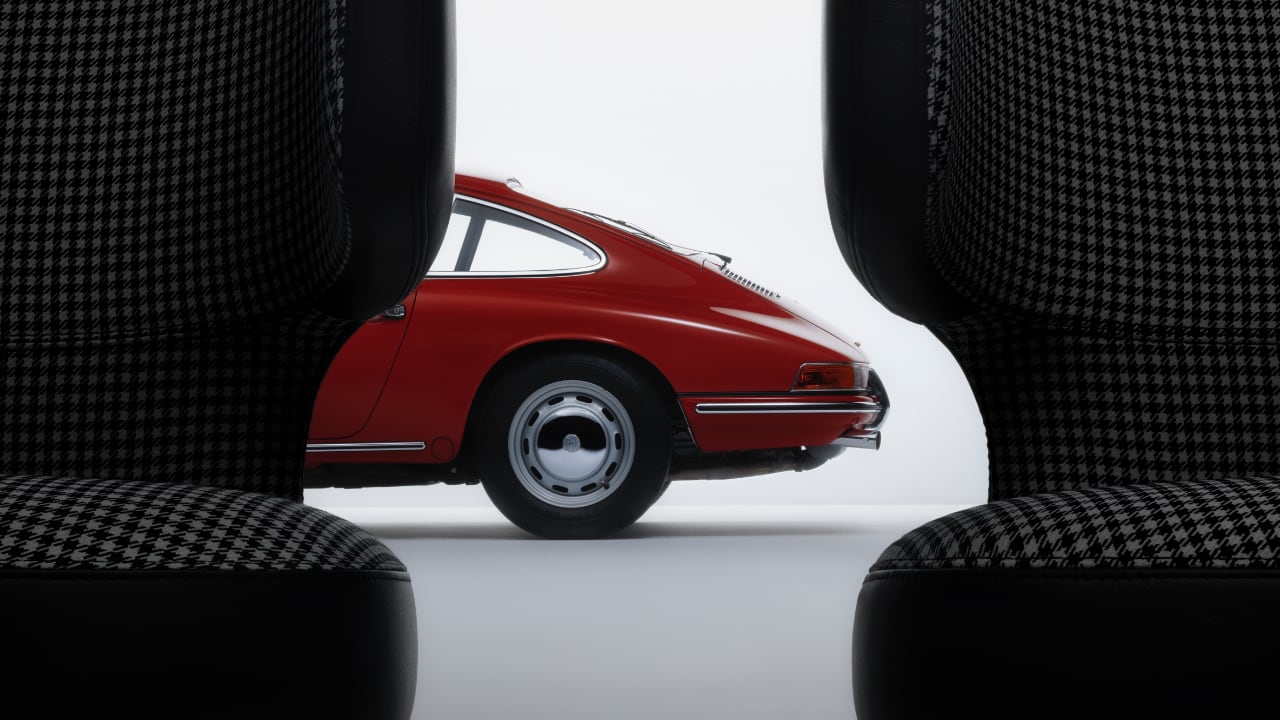
Initially featured as upholstery in the iconic Porsche 911 models, the rarity of Pepita fabric has increased as fewer manufacturers choose to undertake the labor-intensive production of true houndstooth weaves. This scarcity has made genuine Pepita a coveted element in both the automotive and interior design sectors. Vitra’s reintroduction of this fabric through limited edition pieces revives a classic style and maintains its exclusivity, making it highly treasured among collectors. The combination of its limited availability, storied heritage, and intricate aesthetics solidifies Pepita fabric’s status as a rare and distinctive feature across design and automotive history.

In the 1960s, the introduction of the iconic 911, launched in 1963, exemplified Porsche’s commitment to combining performance with sophisticated comfort. The interior design focused on functionality and luxury, resonating with discerning customers through the use of durable and tactile materials like leather and the stylish Pepita fabric for seat coverings. The clean and driver-oriented dashboard design emphasized ease of use and clear visibility of essential instruments, with the tachometer centrally positioned to align with Porsche’s performance-driven philosophy. Subdued color schemes of blacks, greys, and browns dominated, though brighter colors were also available, reflecting personal preferences and the vibrant styles of the 60s.

The unveiling at the ‘The Art of Dreams’ event in Milan highlights the seamless integration of innovation and design excellence between Vitra and Porsche. The collection prioritizes exclusivity, mirroring significant Porsche models and milestones, such as the ‘Eames Plastic Side Chair Pepita Edition’, limited to 1,963 pieces to commemorate the year Porsche introduced the Pepita option in its 911 model. These chairs are more than functional items; they are collector’s pieces that echo the narratives of their creators and pivotal moments in both design and automotive history, celebrating a rich heritage and the evolution of design.

The post Reviving Elegance in Design – The Porsche Pepita Edition by Vitra Blends Classic and Modern Mastery first appeared on Yanko Design.

ASUS ROG Zephyrus G16 (2024) review: Not just for gamers

ASUS’ latest 14-inch gaming laptop is an incredibly versatile and stylish all-rounder. But for those who want something even beefier, there’s the ROG Zephyrus G16. Not only does it feature a more powerful Intel Core Ultra 9 CPU, it supports up to NVIDIA RTX 4090 graphics cards. That’s not all. Its OLED display refreshes twice as fast at 240Hz and it has surprisingly good speakers as well as a full-size SD card reader for quickly transferring files from a camera. So despite being aimed at gamers, the G16 is better equipped to serve as a portable editing rig, which makes this a great system even for people who don’t care about bunny-hopping and fragging.

Design

The G16’s new all-aluminum chassis is simply fantastic. That’s because in addition to being a touch lighter (about 0.1 pounds) and thinner (about 0.2 inches) than the previous model, it feels even sturdier. For 2024, ASUS ditched the dot matrix display on its lid for a single diagonal slash with white (not RGB) LEDs running down the center, which gives the laptop a much more sophisticated look without becoming boring. It’s like a teenager who grew up and learned to dress properly without losing touch with their gamer roots. On the inside, there’s a backlit keyboard with rainbow lighting (though it’s single-zone and not per-key) flanked by some surprisingly punchy speakers with an absolutely massive touchpad below. All told, it’s a beautifully designed system that looks as good as it feels.

ASUS has also included the right blend of connectivity options. The G16 features two USB 3.2 Gen 2 Type-A slots, two USB-C ports (one of which supports Thunderbolt 4), HDMI 2.1, a full-size SD card reader and a 3.5mm audio jack. This is the kind of arrangement that lets you travel freely without needing to worry about extra dongles or adapters. Plus, thanks to ASUS’ new Slim Power Jack, you don’t have to hog any other ports while charging. And in a pinch, you can also juice up the G16 via USB-C, albeit at slower speeds (up to around 100 watts) than with the included 240-watt brick.

Display

The G16’s 2.5K (2,560 x 1,600) OLED screen might be the best component here. It’s vivid and supports a huge color gamut (100 percent of DCI-P3), while its 240Hz refresh rate makes it great even for gamers looking to squeeze out every last competitive advantage. Though brightness is just average at around 400 nits in standard definition mode or 450 nits in HDR, I didn’t really have any trouble seeing the screen unless the G16 was in direct sunlight. One last bonus for photo and video editors is that ASUS does include a few calibrated viewing modes in its Armoy Crate app for sRGB, D65 P3 and DCI-P3 so you can more accurately adjust hues or color grade footage.

Performance

The ASUS ROG Zephyrus G16's 240Hz OLED display might be one of its best components thanks to vibrant colors and a handful of calibrated presets for photo and video editing.
Photo by Sam Rutherford/Engadget

The G16’s performance is pretty solid thanks to an Intel Core ultra 9 195H CPU, up to 32GB of RAM, 2TB of storage and NVIDIA RTX 4090 graphics. However, here’s where some trade-offs for the G16’s slim chassis factor in. Compared to similarly-sized rivals like the Razer Blade 16, the G16 features a lower overall TDP (total device power), which means even if they appear to have the same listed components, there’s still a difference in capabilities. For example, on our review unit with an RTX 4080, the amount of power sent to the GPU caps out at 115 watts versus 175 watts for the Razer. The G16's RAM is also soldered in, so you can't add more post-purchase. 

In Cyberpunk 2077 at 1440p and ultra graphics with ray-tracing on, the G16 hit 68 fps, which is just barely ahead of what we saw from a smaller Razer Blade 14 (66 fps), despite the latter having a lower tier RTX 4070 but with a similar wattage. That said, those figures are more than adequate to keep AAA games running smoothly. And let's not forget that the Blade 14 model I referenced costs $2,700, which is the same price as our G16 review unit. This makes it an apt comparison even if Razer’s laptop has a smaller footprint.

Battery life

The ASUS ROG Zephyrus G16 has a great selection of ports including two USB 3.2 Gen 2 Type-A slots, two USB-C ports (one of which supports Thunderbolt 4), HDMI 2.1, a full-size SD card reader and a 3.5mm audio jack.
Photo by Sam Rutherford/Engadget

One of the main advantages of a larger system is having extra room for a bigger battery. On PCMark 10’s Open Office rundown test, the G16 lasted 9 hours and 17 minutes versus just 5:12 for the smaller G14. That’s a solid mark considering it’s also better than an XPS 16 (8:31) we reviewed. However, overall longevity depends on your workload, because when I ran the battery test a second time only using the GPU instead of relying on NVIDIA’s Optimus graphic switching feature, that time dropped to just 3:08. That means the system will last all day if you’re using basic productivity app, but for more demanding tasks like gaming or video editing, you’ll want to keep ASUS’ 240-watt power brick close by.

Wrap-up

The ASUS ROG Zephyrus G16 has a spacious keyboard and a massive touchpad. We just wish it had per-key RGB lighting instead of a single-zone setup.
Photo by Sam Rutherford/Engadget

Just like its smaller sibling, ASUS’ ROG Zephyrus G16 is an almost ideal thin-and-light gaming laptop. It’s got a sleek all-aluminum build, a gorgeous 240Hz OLED display and longer battery life. Granted, it might not be quite as powerful as some of its rivals thanks to lower-wattage components, but it’s still got enough oomph to handle practically anything you can throw at it. And thanks to a full-size SD card reader, it makes for an even better portable editing workstation. But most importantly, with a starting price of $1,750, the G16 is more approachable than many of its high-end (and bulkier) competitors, which makes it a great pick for people who want a larger system that won’t weigh them down.

This article originally appeared on Engadget at https://www.engadget.com/asus-rog-zephyrus-g16-2024-review-not-just-for-gamers-153001954.html?src=rss

ASUS ROG Zephyrus G16 (2024) review: Not just for gamers

ASUS’ latest 14-inch gaming laptop is an incredibly versatile and stylish all-rounder. But for those who want something even beefier, there’s the ROG Zephyrus G16. Not only does it feature a more powerful Intel Core Ultra 9 CPU, it supports up to NVIDIA RTX 4090 graphics cards. That’s not all. Its OLED display refreshes twice as fast at 240Hz and it has surprisingly good speakers as well as a full-size SD card reader for quickly transferring files from a camera. So despite being aimed at gamers, the G16 is better equipped to serve as a portable editing rig, which makes this a great system even for people who don’t care about bunny-hopping and fragging.

Design

The G16’s new all-aluminum chassis is simply fantastic. That’s because in addition to being a touch lighter (about 0.1 pounds) and thinner (about 0.2 inches) than the previous model, it feels even sturdier. For 2024, ASUS ditched the dot matrix display on its lid for a single diagonal slash with white (not RGB) LEDs running down the center, which gives the laptop a much more sophisticated look without becoming boring. It’s like a teenager who grew up and learned to dress properly without losing touch with their gamer roots. On the inside, there’s a backlit keyboard with rainbow lighting (though it’s single-zone and not per-key) flanked by some surprisingly punchy speakers with an absolutely massive touchpad below. All told, it’s a beautifully designed system that looks as good as it feels.

ASUS has also included the right blend of connectivity options. The G16 features two USB 3.2 Gen 2 Type-A slots, two USB-C ports (one of which supports Thunderbolt 4), HDMI 2.1, a full-size SD card reader and a 3.5mm audio jack. This is the kind of arrangement that lets you travel freely without needing to worry about extra dongles or adapters. Plus, thanks to ASUS’ new Slim Power Jack, you don’t have to hog any other ports while charging. And in a pinch, you can also juice up the G16 via USB-C, albeit at slower speeds (up to around 100 watts) than with the included 240-watt brick.

Display

The G16’s 2.5K (2,560 x 1,600) OLED screen might be the best component here. It’s vivid and supports a huge color gamut (100 percent of DCI-P3), while its 240Hz refresh rate makes it great even for gamers looking to squeeze out every last competitive advantage. Though brightness is just average at around 400 nits in standard definition mode or 450 nits in HDR, I didn’t really have any trouble seeing the screen unless the G16 was in direct sunlight. One last bonus for photo and video editors is that ASUS does include a few calibrated viewing modes in its Armoy Crate app for sRGB, D65 P3 and DCI-P3 so you can more accurately adjust hues or color grade footage.

Performance

The ASUS ROG Zephyrus G16's 240Hz OLED display might be one of its best components thanks to vibrant colors and a handful of calibrated presets for photo and video editing.
Photo by Sam Rutherford/Engadget

The G16’s performance is pretty solid thanks to an Intel Core ultra 9 195H CPU, up to 32GB of RAM, 2TB of storage and NVIDIA RTX 4090 graphics. However, here’s where some trade-offs for the G16’s slim chassis factor in. Compared to similarly-sized rivals like the Razer Blade 16, the G16 features a lower overall TDP (total device power), which means even if they appear to have the same listed components, there’s still a difference in capabilities. For example, on our review unit with an RTX 4080, the amount of power sent to the GPU caps out at 115 watts versus 175 watts for the Razer. The G16's RAM is also soldered in, so you can't add more post-purchase. 

In Cyberpunk 2077 at 1440p and ultra graphics with ray-tracing on, the G16 hit 68 fps, which is just barely ahead of what we saw from a smaller Razer Blade 14 (66 fps), despite the latter having a lower tier RTX 4070 but with a similar wattage. That said, those figures are more than adequate to keep AAA games running smoothly. And let's not forget that the Blade 14 model I referenced costs $2,700, which is the same price as our G16 review unit. This makes it an apt comparison even if Razer’s laptop has a smaller footprint.

Battery life

The ASUS ROG Zephyrus G16 has a great selection of ports including two USB 3.2 Gen 2 Type-A slots, two USB-C ports (one of which supports Thunderbolt 4), HDMI 2.1, a full-size SD card reader and a 3.5mm audio jack.
Photo by Sam Rutherford/Engadget

One of the main advantages of a larger system is having extra room for a bigger battery. On PCMark 10’s Open Office rundown test, the G16 lasted 9 hours and 17 minutes versus just 5:12 for the smaller G14. That’s a solid mark considering it’s also better than an XPS 16 (8:31) we reviewed. However, overall longevity depends on your workload, because when I ran the battery test a second time only using the GPU instead of relying on NVIDIA’s Optimus graphic switching feature, that time dropped to just 3:08. That means the system will last all day if you’re using basic productivity app, but for more demanding tasks like gaming or video editing, you’ll want to keep ASUS’ 240-watt power brick close by.

Wrap-up

The ASUS ROG Zephyrus G16 has a spacious keyboard and a massive touchpad. We just wish it had per-key RGB lighting instead of a single-zone setup.
Photo by Sam Rutherford/Engadget

Just like its smaller sibling, ASUS’ ROG Zephyrus G16 is an almost ideal thin-and-light gaming laptop. It’s got a sleek all-aluminum build, a gorgeous 240Hz OLED display and longer battery life. Granted, it might not be quite as powerful as some of its rivals thanks to lower-wattage components, but it’s still got enough oomph to handle practically anything you can throw at it. And thanks to a full-size SD card reader, it makes for an even better portable editing workstation. But most importantly, with a starting price of $1,750, the G16 is more approachable than many of its high-end (and bulkier) competitors, which makes it a great pick for people who want a larger system that won’t weigh them down.

This article originally appeared on Engadget at https://www.engadget.com/asus-rog-zephyrus-g16-2024-review-not-just-for-gamers-153001954.html?src=rss

Boston Dynamics unveils an all-electric version of its Atlas robot

When Boston Dynamics announced on Tuesday it was retiring the hydraulic version of Atlas, there were a few hints that the company wasn't done with humanoid robots entirely. Sure enough, one day later, Boston Dynamics has unveiled an all-electric model.

Atlas was originally envisioned as a search-and-rescue robot and Boston Dynamics claims the latest model is designed for real-world applications. It calls Atlas "the world’s most dynamic humanoid robot" and it certainly looks limber. 

A video shows Atlas lying prostrate and flipping its feet over to push itself up into a standing position. The robot then turns its head 180 degrees, followed by its torso. The rotations of the legs and the rest of the body are a little unnerving, but it's an impressive display of balance and flexibility. 

The electric Atlas appears sleeker than its predecessor, which looked slightly like a person wearing an exosuit. Rather than having a face with human features, Atlas' featureless head looks a bit like a ring light.

Boston Dynamics says parent company Hyundai's next generation of automotive manufacturing tech is the "perfect testing ground for new Atlas applications." It plans to show off what the robot can really do over the coming months and years, and to put Atlas through its paces with a small group of partners at first.

The company is looking into new gripper systems to make sure Atlas is suitable for a range of commercial needs while building on the previous parkour-capable model's ability to lift and move a variety of heavy and irregular objects. It claims that the new Atlas will be stronger than before and it's confident that it can commercialize a humanoid robot.

"Atlas may resemble a human form factor, but we are equipping the robot to move in the most efficient way possible to complete a task, rather than being constrained by a human range of motion. Atlas will move in ways that exceed human capabilities," Boston Dynamics wrote in a blog post. "Combining decades of practical experience with first principles thinking, we are confident in our ability to deliver a robot uniquely capable of tackling dull, dirty and dangerous tasks in real applications."

Boston Dynamics is hardly the only company working on a humanoid robot. Tesla, of course, has one in the pipeline, while Menteebot, which can be controlled using natural-language voice commands emerged just this morning. 

However, Boston Dynamics has been working on robots with this form factor for well over a decade, far longer than most. As things stand, it may be best positioned to get a humanoid robot into workplaces and even homes. Before that though, you might expect to see some videos in which the electric Atlas shows off some slick dance moves.

This article originally appeared on Engadget at https://www.engadget.com/boston-dynamics-unveils-an-all-electric-version-of-its-atlas-robot-151513244.html?src=rss

Boston Dynamics unveils an all-electric version of its Atlas robot

When Boston Dynamics announced on Tuesday it was retiring the hydraulic version of Atlas, there were a few hints that the company wasn't done with humanoid robots entirely. Sure enough, one day later, Boston Dynamics has unveiled an all-electric model.

Atlas was originally envisioned as a search-and-rescue robot and Boston Dynamics claims the latest model is designed for real-world applications. It calls Atlas "the world’s most dynamic humanoid robot" and it certainly looks limber. 

A video shows Atlas lying prostrate and flipping its feet over to push itself up into a standing position. The robot then turns its head 180 degrees, followed by its torso. The rotations of the legs and the rest of the body are a little unnerving, but it's an impressive display of balance and flexibility. 

The electric Atlas appears sleeker than its predecessor, which looked slightly like a person wearing an exosuit. Rather than having a face with human features, Atlas' featureless head looks a bit like a ring light.

Boston Dynamics says parent company Hyundai's next generation of automotive manufacturing tech is the "perfect testing ground for new Atlas applications." It plans to show off what the robot can really do over the coming months and years, and to put Atlas through its paces with a small group of partners at first.

The company is looking into new gripper systems to make sure Atlas is suitable for a range of commercial needs while building on the previous parkour-capable model's ability to lift and move a variety of heavy and irregular objects. It claims that the new Atlas will be stronger than before and it's confident that it can commercialize a humanoid robot.

"Atlas may resemble a human form factor, but we are equipping the robot to move in the most efficient way possible to complete a task, rather than being constrained by a human range of motion. Atlas will move in ways that exceed human capabilities," Boston Dynamics wrote in a blog post. "Combining decades of practical experience with first principles thinking, we are confident in our ability to deliver a robot uniquely capable of tackling dull, dirty and dangerous tasks in real applications."

Boston Dynamics is hardly the only company working on a humanoid robot. Tesla, of course, has one in the pipeline, while Menteebot, which can be controlled using natural-language voice commands emerged just this morning. 

However, Boston Dynamics has been working on robots with this form factor for well over a decade, far longer than most. As things stand, it may be best positioned to get a humanoid robot into workplaces and even homes. Before that though, you might expect to see some videos in which the electric Atlas shows off some slick dance moves.

This article originally appeared on Engadget at https://www.engadget.com/boston-dynamics-unveils-an-all-electric-version-of-its-atlas-robot-151513244.html?src=rss

Cozy cat sim Little Kitty, Big City arrives for consoles and PCs on May 9

After the massive success of Stray, the world has been crying out for another big game about cats. Well, our pleas have been answered. The cozy cat sim Little Kitty, Big City will be available for download on May 9 for multiple platforms, including the Switch, Xbox One, Xbox Series X/S and PC via Steam. It costs $25 and preorders are available now, with Switch owners getting 10 percent off for the time being. It’s also a Game Pass day one release.

There’s a new trailer, which was revealed at Nintendo’s latest Indie World Showcase event. It looks very cute. You play as a, duh, cat and explore a Japan-inspired city, getting into mischief and wearing a bunch of costumes. It’s a cozy game, so don’t expect any bloodthirsty cyberpunk ruffians to chase you around town.

The cel-shaded visuals are adorable and the “mini-open-world” looks like its filled with stuff to do, people to annoy and sun-soaked spots to take a good nap. We’ll never fully understand what goes on in the brains of our favorite felines, they are aliens after all, but this game will at least give us some time in their shoes/paws.

The developer is a company called Double Dagger Studio, which was started by veteran game designer Matt T. Wood, who spent nearly two decades honing his craft at Valve. He worked on a whole bunch of games that seem to be the polar opposite of a cat sim, like Left 4 Dead, Portal 2 and CS:GO. Despite this pedigree, Little Kitty, Big City features no combat and has been likened to classic stories like Alice in Wonderland and The Wizard of Oz.

This article originally appeared on Engadget at https://www.engadget.com/cozy-cat-sim-little-kitty-big-city-arrives-for-consoles-and-pcs-on-may-9-145650339.html?src=rss

Cozy cat sim Little Kitty, Big City arrives for consoles and PCs on May 9

After the massive success of Stray, the world has been crying out for another big game about cats. Well, our pleas have been answered. The cozy cat sim Little Kitty, Big City will be available for download on May 9 for multiple platforms, including the Switch, Xbox One, Xbox Series X/S and PC via Steam. It costs $25 and preorders are available now, with Switch owners getting 10 percent off for the time being. It’s also a Game Pass day one release.

There’s a new trailer, which was revealed at Nintendo’s latest Indie World Showcase event. It looks very cute. You play as a, duh, cat and explore a Japan-inspired city, getting into mischief and wearing a bunch of costumes. It’s a cozy game, so don’t expect any bloodthirsty cyberpunk ruffians to chase you around town.

The cel-shaded visuals are adorable and the “mini-open-world” looks like its filled with stuff to do, people to annoy and sun-soaked spots to take a good nap. We’ll never fully understand what goes on in the brains of our favorite felines, they are aliens after all, but this game will at least give us some time in their shoes/paws.

The developer is a company called Double Dagger Studio, which was started by veteran game designer Matt T. Wood, who spent nearly two decades honing his craft at Valve. He worked on a whole bunch of games that seem to be the polar opposite of a cat sim, like Left 4 Dead, Portal 2 and CS:GO. Despite this pedigree, Little Kitty, Big City features no combat and has been likened to classic stories like Alice in Wonderland and The Wizard of Oz.

This article originally appeared on Engadget at https://www.engadget.com/cozy-cat-sim-little-kitty-big-city-arrives-for-consoles-and-pcs-on-may-9-145650339.html?src=rss

New Audi S3 Starts at £46,925

Audi S3

If you’re in the market for a vehicle that melds comfort, innovation, and performance, the newly updated Audi S3 models demand your attention. The Audi S3 has long been a favorite for enthusiasts looking for a compact car with a luxurious touch. The latest models, which include both Sportback and Saloon, are now open for […]

The post New Audi S3 Starts at £46,925 appeared first on Geeky Gadgets.

Logitech adds programmable ChatGPT shortcuts to its mice and keyboards

Logitech has rolled out a new software tool called Logi AI Prompt Builder, which gives you quick access to ChatGPT's features. You first have to link a specific key on your keyboard or a button on your mouse with the tool from within the Logi Options+ software. After that, you can use that key or button as a shortcut to summon the prompt builder when you need it. 

The tool window pops up when you call it, populated with the text you've highlighted. It already has functions or "recipes" you can use, such as Rephrase, Summarize and Create Email, that will base their results on the text you've selected. However, you can create your own recipes, as well, including one that can generate images. From within each feature, you can also adjust the result's length and tone until you get one that fits your needs. It could help prevent disruption to your workflow if you do use AI tools frequently. And if you don't, well, maybe OpenAI is hoping that this could lessen friction and get you to use ChatGPT. 

Logitech says you can access the Logi AI Prompt Builder if you have one of its keyboards and mice that support the English language version of the Logi Options+ app, including its MX, Ergo, Signature and Studio Series devices. But take note that having one of its more recent models isn't a guarantee that you'll be able to access it: The Verge says they had to get a new mouse, because their 2022 M557 model was deemed too old to access the tool. 

One model that's sure to be able to conjure the prompt builder is the newly launched Logitech Signature AI Edition Mouse, which already has a dedicated button for it. You can only get the accessory from its website in the US and the UK starting this month for $49.99 and £54.99, respectively.

Earlier this year, Microsoft introduced a dedicated keyboard key to summon Copilot, which is also powered by OpenAI's technology. The company said Copilot keys are slated to appear in new PCs coming this spring, as well as in future Surface devices. 

This article originally appeared on Engadget at https://www.engadget.com/logitech-adds-programmable-chatgpt-shortcuts-to-its-mice-and-keyboards-133058130.html?src=rss

Logitech adds programmable ChatGPT shortcuts to its mice and keyboards

Logitech has rolled out a new software tool called Logi AI Prompt Builder, which gives you quick access to ChatGPT's features. You first have to link a specific key on your keyboard or a button on your mouse with the tool from within the Logi Options+ software. After that, you can use that key or button as a shortcut to summon the prompt builder when you need it. 

The tool window pops up when you call it, populated with the text you've highlighted. It already has functions or "recipes" you can use, such as Rephrase, Summarize and Create Email, that will base their results on the text you've selected. However, you can create your own recipes, as well, including one that can generate images. From within each feature, you can also adjust the result's length and tone until you get one that fits your needs. It could help prevent disruption to your workflow if you do use AI tools frequently. And if you don't, well, maybe OpenAI is hoping that this could lessen friction and get you to use ChatGPT. 

Logitech says you can access the Logi AI Prompt Builder if you have one of its keyboards and mice that support the English language version of the Logi Options+ app, including its MX, Ergo, Signature and Studio Series devices. But take note that having one of its more recent models isn't a guarantee that you'll be able to access it: The Verge says they had to get a new mouse, because their 2022 M557 model was deemed too old to access the tool. 

One model that's sure to be able to conjure the prompt builder is the newly launched Logitech Signature AI Edition Mouse, which already has a dedicated button for it. You can only get the accessory from its website in the US and the UK starting this month for $49.99 and £54.99, respectively.

Earlier this year, Microsoft introduced a dedicated keyboard key to summon Copilot, which is also powered by OpenAI's technology. The company said Copilot keys are slated to appear in new PCs coming this spring, as well as in future Surface devices. 

This article originally appeared on Engadget at https://www.engadget.com/logitech-adds-programmable-chatgpt-shortcuts-to-its-mice-and-keyboards-133058130.html?src=rss