How to stream via a VPN on your Google TV or Chromecast

Google TV is an easy to use operating system that provides access to all of the best streaming services in one centralized location. A growing number of modestly priced smart TVs have Google TV built-in. But even if your smart TV runs a different OS, you can get access to Google TV easily by buying a Chromecast for as little as $30, or a new Google TV box for closer to $100. But here's an open secret: If you use a VPN (virtual private network) with your Google TV set or Chromecast, you can access even more content. Here’s how to set up a VPN on Google TV or a Chromecast and why you may want to use one.

For streaming purposes, VPNs have one clear benefit: spoofing your IP address to that of a different country so that you can access geo-restricted content. If you use a VPN and connect to a different country’s server, you can access its content library on any streaming platform.

Let’s say you live in the US but want to watch some award-winning BBC documentaries on the BBC iPlayer streaming service. All BBC iPlayer content is free if you live in the UK, but blocked everywhere else. Using a VPN, you can connect to a UK VPN server and stream to your heart’s content.

VPNs also have considerable security benefits if you use them on your smartphone or PC. Purchasing a single subscription means you can use your VPN on any supported device, so we recommend you shop for a flexible one that supports multiple concurrent logins.

Google TV doesn’t have as many VPN apps to install compared to other smart TV systems like Amazon’s Fire TV OS. Although this may seem like a disadvantage, it’s actually a blessing in disguise.

With VPNs, you want to ensure you invest in a quality and trustworthy product. There are many untested or free VPNs available that sell your data or falsify their encryption claims. Although this might not be a huge issue for streaming purposes alone, it generally poses massive security and privacy risks.

When installing a VPN on Google TV or Chromecast, we recommend the following VPN services:

We also have a guide to the best VPNs where we explain why we recommend them.

It’s easy to use a VPN on your Google TV (and perhaps even easier on a Chromecast). Here’s a step-by-step guide on how to install one:

  1. Navigate to the Google Play Store on your Google TV.

  2. Search for the VPN you want to install (alternatively, search for the keyword “VPN” to view your options).

  3. Install the VPN.

  4. Sign up (or login if you already have an account).

  5. Navigate the country server list and connect.

Note that you can use your VPN on as many devices as it supports. So, once you’ve purchased a subscription, it’s wise to download it on as many platforms and devices you can to maximize your investment.

If you have a Chromecast, you can still enjoy the benefits of a VPN — you just need to use your smartphone or laptop in tandem with the streaming device. Here’s how to do it:

  1. Install a VPN on your smartphone or laptop.

  2. Make sure your Wi-Fi is enabled.

  3. Turn on the VPN on your smartphone/laptop.

  4. Connect your smartphone or laptop to your TV via Chromecast.

  5. Begin streaming your content.

Additional tip: VPNs also work with screencasting. As long as your smart TV is under the same Wi-Fi as the device you’re screencasting from, you can use the VPN securely.

Don't have Google TV? Good news: Robust VPN options (or alternatives) exist for the other major streaming platforms, too.

This article originally appeared on Engadget at https://www.engadget.com/cybersecurity/vpn/how-to-stream-via-a-vpn-on-your-google-tv-or-chromecast-140619569.html?src=rss

New Bentley Flying Spur Launching Next Week

Bentley Flying Spur

The automotive world eagerly awaits the unveiling of the new Bentley Flying Spur, a four-door supercar that promises to redefine luxury and performance. Set to make its debut at 12:30 BST on Tuesday, 10 September, this groundbreaking vehicle is poised to make a lasting impact on the industry. The Flying Spur is not merely another […]

The post New Bentley Flying Spur Launching Next Week appeared first on Geeky Gadgets.

Bitcoin ATM scams have cost Americans over $10 million per month this year

The Federal Trade Commission has published a report that aims to warn people about Bitcoin ATM (or BTM) scams, which have apparently increased tenfold from 2020 to 2023. Americans had lost $65 million to fraud losses involving BTMs within the first six months of this year alone, and the actual amount may be a lot more than that, since most scams go unreported. Further, losses due to BTM scams have been exceptionally high, with people reporting a median loss of $10,000 over the past six months. 

In most of the BTM scams reported, the bad actors impersonated government and business entities, as well as tech support representatives. Almost half of the instances reported started with a phone call, though some victims were fooled by fake security warnings from online ads, pop-ups and emails from scammers pretending to be from Microsoft or Apple. 

Some scammers pretend to be government agents or employees from utility providers, for instance, and tell people that they have to settle their bills by paying through a nearby BTM. Others pretend to be feds or bank agents and scare would-be victims into believing that their accounts are being targeted by hackers, so they have to transfer their money to a "secure account." Those are just some examples of how the bad actors can fool their victims. 

According to the commission's warning, scammers tend to send their targets to specific BTM locations, showing that they prefer some operators over others. Those preferences have changed over time, though, likely due to the fraud prevention measures crypto companies introduce to their systems. Whatever operator the scammer chooses, they send QR codes to their victims, since BTMs typically require depositors to scan one linked to the recipient's account. Those QR codes, of course, send money straight to the scammers' wallets. 

As you can guess, most of the BTM scam victims are older people. The FTC says $46 million of the total losses involving BTMs in the first half of 2024 — that's 71 percent of the overall amount — came from people over 60. If you take BTMs out of the equation, most of the losses from cryptocurrency fraud were reported by people between 18 and 59 years old who fell victim to fake investment opportunities. 

If you have an older person in your life, it's best to warn them about potential BTM scams before they get targeted, because recovering the money they lose from these schemes would most likely be impossible. In addition, it may be time for all BTM operators, as well as the supermarkets, convenience stores and other locations where the machines are installed, to post warnings next to BTMs about these scams. 

This article originally appeared on Engadget at https://www.engadget.com/cybersecurity/bitcoin-atm-scams-have-cost-americans-over-10-million-per-month-this-year-140031675.html?src=rss

Microsoft is testing a new on-screen keyboard layout that works better with game controllers

Microsoft has been working on improving small-screen and touchscreen input, focusing on making it more accessible to Windows handheld console users (think the ASUS ROG Ally). Typing with a controller isn’t convenient, but Microsoft's latest small update introduced a new onscreen keyboard layout that’s a lot easier to use with an Xbox controller, or the controls on a portable gaming PC.

Windows New On-Screen Keyboard
Windows

The new layout isn’t confined to moving cursors and selecting specific keys anymore. For example, the X button can be used to backspace, while the Y button is a space bar. The left trigger opens the symbols and numbers page as well. It’s almost like a mobile keyboard but optimized for Xbox controller usage. Most importantly, all keys are vertically aligned, making navigating the keyboard easier.

The target users for this change include Windows-powered handheld users and PC gamers who prefer to stick to an Xbox controller while playing games. This latest update follows another change Microsoft made a few weeks ago that makes the Windows Game Bar easier to use on handhelds.

This article originally appeared on Engadget at https://www.engadget.com/gaming/pc/microsoft-is-testing-a-new-on-screen-keyboard-layout-that-works-better-with-game-controllers-135058122.html?src=rss

Microsoft is sharing Copilot’s ‘next phase’ in a September 16 livestream

According to Microsoft, it's time for the "next phase of Copilot innovation." On September 16, the company is live streaming an event called Microsoft 365 Copilot: Wave 2. Microsoft's CEO Satya Nadella and corporate vice president of AI at work, Jared Spataro, will host the event on LinkedIn (It is "your AI assistant for work," so it's a fitting platform). The stream starts at 8 AM PT/11 AM ET and is available here

Spataro first announced Microsoft 365 Copilot in early 2023 to create responses, draft presentations, and break down data — to name a few of its uses. In the year and a half since, CoPilot has folded in Microsoft's chatbot Bing and expanded to serve entire teams, generate images, and reference multiple documents when it writes. It currently costs $360 annually per user

This article originally appeared on Engadget at https://www.engadget.com/ai/microsoft-is-sharing-copilots-next-phase-in-a-september-16-livestream-134451868.html?src=rss

Top 5 AI Apps to Use With Notion

AI Apps

Enhancing Business Operations with AI Tools Integrated into Notion Integrating AI tools with Notion can significantly enhance your business operations by streamlining processes, automating tasks, and providing valuable insights. By leveraging the power of artificial intelligence, you can optimize various aspects of your business, from content creation to meeting management. The awesome video from Daniel […]

The post Top 5 AI Apps to Use With Notion appeared first on Geeky Gadgets.

Posted in Uncategorized | Tagged ,

Noble FoKus Apollo over-ear headphones $649

Noble FoKus Apollo headphones

Noble, a leader in the design and development of universal and custom in-ear monitors, has announced its first-ever over-ear Noble headphone model, the FoKus Apollo. This groundbreaking product is the world’s first to feature a dynamic driver and planar magnetic driver hybrid speaker arrangement. This unique combination promises an audio experience like no other, blending […]

The post Noble FoKus Apollo over-ear headphones $649 appeared first on Geeky Gadgets.

Our favorite smart plug drops to only $35 for a four-pack

My nighttime, dim lamp is just out of reach from my bed, forcing me to get up every night just as I've gotten cozy and turn it off. I finally need to pull the trigger and get smart plugs. Thankfully, our favorite smart plug, the Kasa Smart Plug Mini EP25, is currently on sale with a four-pack costing $35, down from $50 — a solid $15 savings. The deal comes courtesy of a 22 percent discount and a $4 coupon you can tack on (just remember to click it). It's only $2 more than the four-pack's all-time low price on Prime Day. 

The Kasa Smart Plug Mini EP25 is our top choice thanks to its reliability and fuss-free setup. The plug connects to Wi-Fi and works with iOS and Android devices, letting you access assistant support from Siri, Google Assistant, Alexa and Samsung SmartThings. The assistants can do tasks like turning your plug on and off. The EP25 also lets you track your device's power consumption and see your real-time energy usage.

The setup is straightforward for the Kasa Smart Plug Mini EP25. You can choose a name for each plug and designate which room it lives in (so you don't accidentally turn the kitchen lights off on someone). Then, program it to switch on at certain times and enjoy getting to stay in bed while turning the light off down the hall. 

Follow @EngadgetDeals on Twitter and subscribe to the Engadget Deals newsletter for the latest tech deals and buying advice.

This article originally appeared on Engadget at https://www.engadget.com/deals/our-favorite-smart-plug-drops-to-only-35-for-a-four-pack-131535200.html?src=rss

15 Awesome Apple Watch Features You Need to Know About

Apple Watch

The Apple Watch is more than just a timepiece; it’s a powerful tool that can streamline your daily life with its wide array of practical features. From browsing the web to tracking your sleep, the Apple Watch offers a host of functionalities that make it an indispensable companion. In the video below, HotshotTek explores 15 essential […]

The post 15 Awesome Apple Watch Features You Need to Know About appeared first on Geeky Gadgets.

Acer Project DualPlay Laptop Concept puts a unique twist to gaming on the go

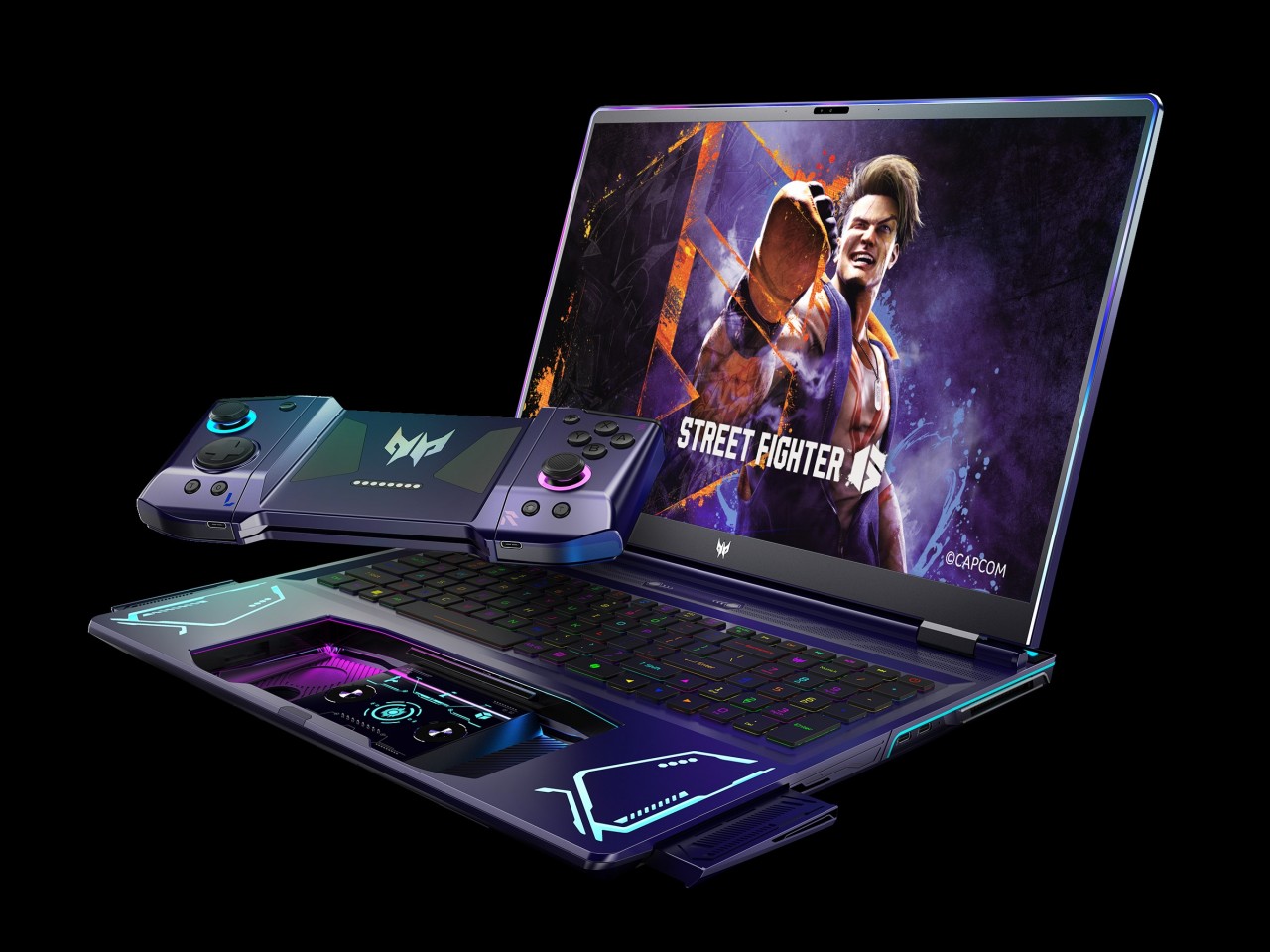
PC gaming has experienced a huge boost thanks to the advent of handheld gaming PCs like the Steam Deck, the ASUS ROG Ally, and the Lenovo Legion Go. But while these offer a more mobile gaming experience, they still pale in comparison to dedicated gaming laptops when it comes to performance, battery life, and heat management. Gaming laptops have been around for years, of course, but they, too, are experiencing a renaissance, whether they’re becoming slimmer and sleeker or, in this case, taking on a completely different design. Rather than completely overhauling the laptop or even doing away with it, the Acer Project DualPlay concept instead transforms this familiar design into something that adapts to the latest gaming trends, including playing the same game with a friend who’s right beside you.

Designer: Acer

The days when PC and console gaming camps were divided across keyboard or controller lines are long gone. Those on PS5 and Xbox now feel the need to grab a keyboard to communicate with friends, while some PC gamers now swear by gamepads, especially those playing on handheld PCs. The trends may have changed, but the design of gaming laptops has not caught up to this shift, which is why the Acer Project DualPlay concept changes the formula a wee bit by embracing both playing styles in the same device.

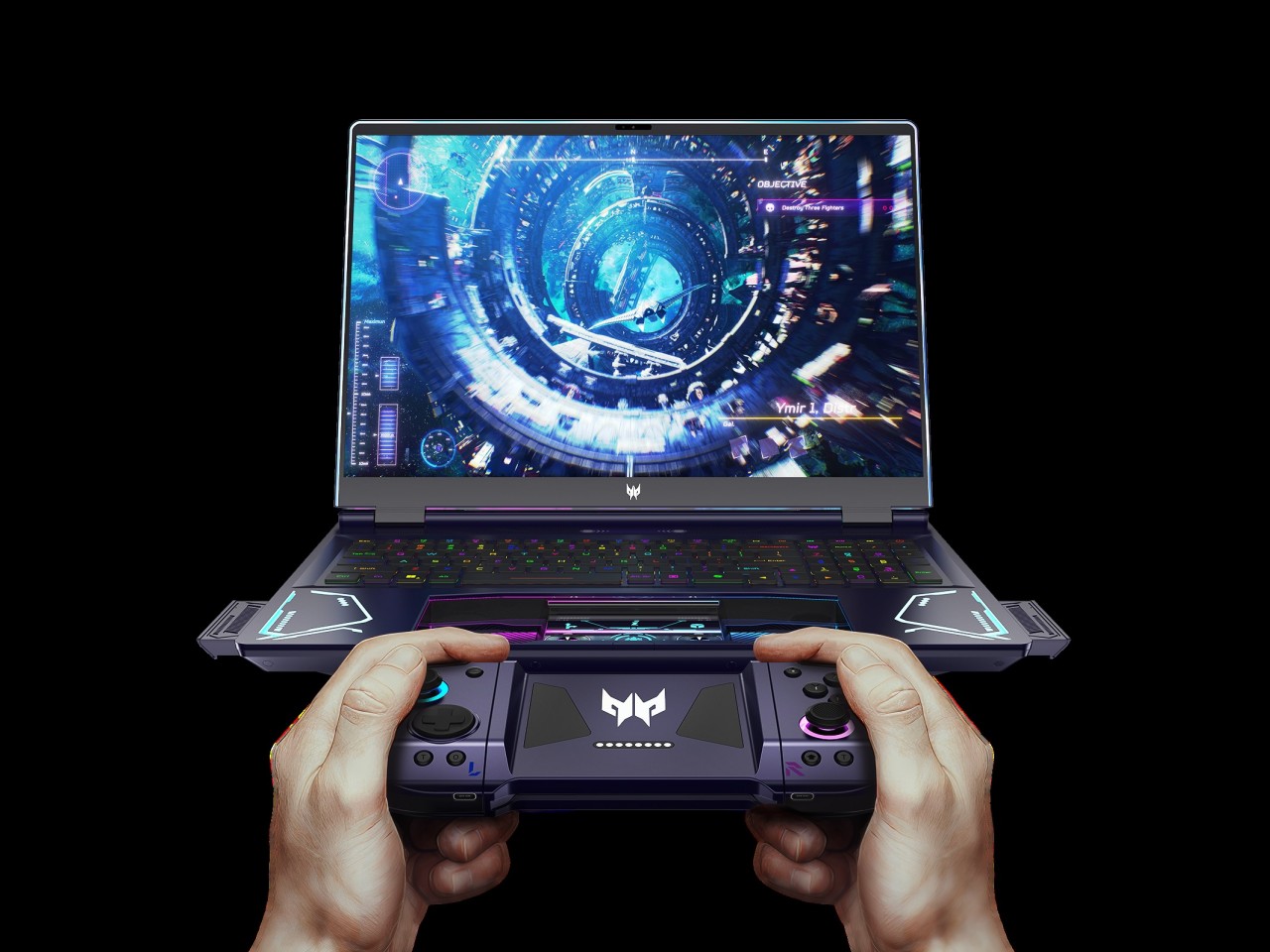
When you press a certain “release” button on top of the keyboard with two fingers, the laptop’s extra-large touchpad pops out and becomes a wireless controller, not unlike those you’d usually connect and bring with you in a separate case or pouch. This dual system lets gamers quickly switch between keyboard and controller without missing a beat and without having to worry about forgetting to bring the controller or having no space for it in the bag.

“DualPlay,” however, has dual meanings here. That detachable controller can actually be separated into two joysticks, not unlike the concept of the Nintendo Switch Joy-con, allowing two people to compete or cooperate in the same game without having to fight over the controls. It brings back the social feeling of playing with someone beside you that home consoles offered, except you’re no longer limited to doing that at home.

The Acer Project DualPlay gaming laptop concept has other surprising features that really take gaming to the next level. Releasing the controller also pops out two high-fidelity 5W speakers from the sides, delivering audio that’s not impeded by desks or other obstacles. There’s also an overabundance of dynamic RGB lighting not only around the keyboard but also around the screen, flanking the detachable controllers, the infinity mirror lighting bar on the back, and even the controller’s joysticks. It definitely looks like a gaming laptop from the future, though it remains to be seen if it is far too ahead of its time as well.

The post Acer Project DualPlay Laptop Concept puts a unique twist to gaming on the go first appeared on Yanko Design.