Apple just announced it will be integrating more ads into the App Store because our poor eyeballs must be assaulted at all times. The company plans on littering search results with advertisements beginning next year.
Currently, the App Store only has one ad spot. That's at the very top of search results. If you search for something like Instagram it's likely that top spot will be filled with an ad for a rival social media platform. The new ads will appear further down the actual search results.
Apple says that advertisers won't have to alter their campaigns, as the ads will "run in either the existing position — at the top of search results — or further down in search results." The company says that 65 percent of app downloads happen after a search, so this move will "give advertisers more opportunities."
Google began inundating the Play Store with more ads last year and, well, the results haven't been pretty. The general consensus is that the store has become more frustrating to use. We'll have to wait and see just how intrusive these App Store ads end up being.
Recent reporting also indicates that Apple plans on bringing ads to the Maps app. This is reportedly scheduled for next year, though the company has yet to comment.
This article originally appeared on Engadget at https://www.engadget.com/apps/apple-is-bringing-even-more-ads-to-the-app-store-193416921.html?src=rss
You can add Japan to the list of regions where Apple has been forced to do something it would rather not: open up the App Store. On Thursday, the company announced changes to iOS in Japan to comply with the nation's Mobile Software Competition Act (MSCA). The tighter regulations for Apple and Google, which overlap with Europe's, took effect today. Users in the US and elsewhere won't see any of these changes.
Apple's changes in iOS 26.2 in Japan revolve around alternative app stores, payments outside the App Store and browser choice. The company worked with Japanese regulators on new protections for increased security risks.
The company calls this set of safeguards Notarization. It involves an authorization process for alternative app stores and child-safety protocols. Third-party marketplaces will need to undergo a baseline security review. This uses a combination of human and automated checks to block malware and other threats.
Naturally, Apple cautions that Notarization is less comprehensive than the App Store's reviews. "The App Store — where every app is reviewed to meet the App Store's high bar for privacy and security — remains the best place for iOS users in Japan to discover and download the apps they love," the company wrote.
To state the obvious, the App Store is a booming business for the iPhone maker. In 2024, it generated $1.3 trillion in total sales. Opening it up poses a threat to one of the company's most reliable revenue streams. Big Tech seems to talk a lot about fewer rewards and more penalties for users when their own money trees are at risk.
Apple CEO Tim Cook in Tokyo in October 2025
ANDREW CABALLERO-REYNOLDS via Getty Images
iOS 26.2 in Japan also introduces new payment options. Developers can now use non-Apple payment processors within their apps or link to external websites for purchases. (Children's content is exempt from this.) Here, Apple again warns the user about the penalties for doing something that will hurt its bottom line. "For apps that use alternative payment processing or link users to the web for transactions, Apple will not be able to issue refunds and will have less ability to support customers encountering issues, scams or fraud," the company cautioned.
The last big change involves picking defaults within the operating system. Users in Japan will see new browser and search engine choice screens. They'll also find default controls for navigation apps and app stores. Finally, developers can now offer browsers that use alternative engines other than Apple's WebKit.
Apple's announcement comes a day after Google detailed its compliance with the MSCA. Since Android is more open than iOS, Google's changes in response to the regulations are a bit less pronounced. Android users will find new browser / search choice screens, expanded billing options and side-by-side comparisons of external vs. Play Store payment options.
This article originally appeared on Engadget at https://www.engadget.com/mobile/apple-opens-up-ios-in-japan-in-response-to-new-regulations-174854950.html?src=rss
If you're like me, it's probably been a hot minute since you’ve used or even thought of Meetup. Predating both Facebook and Twitter, the website, which was designed to help people organize in-person events, has changed hands a handful of times in recent years.
In 2017, founder Scott Heiferman sold it to WeWork, which offloaded it a few years later before declaring bankruptcy in 2023. As of 2024, Bending Spoons, the Italian tech company that's probably best known for buying Evernote in 2022, has been running Meetup.
In the aftermath of the pandemic, the platform has seen something of resurgence. As of late 2025, Gen Z and young Millennials make up 40 percent of Meetup's active user base and represent its most engaged group of users. This year, the app has also seen a 20 percent year-over-year increase in new registrations. Going into 2026, Bending Spoons is hoping to build on that momentum with a redesign of Meetup's mobile app.
The new interface, which starts rolling out today, brings the Android and iOS app inline with Meetup's recently redesigned website. Across the application, users can expect updated fonts, new more colorful icons and better spacing. The goal of the redesign is to make the app "vibrant, fun and more modern than before," says Chiara Vivaldi, Meetup's product lead. She adds the redesigned app retains all the key features found in the previous version, while making those easier to find. For instance, users can access their profile and groups directly from the homepage of the app.
Beyond making Meetup feel more modern, Bending Spoon is using the redesign to cement the groundwork for a series of improvements it plans to roll out in the coming months.
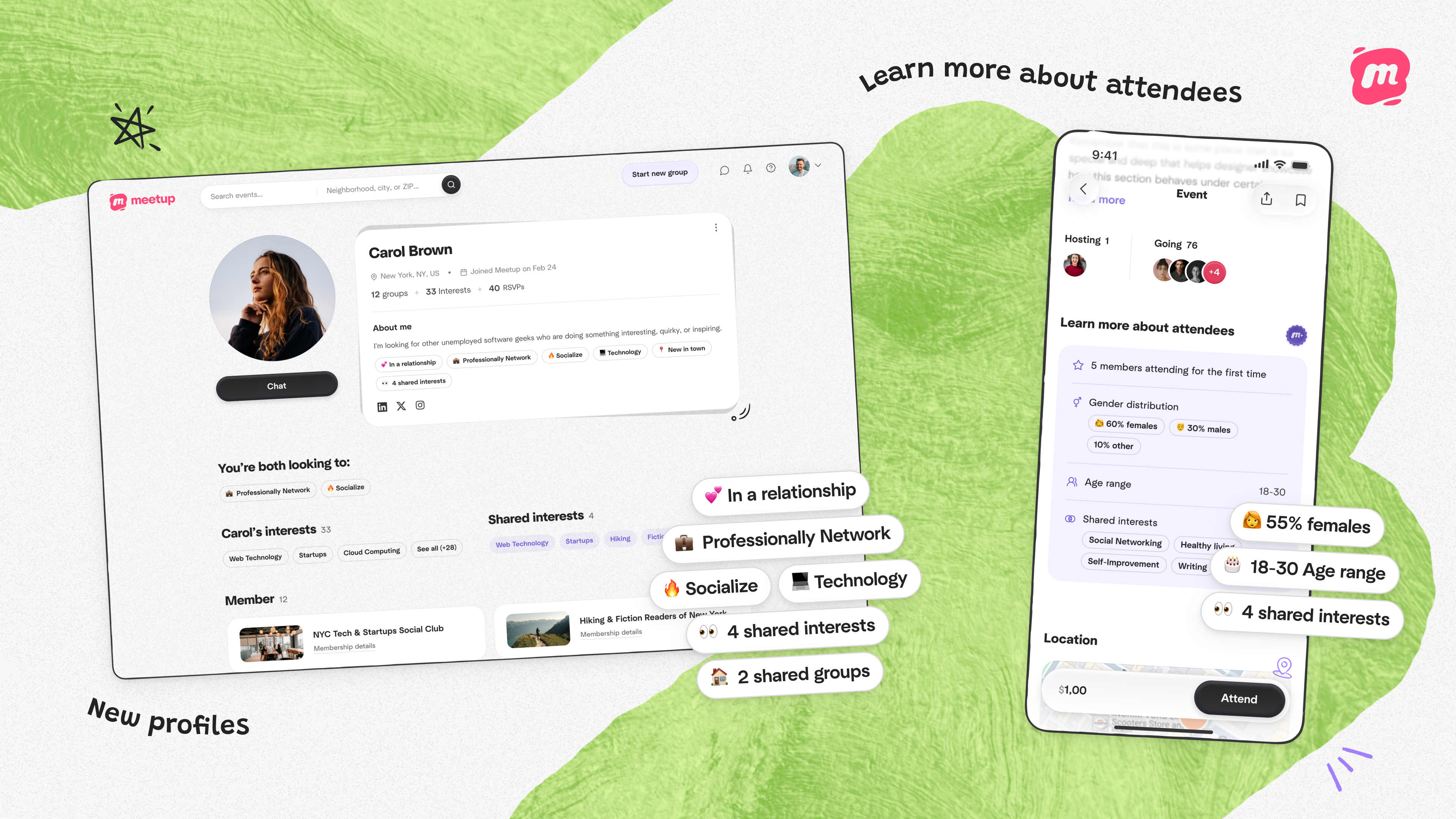
Soon, Meetup users will be able to see a breakdown of the people who have signed up for an event.
Bending Spoons
According to Vivaldi, one major priority is to give people, particularly women, more confidence to attend the events that are listed on Meetup. When you navigate to an event page in the new app, you'll see a broad gender and age breakdown of the users who have signed up to be there. Additionally, new and richer user profiles allow people to get a better sense of who exactly they might meet if they decide to go. Bending Spoons is also introducing a new Super Organizer badge it plans to award to the platform's top event planners. It's designed to signal to users that the person who put together the event takes community building seriously.
Taken together, Vivaldi says these features are designed to reduce the friction of attending events where you might not know anyone, and they're something the company plans to build on in the future.
At the same time, Bending Spoons plans to make it easier for organizers to use Meetup. Starting early next year, the company will unify Meetup's two disparate apps — right now, the company maintains separate ones for members and organizers. Vivaldi says organizers can expect the unified app to include all of the features they depend on, alongside a handful of enhancements. For instance, Vivaldi’s team is working to make QR-based ticketing the norm for check-ins and attendance tracking. She says the move to a single app is informed by the fact that 75 percent of Meetup's organizers got their start as a member.
"[Organizers] are part of the community. They want to be in the action, and so having them within the same app is conducive to that. They can jump into conversations, look at other events, making it all feel a bit more organic," Vivaldi said. In the meantime, if it’s been since you’ve used Meetup, you can download the redesigned app from the App and Google Play stores.
This article originally appeared on Engadget at https://www.engadget.com/mobile/meetups-new-mobile-app-is-designed-to-make-it-easier-to-meet-people-irl-150000920.html?src=rss
OpenAI has introduced an app directory that's now available right inside ChatGPT, the company announced. "Apps extend ChatGPT conversations by bringing in new context and letting users take action like order groceries, turn an outline into a slide deck or search for an apartment," the company wrote in a blog post. OpenAI also noted in a help document that "connector" apps like Google Drive are now simply called "apps."
The new apps section (on iOS, Android and web) is divided into Feature, Lifestyle and Productivity categories, letting you connect to commonly used apps and sites like Booking.com, Spotify and Dropbox. To use an app, simply click on it, hit "Connect" then authorize the app to access ChatGPT. With that done, you can then start a chat related to that app. In the case of Dropbox, for instance, you'll be able to "gather insights, prepare briefs and summarize reports or internal documents," according to the description. Once connected, any app can be accessed by doing an @ mention of it.
A new addition that came along with the store is an Apple Music app that, like Spotify, helps users find music, create playlists and manage their libraries through a chat interface. Another is DoorDash, which lets you transform recipes, meal planning and staples into "an actionable shopping cart."
Along with the app directory, OpenAI is now allowing developers to submit apps for review and publication in ChatGPT according to the company's app submission guidelines. It also published resources to help developers build such apps, including best practices, open-source example apps, an open-sourced UI library for chat-native interfaces and a step-by-step quickstart guide. That's on top of the software developer kit (SDK) that OpenAI introduced in October.
OpenAI noted that for now, developers can only monetize apps by linking out from the ChatGPT app to the native app or website — but the company is exploring internal monetization options as well. Privacy was also emphasized, with companies required to provide "clear" policies.
The new feature is a big part of Sam Altman's promises to make ChatGPT more versatile with the addition of custom "GPT" bots. "Over time, we want apps in ChatGPT to feel like a natural extension of the conversation, helping people move from ideas to action, while building a thriving ecosystem for developers," the company wrote.
This article originally appeared on Engadget at https://www.engadget.com/ai/openai-just-launched-an-app-store-inside-chatgpt-133049586.html?src=rss
Chromebooks have quietly become some of the most useful laptops for everyday tasks. They boot fast, stay secure with automatic updates and often cost far less than traditional Windows or Mac machines. Modern Chromebooks also look and feel better than ever, with brighter screens, stronger processors and designs that range from simple clamshells to flexible 2-in-1s.
Whether you need a laptop for school, streaming or a portable option for travel, there is likely a Chromebook that fits your routine. After testing the top models, we picked the best Chromebooks you can buy today to help you find something that balances performance, price and reliability.
What is Chrome OS, and why would I use it over Windows?
This is probably the number one question about Chromebooks. There are plenty of inexpensive Windows laptops on the market, so why bother with Chrome's operating system? Glad you asked. For me, the simple and clean nature of Chrome OS is a big selling point. Chrome OS is based on Google’s Chrome browser, which means most of the programs you can run are web based. There’s no bloatware or unwanted apps to uninstall like you often get on Windows laptops, it boots up in seconds, and you can completely reset to factory settings almost as quickly.
Of course, simplicity will also be a major drawback for some users. Not being able to install native software can be a dealbreaker if you’re a video editor or software developer. But there are also plenty of people who do the majority of their work in a web browser, using tools like Google Docs and spreadsheets for productivity without needing a full Windows setup.
Google and its software partners are getting better every year at supporting more advanced features. For example, Google added video editing tools to the Google Photos app on Chromebooks – it won’t replace Adobe Premiere, but it should be handy for a lot of people. Similarly, Google and Adobe announced Photoshop on the web in 2023, something that brings much of the power of Adobe’s desktop apps to Chromebooks.
Chromebooks can also run Android apps, which greatly expands the amount of software available. The quality varies widely, but it means you can do more with a Chromebook beyond just web-based apps. For example, you can install the Netflix app and save videos for offline watching. Other Android apps like Microsoft Office and Adobe Lightroom are surprisingly capable as well. Between Android apps and a general improvement in web apps, Chromebooks are more than just portals to a browser.
What do Chromebooks do well?
Put simply, web browsing and really anything web based. Online shopping, streaming music and video and using various social media sites are among the most common daily tasks people do on Chromebooks. As you might expect, they also work well with Google services like Photos, Docs, Gmail, Drive, Keep and so on. Yes, any computer that can run Chrome can do that too, but the lightweight nature of Google Chrome OS makes it a responsive and stable platform.
As I mentioned before, Chrome OS can run Android apps, so if you’re an Android user you’ll find some nice ties between the platforms. You can get most of the same apps that are on your phone on a Chromebook and keep info in sync between them. You can also use some Android phones as a security key for your Chromebook or instantly tether your 2-in-1 laptop to use mobile data.
Google continues to tout security as a major differentiator for Chromebooks, and it’s definitely a factor worth considering. Auto-updates are the first lines of defense: Chrome OS updates download quickly in the background and a fast reboot is all it takes to install the latest version. Google says that each webpage and app on a Chromebook runs in its own sandbox as well, so any security threats are contained to that individual app. Finally, Chrome OS has a self-check called Verified Boot that runs every time a device starts up. Beyond all this, the simple fact that you generally can’t install traditional apps on a Chromebook means there are fewer ways for bad actors to access the system.
If you’re interested in Google’s Gemini AI tools, a Chromebook is a good option as well. Every Chromebook in our top picks comes with a full year of Google’s AI Pro plan — this combines the usual Google One perks like 2TB of storage and 10 percent back in purchases from the Google Store with a bunch of AI tools. You’ll get access to Gemini in Chrome, Gmail, Google Docs and other apps, Gemini 2.5 Pro in the Gemini app and more. Given that this plan is $20/month, it’s a pretty solid perk. Chromebook Plus models also include tools like the AI-powered “help me write,” the Google Photos Magic Editor and generative AI backgrounds you can create by filling in a few prompts.
As for when to avoid Chromebooks, the answer is simple: If you rely heavily on a specific native application for Windows or a Mac, chances are you won’t find the exact same option on a ChromeOS device. That’s most true in fields like photo and video editing, but it can also be the case in law or finance. Plenty of businesses run on Google’s G suite software, but more still have specific requirements that a Chromebook might not match. If you’re an iPhone user, you’ll also miss out on the way the iPhone easily integrates with an iPad or Mac. For me, the big downside is not being able to access iMessage on a Chromebook.
Finally, gaming Chromebooks are not ubiquitous, although they’re becoming a slightly more reasonable option with the rise of cloud gaming. In late 2022, Google and some hardware partners announced a push to make Chromebooks with cloud gaming in mind. From a hardware perspective, that means laptops with bigger screens that have higher refresh rates as well as optimizing those laptops to work with services like NVIDIA GeForce Now, Xbox Game Pass and Amazon Luna. You’ll obviously need an internet connection to use these services, but the good news is that playing modern games on a Chromebook isn’t impossible. You can also install Android games from the Google Play Store, but that’s not what most people are thinking of when they want to game on a laptop.
What are the most important specs for a Chromebook?
Chrome OS is lightweight and runs well on fairly modest hardware, so the most important thing to look for might not be processor power or storage space. But Google made it easier to get consistent specs and performance late last year when it introduced the Chromebook Plus initiative. Any device with a Chromebook Plus designation meets some minimum requirements, which happen to be very similar to what I’d recommend most people get if they’re looking for the best laptop they can use every day.
Chromebook Plus models have at least a 12th-gen Intel Core i3 processor, or an AMD Ryzen 3 7000 series processor, both of which should be more than enough for most people. These laptops also have a minimum of 8GB of RAM and 128GB of SSD storage, which should do the trick unless you’re really pushing your Chromebook. All Chromebook Plus models have to have a 1080p webcam, which is nice in these days of constant video calling, and they also all have to have at least a 1080p FHD IPS screen.
Of course, you can get higher specs or better screens if you desire, but I’ve found that basically everything included in the Chromebook Plus target specs makes for a very good experience.
Google has an Auto Update policy for Chromebooks as well, and while that’s not exactly a spec, it’s worth checking before you buy. Last year, Google announced that Chromebooks would get software updates and support for an impressive 10 years after their release date. This support page lists the Auto Update expiration date for virtually every Chromebook ever, but a good rule of thumb is to buy the newest machine you can to maximize your support.
How much should I spend on a Chromebook?
Chromebooks started out notoriously cheap, with list prices often coming in under $300. But as they’ve gone more mainstream, they’ve transitioned from being essentially modern netbooks to some of the best laptops you’ll want to use all day. As such, prices have increased: At this point, you should expect to spend at least $400 if you want a solid daily driver. There are still many Chromebooks out there available at a low price that may be suitable as secondary devices, but a good Chromebook that can be an all-day, every-day laptop will cost more. But, notably, even the best Chromebooks usually cost less than the best Windows laptops, or even the best “regular” laptops out there.
There are a handful of premium Chromebooks that approach or even exceed $1,000 that claim to offer better performance and more processing power, but I don’t recommend spending that much. Generally, that’ll get you a better design with more premium materials, as well as more powerful internals and extra storage space, like a higher-capacity SSD. Of course, you also sometimes pay for the brand name. But, the specs I outlined earlier are usually enough, and there are multiple good premium Chromebooks in the $700 to $800 range at this point.
This was our pick for best overall Chromebook for years, and it’s still one of the better options you can find for a basic laptop that doesn’t break the bank. It’s a few years older than our current top pick, so its processor isn’t fresh and it only has 128GB of storage. It also won’t get updates from Google as long as newer models. But it still combines a nice screen and keyboard with solid performance. This laptop typically costs $500, which feels high given its a few years old and Acer’s Chromebook Plus 514 is only $350, but if you can find it on sale and can’t find the Acer it’s worth a look.
ASUS CX15
This Chromebook is extremely affordable – you can currently pick it up for only $159 at Walmart. That price and its large 15.6-inch screen is mainly what it has going for it, as the Intel Celeron N4500 chip and 4GB of RAM powering it does not provide good performance if you’re doing anything more than browsing with a few tabs open. If you’re shopping for someone with extremely basic needs and have a small budget, the CX15 might fit the bill. But just be aware that you get what you pay for.
Samsung Galaxy Chromebook Plus
Samsung’s Galaxy Chromebook Plus, released in late 2024, is one of the more unique Chromebooks out there. It’s extremely thin and light, at 0.46 inches and 2.6 pounds, but it manages to include a 15.6-inch display in that frame. That screen is a 1080p panel that’s sharp and bright, but its 16:9 aspect ratio made things feel a bit cramped when scrolling vertically. Performance is very good, and the keyboard is solid, though I’m not a fan of the number pad as it shifts everything to the left. At $700 it’s not cheap, but that feels fair considering its size and capabilities. If you’re looking for a big screen laptop that is also super light, this Chromebook merits consideration, even if it’s not the best option for everyone.
This article originally appeared on Engadget at https://www.engadget.com/computing/laptops/best-chromebooks-160054646.html?src=rss
FlexClip Magic Edit uses AI to automate video editing with Auto Edit and AI Recreate, helping creators turn raw clips into polished videos faster and easier.
As part of its last Xbox-focused software update of the year, Microsoft is improving the Bluetooth performance of the Xbox Wireless Headset to make it work even better with Windows 11. Microsoft released the latest Wireless Headset as an accessory for Xbox Series X/S and PC, but as of this update, Xbox Wireless Headset owners on Windows will now have a leg up on their console counterparts thanks to support for Bluetooth Low Energy (LE) Audio.
Microsoft says that supporting Bluetooth LE Audio will let the headset offer lower latency audio, better battery life, richer stereo sound and the ability to share audio across multiple compatible Bluetooth accessories at the same time. Not revolutionary updates, but still nice to have if you bought a $110 Xbox Wireless Headset back in 2024. Provided you're running the latest version of Windows 11 and your device supports Bluetooth LE, Microsoft says you can take advantage of the improvements by updating your headset in the Xbox Accessories app.
If you're a regular user of the Xbox mobile app, Microsoft is also making some changes there. After adding the ability to purchase Xbox games directly from the app in April — a feature made possible after Google and Apple were forced to change the rules of their app stores — Microsoft is now adding a dedicated Store tab to the app. You'll also be able to add games to your wishlist and search for add-ons and DLC directly in the app.
Microsoft ending the year with Windows and mobile app updates reflects the ways the company's gaming strategy has changed in 2025. After spending decades positioning itself as a console maker, Microsoft is seemingly making Xbox software its main focus going forward.
This article originally appeared on Engadget at https://www.engadget.com/gaming/xbox/the-last-xbox-update-of-2025-includes-a-handy-wireless-headset-upgrade-204500386.html?src=rss
Google's at it again, once more insisting that AI is something people need or want more of in their lives. The latest move comes from YouTube Gaming, which announced an open beta for a project called Playables Builder. This allows select YouTube Creators to use a "prototype web app built using Gemini 3" to make bite-sized games, no coding required.
YouTube is launching a closed Beta test for Playables Builder, a prototype web app built using Gemini 3 where users create games with short text, video or image prompts. we’ve partnered with YouTube Creators like @sambucha, @AyChristene, @goharsguide and @Mogswamp to start making… pic.twitter.com/1Gx0v4oZFA
YouTube was testing the addition of small-scale games to its desktop and mobile platforms back in 2023, then added multiplayer capability to Playables last year. Since AI is appearing all over Google-owned services, today's news probably shouldn't be a surprise.
The premise sounds similar to the Disco and GenTabs projects that Google Labs recently announced. They offer an AI layer to web browsing: provide a natural language input, get an interactive widget that does what you asked for. Despite my skeptical attitude toward AI, I can see those tools having some practical applications for search, where the goal is to aggregate whatever data you're looking for into a manageable, easy-to-read interface.
But a game is not simple. A good game takes what might be a simple idea and, with finesse and iteration and skill, transforms it into a genuinely fun experience. It's a cute parlor trick that AI assistants can help people to make stuff without technical knowledge, but there's a reason professional game devs work hard to amass all their know-how. Playables Builder is a peak example of misunderstanding what artificial intelligence is best at. Just because a chatbot can make a game doesn't mean anyone will enjoy playing it.
This article originally appeared on Engadget at https://www.engadget.com/ai/youtube-is-letting-creators-make-playable-games-with-a-gemini-3-tool-195500318.html?src=rss
Have you ever just wished you could watch Instagram Reels right on a TV? Maybe? Well, if so, you're in luck. Meta has launched an Instagram app exclusively on Fire TV. It will be solely for "short-form video content," so Reels. TikTok launched an app on Fire TV in 2020 before rolling it out to other platforms.
Instagram and Fire TV users can download the former through Amazon's App Store. It can either link to an existing account or have a separate account just for TV. The app can hold up to five different Instagram accounts — and time spent factors into any limits on teen accounts.
"Our mission is to get you to the world’s best content fast, and we’re thrilled to welcome Instagram to Fire TV," Fire TV vice president, Aidan Marcuss, said in a statement. "We’re committed to keep pushing the boundaries of entertainment on customers' biggest screens — the Instagram team has built an awesome experience, and we’re excited to be the first place to offer it. We can’t wait to see what customers think."
For now, Reels are separated into different channels, such as sports highlights or hidden travel gems. Reels also play automatically, so you don't have to swipe between content on the screen. According to Meta, the app is still being tested, so these formats might change in the future.
Instagram users in the US can now get the TV app on Amazon's Fire TV Stick HD, 4K Plus and 4K Max (first and second generation). It's also available on the Fire RV 2-Series, 4-Series, and Omni QLED Series. However, Meta says that the Instagram App for TV should be available on more devices and in other countries after this initial testing round.
This article originally appeared on Engadget at https://www.engadget.com/social-media/instagram-launches-a-fire-tv-app-for-reels-160003710.html?src=rss
Apple TV is adding Google Cast support to its native Android app. This update allows subscribers to stream Apple TV shows from their smartphones to their televisions. Apple's streaming service only just released the dedicated app for the Android operating system in February 2025. Adding in Google Cast support helps fully integrate the app into the experience for people whose gear is part of the Android ecosystem.
The addition should make it easier for viewers to shift between screens, even mid-episode. It's a very different approach than Netflix, which recently ended Google Cast support for its streaming platform in most use cases.
This article originally appeared on Engadget at https://www.engadget.com/entertainment/streaming/apple-tv-app-for-android-now-supports-google-cast-205642324.html?src=rss