Traeger’s first non-pellet grills debuted in 2023. Jumping into the griddle craze, the company introduced the Flatrock series in a three-burner model — later adding the smaller, two-burner option. Now Traeger is back with two new griddles, the two- and four-burner Irontop, which actually offer more cooking area than their predecessors. Plus, these new griddles are more affordable, too.
Traeger promises the Irontop models will offer fast preheating, precise temperature control, edge-to-edge heating and a durable construction. The cooking area has a food-safe, rust-resistant coating the company says only requires “simple seasoning and care.” Traeger says the consistent heating across the cooktop is the same level of performance as the more expensive Flatrock series of griddles. The Irontop griddles also have integrated wind guards to insure reliable heating in windy conditions.
The Irontop griddles sit atop carts with four casters. Each model also has two side shelves and a larger shelf underneath for storage. The side shelves can accommodate some of Traeger’s Pop-And-Lock accessories, like the storage bin and roll rack. Those shelves also have three hooks on each side, where you can hang spatulas and other griddle tools.
The two- and four-burner Irontop griddles starting May 15 from various retailers for $500 and $600 respectively. Traeger also recently added two sizes of the new Westwood smart pellet grill to its list of more affordable options, starting at $700.
Update, April 18, 2026, 11:30AM ET: This post has been updated with more detailed availability info from Traeger.
This article originally appeared on Engadget at https://www.engadget.com/home/kitchen-tech/traeger-debuts-the-irontop-a-more-affordable-gas-powered-griddle-150000759.html?src=rss
Amazon has today announced a software update for both the Kindle Colorsoft and Kindle Scribe Colorsoft which will bring dark mode to both e-readers. Even better, users will be able to toggle the settings for specific menus on both devices, so if they want their library dark and their notebook light, they can. Given the option is available on plenty of other Kindle devices, its omission here always felt like something Amazon was just getting around to addressing.
In addition, the update brings Smart Shapes to notebooks, enabling users to add pre-drawn lines, arrows, circles, triangles and rectangles from the toolbar. In addition, a hold-to-snap tool lets you draw a shape freehand, after which point it’ll pull itself into a nice tidy design. Both should help folks who want to add some graphical zing to their note taking who can’t do all those fancy journal designs on their own.
The update is rolling out across the ecosystem across the next few days, further empowering would-be journal scribes using these tablets. For tablets like the Kindle Scribe Colorsoft, it’s clear Amazon needs to build out the Scribe half of the equation, which looks like a poor relative compared to its competition. As Cherlynn Low wrote in her review, it’s a fine e-reader, but one that’s sorely lacking in many areas.
This article originally appeared on Engadget at https://www.engadget.com/general/amazon-brings-dark-mode-to-kindle-colorsoft-and-scribe-colorsoft-130054573.html?src=rss
ASUS is often best when it's weird, and this year at CES 2026 the company decided to resurrect one of its weirdest laptops ever: the ROG Zephyrus Duo. Unlike the last model from 2023 that had a smallish, tilting second screen, the 2026 model rocks massive dual 16-inch OLED displays that should make it an ideal content creation and gaming machine. ASUS has now opened up pre-orders for the Zephyrus Duo and revealed that pricing will start at a breathtaking $4,500.
The Zephyrus Duo is the "world's first 16-inch dual-screen gaming laptop," according to ASUS. It boasts a pair of 3K HDR OLED touchscreens that offer a combined 21 inches of diagonal screen space. They're DisplayHDR True Black 1000 certified, and can each hit 1,100 nits of peak HDR brightness. Both offer a 120Hz refresh rate and 0.2ms response time, though only the main screen supports NVIDIA G-Sync.
ASUS
Another important piece is the detachable magnetic Bluetooth keyboard. Despite the thin 5.1mm profile, it offers a generous 1.7mm of key travel and ultra-large touchpad. With the two hinging touch displays and the keyboard, it offers five dedicated operation modes. Dual Screen mode removes the keyboard altogether, Laptop mode provides a standard 16-inch screen and keyboard setup, Sharing mode sets the Duo flat at 180 degrees, Book mode sets both screens in a portrait orientation, and Tent mode has the hinge forming an A-frame.
There's a lot of power under the hood, with a 16-core Intel Core Ultra 9 386H processor paired with an NVIDIA GeForce RTX 5070 or RTX 5090 laptop GPU with a max TGP of 135 watts. The latter is NVIDIA's flagship mobile GPU with the latest AI and gaming features including DLSS 4, frame generation and fourth-gen ray-tracing cores. It also comes with a redesigned motherboard and larger vapor chamber, along with dual fans to keep things cool.
All of that is housed in a CNC-milled aluminum chassis with a new "Stellar Grey" colorway and "Slash" lighting array with 35 discrete zones. The Zyphyrus Duo is now available for pre-order from ASUS or partners including Newegg starting at $4,500 for the RTX 5070Ti version or (brace for it) $5,500 for the RTX 5090 version. Both models come with 32GB of memory and 1TB of PCIe 5.0 storage.
This article originally appeared on Engadget at https://www.engadget.com/computing/laptops/asus-dual-screen-rog-zephyrus-duo-is-now-on-pre-order-starting-at-4500-130041463.html?src=rss
Not long ago, high-quality wireless mic systems cost over $500 and required a bulky transmitter and lav mic wire tucked under the subject’s shirt. DJI’s Mic Mini showed how unnecessary all of that was, combining mic and transmitter into a 0.35-ounce device that delivered high quality sound for under $100.
Now, DJI has released the Mic Mini 2 (around $100) as a mild update to the original at a much lower price. It’s more fashion forward thanks to the colorful new magnetic covers and offers an audio upgrade via new voice tone presets. Those changes make it the best budget wireless mic for new buyers, but it’s not worth the upgrade if you already have a Mic Mini — and DJI’s flagship Mic 3 is better if you can afford it. However, beware that the Mic Mini 2 isn’t currently on sale in the US as it hasn’t yet been certified by the Federal Communications Commission (FCC).
Design and features
The Mic Mini 2 now comes in two packages for smartphone and camera users. One includes a receiver with a 3.5mm mic output for mirrorless cameras, while the other offers a mobile receiver with a USB-C port for smartphones. Both kits include a charging case, one or two transmitters (mics) and a receiver. You also get a magnetic mount, clip mount, black and white magnetic front covers and a windscreen for each mic. The camera kit includes a smartphone adapter as well.
The camera kit contains 10 mic covers in a rainbow of hues that look like they were borrowed from ‘90s iMacs, letting you match a subject’s clothing or add a pop of color. They all have a huge, distracting DJI logo, though, so many creators may want to cover it with a piece of tape. DJI also has optional designer front covers with four very ‘90s looking abstract patterns in several pastel shades, available for around $45.
Steve Dent for Engadget
DJI has changed the transmitter design slightly from the previous model's faceted shape to a flatter design to better accommodate the new magnetic covers. The mic portion also weighs slightly more at 0.39 ounces. Though tiny, each mic is rated to run up to 11.5 hours on a charge, and the receiver is supposed to go for about 10.5 hours with noise cancellation disabled. In my own testing (recording continuously with a looped video as an audio source), I was even able to slightly exceed these times, so you could easily use it for a full shooting day. This is better than nearly all rivals including the Rode Wireless Go III, which is rated for seven hours on a charge. Another wireless mic in this price range, the Hollyland Lark M2, has a stated runtime of 10 hours between charges.
As before, the transmitters and receiver snap into the charging case magnetically. The mobile charging case is small enough to slide into a pants pocket, while the larger camera version fits into a jacket pocket or a bag. On top of being a convenient way to store the transmitters and receiver, they can charge the mics and receiver 3.6 times, giving you 48 hours of use even without a wall plug in sight. It took me about two hours to charge all three devices in the camera case and about an hour to charge the smaller receiver and single transmitter with the mobile case.
The Mic Mini 2 transmitters can be paired directly with smartphones via Bluetooth or you can connect them to DJI cameras like the Osmo Action 6, Osmo 360 and Osmo Pocket 4 via DJI’s OsmoAudio system.
Audio quality
To use the Mic Mini 2, just affix the mics (transmitters) to your subject, either via the clip or magnetic attachment, and turn them on. Then, power up the receiver and connect it to your camera via a 3.5mm cable or plug it into your smartphone’s USB-C port. Everything pairs automatically, and the final step is to adjust the level between -12 db and +12 db using the dial on the side (camera receiver only). Noise reduction is set via a switch on the mobile receiver, or the Mimo app for the camera receiver.
There are a few major differences between DJI’s Mic Mini 2 and the more expensive flagship Mic 3 when it comes to audio specs. The biggest is that the Mic 3 supports 32-bit float internal recording (with 32GB of storage) that eliminates clipping in most situations, even if your levels are too high. It also comes with dynamic gain control to balance volume if your subject tends to lower or raise their voice a lot.
Steve Dent for Engadget
In comparison, the Mic Mini 2 only offers automatic limiting, which does prevent clipping but can reduce audio quality. It also offers no internal recording so you won’t have a backup if your camera or smartphone recording fails. The Mic Mini 2 also lacks an audio level display like the Mic 3.
Despite those limitations, the 48Khz, 24-bit audio quality on the Mic Mini 2 is excellent. I recorded my voice using all three voice tone presets, and found that I could use the “rich” mode (which emphasizes low tones) without the need to do equalization in post. The “regular” setting offers neutral and balanced sound, while the “bright” mode adds clarity in noisy situations. If you prefer doing EQ yourself, the regular mode is best.
A good test of a microphone is to record your voice and then max out EQ levels in a narrow band across a range of frequencies. A mediocre mic will distort audio in more than one range, reducing sound quality. DJI’s Mic Mini 2 performed well here, showing minor distortion for my voice only at one frequency. When I reduced the gain at that range, my voiceovers sounded clear and full.
Another key feature is noise cancellation. DJI’s Mic Mini 2 offers two levels of AI-powered cancellation depending on the amount of background noise. At the low setting, it reduced background noise but produced some distortion. However, the high level noise cancellation distorts audio considerably, so you should only use it in a pinch when noise is excessive. I also tested the Mic Mini 2’s wireless range and was able to record audio at 450 yards away from the receiver as DJI claims, though the device disconnected once at that distance.
The Mic Mini 2 retains other functions from the original Mini like automatic limiting to prevent clipping. It supports two mics at once, and when used in Stereo mode, lets you capture each mic to a separate channel so you can mix them later on. To set those functions, you need to use DJI’s Mimo smartphone app.
Wrap-up
Steve Dent for Engadget
The Mic Mini 2 is now available in Europe and elsewhere but not yet the US due to lack of certification. It costs almost half as much as the Mic Mini did at launch, just €89/£89 for the camera kit with two transmitters and a receiver, or €49/£54 for the mobile kit with one transmitter and a receiver.
Given the features and price, the Mic Mini 2 doesn’t have a lot of competition. One of its main rivals is the Rode Wireless Go III, but that model is double the price and lacks noise cancellation. It does have slightly better audio quality, though. Other options in the same price range from Hollyland, Boya and others either can’t connect to both a camera and smartphone or don’t stack up in terms of sound quality and features.
Overall the Mic Mini 2 offers a great combination of range, audio quality and noise cancellation. It’s not worth an upgrade from the Mic Mini, but if you’re buying your first wireless mic and don’t want to spend a bundle, it’s a great option.
This article originally appeared on Engadget at https://www.engadget.com/audio/dji-mic-mini-2-review-the-tiny-wireless-mic-is-colorful-and-much-cheaper-120046171.html?src=rss
Magic: The Gathering Arena developers at Hasbro subsidiary Wizards of the Coast are set to join the Communications Workers of America (CWA), the union announced. The CWA says it has secured a "supermajority" among workers in favor of unionization for the chapter, called United Wizards of the Coast (UWOTC-CWA). The CWA has filed for a formal election with the National Labor Relations Board (NLRB), but that will be withdrawn if Hasbro voluntarily recognizes the union by May 1st.
"At Wizards, we’re organizing for a say in layoffs, accountability that runs up and down the chain, and a living wage that actually lets people build a life," said UWOTC-CWA member and senior software engineer Damien Wilson. "I’m hopeful about what we can build here and being clear-eyed about why it’s necessary."
Workers have outlined several areas of concern including protections over layoffs and remote work, generative AI guardrails and mandatory crunch time, along with "increased transparency and equity" in the workplace. "This isn’t just something that affects Wizards of the Coast; it’s how most American workplaces are set up," Wilson added. "Unions are the missing counterweight to protect our craft."
The push to unionize was triggered back in 2023 following mass Hasbro layoffs that affected nearly 2,000 workers, software engineers told Kotaku. Developers were also concerned about issues like remote work, saying that Hasbro and Wizards of the Coast decisions "have not aligned with the values of their employees."
The CWA has been involved in recent unionization drives across the games industry, with workers from Blizzard and ID Software, along with indie devs from publishers including Heart Machine recently joining. Over 4,000 workers have organized across the industry as part of CWA's CODE (Campaign to Organize Digital Employees), according to the union. "Every worker deserves job security, fair compensation, and a seat at the table," said CWA District 7 VP Susie McAllister.
This article originally appeared on Engadget at https://www.engadget.com/gaming/magic-the-gathering-arena-developers-intend-to-form-a-union-with-the-cwa-104438341.html?src=rss
The International Association of Machinists and Aerospace Workers (IAM) union has accused Apple of unlawfully discriminating against the unionized employees of the company’s Towson, Maryland retail store. IAM has filed an unfair labor practice charge against Apple with the National Labor Relations Board (NLRB) after the company announced on April 9 that it was shutting down three of its US stores. One of those locations was the Towson retail outlet, which employed nearly 90 workers and became the first Apple Store in the country to unionize back in 2022.
In its complaint, IAM said that Apple didn’t offer the employees it represents the transfer opportunities it provided to non-unionized employees from its other stores. Unlike those non-represented employees, Towson personnel were allegedly told that they had to reapply for positions through the same process as external candidates. “Apple is denying union-represented workers the same opportunities it is giving to others — and doing so because these workers chose to organize,” the organization said. “That is discrimination, and it is exactly what federal labor law is designed to prevent.”
In addition to the Towson location, Apple also shut down its stores in Trumbull, CT, Escondito, CA. Back when the closures were announced, IAM said that “Apple’s claim that the collective bargaining agreement prevents relocation is simply false and raises serious concerns that [the] closure is a cynical attempt to bust the union.”
This article originally appeared on Engadget at https://www.engadget.com/big-tech/union-accuses-apple-of-unlawful-discrimination-against-represented-workers-094531505.html?src=rss
Google is determined to impose AI search onto as many of its products as possible, and the latest, er, victim is YouTube. A new feature called "Ask YouTube" will let you pose complex questions and receive "comprehensive results that include video and text, then ask follow ups to dive deeper," Google explained on its YouTube Labs page. The experimental feature is available starting today until June 8 for Premium US subscribers 18 and older.
To use it, first, enable the feature in your account. Then, click on the new "Ask YouTube" button in the search bar and you'll see prompt suggestions, or you can enter your own, like "plan a 3-day road trip between San Francisco and Santa Barbara." After getting the results, you can try follow-up questions or choose from suggested prompts to explore in more detail.
As shown in The Verge's quick test, the prompt "short history of Apollo 11 moon landing" brought up a summary of the mission, along with videos and time stamps for relevant information. Follow-up questions yielded similar results, but some queries just showed a list of videos like you'd see in a classic YouTube search. As happens with AI, one of the searches (around a Steam Controller) yielded factually inaccurate information, according to The Verge's Jay Peters.
Tech companies love AI a lot more than the public, and YouTube users are particularly passionate about hating AI-generated slop. YouTube's AI search function may fare better with subscribers, but only if it helps them find quality content more quickly.
This article originally appeared on Engadget at https://www.engadget.com/apps/youtube-is-testing-an-ai-search-mode-that-feels-more-like-a-conversation-075057461.html?src=rss
Thanks to the adoption of features like rapid triggers, analog switches and TMR sensors, the tech in fancy gaming keyboards has changed surprisingly quickly in the past few years. So to keep up with the pace of development, Logitech is putting a bunch of advanced components in its latest flagship offering — the G512 X — to create what may be its most configurable keyboard to date.
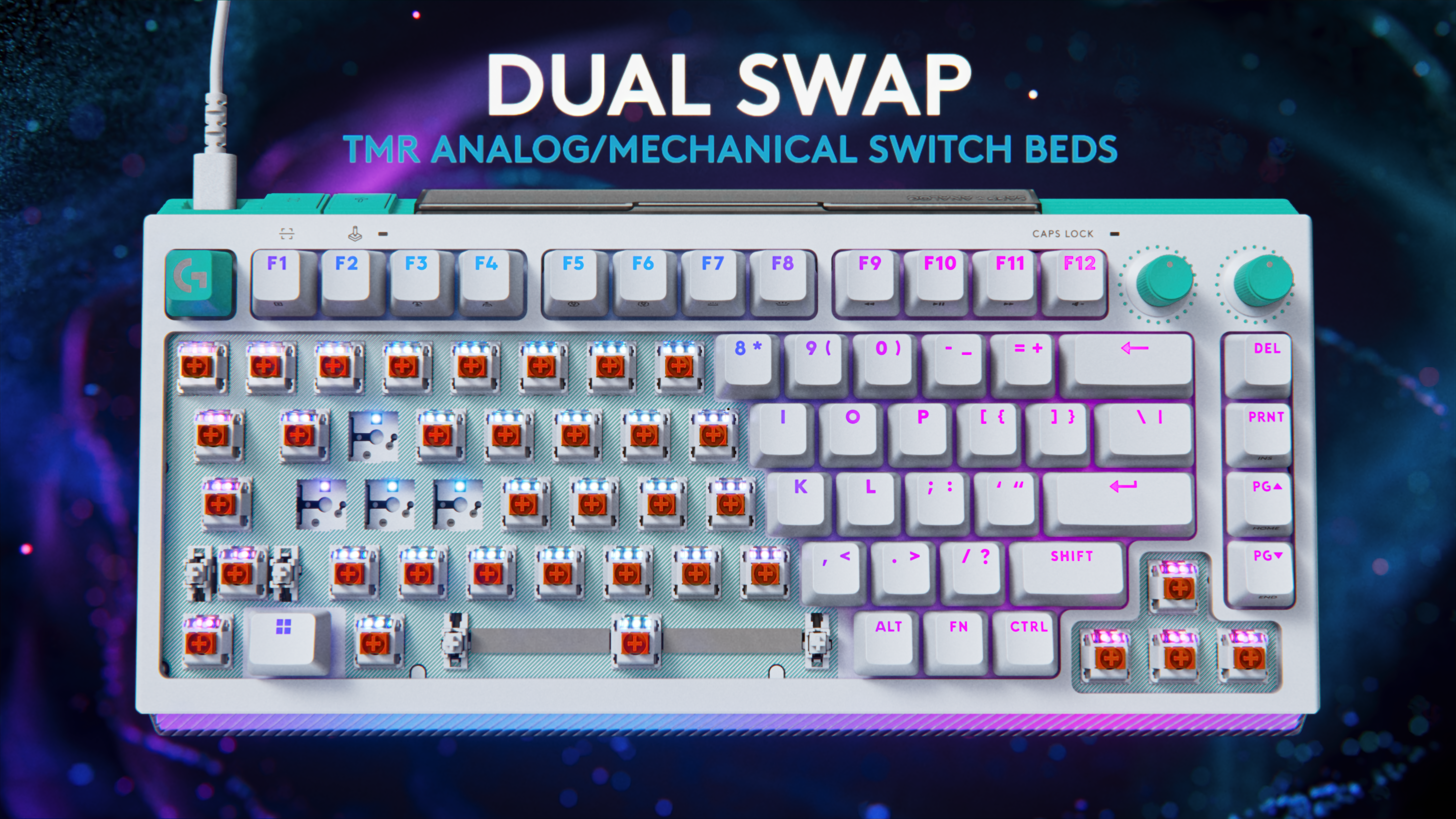
Available in both 75 and 98 percent layouts, the G512 X is based on a novel design that supports both mechanical and analog switches. Out of the box, every key features PBT keycaps and uses one of Logitech's MX mechanical switches. However, for important buttons like WASD, users can swap in up to nine bundled Gateron KS-20 magnetic analog switches. This means that when combined with the keyboard's 39 tunneling magnetoresistance (TMR) switch beds, users can enable support for customizable rapid triggers and multipoint actuation, complete with five bundled second actuation pressure point (SAPP) rings in case you need even more control over every keystroke. The one potential downside is that Logitech only added TMR switch beds to the left side of the keyboard, so if you prefer more unusual keybinds, you won't have quite as many configuration options.
The 39 TMR sensors on the left of the keyboard are the ones that support the included TMR switches.
Logitech
Meanwhile, to meet the demands of competitive gamers who need lightning-fast response times, Logitech added an 8K polling rate. This includes both 8K reporting and processing to deliver input times of just 0.125 milliseconds. Elsewhere, the G512 X comes with dual dials, a large RGB lightbar and game mode presets — all of which can be tweaked in Logitech's G Hub app.
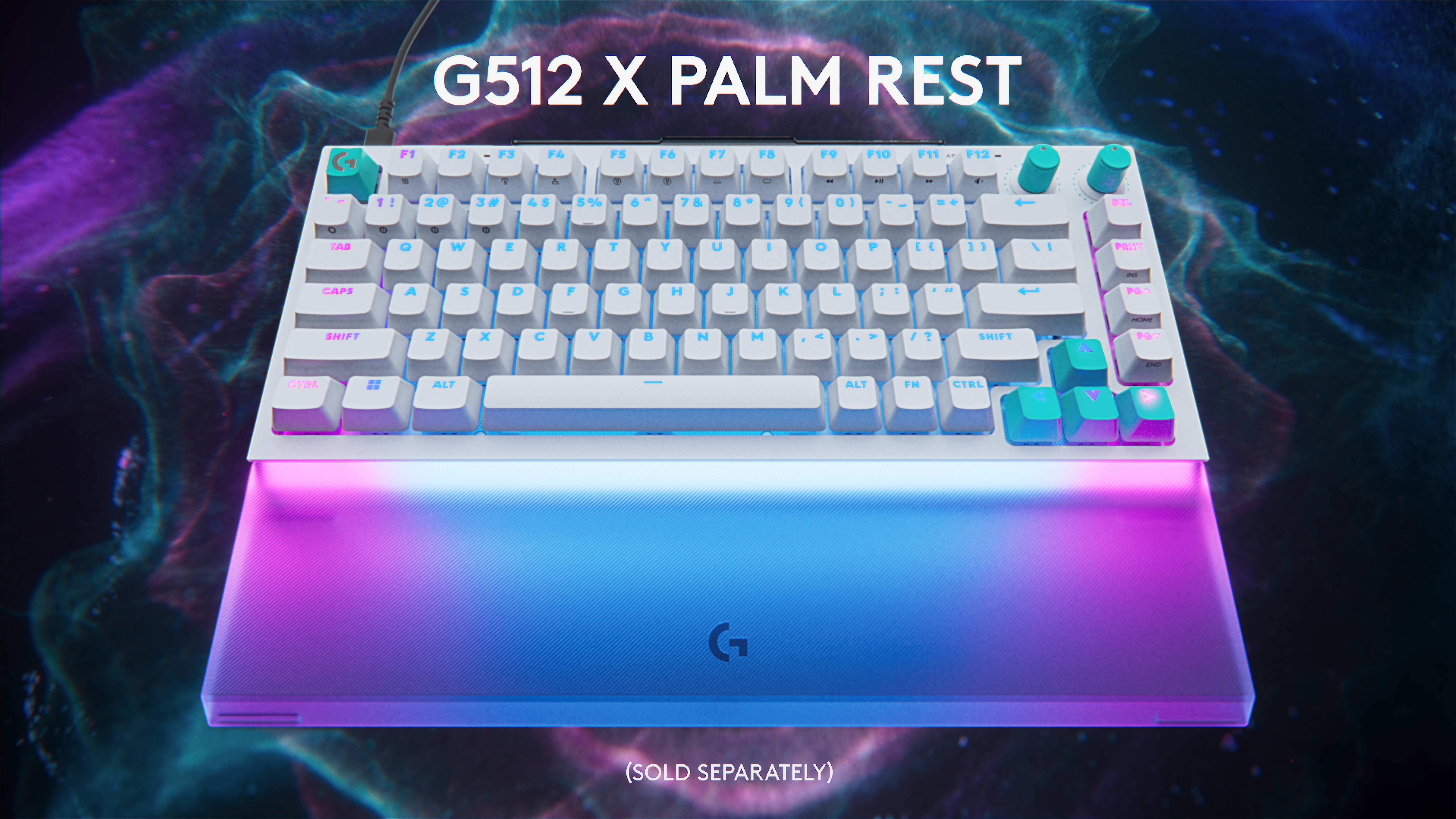
However, the coolest thing about the G512 X might be all the handy little details scattered across the keyboard. For example, its adjustable feet serve double duty as keycap and switch pullers, so when you want to adjust your layout, you won't need to go searching elsewhere for the right tool. On top of that, there is built-in storage for the nine included magnetic analog switches and five SAPP rings, so you'll always have them on hand if you want to make changes. Finally, while it is an optional accessory, Logitech created a transparent palm rest with a laser-etched surface that will enhance the G512 X's onboard RGB lighting.
Logitech's optional palm rest really boosts the output of the Logitech G512 X's front-mounted RGB lightbar.
Logitech
Unfortunately, at $180 for the 75 percent layout or $200 for the 98 percent model, the G512 X is a bit pricey. And unlike some other members of Logitech's G5 family, there's no option for a wireless variant. But if you want a keyboard with practically all the latest tech and a ton of customizability (including the ability to select linear, tactile or clicky switches), the G512 X is a very intriguing option for demanding gamers.
The G512 X is available directly from Logitech today, with wider availability slated for May 2.
This article originally appeared on Engadget at https://www.engadget.com/gaming/pc/the-g512-x-is-logitechs-most-advanced-and-customizable-gaming-keyboard-yet-070100610.html?src=rss
Images and details about Samsung's upcoming smart glasses have leaked, according to a report by Android Headlines. We knew these were coming at some point, but we now have what could be actual photos and they look pretty nifty. The glasses are reportedly being developed under the codename "Jinju" and could cost anywhere from $380 to $500.
These are the first smart glasses from Samsung and look to offer a similar feature set to stuff like Meta Ray-Bans and the forthcoming Google Gemini glasses. Samsung's specs will run on the Android XR wearables platform and will likely feature heavy integration with the Google Gemini chatbot.
It has been reported that these glasses will not feature a display, but that's likely coming with another pair in 2027. The second release is being developed under the codename "Haean" and will reportedly include a micro-LED display, allowing for similar functionality to something like the Meta Ray-Ban Display glasses. These could cost anywhere from $600 to $900.
We don't know when the Jinju glasses will launch, but later this year is a safe bet. Samsung has a major Unpacked event scheduled for July. We could get some official details at that point, though it's unlikely the smart glasses will launch alongside stuff like the Galaxy Z Fold 8 and the Galaxy Watch 9.
It's far more likely we'll get a tease at that event, with a launch later in the year. This is what Samsung did with its Galaxy XR virtual reality headset last year.
It's also been reported that the Jinju glasses will include a 12MP camera, a Snapdragon AR1 chip and directional speakers with bone-conduction tech. These specs are, of course, subject to change before launch. It's also highly possible the price will tick up beyond the aforementioned range, thanks to global economic uncertainty and the rising costs of RAM and storage.
This article originally appeared on Engadget at https://www.engadget.com/ar-vr/images-of-samsungs-rumored-smart-glasses-have-leaked-184129483.html?src=rss
Joby Aviation is kicking off 10 days of electric air taxi demo flights in New York City. Before you try to book one to bypass the city's awful traffic, Joby's aircrafts aren't taking customers yet. Instead, the company is trialing the air taxis in "real flight routes and real environments," as indicated in its press release.
With the first point-to-point flight of its electric vertical takeoff and landing (eVTOL) aircraft completed, Joby said that one of its electric air taxis made it from John F. Kennedy International Airport to NYC's heliports in Lower Manhattan and Midtown in less than 10 minutes. Unlike helicopters, Joby's CEO, JoeBen Bevirt, said this "quiet, zero operating emissions air taxi service" will better serve New Yorkers. These demo flights are part of Joby's participation in the eVTOL Integration Pilot Program, the Federal Aviation Administration's program to fast-track the commercial rollout of air taxis.
Joby said it's still in the final stages of securing FAA certification, but this latest campaign in NYC should propel its process forward, especially after having completed piloted demos in the San Francisco Bay Area in March. Joby was previously targeting to launch its air taxi service in 2025, but that goal has since been pushed back. The company's CEO said that Joby is planning to start passenger flights in New York, Texas and Florida as soon as the second half of 2026, according to Bloomberg.
This article originally appeared on Engadget at https://www.engadget.com/transportation/joby-aviation-is-demoing-10-minute-air-taxi-flights-from-jfk-to-manhattan-for-a-week-180247411.html?src=rss