Meta is making another steep cut to its staff, this time to the tune of a 10 percent reduction in its workforce. About 8,000 people will be laid off and about 6,000 open jobs will also be eliminated, according to Bloomberg.
In an internal memo from Janelle Gale, Meta's head of human resources, the latest cuts are "part of our continued effort to run the company more efficiently and to allow us to offset the other investments we’re making." Those "other investments" are likely in artificial intelligence. Meta is building its own models and apparently training them on its own staff. Its smart glasses are also leveraging ever-more AI capabilities.
Today's layoffs likely don't mark the end of Meta's current contraction. A report from March suggested that Meta was planning to downsize by up to 20 percent, although no timeline was given. The company cut hundreds of jobs, primarily in its Reality Labs division, shortly after those claims circulated. It also kicked off 2026 by slashing its metaverse operations with the closure of three VR studios.
This article originally appeared on Engadget at https://www.engadget.com/social-media/meta-is-downsizing-by-about-10-percent-192658099.html?src=rss
I would love to tell you everything about my favorite game of the year so far. But that would be doing a great disservice to Titanium Court. I'm not even sure I could explain it all, anyway.
Titanium Court is a run-based game with elements of permanent progression, so it's technically a roguelite. However, you cannot really break Titanium Court like you can with Balatro. There are multiple ways to win a run, but you have to play by the rules. Gradually learning what those are — and how the game suddenly changes them — is a big part of what makes this so effective.
I can at least break down the core gameplay loop for you. There are two stages to each battle in every run aka a "war." The first is a match-three segment (think Candy Crush Saga), in which you gather resources by lining up wheat fields, rivers, hills and forests. At the same time, you're setting up the terrain and positioning your own tile (the titular court) for the second stage. For instance, water will stop foot soldiers entirely, so you can position yourself behind a barricade of rivers to block them. But you'll need to be careful, since a chain reaction of matches can wipe out your carefully constructed defense.
At the same time, you'll be moving around enemy strongholds. You can line up three or more matching enemy bases to eliminate them, but you don't gain any resources from those. Plus, you can only make a limited number of moves in this phase. So that makes for an interesting risk-reward conundrum. A timeline shows you which enemies will attack and when so you can plan accordingly.
The second phase is where the tower defense element really takes hold. You'll use what you've collected to recruit soldiers to attack enemies or defend your base, add workers that will gather more resources and maybe deliver magic attacks. You can trade at shops and markets as long as you haven't wiped them from the grid, since they're bonded to terrain tiles. When you're ready to fight, you hit a play button and the battle takes place automatically.
Nothing’s as simple as it might seem at first, because this is a game that will mess with you. I was scolded for trying to buy my way to victory by trading too much, with the game calling that approach "boring" and closing the shop's doors for the round. Perfectly fair. I chuckled the first time that happened. When I thought I was being clever by using the introspective power of self-reflection (you'll see) to win a boss fight, I was swiftly shut down.
Between wars, you'll explore the titular court as its newly anointed queen, trying to figure out what on Earth is going on and, ultimately, how to get home. Here, Titanium Court morphs into a blend of old-school adventure game and bizarre visual novel. This is where much of the magic lies, and where you gradually learn about the story and even how to play the game.
AP Thomson/Fellow Traveller
Developer AP Thomson's writing is smart and funny. I lost count of the number of jokes I've laughed out loud at. His narrative takes you in startlingly unexpected directions. It feels like a grand performance and Thomson is the master of ceremonies. It’s a confidently authored experience that offers further evidence as to why absolutely no one needs a generative AI game platform that seeks to “kill the scripted RPG.”
Titanium Court won the prestigious Seumas McNally Grand Prize at the Independent Games Festival Awards earlier this year and it's not hard to see why. Thomson and his collaborators have cooked up something really special here.
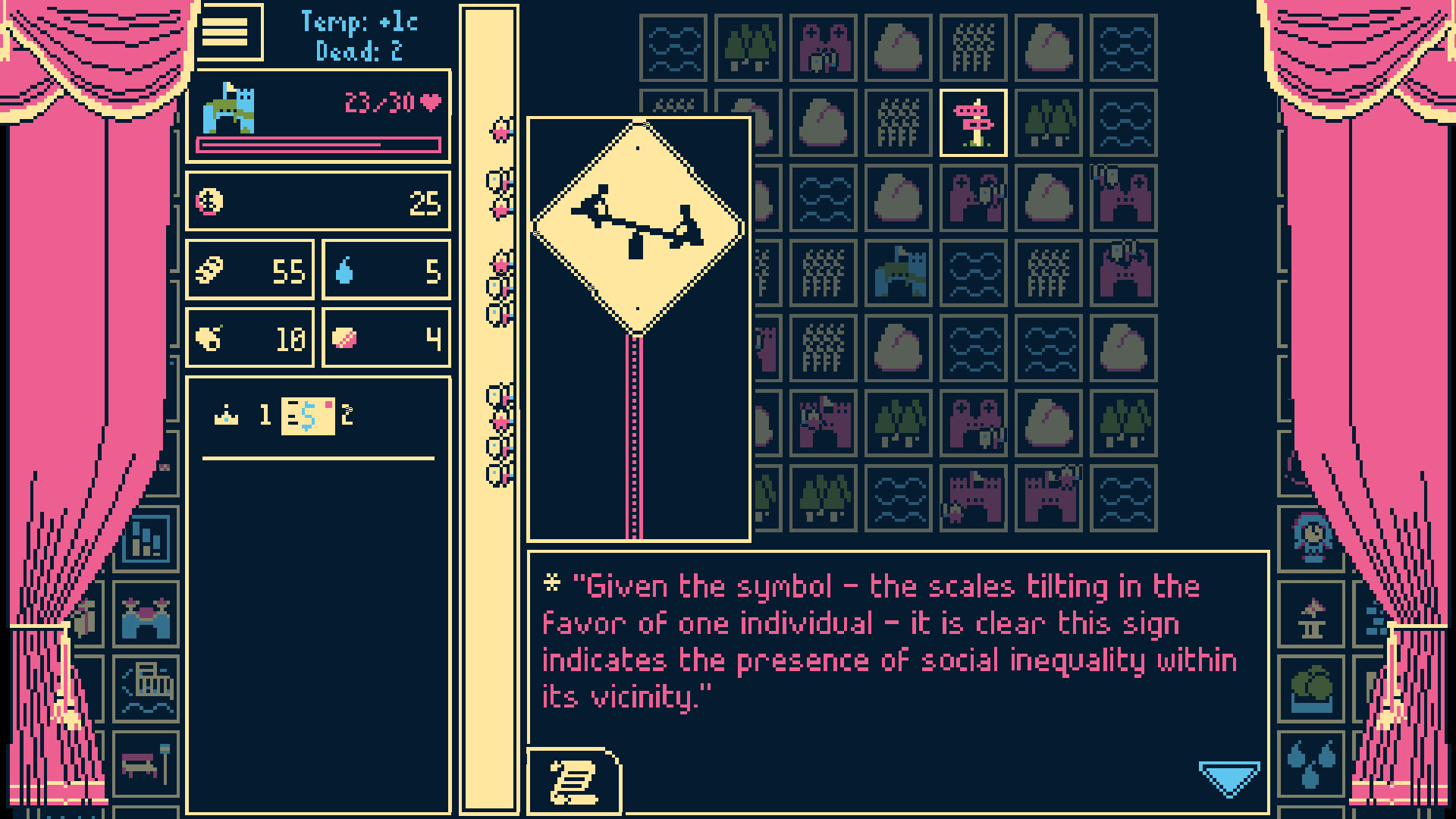
It's a game with dragons and ballet, baseball and bike races, shower thoughts and wormholes. There are road signs in a world in which faeries believe cars are a figment of your imagination. It references Catan, the Civilization series, Jenga and A Midsummer Night's Dream. It skewers capitalism and social inequality. I'll let you discover the details of the job system, which completely upends how you play the game, yourself. I haven't been this engrossed by a game since Ball x Pit. It surprises and delights at almost every turn.
Titanium Court is certainly not going to be for everyone (there's so much reading!) and I’m going to stop here before I tell you too much about it. You can get a taste by checking out a Steam demo that’s available for PC and Mac. The full game arrived today. It usually costs $15, but it's 20 percent off until May 7.
This article originally appeared on Engadget at https://www.engadget.com/gaming/titanium-court-mashes-together-genres-and-cultural-references-to-tell-a-strange-funny-tale-184750797.html?src=rss
X is closing its Communities feature in May, X Head of Product Nikita Bier has announced. Communities were introduced before Twitter was acquired and rebranded by Elon Musk, and act as a way for users to create, join and moderate public groups focused on a particular interest. Communities make it possible to follow a feed made up of only the people or subject matter you care about, but they haven't been used at the scale the social platform wanted.
"Communities had a great vision, but they were used by less than 0.4% of users — yet contributed to 80% of spam reports, financial scams, and malware on X," Bier said in a separate post. "It occupied half the team's time some weeks, while the rest of the app suffered." And while some real people did use groups to organize around niche topics, the most active groups were "user-acquisition channels for Kick or compensated clipper communities," according to Bier, not really the intended uses for the feature in the first place.
Today we're announcing two product changes for organizing communities on X:
1. XChat now supports joinable links for groupchats. Create a public link & share direct to Timeline. With support for 350 members per chat (and growing), Groupchat Links are the fastest way to bring… pic.twitter.com/GNcRB99Opc
X's proposed replacement for Communities is its new XChat app, which can currently host group chats of up to 350 people, and will be expanded to support group chats of up to 1,000 people in the future, Bier says. Moderators are able to pin links in their Communities so members can join a group chat before the Communities feature is fully retired on May 30, an extension to the previously proposed deadline of May 6.
While that could keep groups together, a live group chat is fairly different from the asynchronous, separate-timeline-of-posts experience that Communities offered. Group chats are typically active and demand your attention in a way a separate feed doesn't. To get a timeline of posts focused on an interest, users will now have to turn to X's new custom timelines feature, which uses Grok to automatically organize posts into feeds focused on topics like food, art or photography.
This article originally appeared on Engadget at https://www.engadget.com/social-media/x-is-shutting-down-its-communities-feature-182843958.html?src=rss
The Greenhouse Gas Protocol, a widely used international environmental standard for measuring and reporting emissions, is considering changes to how certain types of the emissions are reported. Advocates for the new guidance argue that the current rules make it too easy for businesses to overstate their commitments to environmentally friendly operations, such as being powered by renewable energy or making progress toward net-zero emissions.
Today, some major tech companies joined a call pushing back against the new guidance, asking for the new reporting rules to be optional rather than required. The joint statement argued that the proposed policies would reduce investments in sustainability programs and increase electricity prices. Apple and Amazon are among the more than 60 companies that signed the letter, Bloomberg reported.
The protocol's three tiers of emissions present a clearer picture about companies' environmental efforts and how impactful they are in reducing emissions. Scope 1 includes emissions from sources directly owned or controlled by a business, while Scope 2 covers "how corporations measure emissions from purchased or acquired electricity, steam, heat and cooling." Scope 3 is the catch-all for any other emissions produced within a business' value chain. New proposed changes to the scope 2 guidance would place tighter requirements on how companies use renewable energy certificates to offset their electricity emissions. Rather than purchase clean energy certificates at any point during the year, companies would have to source clean energy that is both geographically close and simultaneously available to their grid-derived power. Any changes adopted by the Greenhouse Gas Protocol could take effect as early as next year.
This article originally appeared on Engadget at https://www.engadget.com/big-tech/apple-amazon-join-push-for-looser-greenhouse-emissions-reporting-182314690.html?src=rss
Apple TV just dropped a real-deal trailer for Star City, after releasing a short teaser earlier this year. It's a spinoff of For All Mankind, but this new show examines the alt-history space race from the Soviet perspective.
In other words, this is a trailer steeped in Cold War-era paranoia. Secret photos are snapped, phones are tapped and characters are disappeared, all set against the backdrop of space exploration. The vibe looks decidedly different from For All Mankind, despite the parent show occasionally dabbling in Russia-based espionage.
The vibe isn't the only shift here. Star City isn't doing time jumps, which is a hallmark of For All Mankind. The original show started in 1969 and season five is set in 2012. The spinoff "lives in the 1970s" and is "its own genre." This is according to showrunners Matt Wolpert and Ben Nedivi.
For the uninitiated, For All Mankind begins with Russia beating us to the Moon in the 1960s. This creates a butterfly effect that changes history in ways both big and small. Star City looks like it'll focus on how Russia managed to land astronauts on the Moon before America and what happened to the space program in the immediate aftermath. It stars Rhys Ifans, Anna Maxwell Martin, Agnes O’Casey and Alice Englert.
Star City premieres on May 29 with two episodes. That's the same day season five of For All Mankind concludes. The original show was recently renewed for a sixth and final season.
Apple TV really has become the best streamer for sci-fi. This summer sees not just the premiere of Star City, but the second season of the multiverse-based thriller Dark Matter and season three of the dystopian adventure Silo. The platform is also home to shows like Pluribus, Severance and Foundation, among many others.
This article originally appeared on Engadget at https://www.engadget.com/entertainment/tv-movies/apple-tvs-upcoming-for-all-mankind-spinoff-star-city-oozes-cold-war-era-paranoia-180429809.html?src=rss
Rivian has begun production of its R2 SUV. However, you can't get one just yet: The first customer deliveries (of the most expensive version) aren't expected until later this spring.
On Wednesday, CEO RJ Scaringe drove the first electric SUV off the production line at the company's Normal, IL, factory. A storage and logistics building at that factory was damaged by a tornado last weekend, with Wednesday's rollout event seemingly designed to reassure nervous customers and investors.
"We are really excited to be producing R2 for our customers," Scaringe is quoted as saying in a news release. However, Rivian CFO Claire McDonough toldReuters that customers won't be able to configure their vehicle orders until June. Electrekreports that these first units rolling out now are going to Rivian employees.
Rivian
If you were drawn to the R2's $45,000 starting price, well, Rivian won't have any of those for a while. First off the line (this spring) is the Launch Package, starting at $57,990. A Premium trim, expected late 2026, will cost $53,990. Then, in the first half of 2027, a Standard (RWD long range) variant arrives at $48,490. And as for that headline-grabbing $45,000 base-model R2, I hope you like waiting. It won't be here until late 2027.
The Rivian R2 was revealed in 2024. Smaller and lighter than the flagship R1, the company is positioning the EV as its answer to Tesla’s best-selling Model Y. All versions of the new two-row SUV are rated for at least 300 miles per charge. Each trim has a native NACS charge port. The vehicle can charge from 10 percent to 80 percent in under 30 minutes when using a DC fast charger.
This article originally appeared on Engadget at https://www.engadget.com/transportation/evs/rivian-begins-production-on-the-r2-electric-suv-171729320.html?src=rss
If you’re a Switch 2 owner itching for something new to play and you happen to be partial to an Annapurna Interactive game, then boy is it your lucky day. The prolific indie publisher has announced that five of its titles are coming to Switch 2, three in the form of next-gen upgrades and two for the first time on Nintendo platforms.
The magnificent Sayonara Wild Heartsand Lorelei and the Laser Eyesare available starting today, complete with 120Hz and 4K upgrades for Nintendo’s latest console. First-time buyers can grab Sayonara Wild Hearts for $13, while 2024’s Lorelei and the Laser Eyes costs $25. The upgrades are free if you already own either game on Switch, and Sayonara Wild Hearts also adds the previously unavailable Remix Arcade mode for the first time. This speeds up gameplay and removes loading as you chase high scores.
Next month, May 28, cyberpunk cat adventure Strayis also getting the Switch 2 treatment, sporting improved 4K visuals, a frame rate boost and, fittingly given its feline focus, mouse controls. The Switch 2 port will be available to purchase digitally from the eShop for $30, but it’s not clear if this will also be a free upgrade for those who bought Stray on Switch.
Katamari creator Keita Takahashi’s charmingly weird puzzle-adventure To a T skipped Nintendo consoles when it launched last year, so it’s nice to see that one coming to Switch 2 on June 11 (digital-only, $20). A few weeks later on June 23, cozy narrative game Wanderstoparrives on both Switch and Switch 2. It’ll cost $25 on the eShop, with no word on a physical version.
Annapurna Interactive released a lot of its games on Switch, and that trend happily looks set to continue throughout the Switch 2 generation. The musical turn-based RPG People of Notecame to Nintendo’s latest console at launch earlier this month, with stylish adventure game Mixtapealso arriving on Switch 2 on May 7.
This article originally appeared on Engadget at https://www.engadget.com/gaming/nintendo/five-annapurna-interactive-games-get-switch-2-releases-164950446.html?src=rss
There's a trailer and it looks absolutely gorgeous, with graphics resembling recent entries like Assassin's Creed Shadows. This is a real-deal remake, and not a port. This version seems to feature a fair amount of new content, but still stars protagonist Edward Kenway.
There's a new weather system and an upgraded underwater exploration system. Combat has been refined to closer match new entries and, thankfully, the stealth mechanics have been updated. Getting spotted doesn't always end the mission, like the original. The remake even has new crew members, including a cat, that accompany you during the exploration segments.
Here's one interesting tidbit. The trailer only shows scenes set in the Caribbean during the 1700s, and none of the modern day segments. This tracks with rumors that the remake would scrap the Montreal bits entirely. We'll have to wait and play the game to see if this ends up being true.
We're still waiting on news regarding the next mainline entry in the franchise. Ubisoft is currently developing it under the name Codename Hexe and it's being described as "a unique, darker, narrative-driven Assassin's Creed experience set during a pivotal moment in history."
This article originally appeared on Engadget at https://www.engadget.com/gaming/ubisoft-has-finally-dropped-a-trailer-for-that-assassins-creed-black-flag-remake-162610745.html?src=rss
A hairdryer was allegedly used to rig Polymarket bets on the weather at Charles de Gaulle airport in Paris, according to a report by The Telegraph. French authorities note that the official temperature readings at the airport spiked twice in the past month, reaching levels much higher than expected. On both occasions, gamblers on Polymarket appear to have walked away with thousands upon thousands of dollars by betting on those temperature fluctuations.
The gambling site relies on readings from temperature sensors, and the one at Charles de Gaulle airport is on a public road. This makes it easy to access. The operating theory is that someone snuck in and used a battery-powered hairdryer to bring the recorded temperature up well beyond the actual heat outside.
Meanwhile, the Polymarket page indicated less than a one percent chance of the airport exceeding a particular temperature. Successful bets on these fluctuations netted an unknown user around $34,000.
holy fuck, a hair dryer at a Paris airport broke Polymarket weather markets & made someone $34,000 richer
- polymarket was settling Paris temperature bets on a single Météo France sensor sitting near the Charles de Gaulle runway perimeter - basically unguarded
“In view of physical findings on one of our instruments and the analysis of sensor data, Météo-France was indeed led to file a complaint for alteration of the operation of an automated data processing system with the Air Transport Gendarmerie Brigade of Roissy,” a spokesperson for France's official weather agency said.
There is no indication that Polymarket forced anyone to return their winnings, but the temperature sensor has been moved to a new location. The site is still running bets on the daily temperature in and around Paris.
It sucks that someone potentially tricked a temperature sensor with a hairdryer to scam actual gamblers out of potential winnings. However, this sort of thing should be expected when betting money on real-world scenarios like this. If something can be rigged, and there's money to be made, it'll get rigged. Humans are gonna human.
This does, however, shine a light on the types of bets that should be allowed on sites like Polymarket and Kalshi. Polymarket, for instance, hosts numerous bets on the outcome of wars, whether or not countries will receive nuclear weapons and potential prison sentences, among many other sensitive topics. What happens when someone uses something much more dangerous than a hairdryer to change the outcome of something for financial gain?
This article originally appeared on Engadget at https://www.engadget.com/big-tech/someone-allegedly-used-a-hairdryer-to-rig-polymarket-weather-bets-155312411.html?src=rss
The Turkish parliament has voted through a bill that would ban all children under the age of 15 from using social media. As part of the legislation, social media platforms would be required to enforce age-verification measures on their apps, provide parental control tools, and react more quickly to harmful content being posted.
As reported by The Associated Press, lawmakers have passed the bill in the wake of two deadly school shootings in Turkey, after which police arrested 162 people accused of sharing footage of the tragedies online.
Turkey’s President Recep Tayyip Erdogan now has 15 days to accept the bill in order for it to become law, after reportedly saying social media platforms had become "cesspools" in a televised address to the nation.
As well as the major social media platforms, AP reports that online gaming companies would also have to implement their own restrictions on minors, with potential punishments including bandwidth reductions and financial penalties.
This isn’t the first time Turkey has locked horns with social media and online gaming platforms. Instagram has been blocked in the country before, back in 2024, relating to a dispute over the posting of Hamas-related content. Access was restored around a week later, but in the same time period Turkey also banned Roblox over reports of inappropriate sexual content accused of being explorative to children. At the time, a Turkish official also named the "promotion of homosexuality" as one reason for the ban.
Turkey has also temporarily banned Twitter (now called X) on several occasions, most recently after 2023’s devastating earthquakes, though it was not clear at the time why the government may have moved to block the social media platform.
The country’s lawmakers moving to ban under-15s from accessing social media is part of an emerging trend in Europe and across the globe. The likes of Greece and Austria have recently introduced similar legislation of their own, following Australia becoming the first country in the world to ban children under 16 from social media last year. The UK has since considered bringing in tighter restrictions too.
This article originally appeared on Engadget at https://www.engadget.com/social-media/turkey-wants-to-ban-social-media-for-kids-under-15-143053462.html?src=rss