The best laptops for gaming and schoolwork in 2026

A good laptop for both gaming and schoolwork strikes a balance that goes beyond raw power. It should handle essays and research during the day, then jump into your favorite games when you are ready to take a break. That mix is easier to find now, with more laptops offering capable GPUs, solid battery life and designs that do not look out of place in a classroom.

Whether you want a budget gaming laptop for lighter titles or a more powerful system that can run demanding games, there is something that fits just about every schedule and workload. We rounded up the best laptops for gaming and schoolwork so you can find a machine that does both without compromise.

As we’ve mentioned, gaming laptops are especially helpful if you're doing any demanding work. Their big promise is powerful graphics performance, which isn't just limited to PC gaming. Video editing and 3D rendering programs can also tap into their GPUs to handle laborious tasks. While you can find decent GPUs on some productivity machines, like Dell's XPS 15, you can sometimes find better deals on gaming laptops. My general advice for any new workhorse: Pay attention to the specs; get at least 16GB of RAM and the largest solid state drive you can find (ideally 1TB or more). Those components are both typically hard to upgrade down the line, so it’s worth investing what you can up front to get the most out of your PC gaming experience long term. Also, don’t forget the basics like a webcam, which will likely be necessary for the schoolwork portion of your activities.

The one big downside to choosing a gaming notebook is portability. For the most part, we'd recommend 15-inch models to get the best balance of size and price. Those typically weigh in around 4.5 pounds, which is significantly more than a three-pound ultraportable. Today's gaming notebooks are still far lighter than older models, though, so at least you won't be lugging around a 10-pound brick. If you’re looking for something lighter, there are plenty of 14-inch options these days. And if you're not into LED lights and other gamer-centric bling, keep an eye out for more understated models that still feature essentials like a webcam (or make sure you know how to turn those lights off).

Not necessarily — it really depends on how you define "last longer." In terms of raw performance, gaming laptops tend to pack more powerful components than standard laptops, which means they can stay relevant for longer when it comes to handling demanding software or modern games. That makes them a solid choice if you need a system that won’t feel outdated in a couple of years, especially for students or creators who also game in their downtime.

But there’s a trade-off. All that power generates heat, and gaming laptops often run hotter and put more strain on internal components than typical ultraportables. If they’re not properly cooled or regularly maintained (think dust buildup and thermal paste), that wear and tear can shorten their lifespan. They’re also usually bulkier and have shorter battery life, which can impact long-term usability depending on your daily needs.

Gaming laptops can last longer performance-wise, but only if you take good care of them. If your needs are light — browsing, writing papers and streaming — a standard laptop may actually last longer simply because it’s under less stress day-to-day.

The GPU plays a big role in how your laptop handles visuals — and it’s especially important if you’re using your computer for both gaming and school.

For gaming, the GPU is essential. It’s responsible for rendering graphics, textures, lighting and all the visual effects that make your favorite titles look smooth and realistic. A more powerful GPU means better frame rates, higher resolutions and the ability to play modern games without lag or stuttering.

For schoolwork, the GPU matters too — but its importance depends on what you're doing. If your school tasks mostly involve writing papers, browsing the web or using productivity tools like Google Docs or Microsoft Office, you don’t need a high-end GPU. But if you’re working with graphic design, video editing, 3D modeling or anything else that’s visually demanding, a good GPU can speed things up significantly and improve your workflow.

Georgie Peru contributed to this report.

This article originally appeared on Engadget at https://www.engadget.com/computing/laptops/best-laptops-for-gaming-and-school-132207352.html?src=rss
ROG Xbox Ally X vs. Legion Go 2: Is OLED Worth The Extra Cash?

ROG Xbox Ally X vs. Legion Go 2: Is OLED Worth The Extra Cash?

Handheld gaming has reached new heights, offering devices that deliver console-quality experiences in a portable format. Among the leading options are the ROG Xbox Ally X and the Lenovo Legion Go 2, two Windows-based gaming devices tailored to different user preferences. While the Ally X emphasizes comfort and simplicity, the Legion Go 2 focuses on […]

The post ROG Xbox Ally X vs. Legion Go 2: Is OLED Worth The Extra Cash? appeared first on Geeky Gadgets.

Posted in Uncategorized

Time Gets a Remix with This Hypnotic Spinning Clock

There’s something oddly satisfying about watching things spin. Maybe it’s the smooth rotation, the predictable yet mesmerizing motion, or just our collective fascination with anything kinetic. Whatever it is, designer Germain Verbrackel has tapped into that feeling with Clock&Roll, a timepiece that turns the simple act of checking the time into a visual experience you can’t look away from.

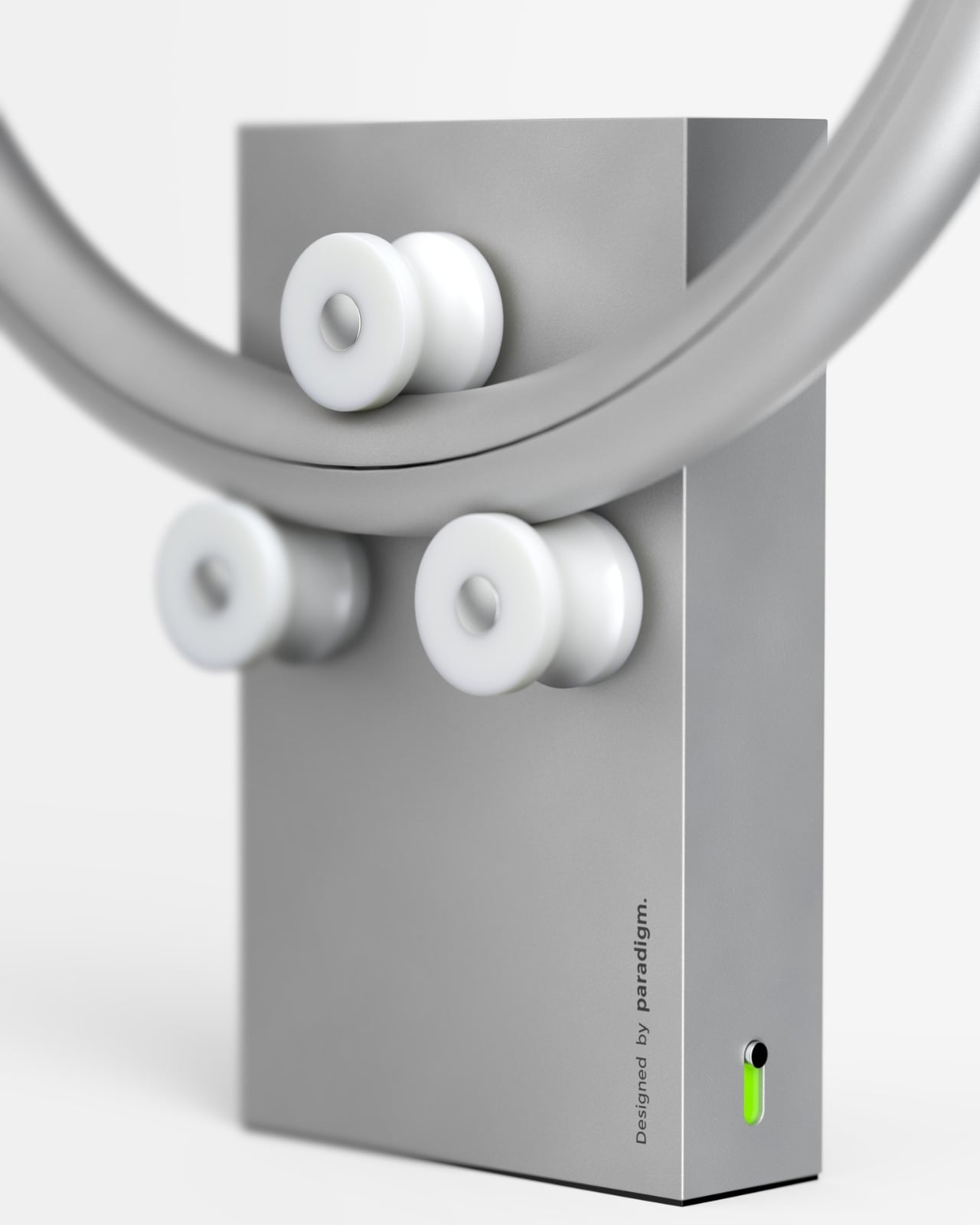
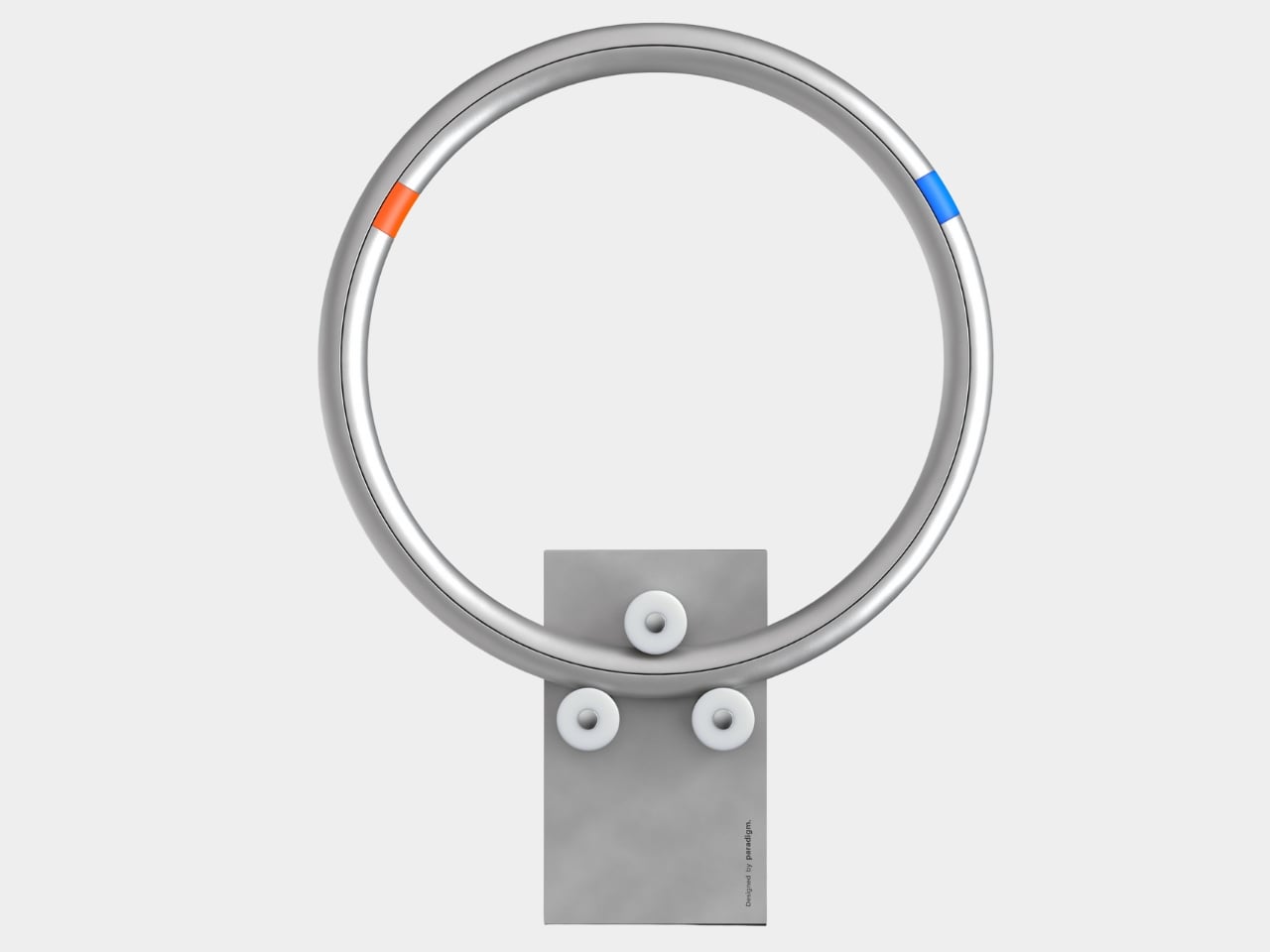
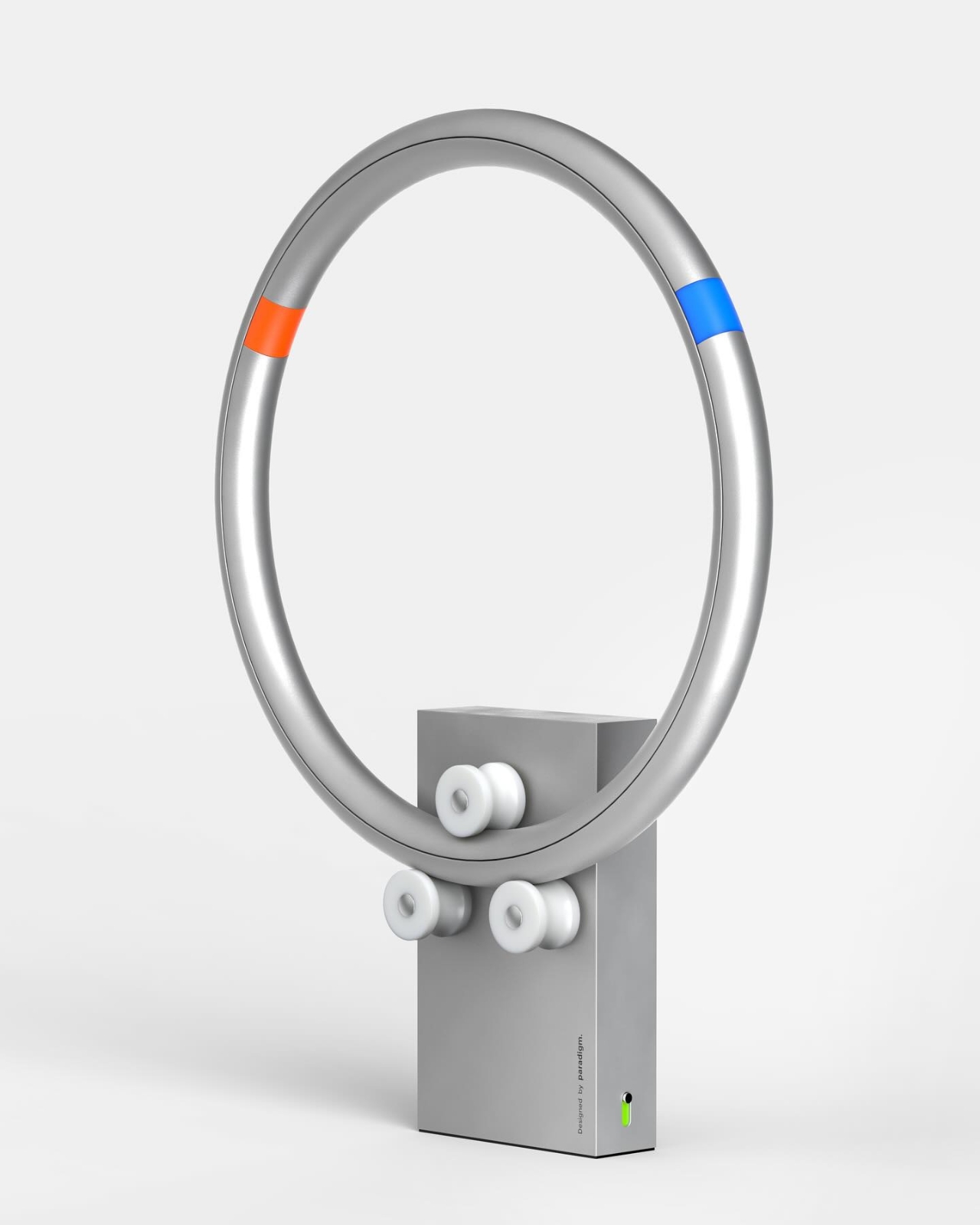
At first glance, Clock&Roll looks like a minimalist sculpture that belongs in a modern art museum. Two aluminum rings form a sleek torus shape, suspended vertically on a clean rectangular base. But this isn’t just eye candy for your desk or shelf. Those rings? They’re actually moving, gliding independently on precision bearings, each one tracking time in its own hypnotic rotation.

Designer: Germain Verbrackel

The genius here is in how the clock communicates time without numbers, hands, or a traditional face. Instead, small colored bands mark the hours and minutes on each ring. An orange segment on one ring, a blue one on the other. As external rollers built into the base push the rings into motion, these colored markers shift positions, creating an ever-changing display that’s equal parts functional and meditative to watch. It’s like someone took the mechanical beauty of old clockwork and gave it a sleek, contemporary makeover.

What makes Clock&Roll particularly interesting is how it challenges our relationship with timekeeping. We’re so used to glancing at digital displays or traditional clock faces that instantly tell us exactly what time it is. But this design makes you pause for a second, observe the position of those colored bands, and actually engage with the object. It’s a small moment of mindfulness in a world where we’re constantly checking our phones for the millionth notification of the day.

1

The materials play a huge role in the overall vibe. Aluminum gives the rings that perfect industrial-sleek look, somewhere between high-tech gadget and designer object. The finish has that subtle matte quality that catches light just right, while the white rollers and base provide a clean contrast that keeps everything balanced. And those pops of orange and blue? They’re not just practical markers but also inject personality into what could have been an entirely monochrome piece.

Verbrackel clearly had fun with the mechanics too. If you look closely at the base, you can spot the gears and motor system that drive the whole operation. Instead of hiding the machinery away, the design embraces it, showing you exactly how this kinetic magic happens. It’s honest engineering meets aesthetic appeal, which is pretty much the sweet spot for anyone who appreciates good industrial design.

Clock&Roll also plays with scale in an interesting way. It’s substantial enough to be a statement piece, something that commands attention in a room, but not so large that it overwhelms your space. You could see it living happily on a modern office desk, a minimalist living room shelf, or even in a creative studio where it would fit right in with other design-forward objects. There’s also something inherently playful about the name and concept. “Clock&Roll” obviously riffs on rock and roll, complete with the little hand gesture emoji, and that rebellious spirit comes through in the design itself. This isn’t your grandmother’s mantel clock or even your standard smartwatch. It’s time reimagined for people who appreciate when everyday objects get a creative twist.

Since most of us check the time on our phones or smartwatches, a dedicated clock needs to justify its existence. Clock&Roll does exactly that by offering something those digital displays can’t: a tactile, visual, almost sculptural experience of time passing. It’s functional art that happens to tell you when you’re running late for your next meeting. Whether you’re a design enthusiast, a lover of kinetic art, or just someone who appreciates when familiar objects get reinvented in unexpected ways, Clock&Roll is the kind of piece that makes you rethink what a clock can be. Sometimes the best designs are the ones that take something we see every day and spin it in a completely new direction.

The post Time Gets a Remix with This Hypnotic Spinning Clock first appeared on Yanko Design.

OpenAI’s Code Red Strategy Explained : Plan to Make ChatGPT Faster, Steadier & Clearer

OpenAI’s Code Red Strategy Explained : Plan to Make ChatGPT Faster, Steadier & Clearer

What happens when a tech giant sounds the alarm? OpenAI’s recent declaration of a “Code Red” has sent ripples through the artificial intelligence industry, signaling a moment of intense urgency and recalibration. Once the undisputed leader in conversational AI, OpenAI now faces mounting pressure from rivals like Google and Anthropic, whose advancements threaten to outpace […]

The post OpenAI’s Code Red Strategy Explained : Plan to Make ChatGPT Faster, Steadier & Clearer appeared first on Geeky Gadgets.

Posted in Uncategorized

macOS 26.2 Release Candidate is Here: Update Now or Wait?

macOS 26.2 Release Candidate is Here: Update Now or Wait?

Apple has officially released macOS 26.2 Release Candidate, a comprehensive update designed to enhance the functionality and performance of your Mac. This update introduces a range of new features, app improvements, and system-level optimizations aimed at improving productivity and creating a more seamless user experience. Additionally, macOS 26.2 Release Candidate aligns with updates across Apple’s […]

The post macOS 26.2 Release Candidate is Here: Update Now or Wait? appeared first on Geeky Gadgets.

Posted in Uncategorized

Netflix is reportedly in exclusive talks to acquire Warner Bros. and HBO

Netflix is in exclusive talks to acquire Warner Bros. Discovery's film and TV studios and HBO Max streaming service, according to sources from Bloomberg. That suggests Netflix submitted a superior offer to rivals including Paramount Skydance Corp (owned by billionaire Larry Ellison) and Comcast, which owns NBCUniversal. The deal could be consummated within days and, if approved, would change the landscape of Hollywood and the streaming market. 

Warner Bros. Discovery's cable channels including CNN, TBS and TNT, valued at more than $60 billion, would not be part of the deal and spun off prior to the closing. However, Netflix would become the owner of the HBO network and its library of series (The Sopranos, Game of Thrones, etc.), along with its Burbank studios and massive film and TV archive consisting of 12,500 feature films and 2,400 TV series, including properties like Batman, Lord of the Rings and Friends. 

A big sweetener offered by Netflix was a $5 billion breakup fee if the deal isn't approved by regulators, according to people familiar with the discussions. That's a considerable risk on Netflix's part, as the acquisition is likely to be closely scrutinized by the FCC and even President Trump himself, who reportedly has close ties to Ellison. It would also need to pass muster with regulators from other nations, considering the wide reach of WBD and Netflix. 

After multiple suitors, including Paramount Skydance expressed interest in buying Warner Bros. Discovery, CEO David Zaslav put the company up for sale in October. The bidding process has been heated, with Paramount's lawyers complaining that WBD "embarked on a myopic process with a predetermined outcome that favors a single bidder," namely Netflix. Paramount argued that its deal would be more palatable to regulators around the world.

However, Zaslav's camp has said that it would achieve the best value in a sale by splitting off its cable assets and doing two separate deals, CNN reported. Both Paramount Skydance and Comcast submitted deals to buy all of WBD's assets. 

Netflix offered around $28 a share for WBD minus the cable assets, according to Deadline. Shares were as low as $7.50 earlier this year. The acquisition would be far and away the largest for Netflix, which has historically favored organic growth. 

An acquisition could have a huge impact on streaming customers and filmgoers. Would Netflix merge its catalog with HBO Max or continue to run the latter as a separate service? It's also not clear if Netflix would honor Warner Bros.' commitment to theatrical releases, considering that Netflix CEO Ted Sarandos has called movie theatres an "outdated concept."

This article originally appeared on Engadget at https://www.engadget.com/entertainment/streaming/netflix-is-reportedly-in-exclusive-talks-to-acquire-warner-bros-and-hbo-082233278.html?src=rss

Excel Lookup Showdown, Use XLOOKUP for Fixed Lookups, VLOOKUP for Relative Columns

Excel Lookup Showdown, Use XLOOKUP for Fixed Lookups, VLOOKUP for Relative Columns

Have you ever found yourself wrestling with Excel formulas, wondering why your data retrieval isn’t working as expected? For years, Excel users have relied on VLOOKUP, a familiar and straightforward function, to pull information from their spreadsheets. But with the introduction of XLOOKUP, a newer and more versatile alternative, the game has changed. While VLOOKUP […]

The post Excel Lookup Showdown, Use XLOOKUP for Fixed Lookups, VLOOKUP for Relative Columns appeared first on Geeky Gadgets.

Posted in Uncategorized

Samsung Galaxy Z Trifold vs Galaxy Z Fold 7: Which to Buy?

Samsung Galaxy Z Trifold vs Galaxy Z Fold 7: Which to Buy?

Samsung continues to redefine the foldable smartphone market with the launch of the Galaxy Z Trifold. This device introduces a bold new design and enhanced functionality, setting it apart from its predecessor, the Z Fold 7. However, with a price tag that is 40% higher, the question arises. Is the upgrade worth it? By examining […]

The post Samsung Galaxy Z Trifold vs Galaxy Z Fold 7: Which to Buy? appeared first on Geeky Gadgets.

Posted in Uncategorized

INMO Air 3 Runs Android, 1080p OLED, Private Screen, No Phone Needed

INMO Air 3 Runs Android, 1080p OLED, Private Screen, No Phone Needed

What if your glasses weren’t just glasses? Imagine slipping on a sleek, lightweight pair that doesn’t just help you see the world, but transforms how you interact with it. The INMO Air 3 isn’t your typical pair of augmented reality (AR) glasses; it’s a fully self-contained device that redefines what wearable tech can do. Forget […]

The post INMO Air 3 Runs Android, 1080p OLED, Private Screen, No Phone Needed appeared first on Geeky Gadgets.

Posted in Uncategorized

New Copilot Agents Turn Prompts into Apps, Workflows, and Microsoft Forms

New Copilot Agents Turn Prompts into Apps, Workflows, and Microsoft Forms

What if creating apps, automating workflows, or designing surveys was as simple as having a conversation? With the latest advancements in Microsoft 365 Copilot, this isn’t just a bold claim, it’s the new reality. By introducing three new agents, App Builder, Workflows, and Surveys, Microsoft is reshaping how we approach productivity. These tools use the […]

The post New Copilot Agents Turn Prompts into Apps, Workflows, and Microsoft Forms appeared first on Geeky Gadgets.

Posted in Uncategorized