ASUS ROG Ally X review: A fully armed and operational handheld battle station

Despite being one of the first gaming handhelds from a major PC maker, ASUS got a lot right with the original ROG Ally. It offers better performance in a smaller chassis than Valve’s Steam Deck, but without a huge increase in price. And because it’s based on Windows instead of Linux, it delivers almost universal game compatibility. That said, issues like weak battery life and faulty SD card slots left plenty of room for improvement. So on the new Ally X, ASUS tweaked almost everything aside from its chip and display. But this time, what we’re getting is the fully armed and operational battle station that I wanted all along.

From afar, it may appear like all ASUS did was switch the color of the Ally X’s chassis from white to black. But the second I picked it up, I noticed a lot of little changes including more pronounced grips, slightly taller face buttons and smaller paddles around back designed so that they’re harder to hit by accident. There’s also a brand new D-Pad which is a big improvement from the one on the vanilla Ally, though I’d still prefer a traditional cross or one of Sony’s pentagon-shaped arrangements.

On the inside, ASUS added stiffer springs to Ally X’s joysticks, making them tighter and more responsive. However, ASUS stopped short of switching to Hall Effect sensors like the ones on rivals like the Lenovo Legion Go. There’s also a third vent and a new fan system that improve cooling and airflow, though at full load, the back of this thing still gets pretty toasty.

But the best part is that even with all these changes and a handful of new components on the inside (more on those later), the Ally X isn’t much bulkier than its predecessor. The original ROG Ally weighs 1.34 pounds and measures 1.28 inches at its thickest while the Ally X comes in at 1.49 pounds and 1.45 inches. I’ve even been told by an ASUS representative that the Ally X fits in the original Ally’s official case, though I haven’t confirmed that myself, because, unlike the Steam Deck, you don’t get one bundled with the system.

On the Ally X, ASUS switched in a new D-Pad and tighter, more responsive springs for its joysticks.
Photo by Sam Rutherford/Engadget

Finally, there’s the Ally X’s 1080p display, one of two components that’s the same as on its predecessor. It has great brightness with a peak of around 500 nits (our review unit was actually a touch better at around 515 nits) and a variable 120Hz refresh rate. It’s pretty much exactly what you want on a system this size and in brighter environments, its black levels are so good that I’ve mistaken it for an OLED panel.

The other major component that hasn’t changed is the Ally X’s AMD Ryzen Z1 Extreme chip. But that doesn’t mean there aren’t any performance improvements. That’s because ASUS massively upgraded the rest of its components with 24GB of faster LPDDR5X-7500 RAM (up from 16GB) and a larger 1TB M.2 SSD (up from 512GB). This time, ASUS even opted for a full-size 2280 module, so if you want to upgrade your storage down the line, you’ll have way more options than the smaller 2230 stick used in the previous model. Plus, and I can’t stress this enough, ASUS has also had extra time to polish the Ally X’s drivers. As we saw on the original, improved software support can make a big difference in performance, especially in a category that still benefits a ton from better optimization. And depending on the title, we’ve seen performance increase by as much as 5-10 percent, which is pretty significant considering its chip hasn’t changed.

On the ROG Ally X, ASUS added a third vent and new fans to improve cooling and airflow.
Photo by Sam Rutherford/Engadget

In Shadow of the Tomb Raider at 720p on high graphics, the Ally X hit 54 fps in performance mode and 64 fps in Turbo mode compared to 54 fps and 60 fps for the original. Meanwhile when playing Cyberpunk 2077, I saw even bigger gains with the Ally X getting up to 78 fps in Turbo mode versus just 69 fps for the vanilla Ally. This improvement seems to be due in large part to the Ally X’s increased RAM, which the handheld shares with its GPU. And unlike on a laptop or desktop with discrete graphics, the Z1 Extreme’s Radeon 780M doesn’t have its own dedicated memory.

But regardless of how it’s getting there, all these changes make the Ally X one of the most powerful handheld PCs on the market. That’s because while the Legion Go uses the same processor, it has 8GB less RAM, so in games, it generally lagged behind by three to five fps.

One nice thing about Windows-based handhelds like the ROG Ally X is that they play nicely with all the various online game stores and launchers.
Photo by Sam Rutherford/Engadget

Windows-based gaming handhelds continue to be a bit clunky when you need to switch between various game launchers and menus, but ASUS has streamlined its Armoury Crate app to be more responsive and easier to use. It’s generally less buggy and better equipped to be a one-stop shop for aggregating all different games (and launchers) or quickly tweaking settings. Even with all that, though, it’s still less cohesive than Valve’s Steam OS. And despite recent improvements, I still ran into things like Armoury Crate interrupting what I was trying to do in Windows when it automatically boots up after a restart (which thankfully you can disable).

One of the biggest issues with the original Ally was its short battery life, which often lasted just an hour or an hour and a half at best. And when you have a system that needs to be plugged into a wall that frequently, it calls into question how good of a gaming handheld it really is.

On the Ally X, ASUS removed its proprietary XG Mobile connector and replaced it with a second USB-C port with support for Thunderbolt 4.
Photo by Sam Rutherford/Engadget

But on the Ally X, ASUS doubled battery capacity to 80Wh. Now it can easily game for at least two hours to two and a half hours (or more, if you don’t mind fiddling around with settings). And when you remember that the Ally X isn’t that much heftier than its predecessor, you have an even greater appreciation for how much extra juice ASUS managed to cram inside.

I also appreciate that ASUS replaced the proprietary XG Mobile connector on the original model with a second USB-C port that supports Thunderbolt 4. This means you can still plug in an external graphics dock if you want, while also giving you the flexibility to hook up all sorts of peripherals. This allows the Ally X to better serve as a portable desktop because you can plug in accessories like a mouse and keyboard without the need for external docks or dongles. 

ASUS' Armoury Crate app serves as a one-stop shop for tweaking settings and launching games.
Photo by Sam Rutherford/Engadget

While the Ally X isn’t a true 2.0 version of its predecessor, ASUS has addressed pretty much every complaint I had about the original and then some. Its joysticks feel tighter, its performance is better and battery life has essentially doubled. Even ASUS’ Armoury Crate app is easier to use, though it still hasn’t fully solved the issue of Windows feeling clunky on PC handhelds. And while it’s a touch thicker and heavier than before, those changes don’t impact its portability. ASUS also claims it has improved its RMA process to better support people who need servicing or repairs after numerous customer complaints. But it’s still too early to say if this has made a difference.

Really, the biggest hurdle for the Ally X is its price. At $800, it costs $150 more than the original Ally or the closest equivalent Steam Deck. For those who bought its predecessor, that could still make it a tough sell after only one year. I’d also argue that thanks to Steam OS, Valve’s handheld remains the more streamlined and easier-to-use option. But make no mistake, if you’re talking about the best PC gaming handhelds on the market, the Ally X sits at the top of the hill right next to the Steam Deck.

This article originally appeared on Engadget at https://www.engadget.com/gaming/pc/asus-rog-ally-review-a-fully-armed-and-operational-handheld-battle-station-133043986.html?src=rss

Gympad Bench compact all-in-one home gym

Gympad Bench home gym

Ever wondered how you can maintain a consistent workout routine without sacrificing space or breaking the bank? The Gympad Bench might just be the answer you’ve been looking for. This compact, all-in-one home gym solution offers a wide range of workout options in a minimal space, making it perfect for any home. With adjustable resistance […]

The post Gympad Bench compact all-in-one home gym appeared first on Geeky Gadgets.

Become a Samsung Olympic Games Pin Master and get a Galaxy Z Flip6

Aside from the actual sports events and the Olympians themselves, another popular activity in Paris during the Olympics is pin trading. You see the athletes and fans trying to get as many pins as they can, a practice that actually goes back to the 1924 Paris Olympics where it was a sign of international friendship. One of the games’ major sponsors, Samsung, is bringing a new spin to this tradition, and bringing prizes into the mix.

Designer: Samsung

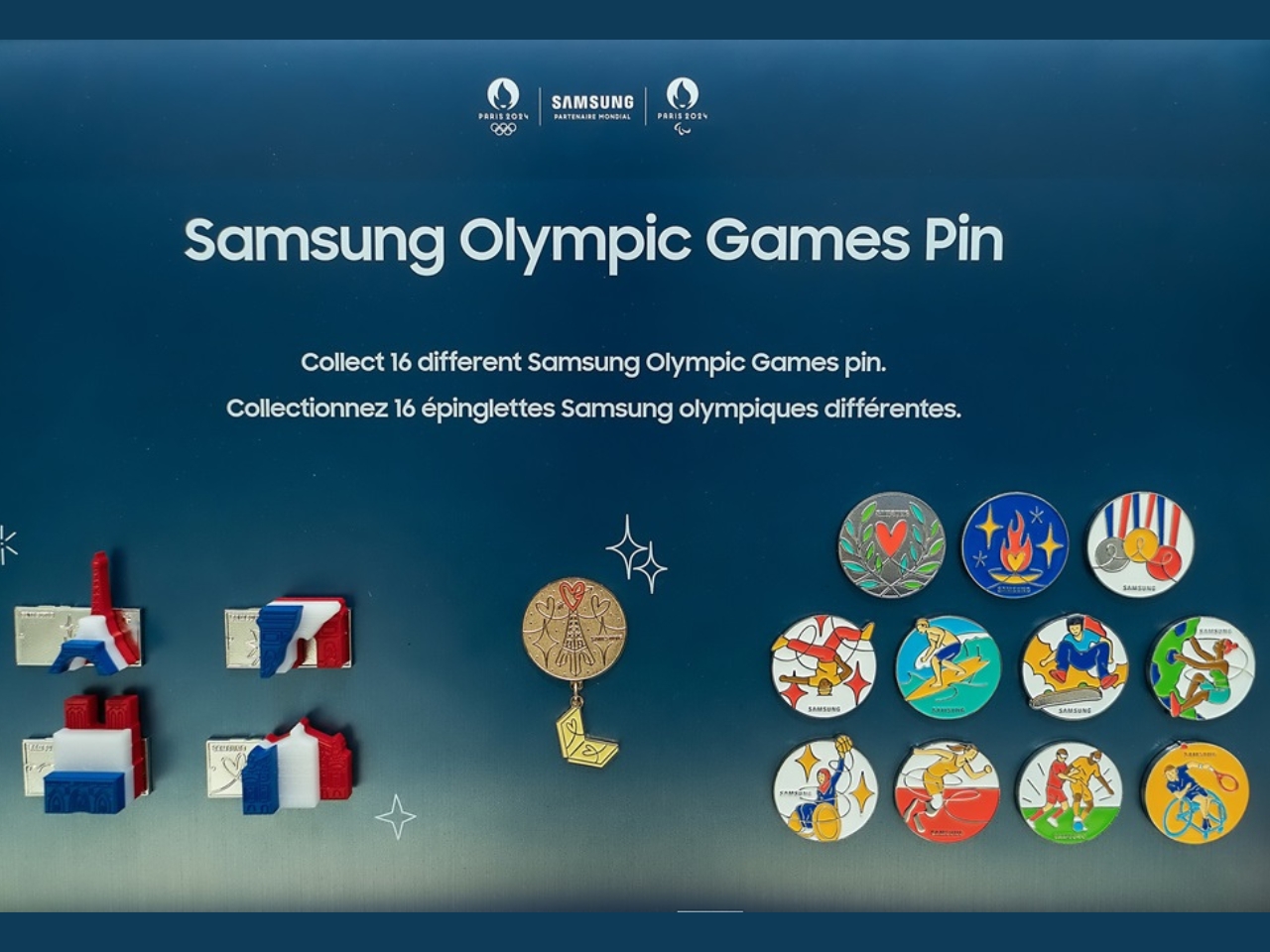
The Samsung Olympic Games Pin Masters Challenge lets visitors in Paris get the chance to collect 16 specially created pins by playing different Galaxy AI-powered challenges at the Olympic™ rendezvous @ Samsung pop-up experiences all over the city. You can even get the chance to get the extremely rare Golden Pin in order to become an official Samsung Olympic Games Pin Master. If ever you’re in Paris, you have until September 8 to play this challenge.

The 16 pins were designed by French illustrator Jean André and they are actually made from recycled aluminum from old Galaxy smartphones. Eleven of these pins represent Olympic sports like breaking, skateboarding, sport climbing, and surfing, and four Paralympic sports – blind football, para athletics, wheelchair basketball, and wheelchair tennis. There are also four Special Pins that feature three-dimensional landmarks of the city. And then, there is that rare and elusive Golden Pin.

If you’re able to collect all 16 pins, you’ll get a new Galaxy Z Flip6 and a raffle entry to win a round-trip package for two to attend the 2026 Milano Cortina Olympics. Several have already become Pin Masters, and it looks like most of them are kids. They’re the ones who probably enjoyed playing the challenges to get the pins. If I was there in Paris, I would probably be all over this challenge, even just for the pins.

The post Become a Samsung Olympic Games Pin Master and get a Galaxy Z Flip6 first appeared on Yanko Design.

ASUS ROG Swift OLED PG32UCDP gaming monitor $1,299

OLED Gaming Monitor

The ASUS Republic of Gamers (ROG) has unveiled its latest gaming monitor, the ROG Swift OLED PG32UCDP. This 32-inch 4K WOLED monitor is designed to deliver exceptional motion clarity and immersive gaming experiences. With its ultra-high dual-mode refresh rate and low pixel response, the PG32UCDP is set to redefine gaming visuals. ASUS ROG Swift OLED […]

The post ASUS ROG Swift OLED PG32UCDP gaming monitor $1,299 appeared first on Geeky Gadgets.

How to Downgrade From iOS 18 beta to iOS 17

iOS 18 beta

If you’ve been testing the iOS 18 beta and have encountered issues or instability, you may find it necessary to downgrade to the more stable iOS 17. The video below from iDevice Central will walk you through the process of downgrading your device using iTunes, ensuring a smooth transition back to the previous operating system […]

The post How to Downgrade From iOS 18 beta to iOS 17 appeared first on Geeky Gadgets.

Roomba robot vacuums are up to $420 off right now

Roomba robot vacuums are on sale right now via Wellbots and some of the deals are absolutely fantastic. The biggest discount is for the well-regarded Combo j9+, which is pretty much the company’s top-tier robovac. This vacuum and mop hybrid is typically a jaw-dropping $1,400, but this deal brings the price down to $980. Just enter the code “ENGT420” at checkout.

We loved this unit in our official review, calling it “the ideal robot vacuum and mop” and “a godsend for tired parents.” The vacuuming performance is excellent and mop is a great bonus for mild cleaning duties (it doesn’t excel with sticky messes.) The obstacle detection is fantastic. It’ll avoid furniture, walls and even pet-related fecal matter. It’s a high-end Roomba. You know the drill.

The base is designed well and allows the vac to get stuff done on its own. The vacuum will perform its cleaning duties and empty debris right into the base. This base can accommodate 60 days of solid debris and 30 days of liquid mess before having to be manually emptied. It also features an area for storing accessories.

About the only bad thing one can say about this vacuum is the exorbitant price. The typical cost of $1,400 is simply outrageous, despite being one heck of a cleaning robot. The discount to $980 makes it a more palatable option, but it’s still closing in a grand.

If you want a good robot vacuum and don’t have an endless supply of money, there are other items on sale. The original Roomba j9+, without the mop, is available for $580 instead of $900. Just enter the code “ENGT320” at checkout. The Roomba Combo j7+, which does include a mop, is $680 instead of $1,000 with the code “ENGT320” at checkout. Incidentally, this one made our list of the best robot vacuums.

Follow @EngadgetDeals on Twitter and subscribe to the Engadget Deals newsletter for the latest tech deals and buying advice.

This article originally appeared on Engadget at https://www.engadget.com/deals/roomba-robot-vacuums-are-up-to-420-off-right-now-130019914.html?src=rss

FLUX.1 AI image generator tool developed by Black Forest Labs

FLUX AI image generator Black Forest Labs

FLUX.1, a innovative AI image generator developed by Black Forest Labs, is set to make waves in the field of artificial intelligence. Created by a team of seasoned experts with extensive experience in AI image and video generation, including notable contributions to the renowned Stable Diffusion project, FLUX.1 offers a trio of distinct models tailored […]

The post FLUX.1 AI image generator tool developed by Black Forest Labs appeared first on Geeky Gadgets.

Posted in Uncategorized | Tagged

USB4 20Gbps Switch enhancing remote work setups

Cable Matters has unveiled its latest innovation, the USB4 20Gbps Switch, designed to meet the evolving needs of today’s remote workforce. This powerful device combines performance, adaptability, and cost efficiency, offering users an unparalleled connectivity solution. The USB4 20Gbps Switch is engineered to handle two USB-C, USB4, or Thunderbolt-enabled devices concurrently, making it an ideal […]

The post USB4 20Gbps Switch enhancing remote work setups appeared first on Geeky Gadgets.

Posted in Uncategorized | Tagged

Google Gemini vs Samsung Galaxy AI (Video)

Google Gemini

Google Gemini is a versatile AI assistant that is available on both Samsung and Google Pixel phones, making it accessible to a wide range of users. One of its key strengths lies in its seamless integration with multiple Google applications, such as: YouTube Gmail Google Drive The video below from Simple Alpaca compares Google Gemini […]

The post Google Gemini vs Samsung Galaxy AI (Video) appeared first on Geeky Gadgets.

Intel is bringing GPUs to cars

Intel has unveiled a discrete GPU for cars, the Arc A760A, designed to bring the "triple-A gaming experience" from home over to your car, the company announced. No automotive partners were revealed, but vehicles with the new chips will go on sale as soon as 2025. 

With car buyers increasingly focused on in-vehicle entertainment above all else, the chips are designed to "unlock a new era of AI-powered cockpit experiences," according to Intel's press release. 

The GPUs will allow voice, camera and gesture recognition to make it easy to control up to "seven high-definition screens rendering 3D graphics and six-in vehicle cameras and interactive features." At the same time, it can supposedly run demanding triple-A gaming titles, in-vehicle entertainment and AI-powered productivity apps.

Intel is bringing GPUs to cars
Intel

The system will also be highly personalized to the driver. It'll include the ability to "execute complex vehicle control commands through natural language processing, answer vehicle-related questions accurately, and even engage in leisurely chat with users, providing a more interactive and enjoyable journey," according to Intel.

Intel added that it has created over 500 features and AI apps for automobiles, with over 100 independent software vendors working on in-vehicle experiences. In addition, the A760A will be fully compatible with software developed for its iGPU PC platform, while scaling from entry- and mid-tier vehicles up to higher-end cars. 

Intel said it wants to be the "go-to partner for automakers." It's clearly looking to diversify its offerings in the wake of quality-control problems with recent PC chips and financial woes that may see it lay off up to 15,000 employees. 

This article originally appeared on Engadget at https://www.engadget.com/intel-is-bringing-gpus-to-cars-120057738.html?src=rss