Valerion VisionMaster Max projector review: Near-perfect image quality comes at a price

After a widely hyped and successful Kickstarter campaign, Valerion’s 4K VisionMaster Max laser projector has finally arrived. It’s the company’s new flagship model in the VisionMaster series, offering better image quality and more convenience than its other models. However, it’s quite expensive and has some stiff competition from Anker’s Nebula X1 and XGIMI’s Horizon 20 Max.

I was eager to see how it compared to those models and if it delivers on Valerion’s promise of “pure cinema.” It does offer better image quality, but the difference isn’t quite enough to justify the big jump in price for most users.

The VisionMaster Max has a classy squarish design with a glossy black finish up front and chrome fins on the side that house two 12W speakers. It’s smaller and fit my decor better than Nebula’s tall, plasticky X1, though to be fair the latter is also designed for outdoor use. The VisionMaster Max has a similar form factor to XGIMI’s Horizon 20 Max, but that model pivots on its stand, while the Valerion uses a kickstand-like support.

For setup, the VisionMaster Max is quite flexible. It comes with a 0.9-1.5x optical zoom, so it can be installed between 7.8 and 13 feet away for a 120-inch screen size, which covers a wide range of scenarios. It also features a +/- 105 percent vertical shift option that helps you get an optically perfect screen fit without moving the projector or employing digital “keystone” adjustments that affect picture quality.

If that still doesn’t work, you can swap out the included lens with a long-throw 0.9-2.0:1 option once it becomes available. The company has even promised an anamorphic lens for users with CinemaScope screens. Both of those items will be available for purchase separately with the prices yet to be disclosed.

Valerion VisionMaster Max rear panel
Steve Dent for Engadget

For my space, I placed the VisionMaster Max on a table about 12 feet from my 120-inch screen and centered it horizontally as there’s no horizontal shift option (it can also be ceiling mounted, of course). Then, I went into the auto-alignment setting, made sure that the projected image was larger than my screen and hit “start alignment” to get a perfect fit to my screen. Though it lacks a motorized lens gimbal like the Nebula X1, the lens shift option provides the same flexibility, so setup was just as easy.

For inputs, the VisionMaster Max comes with three HDMI 2.1 ports, including one with eARC for a sound bar, along with S/PDIF optical and 3.5mm audio outputs. Impressively, it includes a gigabit ethernet connection so you can either hardwire it to the internet or connect via Wi-Fi.

The VisionMaster Max lacks liquid cooling like the Nebula X1, but Valerion claims a similar fan noise level of 28db. When I compared them side by side, it was only a touch louder than the X1 and not at all bothersome.

Google TV is built in for streaming and projector control via the high-quality, partially backlit remote. It provides a large library of apps via Google Play along with a familiar interface. You get certified versions of Netflix, YouTube, Prime Video, Disney+, Max and others, plus Chromecast and AirPlay support, and Google Assistant for voice control. With 4GB of RAM and 128GB of ROM, the software felt a bit more responsive than Google TV on the Nebula X1.

Valerion ImageMaster Max image quality
Steve Dent for Engadget

The VisionMaster Max has a number of features designed to optimize image quality. It’s one of the few consumer projectors with a dynamic iris and a feature called Enhanced Black Level (EBL) for improved contrast. It uses an RGB triple-laser light source (rated for 25,000 hours) paired with a 0.47-inch DLP chip that projects 1080p natively or 4K video via pixel shifting. This same chip is used on almost every consumer-level 4K projector, but XGIMI’s upcoming Titan Noir Max projector will pack a much larger 0.78-inch DMD chip that should deliver a sharper picture.

The VisionMaster Max also supports every HDR format, including Dolby Vision and Samsung’s HDR10+, along with Valerion’s own tone-mapping HDR setting. You can choose from seven picture modes for SDR, eight for HDR, three for Dolby Vision and four for HDR10+. The projector handled most HDR content well, though it occasionally lost detail in extra-bright shots. However, that can largely be fixed using the extensive manual color controls.

With all those features, the VisionMaster Max can output 4K 60 fps video at up to 3,500 ANSI lumens with a 50,000:1 contrast ratio, easily besting its main rivals. On top of that, it promises an impressive 110 percent of the Rec.2020 HDR color spectrum, with a delta E (color accuracy) value of less than 0.8 straight out of the box (any delta E less than 2 is undetectable by the human eye). Another key feature is reduction of the rainbow effect that can occur with DLP projectors.

After some fine-tuning that’s typically required with new projectors, I was highly impressed with the image quality. Brightness was high enough in “standard” mode to watch content like sports or TV shows without lowering the blinds, and can be increased if you don’t mind compromising color accuracy.

When used in ideal conditions like a darkened room, the VisionMaster Max’s image quality is the best of any projector I’ve tested to date. In Filmmaker mode (with the EBL setting enabled), contrast levels are outstanding, with true blacks showing in dark-lit scenes instead of the washed-out greys seen on most projectors. However, I kept the EBL mode at the minimum setting as I noticed it caused some color shifting at the other levels. Dynamic iris projectors can cause excessive “pumping” or sudden changes in light levels, but after adjusting the iris to a medium setting, I saw no signs of that.

Valerion VisionMaster Max image quality
The famously dark Game of Thrones Night King battle scene was easy to see on the VisionMaster Max.
Steve Dent for Engadget

Color accuracy is outstanding straight out of the box both in HDR and non-HDR modes, particularly, again in Filmmaker mode. Visually, I couldn’t detect any anomalies when looking at color bars or other charts, though my Calibrite Color Checker told me that the gamut of hues was slightly less than what Valerion claims (under 100 percent of BT.2020).

Still, the Max’s high color accuracy allowed me to see TV series and movies exactly as the filmmakers intended for a range of HDR and non-HDR movies including White Lotus season 3, Once Upon a Time in Hollywood, Andor and Dune 2. The projector’s excellent dynamic range and contrast revealed shadow details in Game of Thrones’ Night King battle, which has famously dark scenes that are difficult to see on some TVs.

I have a slight amount of sensitivity to the “rainbow” effect, but the RBE Reduction feature effectively eliminated that visual artifact for me. However, it also introduced a slight amount of noise, so I disabled it. The feature might be a godsend for some users who are particularly susceptible, but it still needs a bit more refinement.

Of all the luxury projectors I’ve tested to date, the VisionMaster Max is the best for gaming — even compared to some dedicated models. It delivers latency as low as 4ms and a refresh rate up to 240Hz at 1080p, and 15ms for 4K at 60Hz. I tested a couple of PC titles including Cyberpunk 2077 and Hollow Knight: Silksong and found them to be as responsive as I’ve seen on any TV, but with far more immersion thanks to the huge, bright and color-accurate image.

Valerion VisionMaster Max 4K projector
Steve Dent for Engadget

You can output audio via the S/PDIF optical output, 3.5mm headphone jack, HDMI 2.1 ports and even USB 3.0 Type A ports. The built-in 12W stereo speakers work well and are fairly loud, so you can use them in a pinch. However, since it supports both DTS:X and Dolby Atmos, you’ll ideally want to connect it to a nice home theater audio system with support for at least 5.1 surround sound.

In comparison, the Nebula X1 doesn’t have Dolby Atmos support, but it does give you the option to purchase and easily connect stereo Bluetooth speakers at a relatively cheap price. For around the same cost as the Valerion Max, Anker is also offering the Nebula X1 Pro that comes with a giant outdoor sound system and does support Dolby Atmos.

The Valerion VisionMaster Max is a highly capable indoor projector that offers the best image quality I’ve seen thanks to the dynamic iris and Enhanced Black Level features. However, it’s also a lot more expensive than rival models at $5,000. It’s pretty hard to justify that extra money, unless you’re really fussy about picture accuracy and gaming performance, or need other features like the 1Gbps ethernet port.

Most buyers would be better off spending a lot less on Valerion’s own $2,699 VisionMaster Pro2, Anker’s $2,999 Nebula X1 or the $2,999 XGIMI Horizon 20 Max. Again, the difference in picture quality is too slight to justify the huge price jump to the VisionMaster Max. You might also want to wait to see how much XGIMI’s incoming Titan Noir Max 4K costs, as it also offers a dynamic iris but has a much bigger DLP chip.

This article originally appeared on Engadget at https://www.engadget.com/home/home-theater/valerion-visionmaster-max-projector-review-near-perfect-image-quality-comes-at-a-price-140045939.html?src=rss

Trump administration imposes a 25 percent tariff on high-end chips

President Trump has signed a proclamation imposing a 25 percent tariff on “certain advanced computing chips,” the White House has announced. As The New York Times notes, the administration previously threatened much bigger and broader tariffs for chips. Trump even said that he was going to impose a 100 percent tariff on companies unless they invest on semiconductor manufacturing in the United States.

The new tariff will only affect advanced chips imported into the US and are meant to be re-exported to other countries to sell. In its announcement, the White House specifically named AMD MI325X and NVIDIA H200 as two products that will be affected by the tariff. The president recently approved H200 for export to China, saying that it isn’t NVIDIA’s most advanced AI chip anyway and that the company now has newer and more powerful products, such as its Blackwell semiconductors. “[W]e're going to be making 25 percent on the sale of those chips, basically,” Trump said.

Semiconductors imported into the US for use in products to be sold in America or for use in data centers in the country, will not be affected by the new tariff. “This tariff will not apply to chips that are imported to support the buildout of the US technology supply chain and the strengthening of domestic manufacturing capacity for derivatives of semiconductors,” the White House wrote. But that could still change: The administration said that it may still impose broader tariffs on semiconductor imports and the products that use them in the near future.

This article originally appeared on Engadget at https://www.engadget.com/big-tech/trump-administration-imposes-a-25-percent-tariff-on-high-end-chips-140000138.html?src=rss

Give Claude Extra Memory Without Coding : Turn Large Datasets into Ongoing Workflows

Give Claude Extra Memory Without Coding : Turn Large Datasets into Ongoing Workflows

What if you could transform an AI like Claude into a tireless collaborator that never forgets, no matter how complex or long-term your projects are? Memory limitations are one of the most frustrating hurdles when working with AI, forcing you to repeatedly reintroduce context or break down tasks into smaller chunks. But what if there […]

The post Give Claude Extra Memory Without Coding : Turn Large Datasets into Ongoing Workflows appeared first on Geeky Gadgets.

Posted in Uncategorized

OpenAI quietly rolls out a dedicated ChatGPT translation tool

OpenAI has debuted a dedicated ChatGPT-powered translation tool. While folks have been using the main chatbot for translation for some time, you can now find ChatGPT Translate on its own webpage, as Android Authority spotted. 

The tool can translate text, voice inputs and images into more than 50 languages in seconds, OpenAI says. There’s an automatic language detection function too.

Most interestingly, ChatGPT Translate can rewrite the output to take various contexts and tones into account, much in the same way that more general text-generating AI tools can do. With a single tap, it can rewrite the translation into something "more fluent," for a business formal audience, to make it more child-friendly or for academic purposes. The tool’s webpage says ChatGPT Translate understands "tone, idioms and context."

While those tone and context considerations are intriguing, ChatGPT Translate is a little underbaked compared with the likes of Google Translate — which has been around for decades and just got its own Gemini-based makeover with better support for understanding idioms and slang. The desktop version of ChatGPT Translate does not yet allow for voice inputs, though the mobile one does, as Android Authority notes. Despite claims that ChatGPT can translate text in an image, there’s currently no way to upload one to the tool. There’s no website, document or handwriting translation support as yet either. 

Perhaps most crucially, ChatGPT Translate lives on a webpage right now and there’s no dedicated app. So using it offline appears to be out of the question as things stand. No app with on-device translation support could make ChatGPT Translate a no-go for travelers in rural areas with no Internet access. There’s no support for translating real-time conversations as yet either. Google’s Pixel 10, on the other hand, now supports voice translations for calls.

It’s not exactly clear when ChatGPT Translate debuted — it arrived with zero fanfare from OpenAI. There’s a snapshot of the webpage from November on The Internet Archive’s Wayback Machine that looks just like the current one, but that may have simply been a case of OpenAI testing a live version of the tool. 

This article originally appeared on Engadget at https://www.engadget.com/ai/openai-quietly-rolls-out-a-dedicated-chatgpt-translation-tool-133000974.html?src=rss

Spotify is getting a buck more expensive in February

Spotify is raising the prices for its premium subscriptions by $1 to $2 across the board, starting this February. Those are similar figures to the company’s last price hike in 2024. Subscribers across the US, Estonia and Latvia will soon receive an email, notifying them that they’ll be paying a larger amount for their February bill.

The streaming service said it’s raising its prices occasionally to “reflect the value that Spotify delivers,” “to continue offering the best possible experience” and to “benefit artists.” It reported last year that it paid out $10 billion to music rights-holders in 2024. However, it’s worth noting that several Grammy-nominated songwriters boycotted an awards event it hosted to protest the supposed decreasing royalties songwriters are getting from Spotify plays.

Subscribers who choose to keep their accounts will now have to pay $13 instead of $12 a month for an individual plan or $7 instead of $6 for a student plan. The Duo plan will now cost users $19 a month instead of $17, while the Family plan will cost them $22, up $2 from its previous price of $20. Meanwhile, those who decide to cancel their plans can follow our guide right here.

Spotify came under fire late last year for running recruitment ads for ICE. It said the advertisements were part of a larger campaign by the US government that ran across platforms, including Meta and Google. The company also recently confirmed that the campaign has ended that there are no ICE ads currently running on the service.

This article originally appeared on Engadget at https://www.engadget.com/entertainment/music/spotifys-getting-a-buck-more-expensive-in-february-132300118.html?src=rss

Antigravity 3 Hands-On with Security Mode: Turbo, Auto, Off, Plus New Skills

Antigravity 3 Hands-On with Security Mode: Turbo, Auto, Off, Plus New Skills

What if your workflow could be customized to fit your exact needs, your security protocols were smarter than ever, and your resource management was effortlessly efficient? AI Code King breaks down how Google Antigravity 3 is redefining the way we interact with technology, offering a suite of upgrades that promise to transform productivity and control. […]

The post Antigravity 3 Hands-On with Security Mode: Turbo, Auto, Off, Plus New Skills appeared first on Geeky Gadgets.

Posted in Uncategorized

FTC finalizes GM punishment over driver data sharing scandal

After reaching a proposed settlement last year, the FTC has banned General Motors from sharing specific consumer data with third parties, TechCrunch reported. The finalized order wraps up one of the more egregious cases of a corporation collecting its customers' data and then using it against them. 

Two years ago, the New York Times report released a report detailing how GM's OnStar "Smart Driver" program collected and sold detailed geolocation and driving behavior data to third parties, including data brokers. Those brokers in turn sold the data to insurance providers, which jacked up the rates for some drivers based on the data. "It felt like a betrayal," said a Chevy Bolt owner that saw his insurance rise by 21 percent based on the data. "They’re taking information that I didn’t realize was going to be shared and screwing with our insurance."

According to the terms of the settlement, GM is barred from sharing specific user data with consumer reporting agencies for a five year period. The automaker is also required to request user permission before collecting, using or sharing vehicle data with any third party. It must do that when a consumer purchases a car at a dealership, with the customer asked in person whether they agree or not with the data collection, GM said. 

Some of the settlement is moot as GM stopped its Smart Driver program for all brands in April 2024. The company unenrolled all customers and stopped its third-party relationship with LexisNexis and Verisk, the brokers that sold driver data to insurance companies. 

GM faced other actions over the data collection, including lawsuits from Texas, Nebraska and other states. "Our investigation revealed that General Motors has engaged in egregious business practices that violated Texans’ privacy and broke the law. We will hold them accountable," said Texas AG Ken Paxton at the time. 

In a statement to TechCrunch, GM said: "The Federal Trade Commission has formally approved the agreement reached last year with General Motors to address concerns. As vehicle connectivity becomes increasingly integral to the driving experience, GM remains committed to protecting customer privacy, maintaining trust, and ensuring customers have a clear understanding of our practices." 

This article originally appeared on Engadget at https://www.engadget.com/transportation/ftc-finalizes-gm-punishment-over-driver-data-sharing-scandal-130012313.html?src=rss

Samsung Galaxy S26 Ultra Pre-Order & Shipping Dates: Everything You Need to Know

Samsung Galaxy S26 Ultra Pre-Order & Shipping Dates: Everything You Need to Know

The Samsung Galaxy S26 Ultra, the flagship model of the highly anticipated S26 series, is set to redefine expectations in smartphone technology. Scheduled for its official unveiling on February 25, 2024, during Samsung’s Unpacked Event, the device will be available globally starting March 11, 2024. With a focus on privacy, photography, and display innovation, the […]

The post Samsung Galaxy S26 Ultra Pre-Order & Shipping Dates: Everything You Need to Know appeared first on Geeky Gadgets.

Posted in Uncategorized

Ditch Distractions with a Palm-Friendly Apple Watch That Still Takes Calls and Texts

Ditch Distractions with a Palm-Friendly Apple Watch That Still Takes Calls and Texts

What if your old Apple Watch could become something entirely new, a sleek, minimalist device that reduces screen time without sacrificing essential connectivity? Below, Luke Miani takes you through how to transform outdated Apple Watches into handheld gadgets that feel like a modern twist on the classic iPod. This creative upcycling concept not only breathes […]

The post Ditch Distractions with a Palm-Friendly Apple Watch That Still Takes Calls and Texts appeared first on Geeky Gadgets.

Posted in Uncategorized

5 Best Desk Accessories to Reset Your Work-From-Home Setup in January 2026

January arrives with its familiar promise of renewal, and your work-from-home setup deserves the same attention as your fitness goals or morning routines. The desk where you spend eight hours daily becomes more than furniture—it transforms into the command center of your productivity, creativity, and professional presence. After months of accumulated cable chaos, scattered pens, and makeshift arrangements, the new year offers the perfect excuse to reimagine your workspace with intention.

The right desk accessories don’t just organize; they elevate your entire work experience through thoughtful design and purposeful engineering. These five pieces represent the intersection of form and function, where premium materials meet clever problem-solving. From levitating pens that spark creative breaks to monitor stands that finally solve the Mac mini placement puzzle, each accessory addresses a specific pain point while adding visual sophistication to your desk landscape.

1. Alogic Aspekt Omni Fold Stand

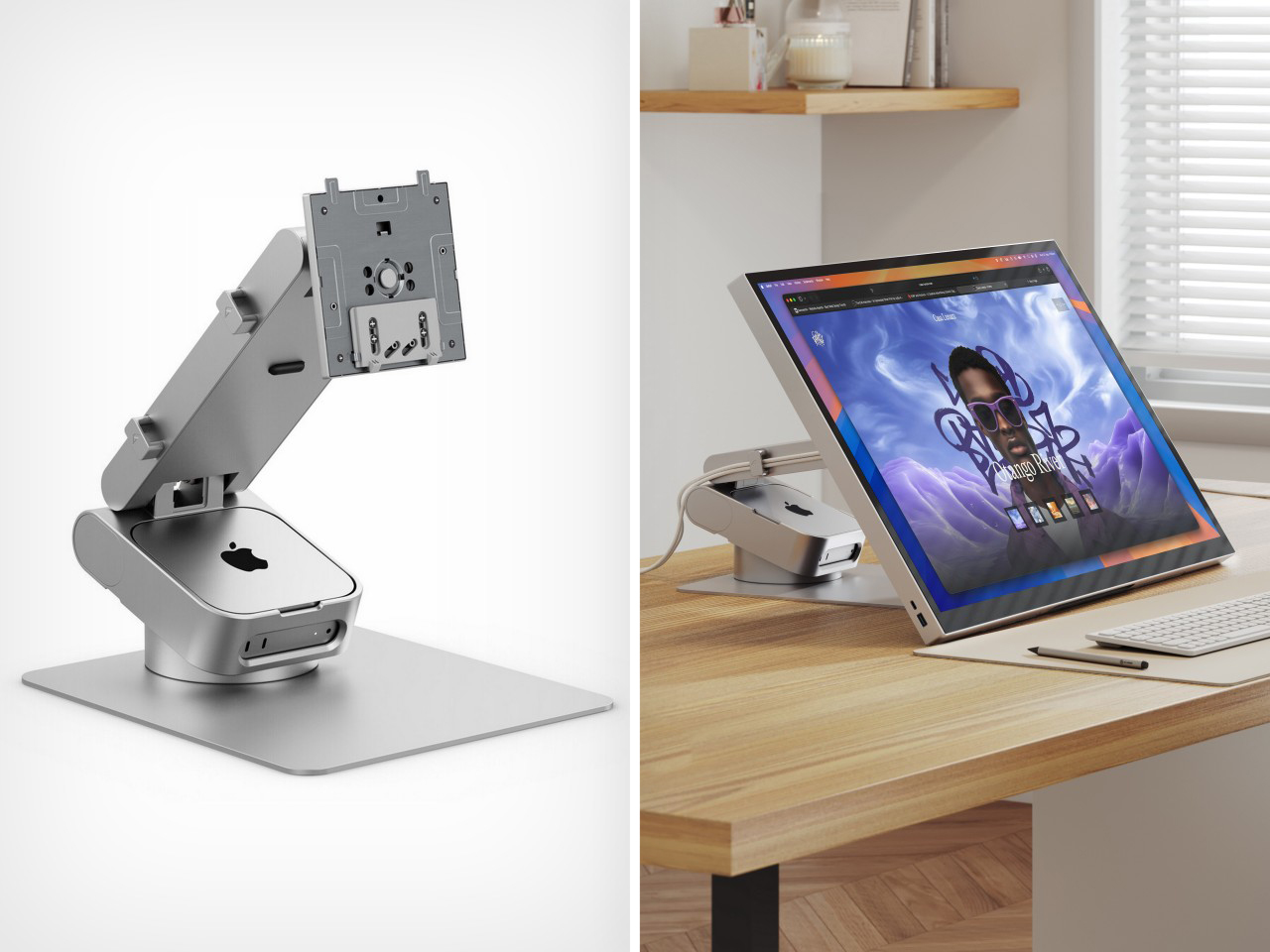
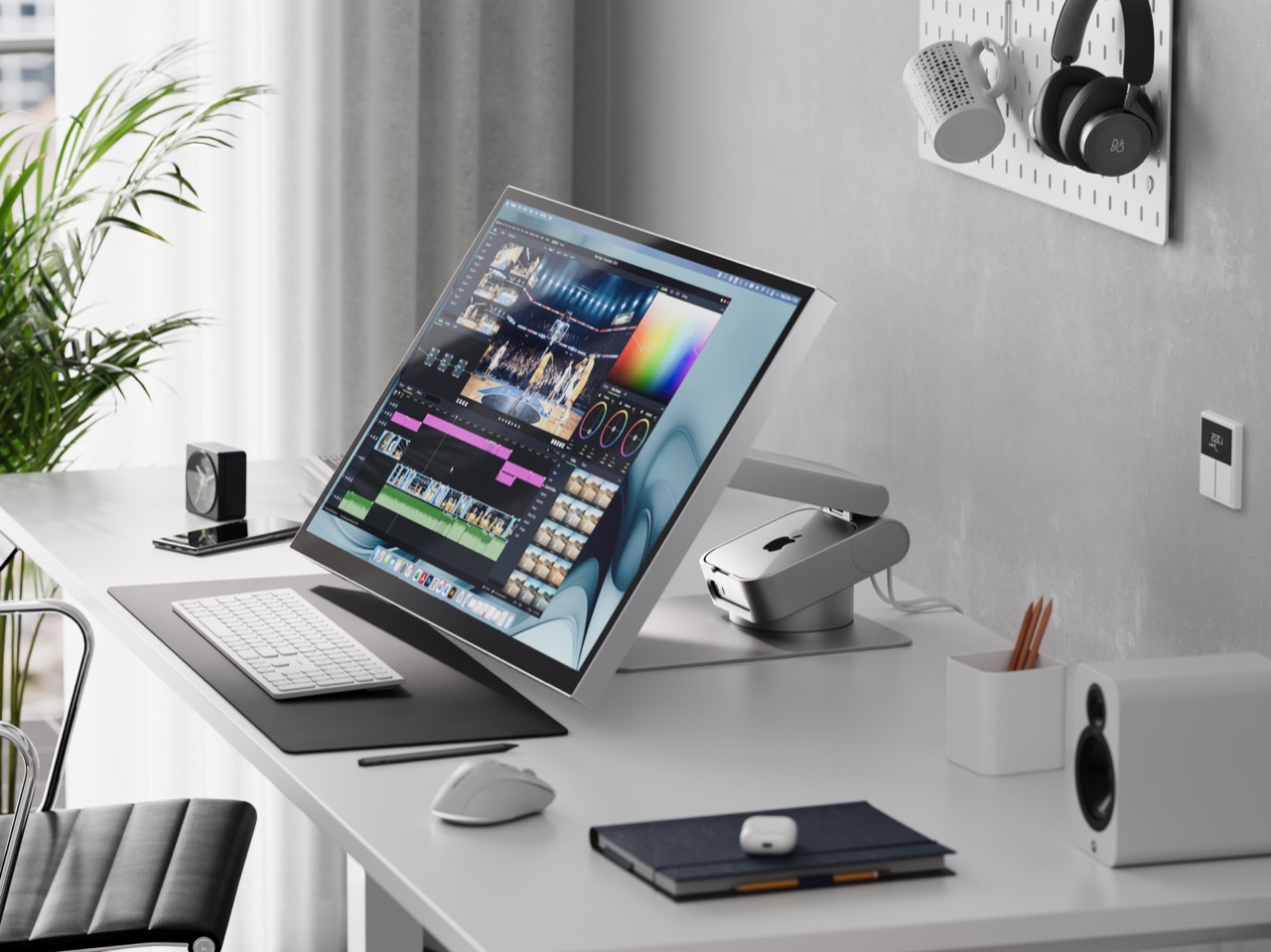
Apple’s Mac mini has always been a spatial enigma—too beautiful to hide away, yet too awkward to display properly. The little computing powerhouse typically ends up pushed to the side with cables sprawling in every direction, never quite integrating into your desk aesthetic. Alogic spotted this design gap and responded with the Aspekt Omni Fold Stand, a monitor stand that elegantly solves the Mac mini placement problem by building its home directly into the base.

The engineering here feels revelatory in its simplicity. Rather than creating another shelf or separate mount, Alogic carved a precision groove into their premium monitor stand specifically calibrated for the M4 Mac mini. This transforms your setup into a modular iMac where computer and display unite visually while remaining independently upgradeable. The stand eliminates cable clutter by centralizing your hub, while the aluminum construction matches Apple’s design language perfectly. Starting your year with this level of spatial organization creates a foundation for everything else on your desk.

What We Like

  • Transforms the Mac mini and monitor into a cohesive all-in-one aesthetic.
  • Precision-engineered groove prevents the computer from sliding or shifting.
  • Centralizes cables and ports for a cleaner desk appearance.
  • Premium aluminum construction matches Apple product quality.

What We Dislike

  • Specifically designed for the Mac mini limits universal appeal.
  • Premium materials result in a higher price point than basic stands.

2. FoldLine Pen Roll

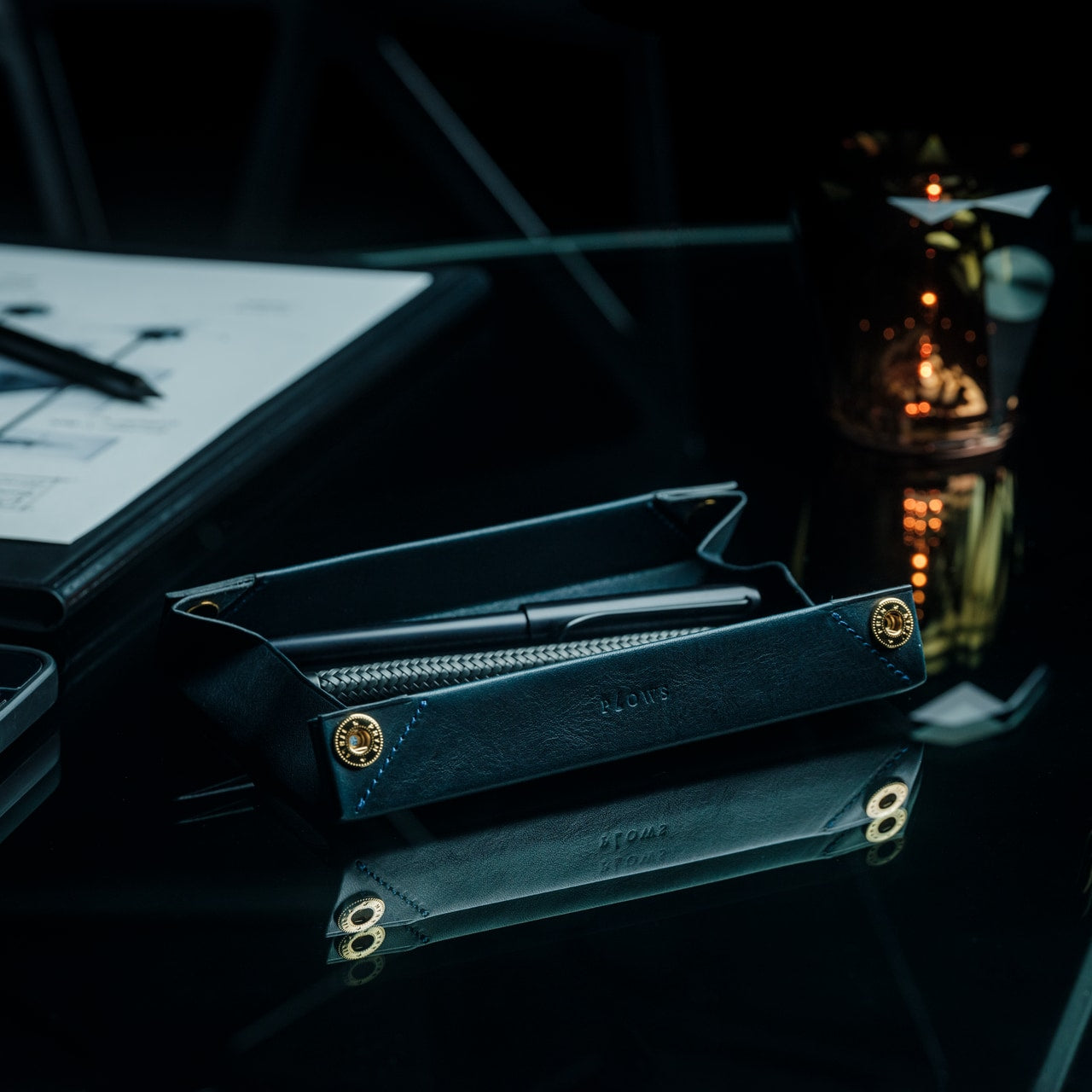
Digital tools dominate our workflows, yet the ritual of putting pen to paper remains irreplaceable for sketching ideas, signing documents, or journaling thoughts. The FoldLine Pen Roll recognizes this enduring need and transforms pen storage from utilitarian afterthought into an intentional design object. Crafted from a single piece of Italian leather, this isn’t merely a case—it’s a portable writing station that unfolds into a defined work surface wherever you land.

The origami-inspired geometry creates natural compartments without stitching or partitions. Your pens nestle into folded leather channels that prevent rattling and scratching; even metal-bodied instruments remain separated and protected. Opening the roll becomes a small ceremony that signals transition into focused work mode, whether you’re at a café table or hotel desk. The leather develops character through use, aging beautifully while maintaining structure. Resetting your desk for January means honoring analog tools with the same design consideration you’d give your laptop or monitor.

Click Here to Buy Now: $135.00

What We Like

  • Single-piece Italian leather construction ensures durability and elegance.
  • Unfolds into a stable tray that defines a workspace on any surface.
  • Natural folding system protects pens without scratches or noise.
  • Compact form travels easily in bags without adding bulk.

What We Dislike

  • Leather requires occasional conditioning to maintain suppleness.
  • Limited capacity suits curated pen collections rather than large inventories.

3. ClearMind Kendama

Desk accessories typically focus on productivity optimization, but sustained focus requires deliberate breaks that refresh your mind without derailing concentration. The ClearMind Kendama from Tokyo Kendama introduces a physical skill toy to your workspace, offering three-minute mental resets between video calls or during creative blocks. This traditional Japanese toy—a wooden handle connected to a ball—challenges hand-eye coordination while providing satisfying tactile feedback that screens simply cannot deliver.

Tokyo Kendama recalibrated the classic design specifically for modern desk use. Larger cups make landing tricks more achievable, building confidence rather than frustration during brief breaks. The bearing system minimizes string twists, maintaining smooth operation throughout the day. The balanced weight distribution creates precise movements that feel meditative rather than chaotic. Keeping the ClearMind Kendama within reach establishes a healthier relationship with breaks, replacing endless phone scrolling with intentional physical engagement that genuinely refreshes your attention span for the next task.

Click Here to Buy Now: $59.00

What We Like

  • Physical skill development provides genuine mental breaks from screens.
  • Larger cups and recalibrated balance increase success rates for beginners.
  • The bearing system prevents string tangles during extended use.
  • Compact desktop footprint requires minimal space when not in use.

What We Dislike

  • The initial learning curve may frustrate users seeking immediate gratification.
  • Wooden construction shows wear marks from repeated trick attempts.

4. OrigamiSwift Folding Mouse

Laptop trackpads serve their purpose, but precision work demands a proper mouse—a truth that becomes problematic when your workspace shifts between home office, coffee shops, and coworking spaces. The OrigamiSwift Folding Mouse solves this portability paradox by delivering full-size comfort and control in a device that collapses completely flat. Inspired by origami’s transformation principles, this Bluetooth mouse adapts to your location rather than forcing workspace compromises.

The folding mechanism activates in under half a second with a simple flip, springing the mouse to life immediately. At just 40 grams, it disappears into your bag or pocket until needed, yet the ergonomic shape feels substantial and natural during extended work sessions. The design acknowledges that January resolutions often include workspace flexibility—maybe you’re committing to working from different environments or finally embracing that digital nomad dream. OrigamiSwift ensures your tools match your ambitions, providing desktop precision regardless of where you unfold your laptop.

Click Here to Buy Now: $79.00

What We Like

  • Folds completely flat for effortless transport in any bag.
  • Full-size ergonomic comfort prevents hand fatigue during long sessions.
  • Instant 0.5-second activation from folded to functional state.
  • Ultra-lightweight 40-gram construction adds negligible travel weight.

What We Dislike

  • The folding mechanism represents a potential long-term durability concern.
  • Bluetooth connectivity requires occasional battery recharging.

5. Levitating Pen

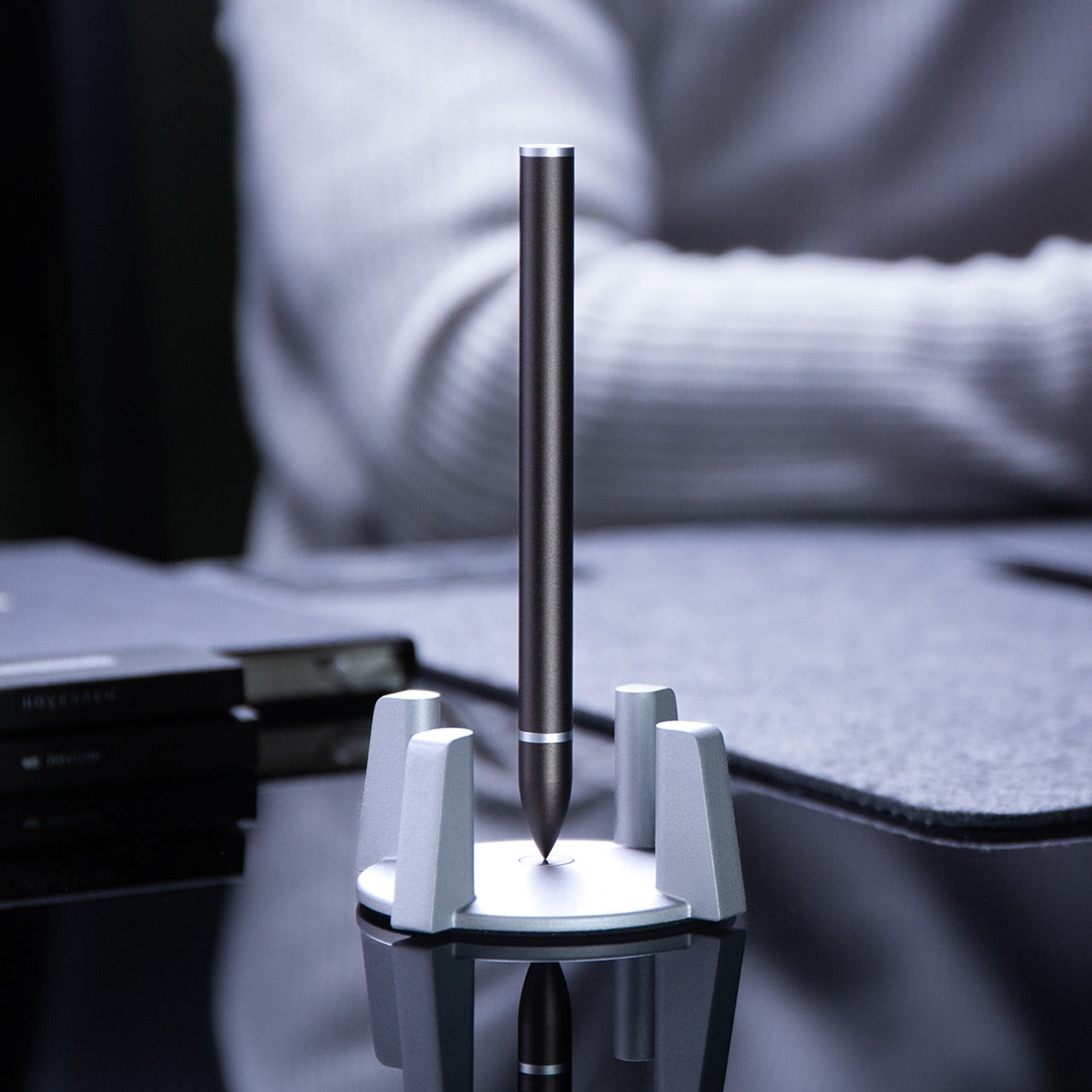
Every desk needs a conversation piece that transcends pure utility, an object that sparks curiosity and provides momentary wonder during grinding workdays. The Levitating Pen achieves this through magnetic engineering that suspends the pen vertically in mid-air without batteries or electronics. The precision-machined pedestal creates a magnetic field perfectly calibrated to balance the pen, transforming a writing instrument into a kinetic sculpture that commands attention on any desk surface.

Manufactured using CNC machining with tolerances under 0.1mm—the same facility producing Apple products—this pen demonstrates obsessive attention to detail. The Swiss-made ballpoint cartridge ensures writing performance matches the engineering spectacle. Beyond aesthetics, the levitating mechanism serves a practical purpose: taking brief mental breaks by spinning the pen, watching its hypnotic wobble for thirty seconds before returning refreshed to your task. Starting January with this level of design consideration signals your commitment to a workspace that inspires rather than merely functions.

Click Here to Buy  Now: $79.00

What We Like

  • Magnetic levitation creates a mesmerizing desk centerpiece without power requirements.
  • High-precision CNC manufacturing ensures reliable hovering performance.
  • Swiss ballpoint cartridge delivers a smooth, professional writing experience.
  • Spinning motion provides meditative micro-breaks during intensive work.

What We Dislike

  • The pedestal requires permanent desk space that cannot be repurposed.
  • Premium manufacturing process results in significant investment cost.

Resetting Your Workspace Intentionally

The desk accessories you choose reveal your priorities and shape your daily experience more than most people realize. These five pieces represent different facets of the modern work-from-home reality: spatial organization, analog appreciation, mental refreshment, location flexibility, and design inspiration. Each addresses specific pain points while elevating your workspace beyond pure function into something that genuinely sparks joy during those long January afternoons.

Resetting your desk for the new year isn’t about buying everything at once—it’s about identifying which aspect of your current setup drains energy rather than creating it. Maybe you’re drowning in cable chaos around your Mac mini, or perhaps you’re scrolling through your phone during breaks when your mind needs actual engagement. Start with the accessory that solves your most persistent frustration, then build from there as your workspace evolves throughout the year.

The post 5 Best Desk Accessories to Reset Your Work-From-Home Setup in January 2026 first appeared on Yanko Design.