Turtle Beach Corporation, in collaboration with Performance Designed Products LLC (PDP), has launched a new line of limited-edition TEKKEN 8 Victrix Pro FS Arcade Fight Sticks. These exclusive fight sticks are available in six distinct designs, each representing a popular character from the TEKKEN 8 game, including Jin, Kazuya, King, Law, Lili, and Xiaoyu. Priced […]
The Apple MacBook Air has long been a go-to choice for those seeking a reliable, sleek, and high-performing laptop. As consumers navigate the ever-evolving landscape of technology, the question arises: is it worth waiting for the upcoming models, particularly the 16GB RAM version? To make an informed decision, it’s essential to examine both the current […]
The next Tron game is a follow-up to Tron: Identity, but it’s also something completely new. Where Tron: Identity was a visual novel, Tron: Catalyst is an isometric action game with a looping narrative, and it’s coming to PC, PlayStation 5, Xbox Series X/S and Switch in 2025. Tron: Catalyst is in development at Bithell Games, the award-winning studio behind Tron: Identity, John Wick Hex and Thomas Was Alone.
In Tron: Catalyst, players return to the Arq Grid, a virtual world that’s evolved without human input, creating a siloed, Galapagos Islands type of space populated by sentient computer programs. The protagonist is Exo, a program who’s able to relive segments of time by exploiting a system-level glitch that no one else can sense. She’s on a mission to uncover and stop the unsavory goals of the Arq Grid’s overlords, sniffing out secrets and bypassing enemies with each new loop.
Combat includes melee and ranged attacks, and Exo will collect data shards that grant her new abilities as the game progresses. Exo’s identity disc is a crucial tool in her fight to stabilize the Arq Grid, and one thing players will do with it is customize their upgrade paths.
“As you're playing through, all combat flows from your identity disc, but you're going to be able to upgrade that disc in order to satisfy the kind of action you'd like,” Bithell Games founder Mike Bithell said during a media preview of Tron: Catalyst. He showed off a disc kick, a ranged move that (fittingly) let Exo kick her disc back at the enemies encircling her, in between close-combat slices and standard throws. On top of parkour traversal, players will also be able to ride light cycles.
Tron: Catalyst will make complete sense even if you haven't played Identity, but anyone who played the first installment will encounter a few familiar faces and locales. The new game is a narrative-driven experience where players’ choices have a small but noticeable impact on the world around them. The game has voice acting for major characters and in pivotal scenes.
Bithell Games
“We have a text-based dialogue system here,” Bithell said. “This is at times linear in that way. The player also gets to make dialogue choices. The game is very straight ahead with its action, so there's not an enormous amount of branching, but it does let you be expressive. So as a player, you can decide if you want to be snarky with people, polite with people, and kind of make some choices — for example, choosing if you want to lie or not to this character, and you'll see the echoes of that in your character interactions.”
In the demo, Exo was on a mission to edit her identity disc — in the first loop, she fought her way through stages of enemies in order to access a club and talk to the proper character, who then sent her on an escort mission in order to prove her worth. She completed it, got her disc wiped, and restarted the loop. The second time around, she didn’t need to fight anyone because her identity disc scanned clean. From that point on, the city was open to Exo in a new way.
Bithell Games
Tron: Catalyst isn’t an open-world game, but it’s composed of multiple “big levels,” as Bithell called them.
He added, “We probably need to come up with a better term.”
Essentially, Tron: Catalyst is composed of multiple large hubs that take players from the city streets to rooftop penthouses, providing plenty of points of interest, even after multiple loops. As players explore, they’ll be able to add shortcut codes to Exo’s disc, removing some of the tedium from the playthroughs.
“When you travel somewhere, you may get a taxi to the hotel, but then once you start to get comfortable, you might go to a coffee shop nearby,” Bithell said. “Slowly, in ever-increasing concentric circles, a kind of iterative exploration. That's something we've really tried to pull in here. So as you're playing the game, you're building up that knowledge of the space and how to use it.”
Characters in the world of Tron: Catalyst don’t shift cycle to cycle — at the start of each loop, everyone returns to their original place, doing what they were originally doing. Still, Exo’s perception of each situation changes with every refreshed loop, revealing new paths, and the world reacts according to the edits in her identity disc.
Bithell Games
“It's meant to be a game about playing with those relationships and exploring how characters can kind of be influenced and have their minds changed,” Bithell said. “There's lots going on there, but it’s different to Hades, definitely. It's not a 100-loop roguelite. It's not that kind of game. It's much more story-driven.”
Bithell Games has a team of about 20 developers working on Tron: Catalyst, and it’s being published by Devolver Digital’s new hub for licensed indie games, Big Fan. Of course Disney is also involved — technically the new game’s full name is Disney Tron: Catalyst, so don’t be alarmed if it appears higher up in your alphabetized library than expected once it lands in 2025.
This article originally appeared on Engadget at https://www.engadget.com/gaming/the-next-tron-game-is-an-isometric-action-adventure-due-out-in-2025-130050360.html?src=rss
You can think of the $300 Meta Quest 3S as a basic Honda Accord of VR headsets. It doesn't have the same high-quality optics as the $500 Quest 3, which is more like a Touring-grade Honda for enthusiasts, but they both get you to the same place: Truly immersive virtual reality. After testing the Quest 3S for the past week, I see it less as a step down and more like an upgrade over the Quest 2. That headset also launched at $300 four years ago, but its price fluctuated up and down depending on supply chain issues, and, over time, it was hampered by aging hardware.
But now Meta has a $300 VR entry that's powered by a much more capable processor, offers better hand and controller tracking, and lets you dip your toes into mixed reality (overlaying digital objects atop a camera feed of real life). While the Quest 3S might just appear to be a less capable Quest 3, it has the potential to be one of the most significant VR products Meta has made yet.
Hardware
As I mentioned in my initial hands-on, the Quest 3S doesn't look very different compared to the Quest 3, aside from its triangular sensor array. It still has a sturdy plastic case, a healthy dose of cushioning around your eyes, and an adjustable Y-shaped strap. You'll have a genuinely hard time telling the headsets apart while they're facing each other, I found myself peeking at their front sensors often while testing them on the same workbench.
Look a bit closer, though, and you'll notice some key differences. For one, you can easily see the telltale concentric circles of Fresnel lenses on the Quest 3S. Meta also used them on the Quest 2, and they've historically been common among cheaper VR headsets. The Quest 3, on the other hand, uses pancake lenses, which have a smooth surface. (More on the technical differences between those two lens types below.)
Devindra Hardawar for Engadget
One way Meta was able to drive down the cost of the Quest 3S was by re-using the 1,830 by 1,920 pixel per eye screen from the Quest 2. The Quest 3's screen offers 30 percent more pixels (2,264 by 2,208 pixels per eye), to deliver a sharper and more realistic image.
The Quest 3S doesn't have a headphone jack, either, so you'll have to plug in a USB-C adapter to get better sound, or connect to wireless headphones. While I'll go to my grave as a defender of 3.5mm audio jacks, but I suppose it makes sense to lose it here. Most Quest 3S users will likely be just fine with its built-in speakers, and anyone who demands the fidelity of a wired connection likely wouldn't mind paying more for the Quest 3 (or shelling out for a $10 USB-C to 3.5mm adapter).
Also gone is the nifty dial for adjusting lens spacing from the Quest 3, instead you have to manually push the lenses into three positions to approximate the best pupillary distance. This involves putting the headset on and taking it off several times (exactly the sort of friction that could easily turn off VR newcomers), but at least it's something you only have to sort once. It could be a bigger problem if you're sharing the headset with your household, though.
Meta added an action button for quickly swapping between mixed reality mode, which shows a camera feed of your room, and a completely immersive VR view. This is something the Quest 3 doesn't have at all — instead, you have to tap its right front corner to jump into mixed reality. Having a dedicated button is simply better for usability, especially for new VR users, so I don't mind that it slightly disrupts the curves of the Quest 3S's design.
The Quest 3S also uses the same Touch Controllers as its more expensive sibling, and they're once again excellent. They've lost the clunky motion tracking ring from the earlier models, now they're simply light controllers that fit your hand like a glove. The joysticks feel smooth and accurate, and the buttons deliver some wonderfully responsive feedback. That's nothing new, though: I've been impressed by Facebook's gamepads since the first Oculus Touch controllers were released in 2016.
Devindra Hardawar for Engadget
What's most important about the Quest 3S is the hardware Meta brought over from its more expensive headset. There's the Snapdragon XR2 Gen 2 processor, which the company claims offers double the graphics performance as the Quest 2, as well as 8GB of RAM. That's only a slight leap from the Quest 2's 6GB of memory, but it's essential for storing more detailed textures.
Now instead of worrying about how a game would perform on the slower Quest 2, developers can simply build for a single hardware specification. Less headaches for devs, ideally, should mean more software on the Meta Quest store. And the hope is that a wealth of new apps will lead to people buying more headsets. Which leads to more apps sold. It's a virtuous cycle that could potentially help Meta out of the death spiral the consumer VR market has been circling for years.
Photo by Devindra Hardawar/Engadget
In use: Snappy and functional VR
The first thing I noticed after donning the Quest 3S: Wow, it sure feels fast. Stepping through the headset onboarding process, downloading a few apps and navigating around the Meta home environment was simply snappy and responsive. That's something I remembered from the Quest 3, as well, but it feels like even more of a revelation on a $300 headset. There was none of the lag or occasional slowdowns I grew used to on the Quest 2.
The actual VR experience looked detailed and immersive, as well. I didn't notice the resolution loss from the Quest 3 much, but it was easily apparent that the cheaper Fresnel lenses led to more artifacts. Edges looked a bit fuzzier, I'd occasionally see haloing around objects, and God rays from extra bright objects often appeared in games like Pistol Whip. There's no doubt the Quest 3's pancake lenses, which aren't as susceptible to the same visual issues, look far sharper.
But here's the thing: I don't think the Fresnel lenses will make much of a difference for VR newcomers. I enjoyed VR headsets for years while living with those same artifacts. And if going with cheaper lenses helped Meta drive the cost of the Quest 3S down to $300, it was worth it. The biggest barrier to the world of VR isn't fidelity, it's cost.
Once I started spending significant time inside the Quest 3S, I also noticed the visual issues less. I was far more interested in trying to conduct the perfect symphony in Maestro, which did a fantastic job of simulating the live orchestral experience thanks to the headset's accurate hand tracking and immersive audio. It was also fun to pick up a random pen from my desk and transform it into a virtual baton. The game certainly looks a bit clearer in the Quest 3, but I would wager many people won't be directly comparing the two headsets.
I also spent an hour playing Mobile Suit Gundam: Silver Phantom — which is less a game and more of an interactive anime film, but it was engrossing enough that I started to ignore the Quest 3S's artifacts. If you're immersed in a genuinely great VR experience, they simply don't matter. Naturally, I also checked out classics like Pistol Whip and Superhot, which are still a blast to play after all these years.
Sadly, the Quest 3S doesn't solve the problem of looking like an absolute buffoon while using VR. That was particularly noticeable while playing I Am Cat, a game that had me climbing up walls, digging up a litter box and absolutely terrorizing the old woman in my virtual house. I was having a blast, but my six year old daughter started to wonder if I was going mad.
I ended up streaming the game to the Meta app on my iPhone, and screen mirroring that to my Apple TV, to give her a live view of everything I was seeing. That, of course, led to her coming up with all sorts of ways for me to wreak kitty havoc in VR. (Pro tip: You can totally make the old lady eat a cat poop sandwich.)
Just like the previous Meta standalone headsets, the Quest 3S can also stream more intensive VR experiences from gaming PCs, either wirelessly or via a USB-C cable. I was able to connect to my rig over Wi-Fi and play 15 minutes of Half-Life: Alyx without any noticeable lag. Sure, it didn't look as great as it did on the Valve Index, but that whole setup still costs $1,000. And, of course, the Index doesn't give you the option of playing wirelessly without a PC. I was also able to stream some non-VR Xbox Cloud Gaming titles, including Halo Infinite and Fortnite, after pairing my Xbox controller. W2D gaming isn't the ideal thing to do in a VR headset, but being able to virtualize an enormous screen still makes it worthwhile, especially if you don't have a large TV.
While Meta positioned the Quest 3 as a mixed reality device, thanks to its color cameras and more capable room mapping, I never found it as useful as the Vision Pro. That's a headset I can wear for hours at a time while I move around my home. The Quest 3's cameras were simply too fuzzy to use for long, and the Quest 3S suffers from the same problem. It's fun to play Meta's First Encounters demo and have aliens invade your home, or jam out in Synth Riders, but the Quest 3 and 3S headsets need far better cameras to truly recreate reality.
That's also why I couldn't stomach using Meta's Remote Desktop app to replicate my PC for too long. The virtual display looked decently sharp, but I had a hard time focusing on that alongside a fuzzy view of my office. I'd much rather just take off the Quest 3S and look at my monitor to get some work done.
Devindra Hardawar for Engadget
As an entertainment device, the Quest 3S is a comfortable way to sit back and enjoy movies, TV and 360-degree videos. Home theater heads might notice that videos don't leak nearly as sharp as they do on the Quest 3, and the contrast and black levels are lightyears away from the Vision Pro's MicroLED displays, but for most people the Quest 3S is perfectly fine. It's certainly better than watching something on a laptop or tablet (or god forbid, a phone).
Throughout my week of testing, the Quest 3S would typically last around two hours and 20 minutes before needing a recharge. That's slightly better than what I saw on the Quest 3, which could drain its battery in just two hours. This is one area where the Quest 3S's lower resolution displays may be a benefit, since they're less demanding on the GPU. You could always plug in a 10,000 mAh external pack to extend the Quest 3S’s 4,324 mAh built-in battery, or just leave it plugged into a charger for extended play sessions.
Devindra Hardawar for Engadget
Pricing and the competition
The Quest 3S starts at $300 with 128GB of storage, but you can double that to 256GB with the $400 model. If you need 512GB of space, then the $500 Quest 3 is your only option. Given the optics advantage of the more expensive headset though, the $400 Quest 3S doesn't exactly seem like a smart buy. If you need more than 128GB of storage, you're better off saving up until you can snag a Quest 3.
Meta still doesn't have much competition in the world of inexpensive standalone VR headsets. HTC's Vive Focus 3 lineup, which now includes the new Focus 3 Vision, starts at $1,000 and is geared more towards enterprises and business customers. HTC Vive's storefront also has far fewer games and apps than Meta's, so their platform doesn't make much sense for average users.
Devindra Hardawar for Engadget
Wrap-up
The Meta Quest 3S is the best $300 standalone VR headset we've ever seen. It's comfortable to wear, and it delivers a snappy VR experience. It's so good, you likely won't notice that it's not as sharp as the Quest 3, or that it also has more visual artifacts. When you’re truly immersed in VR, those problems will fade away.
Alongside the company's Ray-Ban smart frames, its Orion augmented reality glasses, and the billions it's already spent on VR, Meta clearly believes the future of computing rests on your face. But even light smart glasses are still glasses, something that many people avoid wearing by shoving contact lenses onto their eyeballs instead. We don't know how, exactly, the public will respond to true AR glasses. But really, that's a problem for the future. For now, we can just enjoy the Quest 3S for what it is: Great VR at a relatively inexpensive price.
This article originally appeared on Engadget at https://www.engadget.com/ar-vr/meta-quest-3s-review-impressive-vr-for-300-130013596.html?src=rss
When considering an upgrade from the Apple Watch Series 7 to the Series 10, it’s essential to evaluate the differences in design, features, performance, and overall user experience. The video below will help you determine whether the Series 10 aligns with your specific needs and preferences, allowing you to make an informed decision. Design and Display Enhancements The […]
It is not possible to have a business that never sleeps even with just a few employees, where customer inquiries are handled with precision and care, even in the dead of night. This is not a futuristic dream but a present-day reality, thanks to the rise of AI voice assistants. These digital workhorses are reshaping […]
Apple’s introduction of password groups in iOS 18 marks a significant milestone in the evolution of password management. This innovative feature, housed within the iOS 18 Passwords App, empowers users to create, store, and share passwords securely and efficiently. By centralizing password management and allowing seamless collaboration, Apple has transformed the way individuals and groups […]
I love the fall season because it means a time for cozy gatherings, pumpkin-spiced lattes, warm meals, and a certain crispness in the air. To make the most of this season, it is important to curate the right home and kitchen gadgets to ensure you can organize your home, and create an inviting atmosphere. From watching Halloween-themed movies in advance to mowing your lawn and getting rid of those fallen leaves – the right assortment of gadgets can ensure that your Autumn season will pass smoothly and seamlessly. We have curated a collection of functional and fall-appropriate appliances for you! From a smart tea maker to help you prepare your steaming pumpkin chai latte to an intelligent lawn blower with Vision AI – these innovative and well-designed gadgets are what you need this fall season.
1. Google TV Streamer
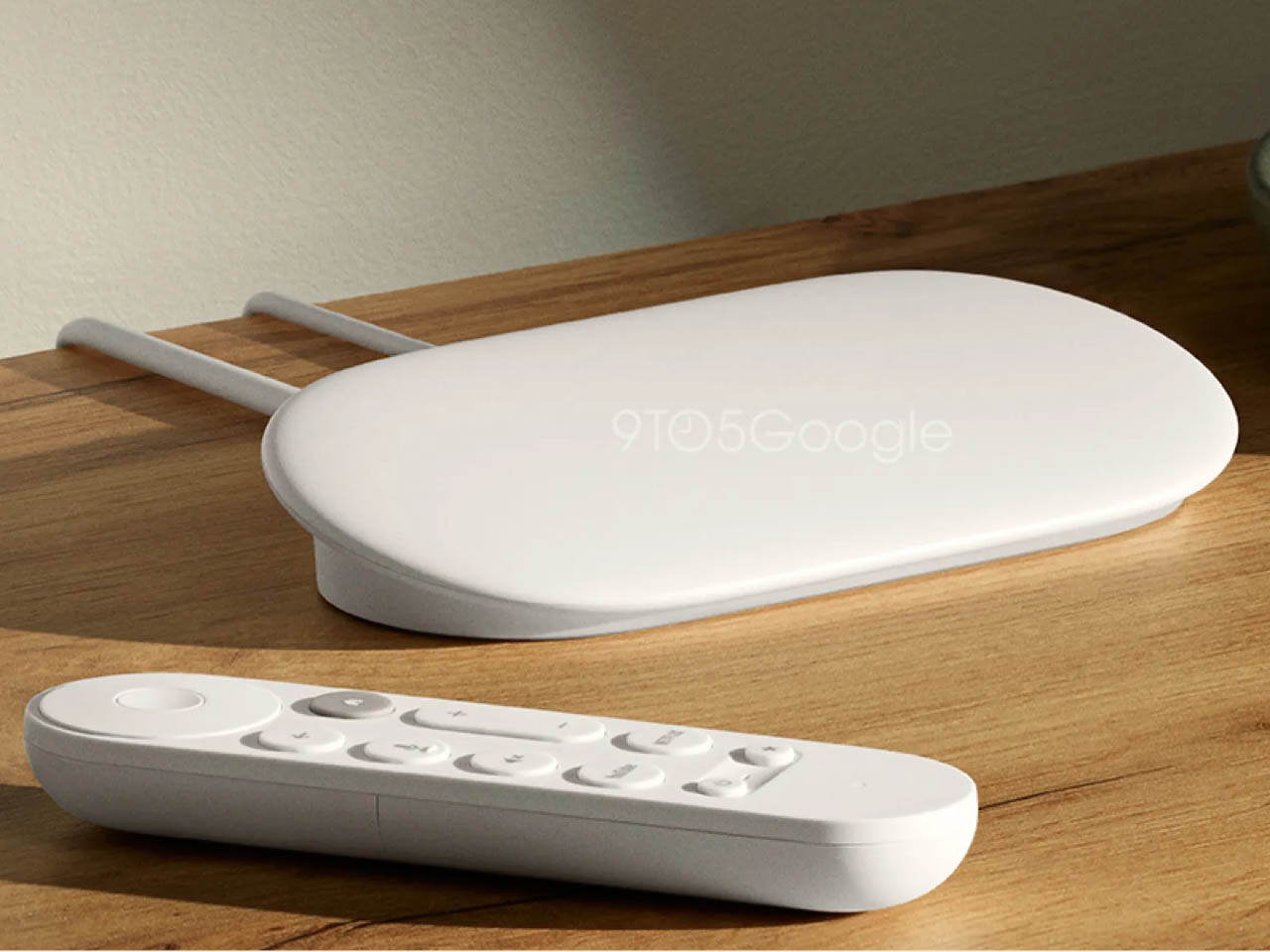
The Google TV Streamer is designed to be the Chromecast’s successor. It is deemed a natural rival to the Apple TV, and it features a slanted top, supported by a firm block base. It has a clean and minimal white color theme, and it is quite different from the compact dongle Chromecast while maintaining the Google TV branding. It is the latest 4K streaming device from Google. It seems like the ideal gadget to support your movie-watching marathons this fall season if you’re in the mood for some Halloween-themed media!
Why is it noteworthy?
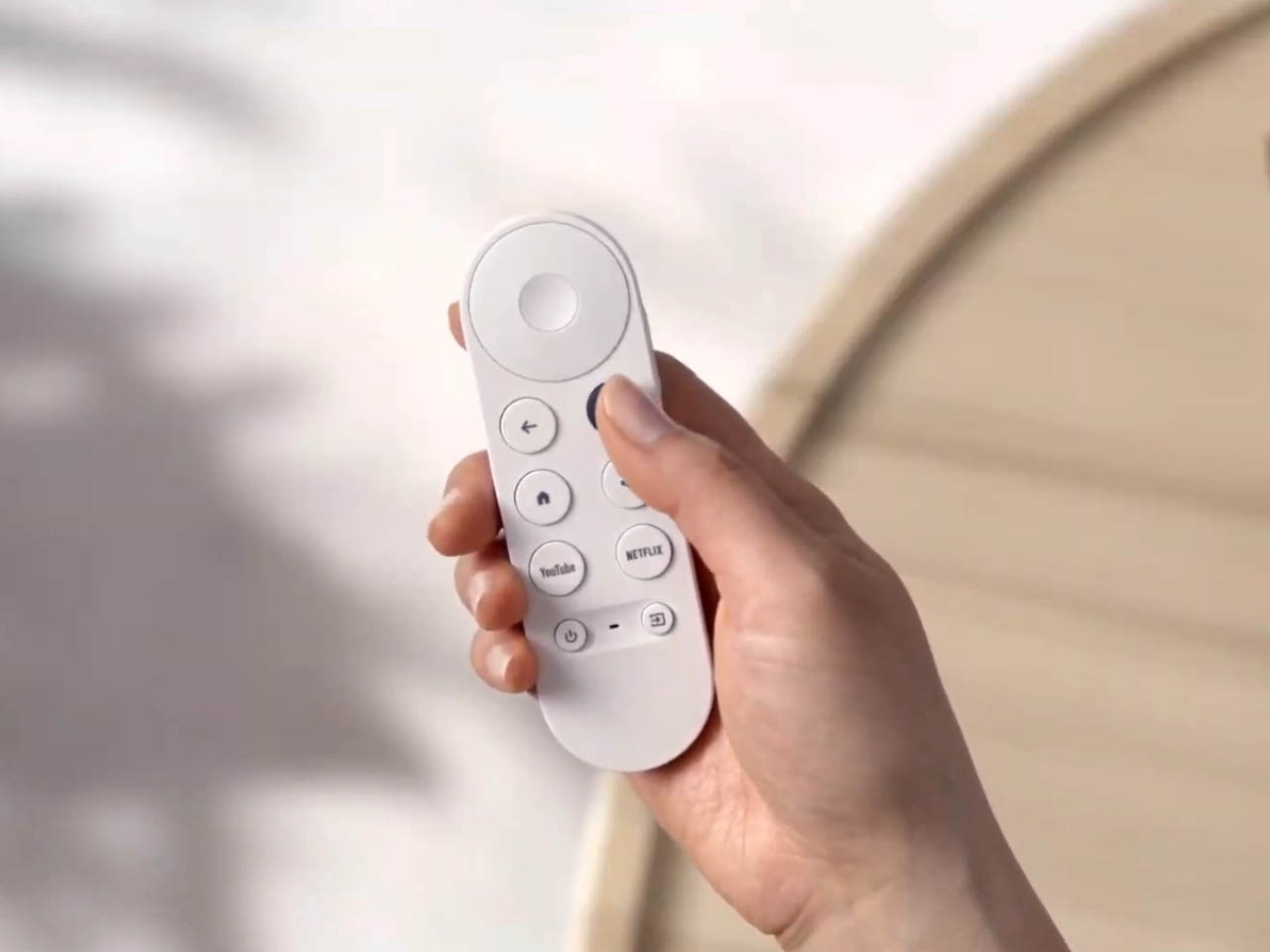
The Google TV Streamer’s new and improved design is paired up with a remote control, which is longer than the previous remote of the Chromecast. The remote features some improvements in the design and feel as well. The streaming box is connected to two cables at the back, which may be for power and HDMI.
What we like
Features a new flat tabletop design
Upgraded smart home controls
What we dislike
Uses Wi-Fi 5 instead of a more modern standard like Wi-Fi 6E or Wi-Fi 7
It is pricier than the Chromecast with Google TV
2. The COit
Designed by LG, the COit is intended to be a robot that functions as a hub in your kitchen ecosystem. The robot is designed to be utilized by novices and professional chefs. It is an autonomous device that moves the focus from videography back to cooking, which is the primary focus of entering a kitchen.
Why is it noteworthy?
It is equipped with a mountable rail with a circular display that is surrounded by a projector, camera, light, and a smart grip. The different modules are designed to be moved around in the small area, ensuring they are kept away from fires and vapors.
What we like
These modules – that clip onto the rail with built-in magnets – can be customized in orientation, depending on user requirements
What we dislike
Food over the globe has such diversity, that trying to standardize the recipe as per one instruction set would impact the diversity of that dish
3. Shell Intelligent Speaker
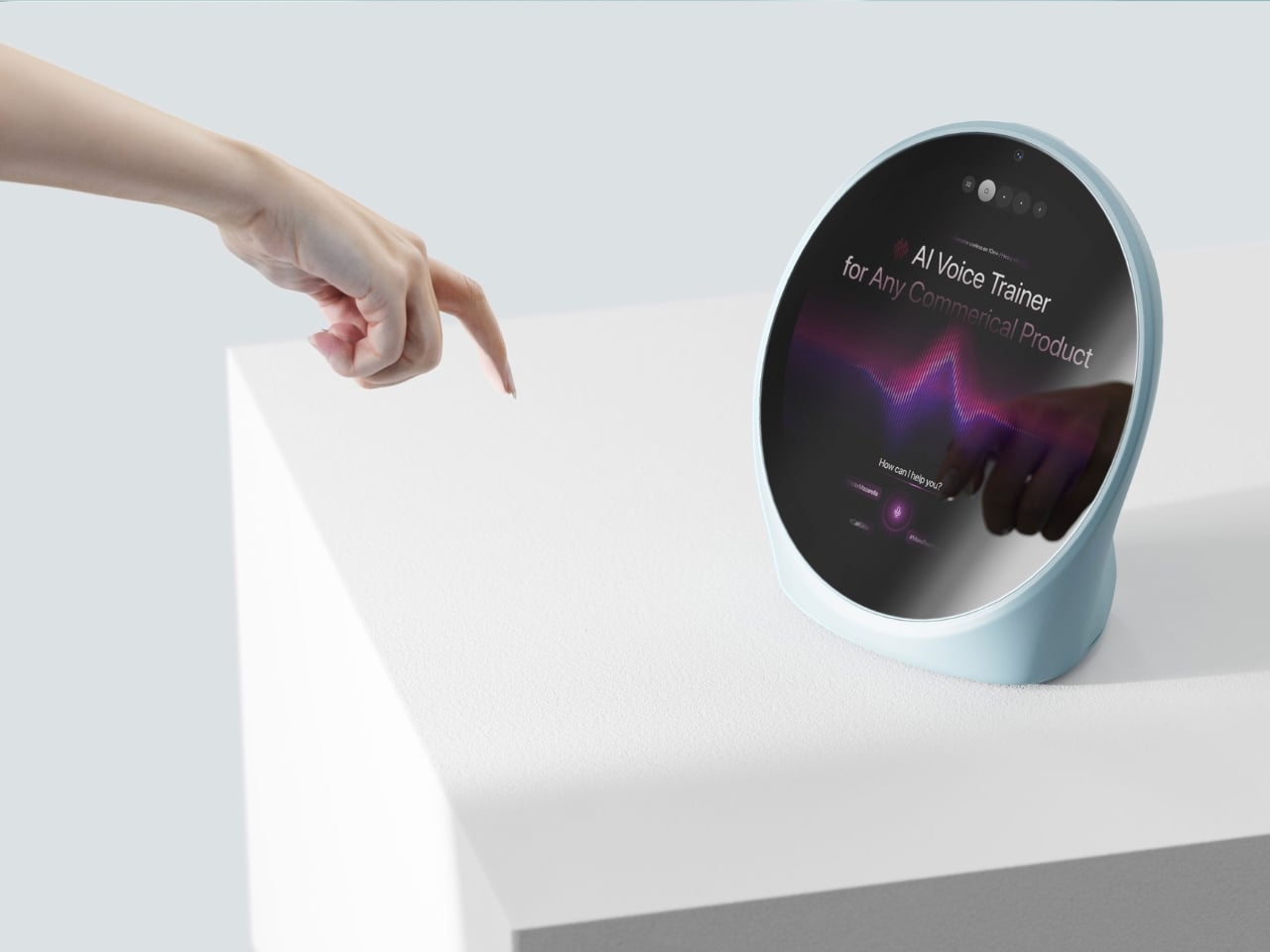
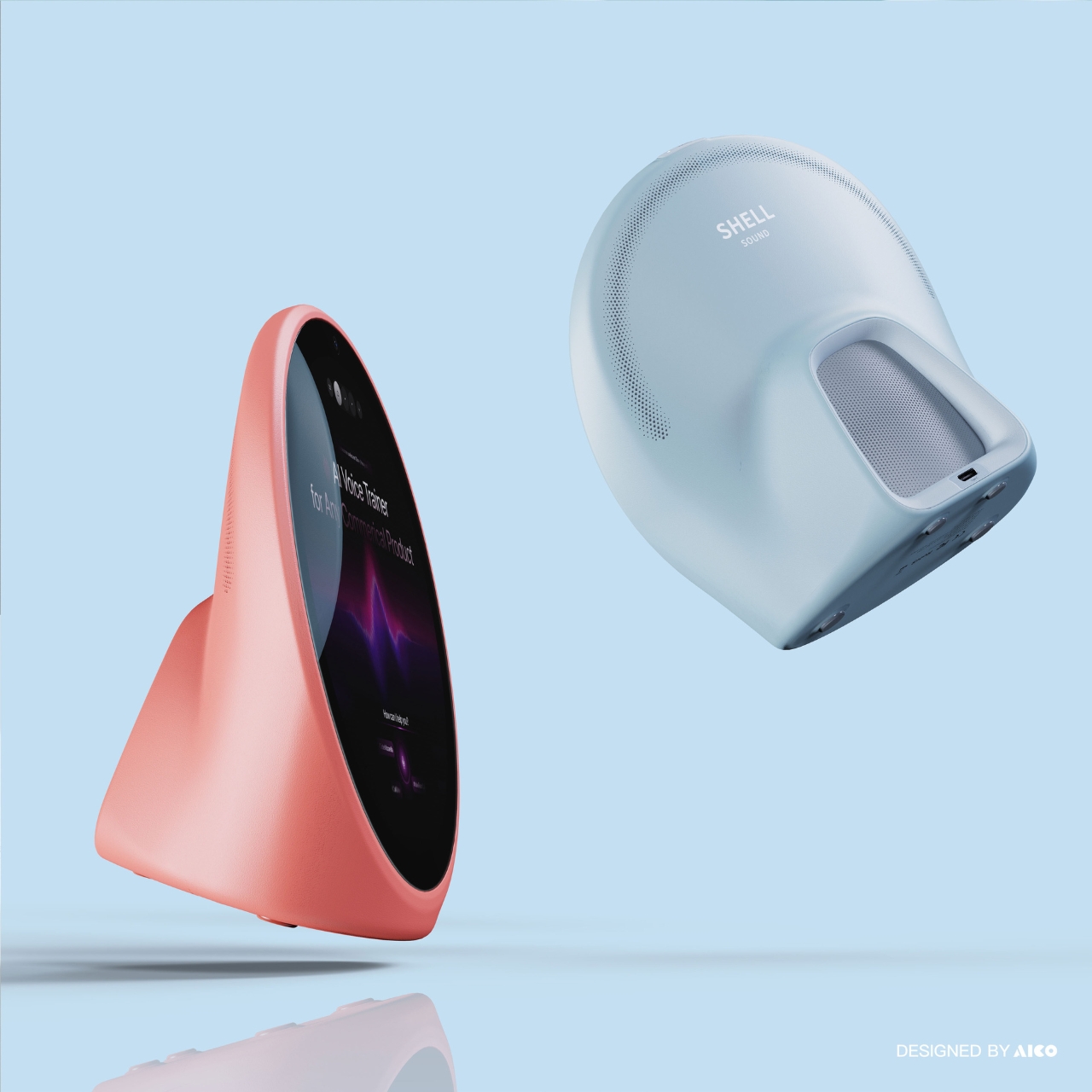
Dubbed the Shell Intelligent Speaker, this conceptual design offers a twist on the shape of a smart speaker. It draws inspiration from shells, merging the round and squarish shapes, and then utilizing a dot matric outline. The hole-inspired form and the addictive character will elevate the acoustic sound of the speaker. The speaker is a visually pleasing device, to help you play your autumn-themed playlist at full volume!
Why is it noteworthy?
The round speaker looks quite cute and appealing and reminds you not only of a seashell but also of an egg. The round screen offers more space to view your music, videos, weather, and date information. Since it is a smart speaker, you can simply listen to the shell to get the information you need.
What we like
Minimal aesthetic with pastel colors
Larger screen space
What we dislike
It is a concept, so we don’t know how well it will translate into a tangible product
4. Smart Tea Pot
Say hello to the Smart Tea Pot, an essential for all tea lovers. It is a unique connected teapot, which lets you brew your tea using technology. You can prepare a delicious brew based on the tea you like to drink, creating a specialized brew of your own choice. You could try preparing some delicious pumpkin-themed tea or chai to deal with the autumn air!
The Smart Tea Pot features advanced brewing adjustments you can customize to prepare the kind of tea you want. Its “Golden Drop” rotating infuser is the perfect example of Japanese minimalism.
What we like
Equipped with compact size, and minimal design language
Perfect example of Japanese minimalism and design philosophy
What we dislike
Tech is used for brewing, which may require a learning curve for users
5. Kuku Maker
If you’re in the mood to up your coffee game this fall, and prepare some delicious pumpkin-spiced lattes, then you may want to consider purchasing the Kuku Maker. It helps you take control of your coffee, and prepare it exactly the way you like it. You have options for flavor, thick or light consistency, as well as hot or cold serving.
Why is it noteworthy?
Designed to be a revolutionary coffee machine, the KUKU Maker provides a consistent taste and allows you to customize extraction parameters according to your personal preferences during the brewing process. It has a whole bunch of adjustable options, such as extraction pressure, time, temperature, and grind fineness.
What we like
Provides exceptional control and flexibility
Easy-to-clean design
What we dislike
Will require a learning curve to fully understand and properly use the various settings effectively
6. Heisenberg H1 Pro All-in-One Robot Mower
Meet the Heisenberg H1 Pro All-in-One Robot Mower amped with Vision AI. It is a robotic lawn mower, perfect for cleaning up your yard this autumn season. It merges cameras with AI to plan routes, and also avoid obstacles pretty efficiently. This ensures that the traditional boundary wire isn’t required.
Why is it noteworthy?
The robotic lawn mower ensures your yard is clean and crisp. The H1 Pro is amped with the Heisenberg Pilot System (HPS), and it uses robotic vision, dual AI chips, and deep-learning algorithms to build the perfect 3D navigation for your entire lawn. It is great for perfect edges and an even cut.
What we like
Trims edges, blows leaves, and sprays fertilizers on its own
What we dislike
Looks a bit too industrial
7. ROTO-Q 360
Say hello to the ROTO-Q 360 – a non-electric rotisserie cooking machine. It is designed to be a durable and convenient option for rotisserie chicken. It occupies minimal space and automates the whole rotisserie process, so you just need to set it up and turn it on. The machine doesn’t need any fuel, gas, or power to run, so you don’t need to stress about keeping it charged and ready for use.
Why is it noteworthy?
It offers the ultimate convenience in rotisserie cooking and ensures some delicious and healthy chicken is always easily accessible for you. You can enjoy some fresh and delicious rotisserie chicken all day long, keeping your diet on track, and making for a perfect fall dinner!
What we like
Engineered to fit in any home and kitchen
Portable design
What we dislike
Some users said that it has sharp edges, so use it with care to ensure you don’t cut yourself
8. Abell
Dubbed Abell, this air purifier is both functional and aesthetic. It purifies the air in your room and home, while also serving as a decorative piece. It doesn’t simply stand in your room, cleaning the air, it also functions as a lighting design, making it a truly multifunctional product.
Why is it noteworthy?
The purifier can be hung wherever you like, and it won’t occupy any precious real estate in your home. It provides clean air, while also illuminating your room. If you’re someone who appreciates a minimal and monochromatic aesthetic, then this air purifier is the perfect choice for you.
What we like
Multifunctional and versatile product
Minimalist and visually pleasing design
What we dislike
It has a pretty minimal and simple controller, which doesn’t display how the air-purification function can be customized
9. ANAORI Kakugama
Say hello to the ANAORI kakugama – a sleek, all-black, and aesthetic appliance that merges traditional and modern design. The kitchen appliance prepares fresh delicious food, without causing much damage to the ingredients. It is a multifunctional gadget made from carbon graphite. It can steam, poach, simmer, grill, or even fry your food for you. You can do a lot with your autumnal vegetable this fall season!
Why is it noteworthy?
The versatile cooking device can prepare your food in different styles for you. It is equipped with great heat retention on account of the carbon graphite and a Japanese cypress lid which imparts the food with the lovely scent of the Japanese countryside.
What we like
Prepares food with care, while taking care of ingredients
What we dislike
Expensive price tag
Bulky appliance that will occupy substantial space
10. Battery-free Amplifying iSpeakers
If you’re in the mood to play some spooky tunes this Halloween, then you may want to get your hands on the Battery-Free Amplifying Speakers. These unique speakers are battery-free and portable and designed to be an upgraded variant of the conventional no-power smartphone speaker. The speakers are built from metal, giving them a sleek and sturdy look.
These speakers are made from a special aluminum alloy called Duralumin. This alloy is typically used in aviation and aerospace industries since it has vibration-resistant properties. You just need to place the smartphone into the speaker and prepare yourself for a high-quality audio experience.
What we like
It doesn’t need any power, so you can carry it wherever you like
Sleek and minimal aesthetics
What we dislike
Incompatible with bulky and big smartphone cases and covers
In today’s digital age, the allure of running large language models (LLMs) on your computer or home network is undeniable. Who wouldn’t want the cost savings, enhanced privacy, and control over scalability that come with local AI hosting? Yet, as enticing as these benefits sound, the reality of self-hosting LLMs is far from straightforward. It’s […]
When comparing the iPhone 16 Pro and the iPhone 14 Pro, several notable differences emerge in terms of design, performance, and features. The video below from Nick Ackerman will help you understand these distinctions and determine which model best suits your specific needs and preferences. Design and Build Quality The iPhone 16 Pro features a sleek and modern design, featuring […]