Google Drive is a powerful cloud-based storage and collaboration platform that simplifies file management and sharing. With its user-friendly interface and robust features, Google Drive enables you to efficiently store, organize, and access your files from anywhere, at any time. The videos below from Hopwfinity will walk us through the essential steps to leverage Google […]
The European Union is going impose additional tariffs of up to 38 percent on Chinese-made electric vehicles in an effort to protect the region's manufacturers from unfair competition, according to The New York Times and the Financial Times. The European Commission has already warned Chinese carmakers about the additional taxes, which will go on top of the existing 10 percent tariff on their EVs and will be different for each manufacturer. BYD's and Geely's vehicles will be hit by tariffs between 17.4 and 20 percent, while SAIC will face an additional 38 percent in taxes.
Rates for other carmakers vary, depending on whether they've cooperated with an ongoing EU investigation into the Chinese government's subsidies for its EV manufacturers. Because of those subsidies, China-made EVs can be sold at much lower prices than their European competitors'. The Chinese carmakers that have cooperated with the probe will be subjected to an additional tariff of 21 percent, while those who didn't will get an extra 38 percent. The Financial Times says European Commission's Margaritis Schinas has reached out to Chinese authorities to "explore possible ways to resolve" the issue. The new tariffs will be enforced on July 4 if they fail to reach an agreement.
While the EU said that it's introducing additional taxes on Chinese EVs to protect the bloc's manufacturers, some authorities and European automakers oppose the move out of concern that it could lead to retaliation from China. They're specifically worried that China's response would make EVs more expensive in general, which in turn could drive away customers, especially those who are still not wholly convinced that they should switch to electric.
The EU's announcement comes a month after the US quadrupled the import tariff for Chinese EVs. It was part of a bigger move by the US government to quash China's influence on its economy, along with imposing additional taxes on Chinese-made semiconductors, solar cells, batteries and medical products.
This article originally appeared on Engadget at https://www.engadget.com/chinese-ev-makers-face-additional-tariffs-of-up-to-38-percent-in-the-eu-130046170.html?src=rss
NETGEAR has expanded its WiFi 7 lineup with the introduction of the Orbi 770 Tri-band Mesh System and the Nighthawk RS300 Router. These new products promise to deliver powerful WiFi performance and secure connectivity at an affordable price point, making next-generation internet speeds accessible to a wider audience. Key Takeaways Orbi 770 Tri-band Mesh System […]
Jabra has unveiled its latest innovations: the Elite 8 Active Gen 2 and Elite 10 Gen 2 wireless earbuds. These next-generation earbuds build upon the success of their predecessors, offering enhanced features that elevate the audio experience to new heights. Key Takeaways Elite 8 Active Gen 2: LE Audio smart case for streaming spatial sound […]
Waymo is voluntarily recalling its robotaxis after one of them collided with a telephone pole in an alley enroute to pick up a passenger, The Verge reported. The vehicle was unoccupied and no bystanders were injured.
At the time of the May 21st accident, the Waymo vehicle went through an alley lined with telephone poles mounted at street level rather than on a curb, with a yellow line showing where to drive. While pulling over, it struck one of the poles at 8 MPH and sustained some damage, Waymo said.
"It never made it to pick us up," the passenger waiting for the car, Jericka Mitchell, told 12News. Mitchell reportedly heard, but didn't see the accident.
The company filed a recall with the National Highway Traffic Safety Administration (NHTSA) after updating the software in its entire self-driving fleet of 672 vehicles. The update is designed to fix an error that assigned a low damage score to the pole and failed to account for the alleyway's hard edge.
It's only Waymo's second recall. The first happened earlier this year when two of its autonomous vehicles crashed into the same pickup truck that was being towed. In that one, Waymo found that its software failed to predict the movements of the vehicle due to "persistent orientation mismatch" between the towed vehicle and the one towing it.
Waymo is also under investigation for more than 24 incidents including crashes and traffic violations. Rival Cruise, owned by GM, was involved in a more serious incident last year, wherein one of its robotaxis accidentally dragged someone hit by another vehicle a few dozen feet down a San Francisco street. California then suspended its license to operate in the state and Cruise eventually paused all robotaxi operations
This article originally appeared on Engadget at https://www.engadget.com/waymo-issues-recall-after-one-its-self-driving-taxis-crashed-into-a-pole-121937607.html?src=rss
Since its recent launch GitButler is has been transforming the way developers manage their source code with its innovative approach to Git branching. Designed to enhance productivity and streamline workflows, GitButler offers a suite of features that cater to the needs of modern developers. This article delves into the advanced Git branching capabilities of GitButler, […]
Google has recently unveiled its latest Feature Drop for Pixel devices, introducing a range of new capabilities designed to enhance user experience and functionality. The standout feature of this update is the introduction of Gemini Nano, Google’s most efficient AI model built specifically for on-device tasks. This groundbreaking technology is now available as a developer […]
Elon Musk had sexual relations with a SpaceX intern who was later hired onto his executive staff as a troubleshooter, The Wall Street Journal reported. He also had an intimate relationship with a second employee and allegedly asked a third woman to have his babies, according to the report. When the latter refused, Musk denied her a raise and complained about her performance, according to the WSJ's sources.
In one case, Musk pursued a relationship with an intern. Later, he contacted her about a fulltime job at SpaceX to "find problems at the company and fix them," according to the report. She became a full-time member of Musk's executive group, something former employees found unusual for someone so junior — despite her talent as an engineer. (The woman told the WSJ that she didn't want to be part of the article and said in an affidavit that her and Musk remained friends.)
Another woman said she was accused by SpaceX President Gwynne Shotwell of having an affair with Shotwell's husband. The woman reported the event to HR, something that allegedly got back to Shotwell. Shotwell then demanded the woman be removed from the chief executive's office. Musk later had a sexual relationship with the same woman, who has since left the company.
The WSJ said its reporting is based on text message, emails, documents and interviews with more than 48 people, "including former employees, people familiar with Musk’s interactions with female subordinates and friends and family of the women."
Musk didn't reply to the WSJ. In a comment, Shotwell said:
"The untruths, mischaracterizations, and revisionist history in your email paint a completely misleading narrative. I continue to be amazed by what this extraordinary group of people are achieving every day even amidst all the forces acting against us. And Elon is one of the best humans I know."
This is far from the first report about inappropriate behavior at SpaceX, though. Late in 2021, former employees described a "culture of sexual harassment" at the company, including unwanted advances, lewd comments and physical contact. Last year, Musk was accused of sexual misconduct by a SpaceX flight attendant and earlier in 2024, a SpaceX lawsuit claimed repeated instances of gender discrimination and basic safeguarding failures.
This article originally appeared on Engadget at https://www.engadget.com/wsj-details-elon-musks-questionable-conduct-with-spacex-employees-120057625.html?src=rss
There’s about a one in three chance you’re reading this on a desktop computer — and you might be wondering whether there’s a way to make your computing-at-a-desk experience more ideal for your body. Sitting for hours on end appears to be the biggest detriment to our health, which is why getting up regularly or switching things up with a standing desk can help. Then there’s the health considerations of peripherals like mice and keyboards. A traditional mouse can constrict your wrist and put pressure on your forearm, something ergonomic mice can alleviate with their more natural orientations. I tried out around 20 highly rated vertical, semi-vertical and trackball mice to see which ones felt good, worked well and most importantly, did anything to alleviate my chronic shoulder tension. Here are the best ergonomic mice I found.
Like everything related to ergonomics, the mouse design that works best for you will depend on your body and what you need to do on a typical day. So the shapes, added features and how the mouse communicates with your computer will determine which you should get.
Types and shapes of ergonomic mice
When we’re talking about ergonomic mice for productivity purposes, it usually refers to mice that look distinctly different from the standard, typically with shapes that tilt your hand towards a more “handshake” position instead of facing your palm downward. A vertical ergonomic mouse has the most severe up-and-down angle, semi-vertical mice split the difference and trackball models stay put on your desk while your thumb controls the movement of the cursor. Gaming mice have an ergonomic category as well, but that simply refers to a mouse with curves designed to fit either the right or left hand. It differentiates those mice from ambidextrous models, which don’t conform to a particular hand.
Each of three ergonomic mice shapes can help address different concerns. If you’re trying to avoid twisting your forearm, a vertical mouse could be what you need. Clicking a vertical mouse feels more like pinching your finger and thumb together, which could relieve certain other wrist issues as well.
A semi-vertical mouse feels the most like a traditional mouse, with an angle closer to 50 or 60 degrees from your desk. Semi-vertical mouse clicks can feel easier too, since you're pushing down instead of pinching. Some vertical and semi-vertical mice have an optional flange that supports the heel of your palm. Instead of pivoting on those bones to make the mouse move, your palm and wrist stay aligned and the entire arm controls the motion.
A trackball mouse can also keep your wrist from bending, as it keeps your forearm planted. My personal struggle is with neck and shoulder tension, so trackballs and very lightweight vertical mice work best for me as their configuration lets me keep my forearm from moving.
DPI, weight and buttons
As this guide focuses on productivity mice, gaming-specific stats like polling rates and IPS values don’t really come into play. (My colleague Jeff Dunn does a good job of explaining those metrics in his gaming mouse review guide.) What matters here are numbers like DPI, or dots per inch, which indicates how sensitive a mouse is. The higher the setting, the faster your cursor will move across the screen. Low DPI settings let you do precision work like pixel-by-pixel editing in Photoshop. All the mice here have at least two and as many as five settings, ranging from 400 to 3,200 DPI. Mice that make it easy to switch from high to low DPI might make sense if you do a lot of detailed work.
Weight makes a difference in vertical and semi-vertical mice (but not trackballs, since they stay put). A lighter mouse will be easier to move around, which could put less strain on your wrist and arm. That said, a little weight can make the movements of your mouse feel more precise. For reference, a featherweight gaming mouse might weigh 45 grams and a large vertical mouse with a flange attached might weigh 140 grams. The latter may feel a little heavy, but a mouse with smooth feet and used with a decent mouse pad will feel lighter.
It's always nice to have easily clickable buttons, but that matters even more when body health is a concern. Pressing hard on a button tenses up my arm and shoulder like nobody’s business. Since it’s an action desk workers perform hundreds or thousands of times a day, it's essential that it be effortless — nothing ruled out a mouse quicker in my tests than tough buttons.
Photo by Amy Skorheim / Engadget
Extra features
All mice have the basics: a right and left button and a scroll wheel. All mice in this guide also have a DPI selector button. Some have other functions such as a scroll wheel that can click with a press or handle horizontal scrolling by tilting the wheel to the right or left. Many also have back and forward buttons for browser windows, and sometimes those two are programmable to perform different functions in other apps.
More complex mice have additional buttons to customize, typically using a mouse’s proprietary software. Depending on that software, you can set buttons to mute calls, copy and paste, undo and redo, switch tabs and more. Performing multiple functions without extraneous movement is a big plus in ergonomic design. Of course, there are a number of keyboards that let you program multiple functions into specific keys, which cuts down on superfluous movement even more, which you can read about in our ergonomic keyboard guide.
Connectivity and compatibility
All the mice here will work with Mac's operating system as well as Microsoft Windows, and some work with Chrome, Linnux and even iPadOS (though I didn’t test those) as well. They connect in three ways: Wired, via Bluetooth or with a 2.4Ghz wireless dongle. More devices have incorporated USB-C interfaces, but most mice still use USB-A. So if you have a laptop that only sports USB-C ports (looking at you, MacBook), you’ll need an adapter to use a wired or dongle-enabled mouse. You can use a hub or docking station for this purpose, but in testing this guide, I ran into connectivity issues using a wireless USB receiver in a docking station, particularly when there wasn’t a direct and completely clear path between the mouse and receiver. Everything worked far more reliably with just a direct USB-C to A adapter.
The difference between wireless and Bluetooth is twofold: a wireless dongle connection tends to be quicker to set up. You just plug in the accessory, turn on the mouse (potentially granting permission for the device) and you’re set. For Bluetooth, you need to open the settings menu, activate pairing mode on the mouse, search for the mouse and then click connect. There’s also a bit more latency when using Bluetooth versus a wireless mouse. It’s not something most people will notice doing workaday stuff, but if you plan on playing some Overwatch after hours and want to use the same mouse, you might want to go with the faster, 2.4Ghz route.
How we test ergonomic mice
After many hours of research and reading reviews, I gathered just over 20 mice with good claims to ergonomic design to test in my work setup. I mostly tried out mice geared towards a work-from-home or office setting, as opposed to gaming (we have a whole guide dedicated to that topic). I used each mouse for a few hours or a few days, noting how well they felt as well as how they performed. I mostly used a MacBook Pro M1 but verified Windows compatibility with an Asus ROG Strix laptop. For reference, my right hand measures 7.25 inches from the wrist crease to the tip of my middle finger, which is just under average for a man and large for a woman.
Best ergonomic mouse for 2024
Other ergonomic mice we tried
Logitech MX Master 3S
In our guide to the best productivity mice, we name the Logitech MX Master 3S the best you can get. As I considered its merits as a mouse, it was indeed an impressive option — it connected flawlessly, has a useful sideways wheel as well as the traditional scroll feature and the thumb rest is a nice touch. But the ergonomics didn't quite do it for me. For one, it holds your hand in the standard, palm-down, claw-grip position.
Logitech Lift Vertical
Logitech’s Lift Vertical is likely one of the more popular ergonomic mice out there. It’s fairly lightweight, has an attractive design with a nice feel to the exterior. The buttons are easy to click and nearly silent. It also connects quickly using either Bluetooth or a dongle. Unfortunately, it doesn’t glide across the mouse pad all that smoothly, and the pinch grip the design requires actually aggregated my wrist. The cursor movements are fairly precise, though I occasionally had trouble getting the cursor to land just where I wanted it. Also, it’s small; my hands are too large for the Lift. Logitech’s Logitech MX Vert is essentially a larger version, but again, the skinnier shape was uncomfortable in my hands and it was tough to get the cursor to go where I wanted it to.
HP 920 ergonomic vertical
The HP 920 ergonomic vertical also has a flange for resting your palm, but it makes the mouse overly heavy to move around. Without it, however, it's an extremely comfortable mouse with a premium feel, rechargeable battery, and two programmable thumb buttons. Unfortunately, the cursor movement was frustratingly imprecise and didn’t go exactly where I pointed, forcing a number of corrections — and extraneous movement is what we’re trying to avoid in ergonomic setups.
Turtle Beach Pure Air
Apart from the rather loud clicks, I was impressed with the build and performance of the Turtle Beach Pure Air. It’s lightweight, moves smoothly, and has impressively accurate cursor movements. But despite being labeled an ergonomic mouse, it’s particularly light on the ergonomics. There’s a divot for your right thumb, so it can't be called ambidextrous, but beyond that it’s a pretty standard (albeit quite nice) gaming mouse.
Perixx Perimice 719
The PERIMICE-719 from Perixx is a solid mouse with an exterior that feels nice to the touch. It has a comfortable, semi-vertical design, accurate cursor moves and a satisfyingly ratcheted scroll wheel. Plus, it offers reliable connectivity with a wireless dongle and only costs $22. Unfortunately, it was too small for my hand. Only folks with smaller glove sizes (or don’t mind adopting more of a fingertip grip) will be able to get the most out of this one.
This article originally appeared on Engadget at https://www.engadget.com/computing/accessories/best-ergonomic-mouse-120004931.html?src=rss
A true gentleman is always selective about the products he carries and uses since they are an extension of his own personal style. The first gentlemen we all encounter are our dads, and this Father’s Day why not gift your dad thoughtful and functional lifestyle products that will add to his natural aura, and charisma while adding value to his everyday life? Striking a unique balance between functionality and style is extremely important – especially when it comes to men’s lifestyle designs. And we do believe we may have found a collection of product designs that harmoniously capture this balance! From a portable shaver with ceramic blades to give you the perfect clean shave to an innovative key ring that will hold all keys – these products are essential must-haves for all the gentlemen out there.
1. Painless Key Ring
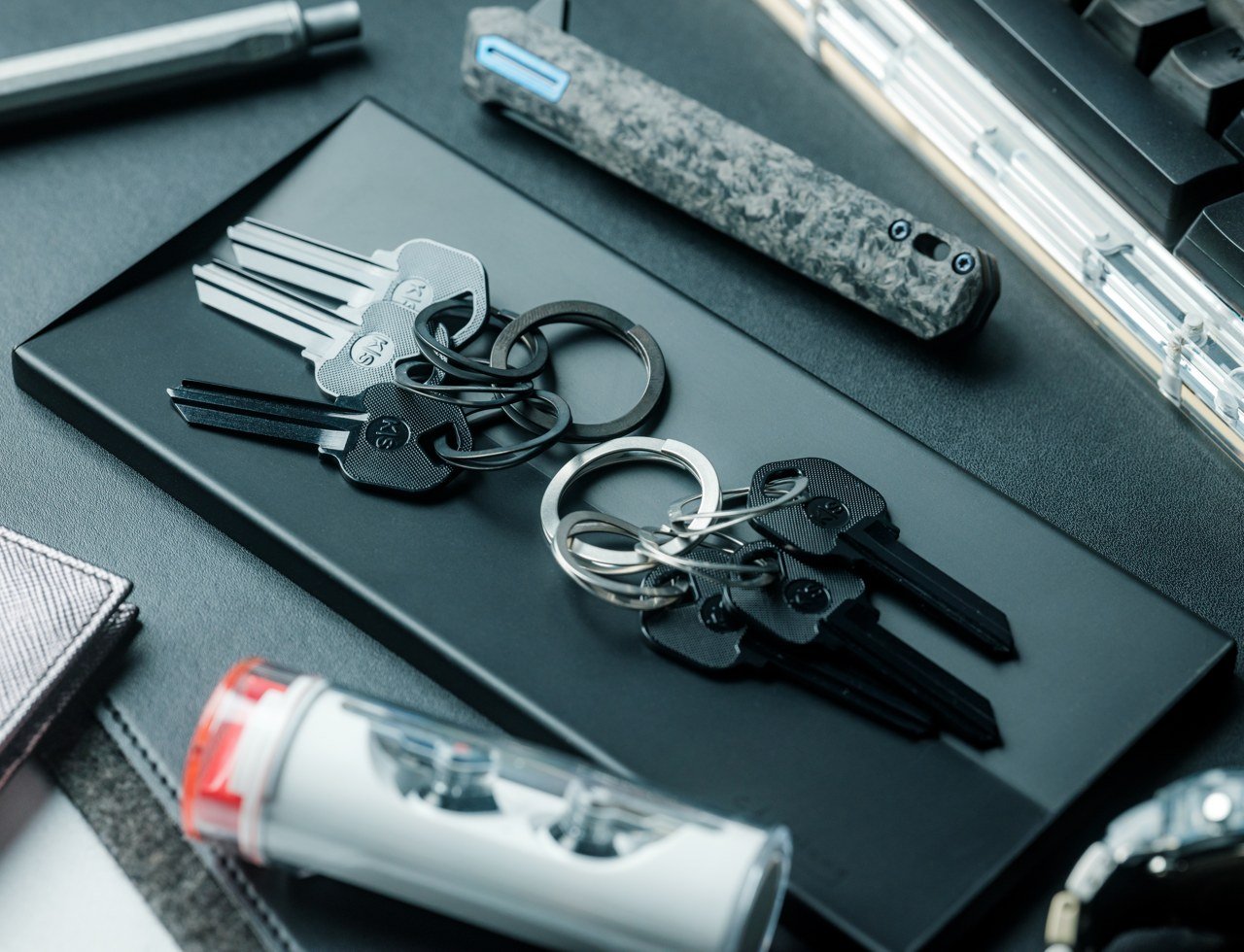
Called the Painless Key Ring, this innovative product is equipped with a revolutionary wave spring key ring. The design draws inspiration from the mechanism used in the aerospace and automotive industries, ensuring you handle your keys in a smooth and hassle-free manner. If your dad tends to lose his keys easily or hates dealing with typical key rings, then he can finally bid farewell to them, and thank the Painless Key Ring!
This key ring organizes your keys using a high-tech and durable design letting you store your keys in an easy-to-access manner. It has. a compact and lightweight form which makes it easy to carry around and store.
What we like
It utilizes a wave spring tech to remove and add keys
What we dislike
More expensive compared to conventional keyrings
There is no system to differentiate between the keys they hold
2. The Erazor
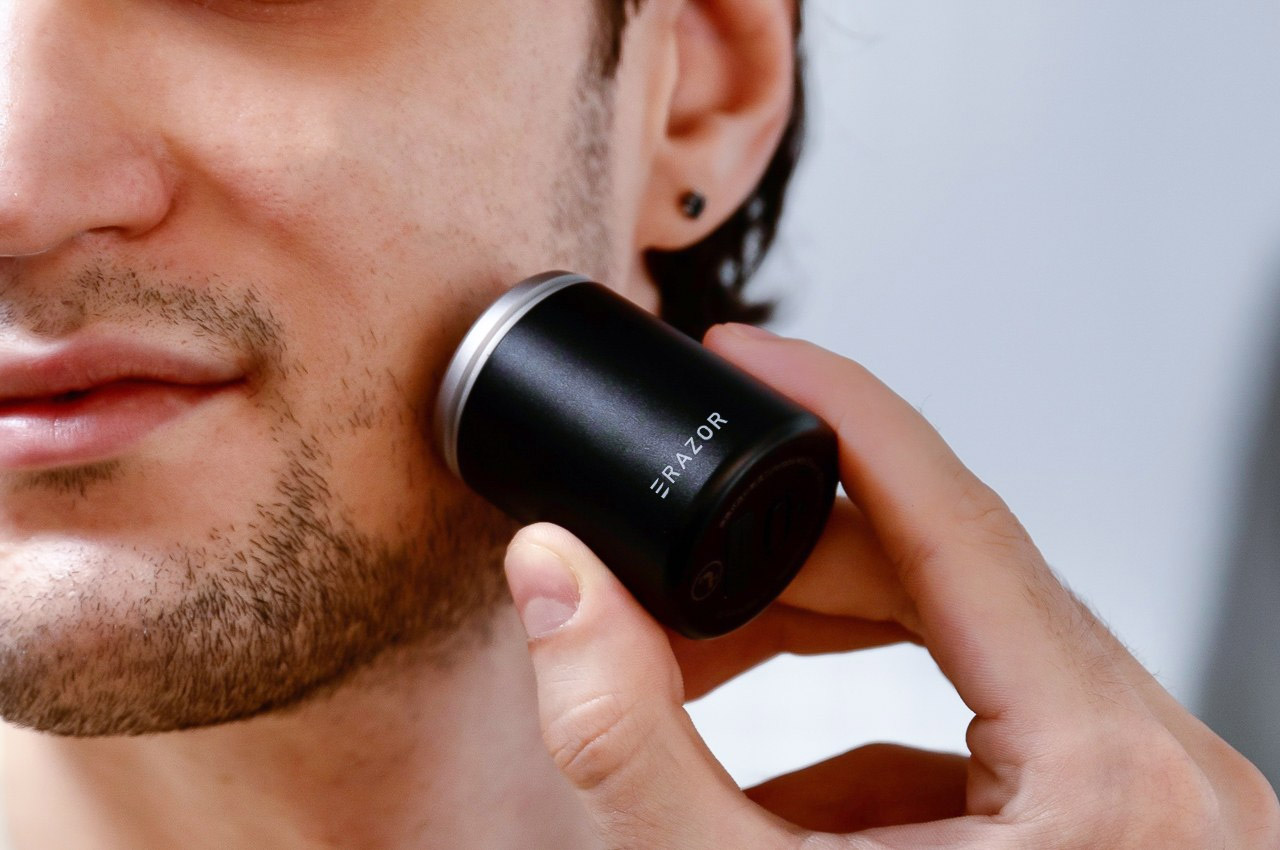
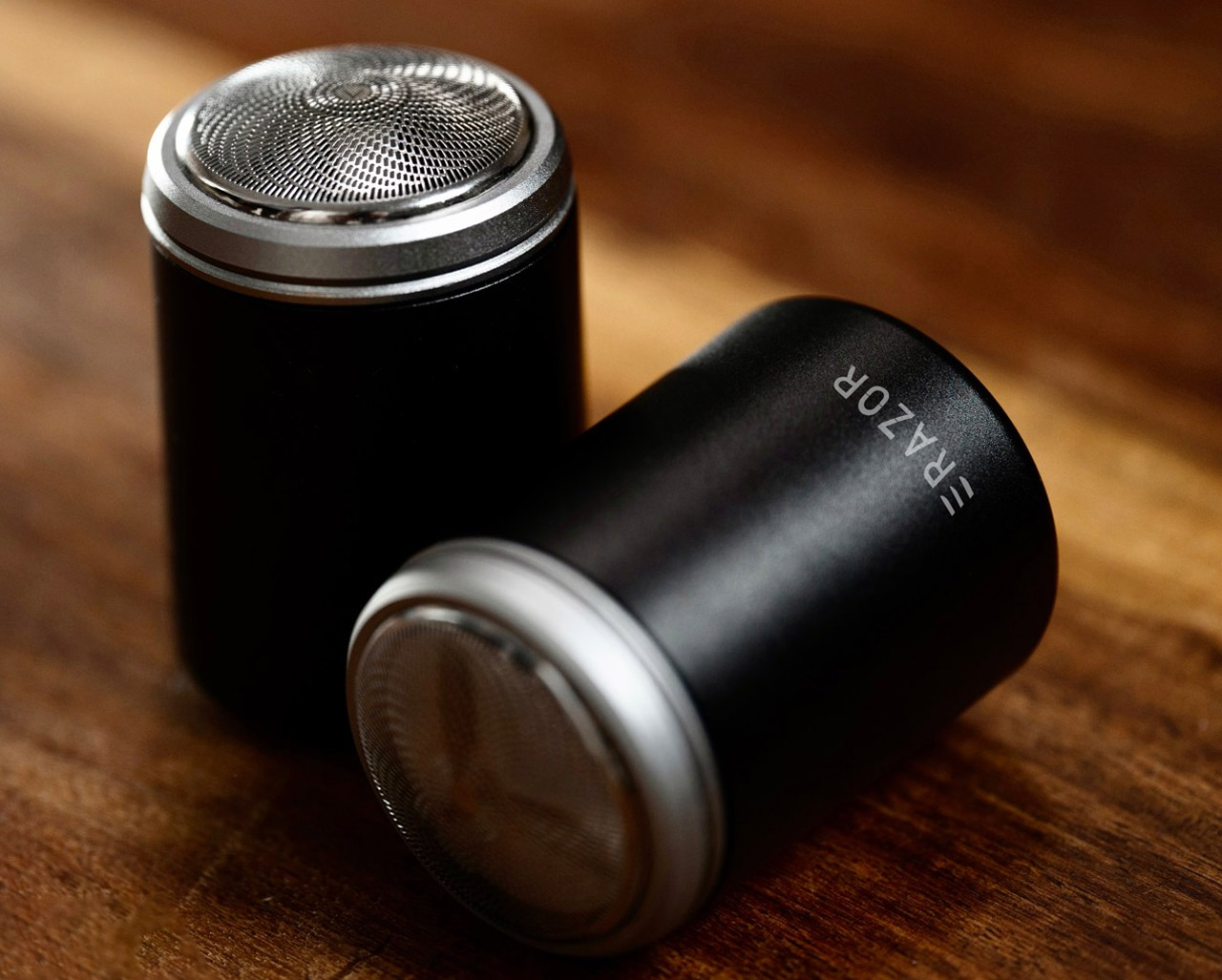
Called the Erazor, this unique portable shaver is designed to erase the stubble off your face, using ceramic blades. It is supposed to be the first shaver featuring ceramic blades. It is a compact and lightweight product that is quite easy to carry around, and also super comfortable to use. It makes for a thoughtful and functional Father’s Day present for your dad!
Why is it noteworthy?
The ceramic blades are designed to neatly and swiftly trim down your stubble, providing a totally clean shave, without causing any painful razor burns. The ceramic blades are a great alternative to meat blades which are coated with DLC for sharpness. But with time the coating can wear off, making the blades prone to nicking you.
What we like
The blades are made from Zirconium Oxide – an extremely durable material
What we dislike
The ceramic blades may take a while to adjust to if you’re used to metal blades
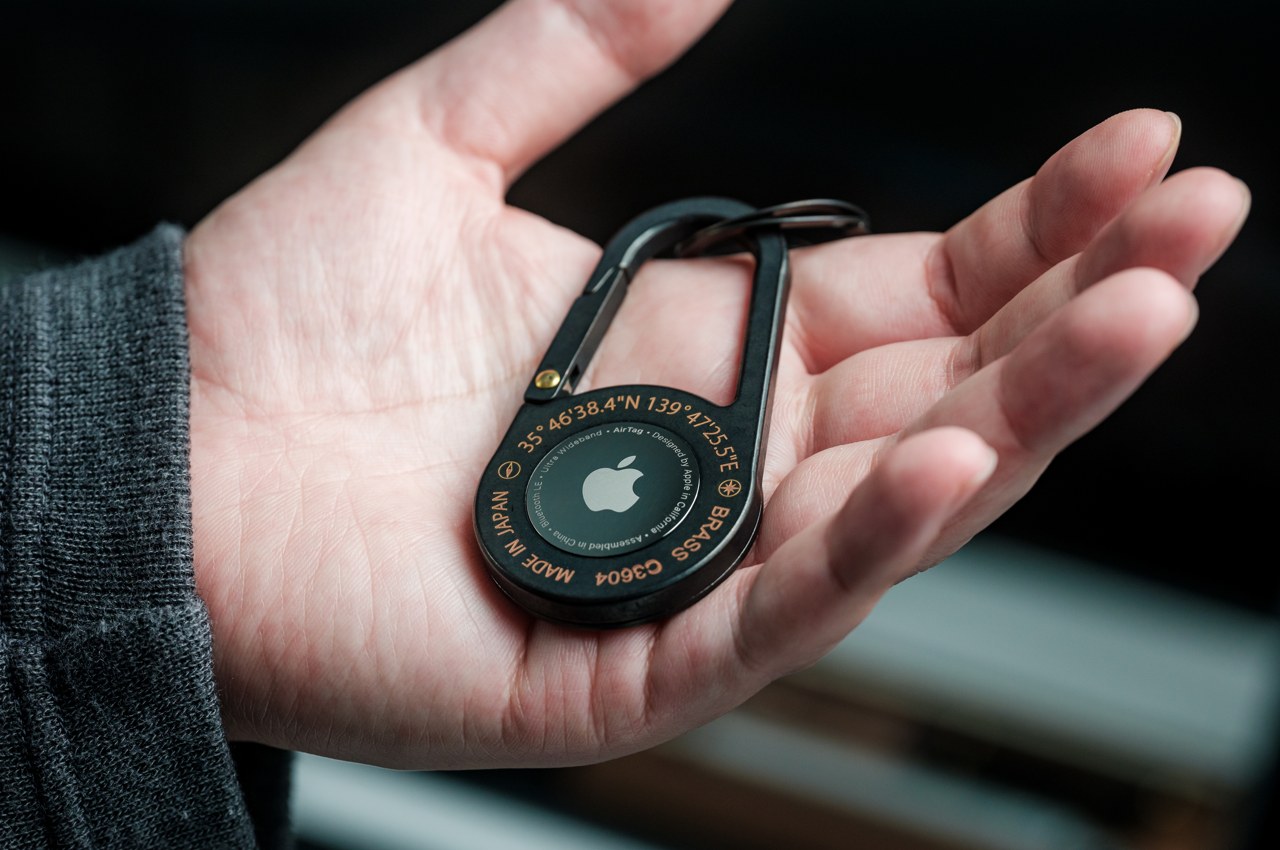
3. AirTag Carabiners
Called the AirTag Carabiners, these minimalist and good-looking designs are a refreshing new version of the typical old metal carabiners. They are precision-made and have a pretty compact form, making them easy to carry and even easier to use. The functional and portable design makes for a handy Father’s Day present.
They are handcrafted to make them durable and sturdy. These aren’t just simple melted metal casings, in fact, each piece is unlike any other, as manufacturing conditions alter the final design.
What we like
Handcrafted using premium-quality metal
Lightweight and easy-to-carry design
What we dislike
The process of attaching or detaching the AirTag isn’t very user-friendly and can be tedious
4. Pebble Time Watches
Called Pebble Time, this color e-paper smartwatch is designed to have seven days of battery, as well as a new timeline interface that highlights what’s most important in your day. There are two variants – Pebble Time and Pebble Time Steel, and they’re both infused with an improved timeline interface. If your dad doesn’t own a smartwatch, but you want to hook him up to the smartwatch game, then this is a good option for Father’s Day.
Why is it noteworthy?
The watches feature a color e-paper display as well as a microphone for responding to notifications. They are amped with four days of battery life, water resistance, and customizability. They are compatible with 6500+ existing Pebble apps and watch faces.
What we like
The e-paper display is ideal for displaying incoming notifications and your favorite watch face
What we dislike
Has a pretty thick bezel
Compatibility issues with certain apps
5. Unfiltered Titanium Whisky Glass
Dubbed the Unfiltered Titanium Whisky Glass, this classy glass draws inspiration from metallic hues and forms a fascinating light and color play. It builds a beautiful visual experience for you owing to its 1/f fluctuating pattern, which looks like a murmuring stream. Made from pure titanium, it elevates the drinking experience with its purity. It makes for an elegant and functional gift for your dad on Father’s Day, letting him enjoy his drink with class.
The whisky glass uses cutting-edge technology which creates a fascinating color play. It is biocompatible and safe, even more so than gold or platinum. The glass is pretty resistant to stains and odors and has long-term hygiene.
What we like
It uses advanced space development technology
What we dislike
Since it is a solid glass, you cannot see the quantity being poured or the amount in the glass from afar
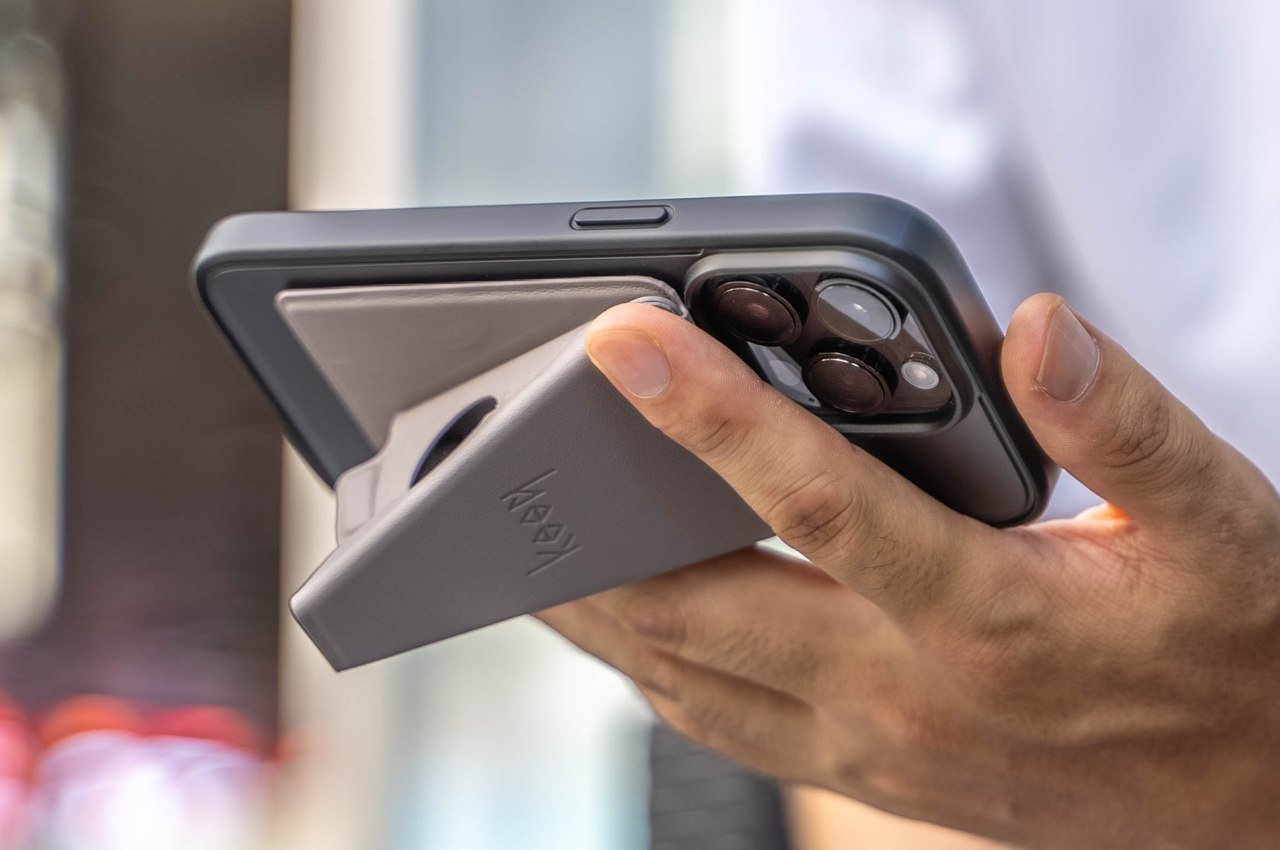
6. MagSafe Origami Grip Stand
Called the MagSafe Origami Grip Stand – this sleek little stand is inspired by the Japanese art of paper folding. It can be folded flat and vice versa, cutting down the trouble of assembly and disassembly. This stand will offer excellent support to your dad’s iPhone, without causing any damage to it. We can watch his shows in peace, or scroll through his phone without having to hold it up.
The MagSafe Origami Grip Stand is lightweight, with a card-sized thin design. It can be easily attached to your phone, or slipping into your pocket, and it won’t look awkward or odd! The stand will be firmly attached to your phone, and it won’t fall apart even if you move about a lot.
What we like
Draws inspiration from the Japanese art of Origami
It will stay securely attached to your phone
What we dislike
It only works with iPhone 12 and later models, excluding the iPhone SE, making it a limited product
7. Everyday Messenger
Say hello to the Everyday Messenger – a visually stunning, smartly-designed, and adaptable messenger bag which is designed to be many things – ranging from a camera bag to a day-to-day essential carry workhorse. If your dad works in the creative field and has a ton of work gear he needs to carry around, but no stylish and convenient way to carry it, then you need to gift him the Everyday Messenger this Father’s Day!
Why is it noteworthy?
The Everyday Messenger is designed for photographers, creatives, travelers, and daily commuters. It is available in Charcoal and Heritage Tan colors and adds an element of sleek style and quick efficiency to your everyday carry experience. The bag maintains its shapely figure even if your load is light or heavy.
What we like
Features dividers that allow the bag to expand or contract depending on your gear
You can wear the strap in a multitude of styles
What we dislike
Users said it slides around too much when worn
8. AirCard
Meet AirCard – the first card-sized tracker in the world with an integrated Digital ID, which works exclusively with the Apple Find My network. There are multitudes of Apple products being used around the world, and the AirCard emits a strong Bluetooth signal which can be detected by devices surrounding it in the network. This allows you to track your wallet no matter where it is, ensuring you never truly lose. If your dad is someone who frequently loses his wallet, then the AirCard is an ingenious present for him.
Why is it noteworthy?
Even if your wallet is hidden somewhere close by, you can make it emit a noise using the AirCard app, allowing you to easily trace and locate it. You could also ask Siri where your wallet is, and to make it sound. Also if you leave your wallet behind somewhere, you will get a notification immediately due to the Find My app.
What we like
It also has an advanced lost mode to provide your contact details in case someone finds your wallet
What we dislike
The battery is not replaceable
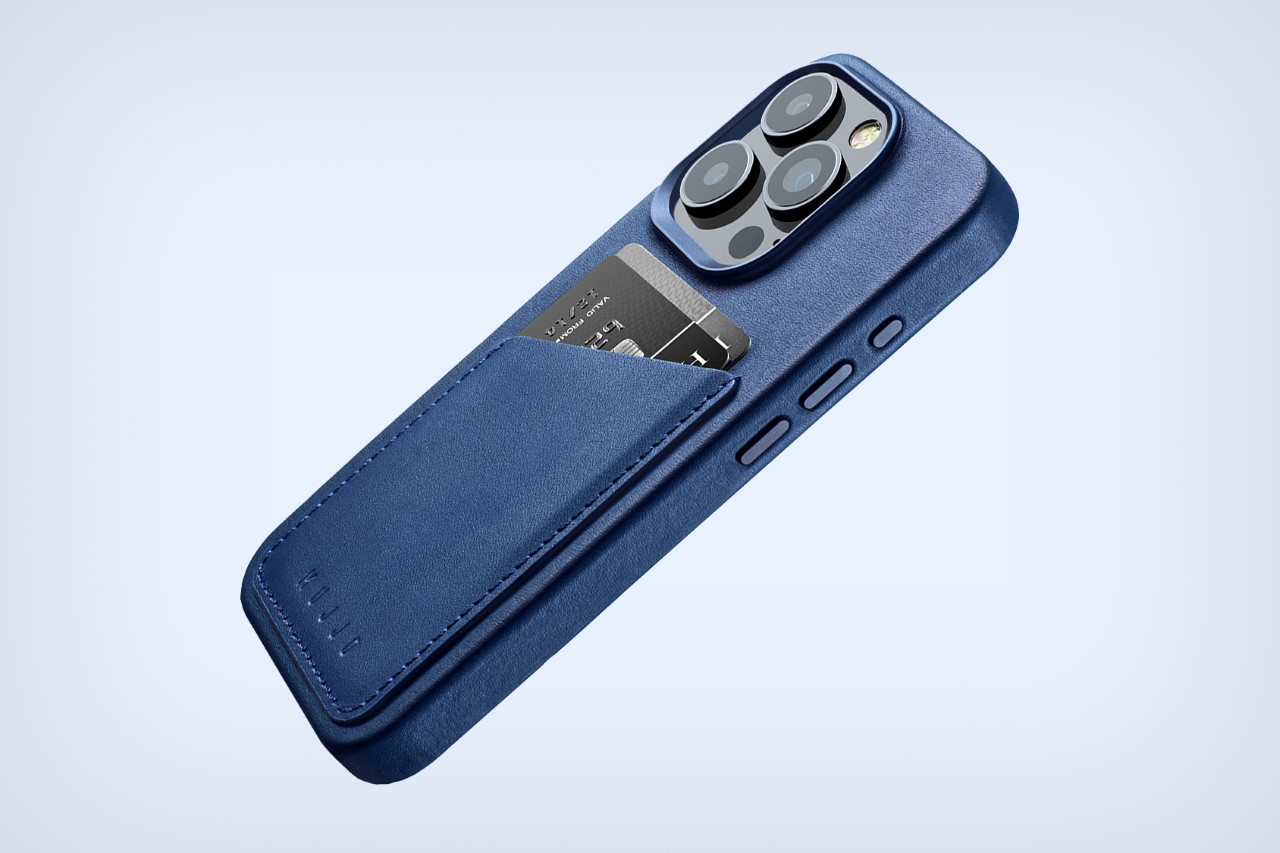
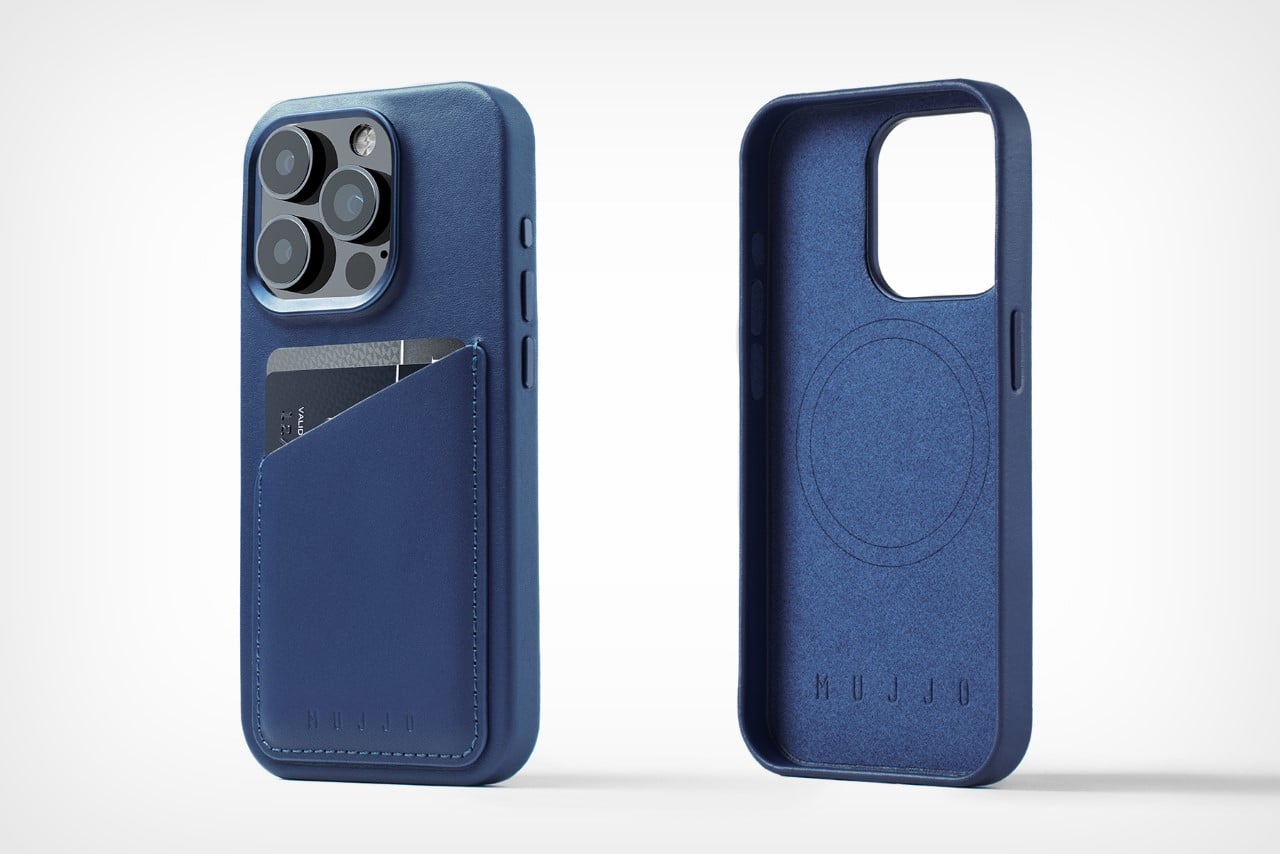
9. Full Leather Wallet Case
Called the Full Leather Wallet Case, this cover for the iPhone 15 Pro provides complete protection to your smartphone, while also making it look great. The cover features premium European leather tanned in the Netherlands, and there is a choice between black, brown, and blue finishes. The camera lenses are protected by a machined metal rim, while a polycarbonate inner structure with a microfiber interior lining provides protection against bumps.
Why is it noteworthy?
Each case features a slot on the back that can hold up to two cards with ease. You can also pull out the cards easily, and the wallet doesn’t detach or fall off from your phone when you pull it out of your pocket.
What we like
Utilizes the highest-quality leather and is tanned using a special DriTan process
What we dislike
You will need to remove the cards when you snap Apple’s MagSafe charger onto the back of the cover
10. BULLET
Say hello to the world’s smallest LED flashlight – the BULLET light. Designed to be functional, minima, and refined, the BULLET EDC is more than just your regular flashlight. It is a tiny flashlight designed to be the next step in mini everyday carry. If your dad loves carrying compact little tools with him on the go, then the BULLET light is a thoughtful and exceptional Father’s Day present for him.
Why is it noteworthy?
Shaped and sized like a bullet, the BULLET flashlight features a sleek and minimal design that isn’t too bad on the eyes. It is a strong LED mini flashlight in a lightweight and minimal form, and it eliminates the use of bulky flashlights from your everyday carry.
What we like
Features a built-in keychain that lets you carry the flashlight with you wherever you go
What we dislike
The size is pretty small, so it can be easily misplaced if not handled carefully