Bedside lava lamp concept improves sleep with white noise, warm lights

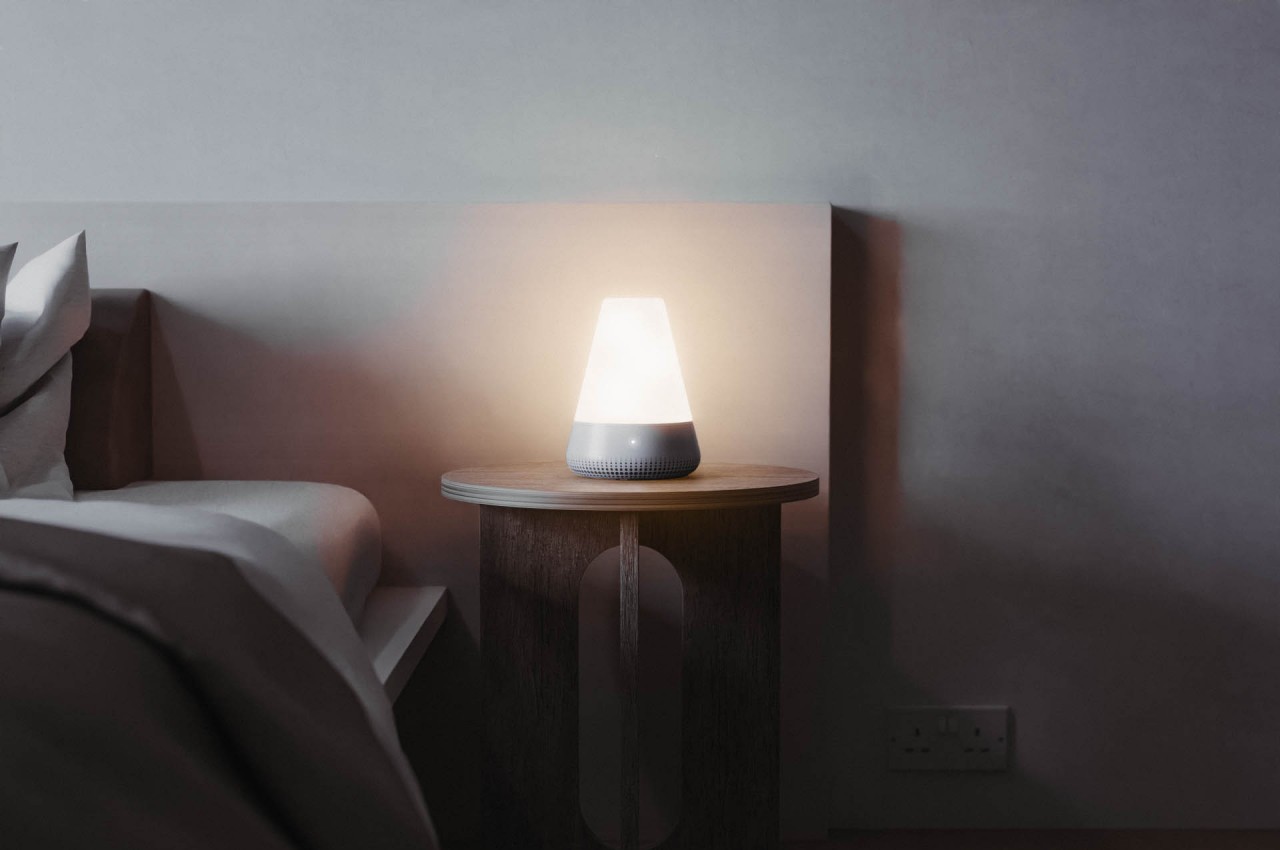
People are finally realizing that sleep actually plays an important role in productivity and shouldn’t be sacrificed for its sake. Unfortunately, many people by now have acquired one sleeping disorder or another, or at the very least have developed poor habits that lead to poor-quality sleep. There are plenty of methods being offered these days, from supplements to meditation to aromas, but sometimes the simplest solution is to use our body’s natural faculties to induce sleep and correct bad practices. That’s the kind of answer that this concept lamp tries to give, using light and sound to lull our minds and bodies to a more peaceful slumber and an even more refreshing awakening.

Designer: Alessandro Pennese

There are plenty of reasons why we have trouble sleeping in this day and age, but most of them boil down to our habits and lifestyles. Many of us flood our eyes with harmful blue light from our phones even while lying in bed, or let our ears be hammered by noise and distractions. Supplements rely on chemical changes to the body, which might be effective in the short term but could do more harm than good in the long run. Meditation is a good habit to develop in any context, but it only goes so far into actually inducing a physical change in our bodies.

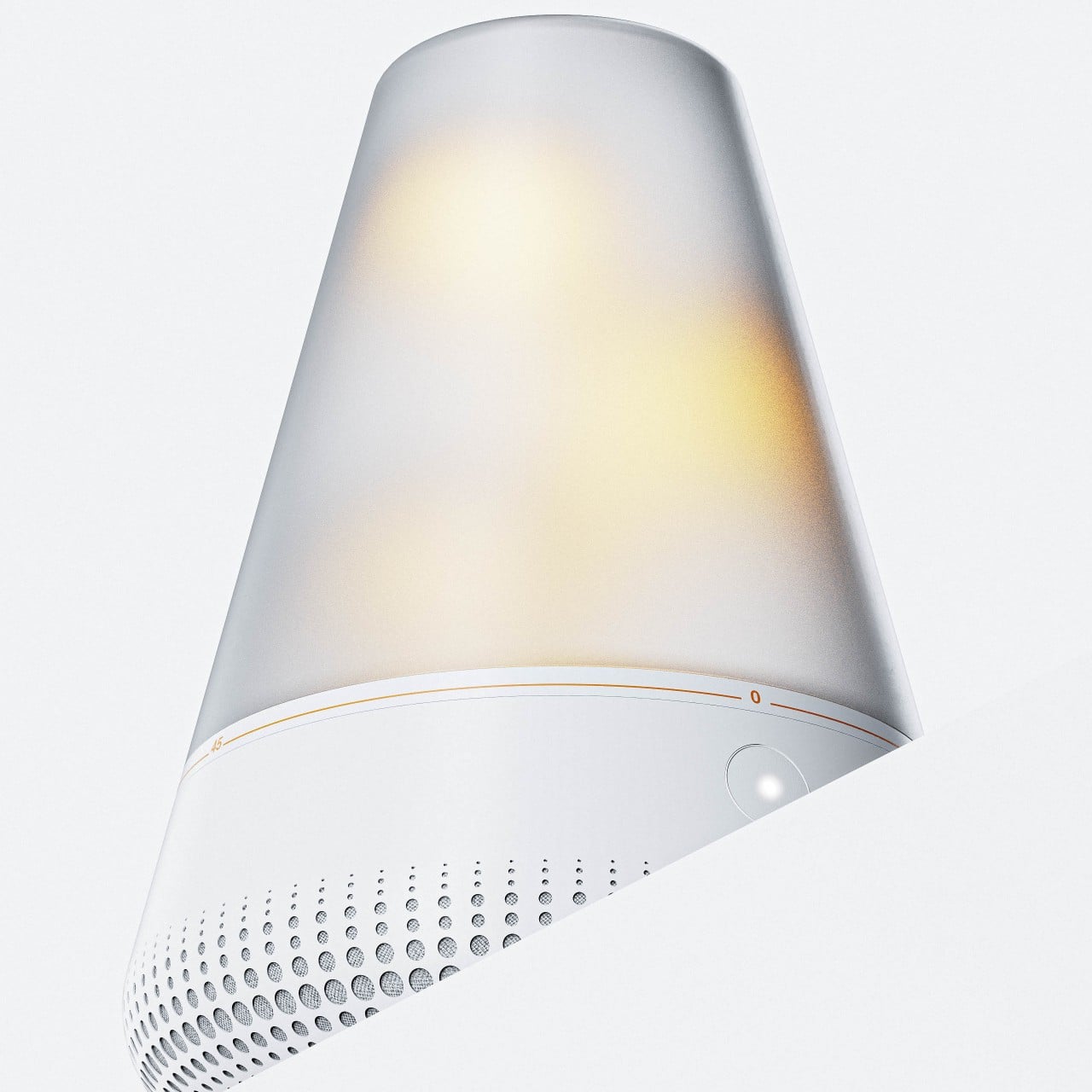
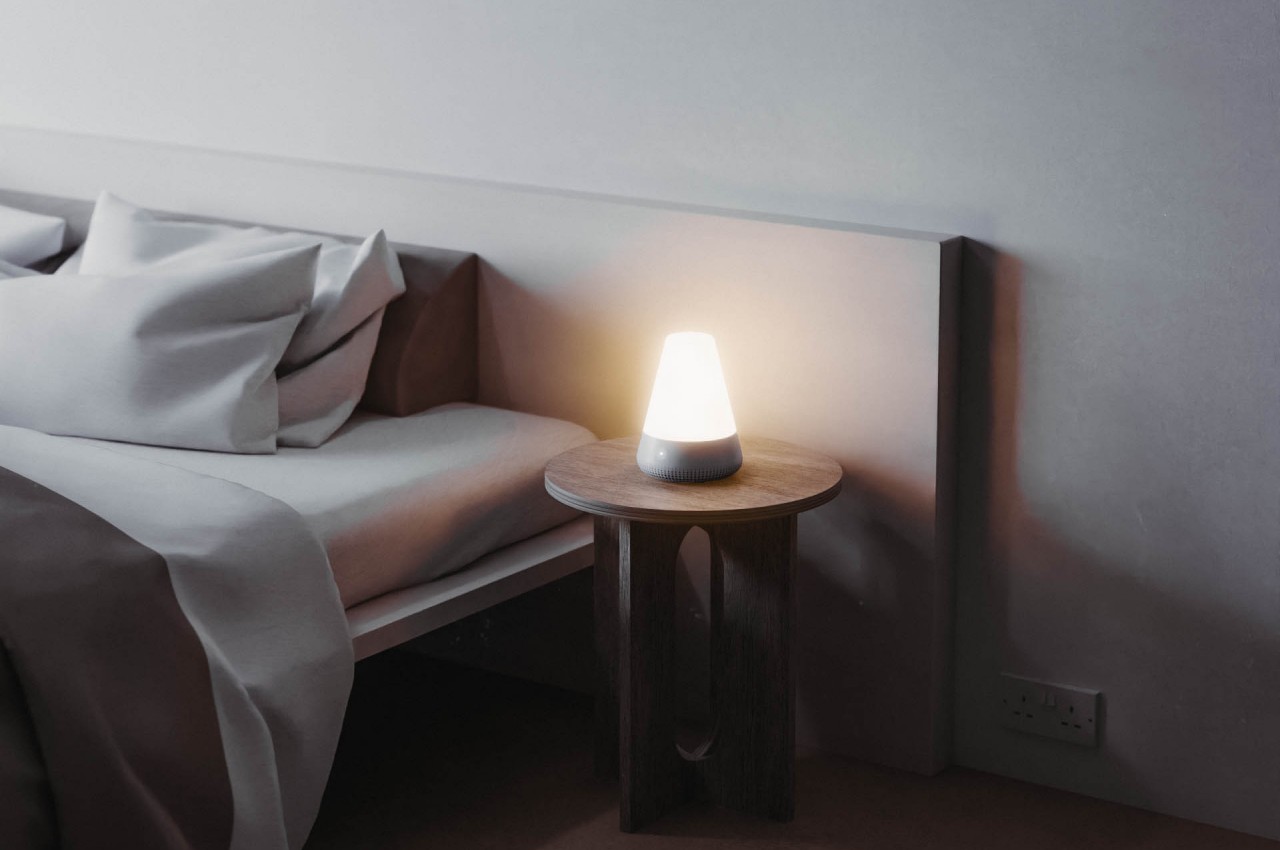
EPY is a lamp concept that tries to trigger those changes by using white noise and warm lights. White noise has been known to be effective in canceling out ambient noise that could be keeping our brains active, using sounds from nature to lull our minds to sleep. Warm light, which is closer to natural light, also soothes the eyes and helps generate melatonin, mimicking the setting sun’s gentle glow that signals our bodies to slow down as well.

This lava lamp-like design encourages the user to develop good sleeping habits in order to help repair and rejuvenate their bodies. But although good sleep is important, waking up properly is also a significant factor in a good day. Like the sun at dawn, that same warm light helps our body slowly wake up in a more graceful and peaceful manner, ensuring that we’re ready to face the day full of energy and zest each time.

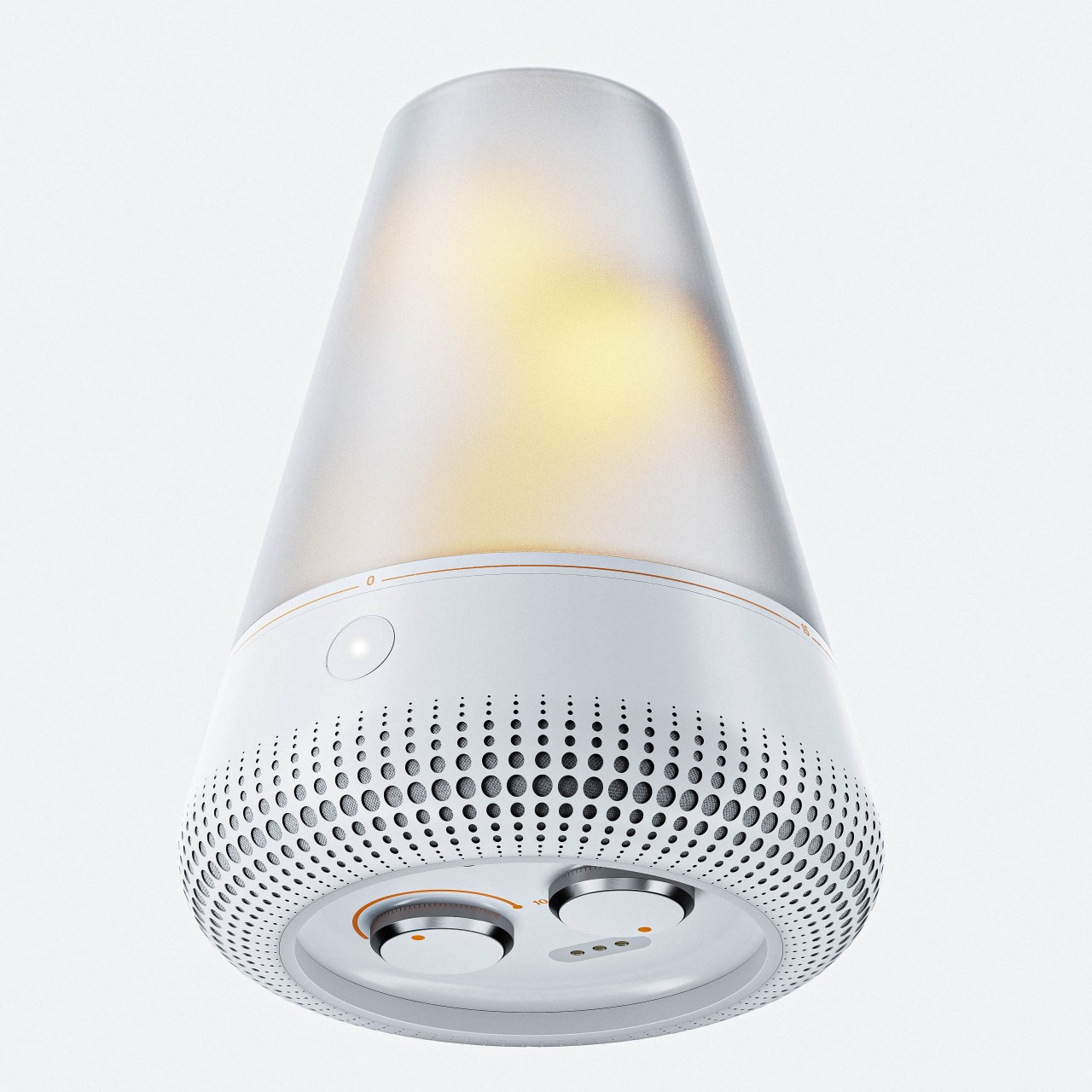
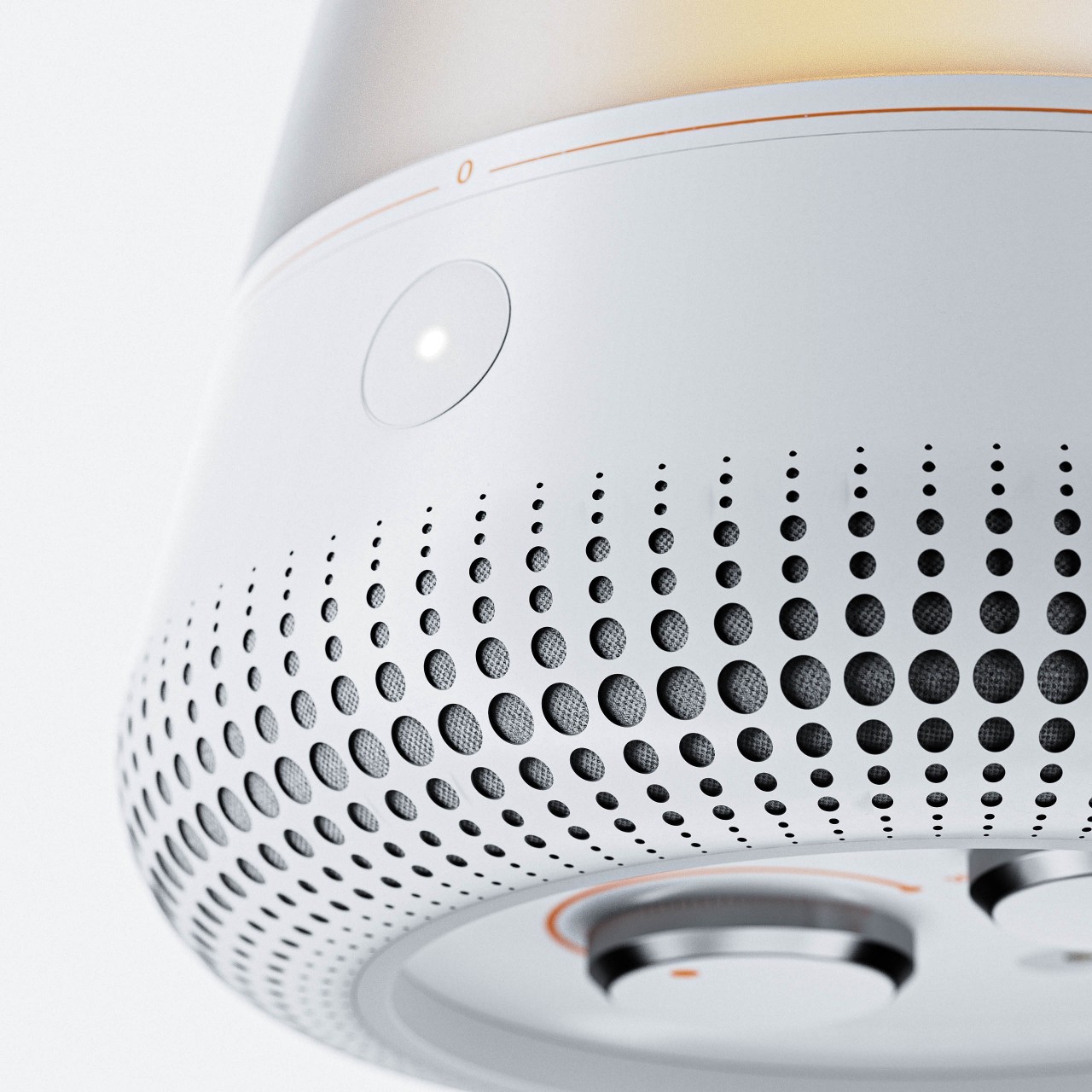
EPY’s very design is also meant to evoke a sense of calm with its minimalist aesthetic and simple controls. The translucent cap of the lamp acts as a timer when you twist it, letting you set the time of playback for up to 45 minutes. Hidden at the bottom of the lamp are two dials, one for setting how long you intend to sleep while the other sets the volume of the white noise playback. It doesn’t have complicated features, nor does it require you to reach for your phone, which would defeat the entire purpose of getting you to sleep swiftly and peacefully.

The post Bedside lava lamp concept improves sleep with white noise, warm lights first appeared on Yanko Design.

OnePlus rolls out its own version of Google’s Magic Eraser

OnePlus is the latest company to hop on the AI train. The phone manufacturer is rolling out a new photo editing tool called AI Eraser, which lets users remove extraneous objects from their photos. The new feature will be available on a range of OnePlus smartphones, including the OnePlus 12 and 12R, OnePlus 11 and OnePlus Open.

To use the OnePlus AI Eraser, a person first has to highlight the parts of the image that need removing. These could be random people or a dirty trash can, but they can also be "imperfections" in the photo. Then, AI analyzes that area and creates a background that OnePlus claims will blend into the existing image. If it sounds familiar, it works basically the same as Adobe's Generative Fill and Google's Magic Eraser tools.  

However, this is a new venture for OnePlus, which uses its proprietary LLM to power the AI Eraser. "As OnePlus' first feature based on generative AI technology, AI Eraser represents the first step in our vision to liberate user creativity through AI and revolutionize the future of photo editing, empowering users to create remarkable photos with just a few touches," Kinder Liu, president and COO of OnePlus, said in a statement. "This year, we plan to introduce more AI features, and we look forward to their upcoming availability."

This article originally appeared on Engadget at https://www.engadget.com/oneplus-rolls-out-its-own-version-of-googles-magic-eraser-151731265.html?src=rss

OnePlus rolls out its own version of Google’s Magic Eraser

OnePlus is the latest company to hop on the AI train. The phone manufacturer is rolling out a new photo editing tool called AI Eraser, which lets users remove extraneous objects from their photos. The new feature will be available on a range of OnePlus smartphones, including the OnePlus 12 and 12R, OnePlus 11 and OnePlus Open.

To use the OnePlus AI Eraser, a person first has to highlight the parts of the image that need removing. These could be random people or a dirty trash can, but they can also be "imperfections" in the photo. Then, AI analyzes that area and creates a background that OnePlus claims will blend into the existing image. If it sounds familiar, it works basically the same as Adobe's Generative Fill and Google's Magic Eraser tools.  

However, this is a new venture for OnePlus, which uses its proprietary LLM to power the AI Eraser. "As OnePlus' first feature based on generative AI technology, AI Eraser represents the first step in our vision to liberate user creativity through AI and revolutionize the future of photo editing, empowering users to create remarkable photos with just a few touches," Kinder Liu, president and COO of OnePlus, said in a statement. "This year, we plan to introduce more AI features, and we look forward to their upcoming availability."

This article originally appeared on Engadget at https://www.engadget.com/oneplus-rolls-out-its-own-version-of-googles-magic-eraser-151731265.html?src=rss

Some Spotify plans are reportedly getting more expensive soon

Fish swim, birds fly and streaming services increase their prices. That’s (mostly) the way of things. After maintaining the same pricing for Premium for a long time, Spotify looks set to increase it twice within a year in some countries.

According to Bloomberg, Spotify Premium will be around $1 more for an individual plan and about $2 costlier for family and duo plans by the end of April in a few markets, including the UK, Australia and Pakistan. The report suggests the US is in line for a similar increase later this year.

The higher fees are expected to offset the costs of audiobook offerings. Since October, Premium users in select markets have been able to listen to 15 hours of audiobooks per month at no extra cost. The company is said to have seen strong levels of audiobook consumption so far.

If users go over the 15-hour limit, they can pay for a 10-hour top up. It’s there that Spotify makes more money from its Premium audiobook library. The company also sells audiobooks on its web store.

Spotify has been chasing profitability since it went public in 2018 and to help it get there, it’s said to be preparing several more subscription tiers. One of those (a more expensive option) will reportedly offer high-fidelity audio, a feature the company has long been promising.

It may also introduce a basic tier that includes ad-free music and podcasts, with audiobooks being cut out. This plan is expected to cost $11 per month, the same as Spotify currently charges for Premium. As such, that $10 audiobook-only plan Spotify introduced in the US last month is starting to make more sense.

This article originally appeared on Engadget at https://www.engadget.com/some-spotify-plans-are-reportedly-getting-more-expensive-soon-143013215.html?src=rss

Some Spotify plans are reportedly getting more expensive soon

Fish swim, birds fly and streaming services increase their prices. That’s (mostly) the way of things. After maintaining the same pricing for Premium for a long time, Spotify looks set to increase it twice within a year in some countries.

According to Bloomberg, Spotify Premium will be around $1 more for an individual plan and about $2 costlier for family and duo plans by the end of April in a few markets, including the UK, Australia and Pakistan. The report suggests the US is in line for a similar increase later this year.

The higher fees are expected to offset the costs of audiobook offerings. Since October, Premium users in select markets have been able to listen to 15 hours of audiobooks per month at no extra cost. The company is said to have seen strong levels of audiobook consumption so far.

If users go over the 15-hour limit, they can pay for a 10-hour top up. It’s there that Spotify makes more money from its Premium audiobook library. The company also sells audiobooks on its web store.

Spotify has been chasing profitability since it went public in 2018 and to help it get there, it’s said to be preparing several more subscription tiers. One of those (a more expensive option) will reportedly offer high-fidelity audio, a feature the company has long been promising.

It may also introduce a basic tier that includes ad-free music and podcasts, with audiobooks being cut out. This plan is expected to cost $11 per month, the same as Spotify currently charges for Premium. As such, that $10 audiobook-only plan Spotify introduced in the US last month is starting to make more sense.

This article originally appeared on Engadget at https://www.engadget.com/some-spotify-plans-are-reportedly-getting-more-expensive-soon-143013215.html?src=rss

Get the Meta Quest 2 for only $199 along with $50 Quest store credit

If you've yet to join the VR craze of the last few years, then now's a good time to do so. The 128GB Meta Quest 2 is currently available at Walmart for $199, down from $249 — a return to its record-low price. Not only is the sale enticing, but the deal comes with a $50 credit for the Meta Quest store. Amazon is offering the same 20 percent discount on the Meta Quest 2, but it doesn't include that extra credit. 

The Meta Quest 2 might not be the newest headset in its lineup, but it still has plenty of great features — and is our pick for 2024's best cheap VR headset. Plus, we gave it an 89 in our review back in 2020, when it was still called the Oculus Quest. 

The device is wireless, comfortable and much more affordable than the alternatives. Its field of vision is about 90 degrees and can change based on which face pads you use. The Meta Quest 2 also offers fast-switching LCDs, an 1832x1920 resolution and a 90Hz refresh rate. You can hook it up to your gaming PC or explore the many titles available on Meta's Quest store — especially with $50 to spend.

Follow @EngadgetDeals on Twitter and subscribe to the Engadget Deals newsletter for the latest tech deals and buying advice.

This article originally appeared on Engadget at https://www.engadget.com/get-the-meta-quest-2-for-only-199-along-with-50-quest-store-credit-141001515.html?src=rss

Get the Meta Quest 2 for only $199 along with $50 Quest store credit

If you've yet to join the VR craze of the last few years, then now's a good time to do so. The 128GB Meta Quest 2 is currently available at Walmart for $199, down from $249 — a return to its record-low price. Not only is the sale enticing, but the deal comes with a $50 credit for the Meta Quest store. Amazon is offering the same 20 percent discount on the Meta Quest 2, but it doesn't include that extra credit. 

The Meta Quest 2 might not be the newest headset in its lineup, but it still has plenty of great features — and is our pick for 2024's best cheap VR headset. Plus, we gave it an 89 in our review back in 2020, when it was still called the Oculus Quest. 

The device is wireless, comfortable and much more affordable than the alternatives. Its field of vision is about 90 degrees and can change based on which face pads you use. The Meta Quest 2 also offers fast-switching LCDs, an 1832x1920 resolution and a 90Hz refresh rate. You can hook it up to your gaming PC or explore the many titles available on Meta's Quest store — especially with $50 to spend.

Follow @EngadgetDeals on Twitter and subscribe to the Engadget Deals newsletter for the latest tech deals and buying advice.

This article originally appeared on Engadget at https://www.engadget.com/get-the-meta-quest-2-for-only-199-along-with-50-quest-store-credit-141001515.html?src=rss

Monocycle robot with legs may be last-mile delivery helper in the future

When we think of robots, more of then than not, we think of them in their humanoid design or at the very least in a dog-like form. But if you’re really experimenting with this kind of technology, you can get inspired from sci-fi and futuristic movies or TV shows. You can even be inspired by something “old” that can be adapted into a high-tech design. I’m fine with more experimental kinds of robots as long as they don’t overthrow the human race.

Designer: Joohyung Kim

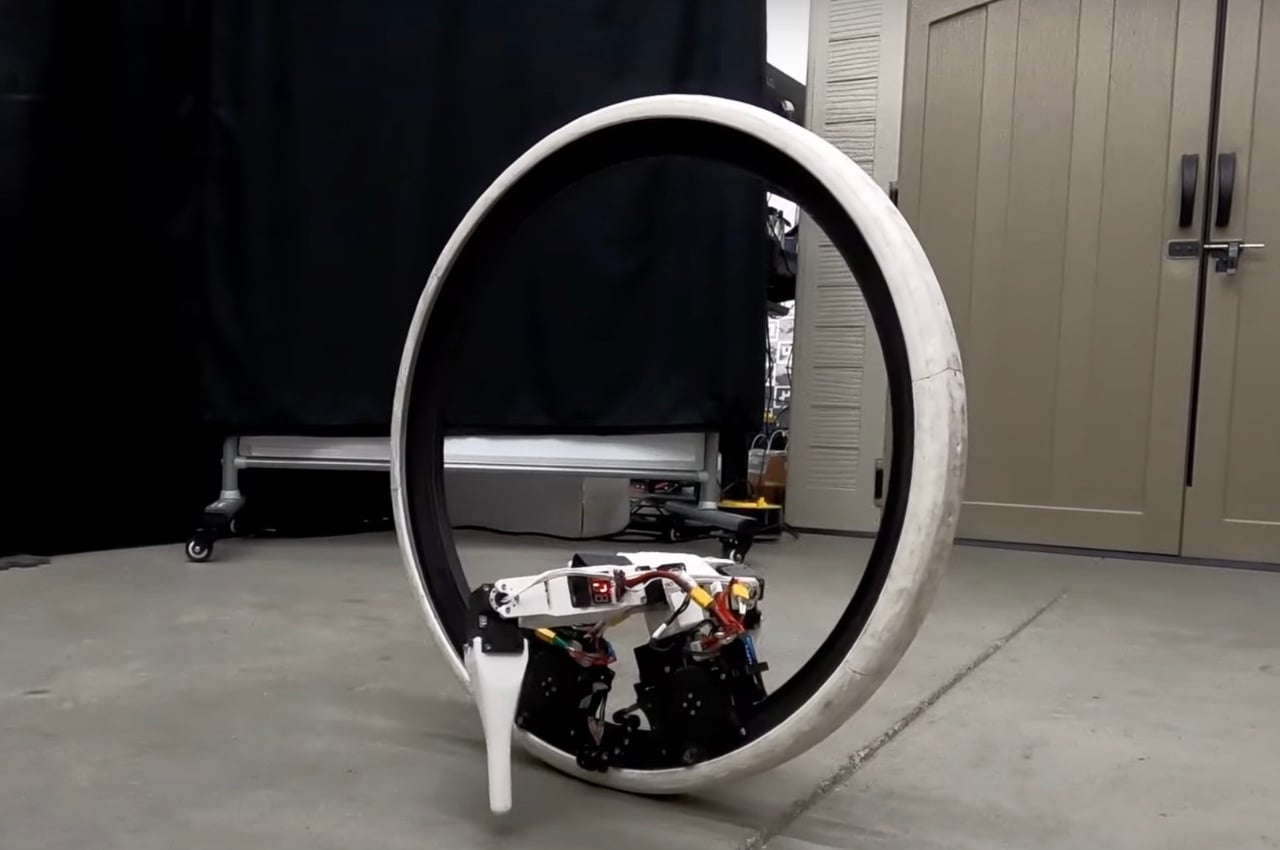
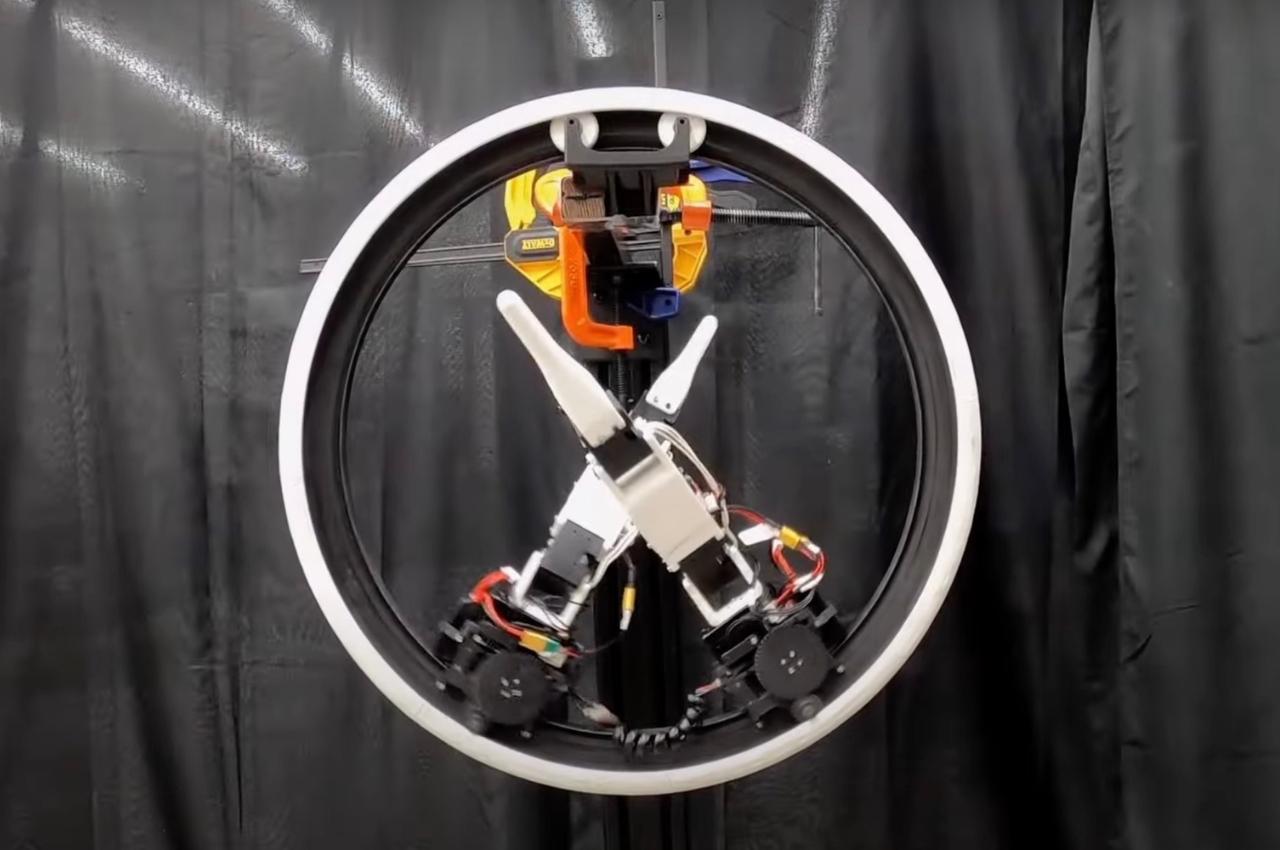
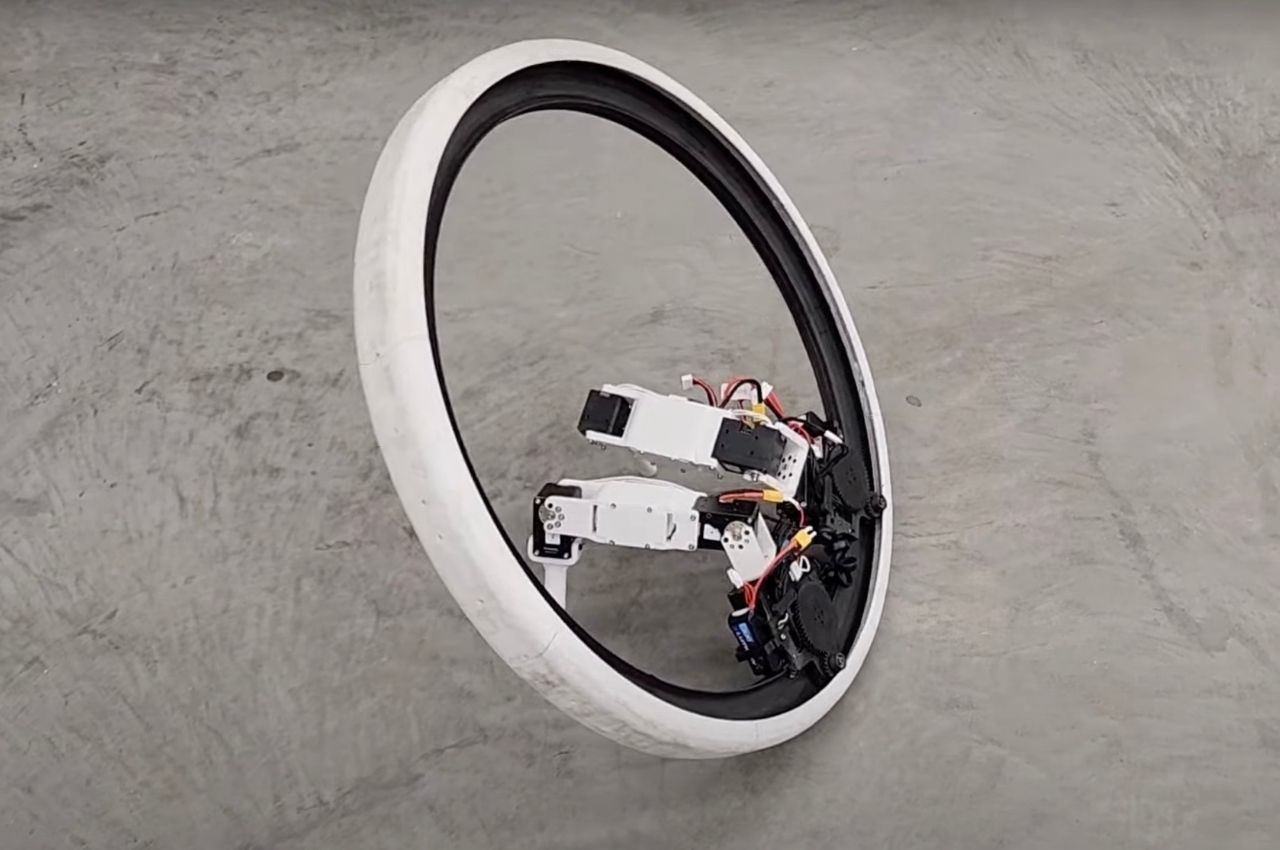
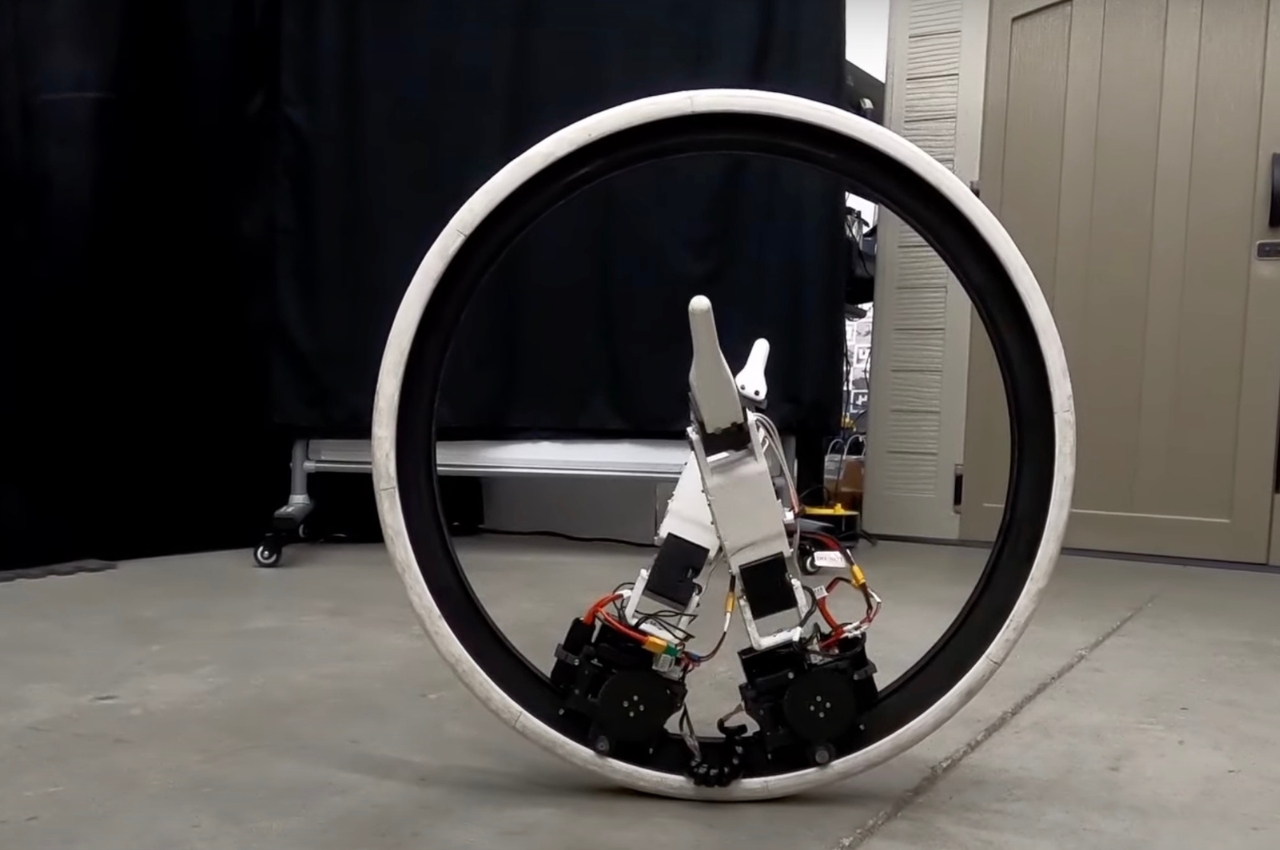
A professor from the Electrical & Computer Engineering department at the University of Illinois Urbana-Champaign has come up with a robot that is inspired by the monocycle and some of those fast-moving circular robots you see in sci-fi films. The Ringbot is basically a monocycle robot that has two legs inside of it that looks like someone lying inside a ring and pedaling away. While there have been wheel-leg designs previously, this is the first one that was probably inspired by monocycles and General Grievous from Star Wars’ Clone Wars series.

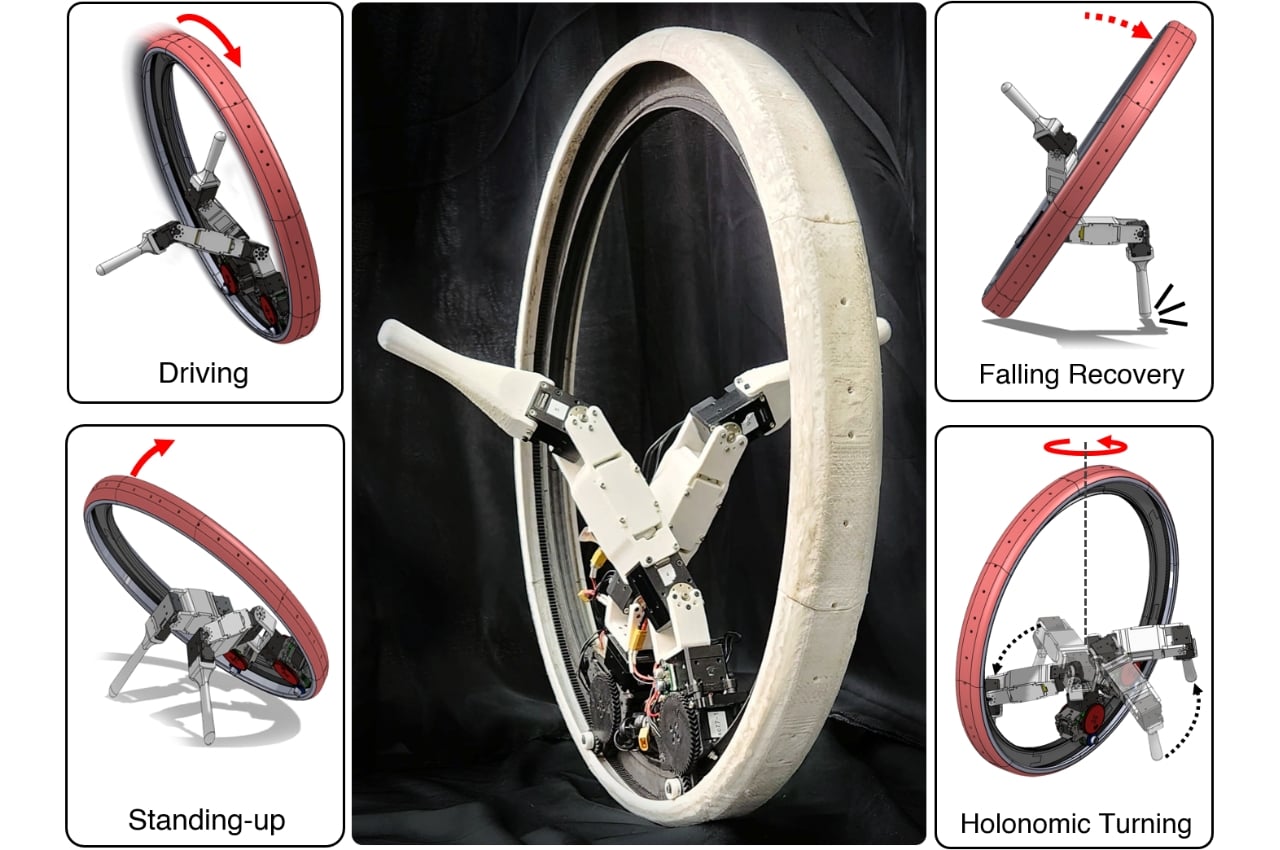
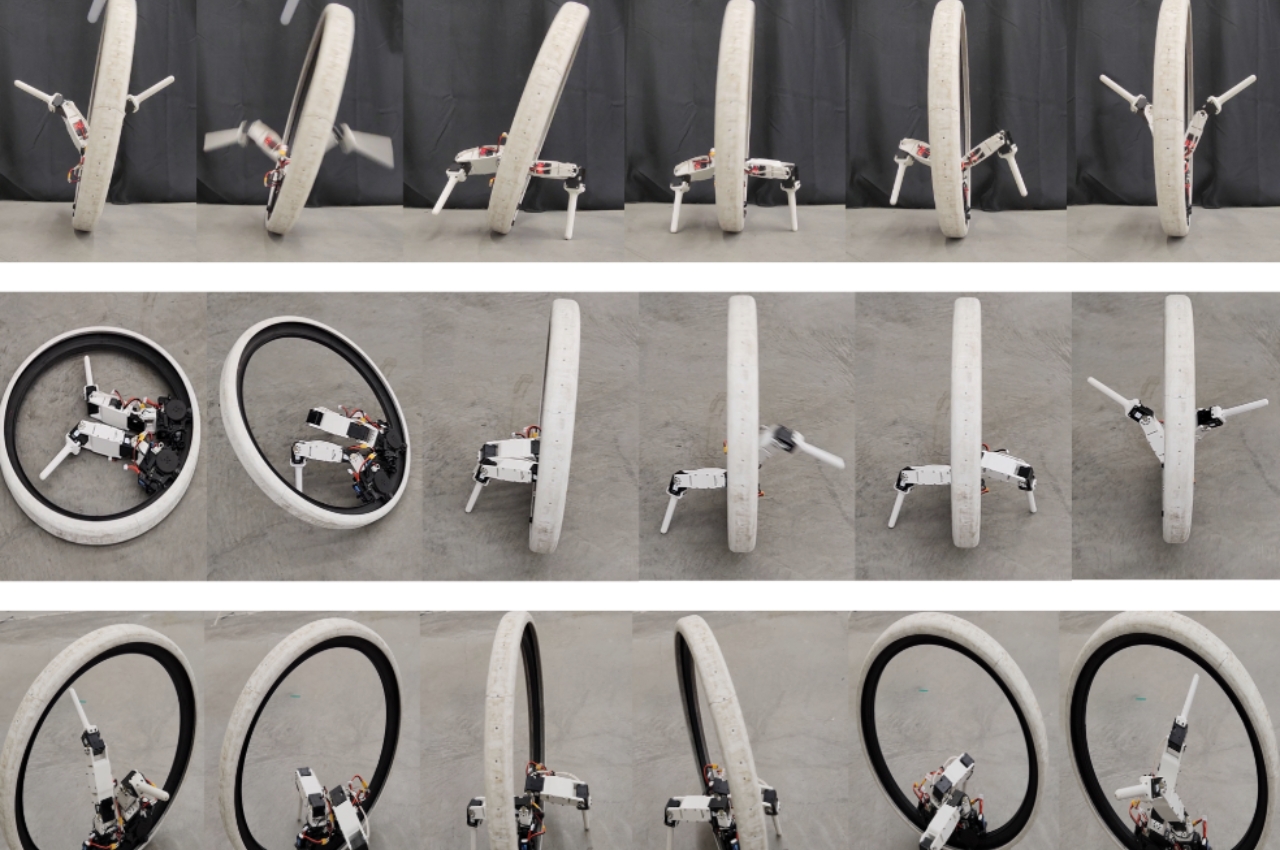
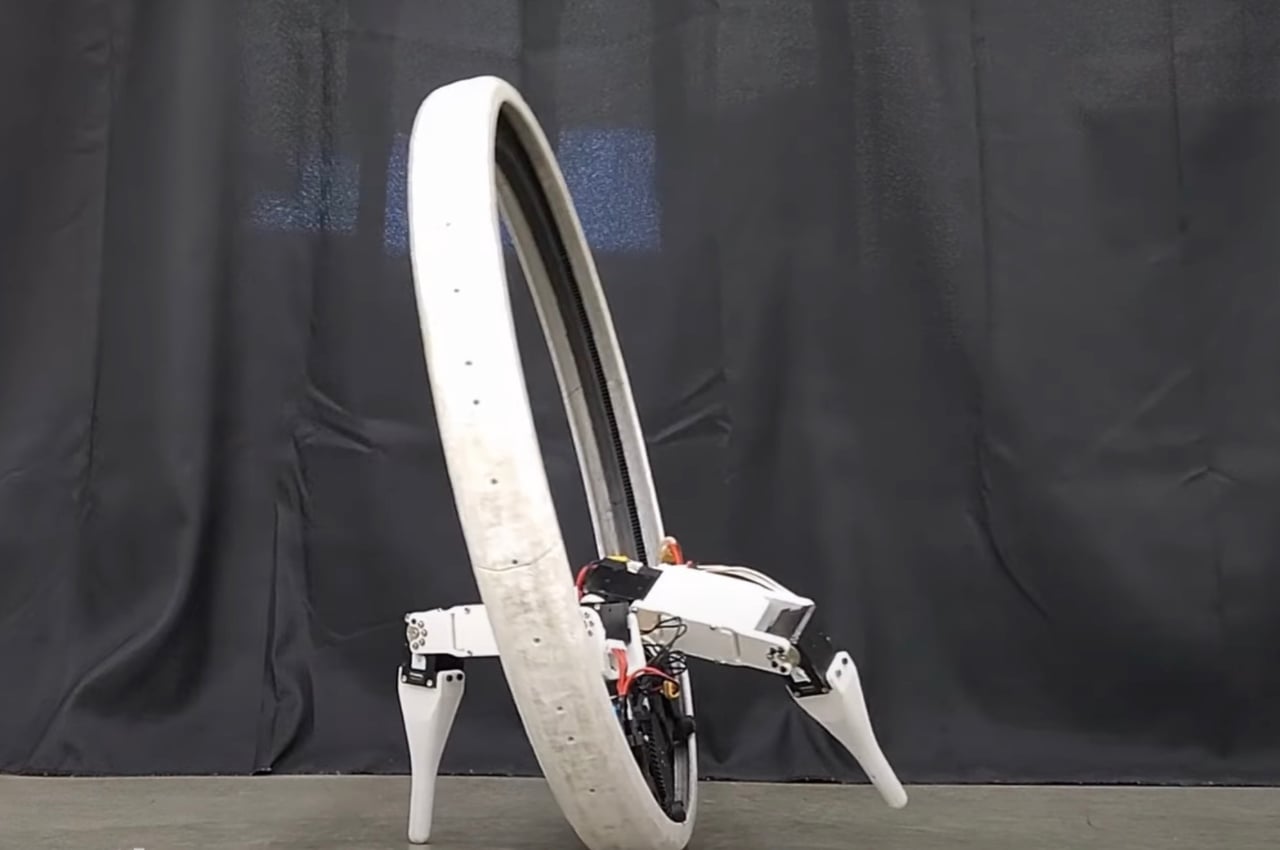
The large wheel is the frame of the robot itself while the legs actually help the robot to balance itself and avoid toppling over. There are actually two indepent driving modules inside of it and each one controls its velocity so it can track a desired orientation. It can go around with the legs in the air steering and balancing it. When it does fall down, the legs will enable it to stand back up. It is also able to move and turn when stuck in tight spaces. It is able to make full rotations inside the wheel and drive it up to 5km/hour.

For now the Ringbot seems to just be something they are experimenting with. But in the future, they are looking at this robot to do autonomous last-mile deliveries in congested environments. They will be adding two additional limbs so it can carry packages and even go up and down stairs and rough terrains. Who knows, in the future you’ll get your package delivered by this monocyle robot with legs.

The post Monocycle robot with legs may be last-mile delivery helper in the future first appeared on Yanko Design.

The best smartphone cameras for 2024: How to choose the phone with the best photography chops

I remember begging my parents to get me a phone with a camera when the earliest ones were launched. The idea of taking photos wherever I went was new and appealing, but it’s since become less of a novelty and more of a daily habit. Yes, I’m one of those. I take pictures of everything — from beautiful meals and funny signs to gorgeous landscapes and plumes of smoke billowing in the distance.

If you grew up in the Nokia 3310 era like me, then you know how far we’ve come. Gone are the 2-megapixel embarrassments that we used to post to Friendster with glee. Now, many of us use the cameras on our phones to not only capture precious memories of our adventures and loved ones, but also to share our lives with the world.

I’m lucky enough that I have access to multiple phones thanks to my job, and at times would carry a second device with me on a day-trip just because I preferred its cameras. But most people don’t have that luxury. Chances are, if you’re reading this, a phone’s cameras may be of utmost importance to you. But you’ll still want to make sure the device you end up getting doesn’t fall flat in other ways. At Engadget, we test and review dozens of smartphones every year; our top picks below represent not only the best phone cameras available right now, but also the most well-rounded options out there.

What to look for when choosing a phone for its cameras

Before scrutinizing a phone’s camera array, you’ll want to take stock of your needs — what are you using it for? If your needs are fairly simple, like taking photos and videos of your new baby or pet, most modern smartphones will serve you well. Those who plan to shoot for audiences on TikTok, Instagram or YouTube should look for video-optimizing features like stabilization and high frame rate support (for slow-motion clips).

Most smartphones today have at least two cameras on the rear and one up front. Those that cost more than $700 usually come with three, including wide-angle, telephoto or macro lenses. We’ve also reached a point where the number of megapixels (MP) doesn’t really matter anymore — most flagship phones from Apple, Samsung and Google have sensors that are either 48MP or 50MP. You’ll even come across some touting resolutions of 108MP or 200MP, in pro-level devices like the Galaxy S24 Ultra.

Most people won’t need anything that sharp, and in general, smartphone makers combine the pixels to deliver pictures that are the equivalent of 12MP anyway. The benefits of pixel-binning are fairly minor in phone cameras, though, and you’ll usually need to blow up an image to fit a 27-inch monitor before you’ll see the slightest improvements.

In fact, smartphone cameras tend to be so limited in size that there’s often little room for variation across devices. They typically use sensors from the same manufacturers and have similar aperture sizes, lens lengths and fields of view. So while it might be worth considering the impact of sensor size on things like DSLRs or mirrorless cameras, on a smartphone those differences are minimal.

Sensor size and field of view

If you still want a bit of guidance on what to look for, here are some quick tips: By and large, the bigger the sensor the better, as this will allow more light and data to be captured. Not many phone makers will list the sensor size in spec lists, so you’ll have to dig around for this info. A larger aperture (usually indicated by a smaller number with an “f/” preceding a digit) is ideal for the same reason, and it also affects the level of depth of field (or background blur) that’s not added via software. Since portrait modes are available on most phones these days, though, a big aperture isn’t as necessary to achieve this effect.

When looking for a specific field of view on a wide-angle camera, know that the most common offering from companies like Samsung and Google is about 120 degrees. Finally, most premium phones like the iPhone 15 Pro Max and Galaxy S24 Ultra offer telephoto systems that go up to 5x optical zoom with software taking that to 20x or even 100x.

Processing and extra features

These features will likely perform at a similar quality across the board, and where you really see a difference is in the processing. Samsung traditionally renders pictures that are more saturated, while Google’s Pixel phones take photos that are more neutral and evenly exposed. iPhones have historically produced pictures with color profiles that seem more accurate, though in comparison to images from the other two, they can come off yellowish. However, that was mostly resolved after Apple introduced a feature in the iPhone 13 called Photographic Styles that lets you set a profile with customizable contrast levels and color temperature that would apply to every picture taken via the native camera app.

Pro users who want to manually edit their shots should see if the phone they’re considering can take images in RAW format. Those who want to shoot a lot of videos while on the move should look for stabilization features and a decent frame rate. Most of the phones we’ve tested at Engadget record at either 60 frames per second at 1080p or 30 fps at 4K. It’s worth checking to see what the front camera shoots at, too, since they’re not usually on par with their counterparts on the rear.

Finally, while the phone’s native editor is usually not a dealbreaker (since you can install a third-party app for better controls), it’s worth noting that the latest flagships from Samsung and Google all offer AI tools that make manipulating an image a lot easier. They also offer a lot of fun, useful extras, like erasing photobombers, moving objects around or making sure everyone in the shot has their eyes open.

How we test smartphone cameras

For the last few years, I’ve reviewed flagships from Google, Samsung and Apple, and each time, I do the same set of tests. I’m especially particular when testing their cameras, and usually take all the phones I’m comparing out on a day or weekend photo-taking trip. Any time I see a photo- or video-worthy moment, I whip out all the devices and record what I can, doing my best to keep all factors identical and maintain the same angle and framing across the board.

It isn’t always easy to perfectly replicate the shooting conditions for each camera, even if I have them out immediately after I put the last one away. Of course, having them on some sort of multi-mount rack would be the most scientific way, but that makes framing shots a lot harder and is not representative of most people’s real-world use. Also, just imagine me holding up a three-prong camera rack running after the poor panicked wildlife I’m trying to photograph. It’s just not practical.

For each device, I make sure to test all modes, like portrait, night and video, as well as all the lenses, including wide, telephoto and macro. When there are new or special features, I test them as well. Since different phone displays can affect how their pictures appear, I wanted to level the playing field: I upload all the material to Google Drive in full resolution so I can compare everything on the same large screen. Because the photos from today’s phones are of mostly the same quality, I usually have to zoom in very closely to see the differences. I also frequently get a coworker who’s a photo or video expert to look at the files and weigh in.

This article originally appeared on Engadget at https://www.engadget.com/best-camera-phone-130035025.html?src=rss


The best smartphone cameras for 2024: How to choose the phone with the best photography chops

I remember begging my parents to get me a phone with a camera when the earliest ones were launched. The idea of taking photos wherever I went was new and appealing, but it’s since become less of a novelty and more of a daily habit. Yes, I’m one of those. I take pictures of everything — from beautiful meals and funny signs to gorgeous landscapes and plumes of smoke billowing in the distance.

If you grew up in the Nokia 3310 era like me, then you know how far we’ve come. Gone are the 2-megapixel embarrassments that we used to post to Friendster with glee. Now, many of us use the cameras on our phones to not only capture precious memories of our adventures and loved ones, but also to share our lives with the world.

I’m lucky enough that I have access to multiple phones thanks to my job, and at times would carry a second device with me on a day-trip just because I preferred its cameras. But most people don’t have that luxury. Chances are, if you’re reading this, a phone’s cameras may be of utmost importance to you. But you’ll still want to make sure the device you end up getting doesn’t fall flat in other ways. At Engadget, we test and review dozens of smartphones every year; our top picks below represent not only the best phone cameras available right now, but also the most well-rounded options out there.

What to look for when choosing a phone for its cameras

Before scrutinizing a phone’s camera array, you’ll want to take stock of your needs — what are you using it for? If your needs are fairly simple, like taking photos and videos of your new baby or pet, most modern smartphones will serve you well. Those who plan to shoot for audiences on TikTok, Instagram or YouTube should look for video-optimizing features like stabilization and high frame rate support (for slow-motion clips).

Most smartphones today have at least two cameras on the rear and one up front. Those that cost more than $700 usually come with three, including wide-angle, telephoto or macro lenses. We’ve also reached a point where the number of megapixels (MP) doesn’t really matter anymore — most flagship phones from Apple, Samsung and Google have sensors that are either 48MP or 50MP. You’ll even come across some touting resolutions of 108MP or 200MP, in pro-level devices like the Galaxy S24 Ultra.

Most people won’t need anything that sharp, and in general, smartphone makers combine the pixels to deliver pictures that are the equivalent of 12MP anyway. The benefits of pixel-binning are fairly minor in phone cameras, though, and you’ll usually need to blow up an image to fit a 27-inch monitor before you’ll see the slightest improvements.

In fact, smartphone cameras tend to be so limited in size that there’s often little room for variation across devices. They typically use sensors from the same manufacturers and have similar aperture sizes, lens lengths and fields of view. So while it might be worth considering the impact of sensor size on things like DSLRs or mirrorless cameras, on a smartphone those differences are minimal.

Sensor size and field of view

If you still want a bit of guidance on what to look for, here are some quick tips: By and large, the bigger the sensor the better, as this will allow more light and data to be captured. Not many phone makers will list the sensor size in spec lists, so you’ll have to dig around for this info. A larger aperture (usually indicated by a smaller number with an “f/” preceding a digit) is ideal for the same reason, and it also affects the level of depth of field (or background blur) that’s not added via software. Since portrait modes are available on most phones these days, though, a big aperture isn’t as necessary to achieve this effect.

When looking for a specific field of view on a wide-angle camera, know that the most common offering from companies like Samsung and Google is about 120 degrees. Finally, most premium phones like the iPhone 15 Pro Max and Galaxy S24 Ultra offer telephoto systems that go up to 5x optical zoom with software taking that to 20x or even 100x.

Processing and extra features

These features will likely perform at a similar quality across the board, and where you really see a difference is in the processing. Samsung traditionally renders pictures that are more saturated, while Google’s Pixel phones take photos that are more neutral and evenly exposed. iPhones have historically produced pictures with color profiles that seem more accurate, though in comparison to images from the other two, they can come off yellowish. However, that was mostly resolved after Apple introduced a feature in the iPhone 13 called Photographic Styles that lets you set a profile with customizable contrast levels and color temperature that would apply to every picture taken via the native camera app.

Pro users who want to manually edit their shots should see if the phone they’re considering can take images in RAW format. Those who want to shoot a lot of videos while on the move should look for stabilization features and a decent frame rate. Most of the phones we’ve tested at Engadget record at either 60 frames per second at 1080p or 30 fps at 4K. It’s worth checking to see what the front camera shoots at, too, since they’re not usually on par with their counterparts on the rear.

Finally, while the phone’s native editor is usually not a dealbreaker (since you can install a third-party app for better controls), it’s worth noting that the latest flagships from Samsung and Google all offer AI tools that make manipulating an image a lot easier. They also offer a lot of fun, useful extras, like erasing photobombers, moving objects around or making sure everyone in the shot has their eyes open.

How we test smartphone cameras

For the last few years, I’ve reviewed flagships from Google, Samsung and Apple, and each time, I do the same set of tests. I’m especially particular when testing their cameras, and usually take all the phones I’m comparing out on a day or weekend photo-taking trip. Any time I see a photo- or video-worthy moment, I whip out all the devices and record what I can, doing my best to keep all factors identical and maintain the same angle and framing across the board.

It isn’t always easy to perfectly replicate the shooting conditions for each camera, even if I have them out immediately after I put the last one away. Of course, having them on some sort of multi-mount rack would be the most scientific way, but that makes framing shots a lot harder and is not representative of most people’s real-world use. Also, just imagine me holding up a three-prong camera rack running after the poor panicked wildlife I’m trying to photograph. It’s just not practical.

For each device, I make sure to test all modes, like portrait, night and video, as well as all the lenses, including wide, telephoto and macro. When there are new or special features, I test them as well. Since different phone displays can affect how their pictures appear, I wanted to level the playing field: I upload all the material to Google Drive in full resolution so I can compare everything on the same large screen. Because the photos from today’s phones are of mostly the same quality, I usually have to zoom in very closely to see the differences. I also frequently get a coworker who’s a photo or video expert to look at the files and weigh in.

This article originally appeared on Engadget at https://www.engadget.com/best-camera-phone-130035025.html?src=rss