Google brings free Gemini access to India’s largest carrier

Google’s AI ambitions are global in scale, so much so that it has just agreed to give Gemini away for free in India to people using the country's biggest mobile provider. Thanks to a deal with Reliance Intelligence, an AI-focused subsidiary of Reliance Industries, people signed up to Jio’s Unlimited 5G plan will be offered Google AI Pro at no extra cost for 18 months.

That means that qualifying users will have access to Gemini 2.5 Pro, Google’s most advanced AI model. They will also benefit from higher limits for the Nano Banana and Veo 3.1 AI image and video generators, plus expanded access to NotebookLM. The plan also includes 2TB of cloud storage across Google’s apps, for a total combined worth of around 35,100 rupees ($396) per user.

The offer will initially be exclusive to Jio customers between the age of 18 and 25, but will eventually extend to all people on an eligible plan via the MyJio app. Jio is India's largest mobile network operator, and a company in which Google purchased a 7.7 percent stake worth $4.5 million in 2020.

India is fast becoming a key battleground for AI expansion. Back in July, Perplexity AI partnered with Bharti Airtel, Jio’s rival carrier, to offer a year-long Perplexity Pro subscription worth $200 to all of Airtel’s 360 million customers. OpenAI is also adopting an aggressive strategy in the country, recently debuting its cheapest ChatGPT subscription to date, at 390 rupee ($4.60), in India first. ChatGPT Go offers users 10 times more message limits, image generation and file uploads than the free version.

This article originally appeared on Engadget at https://www.engadget.com/ai/google-brings-free-gemini-access-to-indias-largest-carrier-130627625.html?src=rss

Samsung is using NVIDIA chips to build its new AI chip factory

NVIDIA has teamed up with with South Korea's biggest companies and the country itself, as they build out their AI infrastructure. One of those companies is Samsung, which is building a new AI factory that will use 50,000 NVIDIA Blackwell server GPUs and other NVIDIA technologies to make its own chips. This "AI-driven semiconductor manufacturing," as the companies call it, will help Samsung improve its processes, better predict maintenance needs and improve the efficiency of its autonomous operations. NVIDIA will help Samsung adapt its chipmaking lithography platform to work with its GPUs, and it will apparently result in 20 times greater performance for Samsung. 

Korean carmaker Hyundai will also use 50,000 NVIDIA Blackwell GPUs to develop its AI models for manufacturing and autonomous driving. Meanwhile, the SK Group conglomerate, which includes SK Telecom and DRAM and flash memory chip supplier SK Hynix, will use 50,000 NVIDIA Blackwell server chips to launch an industrial AI cloud. The facility, NVIDIA says, will power the "next generation of memory, robotics, digital twins and intelligent AI agents." As Bloomberg reports, NVIDIA CEO Jensen Huang, who's in South Korea for the Asia-Pacific Economic Cooperation CEO Summit, was recently photographed with Samsung's Jay Y. Lee and Hyundai’s Chung Euisun in a local restaurant. 

Finally, NVIDIA is working with the South Korean government for its sovereign AI infrastructure, or AI it will have control over. The Korean government will deploy 50,000 NVIDIA GPUs to the National AI Computing Center it's establishing, as well to facilities owned by local companies that include Kakao and Naver.

This article originally appeared on Engadget at https://www.engadget.com/ai/samsung-is-using-nvidia-chips-to-build-its-new-ai-chip-factory-130057773.html?src=rss

The best free VPNs in 2025

A good VPN is worth paying for. Almost every service I'll recommend as one of the best VPNs is either subscription-only or supported by paid plans. Free VPNs do have their place, though, as not everybody can afford yet another subscription in the software-as-a-service hellscape we live in. Since everyone deserves privacy and flexibility online, I wanted to put together a definitive list of the best free VPNs.

Now, some will say that free VPNs are, by definition, security risks that are to be avoided by default. That reputation exists because free VPNs often really are a risk. As proliferating age verification laws have created a need for VPNs, some free services have stepped up to answer the call, while others have taken advantage of it to spread malware. Free VPNs are easy for scammers to set up and hard for app stores to catch. I never recommend using one without doing thorough research.

To that end, the three providers on this list are exceptions to the risk of free VPNs. While they all have tradeoffs, they're also upfront about what they do and don't do. Each one comes with reliable security, a clean record of handling user data and apps that never force you to upgrade just so they'll work properly. They aren't the only good free VPNs, but they're the top three by far.

Editor's note: This list represents our ranking as of October 2025. We intend to revisit the list every three months at a minimum, at which time our picks may be adjusted based on changes in features, testing results and other factors.

The first three no-cost VPNs mentioned here are worthy of recommendation in their own ways, but didn't quite make the cut for our top picks. I've left notes on them here in case one of them turns out to be perfect for you, and because they're on my list for induction into the free VPN pantheon if they improve.

None of the above applies to Hotspot Shield, which you should not use. It's on here as a warning. You can find more details in that section below.

PrivadoVPN is a strong enough contender that I seriously considered adding it to the list as my fourth official recommendation. It's technically unlimited, though once you use 10GB of data, it sharply handicaps your speed for the rest of the month. Free users can choose between 13 server locations on four continents. It even performs well on worldwide latency tests, though download speeds swing pretty heavily.

That uncertain speed stat kept Privado out of the winner's circle, as did one other concern: although it has a clear and extensive privacy policy, it's never gone through a third-party audit. Additionally, it's a newer service, having only launched in 2019 — so it's harder to make claims about its business practices.

Finally, while hide.me, Windscribe and Proton VPN all retain their excellence on the paid plan, PrivadoVPN isn't as worth paying for. Outside the free plan, it's a decent VPN with no reason to pick it over Proton or ExpressVPN. That said, if it passes an audit — or faces a real-world test of its no-logs policy, like a server seizure — look for Privado to join the big leagues soon.

TunnelBear does free VPN service well — it just doesn't do enough. Trust me, I don’t take pleasure in criticizing its adorable, hole-digging bear mascot, which goes a long way toward making the app welcoming to beginners. I like that its free plan offers access to the entire server network, the only VPN that does so.

But the hard fact is that 2GB of data per month is not enough to do much of anything. With such a low data limit, TunnelBear's free plan is an enticement to upgrade to its paid service, not a viable VPN solution in its own right. That really is a good bear, though.

EventVPN, developed by the ExpressVPN team, was launched a month ago and could one day become an outstanding free VPN. However, given its bizarre decision to run ads in the app, I can't endorse it right now.

Were EventVPN not associated with ExpressVPN or Kape Technologies, I might defend its decision to show ads by pointing out that all ad tracking data is anonymized — there isn't even a backend in which to store it. That might be a decent way to fund a full-featured free VPN. But EventVPN is openly part of a lucrative VPN portfolio, and has its own paid tier, so there's no excuse for the 30-second video ads.

Hotspot Shield was once the poster child for free VPNs; today, it's become one of the clearest illustrations of why they're dangerous. You get 500MB of browsing data per day, which is reasonable, on par with Windscribe's best offer. However, not only does the free version cap speeds at 2 Mbps, but it also restricts you to one location, the United States.

Worse, it shows you ads. Unlike EventVPN, which at least limits itself to ads from a single service, Hotspot Shield lists no fewer than eight ad coordinators in its privacy policy. One of them is Meta, which you should never, ever trust with any sensitive data. I can't name a better textbook example of "if the product is free, you're the product."

Selecting a VPN is hard enough with all the competition out there, but with a free VPN, the stakes are even higher. Free VPNs are all over the place, and app stores don't vet them effectively. You're left on your own to determine whether a free VPN is mediocre, exploitative or even a straight-up malware vector.

My top three recommendations — hide.me, Windscribe and Proton VPN — are clean. If you choose to use another one, here are the red flags to consider.

Security: First, make absolutely certain the free VPN isn't a threat to your security. Research it to see if any experts have warned against it, and check to make sure it uses known and approved encryption protocols (OpenVPN, WireGuard, IKEv2 or an equivalent). If you have an antivirus program, download the VPN in sandbox mode so you can scan it while it's quarantined.

Privacy: Read the free VPN's privacy policy in detail to see if it claims any liberties with your personal data. As a rule, never use an "ad-supported" free VPN, since almost all ad services track users for targeted campaigns. Other free services, like Hola VPN, make money by selling user IP addresses as residential proxies. Be alert for any indication that the VPN will profit off your personal data.

Usage requirements: If you've determined a free VPN is safe and secure, your next step is to make sure you'll be able to use it for the tasks you have in mind. Most reputable free VPNs are limited in some way. Match the restrictions to what you need; for example, if you want a free VPN for streaming, pick one without data caps that lets you choose your own server location.

Speed: Even if it meets the minimum requirements of safety and privacy, a free VPN still needs to meet the same criteria as any paid service. Mainly, it's got to be fast. With the free VPN active, run speed tests using Ookla in several locations. On average, it shouldn't reduce your unprotected download speed by more than 25 percent.

Customer service: Some otherwise full-featured free VPNs skimp on customer service, restricting live help to paid users. Even Proton VPN is guilty of this. If you're a beginner or think you're going to need extra help, make sure to pick a free VPN with a well-written knowledgebase and available tech support.

Let's finish up with some of the free VPN questions we get most often. Leave a comment if you'd like me to answer one I haven't gotten to yet.

A free VPN is a virtual private network that's available to individual users at no cost. They generally take the form of desktop and mobile apps downloaded through websites or app stores. You can use them to filter your internet connection through another server, changing your virtual location and hiding what you do online.

Most people use free VPNs to make it appear that they're getting online from somewhere else. This gets around restrictions on internet usage in certain jurisdictions, like China's "Great Firewall" or the UK's age verification laws. It can also be used to stream TV shows and events that aren't available in the user's home region.

While free VPNs aren't inherently dangerous, the use case and underlying business model makes them an easy vector for unscrupulous companies to take advantage of vulnerable users. It's easy for a malicious actor to set one up quickly and get it hosted on an app store. Likewise, the people who download free VPNs tend to need them urgently and may not look too closely at what they're putting on their phones or computers.

As a rule of thumb, you should approach a free VPN with extreme caution. If it's not on our recommended list above, we'd suggest avoiding it. In general, it's almost always safer to seek out VPNs that support their free versions with paid subscriptions, since they don't need to make money under the table. But any VPN – or other digital service – that's put forward as totally free puts us in mind of the old adage about gambling: If you can't spot the sucker at the table, it's probably you.

I've rated hide.me as the best free VPN. Its free service gives you a lot to work with — seven free locations and a data cap that doesn't really apply in practice. It's also just as secure and trustworthy as its paid version, without skimping on anything important.

Yes — in fact, there are more free VPNs on mobile app stores than almost anywhere else. All three of my top picks (hide.me, Windscribe and Proton VPN) have apps for both iOS and Android, and nearly every other free VPN works on at least one mobile platform.

This article originally appeared on Engadget at https://www.engadget.com/cybersecurity/vpn/best-free-vpn-120032818.html?src=rss

Engadget Podcast: Would you trust a terrifying home robot?

Home robots are moving way beyond Roombas. 1X unveiled its NEO helper bot this week, a terrifying $20,000 machine that can perform basic tasks after you've trained it, and more complex tasks via teleoperation. In this episode, Devindra and Engadget's Igor Bonafacic try to figure out why 1X made the Neo look like a murderbot, as well as the future they see for home robots. Also, we discuss last week's AWS outage and our over-reliance on a single cloud provider, as well as Apple's rumored push for OLED devices in 2026.   

Devindra also what’s with John Gearty, a former Apple Vision Pro engineer, about the state of Apple’s headset and the world of XR.

Subscribe!

Topics

  • Interview with John Gearty, former Apple Vision Pro engineer and founder of PulseJet Studios – 1:30

  • Robotics company 1X announces Neo, a $20k home assistant that might become autonomous…someday – 33:05

  • Amazon says automation bug caused AWS outage – 45:11

  • NVIDIA is the first company in history to hit a $5T market cap – 50:55

  • OpenAI finishes reorganization that paves path for future IPO – 55:21

  • U.S. Customs and Border Protection announces plan to photograph non-citizens entering the country for facial recognition – 1:08:45

  • Around Engadget: Billy Steele’s Echo Studio 2025 review – 1:17:25

  • Working on – 1:19:39

  • Pop culture picks – 1:22:07

Credits

Host: Devindra Hardawar
Guest: John Gearty
Producer: Ben Ellman
Music: Dale North and Terrence O'Brien

This article originally appeared on Engadget at https://www.engadget.com/mobile/smartphones/engadget-podcast-would-you-trust-a-terrifying-home-robot-113000179.html?src=rss

The Morning After: Xbox console revenue fell off a cliff this year

Microsoft’s latest earnings report for the quarter ending on September 30 revealed that revenue from the Xbox hardware fell 30 percent year over year.

Worse, in a way, this revenue decline doesn’t reflect any dip in sales caused by the console’s $20 to $70 price hike, since that took effect on October 3 — after this earnings report. (Oh, and Microsoft raised the price for its Game Pass Ultimate subscription from $20 to $30 in October.)

Fortunately, revenue from Xbox content and services, specifically, remained relatively unchanged from the same period last year. That’s the Game Pass component of Microsoft’s gaming business.

When Microsoft started cutting down its global workforce earlier this year, Xbox was hit hard, with the company canceling games, like a modern reimagining of Perfect Dark, and even shutting the Xbox studio working on it.

More broadly, Microsoft’s revenue is up, with CEO Satya Nadella posting a few highlights about the company’s earnings call on X, which mostly focused on AI. He said the company will increase its AI capacity by 80 percent this year.

— Mat Smith

Get Engadget's newsletter delivered direct to your inbox. Subscribe right here!


TMA
1X

Just in time for your Halloween nightmares, here comes Neo. From California-based AI and robotics company 1X, it’s designed to deal with everyday chores and tasks.

But not out of the box. At launch, it’ll be able to open doors, fetch items and turn lights on and off. More complicated tasks will require a human teleoperator to control the robot remotely, training the Neo to repeat the task. Horror movie premise? Tick.

1X CEO Bernt Børnich explained that the AI neural network inside the Neo has to learn from more real-world experiences. To do so, buyers will have to agree to a human operator seeing their houses through the robot’s camera, judging their cleanliness levels and interior decor decisions. (Probably.)

Continue reading.


TMA
Netflix

Three and a half years since season four of Stranger Things premiered, we get a true trailer for the fifth and final season. As Lawrence Bonk notes, it appears that the conclusion of the series will be an action-packed affair, heavy on emotion and light on the type of ’80s humor the show became known for. Poor Will, he’s getting some of the worst of it, again.

Watch here. 


Halloween is almost over, so it’s time to assess the entire year, buy holiday presents and generally pretend there aren’t two whole months before the end of 2025. So we have compiled a list of the best gear we reviewed this year based on the highest review scores in each category. From Pixel to iPad and Switch 2 to Sony WH-1000XM6, our reviews team has spent thousands of hours testing new products this year to discover the best of the best. These are those! I ended up buying five of them — is that enough to keep my job?

Continue reading.


If you’re a former Mint user (RIP), Monarch Money is a great alternative. Monarch has a steeper learning curve than some other budget trackers, but it offers a great deal of customization and granularity, which outweighs the complexity. If you use the code MONARCHVIP at checkout, you can get an annual plan for 50 percent off. Some caveats, though: The discount is only for new users, and you can’t combine it with other offers. The code only works when you sign up through the web.

Continue reading.

This article originally appeared on Engadget at https://www.engadget.com/general/the-morning-after-xbox-revenue-fell-2025-111525578.html?src=rss

The best projector for a home theater in 2026

To see a film the way the creators intended, you really need a projector. A good one can show a bright, sharp image up to 250 inches in size for an immersive experience that no TV can match — and usually at a much lower price. Plus, they’re great for immersive gaming with consoles and PCs.

Thanks to companies like Anker and Valerion, projectors are starting to be seen as a must-have item for cinephiles and outdoor party screenings alike. That means there are a wide variety of choices, ranging from classic ceiling-mounted models to battery-powered projectors you can take on a camping trick. You can also choose from dozens of ultra short throw (UST) models for a more TV-like installation.

But compared to TVs, projectors remain a bit more confusing for a majority of buyers. This guide will fill you in on important details to consider like brightness, type (classic, portable and ultra short throw) and other factors to help you choose the best model for your setup.

Some projectors are for serious cinephiles, projecting sharp 4K video with HDR brightness and hyper realistic colors to a large screen. Others are bright enough to replace your TV for sports or gaming, and some low-cost portable models can be set up for camping or outdoor fun. That’s why we’ve divided this guide into several categories to help you find the right one.

For a deep dive on projector technology check my previous explainer, but there are few key things to keep in mind. What will the projector mainly be used for? What type of room will it be used in? And how big of an image do you want? You’ll also see a variety of specifications that may be confusing, so here are a few to consider and what they mean.

Brightness is measured in ANSI lumens; the brighter the projector, typically the more expensive it will be. 1,500-2,500 lumens is good for darkened rooms, 3,000-4,000 lumens allows you to see with some ambient light and 4,000+ lumens is bright enough to use in direct sunlight. High contrast is important for detail, because projectors are more sensitive to things like ambient light and reflections.

Laser projectors offer the most brightness and they are entering the mainstream with models costing well under $2,000. Below that, you’re looking at projectors with bulbs. Aside from brightness, laser projectors have an advantage in that the light source lasts 10,000 hours or more, compared to 2,000 hours maximum for bulb projectors.

Digital light processing units (DLPs) used by Optoma, BenQ, LG and others allow bright 4K images. The negative is that they can produce a “rainbow” effect, or red/blue/green artifacts that affect some viewers more than others. LCDs are used mainly by Epson, but also Sony and Sanyo. Those are often brighter, more color accurate and don’t produce rainbow effects, but are also more expensive and susceptible to image degradation over time.

If you want a true 4K projector, beware: only expensive models have native 4K resolution (many movie theaters still use 2K projectors for various reasons). However, most DLP projectors and some LCD models can use pixel-shifting to attain 4K resolution.

Projectors can’t produce anywhere close to the amount of light required to qualify as true HDR. Rather, they use a technique called tone mapping to fit the entire HDR gamut into a lower brightness range. That said, many projectors can display millions of colors, with some models surpassing the color accuracy of TVs and monitors.

Classic projectors and screens can be mounted on the ceiling so they’re great if you have no floor space. They can also project a larger video for a truly cinematic experience. UST projectors mount on the floor right next to the screen so they can take the place of a TV. They don’t beam as big an image but are generally brighter, sharper and more expensive. For best results, they require special screens.

Elite Starling motorized screen
Elite Starling

Ceiling mounting requires some work and don’t forget to budget for a bracket and any necessary long cables, including extra power for a Google Chromecast or other streaming device. UST projectors require less labor, but getting the image perfectly square can still be surprisingly time-consuming. As for fan noise, some projectors (usually cheaper DLP models) generate more than others.

For more flexibility with location and image size, ceiling mounted projectors need a good zoom range. Lens shift, meanwhile, is used if the projector is mounted higher or lower relative to the screen than recommended by the manufacturer. Otherwise, you might have to use a "keystone correction" to digitally stretch part of the image, resulting in distortion or artifacts. Also, keystore correction may not work in gaming modes for some models.

If you’re interested in a projector for gaming, look up the refresh rate and input lag figures. Some projectors offer good numbers in that regard (240Hz and <20 ms, respectively), but others designed for home entertainment have very poor input lag and refresh rates at just 60 Hz. If it’s streaming you want, be sure to pick a model either with built-in Google TV or a bundled streaming dongle.

Should you project onto a wall, roll-down screen, fixed screen or ambient light rejecting (ALR) screen? The choice depends largely on the room and what kind of projector you have. Roll down screens take up no space as they’re ceiling mounted, fixed screens can be moved easily and ALR models are perfect in rooms with a lot of ambient light.

Yes, because higher resolution is more noticeable on larger screens, so 4K is particularly useful with projectors since they beam images up to 200 inches in size. That being said, brightness and contrast are more important.

Projectors can provide a more immersive experience thanks to the large screen, but they’re not necessarily “better.” Since you usually have to dim the lights with a projector, TVs are superior for everyday use.

Yes, 2000 lumens is easily bright enough, even with some ambient light in the room. However, the image will still be hard to see with the windows open on a bright day.

That depends on your budget and needs. If your budget is below $1,000, look for a 1080p projector with the best brightness and contrast. Between $1,000-$2,000, you’ll need to weigh whether brightness or 4K resolution is most important. Above that, choose the brightest 4K projector you can afford.

The best projectors in daylight are ultra short throw (UST) models, as they have the brightest and sharpest image. However, they generally cost more than $2,000.

Technically, you don’t need a screen to use a projector — any light-colored, smooth wall can work in a pinch. But if you want to get the most out of your projector, a screen can make a difference. Projector screens are designed to reflect light evenly and enhance contrast, so colors look more vibrant and the picture appears sharper. With a screen, you’ll notice darker blacks and brighter colors, which can give a real boost to your movie nights or gaming sessions. So while you can absolutely enjoy a projector without one, a screen can make the experience feel a bit more like your own personal theater.

It depends on how and where you plan to use it. If you want a projector you can easily move around, bring to friends’ houses or set up indoors or outdoors easily, a portable projector is a great choice. They’re usually smaller, lightweight and often have built-in speakers and batteries, making them convenient for on-the-go use.

On the other hand, if you’re looking for a more permanent setup for a home theater or living room, a home projector might be the way to go. Home projectors tend to be more powerful, with higher resolution and brightness, which gives you that crisp, cinema-quality experience. They’re ideal if you have a dedicated space and don’t mind leaving it set up in one spot.

This article originally appeared on Engadget at https://www.engadget.com/home/home-theater/best-projectors-123004354.html?src=rss

Affinity resurfaces as an all-in-one illustration, photo editing and layout app

The future of Affinity Designer, Photo and Publisher, subscription-free alternatives to Adobe Creative Cloud, was uncertain after the apps' developer Serif was acquired by Canva in 2024. Now, over a year later, the changes Canva has introduced are big, but not necessarily unwelcome. The newly relaunched Affinity by Canva combines all three apps into a single piece of illustration, photo editing and layout software, and rather than move to a subscription model as many feared, Canva's made it entirely free. Or, at least, freemium.

Affinity is available now as a desktop app for macOS and Windows, with an iPadOS version on the way at some point in the future. The basic functionality of the app doesn't seem all that different from the three separate apps Serif offered before, only now you can toggle between their tools via separate Vector, Pixel and Layout tabs. Canva stresses you also have the option to mix and match tools, and save custom toolbars to use for specific types of projects, if you want.

Beyond layering in chunky serif fonts, Canva's touch seems relatively light. The Affinity app now requires a free Canva account to use and offers integrations with the company's suite of tools, with a new option to send an Affinity project directly to Canva. The company is also making its Canva AI Studio tools available in Affinity, giving users the ability to automatically remove a background or use Generative Fill to edit part of a photo. How well veteran Affinity users will take to these changes remains to be seen, but they'll at least be able to continue using their existing copies of the old Affinity V2 lineup.

Free sounds good, but one of the draws of the original Affinity creative suite is that you could purchase a license for Serif's individual apps and not ever have to think about it again. Canva is promising that the new Affinity will be free going forward, but a free app that requires an account and might try to upsell you on subscription-based AI features is not quite the same thing.

Affinity wasn't the only Adobe competitor to be acquired in 2024. Pixelmator, a developer of popular photo and image editing tools for iOS, iPadOS and macOS, was absorbed by Apple in November that same year. The company's apps continue to be maintained, but it’s still not clear if Apple plans to shift them to a subscription model in the future.

This article originally appeared on Engadget at https://www.engadget.com/apps/affinity-resurfaces-as-an-all-in-one-illustration-photo-editing-and-layout-app-204833289.html?src=rss

Disney+ begins rolling out HDR10+ support

Disney+ is making its first foray into HDR10+ content, but access to this content will be limited at the start. About 1,000 shows from Hulu will be available with this HDR standard, although other programming under the Disney umbrella will add support at an unspecified later date. Samsung, which is a major player behind this standard for high dynamic range video, announced the news. Disney+ will first offer the HDR10+ content on Samsung Crystal UHD TVs and above for models dating back to 2018, as well as select on Samsung Smart Monitors. 

HDR10+ builds on the HDR10 tech for image quality. It's an alternative to Dolby Vision, and both technologies offer viewers a wider range of contrast, brightness and colors on a scene-by-scene basis. (Assuming you have a screen that supports it, of course.) 

Netflix announced the addition of HDR10+ support in March, but a handful of platforms have supported the standard for much longer.

This article originally appeared on Engadget at https://www.engadget.com/entertainment/streaming/disney-begins-rolling-out-hdr10-support-190000237.html?src=rss

Oakley Meta Vanguard review: Sporty to a fault

By now, I have a well-established routine when I set up a new pair of Meta smart glasses. I connect my Instagram, WhatsApp and Spotify accounts. I complete the slightly convoluted steps in my Bluetooth settings to make sure Meta AI can announce incoming phone calls and text messages. I tweak the video settings to the highest quality available, and change the voice of Meta AI to "English (UK)" so it can talk to me in the voice of Judi Dench. 

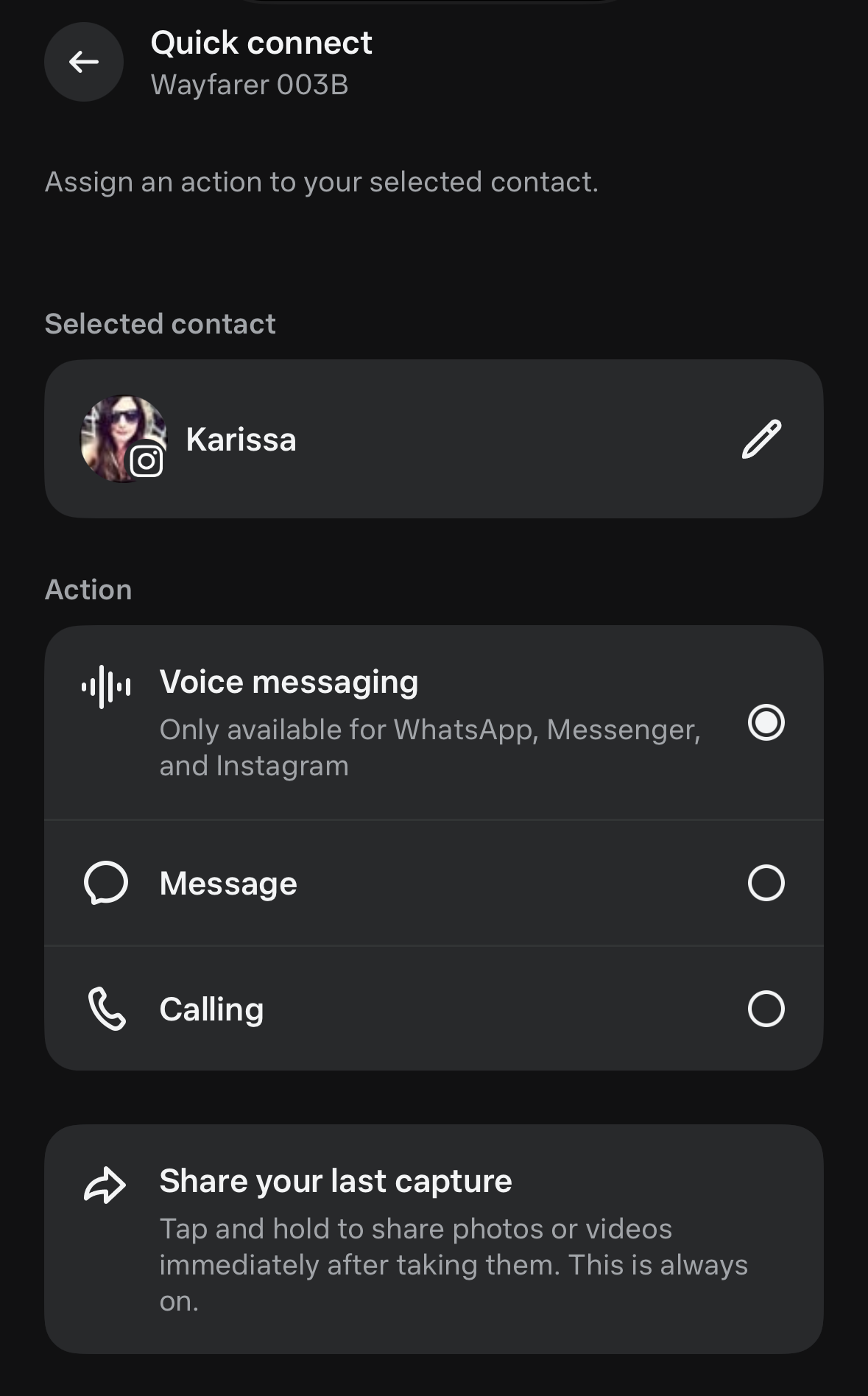
But with the $499 Oakley Meta Vanguard glasses, there's also a new step: deciding what the customizable "action button" should do. The action button isn't even my favorite part of using the glasses, but it's a sign of just how different these shades are from the rest of Meta's lineup. 

While the second-gen Ray-Ban and Oakley HSTN glasses iterated on the same formula Meta has used for the last few years, the Vanguard glasses are refreshingly different. They aren't really meant to be everyday sunglasses (unless you're really committed to your athletic pursuits) but they are in many ways more capable than Meta's other smart glasses. The speakers are louder, the camera has new abilities and they integrate directly with Strava and Garmin. And while these won't replace my go-to sunglasses, there's more than enough to make them part of my fitness routine.

New look, new setup

The sunglasses were very clearly made with athletes in mind. The Oakley Meta Vanguard glasses are the type of shades a lot of people probably think of when they hear "Oakley sunglasses." The wraparound frames with colorful, reflective lenses are the style of glasses you might associate with a high school track coach, or your neighbor who is really serious about cycling.

The pair I tested had black frames and Oakley's orange "Prizm 24K" lenses, which aren't polarized but are favored by a lot of athletes for their ability to dial up the contrast of your surroundings. I was able to comfortably wear my pair in bright, sunny conditions and also in more overcast lower light. I also appreciate that the lenses are swappable, so you can switch them out for a dedicated low-light or different-colored lens depending on your conditions. (Extra lenses cost $85 each and will be available to purchase separately soon, according to Meta.) These glasses don't, however, support prescription lenses of any kind. 

I wouldn't wear these as everyday sunglasses, but I don't mind the look for a trail run.
Karissa Bell for Engadget

I realize this style of sunglasses won't be appealing to everyone, but the frame shape does enable a slightly different setup than what we've seen with any of Meta's other smart glasses. Most noticeably, the camera is in the center of the glasses, just above the nosebridge. The LED that lights up when the camera is on is also in the center, near the top of the frames. 

As with Meta's other smart glasses, you can control volume and music playback via a touchpad on the right side of the glasses, but the capture button to take photos and videos is now on the underside of the glasses rather than on top. This is meant to make it a bit easier to reach if you're wearing a hat or helmet, though I found it took me a few tries to get used to the new placement. Behind the capture button is the previously mentioned "action button," which can be customized to trigger specific functions via the Meta AI app. 

The capture button (left) and the action button (right) are both on the underside of the frames rather than on top.
Karissa Bell for Engadget

I haven't yet figured out what the best use for the action button is, though I've tried out a few different setups. On one hike, I set it up to automatically call my husband, kind of like a speed dial. During a bike ride, I had it set to record a hyperlapse video. I've also tried it out as a shortcut for launching a specific Spotify playlist or as a general trigger for Meta AI. With all of these, I appreciated that the action button allowed me to do something without saying the "Hey Meta," command. Repeating "hey Meta" to my glasses in public has always felt a bit cringey, so it was nice to have a much more subtle cue available. 

Did I mention it's for athletes?

The Vanguard's athlete-focused features go beyond the sportier frames. The shades come with new integrations for two of the most popular run and bike-tracking platforms: Garmin and Strava. If you have a supported Garmin watch or bike computer, you can set up the glasses to automatically capture video clips based on metrics from your activity, like hitting a particular heart rate zone or other milestone. You can also ask Meta AI directly to tell you about stats from your Garmin watch, like "hey Meta, what's my pace." 

I don't have a Garmin watch, though I did briefly test out some of these features during my hands-on at Meta Connect. I suspect a lot of runners and cyclists may still find it easier to simply glance at their watch to see stats, but having it all available via voice commands doesn't seem like a bad thing either.

Strava's integration isn't quite as deep. If you're tracking a run, hike or ride while wearing the glasses, you can overlay your stats directly onto photos and videos from your activity. This includes metrics like distance and elevation, as well as heart rate if you're also wearing an Apple Watch or other tracker that's connected to the Strava app. Here's what it looks like with a photo from a recent bike ride. 

You can overlay your Strava stats onto the photos and videos you record.
Karissa Bell for Engadget

I typically don’t share stats from runs or bike rides (usually because they aren't that impressive) but it's a bit more appealing that just sharing a straight Strava screenshot. Another neat feature is that if you share a video, you can watch the stats change in real time alongside your recording. That level of detail isn't particularly interesting for a mostly flat bike ride on a city street, but I can see how it would be a lot more compelling on a more technical trail ride or in a race. 

My only complaint, really, is that Meta has limited these kinds of features to Garmin and Strava's platforms so far. I'd love to have support for my favorite ski-tracking app, Slopes, and I'm sure there are plenty of people who'd be happy to have an integration with their running or workout-tracking app of choice. Meta has announced some plans to bring more third-party apps onto its smart glasses platform so there might be hope here. 

There are other improvements, though, that will be appealing to even casual athletes. The speakers are a lot louder to account for potentially noisy conditions like a congested roadway or high-wind environment. I never had to crank the volume up anywhere near the max during my bike rides or runs, but I can say the speakers were loud and clear enough that I was able to comfortably listen to a podcast with the glasses laying next to me on the couch at full volume.

The new centered camera placement is meant to make it harder for a hat or helmet to interfere with your shots, which has been a consistent issue for me with Meta's other smart glasses. The new position didn't totally solve this — I still found that my bike helmet made it into the top of my pics — but at least it's easier to crop out now that my headgear is centered over the top of my image rather than awkwardly sticking out on one side.

The 12MP ultra-wide camera also comes with new video stabilization settings that make it feel a bit more like a replacement for an action cam. The glasses are set to automatically select a level of stabilization based on your motion, but you can also manually choose between low, medium or high stabilization (stabilization is locked at "medium" if you opt to record in 3K). I've mostly left it with the default settings and have been impressed with the results. 

The LED light is also a bit more subtle than on Meta's other smart glasses.
Karissa Bell for Engadget

The Vanguard glasses are also Meta's first smart glasses that can record hyperlapse and slow-motion video. Hyperlapse should be familiar to Instagram users who used the now-defunct app of the same name to record timelapse clips. Now, you can say "Hey Meta, start a hyperlapse" and the glasses will record a similar sped-up clip. My hyperlapse clips ended up looking a bit jittery, though, compared to the timelapse shots I'm used to getting with my GoPro.  And unfortunately, there's no way to adjust the cadence of the video like you used to be able to with the dedicated app. 

My slow-motion clips, on the other hand, came out better. It's not something I'd expect to use very often during a bike ride or trail run, but the POV angle is great for recording clips of pets or kids. Meta is also planning to bring support for hyperlapse and slow-motion videos to the rest of its glasses lineup, though, so you don't need to get these particular shades to take advantage of the feature.

The other major improvement is battery life. The Vanguard glasses have a notably better battery life compared with the second-gen Ray-Ban glasses or the HSTN frames (probably because the bigger frames allow for a larger battery). According to Meta, the Vanguard glasses can go nine hours on a charge with "typical use" or six hours with continuous audio playback. I was actually able to get a little over six hours of audio on a single charge, so they should hold up pretty well if you're running marathons or competing in longer races. As usual, exact battery life can vary a lot depending on how much you're using more resource-intensive features like video recording or Meta AI.

The bigger frames and charging case give the glasses a battery life boost.
Karissa Bell for Engadget

I'm especially looking forward to seeing how these glasses will hold up during a day of snowboarding. Meta previously told me that the battery has been optimized for a wider spectrum of temperatures so hopefully the battery won't drain as quickly on the mountain as Meta's other glasses. And with increased water resistance — the shades have an IP67 rating —  I wouldn't worry about dropping them in the snow. 

Should you buy these?

While Meta and EssilorLuxottica have gotten very good at making smart glasses (sorry Mark Zuckerberg, I won't call them "AI glasses,") they are still somewhat of a niche product. And the ultra-sporty Oakley Vanguard glasses are even more niche. At $499, these are also more expensive than other models.

That, understandably, may feel too steep for a pair of sunglasses you're likely only going to wear during specific activities. But if you're a dedicated cyclist, runner, hiker or [insert outdoor activity of your choice], there's a lot to like. The camera makes a lot more sense for action cam-like POV footage, and better video stabilization means you're more likely to get shots you actually want to share. Ready-made Garmin and Strava integrations are practically begging for you to brag about your latest PR or race time, which will certainly appeal to many.


This article originally appeared on Engadget at https://www.engadget.com/wearables/oakley-meta-vanguard-review-sporty-to-a-fault-183000829.html?src=rss

Fractal Design Scape review: A stellar debut

Unless you're a PC nerd like me, chances are you're not familiar with Fractal Design. The company has made a name for itself in recent years by designing some of the best cases you can buy for a DIY build. In a space known for its gaudy aesthetics, Fractal's products stand out for their simplicity. Now the company is entering the crowded audio space with the $200 Scape, a gaming headset that not only looks sophisticated, but also sounds surprisingly great too.  

Design

The Fractal Scape features an attractive mix of materials.
Igor Bonifacic for Engadget

I mentioned the design of the Scape first, and for good reason. It shows attention to detail, with a lot of thoughtful flourishes. The best of those is the dock that comes included with the headset. It charges the Scape inductively, so there's no need to align any charging pins, and it cleverly houses the headset's 2.4GHz wireless transmitter. When connected to your main PC, the dongle can sit inside the dock, ready to go when you want to use it with your PlayStation 5, PS4, Nintendo Switch or another PC or Mac (sorry, Microsoft fans, there's no Xbox support). The base also has wire channels to make cable management easy.     

Those same thoughtful design touches extend to the headset itself. On the back are four buttons, a dial and a toggle that cover nearly every function of the Scape. You can adjust the volume, mute the built-in mic, switch between 2.4GHz and Bluetooth connectivity, power the headset on or off, turn the RGB lighting on or off and switch between three EQ presets. What’s more, all of the controls feel distinct and are easy to use. There's also a USB-C connection for wired audio and a three-pole headphone jack for the detachable microphone. 

The headset is primarily made of plastic, with a touch of brushed metal. Fractal offers the Scape in two colors — the aptly named light and dark — and despite the company's choice of materials, the headset feels undoubtedly premium. Tilt adjustment is limited — it's not possible to lay the ear pads flat on a table, for example — but the headband offers a fair amount of resistance, adding to the high-end feel.  

That said, the Scape could be more comfortable. Clamping force feels just about right, but there's not enough padding along the top of the headband. I found I could wear the headphones for a few hours, but I eventually had to take them off to relieve the pressure that had built up on the top of my head. I'm also not a fan of the fabric Fractal used for both the headband and ear pads. It feels scratchy and it's not great at dissipating heat. Thankfully, the high-density memory foam beneath is plush and the pads were deep and wide enough to comfortably accommodate my ears. 

Fractal has made it easy to swap the ear pads if needed; they come right off with just a small amount of force. For the time being, the company isn't selling replacements, but a spokesperson told me Fractal will send customers who need new pads a set for free. You just need to contact their support team.           

Sound quality

The Scape comes with a set of custom-tuned drivers.
Igor Bonifacic for Engadget

Out of the box, the Scape's dynamic drivers are tuned to a soft v-shaped curve, with an emphasis on accuracy over character. Bass frequencies are punchy without being bloated, and there's nice detail to mid-focused instruments like guitars. To my ear, the one issue with the Scape's default tuning were the upper mids and treble frequencies. They weren't shouty to the point of being sibilant, but there was definitely a harshness to the vocals of singers like Jeff Buckley and Caroline Polachek who are known for their falsetto. Thankfully, this was easy to fix with the Scape's built-in EQ settings.  

I'll have more to say in the software section of this review, but Fractal's Adjust app allows you to make parametric EQ adjustments. This is different to most gaming headsets, which often limit people to restrictive fixed-band tweaks. Even when I used just five potential points of customization, I found I had a great deal of control over the tonality of the Scape. 

Overall, for casual music listening these are excellent headphones capable of covering many different genres. When it comes to gaming, they're great too — with some caveats. For singleplayer games, the default tunings are an excellent match. Playing Ghost of Tsushima, the Scape did a great job of reproducing the game's immersive sound design, allowing me to soak in all the little audio details Sucker Punch packed into its rendition of 13th century Japan. The soundstaging isn't as expansive and lush as I'm used to with my Sennheiser HD 600, but for a pair of closed-back headphones, it's above average.  

When it comes to competitive first-person shooters, some tweaks are required. I found all the default presets produced too much bass to easily isolate sound cues in games like Valorant. Again, Fractal's software made this simple to fix; however, the Scape can only store three presets. Some gaming headsets, particularly those from Steelseries, come with tunings for hundreds of different games. For the ultra-competitive gamer, this can be useful since every game has a different sound engine. I'm not one of those people, so I found the Scape had just the right amount of customization.   

A closeup of the Scape's volume dial.
Igor Bonifacic for Engadget

One feature you won't find on these headphones is active noise cancellation (ANC). Don't get me wrong, ANC is great, but I also didn't feel like the Scape was a worse product without it. My girlfriend is a Pelton fanatic and she does all of her daily classes without wearing headphones in our small apartment. In that situation, the Scape's passive noise isolation was enough to block the loud music coming from those workouts.    

That said, the one area where the Scape could have been better is Bluetooth connectivity. It's a 5.3 headset, but codec support is limited to SBC and AAC. If you've ever tried a pair of wireless headphones only to be disappointed by how they sounded, SBC was probably to blame. When I used the Scape over Bluetooth, there was a subtle difference, but in a beat 'em up like Absolum, the game's excellent sound design was less effective because it sounded more compressed, with more lag between what was happening on-screen and the effects that followed.      

I would have liked to see Fractal support more modern codecs like aptX Adaptive, but given that you need a dongle like the Creative BT-W6 to get access to those protocols on PCs and consoles, I can't fault the company for its decision. Also missing from the Bluetooth equation is multipoint support, meaning I wasn't able to connect the Scape to my PC or Switch and my iPhone at the same time.  

The Scape's detachable microphone is fine but uninspiring. In listening back to a chat I had with some friends over Discord, I found the Scape compressed my voice to the point where there wasn't a lot of life or nuance to it. The optional noise cancellation algorithm does a good job of filtering out nearby commotion, but does so at the expense of adding more compression. You can flip the microphone to mute yourself, and if you're feeling lazy, the Scape also has a built-in mic — though it sounds about as good as you might imagine. Still, it's handy in a pinch.         

Software 

Fractal's Adjust app is web-based and easy to use.
Igor Bonifacic for Engadget

I mentioned Fractal's Adjust software, but what I didn't note is that it's not an app you need to install on your computer. Instead, it's a website you can access through any Chrome-based browser. It's a small thing, but one I really appreciate. I can't count how many times I've had to troubleshoot issues with Windows that were caused by a conflict created by Logitech G Hub or NZXT Cam. 

The web-based software itself is simple, with two pages, named Lighting and Audio, encompassing all the options you can tweak. The Scape comes with 10 lighting themes out of the box, and like the headset itself, these presets are understated and classy. Naturally, you can also create your own lighting schemes, and the tool for doing so is fairly robust. 

A closeup of the Fractal Scape's EQ button
Igor Bonifacic for Engadget

When it comes to the EQ adjustments you can make with the Adjust app, the one thing I'll add here is any presets you save are stored on the Scape, so they're available everywhere you want to use the headset. That was great because it meant I didn't need to Alt-Tab out of a game to switch the headset to a more competitive tuning.   

The one area where Fractal's software feels lacking is when it comes to microphone controls. It's possible to adjust sidetone (the volume of your mic input as heard through the headset) and enable microphone noise cancellation, but that’s it. It'd be nice if it was possible to configure those settings for the two mics independently of one another, but the software doesn't support that right now.  

Battery life

According to Fractal, the Scape can go up to 40 hours on a single charge with RGB lighting off. With the feature turned on, battery life drops to about 26 hours. I'll be honest, I had a tough time putting those claims to the test because of how easy it is to charge the headset. As best as I can tell, those estimates are accurate. I managed to get three days of battery life from the Scape with the RGB lights turned on and about eight hours of use each day. 

One nice touch: when you tap the power button, the RGB lights will briefly illuminate to indicate how much battery life the Scape has left. Those same lights will turn off when you place the headset to charge so that they're not distracting.  

The competition

With the Scape, Fractal has entered a crowded market. That said, the Scape is competitive with some of the best gaming headsets you can buy right now. At $200, it's $100 cheaper than the Audeze Maxwell, Engadget's pick for the best premium gaming headset. The Scape doesn't sound as good as the Maxwell or offer LDAC support for Bluetooth connectivity, but it's lighter and charging is easier thanks to the included charging base. If you ask me, the Scape also looks a lot better too. 

If you can't live without ANC, your best bet is Razer's BlackShark V3 Pro, but it costs $50 more and doesn't sound as good as the Scape. You also need to put up with Razer's annoying Synapse software. For the best mic on a gaming headset, my longstanding recommendation has been the $199 Drop PC38X. It also has one of the best default tunings for competitive gaming. However, it's a wired headset, and Drop doesn’t offer a wireless option.    

Wrap-up

The charging station also houses the Scape's 2.4GHz transmitter.
Igor Bonifacic for Engadget

If you can't tell by now, I think the Fractal Scape is a great gaming headset. There are models like the Audeze Maxwell that beat it in one or two categories, but for $200 the Scape is an excellent all-around package. Nitpicks about comfort aside, the Scape sounds and looks great. It's also a tremendous first effort by Fractal, and I can't wait to see what the company does next in the audio space and beyond. 

This article originally appeared on Engadget at https://www.engadget.com/gaming/fractal-design-scape-review-a-stellar-debut-173000007.html?src=rss