Nintendo gear is always sought after during the holiday shopping season, but this year likely more so than others. The Nintendo Switch 2 is the console launch of 2025 and it will undoubtedly be at the top of many wish lists for both kids and adults alike. If you were hoping to save a bit on the console during the Black Friday shopping season, you may be disappointed. The Nintendo Black Friday sale was announced earlier this month, and unsurprisingly, there aren't a lot of true "deals" to be had. This is typical of Nintendo — legit Nintendo Black Friday deals are hard to come by even in the best Black Friday gaming deals — but there are ways to at least get the best value for your money if you're going to pick up a Switch 2 before the year is out.
As has been the case for many years, the marquee Nintendo deals for the holidays come in the form of console bundles. When the Switch 2 launched earlier this year, it was available as just the console only for $449 or bundled with Mario Kart World for $499. Both options are still available now. Considering the games by themselves cost $70 each, you do save a bit by picking up a console bundle. you can pick up the console and its bundles at most retailers including Amazon, Walmart, Best Buy and others.
Nintendo Switch game deals
When it comes to deals on Nintendo Switch 2 games, the Nintendo eShop will have Cyber Deals starting on November 20, running through December 3. The shop will feature "holiday offers on select games," so it appears we'll all just have to go to the online store on November 20 to see the games on offer.
Switch 2 accessories were conspicuously absent from the announced deals, but there's always a chance they'll receive discounts from third-party retailers like Amazon, Walmart and Best Buy. A handful of official Nintendo accessories made it onto our best Switch 2 accessories list, but you can find plenty of good ones from other manufacturers as well. If you're keen on getting a first-party accessory, though, for yourself or as a gift for someone else, here's where you can find some of the most popular ones.
Even if you can't get huge discounts on Nintendo consoles or new games this year, that doesn't mean you can't find decent deals on other Nintendo gear. There are plenty of great ideas for gifts for the Nintendo fan in your life, and Engadget's Sam Rutherford got to see a bunch of them in person when he attended Nintendo's holiday showcase. From collectibles to clothing to plushies and holiday decor, there's really a ton to choose from — but you may want to pace yourself if you're also a Nintendo fan finding things that you want to pick up for yourself in the process of looking for good gifts. Here are just some of the best Nintendo gift ideas that you can look out for during Black Friday and Cyber Monday.
This article originally appeared on Engadget at https://www.engadget.com/deals/nintendo-switch-2-black-friday-deals-are-still-live-big-savings-on-switch-games-and-accessories-plus-the-best-switch-2-bundles-for-the-holiday-shopping-season-155223014.html?src=rss
Most pizza cutters feel flimsy when you need them to work hardest. The blade dulls after a few uses, the handle slips when your hands are greasy, and cleaning caked cheese out of the mechanism becomes its own kitchen project. Cheap versions wobble through thick crusts instead of cutting cleanly. Better ones exist but often sacrifice grip comfort or end up too bulky for drawer storage.
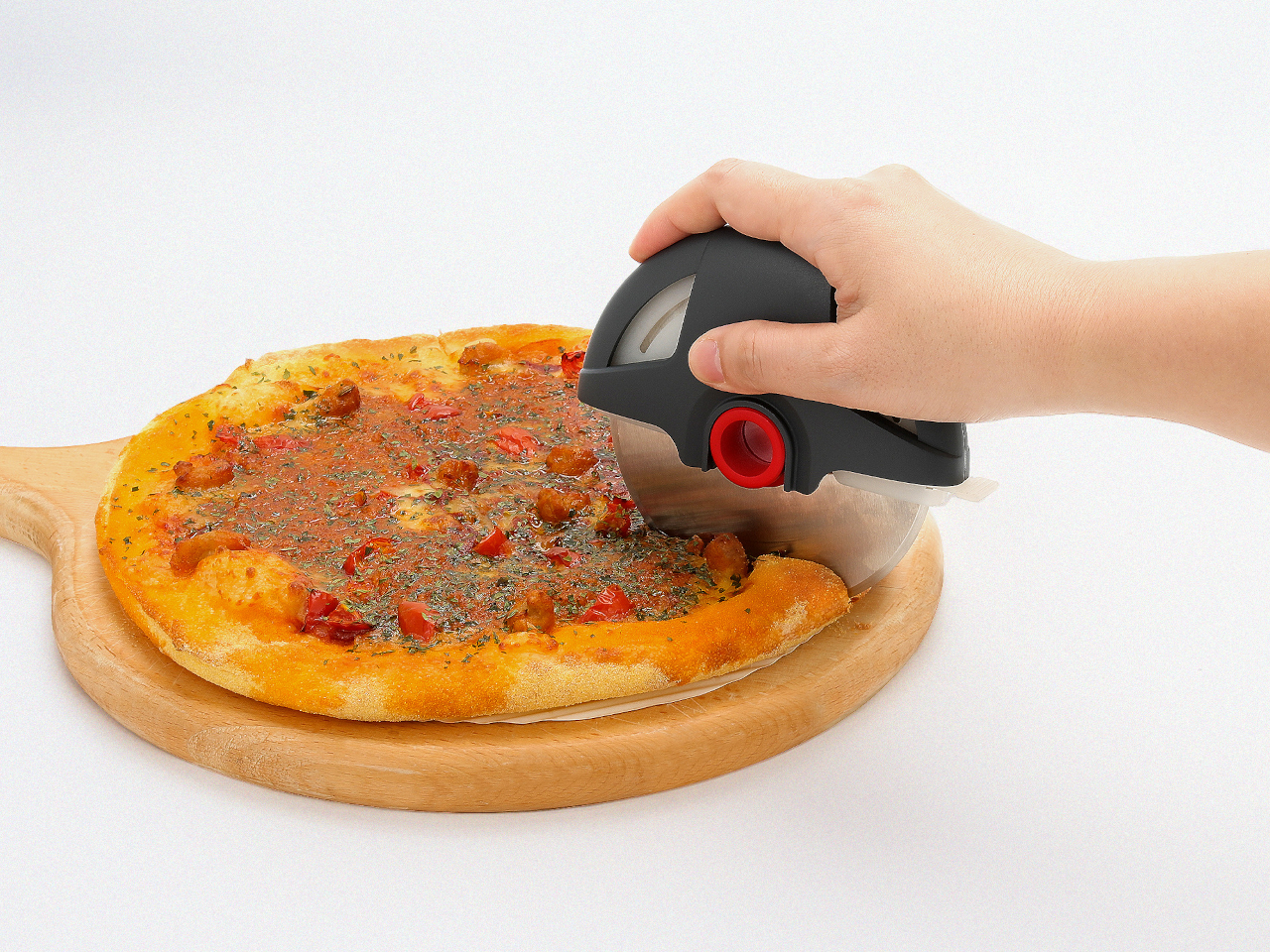
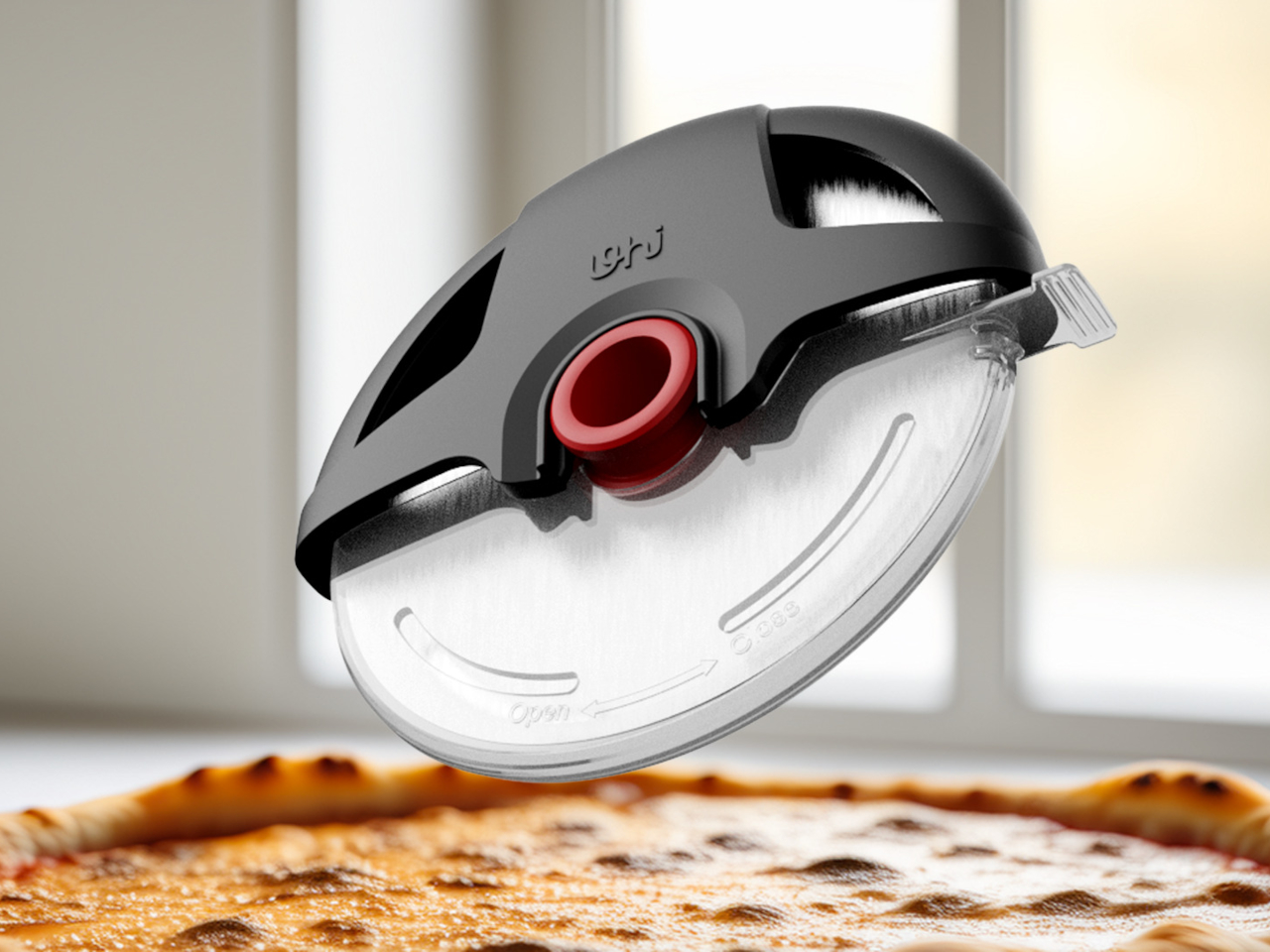
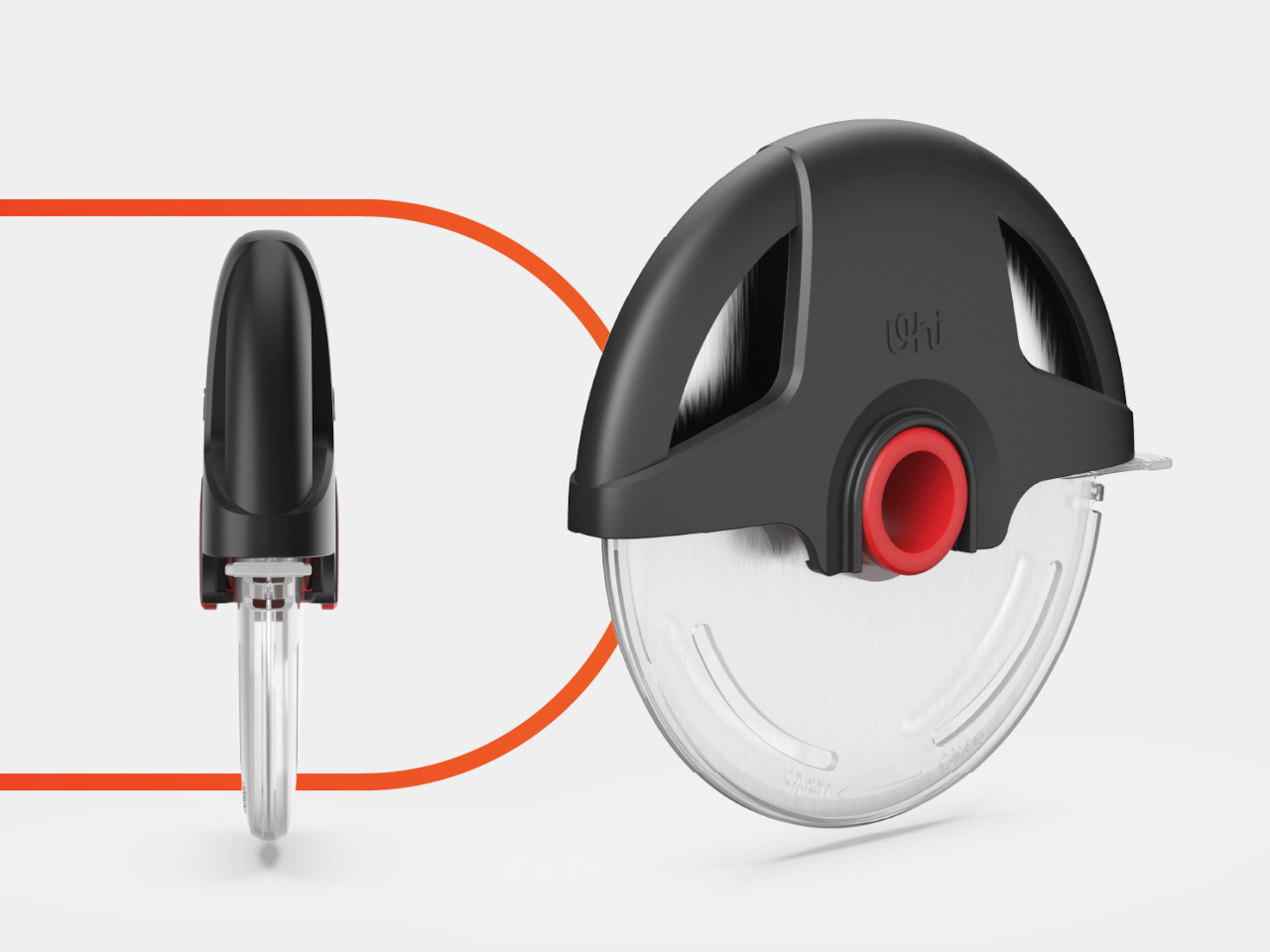
The UHIYEE Wheel Pizza Cutter addresses these problems by borrowing design language from power tools rather than typical kitchen gadgets. The arched handle and exposed blade resemble a compact circular saw, which might seem excessive for slicing pizza until you realize how much more confidence that visual cue provides. The wheel-shaped form suggests capability before you’ve even used it, setting expectations that the design then delivers on.
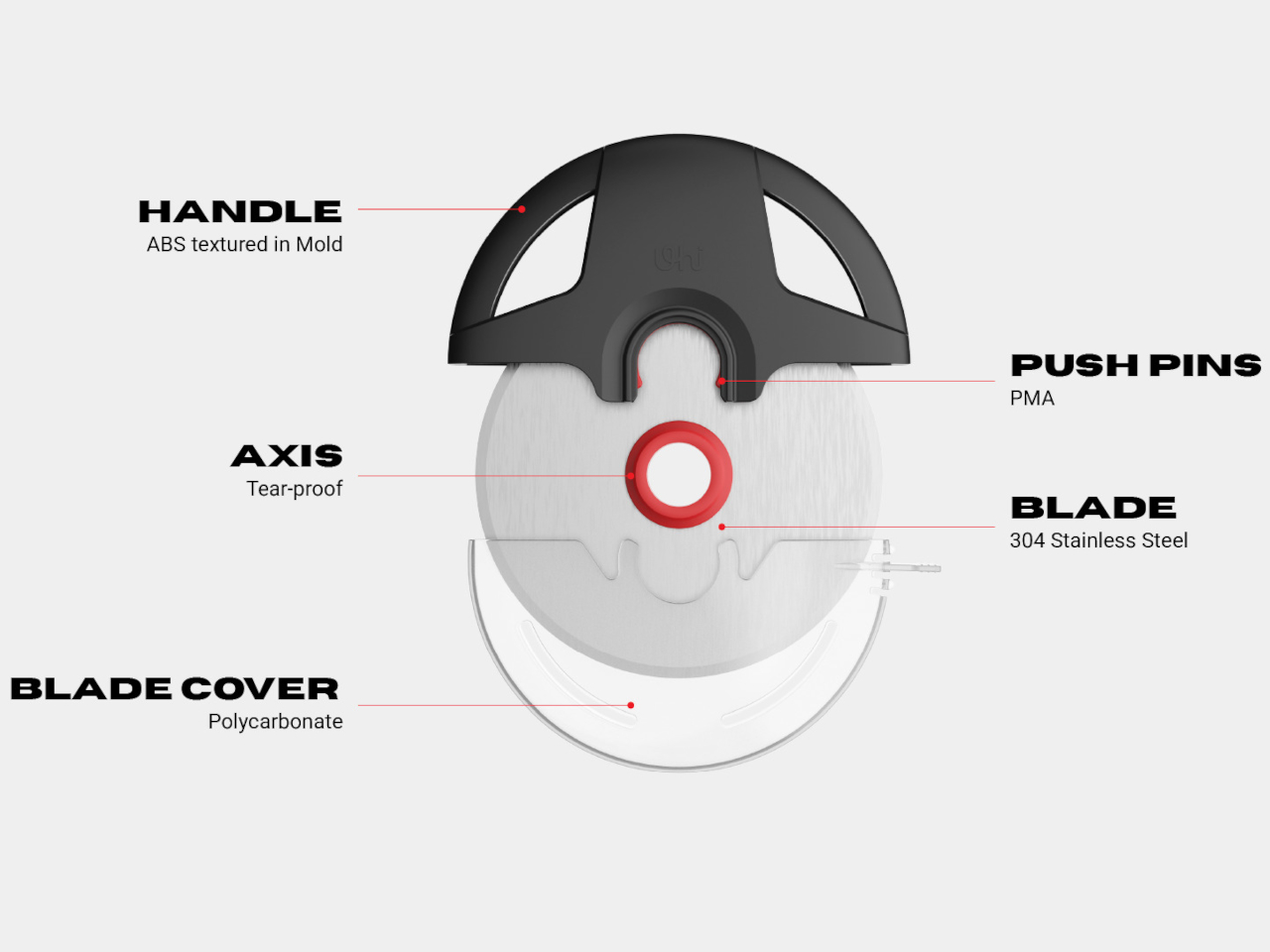
The handle uses injection-molded ABS with textured surfaces that maintain grip even when hands are wet or oily. The palm-filling shape distributes pressure evenly, preventing the hand fatigue that happens with thin handles requiring tight grips. Finger placement feels natural rather than forced. The geometry accommodates different hand sizes without requiring conscious adjustment to where you’re holding it.
A large 304 stainless steel blade cuts through thick crusts, deep dish edges, and layered toppings without requiring multiple passes or sawing motions. The diameter gives the blade enough surface contact to slice decisively rather than dragging. The edge profile stays sharp longer than typical pizza cutter blades, which matters when you’re cutting regularly rather than occasionally.
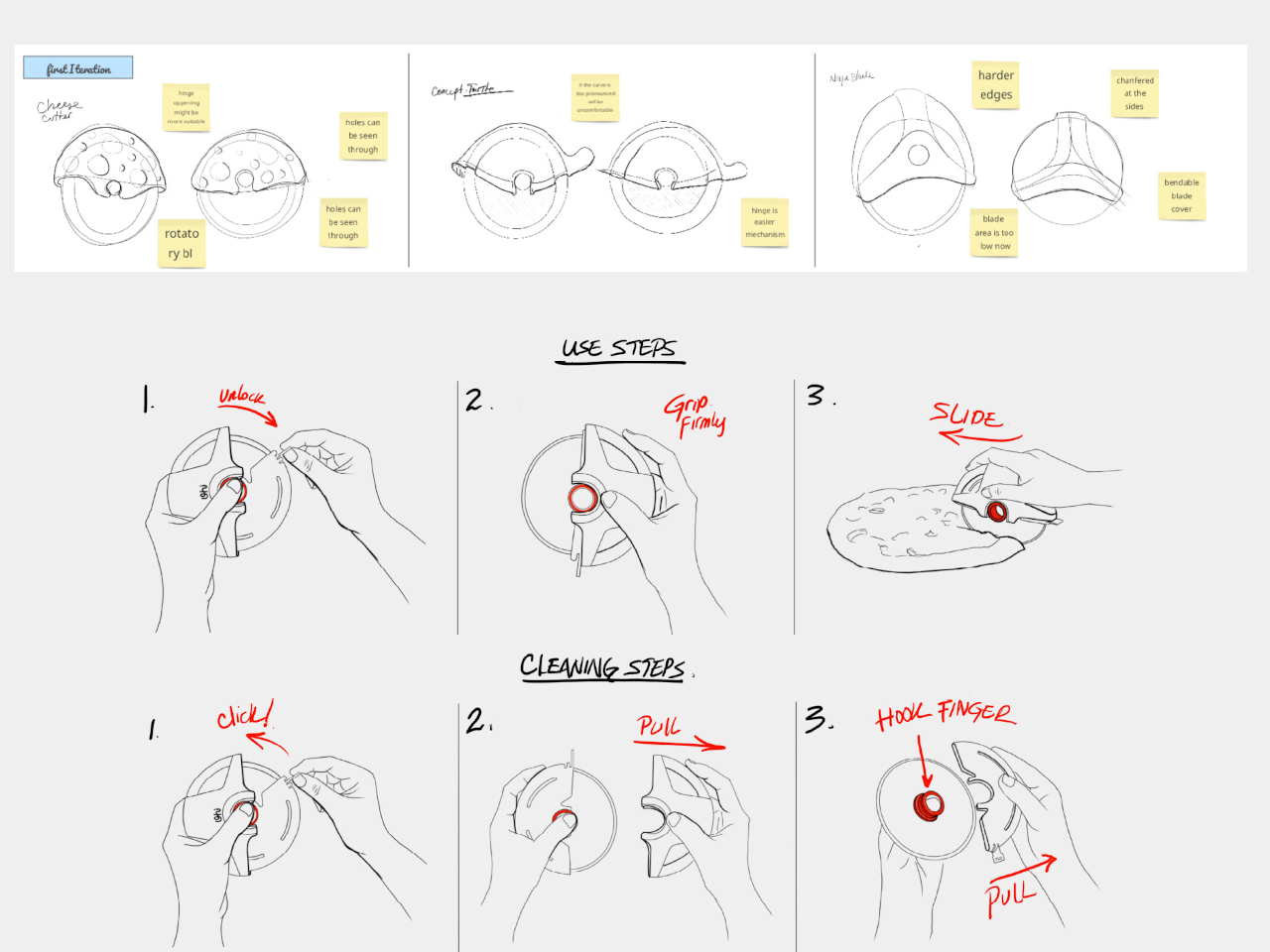
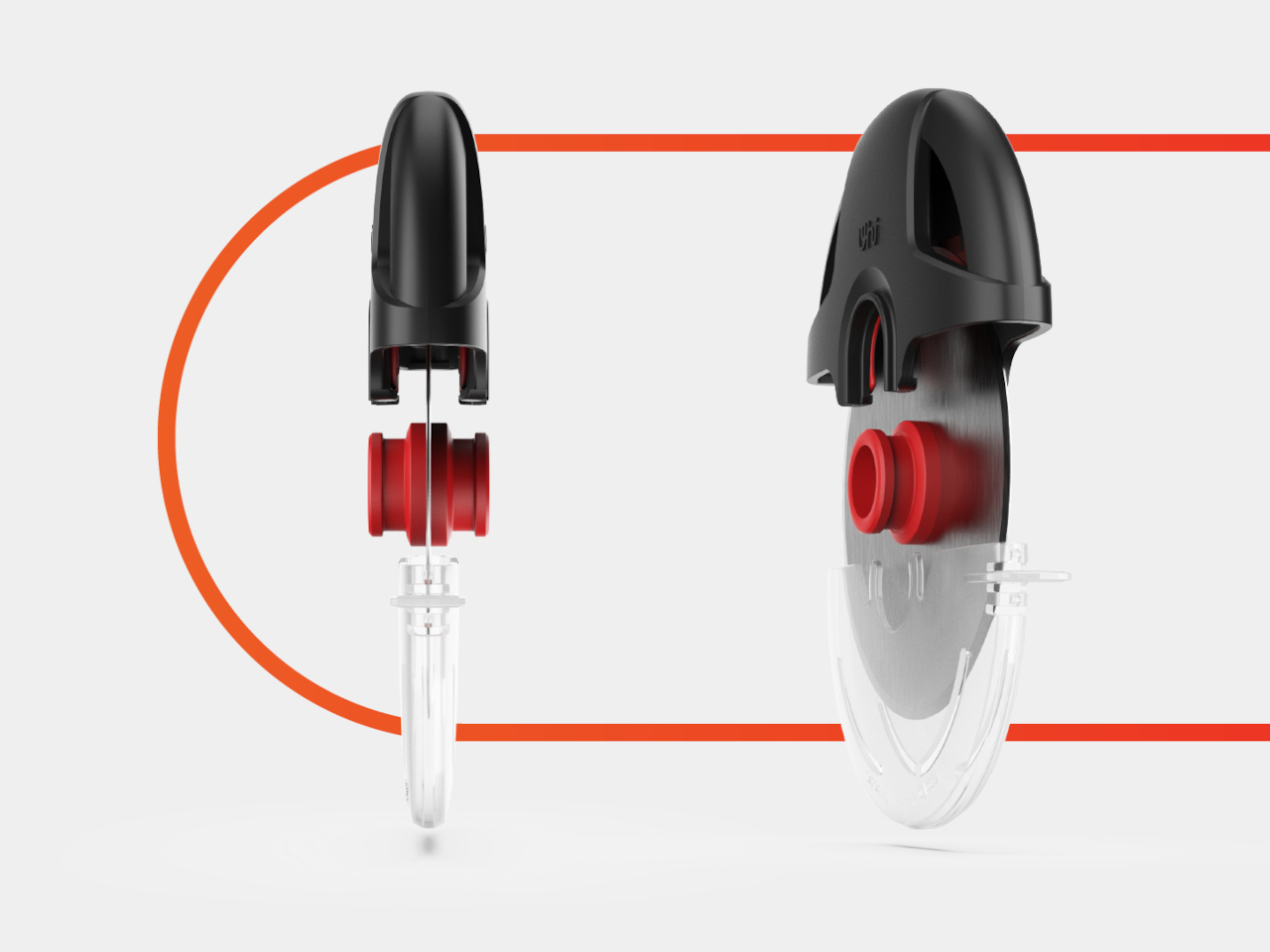
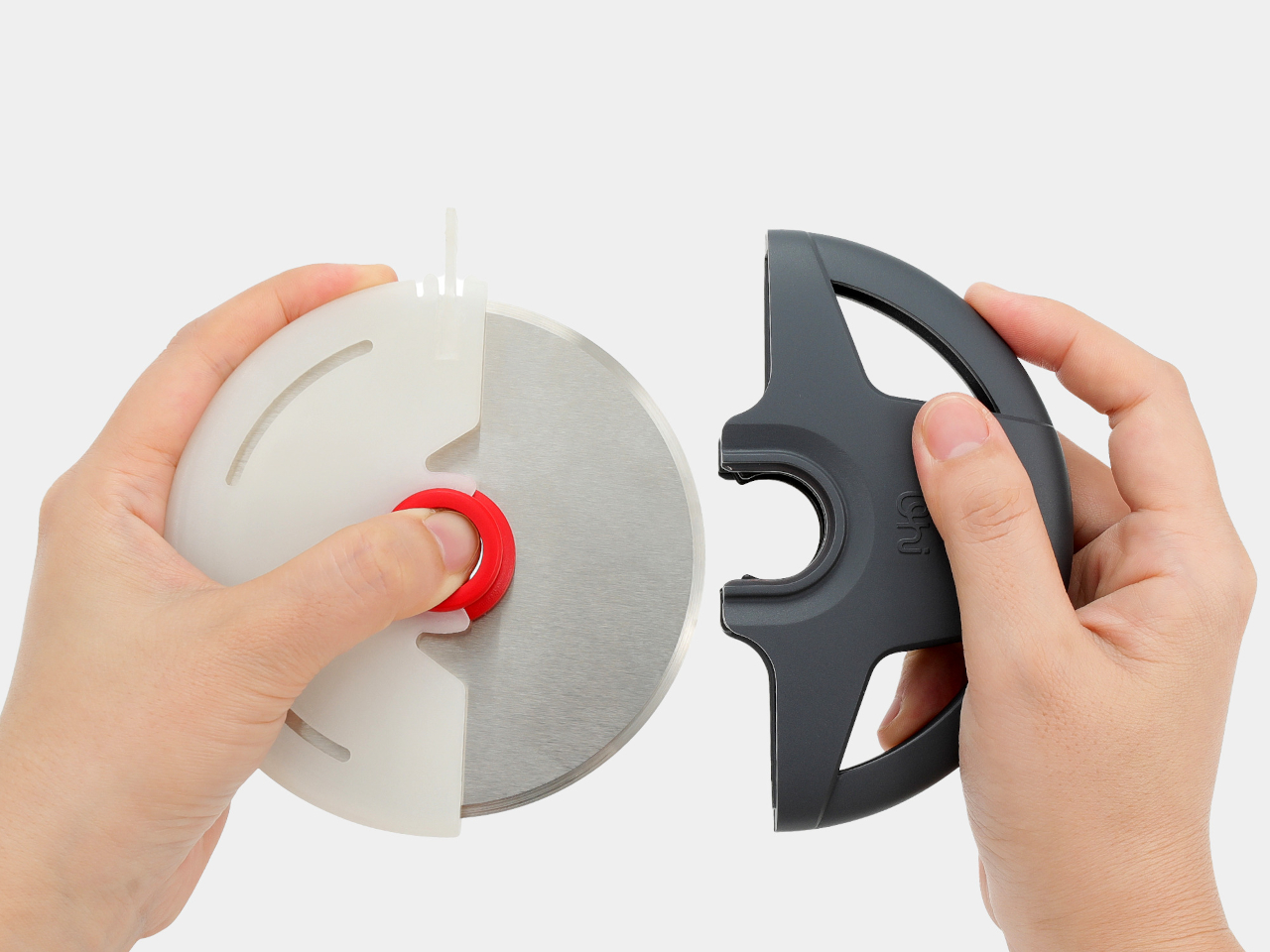
Push pins on either side of the handle release the blade assembly for cleaning. The whole mechanism separates into a few parts that rinse clean quickly instead of trapping cheese and sauce in unreachable crevices. Reassembly happens just as easily, with parts that align obviously rather than requiring guesswork about which direction components face.
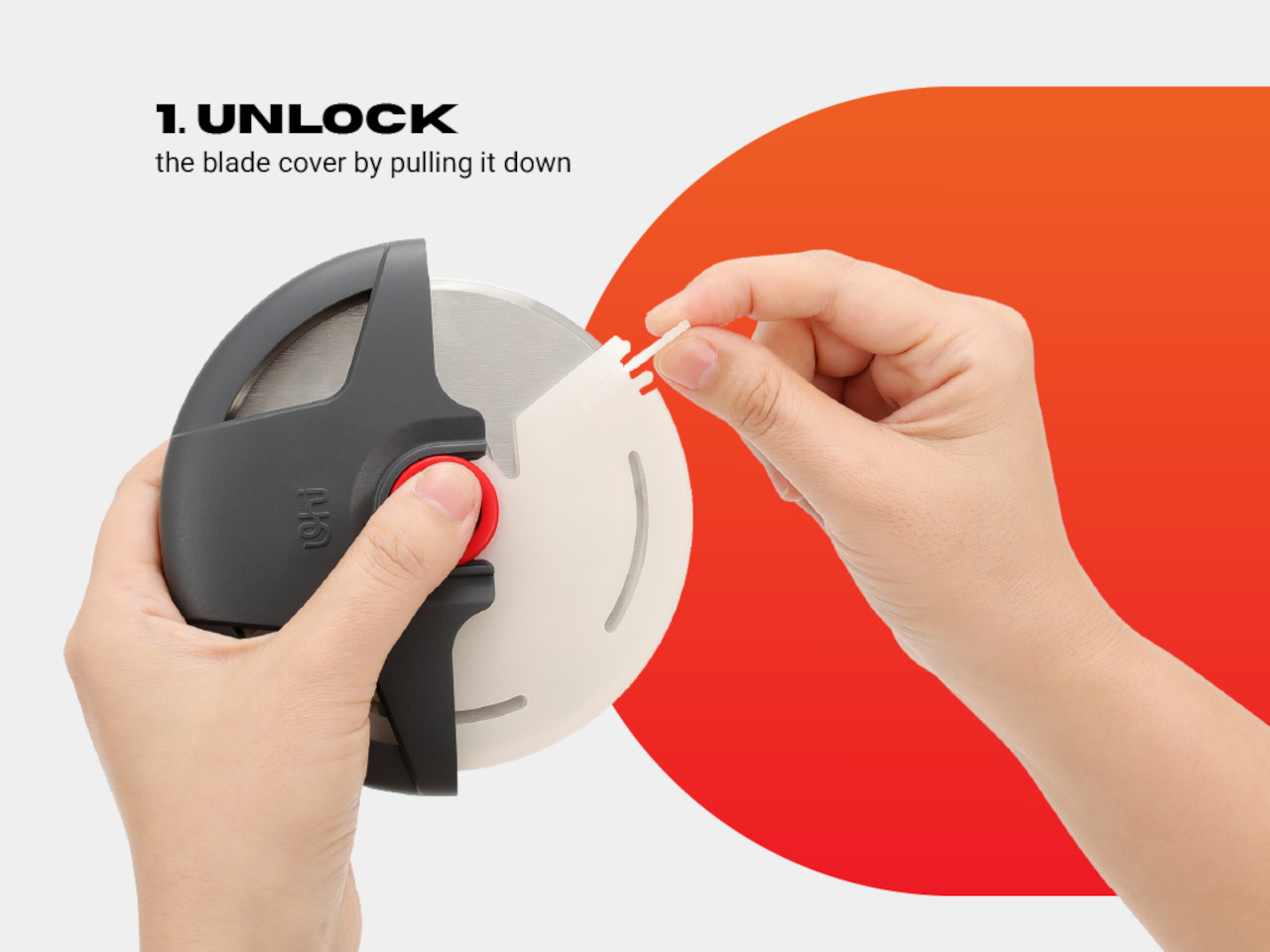
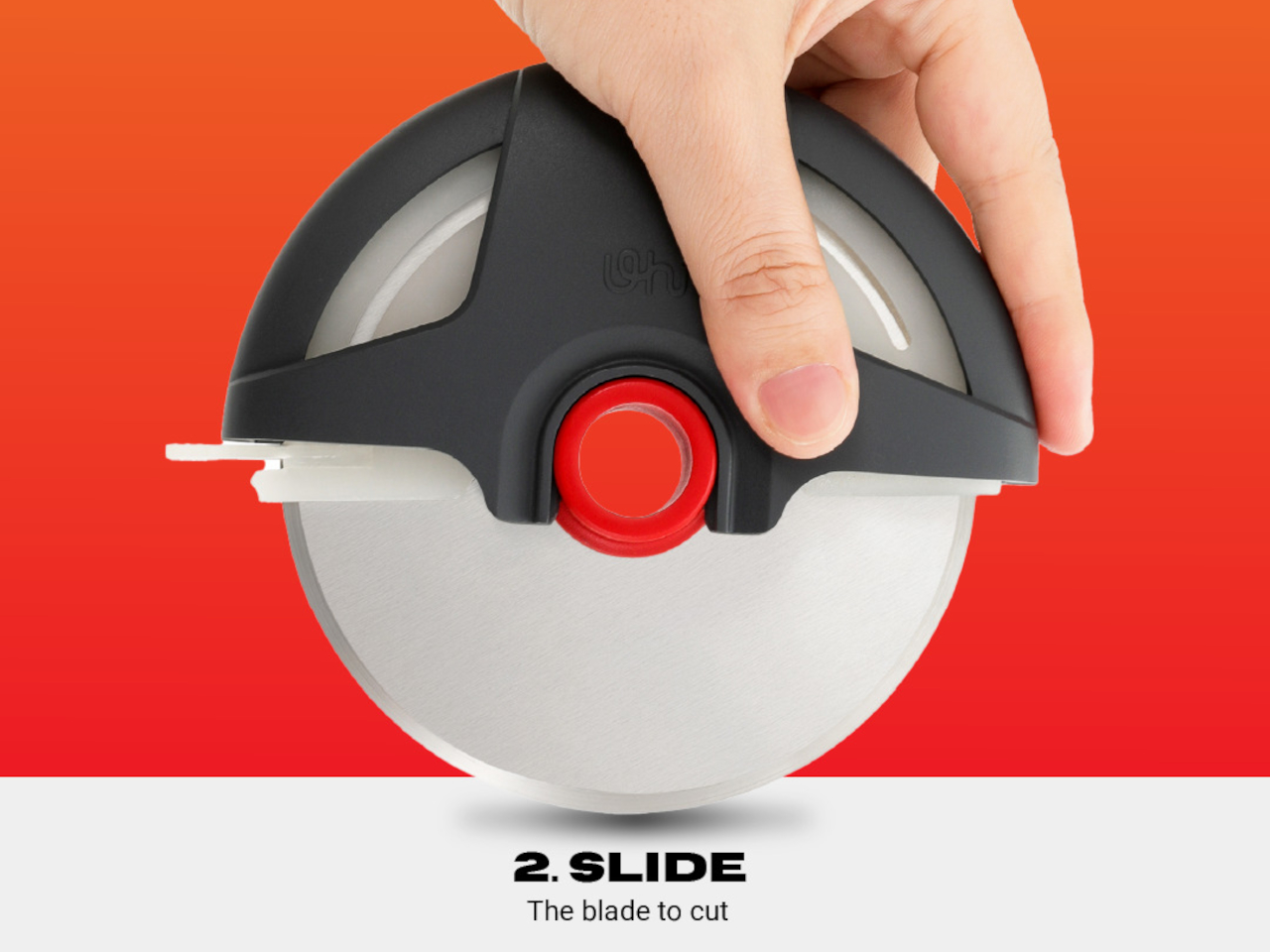
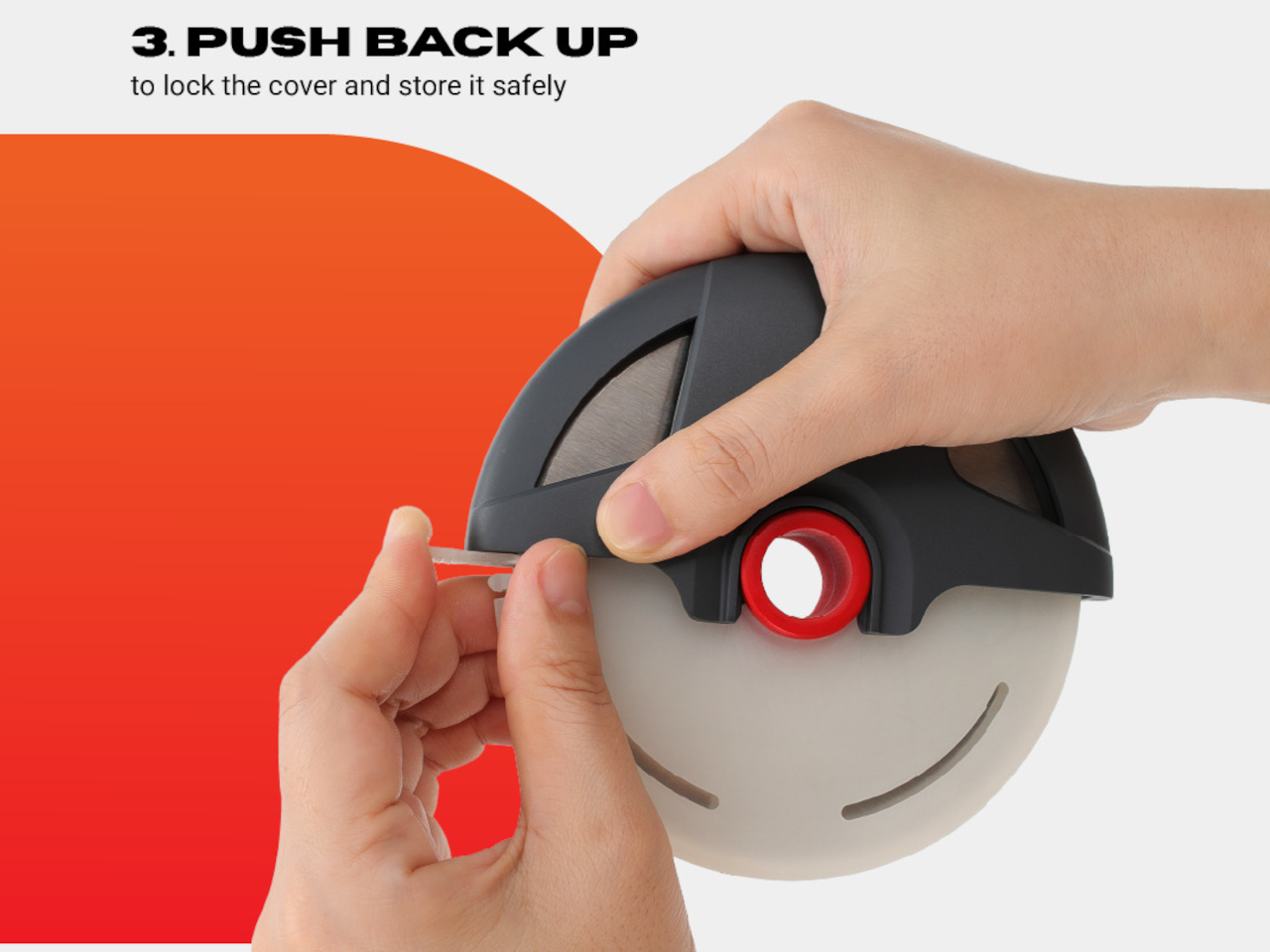
The transparent polycarbonate blade cover locks over the cutting edge when the tool goes back in the drawer. A simple sliding mechanism unlocks it for use. This removes the anxiety about reaching into a drawer and grabbing the sharp side accidentally. The cover also keeps the blade clean between uses and prevents it from dulling against other utensils.
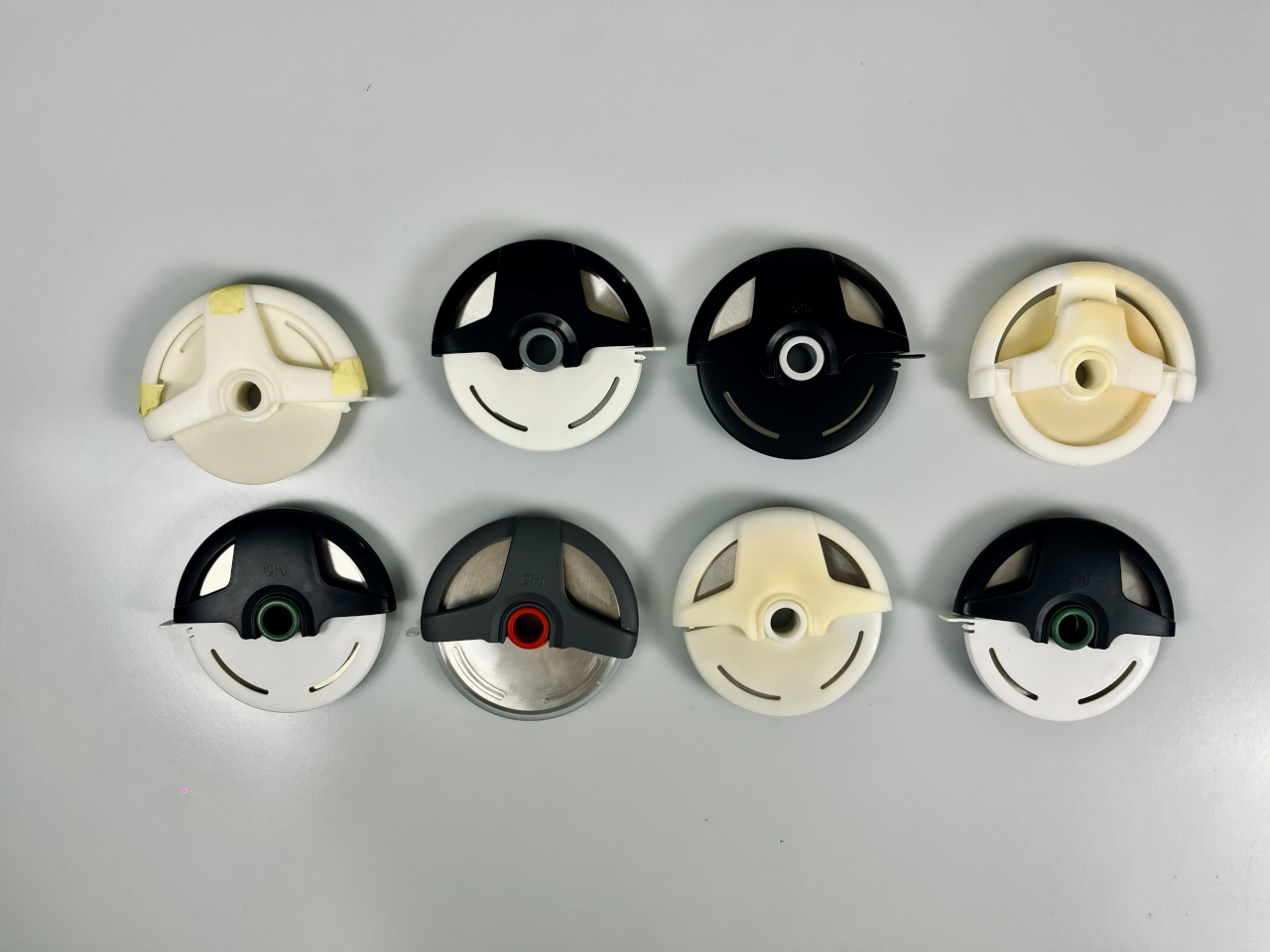
That power tool resemblance works both functionally and aesthetically. The black, red, and silver color scheme reinforces the industrial quality. The wheel shape makes storage more compact than traditional pizza cutters with long handles. What could feel gimmicky instead reads as purposeful, turning pizza cutting into something that feels more deliberate and satisfying.
The UHIYEE Wheel Pizza Cutter brings industrial design thinking to a kitchen task that rarely receives this level of engineering attention. It handles thick crusts and deep dish edges confidently while looking appropriate next to other well-designed kitchen tools. The power tool resemblance stops feeling unusual once you’ve used it, making pizza night more satisfying for anyone who appreciates objects that actually work.
It's arriving too late to be part of a Sam Porter Bridges Halloween costume this year, but Kojima Productions has a new collaboration lined up that could be just the ticket for cosplayers or anyone who may wish to enhance their lower-body strength and stability. The studio has teamed up with exoskeleton maker Dnsys for a limited run of a model based on Death Stranding 2: On The Beach.
Dnsys claimed this was the first collaboration between an exoskeleton maker and a game studio. Kojima Productions art director Yoji Shinkawa worked with the company on the design, which draws from the color palettes of the game and is based on an existing Dnsys model. It has lights similar to the exoskeleton Sam wears in the game, and they indicate the battery level.
DNSYS ✖️ DEATH STRANDING 2 co-branded exoskeleton is here 👍
📦 Dnsys Z1 Exoskeleton Pro – DEATH STRANDING 2 ON THE BEACH Limited Edition It enhances lower-body strength and stability, allowing humans to keep moving through complex terrain and extreme environments. 🦵🦿… pic.twitter.com/Yi1E6RnKNC
The Dnsys Z1 Exoskeleton Pro - Death Stranding 2: On The Beach Limited Edition (to give its full name) is said to mimic the game's load-balancing system by offloading up to 200 percent of the wearer's body weight from their knees to help protect the joints. Dnsys said it adds 50 percent more power to steps and "intelligent gait control" to improve balance on stairs and uneven terrain. According to the company's press release, you'll "instantly feel up to 44 lbs lighter during vertical movements." The exoskeleton is slated to offer over four hours of continuous support and there's a quick-swap battery system.
Exoskeletons can be very useful, particularly for those who could do with extra support and/or have mobility issues. Or maybe you want to look the part while you carry some very heavy cargo on your back and listen to Chvrches and Bring Me the Horizon.
This limited-edition exoskeleton will be available on December 2. Pricing will be announced then. The regular price of a dual-leg Dnsys Z1 system is $1,500, so you can probably expect the Death Stranding 2 variant to be in that ballpark. You can also try your luck at scoring the exoskeleton for free through a giveaway.
This article originally appeared on Engadget at https://www.engadget.com/gaming/the-latest-death-stranding-collab-is-an-actual-exoskeleton-151215509.html?src=rss
The Samsung Galaxy S26 Ultra is capturing attention as leaks suggest significant advancements in chipset technology and charging capabilities. If these reports hold true, the Galaxy S26 Ultra could set a new benchmark for premium smartphones in 2024. Below is an in-depth look at the rumored upgrades and their potential impact on your smartphone experience. […]
Amazon is in the middle of rolling out Alexa+, the long-awaited, AI-infused update for its voice assistant. At the same time, the company has also been giving a fair bit of attention to Amazon Music, adding things like Alexa+ integration and AI-powered playlists. And as of today, Amazon is rolling out a new community-focused feature called Fan Groups. As the name suggests, Fan Groups are a way for users to connect around different musical interests — and what makes this more fun to me is that these aren’t limited to Amazon-curated groups.
Once Fan Groups fully rolls out, anyone will be able to create a public group in Amazon Music based around a genre, region, time period or anything else you want to focus the group on. Right now, Fan Groups are only available in Canada during a a beta period, but they’ll come to other countries (including the US) early next year. Amazon has had testers building out some Fan Groups in the meantime so that testers don’t walk into a ghost town.
When you first open the Groups tab, which will be part of Amazon Music’s bottom navigation, you’ll see a top rail with Groups you’ve joined and a scrolling list of ones you can check out. Some of the examples Amazon showed off include “K-pop Now,” “Red Dirt Americana” and “Indie Insiders,” all of which feel pretty self-explanatory. Each group includes a “featured” playlist at the top and then a scroll of posts by people who’ve joined the group.
Members can share any song, album or playlist on Amazon Music along with a comment; you can then have a discussion on the post. It’ll be familiar to anyone who has used a Facebook Group over the years. Somewhat interestingly, Amazon is also letting you share external links Beyond the “posts” view, there’s also a music-only tab that just shows everything that has been shared to the group. One of the more intriguing features in Fan Groups is the ability to just hit “play” and listen to everything that’s been shared over time — it’s something that should be good for exploration as well as just seeing if the group’s tastes are aligned with your own.
In the quick demo I saw of Fan Groups, it felt like the rare new social tool that could be useful. Music is obviously an extremely social art, one that so many love sharing with other fans. Discovery is also a huge part of being a music fan, and I appreciate the fact that Amazon is building a way to get recommendations from other human beings and not just algorithms and AI. The only issue is that getting traction for a social network built inside of a specific service isn’t the easiest thing to do — you could just as easily share music on Facebook or any number of other apps. But the potential for finding new music and sharing what you’re into with other fellow obsessives make this feature worth a look once it fully launches.
This article originally appeared on Engadget at https://www.engadget.com/amazon-musics-fan-groups-are-a-refreshingly-old-school-way-to-share-and-find-tunes-150000084.html?src=rss
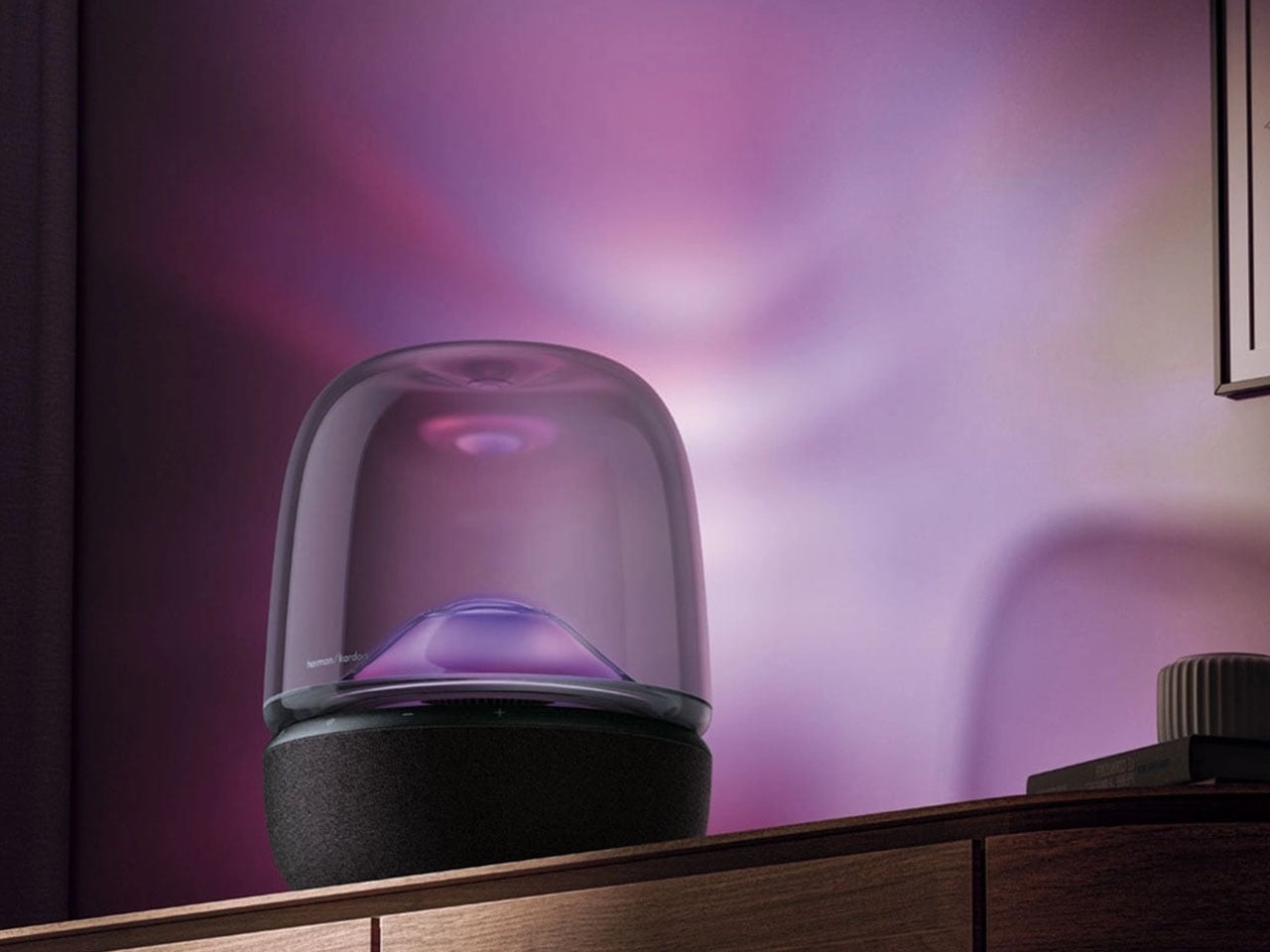
Few brands have successfully merged sound and sculptural elements quite like Harman Kardon. For decades, the New York-based company has treated speakers not merely as audio devices but as design objects. More than just audio accessories, they are pieces that add emotion and visual rhythm to any interior space. From the transparent SoundSticks that became a millennial desktop icon to the elegantly curved Aura series, every release has carried that distinctive harmony of sublime clarity and unique form.
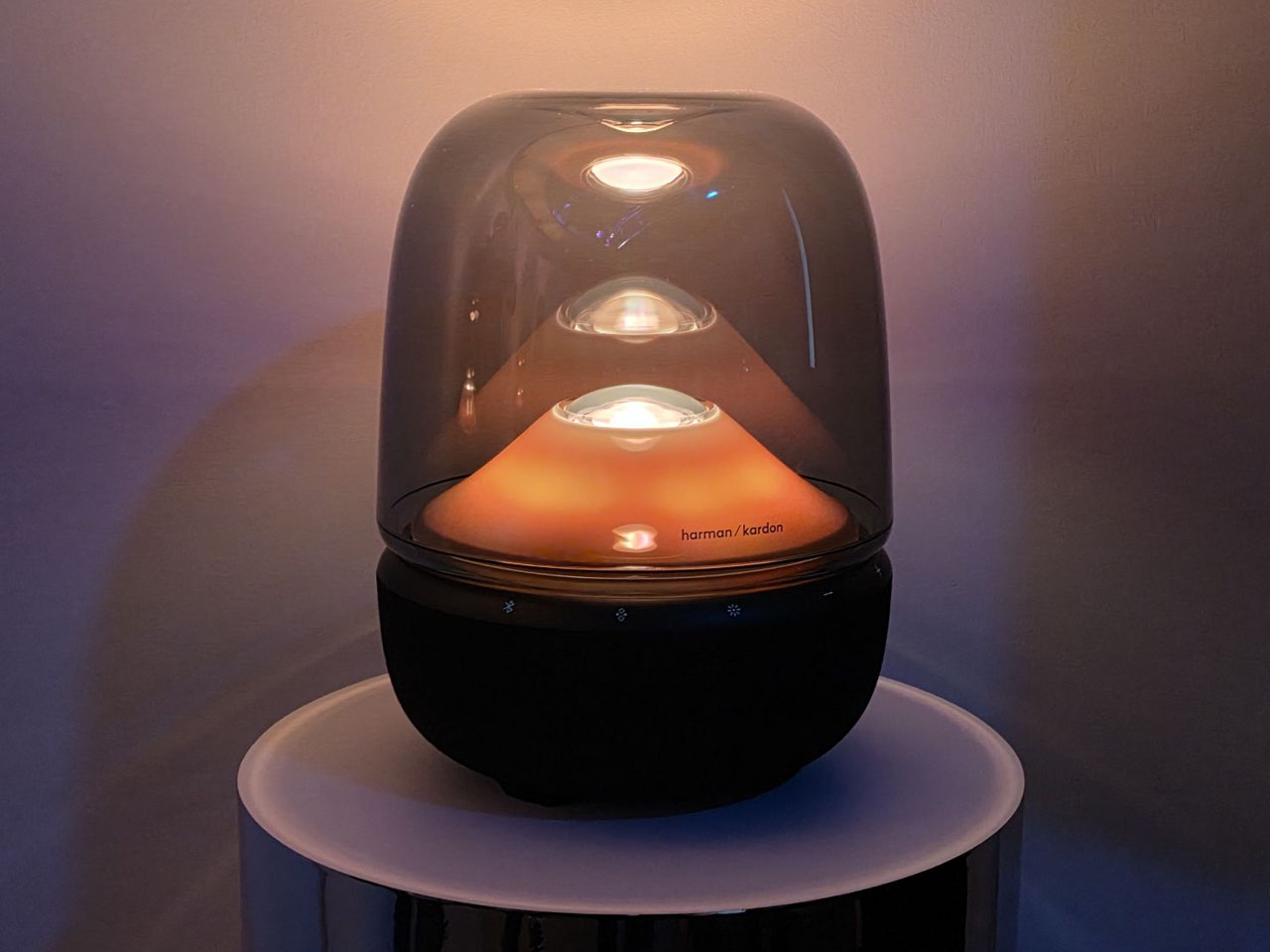
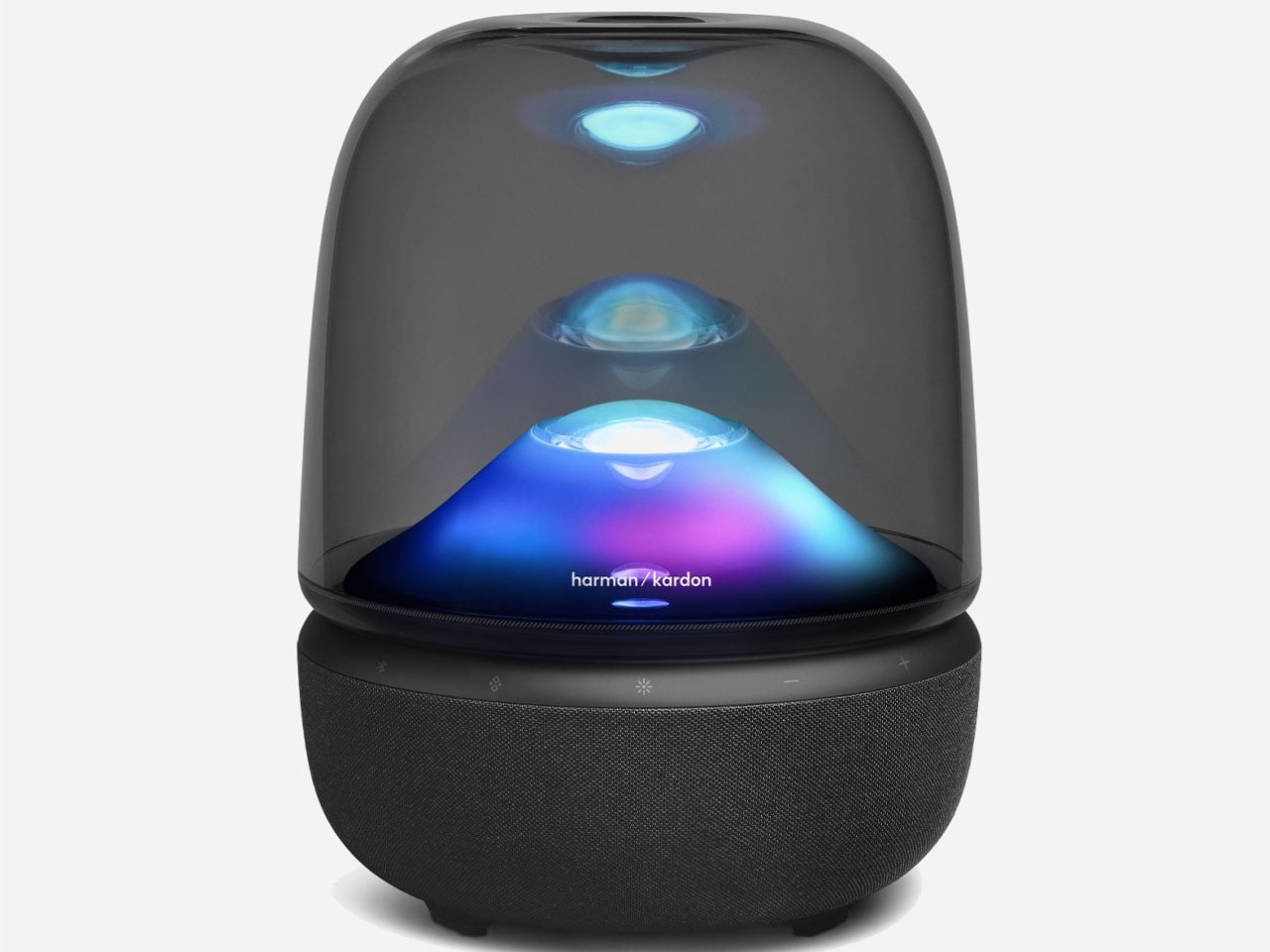
The newly introduced Aura Studio 5 builds on that legacy, reinterpreting Harman Kardon’s classic dome aesthetic for a generation that values both sensory immersion and timeless design. Its combination of audio performance, ambient lighting, and sculptural form positions it not just as a speaker but as an artful centerpiece for modern interiors. In the age of portable sound and smart assistants, the Aura Studio 5 stands apart by focusing on the audio and visual experience. The sculptural speaker is designed to fill a room not only with rich sound but with presence. For longtime admirers of Harman Kardon’s design language, this evolution feels like a thoughtful homage. One that reconnects with the brand’s expressive past while embracing a distinctly modern sensibility.
At first glance, the Aura Studio 5 feels familiar yet freshly refined. The transparent dome remains its signature feature, offering a glimpse of the internal architecture while softly diffusing light. On the Inside, there’s a carefully engineered 360-degree sound system that combines a 25 mm tweeter, six 40 mm mid-range drivers, and a 143 mm subwoofer driven by a powerful 160-watt amplifier. Together, they deliver Harman Kardon’s “Constant Sound Field” experience, balancing acoustics that maintain their character no matter where you sit in the room. With a frequency response from 45 Hz to 20 kHz, the speaker captures both the warmth of low-end depth and the sparkle of treble detail with remarkable precision.
This new model, replacing the Aura 4, introduces a refreshed layer of sensory engagement through its ambient light projection system. Nature-inspired themes like Snowy Fireplace, Sunrise, Blossom, Aurora, and Ocean, cast subtle, dynamic visuals across walls and ceilings, transforming listening sessions into immersive environments. Through the companion Harman Kardon app, users can control lighting effects, adjust brightness, fine-tune the equalizer, install firmware updates, or even link two Aura Studio 5 units for a stereophonic setup.
Modern connectivity keeps the overall experience seamless. Bluetooth 5.4 ensures stable wireless streaming with minimal latency, while the 3.5 mm auxiliary input offers a wired alternative for traditional audio sources. This versatility makes the speaker equally at home in a contemporary living space, creative studio, or office setting. The Aura Studio 5 debuted in Japan at around 46,200 Yen (approximately $300) with sales starting on 13 November. Availability in other markets such as the United States, the United Kingdom, and Europe is expected soon.
Sony is bringing things home with State of Play Japan. The "special episode" will feature the same type of PlayStation gaming announcements as a typical State of Play broadcast, but with a focus solely on Japan and Asia.
While we don't know exactly what Sony will unveil, it promises 40 minutes of everything "from beloved series to distinctive indie creations, the show, hosted by voice actor Yuki Kaji, will be packed with great games, interviews, and new looks at anticipated titles." Maybe if we all think hard enough we can manifest updates on Phantom Blade Zero or Marvel Tokon: Fighting Souls, which we first learned about at Playstation's State of Play in June.
The whole show will air in Japanese on the PlayStation YouTube channel for Japan, but the general PlayStation YouTube channel will show State of Play Japan with English subtitles.
Catch State of Play Japan live on Tuesday, November 11 at 2PM PT / 5pm ET.
This article originally appeared on Engadget at https://www.engadget.com/gaming/playstation/how-to-watch-playstations-state-of-play-japan-tomorrow-140519040.html?src=rss
Editor’s note (11/10/25): After spending another month with the MX Master 4, our impressions remain largely unchanged. The new textured plastic finish and silicone thumb rest have shown no signs of wear, and we’ve continued to see no erratic behavior with the electromagnetic scroll wheel. Battery life still lines up with Logitech’s rating, while the haptic feedback and Actions Ring functionality remain useful if inessential. We’ve added an official review score to this post as a result. Our original hands-on is below.
Original post (9/30/25): If you’ve shopped around for a wireless mouse at any point in the past decade, you’ve probably seen lots of people recommending a Logitech MX Master. There’s good reason for that: They aren’t cheap, but they’re usually comfortable, versatile and loaded with features designed to make working in front of a monitor all day a little less annoying. The current MX Master 3S has sat at the top of our own wireless mouse buying guide for some time now.
Now, three years after releasing the 3S, Logitech is rolling out the new MX Master 4, which costs $120 and will ship in October. I’ve been able to test it out for the past few weeks.
For the most part, this is an iterative update, with the same general shape, battery life, 8K DPI sensor and ultra-quiet clicks as the MX Master 3S before it. It is a touch heavier (150 grams vs. 141g), wider (3.48 inches vs 3.32 in.) and taller (5.05 inches vs. 4.92 in.) than the last model, and the main click buttons are slightly larger. But if you found the 3S or older MX Master 3 comfortable, you should have few issues here. That said, this is still a hefty mouse designed for palm grippers and right-handed users: Its gentle contours, generous hump, ample thumb rest and large buttons will fit like a glove if that describes you, but lefties and those with especially petite hands won’t agree.
The flashiest change here is the addition of haptic feedback, which is built into a small panel within the mouse’s thumb rest. You can customize the intensity of this effect through Logitech’s Options+ software — or turn it off entirely — but it essentially brings a modicum of smartphone-style feedback to your desktop. When you first pair the mouse, for one, you’ll feel a little bump. The same goes if you move between devices using Logitech’s “Flow” feature. When battery is low, it’ll vibrate. If you’re trying to precisely line up a graphic in an app like Photoshop, you’ll get a little buzz when you’ve moved it to the exact right spot.
Jeff Dunn for Engadget
You’ll also feel it when you hover over options in the Actions Ring, a customizable overlay that presents different shortcuts depending on the app you’re using. This pops up when you click the side panel; you could use it quickly access the screenshot tool while in Chrome, for instance, or the brightness and contrast sliders in Photoshop.
If all of this sounds like a gimmick, well, yeah it kind of is. It’s not the kind of thing anyone needs. But the effect is surprisingly subtle on the default “medium” setting, and there’s a level of reassurance that comes with feeling a confirmed action instead of just seeing it. I found it more pleasant than distracting. The catch is that only a few apps will natively support the MX Master 4’s haptics at launch: Photoshop, Lightroom and Zoom, with Adobe Premiere Pro to follow soon after. You’ll still be able to utilize the haptic feedback on a system level on Windows and macOS, and Logitech is releasing an SDK for more developers to integrate the functionality, but we’ll have to see how many do so.
Another change is with the mouse’s coating, which trades the 3S’ rubbery finish for a lightly textured plastic around the top. (The thumb rest area and right side still use a denser rubber.) Some users have complained about older MX Master mice peeling and wearing down after extended use; time will tell how well the new model holds up, but it should avoid the same sort of sweat-induced degradation. Either way, I’ve found it smooth to the touch without being slippery. I also haven’t been able to replicate the accuracy issues some 3S buyers have had with that mouse’s electromagnetic scroll wheel, which is still made of a high-quality metal and lets you conveniently swap between a notched and free-spin scroll on the fly.
Customizing the Actions Ring in Logitech's Options+ app.
Logitech/Jeff Dunn for Engadget
There are other minor tweaks and improvements. The receiver included with the Windows model is now USB-C instead of USB-A. The horizontal scroll wheel on the side — which remains a blessing for navigating spreadsheets — is now more exposed and extends a little farther with each spin. The PTFE feet on the bottom are a bit larger for a smoother glide. The dedicated gesture button is no longer awkwardly integrated into the thumb rest; instead, it’s been pulled out ahead of the two programmable side buttons. Logitech says there’s a more powerful chip inside the mouse to improve connection quality. The edges around the main click buttons are now translucent: nothing major, but a bit more stylish. The screws on the bottom are now exposed, too, which Logitech says should be helpful for recycling purposes down the road.
The rest is largely the same as before, which isn’t a bad thing. The best feature here is still the virtually silent main buttons, which keep a pleasing level of travel but will never bother anyone around you. Battery life is still rated at a solid 70 days, which seems about right — I haven’t charged the mouse in about a month and the Options+ app says I still have about 50 percent juice left. The design still feels super sturdy, with no flexing or creaking. The side buttons feel firm and tactile. Options+ is resource-heavy but still intuitive enough for reprogramming buttons and customizing app-specific settings. It can still track on a variety of surfaces, including glass or the fabric of my couch. You can still connect to three devices simultaneously and switch between them with a button on the bottom, too.
Logitech
On the downside, there’s no USB-C cable included in the box anymore, and the polling rate is still set at a basic 125Hz, which means tracking isn’t quite as buttery smooth as it could be. (Though you'd never want to use something this heavy for gaming.) The Mac version doesn’t come with a USB receiver, and there’s still no built-in storage compartment for the dongle with either model. You also need to keep Options+ open to feel the haptic feedback, which is annoying, especially if your work limits use of third-party software.
Some of those complaints have been issues for a while, so it’s frustrating to see them three years later. Still, they’re probably not dealbreakers. The MX Master 4 may not be a essential upgrade if you’re happy with an older MX Master mouse, and if those didn’t work for you before, this one probably won’t work for you now. But if you’re a power user in the market for a new productivity mouse, we’d expect this newest iteration to be as popular as its predecessors.
This article originally appeared on Engadget at https://www.engadget.com/computing/accessories/the-logitech-mx-master-4-comes-with-haptic-feedback-less-rubber-and-the-same-general-shape-070129482.html?src=rss
Apple is undertaking a significant initiative to redefine Siri, its voice assistant, by integrating advanced artificial intelligence (AI) capabilities, according to recent rumors. At the heart of this effort lies a new $1 billion annual partnership with Google, using its Gemini AI technology. This collaboration is designed to address Siri’s long-standing limitations while staying true […]
TCL just announced a new line up of budget-friendly QLED TVs with plenty of bells and whistles. The T7 Series offers quantum dot technology and a native refresh rate of 144Hz. The sets are available in multiple sizes, from 55-inches all the way up to 85-inches. That last one will certainly fill up the living room.
They also ship with the company's proprietary AI processor that automatically optimizes color, contrast and clarity. This should lead to some stunning 4K HDR performance. To that end, the TVs integrate with Dolby Vision and HDR10+.
The sound is also on point here. The televisions offer Dolby Atmos and Dolby Digital+ audio processing. The whole thing is powered via Google TV that allows for hands-free voice control via built-in microphones.
The prices here are fairly reasonable, considering the tech involved. These TVs start at $600 for the 55-inch model and go up to $1,400 for the 85-inch model. We don't have a release date just yet.
These aren't the only interesting displays the company has announced this year. The QM6K Mini LED is available in sizes up to 98-inches, with a starting price of $700 for the smallest model. The QM7K is another Mini LED that ships with Bang & Olufsen speakers.
This article originally appeared on Engadget at https://www.engadget.com/home/home-theater/tcls-new-budget-friendly-qled-tv-line-starts-at-600-140024183.html?src=rss