Apple is expanding access to its web-based diagnostic tool. The software (officially called “Apple Diagnostics for Self Service Repair”) is now available in 32 European countries, including the UK, Germany, France and the Netherlands. They join the US, where the tool arrived in December.
As Apple describes it, the software “gives users the same ability as Apple Authorized Service Providers and Independent Repair Providers to test products for optimal parts functionality and performance.” It currently supports iPhone, Mac and Studio Display.
The tool can scan the device for display, camera, Face ID, software integration and audio output issues and tell you which parts may need repair. This is part of Apple’s recent push to be friendlier to self-servicing, likely to try to head off regulations.
The only catch is the diagnostics require a second Apple device. Both products need to be running iOS 17 or later or macOS Sonoma 14.1 or later. Beta software is a no-go. (Sorry, iOS 18 and macOS Sequoia early adopters.)
After initiating the process at this website from the second device, the tested one will be put into Diagnostics mode, and you can follow the prompts from there.
This article originally appeared on Engadget at https://www.engadget.com/apples-self-repair-diagnostics-tool-expands-to-europe-202453216.html?src=rss
Google is making subtle quality-of-life improvements to the Chrome mobile apps. The Android and iOS versions of the browser now offer quicker access to crucial info, trending searches and live sports scores in the Discovery Feed.
Chrome Actions, preset tasks that appear in the browser’s address bar when cued by trigger words, now include one for local businesses. When you search for something like a nearby restaurant, a shortcut will appear at the top of the bar showing the eatery’s name and address, along with buttons to call, get directions or read reviews.
The feature is available now in Chrome for Android, and Google says it will arrive on iOS this fall.
Google
Chrome mobile is also getting new usage-based shortcut suggestions. If you typically type a particular phrase to get to a specific website, the browser will learn it and include a link to it high in your search suggestions. As the example above shows, if you usually enter “schedules” to see the City Metro’s webpage, its link will appear more prominently in the recommendations.
Mobile Chrome’s Discover Feed, the contextual cards you see when opening a new tab or the Google app on mobile, will now include live sports scores. When a team Google has learned that you like is playing, a Discover card now shows the live score, which will be automatically updated.
Trending searches, something Android devices already show in the Chrome address bar (before you type anything), are now available on iOS. Finally, the browser’s tablet address bar better matches the company’s Material You design language. The bar on tablets also now includes the current website at the top — always visible — to make it easier to stay put.
You can read more about Google’s Chrome additions on the company’s blog.
This article originally appeared on Engadget at https://www.engadget.com/chrome-for-mobile-adds-handy-action-shortcuts-for-local-businesses-192248053.html?src=rss
The devices and gear we own today are vastly different from the ones our grandparents owned. Back in the day, products could be pulled apart, tinkered with, and repaired without much of a fuss. Radios lasted decades, toasters from that era still work today, but the devices of today are a little too complicated to repair or tinker with. In fact, the companies that make these devices don’t even want you looking under the hood – try tinkering with a Tesla car and the company can remotely disable your entire vehicle for tampering. Mess with an Apple phone and its warranty gets voided. If you bought a Spotify Car Thing, regardless of your efforts, the company is planning on bricking the device globally at the end of this year.
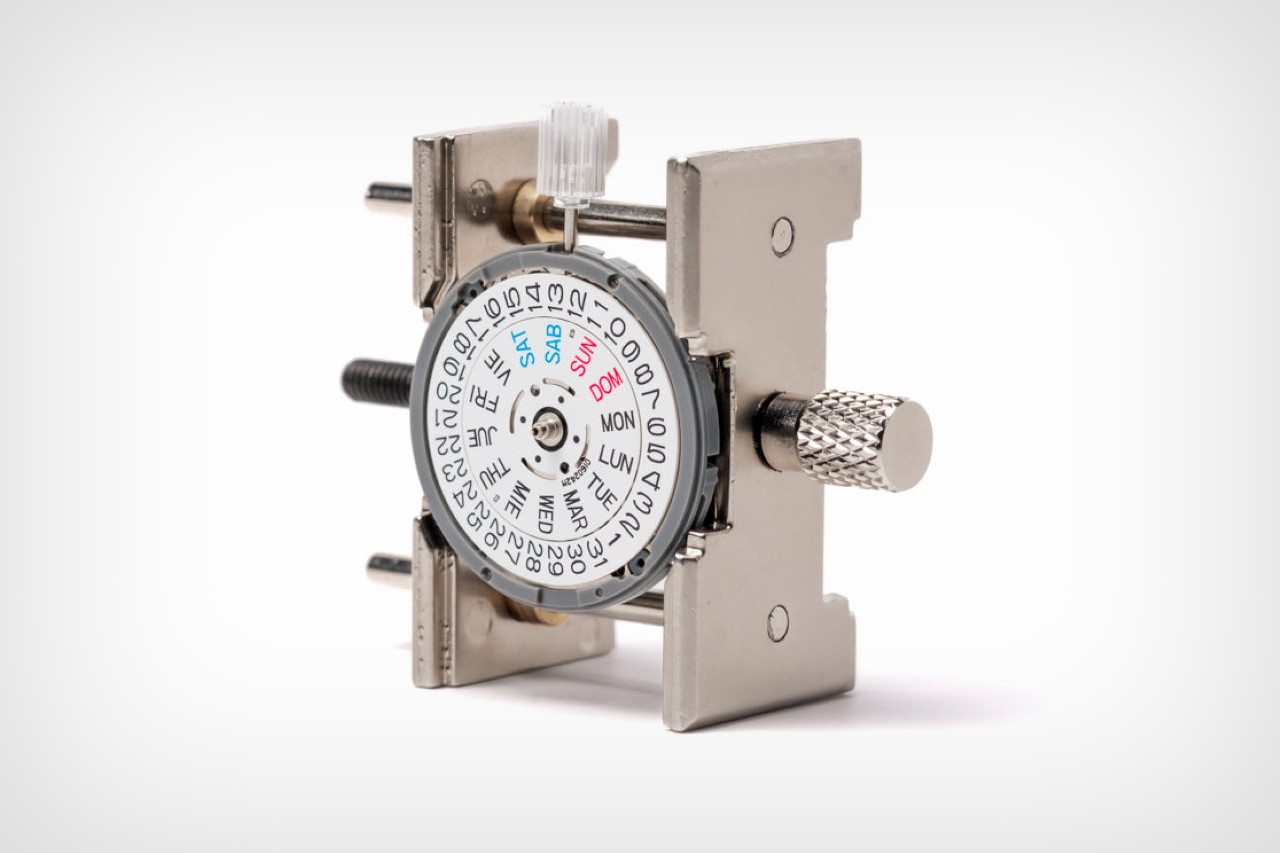
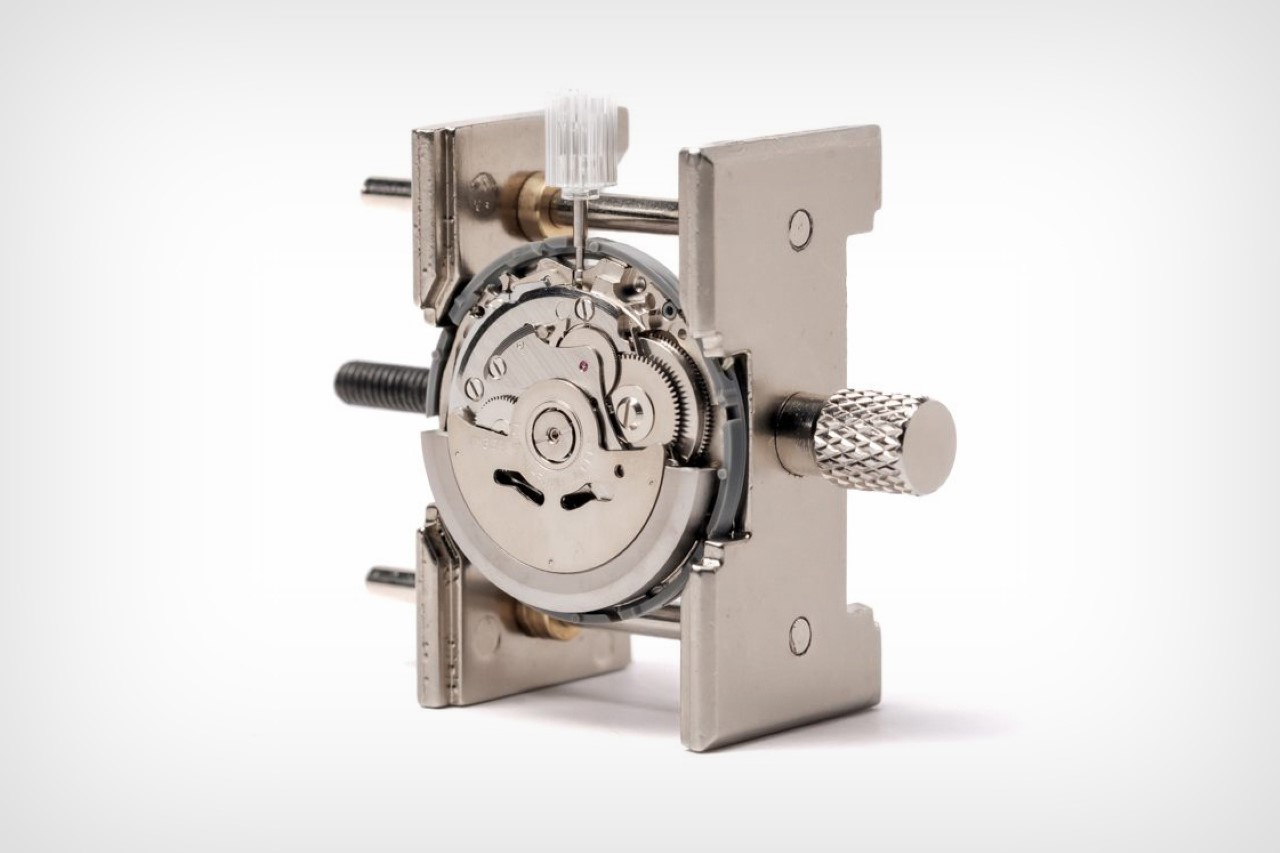
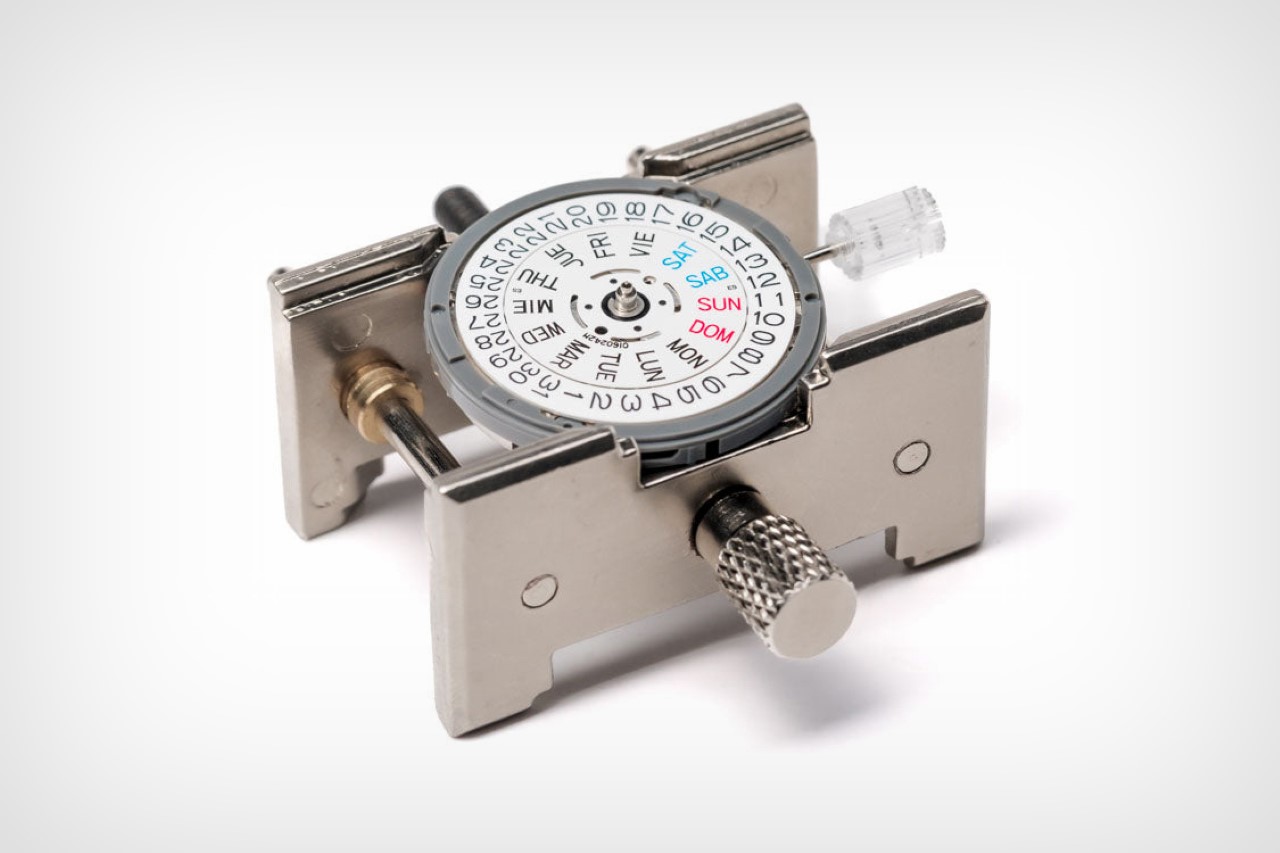
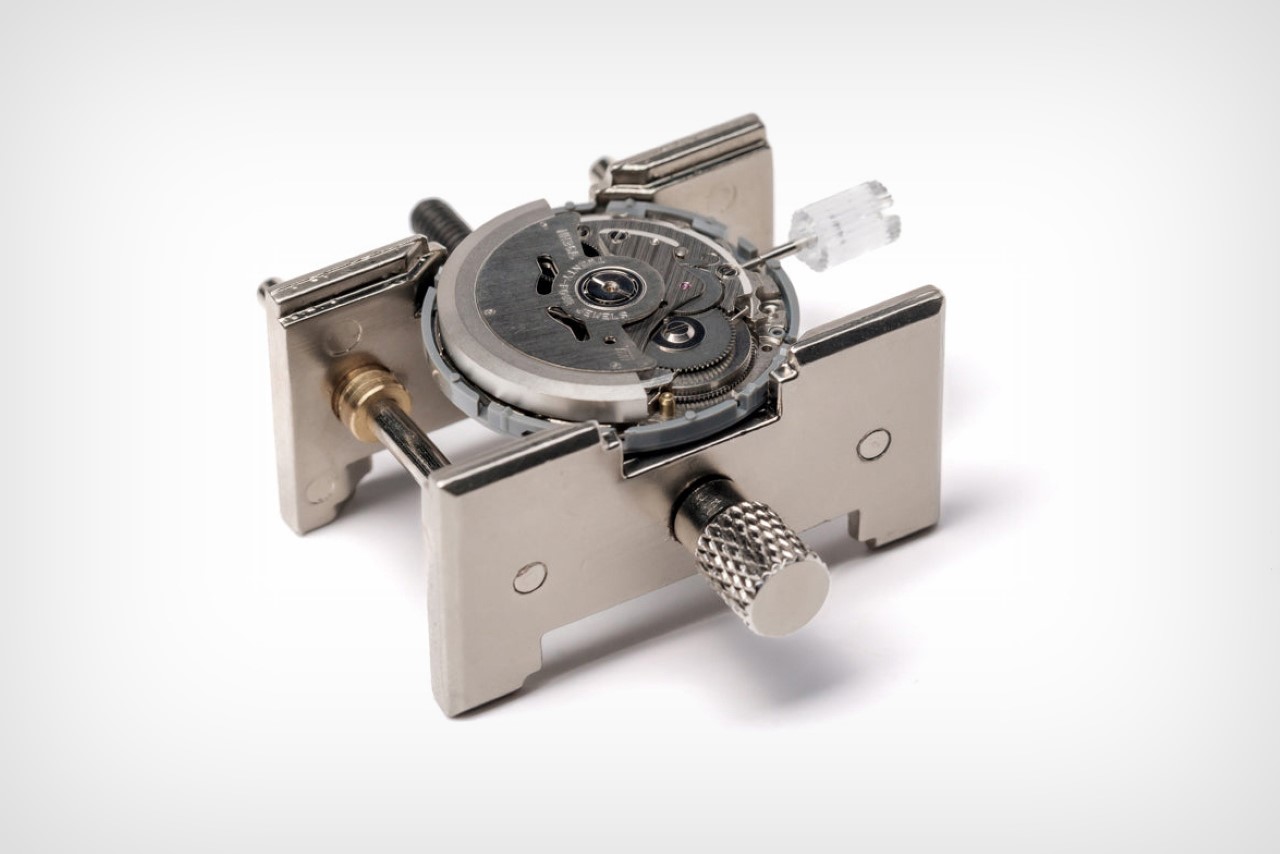
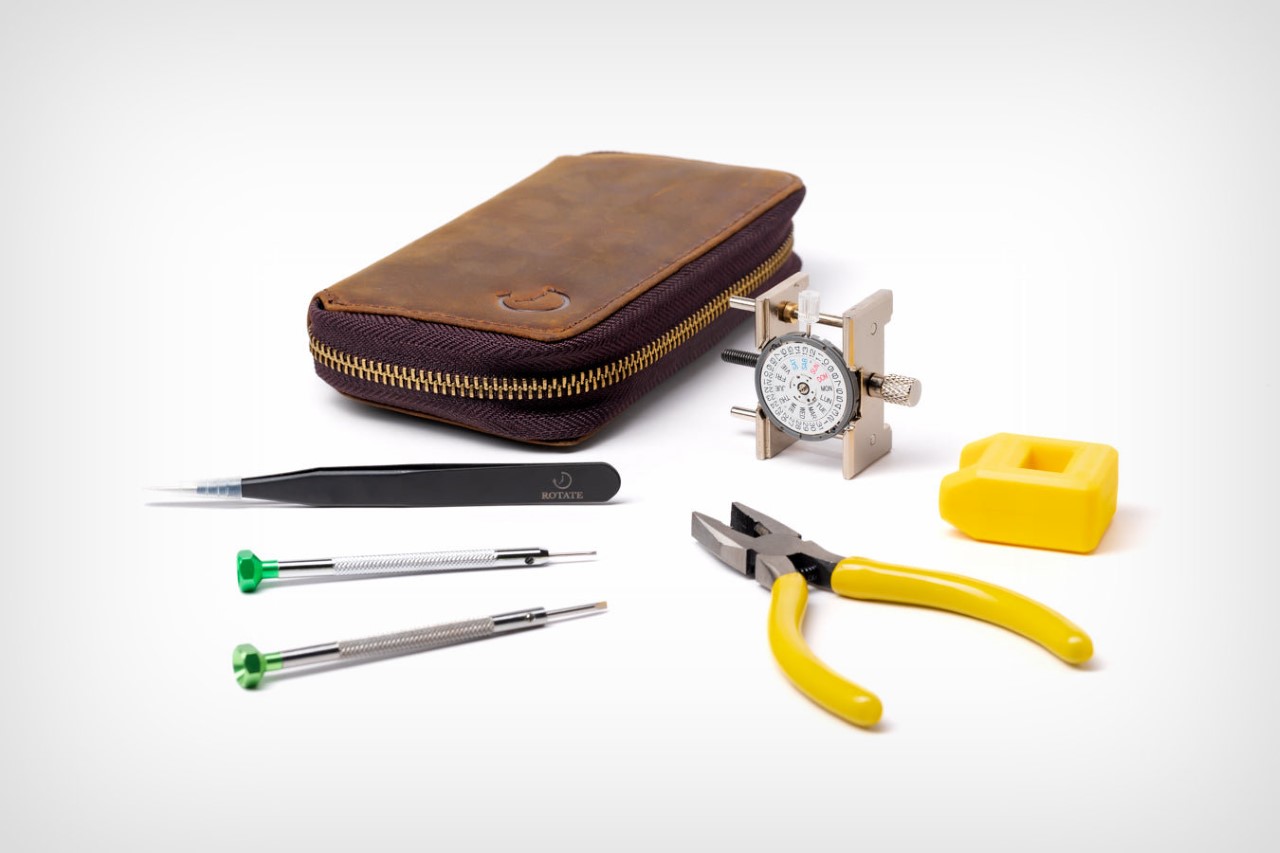
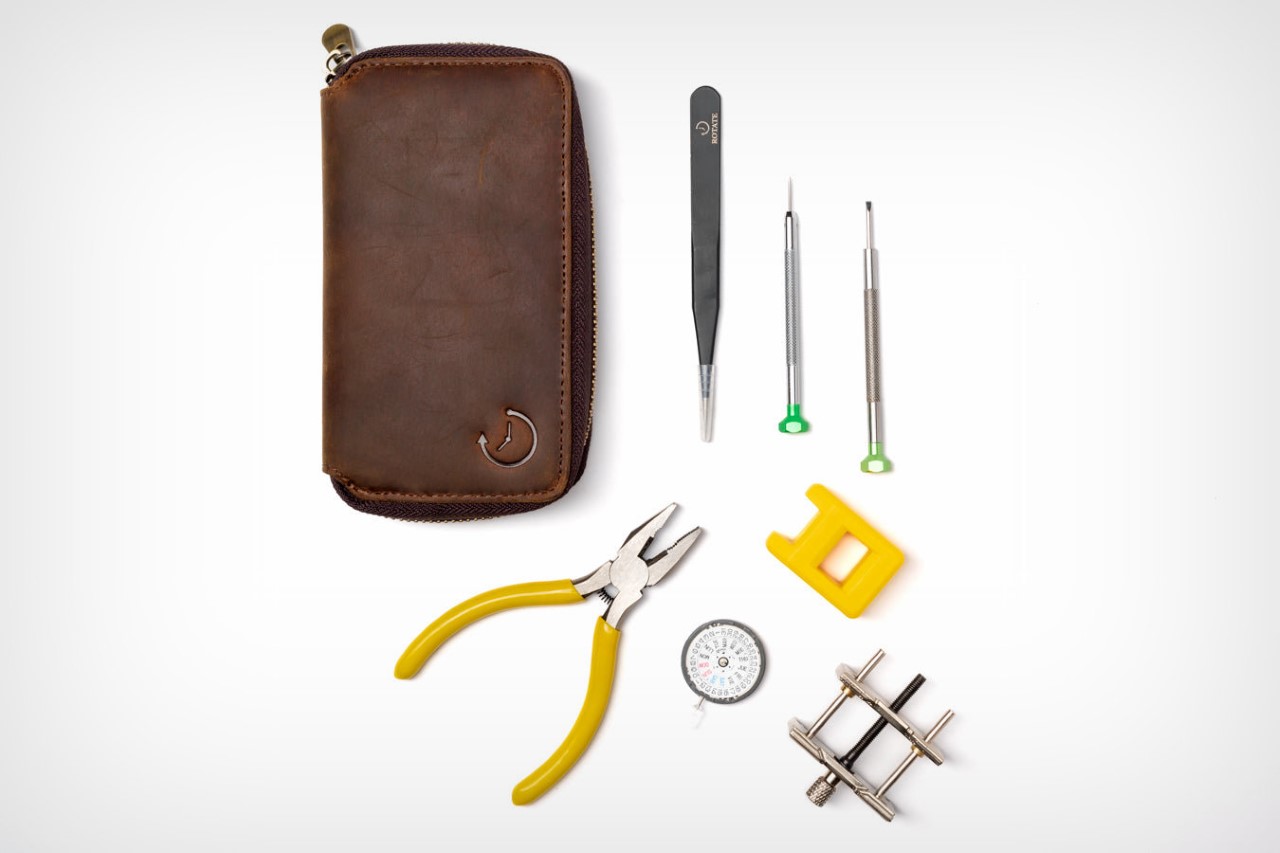
The reality is that we aren’t intimately familiar with the stuff we own today, and it’s time we changed that. The folks at Rotate Watches believe the only way to change this is to make tinkering more accessible. This beginner-friendly 50+ piece kit lets you build your own working, automatic watch movement from scratch. Modeled on the Seiko NH36, this kit has everything you need to be an amateur horologist. A guide helps take you through the various processes, and at the end, not only do you have a working watch that you can keep on your table to tell the date and time, but you also inherit an innate understanding of how timepieces work… and that’s just priceless, isn’t it?!
The Seiko NH36 is a popular and reliable automatic movement known for its accuracy and durability. With a diameter of 29.36mm and a height of 5.32mm, it’s a compact powerhouse featuring 24 jewels for reduced friction and a smooth operation. This kit includes the movement itself, along with a set of specialized tools to handle the delicate watch parts. Screwdrivers, tweezers, finger cots, and pliers are all included, ensuring you have everything you need to handle the intricate components.
One of the highlights of this kit is the beginner-friendly guide. Rotate, the company behind the kit, understands that watchmaking can be intimidating for newcomers. Their detailed instructions break down the disassembly and assembly process into clear steps, accompanied by numbered pictures for easy reference. The guide goes beyond just the mechanics, explaining the purpose of each piece and offering helpful tips and tricks throughout the process. For those who prefer a greater challenge, Rotate also offers the option to receive the movement disassembled. This allows experienced hobbyists to dive right into the reassembly process, testing their watchmaking skills.
There’s about to be a new clicking game in town, and this one looks like an absolute nightmare (in a good way.) Clickolding, which seems to derive its name from cuckolding, is described on Steam as a “dark incremental narrative game about thumbing a tally counter to satisfy the distressing masked man sitting in the corner of your hotel room.” Yikes.
There’s a trailer and it only adds to the whole unsettling feeling surrounding this game. There is indeed a distressing masked man sitting in the corner of a hotel room demanding that you click a tally counter. There’s something… violent and almost sexual about the whole thing. What happens when you click enough? Do you get a bag of money? Does he explode? Do you explode? Does it turn into a new entry in the Saw franchise? I guess we’ll find out on July 16, which is when the game is set to release on PC.
Of course, clickers aren’t exactly high art, but this one is developed by Strange Scaffold, the company behind El Paso, Elsewhere, I Am Your Beast and Space Warlord Organ Trading Simulator, among others. So we have some hope that the game could turn the simple clicking formula into something unique. It’s also being published by Outersloth, an indie game fund started by the creators of Among Us. With that pedigree, there’s no way Clickolding ends up being a standard clicker. Did we mention the creepy guy in the corner? He also has a gun.
It’s rare that a clicking game becomes a bona-fide phenomenon, but it's not unheard of. Just last week, one called Bananarose to the top of the Steam charts. That one didn’t have a creepy guy in a hotel room, but did offer the potential to make actual money.
This article originally appeared on Engadget at https://www.engadget.com/clickolding-from-the-i-am-your-beast-devs-looks-like-a-clicking-nightmare-180504296.html?src=rss
Earlier this year, Meta made the controversial decision to automatically limit political content from users’ recommendations in Threads and Instagram by default. The company said that it didn’t want to “proactively amplify” political posts and that users could opt-in via their Instagram settings if they did want to see such content.
But, it turns out, that Meta continued to limit political content even for users who had opted in to seeing it. An unspecified “error” apparently caused the “political content” toggle — already buried several layers deep into Instagram's settings menu — to revert back to the “limit” setting each time the app closed. Political content, according to Meta, “is likely to mention governments, elections, or social topics that affect a group of people and/or society at large.”
Meta
The issue was flagged by Threads users, including Democratic strategist Keith Edwards, and confirmed by Engadget. It’s unclear how long the “error” was affecting users’ recommendations. “This was an error and should not have happened,” Meta spokesperson Andy Stone wrote on Threads. “We're working on getting it fixed.” Meta didn’t respond to questions about how long the setting had not been working properly.
The issue is likely to raise questions about Meta’s stance on political content. Though Threads is often compared to X, the company has taken an aggressive stance on content moderation, limiting the visibility of political content and outright blocking “potentially sensitive” topics, including anything related to COVID-19, from search results.
Stone later confirmed that the supposed bug had been fixed. "Earlier today, we identified an error in which people's selections in the Instagram political content settings tool mistakenly appeared to have reset even though no change had actually been made," he wrote on Threads. "The issue has now been fixed and we encourage people to check and make sure their settings reflect their preferences."
Update June 26, 2024, 8:04 Pm ET: Added additional comments from Meta spokesperson Andy Stone.
This article originally appeared on Engadget at https://www.engadget.com/a-meta-error-broke-the-political-content-filter-on-threads-and-instagram-173020269.html?src=rss
Availability: High demand and limited release can make it hard to find
RATINGS:
AESTHETICS
ERGONOMICS
PERFORMANCE
SUSTAINABILITY / REPAIRABILITY
VALUE FOR MONEY
EDITOR'S QUOTE:
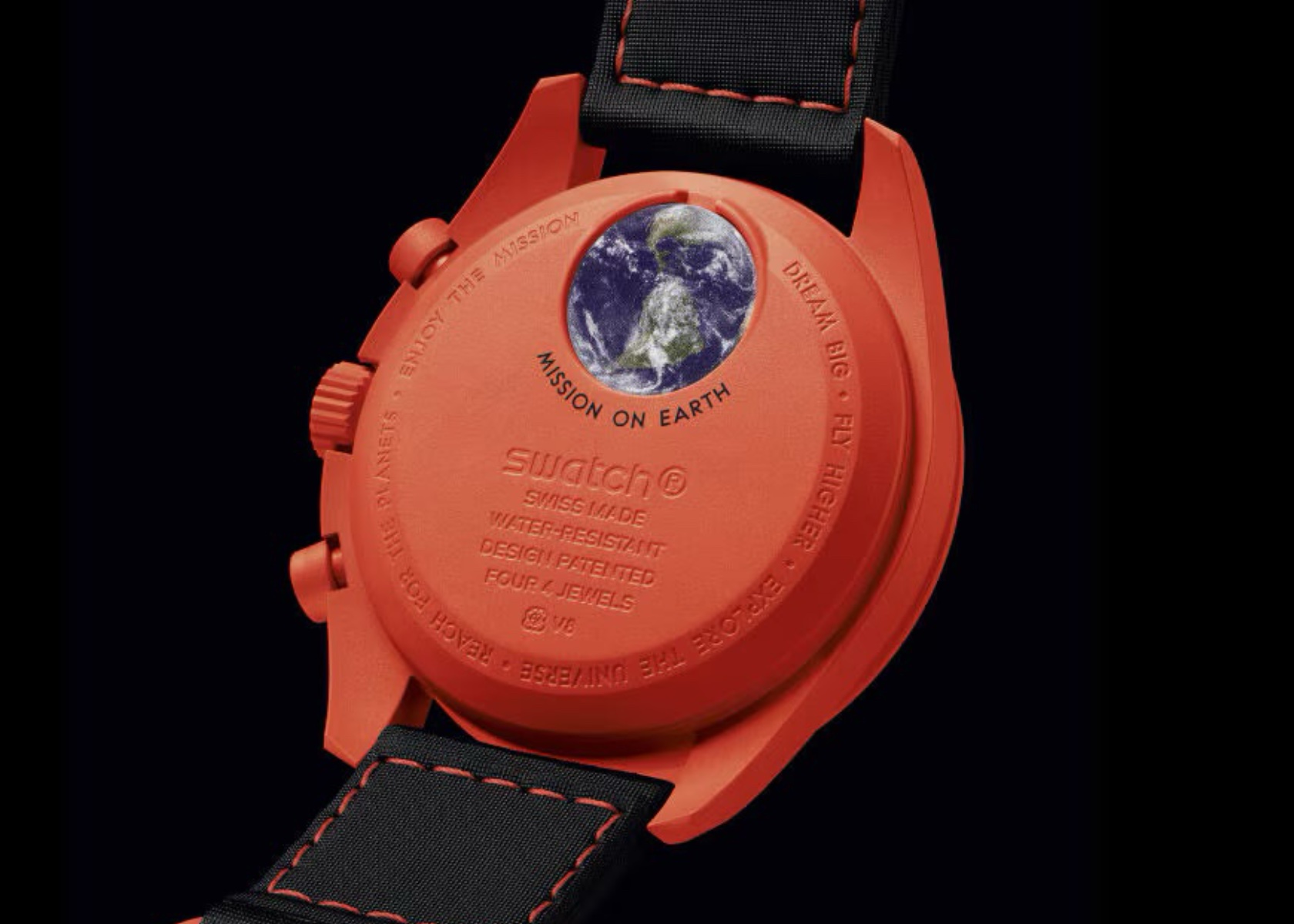
The MoonSwatch Mission to Earth Lava is a bold, vibrant take on a legendary design, seamlessly merging Omega’s legacy with Swatch’s innovative materials.
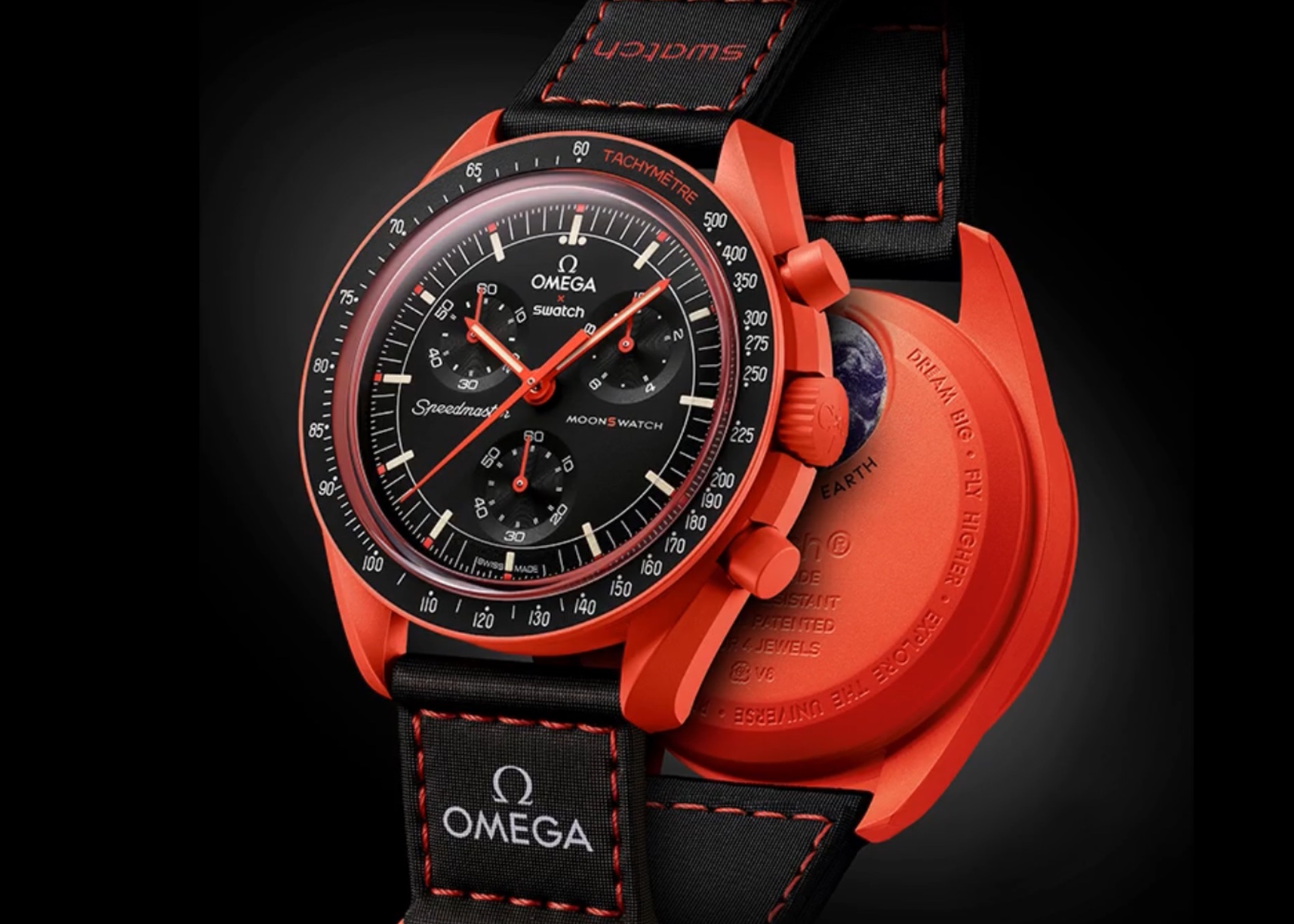
Omega and Swatch have teamed up again to release the latest MoonSwatch series, “Mission on Earth.” This collection introduces three exciting models: Lava, Polar Lights, and Desert. Each watch draws inspiration from natural elements found on Earth, infusing fresh and vibrant details into the iconic Speedmaster design.
Designer: Omega + Swatch
During a work trip to Tokyo, I timed my visit perfectly with the launch of these new models. The buzz around the MoonSwatch collection was undeniable, and the excitement was palpable. After waiting in line at the Swatch location in Ginza, I snagged the model I wanted: the Lava. Its bold color and unique design immediately caught my attention, and I was eager to see if it lived up to the hype. I picked one up from the boutique to thoroughly review it for Yanko Design.
Aesthetics
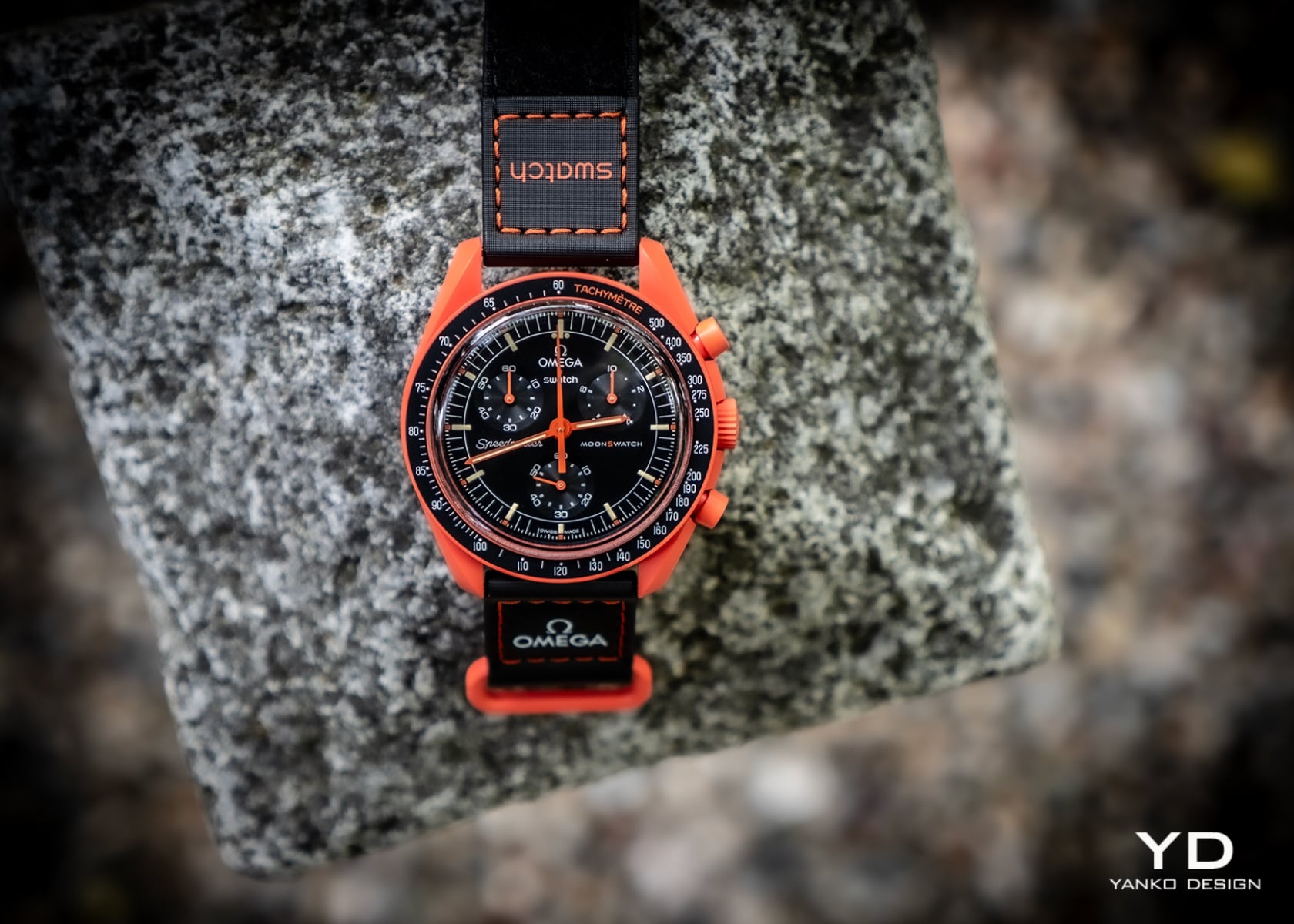
The Omega x Swatch MoonSwatch Mission to Earth Lava grabs attention with its bright orange bioceramic case. This vibrant color is more than just eye-catching; it’s a deliberate nod to the Speedmaster “Ultraman,” known for its striking orange seconds hand. The bright orange of the case brings a sense of energy and intensity, much like the molten lava it’s named after. This daring color sets it apart from traditional Speedmasters and makes it a standout piece.
Omega x Swatch MoonSwatch Mission to Earth Lava
The case retains the iconic twisted lug design that has been a hallmark of the Speedmaster since 1963. This feature, combined with the new bioceramic material, keeps the watch lightweight and durable. The satin/matte finish on the case avoids the cheap look that polished plastic can sometimes have, giving it a refined and sleek appearance. Every curve and edge of the case mirrors the classic Speedmaster design, ensuring it remains recognizable and authentic to its roots.
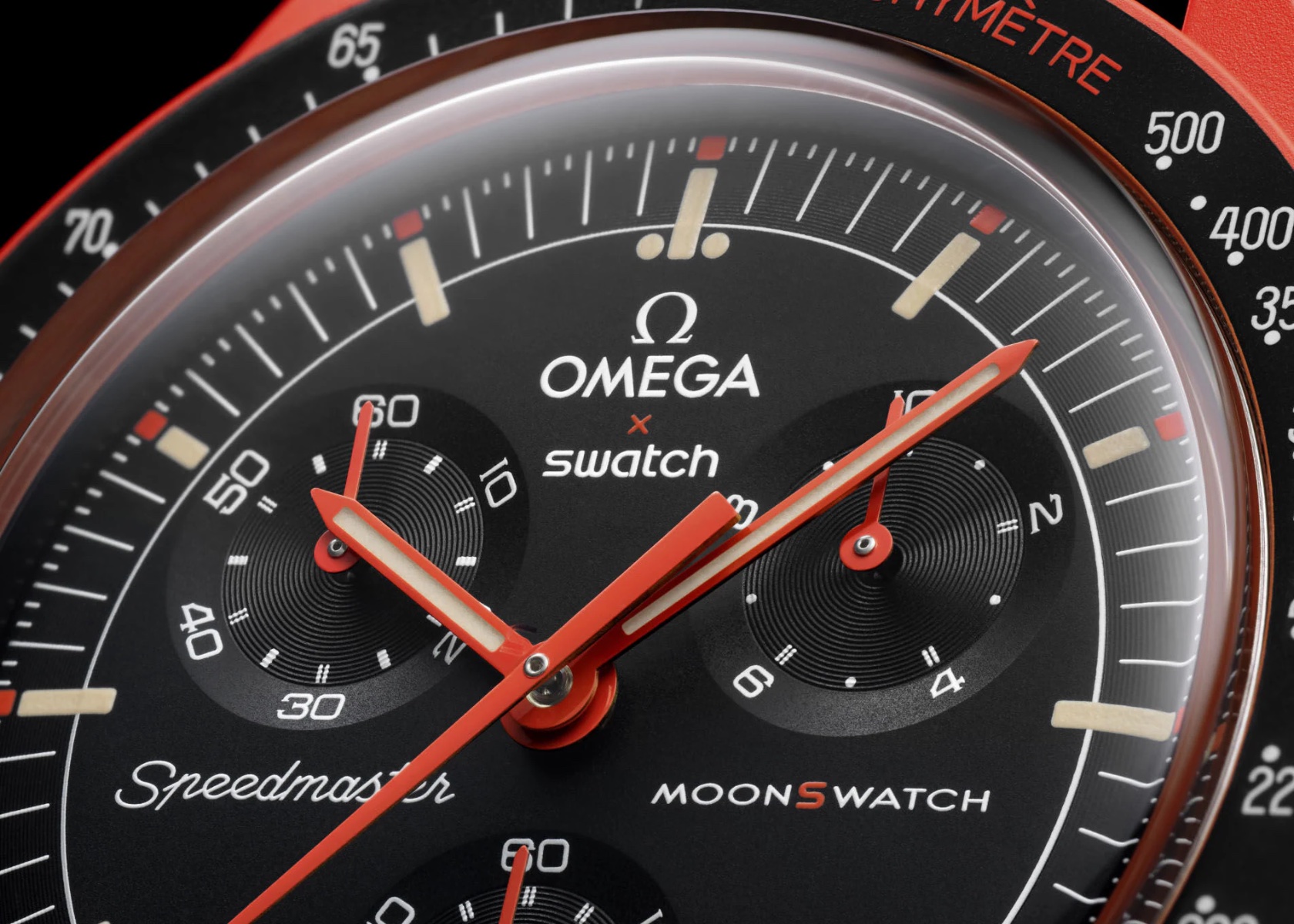
The black dial contrasts the orange case sharply, making the orange elements pop and enhancing readability. The dial is full of thoughtful design elements. The subdials, positioned at two, six, and ten, feature Arabic numerals and radial indexes. These subdials are a nod to the Speedmaster Alaska II and III projects, integrating a piece of Omega’s rich history into the design.
Mooonswatch Mission on Earth: Lava
A notable feature on the dial is the full black circle that marks where the “step” would be on older Speedmaster models. This line helps segment the dial, making reading and organizing information easier. While an actual step might add more depth, this design choice effectively maintains aesthetic and functional clarity.
The hands are another highlight. The chronograph functions are emphasized with deep orange, matching the case. The hour, minute, and active seconds hands are in dark khaki, complementing the overall color scheme. These hands are coated with Super-LumiNova, ensuring they glow brightly in the dark. This feature adds both functionality and a cool visual effect when the lights go down.
Mooonswatch Mission on Earth: Lava
The tachymeter scale on the bezel is classic Speedmaster, complete with the iconic “dot over 90” detail. Using orange for the tachymeter text ties it back to the overall color scheme. The tachymeter acts as an extension of the dial, maintaining the watch’s cohesive look.
Ergonomics
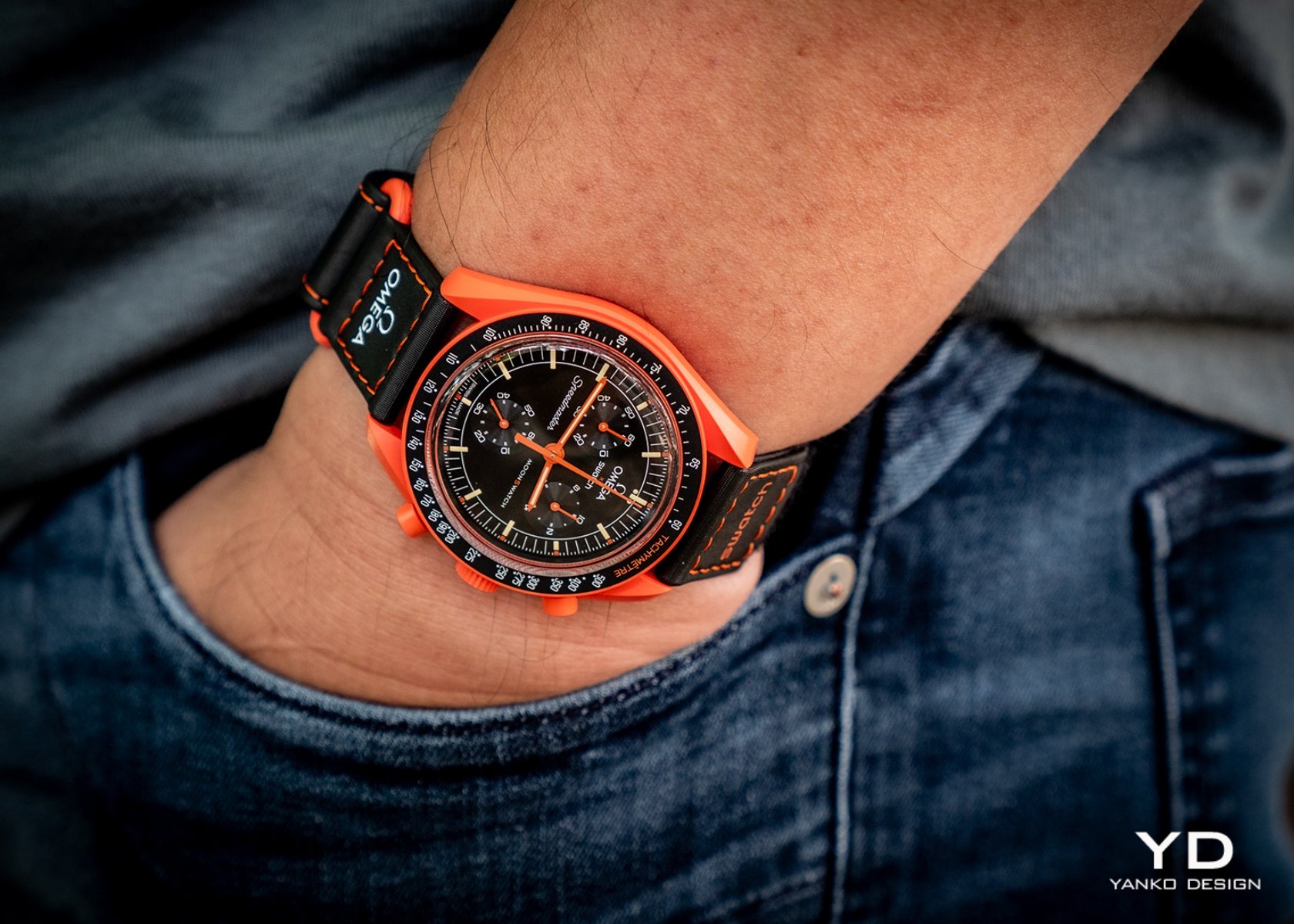
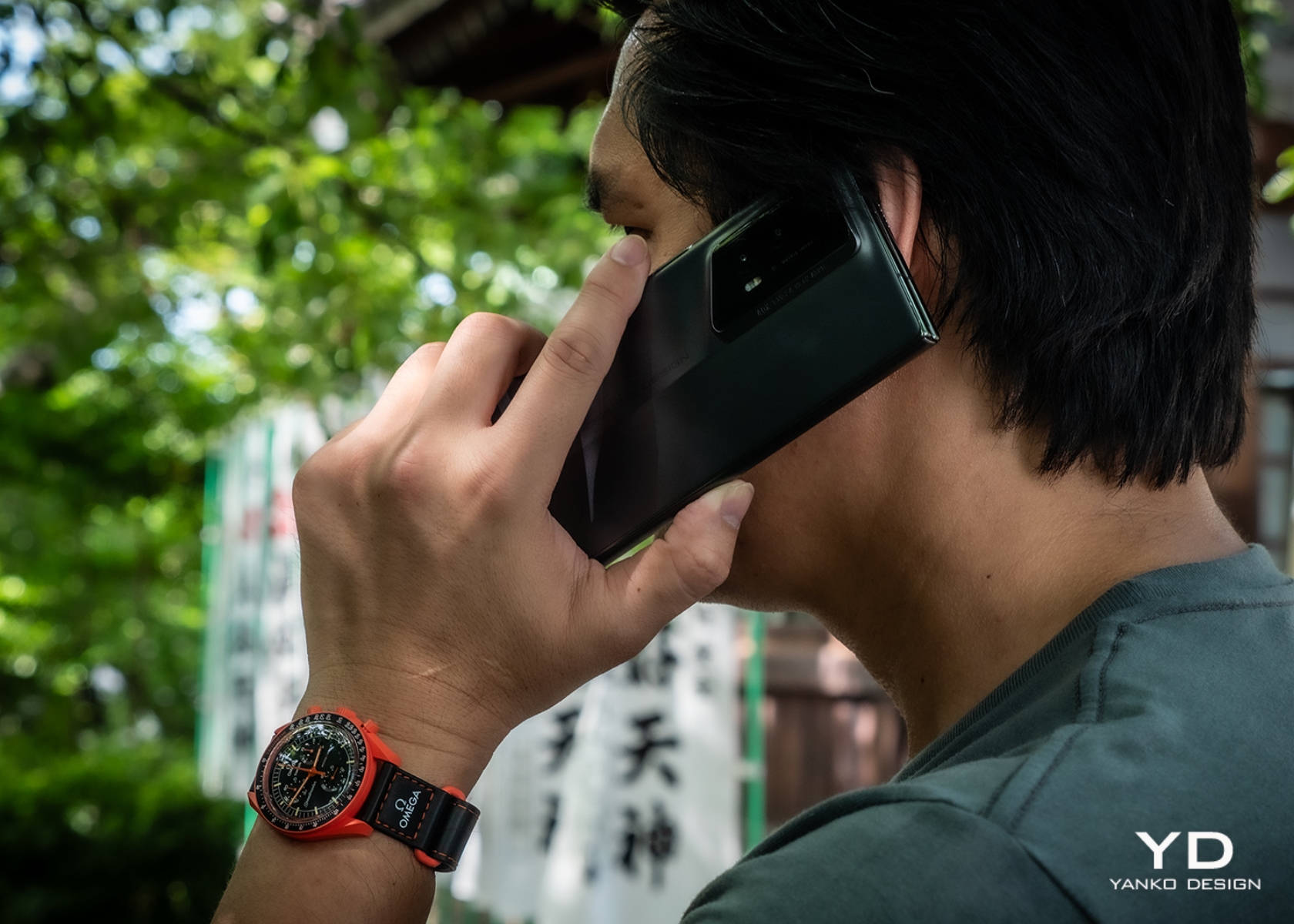
When it comes to ergonomics, the MoonSwatch Mission to Earth Lava delivers. The 42mm case diameter is a familiar size for Speedmaster fans, offering a balanced presence on the wrist. Bioceramic material (plastic) makes the watch notably lightweight, adding to its comfort during extended wear. This is a significant advantage over traditional steel cases, which can feel heavy after a long day.
Omega x Swatch MoonSwatch Mission to Earth Lava
The iconic twisted lugs enhance the watch’s aesthetic appeal and comfortable fit. They ensure the watch sits snugly on the wrist without causing discomfort. The 13.25mm thickness is slightly more substantial than some might expect, but it doesn’t detract from the overall wearability.
One area where the Lava could improve is the strap. While thematically fitting with the MoonSwatch series, the included Velcro strap may not offer the same level of comfort as a traditional leather or fabric strap. The strap can feel stiff and less breathable, which might be an issue in warmer climates or during physical activity. I appreciate the natural curve in the strap. However, for my wrist, it feels short. For my 14-year-old daughter’s wrist, it fits perfectly. The dial and case dimensions sit well on her wrist and look fantastic. She loves motorsport, especially F1, so this gift gave her a taste of the world of collecting watches without the high cost.
Despite this, the MoonSwatch Mission to Earth Lava’s overall ergonomics is impressive. It’s a watch designed for daily wear, providing visual appeal and practical comfort. Whether you’re a longtime Speedmaster fan or new to Omega, this watch offers a unique blend of style and wearability.
Performance
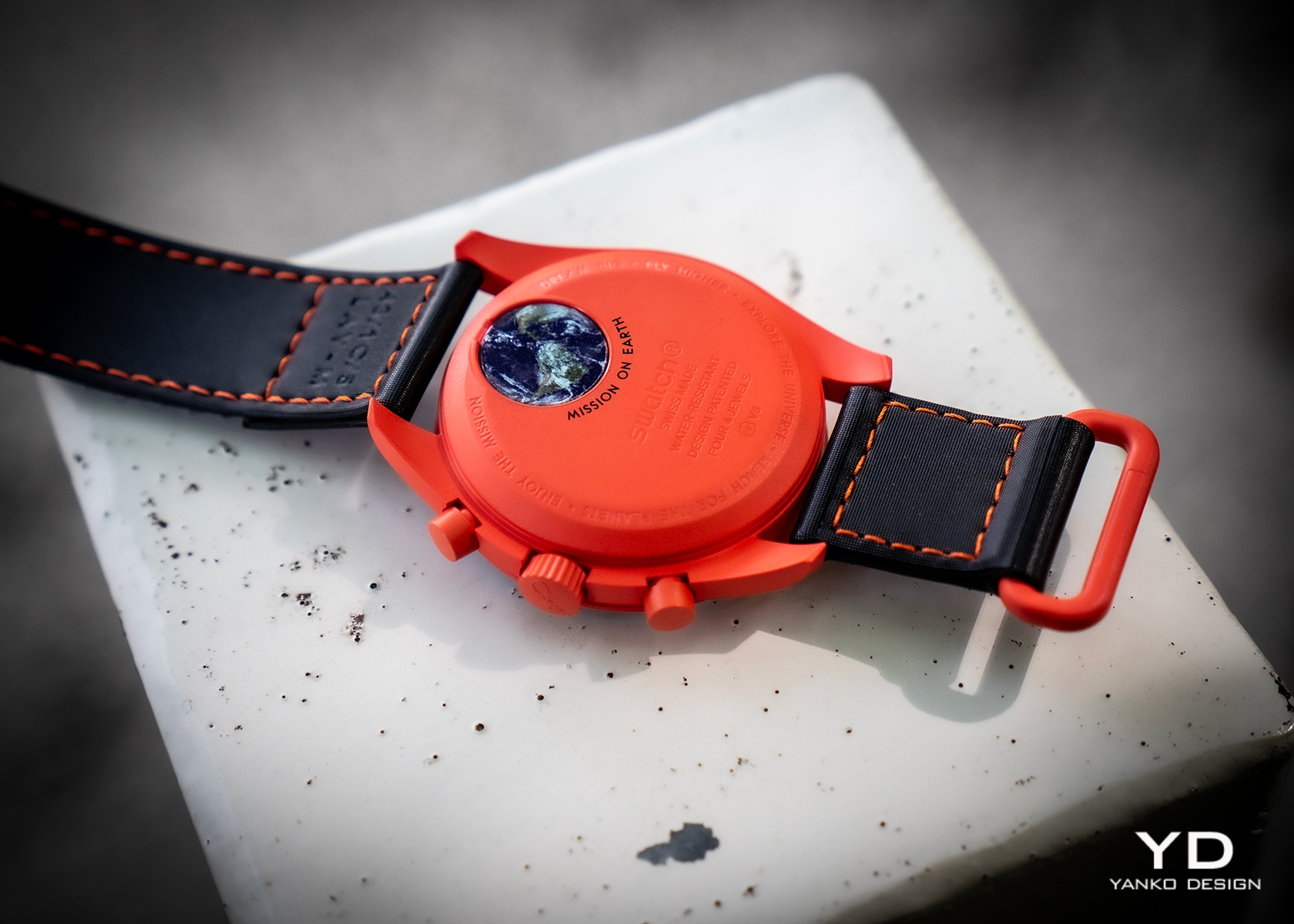
The Omega x Swatch MoonSwatch Mission to Earth Lava delivers solid performance for everyday wear. Powered by a precise quartz movement with four jewels, it ensures accurate timekeeping and smooth operation. This reliability means you won’t need to adjust the watch frequently, making it a hassle-free option for busy schedules.
Changing the battery is straightforward, unlike many high-end watches that require specialized tools and expertise. This user-friendly feature enhances the watch’s longevity, allowing you to keep it running smoothly for years without needing professional servicing.
Mooonswatch Mission on Earth: Lava
The push buttons on the Lava model are satisfyingly tactile, providing a responsive feel that makes using the chronograph functions enjoyable. This level of tactile feedback is usually found in much more expensive timepieces, adding to the overall value and user experience of the MoonSwatch.
Durability is another strong point of the MoonSwatch. The case is made from Bioceramic, which combines ceramic and bio-sourced plastic. Bioceramic is lightweight yet incredibly tough, resisting scratches and dents far better than traditional metal cases. This is a significant advantage over the “real” Omega Speedmaster, which, while iconic, can show wear and tear more readily. The Bioceramic material ensures that your watch maintains its pristine look even with regular use.
The Bioceramic case also contributes to the watch’s comfort. It remains temperature neutral so that it won’t get too hot or cold on your wrist, regardless of the weather. This feature enhances the overall wearing experience, making it an excellent choice for all-day wear.
Overall, the MoonSwatch Mission to Earth Lava offers a blend of style, practicality, and durability, making it an excellent addition to any watch collection. Whether you’re a seasoned collector or new to Omega, this watch delivers on performance and aesthetics.
Sustainability
Swatch has stepped up its game with the Bioceramic MoonSwatch collection, making significant strides in sustainability. Bioceramic is a blend of ceramic and bio-sourced plastic derived from castor oil. This innovative material reduces reliance on traditional petroleum-based plastics, helping to lower the carbon footprint of these watches.
Making Bioceramic is more sustainable, as it uses renewable resources and aims to minimize waste. Swatch is committed to energy efficiency and reducing environmental impact across its production practices, which is a big plus for eco-conscious consumers.
Moreover, the user-friendly battery replacement feature means you can keep your watch running for years, reducing the need for frequent replacements and reducing electronic waste. The robust and durable Bioceramic case also ensures that the watch lasts longer, decreasing the need for new materials and manufacturing.
Choosing a MoonSwatch means getting a stylish and functional timepiece and supporting a brand that is actively trying to protect the environment.
Value + Verdict
The Omega x Swatch MoonSwatch Mission to Earth Lava offers impressive value for its retail price of around $270. Given its enjoyment and unique features, this watch is well worth the money. The combination of Omega’s iconic design and Swatch’s innovative Bioceramic material creates a stylish and functional timepiece.
What makes the MoonSwatch series particularly appealing is the variety of models available. Each watch from Earth to Mars and beyond offers a unique design inspired by different celestial bodies. This variety allows for a fun collecting experience, as you can choose different models to match your attire or mood. The affordability of the MoonSwatch series makes it accessible to a wide range of watch enthusiasts, allowing you to build a versatile collection without breaking the bank.
With its bold orange case and thoughtful design details, the Lava model stands out as a vibrant and unique addition to any watch collection. The user-friendly battery replacement and durable Bioceramic case ensure that this watch will provide enjoyment for years to come. Its lightweight and comfortable fit make it suitable for daily wear, while its striking aesthetics make it a conversation starter.
In conclusion, the Omega x Swatch MoonSwatch Mission to Earth Lava is a fantastic investment for anyone looking to add a distinctive and enjoyable watch to their collection. The classic Speedmaster design elements blend with modern materials and sustainability efforts, making this watch a standout choice. Whether you’re a seasoned collector or new to the world of watches, the MoonSwatch series offers something unique that will surely delight you.
An ID verification company that works on behalf of TikTok, X and Uber, among others, has left a set of administrative credentials exposed for more than a year, as reported by 404 Media. The Israel-based AU10TIX verifies the identity of users by using pictures of their faces and drivers’ licenses, potentially opening up both to hackers.
“My personal reading of this situation is that an ID Verification service provider was entrusted with people's identities and it failed to implement simple measures to protect people's identities and sensitive ID documents,” Mossab Hussein, the chief security officer at cybersecurity firm spiderSilk who originally noticed the exposed credentials, said.
🔍🕸️ The latest discovery by spiderSilk covering an incident affecting AU10TIX.
The set of admin credentials that were left exposed led right to a logging platform, which in turn included links to identity documents. There’s even some reason to suspect that bad actors got ahold of these credentials and actually used them.
They appear to have been scooped up by malware in December 2022 and placed on a Telegram channel in March 2023, according to timestamps and messages acquired by 404 Media. The news organization downloaded the credentials and found a wealth of passwords and authentication tokens linked to someone who lists their role on LinkedIn as a Network Operations Center Manager at AU10TIX.
If hackers got ahold of customer data, it would include a user’s name, date of birth, nationality, ID number and images of uploaded documents. It’s pretty much all an internet gollum would need to steal an identity. All they would have to do is snatch up the credentials, log in and start wreaking havoc. Yikes.
AU10TIX has issued a statement on the matter, writing that the “data was potentially accessible” but that it sees “no evidence that such data has been exploited.” The company said that impacted customers have been notified and that it’s decommissioning the current operating system in favor of a new one that focuses more on security.
Some of its partners switched verification companies before this issue popped up. A spokesperson for Upwork said that it has “been working with a different service provider for some time now.” X, however, just signed up with AU10TIX back in September and it uses government-issued IDs to verify premium users. Others, like Fiverr and Coinbase have said they aren’t aware of any data exposure, though they still work with AU10TIX.
This article originally appeared on Engadget at https://www.engadget.com/an-id-verification-service-that-works-with-tiktok-and-x-left-its-credentials-wide-open-for-a-year-171258438.html?src=rss
Who among us hasn’t lied awake at night during past Olympics, longing for personalized daily event summaries read in the dulcet tones of legendary sports broadcaster Al Michaels? Well, our moment has finally come. “Your Daily Olympic Recap on Peacock” will let you choose your favorite sports and highlight types for the 2024 Summer Olympics, and an AI-generated Michaels will read a 10-minute customized recap of the previous day’s events based on your preferences.
Michaels said he was understandably reluctant when NBC asked for his approval, but he ultimately came around to the AI-fueled vision. “When I was approached about this, I was skeptical but obviously curious,” the Hall of Fame broadcaster said. “Then I saw a demonstration detailing what they had in mind. I said, ‘I’m in.’”
Peacock shared a demo of one of the recaps with Engadget, and it’s easy to see why the Hall of Fame broadcaster came around. You’d be hard-pressed to tell the AI-generated speech from Michaels’ real voice. Even the clone’s subtle rhythms and intonations sound distinctly like him.
NBCUniversal
NBCUniversal says it trained AI Al on Michaels’ past appearances on NBC. The 79-year-old currently calls play-by-play for Amazon’s Thursday Night Football and holds an emeritus role for NBC Sports, where he’s worked since 2006.
Peacock’s recaps will draw from what it says will be 5,000 hours of live coverage from this summer’s games. They will cover up to 40 concurrent daily Olympic events and have the potential for “nearly 7 million personalized variants.”
NBCUniversal says its editors will review all of the customized content — including audio and clips — before sending it to users. If enough people sign up, that sounds like quite the undertaking. But given the embarrassing mistakes we’ve seen previous AI gimmicks make, it’s probably a wise choice.
You can opt into the recaps starting on July 27, when the first edition will summarize the previous day’s Opening Ceremony. The 2024 Summer Olympics kick off on July 26 in Paris. After the torch is lit, you can sign up for the recaps on Peacock’s Olympics website (it supports Chrome, Safari, Firefox and Edge) and in the Peacock mobile app.
This article originally appeared on Engadget at https://www.engadget.com/welcome-to-the-future-where-ai-generated-al-michaels-reads-you-personalized-olympic-recaps-170022286.html?src=rss
It's taken 12 years, but Microsoft has finally made an Arm-powered Surface tablet that I don't want to toss out of a window. The new Surface Pro, one of the company's first Copilot+ AI PCs, is astoundingly fast and power-efficient, thanks to Qualcomm's new Snapdragon X Elite chip. It can run native Arm apps well — but even better, it can also emulate older apps without much fuss. Basically, Microsoft has finally managed to do what Apple did with its M-series chips four years ago: Deliver killer laptops with power-sipping mobile chips.
Ironically, though, the Surface Pro's much-hyped AI features are far less compelling than the one-two punch of speed and solid battery life. At launch, the Surface Pro and other Copilot+ PCs can use the Cocreator in Paint to generate AI images alongside text prompts and doodles. They can also translate over 40 languages into English using Windows 11's Live Captions feature. The controversial Recall capability, however, is nowhere to be seen (Windows Insiders will be able to test it in the coming weeks, according to Microsoft, but there's no official public release date yet.)
What’s Copilot+ again?
Announced ahead of its Build developer conference last month, Copilot+ is Microsoft’s latest initiative aimed at getting consumers and device makers excited about AI PCs. Similar to Intel’s Evo PCs, Copilot+ systems need to meet a minimum range of specifications: They have to include a neural processing unit (NPU) with at least 40 TOPs (trillions of operations per second) of AI performance, 16GB of RAM and a 256GB SSD. While both Intel and AMD have tried to hype up the idea of an “AI PC” over the past year, there wasn’t much to actually do with them aside from using Windows Studio Effects in video chats.
To power the initial Copilot+ systems, Microsoft is partnering with Qualcomm to optimize Windows 11 for the chip maker's new Snapdragon X Elite and Plus models. Those processors are based on mobile Arm technology, instead of the x86 and x64 chips produced by Intel and AMD. Arm designs have typically led to poor performance and software incompatibility on Windows (see our reviews of the Surface Pro 9 5G and Surface Pro X as a refresher), but Microsoft says it’s finally optimized its OS to work better with the mobile architecture, and its new Prism emulator can also run older software far better than earlier solutions.
What’s up with Recall?
Recall is a clear example of Microsoft's reach exceeding its grasp. It was meant to help you find anything you were doing on your computer through a natural conversation with the Copilot AI assistant. But to do so, Recall continuously takes screenshots of your system, which are then stored on your hard drive. It didn’t take researchers long to find some obvious security gaps: it wasn’t tough for other accounts to get to your Recall data, and it was also easy pickings for remote hackers. Microsoft responded to the criticism by saying it would make Recall an opt-in feature, making it only accessible with biometric Windows Hello authentication and encrypting your database by default.
The lesson for Microsoft (and every other AI-hungry company) is that you have to build trust, ideally by prioritizing privacy and security, before forcing overbearing AI features onto your customers. The backlash against Recall comes from the company being blissfully unaware of how little people trusted it.
Photo by Devindra Hardawar/Engadget
Hardware: The Surface Pro is still impressive
We’ve had many issues with the Surface lineup over the last few years, but the hardware has always been a step above typical PC laptops and tablets. That holds true for the new Surface Pro: It’s surprisingly thin and light, measuring 9.3 millimeters thick and weighing 1.97 pounds. Its recycled aluminum case makes it feel like a truly premium device, and the Surface Pro remains one of the most unique-looking devices on the market. I noticed plenty of furtive glances and curious faces as I tested it out in public — people were clearly intrigued by the way it looked. (Or perhaps they were just surprised to see one for the first time.)
As much as I like the Surface aesthetic, though, it’s hard to deny that Apple is bringing more significant stylistic breakthroughs with the iPad Pro. The new 13-inch model weighs just 1.28 pounds and is a mere 5.1mm thin — almost half as thick as the Surface Pro. From the start, Apple has had the advantage of designing the iPad Pro around efficient mobile chips, whereas the Surface Pro previously had to squeeze in laptop-grade Intel CPUs. Microsoft may be able to slim down the Surface Pro in the future, thanks to the advent of Qualcomm’s new Snapdragon chips, but for now buyers will have to live with new chips in familiar cases.
Photo by Devindra Hardawar/Engadget
And when I say familiar, I’m mainly referring to the Surface Pro’s built-in kickstand. It lets you prop up the tablet however you’d like, from a laptop-like angle to a nearly easel-like position when it’s completely opened. While it still gets the job done (and is something the iPad Pro and most other tablets don’t have), it also limits how you can use the Surface Pro. While you could always use it on a table, I’ve grown weary of balancing the metallic kickstand on my legs when working on the couch, hanging out in my backyard, or watching videos in bed.
Microsoft hasn’t updated the Surface Pro’s ports either: You’ve still got the magnetic Surface Connector for power, as well as two USB-C USB 4 connections on the opposite side. Sure, that’s more than you’d get on an iPad Pro, but that device isn’t being marketed as a full-fledged computer. There’s also no wired headphone jack on the Surface Pro, either, even though its case clearly has room for one. I’ve come to understand why some PC makers would rather have thin devices instead of a 3.5mm connection, but that reasoning doesn’t apply at all in this case.
Under the hood, the Surface Pro comes equipped with either the 10-core Snapdragon X Plus chip or the 12-core Snapdragon X Elite. The base $1,000 model comes with 16GB of RAM and a 256GB SSD, but you can upgrade that to a 1TB SSD and up to 32GB of RAM. Microsoft also made the Surface Pro’s SSD easily accessible under the kickstand, so it’s a cinch to upgrade storage on your own down the line. (I’d still like to see an SD or microSD card slot, though.)
The Surface Slim Pen 2 ($130) remains the go-to stylus for Microsoft's tablets, and it's still a great device for doodling or jotting down notes. I don't think it's nearly as essential to the Surface experience as Microsoft used to claim, but for some users it can be helpful. It's well-balanced and easy to hold, and it charges easily as long as you get a keyboard with a Slim Pen slot.
Photo by Devindra Hardawar/Engadget
Keyboard sold separately, as usual
Since the Surface is just a tablet, Microsoft doesn’t offer any of its keyboards in the box. So if you’re considering the Surface Pro, be sure to set aside at least $140 for the Pro Keyboard. If you’re interested in the Surface Slim Pen ($130 on its own), you can also get it bundled with the Surface Pro keyboard for $280. The new Surface Flex keyboard – which can still work when it’s detached from the tablet – is a whopping $350, or $450 together with the Slim Pen 2. That’s a hard price to stomach, admittedly, but I’ll explain later why the Flex may be worth it.
Photo by Devindra Hardawar/Engadget
Display: Finally, a glorious OLED
The PixelSense screens on all of Microsoft’s Surface PCs have always impressed us – but in the end, they were just finely polished LCDs. The Surface Pro marks the first time Microsoft has offered OLED, which delivers better contrast, bolder colors and inky dark blacks. You’ll have to pay at least $1,500 to get the OLED screen, but in my testing it’s well worth the premium, since it makes everything on the Surface Pro look incredible.
The benefits of OLED were particularly noticeable when I watched The Acolyte, a Star Wars show that features plenty of bright colors alongside dark backgrounds. I’ll never stop being impressed by seeing truly pitch black scenes on OLED – on an LCD, they typically look more dark gray due to their backlights. The new display tech also impressed me while I was streaming Forza Horizon 5 or simply browsing websites, since it made text a bit easier to read and also made colors pop off the screen. The downside of living with OLED? It will quickly make every LCD in your life seem woefully outdated.
PCMark 10
Geekbench 6 CPU
3DMark Wildlife Extreme
Cinebench 2024
Microsoft Surface Pro (2024, Qualcomm Snapdragon X Elite)
12,615
2,769/13,842
6,430
120/770
Microsoft Surface Pro 10 for Business (Intel Core Ultra 5 135U, Intel graphics)
5,772
2,085/8,827
2,546
90/524
Dell XPS 13 (Intel Core Ultra 7 155H, Intel Arc)
6,806
2,276/11,490
4,579
90/453
Apple MacBook Air (M3)
N/A
3,190/12,102
8,310
141/490
Performance: Shockingly fast
It’s not too often that I’m genuinely shocked while testing a device – chalk that up to writing about technology for 15 years and working in IT for eight years. But I’ll admit, I was blown away by the Surface Pro the instant I started using it. As soon as I opened it up, it was ready to set up Windows and get to work. I didn’t notice any of the usual slowdown or app incompatibilities I previously encountered on Arm-based Surfaces. Everything simply felt zippy. It was the same feeling I got when testing the M-series MacBooks: The Surface Pro is so fast and responsive I forgot it was using a mobile processor.
Then I started running benchmarks, and I couldn’t believe what I was seeing. Our review unit with the Snapdragon X Elite scored 12,615 points in PCMark 10 — the highest we’ve ever seen on a laptop. In comparison, the next fastest PCMark 10 result we saw this year was the Framework Laptop 16, which reached 8,129 points with its beefy Ryzen 7840HS chip. The Surface Pro was also more than twice as fast as the Surface Pro 10 for Business (now it’s clear why Microsoft didn’t want to push that model on consumers).
Photo by Devindra Hardawar/Engadget
Now benchmarks aren’t everything, but the Surface Pro’s PCMark 10 score mirrored everything I was seeing during my usual workflow, which involves running dozens of tabs across Chrome and Edge, sending notes in Slack, editing images in Photoshop Elements 2022 and writing in Evernote. Most of the apps I used, including Slack, Spotify and Chrome, ran natively on the Surface Pro’s Arm chip, but I didn’t notice any hiccups on emulated apps like Evernote and Photoshop Elements.
The error message that appears when launching Fortnite on the Surface Pro.
Photo by Devindra Hardawar/Engadget
Ideally, most users shouldn’t have to worry about the type of app they’re running – it should all just work, much like Apple Silicon Macs. Unfortunately, there are still some Arm issues on Windows. Both Fortnite (above) and League of Legends refuse to launch because they rely on kernel-level anti-cheat solutions, and Samsung has also warned its Copilot+ customers about issues with some Adobe Creative apps. It’s up to developers to update their apps for Arm hardware, so these issues aren’t entirely a knock against Microsoft. But if you’re interested in any Copilot+ system, make sure all of your commonly used apps are supported. (Or you could also wait for future Intel and AMD Copilot+ PCs, which won’t run on Arm.)
While nobody will confuse the Surface Pro with a gaming PC, I was able to play the indie adventure title 1000xRESIST smoothly with a paired Xbox controller. For more demanding titles, though, you’re better off streaming. The Surface Pro was able to launch Forza Horizon 5 on Game Pass streaming in 15 seconds, and it looked almost indistinguishable from having the game run locally. (The only thing you lose with Xbox streaming is HDR support, which offers a wider range of colors and brightness levels.)
Photo by Devindra Hardawar/Engadget
The Surface Pro Flex keyboard is a dream
I won’t make any excuses for the Surface Pro Flex keyboard’s exorbitant $350 price. It’s $50 more than the latest iPad Pro Magic Keyboard, and its cloth-like covering doesn’t feel nearly as luxurious as Apple’s smooth metal case. But, I’ve grown to love yanking off the Flex Keyboard and typing my heart away. Instead of precariously balancing the Surface Pro on my lap, like I have for the past 12 years, I can just prop the screen up on a table and keep the Flex keyboard in my lap.
I wrote most of this review while reclining on my deck, with only the weight of the keyboard’s 0.75 pound frame on my lap. Honestly, I’m not looking forward to going back to a traditional laptop. The Flex keyboard also let me work in spaces where the Surface’s kickstand got in the way, like a cramped cafe table. I could easily see it being useful on planes too, where you could easily keep the Flex keyboard on your lap while the Surface sits on your tray table. (It would also be ideal for newer planes that don’t have any built-in screens and expect you to hang your own tablet on the back of the seat in front.)
Photo by Devindra Hardawar/Engadget
While I’d still love to see Microsoft rework the Surface Pro’s kickstand, I’ll admit the Flex keyboard has opened up more ways for me to use the tablet. Instead of craning down at the Surface Pro’s screen on my kitchen counter, I can place it atop a few boxes and keep the keyboard lower for more ergonomic typing. Thanks to the Flex keyboard’s wireless versatility, I can be productive almost anywhere with the Surface Pro. The keyboard is also great for lengthy writing sessions, with a satisfying amount of key travel and a large haptic trackpad.
Photo by Devindra Hardawar/Engadget
Decent AI PC features
As I mentioned at the start of this review, none of the Surface Pro's AI capabilities are compelling on their own. It was fun doodling with Paint's Cocreator, but I found the resulting AI images (a combination of your drawings, text input and generative AI engines) to be far less compelling than asking Copilot to generate DALL-E 3 pictures. Copilot+ PCs can also make AI images from the Photos app, which also offers a slightly better interface for controlling the AI's creativity level and stylistic keywords.
It's still unclear what most people would do with these images, outside of sending them to friends or plugging them into boring presentations. Apple's upcoming Genmoji feature, which lets you create custom emojis with AI, seems far more useful in comparison.
Similarly, Microsoft's Live Captions feature seems like something people would actually want to use. Any Windows 11 PC running the 22H2 update (released in late 2022) can tap into its basic ability to subtitle video, but Copilot+ PCs can also automatically translate 44 languages into English. I tested it across a few anime shows and Spanish films, and the resulting captions were understandable but not as precise as properly translated subtitles. I could see these translations being useful in a pinch though, and they also work across video chats, so it may be helpful while working across language barriers.
Copilot+ PCs can also tap into a few new Windows Studio Effects, including a Portrait Light for brightening up your face and creative filters for illustrated, animated and watercolor effects. I found the latter filters to be fairly useless and a bit ugly, but the Portrait Light helped during video calls in my dark basement office. The existing Studio Effects, like automatic framing, eye contact adjustment and background blur options, will continue to work on older Windows 11 AI PCs as well as Copilot+ systems.
Photo by Devindra Hardawar/Engadget
Solid battery life, but heat and fan noise remain
The Surface Pro lasted 12 hours and 15 minutes in the PCMark 10 Applications battery benchmark, which is a bit less than we've seen on comparable systems. The Surface Pro 10 for Business eked out a bit longer, 12 hours and 20 minutes, on the Modern Office benchmark, while the Dell XPS 13 hit 13 hours and 15 minutes. It's worth noting that PCMark 10 was being emulated on the Surface Pro, though its script launches native applications like the Office suite.
During my typical usage, I noticed that the battery life held strong for most of my workday. After eight hours of on-and-off work, it typically had around 40 percent of its charge left. Clearly, there's still room for optimization with the new Snapdragon processors, and Surface Pro owners will likely see better battery life as more apps gain native Arm support.
Unlike the recent MacBook Air models, the Surface Pro still has fans. And based on my testing, you'll hear them once you start downloading large files or running anything that taps into the GPU. The whirring noise isn't loud, exactly, but it's a noticeable in a quiet room. The Surface Pro also gets fairly warm during light gaming and software downloads — it's not enough to burn you, but it's not something you'd want on your lap during a hot day.
Photo by Devindra Hardawar/Engadget
Pricing and the competition
I’ll give Microsoft some credit for finally giving its base Surface Pro model 16GB of RAM. $1,000 is a surprisingly affordable entry point for the Surface Pro lineup, just remember you’ll have to spend at least $140 more for the companion keyboard. If you’re considering it as your primary computer, it’s worth spending $200 more for 512GB of storage. You could also jump straight to the $1,500 Surface Pro with the Snapdragon X Elite chip, OLED screen, 16GB of RAM and 512GB SSD.
Our review unit, which included the OLED screen and Flex keyboard, would cost $1,950 altogether. That’s more than I’d want to spend for an ultraportable, so if you’re pinching pennies, the new Surface Laptop is a far better deal. It also starts at $999, but that includes a keyboard and a slightly larger screen than the Surface Pro. Sure, it won’t function as a tablet, but you could even buy an iPad or Android slate and still end up spending far less than $1,950.
At the moment, there aren’t any other Copilot+ PC-branded hybrid tablets on the market, but if you’re just looking for a new laptop, the ASUS Vivobook S 15, Dell XPS 13 (with Snapdragon) and HP Omnibook X 15 all seem to be solid options. We haven’t tested those Copilot+ systems yet, but we’re planning to get our hands on many of them soon.
Photo by Devindra Hardawar/Engadget
Wrap-up
The Surface Pro is fast, stylish and, together with the Flex keyboard, lets me work comfortably almost anywhere. While I'd love to see a different kickstand design eventually, and I think the keyboards should definitely be cheaper, Microsoft has done the impossible with the Surface Pro Copilot+ PC: It's created an Arm-based Surface I don't hate. I dare say, I love it.
This article originally appeared on Engadget at https://www.engadget.com/surface-pro-copilot-review-the-best-surface-tablet-ever-made-no-thanks-to-ai-160039966.html?src=rss
No, vacuums aren't the most exciting thing to buy, but they do make life a lot better — especially if you have a pet. A clean house can be a bit cheaper right now thanks to a 30 percent discount on Tineco's Pure ONE S15 Pet Smart Cordless Vacuum Cleaner. The vacuum for pets is down to $349 from $500, and there's an additional, clippable $25 coupon that will bring the final price down to around $325 — a new all-time low price on one of our favorite cordless vacuums.
Tineco Pure ONE S15 Pet Smart Cordless Vacuum Cleaner is a cordless option with a charging base that requires no installation. The vacuum uses Zerotangle technology and grabs hair without wrapping it around the device.
If you're looking for a higher-end option, try Tineco's Pure ONE Station FurFree Cordless Vacuum Cleaner. It's 25 percent off, dropping to $599 from $799 — another record-low price. It can go into an OmniHub and gets self-cleaned when being recharged. The vacuum also has 60 days of use with a three liter eco dustbin.
Your Prime Day Shopping Guide: See all of our Prime Day coverage. Shop the best Prime Day deals on Yahoo Life. Follow Engadget for Prime Day tech deals. Hear from Autoblog’s experts on the best Amazon Prime Day deals for your car, garage, and home, and find Prime Day sales to shop on AOL, handpicked just for you.
This article originally appeared on Engadget at https://www.engadget.com/one-of-our-favorite-cordless-vacuums-is-175-off-at-amazon-153017720.html?src=rss