Meta is finally making the Threads API available to developers. The company began testing the developers tools with a handful of companies back in March, but is now throwing the door open to more creators and app makers.
For now, the Threads API functionality is somewhat limited. It enables third-party apps to publish posts to Threads and view and manage replies and interactions with their posts. So far, this has enabled Threads integrations with social media management software like Hootsuite and Sprout Social. The Threads API has also enabled tech news aggregator Techmeme to automatically post to the platform.
These kinds of tools are widely used by brands, marketers and power users who rely on more advanced analytics and other specialized capabilities. Interestingly, Meta also suggests that creators could also be interested in using the new Threads API for their own “unique integrations” with the platform.
Meta hasn’t talked much about its future plans for the Threads API, or if it would ever support third-party client apps the way that Twitter did before Elon Musk’s take over of the service. The API could also play an eventual role in Meta’s plans to interoperate with the fediverse, though Meta has said it’s still early days for its plans to make Threads interoperable with decentralized platforms.
This article originally appeared on Engadget at https://www.engadget.com/meta-makes-the-threads-api-available-to-all-developers-174946709.html?src=rss
Chrome on Android has a new feature called "Listen to this page" that lets you read a webpage aloud from within the app, Google said in a help document spotted by 9to5Google. That long-awaited feature should boost accessibility for the app and make it easier to listen to web pages when you're busy with something else.
The feature isn't supported by all web sites, but if so, you'll find "Listen to this page" in the three-dot menu at the top right on the Chrome app. The new function offers podcast-like controls, letting you play, pause, scrub, change playback speed and skip ahead or behind by 10 seconds. So far, it works in English, French, German, Arabic, Hindu and Spanish.
Also available are options for different voices in each language, including four in the US and two in the UK, along with text highlighting. The control bar stays docked when you open other tabs and playback will continue if you lock your screen with Chrome in the foreground.
The new feature is rolling out gradually as part of Chrome 125, so it may take awhile to arrive to your corner of the world. Google Assistant has been able read web pages aloud for quite some time now, but the new feature adds another way of doing this.
This article originally appeared on Engadget at https://www.engadget.com/google-chrome-on-android-can-now-read-webpages-aloud-123011073.html?src=rss
The Yahoo News app is now AI-assisted, thanks to the company’s purchase of Artifact. Yahoo rolled out an update to its news aggregation app on Thursday with AI-powered personal feeds, key takeaways and the ability to flag clickbait headlines.
In April, Yahoo (Engadget’s parent company) bought the remains of Artifact, the AI-fueled news and recommendation app from Instagram’s co-founders that shut down earlier this year. Today’s update showcases how the technology can improve Yahoo’s news feed, which brings in over 180 million unique visitors every month in the US.
The new Yahoo News, available now on mobile and later on desktop, starts by letting you pick topics and publishers of interest for its algorithms to customize your feed accordingly. One noteworthy feature is the ability to quickly glance at the “Key Takeaways” of a given story: a short bullet list of main ideas that (if you request it) appear at the top of an article to help save time. This is Yahoo’s version of Artifact’s “Summarize” feature.
You can further customize your feed by blocking keywords you want to avoid (like, say, “NFT”) or publishers whose content you don’t like. Maybe the most intriguing feature is its ability to flag clickbait, which prompts the AI to rewrite headlines that are misleading, overly sensational or withholding critical information in hopes that you’ll click. (Yes, please.)
In addition to the app, Yahoo is revamping its homepage layout. The updated UI “emphasizes top news, personalized recommendations, and real-time trending topics” and is designed to evolve over time. The company says you can opt in to receive access to new features (presumably, many AI-powered) as they’re introduced.
If you’re in the US, you can download the new Yahoo News app for iOS or Android today.
This article originally appeared on Engadget at https://www.engadget.com/yahoo-news-gets-an-ai-powered-overhaul-171507596.html?src=rss
There was so much Apple had to cram into its WWDC 2024 keynote that some features were left out of the spotlight. Here at the company's campus, I've had the chance to speak with various executives, as well as get deeper dives into iOS 18, iPadOS 18, Apple Intelligence, watchOS 11 and more. In these sessions, I've been able to learn more about how specific things work, like what steps exactly do you take to customize your iPhone's home screen and control center. I also got to see some other updates that weren't even briefly mentioned during the keynote, like new support for hiking routes in Apple Maps and what training load insights look like on watchOS 11. Of all the unmentioned features I've come to discover, here are my favorites.
Maps: Create and share custom routes
I've always been a Google Maps girl, in part because that app had superior information compared to Apple Maps in its early years. These days, I stick to Google Maps because it has all my saved places and history. When I found out that iOS 18 would bring updates to Apple Maps, particularly to do with hiking and routes, I was intrigued.
Basically, in iOS 18, when you go into search in Maps, you'll see a new option under "Find Nearby" called hikes. It'll show you recommended hikes, and you can filter by the type of hike (loop, for example) and specify a length. You'll find options in the vicinity and tapping into one will show you a topographical view with the elevation details, how challenging it should be as well as estimated duration. You can tap to save each route and store it for offline reference later and add notes too. There's a new Library view and you'll find it in your profile in Maps.
You'll also be able to create new routes in Maps by tapping anywhere to start defining your route. You can keep tapping to add waypoints, which will cause the trail to continue to connect them, then hit a "Close loop" button to finish your trail. These routes can be shared, though it's not yet clear if you can share it to, say, your friend or driver to have them take your preferred path to your destination.
Apple
The hikes that Apple will serve up in Maps are created by its own team, which is working with US National Parks, so they'll only be available for the 63 national parks in the country to begin with. In other words, it's not porting information from AllTrails, for example. In a press release, Apple said thousands of hikes will be available to browse at launch.
As a city dweller who only sometimes hikes, my excitement is less about hiking and more about the potential of sharing my custom routes to show people how they should walk to my building or favorite restaurant from the train station. It's a compelling feature, and arguably a reason I'd choose Apple Maps versus Google's.
Calendar integration with Reminders
Frankly, the Maps update might be my favorite out of everything that wasn't shown off during the WWDC 2024 keynote by a huge margin. But some of the new tools coming to Calendar tickle my fancy too. Specifically, the new integration with reminders makes it easier to not just schedule your tasks right into your daybook, but also check them off from the Calendar app. You can soon move reminders around by long pressing and dragging them, so that note to call your mom can be placed on a slot at 5pm on Wednesday, instead of sitting in your Reminders app. In addition, Calendar is getting new views that better detail your level of activity each day in a month, similar to how the Fitness app shows your daily rings progress quickly in the monthly view.
Tapback insights showing who exactly responded with what emoji
This isn't one that wasn't mentioned at all during the keynote, but there are details about how Tapback works that weren't described at yesterday's show. If you're like me, you might not even have remembered that Tapback refers to those reactions you can send in Messages by double tapping on a blue or gray bubble. With iOS 18, you'll get more options than the limited selection of heart, thumbs up, thumbs down, "Haha," exclamation points and question mark. They're also going to show up in full color with the update, instead of the existing (boring) gray.
What I found out later on, though, is that when you double tap a message that already has reactions attached, a new balloon appears at the top of your screen showing who has responded with which emoji. This should make it easier to lurk in a group chat, but also could double as an unofficial polling tool by asking your friends to react with specific emojis to indicate different answers. That should make Messages a bit more like Slack, and I wish Whatsapp and Telegram would take note.
Others: Math Notes in iPhone, updates to Journal and Safari
There are quite a lot of features coming to iOS 18 that didn't get much love on the WWDC stage, like the Journal app's new widget for the home screen, which shows prompts for reflection and lets you create new entries. Journal also has a new insights view that displays your writing streaks and other historical data, plus a new tool that lets you add your state of mind to each entry from within the app.
Meanwhile, Safari is getting a new "Highlights" button in the search (or URL) bar, and tapping it will show a machine-learning-generated summary of the webpage you're on. Tapping into this brings up a panel with more information like navigation directions to a restaurant mentioned on the page, for example, or a phone number to call up a business. You can also quickly launch the reader view from this pane.
I wasn't super enthusiastic about either of those, largely because I don't use the Journal app much and I don't need Safari summarizing a webpage for me. But there are some other buried updates that I really wanted to shout out. For example, Math Notes for iPad and with Apple Pencil certainly got a lot of time, but it wasn't till I looked at Apple's iOS 18 press release that I found out the iPhone's Notes app is also getting a version of it. According to the screenshot Apple included, it looks like you can tally up and split expenses between a group of friends by writing a list of expenses and how much each item cost, then add the names of each expense to a formula with plus and equal signs, then get that divided by the number of people in your group. Not quite Splitwise, but I could see this becoming more powerful over time.
I was also intrigued by some of the Smart Script features on iPadOS 18, especially when I realized that you can just move your handwritten words around by dragging your handwritten words further away from each other, and the rest of your scrawled text moves in tandem. This is hard to describe, and I'll have to wait till I can try it for myself to show you an animated example. But it was impressive, even if it's not extremely useful.
Finally, the Passwords app and other privacy updates got a shout out during the keynote, but I learned more about how things like accessory setup and contacts sharing with apps work. Apple is releasing a new accessory setup kit so that device makers can adopt a pairing interface similar to how you'd connect your AirPods or Apple Watch to your iPhone. If developers don't use this approach, the new Bluetooth connection interface will be clearer about what other devices are on your network and what you're actually granting access to when you let an app see other devices on your network. Though it wasn't entirely skipped during the keynote, the Passwords app is something that makes me happy, since I'm absolutely sick of having to dig through settings to get codes for apps which I use my iPhone's authenticator to unlock.
There are plenty of features that were talked about that I'm excited by and learned more about the workings of, including the new dynamic clock style in the Photos face in watchOS 11, pinned collections in the redesigned Photos app and iPadOS mirroring for easier remote tech support. Oh, and that Airplay feature that'll let you send money to friends by holding your phones together? Yes! Being able to pause and adjust your Activity rings in watchOS and that Training Load insight? Hallelujah!
And though I can see the appeal of locked and hidden apps, I'm not sure I'd find much use for that and it would probably exacerbate my already prone-to-suspicion nature.
I'm also a little wary of things like Genmoji and Image Playground, which are both Apple Intelligence features that won't hit all iOS 18 devices. There will be metadata information indicating when images were generated by Apple's AI, and guardrails in place to prevent the creation of abusive and exploitative content.
Clearly, there are plenty of updates coming to Apple's phones, tablets, laptops and wearables later this year, and I can't wait to try them out. The public beta should be ready around the end of summer this year, which is when most people (who are willing to risk an unstable platform) can check them out.
This article originally appeared on Engadget at https://www.engadget.com/my-favorite-ios-18-ipados-18-and-watchos-11-features-that-flew-under-the-radar-at-wwdc-2024-113044069.html?src=rss
There was so much Apple had to cram into its WWDC 2024 keynote that some features were left out of the spotlight. Here at the company's campus, I've had the chance to speak with various executives, as well as get deeper dives into iOS 18, iPadOS 18, Apple Intelligence, watchOS 11 and more. In these sessions, I've been able to learn more about how specific things work, like what steps exactly do you take to customize your iPhone's home screen and control center. I also got to see some other updates that weren't even briefly mentioned during the keynote, like new support for hiking routes in Apple Maps and what training load insights look like on watchOS 11. Of all the unmentioned features I've come to discover, here are my favorites.
Maps: Create and share custom routes
I've always been a Google Maps girl, in part because that app had superior information compared to Apple Maps in its early years. These days, I stick to Google Maps because it has all my saved places and history. When I found out that iOS 18 would bring updates to Apple Maps, particularly to do with hiking and routes, I was intrigued.
Basically, in iOS 18, when you go into search in Maps, you'll see a new option under "Find Nearby" called hikes. It'll show you recommended hikes, and you can filter by the type of hike (loop, for example) and specify a length. You'll find options in the vicinity and tapping into one will show you a topographical view with the elevation details, how challenging it should be as well as estimated duration. You can tap to save each route and store it for offline reference later and add notes too. There's a new Library view and you'll find it in your profile in Maps.
You'll also be able to create new routes in Maps by tapping anywhere to start defining your route. You can keep tapping to add waypoints, which will cause the trail to continue to connect them, then hit a "Close loop" button to finish your trail. These routes can be shared, though it's not yet clear if you can share it to, say, your friend or driver to have them take your preferred path to your destination.
Apple
The hikes that Apple will serve up in Maps are created by its own team, which is working with US National Parks, so they'll only be available for the 63 national parks in the country to begin with. In other words, it's not porting information from AllTrails, for example. In a press release, Apple said thousands of hikes will be available to browse at launch.
As a city dweller who only sometimes hikes, my excitement is less about hiking and more about the potential of sharing my custom routes to show people how they should walk to my building or favorite restaurant from the train station. It's a compelling feature, and arguably a reason I'd choose Apple Maps versus Google's.
Calendar integration with Reminders
Frankly, the Maps update might be my favorite out of everything that wasn't shown off during the WWDC 2024 keynote by a huge margin. But some of the new tools coming to Calendar tickle my fancy too. Specifically, the new integration with reminders makes it easier to not just schedule your tasks right into your daybook, but also check them off from the Calendar app. You can soon move reminders around by long pressing and dragging them, so that note to call your mom can be placed on a slot at 5pm on Wednesday, instead of sitting in your Reminders app. In addition, Calendar is getting new views that better detail your level of activity each day in a month, similar to how the Fitness app shows your daily rings progress quickly in the monthly view.
Tapback insights showing who exactly responded with what emoji
This isn't one that wasn't mentioned at all during the keynote, but there are details about how Tapback works that weren't described at yesterday's show. If you're like me, you might not even have remembered that Tapback refers to those reactions you can send in Messages by double tapping on a blue or gray bubble. With iOS 18, you'll get more options than the limited selection of heart, thumbs up, thumbs down, "Haha," exclamation points and question mark. They're also going to show up in full color with the update, instead of the existing (boring) gray.
What I found out later on, though, is that when you double tap a message that already has reactions attached, a new balloon appears at the top of your screen showing who has responded with which emoji. This should make it easier to lurk in a group chat, but also could double as an unofficial polling tool by asking your friends to react with specific emojis to indicate different answers. That should make Messages a bit more like Slack, and I wish Whatsapp and Telegram would take note.
Others: Math Notes in iPhone, updates to Journal and Safari
There are quite a lot of features coming to iOS 18 that didn't get much love on the WWDC stage, like the Journal app's new widget for the home screen, which shows prompts for reflection and lets you create new entries. Journal also has a new insights view that displays your writing streaks and other historical data, plus a new tool that lets you add your state of mind to each entry from within the app.
Meanwhile, Safari is getting a new "Highlights" button in the search (or URL) bar, and tapping it will show a machine-learning-generated summary of the webpage you're on. Tapping into this brings up a panel with more information like navigation directions to a restaurant mentioned on the page, for example, or a phone number to call up a business. You can also quickly launch the reader view from this pane.
I wasn't super enthusiastic about either of those, largely because I don't use the Journal app much and I don't need Safari summarizing a webpage for me. But there are some other buried updates that I really wanted to shout out. For example, Math Notes for iPad and with Apple Pencil certainly got a lot of time, but it wasn't till I looked at Apple's iOS 18 press release that I found out the iPhone's Notes app is also getting a version of it. According to the screenshot Apple included, it looks like you can tally up and split expenses between a group of friends by writing a list of expenses and how much each item cost, then add the names of each expense to a formula with plus and equal signs, then get that divided by the number of people in your group. Not quite Splitwise, but I could see this becoming more powerful over time.
I was also intrigued by some of the Smart Script features on iPadOS 18, especially when I realized that you can just move your handwritten words around by dragging your handwritten words further away from each other, and the rest of your scrawled text moves in tandem. This is hard to describe, and I'll have to wait till I can try it for myself to show you an animated example. But it was impressive, even if it's not extremely useful.
Finally, the Passwords app and other privacy updates got a shout out during the keynote, but I learned more about how things like accessory setup and contacts sharing with apps work. Apple is releasing a new accessory setup kit so that device makers can adopt a pairing interface similar to how you'd connect your AirPods or Apple Watch to your iPhone. If developers don't use this approach, the new Bluetooth connection interface will be clearer about what other devices are on your network and what you're actually granting access to when you let an app see other devices on your network. Though it wasn't entirely skipped during the keynote, the Passwords app is something that makes me happy, since I'm absolutely sick of having to dig through settings to get codes for apps which I use my iPhone's authenticator to unlock.
There are plenty of features that were talked about that I'm excited by and learned more about the workings of, including the new dynamic clock style in the Photos face in watchOS 11, pinned collections in the redesigned Photos app and iPadOS mirroring for easier remote tech support. Oh, and that Airplay feature that'll let you send money to friends by holding your phones together? Yes! Being able to pause and adjust your Activity rings in watchOS and that Training Load insight? Hallelujah!
And though I can see the appeal of locked and hidden apps, I'm not sure I'd find much use for that and it would probably exacerbate my already prone-to-suspicion nature.
I'm also a little wary of things like Genmoji and Image Playground, which are both Apple Intelligence features that won't hit all iOS 18 devices. There will be metadata information indicating when images were generated by Apple's AI, and guardrails in place to prevent the creation of abusive and exploitative content.
Clearly, there are plenty of updates coming to Apple's phones, tablets, laptops and wearables later this year, and I can't wait to try them out. The public beta should be ready around the end of summer this year, which is when most people (who are willing to risk an unstable platform) can check them out.
This article originally appeared on Engadget at https://www.engadget.com/my-favorite-ios-18-ipados-18-and-watchos-11-features-that-flew-under-the-radar-at-wwdc-2024-113044069.html?src=rss
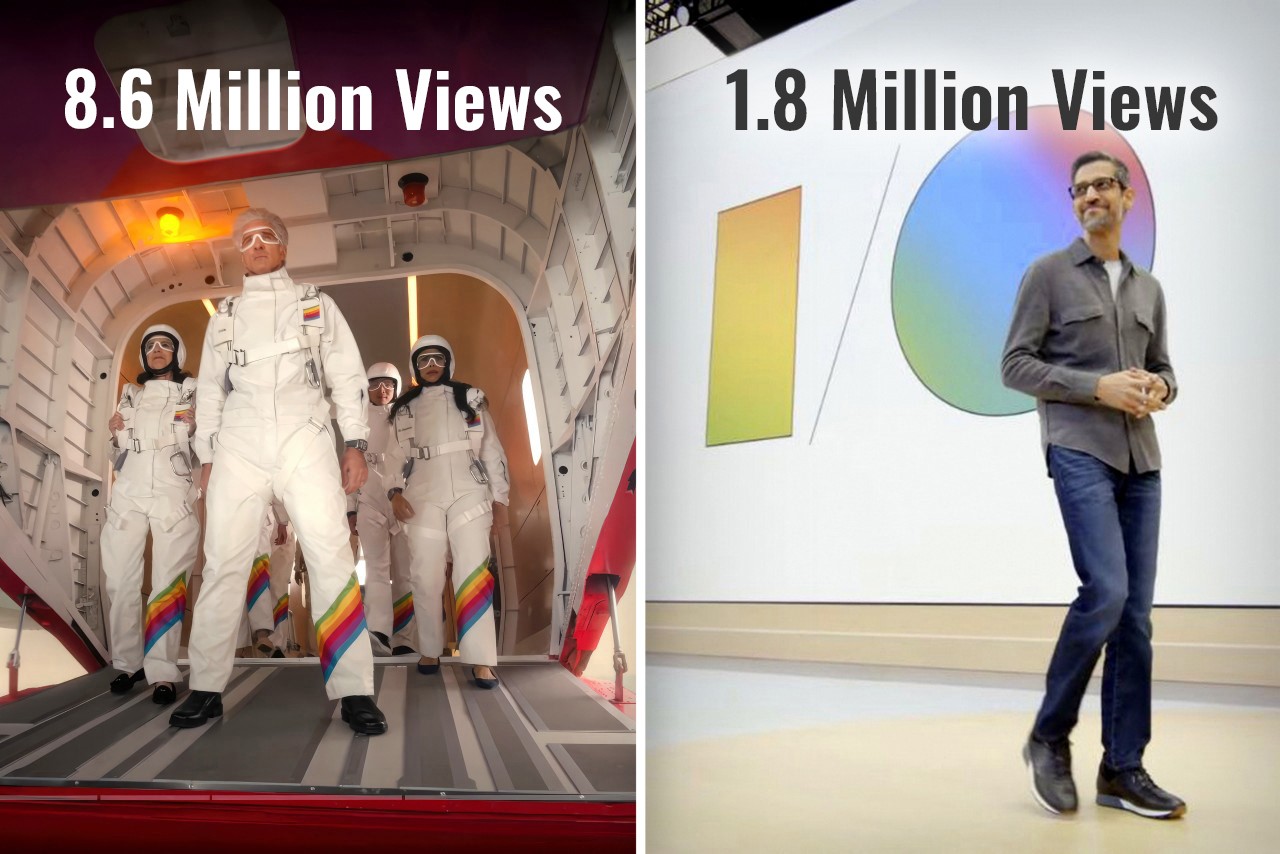
Exactly ten years ago, Google co-founder Sergey Brin jumped out of an airplane and parachuted down into a live event to present Google I/O. Cut to 2024, and Google arguably had one of the most yawn-inducing I/O events ever… but Apple, on the other hand, hat-tipped Brin by having senior VP of Software Engineering Craig Federighi jump out of a plane and parachute down into the Apple headquarters, kicking off the Worldwide Developer’s Conference (WWDC) event. If you were fortunate enough to sit through both Google’s I/O event for developers, and yesterday’s WWDC, chances are you probably thought the same thing as me – How did Google become so boring and Apple so interesting?
Google’s Sergey Brin skydiving into the I/O event wearing the radical new Google Glass in 2014
The Tale of Two Keynotes
Practically a month apart, Google and Apple both had their developer conferences, introducing new software features, integrations, and developer tools for the Android and Apple OS communities respectively. The objective was the same, yet presented rather differently. Ten years ago, Google’s I/O was an adrenaline-filled event that saw a massive community rally around to witness exciting stuff. Apple’s WWDC, on the other hand, was a developer-focused keynote that didn’t really see much involvement from the Apple consumer base. Google popularized the Glass, and unveiled Material Design for the first time, Apple, on the other hand, revealed OSX Yosemite and iOS 8. Just go back and watch the keynotes and you’ll notice how vibrant one felt versus the other. Both pretty much announced the same things – developer tools, new software versions, feature upgrades within first-party apps, and a LOT of AI… but Google’s I/O got 1.8 million views on YouTube over 3 weeks, and Apple’s WWDC sits at 8.6 million views in just one day. (As of writing this piece)
How Apple held the attention
Broadly, having seen both events, I couldn’t help but describe them differently. Google’s keynote seemed like a corporate presentation. Apple’s keynote felt like an exciting showcase. The language was different, the visuals were different, but most importantly, the scenes were different too. Google’s entire I/O was held in person, while Apple did have an in-person event, but the keynote was televised, showing different environments, dynamic angles, and great cinematography. Both events were virtually the same length, with Google’s keynote being 1 hour and 52 minutes long, while Apple’s was 1 hour and 43 minutes. Honestly, after the 80-minute mark, anyone’s mind will begin drifting off, but Apple did a much better job retaining my focus than Google. How? Well, it boiled down to three things – A. a consumer-first approach, B. simplified language, and C. a constant change of scenery.
Notice Apple’s language throughout the presentation, and you’ll see how the entire WWDC rhetoric was user-functionality first, developer-feature second. Whether it was VisionOS, MacOS, iOS, WatchOS, iPadOS, or even TV and Music, Apple’s team highlighted new features that benefit all Apple users first, then mentioned the availability of SDKs and APIs to help developers implement those features in their apps too. One could argue that a Worldwide Developer Conference should inherently be developer-first, but hey, developers are going to watch the keynote regardless. The fact that 8.6 million people (mostly Apple users) watched the WWDC keynote on YouTube shows that Apple wanted to make sure users know about new features first, then developers get their briefing. The fact that a majority of viewers were users also boils down to Apple’s language. There was hardly any technical jargon used in the Keynote. No mention of how many teraflops are used by Apple’s GPUs while making genmojis, what version number Sequoia is going to be, or what Apple Intelligence’s context window is, or whether it’s multimodal. Simple language benefits everyone, whether it’s a teenager excited about new iMessage features, a filmmaker gearing to make spatial content using iPhones or Canon cameras, or a developer looking forward to building Apple Intelligence into their apps. Even Apple Intelligence’s user-first privacy features were explained in ways everyone could understand. Finally, Apple’s production quality helped visually divide the keynote into parts so the brain didn’t feel exhausted. All the different OS segments were hosted by different people in different locations. Craig Federighi and Tim Cook made multiple appearances, but shifted locations throughout, bringing a change of scenery. This helped the mind feel refreshed between segments… something that Google’s in-person keynote couldn’t benefit from.
Where Google dropped the ball
A keynote that’s nearly 2 hours long can be exhausting, not just for the people presenting but also for the people watching. Having the entire keynote on one stage with people presenting in person can feel exactly like an office presentation. Your mind gets exhausted faster, seeing the same things and the same faces. Google didn’t announce any hardware (like they’ve done in past years) to break the monotony either. Instead, they uttered the word AI more than 120 times, while being pretty self-aware about it. The lack of a change of scenery was just one of the factors that made Google’s event gather significantly fewer eyeballs.
Unlike Apple’s presentation, which had a very systematic flow of covering each OS from the more premium VisionOS down to the WatchOS, Google’s presentation felt like an unplanned amalgamation of announcements. The event was broadly about three things – Google’s advancements in AI, new features for users, and new tools for developers – but look at the event’s flow and it feels confusing. I/O started with an introduction where Pichai spoke about multimodality and context windows, then progressed to Deep Mind, then to Search (a user feature), then Workspace (an enterprise feature), then Gemini (a user feature again), then Android (which arguably was supposed to be the most important part of the event), and then to developer tools. An Android enthusiast wouldn’t be concerned with DeepMind or Google Workplace. They might find Search interesting, given how core it is to the Google experience, but then they’d have to wait through 2 more segments before the event even GOT to Android. Search and Gemini are highly intertwined, but they weren’t connected in the keynote – instead, there was an entire 13-minute segment on Workplace in between.
If all that wasn’t fatiguing enough, Google’s I/O tended to lean into technical jargon describing tokens, context windows, and how the multimodal AI could segment data like speech and videos, grabbing frames, finding context, eliminating junk data, and providing value. There was also a conscious attempt at showing how all this translated into real-world usage, and how users could benefit from this technology too, but not without flexing terms that developers and industrial-folk would understand.
Although it’s natural to read through this article and conclude that one company did ‘a better job’ than another company, that isn’t really the case. Both Apple and Google showcased the best they had to offer on a digital/software level. However, the approach to these keynotes has changed a lot over the last 10 years. While Google’s I/O in 2014 had a lot of joie de vivre, their 2024 I/O did lack a certain glamor. Conversely, Apple’s WWDC had everyone at the edge of their seat, enjoying the entire ride. Maybe you got tired towards the end (I definitely did mid-way through the Apple Intelligence showcase), but ultimately Apple managed to deliver a knockout performance… and that’s not me saying so – just look at the YouTube numbers.
Game publisher Voodoo (known for free-to-play mobile titles stuffed with ads) has bought the social platform BeReal (known for a scorching hot 15 minutes of fame in 2022) for €500 million. Although BeReal has fallen off the radar since its much-hyped peak, Voodoo says the app has grown to 40 million active users.
“BeReal achieved incredible user loyalty and growth, showing there is a universal need to share real, unfiltered experiences with close friends,” Voodoo CEO Alexandre Yazdi wrote in a press release. “We are very excited to bring our teams together and leverage Voodoo’s know-how and differentiated technologies to scale BeReal into the iconic social network for authenticity.”
If you’ve forgotten, BeReal’s gimmick is that it promotes “spontaneous authenticity” by prompting users to capture dual-camera pictures (a selfie and whatever the rear camera is aimed at) during two-minute windows at random times throughout the day. It won Apple’s iPhone App of the Year award in 2022 as younger users (especially) appreciated its less choreographed user content.
The app’s marketing spiel is that the short and sudden posting window forces spontaneous, unmanicured content (unlike, say, Instagram). On the downside, authenticity isn’t always engaging: Some users complained that its content could get downright boring. (Care to peruse an adrenaline-pumping pic of... somebody looking half asleep as they sit at a computer?)
Although BeReal’s buzz has died down significantly since its 2022 heyday (partially thanks to Instagram and TikTok cloning its gimmick while it was still hot), the company says its user base is growing more than you might expect. Voodoo’s 40 million active users figure is double the 20 million daily active users BeReal claimed in April 2023.
It’s worth noting that Voodoo’s press release on Tuesday describes BeReal as having 40 million active users, not daily active users, suggesting those figures may not be apples to apples. And around the time BeReal claimed 20 million daily active users last year, The New York Times published a report citing an analytics firm that said the app’s daily use had dropped 61 percent from its peak: from about 15 million users in October 2022 to “less than six million” in March 2023.
Left: The original Donut County. Right: Voodoo’s clone Hole.io.
Ben Esposito / Voodoo
No matter whose figures are accurate, BeReal is now in the hands of the French gaming publisher Voodoo. Founded in 2013, the mobile gaming titan’s ultra-casual titles tend to do quite well. By 2022, it claimed to have passed six billion total downloads, and it says its apps trail only Google and Meta in mobile app installations.
Voodoo says Aymeric Roffé, CEO of its social app Wizz, will take over as BeReal’s CEO. The company says BeReal’s founder and previous CEO Alexis Barreyat will “remain involved in BeReal in the short term” before shuffling off to work on new products.
This article originally appeared on Engadget at https://www.engadget.com/bereal-the-buzziest-app-of-2022-has-been-bought-by-a-mobile-game-publisher-175016152.html?src=rss
Following customer outrage over its latest terms of service (ToS), Adobe is making updates to add more detail around areas like of AI and content ownership, the company said in a blog post. "Your content is yours and will never be used to train any generative AI tool," wrote head of product Scott Belsky and VP of legal and policy Dana Rao.
Subscribers using products like Photoshop, Premiere Pro and Lightroom were incensed by new, vague language they interpreted to mean that Adobe could freely use their work to train the company's generative AI models. In other words, creators thought that Adobe could use AI to effectively rip off their work and then resell it.
Other language was thought to mean that the company could actually take ownership of users' copyrighted material (understandably so, when you see it).
None of that was accurate, Adobe said, noting that the new terms of use were put in place for its product improvement program and content moderation for legal reasons, mostly around CSAM. However, many users didn't see it that way and Belsky admitted that the company "could have been clearer" with the updated ToS.
"In a world where customers are anxious about how their data is used, and how generative AI models are trained, it is the responsibility of companies that host customer data and content to declare their policies not just publicly, but in their legally binding Terms of Use," Belsky said.
To that end, the company promised to overhaul the ToS using "more plain language and examples to help customers understand what [ToS clauses] mean and why we have them," it wrote.
Adobe didn't help its own cause by releasing an update on June 6th with some minor changes to the same vague language as the original ToS and no sign of an apology. That only seemed to fuel the fire more, with subscribers to its Creative Cloud service threatening to quit en masse.
In addition, Adobe claims that it only trains its Firefly system on Adobe Stock images. However, multiple artists have noted that their names are used as search terms in Adobe's stock footage site, as Creative Bloq reported. The results yield AI-generated art that occasionally mimics the artists' styles.
Its latest post is more of a true mea culpa with a detailed explanation of what it plans to change. Along with the AI and copyright areas, the company emphasized that users can opt out of its product improvement programs and that it will more "narrowly tailor" licenses to the activities required. It added that it only scans data on the cloud and never looks at locally stored content. Finally, Adobe said it will be listening to customer feedback around the new changes.
This article originally appeared on Engadget at https://www.engadget.com/adobe-is-updating-its-terms-of-service-following-a-backlash-over-recent-changes-120044152.html?src=rss
After over a decade, the iPad finally got a calculator app. Let’s just get one thing straight – Apple just made the calculator glamorous.
Steve Jobs debuted the iPad back in January 2010, that’s a whopping 14 and a half years ago… and mysteriously enough, the iPad never shipped with an Apple-branded calculator app. Whenever pressed on the issue, Apple spokespeople always had the same answer – they didn’t want to release a calculator app just for the sake of it. They wanted to get it right by designing the best-ever calculator app for the iPad. Up until yesterday, all that felt like deflection, that Apple didn’t quite care about calculators on the iPad (after all, it was an entertainment and visual productivity device). Today, however, Apple is vindicating itself after over a decade of judgment. The new iPad Calculator app debuted at WWDC and it’s INCREDIBLE.
The new Calculator app for the iPad comes with a familiar interface, but uses the iPad’s larger screen to its advantage, delivering more oomph thanks to larger real estate. It has a history feature and built-in unit conversions, but if you have an Apple Pencil lying around, the Calculator experience gets MUCH more interesting.
Pair the Calculator with the Pencil and you get what Apple calls Math Notes, a more interactive, personal experience that takes your hand-written notes and graphs and turns them into computable datasets. Write an equation and the calculator understands your handwriting and solves the equation for you. Draw geometry, label the parts, and add a ‘=’ sign and the app intuitively understands what you want to calculate, giving you the answer. It’s like the self-answering Horcrux book from Harry Potter and the Chamber Of Secrets but on steroids. The app understands what you’re drawing/writing and how you’re doing so too. It mimics your handwriting to deliver answers (so when you write 2+2=, it adds ‘4’ to the end in a similar writing style). You can change parts of your calculations and the answers update in real-time. You can turn equations into graphs, change variables, and watch the graph change in real-time too.
This brilliant reinterpretation of the calculator comes thanks to Apple’s integration of the calculator’s features in its Notes app. It’s nothing like anything we’ve seen before. In fact, we’ve seen ChatGPT and Google Bard (or Gemini) fail in this exact area, with their inability to understand graphs or photos of equations, resulting in hilariously wrong answers. The iPad calculator app sidesteps all that by giving you the ability to intuitively take notes and compute calculations using the Pencil. You don’t need to upload an image from a text book, just draw stuff out instead. Now whether the Math Notes will be able to do all this correctly is something entirely different. It could end up making the same mistakes as GPT and Google, or create unique errors that will only be made evident once the Calculator and Math Notes features roll out with iOS 18 this fall. For one, I can definitely say that math teachers are NOT going to be happy about all of this!
WWDC is always where we learn about the year's biggest updates to Apple's operating systems. Given that the iPhone is Apple's most important product, it's no surprise that iOS takes up a major chunk of the attention each June. WWDC 2024 is no exception, as Apple had a ton of new features and updates to go over, many of which concerned AI (or Apple Intelligence, as the company is calling it).
As part of this new era, Siri is getting a major overhaul. The voice assistant will be able to get much more done as it will be more deeply integrated into your apps and have more contextual awareness. You'll be able to use Siri for things like photo editing, rewriting emails and prioritizing notifications. There's the option to type your Siri commands as well, which is a nice accessibility upgrade.
The language models will be able to rewrite, proofread and summarize text for you in apps such as Mail, Notes, Safari, Pages and Keynote, as well as third-party apps. Image generation will be available too in sketch, illustration and animation styles — so you won't be able to generate realistic images using Apple's tech. Image generation is built into apps such as Notes, Freeform and Pages.
Apple
You'll be able to use natural language prompts to search for photos of certain people. There's also the promise of more intelligent search in the browser and (at long last!) transcriptions of calls and Voice Memos to catch up to a feature Pixel devices have had for a while.
Although Apple Intelligence will pull from your personal information to make sure the systems are applicable to you, it will be aware of your personal data without collecting it, according to Apple software engineering SVP Craig Federighi.
Apple is employing a blend of both on-device and cloud-based AI processing. Your iPhone will handle as much of the legwork locally as it can, with more complex operations being sent to Apple's processing centers. That raises some questions about privacy, one of Apple's central selling points to would-be customers (especially after Apple openly took digs at rivals that use cloud servers for data processing), but Federighi gave some answers to those.
For one thing, the company has established something called Private Cloud Compute. Apple says the aim is to wield the power of the cloud for more advanced AI processing while making sure your iPhone data remains safe and secure.
To use these new features on iOS, you'll need a device that has at least an Apple A17 Pro chipset — in other words, an iPhone 15 Pro or one of this year's upcoming models. Apple Intelligence features will be available for free on iOS 18, iPadOS 18 and macOS Sequoia this fall in US English.
Customization
Apple also focused on customization. You'll be able to make the home screen look more like your own vibe than ever. You'll be able to change the colors of app icons, which can automatically get a different look when you have Dark Mode enabled. Your apps won't need to be locked within a rigid grid anymore either. Your home screen can look almost as messy as you want.
Control Center is getting some big changes. You'll be able to access things like media playback and smart home controls from here. Developers will be able to take advantage of this and offer Control Center management for their apps too. It'll be possible to pin custom controls to the home screen for your most frequently used apps and functions (so you'll be able to switch out the flashlight control for something else, for instance). Custom controls can also be mapped to the physical action button as you see fit.
Messages
When it comes to Messages, there's another nice update in the form of scheduling. When you're catching up on things late at night, you'll be able to time a message to send in the morning, for instance. Those who use emoji reactions in Messages (aka Tapbacks) are getting a nice update too. You'll be able to choose from any emoji instead of the five basic reactions Apple has offered for years.
Text effects (the little animations that show up when you type a certain phrase) are getting an upgrade as well. Meanwhile, Apple will offer satellite messaging support on iPhone 14 and later devices. That's a major update, especially for those who go off the grid often, as messaging will be more useful beyond emergencies. You'll be able to send and receive texts, emoji and Tapbacks via iMessage and SMS.
Apple
There's also a key AI-related change coming to the Messages app. Your iPhone will be able to generate custom emoji based on what you're writing. You might need a PhD in semiotics to decipher some of the "Genmoji" you receive.
There's one other big update for Messages in iOS 18: Apple will add support for RCS (Rich Communication Services) to Messages. RCS is a more advanced messaging protocol than SMS. It enables better media sharing, Wi-Fi messaging, group chats and, crucially, better security thanks to end-to-end encryption. It should allow for more secure, media-rich messaging between iPhone and Android devices.
Apple for years refused to support RCS in order to keep iMessage a walled garden. But after persistent pressure from Google — and more importantly, new EU laws coming into force — Apple promised to start supporting RCS sometime this year. Apple, which is never petty about anything ever, almost completely glossed over the addition of RCS in its the keynote, relegating it to a three-word mention.
Apps
The Photos app is getting is biggest redesign ever, Apple says. It's getting a visual overhaul and one of the key aims is to help you find your photos more easily (filtering out screenshots should be a breeze, for one thing). Your snaps will be organized around memorable moments. Apple Intelligence will power features like Clean Up, which is effectively Apple's version of Google's Magic Eraser tool.
The Mail app will soon be able to categorize emails — just like Gmail has for years. Apple will also organize emails by sender and make it easy to archive or delete every email you get from a certain company. This will be optional, so you can stick to a single inbox if you wish.
Maps, meanwhile, will offer more detailed topographic maps to bring the app more into line with the Apple Watch. This should be useful for planning routes while hiking. As for the Journal app, it will now show stats for things like a daily writing streak.
Wallet is getting a handy new feature that will allow you to send cash without having to exchange personal details. All you need to do is simply tap your phones together. This could be handy for splitting the bill after dinner with a new acquaintance. Tickets saved to Wallet can now include stadium details, recommended Apple Music playlists and other information.
Calendar can show events and tasks from Reminders app, while the Notes app can automatically solve any math equations you enter. The Home app will offer guest access
Another welcome change is the introduction of a dedicated Passwords app. This will work across iOS, iPadOS, visionOS and macOS and make it easier to find saved passwords from iCloud Keychain. Even better, there will also be Windows support via the iCloud for Windows app. Hopefully, this will make it easier for everyone to use a password manager and have unique passwords for every single account — something we strongly recommend.
This being Apple, of course it has some new privacy controls for apps in iOS 18. You'll have the option to lock apps behind an authentication method (i.e., your PIN or Face ID) so that when you pass your iPhone to someone to show them your camera roll, they can't go snooping in your Messages. You can also hide apps — perhaps ones you use for dating — in a locked folder too. Elsewhere on the app privacy front, you'll be able to decide which of your contacts an app has access to instead of giving them absolutely everyone's phone numbers and personal information.
Elsewhere, Apple is bringing Game Mode to iPhone. This aims to boost performance by minimizing background activity, while controllers and AirPods should be more responsive.
During an emergency call, dispatchers will be able to send a request to turn it into a video call or to share media from the camera roll. This, Apple suggests, can help first responders better prepare for an incident. The Health app, meanwhile, has been redesigned to make it easier to access vital info in an emergency.
On the accessibility front, users will be able to navigate their iPhone using eye tracking. You'll be able to set up a custom sound that will trigger tasks using the Vocal Shortcut feature, while Music Haptics aims to give those who are deaf or hard of hearing another way to experience music via the Taptic Engine.
A developer beta of iOS 18 is available today and a public version will roll out in July. As always, iOS 18 will roll out to all eligible iPhones this fall.
If your device can run iOS 17, you'll be able to install iOS 18. The list of eligible devices includes the iPhone 11 and later lineups, along with iPhone Xs, Xs Max, Xr and the second-gen SE.
This article originally appeared on Engadget at https://www.engadget.com/ios-18-gets-a-revamped-control-center-and-loads-of-home-screen-customization-options-172350046.html?src=rss