Microsoft has revealed the first wave of Xbox Game Pass additions for March. Cyberpunk 2077 and F1 25 headline the batch; the former is coming to both Ultimate and Premium tiers. Hollow Knight: Silksong, which launched about six months ago, is also on the way to Premium.
Final Fantasy III and Kingdom Come: Deliverance II had been previously announced and are both available starting today. Both games can be played straight from the cloud or downloaded to the Xbox Series X/S as well as PC across all Game Pass tiers.
F1 25 joins Game Pass Ultimate and PC Game Pass on March 4. For Ultimate subscribers, the game is already available through EA Play. F1 fans should know that EA used LiDAR to map the tracks for F1 25. Also arriving March 4 is To a T, an adventure game from the creator of Katamari Damacy about "a teen navigating small-town life with their cute dog companion." Your character takes on these adventures while stuck in a permanent T-pose, for reasons.
The sci-fi adventurePlanet of Lana II: Children of the Leaf launches as a day-one Game Pass release on March 5 across cloud, console, handheld and PC. Fan favorite Cyberpunk 2077 hits Game Pass Ultimate and Premium on March 10 across cloud and console. The Witcher 3, also from developer CD Projekt RED, returned to Game Pass just a couple of weeks ago.
Hollow Knight: Silksong drops on March 12 across cloud, console, handheld and PC. The highly-anticipated follow-up to the 2017 action-adventure was a day one release on Game Pass Ultimate, and will now be available on the lower Premium tier. Construction Simulator and DreamWorks Gabby’s Dollhouse: Ready to Party round out the first half of the month on March 10 and March 17, respectively.
This article originally appeared on Engadget at https://www.engadget.com/gaming/xbox/game-pass-additions-for-march-include-cyberpunk-2077-and-f1-25-171433874.html?src=rss
This is a wonderfully designed puzzle game that oozes atmosphere. The game tasks players with exploring a gigantic mansion, but there's a twist. You actually build this mansion as you explore, room by room. This is done by placing what can only be described as magical blueprints.
The goal is to fully explore the mansion and solve its many, many mysteries. However, there are only so many blueprints and too many obstacles. This is where the roguelike part comes in. When you build yourself into a dead end, you go to sleep and end the run. All of the rooms reset, but you may have learned a thing or two for the next run. Rinse and repeat.
It's a very nifty gameplay loop, which is why it easily found a spot on Engadget's list of our favorite games from 2025. We even called it a masterpiece, which is deserved. In other words, this is a fantastic addition to the Nintendo eShop.
I only have one small gripe. This is a gorgeous game, but that's primarily due to the art direction and overall vibe. Why is it a Switch 2 exclusive? It seems like the OG Switch could handle it. In any event, this version is priced at $30 but has been discounted to $20 for launch.
This article originally appeared on Engadget at https://www.engadget.com/gaming/nintendo/blue-prince-is-out-on-switch-2-today-complete-with-mouse-control-162242506.html?src=rss
“MacBook Neo” appears to be the name of Apple’s long-rumored cheap MacBook, based on a regulatory posting on Apple’s website, MacRumors reports. The gaffe was quickly removed from Apple’s site (pour one out for the poor soul who posted it). Previous rumors didn’t attach a name to the low-cost MacBook — I figured Apple would just revive the clean and simple “MacBook” branding. The name MacBook Neo sounds like something we’d see from ASUS or Acer, it’s just trying a bit too hard to seem cool.
To recap, Apple is expected to unveil its first low-cost MacBook laptop tomorrow (and personally, I think it has a good shot at peeling away disgruntled Windows users). It’s rumored to be powered by one of the company’s A-series mobile chips, instead of the M-series hardware in its laptops and desktops so far. Apple reportedly isn’t skimping on the case — it’s expected to be all metal, except with plenty more colors than the company’s existing lineup. In many ways, the MacBook Neo sounds like a revival of Apple’s cute and colorful iBook laptops, except for far less money than those machines, with no handle for toting around.
Apple kicked off its week of spring announcements with the iPhone 17e and iPad Air M4 yesterday, both of which are relatively modest upgrades. (Still, it’s nice to have MagSafe on the iPhone 17e.) This morning, Apple unveiled the MacBook Air M5 and MacBook Pro M5 Pro/Max systems, both of which are slightly more expensive than the previous models. We also got a new addition to Apple’s monitor lineup with the 5K MiniLED Studio Display XDR. Along with the MacBook Neo, we may also see an upgraded Mac Studio desktop announced tomorrow.
This article originally appeared on Engadget at https://www.engadget.com/computing/laptops/apples-cheap-macbook-could-be-called-the-macbook-neo-153800133.html?src=rss
There's more waffling going on about the future of electric vehicles in America right now than you might expect at a Belgian breakfast buffet. Some brands like Hyundai are staying committed, some brands like Honda are dialing back, and everyone else is simply doing their damndest to provide as many propulsion options as possible
Count Audi in that last category. On the EV side, it recently launched the new Q6 E-Tron and refreshed the ballistic E-Tron GT. On the internal combustion side, it has a new A6, and there's a full-size, three-row SUV coming in the form of the Q9. The company's latest car, though, can be found in the middle: Meet the new RS5, Audi's latest and greatest plug-in hybrid.
RS stands for "RennSport," or "Racing Sport" in German, the moniker applied to Audi's highest performing cars. RS designates an elite group of machines intended to be a bit more edgy and exclusive than your BMW M cars or Mercedes-Benz AMGs. The 2027 RS5 marks the first time an RS has come with both a big battery and a big engine, but the RS5 is much more than a novelty with a plug.
Tricky diff
2027 Audi RS5
Tim Stevens for Engadget
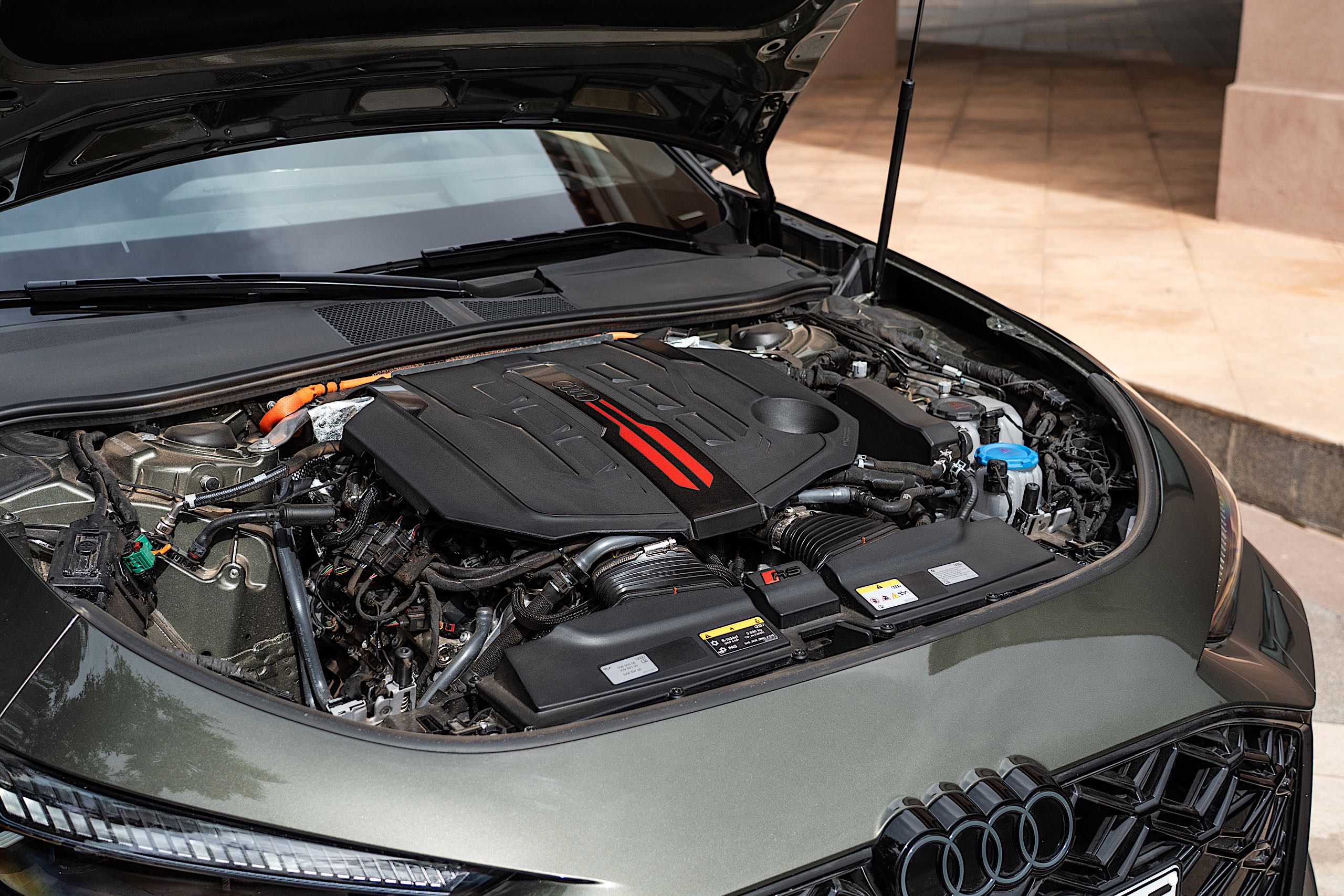
The main grunt of the new RS5 comes from a 2.9-liter, twin-turbocharged V-6 mounted up front under the hood. On its own, that engine produces 503 horsepower, a figure that you might think is plenty. Here, though, it has some help here in the form of not one but two electric motors.
The first is a typical hybrid arrangement, a 174-hp motor wedged in between the engine and transmission. This is the primary means of electric propulsion for the car, giving it a total, maximum system output of 630 hp and 609 lb-ft.
Because that motor is positioned where it is, the RS5 can still make full use of its eight-speed automatic transmission when driven only by the electric motor. That means a top speed of 87 mph before the engine kicks in. Once it does, it'll take you all the way up to 177 mph.
There's a second motor at the back, though, which is far more interesting. No, it isn't there to drive the rear axle like on the RAV4 Hybrid. The RS5 has a traditional Quattro setup with a mechanical differential in the middle to distribute power between the front and rear wheels.
The small, 11-hp motor at the back exclusively controls a new type of system that Audi calls Dynamic Torque Control. This motor uses planetary gearsets to selectively and effectively magnify the power to either the left or the right axle at the back. It may be small, but this motor makes the RS5 do some wonderful things.
Drift time
2027 Audi RS5
Tim Stevens for Engadget
For maximum fun in the new RS5, dial it over to what Audi calls Torque Rear mode. This configures the new rear differential to send maximum twist to the outside rear wheel. Combine that with the center differential, which can send up to 85 percent of the engine's power to the rear, and the result is a remarkably willing drift partner.
After less than 30 seconds behind the wheel on a closed track in Marrakesh, I was confidently sliding my way through a set of cones in a slalom, then pirouetting around a cone at the end in a tight circle, clouds of tire smoke hanging in the air. Normally, drifting a 5,200-pound, 630-hp machine rolling on sticky tires is a real nightmare. It's delightfully easy in the RS5.
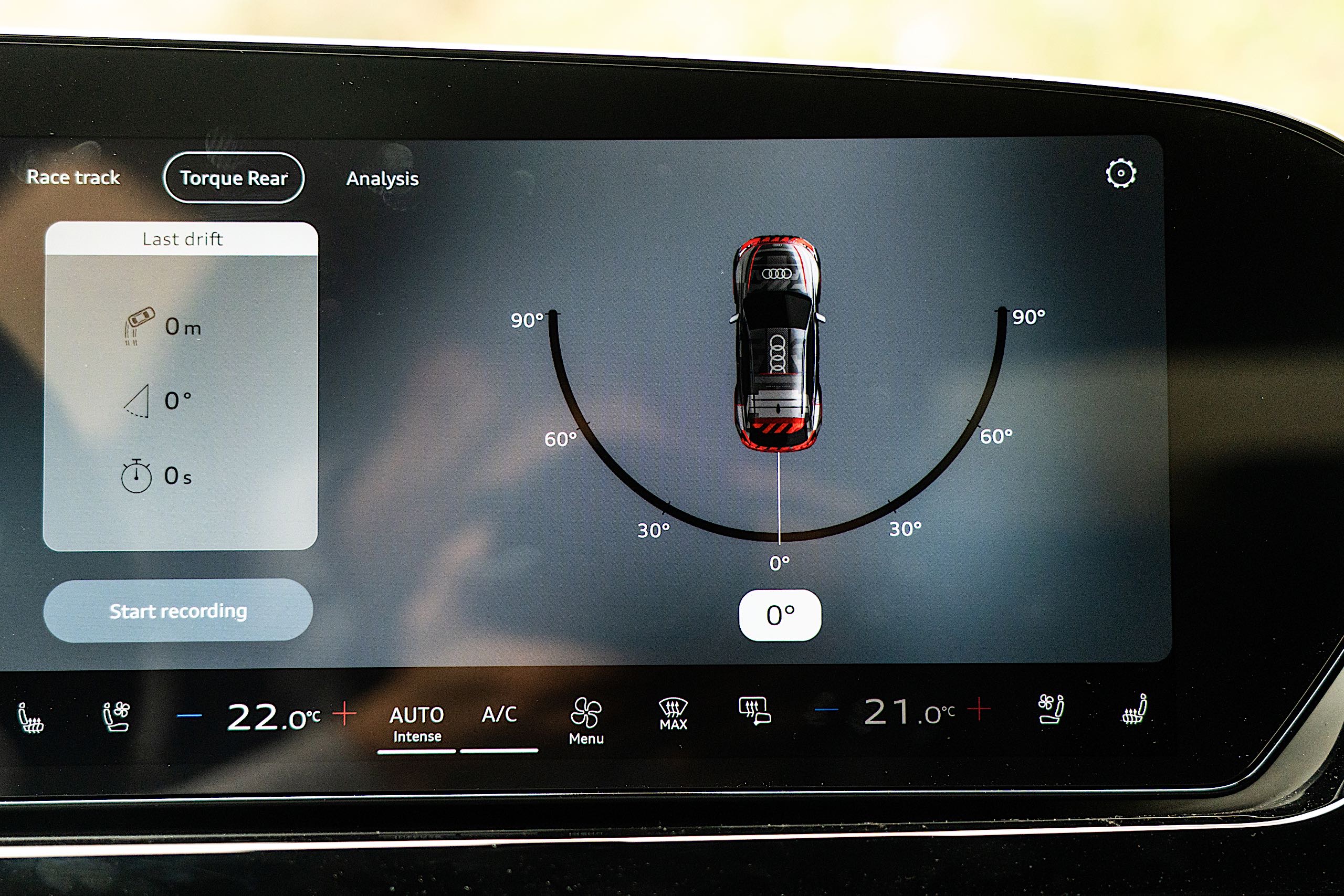
The car's differential setup not only makes this easy but also tracks just how successful you are at it. It records the time, length and even angle of your most dramatic drifts. You can even replay them on the touchscreen if you're so inclined, scrubbing back and forth to see what kinds of G forces you were generating.
This is part of a new extension to its infotainment system called the Audi Driving Experience. It'll also track lap times around race tracks, giving you a bit more information in the timeless pursuit of tenths of a second.
2027 Audi RS5
Tim Stevens for Engadget
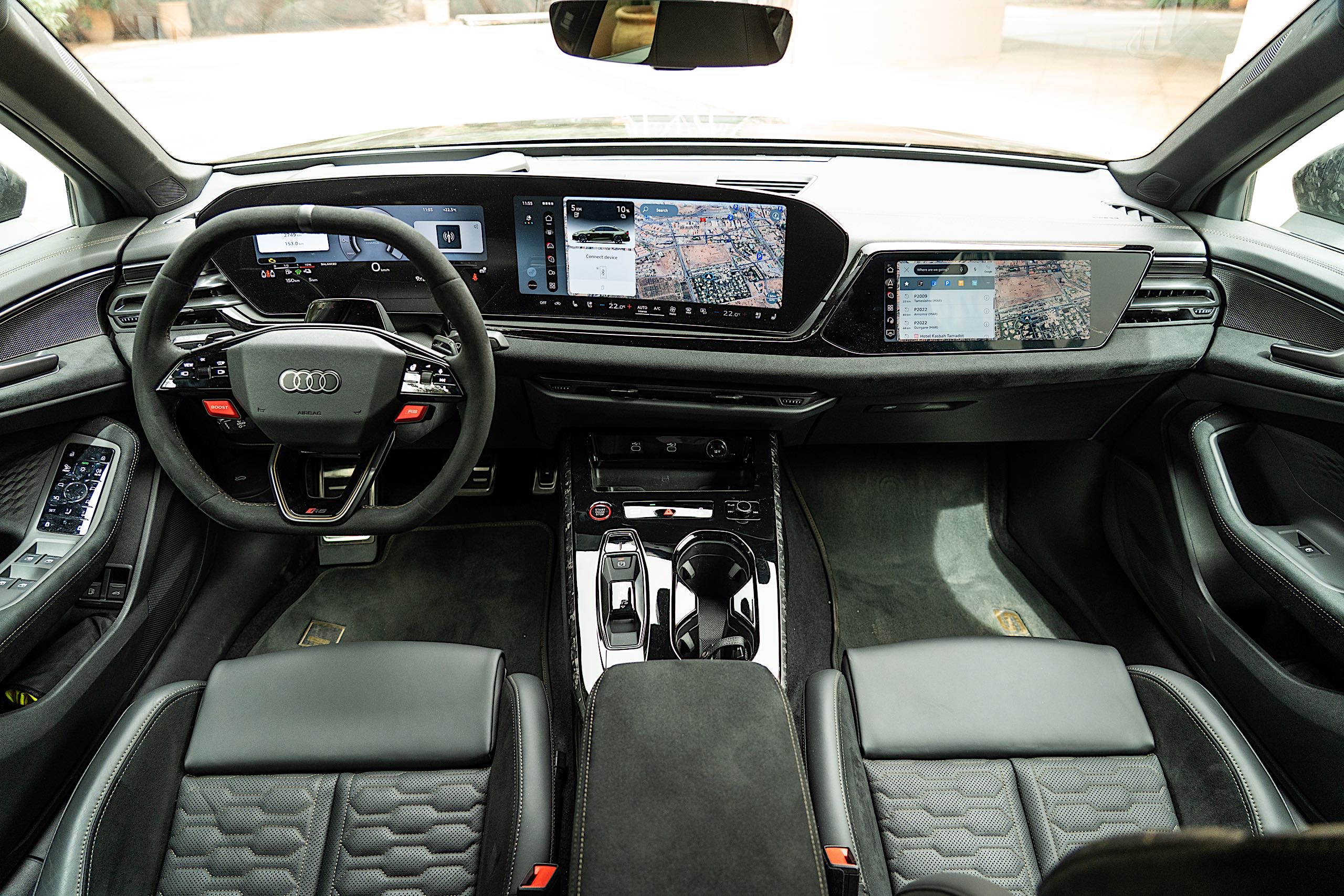
Audi also added a few custom screens showing the power distribution of the car and letting you monitor things like critical system temperatures and tire pressures at every corner. Otherwise, though, it's much the same interface as seen on most new Audis, with a 14.5-inch central touchscreen, an 11.9-inch gauge cluster and an optional 10.9-inch display way over on the right for the passenger.
That's a lot of displays, with the left two encased within an oversized, sweeping panel that stands tall and proud out of the dashboard. Too tall, actually. If big bezels ruin your day, look away, because there's a lot of wasted space here.
Likewise, if you don't like steering wheels with capacitive touch controls, you're not going to love the RS5. Audi has brought back the little scroll wheels under your thumbs, at least, but everything else on there is just a flat surface.
Putting the power down
2027 Audi RS5
Tim Stevens for Engadget
I spent the better part of a day driving the RS5 through the wild streets of Marrakesh and up into the Atlas Mountains to the south. In the city, I left the car in EV mode, letting that primary electric motor and the car's 25.9-kilowatt-hour battery (22 kWh net) do the heavy lifting. Audi says the car can cover up to 54 miles in this mode, and while I didn't have time to go that far on battery power, it seemed like an achievable estimate.
The car is perfectly pleasant in this mode, silent and even reasonably quick. In Comfort mode, the suspension is at its softest, and despite those giant wheels, the RS5 did perfectly fine over the decidedly imperfect Moroccan roads. But it wasn't until I got far away from the city that I could start to open things up a bit, working my way through the various drive modes and eventually all the way up to RS Sport, the most performance-oriented.
Here, the suspension is at its stiffest and the throttle at its sharpest, transmission swinging through its ratios eagerly to keep the engine singing. Jump on the gas, and the car really does leap forward, the electric motor doing its part to cover the power delay caused by the turbochargers in the mix.
You can feel that rear differential here, too, adding an extra bit of pivot to the rear when you're powering out of corners. But, on the way in, you really can feel the substantial weight of this car, the front end scrubbing and pushing forward when you ask too much of it.
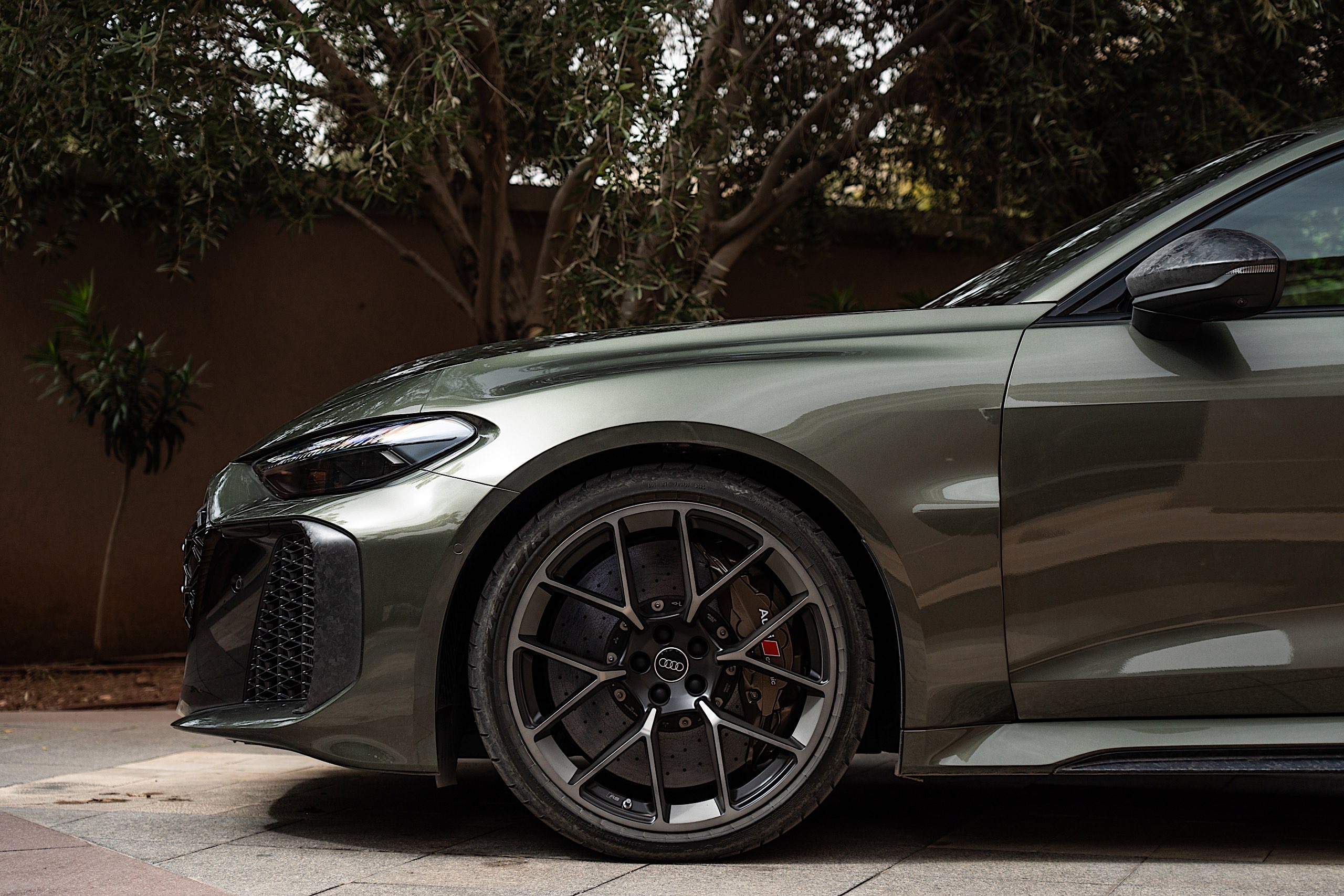
Again, this model gained more than 1,000 pounds over the old RS5, and though the improved suspension, drivetrain, tires and even giant, ceramic brakes all help to reduce its feel, there's no hiding that much mass.
Wrap-up
Yes, the RS5 has gained a lot of weight, and that hurts its nimbleness on track, but remember that this is a large, luxury sedan. It was never meant to be a lithe track toy. Despite that, the new RS5 actually feels far more fun and aggressive than its predecessor, a characteristic at least partially due to that trick new rear differential and the instant response of the new hybrid system. 54 miles of emissions-free range doesn't hurt, either.
The big question is cost, and sadly, Audi's not ready to answer that one yet. You do, at least, have a little time to save. The new RS5 doesn’t hit American shores until sometime in 2027.
This article originally appeared on Engadget at https://www.engadget.com/transportation/2027-audi-rs5-first-drive-big-thrills-with-a-big-battery-152057907.html?src=rss
Let’s deal with the bad news first: Apple is reverting a price cut from last year. It dropped the M4-powered MBA’s starting price down to $999, but for the M5-equipped model, you’ll need to shell out at least $1,099.
The company claimed the M5 MacBook Air will be able to deliver four times faster performance in AI tasks than the M4 MBA. Compared with the M1 MacBook Air, you’ll get up to 9.5 times faster performance, the company said.
Along with swapping in a more powerful chip, Apple has upgraded the starting storage by doubling it from 256GB to 512GB. The company says the SSD has “2x faster read/write performance compared to the previous generation.” You can kit out the MacBook Air with 4TB of internal storage if you have the will and the means.
You’ll also get 16GB of RAM for starters. The memory has 153GB/s of bandwidth, which Apple said is a 28 percent improvement over the M4 MBA. The latest MacBook Air can be equipped with up to 32GB of memory.
Just like it did with the latest iPad Air, Apple has upgraded the connectivity hardware. Thanks to the inclusion of the company’s N1 wireless chip, the M5 MacBook Air supports Wi-Fi 7 and Bluetooth 6.
As you’d imagine, the M5 MacBook Air runs on macOS Tahoe and it supports Apple Intelligence features. It has a Liquid Retina display, 12MP Center Stage camera, a sound system with Spatial Audio support and a pair of Thunderbolt 4 ports, which allows the laptop to support up to two external displays. Apple claims the M5 MacBook Air will run for up 18 hours on a single charge.
The M5 MacBook Air is available in 13-inch and 15-inch models, with the latter starting at $1,299. It’s available in sky blue, midnight, starlight and silver. Pre-orders start on March 4 at 9:15AM ET. The laptops will be available in stores in 33 countries and regions on March 11.
This article originally appeared on Engadget at https://www.engadget.com/computing/laptops/the-macbook-air-m5-starts-at-1099-up-100-from-the-m4-141612909.html?src=rss
As part of its big week of announcements, Apple has unveiled a new pair of M5 chips alongside two new MacBooks. The new M5 Pro and M5 Max chips will power the new MacBook Pro that was just announced today, while the new MacBook Air comes with the base M5. According to the company’s press release, the M5 Pro and M5 Max come with an “advanced GPU with Neural Accelerators and higher unified memory bandwidth for a massive increase in AI compute.”
At the heart of the M5 Pro and M5 Max are what Apple is calling a new “Fusion Architecture” that “combines two dies into a single system on a chip (SoC).” The chips both feature a new 18-core CPU, six of which Apple is now calling “super cores, that are the word’s fastest CPU core.”
The other 12 are “all-new performance cores, optimized for power-efficient, multithreaded workloads.” Altogether, Apple says these CPU changes improve performance by “up to 30 percent for pro workloads.” Meanwhile, the GPU is a jump over the next-gen design we saw in the M5, as it goes to up to 40 cores. Each GPU core has a Neural Accelerator in it, and together with the higher unified memory bandwidth, the company says the M5 Pro and M5 Max offer “over 4x the peak GPU compute for AI compared to the previous generation.”
Apple added that graphics performance is also getting a substantial boost, by up to “35 percent for apps using ray tracing” compared to the M4 Pro and M4 Max.
To be clear, this isn’t the first time Apple has claimed it has the “world’s fastest” core. According to our resident Apple Silicon expert Devindra Hardawar, the benchmarks have proven the company’s claims true. It’s also worth noting that the two-die design isn’t novel or unique, as companies like Intel and AMD have been doing similar.
The M5 Pro and M5 Max will first show up in the new MacBook Pro, which is available for pre-order starting March 4, and will arrive on Wednesday, March 11.
This article originally appeared on Engadget at https://www.engadget.com/computing/apple-unveils-the-m5-pro-and-m5-max-chips-which-feature-new-faster-super-cores-141533420.html?src=rss
It happened much later than we expected, but Apple's announcement of MacBook Pros with its M5 Pro and M5 Max chips has finally arrived. These more powerful variants on Apple's silicon will be available in the 14-inch and 16-inch models of the laptops. Pre-orders will open on March 4 with an expected ship date of March 11. You’ll want to save some extra coin this time, though, as prices have gone up compared to the prior generation.
The new 14-inch MacBook Pro can be kitted out with either an M5 Pro or M5 Max. The Pro option for the chip boasts a CPU with 15 or 18 CPU cores and 16 or 20 GPU cores. For the M5 Max, users will have 18 CPU cores along with 32 or 40 GPU cores. The base model with an M5 Pro has either 24 or 48GB of RAM and now starts with 1TB of storage, up from 512GB as was standard before.
If you're eyeing the 16-inch MacBook Pro, it starts with the M5 Pro with 18 CPU cores and 20 GPU cores. You can also get the same two M5 Max configurations as you can on the 14-inch model.
Perhaps most significantly, Apple has raised prices on its entire MacBook Pro lineup. The 14-inch M5 model previously started at $1,599; it’s now priced at $1,699. At least you’re getting something for that cash, as Apple has doubled its base storage to 1TB.
The same goes for the new M5 Pro and Max options. The 14-inch with the M5 Pro now starts at $2,199 instead of $1,999, while the 16-inch starts at a whopping $2,699 instead of $2,499. That 16-inch model comes with 24GB of RAM and 1TB of storage now as standard; that’s again double the storage space from the prior model. The M5 Max model starts with 2TB of storage and 36GB of RAM for $3,599 (14-inch) or $3,899 (16-inch).
Running down the rest of the specs: Apple says the storage in the new MacBook Pro is twice as fast as the prior generation — so you’re getting more, faster storage than before for the extra cash. The laptops also include the Apple-designed N1 chip for Wi-Fi 7 and Bluetooth 6 connectivity, and Apple says the MacBook Pro is rated for up to 24 hours of battery life. It has the same excellent Liquid Retina XDR display as we’ve seen for multiple years now, as well as a 12-megapixel “Center Stage” front-facing camera.
It's a little unusual for these heavy-duty upgrades to Apple's MacBook Pros to be announced so much later from the news of its latest silicon updates. The company debuted the M5 chip last fall as usual, but spent several months before it revealed these major hardware additions for housing it. And the M5 MacBook Pro that was announced in October shortly after the M5 chip news came with zero fanfare.
This article originally appeared on Engadget at https://www.engadget.com/computing/laptops/apple-brings-its-m5-pro-and-max-silicon-to-the-next-macbook-pro-generation-141553279.html?src=rss
Apple continues its gradual unveiling of new products this week with the launch of the Studio Display and an all-new 27-inch Studio Display XDR. The latter is a higher-end model aimed at content creators with a 27-inch 5K Retina XDR display that features a mini-LED display with 2,000-plus dimming zones, up to 2,000 nits of peak HDR brightness and a wider color gamut for improved accuracy. It looks like a replacement for the expensive, nearly seven-year-old 32-inch 6K Pro XDR Display, which is no longer for sale on Apple's website.
The Studio Display XDR also has a 120Hz refresh rate, addressing complaints about the relatively anemic 60Hz refresh rate of previous models. At the same time, it comes standard with a new tilt- and height-adjustable stand, with a height range of 105mm.
Apple
Apple calls the Studio Display XDR the "world's best pro display" for things like HDR video editing and medical displays. Brightness levels are certainly outstanding at 1,000 nits SDR and 2,000 nits HDR, and the 1,000,000:1 contrast ratio and 80 percent Rec.2020 coverage are also top-notch. The new model should even be fine for some light gaming thanks to the 120Hz refresh rate and Adaptive Sync support, though many buyers may want a 32-inch or larger display like the now-discontinued Pro XDR model.
Other features include a 12MP Center Stage camera with Desk View support and Thunderbolt 5 connectivity with a second port for downstream high-speed accessories or additional daisy-chained displays. It can also act as a Thunderbolt hub, while offering up to 140W of charging power through the included Thunderbolt 5 Pro cable, enough to fast-charge a 16-inch MacBook Pro.
Apple
Along with the Display XDR, Apple also announced a new version of the standard Studio Display. As before, it comes with a 27-inch 5K Retina display with up to 600 nits of brightness and P3 wide color, either with standard or optional nano-texture glass (a $300 option). However, it now includes an improved 12MP Center Stage camera along with Desk View to show your face and an overhead view of your desk at the same time. You also get a studio-quality three-microphone array and six speaker sound system with Spatial Audio.
That display now supports Thunderbolt 5 connectivity as well, providing higher-speed connections for accessories and the ability to daisy-chain displays. However, max charging power on this model is limited to 96W, still enough to fast-charge a 14-inch MacBook Pro. The Studio Display comes standard with a tilt-adjustable stand, but you can get it with a tilt- and height-adjustable standard for $400 more as before.
The Studio Display XDR will be available tomorrow for pre-order starting at $3,299, while the new Studio Display also goes on pre-order on March 4 starting at $1,599 without the nano-texture display or heigh-adjustable stand.
This article originally appeared on Engadget at https://www.engadget.com/computing/accessories/apple-reveals-its-new-5k-mini-led-studio-display-xdr-141515587.html?src=rss
XLR microphone owners, rejoice: Shure's successor to the MVX2U Digital Audio Interface (DAI) brings the adapter into the mobile era. The compact MVX2U Gen 2 adds more advanced onboard audio processing. But its most notable upgrade is mobile device compatibility, so you're no longer limited to desktop use.
The single-channel MVX2U Gen 2 provides up to +60dB of gain and 48V phantom power. On the processing front, the adapter includes an auto-level mode. There’s also a real-time denoiser to minimize background noise and a pop filter ("Popper Stopper" in Shure marketing-speak) to soften those harsh plosive sounds. Shure says the new model improves the noise floor, headphone amp and DAC.
The adapter stores your last-used audio processing settings. That way, you don't have to worry about your settings getting wiped out when switching between devices or software.
The Shure MVX2U Gen 2 includes a 1m (3.3 ft) USB-C to USB-C cable, so you can get it up and running quickly on your phone, tablet or PC. The adapter is now available for $139 from the company website.
This article originally appeared on Engadget at https://www.engadget.com/audio/shures-next-gen-dai-adds-mobile-support-140000205.html?src=rss
Users of Meta's AI smart glasses in Europe may be unknowingly sharing intimate video and sensitive financial information with moderators outside of the bloc, according to a report from Sweden's Svenska Dagbladetreleased last week. Employees in Kenya doing AI "annotation" told the journalists that they've seen people nude, using the toilet and engaging in sexual activity, along with credit card numbers and other sensitive information.
With Meta's Ray-Ban Display and other glasses with AI capabilities, users can record what they're looking at or get answers to questions via a Meta AI assistant. If a wearer wants to make use of that AI, though, they must agree to Meta's terms of service that allow any data captured to be reviewed by humans. That's because Meta's large language models (LLMs) often require people to annotate visual data so that the AI can understand it and build its training models.
This data can end up in places like Nairobi, Kenya, often moderated by underpaid workers. Such actions are subject to Europe's GDPR rules that require transparency about how personal data is processed, according to a data protection lawyer cited in the report.
However, Svenska Dagbladet's reporters said they needed to jump through some hoops to see Meta's privacy policy for its wearable products. That policy states that either humans or automated systems may review sensitive data, and puts the onus on the user to not share sensitive information.
Meta declined to comment directly on the story, and simply said that "when live AI is being used, we process that media according to the Meta AI Terms of Service and Privacy Policy." To find out more, check out Svenska Dagbladet's detailed reporting on the subject.
This article originally appeared on Engadget at https://www.engadget.com/ai/metas-ai-display-glasses-reportedly-share-intimate-videos-with-human-moderators-135939855.html?src=rss