EZCast Just Turned Every Phone Into a Professional Camera Monitor

Monitoring a camera feed used to require either hovering behind the viewfinder or investing in a dedicated wireless video system with separate transmitters, receivers, and field monitors. For solo content creators, small production teams, and anyone shooting interviews or tutorials with limited gear, that kind of setup has always felt disproportionate to the task. The gap between “professional monitoring” and “just squinting at the back of the camera” remained stubbornly wide.

EZCast’s CamCast CT-1 is a compact wireless transmitter designed to sit on top of any HDMI-equipped camera, from mirrorless bodies and DSLRs to action cams and camcorders. Once connected, it broadcasts a live 1080p 60fps feed over 5GHz Wi-Fi to up to four iOS or Android devices simultaneously. EZCast has spent over a decade building wireless display and screen-mirroring technology for offices and classrooms, and the CamCast is their first product built specifically for cameras, applying that signal distribution expertise to a production context.

Designer: EZCast

Click Here to Buy Now: $129 $239 ($110 off). Hurry, only a few units left!

The device itself is small enough to mount on a camera hot shoe or gimbal arm, with included adapters for both horizontal and vertical orientation. A built-in OLED screen displays connection details, and pairing happens through a QR code scan that takes roughly three seconds. Power comes from either a standard NP-F battery, the same type used across countless cinema accessories, or a USB-C connection at 5V/3A. That dual-power flexibility means a battery for mobility on location or a simple cable for longer, stationary shoots where runtime matters more.

1

Beyond passive monitoring, the companion CamCast app lets users save takes directly to their phone, review footage instantly, and share clips without ever pulling a memory card from the camera. For a two-person crew shooting a wedding, for instance, the second operator can watch the main camera’s composition from across the venue on a phone while managing their own setup. A makeup artist can confirm framing before the talent walks on set. Four people watching the same live feed, all from devices they already carry, collapses a communication problem that traditionally required dedicated hardware to solve.

What separates the CamCast CT-1 from a basic wireless HDMI sender, though, is the built-in PTP camera control. From the app on a phone or tablet, users can adjust shutter speed, ISO, color temperature, and aperture, and even navigate through camera menus remotely. Consider a camera mounted on an overhead rig for a cooking tutorial, or locked onto a gimbal for a tracking shot. Physically reaching the camera to change a setting interrupts the flow of a shoot. Being able to tweak exposure or white balance from a phone across the room changes how a solo creator or small team interacts with their gear.

1

The CamCast CT-1 also has a UVC output, which means it can connect directly to a laptop or desktop and function as a capture card. For livestreamers, educators, or anyone running a webinar, this removes an entire piece of hardware from the signal chain. One device handles wireless monitoring to phones and wired streaming output to a computer at the same time, which is a lot of functions packed into something that weighs less than most on-camera microphones.

1

Picture a YouTuber who films with a mirrorless camera on a tripod across the room. Right now, checking framing or adjusting settings means walking over, making a change, walking back, and repeating until it looks right. With the CamCast mounted on that camera, the phone becomes both the monitor and the remote control. An instructor recording a craft tutorial gets the same benefit, turning their tablet into a live preview without needing cables snaking across the workspace or an expensive field monitor clamped to a light stand.

Rather than building another monitor or another receiver, EZCast built a bridge between cameras and the screens people already own. That redistribution of function, turning four phones into four production monitors through a single transmitter, might be the more interesting design move in a category still dominated by expensive, single-purpose hardware.

Click Here to Buy Now: $129 $239 ($110 off). Hurry, only a few units left!

The post EZCast Just Turned Every Phone Into a Professional Camera Monitor first appeared on Yanko Design.

EZCast Just Turned Every Phone Into a Professional Camera Monitor

Monitoring a camera feed used to require either hovering behind the viewfinder or investing in a dedicated wireless video system with separate transmitters, receivers, and field monitors. For solo content creators, small production teams, and anyone shooting interviews or tutorials with limited gear, that kind of setup has always felt disproportionate to the task. The gap between “professional monitoring” and “just squinting at the back of the camera” remained stubbornly wide.

EZCast’s CamCast CT-1 is a compact wireless transmitter designed to sit on top of any HDMI-equipped camera, from mirrorless bodies and DSLRs to action cams and camcorders. Once connected, it broadcasts a live 1080p 60fps feed over 5GHz Wi-Fi to up to four iOS or Android devices simultaneously. EZCast has spent over a decade building wireless display and screen-mirroring technology for offices and classrooms, and the CamCast is their first product built specifically for cameras, applying that signal distribution expertise to a production context.

Designer: EZCast

Click Here to Buy Now: $129 $239 ($110 off). Hurry, only a few units left!

The device itself is small enough to mount on a camera hot shoe or gimbal arm, with included adapters for both horizontal and vertical orientation. A built-in OLED screen displays connection details, and pairing happens through a QR code scan that takes roughly three seconds. Power comes from either a standard NP-F battery, the same type used across countless cinema accessories, or a USB-C connection at 5V/3A. That dual-power flexibility means a battery for mobility on location or a simple cable for longer, stationary shoots where runtime matters more.

1

Beyond passive monitoring, the companion CamCast app lets users save takes directly to their phone, review footage instantly, and share clips without ever pulling a memory card from the camera. For a two-person crew shooting a wedding, for instance, the second operator can watch the main camera’s composition from across the venue on a phone while managing their own setup. A makeup artist can confirm framing before the talent walks on set. Four people watching the same live feed, all from devices they already carry, collapses a communication problem that traditionally required dedicated hardware to solve.

What separates the CamCast CT-1 from a basic wireless HDMI sender, though, is the built-in PTP camera control. From the app on a phone or tablet, users can adjust shutter speed, ISO, color temperature, and aperture, and even navigate through camera menus remotely. Consider a camera mounted on an overhead rig for a cooking tutorial, or locked onto a gimbal for a tracking shot. Physically reaching the camera to change a setting interrupts the flow of a shoot. Being able to tweak exposure or white balance from a phone across the room changes how a solo creator or small team interacts with their gear.

1

The CamCast CT-1 also has a UVC output, which means it can connect directly to a laptop or desktop and function as a capture card. For livestreamers, educators, or anyone running a webinar, this removes an entire piece of hardware from the signal chain. One device handles wireless monitoring to phones and wired streaming output to a computer at the same time, which is a lot of functions packed into something that weighs less than most on-camera microphones.

1

Picture a YouTuber who films with a mirrorless camera on a tripod across the room. Right now, checking framing or adjusting settings means walking over, making a change, walking back, and repeating until it looks right. With the CamCast mounted on that camera, the phone becomes both the monitor and the remote control. An instructor recording a craft tutorial gets the same benefit, turning their tablet into a live preview without needing cables snaking across the workspace or an expensive field monitor clamped to a light stand.

Rather than building another monitor or another receiver, EZCast built a bridge between cameras and the screens people already own. That redistribution of function, turning four phones into four production monitors through a single transmitter, might be the more interesting design move in a category still dominated by expensive, single-purpose hardware.

Click Here to Buy Now: $129 $239 ($110 off). Hurry, only a few units left!

The post EZCast Just Turned Every Phone Into a Professional Camera Monitor first appeared on Yanko Design.

EZCast Just Turned Every Phone Into a Professional Camera Monitor

Monitoring a camera feed used to require either hovering behind the viewfinder or investing in a dedicated wireless video system with separate transmitters, receivers, and field monitors. For solo content creators, small production teams, and anyone shooting interviews or tutorials with limited gear, that kind of setup has always felt disproportionate to the task. The gap between “professional monitoring” and “just squinting at the back of the camera” remained stubbornly wide.

EZCast’s CamCast CT-1 is a compact wireless transmitter designed to sit on top of any HDMI-equipped camera, from mirrorless bodies and DSLRs to action cams and camcorders. Once connected, it broadcasts a live 1080p 60fps feed over 5GHz Wi-Fi to up to four iOS or Android devices simultaneously. EZCast has spent over a decade building wireless display and screen-mirroring technology for offices and classrooms, and the CamCast is their first product built specifically for cameras, applying that signal distribution expertise to a production context.

Designer: EZCast

Click Here to Buy Now: $129 $239 ($110 off). Hurry, only a few units left!

The device itself is small enough to mount on a camera hot shoe or gimbal arm, with included adapters for both horizontal and vertical orientation. A built-in OLED screen displays connection details, and pairing happens through a QR code scan that takes roughly three seconds. Power comes from either a standard NP-F battery, the same type used across countless cinema accessories, or a USB-C connection at 5V/3A. That dual-power flexibility means a battery for mobility on location or a simple cable for longer, stationary shoots where runtime matters more.

1

Beyond passive monitoring, the companion CamCast app lets users save takes directly to their phone, review footage instantly, and share clips without ever pulling a memory card from the camera. For a two-person crew shooting a wedding, for instance, the second operator can watch the main camera’s composition from across the venue on a phone while managing their own setup. A makeup artist can confirm framing before the talent walks on set. Four people watching the same live feed, all from devices they already carry, collapses a communication problem that traditionally required dedicated hardware to solve.

What separates the CamCast CT-1 from a basic wireless HDMI sender, though, is the built-in PTP camera control. From the app on a phone or tablet, users can adjust shutter speed, ISO, color temperature, and aperture, and even navigate through camera menus remotely. Consider a camera mounted on an overhead rig for a cooking tutorial, or locked onto a gimbal for a tracking shot. Physically reaching the camera to change a setting interrupts the flow of a shoot. Being able to tweak exposure or white balance from a phone across the room changes how a solo creator or small team interacts with their gear.

1

The CamCast CT-1 also has a UVC output, which means it can connect directly to a laptop or desktop and function as a capture card. For livestreamers, educators, or anyone running a webinar, this removes an entire piece of hardware from the signal chain. One device handles wireless monitoring to phones and wired streaming output to a computer at the same time, which is a lot of functions packed into something that weighs less than most on-camera microphones.

1

Picture a YouTuber who films with a mirrorless camera on a tripod across the room. Right now, checking framing or adjusting settings means walking over, making a change, walking back, and repeating until it looks right. With the CamCast mounted on that camera, the phone becomes both the monitor and the remote control. An instructor recording a craft tutorial gets the same benefit, turning their tablet into a live preview without needing cables snaking across the workspace or an expensive field monitor clamped to a light stand.

Rather than building another monitor or another receiver, EZCast built a bridge between cameras and the screens people already own. That redistribution of function, turning four phones into four production monitors through a single transmitter, might be the more interesting design move in a category still dominated by expensive, single-purpose hardware.

Click Here to Buy Now: $129 $239 ($110 off). Hurry, only a few units left!

The post EZCast Just Turned Every Phone Into a Professional Camera Monitor first appeared on Yanko Design.

EZCast Just Turned Every Phone Into a Professional Camera Monitor

Monitoring a camera feed used to require either hovering behind the viewfinder or investing in a dedicated wireless video system with separate transmitters, receivers, and field monitors. For solo content creators, small production teams, and anyone shooting interviews or tutorials with limited gear, that kind of setup has always felt disproportionate to the task. The gap between “professional monitoring” and “just squinting at the back of the camera” remained stubbornly wide.

EZCast’s CamCast CT-1 is a compact wireless transmitter designed to sit on top of any HDMI-equipped camera, from mirrorless bodies and DSLRs to action cams and camcorders. Once connected, it broadcasts a live 1080p 60fps feed over 5GHz Wi-Fi to up to four iOS or Android devices simultaneously. EZCast has spent over a decade building wireless display and screen-mirroring technology for offices and classrooms, and the CamCast is their first product built specifically for cameras, applying that signal distribution expertise to a production context.

Designer: EZCast

Click Here to Buy Now: $129 $239 ($110 off). Hurry, only a few units left!

The device itself is small enough to mount on a camera hot shoe or gimbal arm, with included adapters for both horizontal and vertical orientation. A built-in OLED screen displays connection details, and pairing happens through a QR code scan that takes roughly three seconds. Power comes from either a standard NP-F battery, the same type used across countless cinema accessories, or a USB-C connection at 5V/3A. That dual-power flexibility means a battery for mobility on location or a simple cable for longer, stationary shoots where runtime matters more.

1

Beyond passive monitoring, the companion CamCast app lets users save takes directly to their phone, review footage instantly, and share clips without ever pulling a memory card from the camera. For a two-person crew shooting a wedding, for instance, the second operator can watch the main camera’s composition from across the venue on a phone while managing their own setup. A makeup artist can confirm framing before the talent walks on set. Four people watching the same live feed, all from devices they already carry, collapses a communication problem that traditionally required dedicated hardware to solve.

What separates the CamCast CT-1 from a basic wireless HDMI sender, though, is the built-in PTP camera control. From the app on a phone or tablet, users can adjust shutter speed, ISO, color temperature, and aperture, and even navigate through camera menus remotely. Consider a camera mounted on an overhead rig for a cooking tutorial, or locked onto a gimbal for a tracking shot. Physically reaching the camera to change a setting interrupts the flow of a shoot. Being able to tweak exposure or white balance from a phone across the room changes how a solo creator or small team interacts with their gear.

1

The CamCast CT-1 also has a UVC output, which means it can connect directly to a laptop or desktop and function as a capture card. For livestreamers, educators, or anyone running a webinar, this removes an entire piece of hardware from the signal chain. One device handles wireless monitoring to phones and wired streaming output to a computer at the same time, which is a lot of functions packed into something that weighs less than most on-camera microphones.

1

Picture a YouTuber who films with a mirrorless camera on a tripod across the room. Right now, checking framing or adjusting settings means walking over, making a change, walking back, and repeating until it looks right. With the CamCast mounted on that camera, the phone becomes both the monitor and the remote control. An instructor recording a craft tutorial gets the same benefit, turning their tablet into a live preview without needing cables snaking across the workspace or an expensive field monitor clamped to a light stand.

Rather than building another monitor or another receiver, EZCast built a bridge between cameras and the screens people already own. That redistribution of function, turning four phones into four production monitors through a single transmitter, might be the more interesting design move in a category still dominated by expensive, single-purpose hardware.

Click Here to Buy Now: $129 $239 ($110 off). Hurry, only a few units left!

The post EZCast Just Turned Every Phone Into a Professional Camera Monitor first appeared on Yanko Design.

EZCast Just Turned Every Phone Into a Professional Camera Monitor

Monitoring a camera feed used to require either hovering behind the viewfinder or investing in a dedicated wireless video system with separate transmitters, receivers, and field monitors. For solo content creators, small production teams, and anyone shooting interviews or tutorials with limited gear, that kind of setup has always felt disproportionate to the task. The gap between “professional monitoring” and “just squinting at the back of the camera” remained stubbornly wide.

EZCast’s CamCast CT-1 is a compact wireless transmitter designed to sit on top of any HDMI-equipped camera, from mirrorless bodies and DSLRs to action cams and camcorders. Once connected, it broadcasts a live 1080p 60fps feed over 5GHz Wi-Fi to up to four iOS or Android devices simultaneously. EZCast has spent over a decade building wireless display and screen-mirroring technology for offices and classrooms, and the CamCast is their first product built specifically for cameras, applying that signal distribution expertise to a production context.

Designer: EZCast

Click Here to Buy Now: $129 $239 ($110 off). Hurry, only a few units left!

The device itself is small enough to mount on a camera hot shoe or gimbal arm, with included adapters for both horizontal and vertical orientation. A built-in OLED screen displays connection details, and pairing happens through a QR code scan that takes roughly three seconds. Power comes from either a standard NP-F battery, the same type used across countless cinema accessories, or a USB-C connection at 5V/3A. That dual-power flexibility means a battery for mobility on location or a simple cable for longer, stationary shoots where runtime matters more.

1

Beyond passive monitoring, the companion CamCast app lets users save takes directly to their phone, review footage instantly, and share clips without ever pulling a memory card from the camera. For a two-person crew shooting a wedding, for instance, the second operator can watch the main camera’s composition from across the venue on a phone while managing their own setup. A makeup artist can confirm framing before the talent walks on set. Four people watching the same live feed, all from devices they already carry, collapses a communication problem that traditionally required dedicated hardware to solve.

What separates the CamCast CT-1 from a basic wireless HDMI sender, though, is the built-in PTP camera control. From the app on a phone or tablet, users can adjust shutter speed, ISO, color temperature, and aperture, and even navigate through camera menus remotely. Consider a camera mounted on an overhead rig for a cooking tutorial, or locked onto a gimbal for a tracking shot. Physically reaching the camera to change a setting interrupts the flow of a shoot. Being able to tweak exposure or white balance from a phone across the room changes how a solo creator or small team interacts with their gear.

1

The CamCast CT-1 also has a UVC output, which means it can connect directly to a laptop or desktop and function as a capture card. For livestreamers, educators, or anyone running a webinar, this removes an entire piece of hardware from the signal chain. One device handles wireless monitoring to phones and wired streaming output to a computer at the same time, which is a lot of functions packed into something that weighs less than most on-camera microphones.

1

Picture a YouTuber who films with a mirrorless camera on a tripod across the room. Right now, checking framing or adjusting settings means walking over, making a change, walking back, and repeating until it looks right. With the CamCast mounted on that camera, the phone becomes both the monitor and the remote control. An instructor recording a craft tutorial gets the same benefit, turning their tablet into a live preview without needing cables snaking across the workspace or an expensive field monitor clamped to a light stand.

Rather than building another monitor or another receiver, EZCast built a bridge between cameras and the screens people already own. That redistribution of function, turning four phones into four production monitors through a single transmitter, might be the more interesting design move in a category still dominated by expensive, single-purpose hardware.

Click Here to Buy Now: $129 $239 ($110 off). Hurry, only a few units left!

The post EZCast Just Turned Every Phone Into a Professional Camera Monitor first appeared on Yanko Design.

EZCast Just Turned Every Phone Into a Professional Camera Monitor

Monitoring a camera feed used to require either hovering behind the viewfinder or investing in a dedicated wireless video system with separate transmitters, receivers, and field monitors. For solo content creators, small production teams, and anyone shooting interviews or tutorials with limited gear, that kind of setup has always felt disproportionate to the task. The gap between “professional monitoring” and “just squinting at the back of the camera” remained stubbornly wide.

EZCast’s CamCast CT-1 is a compact wireless transmitter designed to sit on top of any HDMI-equipped camera, from mirrorless bodies and DSLRs to action cams and camcorders. Once connected, it broadcasts a live 1080p 60fps feed over 5GHz Wi-Fi to up to four iOS or Android devices simultaneously. EZCast has spent over a decade building wireless display and screen-mirroring technology for offices and classrooms, and the CamCast is their first product built specifically for cameras, applying that signal distribution expertise to a production context.

Designer: EZCast

Click Here to Buy Now: $129 $239 ($110 off). Hurry, only a few units left!

The device itself is small enough to mount on a camera hot shoe or gimbal arm, with included adapters for both horizontal and vertical orientation. A built-in OLED screen displays connection details, and pairing happens through a QR code scan that takes roughly three seconds. Power comes from either a standard NP-F battery, the same type used across countless cinema accessories, or a USB-C connection at 5V/3A. That dual-power flexibility means a battery for mobility on location or a simple cable for longer, stationary shoots where runtime matters more.

1

Beyond passive monitoring, the companion CamCast app lets users save takes directly to their phone, review footage instantly, and share clips without ever pulling a memory card from the camera. For a two-person crew shooting a wedding, for instance, the second operator can watch the main camera’s composition from across the venue on a phone while managing their own setup. A makeup artist can confirm framing before the talent walks on set. Four people watching the same live feed, all from devices they already carry, collapses a communication problem that traditionally required dedicated hardware to solve.

What separates the CamCast CT-1 from a basic wireless HDMI sender, though, is the built-in PTP camera control. From the app on a phone or tablet, users can adjust shutter speed, ISO, color temperature, and aperture, and even navigate through camera menus remotely. Consider a camera mounted on an overhead rig for a cooking tutorial, or locked onto a gimbal for a tracking shot. Physically reaching the camera to change a setting interrupts the flow of a shoot. Being able to tweak exposure or white balance from a phone across the room changes how a solo creator or small team interacts with their gear.

1

The CamCast CT-1 also has a UVC output, which means it can connect directly to a laptop or desktop and function as a capture card. For livestreamers, educators, or anyone running a webinar, this removes an entire piece of hardware from the signal chain. One device handles wireless monitoring to phones and wired streaming output to a computer at the same time, which is a lot of functions packed into something that weighs less than most on-camera microphones.

1

Picture a YouTuber who films with a mirrorless camera on a tripod across the room. Right now, checking framing or adjusting settings means walking over, making a change, walking back, and repeating until it looks right. With the CamCast mounted on that camera, the phone becomes both the monitor and the remote control. An instructor recording a craft tutorial gets the same benefit, turning their tablet into a live preview without needing cables snaking across the workspace or an expensive field monitor clamped to a light stand.

Rather than building another monitor or another receiver, EZCast built a bridge between cameras and the screens people already own. That redistribution of function, turning four phones into four production monitors through a single transmitter, might be the more interesting design move in a category still dominated by expensive, single-purpose hardware.

Click Here to Buy Now: $129 $239 ($110 off). Hurry, only a few units left!

The post EZCast Just Turned Every Phone Into a Professional Camera Monitor first appeared on Yanko Design.

EZCast Just Turned Every Phone Into a Professional Camera Monitor

Monitoring a camera feed used to require either hovering behind the viewfinder or investing in a dedicated wireless video system with separate transmitters, receivers, and field monitors. For solo content creators, small production teams, and anyone shooting interviews or tutorials with limited gear, that kind of setup has always felt disproportionate to the task. The gap between “professional monitoring” and “just squinting at the back of the camera” remained stubbornly wide.

EZCast’s CamCast CT-1 is a compact wireless transmitter designed to sit on top of any HDMI-equipped camera, from mirrorless bodies and DSLRs to action cams and camcorders. Once connected, it broadcasts a live 1080p 60fps feed over 5GHz Wi-Fi to up to four iOS or Android devices simultaneously. EZCast has spent over a decade building wireless display and screen-mirroring technology for offices and classrooms, and the CamCast is their first product built specifically for cameras, applying that signal distribution expertise to a production context.

Designer: EZCast

Click Here to Buy Now: $129 $239 ($110 off). Hurry, only a few units left!

The device itself is small enough to mount on a camera hot shoe or gimbal arm, with included adapters for both horizontal and vertical orientation. A built-in OLED screen displays connection details, and pairing happens through a QR code scan that takes roughly three seconds. Power comes from either a standard NP-F battery, the same type used across countless cinema accessories, or a USB-C connection at 5V/3A. That dual-power flexibility means a battery for mobility on location or a simple cable for longer, stationary shoots where runtime matters more.

1

Beyond passive monitoring, the companion CamCast app lets users save takes directly to their phone, review footage instantly, and share clips without ever pulling a memory card from the camera. For a two-person crew shooting a wedding, for instance, the second operator can watch the main camera’s composition from across the venue on a phone while managing their own setup. A makeup artist can confirm framing before the talent walks on set. Four people watching the same live feed, all from devices they already carry, collapses a communication problem that traditionally required dedicated hardware to solve.

What separates the CamCast CT-1 from a basic wireless HDMI sender, though, is the built-in PTP camera control. From the app on a phone or tablet, users can adjust shutter speed, ISO, color temperature, and aperture, and even navigate through camera menus remotely. Consider a camera mounted on an overhead rig for a cooking tutorial, or locked onto a gimbal for a tracking shot. Physically reaching the camera to change a setting interrupts the flow of a shoot. Being able to tweak exposure or white balance from a phone across the room changes how a solo creator or small team interacts with their gear.

1

The CamCast CT-1 also has a UVC output, which means it can connect directly to a laptop or desktop and function as a capture card. For livestreamers, educators, or anyone running a webinar, this removes an entire piece of hardware from the signal chain. One device handles wireless monitoring to phones and wired streaming output to a computer at the same time, which is a lot of functions packed into something that weighs less than most on-camera microphones.

1

Picture a YouTuber who films with a mirrorless camera on a tripod across the room. Right now, checking framing or adjusting settings means walking over, making a change, walking back, and repeating until it looks right. With the CamCast mounted on that camera, the phone becomes both the monitor and the remote control. An instructor recording a craft tutorial gets the same benefit, turning their tablet into a live preview without needing cables snaking across the workspace or an expensive field monitor clamped to a light stand.

Rather than building another monitor or another receiver, EZCast built a bridge between cameras and the screens people already own. That redistribution of function, turning four phones into four production monitors through a single transmitter, might be the more interesting design move in a category still dominated by expensive, single-purpose hardware.

Click Here to Buy Now: $129 $239 ($110 off). Hurry, only a few units left!

The post EZCast Just Turned Every Phone Into a Professional Camera Monitor first appeared on Yanko Design.

5 Best Foldable Phone Concepts We’re Still Waiting To See At MWC 2026

MWC 2026 is arriving in Barcelona next week under the theme “The IQ Era,” and the foldable conversation has never had more momentum behind it. The worldwide foldable smartphone market is forecast to grow 30% year-over-year in 2026, and with names like Samsung, Apple, and HONOR all moving pieces on the same board, the show floor feels electric. The race isn’t just about who ships first; it’s about who ships something worth keeping.

But the most interesting foldable ideas rarely make it to the keynote stage. Some live in patents. Some debut at design expos and disappear into concept archives. Others surface on design blogs and quietly accumulate a following of people who can’t stop thinking about them. These five concepts represent everything the foldable category could become if ambition and engineering ever fully agreed with each other. Barcelona feels like the right backdrop for that conversation.

1. Nothing Fold (1) — The Foldable With a Spine That Speaks

Nothing has always understood that a phone is a surface before it is a device. The brand built its entire identity on making the invisible visible — circuit boards through glass, notification patterns through LEDs, and the Fold (1) concept carries that thinking directly into foldable territory. The Glyph Interface, Nothing’s signature grid of programmable lights, doesn’t just live on the back panel here. It wraps around the spine, and at boot, it traces the number “1” across the edge like a signature being written in real time.

Once the phone is running, the spine transforms into something genuinely new: a monochrome ticker-tape display that scrolls live notifications along the fold without requiring the user to open anything or wake a screen. Inside, an 8.37-inch display gives the Fold (1) the kind of canvas that makes a book-style foldable feel worth carrying. A MediaTek Dimensity 9400 chip handles the processing alongside a dedicated neural unit for on-device AI, while a 5,500mAh battery keeps the whole system running well past a single day. Five cameras — split across the rear, the spine-side flap, and dual hole-punches on both displays — mean no shooting scenario goes uncovered. This is a concept that treats the fold itself as a feature rather than a compromise.

What We Like

  • The spine-mounted ticker display turns passive notification delivery into an active design statement that no shipping foldable currently replicates.
  • Pairing a 5,500mAh battery with a power-efficient flagship chip gives this concept the endurance its ambitions genuinely require.

What We Dislike

  • Five cameras on a foldable form factor raise legitimate questions about thickness — the hardware demands and the slim silhouette are in direct tension.
  • Nothing OS remains a compelling but narrow platform, and its app ecosystem still asks more patience from users than mainstream Android does.

2. 0/1 Phone — The Foldable That Knows When to Go Quiet

Most digital wellness tools are built on a contradiction. They ask sthe oftware to solve a problem that the software created. The 0/1 phone cuts through that logic by putting the solution in the hardware itself. Closed, the phone presents an e-ink display — customizable with analog clock faces, a calendar, a music player, or whatever belongs in a calmer version of a day. There are no feeds to scroll, no notifications engineered to demand attention, no app icons arranged to maximize tap frequency. Just the time, and whatever you decided mattered before distraction had a vote.

Open it, and the phone becomes something else entirely. A flexible display running at 1080×2640 resolution gives full access to every app, every platform, every habit the closed state was holding at arm’s length. The transition between modes isn’t managed by a screen time setting buried in a menu; it’s a physical gesture. Closing the phone is the act of choosing focus, and opening it is a deliberate decision rather than a reflexive one. That distinction sounds small until you’ve spent a week with a phone that makes you conscious of every time you reach for it. The 0/1 concept understands that people don’t want less technology. They want better control over when it starts.

What We Like

  • Mapping distraction-free mode to a physical action rather than a software toggle is a smarter and more honest approach to attention management.
  • Customizable e-ink clock faces give the closed state genuine personality, making minimalism feel like a choice rather than a penalty.

What We Dislike

  • E-ink displays still lag on refresh rate and struggle with colour depth, which could make the closed-state experience feel dated compared to what users are used to.
  • Building a dual-display device that stays genuinely slim is a serious engineering challenge, and added bulk would directly undermine the concept’s entire premise.

3. Samsung L-Fold Patent — The Tetris Block the Industry Wasn’t Ready For

Samsung’s patent library is enormous, and most of what lives inside it will never become a product. But occasionally something surfaces that reframes what a foldable phone could look like at a structural level. The L-shaped concept — which, unfolded, mirrors the elongated corner-piece of a Tetris grid — is one of those designs. The top section of the display extends to one side and then folds back on itself like a flap, bringing the phone from an asymmetric L-shape into a more conventional rectangle. It’s a transformation that takes about a second to understand and considerably longer to stop thinking about.

What makes the concept genuinely interesting isn’t the shape — it’s what the folded flap can do once it’s in position. Facing outward alongside the main cameras, it becomes a live viewfinder, letting users frame selfies through the primary camera array rather than a secondary front-facing sensor that typically offers a fraction of the optical quality. The curved strip of display wrapping the spine edge serves as an ambient information surface — battery level, the time, notification tickers — visible without waking the main screen. It draws an obvious comparison to the LG Wing’s T-shaped swivel design, but the folding mechanism introduces a layer of versatility that the Wing could never access. The L-fold isn’t trying to be novel. It’s trying to be useful in ways the rectangle hasn’t figured out yet.

What We Like

  • A folded flap that doubles as a selfie viewfinder for the main cameras is one of the most practically useful ideas to emerge from any foldable concept in recent memory.
  • The spine-edge ambient display strips away the need to fully wake the phone for low-stakes information — a subtle but genuinely valuable interaction shift.

What We Dislike

  • Asymmetric form factors demand new muscle memory from users, and history suggests the mass market is slow to warm to anything that doesn’t fit an established shape.
  • Samsung patents ideas prolifically, and the distance between a filed concept and a retail device is wide enough that this design may never leave the archive.

4. OPPO x nendo Slide-Phone — The Triple-Fold That Earns Every Stage

When OPPO partnered with Japanese design studio nendo for the slide-phone concept, the goal wasn’t to make a foldable that could compete on spec sheets. The goal was to design a phone that understood how humans actually move through a day — glancing, then engaging, then working — and matched each state with exactly the right amount of screen. The mechanism unfolds in three progressive steps, each one surfacing a different display area calibrated to a specific type of task. Nendo described the motion as caterpillar-like, and the metaphor holds. This phone doesn’t hinge open. It extends with intention.

The first stage reveals 1.5 inches of display, enough for a notification glance, music control, and an incoming call. The second opens to 3.15 inches, suited to photography, video calls, and light gaming. The third and final stage unlocks the full 7-inch widescreen panel, wide enough to run on-screen game controllers across both flanks simultaneously or to frame a proper panoramic shot. A stylus is included, pushing the concept firmly into professional productivity territory. What distinguishes this design from every other multi-fold proposal isn’t the screen count; it’s that each screen size exists for a reason. That level of purposefulness in a concept is rarer than it sounds, and it’s exactly the kind of thinking MWC 2026 needs more of.

What We Like

  • Three screen sizes, each assigned to a specific use context, is the most functionally coherent multi-fold proposal the category has produced.
  • The OPPO x nendo collaboration brings genuine design philosophy to a product type that has historically been defined by engineering decisions alone.

What We Dislike

  • Three-fold points mean three mechanical vulnerabilities, and the durability science around multi-fold hardware still hasn’t caught up to the ambition.
  • The credit card form factor, when fully closed, is irresistible in theory, but the real-world pocketability of a 7-inch unfolded device still requires a convincing answer.

5. TCL Fold ‘n’ Roll — The Concept That Refused to Choose a Size

Every other foldable phone on this list commits to a fixed set of screen configurations. The TCL Fold ‘n’ Roll doesn’t. Using a combination of the brand’s proprietary dragonhinge folding mechanism and a rollable panel that extends from the chassis, the device starts as a 6.87-inch smartphone, unfolds into an 8.85-inch phablet, and then rolls out fully to become a 10-inch tablet. Three screen sizes. One device. No trade-off required. As a concept, it reads less like a product proposal and more like a direct challenge issued to every manufacturer in the room.

TCL was candid about the technical specifications still being in development when the concept was first revealed — an admission that actually made the idea more credible, not less. It signalled a team working through real problems rather than rendering a fantasy. The rollable display space has since moved meaningfully closer to commercial viability, and with the broader foldable market accelerating sharply heading into 2026, the engineering distance between this concept and a shippable product is closing. The dragonhinge gives the Fold ‘n’ Roll a mechanical foundation most conceptual devices lack. What it still needs is a manufacturer willing to see the build all the way through, and a Barcelona stage to announce it from.

What We Like

  • Phone, phablet, and tablet in a single chassis is the most versatile screen configuration concept the foldable category has put forward to date.
  • The dragonhinge technology gives this proposal a legitimate engineering backbone, separating it from pure speculation.

What We Dislike

  • Combining folding and rolling mechanisms in one device layers mechanical complexity that no manufacturer has yet solved at the consumer scale.
  • TCL has introduced multiple foldable concepts across several years, and relatively few have made the jump from concept to shelf, which tempers excitement with reasonable caution.

The Floor Is Set — Now Someone Has to Build It.

MWC 2026’s “The IQ Era” framing is ultimately about intelligence meeting design, and these five concepts each demonstrate what that looks like when executed with real conviction. One bets on identity and spectacle. One bets on restraint. Another bets on geometric reinvention, one on human-centric layering, and the last on sheer configurability. The foldable market expanding 30% year-over-year isn’t a coincidence; it reflects a growing recognition that the rectangle-shaped smartphone has stopped being interesting.

Not all of these concepts will ship. Some may arrive in forms barely recognizable compared to the original vision. But the questions they ask…about how a phone should behave when closed, how many screens a device actually needs, whether a hinge can carry a brand identity, are already changing how the industry thinks.

The post 5 Best Foldable Phone Concepts We’re Still Waiting To See At MWC 2026 first appeared on Yanko Design.

Infinix NOTE Edge Review: Visible Luxury

PROS:


  • Distinctive material finishes feel intentional, tactile, and far removed from generic glass phones.

  • Curved AMOLED display integrates seamlessly into the frame with excellent visual balance.

  • Slim profile paired with large battery delivers comfort without sacrificing endurance.

  • Weight distribution feels centered, stable, and comfortable during long daily use.

  • Design language prioritizes subtle luxury over flashy, trend-driven aesthetics.

CONS:


  • Performance prioritizes consistency over raw power for demanding mobile gaming.

RATINGS:

AESTHETICS
ERGONOMICS
PERFORMANCE
SUSTAINABILITY / REPAIRABILITY
VALUE FOR MONEY

EDITOR'S QUOTE:

A design-led smartphone where materials, texture, and restraint create a genuinely premium visual identity.
award-icon

The Infinix NOTE Edge doesn’t announce itself through volume. It doesn’t rely on aggressive angles or oversaturated finishes to command attention. Instead, it arrives with a quieter confidence, the kind that reveals itself slowly as light shifts across its surface and the hand adjusts to its form.

I’ve spent time with devices that prioritize specification lists over tactile experience, and the NOTE Edge represents a deliberate departure from that approach. Infinix has made choices here that suggest an understanding of what makes an object feel considered rather than merely assembled. The 7.2mm profile isn’t thin for the sake of a number on a spec sheet. It’s thin because that dimension allows the curved display to flow into the frame without creating awkward transitions or compromising grip. The fact that a 6,500mAh battery fits inside without adding bulk says something about the internal engineering priorities.

What interests me most about this device isn’t any single feature. It’s how Infinix has leaned into a specific material language, treating the phone less like a piece of consumer electronics and more like a fashion object, with finishes that reference gemstones, textiles, and luxury accessories rather than the gradient glass that dominates this category. The NOTE Edge wants to be noticed, but it doesn’t want to shout. That tension between presence and subtlety defines the entire experience.

Design and Ergonomics

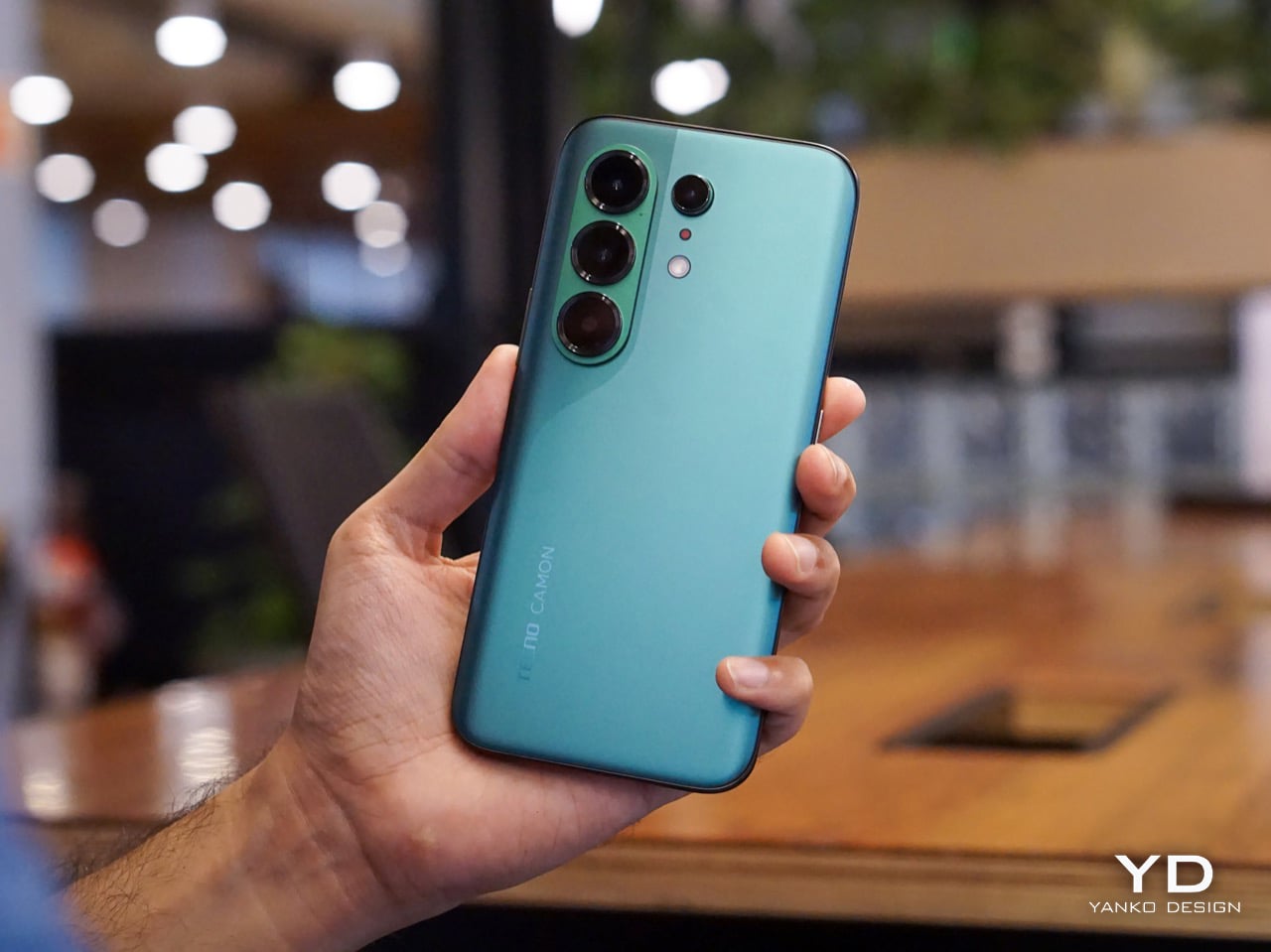
The Silk Green finish on our review unit operates differently than most smartphone surfaces. It’s a leather-like treatment with a texture evocative of luxury handbags, absorbing light rather than bouncing it back indiscriminately. Indoors, the color reads as deep and muted, almost forest-like in its saturation. Move outside, and the green opens up, revealing warmer undertones that shift depending on the angle of observation. This isn’t a static color. It’s a material that responds to its environment, and that responsiveness gives the phone a character that glass-backed devices simply can’t replicate.

The texture matters as much as the color. There’s no cold shock when you pick it up from a table. Fingerprints don’t accumulate the way they do on glossy surfaces. After extended use, the back panel still looks intentional rather than smudged.

Infinix offers alternative finishes that pursue a different aesthetic entirely. The Lunar Titanium, Stellar Blue, and Shadow Black variants use a cat-eye stone inspired treatment that creates visible movement as the phone tilts. Light doesn’t just reflect from these surfaces. It travels across them, producing shifting patterns that never quite settle into a fixed appearance. The finish has enough grip to feel secure without becoming tacky, and it maintains that feel whether your hands are dry or slightly damp. The effect is dramatic without crossing into garish territory, and it demonstrates that Infinix isn’t limiting itself to a single design vocabulary.

The 3D curved 1.5K AMOLED display integrates with the frame through a transition that eliminates the hard edge found on flat-screen devices. The curve is calibrated to reduce perceived width while maintaining usability across the entire display surface. Ultra-narrow bezels, with the bottom edge measuring just 1.87mm at its narrowest point, push content closer to the physical boundary of the device. The 6.78-inch panel feels immersive without forcing the body to expand beyond comfortable one-handed reach. A 120Hz refresh rate keeps motion smooth, 10-bit color depth renders gradients without visible banding, and 4500 nits of peak brightness means outdoor visibility doesn’t require cupped hands or squinting. Gamers benefit from a 2800Hz instant touch sampling rate that registers inputs faster than most users can perceive.

The interaction layer adds functional touches without cluttering the physical design. A dedicated One-Tap button on the frame provides customizable shortcuts to features like the flashlight, camera, or FOLAX AI assistant. The Active Halo Lighting around the rear camera module glows softly in response to notifications, calls, and charging status, with adjustable colors and stepless dimming. Neither element demands attention, but both reward users who engage with them. An integrated IR blaster lets you control TVs, air conditioners, and other appliances directly from the phone. eSIM support, a first for Infinix devices, adds flexibility for travelers and dual-SIM users who’d rather not swap physical cards. Availability varies by region and model, so check the official Infinix website to confirm eSIM support in your market.

Weight distribution deserves specific attention. A 6,500mAh battery creates density that could easily pull the phone off balance, making it feel top-heavy during vertical use or awkward during extended sessions. The NOTE Edge avoids this entirely, with mass centered in the chassis so scrolling, typing, and camera work all feel stable.

The glass-to-frame transition reinforces that sense of cohesion. There’s no lip or ridge where materials meet. Your grip flows uninterrupted around the device, which matters more than it might seem during the first few minutes of handling. Over hours, that seamlessness translates to reduced fatigue. The phone disappears physically while remaining visually present, which is exactly the balance a design-forward device should achieve. Corning Gorilla Glass 7i protects the curved display surface, and IP65 dust and water resistance means the materials can handle exposure to the elements without requiring constant caution.

Software and User Experience (XOS 16)

XOS 16 plays a bigger role in how the NOTE Edge feels than you might expect. Built on Android 16, the interface doesn’t compete with the hardware for attention. It supports it. Transitions stay smooth, layouts feel intentional, and nothing about the experience pulls focus away from what you’re actually doing on the phone.

The Glow Space design language shows up in subtle ways rather than obvious visual tricks. Depth effects, layered wallpapers, and motion cues work especially well with the curved display, giving the interface a sense of dimension without becoming distracting. It pairs naturally with the phone’s physical form, which matters when you’re swiping one handed or shifting between apps quickly. After a few hours, the software fades into the background, which is exactly what good interface design should do.

Haptics feel restrained and precise. Taps register cleanly. Gestures feel confident without being exaggerated. There’s enough feedback to reinforce interaction, but not so much that it becomes noise. Combined with the curved edges and balanced weight, the software contributes directly to how comfortable the device feels over long sessions.

Infinix’s AI layer works best when it stays quiet. System level optimization, background task management, and two-way AI noise reduction operate without demanding attention. The noise cancellation works in both directions, cleaning up background sound on your end while also filtering what you hear from callers. That restraint fits the overall tone of the NOTE Edge.

Longevity is where XOS 16 quietly strengthens the value of the device. Infinix commits to three years of OS updates and five years of security patches, which changes how you think about living with the phone long term. This isn’t software designed to feel fresh for a few months and then age out. It’s built to remain stable, secure, and familiar well beyond the initial ownership window.

Performance and Camera

The MediaTek Dimensity 7100 5G handles daily use without calling attention to itself. Swiping, launching apps, and unlocking all register instantly. It’s the kind of platform that does its job and stays out of the way.

That consistency holds over longer sessions. I kept messaging, maps, and media apps running simultaneously and never felt the system hesitate or dump background processes. The interface stayed responsive after hours of mixed use, which matters more than benchmark numbers when you’re navigating an unfamiliar city or bouncing between work threads and personal messages. Heat management impressed me more than raw speed. Extended navigation, casual gaming, and heavy browsing didn’t produce the kind of warmth that makes you shift your grip or set the phone down. The chassis stayed comfortable against my palm throughout full afternoon sessions. Infinix clearly tuned this device for sustained operation rather than brief bursts of peak performance.

Signal stability reinforces that dependability. Infinix’s UPS 3.0 Super Signal Technology focuses on low-frequency cellular bands, the 615 to 960 MHz range that travels farther and penetrates obstacles better than higher frequencies. These are the signals that actually reach you in elevators, underground parking garages, and concrete-heavy buildings when everything else drops off.

The engineering behind it involves physically larger antenna components. Infinix increased the radiation arm area of the main low-frequency antenna by 50 percent and the auxiliary antenna’s radiation wall by 30 percent. That translates to a 1.5 to 2 dB gain in low-frequency reception, which sounds modest on paper but shows up clearly in practice. Calls held steady in places where I normally expect a brief dropout. Data kept flowing in basement-level parking where other phones tend to stall while searching for signal.

It’s the kind of reliability you only notice when it’s missing.

The camera follows that same practical mindset. It’s built to produce usable results without demanding expertise.

This is a dual camera setup. The 50MP main sensor handles all meaningful imaging work, while the secondary lens exists for depth separation in portrait shots.

The 50MP main sensor handles everyday situations with consistent color accuracy from shot to shot. Outdoor images retain detail without oversaturating, and indoor shots keep skin tones natural under mixed lighting. Low light performance benefits from Infinix’s AI RAW imaging algorithm, which lifts shadow detail without flattening contrast or blowing highlights. Texture stays intact where other processing tends to smooth everything into mush. You don’t need to fight the camera or babysit settings. Point, shoot, and move on works more often than not.

Live Photo Mode captures a three-second window around each shutter press, giving you motion instead of a single frozen frame. It’s useful for candid moments, pets, or scenes where timing matters. Exporting as GIFs, setting captures as live wallpapers, or sharing to iPhones via NFC makes the feature feel integrated rather than bolted on. The implementation suggests Infinix thought about how people actually use these clips rather than just checking a feature box.

Video recording stays predictable and clean. Footage looks solid in good light, motion doesn’t introduce distracting jitter, and audio capture handles casual recording without issues. Nothing here feels experimental or unfinished.

Audio and Sound Performance

Sound is handled by a dual stereo speaker system co-engineered with JBL, and it’s immediately noticeable once you stop defaulting to headphones. Volume comes up without harshness, and the tonal balance stays intact even when you push it higher than you normally would for casual listening. There’s actual separation here, with dialogue staying forward in videos and podcasts while music doesn’t collapse into a single flat plane.

Infinix leans on a five-magnet acoustic system and a high-elasticity silicone rubber diaphragm, which sounds technical until you use it. Bass has presence without rattling, mids stay clean, and highs don’t spike in a way that fatigues your ears over longer sessions. The diaphragm flexibility contributes to that balanced output, absorbing vibrations that would otherwise muddy the low end. The 360-degree symmetrical sound field matters more than I expected, especially when you’re watching something without holding the phone perfectly straight. Audio stays consistent whether the phone is resting on a table, propped up, or held casually in one hand. That positional flexibility makes the speakers feel genuinely usable rather than an afterthought.

Sustainability and Longevity

Battery capacity tells only part of the endurance story. The 6,500mAh cell in our review unit (6,150mAh in certain regional configurations) provides multi-day operational potential under moderate use patterns. This isn’t about chasing screen-on time records. It’s about eliminating the anxiety that comes with uncertainty around whether a device will last through an unpredictable day.

In practice, that translates to roughly 22 hours of continuous video playback or 26 hours of outdoor navigation before you need to reach for a cable. When you do need to refuel, 45W All-Round FastCharge gets you to 50% in about 27 minutes and a full charge in just over an hour. Bypass Charging routes power directly to the system board during gaming or navigation, which keeps the battery out of the thermal loop and reduces heat buildup during extended plugged-in sessions.

Long-term battery health becomes relevant when capacity numbers reach this scale. Infinix claims the battery retains more than 80% capacity after 2,000 full charge cycles, equivalent to over six years of typical daily use. The company also cites self-healing technology that repairs micro-damage through dynamic recrystallization during low-current recovery. These aren’t marketing abstractions. They’re engineering claims with testable outcomes, and they suggest the multi-day endurance you experience initially should hold over the ownership cycle rather than eroding within the first year. The durability framing extends beyond just the battery. Material choices across the device suggest consideration for how surfaces age, how components withstand repeated stress, and how the phone maintains its character over months rather than weeks.

XOS 16, built on Android 16, runs the software side. Infinix commits to three years of OS updates and five years of security patches, which represents the longest support window the NOTE series has offered. That commitment matters for a device positioned around longevity.

Value

The NOTE Edge occupies a market position that doesn’t get enough attention. It’s a design-forward midrange device, which means it competes on material quality and user experience rather than processor benchmarks or camera sensor counts. For users who prioritize how a phone looks and feels over how it performs in synthetic tests, the value proposition here is substantial.

What you receive for the price includes premium-feeling materials, balanced ergonomics, multi-day battery endurance, and a display that rivals more expensive devices in clarity and immersion. The Dimensity 7100 5G provides capable daily performance without generating the heat or power consumption of flagships processors. The camera handles real-world scenarios reliably. None of these elements represents a compromise.

The fashion-led color palette means the NOTE Edge appeals to users who want their technology to reflect personal aesthetic preferences. This isn’t a device that disappears into generic smartphone uniformity. It makes a statement.

Wrap Up

The Infinix NOTE Edge succeeds because it understands what it’s trying to be. It’s a considered object that prioritizes material quality, ergonomic refinement, and visual identity over the metrics that dominate most smartphone conversations.

The Silk Green finish exemplifies the approach. It’s a material choice that affects how the phone looks, how it feels, how it ages, and how it responds to its environment. Nothing about it exists in isolation. Every decision connects to a broader vision of what a design-forward smartphone should offer. That coherence is rare, and it’s what separates the NOTE Edge from devices that feel like committees designed them.

For users who’ve grown tired of phones that feel like interchangeable glass rectangles, the NOTE Edge represents an alternative worth serious consideration. Infinix has demonstrated that visible luxury and practical usability can coexist in the midrange segment. The result is a device that you’ll want to use, want to look at, and want to keep using long after the initial appeal of any new purchase typically fades.

The post Infinix NOTE Edge Review: Visible Luxury first appeared on Yanko Design.

The best midrange smartphone for 2026

Gone are the days in which you needed to spend a fortune to get a good smartphone. In 2026, features once exclusive to high-end smartphones – big batteries, multi-camera arrays, high refresh rate OLED displays and more – have made their way down to more affordable models. Yes, you’ll still need to buy a flagship smartphone to get the best camera or fastest processor, but you don't have to make nearly as many compromises as you once did if you have a strict budget to adhere to when you go shopping for your next smartphone. If you have less than $600 to spend, let us help you figure out what features to prioritize when trying to find the best midrange smartphone.

While the term frequently appears in articles and videos, there isn’t an agreed-upon definition for “midrange” beyond a phone that isn’t a flagship or an entry-level option. Most of our recommendations cost between $400 and $600 — any less and you should expect significant compromises. If you have more to spend, you might as well consider flagships like the Apple iPhone 17 and the Samsung Galaxy S25 if you want the best smartphone experience. Devices like Pixel phones often sit in this price range too, offering some of the best value for Android buyers.

Buying a new device can be intimidating, but a few questions can help guide you through the process. First: what platform do you want to use? If the answer is iOS, that narrows your options down to exactly one phone. (Thankfully, it’s great.) And if you’re an Android fan, there’s no shortage of compelling options. Both platforms have their strengths, so you shouldn’t rule either out.

Of course, also consider how much you’re comfortable spending. Even increasing your budget by $100 more can get you a dramatically better product. Moreover, manufacturers tend to support their more expensive devices for longer with software updates and security updates, so it’s worth buying something toward the top limit of what you can afford. 

Having an idea of your priorities will help inform your budget. Do you want a long battery life or fast charging? Do you value speedy performance above all else? Or would you like the best possible cameras with high megapixel counts? While they continue to improve every year, even the best midrange smartphones still demand some compromises, and knowing what’s important to you will make choosing one easier.

Every year, the line between midrange and flagship phones blurs as more upmarket features and functions trickle down to more affordable models. When Engadget first published this guide in 2020, it was tricky to find a $500 phone with waterproofing and 5G. In 2026, the biggest thing you might miss out on is wireless charging – and even then, that’s becoming less true.

One thing your new phone probably won’t come with is a power adapter; many companies have stopped including chargers with all of their smartphones. Performance has improved in recent years, but can still be hit or miss as most midrange phones use slower processors that can struggle with multitasking. Thankfully, their camera systems have improved dramatically, and you can typically expect at least a dual-lens system on most midrange smartphones below $600 with decent camera quality, selfie performance and software support to keep things running smoothly for years to come..

Support varies by brand, but most midrange phones receive around three to five years of software and security updates. Apple tends to support iPhones longer while companies like Google and Samsung now promise several years of Android and security patches for their midrange models. Budget-focused brands might offer less so it’s worth checking the update policy before you buy.

Yes, many midrange phones handle gaming well, especially popular titles like Fortnite, Genshin Impact and Call of Duty Mobile. They usually include capable processors, though you won’t always get the smoothest performance in the most demanding mobile games or at max settings. If you play casually or stick to less graphically intensive titles a midrange phone will feel more than adequate.

Georgie Peru contributed to this report.

This article originally appeared on Engadget at https://www.engadget.com/mobile/smartphones/best-midrange-smartphone-183006463.html?src=rss