iPhone 17e review: The economical choice

By introducing the iPhone 17e just a year after the iPhone 16e, Apple is closing some gaps. Before, the company would only roll out a new entry-level iPhone every few years, with the iPhone 5c (2013), iPhone XR (2018) and iPhone SE (2016, 2020, 2022) all having two to four years between their releases. But Apple is getting into an annual groove now, and having renamed the device to integrate better with the rest of the iPhone lineup, Apple is making a clear statement: It cares about the midrange now. 

With the current state of global economics, Apple’s focus on lower cost devices like the iPhone 17e and newly launched MacBook Neo is timely. Most people probably don’t make full use of the high-powered machines in their pockets and on their laps, and might be reconsidering whether they need to spend as much money on the Pros and the Airs of Apple’s product lineup. At $599, the iPhone 17e is about half the price of an iPhone 17 Pro or the iPhone Air. It’s $200 cheaper than the base iPhone 17, too.

Since I reviewed the iPhone 16e last year, I’ve been using it as a work phone, mostly for Slack, email and light editing in Docs. The way I see it, most people considering the iPhone 17e are likely in a similar situation — either thinking of getting a supplementary device or looking for a good enough phone for a child or other dependent. For this review, I’ve tried to cover most of those scenarios whether it be a person that would spend most of their phone time on social media and games like a teenager or someone that’s largely using it for administrative work purposes. I mostly want to answer this question: If you’re getting your first iPhone or buying one for someone else, should you get the iPhone 17e or the iPhone 17?

It’s very clear from Apple’s website that it doesn’t want you comparing the iPhone 17e to the iPhone 16e. The company doesn't allow you to do so in the comparison tool on the iPhone 17e product page, limiting you to the iPhone 11, iPhone 12 and the iPhone SE (second and third generations). Sure, I understand that no one is really thinking about getting an iPhone 17e after just buying the 16e last year. But for the purposes of this review, it makes sense for me to shout out what’s new from the previous generation. The most significant additions this year are the A19 chip, double the storage, improved Portrait photography and MagSafe with faster wireless charging. Oh, and a new pink color option, adding an ever so subtle splash of color to the previously monochromatic lineup. 

The A19 chip is supposed to make AI processes faster, thanks to the neural accelerators in its GPU. In my testing so far, the difference has been negligible at best. Initially I was seeing the iPhone 17e perform slower than the 16e, but after a software update, the iPhone 17e caught up. In Apple Intelligence-powered tools like Cleanup, the iPhone 17e was a split second faster at identifying unwanted objects in photos and erasing them than the 16e. If you’ve just received your iPhone 17e and run into issues where image generation or cleanup is slow or stalling, give it a day or so for the software to stabilize. 

Oddly, in some side-by-side Image Playground testing, the iPhone 17e and iPhone 16e were neck and neck. Sometimes, the iPhone 16e was faster. Occasionally, the iPhone 17e was ahead. I’ll continue to keep an eye on how both phones do here, as it could still be due to some early software issues, but for now the improvements from the A19’s GPU seem to be hit or miss.

The pink iPhone 17e and the white iPhone 16e held up in one palm in front of a red brick wall.
Cherlynn Low for Engadget

Of all the improvements to the iPhone 17e, to me, one of the most important is in portraits. In my review of the iPhone 16e, I said that the majority of my grievances with the single camera setup was the fact that Apple ended up using an older version of Portrait mode.

That version was much more limited and didn’t allow for applying a background blur to pictures of non-human subjects. This time, Apple borrowed the algorithms it developed for the iPhone Air for the iPhone 17e’s rear and front cameras. This not only delivers a general improvement to portraits, with better segmentation and a more natural-looking bokeh effect, but also allows for depth information to be captured when applicable. For instance, when a person, cat or dog is detected, the iPhone 17e will automatically capture depth information so you can apply a blur after the picture is taken, even if you didn’t use Portrait mode initially. 

Importantly, these “next-gen portraits” also allow you to edit the level of blur and change up the focal point of the picture after you’ve taken the shot. In some photos of my neighbor’s grumpy shih-poo, I was shocked that my colleagues actually preferred the samples I shared from the iPhone 16e over the ones from the iPhone 17e. But their critique was fair: the newer phone blurred out Oreo’s tail, keeping only his face in focus. I was able to address this by going into the editing tools and dragging the slider for aperture to bring more of the dog into focus. I also played around and tapped on Oreo’s tail to make it clear, and the iPhone 17e blurred up his face instead. 

Two photo samples side by side, featuring a dog on a blue leash staring up into the camera.
Cherlynn Low for Engadget

When using Portrait mode to photograph people, the iPhone 17e did indeed deliver more pleasant bokeh than its predecessor. In pictures of my friend Brenda Stolyar, with the “depth” or aperture set to f/4.5 across both devices, there was more softness in the brick wall behind her on the new phone. I was slightly confused since it seemed like the older iPhone actually delivered a sharper picture, until I realized it was actually just softer bokeh. 

For those coming from older phones like the iPhone 11, 12 or SE, the addition of next-gen portraits should feel like a major step up. Even when compared to the iPhone 16e, the fact that I was now able to apply the effect on photos of food and other inanimate objects with no faces made me happier. It makes the camera more versatile, and feels like a noteworthy update that makes your photos feel more modern. 

But that is definitely because I like pictures with the artificial depth of field effect. If you don’t care for bokeh and really only want a phone’s cameras to be good enough to snap pictures of menus or receipts, for instance, the 17e’s improvements here won’t mean much.

The rear of the iPhone 17e catches the light in front of a stone wall.
Cherlynn Low for Engadget

What might matter more, then, is this generation’s wireless charging speeds. While the iPhone 16e could only support up to 7.5W, the iPhone 17e goes up to 15W (with adapters of 20W or higher) and also works with MagSafe accessories. I can’t imagine anyone considering a new iPhone 17e already has magnetic cases or stands, but if you decide to invest in those accessories, you’ll find them convenient and satisfying. 

I placed both models on my wireless charging stand — the 17e snapped on and started charging, while the 16e clattered helplessly off the stand. I placed it on the charging pad at the base instead and noted how much power each of them gained in 15 minutes. The improvement is clear: the iPhone 17e went up by 16 percent (30 percent to 46 percent), while the 16e only gained 3 percent (69 percent to just 72 percent).

Beyond the numbers, what this means is that when you’re in a pinch and trying to quickly top up your phone on, say, a wireless charger you found at a cafe, you won’t need to sit around as long with the iPhone 17e. For those of you that simply leave your phone on a stand overnight, this is less likely to meaningfully impact you. 

There are a few other updates that I haven’t really tested in this review, like the improved durability with Ceramic Shield 2 on the iPhone 17e’s screen. The new display also has a treatment that is supposed to reduce glare, and considering the week of wonderfully gloomy weather we’ve had here in New York, this isn’t something I’ve truly had a chance to evaluate. Also, while I do appreciate the doubled storage, which is sure to please the media hoarders among us, I will say I’ve already been served warnings about my iCloud storage running out. It still feels like something else Apple might need to address, but for newcomers to the iOS world, the higher base storage is absolutely a positive.

Elsewhere, there are virtually no differences between the iPhone 17e and iPhone 16e. They have the same size displays with the same resolution, brightness, refresh rate, contrast ratio and color gamuts. Both are rated IP68 for dust and water resistance, and have similar battery lives (up to 26 hours of video playback, according to Apple). They also have the exact same dimensions of 5.78 x 2.82 x 0.31 inches, although the iPhone 17e does weigh a whole 2 grams (0.8 ounces) more than the 16e, which is almost definitely attributable to the addition of MagSafe. Unless you have weighing scales for hands, though, this difference is negligible.

An iPhone 17e held up in front of a tree trunk.
Cherlynn Low for Engadget

Where you might find more meaningful distinctions is when comparing the iPhone 17e to the iPhone 17. For $200 more, you’ll get longer battery life and slightly better performance thanks to one more GPU core. The iPhone 17 also has a larger, sharper and brighter display that’s 6.3-inches, with higher refresh rates and a full-screen design incorporating the Dynamic Island. It also supports the Always On Display and has an 18MP front camera with the Center Stage feature that allows for easy switching between landscape and vertical orientations in your selfies without having to rotate your phone. 

In fact, the camera upgrades alone on the iPhone 17 might be worth the money. On top of getting the additional ultrawide camera, you’ll also gain the dedicated camera control button on the right edge, the latest generation of Photographic Styles, support for macro photography, Cinematic mode and Dual Capture in videos as well as spatial and macro recording capabilities. It also comes with sensor-shift optical image stabilization, which is more advanced than the OIS on the iPhone 17e. Rounding out that long list of differences is higher recharge speeds (with compatible chargers) and Apple’s second-generation Ultra Wideband chip for more precise Find My support. The iPhone 17 also offers dual-frequency GPS and works with the latest standards in connectivity, like Thread, Wi-Fi 7 and Bluetooth 6 (whereas the iPhone 17e only gets to Wi-Fi 6 and Bluetooth 5.3). 

Sure, the iPhone 17 is slightly taller and heavier, but considering all the bonuses and the extra camera, that feels like a tradeoff that is more than fair. It’s a lot more advanced for $200, and feels like a better starter phone than the iPhone 17e. But if your budget is tight and camera performance isn’t a priority, you’ll get a great experience from Apple’s latest.

The iPhone 17e held up in mid-air in front of some red foliage.
Cherlynn Low for Engadget

In 2026, it feels like Apple has done the impossible. It’s managed to serve up multiple iPhones at various price points with enough meaningful differentiations to justify each tier. Meanwhile, each iPhone 17 in the full lineup is a capable and satisfying device for its price. Upgrading to the iPhone 17e from the iPhone 11, 12 or SE will certainly feel significant, although getting almost any current-gen phone will feel modern compared to those. 

In fact, if you’re platform agnostic and wouldn’t mind an Android device, there are options out there with significantly superior screens and cameras. The Pixel 10a, for instance, offers a larger display with a 120Hz refresh rate and a dual-camera system all for $100 less. With Apple seeming to be setting its sights on the midrange market, it should seriously consider stepping up in those two areas in the next e-series iPhone.

But of course, the name “iPhone” carries its own premium, and the iPhone 17e is a solid entry-level handset for those who need a basic, no-frills path into the Apple ecosystem.

This article originally appeared on Engadget at https://www.engadget.com/mobile/smartphones/iphone-17e-review-the-economical-choice-130000647.html?src=rss

Alibaba Qwen 3.5 Small Models: 0.8B & 2B Benchmarks and Edge Tests

Alibaba Qwen 3.5 Small Models: 0.8B & 2B Benchmarks and Edge Tests Example of vision and OCR testing where Qwen 3.5 Small reads text from an image and labels objects.

Alibaba’s Qwen 3.5 small models are compact AI systems designed to operate efficiently on edge devices, including older laptops and smartphones. According to Better Stack, these models feature parameter sizes of 0.8 billion and 2 billion, paired with a 262,000-token context window. This allows them to process extensive datasets, such as lengthy documents or complex […]

The post Alibaba Qwen 3.5 Small Models: 0.8B & 2B Benchmarks and Edge Tests appeared first on Geeky Gadgets.

Posted in Uncategorized

Samsung Galaxy S26 Ultra vs S25 Ultra: Flex Magic Pixel and New Aluminum Design

Samsung Galaxy S26 Ultra vs S25 Ultra: Flex Magic Pixel and New Aluminum Design Samsung Galaxy S26 Ultra

  The Galaxy S26 Ultra introduces a range of enhancements over its predecessor, the S25 Ultra, focusing on camera performance, design, processing power, and battery efficiency. While these refinements improve the overall experience, they may not be significant enough to prompt an upgrade for current S25 Ultra users. However, for those using older devices, the […]

The post Samsung Galaxy S26 Ultra vs S25 Ultra: Flex Magic Pixel and New Aluminum Design appeared first on Geeky Gadgets.

Posted in Uncategorized

Set up Claude Workflows Correctly in 5 Minutes with Project Files

Set up Claude Workflows Correctly in 5 Minutes with Project Files Files and connector sources added to a Claude project to keep reports, notes, and reference material together.

Turning Claude into a functional workspace involves creating a structured environment where tasks and information are easily accessible. Payton Bilodeau explains how this starts with project setup, a process that centralizes files, tasks and relevant details. For instance, uploading campaign briefs and performance metrics into a project allows Claude to reference them during interactions, minimizing […]

The post Set up Claude Workflows Correctly in 5 Minutes with Project Files appeared first on Geeky Gadgets.

Posted in Uncategorized

Samsung Galaxy Buds 4 Pro : Is the New ‘Super Wide’ Woofer Worth $250?

Samsung Galaxy Buds 4 Pro : Is the New ‘Super Wide’ Woofer Worth $250? Samsung Galaxy Buds 4 Pro

  The Samsung Galaxy Buds 4 Pro represents a significant leap forward in wireless earbud technology, blending superior audio performance, innovative features, and a user-friendly design. Whether you are an audiophile, a gamer, or someone seeking reliable everyday earbuds, these deliver a premium experience. With features like immersive sound, intelligent noise cancellation, and seamless connectivity, […]

The post Samsung Galaxy Buds 4 Pro : Is the New ‘Super Wide’ Woofer Worth $250? appeared first on Geeky Gadgets.

Posted in Uncategorized

5 Best Spring EDC Gear Upgrades for 2026 That Actually Deserve a Permanent Spot in Your Pocket

Spring has a way of resetting what we carry. The heavy layers come off, pockets shrink, and that overstuffed pouch of winter tools starts feeling like dead weight. This is the season where everyday carry gets honest about what actually earns space against your body, and what was just riding along out of habit. The five products on this list survived that edit. They are compact, functional, and built with enough design intelligence to justify displacing whatever is currently rattling around in your jacket.

What ties these picks together is a shared rejection of bulk for its own sake. The EDC market loves to pile features into objects that end up living in drawers because they are too heavy or awkward to carry daily. These five go the other direction, packing serious utility into forms that disappear into a pocket or clip onto a keyring without protest. Each one solves a real, recurring problem with clean engineering and a material palette that does not apologize for looking good while doing it.

1. Pockitrod Multitool Pen

The pen is the oldest item in pocket carry, and it has been the target of designers trying to cram more function into that slim cylinder for decades. Most tactical pens add a single trick (usually a glass breaker nobody ever uses) and call it innovation. The Pockitrod takes a fundamentally different approach, treating the pen form as a modular platform rather than a finished object. Its body is machined from 6061-T4 aluminum with a hex cross-section that doubles as a driver grip, a detail that sounds minor until the first time a screw needs tightening and the tool is already in hand.

The system is organized around a central driver assembly inside the handle, with additional modules that thread on as extensions: a box opener with interchangeable 20CV steel tips, an inkless writing implement, and a magnetic-base LED flashlight. Etched measurement markings run along the body with a zero-reference aligned to the edge, turning the entire tool into a ruler that actually measures from where objects begin rather than from some arbitrary point inset from the tip. What makes this work different from other multitool pens that collapse under their own ambition is the threading system. Each module is a self-contained unit, so the Pockitrod can be as simple or as loaded as the day demands.

What we like

  • The hex-shaped body provides a non-slip grip when used as a screwdriver, which most round pen multitools completely ignore.
  • Modular threading means the tool adapts to different carry needs without requiring a full kit commitment every day.

What we dislike

  • The added modules increase overall length, which could push the pen past comfortable shirt-pocket territory.
  • An inkless writing tip is a niche preference, and some users will want a ballpoint option that is not currently part of the system.

2. BlackoutBeam Tactical Flashlight

Flashlights are one of those categories where specs have outpaced what most people need, and manufacturers keep chasing lumen counts that look impressive on paper but blind the user as much as the target. The BlackoutBeam lands at 2300 lumens with a 300-meter throw, which is serious output, but the detail worth paying attention to is the 0.2-second response time. There is no lag, no warm-up flicker, no half-second of wondering whether the switch registered. Light appears the instant the button moves, and in a power outage or a dark parking lot, that immediacy changes the entire experience of using a flashlight.

The body is aluminum with an IP68 rating for water and dust resistance, which means submersion rather than just rain tolerance. Where most tactical flashlights lean into an aggressive, knurled aesthetic that screams preparedness, the BlackoutBeam keeps its lines industrial and clean. It is a tool that communicates function through proportion and material rather than surface decoration. The multiple lighting modes provide range for different scenarios, from full-blast flood to something more conservative for close work. Spring carries a flashlight that handles the transition from late-winter darkness to longer evenings without demanding a separate headlamp or phone-screen compromise.

Click Here to Buy Now: $89.00

What we like

  • The 0.2-second activation eliminates the hesitation gap that plagues cheaper flashlights in urgent situations.
  • IP68 waterproofing means genuine submersion protection, not just a splash rating that fails in real rain.

What we dislike

  • At 2300 lumens, the beam can be excessive for indoor or close-range tasks where a lower floor would be more practical.
  • Battery drain at full output will be aggressive, and the frequency of recharging could become a friction point for daily carriers.

3. Bullet SSD

Cloud storage has convinced most people that physical drives are obsolete, right up until the moment a file transfer stalls over weak Wi-Fi, a client meeting has no internet access, or a backup needs to happen without trusting data to someone else’s servers. The Bullet SSD is built for those moments. It measures 51 x 16 x 8mm, weighs 18 grams, and clips onto a keyring with the same casual permanence as a house key. Inside that shell sits up to 2TB of TLC NAND storage with USB-C 3.2 connectivity and read/write speeds around 500 MB/s.

The body is machined from a single piece of aerospace aluminum, which gives it structural rigidity that a plastic thumb drive cannot match, and the IP67 certification means water and dust exposure are non-issues. What separates this from a standard flash drive is the SSD architecture running underneath. Transfer speeds are fast enough to edit video and photos directly from the drive without copying files to a local machine first. For creatives, field workers, or anyone whose workflow involves moving large files between devices that do not share a network, the Bullet SSD turns a keychain into a portable workstation. The form factor is the real argument here: it is small enough to carry without thinking about it, and fast enough to use without compromise when the moment arrives.

What we like

  • The 18-gram weight and keychain form factor mean this drive is always present without occupying dedicated pocket space.
  • USB-C 3.2 with 500 MB/s speeds makes direct editing from the drive a practical reality rather than a spec-sheet fantasy.

What we dislike

  • The compact body limits heat dissipation, which could throttle sustained write speeds during large, continuous transfers.
  • At this size, the USB-C connector is exposed to pocket debris and lint, and there is no integrated cap or cover to protect it.

4. CraftMaster EDC Utility Knife

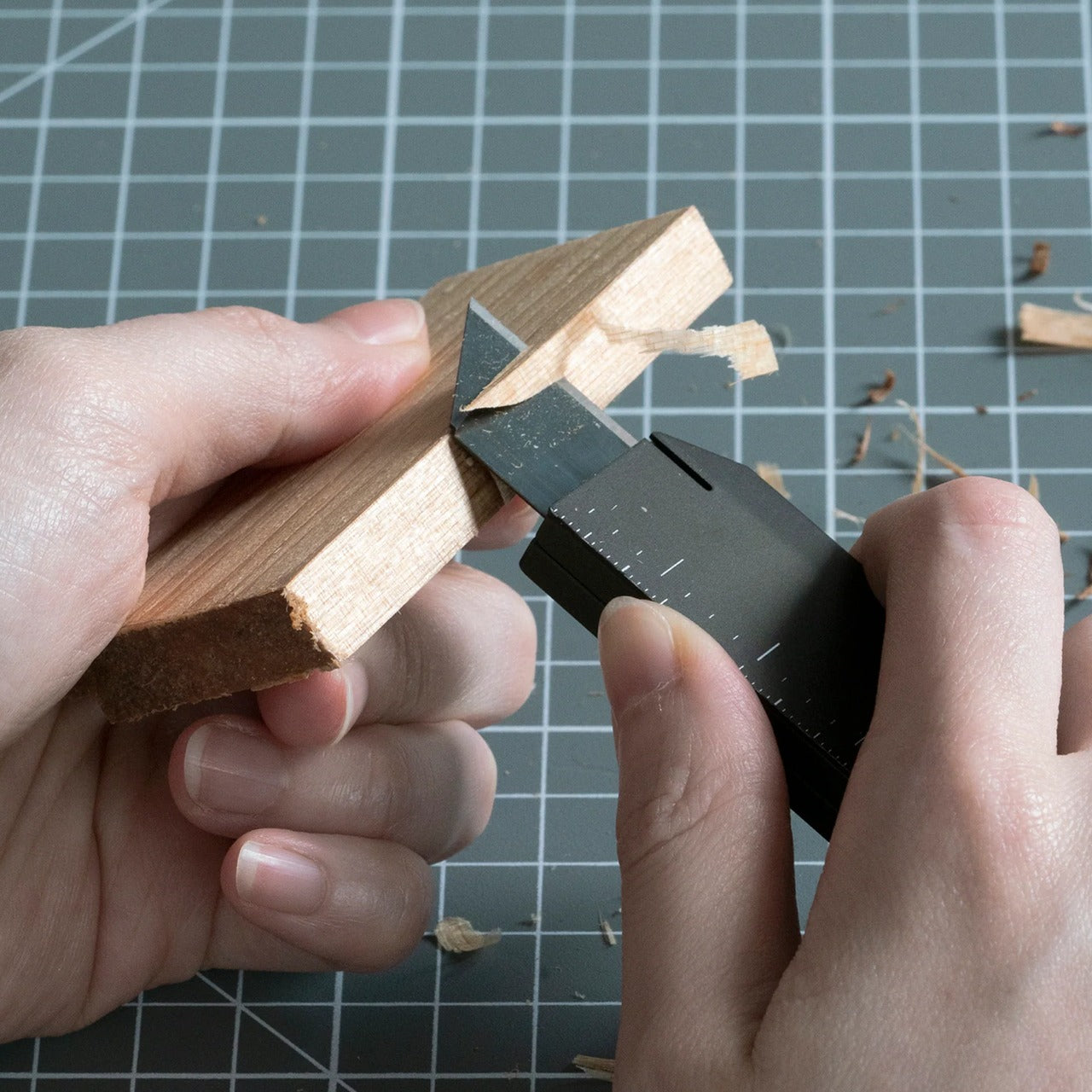
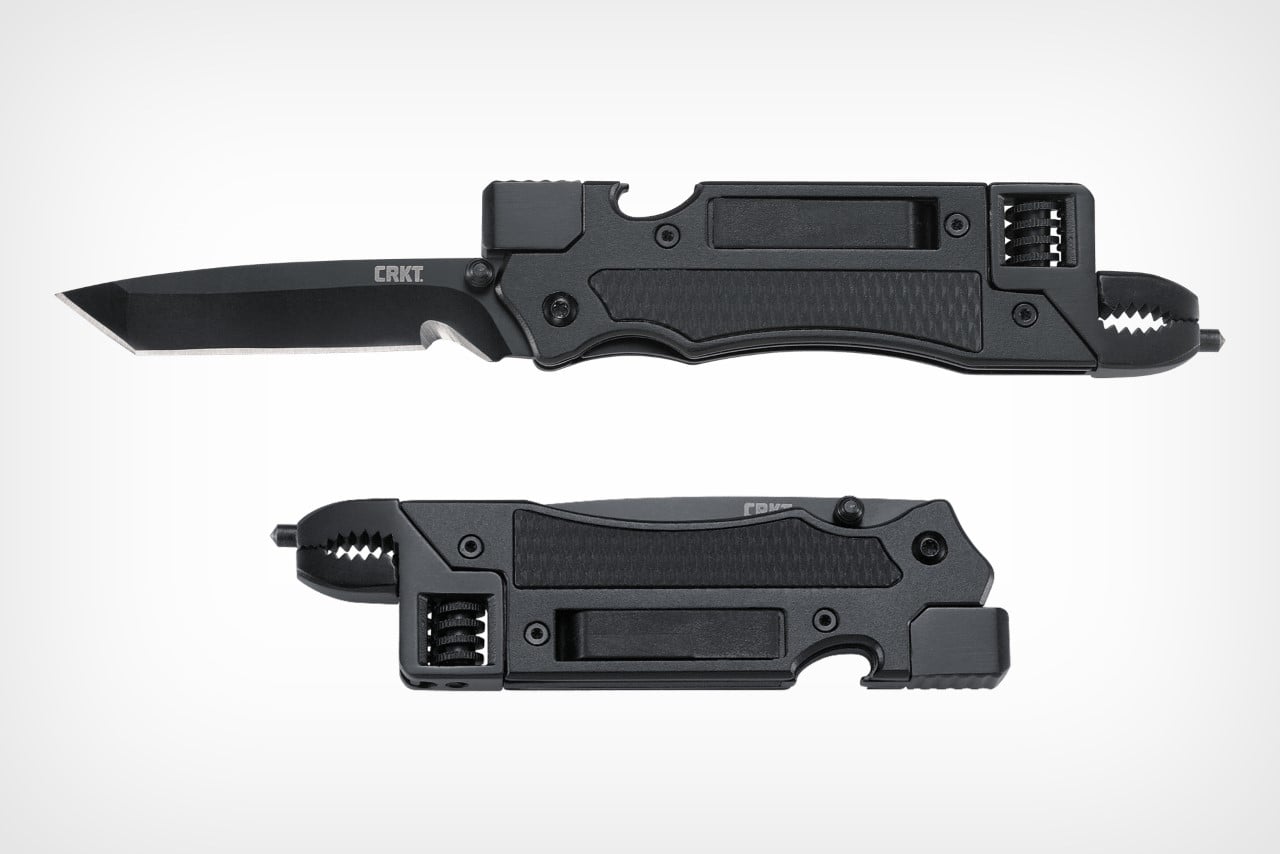
The utility knife is one of the most used and least respected tools in everyday carry. Most people settle for a flimsy box cutter from a hardware store or a folding knife that is overkill for opening packages. The CraftMaster occupies the gap between those extremes with a metal body that measures just 8mm thick and 12cm long, paired with an OLFA blade deployed through a tactile rotating knob. The thinness is not a gimmick. At 0.3 inches, this knife slides into a pocket alongside a phone without creating a noticeable bump, which is the difference between a tool carried daily and one left in a bag.

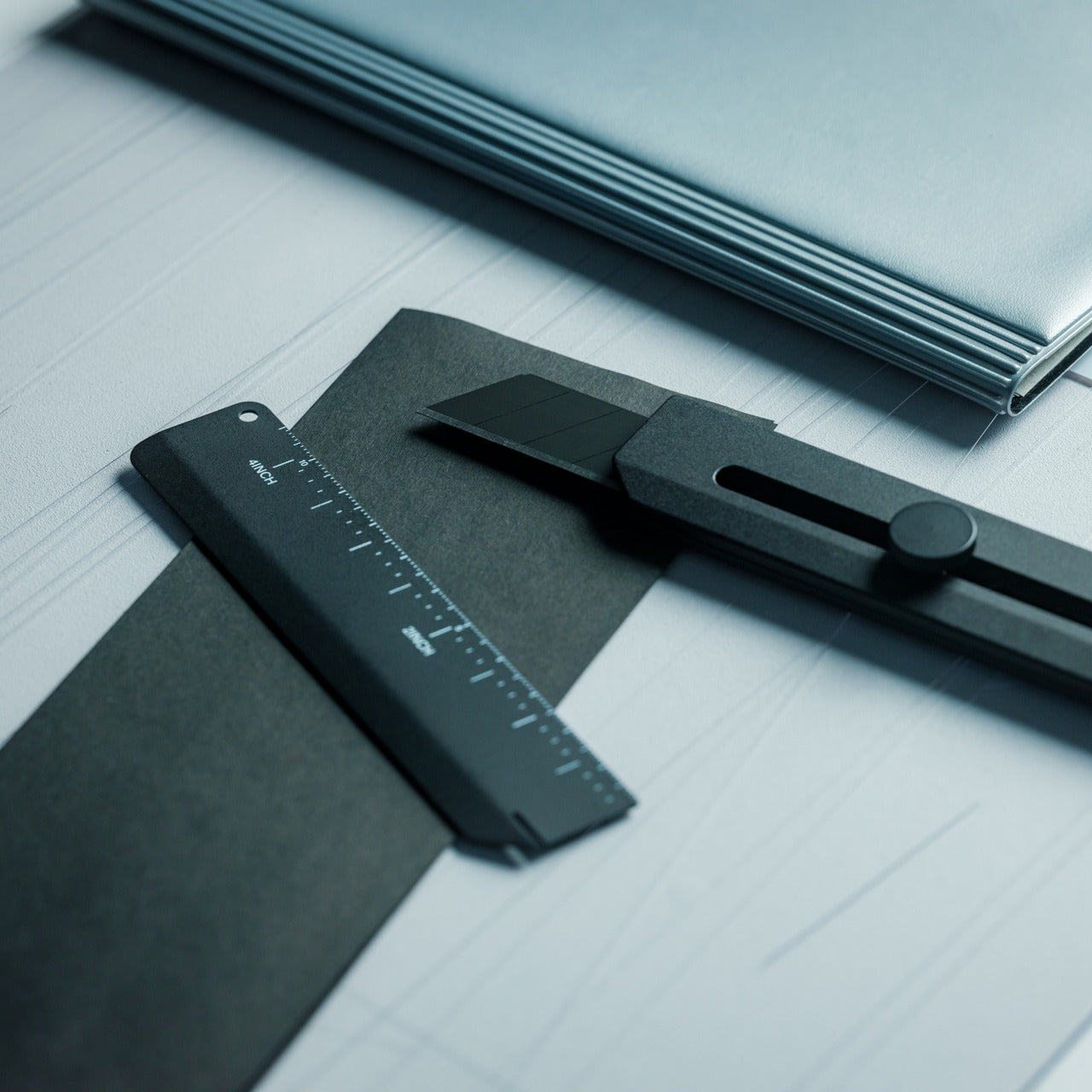
The companion metal scale docks magnetically to the knife’s back, adding dual-scale ruler markings in metric and imperial alongside a blade-breaker for snapping off dull OLFA segments. A 15-degree curvature on the ruler edge protects fingers during cutting, a small detail that reveals how much thought went into the interaction design rather than just the object’s appearance. OLFA blades are replaceable and widely available, which means the CraftMaster avoids the trap of proprietary consumables that plague many premium EDC knives. The 45-degree blade inclination is optimized for box opening, making this a tool that excels at the single task most people actually need a blade for, rather than pretending to be a wilderness survival instrument.

Click Here to Buy Now: $79.00

What we like

  • The magnetic-docking ruler scale transforms the knife into a measuring tool without adding bulk or requiring a separate carry item.
  • OLFA blade compatibility means replacements are cheap, universal, and available at any hardware store on the planet.

What we dislike

  • The rotating knob deployment, while tactile, is slower than a thumb-stud or flipper mechanism for one-handed opening.
  • At 12cm total length, the cutting depth is limited to anything beyond packages and light materials.

5. TPT (Titanium Pocket Tool)

Multitools love to advertise tool counts, but most of those numbers are inflated by variations on the same function (three slightly different screwdriver tips, two redundant pry edges). The TPT earns its ten-tool count because each function occupies its own distinct geometry on a body that measures just three inches long and weighs 28 grams. Grade 5 titanium alloy (6AL4V) gives it a strength-to-weight ratio that steel multitools cannot touch at this size, and the TSA-approved design means it travels without the anxiety of confiscation at airport security. That alone removes one of the biggest barriers to consistent carry.

The tool set includes a full wrench array covering 15 socket sizes (both SAE and metric), a bottle opener, a hex bit driver, a scraper edge, a mini pry bar, measurement cues, and a retractable insert that functions as both a box opener and a camp fork. The stainless steel insert is dual-function, with a fork-tined end for eating and a conventional cutter shape on the other, which is a clever use of a single replaceable component. A removable pocket clip and paracord lanyard provide carry options, and the included leather sheath protects both the tool and whatever pocket it lives in. The TPT does not try to replace a full-sized Leatherman. It targets the 90% of daily situations where a compact, always-present tool solves the problem faster than digging through a bag for something bigger.

What we like

  • TSA approval means this tool crosses through airport security without issue, making it one of the few multitools suitable for travel carry.
  • The 15-size universal wrench built into the body handles quick fixes that would otherwise require a dedicated wrench set.

What we dislike

  • The retractable blade insert can be difficult to swap one-handed, and some users report that the magnet holding it in place could be stronger.
  • At three inches, the wrench openings are small, limiting torque and access in tight spaces where a longer tool would provide better leverage.

Where spring carry is heading

These five tools share a common design philosophy: carry less, carry better. The days of stuffing pockets with redundant gear are giving way to a more considered approach where each item earns its real estate through daily use rather than hypothetical scenarios. A pen that is also a driver and a ruler. A flashlight that responds before the thought finishes forming. A solid-state drive disguised as a keychain. A utility knife is thinner than most phones. A titanium multitool that flies through security.

The best EDC gear in 2026 does not demand attention or lifestyle changes. It occupies the margins of a pocket, a keyring, or a clip, and waits for the moment it is needed. Spring is the right season to audit what makes the cut and what gets retired. These five have earned permanent rotation.

The post 5 Best Spring EDC Gear Upgrades for 2026 That Actually Deserve a Permanent Spot in Your Pocket first appeared on Yanko Design.

Qualcomm’s new Arduino Ventuno Q is an AI-focused computer designed for robotics

Qualcomm, which purchased microcontroller board manufacturer Arduino last year, just announced a new single-board computer that marries AI with robotics. Called the Arduino Ventuno Q, it uses Qualcomm's Dragonwing IQ8 processor along with a dedicated STM32H5 low-latency microcontroller (MCU). "Ventuno Q is engineered specifically for systems that move, manipulate and respond to the physical world with precision and reliability," the company wrote on the product page

The Ventuno Q is more sophisticated (and expensive) than Arduinio's usual AIO boards, thanks to the Dragonwing IQ8 processor that includes an 8-core ARM Cortex CPU, Adreno Arm Cortex A623 GPU and Hexagon Tensor NPU that can hit up ot 40 TOPs. It also comes with 16GB of LPDDR5 RAM, along with 64GB of eMMC storage and an M.2 NVME Gen.4 slot to expand that. Other features include Wi-Fi 6, Bluetooth 5.3, 2.5Gbps ethernet and USB camera support. 

The Ventuno Q includes Arudino App Lab, with pre-trained AI models including LLMs, VLMs, ASR, gesture recognition, pose estimation and object tracking, all running offline. It's designed for AI systems that run entirely offline like smart kiosks, healthcare assistants and traffic flow analysis, along with Edge AI vision and sensing systems. It also supports a full robotics stack including vision processing combined with deterministic motor control for precise vision and manipulation. It's also ideal for education and research in areas like computer vision, generative AI and prototyping at the edge, according to Arduino. 

"With Ventuno Q, AI can finally move from the cloud into the physical world," Qualcomm wrote. "This platform enables building machines that perceive, decide, and act — all on a single board. Our goal is to make advanced robotics and edge AI accessible to every developer, educator, and innovator." The Arduino Ventuno Q will be available in Q2 2026 from the Arduino Store and elsewhere and is expected to cost under $300. 

This article originally appeared on Engadget at https://www.engadget.com/ai/qualcomms-new-arduino-ventuno-q-is-an-ai-focused-computer-designed-for-robotics-113047697.html?src=rss

Why the MacBook Neo Means You’ll Have to Wait for the iPad 12

Why the MacBook Neo Means You’ll Have to Wait for the iPad 12 A simplified A18 chip diagram next to an iPad outline, showing the expected processor upgrade for 2026.

Apple’s March 2026 product announcements sparked curiosity among tech enthusiasts when the much-anticipated iPad 12th generation was notably absent. This omission was not an oversight but a deliberate decision by Apple to strategically manage its product launches. The spotlight was instead directed toward the new MacBook Neo, a significant addition to Apple’s portfolio. By postponing […]

The post Why the MacBook Neo Means You’ll Have to Wait for the iPad 12 appeared first on Geeky Gadgets.

Posted in Uncategorized

How Top Engineers Stop AI Slop : Hooks, Gates & Hard Blocks

How Top Engineers Stop AI Slop : Hooks, Gates & Hard Blocks How Top Engineers Stop AI Slop

AI-generated code often mirrors the quality of the processes guiding it, making structured workflows and proactive oversight essential for success. In a detailed walkthrough, Jaymin West explores how top engineers address the root causes of poor AI outputs rather than merely fixing surface-level issues. One key strategy involves implementing pre-commit hooks to enforce coding standards […]

The post How Top Engineers Stop AI Slop : Hooks, Gates & Hard Blocks appeared first on Geeky Gadgets.

Posted in Uncategorized

NotebookLM Adds Cinematic Video Overviews for AI Ultra

NotebookLM Adds Cinematic Video Overviews for AI Ultra Example of a visual error in a NotebookLM cinematic video, with objects floating or disconnected from the scene.

NotebookLM’s cinematic video overviews offer a new way to convert text-based content into visually rich summaries. By integrating motion graphics, animations and text overlays, these videos aim to simplify complex topics for personal and educational use. Paul Lipsky highlights creative applications, such as adapting content into styles like Japanese manga or children’s television. However, early […]

The post NotebookLM Adds Cinematic Video Overviews for AI Ultra appeared first on Geeky Gadgets.

Posted in Uncategorized