Caviar & SpaceX collaborate over $6630 Luxury Watch with actual Starship Fragment inside it

That price tag shouldn’t surprise you, given that Caviar’s built its reputation on catering to the creme-de-la-creme of tech collectors. While most people know Caviar for its ornate smartphone cases, it turns out the company makes watches too – with the same luxury-forward philosophy. Their latest ‘Space Tornado’ collection features three watches that highlight the cosmos, but it’s the flagship watch in the series that has our eye. Priced at upwards of 6 grand (or roughly two Vision Pros), the Stargazer X-Edition watch comes with a 24k gold-plated body, a tourbillon at the 6 o’clock mark, and a relic of actual space travel at the 12 o’clock mark. Designed in collaboration with SpaceX, each watch comes with a fragment of the Starship spacecraft, carefully placed at the top of the watch as its crown jewel.

Designer: Caviar

The Stargazer’s dial takes inspiration from Jupiter’s moon Europa. The dial comes with an icy, striated finish, referencing the moon’s icy surface with a blue ocean underneath – possibly teeming with life. It’s rather poetic too, considering that the watch’s movement lies beneath this surface too. The watch sports a main dial that tells you the time of the day, accompanied by two subdials, one serving as a power indicator and the other, as a 24-hour clock. The subdials are flanked by a tourbillon at the 6 o’clock position that fervently beats like the watch’s heart… but if your eyes can tear away from its hypnotic movement, it should find itself at the 12 o’clock position.

Sitting right at the top of the watch face is a small, practically unrecognizable fragment. Taken from the Starship – the largest rocket ever flown – these fragments represent space travel, along with humankind’s indomitable spirit for touching the stars. The fragment finds itself encased within the watch’s face right at the top, and is one of three such fragments that will be found in the Stargazer’s limited edition series.

The rest of the watch boasts Caviar-style luxury too. The body is made from 316L stainless steel, plated with 24K gold. The straps are high-quality calfskin leather, and the clasp on the back is gold-plated as well. The watch also sports an exhibition back, letting you view the movement inside. Caviar doesn’t specify the watch movement, but given the presence of a power reserve, it’s probably automatic – using your wrist’s movements to harness energy that powers the watch.

The Stargazer X-Edition is limited to a mere 3 pieces, making the watch rarer than most luxury timepieces we usually see. At $6,630, it still might be one of the more affordable tourbillon timepieces on the market, and the inclusion of a Starship fragment definitely sets it apart – but then again, watches in this range can often be impregnated with moon dust, mars rocks, or even meteorites. The Stargazer X-Edition is definitely a conversation-starter if you’re a space enthusiast or find yourself among similar-minded folk. The watch, at least at the time of writing this, is still available – and if you’re looking for a discount, paying with cryptocurrency gets you a neat 15% knocked off the original price.

The post Caviar & SpaceX collaborate over $6630 Luxury Watch with actual Starship Fragment inside it first appeared on Yanko Design.

Amazon faces nearly $6 million in fines over California labor law violations

The California Labor Commissioner's office has fined Amazon $5,901,700 for infractions related to a law designed to protect warehouse workers. Under the state's AB-701 law, large companies are required to tell warehouse or distribution center workers in writing what their expected quotas are, including how often they should perform particular tasks, and what consequences they may face for failing to meet those quotas.

This law was a reaction to stories from Amazon workers who said they would skip bathroom breaks or risk injury in order to maximize their output. "The hardworking warehouse employees who have helped sustain us during these unprecedented times should not have to risk injury or face punishment as a result of exploitative quotas that violate basic health and safety," Governor Gavin Newsom said when he signed the bill in 2021.

According to the California Labor Commissioner, Amazon failed to meet those rules at two of its facilities in the cities of Moreno Valley and Redlands, with 59,017 violations logged during the labor office's inspections. It's one of the first big fines levied thanks to AB-701, which took effect in January 2022. The tech giant claimed it did not need to provide written information because it uses a "peer-to-peer system."

"The peer-to-peer system that Amazon was using in these two warehouses is exactly the kind of system that the Warehouse Quotas law was put in place to prevent," Labor Commissioner Lilia García-Brower said in an official statement. "Undisclosed quotas expose workers to increased pressure to work faster and can lead to higher injury rates and other violations by forcing workers to skip breaks."

The AB701 bill was passed by the state in September 2021, headed up by State Assembly rep Lorena Gonzalez. She was also a part of passing California's AB-5 bill in 2019 to seek better protections for gig workers at companies such as Uber and Lyft.

Amazon spokesperson Maureen Lynch Vogel told Engadget, however, that the company disagrees with the allegations made in the citations and have already appealed the fines. "The truth is, we don't have fixed quotas," Vogel continued. "At Amazon, individual performance is evaluated over a long period of time, in relation to how the entire site’s team is performing. Employees can — and are encouraged to — review their performance whenever they wish. They can always talk to a manager if they’re having trouble finding the information."

Update, June 18, 2024, 8:48PM ET: We've updated this post's headline to correct the fine Amazon is facing. We regret the error. We've also added a statement from Amazon. 

This article originally appeared on Engadget at https://www.engadget.com/amazon-faces-nearly-6b-in-fines-over-california-labor-law-violations-203238513.html?src=rss

Paradox Interactive closes Life By You’s studio after canceling the life sim game

Paradox Tectonic, the Berkeley, California studio behind the unreleased life simulator game Life By You, has been shuttered by its parent company Paradox Interactive. All 24 employees have lost their jobs, according to a press release.

The news of Paradox Tectonic’s closure comes just one day after Paradox Interactive announced its decision to cancel the release of Life By You. The game’s troubled development was punctuated by blown deadlines on three different early access release windows before the title was scrapped entirely.

“This is difficult and drastic news for our colleagues at Tectonic, who’ve worked hard on Life By You’s Early Access release,” Paradox Interactive Chief Executive Officer Fredik Wester said in a released statement. “Sadly, with cancellation of their sole project we have to take the tough decision to close down the studio. We are deeply grateful for their hard work in trying to take Paradox into a new genre.” Wester said in a separate statement that the life simulation did not “meet our expectations” and could not deliver a version “that we’d be satisfied with” in time for release.

Paradox Interactive has good reason to be wary of releasing a bad game. The studio is still feeling the blowback from Colossal Order’s Cities: Skylines II. The game had a number of bugs following its release in October that put a huge strain on PC graphics cards making it difficult to play in 4K. The sequel also failed to launch with promised features like mod support, and its Beachfront Property asset led to an “Overwhelmingly Negative” review on Steam that forced Colossal Order to issue refunds.

It’s also the third major publisher to close a game studio in just the last week. Embracer Group announced on Monday that it would close Pieces Interactive following its release of the Alone in the Dark reboot. Galvanic Games, the Seattle based developer behind Wizard with a Gun, announced its dissolvement on Friday.

These closings are also just the latest bits of bad news in a year that’s already full of layoffs and studio closures. Obsidian Publishing’s Games Industry Layoffs tracker estimates that this year will see 10,800 layoffs, an alarming number that’s already outpacing last year’s totals.

This article originally appeared on Engadget at https://www.engadget.com/paradox-interactive-closes-life-by-yous-studio-after-canceling-the-life-sim-game-201135761.html?src=rss

SANDMARC’s $335 Probe Lens takes ‘Shot on iPhone’ to a completely new level

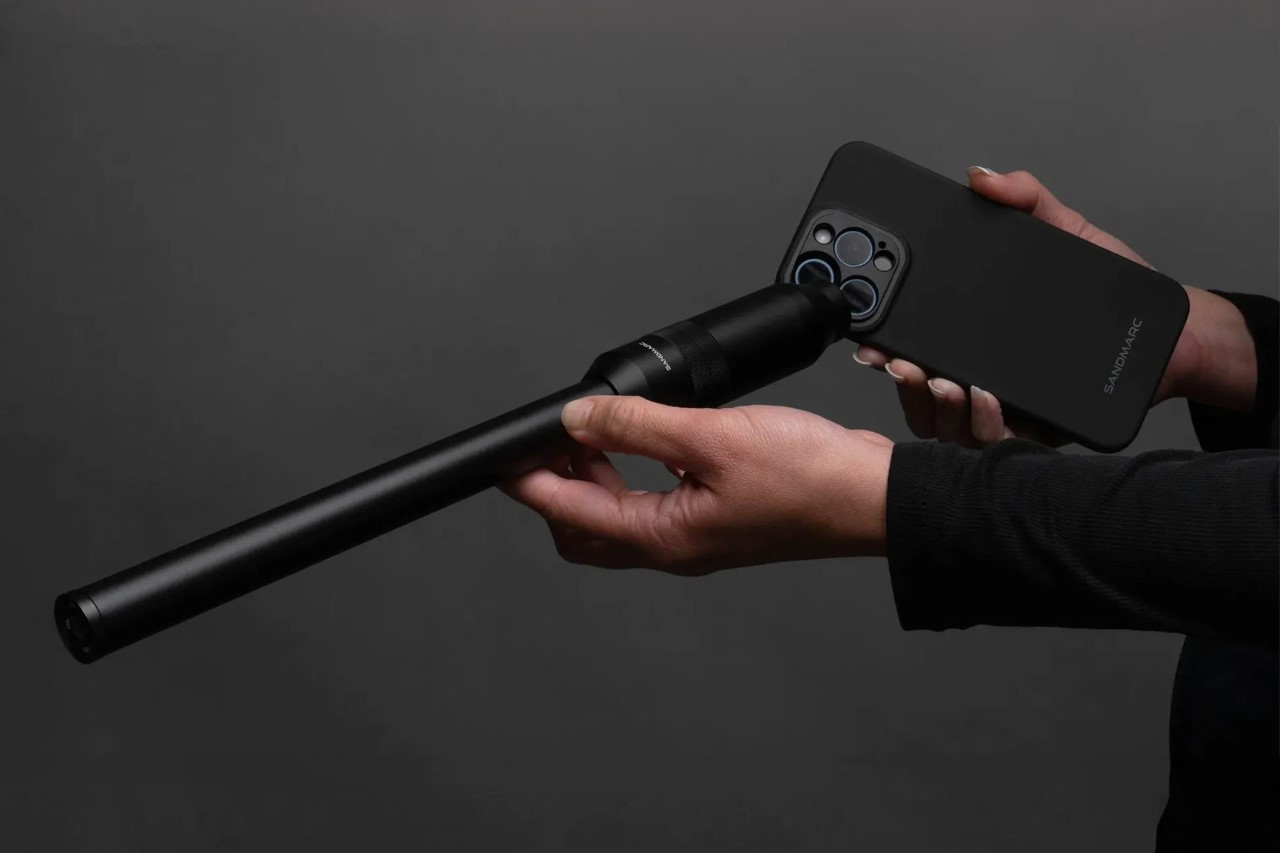
The probe lens, which became the talk of the photography town in 2018, is now going to become a staple of smartphone photography too. After seeing Shiftcam debut their probe lens for the smartphone (although it hasn’t officially been launched yet), SANDMARC has joined the ranks with its own probe lens for the iPhone. Priced at $349.99 along with the mounting case for your phone, SANDMARC’s Probe Lens promises to deliver a new perspective that gives you a tiny critter’s POV, making the world around you seem much larger than life!

Designer: SANDMARC

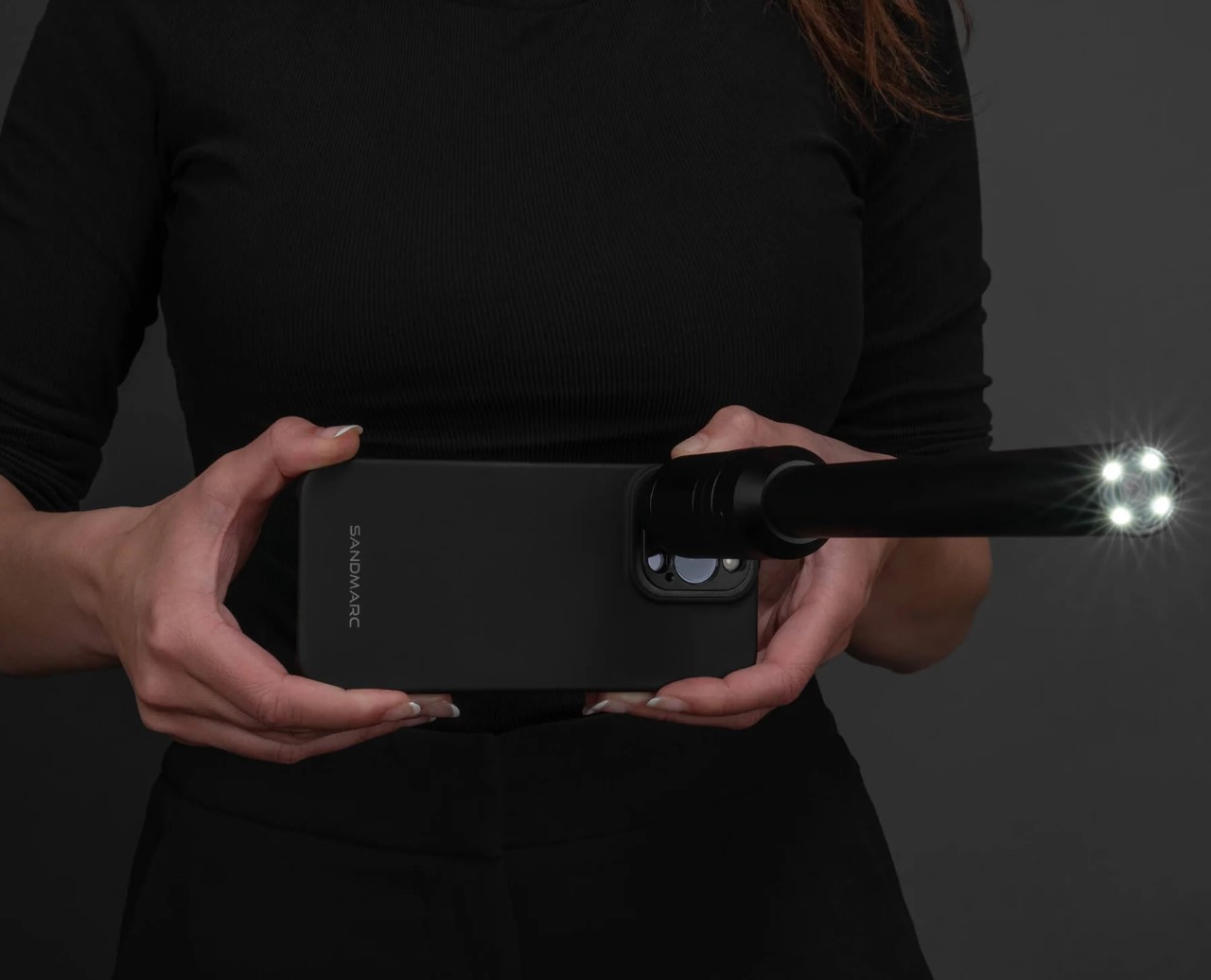
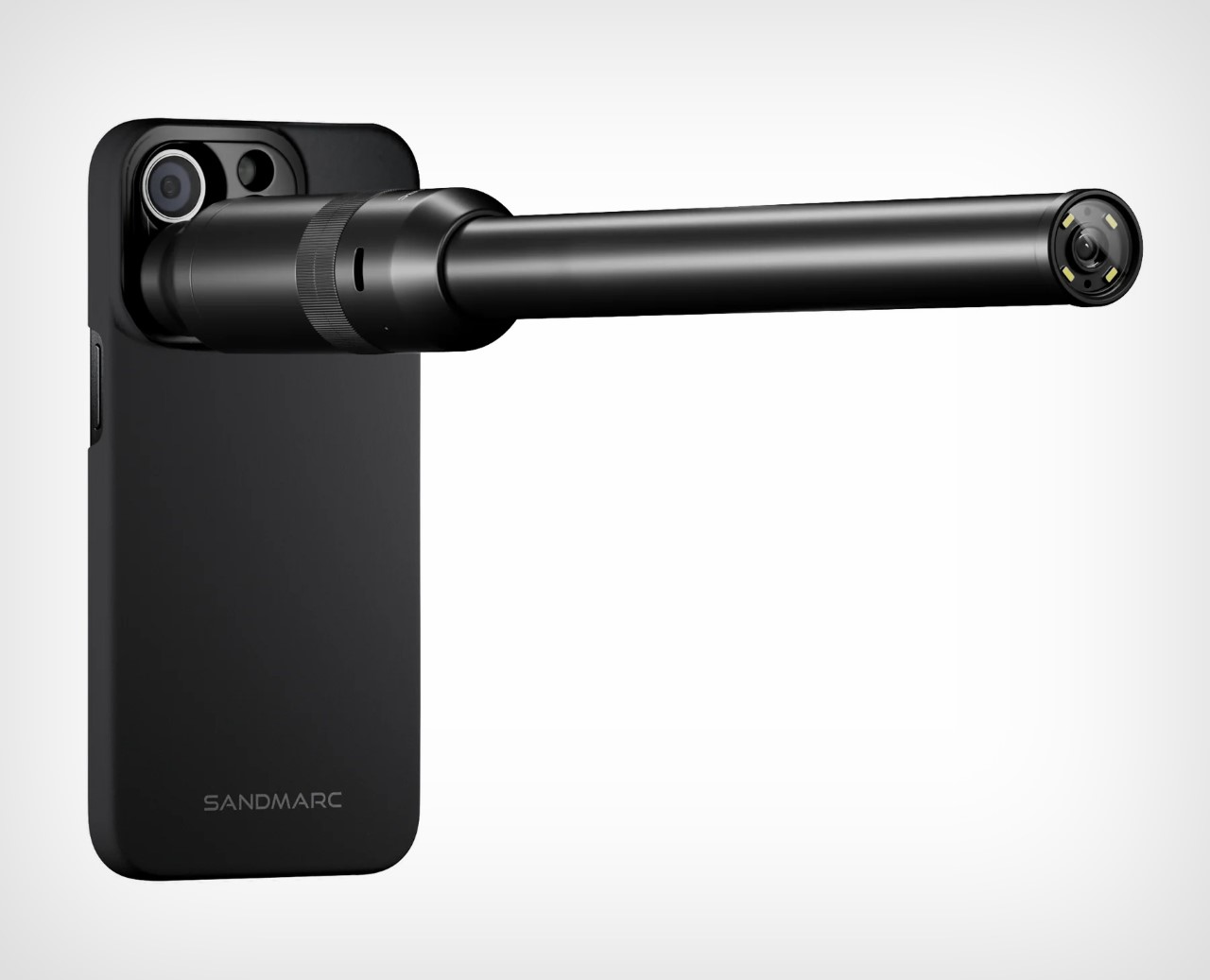
The lens measures an impressive 12 inches long, and comes with that signature probe-shaped design that lets you poke your camera into tiny spaces and capture things from a small PoV. Essentially, it builds itself on the aesthetic set by Laowa and Shiftcam after, and sports a wide DoF, a focus wheel, and LEDs on the front to let the lens gather as much light as possible (tiny lenses do require higher light capture because of their small design).

More importantly, this release from SANDMARC promises to change iPhones and smartphone photography as we know it. Humans are used to the human perspective, which is why we’re so enamored by drone footage. The Probe Lens brings yet another perspective to how we capture the world, and it’s going to be absolutely phenomenal to see what creators do with it.

At its $335 price tag (for just the lens), this isn’t something everyone can or even should buy. The Probe Lens is designed mainly for creatives, filmmakers, and nature documentary folks. The lens has a focal length of 16mm, a magnification of 2.1x, and the ability to focus on objects with stunning bokeh and also a wide FoV. You truly feel like you’ve been shrunk 100x and you’re now exploring the world in a new, tinier body. SANDMARC hasn’t specified whether this probe lens is waterproof (Shiftcam’s upcoming lens is), which means you may not be able to prod your lens into a glass of water, or a pond to observe wildlife inside. There is, however, a set of shadowless lights on the rim, for low-light photography, and a USB-C port that lets you charge your Probe Lens. The lens ships with a pouch, front and back lens caps, a charging cable, and even a mounting case for your iPhone (compatible with iPhone 14 and above).

The post SANDMARC’s $335 Probe Lens takes ‘Shot on iPhone’ to a completely new level first appeared on Yanko Design.

Quicken Simplifi subscriptions are half off right now

Quicken Simplifi, one of Engadget’s favorite budgeting apps, is on sale for half off right now. The user-friendly money management service is on sale for $2 per month, billed annually at $24.

The financial planning and tracking service is one of our top picks for replacing Mint. Its clean and simple interface recalls memories of its now-defunct competitor. Simplifi has a scrolling landing page with a detailed overview, including balances, net worth, spending, upcoming payments and other financial stats.

The service makes it easy to connect with your financial institution (optionally) for easier tracking. You can also invite a partner or financial advisor to co-manage the account.

It has a few limitations. Unlike some of its competitors, it doesn’t offer Zillow integration for home value tracking. (You can still do that manually.) In addition, it doesn’t offer free trials, and we ran into a few minor errors in miscategorizing expenses, although they were in line with the small flubs the competition also makes. It also doesn’t allow Apple or Google sign-ins, so you’ll have to create or log into a Quicken account to get started.

We already consider Simplifi’s standard $48 annual pricing to be a solid deal that aligns with market expectations. But for $24 for the whole year, you can try it for much less. Just remember to cancel before it renews if you aren’t enjoying it enough to renew for a second year at full price.

Follow @EngadgetDeals on Twitter and subscribe to the Engadget Deals newsletter for the latest tech deals and buying advice.

This article originally appeared on Engadget at https://www.engadget.com/quicken-simplifi-subscriptions-are-half-off-right-now-183002570.html?src=rss

Super Mario Party Jamboree comes to Switch in October

The newest title in the Mario Party series was revealed in this morning's Nintendo Direct stream: Super Mario Party Jamboree is rolling its way over to Nintendo Switch on October 17.

Super Mario Party Jamboree will feature 110 minigames and five new game boards that are part of a large island resort: Rainbow Galleria, Roll ‘Em Raceway, King Bowser’s Keep, Mega Wiggler’s Tree Party and Goomba Lagoon. Each board presents different gameplay mechanics and environmental hazards. For example, a lucky roll of the Turbo Dice allows you to move up to 40 spaces in Roll ‘Em Raceway, while the tide can change your route in Goomba Lagoon. Some minigames will have you shake the Joy-Con controllers, while others require you to tilt them.

To spice things up, Mario’s Rainbow Castle from Mario Party and Western Land from Mario Party 2 are being added as maps for fans to revisit. What’s more, up to 20 players can play with each other online in a new competitive racing mode called the Koopathlon.

Super Mario Party Jamboree will arrive just over six years since the last main entry in the series — Super Mario Party — and three years after Mario Party Superstars, which updated classic boards from the Nintendo 64 era. Those boards include Peach’s Birthday Cake and Space Land from the first two games, the former of which inspired the ice cream flavor Superstar Sprinkle Blast at Cold Stone Creamery in 2022.

This article originally appeared on Engadget at https://www.engadget.com/super-mario-party-jamboree-comes-to-switch-in-october-181055353.html?src=rss

Meta makes the Threads API available to all developers

Meta is finally making the Threads API available to developers. The company began testing the developers tools with a handful of companies back in March, but is now throwing the door open to more creators and app makers.

For now, the Threads API functionality is somewhat limited. It enables third-party apps to publish posts to Threads and view and manage replies and interactions with their posts. So far, this has enabled Threads integrations with social media management software like Hootsuite and Sprout Social. The Threads API has also enabled tech news aggregator Techmeme to automatically post to the platform.

These kinds of tools are widely used by brands, marketers and power users who rely on more advanced analytics and other specialized capabilities. Interestingly, Meta also suggests that creators could also be interested in using the new Threads API for their own “unique integrations” with the platform.

Meta hasn’t talked much about its future plans for the Threads API, or if it would ever support third-party client apps the way that Twitter did before Elon Musk’s take over of the service. The API could also play an eventual role in Meta’s plans to interoperate with the fediverse, though Meta has said it’s still early days for its plans to make Threads interoperable with decentralized platforms.

This article originally appeared on Engadget at https://www.engadget.com/meta-makes-the-threads-api-available-to-all-developers-174946709.html?src=rss

Top 13 macOS Sequoia Features That Will Supercharge Your Mac

Apple has introduced macOS Sequoia, featuring new updates that enhance the Mac experience. From improved integration between iPhone and Mac to new gaming features, there’s much to explore. Here are 13 new features in macOS Sequoia that aim to make your daily Mac use smoother and more enjoyable.

Designer: Apple

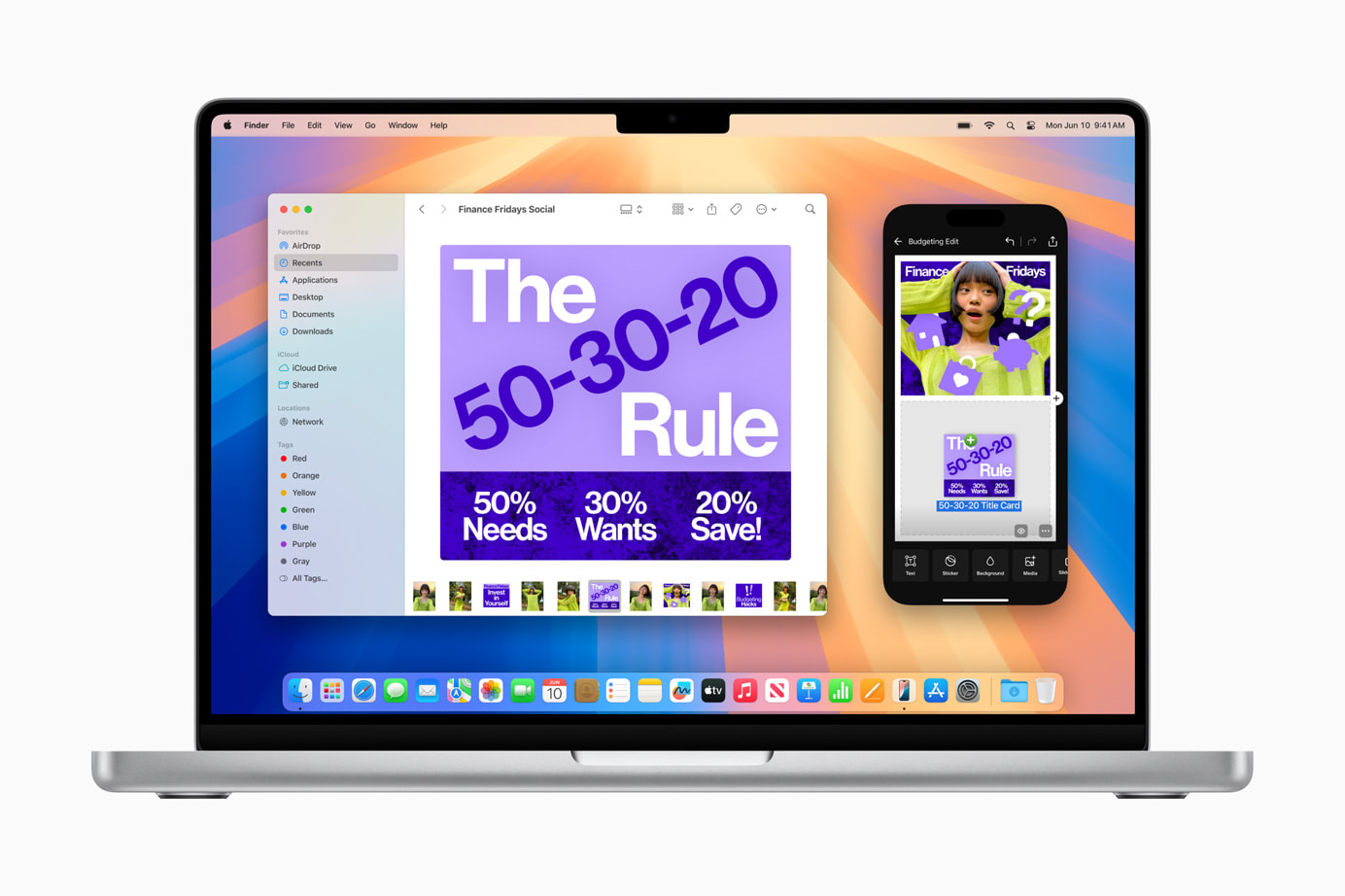
iPhone Mirroring: Seamlessly Connect Your Devices

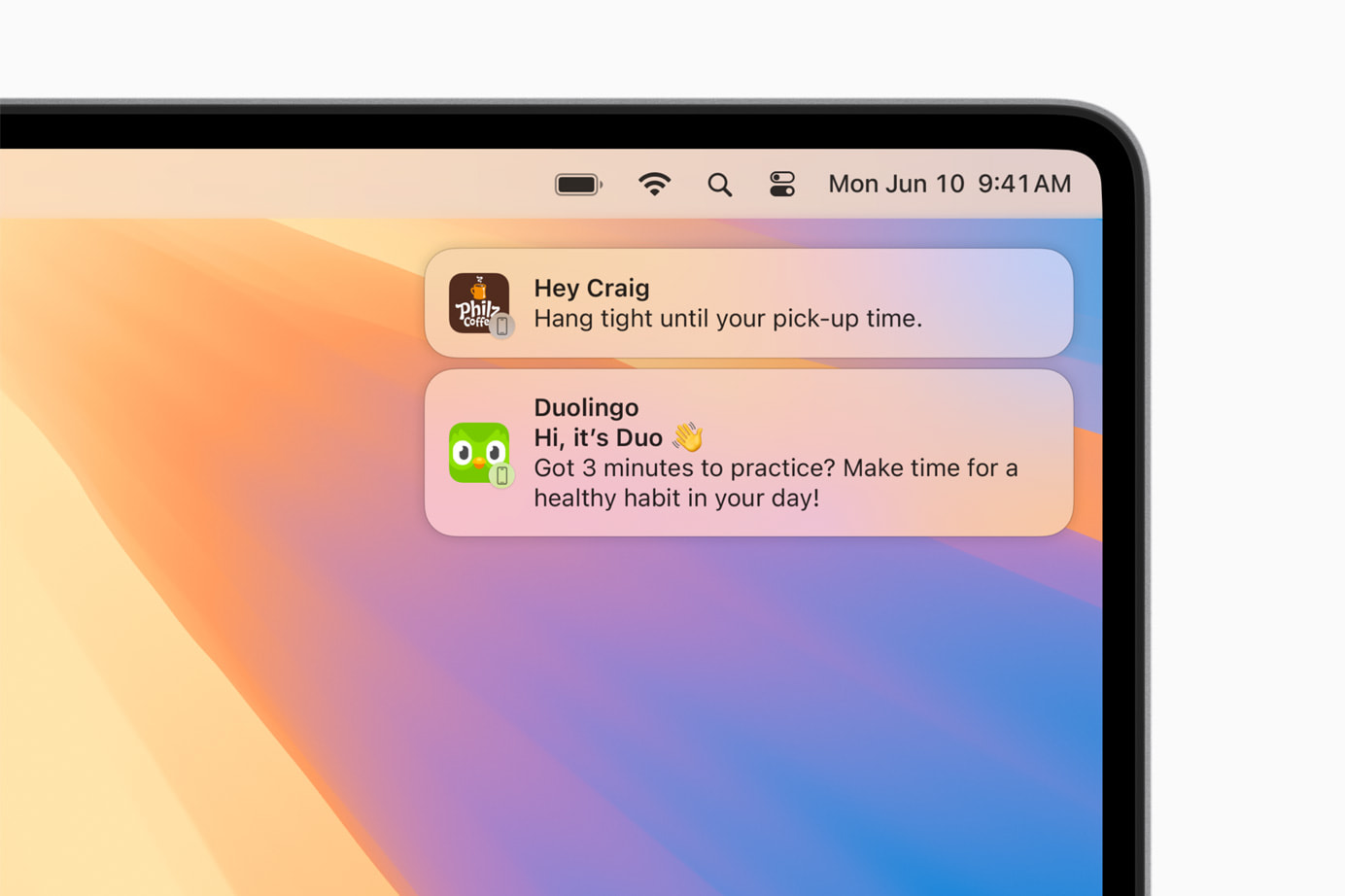
iPhone Mirroring is an exciting addition to Continuity, allowing you to use your iPhone directly from your Mac. This feature provides full access to your iPhone’s home screen, apps, and notifications while using your Mac. You can easily drag and drop files, photos, and videos between your iPhone and Mac, enhancing productivity and saving time.
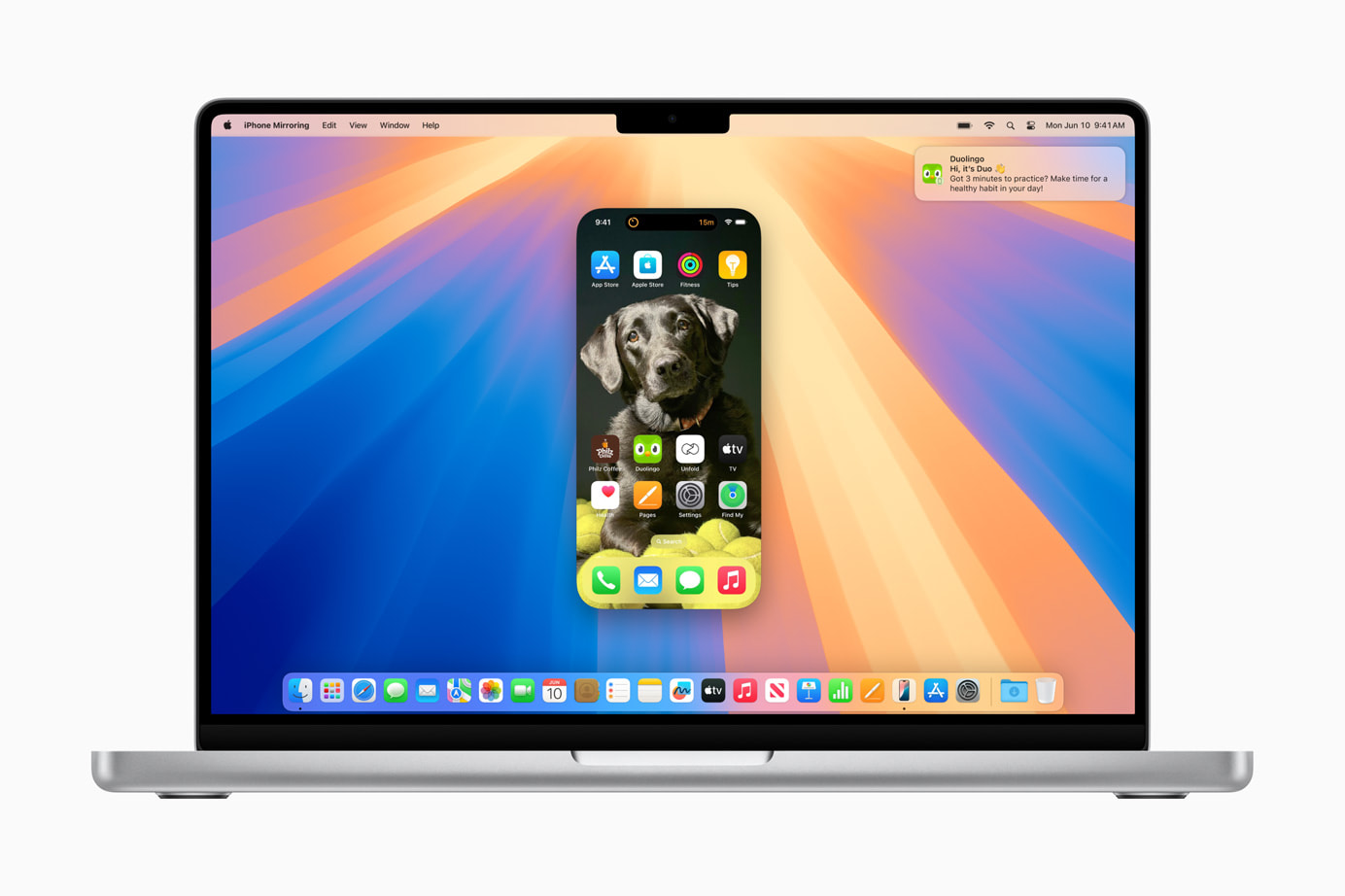
Using the Journal app on your Mac through iPhone Mirroring provides consistency in journaling and note-taking across devices. This feature is especially useful for those who prefer working on a larger screen without losing mobile access convenience. It integrates your devices into one cohesive unit, simplifying your workflow and making your digital experience more seamless.
Safari Updates: Discovering Information Has Never Been Easier

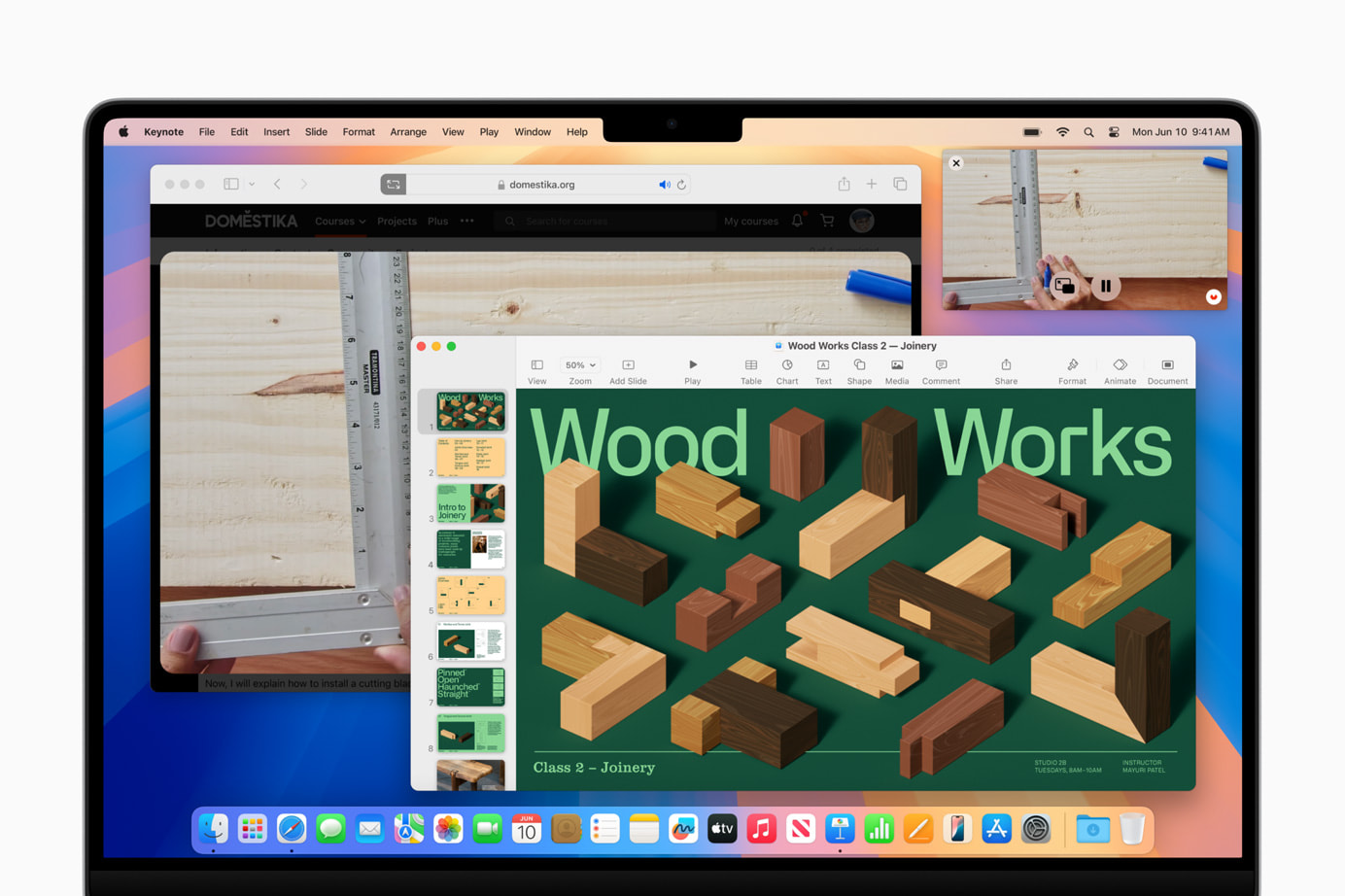
Safari’s new features in macOS Sequoia improve browsing efficiency. The Highlights tool quickly finds information on a webpage, such as directions, summaries, or quick links. The redesigned Reader provides a clean, streamlined view of articles, complete with summaries and tables of contents. The Viewer feature places detected videos front and center with easy playback control.
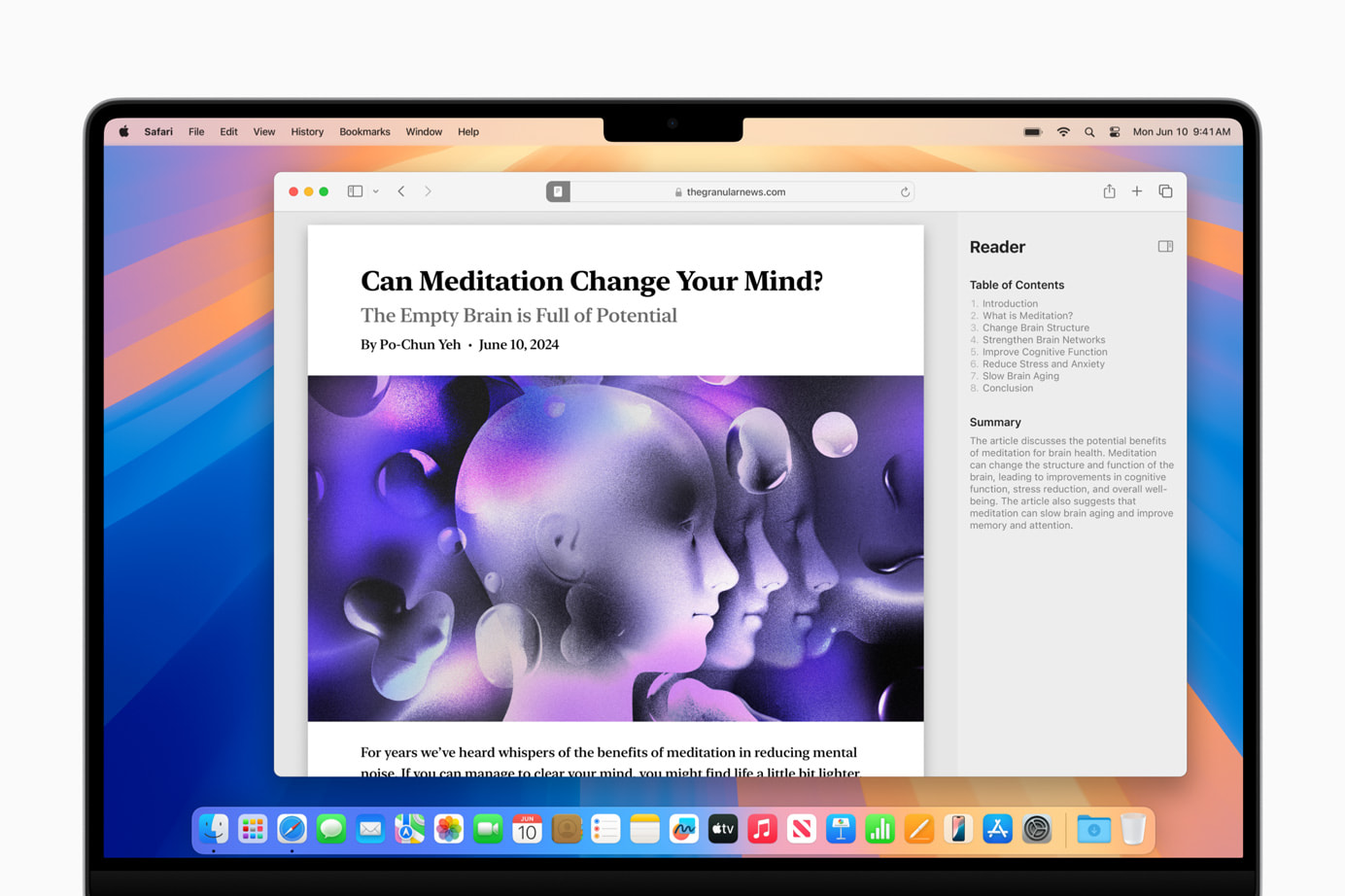
These updates make Safari more powerful for everyday browsing, simplifying and enhancing your experience. Whether you’re researching a project, catching up on news, or just surfing the web, Safari’s new tools help you spend less time searching and more time engaging with content.
Gaming Enhancements: A New Level of Immersion

macOS Sequoia introduces major updates to gaming on Mac, including new titles like “Assassin’s Creed Shadows” and “Prince of Persia: The Lost Crown,” along with additions from the “Resident Evil” series. These games utilize MetalFX Upscaling for enhanced visuals and performance. Personalized Spatial Audio provides a more immersive gaming experience.

Apple’s commitment to improving gaming on Mac is evident with these updates, focusing on high-quality visuals and immersive audio. These enhancements make the Mac a more attractive option for gamers, addressing performance, visual quality, and audio immersion.

Window Tiling: Stay Organized with Ease

macOS Sequoia’s window tiling feature helps you organize multiple applications. Drag a window to the screen edge, and macOS suggests a tiled position, allowing you to arrange windows side by side or in corners. This feature is perfect for maintaining an organized and efficient workspace, reducing screen clutter and enhancing multitasking.

Window tiling streamlines workflows and minimizes desktop clutter, making it beneficial for those working with numerous applications and documents. It simplifies task management, making multitasking smoother and more efficient.

Video Conferencing Updates: Present with Confidence

Video conferencing gets a boost with macOS Sequoia’s new updates. The presenter preview feature lets you see what you’re about to share, ensuring everything looks perfect. Built-in backgrounds and Apple’s segmentation technology add professionalism to your virtual interactions.
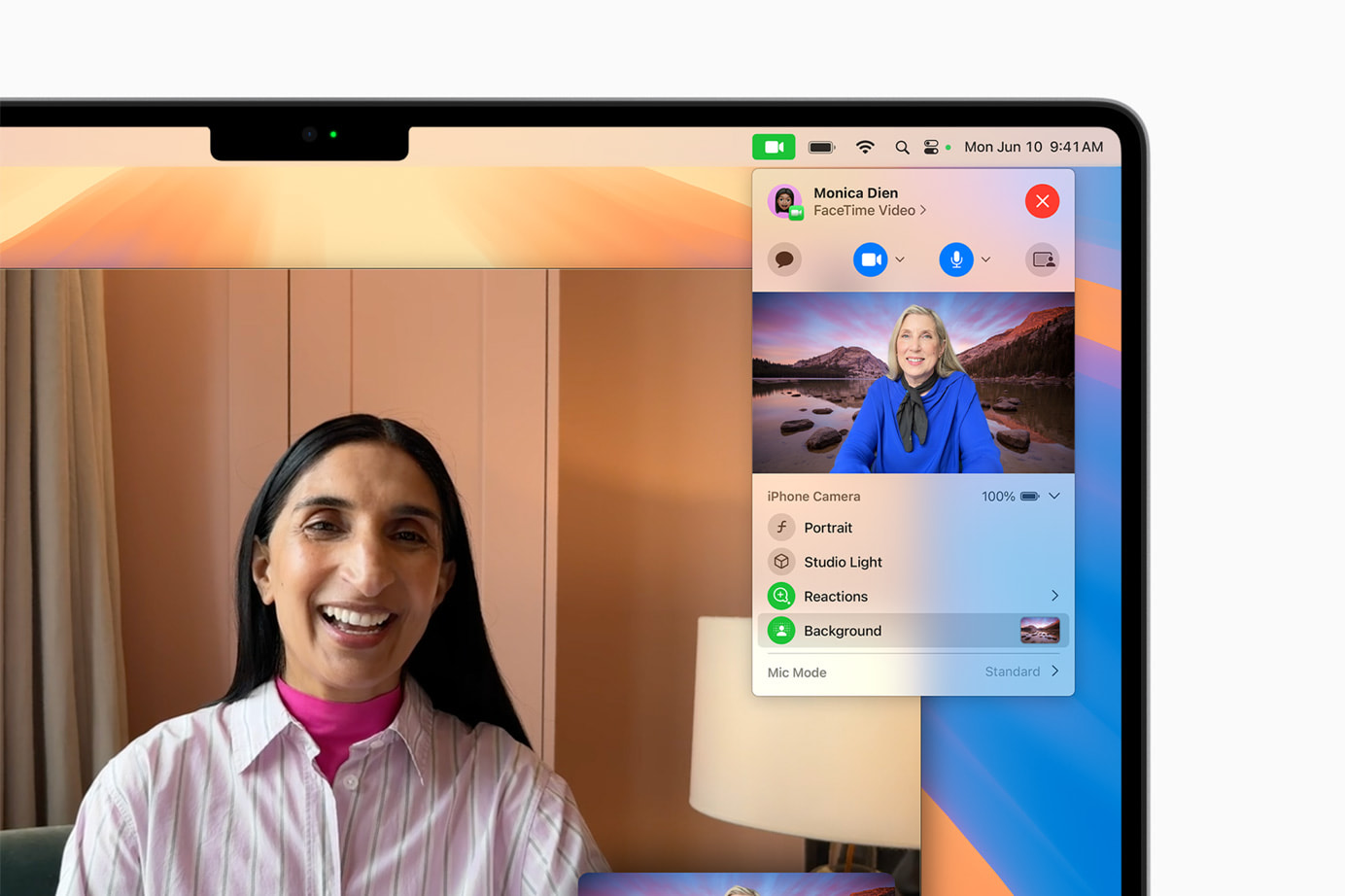
These enhancements make remote work and virtual meetings more productive and engaging. The ability to preview and customize your presentation ensures you always look your best, enhancing your confidence during virtual interactions.

New Passwords App: Keep Your Credentials Secure

The new Passwords app in macOS Sequoia centralizes your passwords, passkeys, Wi-Fi passwords, and other credentials in one secure location. With iCloud syncing and secure end-to-end encryption, your information is always protected. The app integrates seamlessly with Safari and other Apple devices, making accessing your credentials easy and secure.
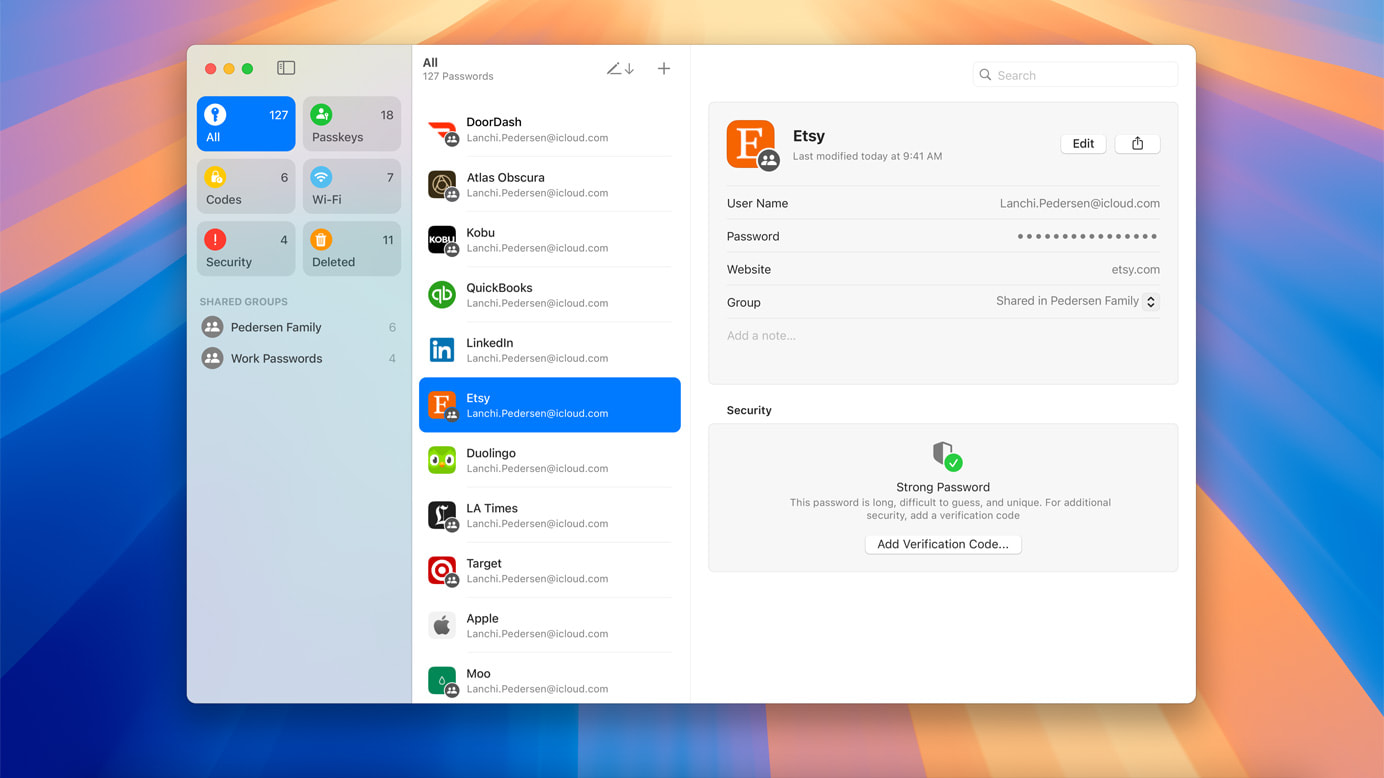
This app simplifies digital security by providing easy access and strong encryption, making managing online security hassle-free. It’s a practical solution for anyone who values security and convenience.

Apple Intelligence: The Next Chapter of AI on Mac

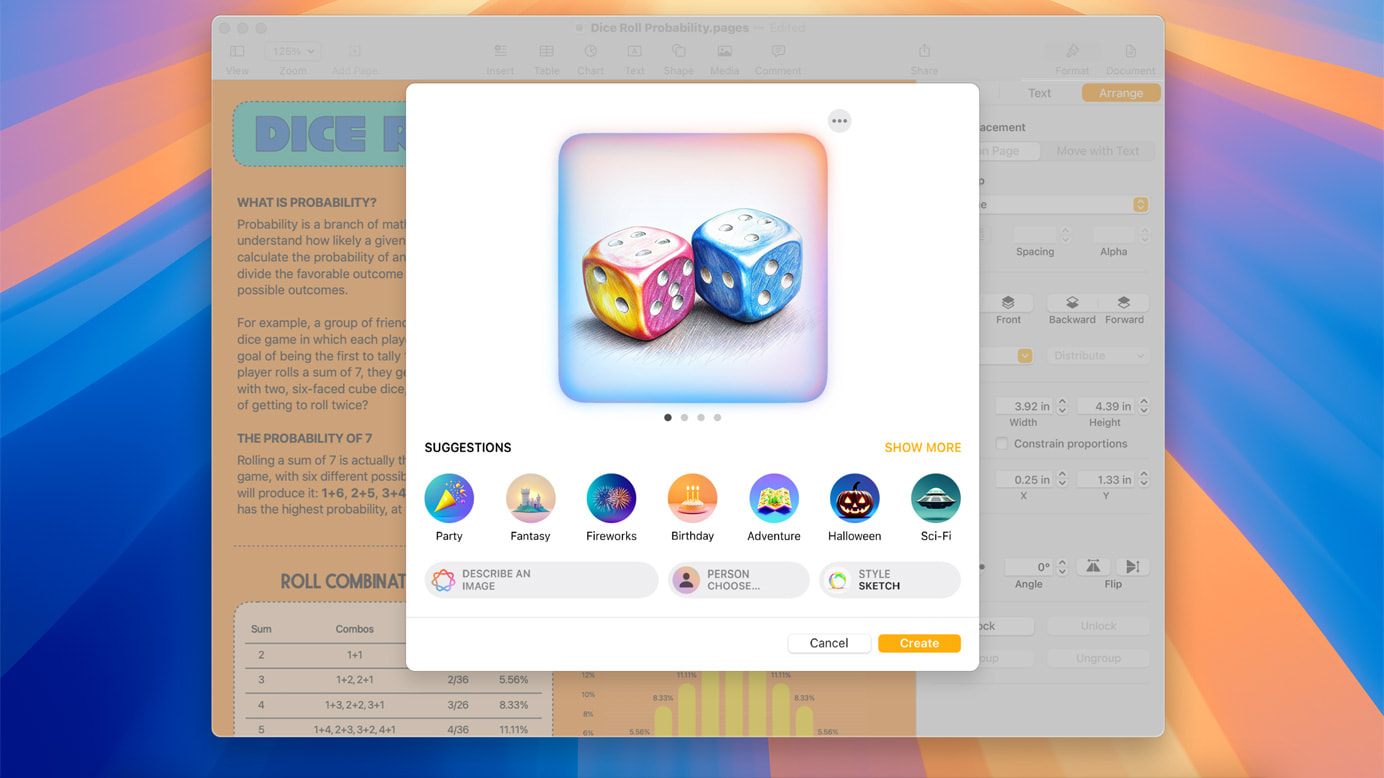
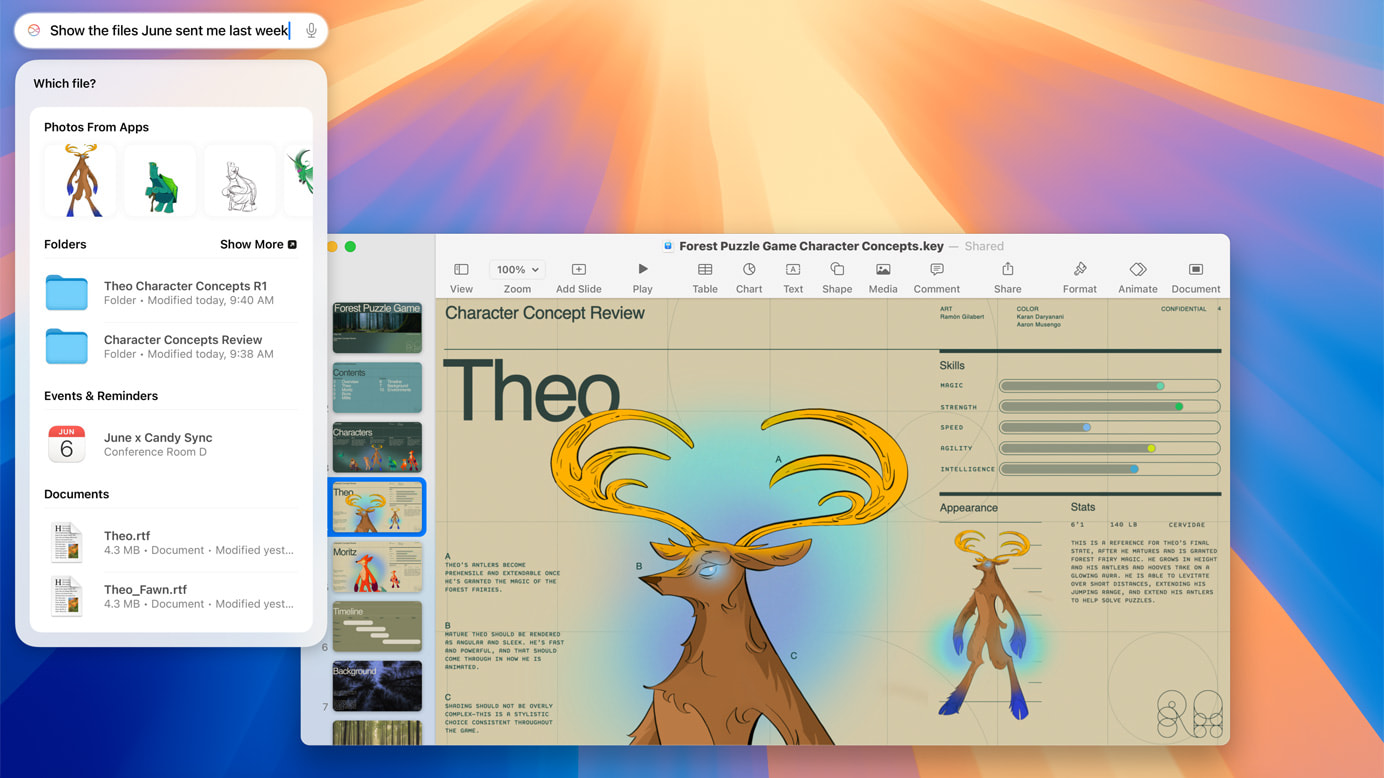
macOS Sequoia introduces Apple Intelligence, a personal AI system that enhances writing and communication. Integrated into macOS, iOS, and iPadOS, it offers features like rewriting, proofreading, and summarizing text. Apple Intelligence also includes Image Playground for creating playful images and Memories in Photos for crafting stories from your photo library.
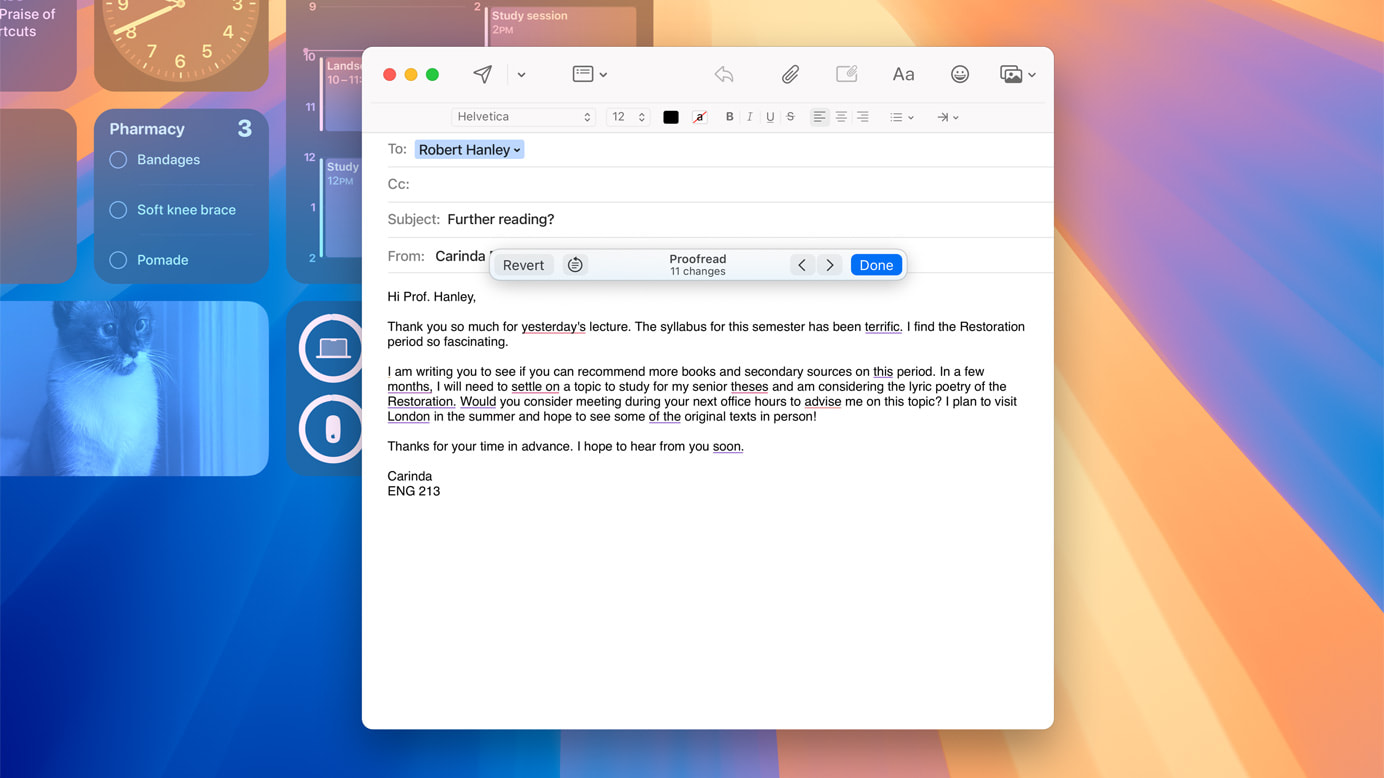
These AI advancements simplify tasks like writing, editing, and creating visual content, making daily tasks more efficient and enjoyable. Apple Intelligence ensures you can achieve more with less effort, enhancing productivity and creativity.
Messages Updates: Express Yourself Like Never Before

macOS Sequoia enhances the Messages app with new text effects, emoji, and sticker Tapbacks, making your messages more fun and engaging. The ability to schedule messages to send later ensures they’re sent at the right time, adding convenience to your communication.
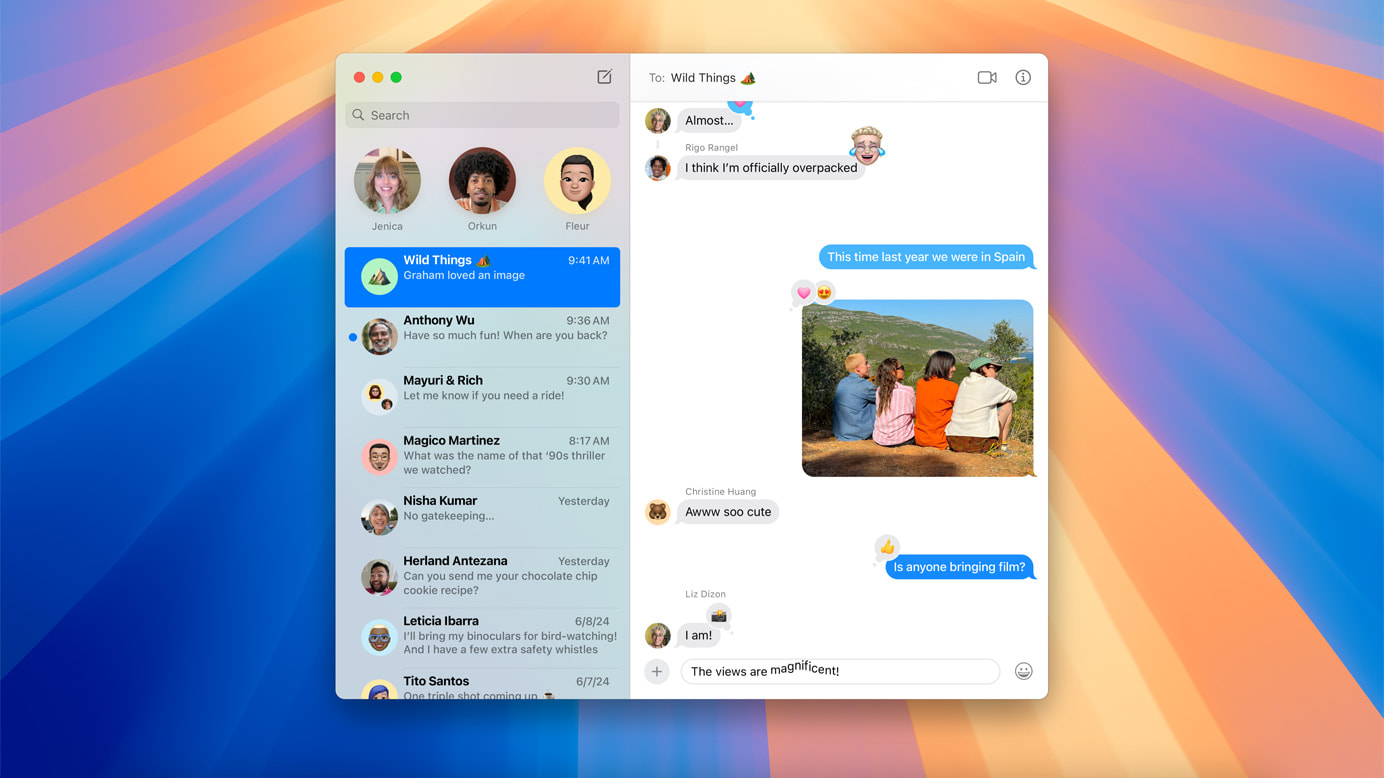
These updates make digital conversations more lively and expressive, helping you convey your thoughts and feelings more clearly. Whether you’re sending a quick update or having a long chat, the new tools in Messages enrich how you connect with others.
Apple Maps Enhancements: Explore the World in New Ways

Apple Maps in macOS Sequoia introduces curated hikes and custom walking routes, making exploring the outdoors easier. Discover thousands of trails across U.S. national parks, filtered by length, elevation, and route type, and save them for offline use. These enhancements cater to both seasoned explorers and casual hikers.

These updates make Apple Maps a powerful tool for outdoor enthusiasts, providing detailed and customizable routes. Whether you’re planning a hike or exploring a new city, the new features make your adventures more accessible and enjoyable.

Photos Updates: Organize and Enjoy Your Memories

macOS Sequoia’s Photos app updates make it easier to organize and enjoy your photo library. Collections automatically organize your photos and videos by themes, and improved search capabilities help you quickly find what you’re looking for. These updates make managing your photo library more intuitive and efficient.

The Photos app enhancements simplify organizing, finding, and sharing your photos, preserving your memories in a meaningful way. Whether you’re a casual photographer or love capturing every moment, the improved Photos app ensures your images are always organized and ready to be enjoyed.

Notes Improvements: Smarter Note Taking

The Notes app in macOS Sequoia now includes audio transcription and summarization features powered by Apple Intelligence. Math Notes allows you to type in equations and have them solved automatically. These updates make note-taking smarter and more efficient.
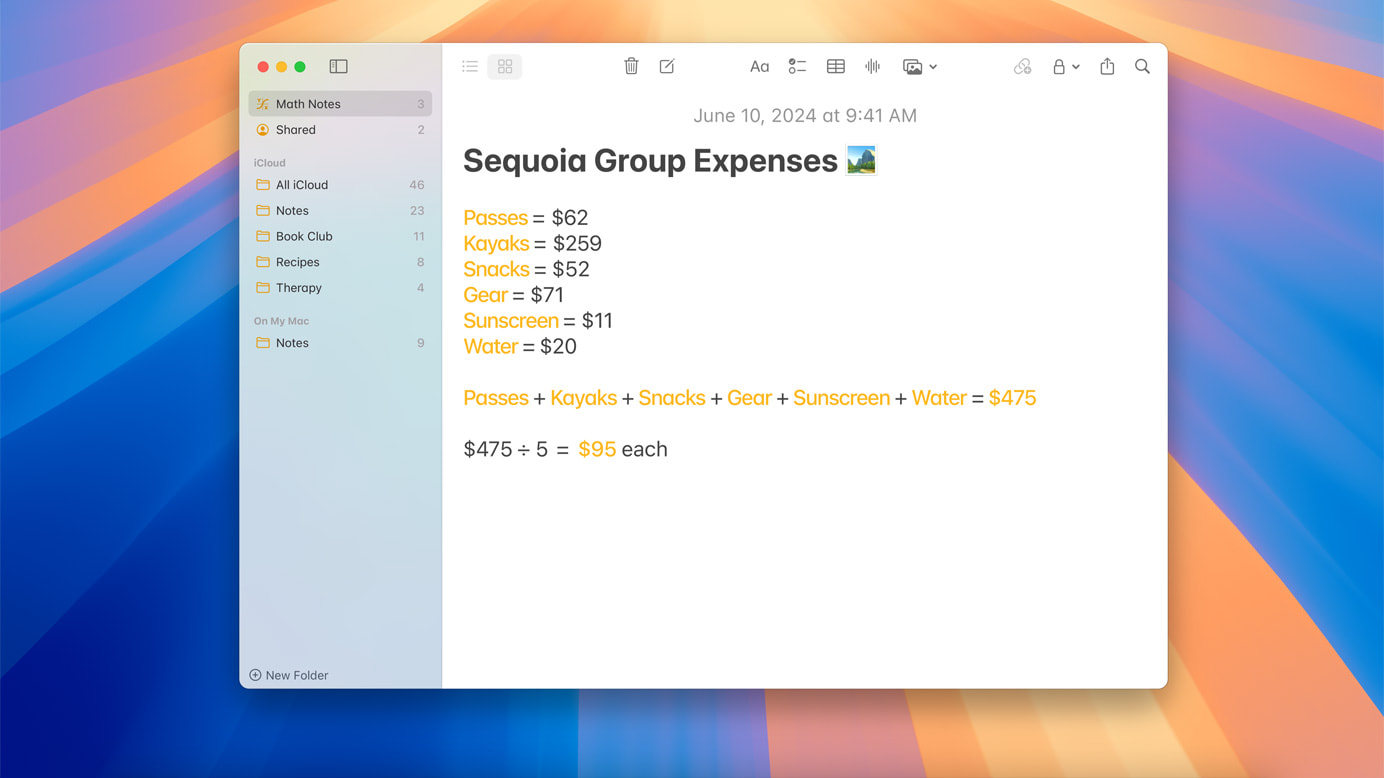
These enhancements make the Notes app a powerful tool for productivity, helping you stay organized and efficient. Whether you’re in a meeting, a classroom, or working on a personal project, the smarter Notes app ensures you can capture and manage information effortlessly.

Updated Calculator App: More Than Just Math

macOS Sequoia’s Calculator app now shows previous calculations with history and displays expressions as you type, making it easier to keep track of your calculations and ensure accuracy. These updates make the Calculator app more versatile and user-friendly.

These enhancements make the Calculator app a reliable tool for simple arithmetic and complex calculations. By adding features like history and expression display, the app becomes a more useful and efficient tool for daily math needs.

Calendar Enhancements: Stay on Top of Your Schedule

The Calendar app in macOS Sequoia shows events and tasks from Reminders, providing a comprehensive view of your schedule. An updated Month View offers a clear overview of events and reminders, making managing your time easier and more efficient.

These updates help you stay organized and productive, ensuring you don’t miss important deadlines or appointments. By integrating reminders and offering a clear monthly view, the Calendar app simplifies planning and organizing your time.

Take Your Mac Experience to the Next Level

macOS Sequoia is packed with features designed to make your Mac more powerful, user-friendly, and enjoyable. From seamless iPhone integration to smarter note-taking and enhanced gaming, these updates offer something for everyone. Explore these new features and see how they can improve your daily Mac experience.
The post Top 13 macOS Sequoia Features That Will Supercharge Your Mac first appeared on Yanko Design.


Beats Solo Buds review: Exactly what you’d expect for $80

The idea of Beats wireless earbuds for under $100 is certainly compelling. Until now, the company has operated in the $150-$200 range, except for the $70 Beats Flex, which offers a great collection of features with good sound quality and a comfy fit. However, much of the competition has been keen to offer buds for considerably cheaper prices, doing so by limiting functionality to the basics. With the Solo Buds ($80), Beats has its cheapest true wireless earbuds yet and manages to retain much of its product DNA. But, the company had to dial things back to bring the price down, so don’t expect these earbuds to wow you with performance.

The Solo Buds carry the same overall earbud design that Beats has favored for a while now. A key difference between these and the Studio Buds +, though, is that the Solo Buds are slightly larger to accommodate its bigger batteries. The new model still offers the onboard controls on an angled flat panel, complete with the company’s trademark “b” branding. The good news is that this earbud shape has always been comfortable to wear for long periods of time and that hasn’t changed here. And despite the closed acoustic architecture of the Solo Buds, added micro vents relieve that plugged feeling that can plague earbud wearers after several minutes of use.

Where the Solo Buds deviate from Beats’ previous models is the case. This thing is tiny. In fact, according to the company it’s 40-percent smaller than the Studio Buds + case, which wasn’t enormous by any means. This is because Beats removed the battery from the case. The company claims that doing so makes the Solo Buds more environmentally friendly and it’s one less battery to worry about degrading over time.

If you're into the clear version of the Studio Buds +, you're in luck. There's a transparent red option for the Solo Buds. But, there’s also some bad news: only the case is transparent; the buds themselves are opaque

Like other recent Beats products, all of the software for iPhone owners is baked into iOS. On Android, you’ll need the Beats app to customize the touch controls or download software updates. On both platforms, you’ll get one-touch pairing, fast pair and location-tracking help for lost earbuds. iOS users get the benefit of iCloud pairing with other devices, Apple Watch hand-offs, as well as audio sharing with AirPods and Beats products. On Android, you’ll be able to automatically pair with any device on your Google account and take advantage of multipoint Bluetooth pairing.

Since the Solo Buds only have the most basic features, there’s not much else to list out. However, the company does allow you to reconfigure the press-and-hold control to adjust volume. By default, this action summons your device’s voice assistant on both earbuds. And that’s really the extent of things. There’s no hands-free Siri, no transparency mode, no active noise cancellation (ANC), no wear detection and no support for Apple’s Adaptive EQ.

The Studio Buds + vs. the Solo Buds.
Billy Steele for Engadget

For a set of $80 earbuds, the best sound quality you can expect is slightly above average. Most of the time, you get something that’s serviceable, but not necessarily tuning you’d use to listen to the finer details of an album. Beats is on a good run with sound quality on the Studio Buds line and the Beats Fit Pro, but it understandably had to cut corners in places to slash the price on the Solo Buds. It turns out that audio performance is one of those areas.

The Solo Buds still retain some decent detail in the sound profile, but overall, the tuning doesn’t offer the dynamics of the Studio Buds +. Songs are flat and the mix is subdued, lacking punchy highs or booming bass at times. Bilmuri’s “Emptyhanded,” for example, has some loud, distorted guitars that provide the rhythm of the track. Those instruments typically soar and have plenty of texture on pricier earbuds, but here they lack dimensionality and stand out less from the rest of the mix than usual. These aren’t the earbuds in the company’s lineup you’ll want to choose if sound quality is of utmost importance. Instead, the Solo Buds get the job done in a workman-like fashion, without much flash or excitement.

One advanced sound feature that Beats did include is Spatial Audio. It’s automatic and works with songs from Apple Music that are available in Dolby Atmos. Albums like Justice’s Hyperdrama and Wyatt Flores’ Half Life have more robust bass and clarity, sounding less compressed than some other “regular” albums on the Solo Buds. It’s still not flagship-level audio performance, but it’s noticeably improved compared to non-Atmos content.

When it comes to calls, Beats only employs one microphone on each side on the Solo Buds. This definitely impacts voice quality and you’ll sound like you’re on speaker phone more so than on pricier sets of earbuds. The company does a great job of blocking background noise, but during my tests in loud environments, that battle against distractions further degraded call performance. In a room with a loud fan, my voice was choppy compared to in a quieter spot with minimal environmental roar.

The Solo Buds carry a similar overall design to other recent Beats earbuds.
Billy Steele for Engadget

Beats claims the Solo Buds will last up to 18 hours on a charge, which is double or, in some cases, triple what much of the competition offers. The company opted for larger batteries in the earbuds and removed the one from the case, so there’s no extended time to be gained from docking the buds. When they’re dead, you have to put them in the case and plug the case into an outlet with a USB-C cable.

During my tests, I came in one hour shy of Beats’ stated figure. This isn’t too much of a disappointment since I still got 17 hours, and it’s likely due to my setting the volume at 75 percent and leaving the Solo Buds unused for over 24 hours. If you find yourself in a pinch, you can get an hour of playback in five minutes of charging. What’s more, you can use your phone to get the tunes going again with charging via a USB-C connection on both iPhone (15 and up) and Android devices.

Since there’s no battery in the case, there isn’t an LED indicator to show you the charging status of the Solo Buds. You can get that info on your phone by tapping the onboard controls while the earbuds are in the case and close by. It’s inconvenient, but you do get an exact figure instead of just a green or red light.

Beats has entered an increasingly crowded market for earbuds under $100. Not only are big names like Bose or Sony dropping new flagship models every year, but the likes of Anker, JLab and Jaybird are also debuting more ultra-affordable options on a regular basis. And some of them cost less than $50. The current best budget earbuds, according to my colleague Jeff Dunn, is the Anker Soundcore Space A40. Currently available for $50, the A40 offers solid ANC, multipoint Bluetooth and respectable sound quality. Battery life is 10 hours and the buds are rated IPX4 for water-resistance, but there’s no wear detection and the A40 isn’t great for calls, either.

The Solo Buds are a smart play for Beats, and I have no doubt the company will sell a lot of them. They’re good enough for most people, even without features like active noise cancellation, transparency more and wear detection. There’s some solid audio performance with songs in Apple Music, but overall sound quality is flat and lacks the oomph on the Studio Buds + or Beats Fit Pro. However, long battery life and a comfy fit mean you can wear these all day long, and those two things alone might be enough to make up for the Solo Buds’ sonic shortcomings – especially for $80.

This article originally appeared on Engadget at https://www.engadget.com/beats-solo-buds-review-exactly-what-youd-expect-for-80-170742296.html?src=rss

Stray is coming to Switch this holiday season

Stray, one of Engadget’s favorite games of 2022, is coming to Switch. The title, which lets you play as an orange tabby cat exploring a dystopian cyberpunk setting, arrives on Nintendo’s console this holiday season.

The trailer shows familiar action in the two-year-old game from BlueTwelve Studio. You’ll see the feline protagonist rolling in a barrel, facing a robotic enemy and knocking objects off ledges (as cats tend to do).

Still from the Stray trailer for Switch. Foreground: kitty cat. Background: robotic warrior with a spear. Grungy cyberpunk alleyway, dimly lit.
BlueTwelve Studios / Nintendo

Unfortunately, its graphical fidelity appears noticeably downgraded compared to its console brethren, but that’s to be expected. Switch developers can do a lot with the seven-year-old system, but they aren’t miracle workers.

Stray arrived on PS5/PS4 and PC (Steam) in 2022, followed by an Xbox port last year. The Switch version will round things out sometime around the holidays. You can check out the announcement trailer below.

This article originally appeared on Engadget at https://www.engadget.com/stray-is-coming-to-switch-this-holiday-season-163611672.html?src=rss