The iFLYTEK AI Note 2 is setting a new benchmark in digital productivity tools with its innovative features and sleek, minimalist design. As the world’s thinnest e-ink tablet, it combines innovative technology with a user-friendly interface to deliver a unique and efficient note-taking experience. Whether you’re a professional managing complex projects, a student navigating academic […]
What if the future of enterprise operations wasn’t just faster, but smarter, capable of transforming how businesses think, plan, and execute? Enter Gemini 3 Enterprise, an advanced AI model that’s redefining the boundaries of productivity and innovation. With its ability to process multimodal data, craft intelligent strategies, and empower developers with agentic coding, Gemini 3 […]
Most people think of AirTags when they picture a Bluetooth tracker. And indeed, Apple’s little white discs were once the only capable option, relying on a vast finding network of nearby iPhones to pinpoint lost tags. But now Google has a finding network of its own, and third party brands like Chipolo, Hyper and Pebblebee have trackers that pair with your choice of Google or Apple’s network. That means you’ve got a lot of options for tagging and tracking your keys, backpacks, luggage and more. We tested the major brands out there to see how well they work, how loud they are and how they look to put together a guide to help you get the most out of your chosen tracker. Here are the best Bluetooth trackers you can buy.
Editor's note: Apple just released a new version of its AirTag trackers. We are in the process of testing the new model and will update this guide once we're done.
Best Bluetooth trackers for 2026
What to look for in a Bluetooth tracking device
Bluetooth trackers are small discs or cards that rely on short-range, low-energy wireless signals to communicate with your smartphone. Attach one of these gadgets your stuff and, if it’s in range, your phone can “ring” the chip so you can find it. These tracking devices offer other features like separation alerts to tell you when you’ve left a tagged item behind, or where a lost item was last detected. Some can even tap into a larger network of smartphones to track down your device when you’re out of range. Depending on what you want the tracker to do, there are a few specs to look for when deciding which to get.
Device compatibility
Like most things from the folks in Cupertino, AirTags only work with products in the Apple ecosystem. Both Apple and Google have opened up access to the Find My and Find Hub networks to third-party manufacturers, including Chipolo and Pebblebee. Those two companies make device-agnostic models that will work with the larger tracking network from either brand, so iPhone and Android users can buy the same tag. Tile trackers work with either Android or Apple devices, but use Tile’s own Life 360 finding network. Samsung’s latest fob, the Galaxy SmartTag2, only works with Samsung phones and taps into a finding system that relies on other Samsung devices to locate lost tags.
Finding network
Crowd-sourced finding capabilities are what make headlines, with stories about recovering stolen equipment or tracking lost luggage across the globe. Using anonymous signals that ping other people’s devices, these Bluetooth tracking devices can potentially tell you where a tagged item is, even if your smartphone is out of Bluetooth range.
Apple’s Find My network is the largest, with over a billion iPhones and iPads in service all running Apple’s Find My app by default. So unless an iPhone user opts out, their phone silently acts as a location detector for any nearby AirTags. Apple recently increased the AirTag’s finding power by enabling you to share the tracker's location with a third party, party, like an airline. Chipolo fobs that work on Apple’s network have the same ability. Google launched its Find My Device network in 2024 and has since renamed it Find Hub, which, like Apple's fining app, combines devices and people finding in one place. That network is now a close second for the largest in the US
Now that Google’s Find Hub network is up and running, it’s a close second for the largest in the US. Like Apple, Android users are automatically part of the network, but can opt-out by selecting the Google services option in their phone’s Settings app and toggling the option in the Find Hub menu. Samsung’s SmartTag 2 and related network also defaults to an opt-in status for finding tags and other devices.
Tile offers a large finding grid that includes Tile users, Amazon Sidewalk customers and people running the Life360 network. Life360 acquired Tile in 2021, and, according to the company, the Life360 network has more than 70 million monthly active users.
In our tests, AirTags and third-party tags using its network, like the Chipolo Loop and Pop and the Pebblebee Clip 5, were the fastest to track down lost items. They offered nearly real-time location data in moderately to heavily trafficked spots around Albuquerque, including a bar, bookstore and coffee shops in Nob Hill, along with various outdoor hangouts on UNM’s campus.
Samsung's SmartTags were able to locate our lost items most of the time, though not with the same precision finding accuracy as AirTags. When we tested Google’s Find Hub (then called Find My Device) network right after launch, it was noticeably slower than Apple’s network when using the community finding feature. Testing it again in mid 2025, the time it took to locate a lost item was considerably improved, taking less than 20 minutes on average for the community to track a fob. In our tests, Tile’s finding network wasn’t able to consistently locate its lost fobs.
Amy Skorheim / Engadget
Separation alerts
A tracker’s day-to-day utility becomes really apparent when it prevents you from losing something in the first place. Separation alerts tell you when you’ve traveled too far from your tagged items. Useful if you want to make sure your laptop bag, jacket or umbrella always comes with you when you leave the house.
Apple’s Find My app delivers these notifications, but Google’s Find Hub does not. However, if you have a Chipolo device and allow its companion app to run in the background on your Android phone, left-behind alerts are enabled. Tile trackers require a yearly subscription to enable the alerts (currently $7 to $25 monthly). Both AirTags and Tiles allow you to turn off separation alerts at certain locations, meaning you can set your home as a “safe” place where items can be left behind, but alerts will still trigger elsewhere.
In our tests, AirTags and others using the Find My network alerted us between the 600- and 1,400-foot mark. Tiles sent a notification after about an average of 1,500 feet and were more consistent when using an Android phone than an iPhone. Chipolo Pop tags paired with an Android phone and using its own app sent an alert when we got around 450 feet away from our tagged item.
Connectivity and volume
The feature you may use most often is the key finder function, which makes the tracker ring when you hit a button in the app. With Apple's AirTags, you can say "Hey Siri, where are my keys?" and the assistant will ring the tag (assuming it doesn't mistakenly think you're asking for directions to the Floridian archipelago). You can also use the Find Item app in your Apple Watch to ring your fob. Asking smart home/personal assistants like Alexa or the Google Assistant to find your keys will work with Chipolo, Tile and Pebblebee trackers linked to your Android device.
If you have your tag but can’t find your phone, some trackers will let you ring them to find your handset. SmartTag2 fobs reliably rang our Galaxy phone when we double-pressed it. Tile trackers have the same feature. Chipolo Pop and Loop trackers can ring your phone, but uses the Chipolo app to do so, which can run concurrently with the Find My or Find Hub connection. AirTags and third-party tags using Google’s network don’t offer this feature.
The volume of the Bluetooth tracking device may determine whether you can find an item buried in your couch cushions or in a noisy room. AirTags have a reputation for being on the quiet side, and that aligned with what we saw (measuring roughly 65 decibels). Chipolo’s Pop tags and Tile’s Pro model measure between 83 and 86 decibels on average. Pebblebee’s new Clip 5 was the loudest of any tag we’ve tested, clocking in at 97 ear-splitting decibels.
Design and alternative formats
Design will determine what you can attach the tracker to. AirTags are small, smooth discs that can’t be secured to anything without accessories, which are numerous, but that is an additional cost to consider. Chipolo, Pebblebee and Tile offer trackers with holes that easily attach to your key ring, and all three companies also offer card-shaped versions designed to fit in your wallet. Pebblebee Clip 5 tags come with a handy carabiner-style key ring.
You can even get trackers embedded into useful items like luggage locks. The SmartLock from KeySmart is a TSA-approved luggage lock, but in addition to the three digit code, it’s also a Bluetooth tracker that’s compatible with Apple Find My. It wasn’t quite as loud as other trackers in my tests, and the range wasn’t as long, but it paired easily and worked with Apple’s finding network just like an AirTag.
Battery life
AirTag, Tile Pro, SmartTag2, HyperShield and Chipolo Pop fobs use replaceable batteries and each should go for at least a year before needing to be swapped. Pebblebee Clip 5 and Chipolo Loop trackers are rechargeable via a standard USB-C port. The Clip 5 has a long battery life claim at 12 months. The Loop should go for six months on a charge.
Trackers shaped like credit cards, aka wallet trackers, don't have replaceable batteries, but some, like the Chipolo Card and the Pebblebee Card 5 are USB-C rechargeable.
Stalking, theft and data privacy
AirTags have gotten a lot of attention and even prompted some lawsuits for Apple due to bad actors planting them on people in order to stalk them. While this fact may not influence your buying decision, any discussion of Bluetooth trackers should note what steps Apple, Google and Tile have taken to address the issue. Last year, all the major players in the Bluetooth tracker business teamed up to combat misuse and standardize how unauthorized tracking detection and alerts work for iOS and Android.
Last year, Tile launched a feature called Anti-Theft Mode, which enables you to render one of its trackers undetectable by others. That means if someone steals your tagged item, they won’t be able to use the anti-stalking features to find and disable the tracker. That sort of negates one of the major ways potential stalking victims can stay safe, so Tile hopes ID verification and a $1 million penalty will deter misuse.
As a theft deterrent, a Bluetooth tracker may or may not be the best option. Anecdotal stories abound in which people have recovered stolen goods using a tracker — but other tales are morecautionary. Neither Apple nor Google promotes its trackers or finding networks as a way to deal with theft. GPS trackers, on the other hand, are typically marketed for just that purpose.
How we tested Bluetooth trackers
Before deciding on which trackers to test, we researched the field, looking at user reviews on Amazon, Best Buy and other retailers, along with discussions on sites like Reddit. We also checked out what other publications had to say on the matter before narrowing down our options.
After acquiring the trackers, I tested each one over the course of a few weeks using both an iPhone 11 followed by an iPhone 16 and a Samsung Galaxy S22 then an S23 Ultra. I recreated likely user experiences, such as losing and leaving items behind at home and out in the city. I planted trackers at different spots near downtown Albuquerque, mostly concentrated in and around the University of New Mexico and the surrounding neighborhood of Nob Hill. Later, I conducted tests in the Queen Anne neighborhood of Seattle.
Each test was performed multiple times, both while walking and driving and I used the measure distance feature on Google Maps to track footage for alerts. I paid attention to how easy the app was to use, how reliable the phone-to-tracker connection was and any other perks and drawbacks that came up during regular use.
As new trackers come to market, or as we learn of worthy models to try, I'll test them and add the results to this guide.
Other Bluetooth trackers we tested
Motorola Moto Tag
The Moto Tag haunts me. At this very moment, my Galaxy phone says the fob is “Near you right now.” But I don’t know where. I tap to play a sound and the Find Hub tries, but ultimately says it can’t. I tap the Find Nearby function that’s supposed to visually guide you to the tag. I parade my phone around the house like a divining rod, take it down into the basement, walk it all over the garage. Nothing. But the Hub app unendingly says the Moto Tag is “Near you right now” and I get flashes of every old-school horror movie where the telephone operator tells the soon-to-be victim that the call is coming from inside the house.
It’s partly my fault. I tend to keep good tabs on the gadgets I test for work. But during my most recent move, the tiny green disc didn’t make it into the safety of my review unit cabinet after relocation. Perhaps in retribution for my neglect, the Moto Tag keeps itself just out of reach. Taunting me. I’ll let you know if I ever find it, but in the meantime, it’s clear this finding device doesn’t want to be found. The recommended tags in this guide will serve you better.
Tile Pro and Tile Mate (2024)
Tile recently came out with a new suite of trackers, replacing the Tile Mate, Tile Pro, Tile Sticker and Tile Slim with updated models. In addition to fun new colors for the Mate and Slim, Tile added an SOS feature that can send a notification to your Life360 Circle when you triple press the button on the tracker. It’s a clever addition that turns your keys into a panic button, something offered by personal safety companies as standalone devices.
There are a few caveats: You and the people you want to notify in an emergency will need the Life360 app installed on your phones. If you want your Tile to also trigger a call to emergency services, you’ll need a $15-per-month Life360 subscription (that’s in addition to a Tile membership, which starts at $3/month or $30 annually). And enabling the SOS triple-press disables the ability to ring your phone with the fob.
I tested the SOS feature and it did indeed send a text message to my Circle, with the message that I had triggered an SOS and a link to a website that showed my current location. I thought it odd that the link didn’t open the Life360 app (which shows the location of users' phones), but I wasn’t as much concerned with Tile’s personal safety features as I was with the tracking capabilities, which turned out to be less than ideal.
For my tests, I planted Tile trackers in a densely populated area of Seattle (about 15,000 people per square mile). After setting the trackers to “lost” in the Tile app, I waited. After four hours, one of the trackers was not discovered by the finding community, so I went and retrieved it. Another fob I planted alerted me that the tracker had been found by the Tile community after three hours — but the location it gave me was off by a third of a mile. I then decided to plant a tracker in the busiest place I could think of — the dried fruit and nuts aisle of a Trader Joes on a Friday evening before a major holiday. It still took over a half an hour before another Tile user anonymously pinged my lost tracker.
In my tests with Samsung’s trackers and the fobs on Google’s Find Hub network, it took around ten minutes for them to be discovered. AirTags took half that time and all were tested in a far less populated city. Tile's four hours with no ping and over a half hour before getting a hit in a crowded TJs were pretty long stretches.
Tile devices work with both mobile operating systems and its latest models are indeed louder than they were before. But they aren’t as quick to connect and you need to pay for a membership to activate left-behind alerts. And when you do, those notifications don’t kick in as quickly as they do with competing trackers.
Bluetooth tracker FAQs
Which Bluetooth tracker has the longest range?
Both the Tile Pro and the Samsung Galaxy SmartTag2 claim a maximum range of around 400 feet, which is longer than the 300-foot claim for Chipolo’s Pop tags. The Pebblebee Clip 5 claims a 500-foot range, though other trackers with a shorter claimed range often performed better in our tests. Apple doesn’t make range claims for AirTags, but 30 meters (100 feet) seems to be the general consensus for those fobs.
Any Bluetooth signal, of course, is dependent on a few factors. Obstacles like walls and people can block the signal, so a clear line of sight is the only way to achieve the maximum range. Other signals, like Wi-Fi, can also interfere with Bluetooth connections. Even high humidity can have an effect and lessen the distance at which your phone will connect to your tracker.
Remember, when considering the range of Bluetooth trackers, the size of the “finding network” also comes into play. This is the number of nearby phones that can be used to anonymously ping your tracker when your own phone is out of Bluetooth range. As of now, Apple AirTags have the largest network, followed by Google’s Find Hub, Samsung’s finding community and finally, Tile’s Life360 members.
What is the best Bluetooth tracker for a car?
Bluetooth trackers are designed to track small, personal items like keys, jackets, backpacks and the like. All trackers have safeguards to prohibit the tag from being used to stalk people, so most will alert someone if a tracker that does not belong to them is detected following them. That means a car thief may get tipped off that there’s a tracker in the car they’re trying to steal.
That said, you’ll see plenty of stories about people finding their car thanks to a Bluetooth tracker. Some policedepartments have even handed out trackers to combat high rates of carjacking. In most instances, the tracker of choice has been AirTags thanks to their wide finding network. If you’re looking for a tracker for your car, you may want to look into GPS trackers, some of which are designed for just that purpose.
How accurate are Bluetooth trackers?
Accuracy for Bluetooth trackers can be looked at in two ways: Finding items nearby and finding items misplaced outside your home. For nearby items, you’ll most often use the ring function on the device to hunt it down. Apple’s AirTags also use ultra-wideband technology, which creates directional navigation on your phone to get you within a foot of the tracker.
Accurately finding lost items outside your home depends on the size of the finding network. Since this relies on the serendipity of a random phone passing within Bluetooth range of your tracker, the more phones on a given network, the better. And since Bluetooth ranges and distance estimates are only precise within about a meter or so, getting pings from more than one phone will help locating items. Here again, it’s worth noting that Apple’s Find My network is the largest, followed by Google, Samsung and Tile (both Chipolo and Pebblebee have fobs that work with the Apple and Google networks).
Recent Updates
February 2026: Added Pebblebee Clip 5 as the best rechargeable device. Added HyperShield tag as a budget pick. Updated FAQs for accuracy.
October 2025: Added Chipolo Loop as a new pick for best rechargeable Bluetooth tracker. Detailed our experience with the Moto Tag and KeySmart SmartLock. Updated details about separation alerts and Ultra Wideband tech.
August 2025: Updated the name of Google's finding network to Find Hub, instead of Find My Device. Added details about Pebblebee's new Alert feature. Added a table of contents.
This article originally appeared on Engadget at https://www.engadget.com/computing/accessories/best-bluetooth-tracker-140028377.html?src=rss
Imagine investing in a promising project, only to realize years later that it’s taking far longer than expected to recoup your initial outlay. Wouldn’t it have been invaluable to know upfront how long it would take to break even? The payback period is a critical financial metric that answers this exact question, offering a clear […]
What if the solution to one of humanity’s most pressing environmental crises has been hiding in plain sight all along? With over 400 million tons of plastic produced annually and only a fraction of it recycled, the world is drowning in waste. Beaches are littered with discarded bottles, marine life is choking on microplastics, and […]
Apple has unveiled its latest software update, version 26.2, which introduces a range of enhancements across iOS, iPadOS, and macOS. This update emphasizes usability, personalization, and seamless integration, offering tools designed to improve productivity and convenience. Whether you are a casual user exploring the basics or a power user seeking advanced functionality, these updates aim […]
Amazon has launched Alexa+, its next-generation digital assistant, in Canada. The company unveiled the new assistant in February, and it has been making its way to more and more people since. Canada is the first region outside the US to get access Amazon’s upgraded Alexa. Like the version that rolled out in the US, users can communicate with Alexa+ in natural language. They can say “I’m cold,” for instance, and the assistant will turn up the heat in their home. If they say “It’s dark,” Alexa+ can switch on the lights for them.
In Amazon’s announcement, Allison Siperco, the Alexa manager for Canada, said the assistant understands Canadian culture and regional expressions. It can understand distinctly Canadian topics, such as the country’s hockey teams and musicians. In addition, the assistant links with services Canadians use. It can make restaurant reservations for them through OpenTable, connects them to CBC news and help them look for and buy items from their e-commerce platforms. Siperco said the assistant will also support Yelp, Uber Eats, Suno and TripAdvisor in the country “soon.”
Alexa+ is capable of adapting its tone to everyone in the household, suggesting different routines based on the user. It can suggest meditation, for example, to someone who’s had a long day at the office. And it can remember if someone has dietary restrictions when recommending restaurants. Alexa+ can also help users shop by finding items with the best pricing, by creating grocery lists for them while taking dietary restrictions into account, as well as by comparing features across products and summarizing reviews on Amazon Canada.
Amazon’s upgraded assistant is free during its Early Access phase, though those who are interested to try it out right now will have to purchase the new Echo Show 8, Echo Show 11, Echo Dot Max or Echo Studio. After Early Access, it will remain free for Prime subscribers, while everyone else will have to pay $28 CAD a month for it.
This article originally appeared on Engadget at https://www.engadget.com/ai/amazon-alexa-is-now-available-in-canada-050827689.html?src=rss
Black Friday shoppers typically hunt for televisions and gadgets, but the smartest deals often hide in less flashy categories. Water filtration doesn’t generate the same excitement as a new laptop, yet it’s something your household uses dozens of times daily. The difference between adequate and excellent water quality affects everything from morning coffee to how your appliances age. Waterdrop Filter’s Black Friday lineup shifts the conversation from discount hunting to genuine value, offering filtration systems that pay dividends long after the sale ends.
Treating home water filtration as a health investment rather than an impulse purchase changes how you evaluate these deals. The right system doesn’t just filter contaminants; it simplifies routines, protects expensive appliances, and delivers convenience that compounds over months and years. Waterdrop’s range covers every scenario, from renters needing plug-and-play solutions to families wanting comprehensive whole-home protection. This limited-time sale makes premium technology accessible without compromising on the features that actually matter for daily use.
Designer: Waterdrop Filter
Waterdrop Filter’s X12 RO System
The X12 handles serious filtration work without taking over your kitchen. This under-sink system churns out 1200 gallons daily through 11 stages of precision reverse osmosis filtering, tackling everything from chlorine to heavy metals. The tankless design means you’ll actually have storage space under your sink, while the smart faucet displays real-time water quality so you’ll know exactly what you’re drinking. That 3:1 pure-to-drain ratio keeps water waste minimal, which matters when you’re running this thing constantly for a busy household.
Families who go through water quickly will appreciate how this system keeps up without lag. You can fill pots for cooking, water bottles for the kids, and still have plenty left for evening tea. The mineral-rich water it produces tastes noticeably better than tap, which makes a difference when you’re trying to get everyone to drink more water instead of reaching for sugary drinks. Installation takes a few hours if you’re handy, or you can hire someone to handle it.
The K6 takes the under-sink concept and adds instant hot water, which sounds like a small feature until you’re standing in a dark kitchen at 3 AM mixing baby formula. Multiple temperature settings let you dial in exactly what you need, from lukewarm for formula to steaming for tea, without waiting for a kettle. The 5-stage RO filtration runs quietly in the background, while safety features like overheat protection keep things worry-free even when you’re running on two hours of sleep.
Families with elderly members find this system particularly useful for afternoon tea routines or instant soup preparation. The precise temperature control takes guesswork out of brewing, and the touch interface makes adjustments simple, even for less tech-savvy users. It fits seamlessly into existing kitchen setups without requiring major modifications, and the filtered water comes out ready to use for cooking or drinking. You’ll forget how much time you used to spend waiting for water to heat or cool to the right temperature.
Waterdrop Filter’s A2 Instant Hot Cold Water RO System
Renters get the short end of the stick when it comes to home improvements, which makes the A2’s plug-and-play design particularly appealing. This countertop unit requires zero installation beyond plugging it in and filling the reservoir. Six temperature options cover everything from ice-cold refreshment to boiling hot for instant coffee, all filtered through a 5-stage reverse osmosis system. The compact design fits on any counter without dominating the space, comes with a 40 oz water pitcher, and you can take it with you when you move.
Office workers tired of lukewarm water coolers will appreciate having control over their hydration station. The sleek exterior looks intentional rather than utilitarian, and the touch screen interface feels more like a kitchen appliance than a filter. Small households benefit from not having to commit to permanent installation, while the instant hot and cold options eliminate the need for separate kettles or ice cube trays. It’s the kind of convenience you didn’t know you needed until you have it.
Waterdrop Filter’s TSA 8 Layer Under Sink Water Filter System
Budget-conscious shoppers often assume they need to choose between affordability and effectiveness, but the TSA system offers both. Eight stages of filtration remove chlorine, lead, and other common contaminants without the complexity or cost of a full RO system. The compact design fits under most sinks, and the high-pressure resistance means no leaks or cracking worries down the line. Installation connects directly to your existing faucet, making setup straightforward even for renters who need something less permanent.
The anti-clog design keeps water flowing steadily without the pressure drops that plague cheaper filters. You’ll notice the difference immediately in taste and clarity, particularly if your tap water tends toward the metallic or chemical side. Replacement filters last longer than expected, which keeps ongoing costs reasonable. For mobile living situations or anyone who wants better water without breaking the bank, this hits the sweet spot between performance and practicality.
Most people think about drinking water first, but what comes out of your shower and washing machine matters too. The Whole House system protects every tap in your home by catching sediment and particles before they reach your plumbing. Five stages of filtration reduce rust, scale buildup, and the large particles that damage water heaters and dishwashers. The high flow rate means no pressure loss even when multiple taps run simultaneously, which keeps showers comfortable and appliances working efficiently.
Homeowners using well water particularly benefit from this kind of whole-home protection. Hard water leaves deposits that shorten appliance lifespans and make cleaning harder, but proper filtration at the entry point solves both problems. Installation typically happens before your RO system or other point-of-use filters, creating layers of protection throughout your home. The long filter lifespan and stable performance make this the kind of upgrade you install once and appreciate for years, especially when your water heater keeps running past its expected replacement date.
Black Friday deals come and go, but upgrading your home’s water quality delivers benefits that outlast any temporary discount. Waterdrop Filter’s lineup offers smart solutions tailored to real households, whether you’re protecting a growing family, simplifying a busy routine, or safeguarding appliances from hard water damage. These limited-time prices make it easier to commit to the filtration level your home actually needs rather than settling for whatever fits the usual budget. The sale window closes fast, but the decision to prioritize cleaner, healthier water is one you’ll appreciate every time someone reaches for the tap.
The Ulysse Nardin Freak has always been more of a horological platform than a static model. Since its debut, it has served as a canvas for the brand’s most forward-thinking ideas, from pioneering silicon components to its signature “movement as the hand” display. It was the watch that proved a piece of high watchmaking could look and function like nothing that came before it. Now, for the first time, Ulysse Nardin has opened that platform to an outside collaborator.
It is fitting that the partner is Urwerk, another independent force that has consistently challenged the conventions of time display. Instead of a simple cosmetic update, the two brands co-developed a new caliber that integrates Urwerk’s wandering hour satellites into the Freak’s rotating carousel. The watch is still fundamentally a Freak, using its entire movement to indicate the time, but the language it speaks is now filtered through Urwerk’s sci-fi, dashboard-inspired lens.
Designers: Urwerk & Ulysse Nardin
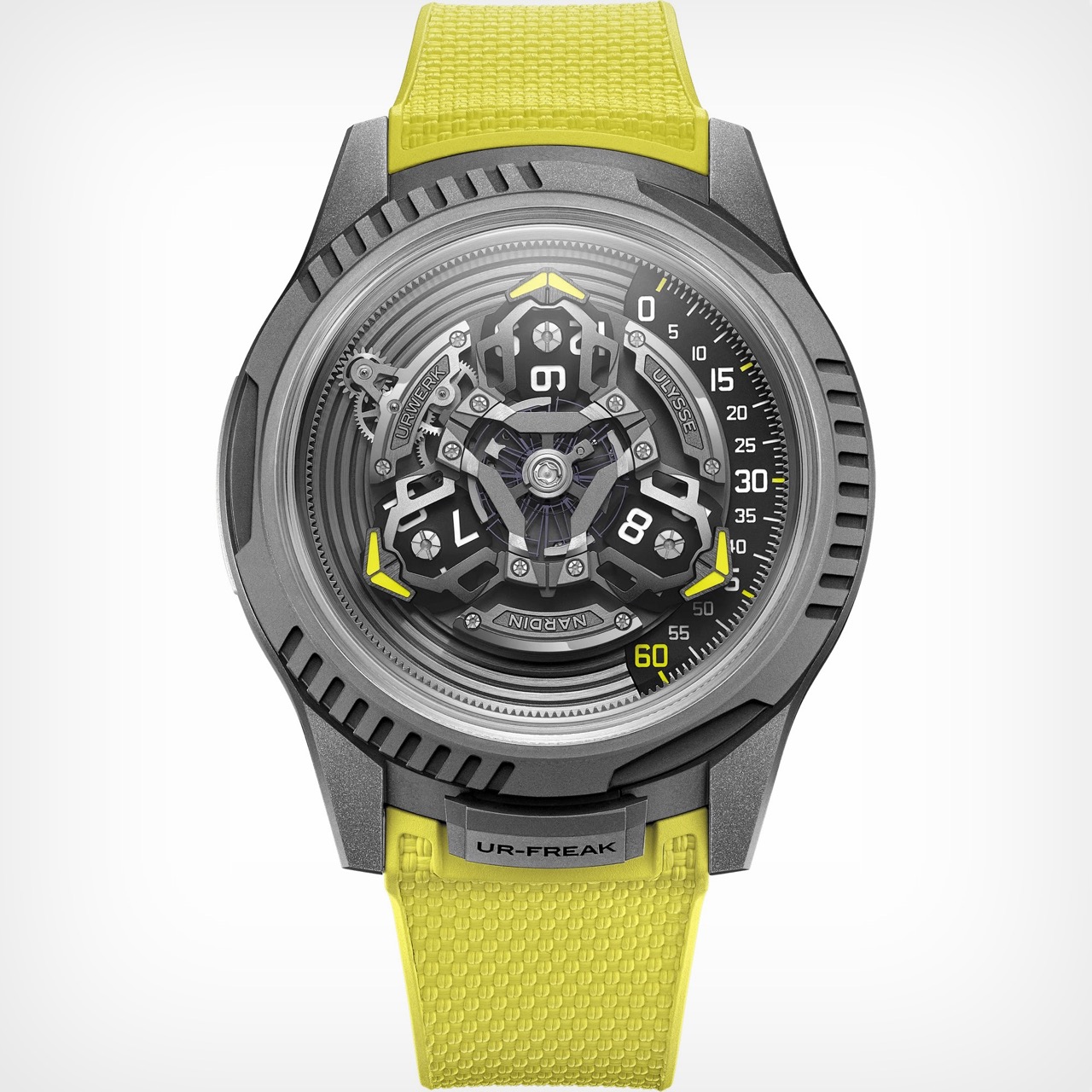
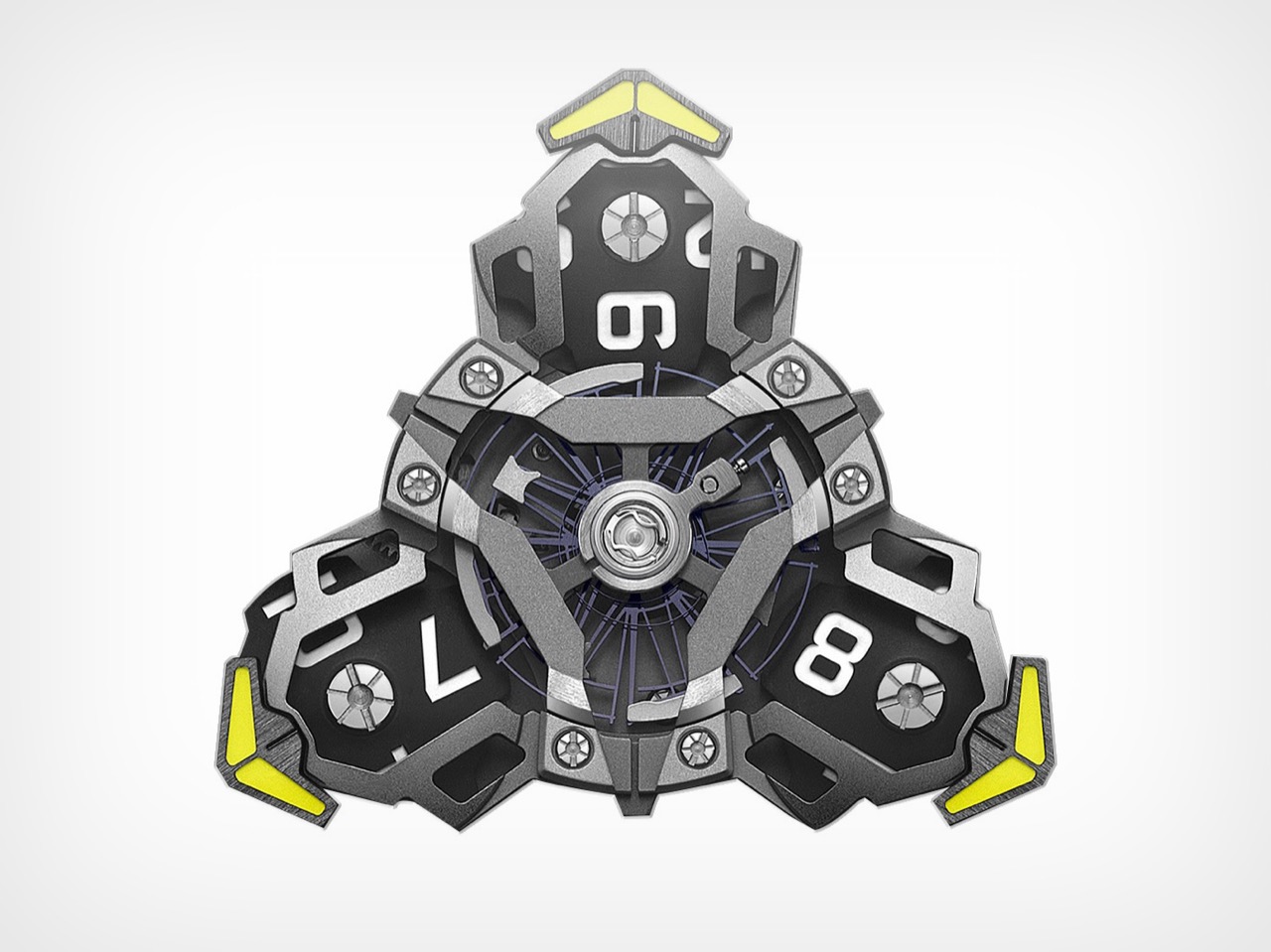
What makes this partnership click is the deep mechanical fusion they achieved. The purpose-built UN-241 caliber is proof of this, a movement born from over 150 new components designed to get these two very different systems to play nice. You can see Ulysse Nardin’s massive silicon oscillator beating right in the middle, the technical heart of the machine. But orbiting around it is an assembly that is pure Urwerk. The three satellite arms, each carrying a rotating hour block, are mounted directly onto the Freak’s carousel, creating a layered, kinetic sculpture. You are looking at a Ulysse Nardin movement carrying an Urwerk complication like a backpack, all rotating as one cohesive unit.
Even with all that movement, reading the time is surprisingly straightforward. Your eye is drawn to the right side of the watch, where a single active satellite points a bright yellow arrow toward a linear minute track. The number on the corresponding hour block gives you the hour. It is an intuitive system, a classic Urwerk touch, but it’s made more dynamic by the constant, slow rotation of the Freak platform underneath. It feels like Urwerk’s dashboard display has been mounted on a revolving space station.
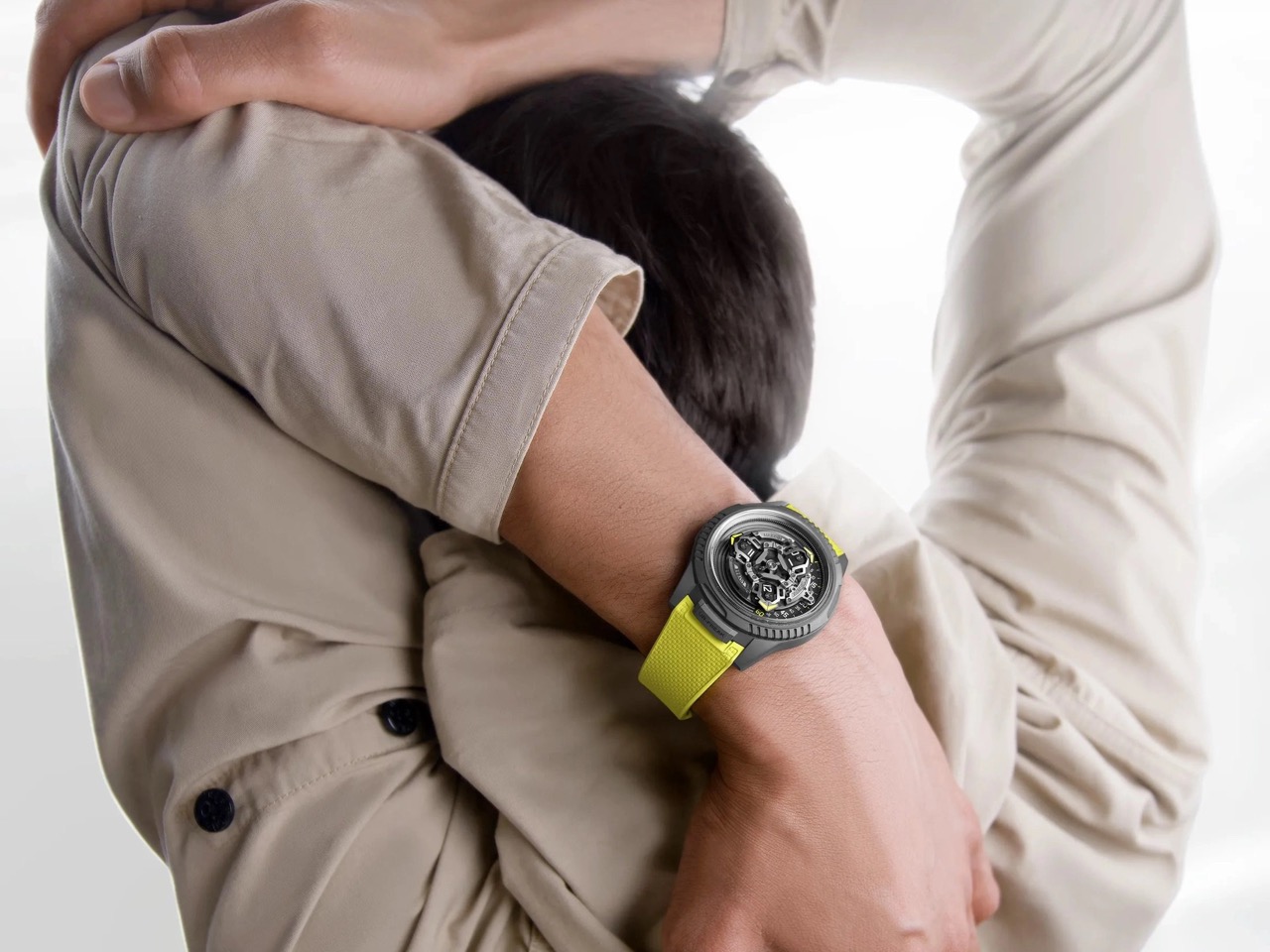
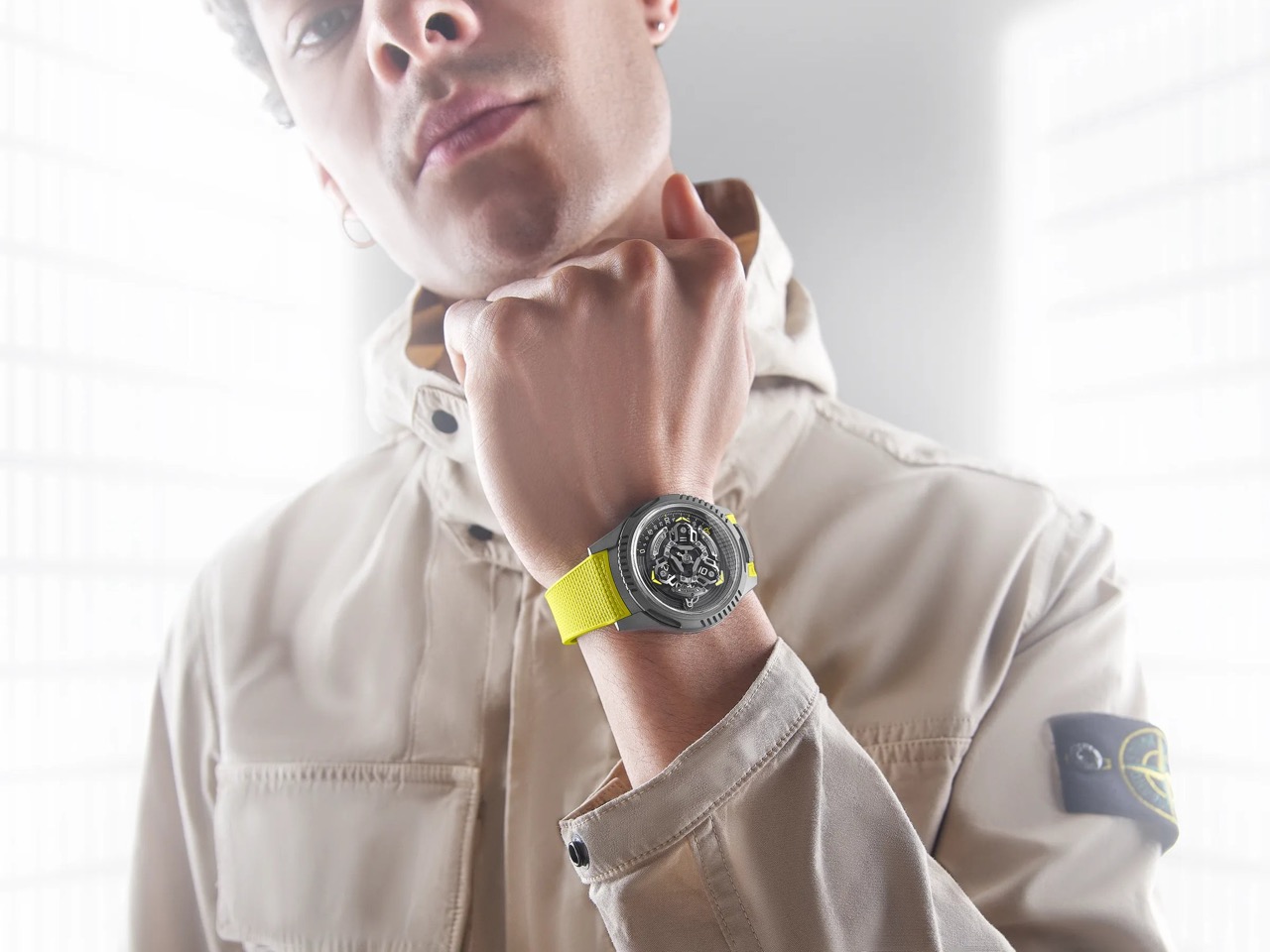
The 44 mm silhouette is clearly from the Freak ONE, with its crownless architecture and smooth, sandblasted titanium. But you can see Urwerk’s influence in the fluted, notched sections of the bezel, which add an industrial texture that feels different from the Freak’s usually sleek profile. You still set the time by rotating this bezel, secured by a locking tab at six o’clock that now reads “UR-FREAK.” It is a clear signal that this is a Freak that has been properly Urwerk-ified. The electric yellow strap, Urwerk’s calling card, drives the point home, a splash of aggressive color against the muted gray case.
Getting one will not be easy, or cheap. The UR-Freak is a limited run of just 100 pieces, and with a price tag of around 122,200 USD, it is aimed squarely at serious collectors in the independent scene. For those looking to acquire one, inquiries will have to be made directly to either brand. The UR-Freak is the kind of watch that makes you wonder why it did not happen sooner, and at the same time, be amazed that it happened at all.
Perched atop a challenging 45-percent slope in the Hollywood Hills, this striking residence by Kristen Becker of Mutuus Studio reimagines what luxury living can look like within a modest footprint. Completed in 2016, the house was commissioned by an actor-director couple who wanted their Los Angeles home to feel as intimate and carefully curated as their New York City penthouse loft. The steep, oak-dotted hillside presented serious design challenges, but Becker transformed these constraints into architectural opportunities that give the home its distinctive character.
Becker drew inspiration from the clients’ travels through Ireland and their fascination with European castles, creating a sequence of spaces that unfold with theatrical drama. Visitors enter through a wooden, steel, and concrete bridge that spans a secret garden before arriving at an imposing bronze door. The garden connects to a courtyard where sunlight filters through floor-to-ceiling windows into the bathroom below, evoking the atmospheric quality of ancient fortresses. Medieval castles and industrial buildings both influenced the aesthetic, resulting in a design that feels simultaneously raw and refined.
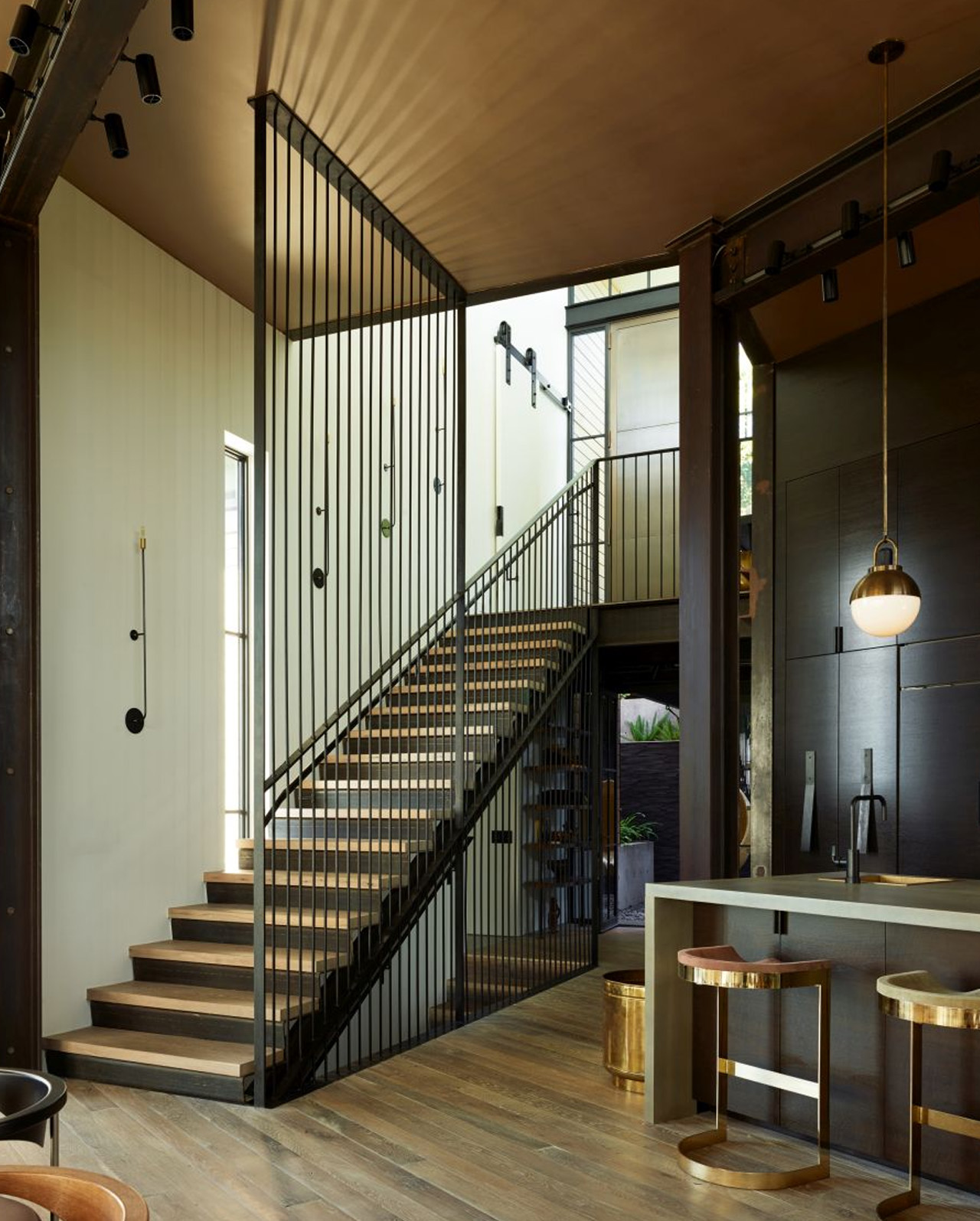
The multi-storey structure steps down the hillside rather than fighting against it, allowing each level to capture different views of the surrounding landscape dotted with shrubs, cacti, and mature oak trees. Natural light floods the interiors through expansive glazing, while a garage-style door in the main living area lifts upward to dissolve the boundary between inside and out. This connection to the terrace extends the living space and takes full advantage of California’s temperate climate. The steel and concrete structure provides the industrial backbone that supports the home’s open, flowing layout.
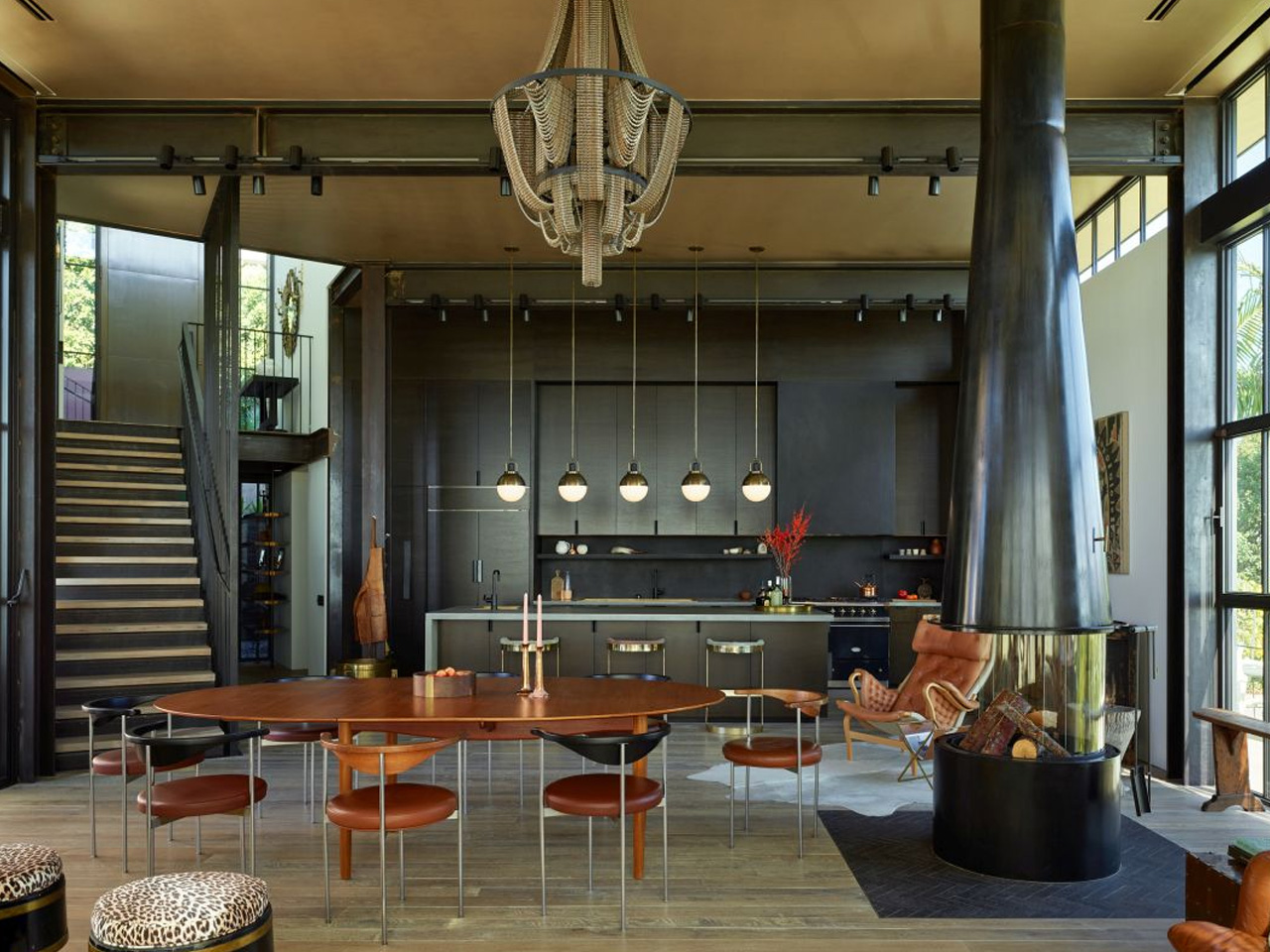
Interior design played an equally important role in the project, with Becker collaborating closely with the clients on furnishings that reflect their globetrotting lifestyle and eclectic taste. The living room showcases caramel leather sofas alongside leopard-print stools and a bronze and glass coffee table by Willy Daro. African artwork hangs near pieces from Brian Henson’s childhood collection. The dining area features a Finn Juhl teak table surrounded by Peter Moos chairs, all illuminated by a custom Facaro bicycle chain chandelier that adds unexpected whimsy.
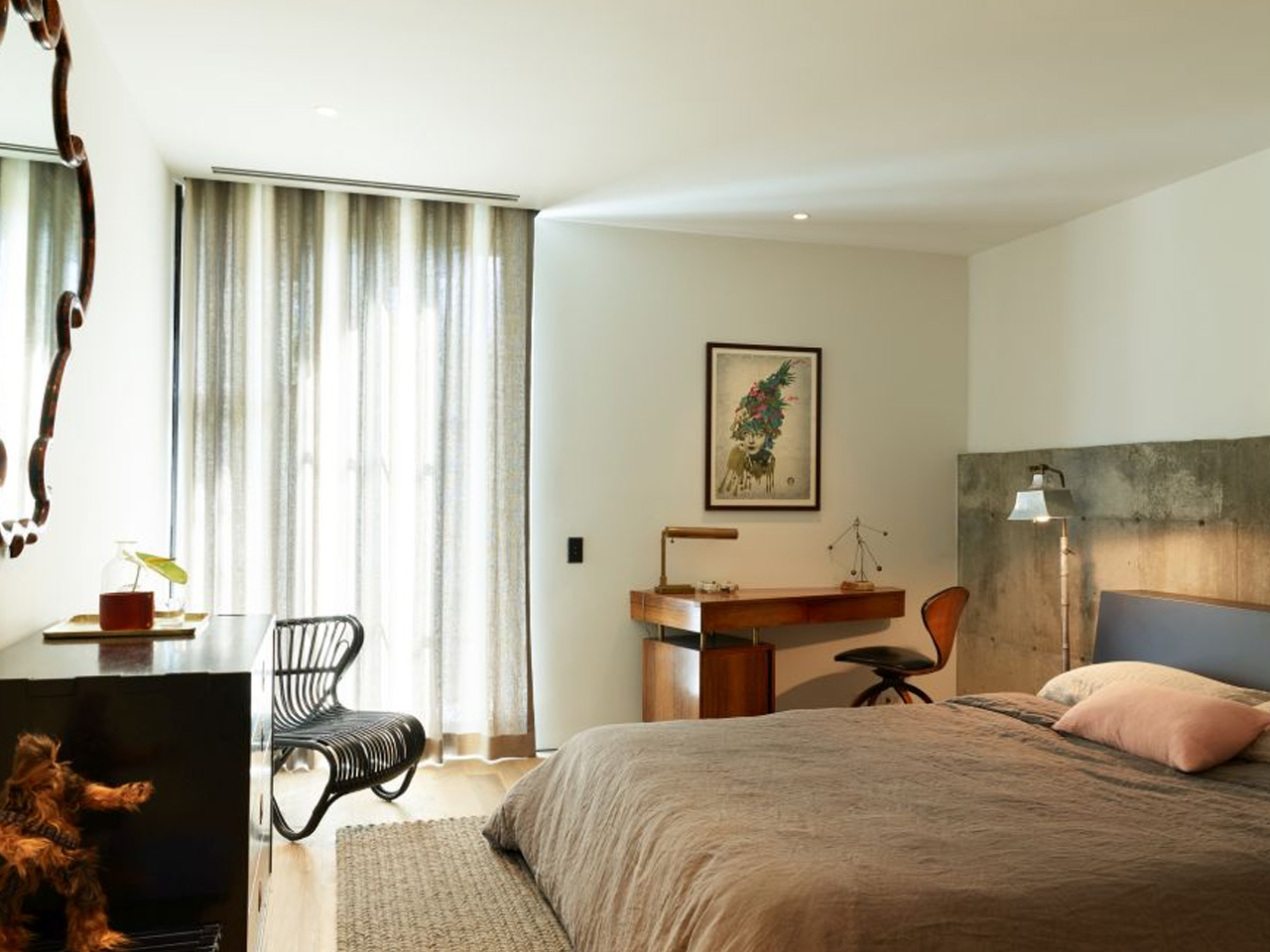
Throughout the home, vintage pieces from different eras and continents sit comfortably together. Ricardo Fasanello’s Anel chair shares space with Bruno Mathsson’s Pernilla Lounge Chair, antique Chinese sideboards, vintage Japanese benches, and a Norman Cherner swivel chair from the 1960s. An Arc dome pendant by Allied Maker illuminates a vintage Warren Bacon saddle stool. Every element received thoughtful consideration, with the design team and owners collaborating to ensure each piece contributed to a seamless experience of place.
The Hollywood Hills House stands as proof that luxury and modesty can coexist. Becker’s background in dance informed the seamless flow through the rooms, where movement feels intuitive and natural. The residence delivers a sophisticated California lifestyle while maintaining efficiency in both space and resources. Photography by Kevin Scott captures how this modern castle commands its hilltop position, offering a fresh interpretation of the iconic Case Study Houses while establishing its own contemporary presence in the Los Angeles architectural landscape.