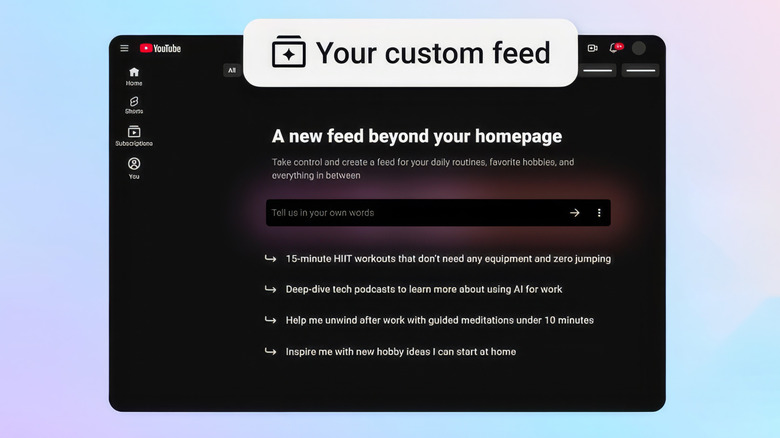
YouTube now lets you offload your playlist curation to AI
After releasing a feature to detect and label AI-generated videos, YouTube has released a new feature that will let you curate videos using... AI.



There are way too many online services and subscriptions to keep track of these days, but the flip side is there’s a tool for just about everything. Time is just about up to get a physical gift shipped in time for the holidays, so below we’ve pulled together some of our favorite digital gifts and subscriptions, including time-tested video, music and gaming services as well as tools to clear your mental space and learn new skills. There are also a few subscriptions that provide ongoing, IRL deliveries, if you think your giftee will appreciate the nostalgic charm of a physical object.
Game consoles are certainly among the most popular gift ideas this time of year. If you know someone who’s been so good that they’re getting a new Nintendo Switch, PlayStation 5 or Xbox Series X/S, one of these subscriptions will make their shiny toy immediately playable out of the box.
There’s no doubt that Microsoft has changed the value proposition for its Game Pass subscription service service. It recently raised the price for its most comprehensive Ultimate tier by 50 percent, to $30 a month. That’s a bitter pill to swallow — but devoted players who have an Xbox as their main (or only) console will still get a ton of value out of Game Pass.
The aforementioned Ultimate tier provides access to more than 500 games that’ll work on Xbox, PC and other supported devices. It’s also the only way to get “day one” release games like Hollow Knight: Silksong Ninja Gaiden 4, The Outer World 2, Call of Duty Black Ops 7; in recent years other high-profile day one releases have included Doom: The Dark Ages, Starfield, Clair Obscur: Expedition 33, Forza Motorsport and numerous others. Game Pass Ultimate subscribers also have access to the highest quality and fastest game streaming Xbox offers. For a slightly less hardcore Xbox fan, though, the $15-per-month Premium tier is also worth considering.
Nintendo’s Switch Online subscription has gotten some nice upgrades in 2025, the year of the Switch 2. As it has for years, Nintendo offers two different Switch Online plans. The basic $20-per-year plan unlocks online play and enables Switch 2 owners to use the system's GameChat capabilities. It also includes more than 100 Game Boy, NES and Super NES games, cloud backups of your saved games as well as the occasional special offers. It also includes access to the rather silly but enjoyable Nintendo Music app, so you can listen to your favorite Zelda or Mario tracks at any time.
The $50 “expansion pack” adds a collection of N64, Game Boy Advance and Sega Genesis games as well as some DLC for games like Mario Kart 8, Animal Crossing: New Horizons and Splatoon 2. But most interesting are the new additions for Switch 2 owners: there’s a small but growing library of GameCube games, including classics like The Legend of Zelda: The Wind Waker and F-Zero GX. Switch 2 owners who have the expansion pack subscription can also upgrade to the Switch 2 versions of The Legend of Zelda: Breath of the Wild and Tears of the Kingdom for free.
A PlayStation Plus subscription is a must-have for any PS5 owners. That’s partially because you need one to play multiplayer games online, but there are plenty of other significant benefits. PS Plus comes in three tiers, but the middle “Extra” plan ($15/month or $135/year) is probably best for most gamers. In addition to cloud storage for saves, online multiplayer support and a couple of free games for your library every month, you get access to the PlayStation Plus catalog, which includes more than 400 PS4 and PS5 games.
There are a number of heavy hitters here, including The Last of Us Part I and II, Ghost of Tsushima, God of War Ragnarok, Death Stranding, Marvel’s Spider-Man Remastered and Returnal alongside lower-profile hits and indie games such as Citizen Sleeper, Sayonara Wild Hearts, Dave the Diver and Humanity. If you know someone who loves older games though, the “Premium” tier ($18/month or $160/year) adds a bunch of titles from the PS1 through the PS4 as well as perks like game trials and PS5 game streaming from the cloud.
Check out the rest of our gift ideas here.
This article originally appeared on Engadget at https://www.engadget.com/the-best-subscription-gifts-to-send-to-your-loved-ones-this-christmas-disney-bundle-masterclass-field-notes-and-more-141830326.html?src=rssWe spend a lot of time staring at our screens, so it’s worth finding one that actually feels good to use. The right monitor can make your desk setup feel faster, brighter and easier on the eyes, whether you’re deep into spreadsheets, watching a show or chasing higher frame rates in your favorite game.
What the best monitor means, though, depends on what you do. Gamers might want smooth, fast refresh rates. Creators usually prioritize color accuracy. Office workers and students just need something clear, comfortable and reliable. Thankfully, monitors in 2025 cover all of those needs, with options that range from compact 24-inch displays to massive ultrawides built for serious multitasking.
We’ve tested a variety of monitors across price ranges and use cases to find the ones that stand out for everyday use. No matter your budget, setup or screen-size preference, these are the monitors that make your PC, and your time in front of it, a little better.
The cheapest monitors are still TN (twisted nematic), which are strictly for gamers or office use. VA (vertical alignment) monitors are also relatively cheap, while offering good brightness and a high contrast ratio. However, content creators will find that LCD, IPS displays (in-plane switching) deliver better color accuracy, pixel density, picture quality and wide viewing angles — making them a strong option for general computer monitor use.
If maximum brightness is important, a quantum dot LCD display is the way to go — those are typically found in larger displays. OLED panels are now available and offer the best blacks and color reproduction, but they lack the brightness of LED or quantum dot displays. Plus, they’re expensive. The latest type of OLED monitor, called QD-OLED from Samsung, is now common among gaming monitors. The most notable advantage is that it can get a lot brighter, with recent models hitting up to 1,000 nits+ of peak brightness.
MiniLEDs are now widely used in high-end displays. They’re similar to quantum dot tech, but as the name suggests, it uses smaller LED diodes that are just 0.2mm in diameter. As such, manufacturers can pack in up to three times more LEDs with more local dimming zones, delivering deeper blacks and better contrast. MiniLED displays also tend to offer excellent backlight control, making them a great choice for HDR content and video editing.
Where 24-inch displays used to be more or less standard (and can still be useful for basic computing), 27-, 32-, 34- and even 42-inch displays have become popular for entertainment, content creation and even gaming these days.
Nearly every monitor used to be 16:9, but it’s now possible to find 16:10 and other more exotic display shapes. On the gaming and entertainment side, we’re also seeing curved monitors and widescreen ultrawide monitors with aspect ratios like 21:9. If you do decide to buy an ultrawide display, however, keep in mind that a 30-inch 21:9 model is the same height as a 24-inch monitor, so you might end up with a smaller display than you expected.
A 4K monitor is nearly a must for content creators, and some folks are even going for 5K or all the way up to 8K. Keep in mind, though, that you’ll need a pretty powerful computer with a decent graphics card to drive all those sharp pixels. And 4K higher resolution should be paired with a screen size of 27 inches and up, or you won’t notice much difference between 1440p. At the same time, I wouldn’t get a model larger than 27 inches unless it’s 4K, as you’ll start to see pixelation if you’re working up close to the display. That’s when a lower resolution monitor shows its limits.
One new monitor category to consider is portable monitors designed to be carried and used with laptops. Those typically come in 1080p resolutions and sizes from 13-15 inches. They usually have a lightweight kickstand-type support that folds up to keep things compact and maximize portability and functionality.
HDR adds vibrancy to entertainment and gaming – but be careful before jumping in. Some monitors that claim HDR on their marketing materials don’t even conform to a base standard. To be sure that a display at least meets minimum HDR specs, you’ll want to choose one with a DisplayHDR rating with each tier representing maximum brightness in nits.
However, the lowest DisplayHDR 400 and 500 tiers may disappoint you with a lack of brightness, washed out blacks and mediocre color reproduction. If you can afford it, the best monitor to choose is a model with DisplayHDR 600, 1000 or True Black 400, True Black 500 and True Black 600.
Where televisions typically offer HDR10 and Dolby Vision or HDR10+, most PC monitors only support the HDR10 standard, other than a few (very expensive) models. That doesn’t matter much for content creation or gaming, but HDR streaming on Netflix, Amazon Prime Video and other services won’t look quite as punchy. In addition, the best gaming monitors are usually the ones supporting HDR600 (and up), rather than content creation monitors – with a few exceptions.
High refresh rate is a key feature, particularly on gaming monitors. A bare minimum nowadays is 60Hz, and 80Hz and higher refresh rates are much easier on the eyes. However, most 4K displays top out at 60Hz with some rare exceptions and the HDMI 2.0 spec only supports 4K at 60Hz, so you’d need at least DisplayPort 1.4 (4K at 120Hz) or HDMI 2.1. The latter is now available on a number of monitors, particularly gaming displays. However, it’s only supported by the latest NVIDIA RTX 3000- and 4000-series, AMD RX 6000-series GPUs. Support for G-Sync and AMD FreeSync is also something to look for if you want to eliminate screen tearing and stuttering during fast-paced gameplay — especially when paired with a high refresh rate.
There are essentially three types of modern display inputs: Thunderbolt, DisplayPort and HDMI. Most monitors built for PCs come with the latter two, while a select few (typically built for Macs) will use Thunderbolt. To add to the confusion, USB-C ports may be Thunderbolt 3, and by extension, DisplayPort compatible, so you may need a USB-C to Thunderbolt or DisplayPort cable adapter depending on your display.
Serious content creators should consider a more costly 10-bit monitor that can display billions of colors. If budget is an issue, you can go for an 8-bit panel that can fake billions of colors via dithering (often spec’d as “8-bit + FRC”). For entertainment or business purposes, a regular 8-bit monitor that can display millions of colors will be fine.
The other aspect of color is the gamut. That expresses the range of colors that can be reproduced and not just the number of colors. Most good monitors these days can cover the sRGB and Rec.709 gamuts (designed for photos and video respectively). For more demanding work, though, you’ll want one that can reproduce more demanding modern gamuts like AdobeRGB, DCI-P3 and Rec.2020 gamuts, which encompass a wider range of colors. The latter two are often used for film projection and HDR, respectively.
OLED is better than mini-LED in many areas but not all. Here are the advantages of OLED panels:
OLED monitors don't have any "blooming" or halos around bright parts of the image.
OLEDs have blacks with zero brightness, which is not achievable on mini-LED. That means they also have higher contrast ratios.
OLEDs consume less energy.
OLEDs have faster response times for gaming.
And here are the advantages of mini-LED monitors:
They are brighter (often much brighter), so it can be better for HDR content.
They don't suffer from burn-in like OLED can.
This depends on the individual. For normal use, 27-32 inches is the sweet spot. If you're one who likes many windows open at a time (like a stock broker), then you might want to go up to 37 or even 42 inches.
If you need as much speed as possible, a curved monitor lets you rapidly look around the screen without changing focus or moving your head as much compared to a flat screen. It also provides more immersion. The drawback is that curved displays tend to be wider so they take up more desk space. They're also generally more expensive.
This article originally appeared on Engadget at https://www.engadget.com/computing/accessories/best-monitor-130006843.html?src=rss