Less than a week after Valve admitted that the current shortage (and growing prices) of RAM were affecting its hardware plans, the Steam Deck is completely sold out. The Steam Deck has gone in and out of stock in the past, but as Kotaku notes, the timing does raise the question whether Valve's RAM issues could also be impacting its Linux handheld.
The 256GB Steam Deck LCD, and both the 512GB and 1TB models of the Steam Deck OLED, are completely sold out on Steam. Valve announced that it was discontinuing the LCD versions of its handheld and selling through its remaining inventory in December 2025, so the fact that the 256GB Steam Deck model is currently sold out isn't surprising. That both OLED versions are also unavailable at the same time, though, is a bit more unusual.
Engadget has contacted Valve for more information about the availability of the Steam Deck. We'll update this article if we hear back.
When Valve announced the Steam Machine, Steam Controller and Steam Frame, the company notably left pricing and availability off the table, presumably because tariffs and access to RAM were leaving those details in flux. The company's announcement last week that the memory and storage shortage had pushed back its plans and would likely impact prices more or less confirmed that. At no point did Valve mention that the Steam Deck would be similarly affected, but maybe it should have.
The rising cost of RAM has already forced other PC makers to adjust the pricing of their computers. Framework announced in January that it was raising the price of its Framework Desktop by as much as $460. Some analysts assume that the memory shortage driven by the AI industry could lead to higher prices and even an economic downturn in the wider PC industry. Ideally, the Steam Deck being out of stock is a temporary issue rather than a sign that Valve is doing something drastic. If things continue as they are, however, changes to the Steam Deck likely won't be off the table.
This article originally appeared on Engadget at https://www.engadget.com/gaming/pc/the-great-ramaggedon-of-2026-might-have-just-claimed-the-steam-deck-211958306.html?src=rss
This is going to be one of the shortest articles in my series on how to cancel your subscriptions to the best VPNs. Unlike most providers, Mullvad VPN does not automatically renew an expired subscription unless you tell it to. Thanks to its unique pricing approach, cancelling Mullvad is the default option.
When you sign up for Mullvad, you pay for as many months upfront as you want at the constant rate of 5 Euro per month (varying with exchange rates). Each month, Mullvad takes 5 Euro out of your account until there's nothing left. If you're no longer satisfied with Mullvad, all you have to do is stop putting money in.
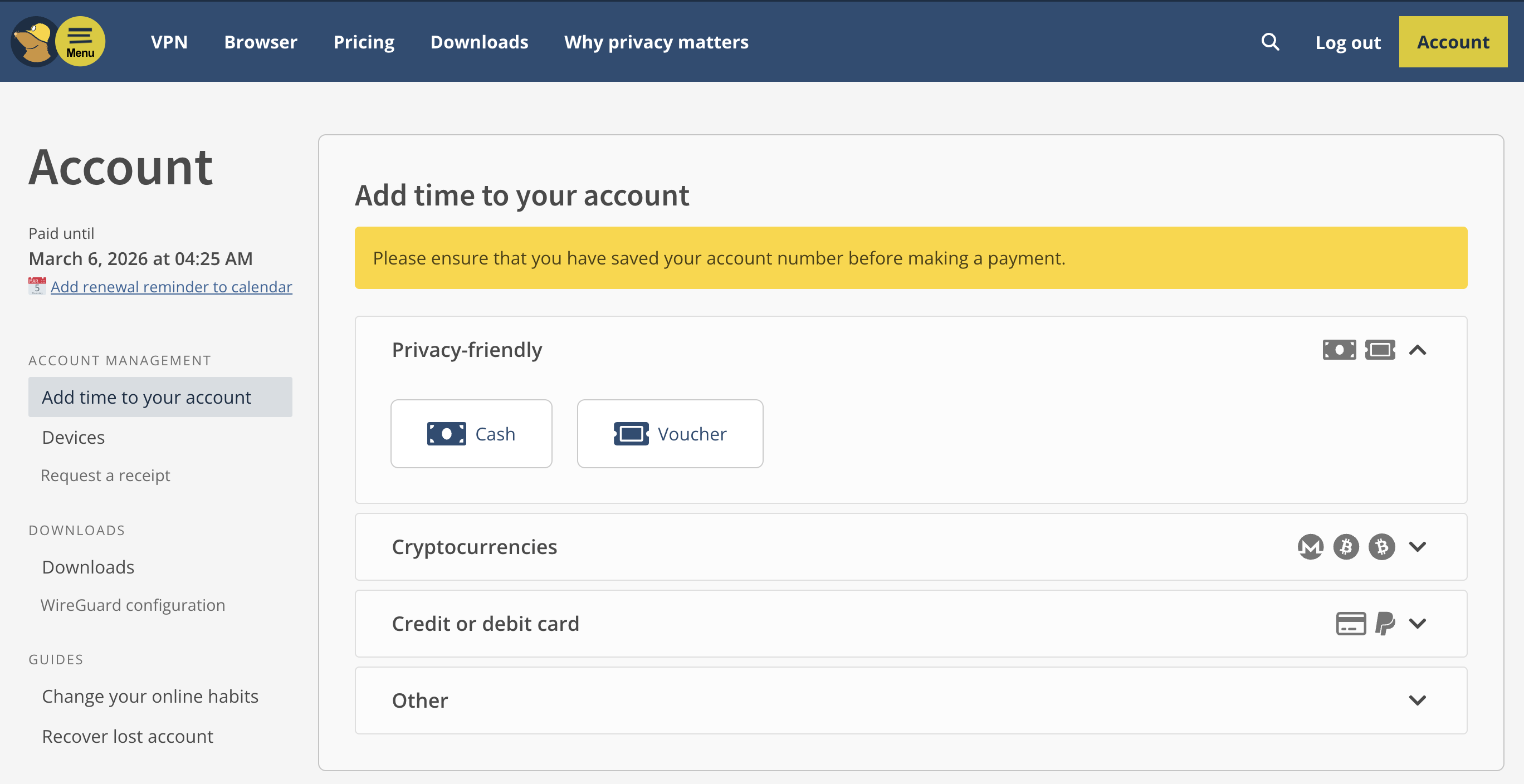
The Mullvad account dashboard.
Sam Chapman for Engadget
If you happen to have originally signed up for Mullvad earlier than the middle of 2022, you may have an auto-renewal account grandfathered in. Mid-2022 is when Mullvad stopped auto-renewing subscriptions and got rid of PayPal integration altogether, but people who had signed up before then had the option to leave auto-renewal on.
If you're in this group, cancelling is simple. Just sign into your account page, click on the word Subscriptions, then click Unsubscribe.
How to cancel Mullvad if you subscribed through an app store
There's one more exception to the usual method of cancelling Mullvad. If you got your subscription through an app store instead of Mullvad's website or app, the app store is the one processing your money. You'll need to cancel through them instead.
On an iPhone or iPad, open the Settings app, whose icon shows gray gears. Tap your name at the top of the screen to reach your Apple ID page, then tab Subscriptions. Scroll down until you find your Mullvad subscription, tap it, then hit Cancel Subscription.
On an Android phone, open the Google Play Store, whose icon is a triangle in the Google colors. At the top-right, tap the circle with the first letter of your username in it. Hit Payments & Subscriptions, scroll down to find Mullvad, then tap it and hit Cancel Subscription.
How to delete your Mullvad account
You can go the extra mile and delete your account if you're sure you'll never want to use Mullvad again. Send an email to support@mullvadvpn.net, provide your account number and request that the account be terminated. You'll get a reply confirming deletion.
How to get a refund from Mullvad
Mullvad offers refunds on any purchase within 14 days. To start a refund request, send an email to support@mullvadvpn.net, including your Mullvad account number and your payment token. If you aren't sure what your payment token is, find the charge for Mullvad on your bank statement and look for something in the format VPN*(10-digit number).
Payments made in cash can't be refunded, apparently because that's considered a form of money laundering in Sweden. If you got Mullvad through a voucher, request your refund through the store the voucher came from.
Best Mullvad alternatives
Mullvad is one of the best VPNs, especially in terms of privacy. However, I've found it to be a bit slow at times, with a somewhat limited server network. Luckily, Proton VPN is almost as private as Mullvad — the only thing it's missing is the ability to sign up without an email. It's also got a larger server network and better overall download speeds.
Windscribe is another privacy-optimized VPN with a better record than Mullvad in my unblocking tests. Surfshark is the fastest VPN of them all, while ExpressVPN is ideal for beginners. If you liked Mullvad's cheap pricing, CyberGhost is a highly affordable alternative.
This article originally appeared on Engadget at https://www.engadget.com/cybersecurity/vpn/how-to-cancel-mullvad-vpn-200000516.html?src=rss
Anthropic is upgrading Claude's free tier, apparently to capitalize on OpenAI's planned integration of ads into ChatGPT. On Wednesday, Anthropic said free Claude users can now create files, connect to external services, use skills and more.
Anthropic added the ability for paid users to create files in September. Starting today, free users of the chatbot can also create and edit Excel spreadsheets, PowerPoint presentations, Word docs and PDFs. Claude's file creation abilities are powered by Sonnet 4.5.
Free users can now create and edit Excel spreadsheets, PowerPoint presentations, Word docs, and PDFs.
Anthropic
Meanwhile, Connectors allow free users to link Claude to third-party services. There's a long list of available ones, including Canva, Slack, Notion, Zapier and PayPal.
Skills, on the other hand, let you teach Claude to "complete specific tasks in repeatable ways." In short, the chatbot loads folders of instructions, scripts and other resources when performing relevant tasks. Other upgrades to the free tier include longer conversations, interactive responses and improved voice and image search.
Claude's free-tier upgrades appear to be a direct response to ChatGPT's planned introduction of ads for its free users. Anthropic's announcement today ended with the tag line, "No ads in sight." This follows the company's promise last week that Claude will remain ad-free. Anthropic even poked fun at OpenAI's cash-seeking move in a Super Bowl ad (below), which also took a swipe at GPT-4o's penchant for kissing ass.
This article originally appeared on Engadget at https://www.engadget.com/ai/anthropic-beefs-up-claudes-free-tier-as-openai-prepares-to-stuff-ads-into-chatgpts-194100939.html?src=rss
Apple has released the software update 26.3 for its various platforms. This includes the iPhone, iPad, Mac and Apple Watch. In other words, don't be surprised when your iPhone notifies you of a pending update.
Unfortunately, there isn't all that much to talk about here. Consider this a minor update that focuses primarily on bug fixes, which is important but not exactly fun. It is worth noting that the new iOS and iPadOS has an especially long list of fixes. There are 37 security issues addressed by the update, according to a report by 9to5Mac.
iOS 26.3 and iPadOS 26.3 do include a new tool for transitioning from an Apple device to an Android device, which is handy. It transfers photos, notes, messages, apps and other data to an Android phone but doesn't do anything with health data, protected notes or photos. There's also a new option to forward notifications from an iPhone or iPad to another device, but only for users in the EU.
Why the small fries update? Rumors have been swirling that Apple is saving the big guns for the next release. Insiders have suggested that software update 26.4 will include the long-awaited Siri refresh and new emoji functionality.
This article originally appeared on Engadget at https://www.engadget.com/mobile/smartphones/apple-just-released-ios-263-alongside-updates-for-the-mac-ipad-and-apple-watch-193532483.html?src=rss
If there’s any area of your life that you might be willing to introduce more AI into, it’s likely something as mundane as grocery shopping. That’s what Uber is betting on with its new AI-powered feature in the Uber Eats app.
Cart Assistant lets you "build grocery baskets faster and with less effort" by using AI to automatically fill your basket with items included on your shopping list. To use it, you search for a supported grocery store on the home screen of the app and tap the new Cart Assistant icon that appears at the top of the screen.
From there, you can either manually type out a shopping list or upload a photo of a handwritten one, and Cart Assistant will fetch your requested items and add them to your basket. A screenshot of ingredients needed for a recipe will also suffice.
Uber says its AI assistant will factor in availability before selecting an item and will also display prices and any available promotions. If you don’t want something it recommends, you can delete or swap it for something else. Anything you forgot to add in the original list can be added later, and if you’ve purchased something in the past, these familiar items will be prioritized so you’re less likely to need to make changes. Uber advises users that the new shopping feature is in beta right now, so might not perform perfectly.
Cart Assistant is the latest development in the gradual AI-ification of Uber Eats. Last summer, Uber added a suite of new features to the app, including AI-enhanced food images, AI menu descriptions and AI summaries or restaurant reviews.
This article originally appeared on Engadget at https://www.engadget.com/ai/uber-eats-new-cart-assistant-feature-is-an-ai-hack-for-your-grocery-shopping-145733478.html?src=rss
Mullvad, a virtual private network (VPN) named after the Swedish word for "mole," is often recognized as one of the best VPNs for privacy. I put it on my best VPN list for exactly that reason. I've got huge respect for the extra lengths Mullvad goes to in order to ensure its user's privacy.
To give you a preview, Mullvad is one of the few VPNs — other than my normal privacy recommendation, Proton VPN — that lets users pay entirely in cash. But even Proton VPN asks for an email address to make an account and uses a few marketing cookies on its own website. Mullvad represents every account as a randomly generated 16-digit code and uses no marketing cookies whatsoever.
That's just one example of how Mullvad goes beyond the call of duty to keep users private. But while privacy is the most important aspect of a VPN alongside security, it's not the only thing that matters. For this review, I set out to investigate whether Mullvad pairs its rights-protecting bonafides with versatile, convenient and enjoyable VPN apps. Using our rigorous VPN testing procedure, I'll rate Mullvad in 11 areas. You can find a summary of my results in the table below, skip to the sections that matter most to you or just read my final advice in the conclusion.
Editor's note (2/11/26): We've overhauled our VPN coverage to provide more detailed, actionable buying advice. Going forward, we'll continue to update both our best VPN list and individual reviews (like this one) as circumstances change. Most recently, we added official scores to all of our VPN reviews.Check out how we test VPNs to learn more about the new standards we're using.
Findings at a glance
Category
Notes
Installation and UI
All apps share roughly the same user interface
Apps are responsive and easy to navigate, with no design choices that would threaten beginners
Lack of "fastest server" button is an issue
Browser extension is only available on Firefox and still in beta
Speed
Reasonably good average latency
Reduces download speeds by 26 percent and upload speeds by 17 percent
Speed declines are consistent and chartable
All speed metrics are quite good on nearby servers
Security
Only uses WireGuard protocol
No IP address leaks, even when switching servers
Packet test showed successful encryption
Pricing
Always costs 5 Euro per month, though prices outside Europe depend on exchange rates
No auto-renewal — membership lasts until money runs out
Can pay using cash or by purchasing scratch-off vouchers on Amazon
14 day money-back guarantee, except on cash payments
Bundles
Only app besides the VPN is the free Mullvad Browser, which removes the tracking habits of typical web browsers
Allows several smaller VPNs to use its servers in their networks
Privacypolicy
No vague lines or loopholes in privacy policy
Only saves account numbers and expiration dates for each user
Uses an extremely limited range of cookies with no marketing trackers
Has undergone a total of 17 audits of different aspects of its service
Swedish police demanded customer information in 2023; Mullvad couldn't comply because the data wasn't logged
Virtual location change
Unblocked Netflix 13 out of 15 times
When it failed, virtual location was still changed
Server network
90 locations in 50 countries, majority in North America and Europe
No virtual servers whatsoever
Features
DAITA conceals traffic patterns that might let an AI identify what sites you visit
Uses quantum-resistant encryption on WireGuard
Can choose your own multihop entry and exit points
Several options for getting around nation-level firewalls
Can block ads, trackers, malware and other unwanted content using predetermined DNS block lists
Supports IPv6 traffic
Kill switch and stronger lockdown mode
Split tunneling by app
Customer support
Help center includes useful filters to find the topic
Well-written articles with good internal linking
No live chat support, but staff answers emails quickly
Can view app logs at any time
Background check
Founded in 2009 in Sweden; still owned and operated by initial founders
User account numbers were exposed in a 2023 incident, but Mullvad quickly closed the leak
Installing, configuring and using Mullvad
Let's start by examining how Mullvad feels as a piece of software. In this section, I'll be testing its desktop apps for Windows and Mac, its mobile apps for Android and iOS and its browser extension for Firefox. To start with the installation process, Mullvad downloads and installs in a snap on mobile. On desktop, installation requires a few more steps than is typical, but the app guides you quickly through everything.
Across the board, my only serious complaint is that there's no option for automatically choosing the fastest server. You can usually assume that the nearest one to you will be the fastest, but there's always the chance of an unusual server overload. It's a bizarre oversight for an app that otherwise goes out of its way to be usable.
Windows
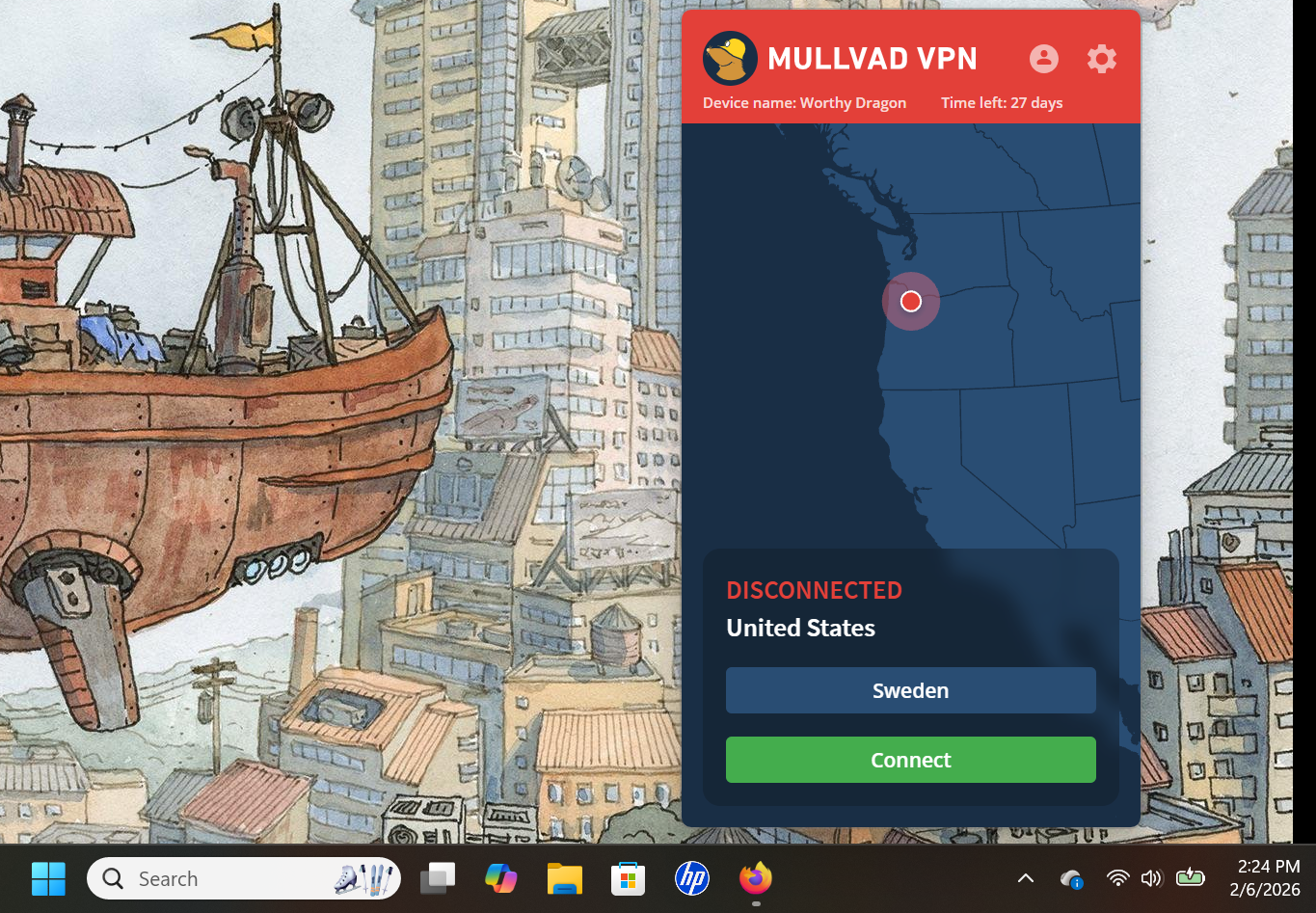
Mullvad's Windows app has a slim UI that uses space efficiently without being too cramped. It doesn't give you a lot of information, such as live speed tests or data in transit, but I've mostly found that to be needless filler on VPN apps.
Mullvad on Windows.
Sam Chapman for Engadget
Speaking of needless filler, the map may be a little bigger than it needs to be, but maps on VPN clients aren't just about teaching you geography — they do a lot to make the apps more welcoming to casual users who might not otherwise fire up security software. In fact, Mullvad's UI is admirably beginner-friendly, befitting its focus on privacy for everybody rather than just the tech-savvy.
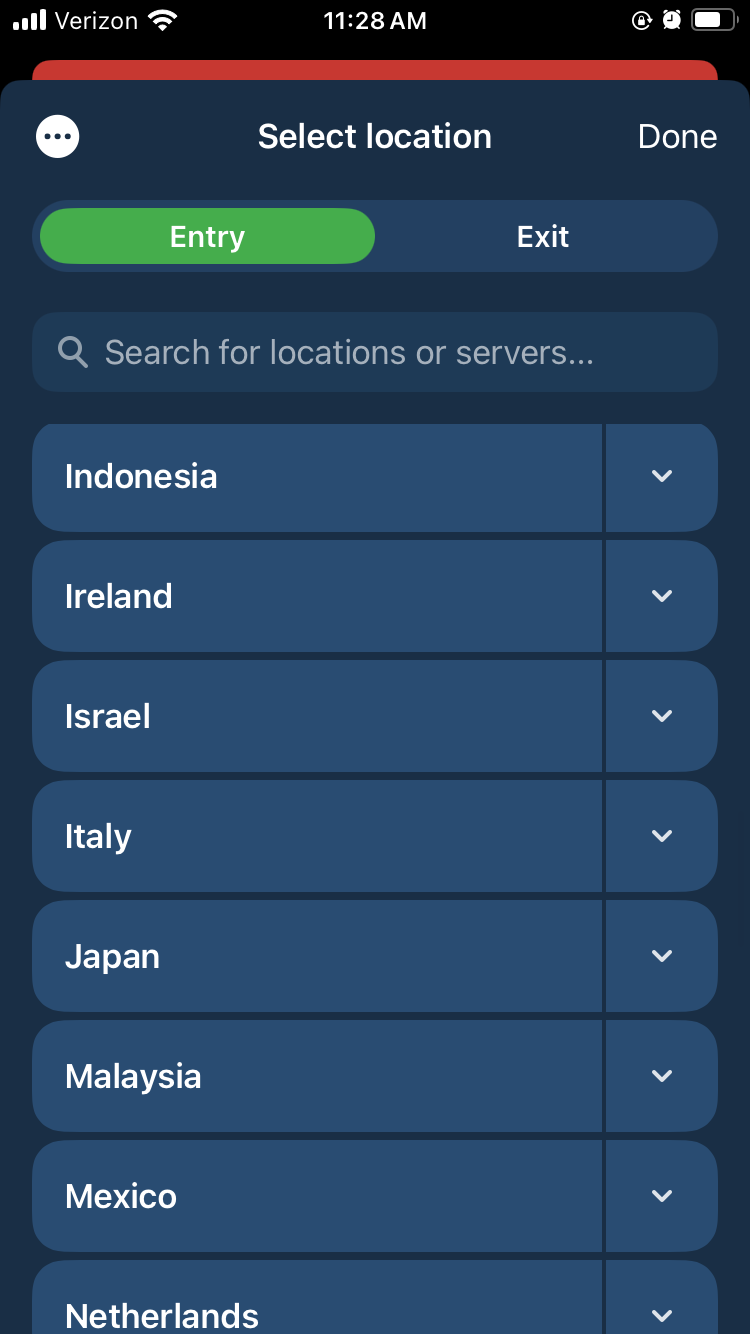
All the settings are accessed by clicking the gear in the top-right. Here, you can turn on DAITA (Mullvad's defense against AI traffic scanning), activate multihop and control Mullvad's other features. There are also some quality-of-life features for the UI itself, such as whether it remains pinned to the taskbar or operates as a standalone window. Some options, especially under the VPN settings tab, are a bit technical, but don't need to be touched for a good experience.
Mac
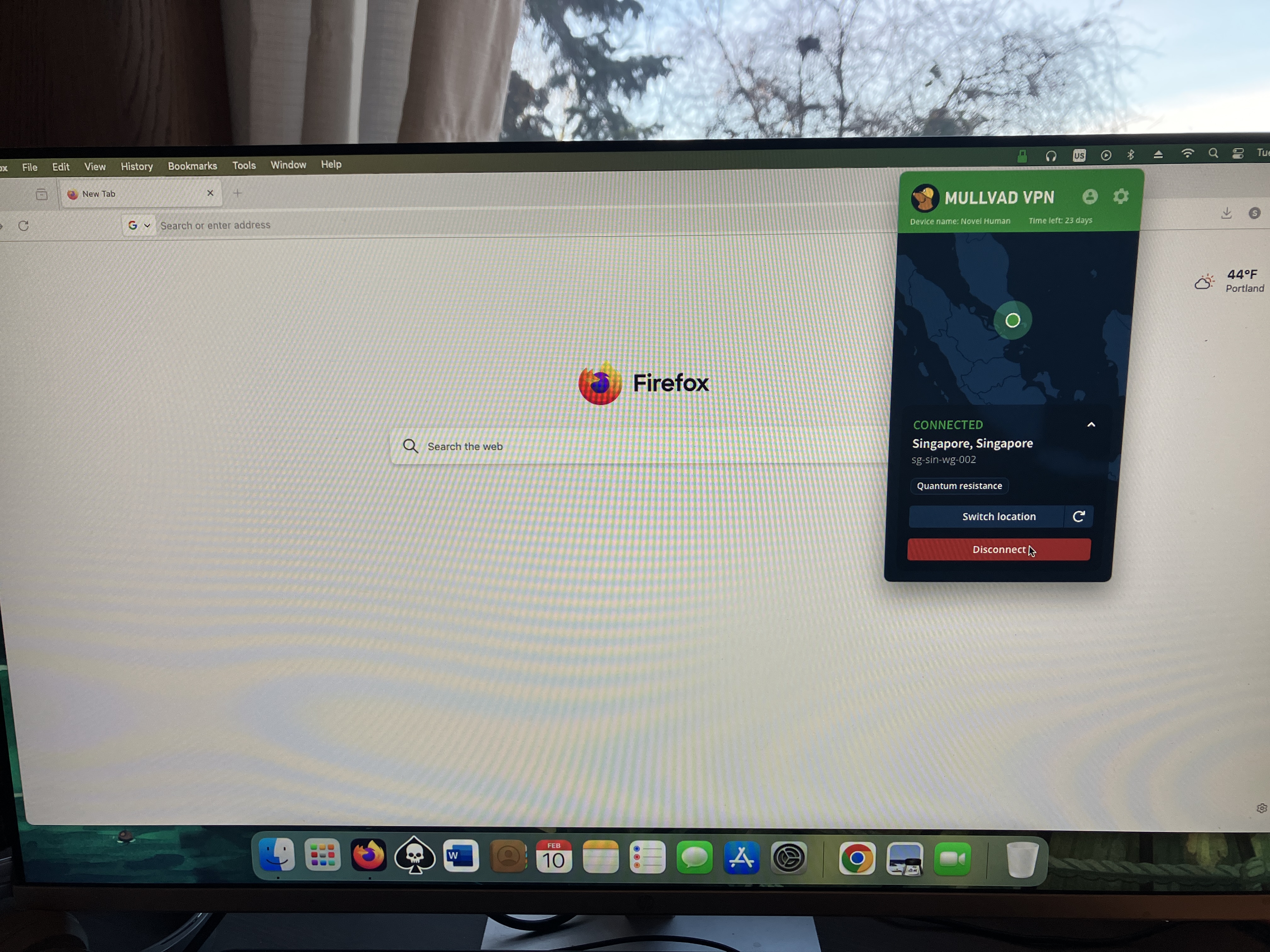
Mullvad's macOS app is quite similar to its Windows app, both in terms of the interface and the features offered. The big difference used to be that macOS lacked split tunneling, but that's been added in a recent update. The only serious distinction now is that the Mac client can't be unpinned from the taskbar, which is just a little bothersome.
Mullvad on Mac.
Sam Chapman for Engadget
Other than that, you'll find every setting you need under the gear, just like on Windows. Similarly, connections to VPN servers happen quickly, and selecting locations from the menu is very straightforward. While connected on either app, you can click the circular arrow by your location to swap to another server in the same location — highly convenient if you're trying to unblock Netflix.
Android
Mullvad's Android app has the same nearly-perfect design approach as all its other apps. The main page has nothing on it but the connect/disconnect button, the choice of server locations, a map and the buttons for your account information and preferences. Those preferences are a manageable set of options that are almost all managed with simple on-off switches. It's all highly responsive and annoyance-free.
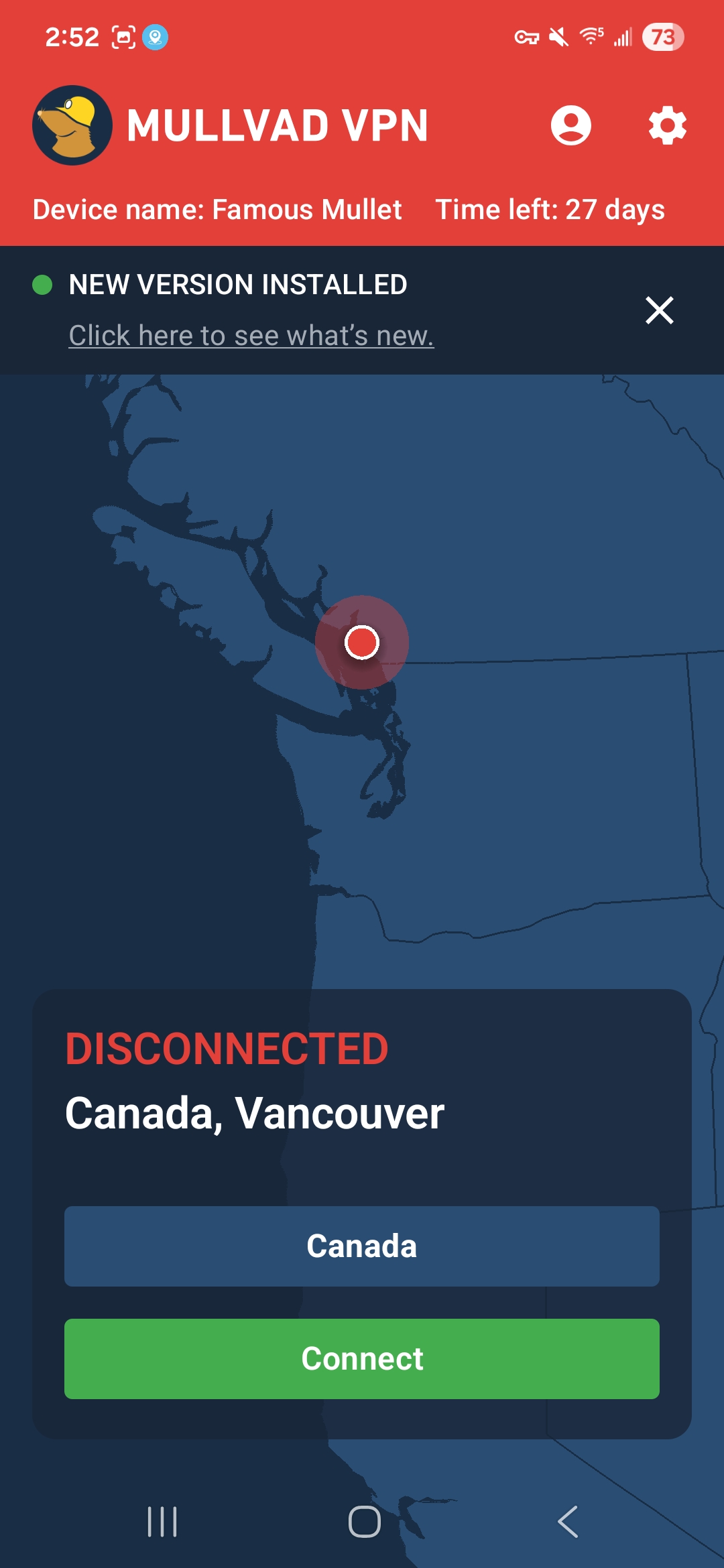
Mullvad on Android.
Sam Chapman for Engadget
iOS
Mullvad's iOS app looks very similar to its apps on every other platform. The front page is kept simple, with large controls in the foreground and a map taking up most of the space. Everything else is located in the menu accessed through the gear icon at top right. Neither mobile app has the options for toggling the UI itself that the desktop apps have, but it's mostly free of quality-of-life problems to start with.
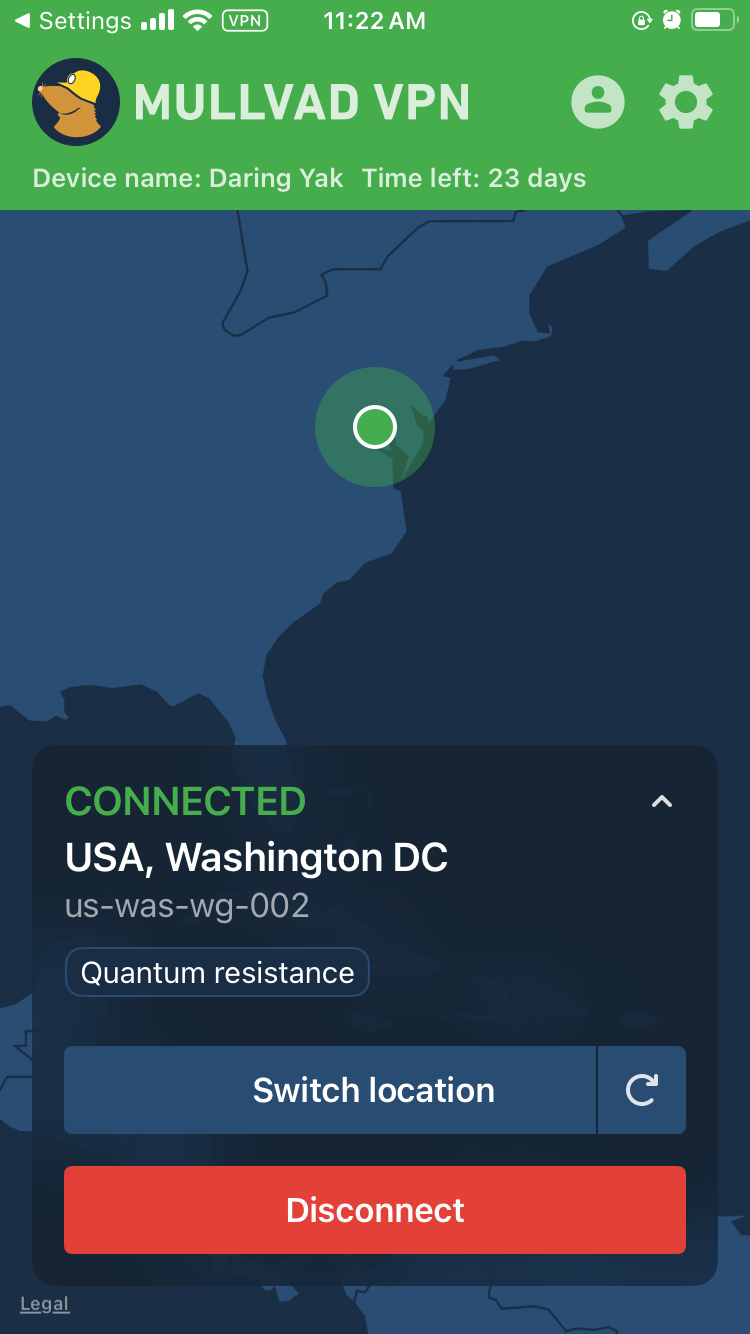
Mullvad on iPhone.
Sam Chapman for Engadget
Browser extensions
Mullvad's browser extension is only compatible with Firefox. You can't actually connect to the VPN through this extension. Its main functions are to tell you whether you're connected to a Mullvad server and to connect to a SOCKS5 proxy in a Mullvad location. If you do this while connected to Mullvad through the desktop app, you'll get a second layer of protection, similar to the multi-hop feature.
The Firefox extension is a rare misfire for Mullvad — perhaps fair, since it's still in beta. Its only real feature is something that the desktop app already does perfectly well, and it looks like a software malfunction to boot. However, given Mullvad's track record, I'm confident they'll figure out what to do with it in time.
Mullvad speed test
A VPN almost always slows browsing speeds and increases latencies. It's unavoidable, given the extra steps a VPN protocol adds to the process of getting online. The trick is to find VPNs that keep the slowdown to a minimum, using a combination of regular maintenance, good planning and smart load balancing.
For this test, I used speedtest.net to check how six of Mullvad's server locations influenced three key speed metrics. Ping measures latency, the time in milliseconds (ms) that one data packet needs to travel between a client device and an ISP. Download speed measures the amount of data in Megabits that a web browser can download in one second. Upload speed tracks how much data can be uploaded in a second. We're looking for low latencies and high download and upload speeds.
Server location
Ping (ms)
Increase factor
Download speed (Mbps)
Percentage drop
Upload speed (Mbps)
Percentage drop
Portland, USA (unprotected)
15
—
58.96
—
5.85
—
Seattle, USA (fastest location)
23
1.5x
55.07
6.6
5.51
5.8
Montreal, Canada
165
11.0x
44.28
24.9
4.62
21.0
Fortaleza, Brazil
307
20.5x
40.96
30.5
4.65
20.5
Prague, Czechia
368
24.5x
43.17
26.8
5.47
6.5
Lagos, Nigeria
528
35.2x
37.41
36.6
4.61
21.2
Bangkok, Thailand
473
31.5x
39.76
32.6
4.13
29.4
Average
311
20.7x
43.44
26.3
4.83
17.4
I'll start with the bad news: the tests didn't exactly make Mullvad look like a speed demon. Its speeds have gone up and down in the years I've been using it, and right now they appear to be on the downswing. If you use locations all around Mullvad's server network, you can expect your download speeds to decrease by about 26 percent and your upload speeds to decline by 17 percent.
However, it's important to put those numbers in perspective. First, Mullvad's numbers aren't markedly worse than the ones I got when testing CyberGhost. Its speeds are average, but by definition, most things are average. Its average worldwide latency is actually better than Surfshark, the current champion of download and upload speeds.
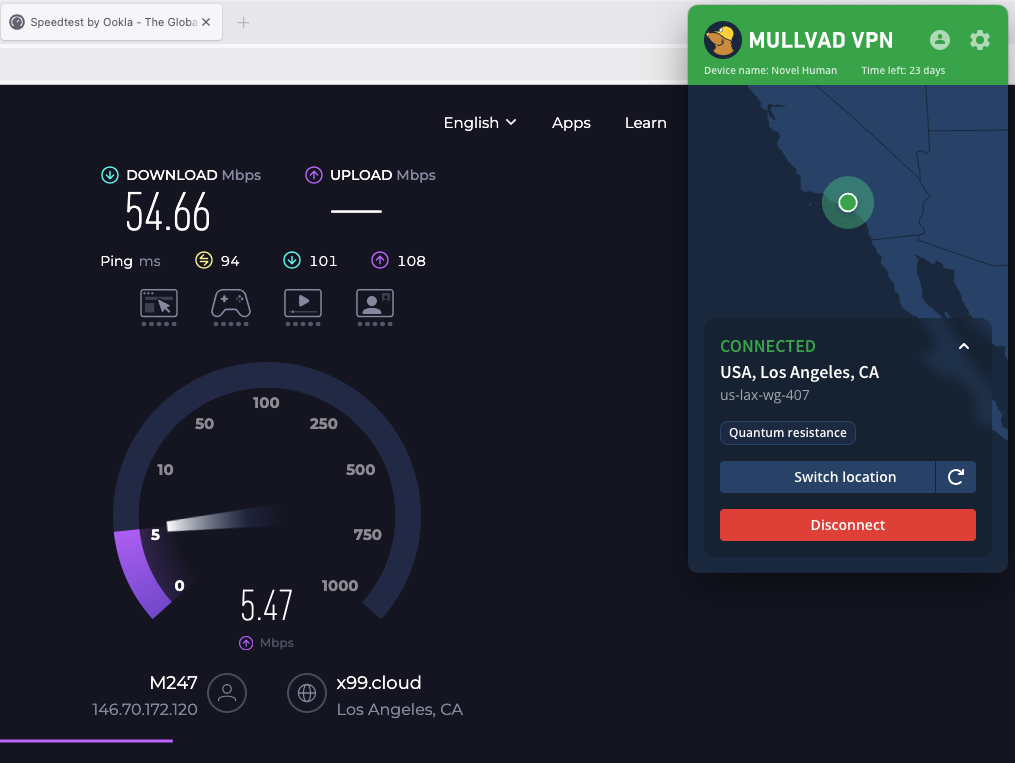
Speed-testing a Mullvad server in Los Angeles.
Sam Chapman for Engadget
It's also nice that Mullvad's speed drops follow a predictable curve. Lots of VPNs have unexpectedly sharp declines in certain locations, frequently in Africa. By contrast, Mullvad's speed decreases pretty much as a direct function of how far from the server you are. This not only makes speed drops easier to plan around, but also means you can expect very good speeds on nearby servers.
This property of being fastest on servers near the user is another sign of Mullvad's focus on its core privacy mission. If anonymity is your main reason for using a VPN, it doesn't matter what your IP address is, so long as it's not your real one. Using a nearby Mullvad server should guarantee you an internet connection that's both fast and private.
Mullvad security test
To be secure, a VPN has to check two critical boxes. It must provide you with a secondary IP address without leaking your real one, and it must encrypt your communications with its servers so your activity can't be traced. In the sections below, I'll see whether Mullvad meets those requirements.
VPN protocols
VPNs use protocols to mediate between end devices, ISPs and their own servers. The first step is to ensure that the service you're considering uses protocols that have expert confidence. Mullvad has kindly made this step easy for me by using only WireGuard on all its apps, with no OpenVPN, IKEv2 or in-house unique protocols.
There's no question that WireGuard is a solid protocol. It uses the ChaCha20 stream cipher for symmetric encryption and Poly1305 for authentication, both uncrackable with current technology. Mullvad has even added its own fix for WireGuard's one flaw, its need to save static IP addresses — the Mullvad implementation is set up to delete the IP address if it goes 10 minutes without being used.
Even so, it's unfortunate to lose the ability to change protocols, which is one of the most common steps for troubleshooting a VPN connection. I understand Mullvad's reasoning for cutting out OpenVPN (it claims the cryptography isn't strong enough) but don't agree. It's one of this provider's few unforced errors.
Leak test
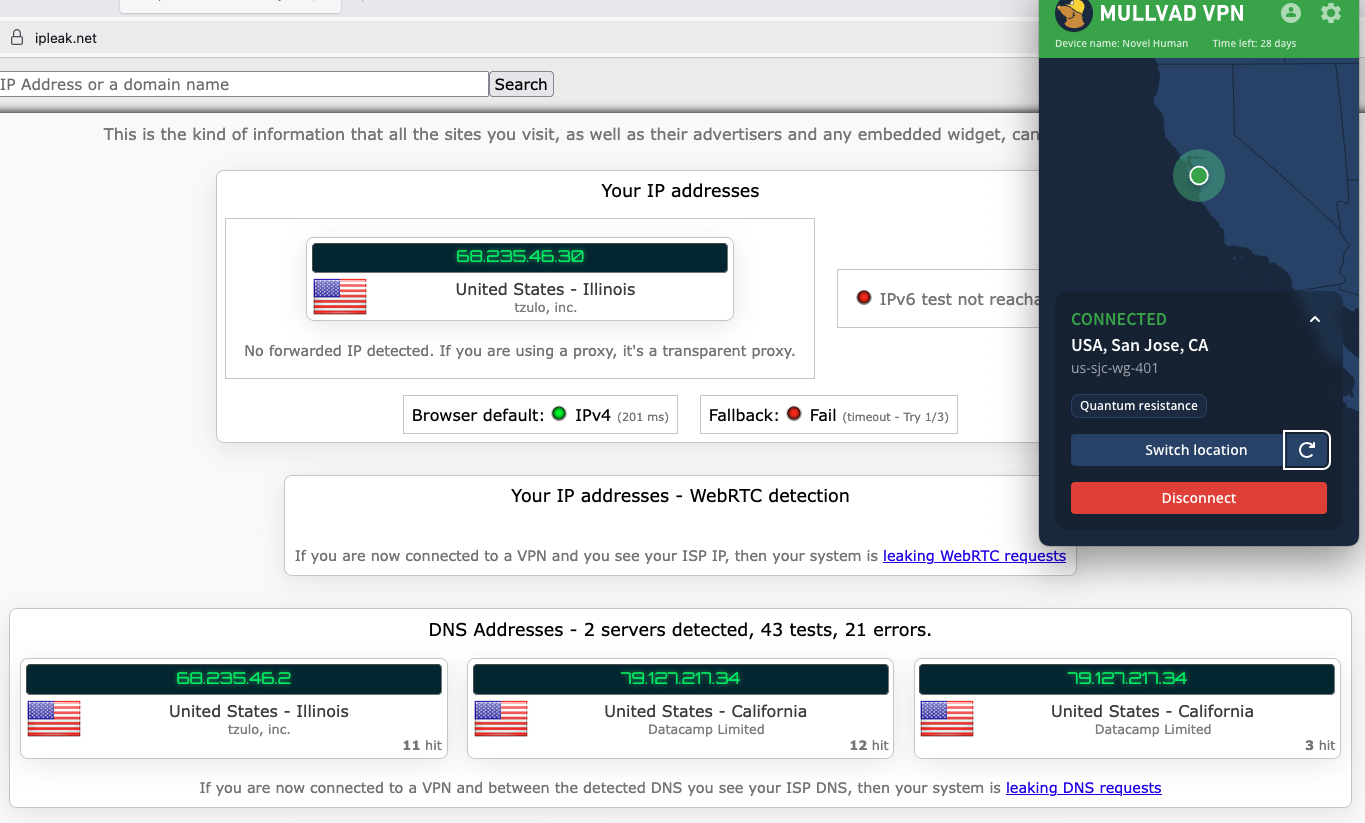
There's a straightforward test to determine if your VPN is leaking. Load up any website that shows your IP address — I personally use ipleak.net — and see what IP and location it reveals without your VPN active. Then activate the VPN and refresh the page. If you see your real IP address anywhere, your VPN is leaking.
Testing Mullvad for IP leaks.
Sam Chapman for Engadget
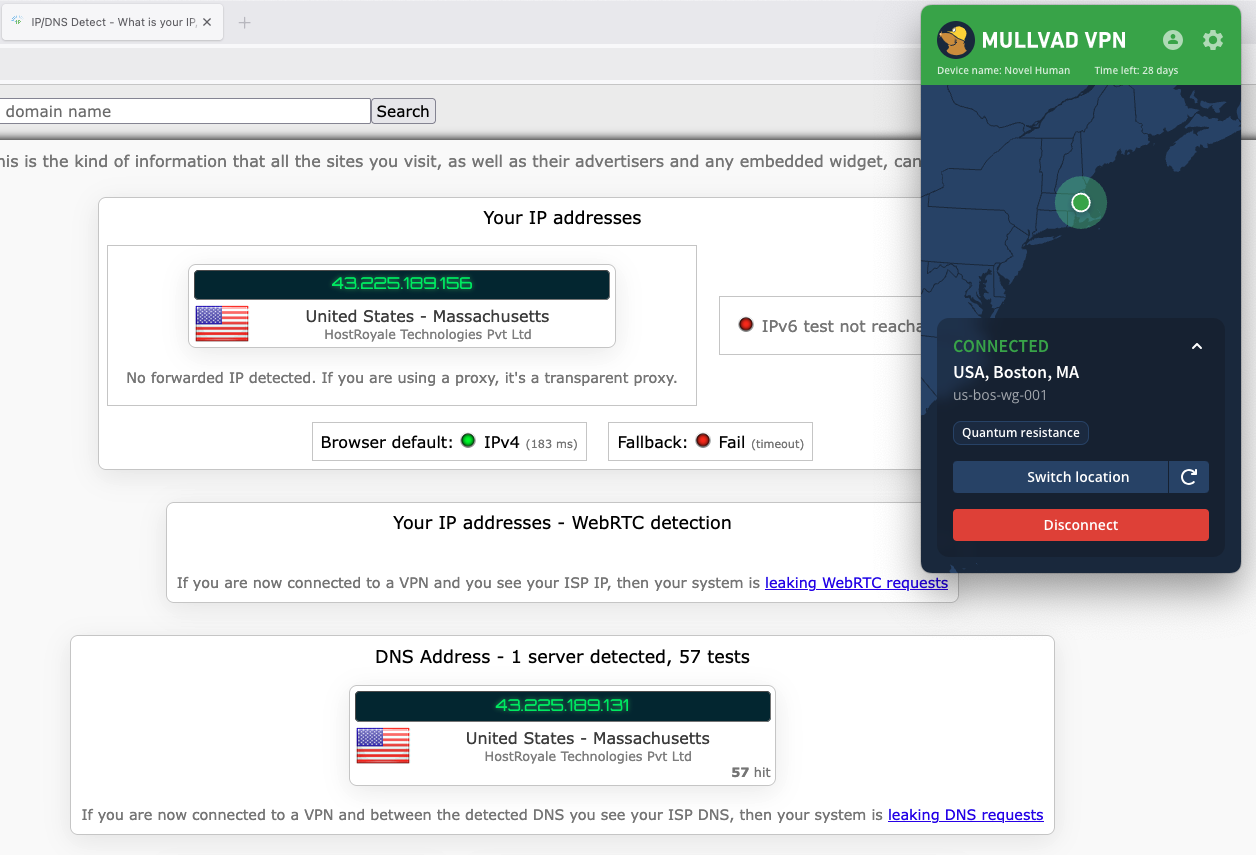
I ran that test on five Mullvad servers. Each time, the website showed me the IP address of the VPN server, concealing my real one. To keep things simple, I ran the initial tests with IPv6 blocked via the Mullvad client. When I turned it on and tried again, the IPv6 traffic didn't leak any more than the IPv4 did. I also saw no signs of WebRTC leaks. Unless you set up a custom DNS server, Mullvad also uses its own DNS, which remains entirely within the VPN tunnel.
I had one more leak test to try. Frequently, VPNs are leak-proof when maintaining a connection to one server but drop encryption when switching between servers. That problem is why I ultimately couldn't recommend Norton VPN. Luckily for me, Mullvad has a button that lets you shuffle to another server in the same location, so I used that to see if it stayed leak-proof.
Mullvad doesn't leak your IP even while changing servers.
Sam Chapman for Engadget
As you can see in the screenshot, Mullvad jumped seamlessly from one server to another without showing my real location in-between. On a practical level, that's enough for me to declare Mullvad leak-proof.
Encryption test
For one final experiment, I used the WireShark packet sniffer to see whether the data Mullvad sent from my computer to my ISP was encrypted. After capturing a few packets, I was gratified to see that they were totally unreadable to interlopers. Most established VPNs pass this test, but it's still important for due diligence.
How much does Mullvad cost?
Mullvad's pricing structure is one of the most unusual things about it. This is normally the section where I untangle 47 different Pro+ and Business- accounts that are all sold at three different durations. Mullvad couldn't be further from that. It costs 5 Euro a month — that’s it. Each 5-Euro subscription can be used on five devices at once.
It manages payments through a system inspired by parking meters. When you sign up for Mullvad, you'll buy as much time as you want. That time will count down until it expires, unless you top it up with more 5-Euro payments. If you run out of money, Mullvad won't charge you a new subscription fee because you didn't tell it not to. It'll just stop working until you pay again. Every payment also comes with a 14-day money-back guarantee, except for payments made in cash.
The Mullvad account dashboard.
Sam Chapman for Engadget
The only real complexity in the process is that Mullvad always figures out its prices in Euro, so outside the EU, the cost per month is affected by exchange rates. If you happen to live in a country where the government's economic policy shuttles between capricious and arbitrary, you might want to grab a few months in advance.
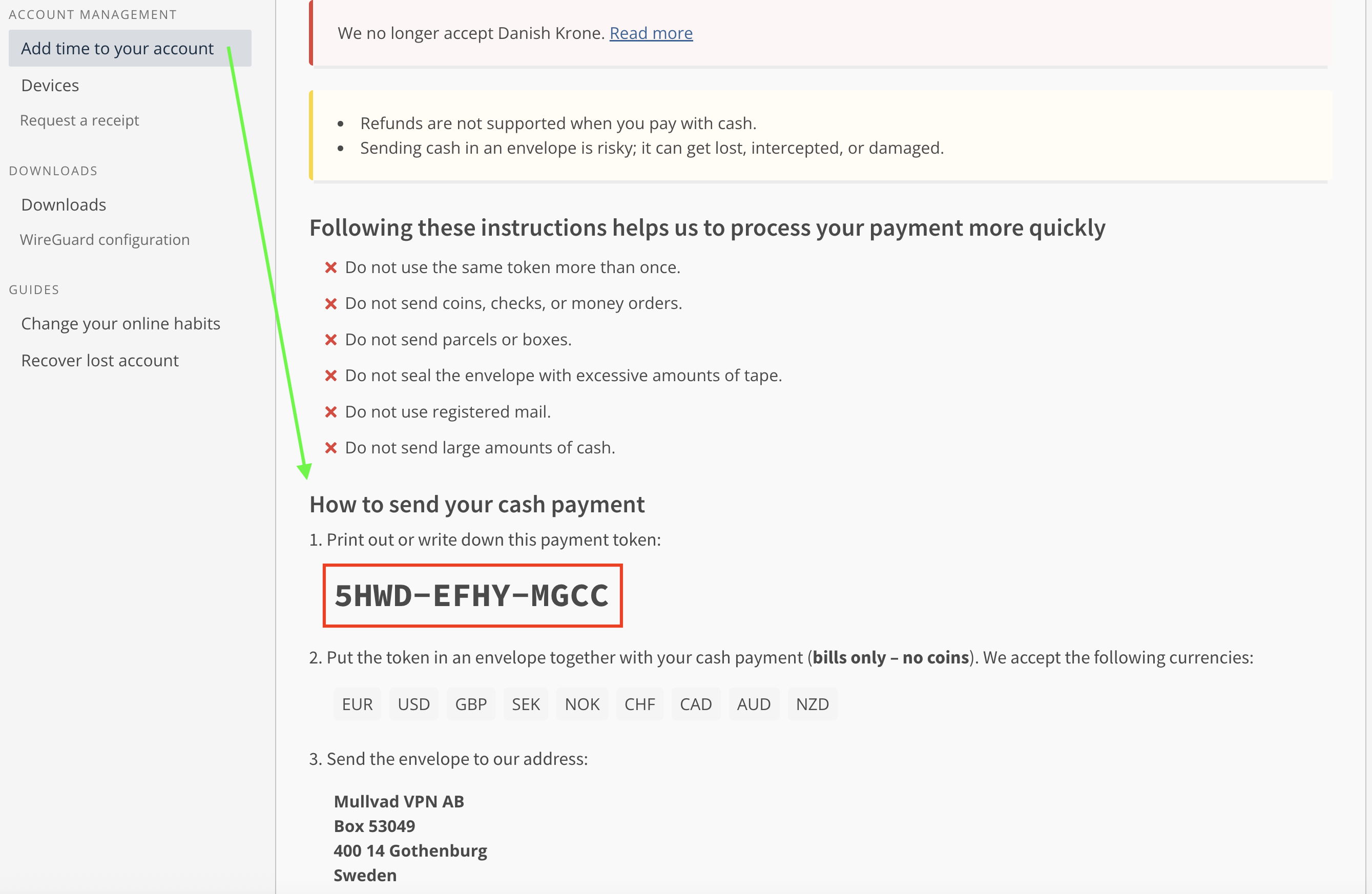
The other most interesting thing about Mullvad's pricing is the options you can use to pay. For maximum privacy, you can pay with cash using the payment token you'll find on your account page. Note that this is not the same as your account number. To find it, log into your dashboard on Mullvad.net, click Add time to your account in the left-hand bar, then click the button labeled Cash and scroll down. Make your cash payment by writing the token on an envelope and mailing it to Sweden (full instructions here).
Unredacted, in case any hackers out there want to buy me some more time.
Sam Chapman for Engadget
You can also get untraceable Mullvad vouchers by paying cash at participating retail locations. Most of them are in Europe, but you can order them from Amazon. While your payment to Amazon won't be private, the voucher can't be linked directly to your VPN account, since the actual number is hidden behind a scratch-off panel. It's actually pretty ingenious.
Of course, you can also pay using any of the normal methods, including credit cards, cryptocurrency and bank wires (though not PayPal). But the more private methods are always there for people who need them.
Mullvad side apps and bundles
Mullvad is that rare VPN that's still content to be a VPN and not an all-inclusive security suite. No shade to NordVPN or Surfshark, whose extra features are generally quite good, but it's nice to see at least one of the top providers staying focused.
Although Mullvad doesn't have any partners that sell their products alongside its VPN, it does have several partnerships with other VPNs who use its network as the basis for their own products. MalwareBytes Privacy VPN, Mozilla VPN, Tailscale and Obscura can all be considered Mullvad side apps if you squint.
Mullvad Browser
Mullvad's only product other than the VPN is Mullvad Browser, which is free to download and works on Windows, macOS and Linux. Mullvad Browser works in the background, blocking common methods of browser fingerprinting that can be used to deduce your identity even when you have a VPN running.
For example, it automatically reports your time zone as UTC, disguises personal preferences like font and window size, scrambles information sent by APIs and conceals your browser version and computer operating system. It's also in private mode by default, which doesn't hide what your ISP sees but is useful for concealing your activity from other people that might use your computer.
Close-reading Mullvad's privacy policy
Since privacy is Mullvad's main selling point, this section is even more important than usual. Loopholes in the privacy policy of the privacy VPN would be deeply ironic. Fortunately, Mullvad's privacy policy backs up its high-flying rhetoric. It's a short, pointed and readable document with no problems I could discern. Mullvad has no parent company or subsidiary it might use as a loophole, and no clauses in its policy are left open to interpretation. It's a masterpiece of the privacy-policy genre.
The document is actually three policies: a privacy policy, a no-logging policy and a cookie policy. The privacy policy lists all the times Mullvad might collect data about a user. That's exactly two situations — using financial information to process payments (which will be entirely anonymous if you use cash or a voucher) and using your email address to track support tickets you open. That's it.
The no-logging policy is a bit longer, but mostly because it's explaining exactly how Mullvad manages to run a VPN service with so little information on individual users. For each account, it stores a number and an expiration date, plus public keys and tunnel addresses if you're using WireGuard (deleted at most 10 minutes after your session ends). Everything else is completely anonymized. Mullvad even claims that its 500,000 or so user accounts could have been created by the same user 500,000 times, which I suppose is one way to spend 2.5 million Euro.
The cookie policy is the shortest because Mullvad uses exactly five cookies. One saves your login status in your browser, one saves your language preferences, one protects its site from being used in a specific kind of forgery hack and the other two are for handling Stripe payments.
Independent privacy audits
Mullvad corroborates its privacy policy with regular audits of various aspects of its service. Currently, there are 17 audits listed on its website, including four infrastructure audits by Cure53. All of its apps have been separately audited and found to be solid. It has been a couple of years since the last full infrastructure audit in 2024, but given how many other targeted reviews Mullvad has gone through since then, it's hard to be too upset about the pause.
In 2023, Mullvad achieved the holy grail of VPN privacy: being ordered by subpoena to turn over customer information and not being able to comply because that information didn't exist. Nothing compares to a VPN's privacy being tested in the wild like this.
Can Mullvad change your virtual location?
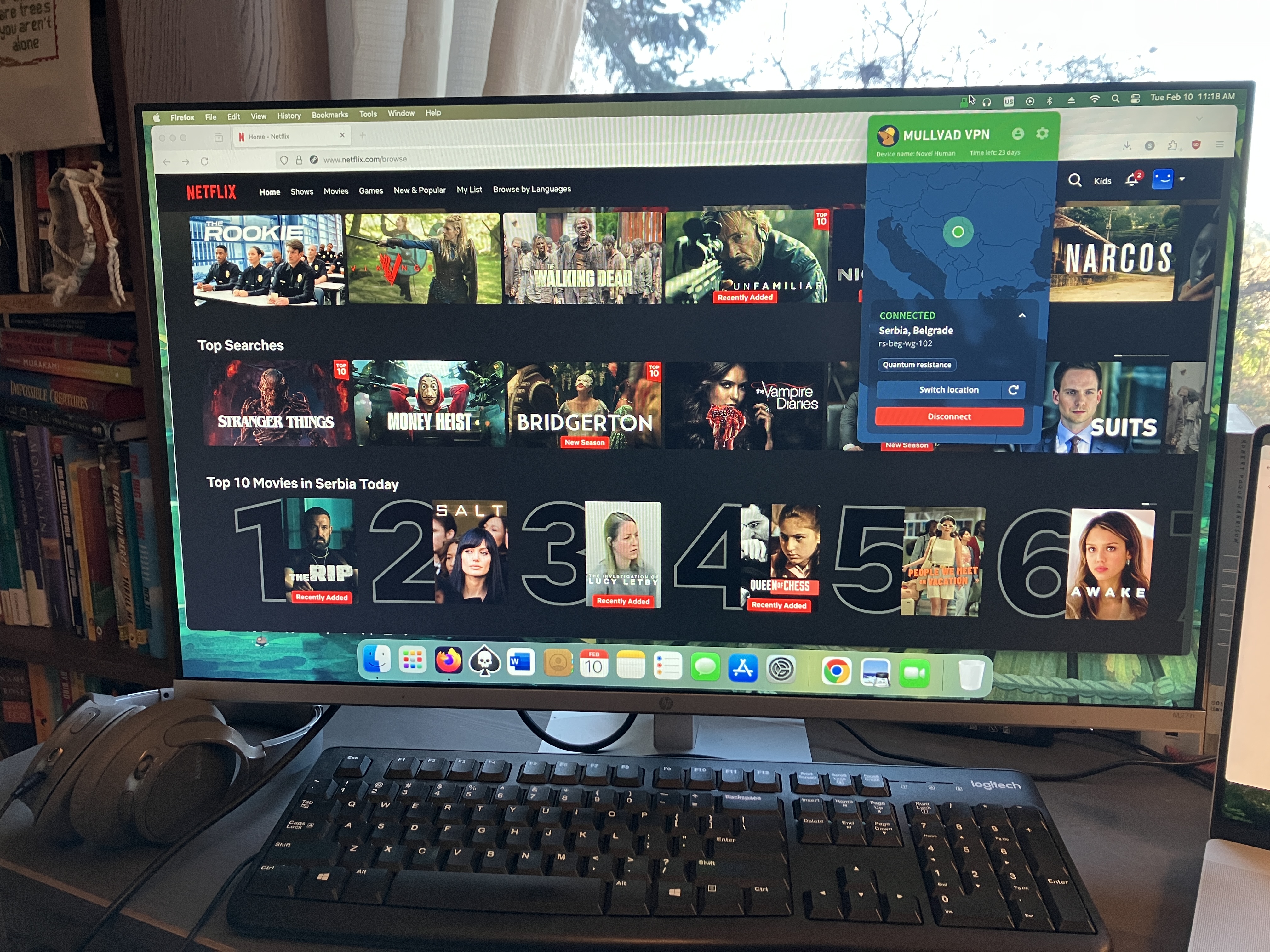
Sometimes, a VPN appears to be working, but still reveals your real location to websites. Netflix is a useful proxy for this. To unblock a streaming site like Netflix, a VPN needs to change your virtual location while not appearing to do so — if Netflix sees any hint of VPN traffic, you'll get blocked with the hated proxy error. I used five different locations to check whether Mullvad is up to the streaming task.
Server location
Unblocked Netflix?
Changed content?
Vancouver, Canada
3/3
3/3
Gothenberg, Sweden
2/3
2/3
Istanbul, Turkey
3/3
3/3
Johannesburg, South Africa
3/3
3/3
Singapore, Singapore
2/3
2/3
Mullvad did well for streaming, but it didn't manage a perfect score like its fellow anti-establishment VPN Windscribe did. Two of the 15 servers I tested failed to unblock Netflix, one in Singapore and one in Mullvad's hometown of Gothenburg. I also had trouble logging into Netflix while connected to a Vancouver server, though that server did unblock the site consistently once I got inside.
Mullvad's servers all tricked Netflix into believing my new location.
Sam Chapman for Engadget
In Mullvad's defense, no location failed more than once. It's completely possible to get good streaming performance out of this VPN; you just have to be willing to click the server refresh button a few times. Privacy is still the main use case for Mullvad, but it's fine for streaming too.
Investigating Mullvad's server network
Mullvad has 90 server locations in 50 countries and territories. Unusually for a VPN, users can choose between all 590 of its total servers, including several in each location. There's even a list on its website that shows you the status of every server.
Mullvad does not use virtual server locations, so every server is physically located in the place where it claims to be. Here's how they're distributed.
Region
Countries with servers
Total server locations
North America
3
25
South America
5
6
Europe
29
41
Africa
2
2
Middle East
2
2
Asia
7
8
Oceania
2
6
Total
50
90
Over half the countries with servers are in Europe and over two-thirds of the cities with servers are in either Europe or North America. That lopsided network is a limitation of Mullvad's refusal to use virtual server locations, since its real servers have to be concentrated in nations developed enough to host data centers. With an all-real network, it's easier to tell which servers will give you the fastest performance, but you can't simulate as much of the world as you can with larger services like ExpressVPN.
The good news is that there's at least two real server locations on every continent. Mullvad has a surprisingly robust presence in South America and two bare-metal servers in Africa, which is more than some other VPNs have. In the end, though, the best application of Mullvad is to protect the online privacy of users in North America, Europe and eastern Asia.
Extra features of Mullvad
Most of Mullvad's features are augmentations to the VPN itself, rather than side options that do other things. Some of them are bread-and-butter, like the kill switch and split tunneling, but a few you won't find anywhere else. Note beforehand that Mullvad does not support port forwarding, so if you depend on that for your torrenting, try another VPN.
DAITA AI defenses
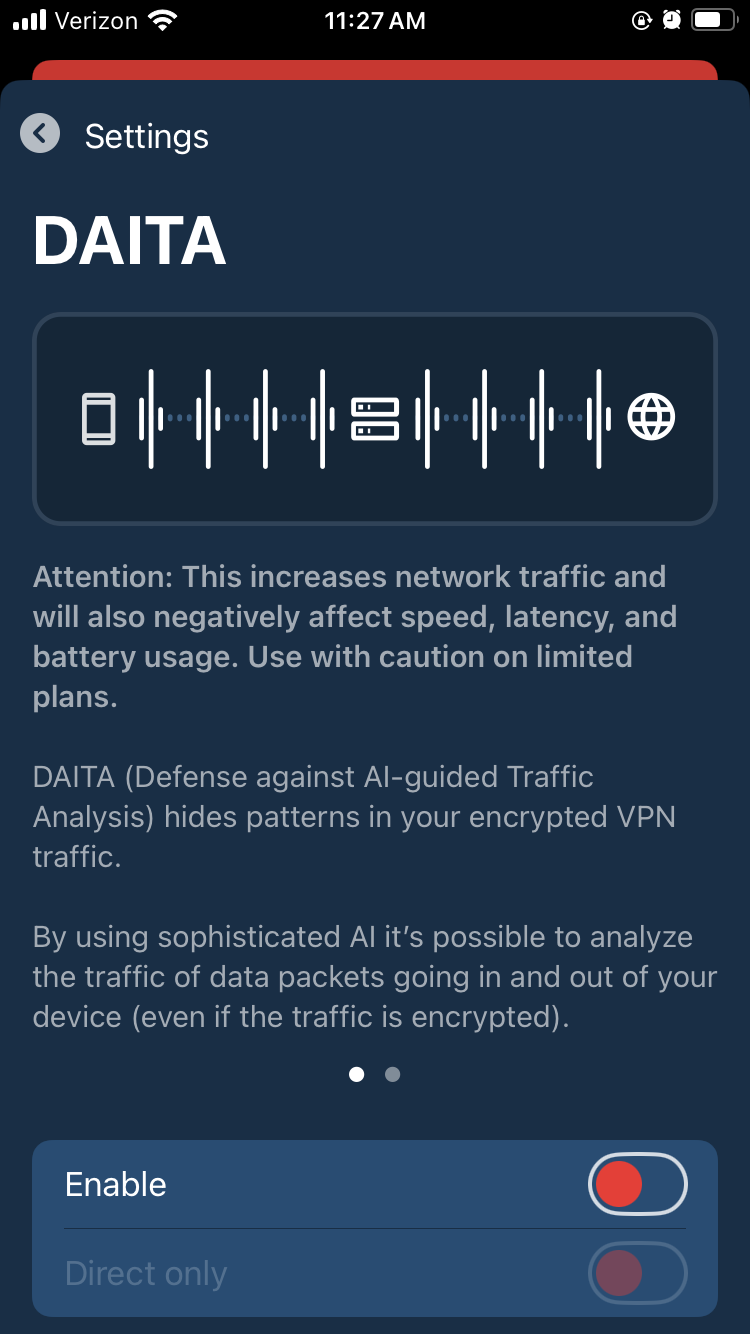
Mullvad's most novel feature is a recent one. DAITA, which stands for Defense against AI-guided Traffic Analysis, can be toggled on and off in the Mullvad app. According to Mullvad, certain patterns in how browsers communicate with websites can be analyzed by AI to reveal the truth behind encrypted internet history. DAITA hides those packets by filling communications with background noise so the AI won't know what's real.
Mullvad's anti-AI settings.
Sam Chapman for Engadget
DAITA is a laudably forward-looking feature, but as Mullvad itself admits, it will make your browsing speeds slower and drain your battery. I recommend only using it for activities you really want to hide.
Quantum resistance
Mullvad's desktop apps establish quantum-proof WireGuard tunnels by default. Quantum computing isn't yet a threat to WireGuard, but it may become dangerous in the future, so Mullvad is getting ahead of the problem (along with a few other services like NordVPN). When quantum resistance is active, Mullvad encapsulates its keys using the current standard mechanism, ML-KEM.
Anti-censorship
If you find yourself in a country where government censorship makes it hard to access the internet, Mullvad has options that might help. These anti-censorship features can be used to get around firewalls that block visible VPN traffic. You have several options, including changing your WireGuard port, randomizing your port number, disguising your VPN traffic as an ordinary HTTPS connection or using an obfuscated Shadowsocks proxy.
Mullvad's anti-censorship involves more features than most VPNs have in this area. This makes it a bit less user-friendly, but a lot more likely to work. If you're new to getting around censorship, Mullvad's help center has a helpful page about using its anti-censor settings.
Multihop
Many VPNs offer a double-hop connection that routes your traffic through two servers instead of one, adding a redundant layer of encryption in case one server malfunctions. Mullvad pulls ahead of the competition (except Surfshark, which also does this) by allowing you to choose your entry and exit servers. When you activate the multihop option and open the server list, you'll be prompted to pick two locations instead of one.
Mullvad's server list with multihop enabled.
Sam Chapman for Engadget
This means you can select an entry server that's close to you and an exit server in any country whose location you want to spoof, letting you fine-tune your own performance. It's way nicer than being railroaded into certain paths.
DNS content blockers
Mullvad includes six blocklists that can keep you or your family members from looking at unwanted content: ads, trackers, malware, gambling, adult content and social media. These lists can't be customized like Windscribe's R.O.B.E.R.T. blocks can, so you're limited to just turning them on and off.
IPv6 support
The internet is gradually transitioning from the old IPv4 standard over to IPv6, which will allow many more addresses to be shared out. Mullvad is one of a few VPNs looking ahead to the IPv6 era. You can leave it to block all IPv6 traffic, but if you do need IPv6 for any reason, you can enable it while still being connected to a Mullvad server.
Kill switch and lockdown mode
Mullvad comes with two features that protect against unexpectedly losing your VPN defenses. The first is a kill switch, a common VPN option that cuts off internet access if the VPN tunnel ever fails. This simple measure helps guard against accidental leaks.
Lockdown mode is the stronger option. While it's active, you will be unable to get on the internet unless you connect to a Mullvad server first. This will remain true if you turn the connection off yourself and even if you quit the app.
Split tunneling
Split tunneling is available on Mullvad's apps for every system except iOS. It lets you send some apps outside the VPN tunnel so they get online with your normal IP address. It's helpful if you have some apps that don't work with the VPN active — this is common with online banking, as an example. Another common application is to protect a torrenting client in the background while using your browser unprotected for better speeds.
Mullvad customer support options
Mullvad makes two forms of support available in the app. You can report a problem by going to Settings -> Support -> Report a problem, typing your question (requested to be in either English or Swedish, though they'd probably be able to read a question run through Google Translate) and optionally providing your email. You can also view the app's logs at any time, which can be useful to help a technician diagnose your problem.
If you'd rather search for a solution at your own pace, you can go to that same page and click FAQs and Guides instead. This opens the help center in a browser.
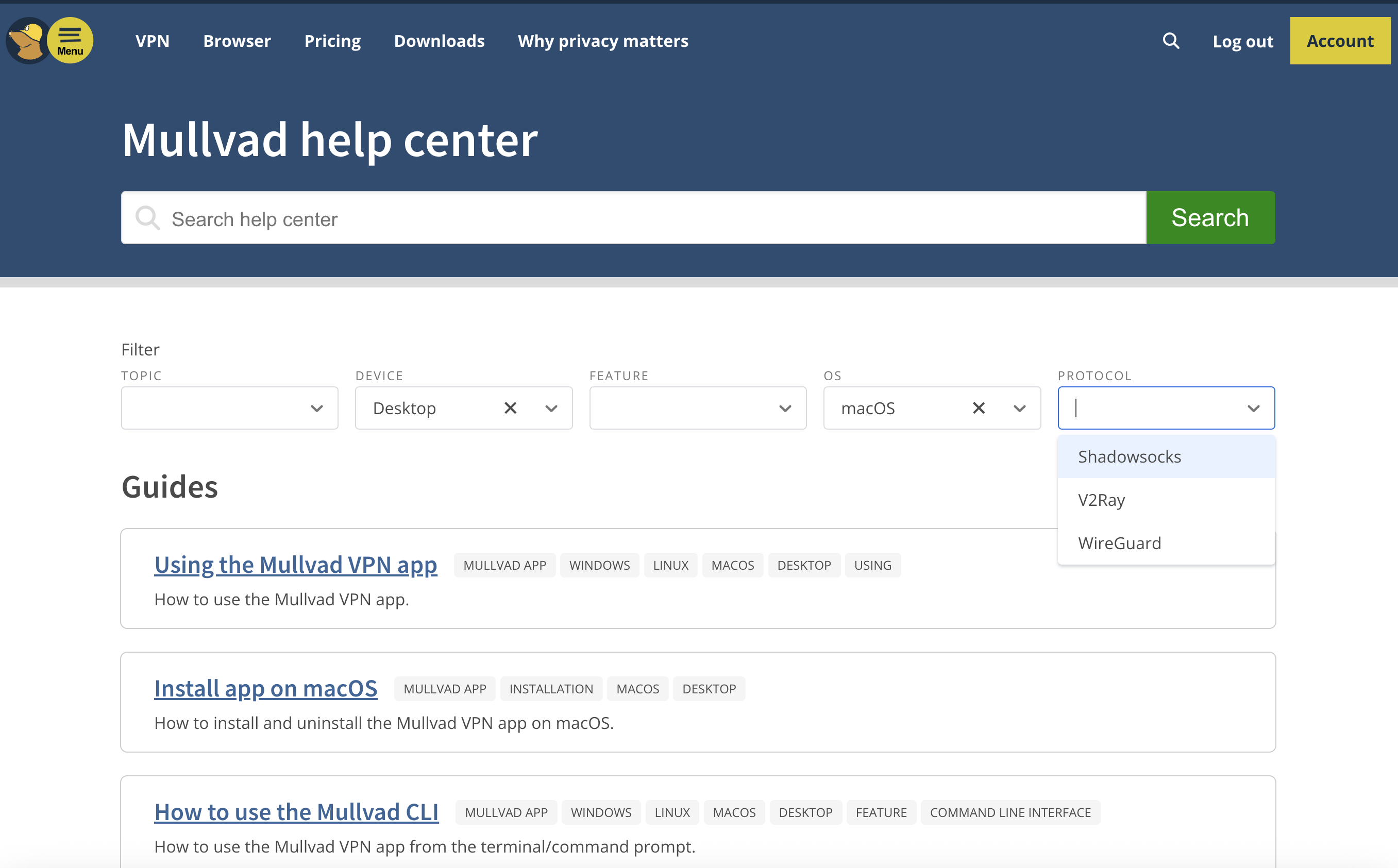
Mullvad's help center, including the dropdown filter menus.
Sam Chapman for Engadget
I love Mullvad's approach to laying out its FAQs. Instead of crowding topics into five or six categories and making you guess whether your problem falls under setup, usage or troubleshooting, Mullvad gives you a set of dropdown filters to narrow down the articles which might relate to your problem.
By the time you've named which device, OS and protocol you're dealing with, you won’t have many articles left to sift through. There is an annoying tendency for certain sets of filters to reduce the number of surfaced links to zero, but for those cases, there's a search bar that also works well.
The articles themselves are good enough that I referred to them several times while writing this review. Some of them are a bit overlong, but they're diligent about including both internal and external links to get you where you're going fast.
Live support experience
This is normally where I cover how it feels to get live chat support from the VPN I'm reviewing. However, Mullvad doesn't have live chat support. That's unfortunate, although it's still better than Windscribe's approach of forcing you to banter with a sarcastic robot. Instead, I sent a question via email to Mullvad's support team, and got a response within 24 hours.
Mullvad background check
Mullvad was founded in 2009 in Sweden. It's still owned and operated by its original founders. According to a detailed timeline on its website, its 16-year history has been as uneventful as any user could ask for, with not much changing except updates to stay on the technological leading edge. The only controversy mentioned in Mullvad's own materials is the 2023 police raid of its headquarters, which (as I covered in the privacy section) only makes them look better.
So as not to take Mullvad at its word, I scoured the last 16 years of news items and user reports to search for any other blemishes on its record. Based on that research, I found no reason to doubt Mullvad's honesty about its location, owners or team.
I found just one leak that wasn't noted on Mullvad's own site. In 2023, a security research group called ZATAZ alleged that it found anonymized information on Mullvad users saved on an Internet Archive page, including account numbers (linked article is in French). According to ZATAZ, Mullvad contacted the Archive and got the page deleted.
To my mind, the only mistake Mullvad made in response to the ZATAZ allegations was not making a public statement about the incident. I can see why they didn't think it was a big deal, since even logging into someone else's Mullvad account wouldn't show you their browsing history, but it's always better to communicate about these things.
Final verdict
Mullvad is a VPN that knows what it wants to be and achieves that goal with flying colors. It's not trying to be an everything app — it does privacy and does it well. That's not to say it has nothing going on outside the VPN itself, as its DNS blockers, AI defenses and split tunneling all work smoothly. But if you want a VPN that's not ashamed to be a VPN, Mullvad is the right choice.
Of course, it has its own compromises. It's solidly in the middle of the speed pack and occasionally trips up when unblocking streaming sites. The lack of any protocols other than WireGuard grates on me a bit, since it reduces the user's options for troubleshooting. With all that said, those are minor hiccups on a VPN that does such a thorough job keeping you anonymous online.
This article originally appeared on Engadget at https://www.engadget.com/cybersecurity/vpn/mullvad-vpn-review-near-total-privacy-with-a-few-sacrifices-130000056.html?src=rss
After kicking off CES 2026 with its "First Look" event, Samsung is ready to announce the first of what should be several new Galaxy smartphones this year. The company is officially hosting a Galaxy Unpacked event on February 25 at 1PM ET, where it'll introduce the Galaxy S26 series and updates to Galaxy AI.
Leaks that have trickled out ahead of the event suggest that the Galaxy S26, S26+ and S26 Ultra will feature a new Snapdragon 8 Elite Gen 5 chip, and could come with more RAM and storage. Only the Galaxy S26 Ultra is expected to include major hardware changes, though, with an updated camera system, and possibly proper support for Qi2 charging. Alongside new smartphones, Samsung is also expected to introduce the Galaxy Buds 4 and 4 Pro, which will reportedly feature a new design, support for head gestures and an Ultra Wideband chip so they're easier to find using Google Find Hub.
As in previous years, Samsung has an optional deal for anyone who wants to lock in a discount before the company's new smartphones and accessories are announced. If you reserve Samsung's new devices now, you can receive a $30 credit and be entered to win a $5,000 Samsung.com gift card. When you do pre-order, the company also claims that it'll offer up to an additional $900 in savings if you trade-in a device or $150 off even without a trade-in if you pre-order through Samsung.com.
Engadget will have coverage of everything Samsung announces at Galaxy Unpacked right here, but if you want to watch along, you can catch the company's livestream of the event on Samsung's YouTube channel, the Samsung Newsroom page or at Samsung.com.
This article originally appeared on Engadget at https://www.engadget.com/mobile/smartphones/samsungs-galaxy-s26-unpacked-event-is-on-february-25-230000375.html?src=rss
Get ye to Windows Update, because there's a good chance you've got new Secure Boot certificates to install. Microsoft just announced that it will be refreshing those certificates, which were originally introduced when Secure Boot debuted in 2011, as a security precaution. Secure Boot was a way for Microsoft to protect systems from running unsigned and potentially malicious code before Windows launched. It went on to be an installation requirement for Windows 11, as well as anti-cheat software used in Valorant, Call of Duty: Black Ops 6/7 and Battlefield 6.
Without the new Secure Boot certificates, Microsoft says your system will still function normally, but it will enter "a degraded security state that limits its ability to receive future boot-level protections." Basically, you won't be protected from malware and viruses targeting vulnerabilities in older versions of Windows. As expected, Microsoft also notes that unsupported versions of Windows won't be receiving the new Secure Boot certificates. They're only coming to Windows 11 systems, as well as Windows 10 PCs subscribed to Microsoft's Extended Security Updates.
Microsoft says many users will be able to pick up the updated Secure Boot certificates by visiting Windows Update, but a few may need additional firmware updates from their system (or motherboard’s) OEM. You’ll also be able to track the status of your security certificates in the Windows Security app in the “coming months.”
"As cryptographic security evolves, certificates and keys must be periodically refreshed to maintain strong protection," Nuno Costa, Partner Director of Windows Servicing and Delivery, wrote in a blog post today. "Retiring old certificates and introducing new ones is a standard industry practice that helps prevent aging credentials from becoming a weak point and keeps platforms aligned with modern security expectations."
Costa says Microsoft has been working with OEMs like Dell and HP to ensure a smooth transition to the new Secure Boot certificates. Many new systems built in 2024 already have the updated certs, while "almost all" devices shipped last year have them as well. Microsoft has also been alerting IT customers to this transition since last year.
This article originally appeared on Engadget at https://www.engadget.com/computing/microsoft-will-start-refreshing-secure-boot-certificates-in-march-for-windows-11-and-windows-10-esu-users-170000777.html?src=rss
There appears to be no limit to how chonky and eye-wateringly expensive PC gaming handhelds can get, with the latest behemoth being the Ayaneo Next 2. First announced back in November, the latest Windows handheld in Ayaneo’s Next lineup is now up for pre-order, with a spec sheet that makes some of its rivals look modest.
If you missed the announcement at the end of last year, the Next 2 is packing a 9-inch OLED display with a 2,400 x 1,504 resolution and a maximum refresh rate of 165Hz (adjustable down to 60Hz). The Next 2 is powered by an AMD Ryzen AI Max+ 395 chip and has a massive 115Mh battery under the hood.
To put all of that into perspective, the Next 2’s display is more than 1.5 inches larger than the Steam Deck OLED’s, and goes bigger than even the Lenovo Legion Go 2’s 8.8-inch panel. Its battery is the largest of the three by some margin too, and according to Ars Technicait weighs in at around 3.14 pounds (around 1424g), making it more than twice as heavy as the very heavy Xbox ROG Ally X. Get those wrists to the gym if you’re considering picking one of these up.
Ayaneo is ticking all the boxes where inputs are concerned too. Its latest handheld has dual touchpads (a feature ASUS left out on the ROG Xbox Ally X), Hall Effect sticks, an 8-way D-Pad and four customizable rear buttons.
All of this tech inevitably comes at a high price, with the entry-level model that ships with 32GB of RAM and 1TB of storage coming in at $1,999, or $1,799 if you take advantage of early bird pricing. This model is equipped with the slightly less capable Ryzen AI Max 385 CPU.
If you want the more powerful AI+ 395 chip you have a few options. A variant of the Next II with 64GB of RAM and 1TB of storage costs $2,699, but you can order now at the early bird price of $2,299. For 128GB of RAM and 2TB of storage you’ll be handing over a slightly hilarious $4,299 at full price. Early birds can order now for $3,499.
This article originally appeared on Engadget at https://www.engadget.com/gaming/pc/the-ayaneo-next-2-is-a-massive-pc-handheld-with-a-price-tag-to-match-165326534.html?src=rss
The internet is ripe with horrible violations of people's privacy, including non-consensual explicit images. A new tool from Google won't do much in the way of prevention, but can help you remove this media from Search.
Now, you can choose an image and quickly request its deletion. Just click on the three dots that appear on the image. From there, choose "remove result" and then "It shows a sexual image of me." Other choices include the picture shows a person under 18 and that it has your personal information. If you choose the initial option then you will also be asked whether it contains a real image or deepfake. There's also an option to submit multiple photos at once.
Google claims that, upon submitting your request, you will "immediately" see links to emotional and legal support organizations. Plus, you can opt-in to safeguards that filter out similar results in Search — though it seems these unreported images will still be available for other users to see. This feature should be available in most countries over the coming days.
You can go on Google's "Results about you" hub to track your request. To use the tool, you will have to add in your personal contact information and government ID numbers. Google already had the hub to track if any of that information appears on Search, but now it will also look for your social security number, drivers license and passport information. The company should notify you if any of that information comes up in Search results and allow you to take removal steps.
Results about you's updates should roll out to US users in the coming days. Notably, it arrives as Google shutters its dark web reports. They would alert you if your name, number, or email address appeared on the internet — typically because of a data breach. However, Google found it didn't help users take next steps to fix the problem, something these new features will hopefully do.
This article originally appeared on Engadget at https://www.engadget.com/cybersecurity/googles-new-tool-helps-you-remove-non-consensual-explicit-images-from-search-155352248.html?src=rss