How to make a Domino Chain Reaction in KeyShot using the new ‘Physics Simulation’ feature

Last year, a global survey crowned KeyShot as the “Best Rendering Software,” with 88% of designers overwhelmingly picking it for its incredibly photorealistic rendering capabilities. Now, with KeyShot’s newly unveiled Physics Simulation and Camera Keyframe features, the software is growing even more powerful, bringing real-world physics and camera effects to make your renders pop even more.

Click Here to Participate in the 2024 KeyShot Animation Challenge. Hurry! Challenge ends March 10th, 2024.
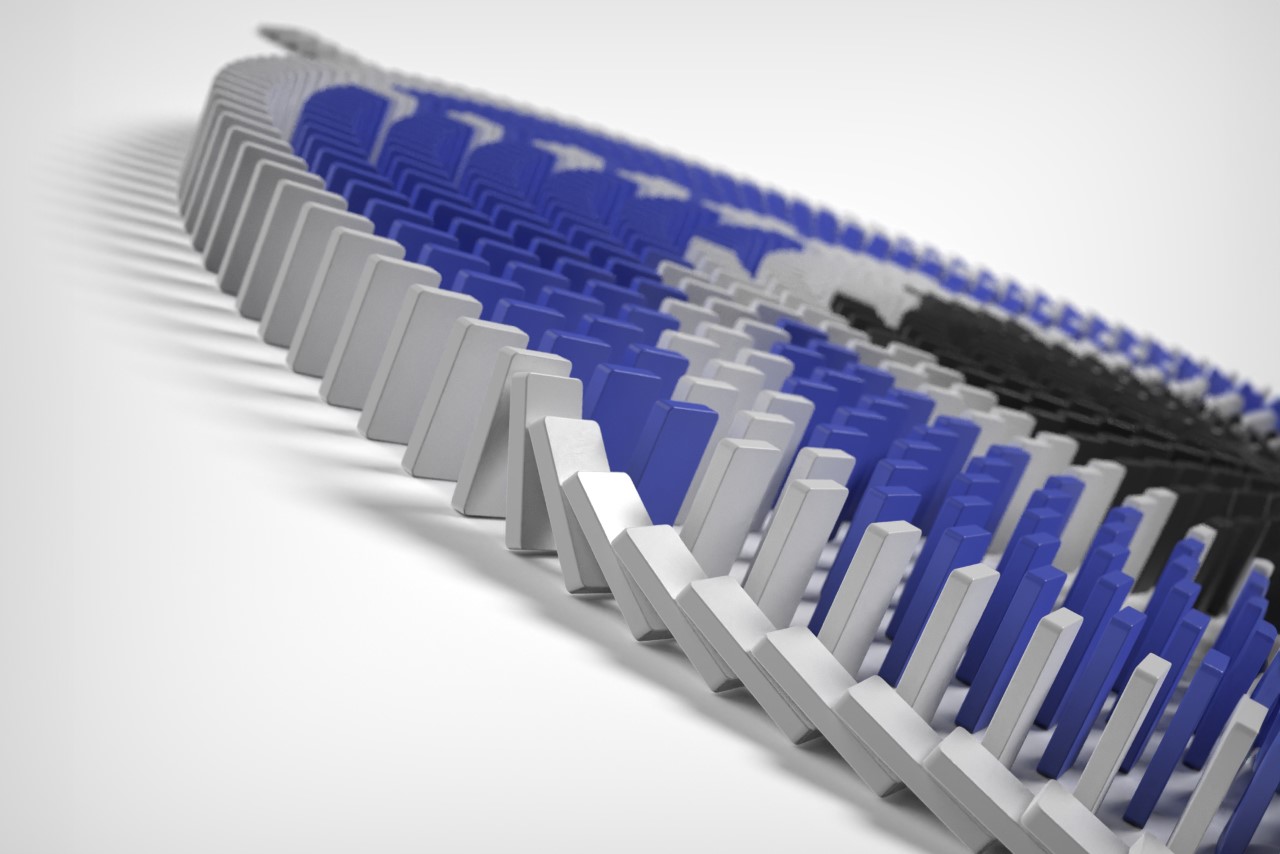
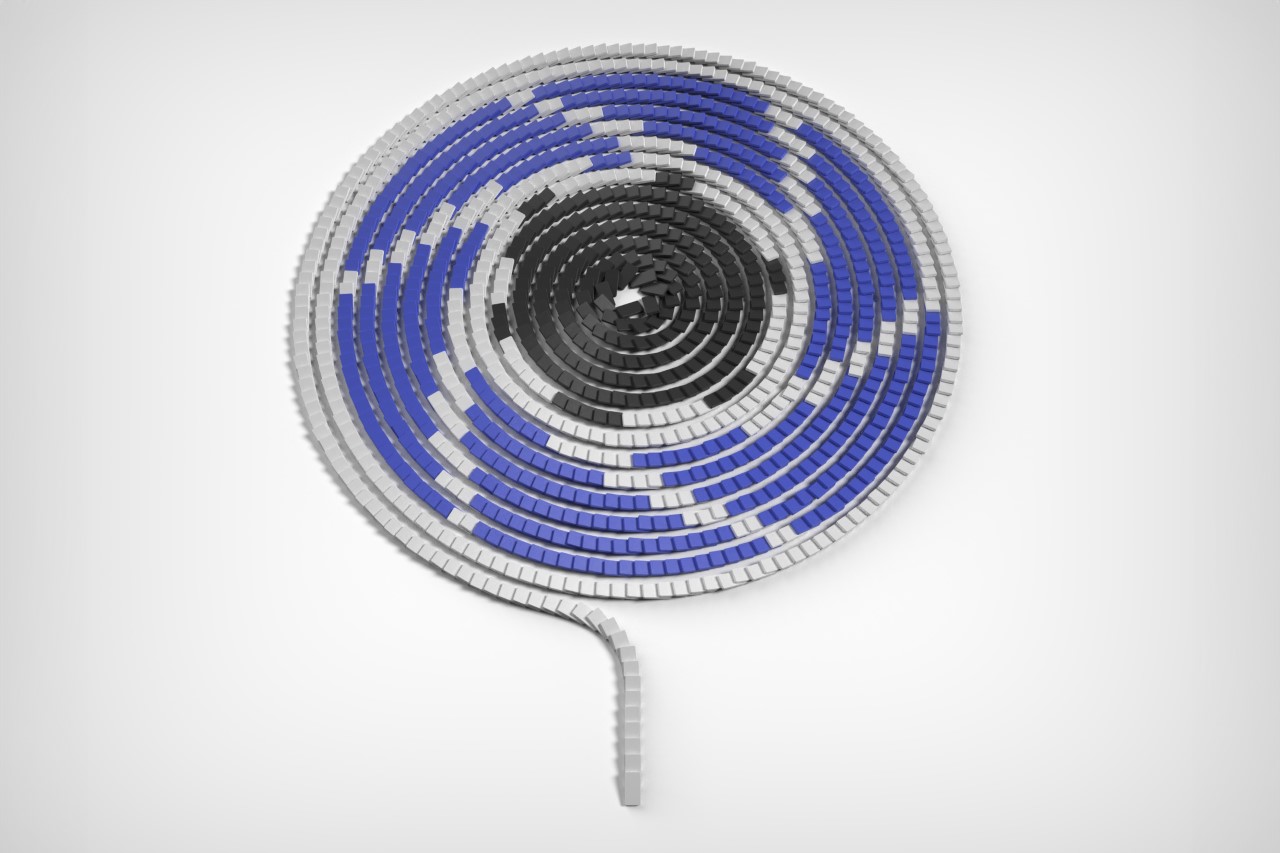
I put KeyShot’s Physics Simulation feature to the ultimate test by rendering a dramatic domino chain reaction scene. Setting up the simulation took hardly any time, with incredibly easy controls that took mere minutes to get the hang of. The results were jaw-dropping if I say so myself. In this article, I’ll show you how I managed to pull off one of my most exciting KeyShot rendering experiences ever. I’ll walk you through how I set the domino scene up, what parameters I input into the Physics Simulation window, and how you can recreate this scene, too. I’ll also share tips and tricks that can help you create some incredibly real simulations with objects falling, bouncing, and colliding with each other, absolutely enhancing your KeyShot rendering experience to a level like never before.
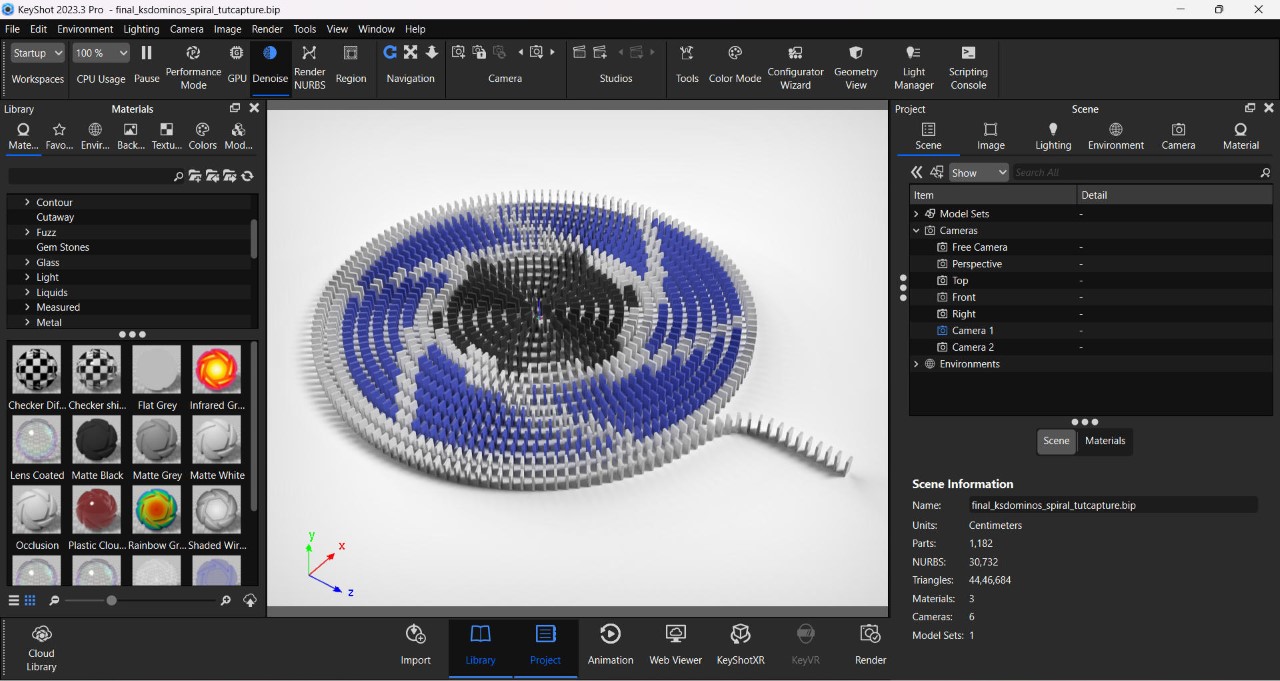
The entire scene was modeled in Rhino 7, starting by building one single domino, creating a spiral curve, and arraying multiple dominoes along the curve. The dominos were spaced at roughly 2 centimeters apart, ensuring the chain reaction would go smoothly from start to finish. The entire scene has a whopping 1182 dominoes in total; a little ambitious considering I was going to render the simulation on a 2022 gaming laptop.
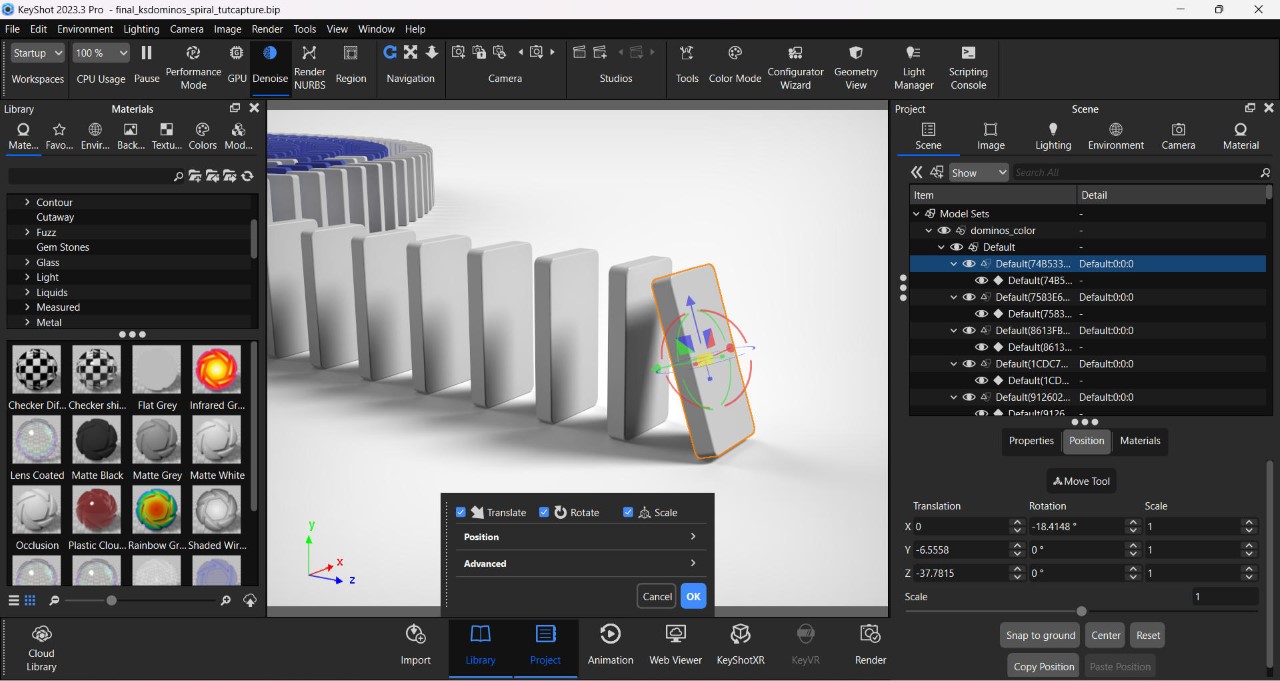
Tilt the first domino to help kickstart the physics cycle

To use the simulation feature, import your scene into the latest version of KeyShot (2023-24) (get a free trial here), set the scale, add the materials, and pick the right environment. Before you use the physics feature, however, you need to prime your scene – in this case, it meant tilting the first domino forward so gravity would kick in during the simulation. The Physics Simulation feature can be found in the ‘Tools’ section on top. Clicking on it opens a separate window with a preview viewport, a bunch of settings, and an animation timeline on the bottom.
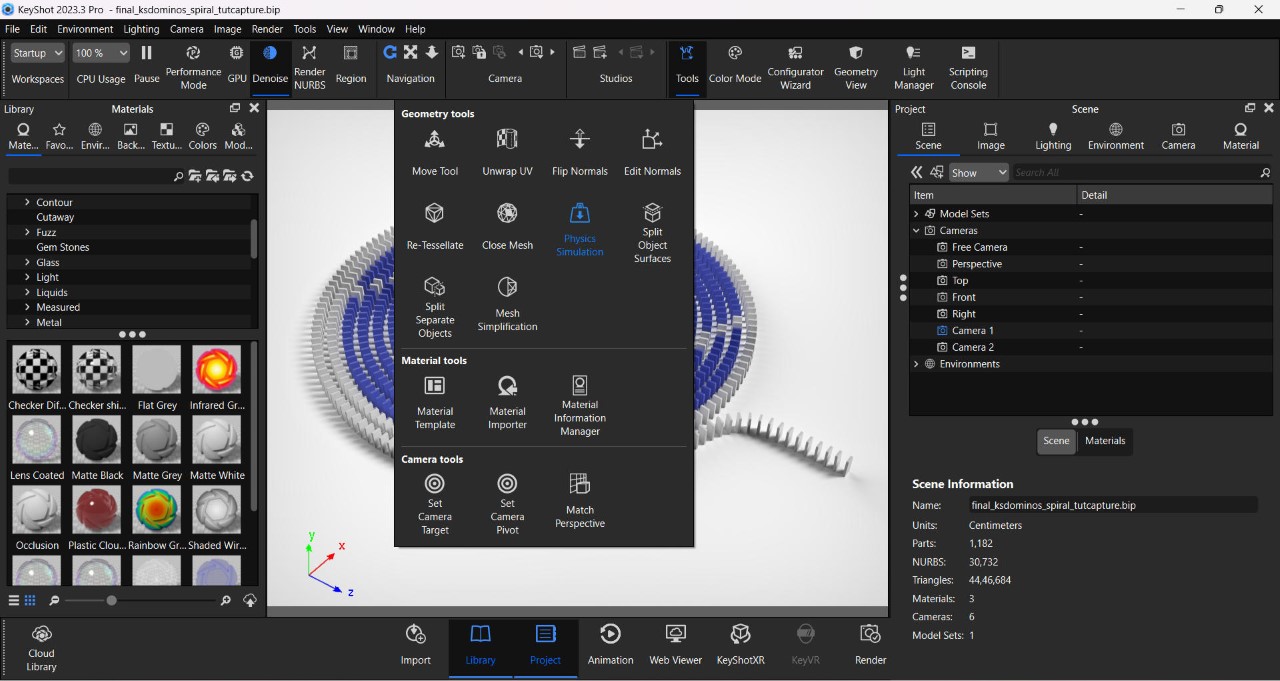
The Physics Simulation feature can be found in the Tools window

To begin with, pick the parts you want to apply physics to (these are the parts that will be influenced by gravity, so don’t pick stuff that remains stationary, like ground objects). The parts you don’t select will still influence your physics because moving objects will still collide with them. Once you’ve chosen what parts you want to move (aka the dominoes), select the ‘Shaded’ option so you can see them clearly in the viewport.

The settings on the left are rather basic but extremely powerful. You start by first setting the maximum simulation time (short animations require short simulations; considering mine was a long chain reaction, I chose 200 seconds), followed by Keyframes Per Second – This basically tells KeyShot to make your animation more detailed or choppy (think FPS, but for simulation). I prefer selecting 25 keyframes per second since I’m rendering my animation at 25fps (just to keep the simulation light), but you can bump things up to 60 keyframes per second, which gives your simulation smoother detail. You can then bump up your animation FPS to render high frame-rate videos that can then be slowed down for dramatic slow motion. Simulation quality dictates how well KeyShot factors the physics in – it’s at a default of 0.1, although if you feel like your simulation looks off, bump it up to a higher value.
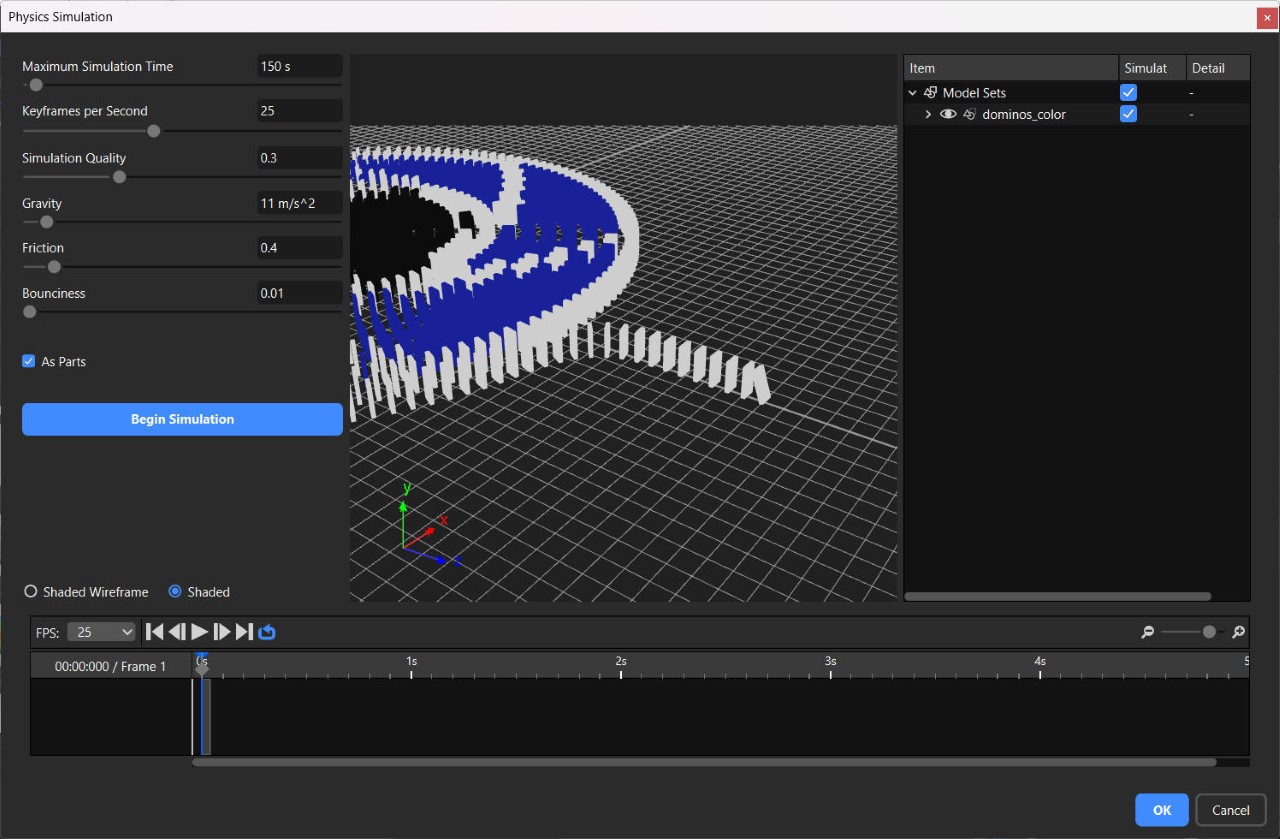
The Physics Simulation Window

The remaining settings pertain to gravity and material properties. The gravity is set at Earth’s default of 9.81 m/s² – increasing it makes items heavier (and fall faster), and decreasing it makes objects float around for longer before descending. I set mine at 11 m/s² just to make sure the dominoes fall confidently. Friction determines the amount of drag caused by two colliding objects – setting a higher friction causes more surface interference, like dropping a cube on a ramp made of rubber, and reducing the friction enables smooth sliding, like the same cube on a polished metal ramp. To ensure that the dominos don’t stick to each other like they were made of rubber, I reduced my friction setting to 0.4. Finally, a Bounciness feature lets you determine how two objects collide – the lower this setting, the less bounce-back, the higher the setting, the more the rebound. Given that I didn’t want my dominos bouncing off each other, I set this at a low of 0.01. Once you’re done, hit the Begin Simulation button to watch the magic unfold.

If you aren’t happy with your simulation, you can stop it mid-way and troubleshoot. Usually, tinkering with the settings helps achieve the right simulation, but here’s something I learned, too – bigger objects fall slower than smaller objects, so playing around with the size and scale of your model can really affect the simulation. If, however, you’re happy with your simulation (you can run through it in the video timeline below), just hit the blue ‘OK’ button, and you’ve successfully rendered your first physics simulation!

The simulation then becomes a part of KeyShot’s Animation timeline, and you can then play around with camera angles and movements to capture your entire scene just the way you visualized it. I created multiple clips of my incredibly long domino chain reaction (in small manageable chunks because my laptop crashed at least 8 times during this) and stitched them together in a video editing app.
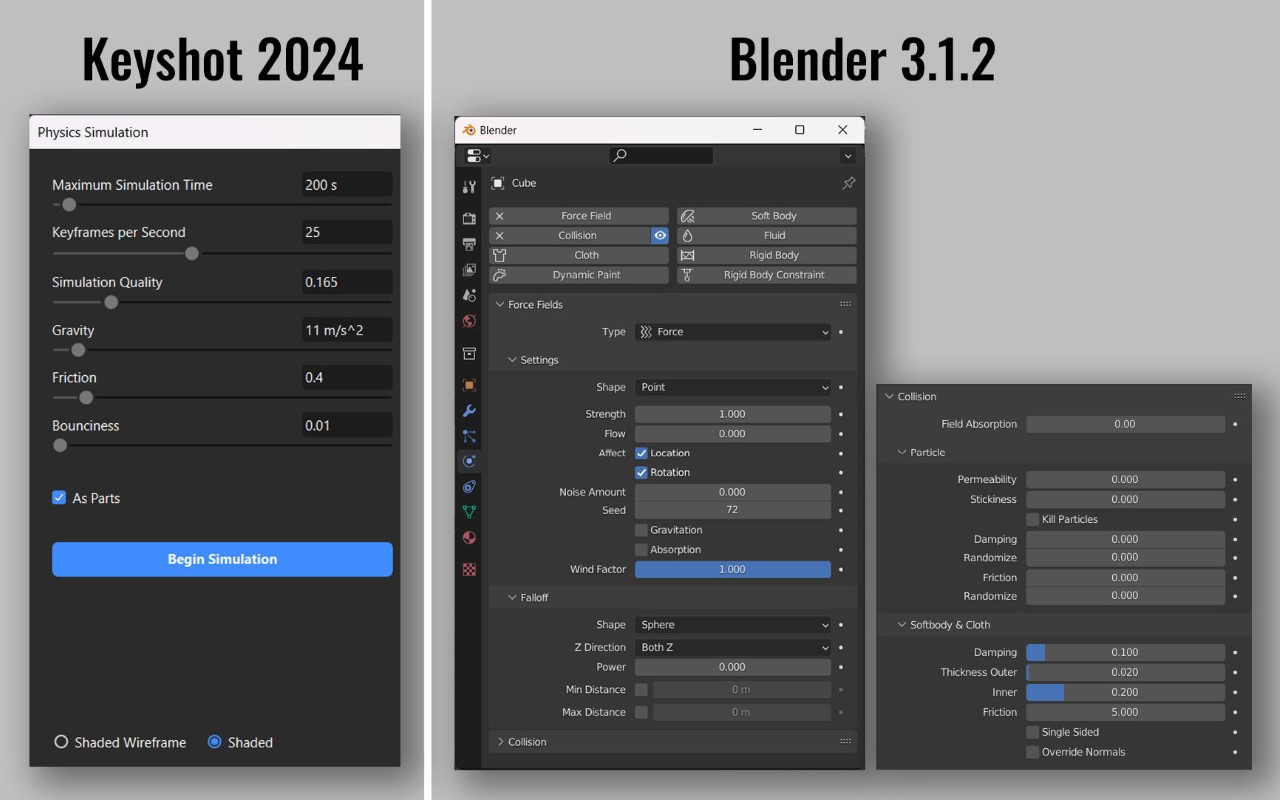
Comparing KeyShot and Blender’s Physics Control Panels

The Physics Simulation feature in KeyShot 2023-24 is incredibly impressive. For starters, it’s a LOT easier than other software like Blender, which can feel a little daunting with the hundreds of settings it has you choose from. Figuring out physics simulation in KeyShot takes just a few minutes (although the actual simulation can take a while if you’re running something complex), making an already powerful rendering software feel even more limitless!

That being said, there’s some room for growth. Previous experiments with the simulation tool saw some strange results – falling objects sometimes ended up choosing their own direction, making the simulation feel odd (I made a watch fall down and the entire thing disassembled and scattered in mid-air instead of falling together and breaking apart on impact). Secondly, sometimes objects can go through each other instead of colliding, so make sure you tinker with quality settings to get the perfect result. Thirdly, you can’t choose different bounciness values for different objects in the same simulation just yet, although I’m sure KeyShot is working on it. Finally, it would be absolutely amazing if there were a ‘slow-motion’ feature. The current way to do this is to bump up the keyframe rate and bring down the gravity, but that can sometimes cause objects to drift away after colliding instead of falling downwards in slow motion.

So there you have it! You can use this tutorial to animate your own domino sequence, too, or better still, create a new simulation based on your own ideas! If you do, make sure to participate in the 2024 KeyShot Animation Challenge to stand a chance to win some exciting prizes. Hurry! The competition ends on March 10th, 2024!

The post How to make a Domino Chain Reaction in KeyShot using the new ‘Physics Simulation’ feature first appeared on Yanko Design.
Apple Sports puts real-time scores on your iPhone lock screen

Apple today announced Sports, a new iPhone app offering real-time stats for a number of major leagues. Once installed, users can set their favorite team and get a trove of data on their lock screen in the live activities box when the team is playing. Available free starting today in the US, Canada and the UK, the app currently supports basketball, hockey and soccer football. The company added that other sports, including baseball and American football will debut for their upcoming seasons.

There are plenty of reasons you might not be able to watch your team of choice play live. You may have a prior engagement, the game may not be televised, or Todd Boehly has done so much damage to the club you can’t bear to look at it any more. In those situations, push alerts from major sports apps has been a lifeline, but it’s not always entirely reliable.

Now, it has been possible to get this working since iOS 16, if you fancied messing around in the depths of the Apple TV app. And some third-party platforms, like MLB’s homegrown app, would put this data in your lock screen or Dynamic Island. But Apple says that its own setup offers a “simple and fast way to stay up to speed on the teams and leagues they love.” The setup will also sync up with any sports preferences already stored in the Apple TV or Apple News apps.

Of more concern is that Sports will also offer up live betting odds for the games as they’re in play. It’s worth noting it will be possible to deactivate the live odds feature in settings, but it seems like it would have been smarter and less potentially harmful to make that opt-in, rather than opt-out.

Apple Sports is available to download now in English. French and Spanish are supported where available.

This article originally appeared on Engadget at https://www.engadget.com/apple-sports-puts-real-time-scores-on-your-iphone-lock-screen-140050382.html?src=rss

Google introduces a lightweight open AI model called Gemma

Google has released an open AI model called Gemma, which it says is created using the same research and technology that was used to build its Gemini AI models. The company says Gemma is its contribution to the open community and is meant to help developers "in building AI responsibly." As such, it also introduced the Responsible Generative AI Toolkit alongside Gemma. It contains a debugging tool, as well as a guide with best practices for AI development based on Google's experience.

The company has made Gemma available in two different sizes — Gemma 2B and Gemma 7B — which both come with pre-trained and instruction-tuned variants and are both lightweight enough to run directly on a developer's laptop or desktop computer. Google says Gemma surpasses much larger models when it comes to key benchmarks and that both model sizes outperform other open models out there. 

In addition to being powerful, the Gemma models were trained to be safe. Google used automated techniques to strip personal information from the data it used to train the models, and it used reinforcement learning based on human feedback to ensure Gemma's instruction-tuned variants show responsible behaviors. Companies and independent developers could use Gemma to create AI-powered applications, especially if none of the currently available open models are powerful enough for what they want to build. 

Google has plans to introduce even more Gemma variants in the future for an even more diverse range of applications. That said, those who want to start working with the models right now can access them through data science platform Kaggle, the company's Colab notebooks or through Google Cloud. 

This article originally appeared on Engadget at https://www.engadget.com/google-introduces-a-lightweight-open-ai-model-called-gemma-130053289.html?src=rss

Astropad Slate turns your iPad into a no-screen Mac drawing tablet

Apple has been pushing the iPads, particularly the iPad Pros, as the next wave of computing, practically replacing laptops for some of the common computing tasks, including content creation. Despite the rich variety of apps for these slates, however, there are still some software and work that can only be done on more powerful computers like Macs and MacBooks. And despite how Apple’s computers have long been loved by designers and artists, the company itself has made no tools to support these use cases, such as drawing tablets or even specialized controllers. That does leave the market wide open for manufacturers like Wacom and its drawing tables, but it also forces people to buy these products when they have a perfectly capable iPad with an Apple Pencil. That’s where Astropad’s latest product comes in, bridging the divide between Macs and iPads once again, but with a curious twist.

Designer: Astropad

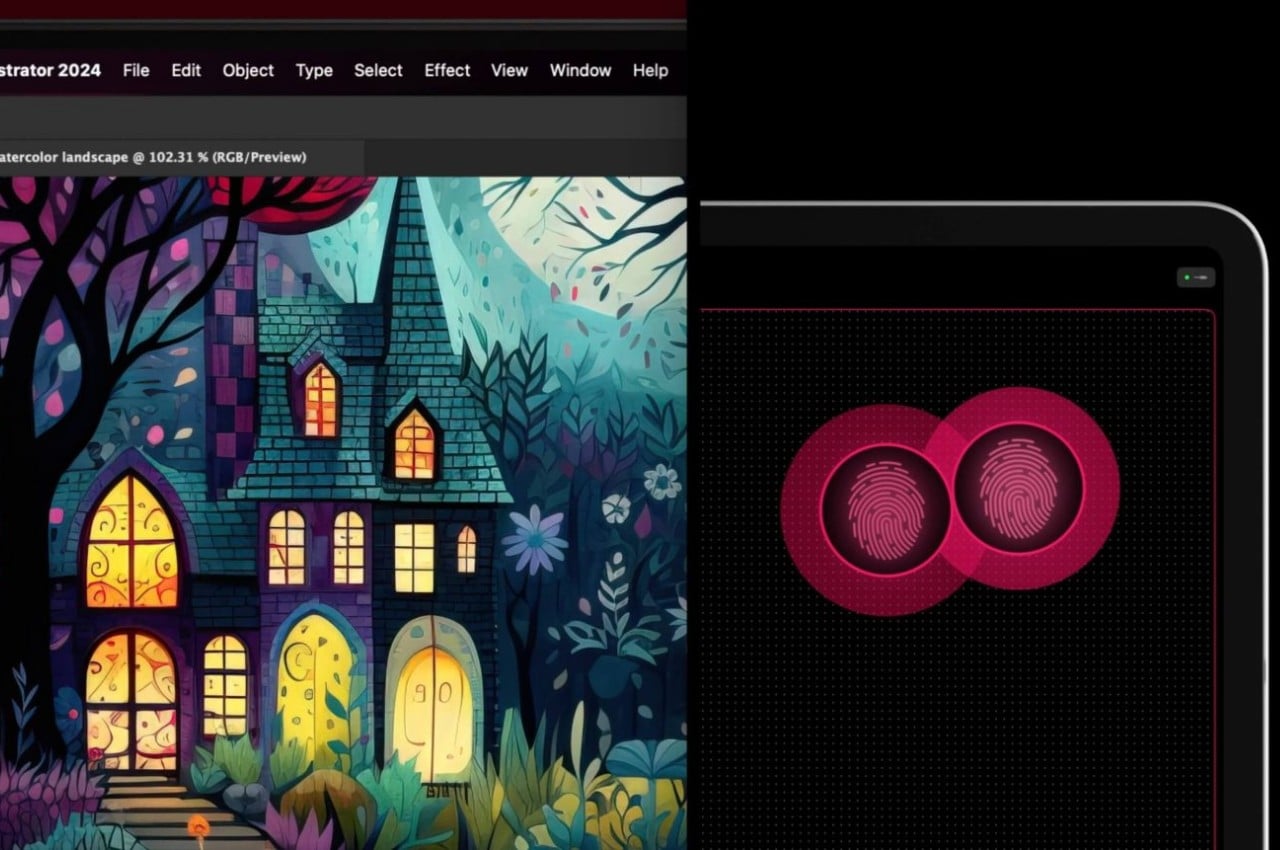
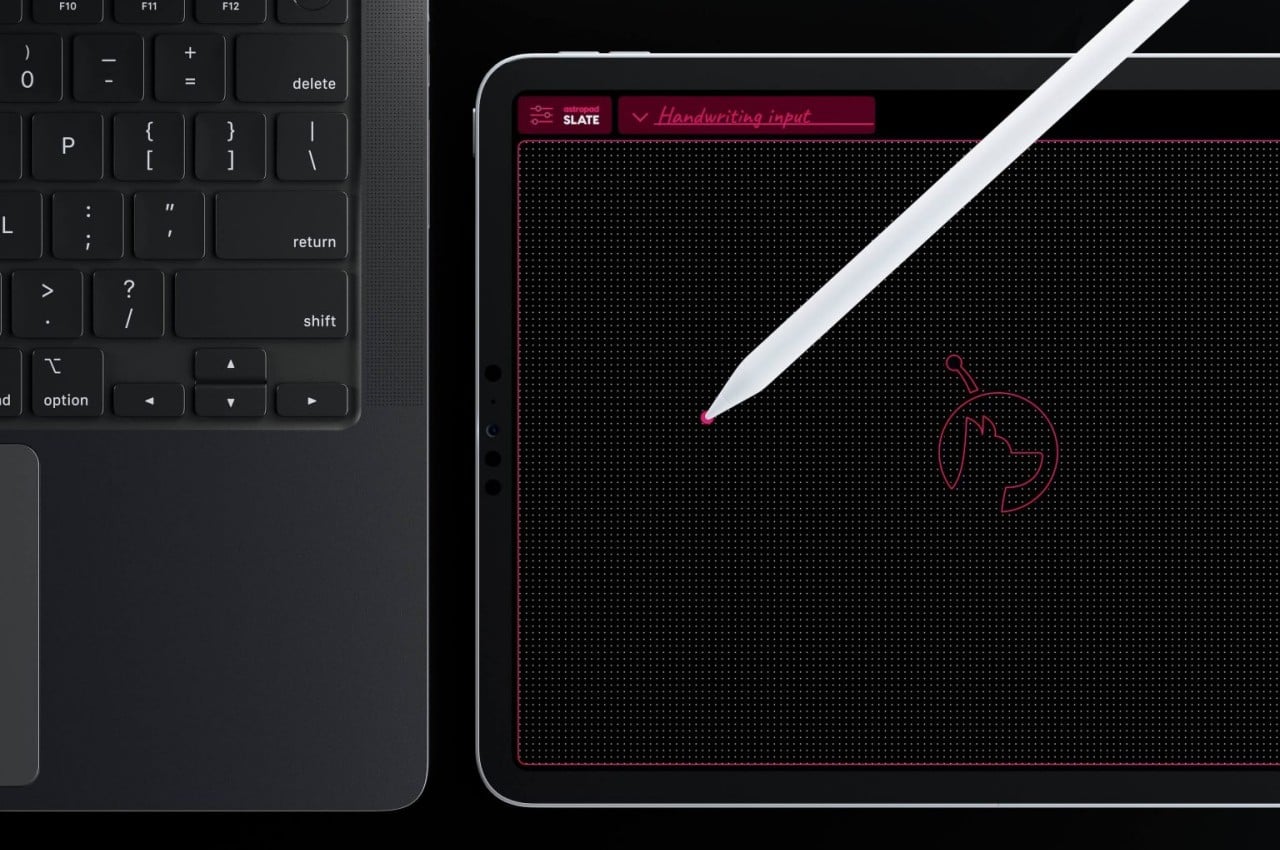
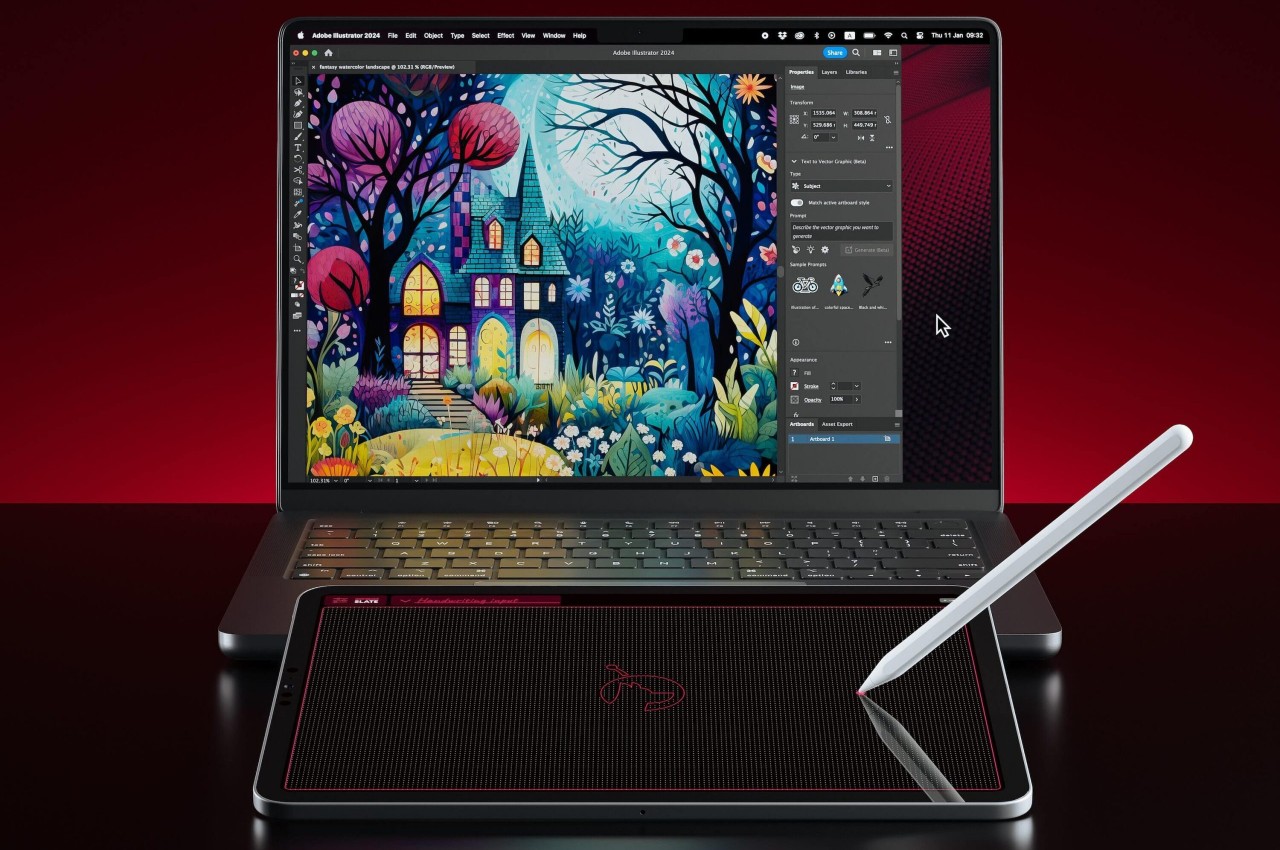
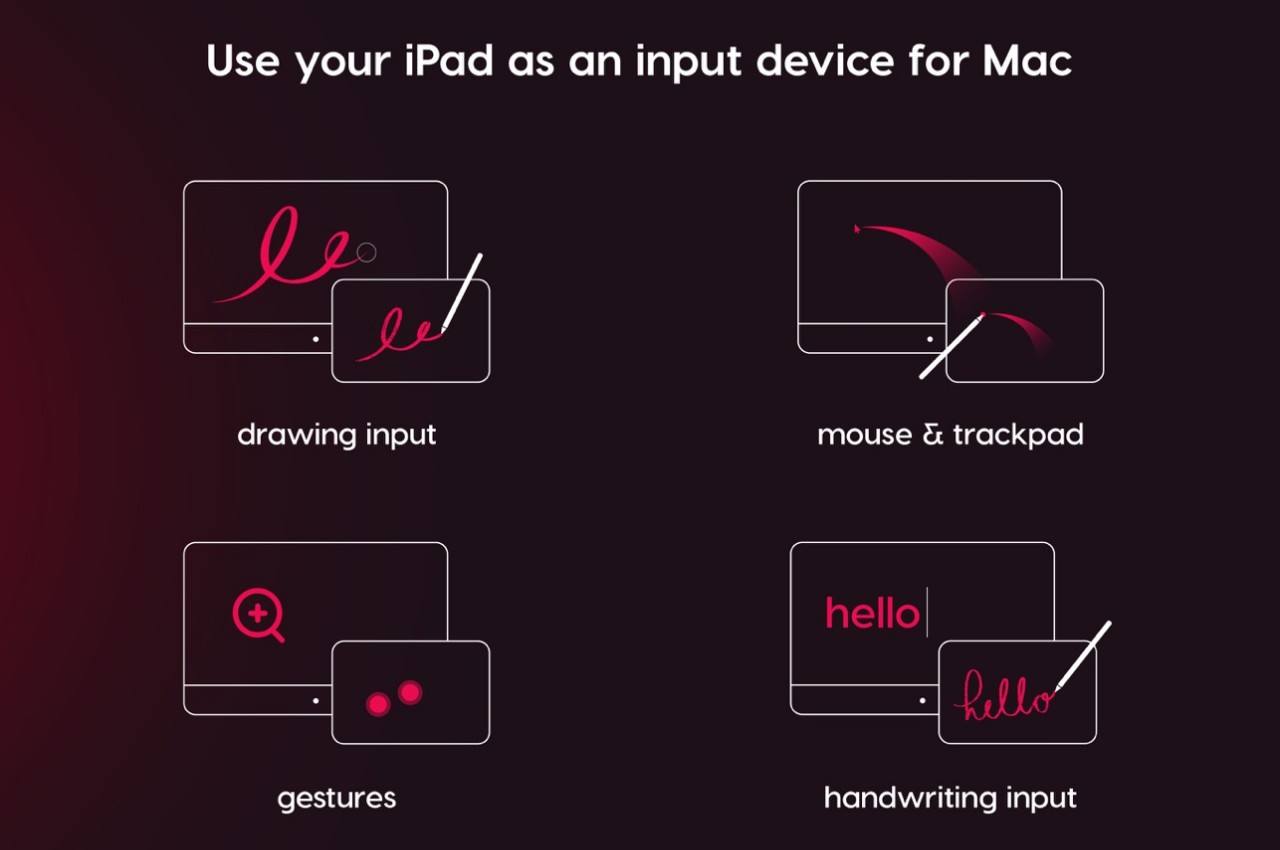
In a nutshell, Astropad Slate is an app that lets you remotely control a Mac using an iPad, Pro or otherwise. You can connect using Wi-Fi, a USB cable, or even Peer-to-Peer networking. Although an Apple Pencil would be nice, it isn’t exactly a requirement. With just your fingers, you can already control the Mac as if you were using a gigantic touchpad. That includes supporting gestures like pinching or two-finger scroll.

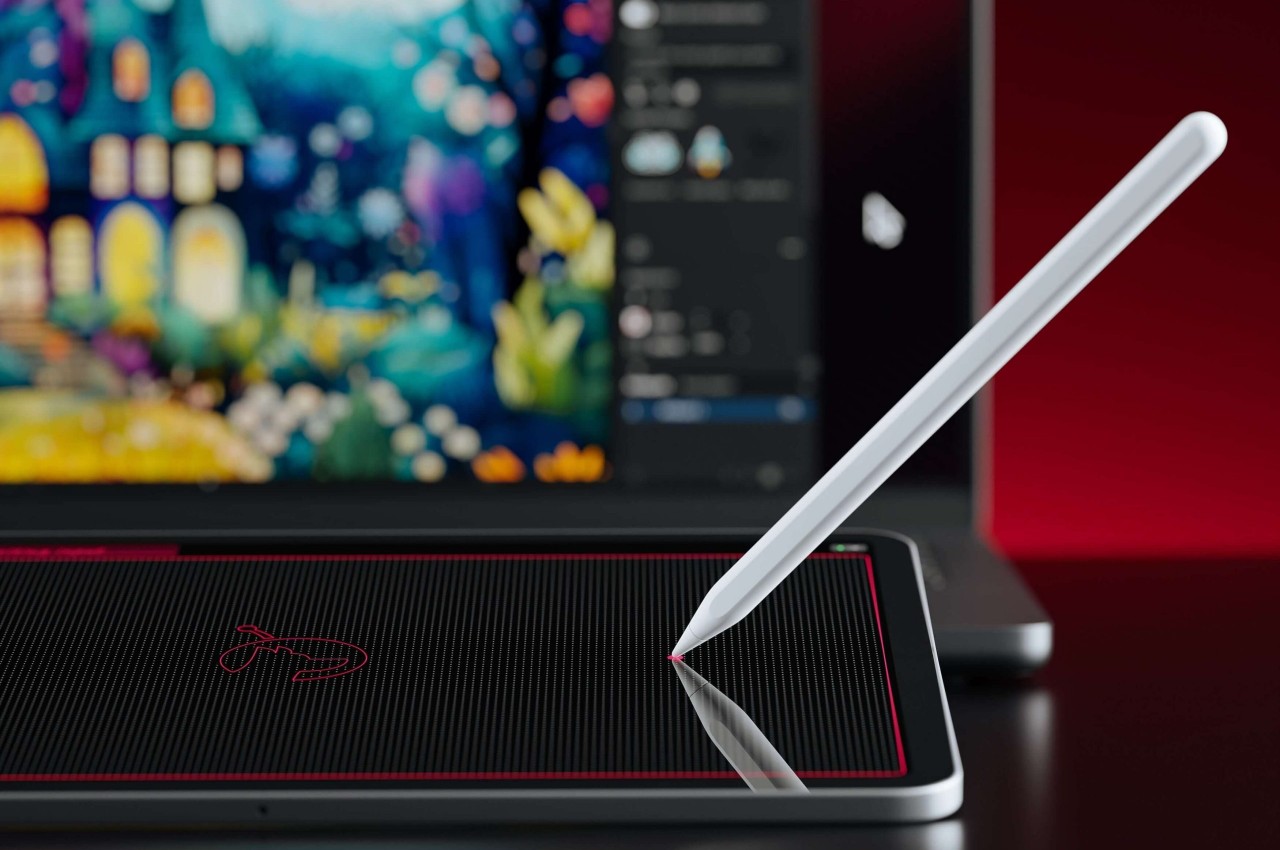
The Slate app really shines, however, when you involve an Apple Pencil, which is supported by most iPads nowadays. With this precise tool, you can not only hover over the user interface on the Mac, you can also turn handwritten scribbles into text, practically replacing the keyboard. Of course, creators, designers, and artists are more likely to utilize the app’s ability to turn the iPad into a drawing tablet, but one without a screen.

This would be similar to the older and cheaper drawing slates that some artists prefer for their distraction-free experience. It does, however, take a bit of getting used to because you won’t be looking at where your hand is going, unlike the analog pen and paper experience. That does help you focus more on what’s happening on screen and, at least for some, offers a more ergonomic position since you won’t be craning your neck downward.

For those that prefer a more “conventional” display tablet experience, Astropad does have its Studio that turns the iPad into something like a Wacom Cintiq and even has compatibility with Windows PCs. For all that power, however, Astropad Studio requires a $79.99 annual subscription, while this simpler Astropad Slate is a one-time $19.99 purchase only.

The post Astropad Slate turns your iPad into a no-screen Mac drawing tablet first appeared on Yanko Design.

Apple confirms home screen web apps will no longer work on European iOS devices

Apple has explained why it's disabling progressive web apps (PWAs) in the EU, it wrote in updated developer notes seen by TechCrunch. The news follows users noticing that web apps were no longer functional in Europe with recent iOS 17.4 beta releases. Apple said it's blocking the feature in the region due to new rules around browsers in Europe's Digital Markets Act (DMA).

Web apps behave much like native apps, allowing dedicated windowing, notifications, long-term local storage and more. European users tapping web app icons will see a message asking if they wish to open them in Safari instead or cancel. That means they act more like web shortcuts, creating issues like data loss and broken notifications, according to comments from users seen by MacRumors.

The problem, according to Apple, is a new DMA requirement that it allow browsers that don't use its WebKit architecture. "Addressing the complex security and privacy concerns associated with web apps using alternative browser engines would require building an entirely new integration architecture that does not currently exist in iOS and was not practical to undertake given the other demands of the DMA and the very low user adoption of Home Screen web apps," the company wrote.

However, the Open Web Advocacy organization disagrees, as it writes in its latest blog: 

Some defend Apple's decision to remove Web Apps as a necessary response to the DMA, but this is misguided.

Apple has had 15 years to facilitate true browser competition worldwide, and nearly two years since the DMA’s final text. It could have used that time to share functionality it historically self-preferenced to Safari with other browsers. Inaction and silence speaks volumes.

The complete absence of Web Apps in Apple's DMA compliance proposal, combined with the omission of this major change from Safari beta release notes, indicates to us a strategy of deliberate obfuscation. Even if Apple were just starting to internalize its responsibilities under the DMA, this behaviour is unacceptable. A concrete proposal with clear timelines, outlining how third party browsers could install and power Web Apps using their own engines, could prevent formal proceedings, but this looks increasingly unlikely. Nothing in the DMA compels Apple to break developers' Web Apps, and doing so through ineptitude is no excuse.

The change, spotted earlier by researcher Tommy Mysk, arrived with the second iOS 17.4 beta, but many observers first thought it was a bug. "The EU asked for alternative app stores and Apple took down web apps. Looks like the EU is going to rue the day they have asked Apple to comply with the #DMA rules," he posted on X.

According to Apple's App Store Guidelines, web apps are supposed to be an alternative to the App Store model. Considering that that the EU's DMA is designed to break the App Store monopoly, the move to disable them altogether is bound to cause friction. The EU, Japan, Australia and the UK have previously criticized the requirement for WebKit to run PWAs, according to the Open Web Advocacy (OWA). 

Apple said it regrets any impact to the change, but said it was required "as part of the work to comply with the DMA." The company has already been accused by developers of malicious compliance with the DMA over fees for developers to bypass the App Store, with Spotify CEO Daniel Ek describing it as "extortion.". 

This article originally appeared on Engadget at https://www.engadget.com/apple-confirms-home-screen-web-apps-will-no-longer-work-on-european-ios-devices-112527560.html?src=rss

Apple confirms home screen web apps will no longer work on European iOS devices

Apple has explained why it's disabling progressive web apps (PWAs) in the EU, it wrote in updated developer notes seen by TechCrunch. The news follows users noticing that web apps were no longer functional in Europe with recent iOS 17.4 beta releases. Apple said it's blocking the feature in the region due to new rules around browsers in Europe's Digital Markets Act (DMA).

Web apps behave much like native apps, allowing dedicated windowing, notifications, long-term local storage and more. European users tapping web app icons will see a message asking if they wish to open them in Safari instead or cancel. That means they act more like web shortcuts, creating issues like data loss and broken notifications, according to comments from users seen by MacRumors.

The problem, according to Apple, is a new DMA requirement that it allow browsers that don't use its WebKit architecture. "Addressing the complex security and privacy concerns associated with web apps using alternative browser engines would require building an entirely new integration architecture that does not currently exist in iOS and was not practical to undertake given the other demands of the DMA and the very low user adoption of Home Screen web apps," the company wrote.

However, the Open Web Advocacy organization disagrees, as it writes in its latest blog: 

Some defend Apple's decision to remove Web Apps as a necessary response to the DMA, but this is misguided.

Apple has had 15 years to facilitate true browser competition worldwide, and nearly two years since the DMA’s final text. It could have used that time to share functionality it historically self-preferenced to Safari with other browsers. Inaction and silence speaks volumes.

The complete absence of Web Apps in Apple's DMA compliance proposal, combined with the omission of this major change from Safari beta release notes, indicates to us a strategy of deliberate obfuscation. Even if Apple were just starting to internalize its responsibilities under the DMA, this behaviour is unacceptable. A concrete proposal with clear timelines, outlining how third party browsers could install and power Web Apps using their own engines, could prevent formal proceedings, but this looks increasingly unlikely. Nothing in the DMA compels Apple to break developers' Web Apps, and doing so through ineptitude is no excuse.

The change, spotted earlier by researcher Tommy Mysk, arrived with the second iOS 17.4 beta, but many observers first thought it was a bug. "The EU asked for alternative app stores and Apple took down web apps. Looks like the EU is going to rue the day they have asked Apple to comply with the #DMA rules," he posted on X.

According to Apple's App Store Guidelines, web apps are supposed to be an alternative to the App Store model. Considering that that the EU's DMA is designed to break the App Store monopoly, the move to disable them altogether is bound to cause friction. The EU, Japan, Australia and the UK have previously criticized the requirement for WebKit to run PWAs, according to the Open Web Advocacy (OWA). 

Apple said it regrets any impact to the change, but said it was required "as part of the work to comply with the DMA." The company has already been accused by developers of malicious compliance with the DMA over fees for developers to bypass the App Store, with Spotify CEO Daniel Ek describing it as "extortion.". 

This article originally appeared on Engadget at https://www.engadget.com/apple-confirms-home-screen-web-apps-will-no-longer-work-on-european-ios-devices-112527560.html?src=rss

A piracy app outranked Netflix on the App Store before Apple pulled it

Over the past week, an app called Kimi curiously outranked well-known streaming services, such as Netflix and Prime Video, in the App Store's list of top free entertainment apps. Now, Apple has pulled the application... most likely because it gave users access to pirated movies. As Wired reports, Kimi was disguised as an app that tests your eyesight by making you play spot the difference in similar photos. In reality, it was nothing of the sort and instead contained bootlegged shows and movies, including recent blockbusters and award-winning films. 

Its offerings, however, varied in quality in a way that's familiar to those who used to look for shows and movies online before the advent of streaming services. Kimi's copy of the Emma Stone-starrer Poor Things was apparently grainy and pixelated, while other movies available in high-quality copies had ads blocking the view across the top of the screen. The app was incredibly easy to use: Viewers simply had to download it and fire it up to start watching. It was similar to the now-defunct service Popcorn Time, in that it made pirating movies as easy as watching Netflix. Popcorn Time shut down for good in 2022. 

The company told us that Kimi presented itself as a vision testing platform during the review process. It removed the app from its store, as well as the developer from the Apple Developer program, after discovering its bait-and-switch tactics, a spokesperson told us. They added that Apple has no tolerance for scam apps and applications with hidden or undocumented features. 

Apple prides itself on privacy and safety and on making sure the apps it makes available for download are on the up and up. When it revealed how it would comply with the European Union's Digital Markets Act (DMA), for instance, it said any alternative app store that makes its way to the company's platforms will need to have stringent rules and moderation tools comparable to its own. Apple itself may have to start keeping an even closer eye on its App Store, though. Viewers have been expressing their discontent online on having to pay for too many streaming services to be able to watch what they want to, and it seems like more and more people are turning to piracy again. 

Update, February 16, 2024, 5:08AM ET: This story has been updated to add the information Apple shared with Engadget.

This article originally appeared on Engadget at https://www.engadget.com/a-piracy-app-outranked-netflix-on-the-app-store-before-apple-pulled-it-132013246.html?src=rss

Apple Vision Pro now has a native TikTok app

The Apple Vision Pro is officially two weeks old, and the apps are starting to roll in. TikTok was conspicuously absent on launch day, but now our long national nightmare has come to an end. The Vision Pro has a native TikTok app.

This isn’t just the iPad app with a new coat of paint. There are some neat features here that take advantage of Apple’s well-regarded and prohibitively-expensive headset. The navigation bar and like button are moved entirely off-screen, giving users an uninterrupted view of video content.

A video on the app showing a man leaning back.
TikTok

This extends to comment sections and creator profiles, as they both now appear as expansions alongside the feed, which TikTok says provides “a more immersive content viewing experience.” To that end, TikTok integrates with the headset’s immersive environments, so people can watch short-form videos on the moon or surrounded by the lush flora of Yosemite.

TikTok also works with the Vision Pro’s Shared Space feature, allowing the app to exist somewhere in your peripheral as you work on other stuff. The location of the app will remain static, so it’ll be in the same place every time you put on the headset (provided you are in the same room.)

You may notice that these features are primarily intended for content consumers, and not creators. Engadget reached out to TikTok to ask about creator-specific features and we’ll update this post when we hear back.

The app’s available for download right now, though it likely won’t be accessible for TikTok’s core userbase of 10 to 19 year olds. The Apple Vision Pro costs $3,500. That’s like an entire childhood of allowances.

This article originally appeared on Engadget at https://www.engadget.com/apple-vision-pro-now-has-a-native-tiktok-app-193214818.html?src=rss

Apple Vision Pro now has a native TikTok app

The Apple Vision Pro is officially two weeks old, and the apps are starting to roll in. TikTok was conspicuously absent on launch day, but now our long national nightmare has come to an end. The Vision Pro has a native TikTok app.

This isn’t just the iPad app with a new coat of paint. There are some neat features here that take advantage of Apple’s well-regarded and prohibitively-expensive headset. The navigation bar and like button are moved entirely off-screen, giving users an uninterrupted view of video content.

A video on the app showing a man leaning back.
TikTok

This extends to comment sections and creator profiles, as they both now appear as expansions alongside the feed, which TikTok says provides “a more immersive content viewing experience.” To that end, TikTok integrates with the headset’s immersive environments, so people can watch short-form videos on the moon or surrounded by the lush flora of Yosemite.

TikTok also works with the Vision Pro’s Shared Space feature, allowing the app to exist somewhere in your peripheral as you work on other stuff. The location of the app will remain static, so it’ll be in the same place every time you put on the headset (provided you are in the same room.)

You may notice that these features are primarily intended for content consumers, and not creators. Engadget reached out to TikTok to ask about creator-specific features and we’ll update this post when we hear back.

The app’s available for download right now, though it likely won’t be accessible for TikTok’s core userbase of 10 to 19 year olds. The Apple Vision Pro costs $3,500. That’s like an entire childhood of allowances.

This article originally appeared on Engadget at https://www.engadget.com/apple-vision-pro-now-has-a-native-tiktok-app-193214818.html?src=rss