Generative AI, we are repeatedly told, is a transformative and complicated technology. So complicated that its own creators are unabletoexplain why it acts the way it does, and so transformative that we'd be fools to stand in the way of progress. Even when progress resembles a machine for undressing strangers without their consent on an unprecedented scale, as has been the case of late with Elon Musk's Grok chatbot.
UK Prime Minister Kier Starmer seems to have so fully bought into the grand lie of the AI bubble that he was willing to announce:
"I have been informed this morning that X is acting to ensure full compliance with UK law."
Not that it currently is in compliance. Nor a timeline in which it is expected to do so. Just that he seems satisfied that someday, eventually, Musk's pet robot will stop generating child sexual abuse material.
This statement comes just under two days after Starmer was quoted as saying "If X cannot control Grok, we will." What could Elon possibly have said to earn this pathetic capitulation. AI is difficult? Solutions take time?
These are entirely cogent technical arguments until you remember: He could just turn it off.
Elon Musk has the power to disable Grok, if not in whole (we should be so lucky) than its image generation capabilities. We know this intuitively, but also because he rate-limited Grok's image generation after this latest scandal: after a few requests, free users are now prompted to pay $8 per month to continue enlisting a wasteful technology to remove articles of clothing from women. Sweep it under the rug, make a couple bucks along the way.
Not only is it entirely possible for image generation to be turned off, it's the only responsible option. Software engineers regularly roll back updates or turn off features that work less than optimally; this one's still up and running despite likely running afoul of the law.
That we have now gone the better part of a month aware this problem exists; that the "feature" still remains should tell Starmer and others all they need to know. Buddy, you're carrying water for a bozo who does not seem to care that one such victim was reportedly Ashley St Clair, the mother of one of his (many) children.
Some countries — namely Malaysia and Indonesia — chose to turn Grok off for their citizens by blocking the service. Indonesia's Communication and Digital Affairs Minister was quoted as saying “The government sees nonconsensual sexual deepfakes as a serious violation of human rights." Imagine if everyone in the business of statecraft felt that way.
The UK (not to mention the US, but please, expect nothing from us, we're busy doingauthoritarianism) has a lot more sway over X, and by extension Elon, than either of those countries. Musk does, and is looking to do even more, business in the UK. Even if Musk were not perhaps the world's most well known liar, Grok can still make images and that should speak for itself. Grok should bewell out of second chances by now, and it's up to government leaders to say no more until they can independently verify it's no longer capable of harm.
This article originally appeared on Engadget at https://www.engadget.com/he-could-just-turn-it-off-180209551.html?src=rss
Look, virtual private networks are great — I wouldn't have made a list of the best VPNs if I didn't recommend using them. But being able to control your own technology is also important. A VPN can provide protection and peace of mind when used properly, but you may not want it active on your phone all the time.
For example: Are your Google search results suddenly in German? That’s one example of what can happen if you leave your virtual location set to Berlin or Vienna. Or maybe a VPN you installed for work or to watch a single tennis match is persistently trying to keep itself active.
The point is, deactivating a VPN on an iPhone can sometimes be unusually tricky, because there’s more than one off switch. Fortunately, it's not hard. There are several easy ways to disconnect from an iOS VPN or delete it entirely. If you catch it turning itself back on, I'll show you how to stop that too.
Three ways to turn off your iPhone VPN
I'm using a fluid definition of "turn off" here. Some of the steps below simply disconnect the VPN, while others remove it from your phone altogether. I'll make it clear in each section what the outcome will be.
How to disconnect in the VPN app
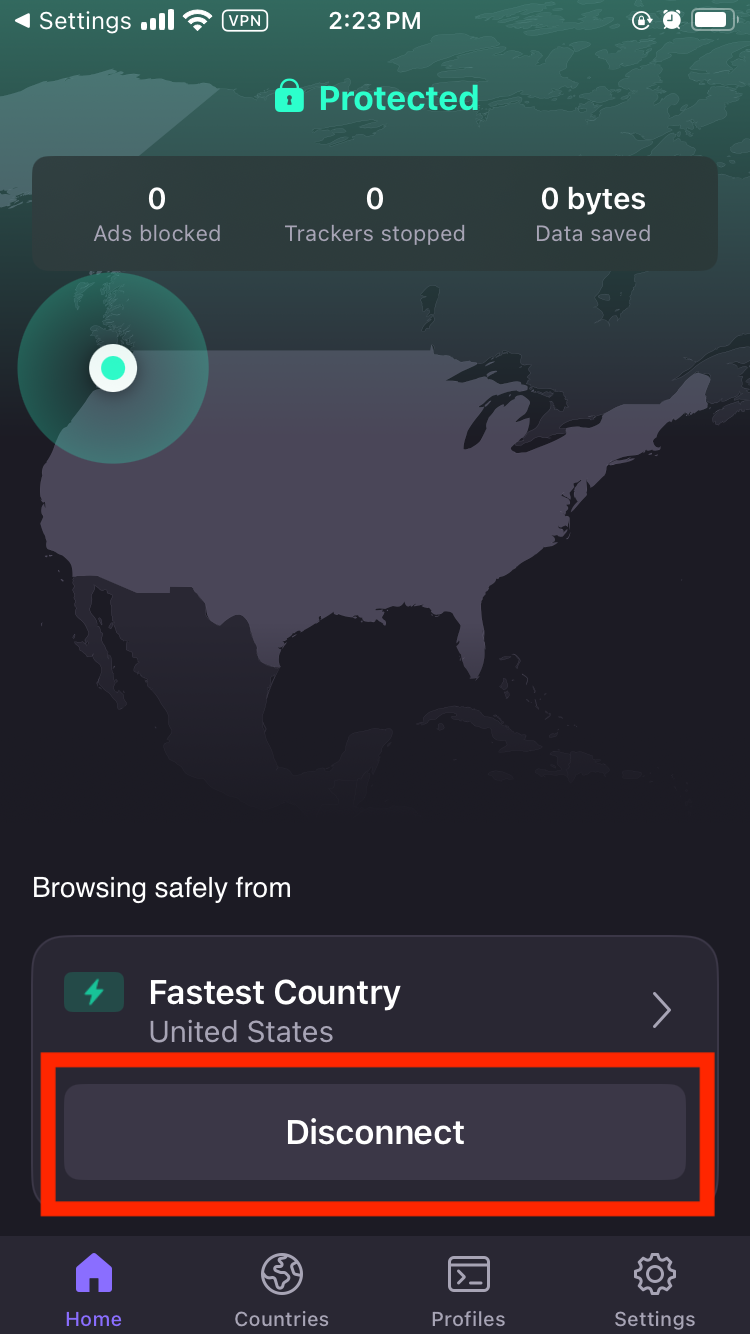
This is the easiest way to turn off a VPN on your iPhone. First, find the VPN app that’s active, which should be on your home screen somewhere. Each app has a different interface for connecting and disconnecting, but the disconnect button should be fairly obvious — it may say the word "disconnect" or show a green power icon. In any case, it should be right on the home screen, without requiring any digging through menus.
Example of where to find the disconnect option on a VPN's home screen.
Sam Chapman for Engadget
Tap the disconnect button and wait for the VPN to clearly state that it's disconnected. Check to make sure the rectangle with "VPN" inside has disappeared from the top of your iPhone screen. The VPN is now disconnected.
How to turn off the VPN in Settings
If you aren't sure which VPN app is active, or if its interface doesn't make it clear how to turn it off, you can shut it down from the Settings menu instead. Find the app on your home screen that looks like several interlocking gray gears and tap it.
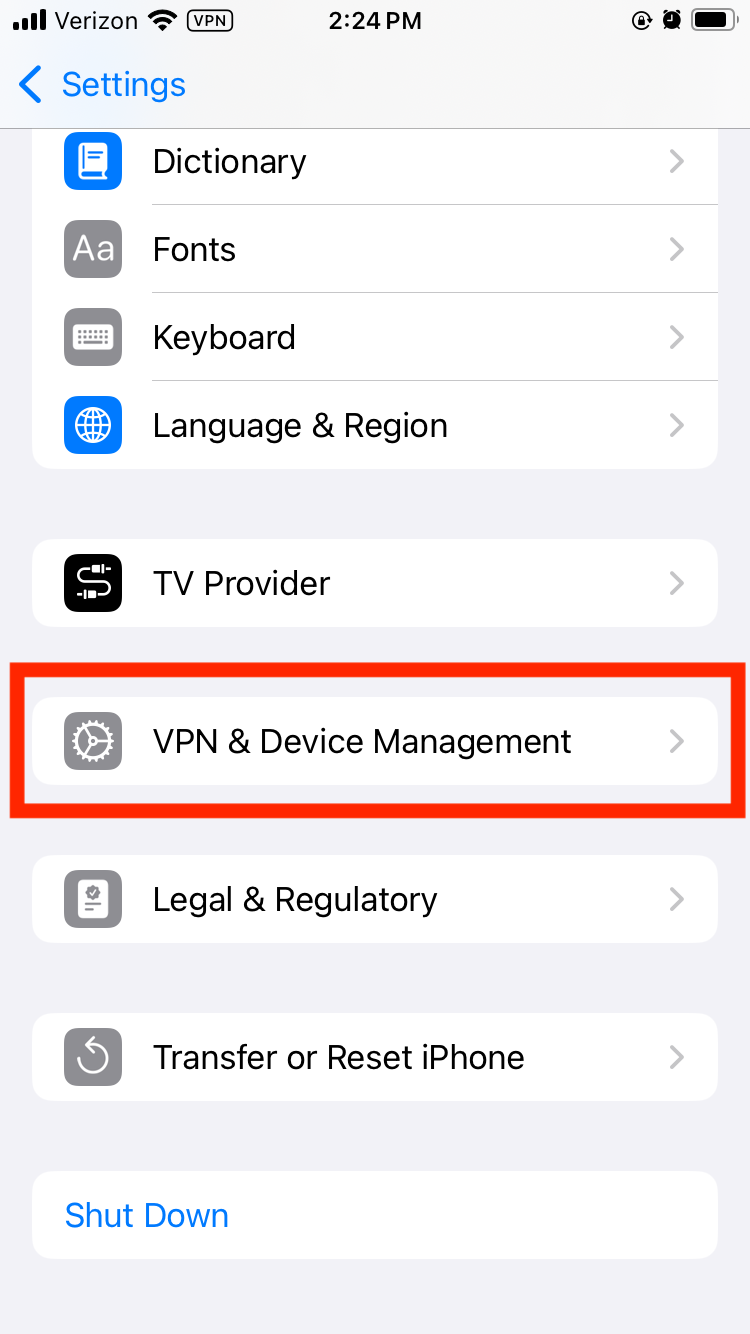
Next, scroll down and tap the VPN option. If it's not present (which it won’t be on older iOS versions), tap the General option next to another picture of a gray gear. Scroll down again and tap VPN & Device Management by yet another gray gear. Finally, tap the VPN option at the top of the screen to reach the VPN management page.
Location of the VPN settings on iOS.
Sam Chapman for Engadget
If you have a VPN active, you should see an option at the top of the page labeled VPN Status. Toggle it from Connected to Not Connected. The VPN icon should disappear from the top of your screen, indicating that it's turned off.
How to delete the VPN app altogether
If you don't want the VPN on your phone at all, you can turn it off permanently by deleting both the app and the configuration. This is a lot harder to undo, so only do it if you're certain.
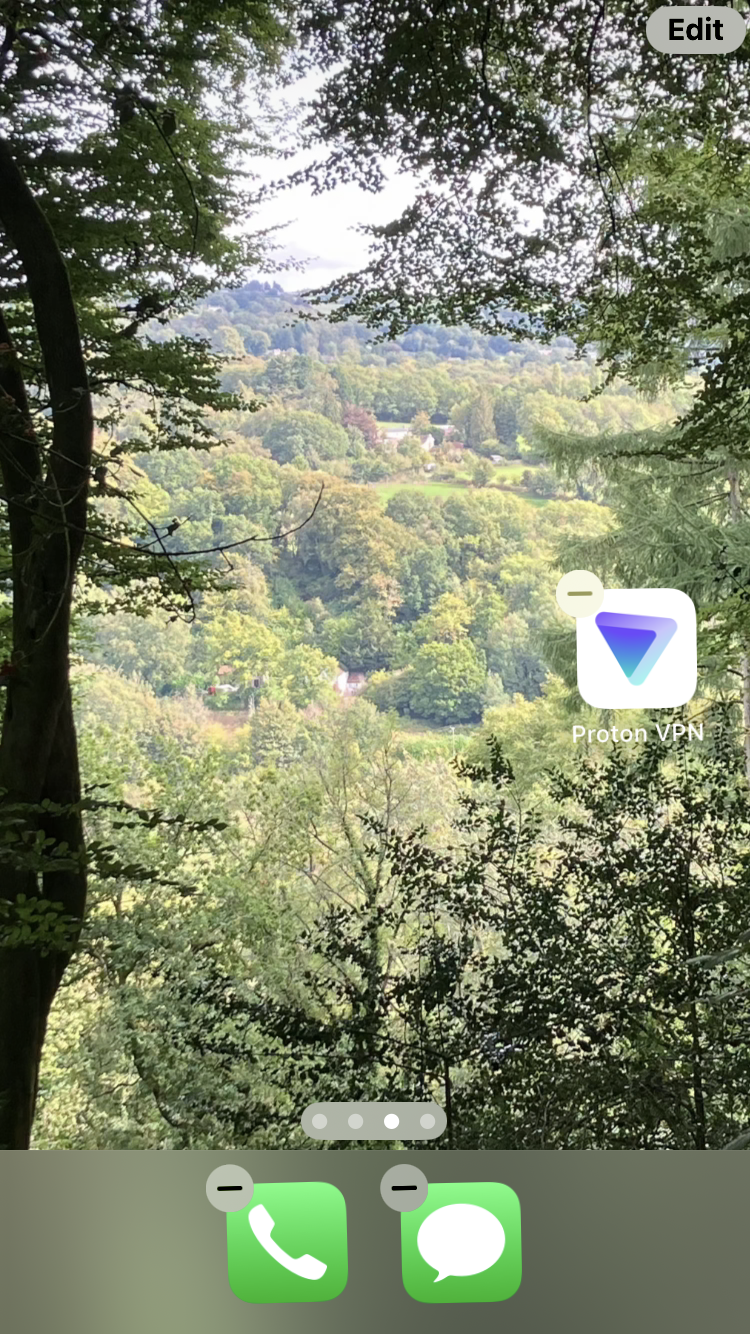
Start by deleting the app the same way you'd get rid of any other app. Tap the icon and hold until a pop-up menu appears. Select the Remove App option in red text, then click Remove App again when prompted.
Deleting a VPN on the iOS home screen.
Sam Chapman for Engadget
Deleting the app should also delete the configuration, but you can verify this for yourself. Follow the process from the previous section to find the VPN settings page. If there's still a VPN profile in those settings, tap the circled letter "i" next to its name, then tap Delete VPN at the bottom of the screen. The VPN is now gone from your iPhone unless you re-download it from the App Store.
Troubleshooting: When an iPhone VPN turns itself back on
Sometimes, even though you've followed all the steps, that pesky VPN rectangle is back on your screen the next time you unlock your phone. If your iOS VPN keeps turning itself back on, a few things might be happening, most of them thankfully fixable.
If you did not delete the VPN, it may be turning itself back on because its settings are telling it to. Go into its preferences menu and check for a setting called "auto-connect" or something similar. Settings like these have the VPN connect by itself to protect users who forget to activate it manually. Toggle all auto-connect options off and the problem should stop.
It's also possible that settings on the iOS side are making the VPN reconnect. Go to the VPN settings page (you'll find instructions for getting there in the previous section) and find the name of the active VPN profile. Tap the "i" next to it. On the next page, turn off "connect on demand" to stop the automatic reconnections.
If you did delete the VPN, but it's still reinstalling itself and turning back on, make sure that you deleted both the app and the connection profile. Reboot your iPhone to make sure all the settings stick. If the problem persists after all this, you've either got malware disguised as a VPN or you're using a school or work phone where the VPN can't be uninstalled.
If you aren't on a phone provided by a school or office, meaning you probably have malware, download an antivirus app and run a complete scan of your iPhone. This should remove any persistent files that keep reinstalling the virus. If, after all this, the VPN is still turning itself back on, I recommend burning your phone in a salt circle with a bundle of sage.
When should you turn off your iPhone VPN?
I encourage everyone to use a VPN every time they connect to the internet, but there are some situations where going through a VPN server is less convenient (this is the whole reason split tunneling exists). Here are a few cases in which temporarily turning off your VPN might be a good idea.
The VPN isn't working. If your browsing speed is sluggish or the VPN keeps dropping the connection, your VPN server might be having problems. Disconnecting and reconnecting, even in the same location, should switch you to a different server that may work better.
The VPN is causing unintended browsing errors. If you’re using mapping software or just trying to do a location-based search, having your VPN active can cause more problems than it solves.
Your internet connection is unstable.A VPN adds an extra step to the process of getting online. If your phone is already struggling, the VPN might be an unnecessary complication.
You're on a site that blocks all VPNs. Sites that work based on your location, including all streaming sites, may blanket-block VPNs so nothing messes with their location services. Good VPNs can get around these blocks, but even the best sometimes fail. In these cases, briefly turning off the VPN may be a good idea.
Your battery is low. VPNs can put a strain on your phone's battery life. This varies with the quality of your VPN, but you may sometimes need to shut it off if your battery is in the red.
How to turn off iCloud Private Relay
iCloud Private Relay is not a VPN, but it's often confused for one. If you found this page because you want to turn it off, you're in luck — the steps are just as simple as turning off a VPN. Start by opening Settings, then tap your name. Scroll down and tap iCloud.
Private Relay will only be active if you're an iCloud+ subscriber. If you are, tap Private Relay, then choose whether to turn it off temporarily or indefinitely.
This article originally appeared on Engadget at https://www.engadget.com/cybersecurity/vpn/how-to-turn-off-a-vpn-on-iphone-180000533.html?src=rss
Some plastics never get recycled, no matter how much you sort them. Fishing nets, buoys, agricultural films, and multilayer snack packaging are too dirty or too mixed for normal recycling systems, so they end up burned or buried. Meanwhile, we keep pouring concrete into retaining walls and bases, even though concrete production is heavy on CO₂ and performs poorly under tension when soil shifts or water builds up behind a wall.
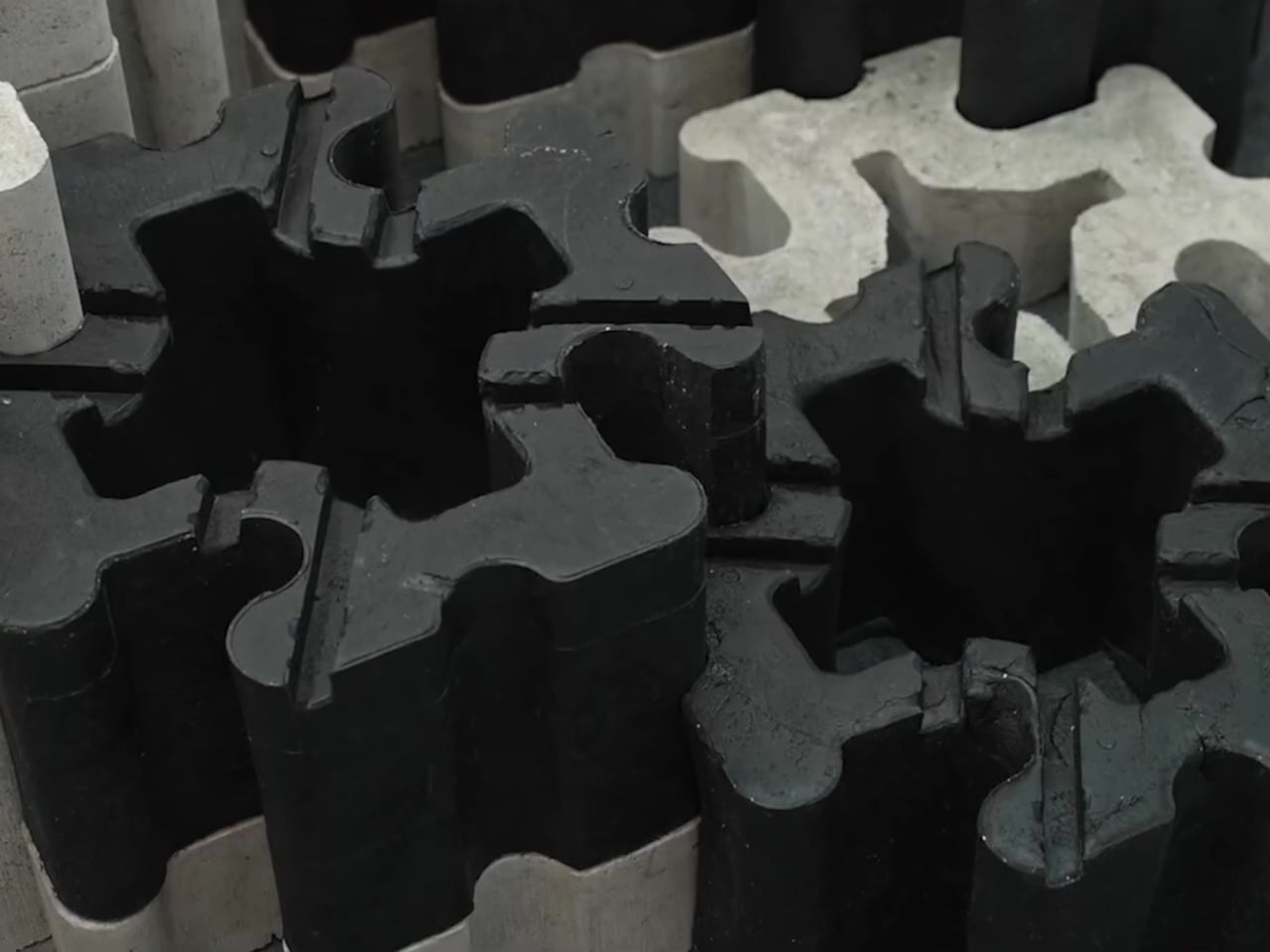
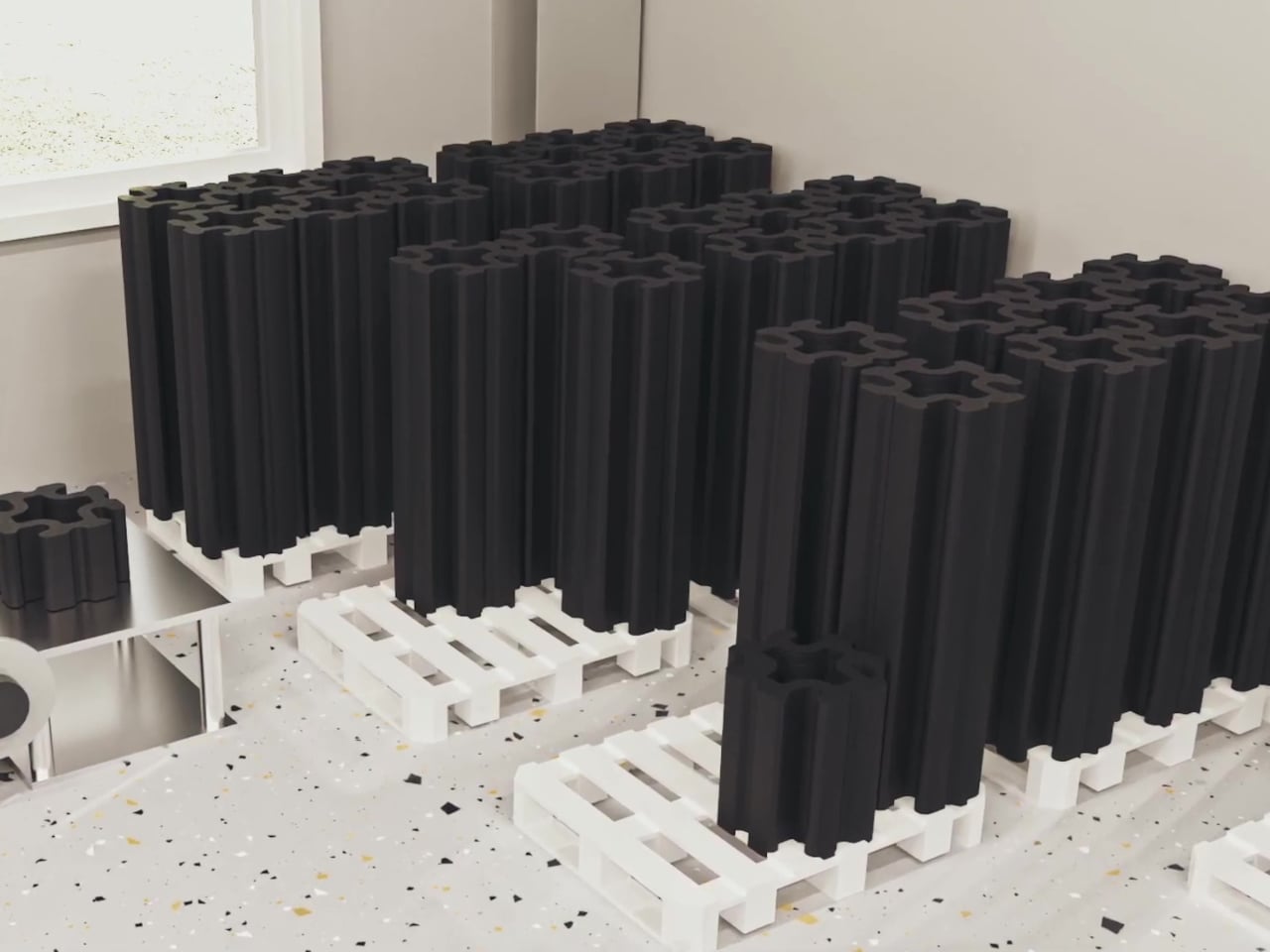
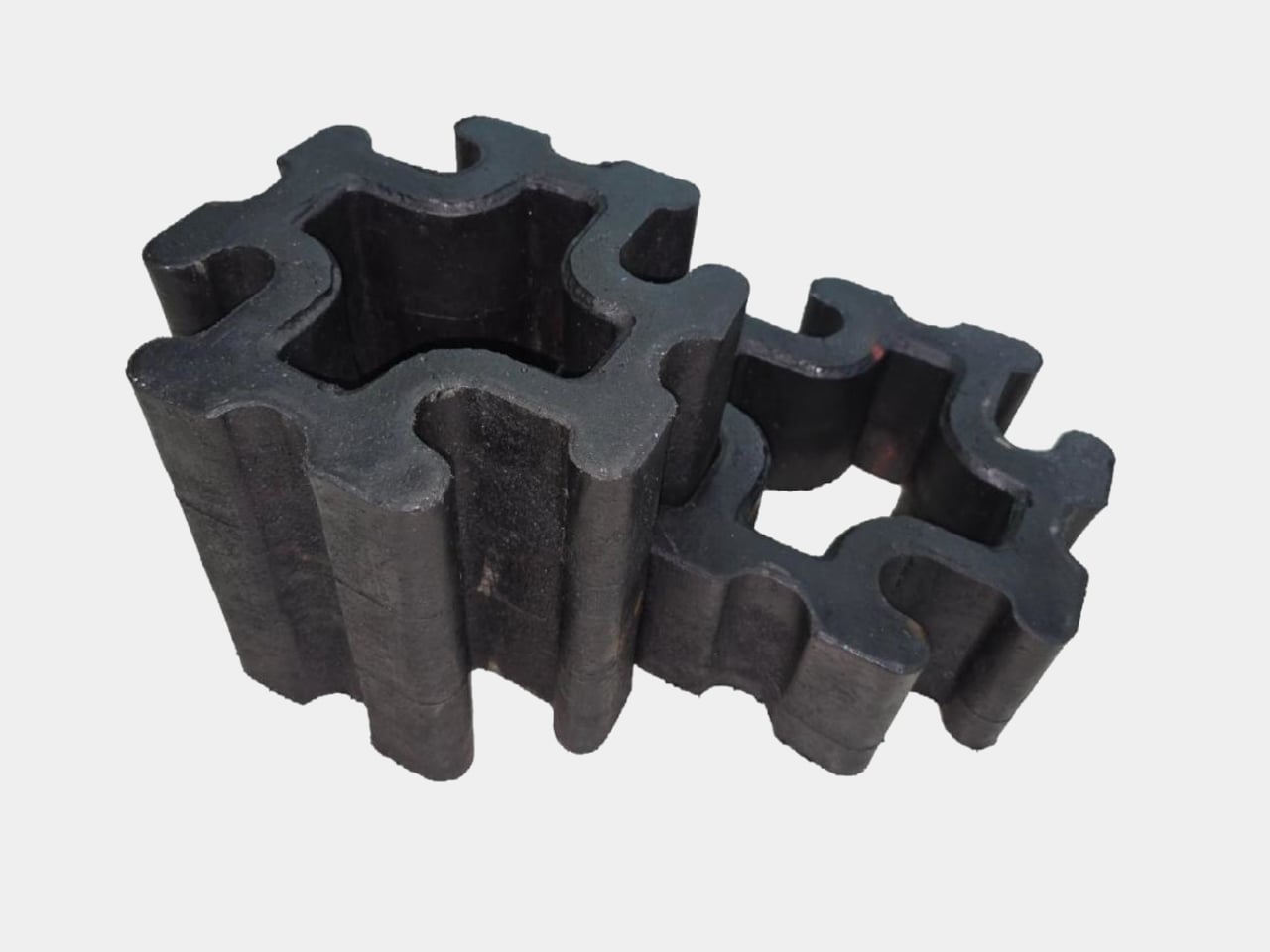
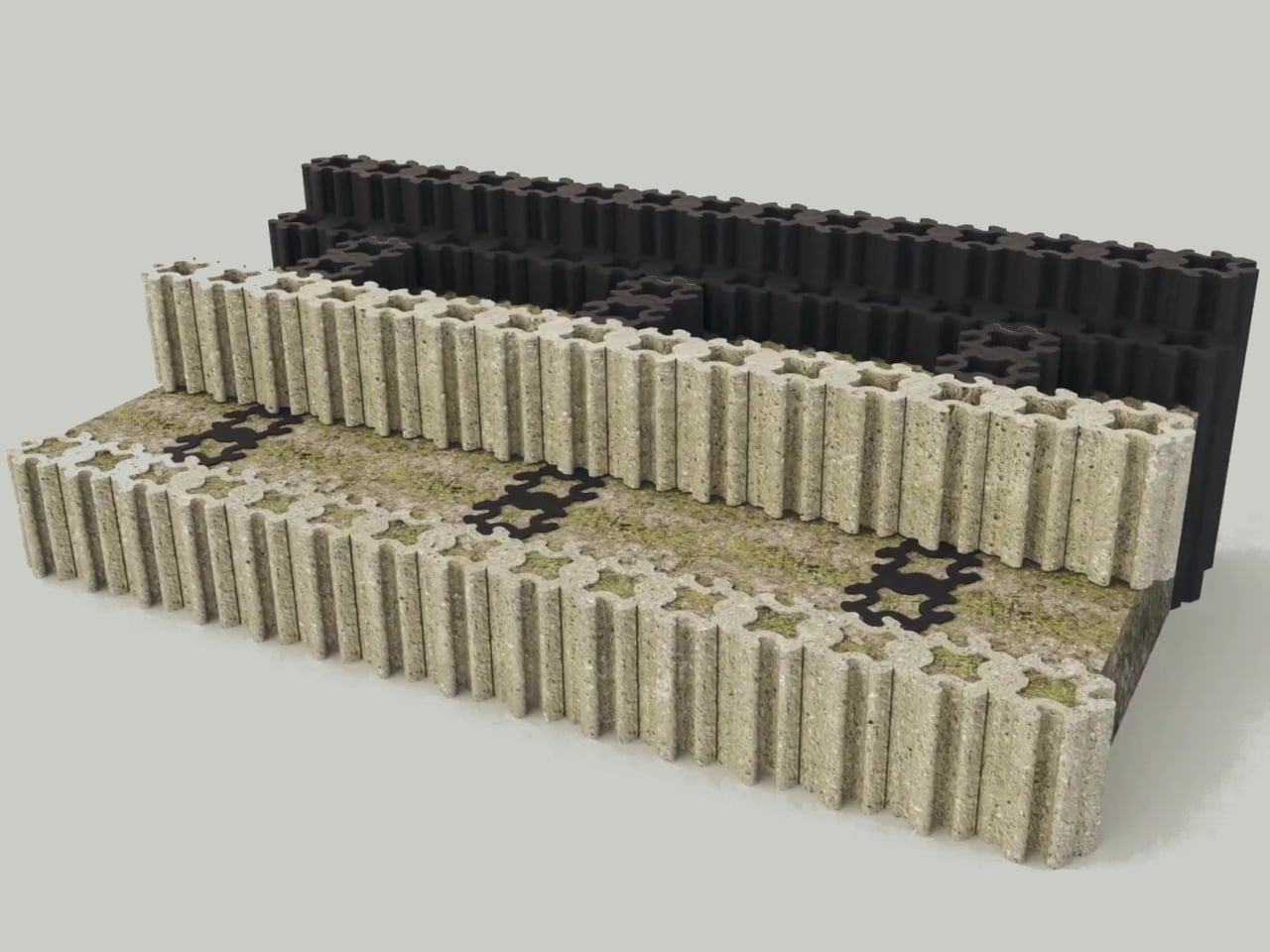
Eco-C CUBE treats those two problems as one solution. Developed by WES-Tec Global and the Korea Low Impact Development Association, it turns hard-to-recycle mixed plastic waste into a structural block for civil infrastructure. The New-Cycling process melts fishing nets, buoys, and film waste at low temperature without sorting or washing, then extrudes the material directly into three-dimensional interlocking blocks designed to hold back hillsides, stabilize slopes, and form solar panel bases.
Picture a discarded fishing net or multilayer wrapper that normally has no second life. Instead of being shredded, washed, and downgraded into pellets, it goes straight into a controlled low-temperature extruder that preserves the polymer structure. What comes out is a dense, high-strength block with better tensile and compressive performance than concrete, which is what you want in a retaining wall trying to hold back a hillside after heavy rain or freeze-thaw cycles.
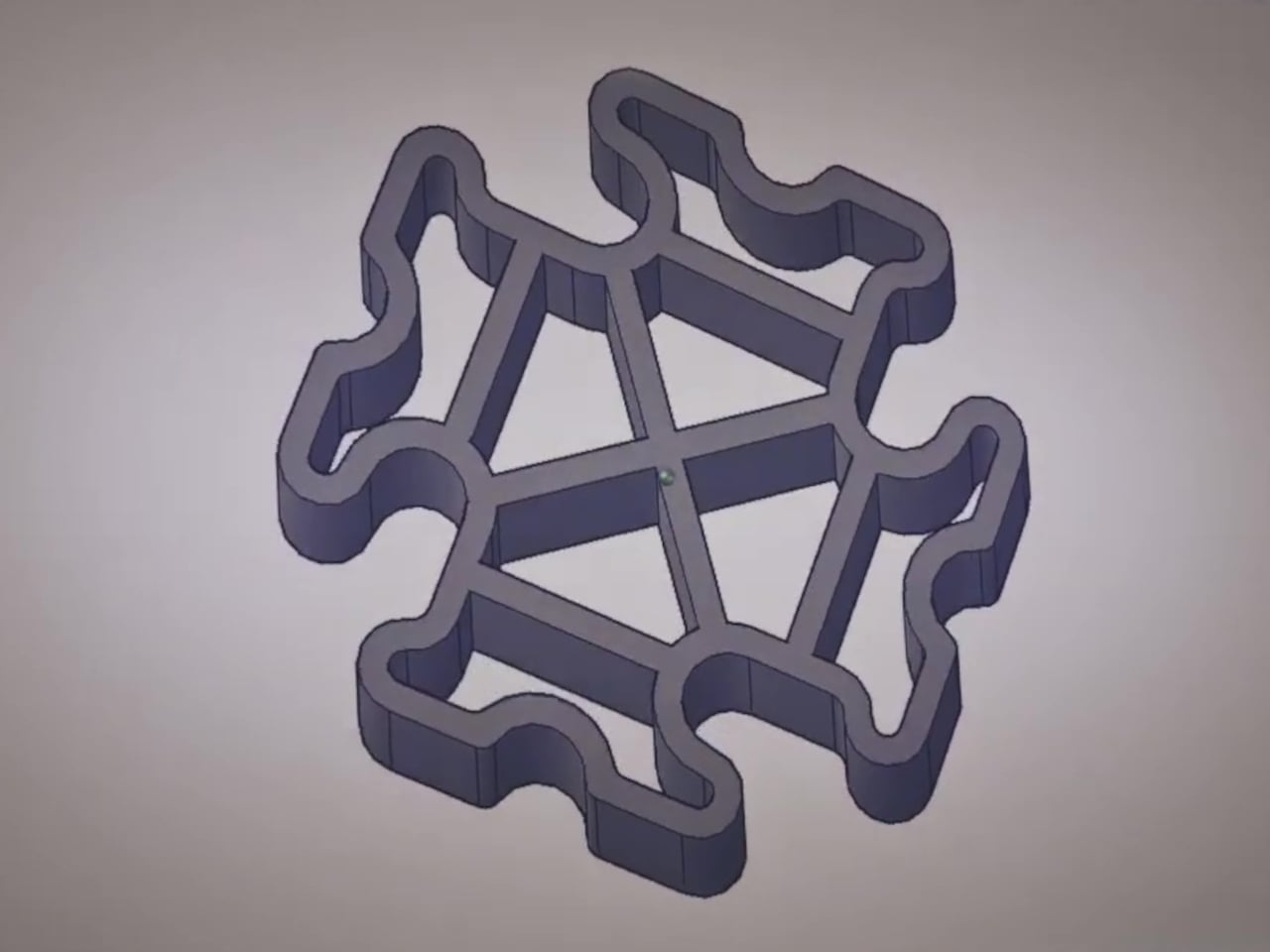
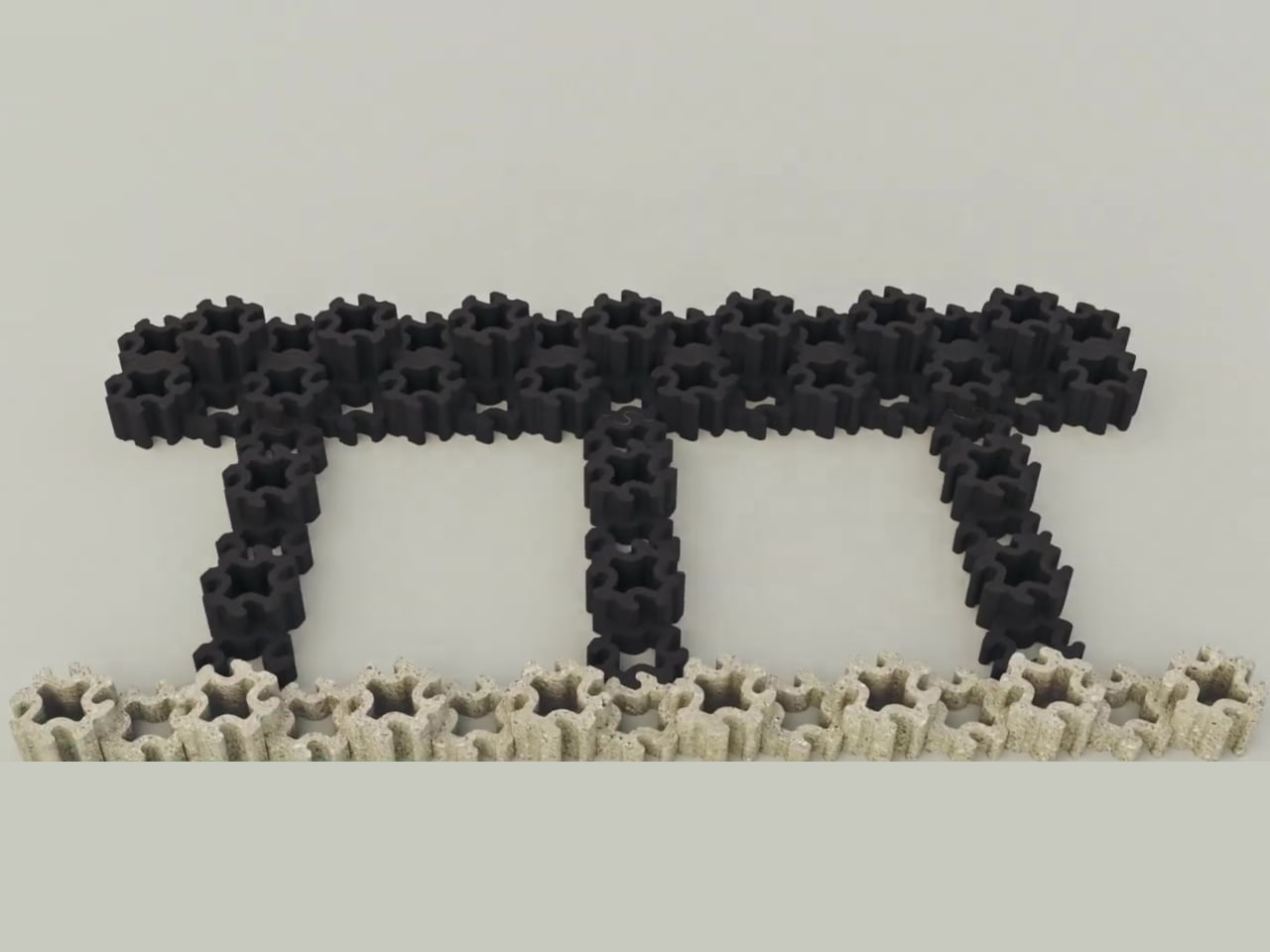
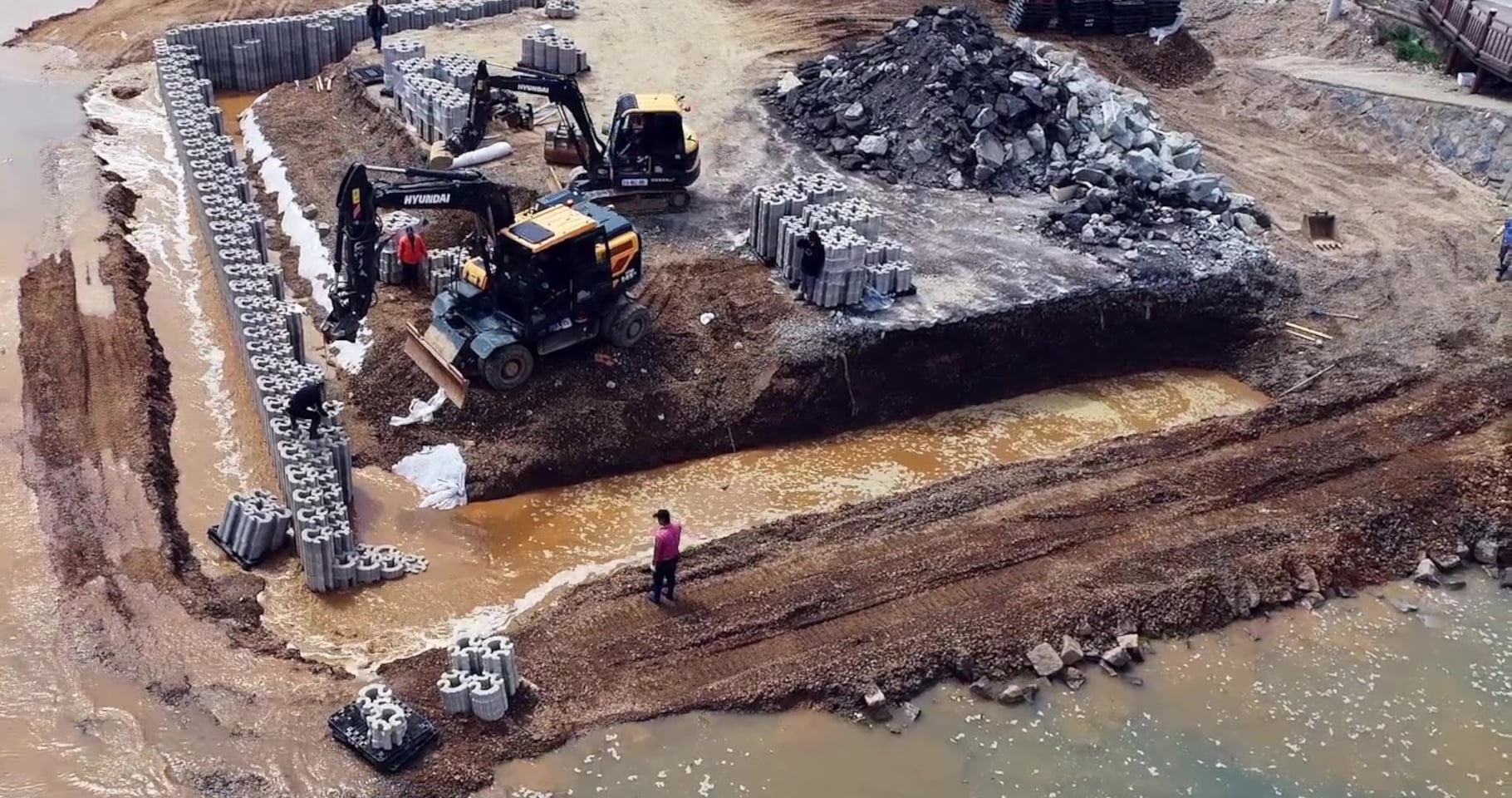
The three-dimensional interlocking design lets crews stack the blocks into buttress-style or box-style retaining walls without cement or adhesives. Gravity and geometry keep everything stable, which means faster installation, easier disassembly if something needs repair, and built-in drainage through hollow channels so water does not accumulate pressure behind the wall. That drainage feature also makes the blocks compatible with low-impact development strategies that manage stormwater on site.
Each kilogram of Eco-C CUBE reduces about 2.99 g of CO₂ compared to business as usual, verified by Life Cycle Assessment through the SDX Foundation. That reduction comes from avoiding incineration, skipping energy-intensive washing and sorting, and replacing concrete. Because the blocks use waste collected through extended producer responsibility systems, they plug directly into existing collection networks instead of requiring new infrastructure to gather and transport material.
A coastal town shoring up eroding slopes could use these blocks instead of pouring concrete, cutting carbon while handling weight and drainage. Solar farms needing stable panel bases that do not leach heavy metals can be built with Eco-C CUBE instead of traditional footings. To most people, these installations will just look like dark modular blocks, but underneath, they are turning plastic that would otherwise drift in oceans or burn in incinerators into long-term structural work.
Eco-C CUBE does not chase perfect purity or pretend mixed plastics can return to virgin resin. It accepts the messiness and turns it into something structurally useful. For designers and engineers, that shift from trying to eliminate waste to actually building with it might be the more interesting part, treating the worst materials we generate as a feedstock instead of an endpoint.
The first-generation Bose QuietComfort Ultra headphones are on sale right now for $280, marked down from $430. That 35 percent savings is an even steeper discount than we saw last year Black Friday.
In our review of the first-generation Ultras, we gave them a score of 86 out of 100, noting their best-in-class active noise cancellation (ANC) and comfort. Bose improved its stock tuning for these headphones, which we could immediately tell sounded warmer and clearer. Bose has typically lagged behind the likes of Sony and Sennheiser in raw sound quality, but the first-generation QuietComfort Ultra was a big step toward catching up.
Bose added "Immersive Audio" to this model, which is the company's take on spatial audio. The company claims this feature effectively puts you in the acoustic sweet spot of a set of stereo speakers. In our testing, we felt this didn't always make songs sound better, but it did make them louder and in some cases made certain details more noticeable.
The Ultras offer up to 24 hours of battery life with ANC turned on and about 18 hours with both ANC and Immersive Audio enabled. In our testing, however, we were actually able to beat Bose's estimates for battery life.
The second generation of these headphones are currently our top pick for best noise-canceling headphones, but when this older model is heavily on sale, the differences between them are less dramatic. If you're in the market for a pair of great noise-canceling cans, consider checking these out.
This article originally appeared on Engadget at https://www.engadget.com/deals/the-first-gen-bose-quietcomfort-ultra-headphones-are-150-off-right-now-164826329.html?src=rss
Eating pistachios or olives usually means improvising a discard situation. Shells end up on napkins, side plates, or scattered across the coffee table, and by the time the bowl is empty, there’s a mess to clean up. Shared snack bowls at parties have the same problem: fresh food mixed with scraps, and everyone reaches in with uncertain hands trying to avoid the pile of pits someone left on the edge.
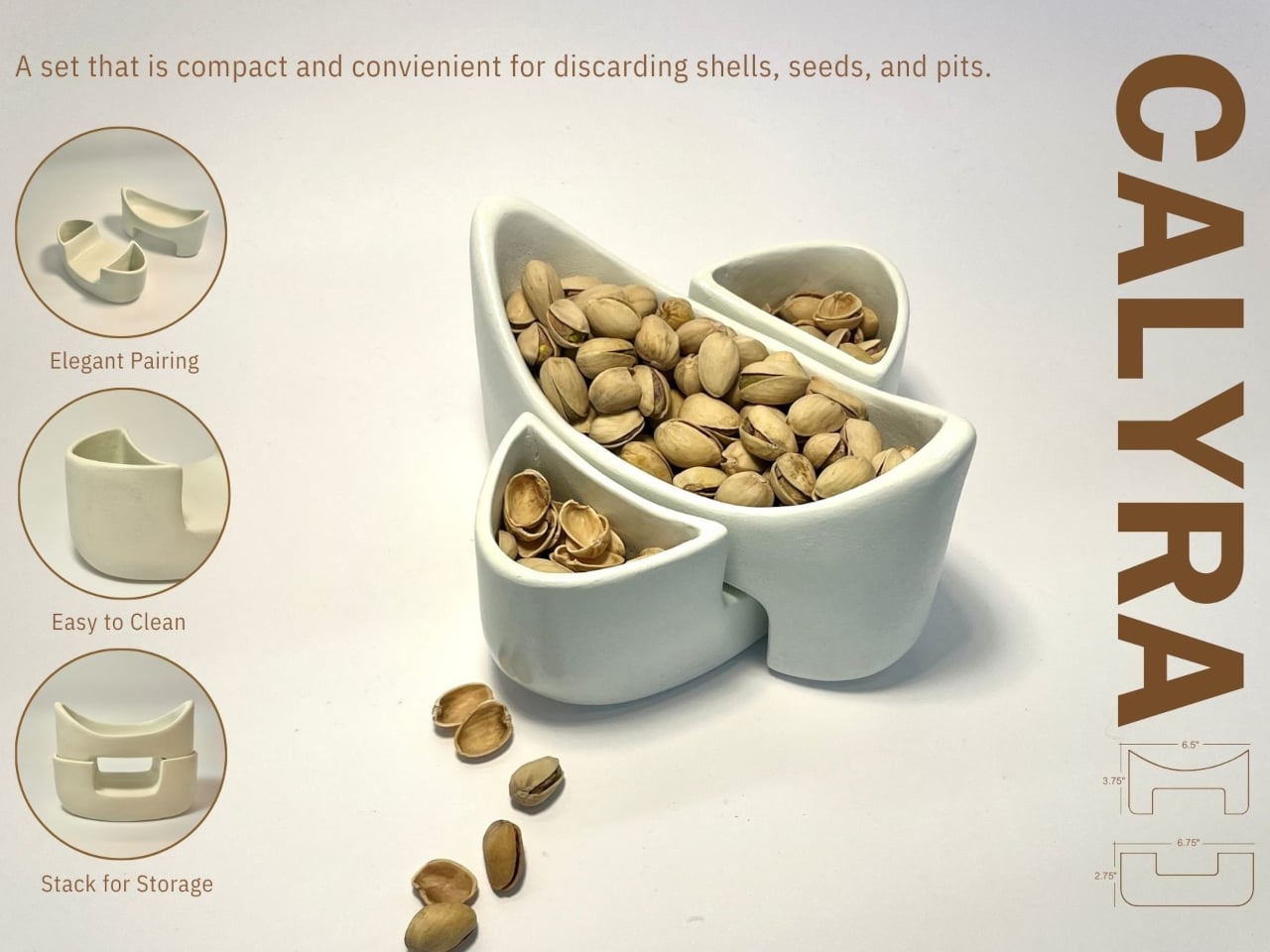
CALYRA treats that mess as part of the design brief rather than an afterthought. It’s a ceramic food and waste server that combines a main serving space with dedicated discard areas in a single form. The two pieces nest together symmetrically, both during use and when tucked away in a cupboard, so pits and shells have an obvious home from the start instead of wandering around the table.
Designer: Christina Tran
Picture a casual evening with pistachios on the coffee table. CALYRA’s larger basin holds the fresh snacks, while two smaller cavities collect empty shells and pits as you work through the bowl. Instead of juggling an extra plate or folding a napkin into an improvised waste pouch, everything stays within one footprint. When you’re done, you can carry the whole situation to the sink in one trip.
Once the food is gone, the two pieces nest into a compact stack. The cut-out legs and curved profiles lock into a stable shape that’s easy to store in a small cabinet. That symmetry means you can carry it as a single object from the cupboard to the table and back again, even when your hands are already full with wine glasses or a tray of something else that needs attention.
CALYRA’s smooth ceramic surfaces and rounded interiors make it simple to rinse or wipe clean, with no tight corners for residue to hide in. The neutral form and color let it move between different foods and settings, from solo snacks at a desk to shared tapas at dinner. It behaves like regular tableware, just with the added intelligence of a built-in waste plan that most bowls quietly ignore.
The concept focuses on the unglamorous part of eating, the shells, seeds, and pits that usually get handled as an afterthought. By folding that step into the serving piece itself, CALYRA turns a small annoyance into a smoother gesture. It’s the kind of quiet improvement that makes you wonder why most snack bowls still pretend the messy part doesn’t exist, as if ignoring it makes it less of a problem when you’re trying to enjoy pistachios without turning your table into a shell graveyard.
For a number of very obvious reasons, we don’t want to roll back the clock to early 2020. No thank you. But if there was a feel-good lockdown story, it was the perfectly timed arrival of Animal Crossing: New Horizons, which allowed friends who could no longer meet up IRL to do so virtually on their carefully pruned islands.
The game will almost certainly never be as popular as it was back then again, but Nintendo is hoping a good chunk of lapsed islanders will return for its latest DLC drop, which arrived on January 14, a day earlier than planned. The Switch 2 update went live as expected on January 15. As spotted by
, the free Animal Crossing: New Horizons 3.0update is available to download now and, as previously announced, brings a host of new features to the cozy life sim, including a brand new resort hotel on the pier that you can help decorate.
There are new items and quality-of-life additions too, as well as the ability to build fresh islands with your friends and family in the “Slumber Island” dream world. All you need to do is go to the New Horizons game icon on your Switch’s home screen and download the software update.
Nintendo also announced last year that New Horizons would be coming to Switch 2 on January 15, improving the visuals, unlocking mouse controls and GameChat functionality, and expanding the online multiplayer capacity from eight players to 12. As of now, the Switch 2 edition is live, as well as the 3.0 update. Upgrading costs $5, while first-time players can purchase the Switch 2 version of Animal Crossing: New Horizons for $65.
Update, January 15, 2026, 12:20PM ET: Updated to note that the Switch 2 edition is live.
This article originally appeared on Engadget at https://www.engadget.com/gaming/nintendo/the-animal-crossing-new-horizons-30-expansion-has-arrived-earlier-than-expected-160739394.html?src=rss
Gemini is adding a feature that’s designed to feel more tailored to individual users. Once enabled, "Personal Intelligence" can pull context from across your Google ecosystem, including Gmail, Google Photos, Search and YouTube History, to gain specific insight that will shape its answers and recommendations. Personal Intelligence is available starting today in the US for Google AI Pro and Ultra subscribers. The feature is opt-in only and is off by default.
Google
Google says users will have the ability to control what apps Gemini pulls from and, in the future, which chats it uses Personal Intelligence for. The company says this new feature might still make some mistakes, such as “over-personalization” where it draws connections between unrelated things.
According to Google, Gemini will not train directly on the data it pulls for personalization like your photos and emails, but will instead train on your prompts and its responses. Users can also prompt Gemini to "try again" without personalization and will have the option to delete chat histories.
For now, Personal Intelligence works in the Gemini app across web, Android and iOS for personal Google accounts. Google says it’s coming to Search’s AI Mode soon, with plans to expand to more countries and the free tier down the line.
Google has been on a tear integrating Gemini into everything, including Gmail, TVs and Chrome on mobile. This week, Apple announced that Siri AI will be powered by Gemini as part of a multi-year collaboration. AI remains an imperfect tool, and Google's AI has a long history of malfunctions like explaining made-up idioms, calling itself a "failure" in a depressing doom loop and generating images of the Founding Fathers as people of color.
This article originally appeared on Engadget at https://www.engadget.com/ai/gemini-can-now-pull-context-the-rest-of-your-google-apps-if-you-let-it-160039468.html?src=rss
The Volkswagen Golf GTI Edition 50, heralded as the most powerful GTI ever produced, is set to make its debut on UK roads in January 2026. This exclusive model commemorates the 50th anniversary of the iconic GTI, blending high-performance engineering, innovative driving technology, and distinctive design elements. With a starting price of £47,995, it promises […]
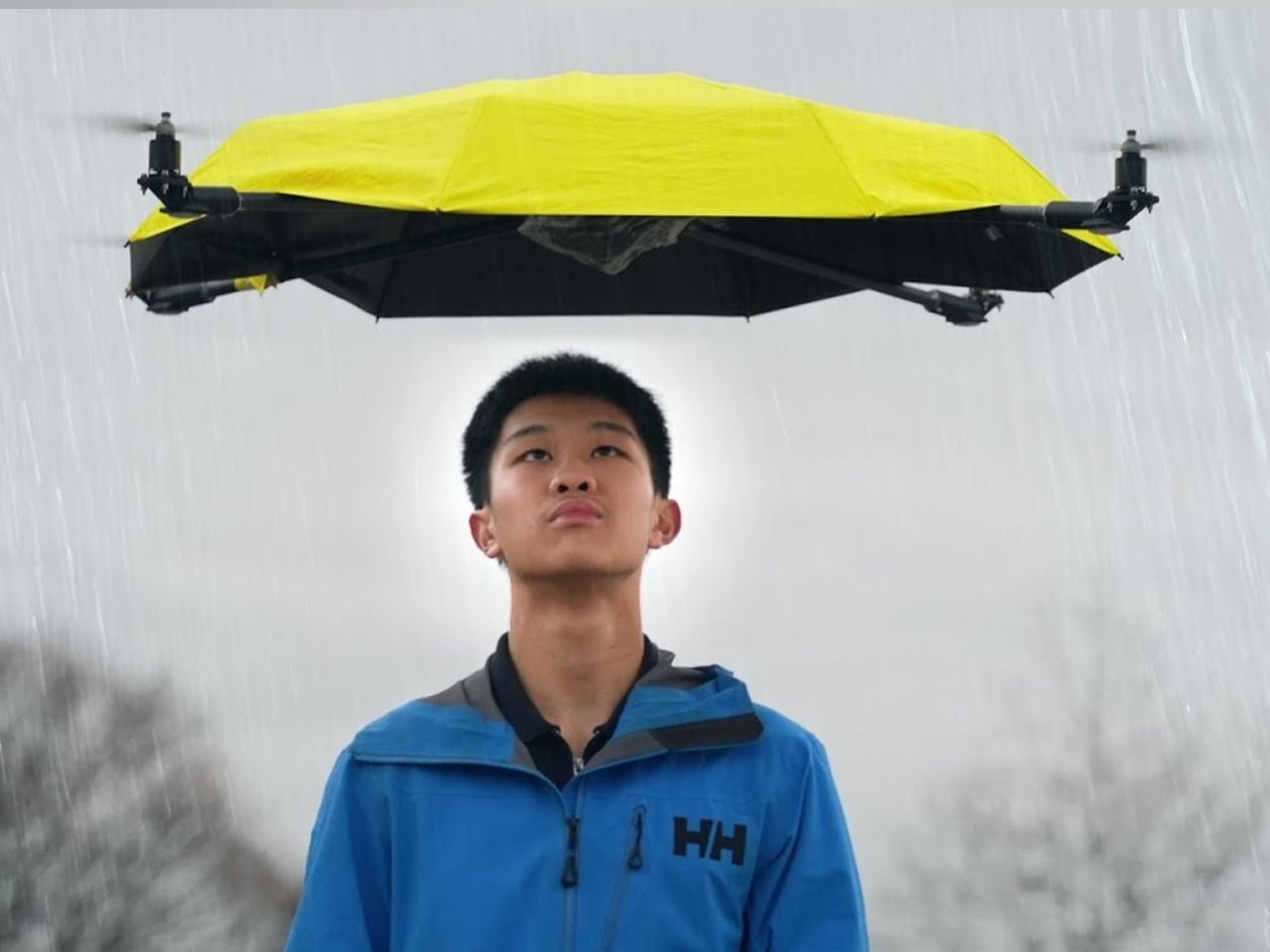
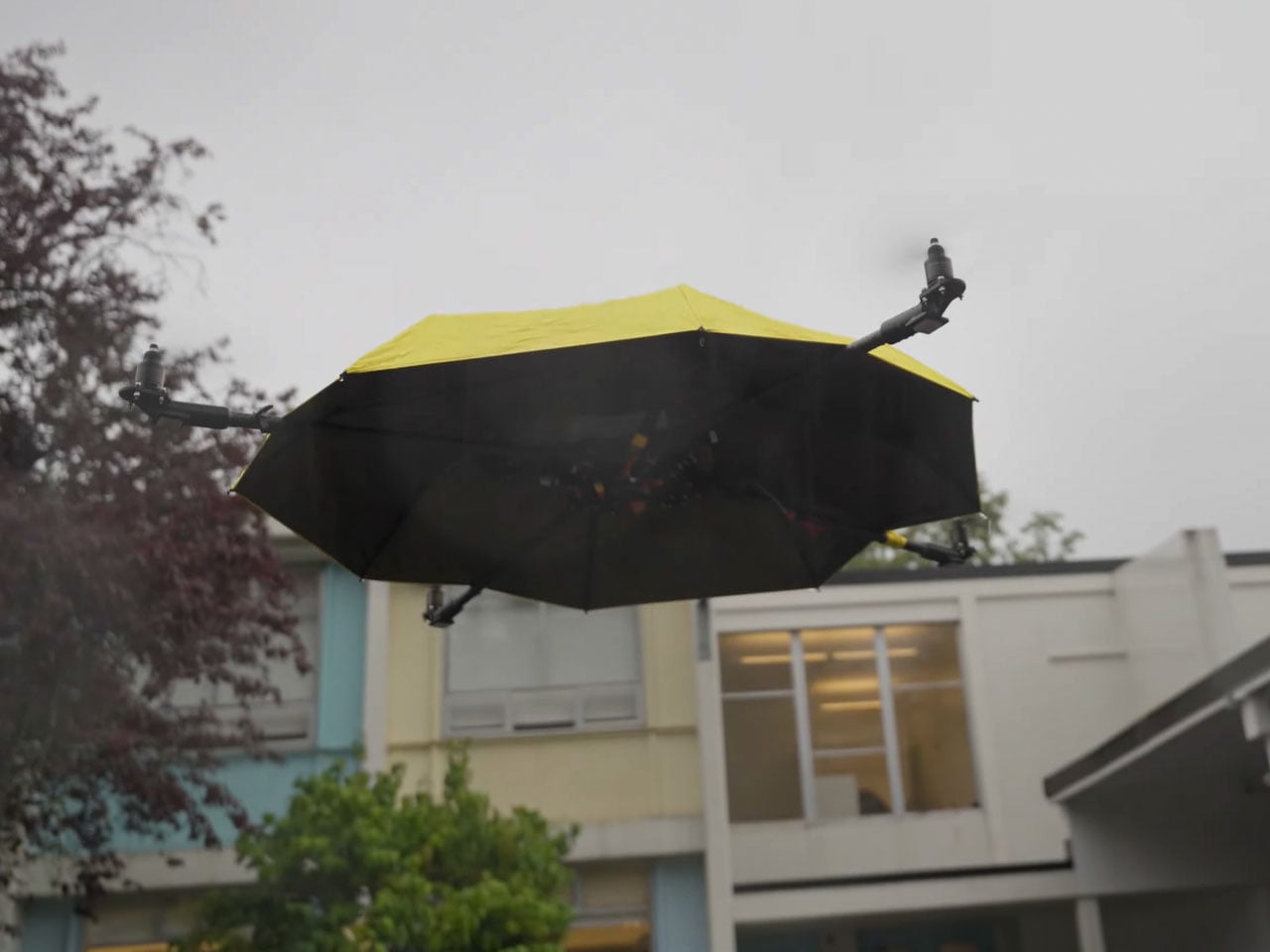
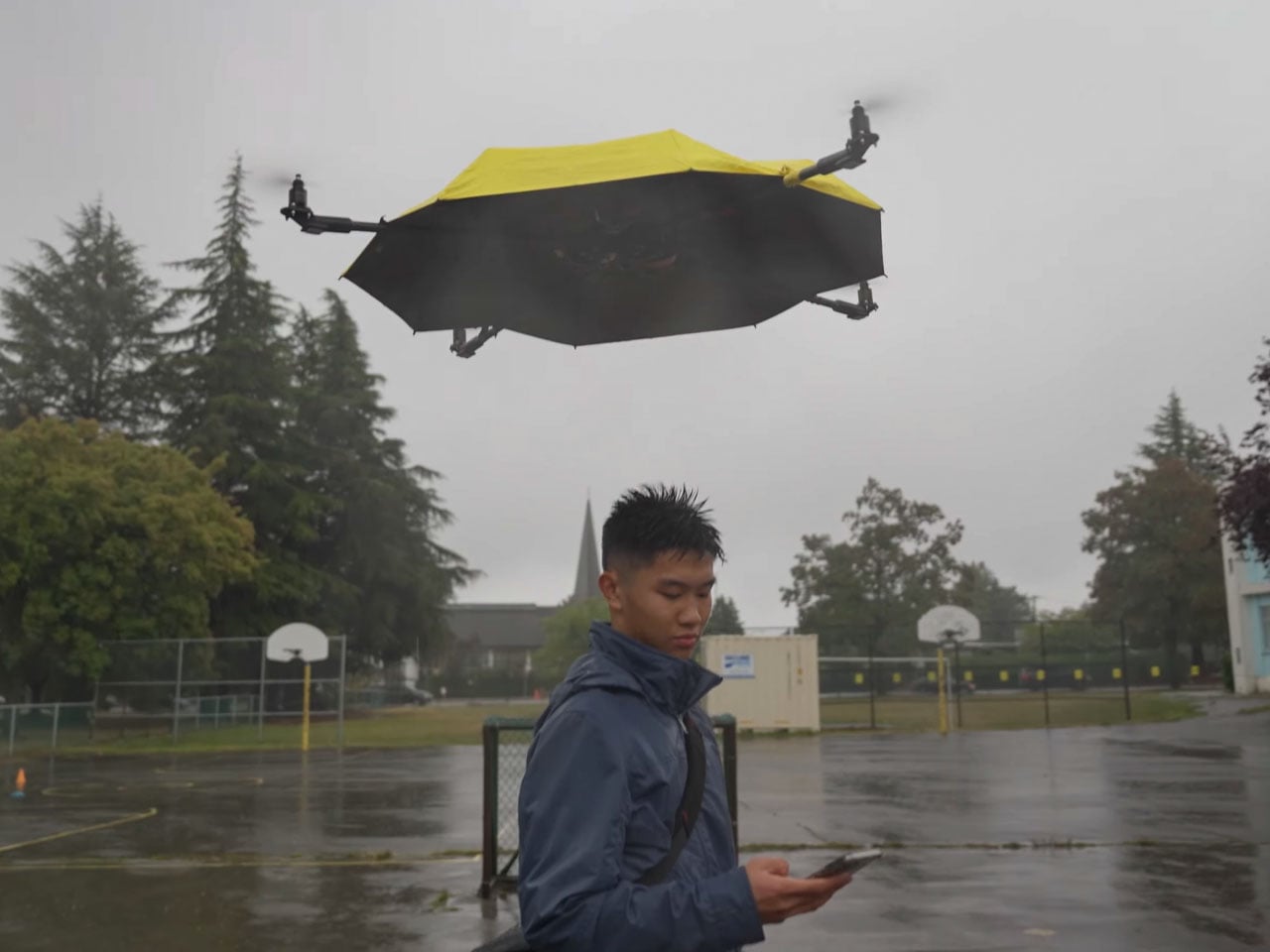
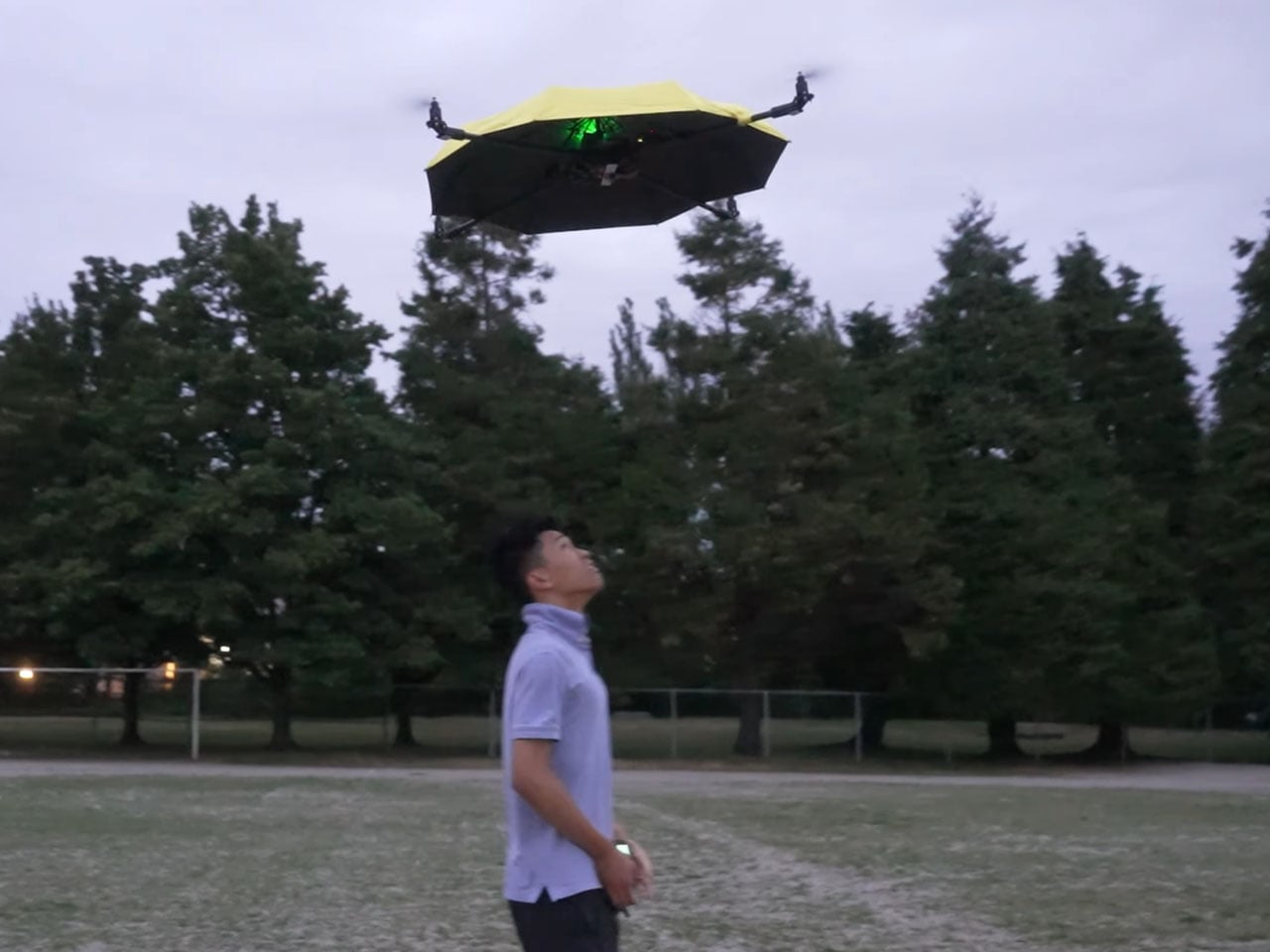
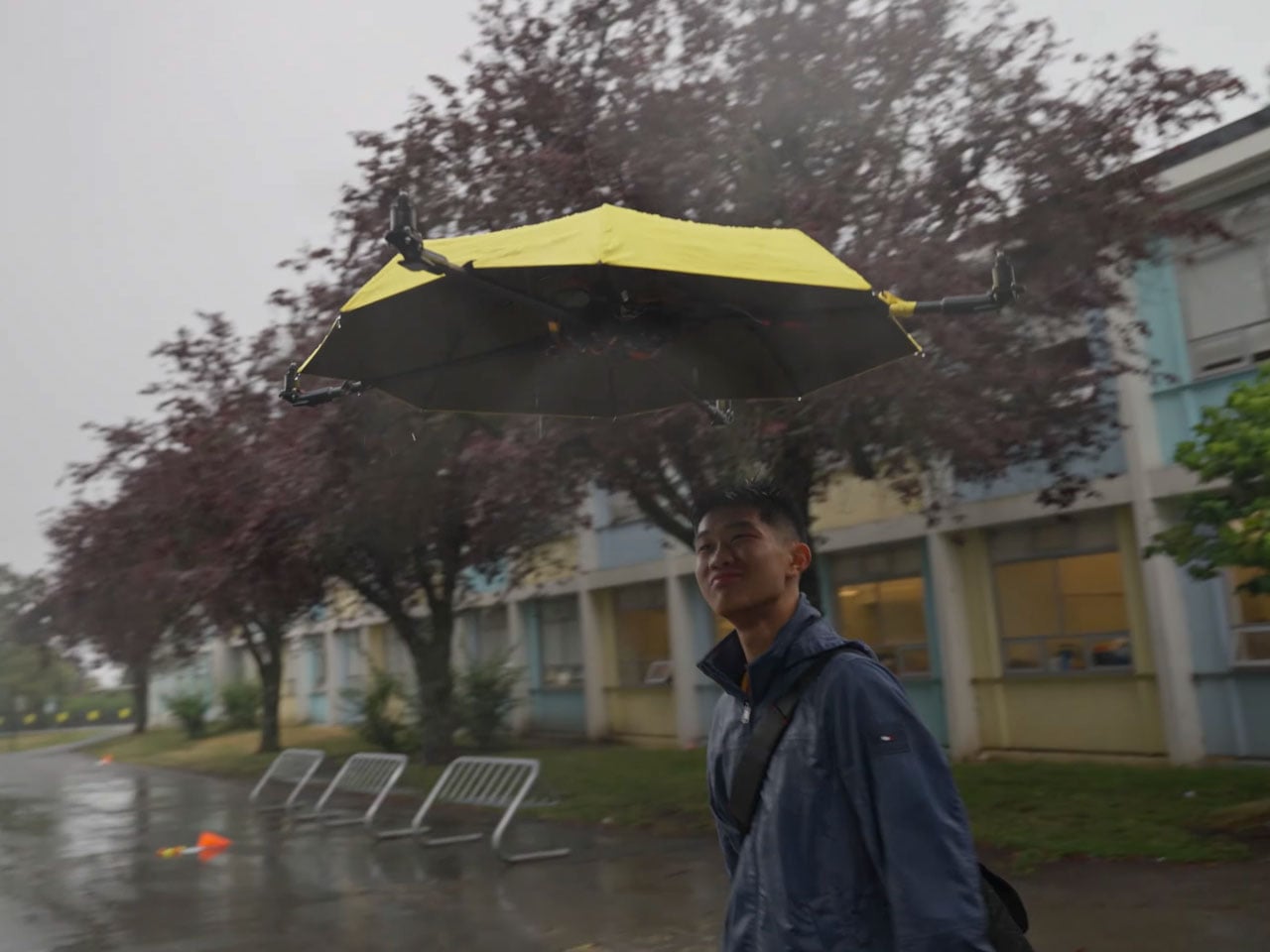
Back in early 2024, John Tse designed a flying umbrella controlled by a remote, which seemed a completely out-of-the-box idea. However, some users pointed out that the umbrella should follow the person using it, to make it more practical, come rain or shine. The hands-free option of using a flying umbrella is far more exciting than maneuvering it while walking.
Months later, John set out to design an upgraded version of the project. The thing is essentially an autonomous drone shading you from wet or dry weather on demand. The vital addition to the rig is a tracking system loaded with a camera that comes from drone parts. That said, the build was not a cakewalk, and it took him a couple of years to achieve the intended version.
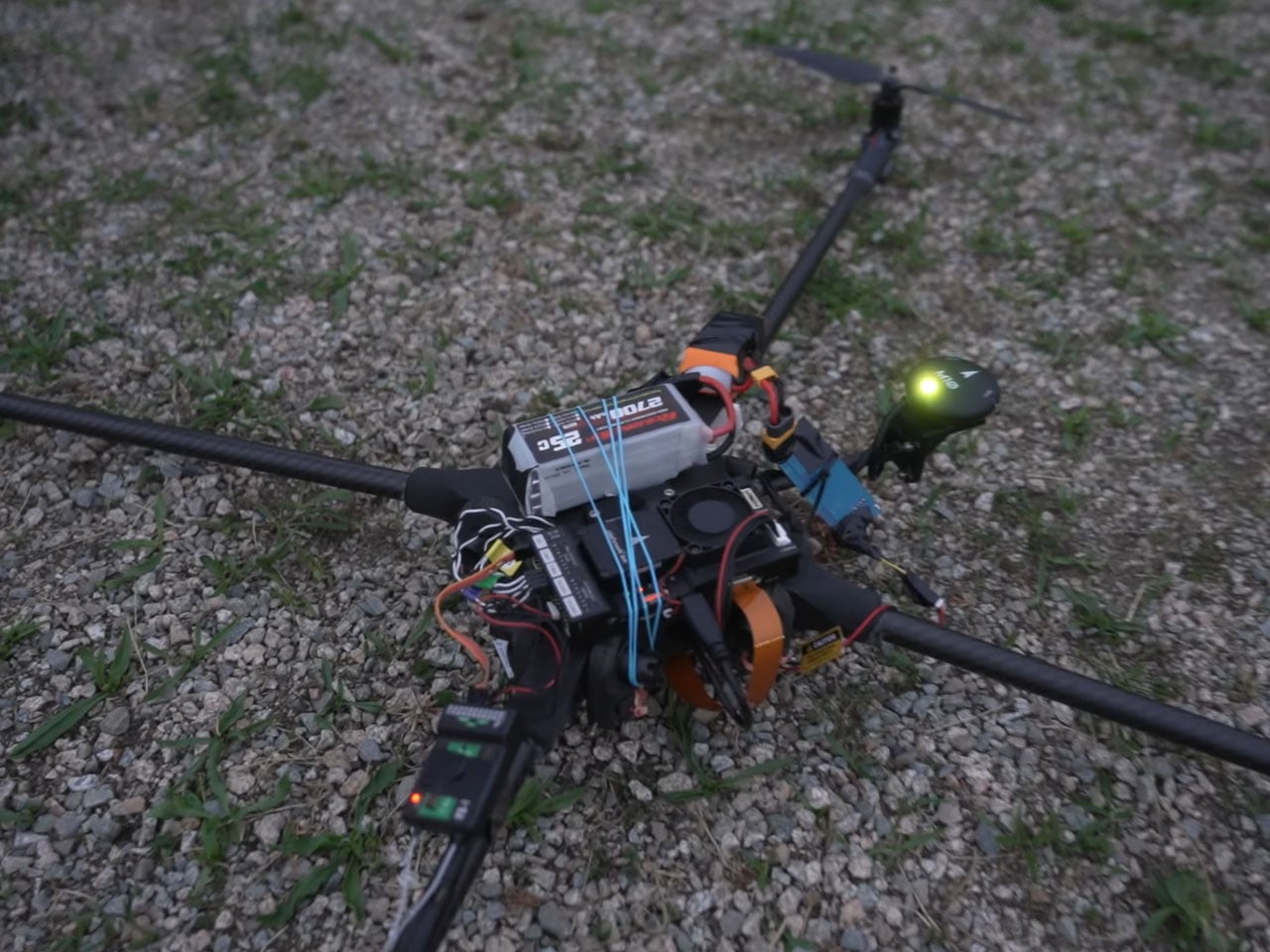
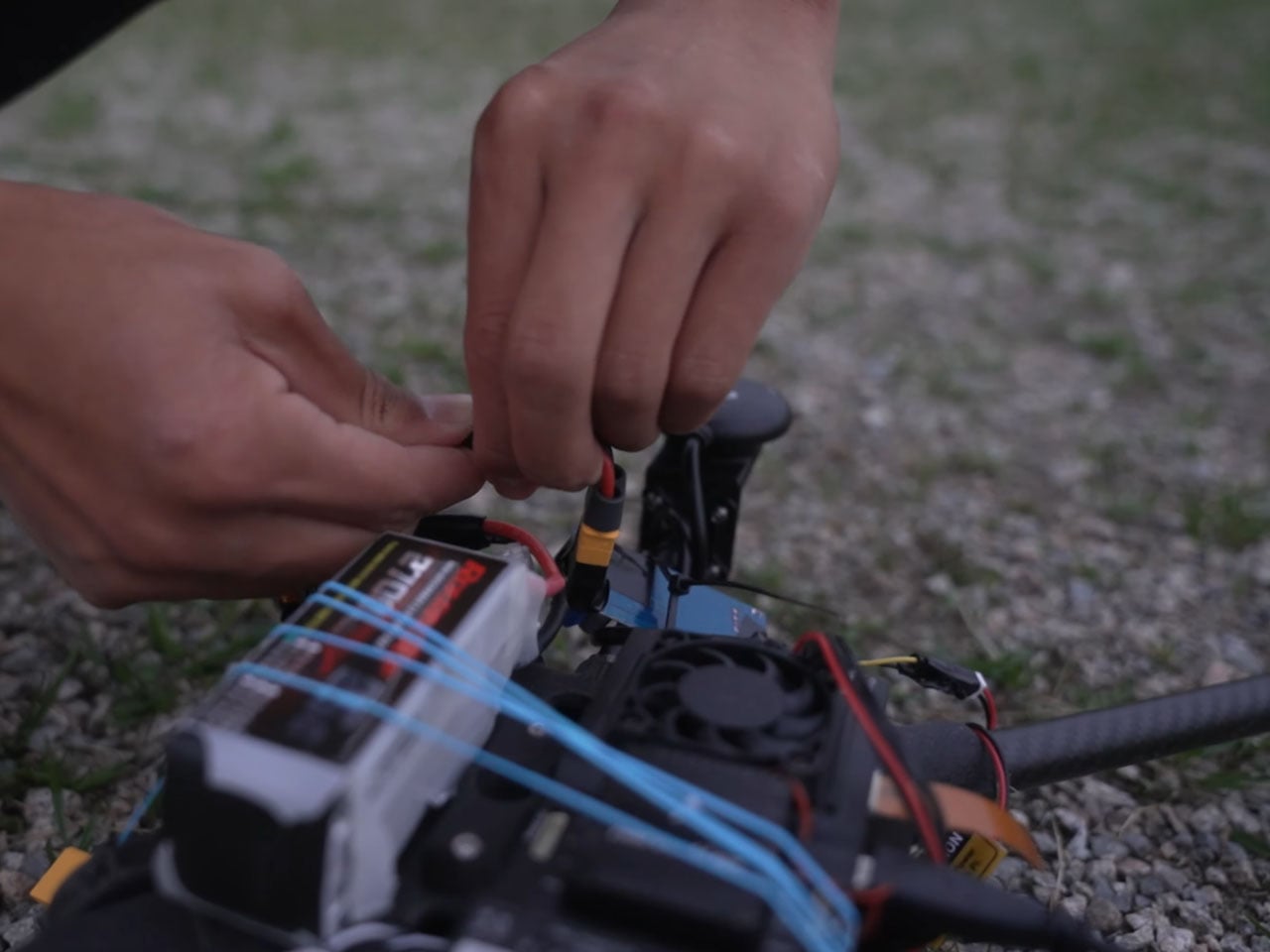
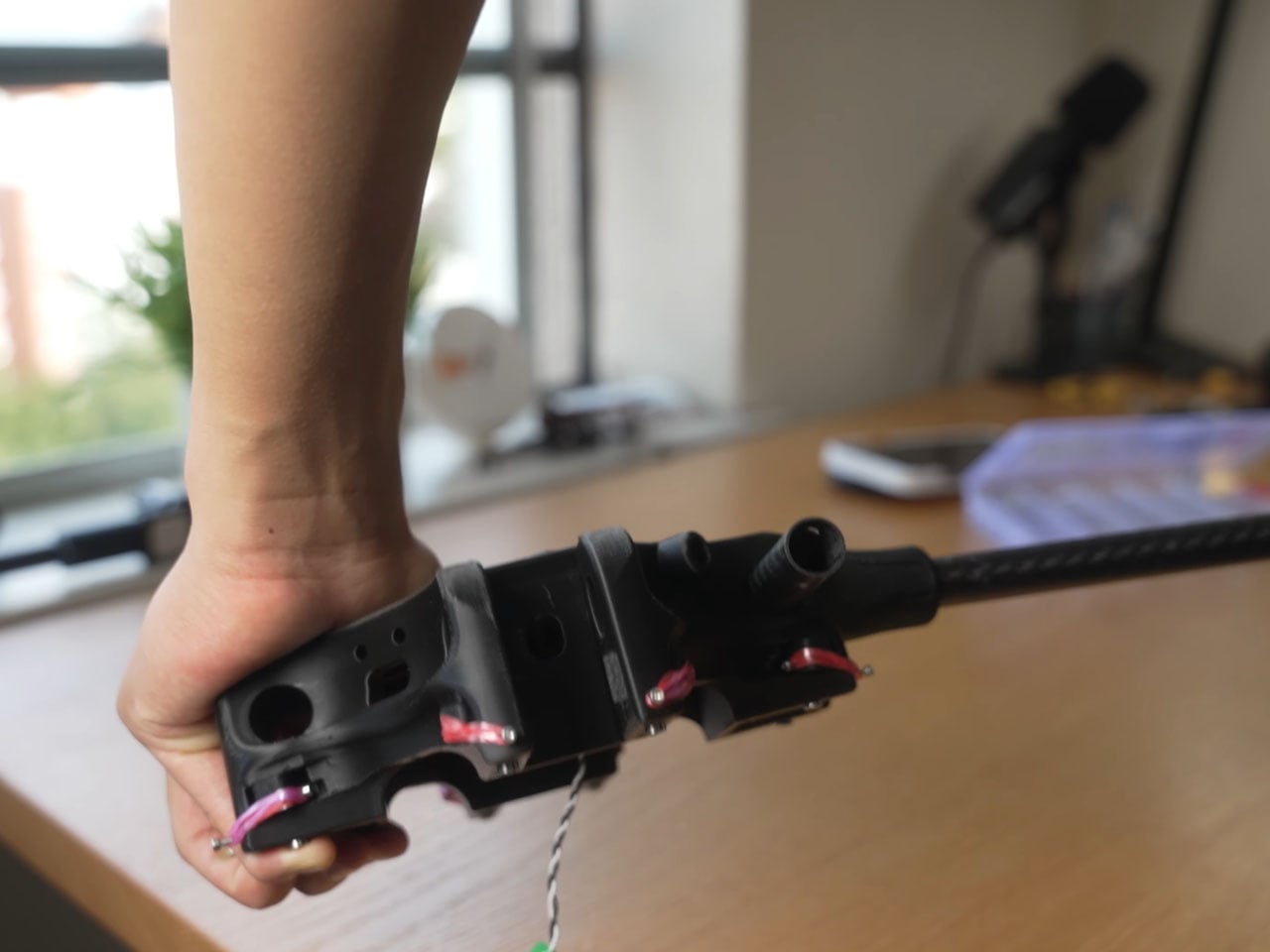
Things started off by creating a custom frame with a central hub for the umbrella, the locking mechanism, and the hinges to have a solid structure for the camera and sensors to mount on. Most of the components are 3D printed, either made out of carbon fiber or nylon. Once the design materialized, an ordinary umbrella was mounted onto the frame, and the arms attached to the mechanism, just like a tripod. After figuring out the GPS, flight controller, Raspberry Pi function, and other electronics, it was time for the first test flight. After a few glitches with the rotational direction and the flight anomalies, the troubleshooting mode kicked on. The rig finally held stable in flight, and John attached the umbrella housing to the thing.
The next step was to align the camera, sensors, and GPS function to make the autonomous flight possible, so that the umbrella doesn’t bump into the person it’s hovering over, or other people on the street. With help from his buddy Hinsen, the idea of creating a 3D map of the people nearby, even in low light, using complex light reflection tech, came to life. Somehow, the thing didn’t work after replacing all the old components with the new ones. Eventually, after a lot of tinkering and tuning, the flying umbrella finally moved from the initial stage to the concrete prototype stage. A project that was meant to be just a few weeks finally took more than a couple of years.
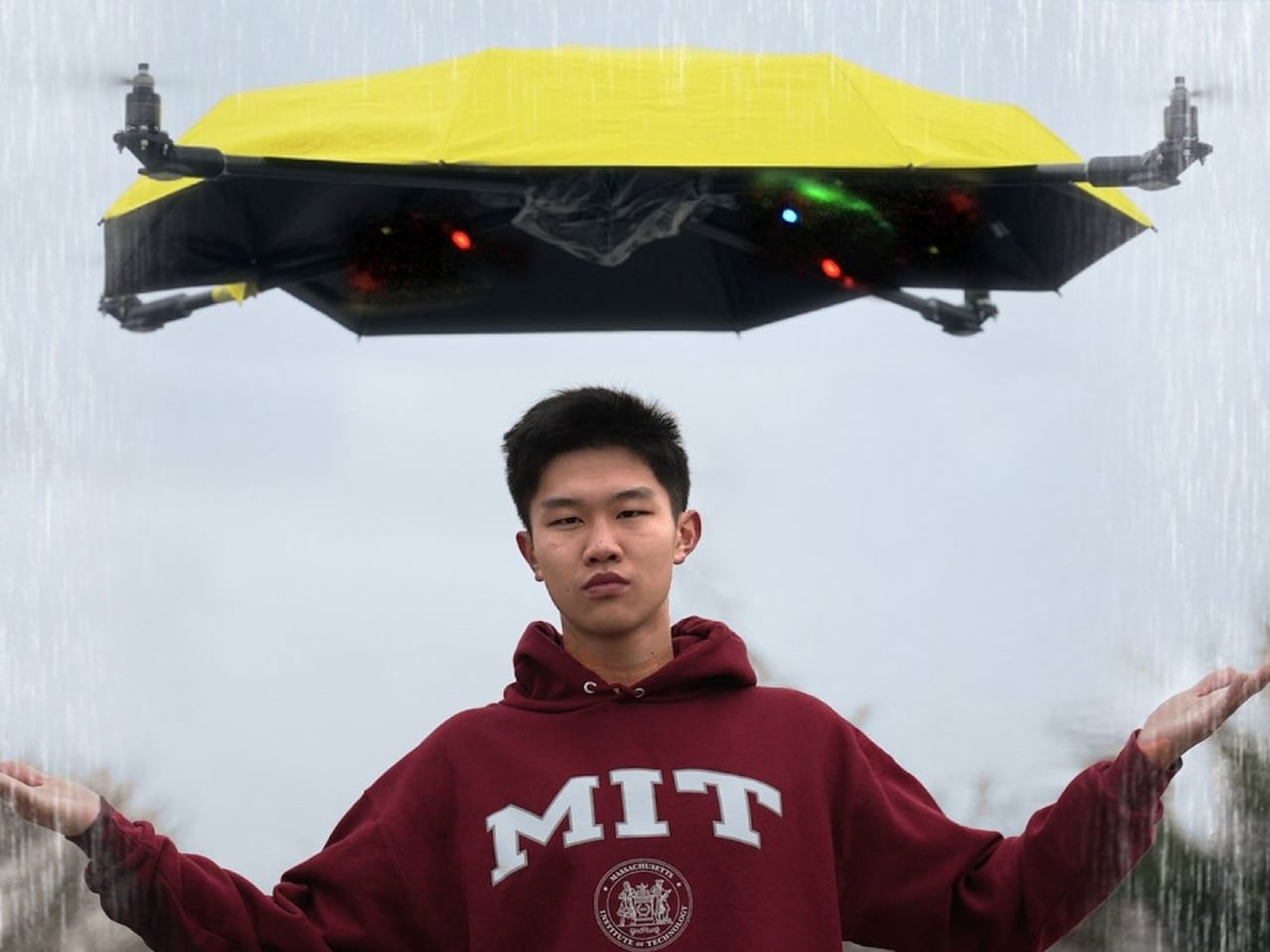
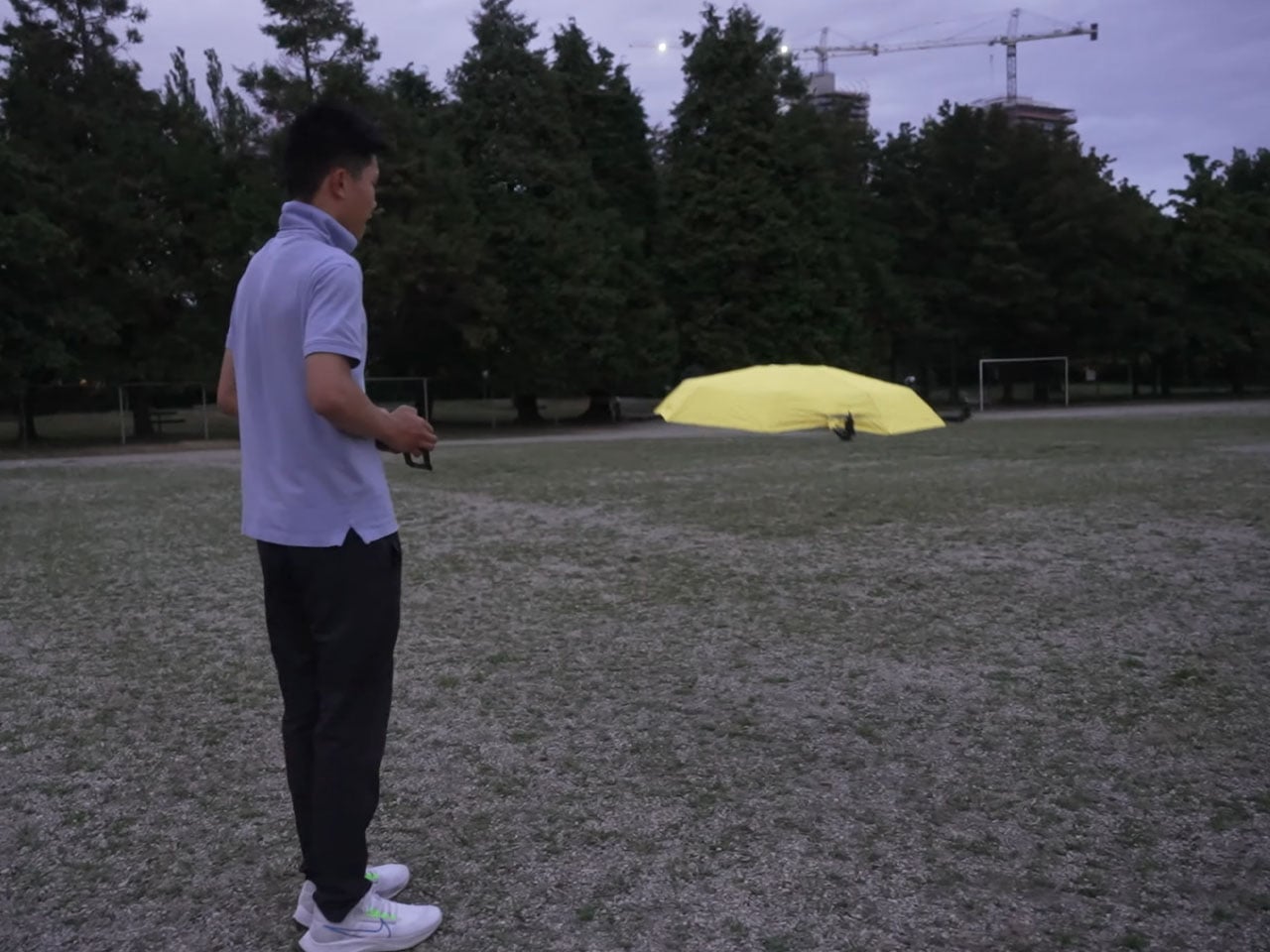
Finally, the day arrived when the project materialized, and the floating umbrella hovered over John. Even when the sun went down, the thing managed to hover over him. Thereafter, it was time for the rain to come down and test the flying umbrella in wet weather. In heavy rain, the umbrella had zero glitches, and the painstaking ritual of going through numerous roadblocks felt sweet for him. The design of the umbrella doesn’t feel like there’s something off; it just feels like an everyday object. Sure, the high-tech accessory is heavy due to all the components, still it manages to do what it was intended for. In the end, a shout out to John for his patience and persistence that ultimately materialized this project.
YouTube is rolling out some additional parental controls, including a way to set time limits for viewing Shorts on teen accounts. In the near future, parents and guardians will be able to set the Shorts timer to zero on supervised accounts. "This is an industry-first feature that puts parents firmly in control of the amount of short-form content their kids watch," Jennifer Flannery O'Connor, YouTube's vice president of product management, wrote in a blog post. Along with that, take-a-break and bedtime reminders are now enabled by default for users aged 13-17.
The platform is also bringing in new principles, under which it will recommend more age-appropriate and "enriching" videos to teens. For instance, YouTube will suggest videos from the likes of Khan Academy, CrashCourse and TED-Ed to them more often. It said it developed these principles (and a guide for creators to make teen-friendly videos) with help from its youth advisory committee, the Center for Scholars and Storytellers at UCLA, the American Psychological Association, the Digital Wellness Lab at Boston Children’s Hospital and other organizations.
Moreover, an updated sign-up process for kid accounts will be available in the coming weeks. Kid accounts are tied to parental ones, and don't have their own associated email address or a password. YouTube says users will be able to switch between accounts in the mobile app with just a few taps. "This makes it easier to ensure that everyone in the family is in the right viewing experience with the content settings and recommendations of age-appropriate content they actually want to watch," O'Connor wrote.
This article originally appeared on Engadget at https://www.engadget.com/entertainment/youtube/youtube-adds-more-parental-controls-including-a-way-to-block-teens-from-watching-shorts-151329673.html?src=rss