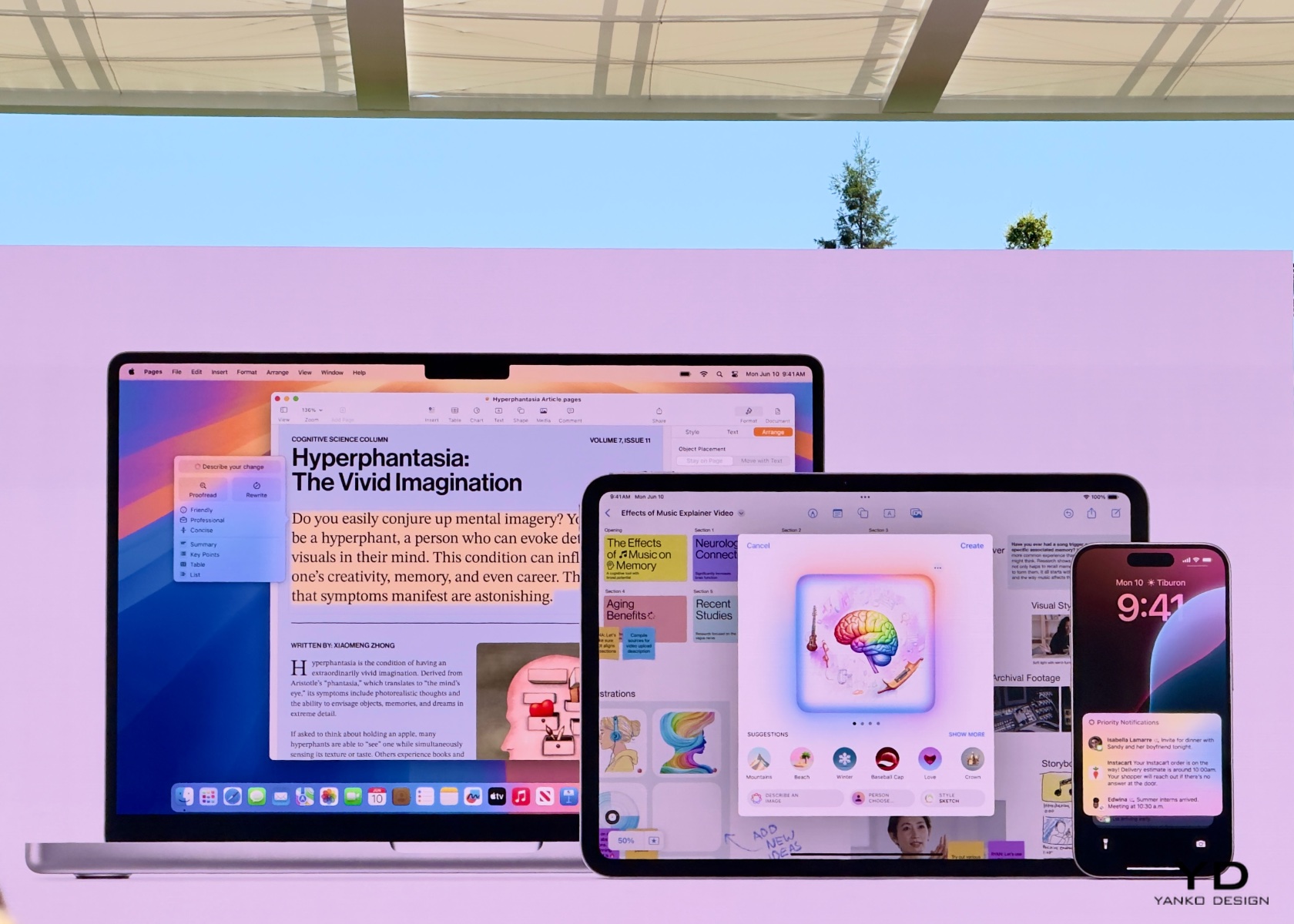
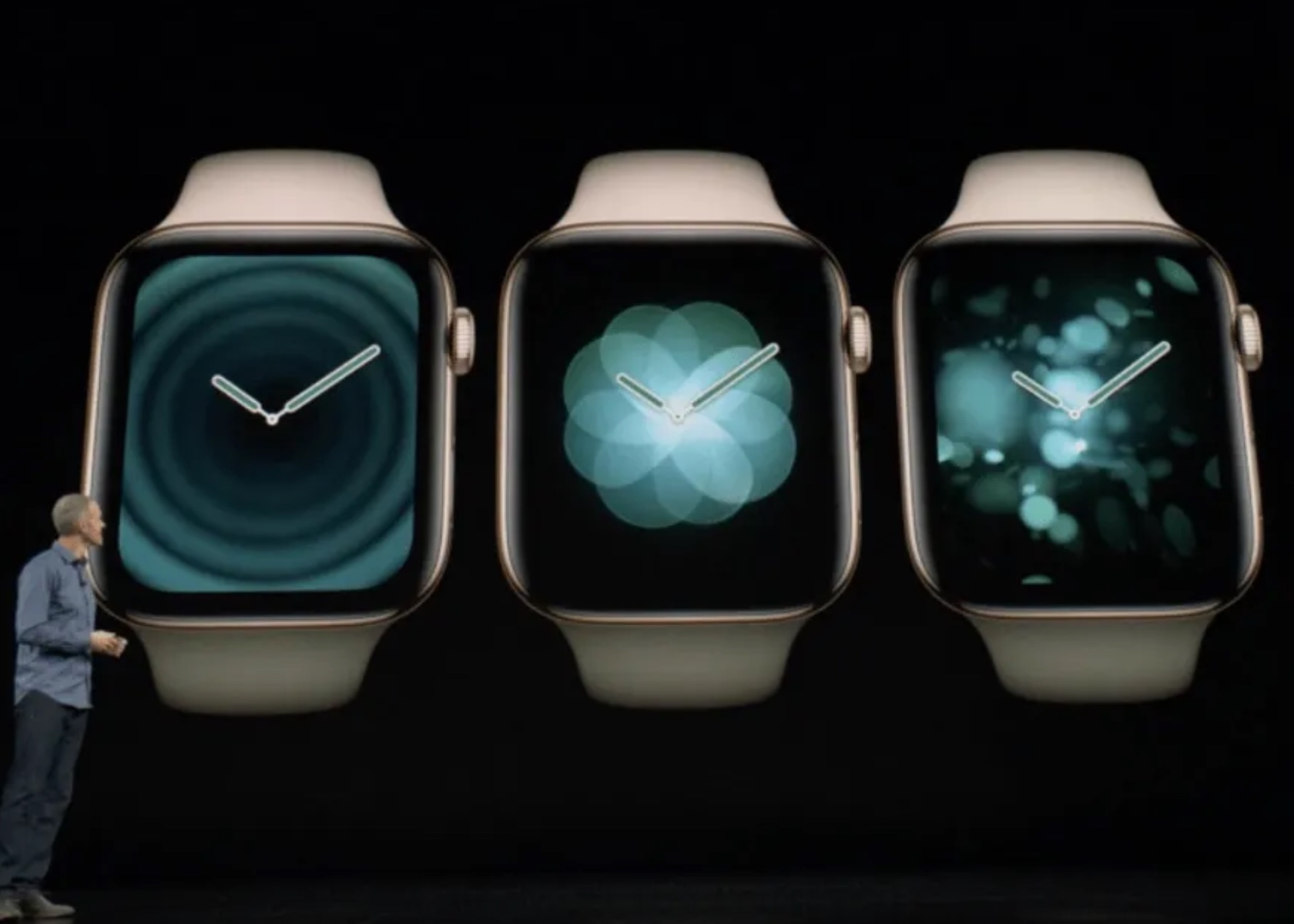
Apple’s latest operating system, macOS Sequoia, is set to bring a range of new features and improvements designed to enhance your experience across Mac, iPad, and iPhone. While some features are still in development, the initial developer beta provides a glimpse into the promising updates and areas that require further refinement. Seamless Cross-Platform Integration One […]
Imagine a world where you can travel freely, work remotely, and stream your favorite shows without worrying about online security. Sounds like a dream, right? Well, with the Deeper Connect Air, this dream can become a reality. This all-in-one travel and security device offers military-grade encryption and top-notch cybersecurity to keep your data safe, even […]
Thanks to X showing what its users "like" on its platform, politicians and public personalities have been caught looking at salacious and unsavory tweets in the past. Now, the platform formerly known as Twitter is making likes mostly private, and according to company chief Elon Musk, it's an important change so that people can "like posts without getting attacked for doing so." The company originally launched the ability to hide the likes tab as a perk for X Premium subscribers last year. "[K]eep spicy likes private," X said when it announced the new feature.
This week we’re making Likes private for everyone to better protect your privacy.
– You will still be able to see posts you have liked (but others cannot).
– Like count and other metrics for your own posts will still show up under notifications.
In a new tweet, X's Engineering account has revealed that the social network is making likes private for everyone this week. Users will no longer be able to see who liked someone else's post, which means likes on the platform will no longer cause PR crises for public figures who like sexual, hateful and other unpalatable posts in general. They can still see who liked their tweets, however, along with their like count and other metrics for their own posts.
This rollout kills one reason for getting a premium subscription, though. The company's advertising revenue took a nosedive last year, and it launched two new tiers for its subscription service to help solve some of its financial woes. The Premium+ tier costs users $16 per month and removes ads from their timelines, while the cheapest tier costs users $3 a month and doesn't come with the website's blue checkmark.
This article originally appeared on Engadget at https://www.engadget.com/x-is-officially-making-likes-mostly-private-for-everyone-035837613.html?src=rss
Sort of like a Gatorade but for your phone, the GRAVITY C5 MagSafe Power Bank from ADAM elements gives your smartphone a burst of energy just when it’s down. Equipped with a 5000mAh battery on the inside, the GRAVITYC5 snaps to the back of your phone, wirelessly charging it to keep you going. It’s sort of like giving your phone an extra battery, without cables or charging bricks. Moreover, this ultra-slim power bank boasts a mere 8.7mm in thickness, making it easy to slip into a pocket, bag, or purse without adding bulk.
The MagSafe-compatible GRAVITY C5 boasts dual charging functionality, offering both 15W wireless charging and 20W USB-C wired fast charging. This allows you to power up two devices simultaneously, perfect for keeping your phone and wireless earbuds juiced on the go. The 5000mAh lithium battery packs enough punch to keep your devices running through a busy day, making it a reliable companion for travelers, commuters, or anyone who needs to stay connected.
Designed to be slimmer than your smartphone, the GRAVITY C5 snaps right to the back of your device, charging it even through MagSafe-compatible cases. Its slick profile makes it a dream to carry around, whether it’s in your backpack, in your pocket, or even attached to your phone. Rounded edges means the GRAVITY C5 slips right into your pocket without getting caught on the lining, something other bulkier sharper power banks tend to do as you put your phone into your pocket with the power bank attached.
The GRAVITY C5 sports a slick machined aluminum outer cover that allows it to match up to the metallic finish on the back of Pro iPhones. It does, however, also sport a range of anodized color options that give you a variety to choose from, so you’re not stuck with a plain black, white, or silver variant. The power bank comes in five colors – Pink, Blue, Purple, Red, and Gray – allowing you to choose a shade that matches your style. On the inside, it’s equipped with over-current protection (OCP), over-voltage protection (OVP), and Foreign Objects Detection (FOD). These features safeguard your devices against potential damage during charging, offering peace of mind.
The ADAM elements GRAVITY C5 is priced at $69, but YD readers can grab it for a discounted price of $58.65. For a complete charging experience, each package includes a storage pouch and a 200mm USB-C charging cable. Additionally, a one-year warranty provides assurance and reliable customer service.
There was no new Apple hardware at WWDC 2024, but Apple still had tons of news around AI and its upcoming operating systems. In this bonus episode, Cherlynn and Devindra brave the California heat to discuss Apple Intelligence and how it's different than other AI solutions. And they dive into other new features they're looking forward to, like the iPhone mirroring in macOS Sequoia and iPadOS 18's surprisingly cool Calculator app.
Listen below or subscribe on your podcast app of choice. If you've got suggestions or topics you'd like covered on the show, be sure to email us or drop a note in the comments! And be sure to check out our other podcast, Engadget News!
Hosts: Devindra Hardawar and Cherlynn Low Music: Dale North and Terrence O'Brien
Transcript
Devindra: What's up, folks? This is Devindra here, and we are live at Apple Park. Cherlynn and I are in the middle of covering Apple's WWDC conference. Cherlynn, what's up? How's it going?
Cherlynn: We are, I feel quite zen right now, because even though I have a lot more meetings coming up, we are seated outside, it's nice out, and even though it's really hot, it's not dying. it's nice. I'm chill.
Devindra: It's nice we are both, we've gone through four to five meetings. For both of us. We've gone through the keynote. We're writing a bunch of news folks. So we're just gonna sit down and Give you our thoughts about what's going on. Cherlynn and I also did a video that's up on our YouTube channel recapping why we think Apple intelligence is doing things a little differently and maybe better than Stuff from Microsoft and Google, but yeah, Sherlyn, you've been talking with Apple a lot.
What is your general takeaway from this year's WWDC?
Cherlynn: Yeah, to set the stage a little, I think, this morning 8 a. m. I had my first meeting and then it's been four meetings like you said, Devendra, covering topics like Apple intelligence, privacy, iOS 18 and iPadOS 18 and watchOS 11 as well. My main thing is that yes, we have actually throughout the keynote, we heard things that we've seen in other platforms, right?
Like they're blatantly copying magic eraser from Google's editor on, this thing called cleanup and photos. and they're adding different things like, oh, you can now rearrange your apps and skin them the way you can in Android's material you. But, the way Apple's thought things through proves and continues to prove to be different from everyone else.
It's a bit more thoughtful, a bit cleaner, a bit more sophisticated. And, again, I think you see this most in Apple Intelligence. And, Devindra, you've been asking everybody here, can we say AI? Can we?
Devindra: I don't know. So one thing I started figuring it out, or at least as we were writing about Apple Intelligence, is that Making an acronym for it is tough because I can't just call it AI and then talk about That stuff versus Copilot or versus OpenAI and I've started using Apple AI as a way to shorten it But I have been asking Apple folks here basically everyone we've encountered about how they shorten Apple intelligence and the resounding response I get is like a data processing error.
It's like watching a human kind of just like stop being able to process information. They look over to the PR person. They're like, what do I see here? But the response I always get is, Apple intelligence. That's all we say. We only ever say Apple intelligence. One person said, personal intelligence, which is a phrase Tim Cook used.
But yeah, it is funny that it is, it seems almost like a corporate command not to call Apple intelligence AI or shorten it that way in any way.
Cherlynn: they think of the words AI, or the letters AI, to stand for Apple Intelligence, it seems And then the word that they fall back on when they don't want to say Apple Intelligence is just Intelligence. three syllables, is only one more than saying AI. Still, though, AI is so much easier to say, in my opinion.
Devindra: It just feels like they have stumbled themselves into this weird branding hole, where they took the letters A and I, but they can't use AI. But it is also an AI powered thing. I just think it's funny, and shows, like, how I don't know how absurd these companies can be at some points. but yeah, let's briefly talk about Apple Intelligence, Cherlynn. I'm more impressed by what Apple's doing here because it does seem like they're announcing features that we actually would want to use, and it's more centered on features within apps, stuff like making Siri better, rather than what Microsoft did.
Microsoft was just like, hey, nobody likes our search engine. Here we put AI in our search engine then everybody all of a sudden thought it was cool And then they put that copilot they rebranded as copilot They put that in Windows and it's like dot profit I don't think it actually led to anything.
I don't care about copilot in Windows It hasn't been functionally useful for me But just looking at the stuff here that Apple has shown off like I want to use this new Siri I want to use a lot of these new features that they're showing off. I don't know if you feel differently
Cherlynn: I think Siri is only one part of the Apple intelligence puzzle.
I think there's a lot of other stuff that they were, that they demoed that would be very intriguing. I do feel like a lot of their writing tools, things that we're going to see on Mac and iPad, are things we've seen elsewhere, like Copilot, like Gemini and OpenAI, have all offered some version of rewriting something for you, summarizing it for you, providing a TLDR.
Apple obviously being the sort of, vertical integration king that it is good at Bringing it so that when you highlight a body of text or something, you can see this like blue or yellow or whatever circle up here at the top left, where you find your copy and paste options, you might also go there to get a writing tool like, yeah, help me adjust the tone of this cover letter that I'm writing, for example. it's Stuff that we've seen, but yet applied a just a bit better, a bit more thoughtfully. the Siri stuff, they've redesigned Siri to better understand you if you, interrupting yourself in the middle of, issuing a command. if you're like, Oh, adjust this timer. Oh, sorry, set it for 15, not 20 minutes, that sort of thing. it will do it. It's smart enough. it is definitely, more thought out and more system wide and deeply integrated. And to use their own words, Personal, more personally, contextually aware than say, Gemini on a Pixel phone. And that's the only real other place I can compare it to because the Copilot on Surface PCs don't seem that deeply integrated just yet.
Devindra: It almost seems like Copilot is directionless. It's like Microsoft was just like, Hey, OpenAI is cool, do you like ChatGPT? look, we put it in Windows. are you not entertained? Aren't you happy about this? And I wasn't, I've tested this stuff for a while. I think Google's at least trying to be a little more, Thoughtful also about how it's doing it with Gemini.
Like it's trying to like hook into all the Google services and all the stuff you're already relying on. But Apple's whole thing is like they are building on the privacy standards that they have talked about before a lot of this Processing is happening on device with their local models They do go to the cloud for some of their like more complex things.
But we also read about the what is it the private cloud? connection that they were talking about and even that seems cool I'd recommend you all it's like weird to even discuss something like this, but they have basically Created a cloud solution that is they say is more secure You it's an anonymized connection.
Like when, first of all, Apple's models only send little bits of data to their cloud. It's anon anonymized in a way, like the, the VPN relay thing that they have on iPhones is, these servers don't save your data. They don't save logs. So that's also something that will prevent, authorities like police or the FBI from getting records of what you're doing. but Apple's just like keeping yourself out of that. And they also say that they're publishing the images. of the software being used on the servers for researchers to audit and to take a look at and your phone can only talk with basically servers running the exact software that they expect it to so your phone will have to keep getting updated there's like just multiple layers of security which is not the sort of thing I think most people think about when they're doing like cloud services, at least from what I've seen.
Cherlynn: I think, so one thing, the irony of Copilot being directionless is just quite funny to me. you don't want a Copilot or a Pilot to be directionless. But anyway, yeah, the private cloud computing is definitely something that, Apple is approaching differently compared to Microsoft and Google, where they explicitly lay out how anonymized and how protected and encrypted your data is. and true. Apple's point, which something that Craig Federighi pointed out during the keynote as well, they actually put it out there. They want independent verification and validation that their stuff is securely happening and all the transfer of your process. for example, right after the keynote, a certain co, CEO or owner of a certain social media network or platform was like, OpenAI integration with this thing is going to be a security risk, right? I am referring to Elon Musk's tweets on X. And, from my understanding, having taken a lot of meetings since, the OpenAI integration is happening like this. whenever you ask Apple Intelligence devices a query, Siri for example, the first thing it's doing is figuring out whether it can do it on device or if it needs to send through privacy cloud compute to the servers to process.
Then, on devices obviously like quite direct, right? But if it needs to pass your information on to chat GPT because you've asked it something that, whatever. It will first surface hey, do you want to pass your information to chat GPT? And it will do it every time. you're not going to say yes once and then afterwards never have to be asked chat GPT access again. and then there is a contractual thing between OpenAI and Apple which prevents OpenAI from storing your requests. and also Apple is just not handing any IP address information over. It is using that sort of private relay thing, to pass on like any IP address information needed. It's just hiding the actual info. and then once OpenAI has done chat GPTing your answers for you, It is supposed to erase your information or whatever and get rid of it. It is a contractual thing supposedly, and that remains to be seen, right? that's how much you trust OpenAI to do that. and then the similar sort of concepts for privacy, cloud compute here.
So again, very well thought out, right? just very Apple in its approach.
Devindra: Thoughtful, I think, is the word. I don't want to sound like I said this in the video. Not too much of a fanboy. We have not seen this stuff in action yet or in the wild. But, I think like the initial I don't know. Problems we saw was something like Microsoft Recall, which was a cool idea.
But Microsoft, it was like a blunt force approach to Hey, we're just going to remember everything you did on your computer by capturing everything we did on your computer. And we're going to serve it, we're going to save it in a database on your system that, Hey, anybody can apparently access with like very little protections around it.
And it literally took days for security researchers to even be like, what the hell is this? this is. Very easy to break through. Microsoft ended up having to, basically rework how that feature is. Initially it was, it was a feature that was always enabled and you had to opt out of it. Now it's opt in. people had to complain to alleviate these very obvious issues. And I think at the very least, I don't have that sense with Apple. Like I feel like they've at least sat down, maybe also talked with researchers and be like, is this cool? Is this actually copacetic in terms of like privacy and user safety and everything?
So I don't know if you have any further thoughts on that.
Cherlynn: Because Apple knows that the sort of price to pay if it's caught with egg on its face is so high and actually arguably higher for it than any of its other rivals to be, is all the more invested in making sure this is going and being done the right way and honestly I wish Google and Microsoft would take notes. I will say there's a lot of other privacy things that are very intriguing to me. I did, I am fresh from like a privacy related demo that, was very, so the passwords app is a new thing that I'm very excited about, I'm very welcome. I feel very welcome. Or I'm welcoming it? Whatever. they're also changing certain things like the allowing access to all your contacts or limiting access or whatever in the permission settings for various apps that need.
Like for example, if I'm playing Match Factory, why do they need to get all the access to all my contacts they don't need? I also think it's funny, no, maybe not funny. one of the new features coming to iOS 18 is locking and hiding. specific apps. locking makes sense. I get it. Hiding, though, seems like you're, like, Ashley Madison ing things for everybody, letting the cheaters of the world keep secrets.
I don't know how I feel about that, but, it's the, atomic bomb thing, right? Do you make it and then let people use it how they will, or, I don't know who at Apple decided this was a necessary feature. Are you going to use this feature Devendra?
Devindra: listen, I could have my Tinder account somehow.
I don't know. but I do think the app blocking thing is cool because parents often have to give their devices to kids and Oh, you don't want them to swipe away, you don't want them to do other stuff. So this way you can lock an app if you want to show off your photos or show off something to somebody and just have them not poke around, which has been.
It's also like a very common problem we see on like TV shows and movies where somebody would be like, Hey, can I take a look at this photo? And they're like, get all your personal data from your phone instantly because it's open. So it seems like a very smart way of dealing with privacy too.
Cherlynn: And very Apple esque in that, if you lock an app, say, your messages, for example, then it, also the contents of that app won't show up, and search won't show up, and series suggestions, or spotlight suggestions, or, even map suggestions. there's just a lot here. and, just to take away broader notes from WWDC2, like I said earlier, there's a lot of, small changes that, that make everything seem very meaty. iOS 18 actually might be a big upgrade. the messages updates that are coming. the new tap back, emoji.
Finally, we can do more than exclamation marks. Sometimes I just want to make a sad face. I can't do that. I have to do thumbs down. I like that they're coming. Oh, and I'm back to the Apple Intelli I know I'm jumping around a bit, but talking about emoji, another thing that Apple did right from the get, I think because it's been able to observe the pitfalls that other people have fallen into is to be like, okay, we're limiting it to these very obviously cartoonish sort of graphic like representation, so no photorealistic.
And then when it's creating images of people in gemmoji, you can only use your own creation. So you're basically choosing from a template or based on your like people that you have in your photos or your people gallery sort of situation. But because it's in a cartoonish representation, people are never going to mistake it for someone that's actually a real life.
You can't, for example, there are guardrails in place that like, prevent you from making the image playground generate something that looks harmful or violent or is exploitative. which again, goes to show, Apple's thought this through, right?
Devindra: And I think a lot of people are asking, what are, where, what are these models trained on?
Because Apple's talking about a lot of its own models, small ones that run directly on your device, larger ones that are in the cloud. And occasionally they'll reach out to OpenAI for chat GPT stuff. Apple has told us that they are training their models on licensed data, like images, things like that.
Some stuff from the open web, publishers can refuse to participate. Like they can say their site is not crawlable by Apple stuff. and they say that, Apple will, if somebody changes down the line, like what they want to be accessible to their own models, Apple will reflect that with further updates.
So again, it's opaque, but at least what they're telling us. To me sounds better than what I've heard from Google and certainly from open AI. so I think that's cool real quick. Let's talk about macOS Sequoia, which has most of the features again All these features pretty much come across all of its products.
So apple intelligence is going to be a thing that's by the way is going to be working on Max running Apple Silicon, so M1 to M4 No M4 Max yet, but M1, M series Max and also the iPhone 15 Pro Sherlyn you wrote a piece about the features people can expect if you have an iPhone 14 Pro Basically, you're sore out of luck.
You get some iOS 18 features, but not everything, right?
Cherlynn: Yeah, all the iOS 18 features, but none of the Apple intelligence features, unfortunately So that redesigned Siri with the glowing edges. That's not coming. It is so pretty I also want to say that the iPadOS things that seem really cool, all the pencil features, the handwriting stuff.
So a lot of the, Keynote or like in demos I've taken, some features will be like, this is ML power, it's like Smart Script, for example, is powered by ML, but it's not part of Apple Intelligence. So you are still going to get that in iPadOS, 18 when you upgrade, regardless of whether you have the M1 iPad or like an older one. but yeah, I gotta talk to you about MathNodes, Devindra. Were you blown away by that demo? Like, when they just draw the equal sign, then that, thing just sums itself. The solution just solves itself. It's Mean Girls Mathletes, but on a whole other level to me.
Devindra: It's, it's cool, and that's also something they say is ML powered, not necessarily Apple Intelligence powered.
So if you have older iPads, you will see some benefits of that. It's cool, but I also feel like, Bye for now. It's like a superpowered calculator. I don't know how many people have Apple Pencils and are like scribbling down math formulas, but it's cool. I dig it.
Cherlynn: I think to, to begin with the fact that an iPad never had a calculator app before this, it's like astonishing.
But then now that it's here, Apple's clearly thought about look, we're bringing this to the bigger screen. We want it to be pencil friendly. We want it to be big screen friendly. Let's really think about the layout here. And this is explains why there's been a delay. And I actually get it. there's you can go into the history tab to see your previous like calculations. There's a lot more calculations you can do on this calculator, A currency conversion, which I forgot to ask, like, how is it pulling the actual rate? But whatever, and then you can go into the notes section and then I feel like almost feel like calculator is a misnomer in this case because it's doing way more than calculating and solving equations.
It's like you can draw like a blueprint of a house and have it measure the areas like length and width, whatever, but at the same time, map that to like price calculations, like price estimates, like if you use this material. So something I saw happen was like you did Price equals X, area equals Y, and then price times area equals, and once you draw the area, it's like programming basically, but all done in the notes app.
And that's really it blew my mind a little bit, which I hate to admit because I don't like to be so like, fangirly, but damn, that was cool.
Devindra: It was cool. Maybe the excuse for not having a calculator app built into the iPad. one thing I want to mention about macOS Decoy is iPhone mirroring. Which was something I like half predicted.
Like I wrote a wish piece for what I would want to see in Vision Pro and Vision OS 2. And one thing was I would really love to be able to mirror the iPhone just the way like you can mirror a MacBook inside Vision Pro. have a full projection of the screen. That's not coming to Vision OS 2. Vision OS 2 is like very minor updates it seems.
But It is something coming to Mac Sequoia and to use that you need to use a phone, an iPhone. With I 18 A Mac with Mac, Sequoia, you get almost instantly. I haven't seen projected, like how it actually works in real time, but it does seem like you hit a button, you get a window view of your iPhone and you use it.
On your Mac as you would in real life you see your home screen you can scroll between apps You can your notifications like very smartly are reintegrated into the max notifications. That's fun you could play games on your iphone and when you launch a game, the window will go widescreen The audio seems to come through pretty quickly just seems like a really cool feature because At least on Macs, like I always have my phone nearby.
It's always like doing other stuff, but I would love to be able to like just have that open and also see other notifications coming in. It's just like very extensible in terms of like how you're interacting with your hardware. The iPhone, by the way, stay the screen stays locked. So it doesn't look like somebody is just like you're just like mirroring a direct computer or something.
One thing we learned from Apple because I've been asking around about this. If you mirrored your Mac inside of the Vision Pro, And then that Mac was also mirroring an iPhone. Would you actually be able to do the iPhone stuff from within the Vision Pro? And I've heard from a couple of folks that is basically not going to happen.
You can run one continuity feature. iPhone mirroring is part of continuity. So those features that let you like copy and paste across devices and stuff. You can only run one mirroring feature at a time. So basically you can't do that with the Mac. I'm still sitting here waiting for iPhone mirroring in Vision OS.
Clearly though, like they have the capability. The Vision Pro is running an M. 2 chip. If iPhone mirroring works on M. 1 and M. 2 Macs, there is no reason why that isn't going to be in Vision Pro eventually. So I'm kinda, I feel like we half won that bet, basically.
Cherlynn: I just gotta say that Windows and Android have been trying to do this forever.
I can remember like years ago though, when the first like Galaxy books try to do this. That's at least my earliest encounter with it. It works. I haven't seen this happen, yet on the iPhone side of things, as in I haven't personally taken a demo, so I couldn't tell you if it's actually better or more thoughtful. knowing Apple, knowing its deep integration prowess is probably gonna work better.
Devindra: probably. Apple also gives very good demos, so that's something we've learned. do you have any further thoughts about WWDC or what's ahead for Apple, Sherlyn?
Cherlynn: I have so much to dive into in detail, like the watchOS stuff, the iOS and iPadOS features.
I guess broad strokes. It's it feels almost revolutionary because Apple is finally jumping on board the AI train, and renaming the train, taking over basically. And you know what? The thing is, I hate this, but now people are going to pay attention. Because what? now my friends actually are going to realize what Genmoji is supposed to do, what you can actually do by, feeding AI, generator.
It's gonna, and we're gonna start seeing more, writing tool assisted emails and reviews, I think it's momentous. I think people are really going to start paying attention to what AI means and what it can do. I don't know if it's good for the world, but yeah, it just feels like big.
Devindra: We ran out of time talking to Apple people, but I did want to ask them, do you think these writing tools are actually helpful?
Because then it just, All our emails, all our conversations are going to start to sound like weirdly robotic or extra formal AI documents or AI texts and I'm not a fan of that, not too interested, but the Genmoji stuff is cool because it's like we have had Dali and other things like create these AI images, what do you do with them? post it on social media? I don't know. Genmoji is just if you want to create an emoji based on a specific feeling, you can create a thing to your liking. Just a really smart use of that. That technology, So anyway, I am in the process of installing the, the iOS 18 developer beta on my phone. I think according to the rules, you can't talk about that, but we can talk about it when they launch the public beta. So that's, later next month, I believe. But we're going to be testing this stuff out. We're going to be thinking about these features. any other takeaways from Apple, Sherlyn?
Cherlynn: No, send us your thoughts though, right? podcast@engadget.Com is the most direct way to reach us. but come back on, we do a Thursday livestream at podcast@engadget.com Eastern on our YouTube channel where we have direct Q& A sessions where we can probably answer your questions, in real time. And I'm pretty sure we'll still continue to dig deep into what we learned, this week on our episode, that drops on Fridays or Thursday nights, right? come back for all of that.
Devindra: Yeah, definitely. We're still gonna be doing a longer, a normal podcast episode this week. Cherlynn and I are in California now, but we'll be flying back tomorrow and ready to podcast on live stream on Thursday. So we'll be back folks. let us know what you think about all this news, podcast@engadget.com. Thanks folks. We're out.
This article originally appeared on Engadget at https://www.engadget.com/engadget-podcast-recapping-wwdc-2024-from-apple-park-011440662.html?src=rss
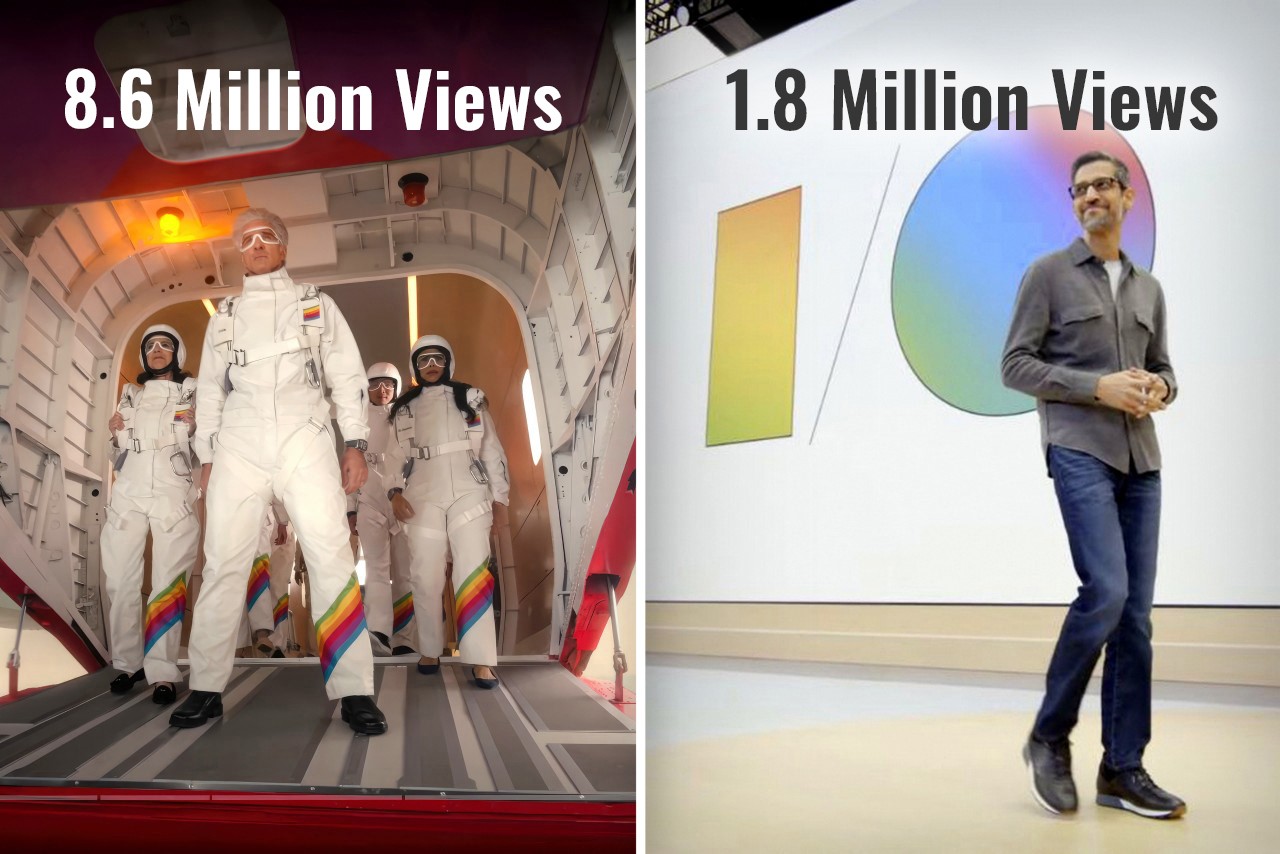
Exactly ten years ago, Google co-founder Sergey Brin jumped out of an airplane and parachuted down into a live event to present Google I/O. Cut to 2024, and Google arguably had one of the most yawn-inducing I/O events ever… but Apple, on the other hand, hat-tipped Brin by having senior VP of Software Engineering Craig Federighi jump out of a plane and parachute down into the Apple headquarters, kicking off the Worldwide Developer’s Conference (WWDC) event. If you were fortunate enough to sit through both Google’s I/O event for developers, and yesterday’s WWDC, chances are you probably thought the same thing as me – How did Google become so boring and Apple so interesting?
Google’s Sergey Brin skydiving into the I/O event wearing the radical new Google Glass in 2014
The Tale of Two Keynotes
Practically a month apart, Google and Apple both had their developer conferences, introducing new software features, integrations, and developer tools for the Android and Apple OS communities respectively. The objective was the same, yet presented rather differently. Ten years ago, Google’s I/O was an adrenaline-filled event that saw a massive community rally around to witness exciting stuff. Apple’s WWDC, on the other hand, was a developer-focused keynote that didn’t really see much involvement from the Apple consumer base. Google popularized the Glass, and unveiled Material Design for the first time, Apple, on the other hand, revealed OSX Yosemite and iOS 8. Just go back and watch the keynotes and you’ll notice how vibrant one felt versus the other. Both pretty much announced the same things – developer tools, new software versions, feature upgrades within first-party apps, and a LOT of AI… but Google’s I/O got 1.8 million views on YouTube over 3 weeks, and Apple’s WWDC sits at 8.6 million views in just one day. (As of writing this piece)
How Apple held the attention
Broadly, having seen both events, I couldn’t help but describe them differently. Google’s keynote seemed like a corporate presentation. Apple’s keynote felt like an exciting showcase. The language was different, the visuals were different, but most importantly, the scenes were different too. Google’s entire I/O was held in person, while Apple did have an in-person event, but the keynote was televised, showing different environments, dynamic angles, and great cinematography. Both events were virtually the same length, with Google’s keynote being 1 hour and 52 minutes long, while Apple’s was 1 hour and 43 minutes. Honestly, after the 80-minute mark, anyone’s mind will begin drifting off, but Apple did a much better job retaining my focus than Google. How? Well, it boiled down to three things – A. a consumer-first approach, B. simplified language, and C. a constant change of scenery.
Notice Apple’s language throughout the presentation, and you’ll see how the entire WWDC rhetoric was user-functionality first, developer-feature second. Whether it was VisionOS, MacOS, iOS, WatchOS, iPadOS, or even TV and Music, Apple’s team highlighted new features that benefit all Apple users first, then mentioned the availability of SDKs and APIs to help developers implement those features in their apps too. One could argue that a Worldwide Developer Conference should inherently be developer-first, but hey, developers are going to watch the keynote regardless. The fact that 8.6 million people (mostly Apple users) watched the WWDC keynote on YouTube shows that Apple wanted to make sure users know about new features first, then developers get their briefing. The fact that a majority of viewers were users also boils down to Apple’s language. There was hardly any technical jargon used in the Keynote. No mention of how many teraflops are used by Apple’s GPUs while making genmojis, what version number Sequoia is going to be, or what Apple Intelligence’s context window is, or whether it’s multimodal. Simple language benefits everyone, whether it’s a teenager excited about new iMessage features, a filmmaker gearing to make spatial content using iPhones or Canon cameras, or a developer looking forward to building Apple Intelligence into their apps. Even Apple Intelligence’s user-first privacy features were explained in ways everyone could understand. Finally, Apple’s production quality helped visually divide the keynote into parts so the brain didn’t feel exhausted. All the different OS segments were hosted by different people in different locations. Craig Federighi and Tim Cook made multiple appearances, but shifted locations throughout, bringing a change of scenery. This helped the mind feel refreshed between segments… something that Google’s in-person keynote couldn’t benefit from.
Where Google dropped the ball
A keynote that’s nearly 2 hours long can be exhausting, not just for the people presenting but also for the people watching. Having the entire keynote on one stage with people presenting in person can feel exactly like an office presentation. Your mind gets exhausted faster, seeing the same things and the same faces. Google didn’t announce any hardware (like they’ve done in past years) to break the monotony either. Instead, they uttered the word AI more than 120 times, while being pretty self-aware about it. The lack of a change of scenery was just one of the factors that made Google’s event gather significantly fewer eyeballs.
Unlike Apple’s presentation, which had a very systematic flow of covering each OS from the more premium VisionOS down to the WatchOS, Google’s presentation felt like an unplanned amalgamation of announcements. The event was broadly about three things – Google’s advancements in AI, new features for users, and new tools for developers – but look at the event’s flow and it feels confusing. I/O started with an introduction where Pichai spoke about multimodality and context windows, then progressed to Deep Mind, then to Search (a user feature), then Workspace (an enterprise feature), then Gemini (a user feature again), then Android (which arguably was supposed to be the most important part of the event), and then to developer tools. An Android enthusiast wouldn’t be concerned with DeepMind or Google Workplace. They might find Search interesting, given how core it is to the Google experience, but then they’d have to wait through 2 more segments before the event even GOT to Android. Search and Gemini are highly intertwined, but they weren’t connected in the keynote – instead, there was an entire 13-minute segment on Workplace in between.
If all that wasn’t fatiguing enough, Google’s I/O tended to lean into technical jargon describing tokens, context windows, and how the multimodal AI could segment data like speech and videos, grabbing frames, finding context, eliminating junk data, and providing value. There was also a conscious attempt at showing how all this translated into real-world usage, and how users could benefit from this technology too, but not without flexing terms that developers and industrial-folk would understand.
Although it’s natural to read through this article and conclude that one company did ‘a better job’ than another company, that isn’t really the case. Both Apple and Google showcased the best they had to offer on a digital/software level. However, the approach to these keynotes has changed a lot over the last 10 years. While Google’s I/O in 2014 had a lot of joie de vivre, their 2024 I/O did lack a certain glamor. Conversely, Apple’s WWDC had everyone at the edge of their seat, enjoying the entire ride. Maybe you got tired towards the end (I definitely did mid-way through the Apple Intelligence showcase), but ultimately Apple managed to deliver a knockout performance… and that’s not me saying so – just look at the YouTube numbers.
Apple previewed watchOS 11, showcasing enhancements that solidify its position as the world’s most advanced wearable operating system. The update focuses on advanced health and fitness insights, greater personalization, and enhanced connectivity features. This discussion delves into the key aspects of watchOS 11, validating the information with official statements and understanding its integration into Apple’s broader ecosystem.
Why watchOS Wasn’t Included in the Apple Intelligence Discussion
Despite Apple’s emphasis on AI for iOS, iPadOS, and macOS, watchOS was notably absent. The reason is that Apple Watch has extensively leveraged AI and machine learning.
Apple Intelligence: iOS, iPadOS + macOS Sequoia
Apple Watch is designed as a personal health and fitness companion, with many features driven by AI and machine learning, providing personalized insights and recommendations. For instance, the automatic workout detection feature uses machine learning to identify when a user begins a workout and suggests the appropriate workout tracking by analyzing data points such as movement patterns, heart rate changes, and location data.
Additionally, the heart rate monitoring feature continuously tracks a user’s heart rate and provides notifications if it detects an irregular rhythm, potentially indicating atrial fibrillation. This capability applies AI, using historical data and real-time analysis to identify potential health issues.
The Breathe app prompts users to take regular breaks for mindfulness and relaxation. Its reminders are based on patterns in the user’s daily routine, reducing stress and improving well-being. The integration of AI ensures timely and relevant reminders.
The sleep tracking feature, introduced in watchOS 7, uses machine learning to analyze sleep patterns and provide insights into sleep quality by tracking metrics such as heart rate, movement, and ambient noise. This helps users understand their sleep habits and make informed decisions to improve their sleep.
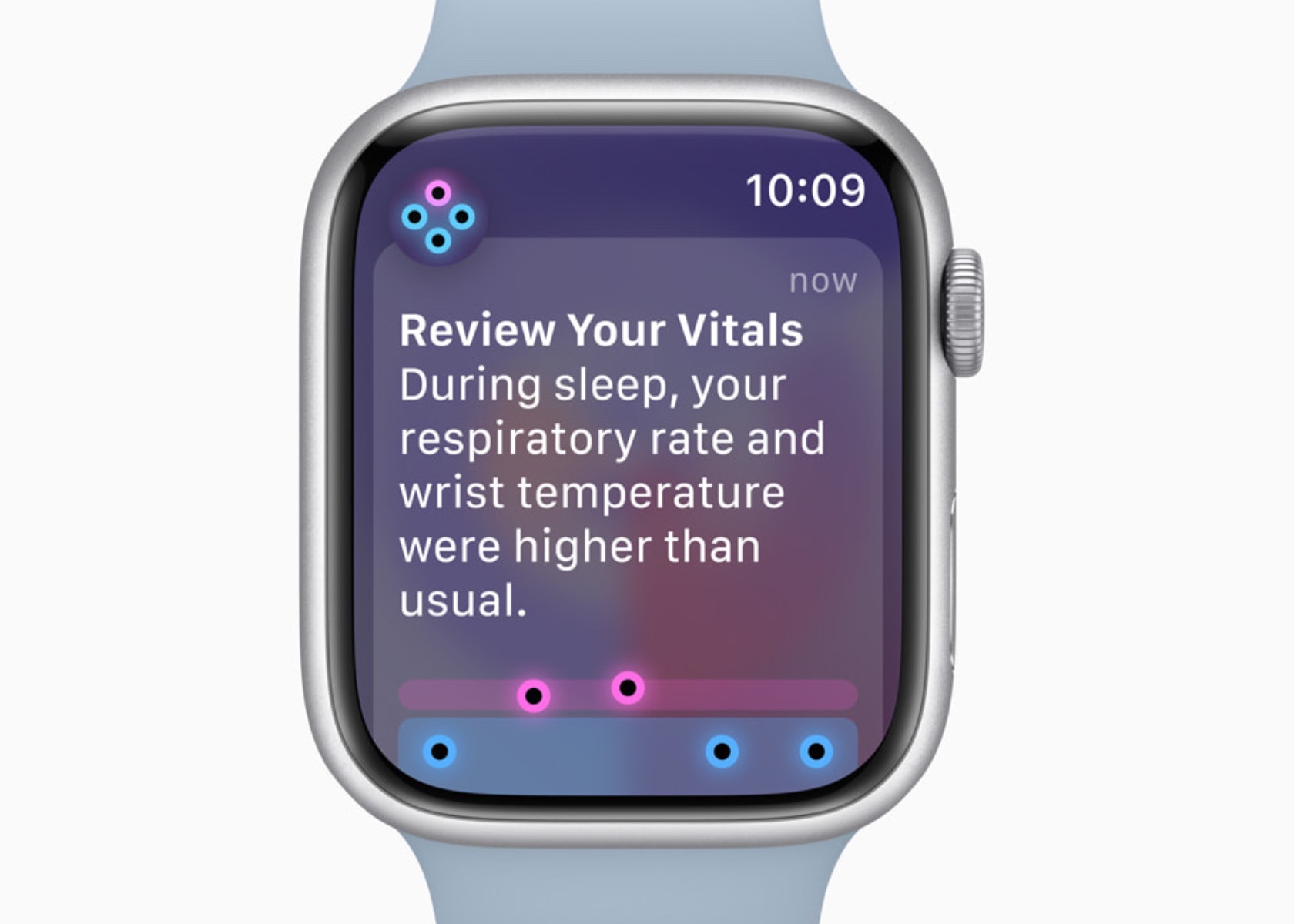
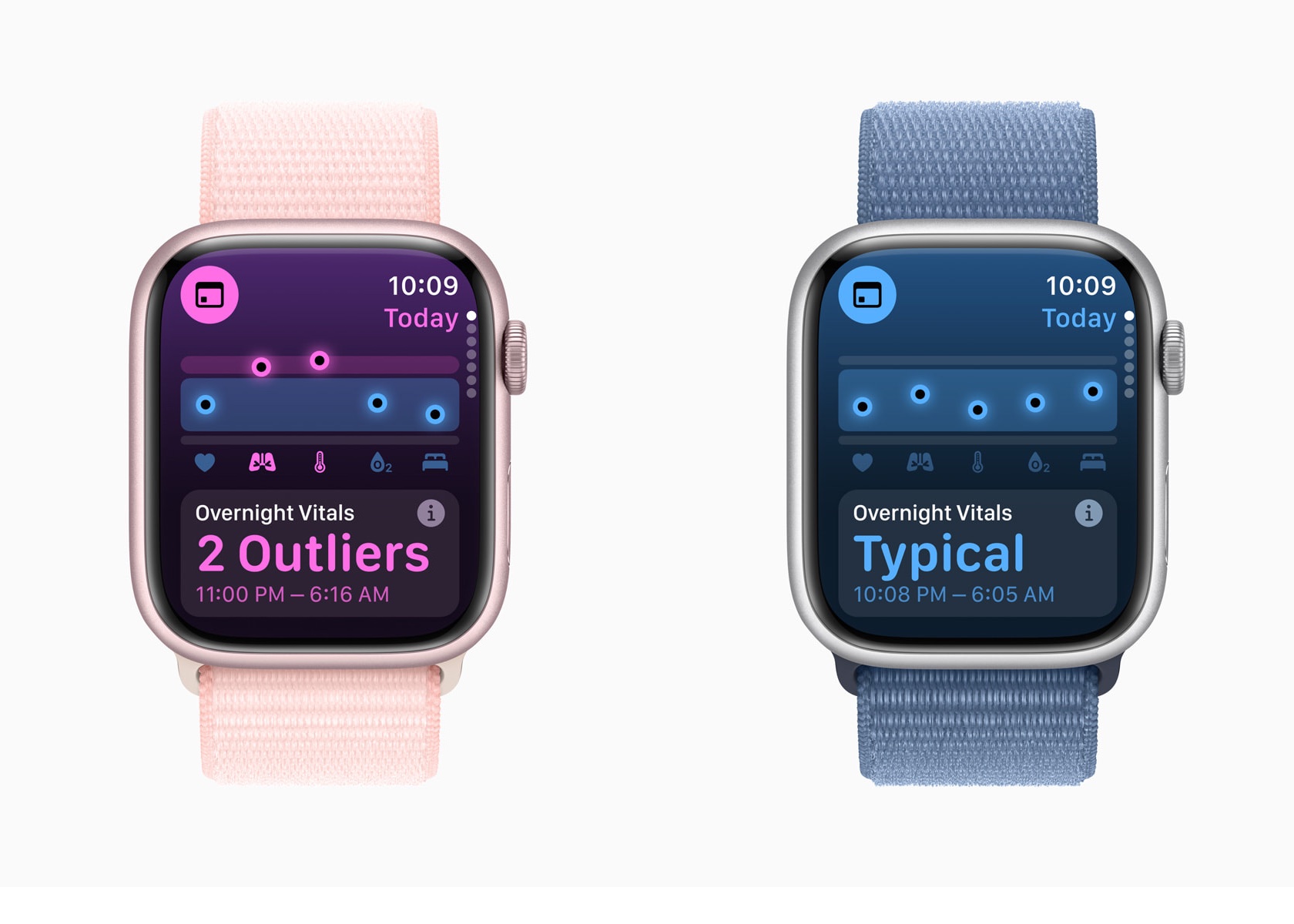
In watchOS 11, the Vitals app and Training Load build on this foundation. The Vitals app consolidates various health metrics, providing a comprehensive view of a user’s health status. It uses AI to analyze these metrics and identify outliers, notifying users when two or more metrics are outside their typical range.
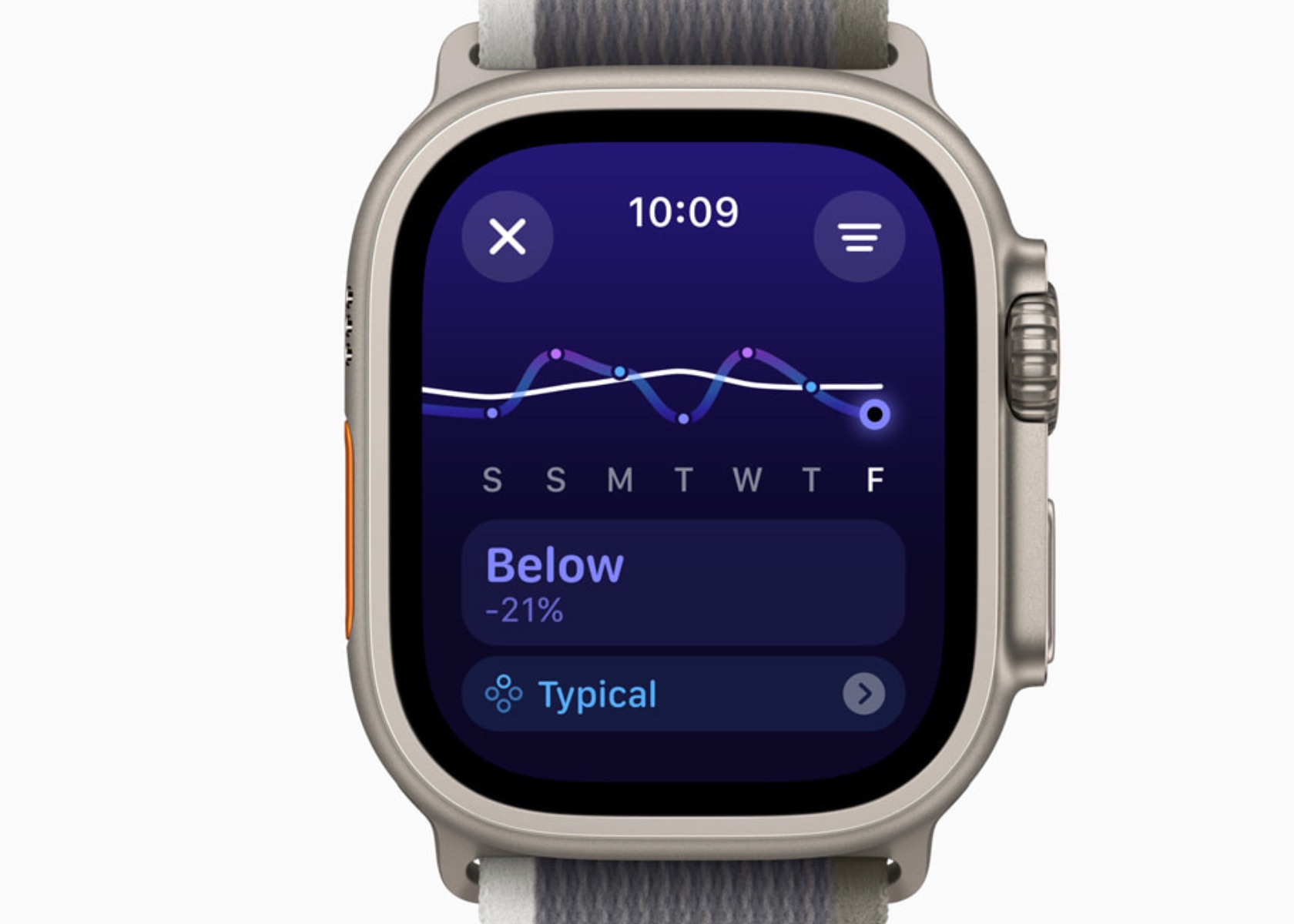
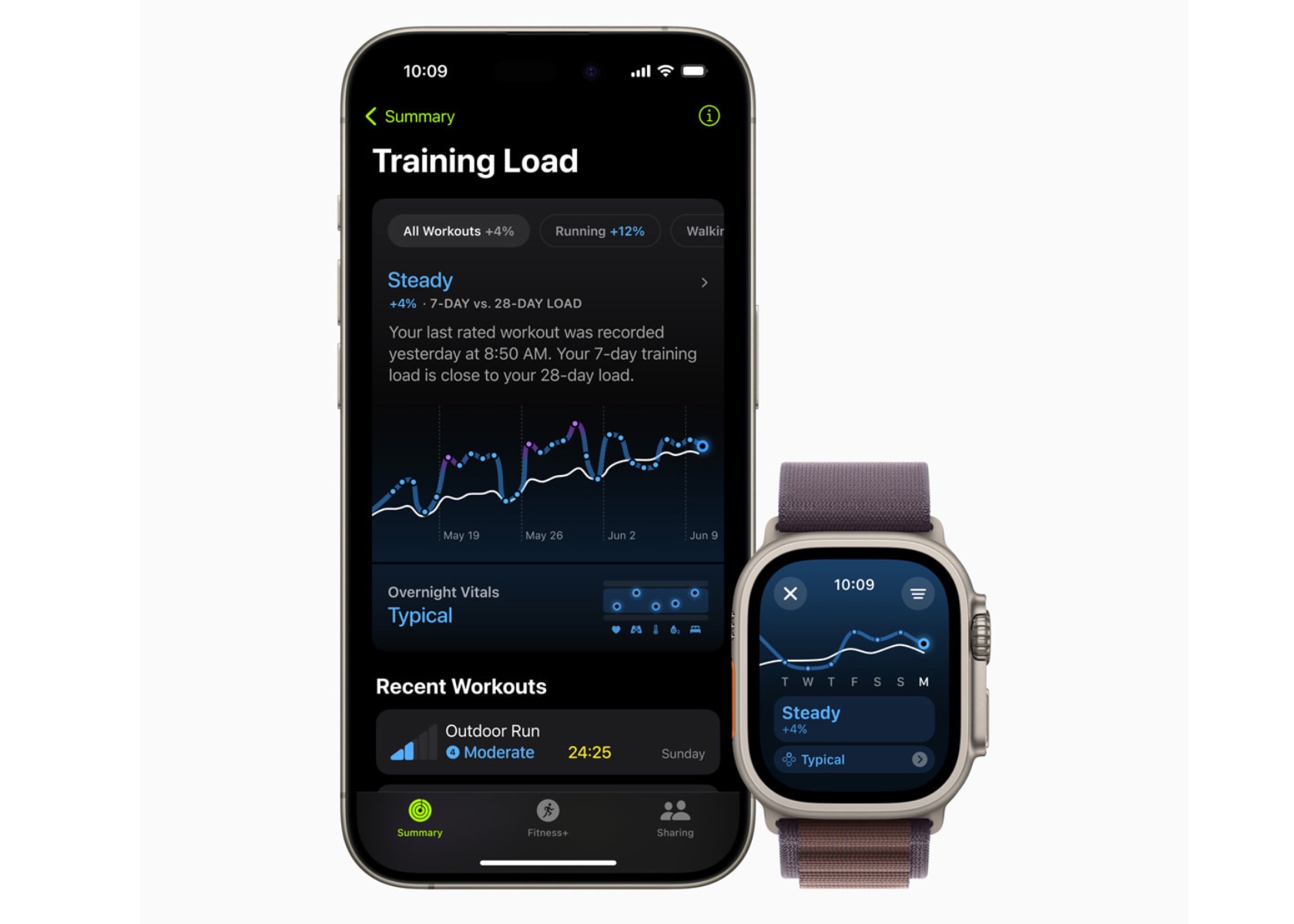
Training Load uses a new effort rating system combining data from various sources to measure workout intensity. By comparing the past seven days of activity with the last 28 days, users can understand how their workouts impact their fitness over time.
The exclusion from the Apple Intelligence segment suggests that watchOS 11’s AI capabilities are deeply embedded in its functionality. The emphasis on iOS, iPadOS, and macOS likely stems from introducing new system-wide AI features still being integrated into these platforms. In contrast, Apple Watch’s AI features are mature and have evolved over the years.
Health and Fitness Insights
Vitals App: A Dream Come True for Sleep Tracking and Health Insights
As someone who sleeps with an Apple Watch, the value of these health insights is undeniable. The ability to monitor sleep patterns and understand the quality of rest has been invaluable in making better lifestyle choices. Previously, reliance on third-party apps and devices was necessary to track sleep. However, with the Vitals app, Apple has built a comprehensive system that outputs detailed sleep tracking data, making it a powerful tool for health monitoring.
The Vitals app allows the Apple Watch to measure key health metrics during sleep, including heart rate, respiratory rate, wrist temperature, sleep duration, and blood oxygen levels. This array of data offers a holistic view of nightly rest. The heart rate monitor tracks beats per minute throughout the night, providing insights into cardiovascular health. The respiratory rate measures breathing patterns, helping to detect any irregularities.
Wrist temperature is another critical metric, offering insights into changes in body temperature, which can indicate various health conditions. Sleep duration records the total amount of time spent sleeping, allowing users to see if they are getting enough rest. Blood oxygen levels are also measured, which is essential for understanding how well the body circulates oxygen during sleep.
The Vitals app consolidates all these metrics into a single, comprehensive view, making it easy to identify outliers and receive notifications when two or more metrics fall outside their typical range. This integration uses data from the Apple Heart and Movement Study, ensuring that the classifications and notifications are grounded in extensive research.
In terms of age restrictions, many of these metrics have minimum age requirements. Heart rate and respiratory rate tracking are available for users aged 13 and above, while wrist temperature tracking is available for users aged 14 and above. This ensures that the data collected is reliable and appropriate for the user’s age group.
Previously, gathering this kind of data required reliance on third-party apps and devices. However, Apple’s approach ensures that the Vitals app works exclusively with the Apple Watch, leveraging a vast amount of research data to provide accurate and reliable insights. This means that if you value sleep data and metrics but cannot wear an Apple Watch, you might find yourself out of luck. Apple has optimized the Vitals app to work seamlessly within its ecosystem, offering a indepth health monitoring experience compared to third-party alternatives.
Overall, the insights provided by the Vitals app have significantly improved the understanding of sleep quality and overall health. By integrating these detailed metrics, Apple has created a powerful tool that helps users make informed decisions about their lifestyle and health management. This personal connection underscores the transformative impact of watchOS 11’s features on everyday life.
Training Load
Training Load is another new feature I’m super excited about in watchOS 11, offering a new way to measure the intensity and duration of workouts. This feature provides insights into how the body’s response to workouts evolves over time, helping users optimize their training routines.
watchOS 11 Training Load
To establish a baseline, Training Load requires data from 28 days of workouts. Importantly, these 28 days do not need to be consecutive, allowing for flexibility in users’ training schedules. This means you can take rest days or adjust your routine without losing the ability to accurately track your training load.
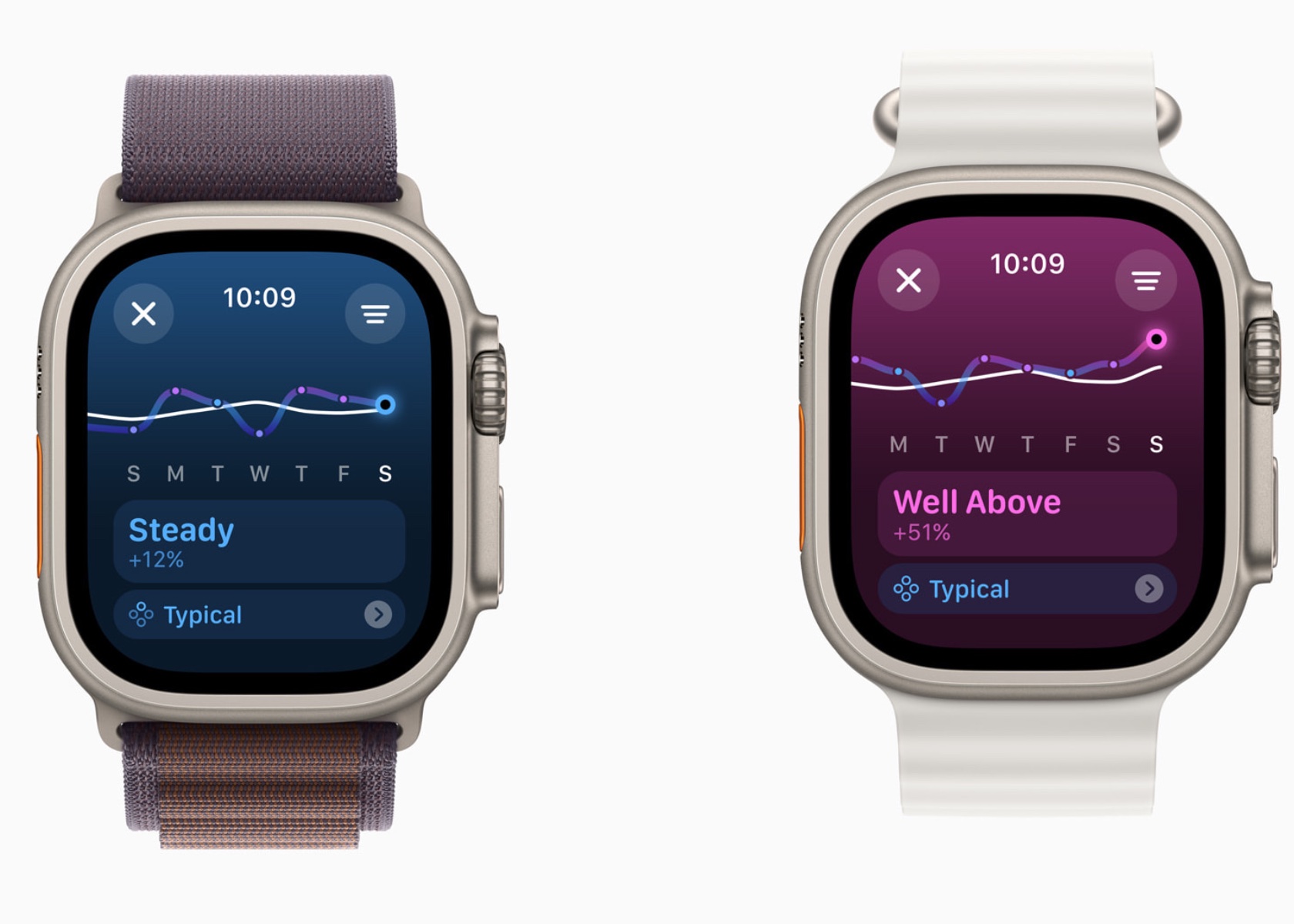
Training Load compares the past seven days of activity with the previous 28 days, providing a comprehensive view of workout intensity and its impact. The effort rating, which ranges from 1 to 10, is calculated using various data points such as age, height, weight, GPS data, heart rate, and elevation changes. For example, running on a flat surface will yield a different effort rating compared to running uphill, even if the distance covered is the same.
For cardio workouts like running, cycling, and swimming, the effort rating is generated automatically using an innovative algorithm. This algorithm takes into account various factors including pace, heart rate, and elevation changes. For workouts that do not receive an automatic effort rating, such as strength training or yoga, users can manually enter an effort rating at the end of each session. This manual input allows users to consider additional factors like stress or soreness that might affect their perceived effort.
In the Activity app, users can view their training load classified as well below, below, steady, above, or well above their 28-day average. This classification helps users understand if they are ramping up their training, maintaining a steady pace, or easing off. For instance, maintaining a training load that is consistently well above the 28-day average might indicate progress in fitness but also a higher risk of injury. Conversely, a well-below training load might suggest the need to increase activity to prevent a decline in fitness.
The integration of Training Load with the Vitals app allows users to see how their daily health metrics correlate with their workout intensity. For example, users can observe how changes in heart rate or wrist temperature align with their training load, providing deeper insights into their overall health and fitness.
Training Load helps users make informed decisions about their training plans, ensuring a balanced approach that optimizes fitness gains while minimizing the risk of overtraining and injury. This personalized feedback is crucial for athletes preparing for events, such as marathons or triathlons, where managing training intensity and recovery is key to peak performance.
Personalization Features
Activity Rings Customization
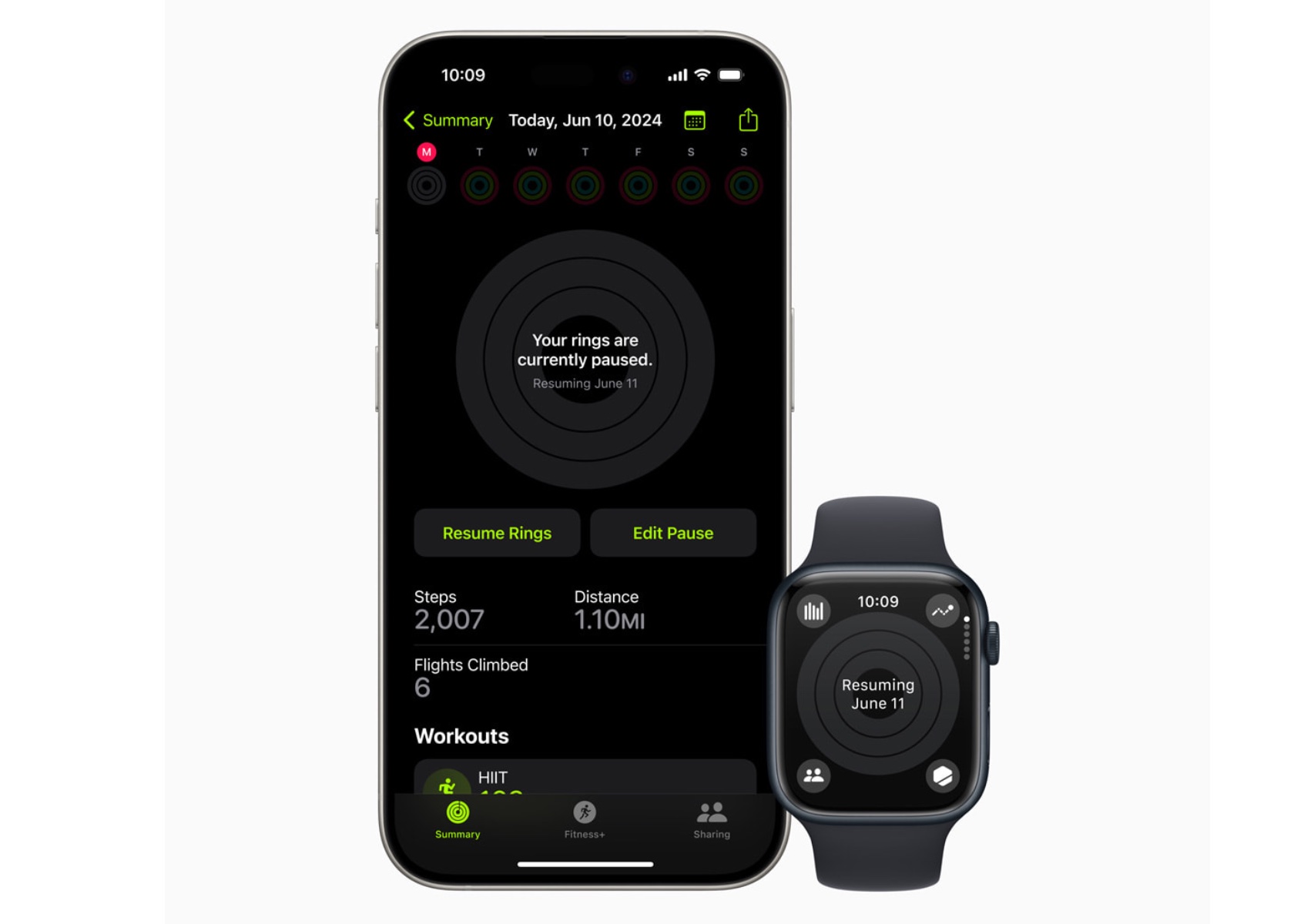
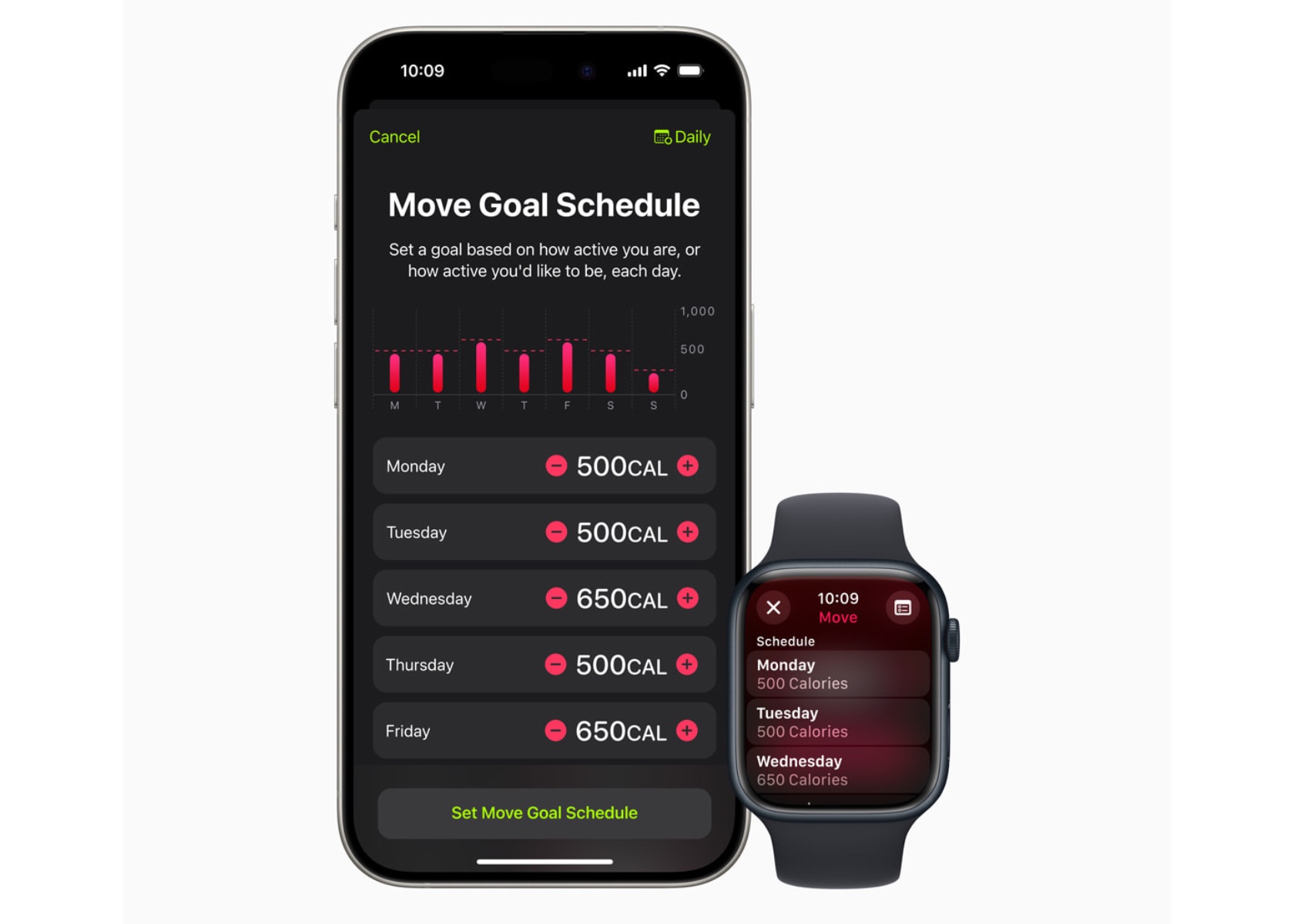
With watchOS 11, Activity rings are more customizable. Users can tailor their goals by the day of the week, accommodating rest days or adjusting targets based on personal schedules. This flexibility ensures the Activity rings provide the right motivation at the right time, maintaining user engagement without compromising fitness streaks.
The ability to pause Activity rings allows users to take a break without losing progress, whether recovering from an injury or needing a day off.
Smart Stack and Photos Face
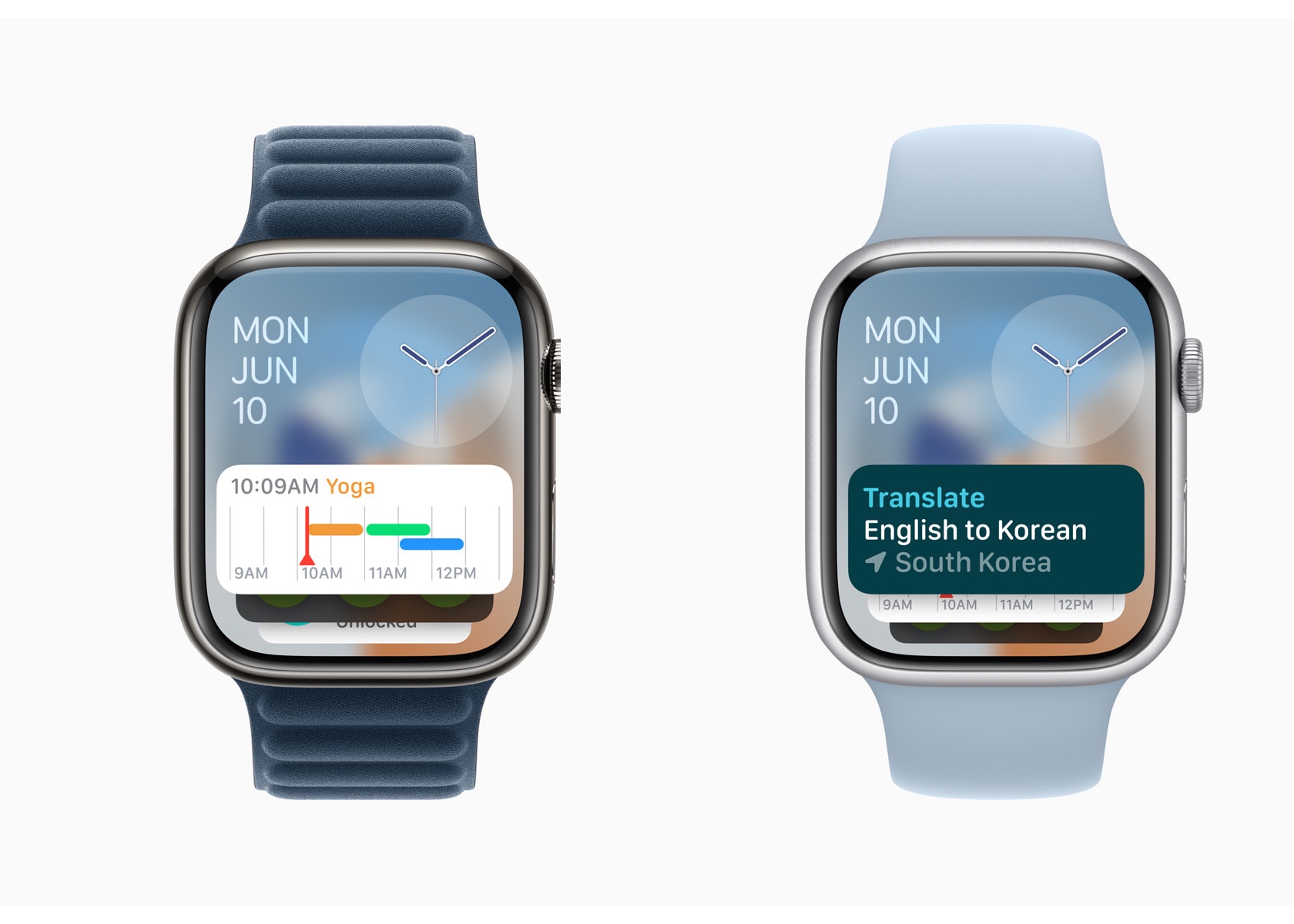
The Smart Stack in watchOS 11 offers new widgets like Shazam and Photos, suggesting widgets based on time, date, location, and daily routines. The Photos face uses machine learning to analyze thousands of images, recommending the best options based on aesthetics and composition. Users can personalize the Photos face, creating a dynamic and visually appealing watch experience.
The Smart Stack’s ability to adapt to a user’s schedule and preferences makes it a powerful tool for staying organized and informed.
Connectivity and Convenience
Check In
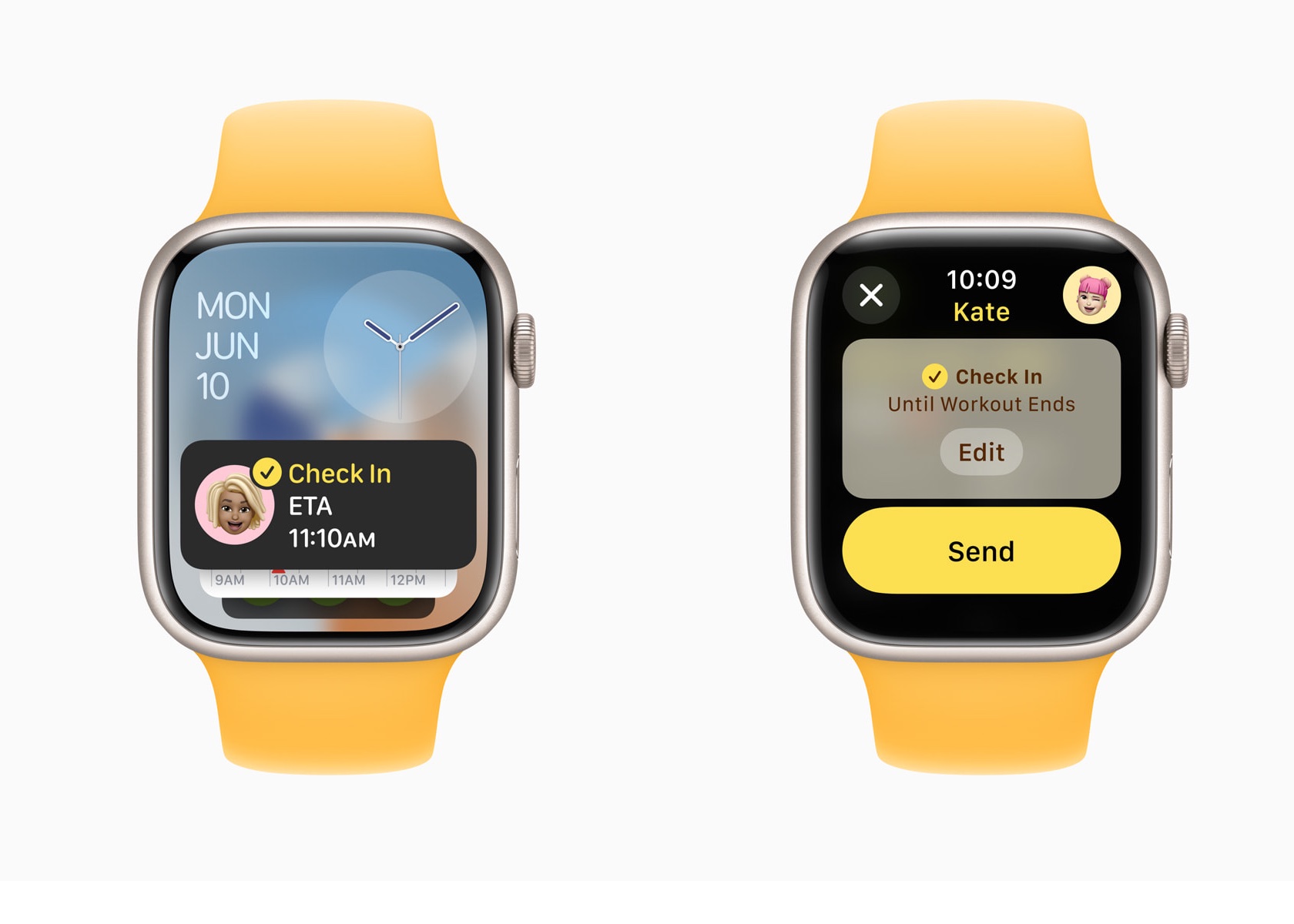
Check In, now available on Apple Watch, enhances user safety and connectivity. Users can use Check In to keep friends or family informed about their activities. This feature integrates with Messages, providing an added layer of security.
It allows users to set a timer for their activities, notifying a designated contact if they don’t check back in time.
Translate App
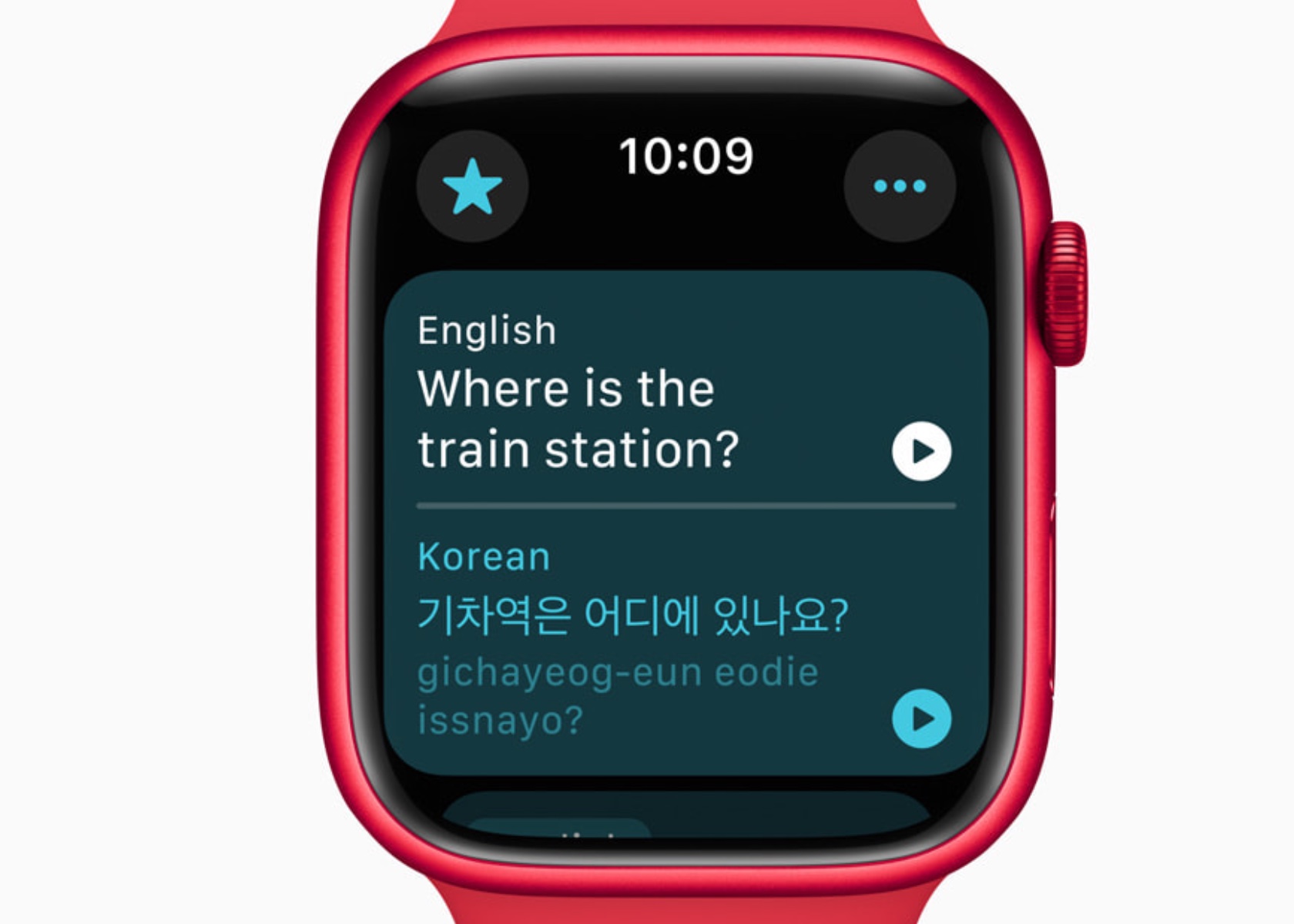
The Translate app on Apple Watch supports 20 languages, allowing users to access translations directly on their wrist. The Smart Stack intelligently suggests the Translate widget based on the user’s location, enhancing convenience while traveling. With offline functionality, users can rely on the Translate app even without an internet connection. However, it is important to note that offline mode requires users to manually download the desired language in advance. This ensures that translations are readily available regardless of internet availability, providing a seamless and dependable experience for language support on the go.
Additional Updates and Developer Tools
watchOS 11 introduces several updates to enhance user experience and provide developers with new tools. These include new workout types with enhanced GPS tracking, customizable Pool Swims, and the ability to save hiking routes for offline use. The Smart Stack and Double Tap gesture capabilities offer developers opportunities to create more interactive and relevant apps.
New workout types like soccer, American football, and downhill skiing expand the range of activities Apple Watch can track. Enhanced GPS tracking ensures accurate distance measurements for outdoor activities. Custom Workouts for Pool Swims allow users to tailor training sessions to meet specific goals.
Developers can use new APIs to create more personalized and interactive experiences for Apple Watch users. The Double Tap gesture can trigger specific actions within an app, providing a seamless and intuitive user experience.
Privacy and Availability
Privacy remains a cornerstone of Apple’s design philosophy. Health and fitness data are encrypted when the device is locked and during transmission to iCloud. watchOS 11 will be available as a free update this fall for Apple Watch Series 6 or later, paired with iPhone Xs or later running iOS 18. The developer beta is available now, with a public beta set to launch next month.
Conclusion
watchOS 11 sets a new standard for wearable technology by integrating advanced health monitoring, personalized fitness insights, and enhanced connectivity features. The Vitals app offers unprecedented visibility into health metrics, enabling proactive management of well-being. The new Training Load feature empowers users to optimize their fitness routines based on real-time data, reducing the risk of overtraining and injury.
So close, yet so far. Ahead of WWDC 2024, I had hoped Apple would let you mirror your iPhone inside of the Vision Pro, just like how you can use your Mac on an enormous virtual display. Instead, we got iPhone Mirroring on macOS Sequoia. As the name implies, it will let you see everything on your iPhone from the comfort of your Mac.
But, I wondered, what if you mirrored a Mac that was mirroring an iPhone in the Vision Pro? It seems like the ideal workaround in theory, one that would solve the headset's annoying inability to play nicely with your iPhone. But, unfortunately, it won't work. We've heard from knowledgeable sources that Apple's hardware only supports one of its Continuity mirroring features at the time. So if you're sending your Mac's screen to the Vision Pro, you won't be able to mirror your iPhone at the same time.
We haven't heard the exact reason for that limitation, but I'd wager it comes down to networking limitations. Mirroring a sharp and lag-free version of your Mac's screen is difficult enough — juggling that alongside a perfectly rendered copy of your iPhone might be too tough for some Macs. Apple is already pushing beyond its current Continuity restrictions with visionOS 2, which will support higher resolution Mac mirroring, as well as the ability to virtualize an ultra-wide display. So perhaps there's room for multi-device mirroring down the line.
It's not hard to imagine Apple bringing the iPhone mirroring feature directly to the Vision Pro eventually, but ideally, it would also work alongside Mac mirroring in the headset.
Here are a few other tidbits we've learned about iPhone mirroring on macOS Sequoia while exploring WWDC:
It requires both WiFi and Bluetooth to work, and the iPhone is projected at 60 fps.
When you launch a game, the iPhone window flips into landscape view on your Mac. The game's sound also appears to be synchronized well.
Mirroring will use around the same amount of battery life on your iPhone as typical usage.
If you unlock your iPhone directly, the mirrored window closes immediately on your Mac.
You'll eventually be able to drag and drop files and other content between your iPhone and Mac. This feature will also be available on third-party apps.
Update 6/12/24, 1:16PM ET: Early testers have discovered that visionOS 2 supports direct AirPlay mirroring from iPhones and iPads. This isn't the same as the Mac's iPhone mirroring feature, since you can't directly interact with the window within Vision Pro, but it's one way to keep tabs on your other devices. We've reached out to Apple for comment on this feature, which wasn't discussed during WWDC.
This article originally appeared on Engadget at https://www.engadget.com/you-cant-mirror-your-iphone-while-mirroring-your-mac-on-apple-vision-pro-222021905.html?src=rss
Elon Musk dropped a lawsuit against OpenAI one day before a judge in California state court was set to hear OpenAI’s request for dismissal. Musk’s suit, which was filed in February, had accused OpenAI co-founders Sam Altman and Greg Brockman of violating the company’s non-profit status and instead prioritizing profits over using AI to help humanity.
In the 35-page suit, Musk had alleged that OpenAI had become a “closed-source de facto subsidiary” of Microsoft, which invested $13 billion in the company and owns a 49 percent stake. Microsoft uses OpenAI’s technology to power Copilot, the company’s generative AI tools that are deeply integrated in products like Windows and Office.
OpenAI had reportedly requested for the lawsuit to be dismissed, arguing that Musk would use any information that emerged as a result to get access to the company’s “proprietary records and technology.” The company had also said that there was no founding agreement for it to breach.
OpenAI and Musk’s lawyer, Alex Spiro, did not respond to a request for comment from Engadget.
Musk, who was one of the founders of OpenAI in 2015, left the company three years later after disagreements over the direction of the organization. He runs xAI an AI startup that makes Grok, a ChatGPT rival that is built into X and is available for paid users. xAI recently raised a $6 billion funding round from top investors including Andreessen Horowitz and Sequoia Capital.
On Monday, Musk said that he would ban Apple devices from his company’s after Apple integrated ChatGPT in its operating systems through a partnership with OpenAI.
This article originally appeared on Engadget at https://www.engadget.com/musk-withdraws-his-breach-of-contract-lawsuit-against-openai-221316519.html?src=rss
Yesterday, following Apple’s announcement of a partnership with OpenAI to integrate support for ChatGPT into the company’s devices, Elon Musk did what he always does: he tweeted. The owner of X wrote, on X, that he would ban Apple devices at his companies "If Apple integrates OpenAI at the OS level." And to that I say: Go right ahead. And while you’re at it, remove your company's software from Apple’s App Store too.
Musk’s companies (at least the major ones) currently include Tesla, SpaceX, X, X AI and Neuralink. Even if we’re just talking about phones — which according to Counterpoint Research Apple currently has a 52 percent market share in the US — around 80,000 of Musk’s 155,000 employees would be subject to the ban, if general statistics hold true. And that’s not counting anyone who uses a Mac computer or iPad. (Note: The lion’s share of these workers would be at Tesla, which employs around 140,000 people.)
And visitors will have to check their Apple devices at the door, where they will be stored in a Faraday cage
Now as we’ve seen with staff reductions at X and Tesla, Musk's management style might best be described as "willing to shoot himself in the foot." But subjecting more than half of his staff to a ban covering one of the most popular gadget makers in the world seems especially obtuse. Yes, all of this would be a headache (especially for the poor souls on his IT teams). But what's truly at issue is that, if Elon truly cares about security, he's only proposing a half-measure.
Why stop at just banning Apple devices? Surely, the apps his companies makes for iOS are in jeopardy as well. So why not pull the apps for X, Tesla and all the others from Apple’s App Store? That would offer even more insulation against the threat of OpenAI, would it not?
It’s patently absurd that Apple isn’t smart enough to make their own AI, yet is somehow capable of ensuring that OpenAI will protect your security & privacy!
Apple has no clue what’s actually going on once they hand your data over to OpenAI. They’re selling you down the river.
Some of the stronger students here, I'm sure, have had their hands raised by now. "But if the problem is that ChatGPT is integrated at the OS level, shouldn't that also mean Musk's companies would be barred from using Windows?" How right you are. And as a man of conviction, I fully expect Elon will ban those machines from his workplaces as well. I suspect his engineers will have a relatively painless time calculating the trajectory of spaceships into orbit on a Ti-83.
Musk followed up his statements by saying “It’s patently absurd that Apple isn’t smart enough to make their own AI, yet is somehow capable of ensuring that OpenAI will protect your security & privacy! Apple has no clue what’s actually going on once they hand your data over to OpenAI. They’re selling you down the river.”
To no surprise, that statement does not accurately describe Apple and OpenAI’s partnership, which readers quickly pointed out using X’s additional context feature. (On Musk’s own website no less, oh the ignominy!) Apple says it will have its own AI models that will either run on-device or in a private compute cloud, and will only send data to OpenAI with a user’s explicit permission on a strict opt-in basis. So despite Musk's claims, there doesn’t seem to be a lot of trickery there.
The bottom line is that, as the founder and CEO of a handful of companies, Musk can do what he wants. And in this case, I encourage Elon to follow through. Show us that your posts aren’t a bluff, as some are already claiming. It’s time to fuck around and find out.
This article originally appeared on Engadget at https://www.engadget.com/hey-elon-go-ahead-and-ban-apple-devices-211521967.html?src=rss