Braun Prize 2024: Submit Your Innovative Design for a $50,000 Reward

The Braun Prize, first introduced in 1968, is an internationally renowned design competition that celebrates the power of innovation and craftsmanship in industrial design. Braun, the German design powerhouse behind the prize, has long been synonymous with iconic, minimalist, sensible design. Known for its clean lines, functional aesthetics, and products that marry form with function, Braun has shaped the landscape of product design for decades. Its influence is deeply rooted in the design world, inspiring generations of designers to prioritize simplicity, utility, and timelessness. With a rich legacy in creating everything from shavers to radios, Braun’s dedication to design excellence extends to the Braun Prize, which has become a benchmark for recognizing creative talent across the globe.

A key element that underscores the significance of the Braun Prize is its distinguished jury, which has, in the past, included design legends like Dieter Rams, Braun’s former Head of Design. Rams, one of the most influential figures in modern design, chaired the competition for several years, bringing his renowned “less, but better” philosophy to the forefront. Other notable figures, such as Peter Schneider and Dr. Fritz Eichler, have also shaped the competition with their expertise. This tradition continues in 2024 under the leadership of Prof. Oliver Grabes, Braun’s current Head of Design, ensuring the competition maintains its high standards of evaluating innovative ideas that fuse practicality with creativity.

For the 2024 edition, under the theme “Ideas to Keep,” Braun invites designers and inventors to participate by submitting projects that highlight both timeless design principles and forward-thinking solutions. Open to students and young professionals globally and held once every 2-3 years, participants have the chance to showcase their work on an international stage and compete for a prize pool totaling $50,000 USD. Designers can submit their entries via the Braun Prize platform, or if you’re looking for inspiration, scroll down to take a look at some Braun Prize winners from the previous edition.

Click Here to Submit Now. Deadline: 14th October 2024.

Braun Prize 2021 Winners

Drilling Targeting Systems (DTS) by Mehmet Mehmetalioglu (Student)

Mehmet Mehmetalioglu’s Drilling Targeting Systems (DTS) is setting a new standard in aerospace assembly. With the surge in aircraft production, DTS provides a much-needed solution for the intricate task of joining fuselage and ribs, enhancing workflows and reducing the need for highly skilled labor. The system employs ultrasonic technology in its modular target unit to accurately locate drilling points, while the drilling unit performs the task with precision, ensuring the surface remains undamaged. This innovation not only minimizes human error but also improves safety in aircraft manufacturing. Juror Stefan Schamberg commends the DTS for its intelligent design, top-notch prototyping, and its potential to elevate industry standards, underscoring Mehmetalioglu’s dedication to meticulous craftsmanship and forward-thinking solutions.

PAPILIO Wind Powered Street Light by Tobias Trübenbacher (Student)

Tobias Trübenbacher’s innovative street light, PAPILIO, addresses the escalating issue of light pollution and energy consumption. As our cities grow taller and windier, so do the environmental challenges we face, including the 6% annual increase in artificial light worldwide. PAPILIO tackles these problems head-on with a Savonius wind rotor that generates its own electricity, significantly reducing CO2 emissions from public lighting. Designed to be both eco-friendly and effective, PAPILIO features a full-cut-off light that directs illumination downward, significantly decreasing its impact on insects and the environment. An infrared sensor ensures the light activates only when necessary, further minimizing unnecessary illumination. Juror Johanna Schoemaker admires the balanced design, highlighting the way the wind turbines’ graceful movement adds an aesthetic element reminiscent of a simple paper windmill. PAPILIO not only offers a functional solution but also enriches public spaces both day and night, making energy generation an elegant spectacle.

RUEI-01 Robotically Recyclable Shoe by Maxwell Ashford (Student)

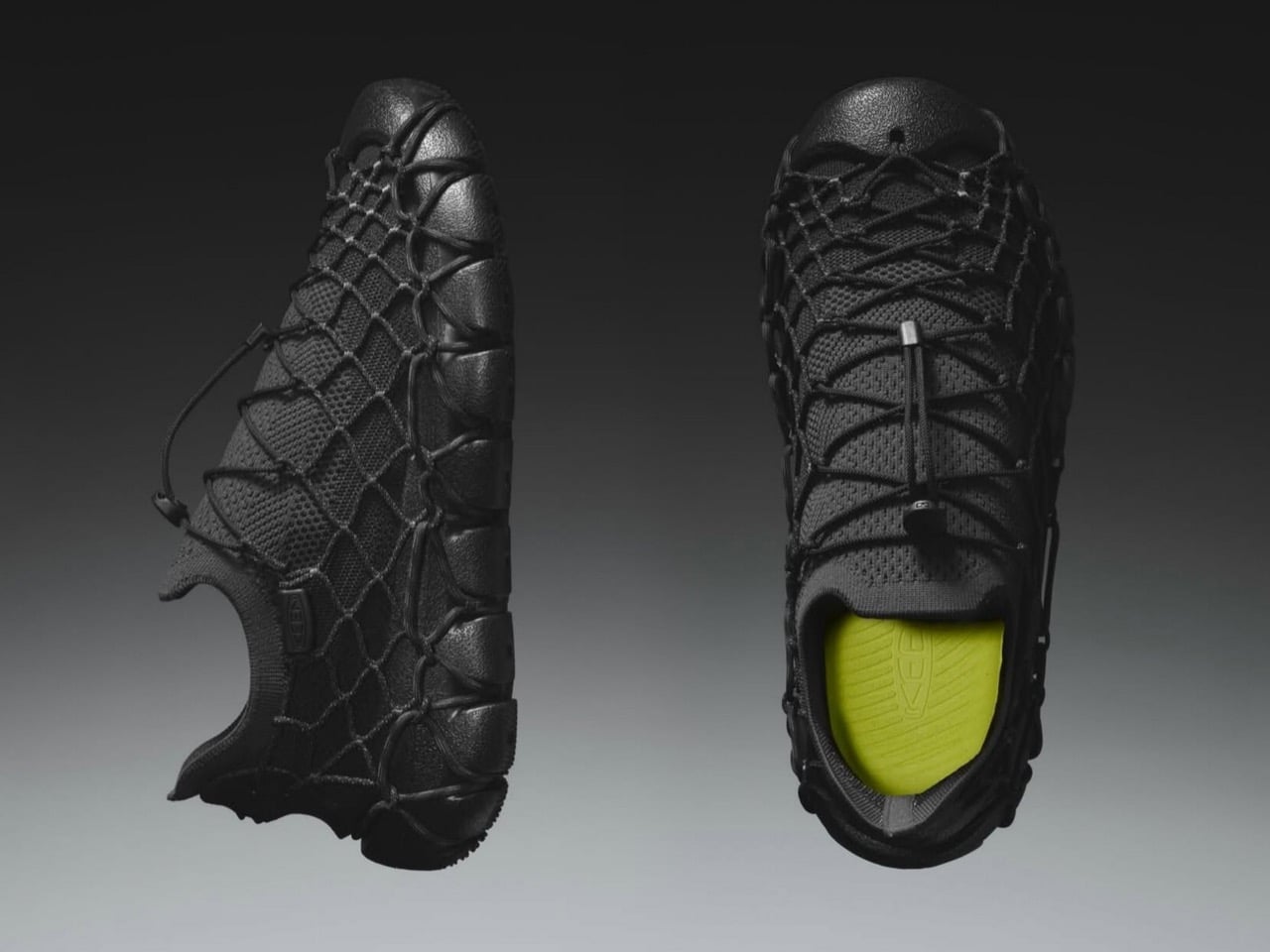
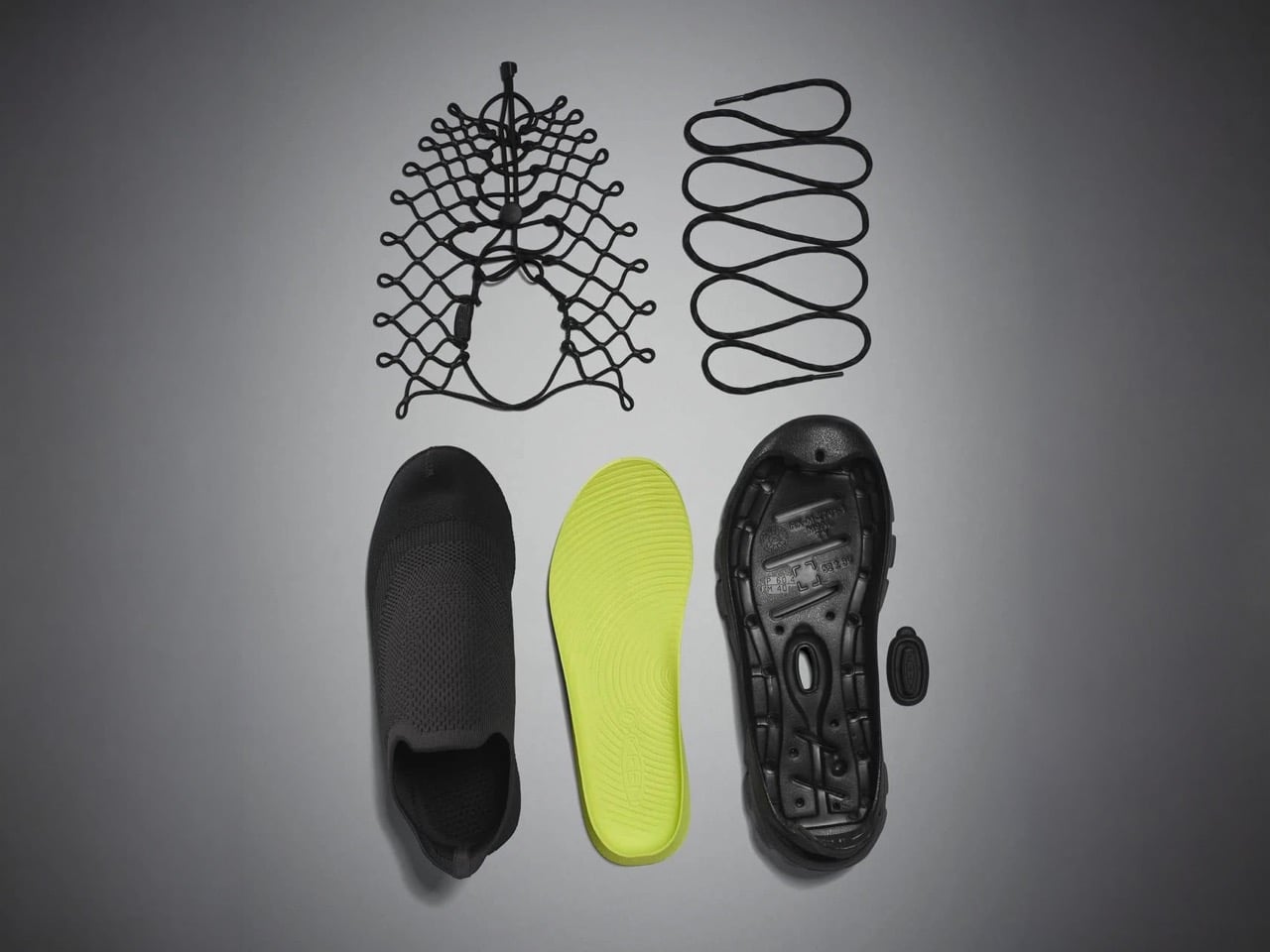
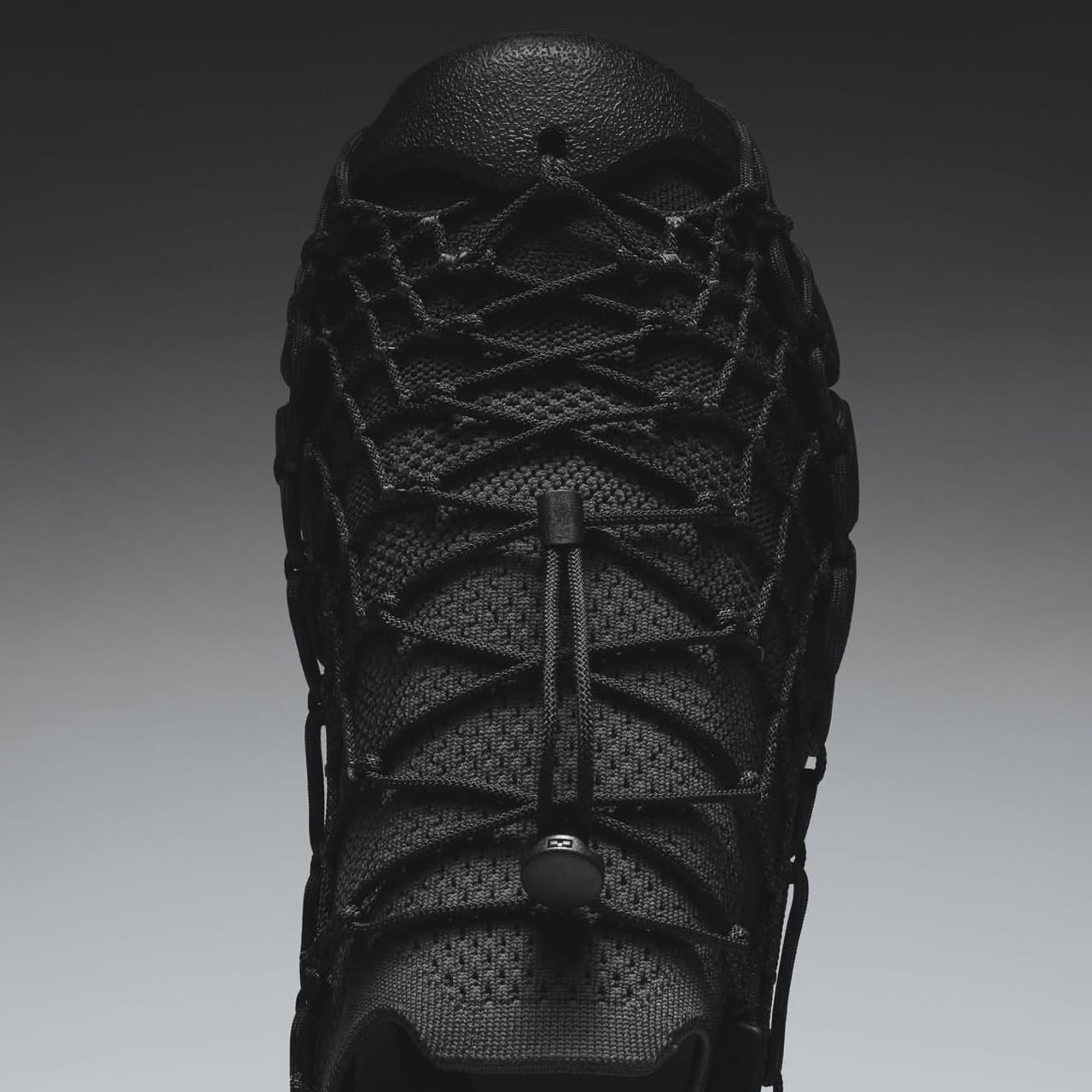
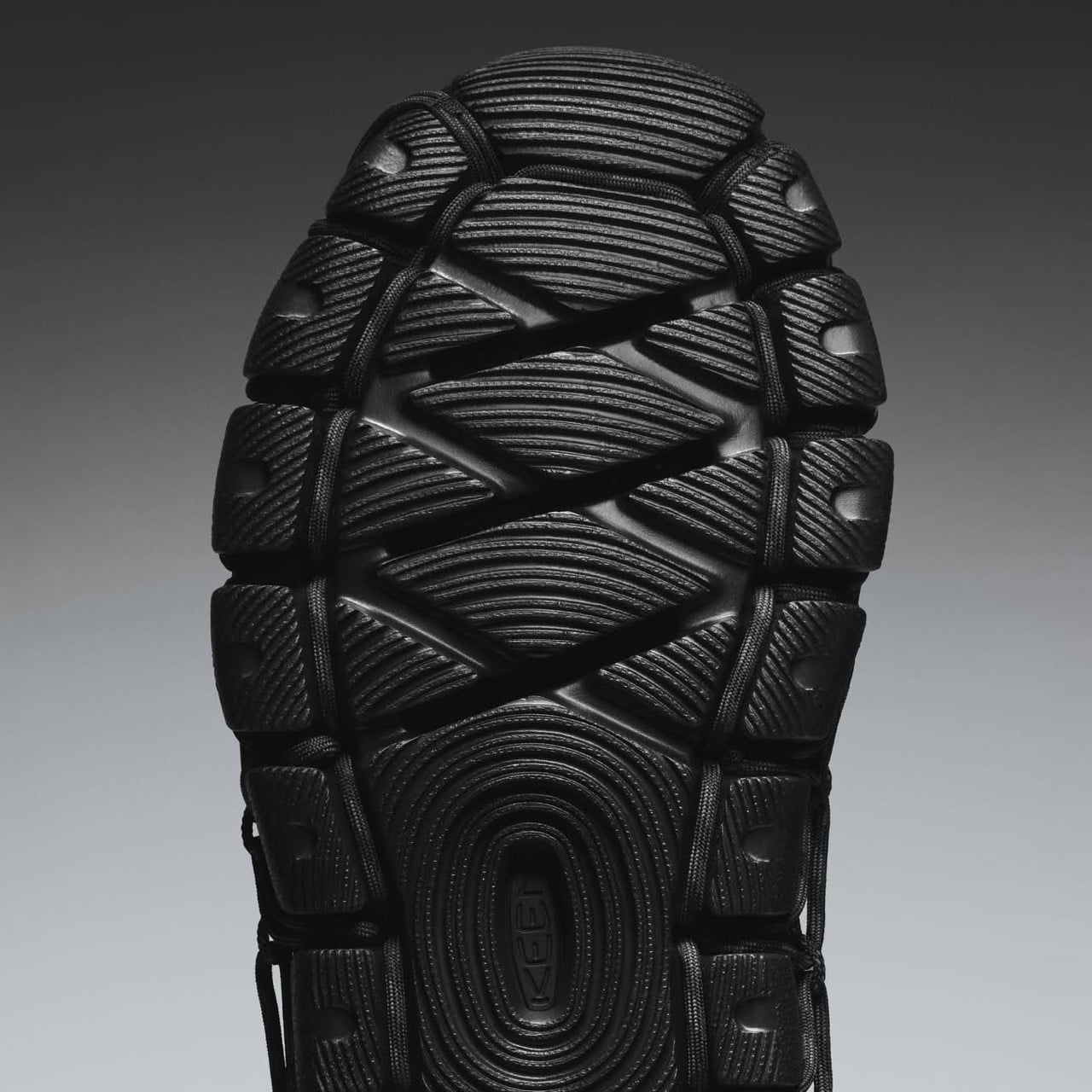
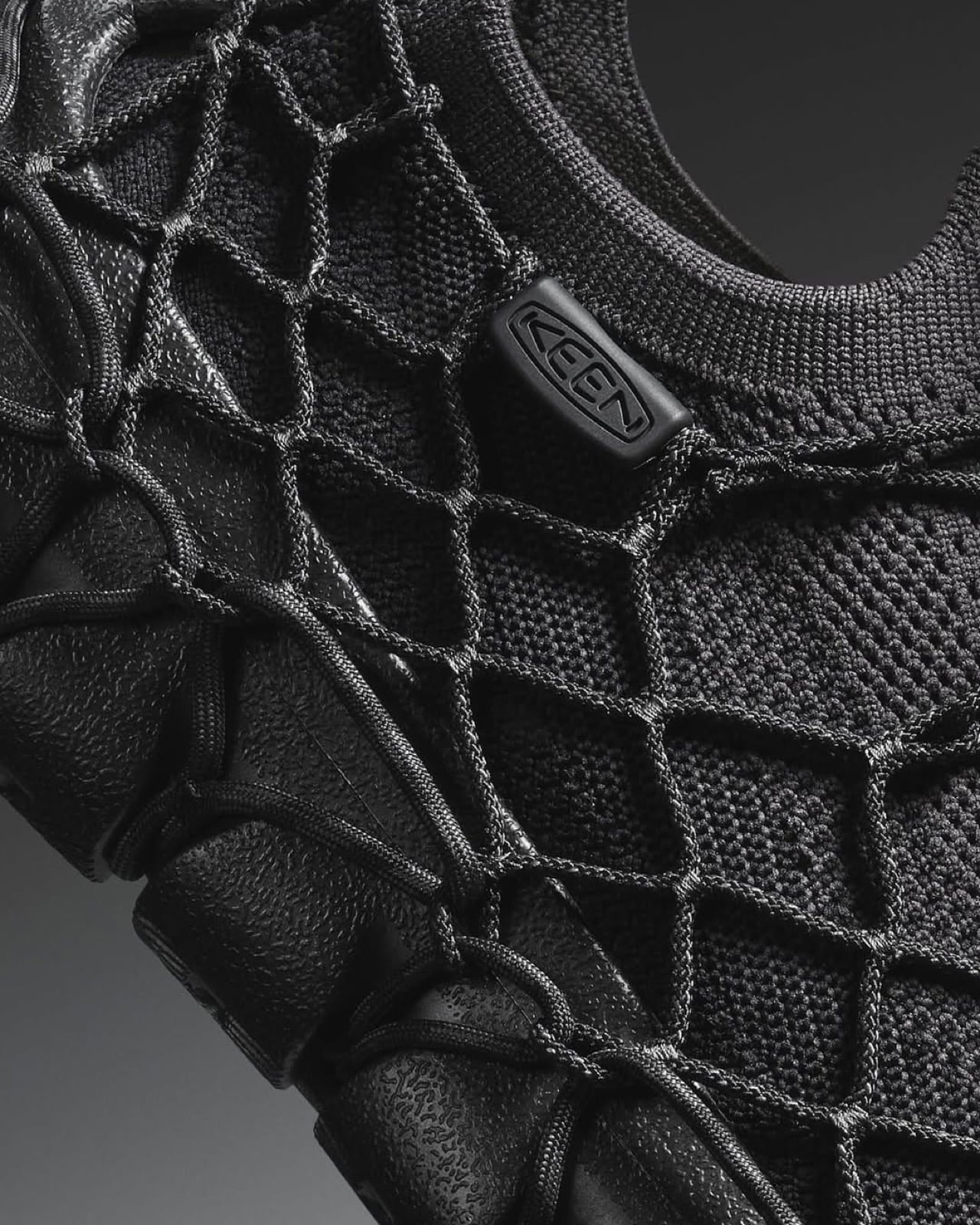
Maxwell Ashford’s RUEI-01 presents an innovative approach to shoe recycling, solving a challenging problem with precision and creativity. Unlike traditional recycling methods that struggle with mixed materials, RUEI-01 is a multi-material shoe designed for robotic disassembly. By embedding digital information directly into the shoe—including robotic g.code instructions and detailed material data—robots can separate and recycle each component accurately. This method ensures the production of high-quality recycled materials that can compete with new ones, significantly reducing waste and environmental impact from material extraction and production. Juror Sukwoo Lee praises the project’s forward-thinking solution and its practical execution, highlighting the impressive use of seam structures for robotic recycling and the robust presentation of research and prototypes. RUEI-01 exemplifies how contemporary tools and thoughtful design can revolutionize recycling practices, maintaining the durability and functionality of multi-material shoes while addressing pressing environmental concerns.

CANNE Self-directed CPR Learning Experience by Shuai Li (Student)

Shuai Li’s CANNE redefines CPR training with a self-directed, cost-effective solution tailored for developing countries. With more than 550,000 sudden cardiac deaths annually in China and a dismal less-than-1% out-of-hospital survival rate, CANNE addresses the urgent need for accessible and engaging CPR training. This innovative kit, made from corrugated cardboard, allows individuals to practice CPR independently using a smartphone app that leverages AR technology. The app offers real-time feedback through the phone’s camera and microphone, guiding users in identifying cardiac arrest, performing chest compressions, and proper ventilation. By making CPR training affordable, portable, and user-friendly, CANNE breaks down barriers related to cost, availability of qualified instructors, and motivation. Juror Li Ning Ning commends CANNE for its ingenious combination of common materials and sensor technology, highlighting its potential to boost CPR course participation and save lives. CANNE’s practical approach could significantly enhance public health by increasing out-of-hospital cardiac arrest survival rates, particularly in regions where traditional CPR training is challenging to access.

LIDfree Origami Cup by Chia Chun Chuang and Pei Chun Hsueh (Young Creatives)

LIDfree, the ingenious creation by Chia Chun Chuang and Pei Chun Hsueh, tackles the escalating plastic waste problem exacerbated by the pandemic. In a world where plastic lid usage is rampant, LIDfree offers a sustainable alternative by merging the cup and lid into one cohesive unit using the art of origami. This revolutionary design features a hexagonal folding rim that collapses inward, eliminating the need for a separate plastic lid. Users can open and close the cup quickly, prevent spills, and enjoy the convenience of an eco-friendly design that accommodates straws of any width. By maintaining the familiar feel of a typical takeaway cup, LIDfree enhances user experience while encouraging eco-friendly habits. Made from a single type of paper, it simplifies the recycling process, allowing easy separation and flattening without mess. Juror applause highlights its stackability, ease of use, and clever incorporation of functionalities—traits that embody simplicity, elegance, and practical ingenuity. LIDfree proves that sustainable design can seamlessly integrate into daily life, supporting environmental protection effortlessly even during challenging times.

MonkeyBots IoT Robots by Georg Kloeck and Mohammad Moradi

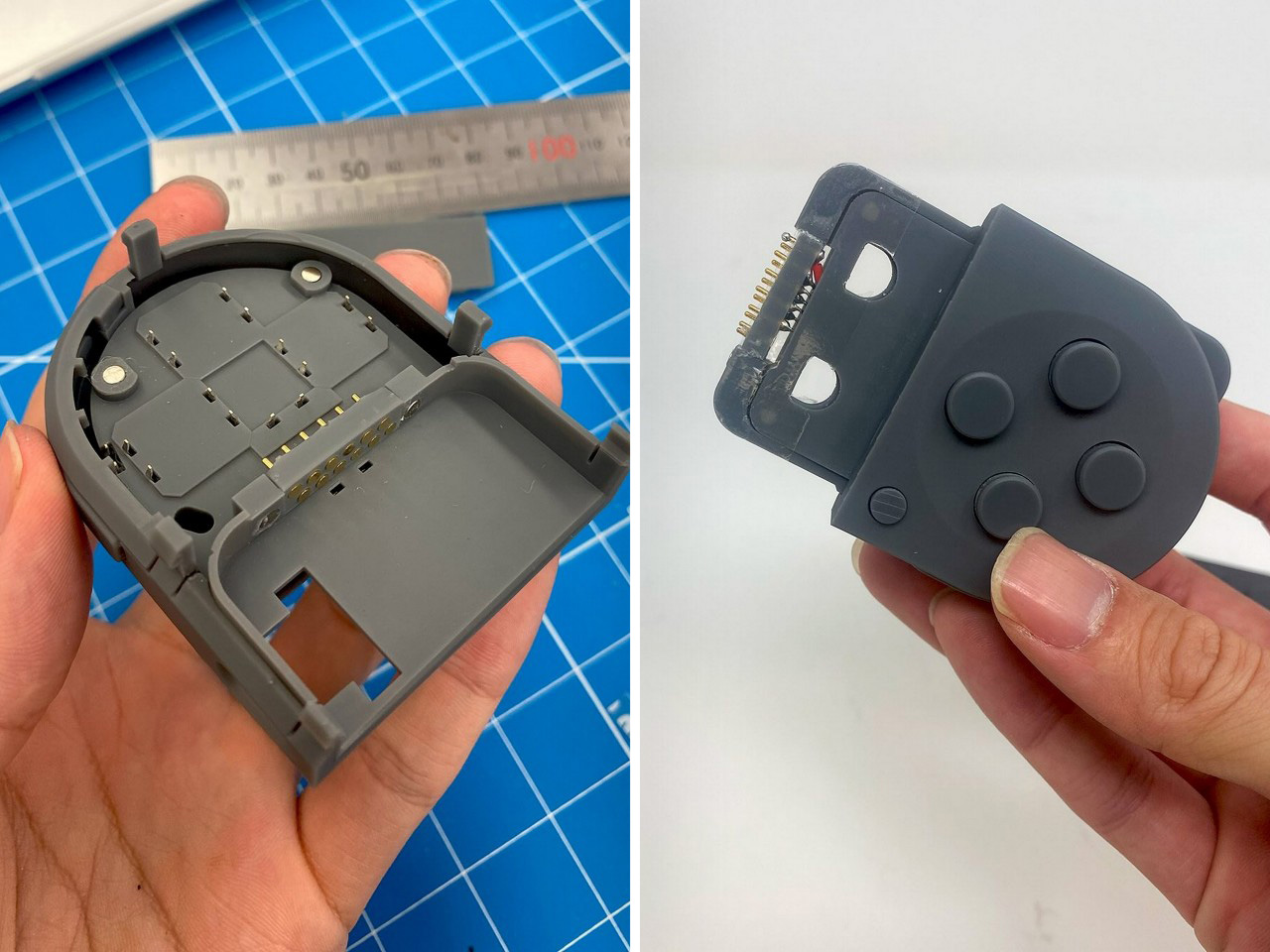
MonkeyBots, created by Georg Kloeck and Mohammad Moradi, revolutionizes the way we interact with digital notifications by transforming them into physical actions. These small IoT robots help liberate us from constant screen time by performing tangible tasks like clicking switches, rattling pill containers, or striking a gong to remind us of important activities. Designed to be secure and unobtrusive, MonkeyBots connect to your phone via Bluetooth-Low-Energy without microphones or cameras, ensuring privacy. They feature sustainably 3D printed add-ons that can grip, push, hit, or click almost anything, making them versatile tools for everyday routines. The design, compatible with LEGO and available in organic PLA or recycled PET, seamlessly blends into various environments. The jury applauded MonkeyBots for their ability to bring digital notifications into the physical world in a playful and creative way, offering endless possibilities without compromising user privacy.

Click Here to Submit Now. Deadline: 14th October 2024.

The post Braun Prize 2024: Submit Your Innovative Design for a $50,000 Reward first appeared on Yanko Design.

Important Tips For Designing Your Tiny Home Based on Climate and Environment

The appeal of tiny homes continues to rise as more people are drawn to the simplicity, affordability, and sustainability they offer. However, creating a cozy, functional, and lasting tiny home necessitates taking your local climate and environment into account. In this editorial, we’ll explore how to tailor your tiny home to thrive in various climates, offering practical design considerations for temperate, tropical, arid (desert), cold, and coastal environments. From personal anecdotes to professional insights, this article will guide you through what to prioritize to ensure your tiny home is both comfortable and efficient.

The environment where you plan to build isn’t just a backdrop; it’s a critical element that influences construction materials, design aesthetics, and long-term livability. A well-designed tiny home reflects thoughtful consideration of the climate, turning potential challenges into advantages. Whether you’re dealing with extreme temperatures, high humidity, frequent storms, or snowfall, your tiny home can be an oasis of comfort and functionality if built with the right principles in mind. Let’s dive into how to design your tiny sanctuary to harmonize with the environment you live in.

Tiny Home Tips for a Temperate (Mild) Climate

1. Effective Insulation: Keep it Cozy Year-Round

One of the best decisions you can make for a tiny home in a temperate climate is to invest in effective insulation. Think materials such as thermal insulation that can maintain comfortable indoor temperatures regardless of the season. Double-glazed windows are a game-changer. They help keep the heat out during summer and retain warmth in winter, making your tiny home’s energy consumption significantly lower.

2. Natural Light: Brighten Your Space Naturally

Maximizing natural light is another key consideration. Large windows and skylights can transform a small space into a bright, airy sanctuary. Light-colored interior finishes, such as white walls or pale wood flooring, help reflect sunlight, enhancing the overall sense of space. This is not just about aesthetics; natural light positively impacts mental health and reduces the need for artificial lighting, saving energy.

3. Seasonal Adaptability: Adjust Your Spaces with Ease

A temperate climate sees changes in temperature and humidity throughout the year. Designing flexible spaces or modular elements within your home can allow you to adjust your living conditions easily. Heating and cooling systems should be tailored for moderate variations, ensuring that your home remains comfortable through the seasons without significant energy expenditure.

4. Ventilation: Fresh Air Circulation

Proper ventilation is crucial for maintaining air quality in your tiny home. Design your windows and vents to promote cross-ventilation, ensuring fresh air circulates freely. Ceiling fans or mechanical ventilation systems can supplement natural airflow, especially on those days when opening windows isn’t an option.

5. Sustainable Materials: Eco-Friendly Living

Choosing locally sourced, sustainable building materials not only reduces your carbon footprint but also supports local businesses. Consider green roofs or walls, which can offer additional insulation and improve air quality, making your tiny home more eco-friendly and enjoyable to live in.

Tiny Home Tips for a Tropical (Humid) Climate

1. Moisture-Resistant Materials: Combat the Dampness

In tropical climates, dealing with high humidity and frequent rainfall is essential. Bamboo wood is a superb choice, as it is naturally resistant to moisture. Metals that don’t rust and mold-resistant paints and finishes will also extend the life of your home, reducing maintenance costs and efforts.

2. Ventilation: Natural Breezes to prevent that Musty Feeling

Strategic window placement and the use of louvers can help maximize airflow, keeping your home cool and dry. Elevated flooring is another effective strategy, allowing air to circulate underneath the house and preventing moisture build-up and that dank, musty feeling that you can often get from homes with the windows shut for too long.

3. Shading: Beat the Heat and Rain

To combat the relentless sun, incorporate overhangs and pergolas into your design. These elements protect against direct sunlight and rain, while light-colored and reflective roofing materials can reduce heat absorption, keeping the indoor spaces cooler.

4. Cooling Strategies: Passive Solutions to Stay Comfortable

Incorporate natural cooling techniques such as wide eaves and verandas, which shield your home from the sun while allowing breezes to flow through. Passive cooling systems, like roof ventilation or even small water features, can also play a significant role in keeping your tiny home comfortably cool.

5. Outdoor Living Spaces: Expand Your Living Area

Designing for outdoor living spaces in tropical climates not only expands your living area but also helps mitigate indoor heat. Equip these areas with weather-resistant furniture and fixtures, creating a comfortable and inviting addition to your tiny home.

Tiny Home Tips for an Arid (Desert) Climate

1. Thermal Mass: Regulate Temperature Naturally

In desert climates, the drastic temperature changes between day and night call for materials with high thermal mass, such as adobe or concrete. These materials absorb heat during the day and release it at night, helping to regulate your home’s temperature naturally.

2. Shade and Cooling: Keeping Cool in the Desert Heat

Incorporate shading devices like awnings and pergolas to reduce heat gain. Evaporative cooling systems, which use water to cool the air, can be incredibly effective in these dry climates, providing an energy-efficient means of temperature control.

3. Water Conservation: Make Every Drop Count

Water is a precious resource in arid environments. Implement rainwater harvesting systems to collect and store what little rainfall you get. Low-flow fixtures and greywater recycling systems can help minimize water use, making your home more sustainable.

4. Solar Energy: Harness the Sun’s Power

Solar panels are a must in sun-drenched regions. With strategic placement, these panels can provide a significant portion of your home’s energy needs, reducing reliance on non-renewable sources and lowering bills.

5. Landscape Design: Drought-resistant and Beautiful

Opt for xeriscaping—a landscaping method that uses drought-resistant plants. This reduces the amount of water needed for gardening while still offering aesthetic benefits. Efficient irrigation solutions can further minimize outdoor water use, aligning your tiny home with sustainable living practices.

Tiny Home Tips for a Cold (Snowfall) Climate

1. Insulation and Heating: Stay Warm All Winter Long

For areas experiencing significant snowfall, proper insulation is paramount. Materials like spray foam or rigid foam board provide excellent thermal resistance. Efficient heating systems such as radiant floor heating or wood stoves can ensure your home remains warm and cozy.

2. Snow Load Consideration: Keep Your Roof Safe

Your roof should be designed to handle heavy snow loads. This typically means a steep pitch and possibly a metal roofing material to facilitate snow shedding, preventing structural damage.

3. Energy Efficiency: Keep the Cold Out and the Warmth In

Triple-glazed windows are an excellent investment in colder climates. They provide superior insulation, keeping the heat inside and cold air out. Pair these with energy-efficient appliances and fixtures to further reduce your energy consumption.

4. Weatherproofing: Shield Against the Elements

Sealing and weatherproofing are vital to prevent drafts and heat loss. Use durable, weather-resistant exterior cladding to protect your home from the elements, ensuring longevity and reduced maintenance.

5. Access and Safety: Ease Your Winter Woes

For those snowy winters, incorporating heated walkways or driveways can prevent ice build-up, making daily access safer. Design considerations should also include adequate storage for winter gear and provisions, ensuring that your tiny home remains functional during the cold months.

Tiny Home Tips for a Coastal Climate

1. Salt-Resistant Materials: Protect Against Corrosion

Living near the sea presents unique challenges, primarily due to salt. Choose materials like composites or treated wood that can withstand salt corrosion. Non-corrosive metals, such as stainless steel or aluminum, are also excellent options for fixtures and structural elements.

2. Elevated Design: Guard Against Flooding

An elevated structure helps prevent flooding and water damage, which are common issues in coastal areas. Sturdy foundations are necessary to withstand coastal storms and wave impact, ensuring the safety and durability of your tiny home.

3. Wind Resistance: Build to Withstand Strong Winds

To combat high winds, incorporate aerodynamic designs that reduce resistance. Reinforced structural elements, such as hurricane ties or braced frames, are critical in providing additional stability and safety.

4. Humidity Control: Maintain a Healthy Environment

Dehumidifiers or humidity control systems are essential in coastal climates. Proper ventilation is key to preventing mold and mildew growth, ensuring that your living space remains healthy and comfortable.

5. Views and Natural Light: Embrace the Scenic Beauty

One of the joys of coastal living is the view. Large windows and open layouts can maximize these ocean vistas, making your tiny home a serene retreat. Outdoor living spaces that blend seamlessly with the natural environment not only enhance the aesthetic appeal but also expand your living area.


Designing a tiny home that harmonizes with its environment is an exercise in both creativity and practicality. The benefits are manifold: from increased comfort and efficiency to sustainability and aesthetic appeal. It requires a nuanced understanding of local climate challenges and opportunities. By using the right materials and design principles, you can create a tiny home that not only stands the test of time but also provides a sanctuary in harmony with nature.

Remember, your tiny home is more than just a place to live— it’s a reflection of your lifestyle and values. Whether you’re basking in the sun’s tropical warmth, savoring the tranquility of the coast, or enjoying the crisp air of a snowy landscape, your tiny home can be your personal oasis, thoughtfully designed for comfort and sustainability. So, as you embark on this journey, consider these tailored recommendations to make every square foot of your tiny home a testament to smart, climate-conscious design.

The post Important Tips For Designing Your Tiny Home Based on Climate and Environment first appeared on Yanko Design.

Enhance Your Cocktails in Seconds with Smokpub, the Ultimate Portable Fireless Electric Smoker

Have you ever sipped a cocktail or eaten a dish and just wondered what that one magical flavor was that you loved but couldn’t put your finger on? Your mind’s thinking of ingredients, but it can’t grasp exactly what made the food or the drink taste so ‘different’. Chances are, that ingredient wasn’t really a solid or liquid, it was air… smoke, specifically. So much of what we eat is an olfactory experience too – we smell the food before and as we eat it, and smoky flavor profiles play a massive role in uplifting our food experience. Think about it, ever since man invented fire, we’ve cooked food, and we’ve given food a charcoal-ish aroma and flavor too, so when you introduce a smoky aftertaste to a dish or a drink, your mind engages with it on a primal level. Smoking dishes and cocktails (or even mocktails) can add that extra oomph to make it distinctly different and better. The problem, however, is that adding a smoky dimension to food and drinks is a bit of a hassle… something this tiny puck-shaped device called the Smokpub hopes to radically change.

Designer: Smokpub

Click Here to Buy Now: $49 $82 (41% off) Hurry! Only 50 left of 2450. Raised over $347,000.

The way it’s most commonly done is by taking wood chips and using a smoke gun. The wood chips get loaded into the smoke gun, which burns them and directs the smoke down a tube. The end of the tube goes into a cloche or domed lid with the food or drink inside. It’s a finicky piece of apparatus that A. uses actual fire, B. takes fairly long, and C. isn’t for everyone. Which is why the folks at Smokpub decided it was time to update things. In comes the Smokpub device, a $49 tiny puck-shaped contraption that sits on the rim of any glass. Load wood chips in, close the Smokpub, and it a button on the top and within 2 seconds, smoke wafts right into your glass. No fire, no moving parts, and no patiently having to wait for the wood to burn. Smokpub uplifts the wood-smoking process, and makes it safe enough for anyone to use. In seconds, your drinks (and even food) get this inexplicably complex smoky aroma and flavor that you and your guests will instantly fall in love with.

Compact and portable, Smokpub is designed for both home and professional use. It’s shaped like a thick disc that rests on top of any glass or tumbler, adding smoke into it with the press of a single button. There’s literally no learning curve – all you do is open the Smokpub, load the wood chips, close it, and hit the button on the top. Its 2-second ignition system allows users to infuse smoke into their drinks quickly, making it convenient for use in various settings, including social gatherings or personal home bars. With six different wood chip flavors including oak, apple, and hickory, the device provides options for customizing the aroma and flavor of cocktails, whiskey, or other beverages.

Unlike traditional smokers which use open fires to burn the wood chips/pellets, the Smokpub relies on a controlled, closed electric-powered flame that’s much safer to use. The heat is directed at just the wood chips, causing them to ignite in seconds, and a clever air-flow system has the smoke descending downwards using a series of channels right into the glass below. The entire process is a massive upgrade from how things used to be done, both from a time and safety perspective. Moreover, the Smokpub accelerates smoke diffusion, creating more smoke than other smoking devices (this is caused by heating the wood chips at exactly the right temperature to generate smoke, not a raging fire). More smoke with less burning means a single scoop of wood chips lasts longer and can be used to smoke multiple drinks/dishes.

One of Smokpub’s core strengths lies in its ease of use. Users simply need to add wood chips, place the smoker over a glass, and press a button to activate the smoke infusion process. You can either infuse smoke into your drinks, or add smoke into the glass before pouring your drink in for more flair. The technique works flawlessly with whiskies and rums (anything that’s aged in wood barrels), but can be used with more complex cocktails, spritzes, or hey, even your cup of coffee (if you haven’t tried smoky coffee, you absolutely need to!) The smoker’s 0.001 m³/s smoke output ensures quick and even distribution of smoke, enriching any drink with a distinct flavor in just a few seconds. Its size and design allow it to fit various glass shapes… and hey, if you want to go beyond drinks, add some food into the glass to give it a smoky taste… a prawn cocktail comes first to mind, but smoked meats, nuts, or potatoes are a great pick too.

Use the Smokpub with food to give it a distinct smoky flavor profile

The puck-shaped device comes with a simple two-part design that snaps together when in use, and pulls apart very easily when you need to load wood chips in. The lower tray comes with a metal cup that holds the chips, while the upper half of the Smokpub has the electronics and heating element. The Smokpub is constructed from flame-retardant materials like ABS+V0 polymer and SUS304 stainless steel, known for their heat resistance and durability. The smoker only works when both halves are joined together. Pull the Smokpub apart and it instantly switches off, preventing you from ever getting burnt. The device can be pulled apart for cleaning – to clean your Smokpub, simply rinse the lower half under tap water and you’re good to go. A USB-C port in the upper half lets you charge your Smokpub, which then smokes over 130 drinks on a full charge thanks to the built-in 850mAh battery that runs the low-power electric flamer.

The Smokpub comes packaged in a well-designed gift box and is guaranteed to ship before Christmas, making it perfect for holiday gifting to a father, brother, partner, colleague, or anyone in your family or friends circle who’s a mixology or culinary enthusiast. The $49 box set includes the Smokpub itself, along with a charging cable, 2 boxes of wood chips (cherry wood and oakwood), a metal spoon for scooping the chips, and a pretty remarkable 2-year warranty on the Smokpub device with free global shipping. An extra $15 gets you the 6-box set of assorted wood chips.

Click Here to Buy Now: $49 $82 (41% off) Hurry! Only 50 left of 2450. Raised over $347,000.

The post Enhance Your Cocktails in Seconds with Smokpub, the Ultimate Portable Fireless Electric Smoker first appeared on Yanko Design.

Internet Sensation Moo Deng the Baby Pygmy Hippo gets her own LEGO Build

Brat Summer has inevitably led to Moo Deng Autumn.

Unless you’ve been living in a remote corner of the internet, you’ve heard of Moo Deng, the 3-month Pygmy Hippo at the Khao Kheow Zoo in Thailand that’s taken the internet by storm for being a symbol of cuteness and chaos. Moo Deng, despite her small size, has a big attitude. She adorably chomps on people’s legs, runs away when zookeepers try to make her bathe, and is just an overall mood with her perplexed expression and rosy cheeks. Given how divided the world is right now, Moo Deng seems to be one positive corner of the internet where everyone units to protect her and give her all the love and support she rightfully deserves… and now after getting her own merch line at Khao Kheow Zoo and a special blush line at Sephora, Moo Deng’s also got her very own fan-made LEGO build courtesy Cornbuilder, a Nebraska-based LEGO enthusiast.

Designer: Cornbuilder

This simple LEGO build from Cornbuilder captures the essence of Moo Deng the pygmy hippo perfectly. It’s adorably round, has all the right proportions, and comes with the signature light-tinted cheeks that Moo Deng is known and loved for (although a slightly pinker hue would have been perfect). The LEGO brick’s naturally glossy plastic appearance also lends itself perfectly to the build, given that Moo Deng herself has a radiant gloss on her slippery, well-hydrated skin.

The Moo Deng LEGO build comes with repositionable legs, a movable head, and even an adjustable jaw. You can position her in whatever pose you want, although she’s best remembered for being an absolute blur while she runs and scampers around or flounders as zookeepers try to handle her. The movable mouth is also perfect given that so many pictures have her with her jaw wide open as she she reigns absolute lovable chaos on everyone around her with her unprompted leg chomps or silent screams that have us all saying “Moo Deng is our spirit animal”!

Although Cornbuilder hasn’t released a detailed set of instructions on this build, it seems fairly easy to reverse-engineer, given how simple it looks. For more information, you can follow Cornbuilder on Instagram to keep yourself updated.

The post Internet Sensation Moo Deng the Baby Pygmy Hippo gets her own LEGO Build first appeared on Yanko Design.

Fluffier Pets, No Wet Mess: PetSnowy SMILE’s All-In-One Dryer Box

For any pet parent, bath time is often the beginning of chaos. Unless you have a pet who obediently sits through their bath, the real challenge kicks in when your dripping wet cat or small dog dashes through the house, leaving a trail of wet paw prints and soaked furniture in their wake. You might have a towel ready, but drying hyperactive pets can feel like a battle beyond the bathing activity. Now sure, you could bust out a hairdryer and groom your little furry one (unless the sound of the hairdryer terrifies them), but the folks at PetSnowy may have designed a better alternative – the SMILE Dryer Box. Instead of struggling to keep your home dry and your pet calm, this unique dryer box offers a solution that promises to make bath time smoother for everyone involved. Imagine your pet comfortably seated in a cozy, transparent box, drying off without the high heat or noise of a traditional blow dryer. No more chasing them around the house. Just a calm, controlled drying experience that leaves your pet fluffier than ever, and your living room, blissfully dry.

Designer: Edison Deng

Click Here to Buy Now: $489 $789 (38% off) Hurry! Only limited units left!

The PetSnowy SMILE is essentially a small, enclosed drying box designed specifically for pets. Created to be highly efficient, safe, and comfortable, the PetSnowy SMILE uses a sophisticated drying system along with outlets to dry your pet while keeping the entire box ventilated throughout the process. Once your pet is placed inside, the Dual Brushless Crossflow Drying System circulates air from the bottom, creating a steady, gentle airflow that dries their fur without the need for harsh, high heat. Unlike traditional drying methods that can stress pets out, the SMILE dryer uses controlled airflow to keep your pet comfortable, reducing drying time while also preventing tangles and discomfort. A transparent glass casing allows your pet to stay aware of their surroundings, reducing anxiety, and the entire process is closely monitored by built-in LCD screens that display drying progress, temperature, and wind speed. With its compact size and thoughtful design, it’s like having a personal drying station that’s safer and more efficient than conventional alternatives. The entire system is designed to be shock-proof, and without the upper hood, the PetSnowy SMILE’s base transforms into a cat’s nest, allowing them to get acclimatized to it and feel relaxed while sitting in it.

Visually, the PetSnowy SMILE dryer looks almost like a pet kennel, albeit with a transparent exterior. This might seem like a small detail, but if you’ve ever tried to put a cat in an enclosed space, you’ll know how much they hate not being able to see what’s happening around them. With the clear tempered glass design, your pet can see their surroundings, allowing them to feel more at ease. The choice of material here is also incredibly practical. The glass is durable and scratch-resistant, so even the feistiest pets won’t cause damage. On top of that, the outer housing is designed with ample airflow to ensure your pet stays safe and comfortable while they dry, with no suffocating, stuffy enclosure to worry about.

The device comes built with a robust design that’s practically pet-proof. The high-quality tempered glass is scratch-resistant and made to last, while being unbreakable and generally safe for pets and you. The design also emphasizes safety, with a non-electrified upper housing that removes the risk of electric shock, so your pet stays safe no matter what… And if you’re the kind of person who values easy maintenance, you’ll appreciate the modular design that makes cleaning and upkeep a breeze. It’s easy to disassemble and clean, ensuring a hygienic environment for your pet every time they step in for a dry-off.

Powering the dryer is the Dual Brushless Crossflow Drying System (located at the bottom of the dryer), ensuring your pet dries quickly without the need for high heat, which can be uncomfortable or even harmful. High-velocity airflow circulates around your pet, cutting down drying time dramatically, making it particularly helpful for long-haired breeds that take forever to dry. And because this system doesn’t rely on extreme heat, it’s gentle enough for all coat types, keeping your pet cozy rather than stressed. Plus, no more soggy towels piling up or fur-filled blow dryers overheating—this setup gets the job done without the usual hassle.

More than simply drying, the SMILE box dryer creates a spa-like experience for your pet. Advanced Negative Ion Technology fluffs their fur up while reducing shedding. If your pet sheds like crazy (and most do), the negative ions help to separate and smooth each strand of fur, making it softer, fluffier, and much less likely to end up all over your floors and furniture. So, not only will your pet look and feel their best, but you’ll also find yourself doing less vacuuming and lint-brushing. In a way, it’s almost like sending your pet to a groomer, but in the comfort of your own home, and without the hefty price tag.

The PetSnowy SMILE box dryer is packed with features designed to make life easier for you, the pet parent. The dual LCD screens give you real-time updates on temperature, wind speed, and the drying stage, so you’re never in the dark about how things are going. If that wasn’t enough, the dryer even offers app support, allowing you to control settings remotely from your smartphone. You could step away to attend a meeting or quickly grab a snack while keeping an eye on your pet’s drying progress from another room (while also avoiding your pet trying to steal your snack!) When the cycle is done, you’ll get a notification on your phone.

Your pet may seem reticent at first, but with enough use, they’ll come to love the pampering experience… while also letting go of their post-bath stress, so to speak! Your pet gets a first-class grooming session, while you on the other hand, don’t have to deal with dripping pets tearing through your living room, or even endless fur-shedding. It’s a win-win if you ask me!

Click Here to Buy Now: $489 $789 (38% off) Hurry! Only limited units left!

The post Fluffier Pets, No Wet Mess: PetSnowy SMILE’s All-In-One Dryer Box first appeared on Yanko Design.

Memobottle Launches Stunning EDC-worthy Titanium, Copper, and Satin Steel Bottles for its 10th Anniversary

The pioneer of the ‘flat-pack’ bottle designed to be carried in laptop bags, handbags, and pockets is celebrating a decade of its iconic presence with new limited-edition metallic memobottles, in addition to their Original Tritan plastic and stainless steel ranges. The 10th-anniversary collection features the iconic memobottles made from titanium, copper, and satin steel. As always, the space-saving bottles are sized keeping international paper sizes and notebook proportions in mind, across A5, A6, A7, and Slim form factors.

Designers: Jesse Leeworthy and James Butler

Click Here to Buy Now: $47 $55 ($8 off, delivered before Christmas 2024). Hurry, only few left! Raised over $91,000.

Dubbed the Elements collection, this edition turns bottles rightfully into EDC. Staying hydrated is usually a chore, but these memobottles make being hydrated feel exceptionally cool. The Titanium Ultralight, Copper PVD, and Satin Steel memobottles have a gorgeous microtextured finish reminiscent of high-end tech gear. Leading the collection is the Titanium Ultralight Memobottle, a standout thanks to its use of aerospace and medical-grade TA1 titanium. Known for its exceptional strength and lightweight properties, titanium makes this 600ml Slim bottle both durable and highly portable. The ultralight design allows for easy carrying without adding unnecessary bulk, ideal for those who are constantly on the move. Its slender, flat profile ensures it can slip into bags without taking up much space, making it the perfect choice for minimalists and travelers alike.

Crafted from 304 stainless steel and sand-blasted down to a smooth satin finish.

With a striking warm-toned rosy glow from its PVD Copper exterior, this bottle is bound to make a statement everywhere you go.

Crafted from TA1 – aerospace and medical grade – pure Titanium. At only 0.42 lb, 189g, it’s 48% lighter than its stainless steel counterpart, without compromising on durability.

The Copper PVD memobottle offers a warmer, more luxurious take on everyday hydration. Made from stainless steel with a Copper PVD coating, this A6 model holds 500ml and stands out with its rich, metallic finish. Copper has a natural antibacterial quality, adding a functional edge to the bottle’s already impressive aesthetic. It’s a great option for those who appreciate both style and utility in their daily accessories. The flat design, characteristic of all Memobottles, ensures this one fits neatly into slim bags or alongside laptops, making it a practical yet eye-catching companion for work, commuting, or leisure.

If you want to explore memobottle’s various sizes, the Satin Steel version comes in all four sizes (unlike the Titanium and Copper models that are limited to just a single size). From the compact A7 (250ml) to the larger A5 (1050ml), these bottles are made from 304-grade stainless steel, ensuring they’re as durable as they are stylish. The metallic finish gives them a modern minimalist edge, putting them miles ahead of plastic bottles but also outshining most boring cylindrical thermos designs. Whether you’re carrying the ultra-compact A7 for quick hydration or the larger A5 for all-day use, the Satin Steel bottles and their iconic flat profiles are designed to optimize space in bags while maintaining a strong visual appeal.

Beyond aesthetics, Memobottle even hopes to share a message of sustainability with its broader audience. Aside from just being the most gorgeous set of multi-use bottles that allow you to ditch dependence on use-and-throw bottles of mineral water, the company has also donated over 34 million days of safe water access to communities in need through their partnership with Water.org. As far as the Elements series goes, the use of recyclable materials like stainless steel and titanium reflects the company’s commitment to offering long-lasting alternatives to single-use plastic bottles that can last for years with maintenance. Each bottle is built to endure heavy use over the years, and you can even grab cleaning tablets with your memobottle that you can pop into the bottle when you want an extra deep clean. When the bottles do reach the end of their lifespan, they are fully recyclable too. You can grab your own memobottle Elements-edition, with the Satin Steel and Copper PVD variants shipping before Christmas, and the Titanium Ultralight shipping next year. To make sure your bottles reach you with a minimal carbon footprint, Memobottle has even optimized its shipping routes, using sea freight wherever possible.

Click Here to Buy Now: $47 $55 ($8 off, delivered before Christmas 2024). Hurry, only few left! Raised over $91,000.

The post Memobottle Launches Stunning EDC-worthy Titanium, Copper, and Satin Steel Bottles for its 10th Anniversary first appeared on Yanko Design.

Meta’s futuristic Orion AR Glasses have Holographic Displays and Neural Control. Apple should take notes

At the Meta Connect 2024 keynote, not only did Mark Zuckerberg debut actual Augmented Reality with holographic displays and neural control, it did so in a device that’s smaller, lighter, and one could argue, more socially acceptable (aka stylish) than Apple’s Vision Pro. Dubbed the Orion, it’s simply a developer prototype for now, but Meta hopes to refine the design, improve the displays, and actually sell it at an affordable price to consumers.

Designer: Meta

Orion is not a bulky headset—it’s a sleek, spectacle-like device that weighs under 100 grams, making it comfortable for extended use. This is an impressive feat considering the amount of technology packed into such a small form factor. While Meta Quest Pro and Apple’s Vision Pro are capable of mixed reality, Orion’s fully transparent, holographic display takes things to a different level. Instead of the passthrough experiences that blend digital elements on top of a live camera feed, Orion projects 3D objects directly into the real world using innovative waveguide technology. The frames are made from magnesium, a super-light metal known for its strength and ability to dissipate heat (something even NASA’s relied on for its space hardware).

The core of this magic is a set of tiny projectors embedded within the arms of the glasses. These projectors beam light into lenses that have nanoscale 3D structures, creating stunningly sharp holographic displays. Zuckerberg emphasized that you could go about your day—whether you’re working in a coffee shop or flying on a plane—while interacting with immersive AR elements like a cinema-sized virtual screen or multiple work monitors.

But it’s not just about visuals. The glasses also facilitate natural social interaction: you can maintain eye contact with others through the transparent lenses, and digital elements seamlessly overlay onto the real world. Need to send a message? Instead of fumbling for your phone, a hologram will appear before your eyes, letting you reply with a quick, subtle gesture. This fluid integration of the digital and physical worlds could set Orion apart from its competitors.

When it comes to control, the Orion glasses offer several interaction modes—voice, hand, and eye tracking—but the star of the show is the neural wristband. In contrast to the Vision Pro, which relies on hand gestures, eye-tracking, and voice commands, Orion takes the next step by reading neural signals from your wrist to control the device. This neural interface allows for discreet control. Imagine being in a meeting or walking down the street—gesturing in mid-air or speaking aloud commands isn’t always convenient. The wristband can pick up subtle electrical signals from your brain and translate them into actions, like tapping your fingers to summon a holographic card game or message a friend. This introduces a new level of human-computer interaction, far more intimate and nuanced than what’s currently available on the market.

While Apple’s Vision Pro and Meta’s previous Quest Pro have been praised for their intuitive interaction systems, Orion’s neural control represents a massive leap forward. It reduces the friction of interacting with digital elements by cutting down on the physical and vocal gestures required, creating a more seamless experience.

One of the key differentiators for Orion is its display technology. Unlike the Vision Pro or Meta Quest Pro, which rely on cameras to pass a live feed of the outside world onto a screen, Orion offers true augmented reality. The glasses project digital holograms directly into your field of view, blending with your surroundings. This isn’t just a camera feed of your environment with digital elements superimposed—it’s real-world AR with transparent lenses that you can see through as you would normal glasses. The holograms are bright enough to stand out even in varied lighting conditions and sharp enough to allow users to perceive fine details in their digital overlays.

Zuckerberg illustrated this with examples: receiving a message as a floating hologram or “teleporting” a distant friend’s avatar into your living room. The display architecture is entirely new, made possible by custom silicon chips and sensors integrated into the glasses, offering a level of immersion that’s more subtle yet more profound than the pass-through systems we’ve seen so far. In a private demo, he even played a metaverse version of Pong with key industry experts like Nvidia CEO Jensen Huang, and investors like Gary Vaynerchuck and Daymond John of Shark Tank.

For all its innovation, Orion is still in the development phase. Zuckerberg was candid that Orion is not yet ready for consumers. Instead, it will serve as a development kit for Meta’s internal teams and a select group of external partners. This will help refine both the hardware and software, as well as grow the ecosystem of apps and experiences that will make Orion valuable when it eventually hits the consumer market. There’s also the matter of affordability—Zuckerberg mentioned the team is working to improve manufacturing processes to bring the cost down. As it stands, this isn’t a device you’ll see in stores next week, but it’s a crucial step in realizing Meta’s vision for the future of AR.

The potential for Orion is vast. Zuckerberg envisions it as the next major computing platform, capable of reshaping how we work, play, and interact with others. By leveraging the power of true augmented reality with a groundbreaking neural interface, Orion positions itself as more than just a wearable gadget—it’s an entirely new way of interfacing with the digital and physical worlds. For now, it’s an exciting glimpse into what the future might hold. The Orion glasses may not be in your hands today, but their arrival could redefine the entire AR landscape in the years to come.

The post Meta’s futuristic Orion AR Glasses have Holographic Displays and Neural Control. Apple should take notes first appeared on Yanko Design.
7-in-1 Titanium EDC Multitool combines both Tactical Gear and a Toolshed into the Ultimate Portable Form

Imagine a toolbox that fits in your palm. Not a metaphor, but an actual toolbox of sorts. The Titanium Multifunctional Magnetic Screwdriver or the TI-MMS for short, is a marvel of compact multitool design that packs a surprising punch. Small enough to disappear in your pocket but packed with enough features to handle a range of everyday situations, it’s like a Swiss Army knife that’s been reimagined for the modern tinkerer. Crafted from Grade 5 titanium, this EDC is light, corrosion-proof, and tough enough to survive whatever you can throw at it—whether that’s a quick fix at home, an emergency situation, or a tactical escape.

Designer: Comandi

Click Here to Buy Now: $69 $99 (30% off). Hurry, only 174/200 left!

About the size of a car keyfob, the TI-MMS packs as many as 7 different tools within its palm-sized design, starting with a multi-bit screwdriver. Inside its compact frame, you’ll find a set of 4 hex bits neatly stored with magnets. No more digging through a drawer or toolbox for the right bit—when you need a driver, the TI-MMS lets you mount those bits on top for a standard screwdriver experience. However, if you want to upgrade your drive, mount the bits on the side, within the TI-MMS’ ratchet mechanism that lets you apply some serious torque without feeling like you’re wrestling a stubborn screw. This side-mount option offers a more comfortable grip, especially for those longer jobs where your wrist usually starts protesting.

Beyond its screwdriver duties, the TI-MMS also handles everyday tasks like a breeze. Tucked into its sleek body is a multi-functional pry bar, perfect for prying open stuck lids or pulling out nails. Cutouts in the multitool’s side serve as a hex wrench, with slots that fit 4mm and 6mm nuts, making it handy for tightening bolts when a full toolbox isn’t an option. And for those moments when you need to slice through something—be it tape, a package, or whatever else life throws at you—there’s a foldable scalpel blade that takes replaceable 11# surgical blades. The best part? It’s TSA-compliant. Just pop the blade out before flying, and the tool remains travel-friendly.

While the scalpel blade is designed to also serve as a self-defense tool, the TI-MMS’ integrated window-breaker is perfect for tactical and emergency exits – a feature you hope you never need but are glad to have just in case. A ceramic bead is perched at the top of the tool, ready to smash through glass in an emergency. You never know when you might need to make a quick escape, and this little feature makes sure you’re covered, whether you’re dealing with an actual emergency or just one of those days when you accidentally lock yourself in (or even outside) the car.

In true multifunctional spirit, the TI-MMS also throws in a blunt saw edge (conveniently placed on the pry bar) for more stubborn cutting like thick branches. And for the night owls or outdoor adventurers, there’s an option to install tritium vials in six pre-cut slots, giving the tool a glow-in-the-dark effect that makes it easy to find in your bag or tent, even when the lights are long gone.

Grade-5 titanium was an inspired choice for this tool. Known for its durability and resistance to corrosion, the TI-MMS is built to last while staying remarkably light. At just 80 grams, it’s easy to carry around in your pocket or attached to a keychain, without feeling like it’s weighing you down. Details like brass gaskets and a well-designed integrated lock for your blades just add a chef’s kiss to the overall build. Although the folks at Comandi don’t explicitly say so, the multitool should last you decades without showing any signs of giving up. That’s where the replaceable scalpel blade comes in handy too, allowing you to switch old blades out for new ones so you spend less time sharpening your multitool’s blade and more time actually using it.

And while the TI-MMS covers almost everything you could need in a tool, there is one thing I personally miss: a bottle opener! After a long day of fixing, prying, and cutting, wouldn’t it be nice to crack open a cold one? The TI-MMS ships globally, starting at a discounted price of $69. This includes the compact 7-in-1 multitool itself, along with a detachable scalpel blade, and free worldwide shipping.

Click Here to Buy Now: $69 $99 (30% off). Hurry, only 174/200 left!

The post 7-in-1 Titanium EDC Multitool combines both Tactical Gear and a Toolshed into the Ultimate Portable Form first appeared on Yanko Design.
DAB Motors unveils Transparent E-bike inspired by Retro Gaming Consoles like the Nintendo 64

Back in the ’90s, transparency became a cool trend in tech, particularly with gaming consoles. Anyone remember the clear plastic of the Nintendo 64 controllers or the transparent Game Boy Color and Advance? Those see-through designs let you peek into the gadget’s inner workings, blending functionality with a futuristic aesthetic, and paving the way for Apple’s gorgeous iMacs and MacBooks, followed by Nothing’s transparent tech that has revisited the retro trend in its own unique way. Fast forward to today, and the French electric motorcycle maker DAB Motors (a Peugeot sub-brand) has captured that retro spirit in its stunning DAB 1α Transparent Edition. This motorcycle, though a far cry from gaming consoles, channels that same nostalgic vibe with modern elegance. It feels like it could have come straight out of an arcade racing game—if those games had ever been this sleek.

Designer: DAB Motors

DAB Motors’ 1α Transparent Edition is all about turning heads, and its translucent bodywork is the ultimate conversation starter. The bike’s frame and design are partially see-through, offering a glimpse at its high-tech components—reminiscent of those old gaming consoles where you could see the wires, circuits, and chips. This visual transparency gives the bike a light, almost futuristic vibe that pairs beautifully with the carbon fiber parts made from repurposed Airbus materials. Yes, you read that right—Airbus.

Beyond the cool see-through aspects, the 1α stays grounded with modern touches, like an Alcantara saddle for comfort and a sharp monobloc LED tail light that’s both translucent and futuristic. The front-end design isn’t shy either, featuring a 2.8-inch integrated LCD dashboard and a lenticular headlight that’ll look right at home whether you’re cruising through city streets or zooming down a highway.

Under the clear, see-through hood, a 25.5 kW brushless DC motor powers this electric motorcycle, allowing it to reach a top speed of 130 km/h (81 mph). With a torque output of 395 Nm at the wheel, this machine has more pull than many electric cars. The 150 km range is powered by a 72V Li-Ion battery that’s designed to be both repairable and recyclable.

DAB didn’t skimp on convenience either. The bike comes with an onboard charger that works with both home sockets and Type 2 charging stations, offering a full charge in just 3 hours. That’s right—no lengthy overnight charging sessions here. In terms of customization, the DAB 1α offers four ride modes: Eco, Standard, Sport, and a fun Nitrous Boost mode for when you really want to feel the power surge. It even has a reverse mode to help with tight parking situations, which can come in handy, especially for urban riders.

The steel double cradle frame ensures that the bike remains both sturdy and lightweight, tipping the scales at just 125 kg. For suspension, DAB teamed up with Paioli to equip the bike with a 46mm adjustable USD fork at the front and a spring preload adjustable rear—both offering a smooth, responsive ride. And let’s not forget those Brembo radial brakes with dual ABS for stopping power that inspires confidence whether you’re riding in the rain or dry conditions. The wheels on this transparent beauty are custom-made by DAB x FABA, paired with Pirelli Diablo Rosso 4 tires that are designed for performance and grip. Whether you’re navigating tight city streets or open highways, the wheels (17-inch front and rear) ensure excellent control and stability.

For all this innovation and style, the DAB 1α Transparent Edition starts at €14,900 ($16,651 USD) – and only 400 units will be made. If you’re already daydreaming about pulling up to your local café on this retro-inspired machine, you might want to act fast. Financing options are available, but once these limited editions are gone, they’re gone. And with worldwide delivery, it doesn’t matter where you are—you can still channel your inner gamer while cruising through the streets on this eye-catching piece of machinery.

The post DAB Motors unveils Transparent E-bike inspired by Retro Gaming Consoles like the Nintendo 64 first appeared on Yanko Design.
Nothing launches sports-friendly Ear (open) earphones with built-in ChatGPT for just $149

No, it isn’t Phone (3), but to be honest, haven’t we had enough phone launches already?!

Say hello to the Nothing Ear (open), the latest ‘hearable’ from London-based tech-brand Nothing. Designed in vein with their existing Nothing Ear series, the Ear (open), as its name suggests, is an open-ear wearable and the first of its kind from the company. The newly launched device introduces a distinctive open-ear design that prioritizes comfort, situational awareness, and superior sound quality. This marks the company’s fourth mainline set of earbuds, not counting special editions (like the Nothing Ear (stick)) and their CMF budget line. Known for pushing the boundaries of audio tech with a bold design, Nothing seems intent on revolutionizing the way we experience audio on the move.

Designer: Nothing

One glance at the Nothing Ear (open), and you immediately notice the company’s signature minimalist aesthetic. Transparency is the name of the game here. Rather than having earpieces with silicone tips that create an airtight seal to lock in sound and minimize audio leakage, these open-ear wearables rest against your ear canal, firing audio directly in without compromising your ability to hear the world around you. Sort of like how holding your phone up to your ear lets you hear calls but also lets environmental sounds to make it to your ear so you’re aware of your surroundings. “A lot of people were skeptical internally, but I was really bullish on this form factor because you see people wearing regular earbuds these days, and sometimes they only wear earbuds with one bud in the ear and the other one out… because they want to what’s, you know, happening all around them”, says Nothing founder Carl Pei. “But this form factor opens up, so that you can hear all your surroundings without having to do that.”

Staying true to their design philosophy, the Ear (open) showcases a slim, see-through form factor that emphasizes the craftsmanship behind its sleek exterior. Weighing just 8.1 grams per earbud, these are designed to be lightweight and portable, and with the case measuring a mere 19 mm in thickness, you can easily slip them into your pocket. The buds also come equipped with a smart case that mirrors the same transparency-focused design the company has come to be known for, along with a dimple in the center of the lid for fidgeting purposes. Obviously, the case acts as a charging dock for the earphones when not in use.

The Ear (open) shines with its Open Sound Technology, a software feature that aims to let users enjoy immersive sound while staying connected to their environment. Whether you’re on a busy city street or in a park, these earbuds let ambient sounds like traffic or birdsong through, without drowning out your music or calls. This makes them ideal for those who want to stay aware of their surroundings—whether for safety reasons or just to feel more present.

Supplementing the open-ear design is the Sound Seal System and directional speakers. These features work together to minimize sound leakage, ensuring that you get a rich, personal listening experience without disturbing those around you. This system’s privacy-oriented design addresses one of the common pain points with open-ear earbuds, giving you the best of both worlds—situational awareness and high-quality sound.

The earbuds feature a three-point balance system that, alongside flexible silicone ear hooks, ensures the earbuds sit securely in your ears. Designed with the intent of being worn while running, exercising, cycling, or just walking through the city, the Ear (open) promises a secure fit that won’t fall out during your activities. Combined with their feather-light weight, these earbuds are designed to make you forget you’re even wearing them.

On the performance front, the Ear (open) delivers with its custom patent-pending diaphragm, titanium coating, and ultra-light driver setup. These earbuds are built to handle both the deep lows and the crisp highs, offering a balanced soundstage that’s sort of rare for open-ear designs (although we intend to verify this when we get our review unit!) The bass is further enhanced by an automatic Bass Enhance algorithm, giving the low frequencies an extra punch without distorting the sound quality… something we’ll definitely confirm once we try these bad-boys on.
You’ll get 8 hours of continuous playback on a single charge, with the total extending to 30 hours when factoring in the charging case. And if you’re pressed for time, a quick 10-minute charge provides an additional 2 hours of playback. For those who take a lot of calls on the go, the Clear Voice Technology uses AI-enhanced processing to deliver crystal-clear call quality, even in noisy environments. Trained on over 28 million noise scenarios, this tech ensures that your voice comes through loud and clear, regardless of your surroundings. Additionally, Dual Connection allows seamless switching between devices, and a Low Lag Mode is designed specifically for gaming, ensuring minimal audio delay during gameplay.
Earlier in the year, Nothing announced it was bringing ChatGPT to all its earphones, and the Ear (open) gets this feature too, allowing you to tap into GPT instead of your phone’s assistant for a more intuitive, intelligent conversation. Need to check the weather before heading out or quickly look up an answer to that random question nagging at you? Just ask—no need to fumble for your phone. The ChatGPT feature is accessible directly from your earbuds via the Nothing X app, making real-time information just a voice command away. Whether it’s getting directions, solving a debate, or grabbing quick updates on the go, ChatGPT turns your earbuds into more than just audio devices. That’s more than you can say for a pair of AirPods that are still yet to get Apple Intelligence.

The Nothing Ear (open) will be available for pre-order starting September 24th, with the official launch on October 1st. Priced at $149 USD (£129/€149), these earbuds are positioned to offer great value for those who want cutting-edge technology and user-friendly design without breaking the bank. If you’re the kind who needs music while exercising or training, these open-ear wearables might just be perfect to give a try. Especially at that affordable price point.

The post Nothing launches sports-friendly Ear (open) earphones with built-in ChatGPT for just $149 first appeared on Yanko Design.